



Weiter zum Inhalt
  • Home
  • Aktuell
  • Tags
  • 0 Ungelesen 0
  • Kategorien
  • Unreplied
  • Beliebt
  • GitHub
  • Docu
  • Hilfe
Skins
  • Hell
  • Brite
  • Cerulean
  • Cosmo
  • Flatly
  • Journal
  • Litera
  • Lumen
  • Lux
  • Materia
  • Minty
  • Morph
  • Pulse
  • Sandstone
  • Simplex
  • Sketchy
  • Spacelab
  • United
  • Yeti
  • Zephyr
  • Dunkel
  • Cyborg
  • Darkly
  • Quartz
  • Slate
  • Solar
  • Superhero
  • Vapor

  • Standard: (Kein Skin)
  • Kein Skin
Einklappen
ioBroker Logo

Community Forum

donate donate
  1. ioBroker Community Home
  2. Deutsch
  3. Einsteigerfragen
  4. Steuerung Gecko in Touch 2 per iob möglich? (Wellis)

NEWS

  • Der neue Monatsrückblick für Mai und Juni 2026 ist online!
    BluefoxB
    Bluefox
    8
    1
    686

  • wichtiges UPDATE für controller 7.2.2 im stable
    HomoranH
    Homoran
    10
    1
    3.3k

  • Neues YouTube-Video: Visualisierung im Devices-Adapter
    BluefoxB
    Bluefox
    16
    1
    5.3k

Steuerung Gecko in Touch 2 per iob möglich? (Wellis)

Geplant Angeheftet Gesperrt Verschoben Einsteigerfragen
210 Beiträge 9 Kommentatoren 48.3k Aufrufe 6 Beobachtet
  • Älteste zuerst
  • Neuste zuerst
  • Meiste Stimmen
Antworten
  • In einem neuen Thema antworten
Anmelden zum Antworten
Dieses Thema wurde gelöscht. Nur Nutzer mit entsprechenden Rechten können es sehen.
  • Stefan-Berlin1S Offline
    Stefan-Berlin1S Offline
    Stefan-Berlin1
    schrieb am zuletzt editiert von Stefan-Berlin1
    #185

    Du hast nicht an den Feiertagen dran gearbeitet. Oh das wollte ich nicht.

    So hab genau so alles gemacht leider nein

    IP bei Discover IP eingetragen
    Info.ip da schreibt er die IP automatisch dann rein

    Wasserpflege Modi ist leer.
    Erinnerungen Also 0
    U_ID bleibt auch leer.
    Client GUID da schreibt er was rein.

    Nur die SpaGlobal am laufen IP eingetragen und wenn ich spaUdateConfig starte ist das der Also keine Fehler:

    LOG:

    27.12.2025, 01:09:05.596	[info ]: javascript.0 (24749) script.js.common.Spa.SpaUpdateConfig_js: start JavaScript (Javascript/js)
    27.12.2025, 01:09:05.654	[info ]: javascript.0 (24749) script.js.common.Spa.SpaUpdateConfig_js: start
    27.12.2025, 01:09:05.654	[info ]: javascript.0 (24749) script.js.common.Spa.SpaUpdateConfig_js: registered 1 subscription, 1 schedule, 0 messages, 0 logs and 0 file subscriptions
    27.12.2025, 01:09:05.660	[info ]: javascript.0 (24749) script.js.common.Spa.SpaUpdateConfig_js: *** IP(s) to disover: 192.168.188.68
    27.12.2025, 01:09:05.660	[info ]: javascript.0 (24749) script.js.common.Spa.SpaUpdateConfig_js: resetting scriptRunning, because it's false since more than 5 minutes
    27.12.2025, 01:09:05.661	[info ]: javascript.0 (24749) script.js.common.Spa.SpaUpdateConfig_js: no disabled controller, doing standard discovery
    27.12.2025, 01:09:05.661	[info ]: javascript.0 (24749) script.js.common.Spa.SpaUpdateConfig_js: *** discovering IP: 0 => 192.168.188.68
    27.12.2025, 01:09:05.662	[info ]: javascript.0 (24749) script.js.common.Spa.SpaUpdateConfig_js: *** executing: python3 /SpaController/spa_config.py d37e243f-9fba-4403-b441-df72cb3b1d84 http://172.17.0.3:8087 javascript.0.Datenpunkte.SwimSpa 0 192.168.188.68
    

    ich hab trotzdem weiter geschaut. Bei der SpaUpdateValue

    Log:

    27.12.2025, 01:42:43.011	[info ]: javascript.0 (25209) script.js.common.Spa.SpaUpdateValues_js: Stopping script
    27.12.2025, 01:42:43.017	[info ]: javascript.0 (25209) script.js.common.Spa.SpaUpdateValues_js: start JavaScript (Javascript/js)
    27.12.2025, 01:42:43.026	[info ]: javascript.0 (25209) script.js.common.Spa.SpaUpdateValues_js: registered 1 subscription, 1 schedule, 0 messages, 0 logs and 0 file subscriptions
    27.12.2025, 01:43:00.005	[info ]: javascript.0 (25209) script.js.common.Spa.SpaUpdateValues_js: start
    27.12.2025, 01:43:00.007	**[warn ]: javascript.0 (25209) script.js.common.Spa.SpaUpdateValues_js: no ID set for spa controller: javascript.0.Datenpunkte.SwimSpa.0.ID try to run SpaUpdateConfig first!**
    27.12.2025, 01:43:00.007	[info ]: javascript.0 (25209) script.js.common.Spa.SpaUpdateValues_js: no spa controller found
    27.12.2025, 01:43:00.007	[info ]: javascript.0 (25209) script.js.common.Spa.SpaUpdateValues_js: end
    

    Allgemein Java Info:

    	2025-12-27 01:44:00.007	warn	script.js.common.Spa.SpaUpdateValues_js: no ID set for spa controller: javascript.0.Datenpunkte.SwimSpa.0.ID try to run SpaUpdateConfig first!
    
    1 Antwort Letzte Antwort
    0
    • rrov1R Offline
      rrov1R Offline
      rrov1
      schrieb am zuletzt editiert von
      #186

      Welche Version des ioBroker Repo nutzt du stable oder beta? Welche Version vom Simple RESTful API nutzt du gerade?

      1 Antwort Letzte Antwort
      0
      • Stefan-Berlin1S Offline
        Stefan-Berlin1S Offline
        Stefan-Berlin1
        schrieb am zuletzt editiert von Stefan-Berlin1
        #187

        Io Broker 7.7.20
        Als Docker von Buanet. Latest

        simple-api
        Einfache RESTful API

        Installierte Instanzen:
        1
        Verfügbare Version:
        2.8.0
        Installierte Version:
        2.8.0

        Ich habe ihn nochmal neu gestartet.
        Es geht es kommen Werte. :-)

        UID Erinnerungen alles drin plötzlich :-)

        Dann schau ich mir das mal an und starte die Skripte alle mal bis auf targettemp, mag diese anpassung der temperatur nicht

        1 Antwort Letzte Antwort
        0
        • Stefan-Berlin1S Offline
          Stefan-Berlin1S Offline
          Stefan-Berlin1
          schrieb am zuletzt editiert von Stefan-Berlin1
          #188

          Es scheint alles zugehen :-)

          Ich hab aber nochmal ne Frage.

          ich schicke den Befehl:

          http://iobroker:8087/set/javascript.0.Datenpunkte.SwimSpa.0.ZielTemperatur?value=35
          

          dann gehts. Schicke ich es über die Loxone:

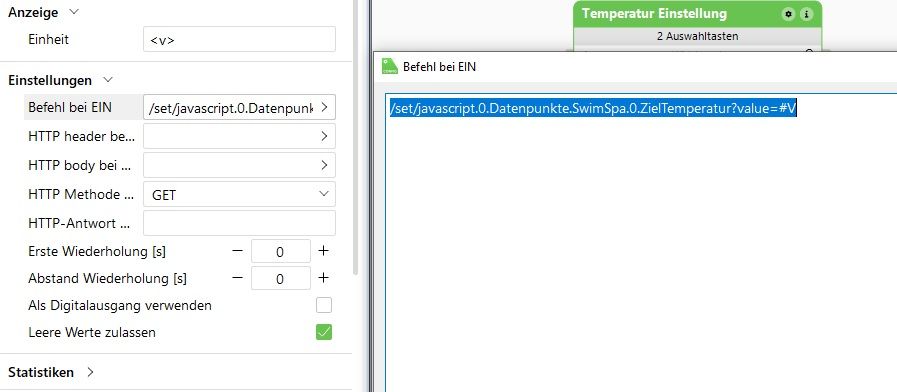
          ich übertrage es mit /set/javascript.0.Datenpunkte.SwimSpa.0.Zieltemperatur?value=#V

          wobei #V der wert ist all so 35

          Es kommt dann

          hast Du da ein Rat?

          simple-api.0
          2025-12-27 17:03:50.829	info	State value to set for "javascript.0.Datenpunkte.SwimSpa.0.ZielTemperatur" has to be type "number" but received type "string"
          
          avascript.0
          2025-12-27 17:04:05.364	error	script.js.common.Spa.SpaUpdateValues_js: *** stderr: Error: Command failed: python3 /SpaController/spa_updateBulk.py d37e243f-9fba-4403-b441-df72cb3b1d84 http://172.17.0.3:8087 SPA80:34:28:20:e3:2c 192.168.188.68 javascript.0.Datenpunkte.SwimSpa Traceback (most recent call last): File "/SpaController/spa_updateBulk.py", line 346, in <module> asyncio.run(main()) ~~~~~~~~~~~^^^^^^^^ File "/usr/local/lib/python3.13/asyncio/runners.py", line 194, in run return runner.run(main) ~~~~~~~~~~^^^^^^ File "/usr/local/lib/python3.13/asyncio/runners.py", line 118, in run return self._loop.run_until_complete(task) ~~~~~~~~~~~~~~~~~~~~~~~~~~~~~^^^^^^ File "/usr/local/lib/python3.13/asyncio/base_events.py", line 721, in run_until_complete return future.result() ~~~~~~~~~~~~~^^ File "/SpaController/spa_updateBulk.py", line 191, in main currentIoBrVal = float(searchForValue("id", ioBrDp, "val", currentStates)) ValueError: could not convert string to float: '#V'


          1.jpg fggg

          rrov1R 1 Antwort Letzte Antwort
          0
          • Stefan-Berlin1S Stefan-Berlin1

            Es scheint alles zugehen :-)

            Ich hab aber nochmal ne Frage.

            ich schicke den Befehl:

            http://iobroker:8087/set/javascript.0.Datenpunkte.SwimSpa.0.ZielTemperatur?value=35
            

            dann gehts. Schicke ich es über die Loxone:

            ich übertrage es mit /set/javascript.0.Datenpunkte.SwimSpa.0.Zieltemperatur?value=#V

            wobei #V der wert ist all so 35

            Es kommt dann

            hast Du da ein Rat?

            simple-api.0
            2025-12-27 17:03:50.829	info	State value to set for "javascript.0.Datenpunkte.SwimSpa.0.ZielTemperatur" has to be type "number" but received type "string"
            
            avascript.0
            2025-12-27 17:04:05.364	error	script.js.common.Spa.SpaUpdateValues_js: *** stderr: Error: Command failed: python3 /SpaController/spa_updateBulk.py d37e243f-9fba-4403-b441-df72cb3b1d84 http://172.17.0.3:8087 SPA80:34:28:20:e3:2c 192.168.188.68 javascript.0.Datenpunkte.SwimSpa Traceback (most recent call last): File "/SpaController/spa_updateBulk.py", line 346, in <module> asyncio.run(main()) ~~~~~~~~~~~^^^^^^^^ File "/usr/local/lib/python3.13/asyncio/runners.py", line 194, in run return runner.run(main) ~~~~~~~~~~^^^^^^ File "/usr/local/lib/python3.13/asyncio/runners.py", line 118, in run return self._loop.run_until_complete(task) ~~~~~~~~~~~~~~~~~~~~~~~~~~~~~^^^^^^ File "/usr/local/lib/python3.13/asyncio/base_events.py", line 721, in run_until_complete return future.result() ~~~~~~~~~~~~~^^ File "/SpaController/spa_updateBulk.py", line 191, in main currentIoBrVal = float(searchForValue("id", ioBrDp, "val", currentStates)) ValueError: could not convert string to float: '#V'


            1.jpg fggg

            rrov1R Offline
            rrov1R Offline
            rrov1
            schrieb am zuletzt editiert von
            #189

            @Stefan-Berlin1 sagte in Steuerung Gecko in Touch 2 per iob möglich? (Wellis):
            Schön zu hören das es jetzt doch geht. Ich habe schon etwas drüber geknobelt und die Fehlerbehandlung noch weiter verbessert, aber lass das jetzt von den eingesetzten Scriptständen mal so wie es ist.

            Ich denke dein:

            /set/javascript.0.Datenpunkte.SwimSpa.0.Zieltemperatur?value=#V

            aus Loxone ist falsch. Ich vermute Loxone sendet wirklich den Wert "#V" und nicht die von dir erwartete Zahl "35". In der Folge schmiert auch spa_updateBulk.py ab, weil es jede Minute den Wert holt und an der Stelle eine Dezimalzahl und nicht "#V" erwartet...

            Wechsle mal in die Objektansicht und stelle bei der Zieltemperatur manuell eine Zahl ein, sagen "33", dann:

            • 1 Minute warten, spa_updateBulk.py sollte sauber laufen und ggf. die im SpaController eingestellte Zieltemperatur zurückschreiben.
            • Jetzt mit Loxone deinen neuen Zielwert eintragen
              Wenn in der Objektansicht jetzt "#V" steht, dann liegts an dem was Loxone sendet.

            Wenn ich die Loxone Doku so lese müsste es "\v" sein um den Wert zu senden. Ich habe aber kein Beispiel zur Hand, da ich die Temperatur im Sommer komplett automatisch nachziehen lasse.

            1 Antwort Letzte Antwort
            0
            • Stefan-Berlin1S Offline
              Stefan-Berlin1S Offline
              Stefan-Berlin1
              schrieb am zuletzt editiert von Stefan-Berlin1
              #190

              Loxone klappt teilweise ^^ sitze noch dran das die Frau nur mit dem intilligenten Raumtemperaturregler + und - drücken kann. Sowie die Frostfunktion

              So aber natürlich nach den Updates wieder.
              Hat sich was geändert?
              musste java auf 9.0.18 updaten.

              Er findet Ihn aber. Das ist ja schonmal gut. Auch die Watercare Daten sind ok. Pumpen kann ich auch ansteuern. Er holt sich die Temperaturen nicht mehr (es steht -1 da)

              Nun kommt als Java Meldung aber immer:

              script.js.common.Spa.SpaUpdateValues_js: *** stderr: Error: Command failed: python3 /SpaController/spa_updateBulk.py 6e619fb7-7433-4ac0-a057-768b78eb8fc0 http://172.17.0.5:8087 SPA80:34:28:20:e3:2c 192.168.188.68 javascript.0.Datenpunkte.SwimSpa Traceback (most recent call last): File "/SpaController/spa_updateBulk.py", line 346, in <module> asyncio.run(main()) ~~~~~~~~~~~^^^^^^^^ File "/usr/local/lib/python3.13/asyncio/runners.py", line 194, in run return runner.run(main) ~~~~~~~~~~^^^^^^ File "/usr/local/lib/python3.13/asyncio/runners.py", line 118, in run return self._loop.run_until_complete(task) ~~~~~~~~~~~~~~~~~~~~~~~~~~~~~^^^^^^ File "/usr/local/lib/python3.13/asyncio/base_events.py", line 721, in run_until_complete return future.result() ~~~~~~~~~~~~~^^ File "/SpaController/spa_updateBulk.py", line 184, in main currentIoBrVal = float(searchForValue("id", ioBrDp, "val", currentStates)) TypeError: float() argument must be a string or a real number, not 'NoneType'
              

              eingestellt hab ich im Java:

              Spiegeln von Skripten in den Dateipfad
              Kommando "setObject" erlauben -> ja
              Kommando "sendToHost" erlauben -> ja
              Kommando "exec" erlauben -> ja
              Nicht alle Zustände beim Start abonnieren -> nein also ohne haken
              Maximale setState-Anfragen pro Minute pro Skript
              1000
              default 1000

              Maximale Auslöser/Trigger pro Skript (bis zur Warnung)
              100
              default 100

              Im den Scripten auf Pause -> SpaMoveTarget

              1 Antwort Letzte Antwort
              0
              • rrov1R Offline
                rrov1R Offline
                rrov1
                schrieb am zuletzt editiert von
                #191

                Hallo,

                das liegt nicht am JavaScript Update, 9.0.18 habe ich auch. Du hast noch eine ältere Version von spa_updateBulk.py im Einsatz, ich tippe von der Zeilennummer des Fehlers her auf 0.3.1. Aktualisiere bitte das Script auf die im Github-Repo liegende aktuelle Version 0.3.2, dann sollte der Fehler beim parsen und konvertieren der Zeichenkette weg sein. Ich habe da Ende letzten Jahres extra die Fehlerbehandlung verbessert.

                rrov1

                Stefan-Berlin1S 1 Antwort Letzte Antwort
                0
                • rrov1R rrov1

                  Hallo,

                  das liegt nicht am JavaScript Update, 9.0.18 habe ich auch. Du hast noch eine ältere Version von spa_updateBulk.py im Einsatz, ich tippe von der Zeilennummer des Fehlers her auf 0.3.1. Aktualisiere bitte das Script auf die im Github-Repo liegende aktuelle Version 0.3.2, dann sollte der Fehler beim parsen und konvertieren der Zeichenkette weg sein. Ich habe da Ende letzten Jahres extra die Fehlerbehandlung verbessert.

                  rrov1

                  Stefan-Berlin1S Offline
                  Stefan-Berlin1S Offline
                  Stefan-Berlin1
                  schrieb am zuletzt editiert von
                  #192

                  @rrov1
                  Alles klar das hab ich wohl übersehen.
                  Mach ich mal die Tage abends 😊

                  1 Antwort Letzte Antwort
                  0
                  • T Offline
                    T Offline
                    tklein
                    schrieb am zuletzt editiert von
                    #193

                    Hallo mal wieder nach langer Zeit :-)

                    Bei der Neuinstallation meines Systems habe ich direkt am Anfang als immer noch Linuxlaie folgende Herausforderung:

                    tklein@iobroker:/opt$ pip install geckolib
                    error: externally-managed-environment
                    
                    × This environment is externally managed
                    ╰─> To install Python packages system-wide, try apt install
                        python3-xyz, where xyz is the package you are trying to
                        install.
                        
                        If you wish to install a non-Debian-packaged Python package,
                        create a virtual environment using python3 -m venv path/to/venv.
                        Then use path/to/venv/bin/python and path/to/venv/bin/pip. Make
                        sure you have python3-full installed.
                        
                        If you wish to install a non-Debian packaged Python application,
                        it may be easiest to use pipx install xyz, which will manage a
                        virtual environment for you. Make sure you have pipx installed.
                        
                        See /usr/share/doc/python3.12/README.venv for more information.
                    
                    note: If you believe this is a mistake, please contact your Python installation or OS distribution provider. You can override this, at the risk of breaking your Python installation or OS, by passing --break-system-packages.
                    hint: See PEP 668 for the detailed specification.
                    tklein@iobroker:/opt$ python3 --version
                    Python 3.12.3
                    

                    Python ist so wie ich es sehe installiert. Ebenfalls mit einer recht neuen Version.

                    Was kann/soll ich tun?

                    Thomas BraunT 1 Antwort Letzte Antwort
                    0
                    • T tklein

                      Hallo mal wieder nach langer Zeit :-)

                      Bei der Neuinstallation meines Systems habe ich direkt am Anfang als immer noch Linuxlaie folgende Herausforderung:

                      tklein@iobroker:/opt$ pip install geckolib
                      error: externally-managed-environment
                      
                      × This environment is externally managed
                      ╰─> To install Python packages system-wide, try apt install
                          python3-xyz, where xyz is the package you are trying to
                          install.
                          
                          If you wish to install a non-Debian-packaged Python package,
                          create a virtual environment using python3 -m venv path/to/venv.
                          Then use path/to/venv/bin/python and path/to/venv/bin/pip. Make
                          sure you have python3-full installed.
                          
                          If you wish to install a non-Debian packaged Python application,
                          it may be easiest to use pipx install xyz, which will manage a
                          virtual environment for you. Make sure you have pipx installed.
                          
                          See /usr/share/doc/python3.12/README.venv for more information.
                      
                      note: If you believe this is a mistake, please contact your Python installation or OS distribution provider. You can override this, at the risk of breaking your Python installation or OS, by passing --break-system-packages.
                      hint: See PEP 668 for the detailed specification.
                      tklein@iobroker:/opt$ python3 --version
                      Python 3.12.3
                      

                      Python ist so wie ich es sehe installiert. Ebenfalls mit einer recht neuen Version.

                      Was kann/soll ich tun?

                      Thomas BraunT Online
                      Thomas BraunT Online
                      Thomas Braun
                      Most Active
                      schrieb am zuletzt editiert von Thomas Braun
                      #194

                      @tklein sagte:

                      pipx install xyz

                      Also

                      pipx install geckolib
                      

                      Und System auf Stand bringen, ein Debian 13 'Trixie' kommt mit

                      echad@chet:~ $ python3 --version
                      Python 3.13.5
                      echad@chet:~ $
                      

                      daher.

                      Linux-Werkzeugkasten:
                      https://forum.iobroker.net/topic/42952/der-kleine-iobroker-linux-werkzeugkasten
                      NodeJS Fixer Skript:
                      https://forum.iobroker.net/topic/68035/iob-node-fix-skript
                      iob_diag: curl -sLf -o diag.sh https://iobroker.net/diag.sh && bash diag.sh

                      T 1 Antwort Letzte Antwort
                      0
                      • Thomas BraunT Thomas Braun

                        @tklein sagte:

                        pipx install xyz

                        Also

                        pipx install geckolib
                        

                        Und System auf Stand bringen, ein Debian 13 'Trixie' kommt mit

                        echad@chet:~ $ python3 --version
                        Python 3.13.5
                        echad@chet:~ $
                        

                        daher.

                        T Offline
                        T Offline
                        tklein
                        schrieb am zuletzt editiert von
                        #195

                        @Thomas-Braun sagte:

                        python3 --version

                        Hi Namensvetter, dir erneuten lieben Dank für die Hilfestellung!

                        bin jetzt a bissle weitergekommen:

                        tklein@iobroker:/opt$ sudo apt install pipx
                        [sudo] password for tklein: 
                        Reading package lists... Done
                        Building dependency tree... Done
                        Reading state information... Done
                        ..
                        Unpacking python3-venv (3.12.3-0ubuntu2.1) ...
                        Selecting previously unselected package python3-argcomplete.
                        Preparing to unpack .../04-python3-argcomplete_3.1.4-1ubuntu0.1_all.deb ...
                        Unpacking python3-argcomplete (3.1.4-1ubuntu0.1) ...
                        Selecting previously unselected package python3-platformdirs.
                        Preparing to unpack .../05-python3-platformdirs_4.2.0-1_all.deb ...
                        Unpacking python3-platformdirs (4.2.0-1) ...
                        Selecting previously unselected package python3-colorama.
                        Preparing to unpack .../06-python3-colorama_0.4.6-4_all.deb ...
                        Unpacking python3-colorama (0.4.6-4) ...
                        Selecting previously unselected package python3-click.
                        Preparing to unpack .../07-python3-click_8.1.6-2_all.deb ...
                        Unpacking python3-click (8.1.6-2) ...
                        ..
                        Processing triggers for man-db (2.12.0-4build2) ...
                        
                        tklein@iobroker:/opt$ ls
                        iobroker  zigbee2mqtt
                        tklein@iobroker:/opt$ ls -la
                        total 16
                        drwxr-xr-x   4 root        root        4096 Jun 22 19:23 .
                        drwxr-xr-x  21 root        root        4096 Jun 29 11:41 ..
                        drwxrwxr-x+  6 iobroker    iobroker    4096 Jun 22 18:42 iobroker
                        drwxr-xr-x  12 zigbee-mqtt zigbee-mqtt 4096 Jun 26 12:02 zigbee2mqtt
                        
                        tklein@iobroker:/opt$ python3 --version
                        Python 3.12.3
                        
                        tklein@iobroker:/opt$ python3 -m geckolib shell
                        /usr/bin/python3: No module named geckolib
                        tklein@iobroker:/opt$ python3.12.3 -m geckolib shell
                        python3.12.3: command not found
                        tklein@iobroker:/opt$ 
                        

                        Ich hätte jetzt erwartet, dass das directory geckolib unter /opt ist

                        Thomas BraunT 1 Antwort Letzte Antwort
                        0
                        • T tklein

                          @Thomas-Braun sagte:

                          python3 --version

                          Hi Namensvetter, dir erneuten lieben Dank für die Hilfestellung!

                          bin jetzt a bissle weitergekommen:

                          tklein@iobroker:/opt$ sudo apt install pipx
                          [sudo] password for tklein: 
                          Reading package lists... Done
                          Building dependency tree... Done
                          Reading state information... Done
                          ..
                          Unpacking python3-venv (3.12.3-0ubuntu2.1) ...
                          Selecting previously unselected package python3-argcomplete.
                          Preparing to unpack .../04-python3-argcomplete_3.1.4-1ubuntu0.1_all.deb ...
                          Unpacking python3-argcomplete (3.1.4-1ubuntu0.1) ...
                          Selecting previously unselected package python3-platformdirs.
                          Preparing to unpack .../05-python3-platformdirs_4.2.0-1_all.deb ...
                          Unpacking python3-platformdirs (4.2.0-1) ...
                          Selecting previously unselected package python3-colorama.
                          Preparing to unpack .../06-python3-colorama_0.4.6-4_all.deb ...
                          Unpacking python3-colorama (0.4.6-4) ...
                          Selecting previously unselected package python3-click.
                          Preparing to unpack .../07-python3-click_8.1.6-2_all.deb ...
                          Unpacking python3-click (8.1.6-2) ...
                          ..
                          Processing triggers for man-db (2.12.0-4build2) ...
                          
                          tklein@iobroker:/opt$ ls
                          iobroker  zigbee2mqtt
                          tklein@iobroker:/opt$ ls -la
                          total 16
                          drwxr-xr-x   4 root        root        4096 Jun 22 19:23 .
                          drwxr-xr-x  21 root        root        4096 Jun 29 11:41 ..
                          drwxrwxr-x+  6 iobroker    iobroker    4096 Jun 22 18:42 iobroker
                          drwxr-xr-x  12 zigbee-mqtt zigbee-mqtt 4096 Jun 26 12:02 zigbee2mqtt
                          
                          tklein@iobroker:/opt$ python3 --version
                          Python 3.12.3
                          
                          tklein@iobroker:/opt$ python3 -m geckolib shell
                          /usr/bin/python3: No module named geckolib
                          tklein@iobroker:/opt$ python3.12.3 -m geckolib shell
                          python3.12.3: command not found
                          tklein@iobroker:/opt$ 
                          

                          Ich hätte jetzt erwartet, dass das directory geckolib unter /opt ist

                          Thomas BraunT Online
                          Thomas BraunT Online
                          Thomas Braun
                          Most Active
                          schrieb am zuletzt editiert von
                          #196

                          @tklein sagte:

                          Ich hätte jetzt erwartet, dass das directory geckolib unter /opt ist

                          Nein, das liegt im venv.
                          Gut möglich, dass du es für den user iobroker machen musst.

                          Du hast aber gelesen:

                          Python3 mind. v3.13 & Pip
                          Wichtig: Die geckolib ab v1.0.0 benötigt Python 3.13

                          Linux-Werkzeugkasten:
                          https://forum.iobroker.net/topic/42952/der-kleine-iobroker-linux-werkzeugkasten
                          NodeJS Fixer Skript:
                          https://forum.iobroker.net/topic/68035/iob-node-fix-skript
                          iob_diag: curl -sLf -o diag.sh https://iobroker.net/diag.sh && bash diag.sh

                          T 1 Antwort Letzte Antwort
                          0
                          • Thomas BraunT Thomas Braun

                            @tklein sagte:

                            Ich hätte jetzt erwartet, dass das directory geckolib unter /opt ist

                            Nein, das liegt im venv.
                            Gut möglich, dass du es für den user iobroker machen musst.

                            Du hast aber gelesen:

                            Python3 mind. v3.13 & Pip
                            Wichtig: Die geckolib ab v1.0.0 benötigt Python 3.13

                            T Offline
                            T Offline
                            tklein
                            schrieb am zuletzt editiert von
                            #197

                            Du hast aber gelesen:

                            Python3 mind. v3.13 & Pip
                            Wichtig: Die geckolib ab v1.0.0 benötigt Python 3.13

                            Habe meiner Meinung nach die 3.13 installiert:

                            tklein@iobroker:/opt$ pipx install geckolib
                            
                            No apps associated with package geckolib or its dependencies. If you are attempting to install a library, pipx should not be used. Consider using pip or
                            a similar tool instead.
                            tklein@iobroker:/opt$ python3 --version
                            Python 3.12.3
                            tklein@iobroker:/opt$ which python3
                            /usr/bin/python3
                            tklein@iobroker:/opt$ sudo apt install python3.13 python3.13-venv
                            Reading package lists... Done
                            Building dependency tree... Done
                            Reading state information... Done
                            python3.13 is already the newest version (3.13.14-1+noble1).
                            python3.13-venv is already the newest version (3.13.14-1+noble1).
                            0 upgraded, 0 newly installed, 0 to remove and 0 not upgraded.
                            tklein@iobroker:/opt$ 
                            
                            Thomas BraunT 1 Antwort Letzte Antwort
                            0
                            • T tklein

                              Du hast aber gelesen:

                              Python3 mind. v3.13 & Pip
                              Wichtig: Die geckolib ab v1.0.0 benötigt Python 3.13

                              Habe meiner Meinung nach die 3.13 installiert:

                              tklein@iobroker:/opt$ pipx install geckolib
                              
                              No apps associated with package geckolib or its dependencies. If you are attempting to install a library, pipx should not be used. Consider using pip or
                              a similar tool instead.
                              tklein@iobroker:/opt$ python3 --version
                              Python 3.12.3
                              tklein@iobroker:/opt$ which python3
                              /usr/bin/python3
                              tklein@iobroker:/opt$ sudo apt install python3.13 python3.13-venv
                              Reading package lists... Done
                              Building dependency tree... Done
                              Reading state information... Done
                              python3.13 is already the newest version (3.13.14-1+noble1).
                              python3.13-venv is already the newest version (3.13.14-1+noble1).
                              0 upgraded, 0 newly installed, 0 to remove and 0 not upgraded.
                              tklein@iobroker:/opt$ 
                              
                              Thomas BraunT Online
                              Thomas BraunT Online
                              Thomas Braun
                              Most Active
                              schrieb am zuletzt editiert von
                              #198

                              @tklein

                              Du hast da irgendwas irgendwie installiert.

                              Linux-Werkzeugkasten:
                              https://forum.iobroker.net/topic/42952/der-kleine-iobroker-linux-werkzeugkasten
                              NodeJS Fixer Skript:
                              https://forum.iobroker.net/topic/68035/iob-node-fix-skript
                              iob_diag: curl -sLf -o diag.sh https://iobroker.net/diag.sh && bash diag.sh

                              T 1 Antwort Letzte Antwort
                              0
                              • Thomas BraunT Thomas Braun

                                @tklein

                                Du hast da irgendwas irgendwie installiert.

                                T Offline
                                T Offline
                                tklein
                                schrieb am zuletzt editiert von
                                #199

                                @Thomas-Braun dann

                                pip install geckolib
                                

                                ausprobieren?

                                Thomas BraunT 1 Antwort Letzte Antwort
                                0
                                • T tklein

                                  @Thomas-Braun dann

                                  pip install geckolib
                                  

                                  ausprobieren?

                                  Thomas BraunT Online
                                  Thomas BraunT Online
                                  Thomas Braun
                                  Most Active
                                  schrieb am zuletzt editiert von
                                  #200

                                  @tklein sagte:

                                  ausprobieren?

                                  Sinnvoller wäre es, deine Kiste insgesamt auf einen aktuellen Stand zu bringen.

                                  Linux-Werkzeugkasten:
                                  https://forum.iobroker.net/topic/42952/der-kleine-iobroker-linux-werkzeugkasten
                                  NodeJS Fixer Skript:
                                  https://forum.iobroker.net/topic/68035/iob-node-fix-skript
                                  iob_diag: curl -sLf -o diag.sh https://iobroker.net/diag.sh && bash diag.sh

                                  T 1 Antwort Letzte Antwort
                                  0
                                  • Thomas BraunT Thomas Braun

                                    @tklein sagte:

                                    ausprobieren?

                                    Sinnvoller wäre es, deine Kiste insgesamt auf einen aktuellen Stand zu bringen.

                                    T Offline
                                    T Offline
                                    tklein
                                    schrieb am zuletzt editiert von
                                    #201

                                    @Thomas-Braun den proxmox container habe ich erst vor kurzen mit ubuntu und dem iob in dem glauben auf einen neuen stand aufgesetzt.

                                    1 Antwort Letzte Antwort
                                    0
                                    • T Offline
                                      T Offline
                                      tklein
                                      schrieb am zuletzt editiert von
                                      #202

                                      wie kann ich dann jetzt am besten weitermachen? Komme leider nicht weiter:

                                      **tklein@iobroker:/opt$ sudo pip install geckolib**
                                      [sudo] password for tklein: 
                                      error: externally-managed-environment
                                      
                                      × This environment is externally managed
                                      ╰─> To install Python packages system-wide, try apt install
                                          python3-xyz, where xyz is the package you are trying to
                                          install.
                                          
                                          If you wish to install a non-Debian-packaged Python package,
                                          create a virtual environment using python3 -m venv path/to/venv.
                                          Then use path/to/venv/bin/python and path/to/venv/bin/pip. Make
                                          sure you have python3-full installed.
                                          
                                          If you wish to install a non-Debian packaged Python application,
                                          it may be easiest to use pipx install xyz, which will manage a
                                          virtual environment for you. Make sure you have pipx installed.
                                          
                                          See /usr/share/doc/python3.12/README.venv for more information.
                                      
                                      note: If you believe this is a mistake, please contact your Python installation or OS distribution provider. You can override this, at the risk of breaking your Python installation or OS, by passing --break-system-packages.
                                      hint: See PEP 668 for the detailed specification.
                                      
                                      **tklein@iobroker:/opt$ sudo pipx install geckolib**
                                      
                                      No apps associated with package geckolib or its dependencies. If you are attempting to install a library, pipx should not be used. Consider using pip or
                                      a similar tool instead.
                                      
                                      **tklein@iobroker:/opt$ compgen -c | grep '^python[3-9]\.[0-9]' | sort -u**
                                      python3.12
                                      python3.12-config
                                      python3.13
                                      python3.13-config
                                      
                                      Thomas BraunT rrov1R 2 Antworten Letzte Antwort
                                      0
                                      • T tklein

                                        wie kann ich dann jetzt am besten weitermachen? Komme leider nicht weiter:

                                        **tklein@iobroker:/opt$ sudo pip install geckolib**
                                        [sudo] password for tklein: 
                                        error: externally-managed-environment
                                        
                                        × This environment is externally managed
                                        ╰─> To install Python packages system-wide, try apt install
                                            python3-xyz, where xyz is the package you are trying to
                                            install.
                                            
                                            If you wish to install a non-Debian-packaged Python package,
                                            create a virtual environment using python3 -m venv path/to/venv.
                                            Then use path/to/venv/bin/python and path/to/venv/bin/pip. Make
                                            sure you have python3-full installed.
                                            
                                            If you wish to install a non-Debian packaged Python application,
                                            it may be easiest to use pipx install xyz, which will manage a
                                            virtual environment for you. Make sure you have pipx installed.
                                            
                                            See /usr/share/doc/python3.12/README.venv for more information.
                                        
                                        note: If you believe this is a mistake, please contact your Python installation or OS distribution provider. You can override this, at the risk of breaking your Python installation or OS, by passing --break-system-packages.
                                        hint: See PEP 668 for the detailed specification.
                                        
                                        **tklein@iobroker:/opt$ sudo pipx install geckolib**
                                        
                                        No apps associated with package geckolib or its dependencies. If you are attempting to install a library, pipx should not be used. Consider using pip or
                                        a similar tool instead.
                                        
                                        **tklein@iobroker:/opt$ compgen -c | grep '^python[3-9]\.[0-9]' | sort -u**
                                        python3.12
                                        python3.12-config
                                        python3.13
                                        python3.13-config
                                        
                                        Thomas BraunT Online
                                        Thomas BraunT Online
                                        Thomas Braun
                                        Most Active
                                        schrieb am zuletzt editiert von
                                        #203

                                        @tklein

                                        Zu Ubuntu auf Proxmox möchte ich nichts sagen.

                                        Linux-Werkzeugkasten:
                                        https://forum.iobroker.net/topic/42952/der-kleine-iobroker-linux-werkzeugkasten
                                        NodeJS Fixer Skript:
                                        https://forum.iobroker.net/topic/68035/iob-node-fix-skript
                                        iob_diag: curl -sLf -o diag.sh https://iobroker.net/diag.sh && bash diag.sh

                                        1 Antwort Letzte Antwort
                                        0
                                        • T tklein

                                          wie kann ich dann jetzt am besten weitermachen? Komme leider nicht weiter:

                                          **tklein@iobroker:/opt$ sudo pip install geckolib**
                                          [sudo] password for tklein: 
                                          error: externally-managed-environment
                                          
                                          × This environment is externally managed
                                          ╰─> To install Python packages system-wide, try apt install
                                              python3-xyz, where xyz is the package you are trying to
                                              install.
                                              
                                              If you wish to install a non-Debian-packaged Python package,
                                              create a virtual environment using python3 -m venv path/to/venv.
                                              Then use path/to/venv/bin/python and path/to/venv/bin/pip. Make
                                              sure you have python3-full installed.
                                              
                                              If you wish to install a non-Debian packaged Python application,
                                              it may be easiest to use pipx install xyz, which will manage a
                                              virtual environment for you. Make sure you have pipx installed.
                                              
                                              See /usr/share/doc/python3.12/README.venv for more information.
                                          
                                          note: If you believe this is a mistake, please contact your Python installation or OS distribution provider. You can override this, at the risk of breaking your Python installation or OS, by passing --break-system-packages.
                                          hint: See PEP 668 for the detailed specification.
                                          
                                          **tklein@iobroker:/opt$ sudo pipx install geckolib**
                                          
                                          No apps associated with package geckolib or its dependencies. If you are attempting to install a library, pipx should not be used. Consider using pip or
                                          a similar tool instead.
                                          
                                          **tklein@iobroker:/opt$ compgen -c | grep '^python[3-9]\.[0-9]' | sort -u**
                                          python3.12
                                          python3.12-config
                                          python3.13
                                          python3.13-config
                                          
                                          rrov1R Offline
                                          rrov1R Offline
                                          rrov1
                                          schrieb am zuletzt editiert von
                                          #204

                                          @tklein Ich habe bei mir auch ein Ubuntu 24.04 in einem Proxmox Container am laufen. Ich bin wie folgt vorgegangen:

                                          1. Python 3.13 (weil es zu dem Zeitpunkt wo ich das gemacht habe nicht Standard war):
                                          • also nur, wenn: python3.13 --version nicht funktioniert
                                          • sudo apt install software-properties-common -y
                                          • sudo add-apt-repository ppa:deadsnakes/ppa
                                          • sudo apt install python3.13-full
                                          1. Virtuelles Environment (venv) erstellen
                                          • Mit venv (Virtual Environment) wird eine isolierte Python-Umgebung für Projekte erstellt. Es verhindert Versionskonflikte, da jedes Projekt seine eigenen spezifischen Paketversionen benötigt. Dadurch wird das globale System sauber gehalten und sichergestellt, dass Änderungen nicht ungewollt andere Anwendungen beeinträchtigen.
                                          • Die Dateien des virt. Environment müssen in ein Verzeichnis abgelegt werden, ich habe in meinem Fall das mein Heimatverzeichnis gewählt und dort ein neues Unterverzeichnis: /home/rrov1/gl-venv, das kannst du anpassen nach eigener Wahl.
                                          • python3.13 -m venv /home/rrov1/gl-venv
                                          • /home/rrov1/gl-venv/bin/pip3.13 install geckolib
                                          • /home/rrov1/gl-venv/bin/pip3.13 install requests
                                          1. Aufruf von Python in dem virt. Environment
                                          • manuell: /home/rrov1/gl-venv/bin/python3.13 /home/rrov1/spa_updateBulk.py ...
                                          • SpaGlobal.js, Zeile 4: const SPA_EXECUTEABLE = "/home/rrov1/gl-venv/bin/python3.13"

                                          Viel Erfolg

                                          T 1 Antwort Letzte Antwort
                                          1

                                          Hey! Du scheinst an dieser Unterhaltung interessiert zu sein, hast aber noch kein Konto.

                                          Hast du es satt, bei jedem Besuch durch die gleichen Beiträge zu scrollen? Wenn du dich für ein Konto anmeldest, kommst du immer genau dorthin zurück, wo du zuvor warst, und kannst dich über neue Antworten benachrichtigen lassen (entweder per E-Mail oder Push-Benachrichtigung). Du kannst auch Lesezeichen speichern und Beiträge positiv bewerten, um anderen Community-Mitgliedern deine Wertschätzung zu zeigen.

                                          Mit deinem Input könnte dieser Beitrag noch besser werden 💗

                                          Registrieren Anmelden
                                          Antworten
                                          • In einem neuen Thema antworten
                                          Anmelden zum Antworten
                                          • Älteste zuerst
                                          • Neuste zuerst
                                          • Meiste Stimmen


                                          Support us

                                          ioBroker
                                          Community Adapters
                                          Donate

                                          190

                                          Online

                                          33.0k

                                          Benutzer

                                          83.5k

                                          Themen

                                          1.3m

                                          Beiträge
                                          Community
                                          Impressum | Datenschutz-Bestimmungen | Nutzungsbedingungen | Einwilligungseinstellungen
                                          ioBroker Community 2014-2026
                                          logo
                                          • Anmelden

                                          • Du hast noch kein Konto? Registrieren

                                          • Anmelden oder registrieren, um zu suchen
                                          • Erster Beitrag
                                            Letzter Beitrag
                                          0
                                          • Home
                                          • Aktuell
                                          • Tags
                                          • Ungelesen 0
                                          • Kategorien
                                          • Unreplied
                                          • Beliebt
                                          • GitHub
                                          • Docu
                                          • Hilfe