




Steuerung Gecko in Touch 2 per iob möglich? (Wellis)
-
python3 --version
Hi Namensvetter, dir erneuten lieben Dank für die Hilfestellung!
bin jetzt a bissle weitergekommen:
tklein@iobroker:/opt$ sudo apt install pipx
[sudo] password for tklein:
Reading package lists... Done
Building dependency tree... Done
Reading state information... Done
..
Unpacking python3-venv (3.12.3-0ubuntu2.1) ...
Selecting previously unselected package python3-argcomplete.
Preparing to unpack .../04-python3-argcomplete_3.1.4-1ubuntu0.1_all.deb ...
Unpacking python3-argcomplete (3.1.4-1ubuntu0.1) ...
Selecting previously unselected package python3-platformdirs.
Preparing to unpack .../05-python3-platformdirs_4.2.0-1_all.deb ...
Unpacking python3-platformdirs (4.2.0-1) ...
Selecting previously unselected package python3-colorama.
Preparing to unpack .../06-python3-colorama_0.4.6-4_all.deb ...
Unpacking python3-colorama (0.4.6-4) ...
Selecting previously unselected package python3-click.
Preparing to unpack .../07-python3-click_8.1.6-2_all.deb ...
Unpacking python3-click (8.1.6-2) ...
..
Processing triggers for man-db (2.12.0-4build2) ...

tklein@iobroker:/opt$ ls
iobroker  zigbee2mqtt
tklein@iobroker:/opt$ ls -la
total 16
drwxr-xr-x   4 root        root        4096 Jun 22 19:23 .
drwxr-xr-x  21 root        root        4096 Jun 29 11:41 ..
drwxrwxr-x+  6 iobroker    iobroker    4096 Jun 22 18:42 iobroker
drwxr-xr-x  12 zigbee-mqtt zigbee-mqtt 4096 Jun 26 12:02 zigbee2mqtt

tklein@iobroker:/opt$ python3 --version
Python 3.12.3

tklein@iobroker:/opt$ python3 -m geckolib shell
/usr/bin/python3: No module named geckolib
tklein@iobroker:/opt$ python3.12.3 -m geckolib shell
python3.12.3: command not found
tklein@iobroker:/opt$
Ich hätte jetzt erwartet, dass das directory geckolib unter /opt ist
-
python3 --version
Hi Namensvetter, dir erneuten lieben Dank für die Hilfestellung!
bin jetzt a bissle weitergekommen:
tklein@iobroker:/opt$ sudo apt install pipx
[sudo] password for tklein:
Reading package lists... Done
Building dependency tree... Done
Reading state information... Done
..
Unpacking python3-venv (3.12.3-0ubuntu2.1) ...
Selecting previously unselected package python3-argcomplete.
Preparing to unpack .../04-python3-argcomplete_3.1.4-1ubuntu0.1_all.deb ...
Unpacking python3-argcomplete (3.1.4-1ubuntu0.1) ...
Selecting previously unselected package python3-platformdirs.
Preparing to unpack .../05-python3-platformdirs_4.2.0-1_all.deb ...
Unpacking python3-platformdirs (4.2.0-1) ...
Selecting previously unselected package python3-colorama.
Preparing to unpack .../06-python3-colorama_0.4.6-4_all.deb ...
Unpacking python3-colorama (0.4.6-4) ...
Selecting previously unselected package python3-click.
Preparing to unpack .../07-python3-click_8.1.6-2_all.deb ...
Unpacking python3-click (8.1.6-2) ...
..
Processing triggers for man-db (2.12.0-4build2) ...

tklein@iobroker:/opt$ ls
iobroker  zigbee2mqtt
tklein@iobroker:/opt$ ls -la
total 16
drwxr-xr-x   4 root        root        4096 Jun 22 19:23 .
drwxr-xr-x  21 root        root        4096 Jun 29 11:41 ..
drwxrwxr-x+  6 iobroker    iobroker    4096 Jun 22 18:42 iobroker
drwxr-xr-x  12 zigbee-mqtt zigbee-mqtt 4096 Jun 26 12:02 zigbee2mqtt

tklein@iobroker:/opt$ python3 --version
Python 3.12.3

tklein@iobroker:/opt$ python3 -m geckolib shell
/usr/bin/python3: No module named geckolib
tklein@iobroker:/opt$ python3.12.3 -m geckolib shell
python3.12.3: command not found
tklein@iobroker:/opt$
Ich hätte jetzt erwartet, dass das directory geckolib unter /opt ist
-
Du hast aber gelesen:
Python3 mind. v3.13 & Pip
Wichtig: Die geckolib ab v1.0.0 benötigt Python 3.13Habe meiner Meinung nach die 3.13 installiert:
tklein@iobroker:/opt$ pipx install geckolib No apps associated with package geckolib or its dependencies. If you are attempting to install a library, pipx should not be used. Consider using pip or a similar tool instead. tklein@iobroker:/opt$ python3 --version Python 3.12.3 tklein@iobroker:/opt$ which python3 /usr/bin/python3 tklein@iobroker:/opt$ sudo apt install python3.13 python3.13-venv Reading package lists... Done Building dependency tree... Done Reading state information... Done python3.13 is already the newest version (3.13.14-1+noble1). python3.13-venv is already the newest version (3.13.14-1+noble1). 0 upgraded, 0 newly installed, 0 to remove and 0 not upgraded. tklein@iobroker:/opt$ -
Du hast aber gelesen:
Python3 mind. v3.13 & Pip
Wichtig: Die geckolib ab v1.0.0 benötigt Python 3.13Habe meiner Meinung nach die 3.13 installiert:
tklein@iobroker:/opt$ pipx install geckolib No apps associated with package geckolib or its dependencies. If you are attempting to install a library, pipx should not be used. Consider using pip or a similar tool instead. tklein@iobroker:/opt$ python3 --version Python 3.12.3 tklein@iobroker:/opt$ which python3 /usr/bin/python3 tklein@iobroker:/opt$ sudo apt install python3.13 python3.13-venv Reading package lists... Done Building dependency tree... Done Reading state information... Done python3.13 is already the newest version (3.13.14-1+noble1). python3.13-venv is already the newest version (3.13.14-1+noble1). 0 upgraded, 0 newly installed, 0 to remove and 0 not upgraded. tklein@iobroker:/opt$Du hast da irgendwas irgendwie installiert.
-
Du hast da irgendwas irgendwie installiert.
-
-
@Thomas-Braun den proxmox container habe ich erst vor kurzen mit ubuntu und dem iob in dem glauben auf einen neuen stand aufgesetzt.
-
wie kann ich dann jetzt am besten weitermachen? Komme leider nicht weiter:
**tklein@iobroker:/opt$ sudo pip install geckolib** [sudo] password for tklein: error: externally-managed-environment × This environment is externally managed ╰─> To install Python packages system-wide, try apt install python3-xyz, where xyz is the package you are trying to install. If you wish to install a non-Debian-packaged Python package, create a virtual environment using python3 -m venv path/to/venv. Then use path/to/venv/bin/python and path/to/venv/bin/pip. Make sure you have python3-full installed. If you wish to install a non-Debian packaged Python application, it may be easiest to use pipx install xyz, which will manage a virtual environment for you. Make sure you have pipx installed. See /usr/share/doc/python3.12/README.venv for more information. note: If you believe this is a mistake, please contact your Python installation or OS distribution provider. You can override this, at the risk of breaking your Python installation or OS, by passing --break-system-packages. hint: See PEP 668 for the detailed specification. **tklein@iobroker:/opt$ sudo pipx install geckolib** No apps associated with package geckolib or its dependencies. If you are attempting to install a library, pipx should not be used. Consider using pip or a similar tool instead. **tklein@iobroker:/opt$ compgen -c | grep '^python[3-9]\.[0-9]' | sort -u** python3.12 python3.12-config python3.13 python3.13-config -
wie kann ich dann jetzt am besten weitermachen? Komme leider nicht weiter:
**tklein@iobroker:/opt$ sudo pip install geckolib** [sudo] password for tklein: error: externally-managed-environment × This environment is externally managed ╰─> To install Python packages system-wide, try apt install python3-xyz, where xyz is the package you are trying to install. If you wish to install a non-Debian-packaged Python package, create a virtual environment using python3 -m venv path/to/venv. Then use path/to/venv/bin/python and path/to/venv/bin/pip. Make sure you have python3-full installed. If you wish to install a non-Debian packaged Python application, it may be easiest to use pipx install xyz, which will manage a virtual environment for you. Make sure you have pipx installed. See /usr/share/doc/python3.12/README.venv for more information. note: If you believe this is a mistake, please contact your Python installation or OS distribution provider. You can override this, at the risk of breaking your Python installation or OS, by passing --break-system-packages. hint: See PEP 668 for the detailed specification. **tklein@iobroker:/opt$ sudo pipx install geckolib** No apps associated with package geckolib or its dependencies. If you are attempting to install a library, pipx should not be used. Consider using pip or a similar tool instead. **tklein@iobroker:/opt$ compgen -c | grep '^python[3-9]\.[0-9]' | sort -u** python3.12 python3.12-config python3.13 python3.13-configZu Ubuntu auf Proxmox möchte ich nichts sagen.
-
wie kann ich dann jetzt am besten weitermachen? Komme leider nicht weiter:
**tklein@iobroker:/opt$ sudo pip install geckolib** [sudo] password for tklein: error: externally-managed-environment × This environment is externally managed ╰─> To install Python packages system-wide, try apt install python3-xyz, where xyz is the package you are trying to install. If you wish to install a non-Debian-packaged Python package, create a virtual environment using python3 -m venv path/to/venv. Then use path/to/venv/bin/python and path/to/venv/bin/pip. Make sure you have python3-full installed. If you wish to install a non-Debian packaged Python application, it may be easiest to use pipx install xyz, which will manage a virtual environment for you. Make sure you have pipx installed. See /usr/share/doc/python3.12/README.venv for more information. note: If you believe this is a mistake, please contact your Python installation or OS distribution provider. You can override this, at the risk of breaking your Python installation or OS, by passing --break-system-packages. hint: See PEP 668 for the detailed specification. **tklein@iobroker:/opt$ sudo pipx install geckolib** No apps associated with package geckolib or its dependencies. If you are attempting to install a library, pipx should not be used. Consider using pip or a similar tool instead. **tklein@iobroker:/opt$ compgen -c | grep '^python[3-9]\.[0-9]' | sort -u** python3.12 python3.12-config python3.13 python3.13-config@tklein Ich habe bei mir auch ein Ubuntu 24.04 in einem Proxmox Container am laufen. Ich bin wie folgt vorgegangen:
- Python 3.13 (weil es zu dem Zeitpunkt wo ich das gemacht habe nicht Standard war):
- also nur, wenn:
python3.13 --versionnicht funktioniert sudo apt install software-properties-common -ysudo add-apt-repository ppa:deadsnakes/ppasudo apt install python3.13-full
- Virtuelles Environment (venv) erstellen
- Mit venv (Virtual Environment) wird eine isolierte Python-Umgebung für Projekte erstellt. Es verhindert Versionskonflikte, da jedes Projekt seine eigenen spezifischen Paketversionen benötigt. Dadurch wird das globale System sauber gehalten und sichergestellt, dass Änderungen nicht ungewollt andere Anwendungen beeinträchtigen.
- Die Dateien des virt. Environment müssen in ein Verzeichnis abgelegt werden, ich habe in meinem Fall das mein Heimatverzeichnis gewählt und dort ein neues Unterverzeichnis:
/home/rrov1/gl-venv, das kannst du anpassen nach eigener Wahl. python3.13 -m venv /home/rrov1/gl-venv/home/rrov1/gl-venv/bin/pip3.13 install geckolib/home/rrov1/gl-venv/bin/pip3.13 install requests
- Aufruf von Python in dem virt. Environment
- manuell:
/home/rrov1/gl-venv/bin/python3.13 /home/rrov1/spa_updateBulk.py ... - SpaGlobal.js, Zeile 4:
const SPA_EXECUTEABLE = "/home/rrov1/gl-venv/bin/python3.13"
Viel Erfolg
-
@tklein Ich habe bei mir auch ein Ubuntu 24.04 in einem Proxmox Container am laufen. Ich bin wie folgt vorgegangen:
- Python 3.13 (weil es zu dem Zeitpunkt wo ich das gemacht habe nicht Standard war):
- also nur, wenn:
python3.13 --versionnicht funktioniert sudo apt install software-properties-common -ysudo add-apt-repository ppa:deadsnakes/ppasudo apt install python3.13-full
- Virtuelles Environment (venv) erstellen
- Mit venv (Virtual Environment) wird eine isolierte Python-Umgebung für Projekte erstellt. Es verhindert Versionskonflikte, da jedes Projekt seine eigenen spezifischen Paketversionen benötigt. Dadurch wird das globale System sauber gehalten und sichergestellt, dass Änderungen nicht ungewollt andere Anwendungen beeinträchtigen.
- Die Dateien des virt. Environment müssen in ein Verzeichnis abgelegt werden, ich habe in meinem Fall das mein Heimatverzeichnis gewählt und dort ein neues Unterverzeichnis:
/home/rrov1/gl-venv, das kannst du anpassen nach eigener Wahl. python3.13 -m venv /home/rrov1/gl-venv/home/rrov1/gl-venv/bin/pip3.13 install geckolib/home/rrov1/gl-venv/bin/pip3.13 install requests
- Aufruf von Python in dem virt. Environment
- manuell:
/home/rrov1/gl-venv/bin/python3.13 /home/rrov1/spa_updateBulk.py ... - SpaGlobal.js, Zeile 4:
const SPA_EXECUTEABLE = "/home/rrov1/gl-venv/bin/python3.13"
Viel Erfolg
@rrov1 thx, das mit python/geckolib hat geklappt.
jetzt habe ich folgendes im log nachdem ich das skript "spavariablen" aufgerufen habe.
die dp sind leider nicht vorhandenhost.iobroker 2026-07-08 10:20:47.470 error Caught by controller[1]: (Use `node --trace-deprecation ...` to show where the warning was created) host.iobroker 2026-07-08 10:20:47.469 error Caught by controller[1]: (node:676167) [DEP0176] DeprecationWarning: fs.F_OK is deprecated, use fs.constants.F_OK instead javascript.0 676167 2026-07-08 10:20:46.805 warn Restart initiated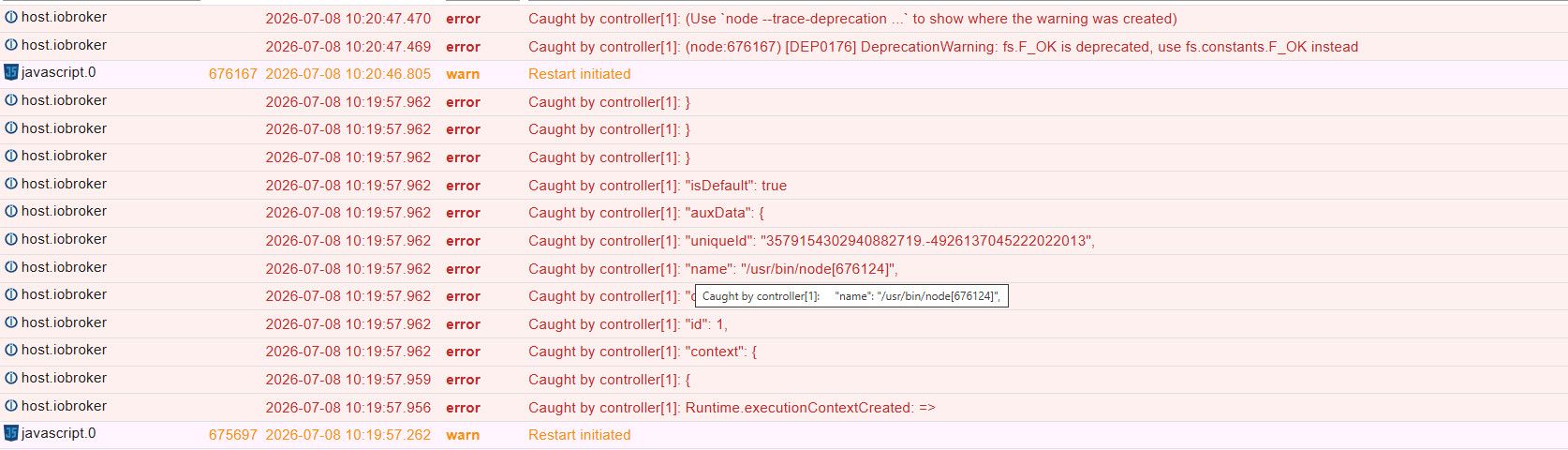
Auszug SPAGLOBAL:
// Pfade für die Datenpunkablage
const BASE_ADAPTER = "javascript.0";
const BASE_FOLDER = "Datenpunkte.SwimSpa";
const SPA_EXECUTEABLE = "python3.13"
//const PY_SCRIPTS_FOLDER = "/SpaController"
const PY_SCRIPTS_FOLDER = "/home/tklein/wellis_spa/SwimSpa/Python"

Dirlisting:
(spa_env) tklein@iobroker:~/wellis_spa/SwimSpa/Python$ ls -la
total 84
drwxrwxr-x 2 tklein tklein 4096 Jul 7 14:53 .
drwxrwxr-x 6 tklein tklein 4096 Jul 7 14:43 ..
-rw-rw-r-- 1 tklein tklein 11889 Jul 7 14:43 spa_config.py
-rw-rw-r-- 1 tklein tklein 6766 Jul 7 14:43 spa_setTargetTemp.py
-rw-rw-r-- 1 tklein tklein 6699 Jul 7 14:43 spa_setWatercareMode.py
-rw-rw-r-- 1 tklein tklein 7254 Jul 7 14:43 spa_switchBlower.py
-rw-rw-r-- 1 tklein tklein 7750 Jul 7 14:43 spa_switchPump.py
-rw-rw-r-- 1 tklein tklein 5924 Jul 7 14:43 spa_toggleLight.py
-rw-rw-r-- 1 tklein tklein 23214 Jul 7 14:43 spa_updateBulk.py
(spa_env) tklein@iobroker:~/wellis_spa/SwimSpa/Python$ -
Hallo @tklein,
Ok, erst mal SpaGlobal:
Füge mal bitte in Zeile 4 den vollständigen Pfad zum angelegt venv ein. Dein aktueller Wert ist:
const SPA_EXECUTEABLE = "python3.13"
in meinem Beispiel, bei meinem Pfad steht da:
const SPA_EXECUTEABLE = "/home/rrov1/gl-venv/bin/python3.13"
Du musst den Teil: /home/rrov1/gl-venv ersetzen mit dem Pfad, unter dem du das venv angelegt hast.
Danach SpaGlobal speichern, das legen wir erst mal beiseite.Jetzt SpaVariablen:
Ich kanns anhand der Logs nicht sehen, aber entweder irgendwas in SpaGlobal.js oder SpaVariablen.js ist nicht in Ordnung. Da du in beiden Skripten nur in den ersten paar Zeilen was manuell anpassen musst und SpaGlobal.js so gut ausschaut, müsstest du mir bitte noch mal die ersten 12 Zeilen von SpaVariablen.js schicken.
Ich tippe, der Aufruf von createDataPoints() ist bei dir falsch, er müsste bei einem Controller so in etwa ausschauen, je nachdem was du alles eingebaut hast:
createDatapoints([
{ pumps: 3, blower: false, waterfall: false } // 0: Pool
]);rrov1
-
Hallo @tklein,
Ok, erst mal SpaGlobal:
Füge mal bitte in Zeile 4 den vollständigen Pfad zum angelegt venv ein. Dein aktueller Wert ist:
const SPA_EXECUTEABLE = "python3.13"
in meinem Beispiel, bei meinem Pfad steht da:
const SPA_EXECUTEABLE = "/home/rrov1/gl-venv/bin/python3.13"
Du musst den Teil: /home/rrov1/gl-venv ersetzen mit dem Pfad, unter dem du das venv angelegt hast.
Danach SpaGlobal speichern, das legen wir erst mal beiseite.Jetzt SpaVariablen:
Ich kanns anhand der Logs nicht sehen, aber entweder irgendwas in SpaGlobal.js oder SpaVariablen.js ist nicht in Ordnung. Da du in beiden Skripten nur in den ersten paar Zeilen was manuell anpassen musst und SpaGlobal.js so gut ausschaut, müsstest du mir bitte noch mal die ersten 12 Zeilen von SpaVariablen.js schicken.
Ich tippe, der Aufruf von createDataPoints() ist bei dir falsch, er müsste bei einem Controller so in etwa ausschauen, je nachdem was du alles eingebaut hast:
createDatapoints([
{ pumps: 3, blower: false, waterfall: false } // 0: Pool
]);rrov1
@rrov1 sagte:
thx, durch die anpassung des pafades wurden die dp erfolgreich angelegt :-)jetzt scheine ich noch ein rechteproblem auf die dateien zu haben:
info	script.js.common.Draussen.Whirlpool.Spa.SpaUpdateValues: end
info	script.js.common.Draussen.Whirlpool.Spa.SpaUpdateValues: no spa controller found
warn	script.js.common.Draussen.Whirlpool.Spa.SpaUpdateValues: no ID set for spa controller: javascript.0.Datenpunkte.SwimSpa.0.ID try to run SpaUpdateConfig first!
info	script.js.common.Draussen.Whirlpool.Spa.SpaUpdateValues: start
info	script.js.common.Draussen.Whirlpool.Spa.SpaUpdateConfig: end
error	script.js.common.Draussen.Whirlpool.Spa.SpaUpdateConfig: *** command failed with error code: 126 - Command failed: '/home/tklein/wellis_spa/spa_env/bin/python3.13' '/home/tklein/wellis_spa/SwimSpa/Python/spa_config.py' 'e112cfe8-1a52-41e2-84a5-9a1809aec54a' 'http://192.168.0.20:8087' 'javascript.0.Datenpunkte.SwimSpa' /bin/sh: 1: /home/tklein/wellis_spa/spa_env/bin/python3.13: Permission denied
info	script.js.common.Draussen.Whirlpool.Spa.SpaUpdateConfig: *** executing: '/home/tklein/wellis_spa/spa_env/bin/python3.13' '/home/tklein/wellis_spa/SwimSpa/Python/spa_config.py' 'e112cfe8-1a52-41e2-84a5-9a1809aec54a' 'http://192.168.0.20:8087' 'javascript.0.Datenpunkte.SwimSpa'
info	script.js.common.Draussen.Whirlpool.Spa.SpaUpdateConfig: no disabled controller, doing standard discovery
info	script.js.common.Draussen.Whirlpool.Spa.SpaUpdateConfig: registered 0 subscriptions, 0 schedules, 0 messages, 0 logs and 0 file subscriptions
info	script.js.common.Draussen.Whirlpool.Spa.SpaUpdateConfig: start
info	script.js.common.Draussen.Whirlpool.Spa.SpaUpdateConfig: start JavaScript (Javascript/js)
info	script.js.common.Draussen.Whirlpool.Spa.SpaUpdateConfig: Stopping script
info	script.js.common.Draussen.Whirlpool.Spa.SpaUpdateValues: end
info	script.js.common.Draussen.Whirlpool.Spa.SpaUpdateValues: no spa controller found
warn	script.js.common.Draussen.Whirlpool.Spa.SpaUpdateValues: no ID set for spa controller: javascript.0.Datenpunkte.SwimSpa.0.ID try to run SpaUpdateConfig first!
Ist mit ID die ClientGUID gemeint?
Der User "iobroker" muss zugriff auf diese dateien/dir ab "wellis_spa" haben, oder?
derzeit hat das der user "tklein"drwxrwxr-x 4 tklein tklein 4096 Jul 7 14:46 . drwxr-x--- 8 tklein tklein 4096 Jul 7 14:37 .. drwxrwxr-x 6 tklein tklein 4096 Jul 7 14:43 SwimSpa -rw-rw-r-- 1 tklein tklein 86 Jul 7 14:39 cui.ini -rw-rw-r-- 1 tklein tklein 196735 Jul 7 14:41 cui.log drwxrwxr-x 5 tklein tklein 4096 Jul 7 14:38 spa_env (spa_env) tklein@iobroker:~/wellis_spa/spa_env/bin$ pwd /home/tklein/wellis_spa/spa_env/bin (spa_env) tklein@iobroker:~/wellis_spa/spa_env/bin$ su iobroker Password: This account is currently not available. (spa_env) tklein@iobroker:~/wellis_spa/spa_env/bin$Evtl .kann ich den user "iobroker" aktivieren und es dort im homeverzeichnis installieren, oder gibt es da eine andere möglichkeit?
hier das log/aufruf der spa_config.py aus dem javascript adapter:
*** executing: '/home/tklein/wellis_spa/spa_env/bin/python3.13' '/home/tklein/wellis_spa/SwimSpa/Python/spa_config.py' 'e112cfe8-1a52-41e2-84a5-9a1809aec54a' 'http://192.168.0.20:8087' 'javascript.0.Datenpunkte.SwimSpa' -
@tklein Super :-)
Die Zirkulationspumpe kann man nicht direkt schalten. Das ist von Gecko so nicht vorgesehen. Du könntest einen watercare mode auf 24x7 Filtern einstellen und dann diesen Modus nach Bedarf aktivieren oder deaktivieren. So steuere ich z.B. das Heizen (kann man ja auch nicht ein/ausschalten). -
@tklein Super :-)
Die Zirkulationspumpe kann man nicht direkt schalten. Das ist von Gecko so nicht vorgesehen. Du könntest einen watercare mode auf 24x7 Filtern einstellen und dann diesen Modus nach Bedarf aktivieren oder deaktivieren. So steuere ich z.B. das Heizen (kann man ja auch nicht ein/ausschalten).@tklein Super :-)
Die Zirkulationspumpe kann man nicht direkt schalten. Das ist von Gecko so nicht vorgesehen. Du könntest einen watercare mode auf 24x7 Filtern einstellen und dann diesen Modus nach Bedarf aktivieren oder deaktivieren. So steuere ich z.B. das Heizen (kann man ja auch nicht ein/ausschalten).das klingt nach einem guten workaround. ich muss sicherstellen, dass während ich mit meinem 36kw gas durchlauferhitzer das wasser durch einen bypass erhitze, dass die zirkulationspumpe am laufen ist. bisher habe ich die externe heizung immer nur während der filterzeiten aktiviert bzw die zirkulationspumpe zuvor manuell aktiviert.


Hey! Du scheinst an dieser Unterhaltung interessiert zu sein, hast aber noch kein Konto.
Hast du es satt, bei jedem Besuch durch die gleichen Beiträge zu scrollen? Wenn du dich für ein Konto anmeldest, kommst du immer genau dorthin zurück, wo du zuvor warst, und kannst dich über neue Antworten benachrichtigen lassen (entweder per E-Mail oder Push-Benachrichtigung). Du kannst auch Lesezeichen speichern und Beiträge positiv bewerten, um anderen Community-Mitgliedern deine Wertschätzung zu zeigen.
Mit deinem Input könnte dieser Beitrag noch besser werden 💗
Registrieren AnmeldenSupport us
298
Online33.0k
Benutzer83.6k
Themen1.3m
Beiträge