




Betriebssystem-Paket-Updates verfügbar
-
Hi, ja ich kann mir vorstellen, dass sich "richtige" Linux-user von zu vielen Meldungen gestört fühlen, schließlich ist das für diese Anwender ja "kalter Kaffee".
Andrerseits gibt es viele iOBroker-user, die mal irgendwann etwas von iOBroker gelesen haben, das ganz interessant fanden und sich da reingefuchst haben - aber eben nur in iOBroker und nicht weiter (so wie ich). Die sind dann froh,wenn sie Erinnerungen vom iOBroker bekommen, was sie - eben im iOBroker - updaten müssen. Bei allem anderen sagen sie "lass mich mit dem Sche... in Ruhe, ich will nur den iOBroker laufen haben. Will sagen, Hinweise vom System nur stark gefiltert, was wirklich erforderlich ist, und dann mit Tipps wie man das angeht.
Ichhoffe ich habe mich (für einen Bäcker, Klemptner etc) verständlich ausgedrückt.@thomas-braun
@homoran
Vielen Dank Euch Beiden! Mein System läuft wieder perfekt - nicht mehr oldold - sofern ich das richtig beurteile! -
@Thomas-Braun
Jetzt bin ich gespannt========== Start marking the full check here ===========
Script v.2026-06-01 *** BASE SYSTEM *** Operating System: Debian GNU/Linux 11 (bullseye) Static hostname: iOBroker Icon name: computer Kernel: Linux 6.1.21-v8+ Architecture: arm64 OS is similar to: Model : Raspberry Pi 4 Model B Rev 1.5 Docker : false Virtualization : none Kernel : aarch64 Userland : 64bit System was installed 1133 days ago (on 2023-05-03). Systemuptime and Load: 15:48:52 up 1:18, 1 user, load average: 0.68, 0.47, 0.36 CPU threads : 4 *** LIFE CYCLE STATUS *** Debian Release codenamed 'bullseye' reached its END OF LIFE and needs to be updated to the latest stable release 'trixie' NOW! *** RASPBERRY THROTTLING *** Current issues: No throttling issues detected. Previously detected issues: No throttling issues detected. *** TIME AND TIMEZONES *** Local time: Tue 2026-06-09 15:48:52 CEST Universal time: Tue 2026-06-09 13:48:52 UTC RTC time: n/a Time zone: Europe/Berlin (CEST, +0200) System clock synchronized: yes NTP service: active RTC in local TZ: no *** Users and Groups *** User that called 'iob diag': Bernd571 HOME=/home/Bernd571 GROUPS=Bernd571 adm dialout cdrom sudo audio video plugdev games users input render netdev gpio i2c spi iobroker User that is running 'js-controller': iobroker HOME=/home/iobroker GROUPS=iobroker tty dialout audio video plugdev bluetooth gpio i2c *** DISPLAY-SERVER SETUP *** Display-Server: Unknown Display-Manager: Not found Desktop: Session: tty Boot Target: multi-user.target *** MEMORY *** total used free shared buff/cache available Mem: 3.8G 2.1G 891M 1.0M 795M 1.6G Swap: 99M 0B 99M Total: 3.9G 2.1G 991M Active iob-Instances: 19 3794 M total memory 2107 M used memory 2264 M active memory 449 M inactive memory 891 M free memory 89 M buffer memory 706 M swap cache 99 M total swap 0 M used swap 99 M free swap *** top - Table Of Processes *** top - 15:48:53 up 1:18, 1 user, load average: 0.68, 0.47, 0.36 Tasks: 175 total, 1 running, 174 sleeping, 0 stopped, 0 zombie %Cpu(s): 8.7 us, 2.9 sy, 0.0 ni, 88.4 id, 0.0 wa, 0.0 hi, 0.0 si, 0.0 st MiB Mem : 3794.3 total, 891.2 free, 2107.2 used, 796.0 buff/cache MiB Swap: 100.0 total, 100.0 free, 0.0 used. 1610.2 avail Mem *** FAILED SERVICES *** UNIT LOAD ACTIVE SUB DESCRIPTION 0 loaded units listed. *** DMESG CRITICAL ERRORS *** No critical errors detected *** FILESYSTEM *** Filesystem Type Size Used Avail Use% Mounted on /dev/root ext4 59G 15G 42G 26% / devtmpfs devtmpfs 1.7G 0 1.7G 0% /dev tmpfs tmpfs 1.9G 0 1.9G 0% /dev/shm tmpfs tmpfs 759M 1.1M 758M 1% /run tmpfs tmpfs 5.0M 4.0K 5.0M 1% /run/lock /dev/mmcblk0p1 vfat 255M 31M 225M 13% /boot tmpfs tmpfs 380M 0 380M 0% /run/user/1000 Messages concerning filesystems in dmesg: [Tue Jun 9 14:30:47 2026] EXT4-fs (mmcblk0p2): mounted filesystem with ordered data mode. Quota mode: none. [Tue Jun 9 14:30:47 2026] VFS: Mounted root (ext4 filesystem) readonly on device 179:2. [Tue Jun 9 14:30:50 2026] EXT4-fs (mmcblk0p2): re-mounted. Quota mode: none. Show mounted filesystems: TARGET SOURCE FSTYPE OPTIONS / /dev/mmcblk0p2 ext4 rw,noatime `-/boot /dev/mmcblk0p1 vfat rw,relatime,fmask=0022,dmask=0022,codepage=437,iocharset=ascii,shortname=mixed,errors=remount-ro Files in neuralgic directories: /var: 2.2G /var/ 1.5G /var/log/journal/f0afd730650d435998ff424a7140192e 1.5G /var/log/journal 1.5G /var/log 418M /var/cache Archived and active journals take up 1.4G in the file system. /opt/iobroker/backups: 3.8G /opt/iobroker/backups/ /opt/iobroker/iobroker-data: 3.7G /opt/iobroker/iobroker-data/ 3.3G /opt/iobroker/iobroker-data/history 268M /opt/iobroker/iobroker-data/files 65M /opt/iobroker/iobroker-data/backup-objects 57M /opt/iobroker/iobroker-data/files/vis The five largest files in iobroker-data are: 18M /opt/iobroker/iobroker-data/objects.jsonl 12M /opt/iobroker/iobroker-data/states.jsonl 8.0M /opt/iobroker/iobroker-data/files/daswetter.admin/assets/index-84bRrRlB.js 7.5M /opt/iobroker/iobroker-data/files/backitup.admin/assets/index-BeQV_TGa.js 7.0M /opt/iobroker/iobroker-data/files/vis/widgets/echarts/static/js/vendors-node_modules_mui_icons-material_esm_index_js.bfab266f.chunk.js.map USB-Devices by-id: USB-Sticks - Avoid direct links to /dev/tty* in your adapter setups, please always prefer the links 'by-id': No Devices found 'by-id' No nvbackup.json found. *** NodeJS-Installation *** /usr/bin/nodejs v22.22.3 /usr/bin/node v22.22.3 /usr/bin/npm 10.9.8 /usr/bin/npx 10.9.8 ✓ Node.js installation is correct nodejs: Installed: 22.22.3-1nodesource1 Candidate: 22.22.3-1nodesource1 Version table: *** 22.22.3-1nodesource1 1001 500 https://deb.nodesource.com/node_22.x nodistro/main arm64 Packages 100 /var/lib/dpkg/status 22.22.2-1nodesource1 1001 500 https://deb.nodesource.com/node_22.x nodistro/main arm64 Packages 22.22.1-1nodesource1 1001 500 https://deb.nodesource.com/node_22.x nodistro/main arm64 Packages 22.22.0-1nodesource1 1001 500 https://deb.nodesource.com/node_22.x nodistro/main arm64 Packages 22.21.0-1nodesource1 1001 500 https://deb.nodesource.com/node_22.x nodistro/main arm64 Packages 22.20.0-1nodesource1 1001 500 https://deb.nodesource.com/node_22.x nodistro/main arm64 Packages 22.19.0-1nodesource1 1001 500 https://deb.nodesource.com/node_22.x nodistro/main arm64 Packages 22.18.0-1nodesource1 1001 500 https://deb.nodesource.com/node_22.x nodistro/main arm64 Packages 22.17.1-1nodesource1 1001 500 https://deb.nodesource.com/node_22.x nodistro/main arm64 Packages 22.17.0-1nodesource1 1001 500 https://deb.nodesource.com/node_22.x nodistro/main arm64 Packages 22.16.0-1nodesource1 1001 500 https://deb.nodesource.com/node_22.x nodistro/main arm64 Packages 22.15.1-1nodesource1 1001 500 https://deb.nodesource.com/node_22.x nodistro/main arm64 Packages 22.15.0-1nodesource1 1001 500 https://deb.nodesource.com/node_22.x nodistro/main arm64 Packages 22.14.0-1nodesource1 1001 500 https://deb.nodesource.com/node_22.x nodistro/main arm64 Packages 22.13.1-1nodesource1 1001 500 https://deb.nodesource.com/node_22.x nodistro/main arm64 Packages 22.13.0-1nodesource1 1001 500 https://deb.nodesource.com/node_22.x nodistro/main arm64 Packages 22.12.0-1nodesource1 1001 500 https://deb.nodesource.com/node_22.x nodistro/main arm64 Packages 22.11.0-1nodesource1 1001 500 https://deb.nodesource.com/node_22.x nodistro/main arm64 Packages 22.10.0-1nodesource1 1001 500 https://deb.nodesource.com/node_22.x nodistro/main arm64 Packages 22.9.0-1nodesource1 1001 500 https://deb.nodesource.com/node_22.x nodistro/main arm64 Packages 22.8.0-1nodesource1 1001 500 https://deb.nodesource.com/node_22.x nodistro/main arm64 Packages 22.7.0-1nodesource1 1001 500 https://deb.nodesource.com/node_22.x nodistro/main arm64 Packages 22.6.0-1nodesource1 1001 500 https://deb.nodesource.com/node_22.x nodistro/main arm64 Packages 22.5.1-1nodesource1 1001 500 https://deb.nodesource.com/node_22.x nodistro/main arm64 Packages 22.5.0-1nodesource1 1001 500 https://deb.nodesource.com/node_22.x nodistro/main arm64 Packages 22.4.1-1nodesource1 1001 500 https://deb.nodesource.com/node_22.x nodistro/main arm64 Packages 22.4.0-1nodesource1 1001 500 https://deb.nodesource.com/node_22.x nodistro/main arm64 Packages 22.3.0-1nodesource1 1001 500 https://deb.nodesource.com/node_22.x nodistro/main arm64 Packages 22.2.0-1nodesource1 1001 500 https://deb.nodesource.com/node_22.x nodistro/main arm64 Packages 22.1.0-1nodesource1 1001 500 https://deb.nodesource.com/node_22.x nodistro/main arm64 Packages 22.0.0-1nodesource1 1001 500 https://deb.nodesource.com/node_22.x nodistro/main arm64 Packages 12.22.12~dfsg-1~deb11u8 500 500 http://security.debian.org/debian-security bullseye-security/main arm64 Packages 12.22.12~dfsg-1~deb11u4 500 500 http://deb.debian.org/debian bullseye/main arm64 Packages Temp directories causing deletion problem: 0 No problems detected Errors in npm tree: 0 No problems detected Checking for nodejs vulnerability: No known Vulnerabilities detected! *** ioBroker-Installation *** ioBroker Status iobroker is running on this host. Objects type: jsonl States type: jsonl Hosts: iOBroker iOBroker (version: 7.1.2, hostname: iOBroker , alive, uptime: 4429) Core adapters versions js-controller: 7.1.2 admin: 7.8.23 javascript: 9.0.18 nodejs modules from github: 0 Adapter State + system.adapter.admin.0 : admin : iOBroker - enabled, port: 8081, bind: 0.0.0.0, run as: admin + system.adapter.backitup.0 : backitup : iOBroker - enabled + system.adapter.broadlink2.0 : broadlink2 : iOBroker - enabled system.adapter.daswetter.0 : daswetter : iOBroker - disabled system.adapter.daswetter.1 : daswetter : iOBroker - disabled system.adapter.daswetter.2 : daswetter : iOBroker - disabled + system.adapter.discovery.0 : discovery : iOBroker - enabled system.adapter.dwd.0 : dwd : iOBroker - disabled + system.adapter.echarts.0 : echarts : iOBroker - enabled system.adapter.flot.0 : flot : iOBroker - enabled + system.adapter.history.0 : history : iOBroker - enabled + system.adapter.hm-rega.0 : hm-rega : iOBroker - enabled + system.adapter.hm-rpc.0 : hm-rpc : iOBroker - enabled, port: 18701 + system.adapter.hm-rpc.1 : hm-rpc : iOBroker - enabled, port: 0 + system.adapter.hm-rpc.6 : hm-rpc : iOBroker - enabled, port: 12010 system.adapter.icons-mfd-png.0 : icons-mfd-png : iOBroker - enabled + system.adapter.jarvis.0 : jarvis : iOBroker - enabled + system.adapter.javascript.0 : javascript : iOBroker - enabled system.adapter.openweathermap.0 : openweathermap : iOBroker - enabled + system.adapter.ping.0 : ping : iOBroker - enabled + system.adapter.shelly.0 : shelly : iOBroker - enabled, port: 1882, bind: 0.0.0.0 + system.adapter.shelly.1 : shelly : iOBroker - enabled, port: 1882, bind: 0.0.0.0 + system.adapter.tr-064.0 : tr-064 : iOBroker - enabled system.adapter.vis-hqwidgets.0 : vis-hqwidgets : iOBroker - enabled system.adapter.vis-inventwo.0 : vis-inventwo : iOBroker - enabled system.adapter.vis-jqui-mfd.0 : vis-jqui-mfd : iOBroker - enabled system.adapter.vis-keyboard.0 : vis-keyboard : iOBroker - enabled system.adapter.vis-metro.0 : vis-metro : iOBroker - enabled system.adapter.vis-timeandweather.0 : vis-timeandweather : iOBroker - enabled system.adapter.vis-weather.0 : vis-weather : iOBroker - enabled system.adapter.vis.0 : vis : iOBroker - enabled + system.adapter.web.0 : web : iOBroker - enabled, port: 8082, bind: 0.0.0.0, run as: admin + system.adapter.whatsapp-cmb.0 : whatsapp-cmb : iOBroker - enabled + instance is alive Enabled adapters with bindings + system.adapter.admin.0 : admin : iOBroker - enabled, port: 8081, bind: 0.0.0.0, run as: admin + system.adapter.hm-rpc.0 : hm-rpc : iOBroker - enabled, port: 18701 + system.adapter.hm-rpc.1 : hm-rpc : iOBroker - enabled, port: 0 + system.adapter.hm-rpc.6 : hm-rpc : iOBroker - enabled, port: 12010 + system.adapter.shelly.0 : shelly : iOBroker - enabled, port: 1882, bind: 0.0.0.0 + system.adapter.shelly.1 : shelly : iOBroker - enabled, port: 1882, bind: 0.0.0.0 + system.adapter.web.0 : web : iOBroker - enabled, port: 8082, bind: 0.0.0.0, run as: admin ioBroker-Repositories ┌─────────┬──────────┬─────────────────────────────────────────────────────────┬──────────────┐ │ (index) │ name │ url │ auto upgrade │ ├─────────┼──────────┼─────────────────────────────────────────────────────────┼──────────────┤ │ 0 │ 'stable' │ 'http://download.iobroker.net/sources-dist.json' │ true │ │ 1 │ 'beta' │ 'http://download.iobroker.net/sources-dist-latest.json' │ false │ └─────────┴──────────┴─────────────────────────────────────────────────────────┴──────────────┘ Active repo(s): stable Upgrade policy: minor Installed ioBroker-Adapters ┌─────────┬─────────────────────────────────────┬──────────────────────┬──────────┬────────────────┐ │ (index) │ id │ name │ version │ upgrade policy │ ├─────────┼─────────────────────────────────────┼──────────────────────┼──────────┼────────────────┤ │ 0 │ 'system.adapter.admin' │ 'admin' │ '7.8.23' │ 'none' │ │ 1 │ 'system.adapter.backitup' │ 'backitup' │ '3.3.17' │ 'none' │ │ 2 │ 'system.adapter.broadlink2' │ 'broadlink2' │ '2.3.0' │ 'none' │ │ 3 │ 'system.adapter.daswetter' │ 'daswetter' │ '4.5.3' │ 'none' │ │ 4 │ 'system.adapter.discovery' │ 'discovery' │ '5.0.0' │ 'none' │ │ 5 │ 'system.adapter.dwd' │ 'dwd' │ '2.8.5' │ 'none' │ │ 6 │ 'system.adapter.echarts' │ 'echarts' │ '3.1.0' │ 'none' │ │ 7 │ 'system.adapter.flot' │ 'flot' │ '1.12.0' │ 'none' │ │ 8 │ 'system.adapter.history' │ 'history' │ '4.0.0' │ 'none' │ │ 9 │ 'system.adapter.hm-rega' │ 'hm-rega' │ '5.1.0' │ 'none' │ │ 10 │ 'system.adapter.hm-rpc' │ 'hm-rpc' │ '3.0.1' │ 'none' │ │ 11 │ 'system.adapter.hoover' │ 'hoover' │ '0.0.7' │ 'none' │ │ 12 │ 'system.adapter.icons-mfd-png' │ 'icons-mfd-png' │ '1.2.1' │ 'none' │ │ 13 │ 'system.adapter.jarvis' │ 'jarvis' │ '3.1.8' │ 'none' │ │ 14 │ 'system.adapter.javascript' │ 'javascript' │ '9.0.18' │ 'none' │ │ 15 │ 'system.adapter.openweathermap' │ 'openweathermap' │ '1.4.0' │ 'none' │ │ 16 │ 'system.adapter.ping' │ 'ping' │ '1.7.9' │ 'none' │ │ 17 │ 'system.adapter.shelly' │ 'shelly' │ '10.6.1' │ 'none' │ │ 18 │ 'system.adapter.simple-api' │ 'simple-api' │ '2.8.0' │ 'none' │ │ 19 │ 'system.adapter.socketio' │ 'socketio' │ '7.1.3' │ 'none' │ │ 20 │ 'system.adapter.tr-064' │ 'tr-064' │ '4.3.0' │ 'none' │ │ 21 │ 'system.adapter.vis' │ 'vis' │ '1.5.6' │ 'none' │ │ 22 │ 'system.adapter.vis-hqwidgets' │ 'vis-hqwidgets' │ '1.6.1' │ 'none' │ │ 23 │ 'system.adapter.vis-inventwo' │ 'vis-inventwo' │ '4.1.0' │ 'none' │ │ 24 │ 'system.adapter.vis-jqui-mfd' │ 'vis-jqui-mfd' │ '1.1.3' │ 'none' │ │ 25 │ 'system.adapter.vis-keyboard' │ 'vis-keyboard' │ '0.0.3' │ 'none' │ │ 26 │ 'system.adapter.vis-metro' │ 'vis-metro' │ '1.2.0' │ 'none' │ │ 27 │ 'system.adapter.vis-timeandweather' │ 'vis-timeandweather' │ '1.2.2' │ 'none' │ │ 28 │ 'system.adapter.vis-weather' │ 'vis-weather' │ '2.5.13' │ 'none' │ │ 29 │ 'system.adapter.web' │ 'web' │ '8.0.0' │ 'none' │ │ 30 │ 'system.adapter.whatsapp-cmb' │ 'whatsapp-cmb' │ '0.3.0' │ 'none' │ │ 31 │ 'system.adapter.ws' │ 'ws' │ '4.1.0' │ 'none' │ └─────────┴─────────────────────────────────────┴──────────────────────┴──────────┴────────────────┘ ioBroker-Adapter Versions and update status Used repository: stable Adapter "admin" : 7.8.23 , installed 7.8.23 Adapter "backitup" : 3.3.17 , installed 3.3.17 Adapter "broadlink2" : 2.3.0 , installed 2.3.0 Adapter "daswetter" : 4.5.3 , installed 4.5.3 Adapter "discovery" : 5.0.0 , installed 5.0.0 Adapter "dwd" : 2.8.5 , installed 2.8.5 Adapter "echarts" : 3.1.0 , installed 3.1.0 Adapter "history" : 4.0.0 , installed 4.0.0 Adapter "hm-rega" : 5.1.0 , installed 5.1.0 Adapter "hm-rpc" : 3.0.1 , installed 3.0.1 Adapter "icons-mfd-png": 1.2.1 , installed 1.2.1 Adapter "jarvis" : 3.1.8 , installed 3.1.8 Adapter "javascript" : 9.0.18 , installed 9.0.18 Controller "js-controller": 7.1.2 , installed 7.1.2 Adapter "openweathermap": 1.4.0 , installed 1.4.0 Adapter "ping" : 1.7.9 , installed 1.7.9 Adapter "shelly" : 10.6.1 , installed 10.6.1 Adapter "socketio" : 7.1.3 , installed 7.1.3 Adapter "tr-064" : 4.3.0 , installed 4.3.0 Adapter "vis" : 1.5.6 , installed 1.5.6 Adapter "vis-hqwidgets": 1.6.1 , installed 1.6.1 Adapter "vis-inventwo" : 4.1.0 , installed 4.1.0 Adapter "vis-jqui-mfd" : 1.1.3 , installed 1.1.3 Adapter "vis-keyboard" : 0.0.3 , installed 0.0.3 Adapter "vis-metro" : 1.2.0 , installed 1.2.0 Adapter "vis-timeandweather": 1.2.2, installed 1.2.2 Adapter "vis-weather" : 2.5.13 , installed 2.5.13 Adapter "web" : 8.0.0 , installed 8.0.0 Adapter "whatsapp-cmb" : 0.3.0 , installed 0.3.0 Adapter "ws" : 4.1.0 , installed 4.1.0 Objects and States Please stand by - This may take a while Objects: 12033 States: 8752 *** OS-Repositories and Updates *** Hit:1 http://security.debian.org/debian-security bullseye-security InRelease Hit:2 http://deb.debian.org/debian bullseye InRelease Hit:3 http://archive.raspberrypi.org/debian bullseye InRelease Hit:4 http://deb.debian.org/debian bullseye-updates InRelease Hit:5 https://deb.nodesource.com/node_22.x nodistro InRelease Reading package lists... Pending systemupdates: 0 *** Listening Ports *** Netid State Recv-Q Send-Q Local Address:Port Peer Address:PortProcess udp UNCONN 0 0 0.0.0.0:5683 0.0.0.0:* users:(("io.shelly.1",pid=1589,fd=37)) udp UNCONN 0 0 0.0.0.0:bootpc 0.0.0.0:* users:(("dhcpcd",pid=799,fd=10)) udp UNCONN 0 0 0.0.0.0:37133 0.0.0.0:* users:(("avahi-daemon",pid=394,fd=14)) udp UNCONN 0 0 0.0.0.0:15001 0.0.0.0:* users:(("io.broadlink2.0",pid=1602,fd=30)) udp UNCONN 0 0 0.0.0.0:52230 0.0.0.0:* users:(("io.broadlink2.0",pid=1602,fd=32)) udp UNCONN 0 0 0.0.0.0:mdns 0.0.0.0:* users:(("avahi-daemon",pid=394,fd=12)) udp UNCONN 0 0 0.0.0.0:34170 0.0.0.0:* users:(("io.broadlink2.0",pid=1602,fd=31)) udp UNCONN 0 0 *:dhcpv6-client *:* users:(("dhcpcd",pid=799,fd=16)) udp UNCONN 0 0 *:mdns *:* users:(("avahi-daemon",pid=394,fd=13)) udp UNCONN 0 0 *:50630 *:* users:(("avahi-daemon",pid=394,fd=15)) tcp LISTEN 0 511 0.0.0.0:1882 0.0.0.0:* users:(("io.shelly.0",pid=1572,fd=47)) tcp LISTEN 0 511 192.168.178.33:12010 0.0.0.0:* users:(("io.hm-rpc.6",pid=1534,fd=35)) tcp LISTEN 0 511 192.168.178.33:2001 0.0.0.0:* users:(("io.hm-rpc.1",pid=1521,fd=35)) tcp LISTEN 0 511 127.0.0.1:9000 0.0.0.0:* users:(("iobroker.js-con",pid=1355,fd=29)) tcp LISTEN 0 511 127.0.0.1:9001 0.0.0.0:* users:(("iobroker.js-con",pid=1355,fd=23)) tcp LISTEN 0 128 0.0.0.0:ssh 0.0.0.0:* users:(("sshd",pid=536,fd=3)) tcp LISTEN 0 511 192.168.178.33:18701 0.0.0.0:* users:(("io.hm-rpc.0",pid=1503,fd=35)) tcp LISTEN 0 511 0.0.0.0:8400 0.0.0.0:* users:(("io.jarvis.0",pid=1724,fd=30)) tcp LISTEN 0 511 *:tproxy *:* users:(("io.admin.0",pid=1375,fd=39)) tcp LISTEN 0 511 *:8082 *:* users:(("io.web.0",pid=2282,fd=35)) tcp LISTEN 0 128 [::]:ssh [::]:* users:(("sshd",pid=536,fd=4)) *** Log File - Last 25 Lines *** 2026-06-09 15:35:05.967 - info: admin.0 (1375) <== Disconnect system.user.admin from ::ffff:192.168.178.42 javascript 2026-06-09 15:35:15.978 - silly: backitup.0 (1470) States system redis pmessage system.adapter.*.logging/system.adapter.admin.0.logging:{"val":false,"ack":true,"ts":1781012115971,"q":0,"from":"system.adapter.admin.0","user":"system.user.admin","lc":1781012115971} 2026-06-09 15:35:15.980 - silly: backitup.0 (1470) system.adapter.admin.0: logging false 2026-06-09 15:36:37.989 - info: admin.0 (1375) ==> Connected system.user.admin from ::ffff:192.168.178.42 2026-06-09 15:36:38.208 - silly: backitup.0 (1470) States system redis pmessage system.adapter.*.logging/system.adapter.admin.0.logging:{"val":true,"ack":true,"ts":1781012198176,"q":0,"from":"system.adapter.admin.0","user":"system.user.admin","lc":1781012198176} 2026-06-09 15:36:38.209 - silly: backitup.0 (1470) system.adapter.admin.0: logging true 2026-06-09 15:36:38.210 - info: admin.0 (1375) <== Disconnect system.user.admin from ::ffff:192.168.178.42 admin 2026-06-09 15:36:38.226 - info: admin.0 (1375) ==> Connected system.user.admin from ::ffff:192.168.178.42 2026-06-09 15:36:38.234 - info: admin.0 (1375) <== Disconnect system.user.admin from ::ffff:192.168.178.42 admin 2026-06-09 15:36:40.241 - info: admin.0 (1375) ==> Connected system.user.admin from ::ffff:192.168.178.42 2026-06-09 15:36:40.621 - info: admin.0 (1375) ==> Connected system.user.admin from ::ffff:192.168.178.42 2026-06-09 15:36:41.022 - info: admin.0 (1375) ==> Connected system.user.admin from ::ffff:192.168.178.42 2026-06-09 15:36:46.199 - info: web.0 (2282) <== Disconnect system.user.admin from ::ffff:192.168.178.42 vis.0 2026-06-09 15:37:02.628 - info: web.0 (2282) ==> Connected system.user.admin from ::ffff:192.168.178.42 2026-06-09 15:37:35.048 - info: host.iOBroker instance system.adapter.openweathermap.0 in version "1.4.0" started with pid 5585 2026-06-09 15:37:40.749 - info: openweathermap.0 (5585) starting. Version 1.4.0 in /opt/iobroker/node_modules/iobroker.openweathermap, node: v22.22.3, js-controller: 7.1.2 2026-06-09 15:38:03.686 - info: openweathermap.0 (5585) Terminated (NO_ERROR): Without reason 2026-06-09 15:38:04.232 - info: host.iOBroker instance system.adapter.openweathermap.0 having pid 5585 terminated with code 0 (NO_ERROR) 2026-06-09 15:40:14.628 - info: javascript.0 (1387) script.js.common.Wassermanagement_.Warnungen_Wasseraustritt: Stopping script 2026-06-09 15:40:14.738 - info: javascript.0 (1387) script.js.common.Wassermanagement_.Warnungen_Wasseraustritt: start JavaScript (Blockly) 2026-06-09 15:40:14.763 - info: javascript.0 (1387) script.js.common.Wassermanagement_.Warnungen_Wasseraustritt: registered 2 subscriptions, 0 schedules, 0 messages, 0 logs and 0 file subscriptions 2026-06-09 15:40:19.792 - info: javascript.0 (1387) script.js.common.Wassermanagement_.Warnungen_Wasseraustritt: Stopping script 2026-06-09 15:40:20.002 - info: javascript.0 (1387) script.js.common.Wassermanagement_.Warnungen_Wasseraustritt: start JavaScript (Blockly) 2026-06-09 15:40:20.009 - info: javascript.0 (1387) script.js.common.Wassermanagement_.Warnungen_Wasseraustritt: registered 2 subscriptions, 0 schedules, 0 messages, 0 logs and 0 file subscriptions 2026-06-09 15:44:31.119 - info: admin.0 (1375) <== Disconnect system.user.admin from ::ffff:192.168.178.42 javascript============= Mark until here for C&P =============
iob diag has finished.
Bernd571@iOBroker:~ $ ========== Start marking the full check here ===========
Script v.2026-06-01 *** BASE SYSTEM *** Operating System: Debian GNU/Linux 11 (bullseye) Static hostname: iOBroker Icon name: computer Kernel: Linux 6.1.21-v8+ Architecture: arm64 OS is similar to: Model : Raspberry Pi 4 Model B Rev 1.5 Docker : false Virtualization : none Kernel : aarch64 Userland : 64bit System was installed 1133 days ago (on 2023-05-03). Systemuptime and Load: 15:48:52 up 1:18, 1 user, load average: 0.68, 0.47, 0.36 CPU threads : 4 *** LIFE CYCLE STATUS *** Debian Release codenamed 'bullseye' reached its END OF LIFE and needs to be updated to the latest stable release 'trixie' NOW! *** RASPBERRY THROTTLING *** Current issues: No throttling issues detected. Previously detected issues: No throttling issues detected. *** TIME AND TIMEZONES *** Local time: Tue 2026-06-09 15:48:52 CEST Universal time: Tue 2026-06-09 13:48:52 UTC RTC time: n/a Time zone: Europe/Berlin (CEST, +0200) System clock synchronized: yes NTP service: active RTC in local TZ: no *** Users and Groups *** User that called 'iob diag': Bernd571 HOME=/home/Bernd571 GROUPS=Bernd571 adm dialout cdrom sudo audio video plugdev games users input render netdev gpio i2c spi iobroker User that is running 'js-controller': iobroker HOME=/home/iobroker GROUPS=iobroker tty dialout audio video plugdev bluetooth gpio i2c *** DISPLAY-SERVER SETUP *** Display-Server: Unknown Display-Manager: Not found Desktop: Session: tty Boot Target: multi-user.target ============= Mark until here for C&P ============= -
@Thomas-Braun
Jetzt bin ich gespannt========== Start marking the full check here ===========
Script v.2026-06-01 *** BASE SYSTEM *** Operating System: Debian GNU/Linux 11 (bullseye) Static hostname: iOBroker Icon name: computer Kernel: Linux 6.1.21-v8+ Architecture: arm64 OS is similar to: Model : Raspberry Pi 4 Model B Rev 1.5 Docker : false Virtualization : none Kernel : aarch64 Userland : 64bit System was installed 1133 days ago (on 2023-05-03). Systemuptime and Load: 15:48:52 up 1:18, 1 user, load average: 0.68, 0.47, 0.36 CPU threads : 4 *** LIFE CYCLE STATUS *** Debian Release codenamed 'bullseye' reached its END OF LIFE and needs to be updated to the latest stable release 'trixie' NOW! *** RASPBERRY THROTTLING *** Current issues: No throttling issues detected. Previously detected issues: No throttling issues detected. *** TIME AND TIMEZONES *** Local time: Tue 2026-06-09 15:48:52 CEST Universal time: Tue 2026-06-09 13:48:52 UTC RTC time: n/a Time zone: Europe/Berlin (CEST, +0200) System clock synchronized: yes NTP service: active RTC in local TZ: no *** Users and Groups *** User that called 'iob diag': Bernd571 HOME=/home/Bernd571 GROUPS=Bernd571 adm dialout cdrom sudo audio video plugdev games users input render netdev gpio i2c spi iobroker User that is running 'js-controller': iobroker HOME=/home/iobroker GROUPS=iobroker tty dialout audio video plugdev bluetooth gpio i2c *** DISPLAY-SERVER SETUP *** Display-Server: Unknown Display-Manager: Not found Desktop: Session: tty Boot Target: multi-user.target *** MEMORY *** total used free shared buff/cache available Mem: 3.8G 2.1G 891M 1.0M 795M 1.6G Swap: 99M 0B 99M Total: 3.9G 2.1G 991M Active iob-Instances: 19 3794 M total memory 2107 M used memory 2264 M active memory 449 M inactive memory 891 M free memory 89 M buffer memory 706 M swap cache 99 M total swap 0 M used swap 99 M free swap *** top - Table Of Processes *** top - 15:48:53 up 1:18, 1 user, load average: 0.68, 0.47, 0.36 Tasks: 175 total, 1 running, 174 sleeping, 0 stopped, 0 zombie %Cpu(s): 8.7 us, 2.9 sy, 0.0 ni, 88.4 id, 0.0 wa, 0.0 hi, 0.0 si, 0.0 st MiB Mem : 3794.3 total, 891.2 free, 2107.2 used, 796.0 buff/cache MiB Swap: 100.0 total, 100.0 free, 0.0 used. 1610.2 avail Mem *** FAILED SERVICES *** UNIT LOAD ACTIVE SUB DESCRIPTION 0 loaded units listed. *** DMESG CRITICAL ERRORS *** No critical errors detected *** FILESYSTEM *** Filesystem Type Size Used Avail Use% Mounted on /dev/root ext4 59G 15G 42G 26% / devtmpfs devtmpfs 1.7G 0 1.7G 0% /dev tmpfs tmpfs 1.9G 0 1.9G 0% /dev/shm tmpfs tmpfs 759M 1.1M 758M 1% /run tmpfs tmpfs 5.0M 4.0K 5.0M 1% /run/lock /dev/mmcblk0p1 vfat 255M 31M 225M 13% /boot tmpfs tmpfs 380M 0 380M 0% /run/user/1000 Messages concerning filesystems in dmesg: [Tue Jun 9 14:30:47 2026] EXT4-fs (mmcblk0p2): mounted filesystem with ordered data mode. Quota mode: none. [Tue Jun 9 14:30:47 2026] VFS: Mounted root (ext4 filesystem) readonly on device 179:2. [Tue Jun 9 14:30:50 2026] EXT4-fs (mmcblk0p2): re-mounted. Quota mode: none. Show mounted filesystems: TARGET SOURCE FSTYPE OPTIONS / /dev/mmcblk0p2 ext4 rw,noatime `-/boot /dev/mmcblk0p1 vfat rw,relatime,fmask=0022,dmask=0022,codepage=437,iocharset=ascii,shortname=mixed,errors=remount-ro Files in neuralgic directories: /var: 2.2G /var/ 1.5G /var/log/journal/f0afd730650d435998ff424a7140192e 1.5G /var/log/journal 1.5G /var/log 418M /var/cache Archived and active journals take up 1.4G in the file system. /opt/iobroker/backups: 3.8G /opt/iobroker/backups/ /opt/iobroker/iobroker-data: 3.7G /opt/iobroker/iobroker-data/ 3.3G /opt/iobroker/iobroker-data/history 268M /opt/iobroker/iobroker-data/files 65M /opt/iobroker/iobroker-data/backup-objects 57M /opt/iobroker/iobroker-data/files/vis The five largest files in iobroker-data are: 18M /opt/iobroker/iobroker-data/objects.jsonl 12M /opt/iobroker/iobroker-data/states.jsonl 8.0M /opt/iobroker/iobroker-data/files/daswetter.admin/assets/index-84bRrRlB.js 7.5M /opt/iobroker/iobroker-data/files/backitup.admin/assets/index-BeQV_TGa.js 7.0M /opt/iobroker/iobroker-data/files/vis/widgets/echarts/static/js/vendors-node_modules_mui_icons-material_esm_index_js.bfab266f.chunk.js.map USB-Devices by-id: USB-Sticks - Avoid direct links to /dev/tty* in your adapter setups, please always prefer the links 'by-id': No Devices found 'by-id' No nvbackup.json found. *** NodeJS-Installation *** /usr/bin/nodejs v22.22.3 /usr/bin/node v22.22.3 /usr/bin/npm 10.9.8 /usr/bin/npx 10.9.8 ✓ Node.js installation is correct nodejs: Installed: 22.22.3-1nodesource1 Candidate: 22.22.3-1nodesource1 Version table: *** 22.22.3-1nodesource1 1001 500 https://deb.nodesource.com/node_22.x nodistro/main arm64 Packages 100 /var/lib/dpkg/status 22.22.2-1nodesource1 1001 500 https://deb.nodesource.com/node_22.x nodistro/main arm64 Packages 22.22.1-1nodesource1 1001 500 https://deb.nodesource.com/node_22.x nodistro/main arm64 Packages 22.22.0-1nodesource1 1001 500 https://deb.nodesource.com/node_22.x nodistro/main arm64 Packages 22.21.0-1nodesource1 1001 500 https://deb.nodesource.com/node_22.x nodistro/main arm64 Packages 22.20.0-1nodesource1 1001 500 https://deb.nodesource.com/node_22.x nodistro/main arm64 Packages 22.19.0-1nodesource1 1001 500 https://deb.nodesource.com/node_22.x nodistro/main arm64 Packages 22.18.0-1nodesource1 1001 500 https://deb.nodesource.com/node_22.x nodistro/main arm64 Packages 22.17.1-1nodesource1 1001 500 https://deb.nodesource.com/node_22.x nodistro/main arm64 Packages 22.17.0-1nodesource1 1001 500 https://deb.nodesource.com/node_22.x nodistro/main arm64 Packages 22.16.0-1nodesource1 1001 500 https://deb.nodesource.com/node_22.x nodistro/main arm64 Packages 22.15.1-1nodesource1 1001 500 https://deb.nodesource.com/node_22.x nodistro/main arm64 Packages 22.15.0-1nodesource1 1001 500 https://deb.nodesource.com/node_22.x nodistro/main arm64 Packages 22.14.0-1nodesource1 1001 500 https://deb.nodesource.com/node_22.x nodistro/main arm64 Packages 22.13.1-1nodesource1 1001 500 https://deb.nodesource.com/node_22.x nodistro/main arm64 Packages 22.13.0-1nodesource1 1001 500 https://deb.nodesource.com/node_22.x nodistro/main arm64 Packages 22.12.0-1nodesource1 1001 500 https://deb.nodesource.com/node_22.x nodistro/main arm64 Packages 22.11.0-1nodesource1 1001 500 https://deb.nodesource.com/node_22.x nodistro/main arm64 Packages 22.10.0-1nodesource1 1001 500 https://deb.nodesource.com/node_22.x nodistro/main arm64 Packages 22.9.0-1nodesource1 1001 500 https://deb.nodesource.com/node_22.x nodistro/main arm64 Packages 22.8.0-1nodesource1 1001 500 https://deb.nodesource.com/node_22.x nodistro/main arm64 Packages 22.7.0-1nodesource1 1001 500 https://deb.nodesource.com/node_22.x nodistro/main arm64 Packages 22.6.0-1nodesource1 1001 500 https://deb.nodesource.com/node_22.x nodistro/main arm64 Packages 22.5.1-1nodesource1 1001 500 https://deb.nodesource.com/node_22.x nodistro/main arm64 Packages 22.5.0-1nodesource1 1001 500 https://deb.nodesource.com/node_22.x nodistro/main arm64 Packages 22.4.1-1nodesource1 1001 500 https://deb.nodesource.com/node_22.x nodistro/main arm64 Packages 22.4.0-1nodesource1 1001 500 https://deb.nodesource.com/node_22.x nodistro/main arm64 Packages 22.3.0-1nodesource1 1001 500 https://deb.nodesource.com/node_22.x nodistro/main arm64 Packages 22.2.0-1nodesource1 1001 500 https://deb.nodesource.com/node_22.x nodistro/main arm64 Packages 22.1.0-1nodesource1 1001 500 https://deb.nodesource.com/node_22.x nodistro/main arm64 Packages 22.0.0-1nodesource1 1001 500 https://deb.nodesource.com/node_22.x nodistro/main arm64 Packages 12.22.12~dfsg-1~deb11u8 500 500 http://security.debian.org/debian-security bullseye-security/main arm64 Packages 12.22.12~dfsg-1~deb11u4 500 500 http://deb.debian.org/debian bullseye/main arm64 Packages Temp directories causing deletion problem: 0 No problems detected Errors in npm tree: 0 No problems detected Checking for nodejs vulnerability: No known Vulnerabilities detected! *** ioBroker-Installation *** ioBroker Status iobroker is running on this host. Objects type: jsonl States type: jsonl Hosts: iOBroker iOBroker (version: 7.1.2, hostname: iOBroker , alive, uptime: 4429) Core adapters versions js-controller: 7.1.2 admin: 7.8.23 javascript: 9.0.18 nodejs modules from github: 0 Adapter State + system.adapter.admin.0 : admin : iOBroker - enabled, port: 8081, bind: 0.0.0.0, run as: admin + system.adapter.backitup.0 : backitup : iOBroker - enabled + system.adapter.broadlink2.0 : broadlink2 : iOBroker - enabled system.adapter.daswetter.0 : daswetter : iOBroker - disabled system.adapter.daswetter.1 : daswetter : iOBroker - disabled system.adapter.daswetter.2 : daswetter : iOBroker - disabled + system.adapter.discovery.0 : discovery : iOBroker - enabled system.adapter.dwd.0 : dwd : iOBroker - disabled + system.adapter.echarts.0 : echarts : iOBroker - enabled system.adapter.flot.0 : flot : iOBroker - enabled + system.adapter.history.0 : history : iOBroker - enabled + system.adapter.hm-rega.0 : hm-rega : iOBroker - enabled + system.adapter.hm-rpc.0 : hm-rpc : iOBroker - enabled, port: 18701 + system.adapter.hm-rpc.1 : hm-rpc : iOBroker - enabled, port: 0 + system.adapter.hm-rpc.6 : hm-rpc : iOBroker - enabled, port: 12010 system.adapter.icons-mfd-png.0 : icons-mfd-png : iOBroker - enabled + system.adapter.jarvis.0 : jarvis : iOBroker - enabled + system.adapter.javascript.0 : javascript : iOBroker - enabled system.adapter.openweathermap.0 : openweathermap : iOBroker - enabled + system.adapter.ping.0 : ping : iOBroker - enabled + system.adapter.shelly.0 : shelly : iOBroker - enabled, port: 1882, bind: 0.0.0.0 + system.adapter.shelly.1 : shelly : iOBroker - enabled, port: 1882, bind: 0.0.0.0 + system.adapter.tr-064.0 : tr-064 : iOBroker - enabled system.adapter.vis-hqwidgets.0 : vis-hqwidgets : iOBroker - enabled system.adapter.vis-inventwo.0 : vis-inventwo : iOBroker - enabled system.adapter.vis-jqui-mfd.0 : vis-jqui-mfd : iOBroker - enabled system.adapter.vis-keyboard.0 : vis-keyboard : iOBroker - enabled system.adapter.vis-metro.0 : vis-metro : iOBroker - enabled system.adapter.vis-timeandweather.0 : vis-timeandweather : iOBroker - enabled system.adapter.vis-weather.0 : vis-weather : iOBroker - enabled system.adapter.vis.0 : vis : iOBroker - enabled + system.adapter.web.0 : web : iOBroker - enabled, port: 8082, bind: 0.0.0.0, run as: admin + system.adapter.whatsapp-cmb.0 : whatsapp-cmb : iOBroker - enabled + instance is alive Enabled adapters with bindings + system.adapter.admin.0 : admin : iOBroker - enabled, port: 8081, bind: 0.0.0.0, run as: admin + system.adapter.hm-rpc.0 : hm-rpc : iOBroker - enabled, port: 18701 + system.adapter.hm-rpc.1 : hm-rpc : iOBroker - enabled, port: 0 + system.adapter.hm-rpc.6 : hm-rpc : iOBroker - enabled, port: 12010 + system.adapter.shelly.0 : shelly : iOBroker - enabled, port: 1882, bind: 0.0.0.0 + system.adapter.shelly.1 : shelly : iOBroker - enabled, port: 1882, bind: 0.0.0.0 + system.adapter.web.0 : web : iOBroker - enabled, port: 8082, bind: 0.0.0.0, run as: admin ioBroker-Repositories ┌─────────┬──────────┬─────────────────────────────────────────────────────────┬──────────────┐ │ (index) │ name │ url │ auto upgrade │ ├─────────┼──────────┼─────────────────────────────────────────────────────────┼──────────────┤ │ 0 │ 'stable' │ 'http://download.iobroker.net/sources-dist.json' │ true │ │ 1 │ 'beta' │ 'http://download.iobroker.net/sources-dist-latest.json' │ false │ └─────────┴──────────┴─────────────────────────────────────────────────────────┴──────────────┘ Active repo(s): stable Upgrade policy: minor Installed ioBroker-Adapters ┌─────────┬─────────────────────────────────────┬──────────────────────┬──────────┬────────────────┐ │ (index) │ id │ name │ version │ upgrade policy │ ├─────────┼─────────────────────────────────────┼──────────────────────┼──────────┼────────────────┤ │ 0 │ 'system.adapter.admin' │ 'admin' │ '7.8.23' │ 'none' │ │ 1 │ 'system.adapter.backitup' │ 'backitup' │ '3.3.17' │ 'none' │ │ 2 │ 'system.adapter.broadlink2' │ 'broadlink2' │ '2.3.0' │ 'none' │ │ 3 │ 'system.adapter.daswetter' │ 'daswetter' │ '4.5.3' │ 'none' │ │ 4 │ 'system.adapter.discovery' │ 'discovery' │ '5.0.0' │ 'none' │ │ 5 │ 'system.adapter.dwd' │ 'dwd' │ '2.8.5' │ 'none' │ │ 6 │ 'system.adapter.echarts' │ 'echarts' │ '3.1.0' │ 'none' │ │ 7 │ 'system.adapter.flot' │ 'flot' │ '1.12.0' │ 'none' │ │ 8 │ 'system.adapter.history' │ 'history' │ '4.0.0' │ 'none' │ │ 9 │ 'system.adapter.hm-rega' │ 'hm-rega' │ '5.1.0' │ 'none' │ │ 10 │ 'system.adapter.hm-rpc' │ 'hm-rpc' │ '3.0.1' │ 'none' │ │ 11 │ 'system.adapter.hoover' │ 'hoover' │ '0.0.7' │ 'none' │ │ 12 │ 'system.adapter.icons-mfd-png' │ 'icons-mfd-png' │ '1.2.1' │ 'none' │ │ 13 │ 'system.adapter.jarvis' │ 'jarvis' │ '3.1.8' │ 'none' │ │ 14 │ 'system.adapter.javascript' │ 'javascript' │ '9.0.18' │ 'none' │ │ 15 │ 'system.adapter.openweathermap' │ 'openweathermap' │ '1.4.0' │ 'none' │ │ 16 │ 'system.adapter.ping' │ 'ping' │ '1.7.9' │ 'none' │ │ 17 │ 'system.adapter.shelly' │ 'shelly' │ '10.6.1' │ 'none' │ │ 18 │ 'system.adapter.simple-api' │ 'simple-api' │ '2.8.0' │ 'none' │ │ 19 │ 'system.adapter.socketio' │ 'socketio' │ '7.1.3' │ 'none' │ │ 20 │ 'system.adapter.tr-064' │ 'tr-064' │ '4.3.0' │ 'none' │ │ 21 │ 'system.adapter.vis' │ 'vis' │ '1.5.6' │ 'none' │ │ 22 │ 'system.adapter.vis-hqwidgets' │ 'vis-hqwidgets' │ '1.6.1' │ 'none' │ │ 23 │ 'system.adapter.vis-inventwo' │ 'vis-inventwo' │ '4.1.0' │ 'none' │ │ 24 │ 'system.adapter.vis-jqui-mfd' │ 'vis-jqui-mfd' │ '1.1.3' │ 'none' │ │ 25 │ 'system.adapter.vis-keyboard' │ 'vis-keyboard' │ '0.0.3' │ 'none' │ │ 26 │ 'system.adapter.vis-metro' │ 'vis-metro' │ '1.2.0' │ 'none' │ │ 27 │ 'system.adapter.vis-timeandweather' │ 'vis-timeandweather' │ '1.2.2' │ 'none' │ │ 28 │ 'system.adapter.vis-weather' │ 'vis-weather' │ '2.5.13' │ 'none' │ │ 29 │ 'system.adapter.web' │ 'web' │ '8.0.0' │ 'none' │ │ 30 │ 'system.adapter.whatsapp-cmb' │ 'whatsapp-cmb' │ '0.3.0' │ 'none' │ │ 31 │ 'system.adapter.ws' │ 'ws' │ '4.1.0' │ 'none' │ └─────────┴─────────────────────────────────────┴──────────────────────┴──────────┴────────────────┘ ioBroker-Adapter Versions and update status Used repository: stable Adapter "admin" : 7.8.23 , installed 7.8.23 Adapter "backitup" : 3.3.17 , installed 3.3.17 Adapter "broadlink2" : 2.3.0 , installed 2.3.0 Adapter "daswetter" : 4.5.3 , installed 4.5.3 Adapter "discovery" : 5.0.0 , installed 5.0.0 Adapter "dwd" : 2.8.5 , installed 2.8.5 Adapter "echarts" : 3.1.0 , installed 3.1.0 Adapter "history" : 4.0.0 , installed 4.0.0 Adapter "hm-rega" : 5.1.0 , installed 5.1.0 Adapter "hm-rpc" : 3.0.1 , installed 3.0.1 Adapter "icons-mfd-png": 1.2.1 , installed 1.2.1 Adapter "jarvis" : 3.1.8 , installed 3.1.8 Adapter "javascript" : 9.0.18 , installed 9.0.18 Controller "js-controller": 7.1.2 , installed 7.1.2 Adapter "openweathermap": 1.4.0 , installed 1.4.0 Adapter "ping" : 1.7.9 , installed 1.7.9 Adapter "shelly" : 10.6.1 , installed 10.6.1 Adapter "socketio" : 7.1.3 , installed 7.1.3 Adapter "tr-064" : 4.3.0 , installed 4.3.0 Adapter "vis" : 1.5.6 , installed 1.5.6 Adapter "vis-hqwidgets": 1.6.1 , installed 1.6.1 Adapter "vis-inventwo" : 4.1.0 , installed 4.1.0 Adapter "vis-jqui-mfd" : 1.1.3 , installed 1.1.3 Adapter "vis-keyboard" : 0.0.3 , installed 0.0.3 Adapter "vis-metro" : 1.2.0 , installed 1.2.0 Adapter "vis-timeandweather": 1.2.2, installed 1.2.2 Adapter "vis-weather" : 2.5.13 , installed 2.5.13 Adapter "web" : 8.0.0 , installed 8.0.0 Adapter "whatsapp-cmb" : 0.3.0 , installed 0.3.0 Adapter "ws" : 4.1.0 , installed 4.1.0 Objects and States Please stand by - This may take a while Objects: 12033 States: 8752 *** OS-Repositories and Updates *** Hit:1 http://security.debian.org/debian-security bullseye-security InRelease Hit:2 http://deb.debian.org/debian bullseye InRelease Hit:3 http://archive.raspberrypi.org/debian bullseye InRelease Hit:4 http://deb.debian.org/debian bullseye-updates InRelease Hit:5 https://deb.nodesource.com/node_22.x nodistro InRelease Reading package lists... Pending systemupdates: 0 *** Listening Ports *** Netid State Recv-Q Send-Q Local Address:Port Peer Address:PortProcess udp UNCONN 0 0 0.0.0.0:5683 0.0.0.0:* users:(("io.shelly.1",pid=1589,fd=37)) udp UNCONN 0 0 0.0.0.0:bootpc 0.0.0.0:* users:(("dhcpcd",pid=799,fd=10)) udp UNCONN 0 0 0.0.0.0:37133 0.0.0.0:* users:(("avahi-daemon",pid=394,fd=14)) udp UNCONN 0 0 0.0.0.0:15001 0.0.0.0:* users:(("io.broadlink2.0",pid=1602,fd=30)) udp UNCONN 0 0 0.0.0.0:52230 0.0.0.0:* users:(("io.broadlink2.0",pid=1602,fd=32)) udp UNCONN 0 0 0.0.0.0:mdns 0.0.0.0:* users:(("avahi-daemon",pid=394,fd=12)) udp UNCONN 0 0 0.0.0.0:34170 0.0.0.0:* users:(("io.broadlink2.0",pid=1602,fd=31)) udp UNCONN 0 0 *:dhcpv6-client *:* users:(("dhcpcd",pid=799,fd=16)) udp UNCONN 0 0 *:mdns *:* users:(("avahi-daemon",pid=394,fd=13)) udp UNCONN 0 0 *:50630 *:* users:(("avahi-daemon",pid=394,fd=15)) tcp LISTEN 0 511 0.0.0.0:1882 0.0.0.0:* users:(("io.shelly.0",pid=1572,fd=47)) tcp LISTEN 0 511 192.168.178.33:12010 0.0.0.0:* users:(("io.hm-rpc.6",pid=1534,fd=35)) tcp LISTEN 0 511 192.168.178.33:2001 0.0.0.0:* users:(("io.hm-rpc.1",pid=1521,fd=35)) tcp LISTEN 0 511 127.0.0.1:9000 0.0.0.0:* users:(("iobroker.js-con",pid=1355,fd=29)) tcp LISTEN 0 511 127.0.0.1:9001 0.0.0.0:* users:(("iobroker.js-con",pid=1355,fd=23)) tcp LISTEN 0 128 0.0.0.0:ssh 0.0.0.0:* users:(("sshd",pid=536,fd=3)) tcp LISTEN 0 511 192.168.178.33:18701 0.0.0.0:* users:(("io.hm-rpc.0",pid=1503,fd=35)) tcp LISTEN 0 511 0.0.0.0:8400 0.0.0.0:* users:(("io.jarvis.0",pid=1724,fd=30)) tcp LISTEN 0 511 *:tproxy *:* users:(("io.admin.0",pid=1375,fd=39)) tcp LISTEN 0 511 *:8082 *:* users:(("io.web.0",pid=2282,fd=35)) tcp LISTEN 0 128 [::]:ssh [::]:* users:(("sshd",pid=536,fd=4)) *** Log File - Last 25 Lines *** 2026-06-09 15:35:05.967 - info: admin.0 (1375) <== Disconnect system.user.admin from ::ffff:192.168.178.42 javascript 2026-06-09 15:35:15.978 - silly: backitup.0 (1470) States system redis pmessage system.adapter.*.logging/system.adapter.admin.0.logging:{"val":false,"ack":true,"ts":1781012115971,"q":0,"from":"system.adapter.admin.0","user":"system.user.admin","lc":1781012115971} 2026-06-09 15:35:15.980 - silly: backitup.0 (1470) system.adapter.admin.0: logging false 2026-06-09 15:36:37.989 - info: admin.0 (1375) ==> Connected system.user.admin from ::ffff:192.168.178.42 2026-06-09 15:36:38.208 - silly: backitup.0 (1470) States system redis pmessage system.adapter.*.logging/system.adapter.admin.0.logging:{"val":true,"ack":true,"ts":1781012198176,"q":0,"from":"system.adapter.admin.0","user":"system.user.admin","lc":1781012198176} 2026-06-09 15:36:38.209 - silly: backitup.0 (1470) system.adapter.admin.0: logging true 2026-06-09 15:36:38.210 - info: admin.0 (1375) <== Disconnect system.user.admin from ::ffff:192.168.178.42 admin 2026-06-09 15:36:38.226 - info: admin.0 (1375) ==> Connected system.user.admin from ::ffff:192.168.178.42 2026-06-09 15:36:38.234 - info: admin.0 (1375) <== Disconnect system.user.admin from ::ffff:192.168.178.42 admin 2026-06-09 15:36:40.241 - info: admin.0 (1375) ==> Connected system.user.admin from ::ffff:192.168.178.42 2026-06-09 15:36:40.621 - info: admin.0 (1375) ==> Connected system.user.admin from ::ffff:192.168.178.42 2026-06-09 15:36:41.022 - info: admin.0 (1375) ==> Connected system.user.admin from ::ffff:192.168.178.42 2026-06-09 15:36:46.199 - info: web.0 (2282) <== Disconnect system.user.admin from ::ffff:192.168.178.42 vis.0 2026-06-09 15:37:02.628 - info: web.0 (2282) ==> Connected system.user.admin from ::ffff:192.168.178.42 2026-06-09 15:37:35.048 - info: host.iOBroker instance system.adapter.openweathermap.0 in version "1.4.0" started with pid 5585 2026-06-09 15:37:40.749 - info: openweathermap.0 (5585) starting. Version 1.4.0 in /opt/iobroker/node_modules/iobroker.openweathermap, node: v22.22.3, js-controller: 7.1.2 2026-06-09 15:38:03.686 - info: openweathermap.0 (5585) Terminated (NO_ERROR): Without reason 2026-06-09 15:38:04.232 - info: host.iOBroker instance system.adapter.openweathermap.0 having pid 5585 terminated with code 0 (NO_ERROR) 2026-06-09 15:40:14.628 - info: javascript.0 (1387) script.js.common.Wassermanagement_.Warnungen_Wasseraustritt: Stopping script 2026-06-09 15:40:14.738 - info: javascript.0 (1387) script.js.common.Wassermanagement_.Warnungen_Wasseraustritt: start JavaScript (Blockly) 2026-06-09 15:40:14.763 - info: javascript.0 (1387) script.js.common.Wassermanagement_.Warnungen_Wasseraustritt: registered 2 subscriptions, 0 schedules, 0 messages, 0 logs and 0 file subscriptions 2026-06-09 15:40:19.792 - info: javascript.0 (1387) script.js.common.Wassermanagement_.Warnungen_Wasseraustritt: Stopping script 2026-06-09 15:40:20.002 - info: javascript.0 (1387) script.js.common.Wassermanagement_.Warnungen_Wasseraustritt: start JavaScript (Blockly) 2026-06-09 15:40:20.009 - info: javascript.0 (1387) script.js.common.Wassermanagement_.Warnungen_Wasseraustritt: registered 2 subscriptions, 0 schedules, 0 messages, 0 logs and 0 file subscriptions 2026-06-09 15:44:31.119 - info: admin.0 (1375) <== Disconnect system.user.admin from ::ffff:192.168.178.42 javascript============= Mark until here for C&P =============
iob diag has finished.
Bernd571@iOBroker:~ $ ========== Start marking the full check here ===========
Script v.2026-06-01 *** BASE SYSTEM *** Operating System: Debian GNU/Linux 11 (bullseye) Static hostname: iOBroker Icon name: computer Kernel: Linux 6.1.21-v8+ Architecture: arm64 OS is similar to: Model : Raspberry Pi 4 Model B Rev 1.5 Docker : false Virtualization : none Kernel : aarch64 Userland : 64bit System was installed 1133 days ago (on 2023-05-03). Systemuptime and Load: 15:48:52 up 1:18, 1 user, load average: 0.68, 0.47, 0.36 CPU threads : 4 *** LIFE CYCLE STATUS *** Debian Release codenamed 'bullseye' reached its END OF LIFE and needs to be updated to the latest stable release 'trixie' NOW! *** RASPBERRY THROTTLING *** Current issues: No throttling issues detected. Previously detected issues: No throttling issues detected. *** TIME AND TIMEZONES *** Local time: Tue 2026-06-09 15:48:52 CEST Universal time: Tue 2026-06-09 13:48:52 UTC RTC time: n/a Time zone: Europe/Berlin (CEST, +0200) System clock synchronized: yes NTP service: active RTC in local TZ: no *** Users and Groups *** User that called 'iob diag': Bernd571 HOME=/home/Bernd571 GROUPS=Bernd571 adm dialout cdrom sudo audio video plugdev games users input render netdev gpio i2c spi iobroker User that is running 'js-controller': iobroker HOME=/home/iobroker GROUPS=iobroker tty dialout audio video plugdev bluetooth gpio i2c *** DISPLAY-SERVER SETUP *** Display-Server: Unknown Display-Manager: Not found Desktop: Session: tty Boot Target: multi-user.target ============= Mark until here for C&P ============= -
-
@Homoran
okay,
ich habe keine Ahnung wofür die Bullenaugen benötigt werden, was muss ich machen?@Bernd_L bullseye ist der Name von Debian 11, danach kam Debian 12 = bookworm, dann debian 13 = Trixie (alles Figuren aus Toy Story).
Zieh jetzt ein Backup mit backitup
Dann nimmst du eine neue gute SD Karte und beschreibst die mit RaspberryPi OS lite 13 (Trixie)Dann tauschst du die SD Karten aus
Darauf iobroker nebst allem nötigen mit dem "Einzeiler" installieren
Und Backup wieder herstellen!Tschakka!!
Das schaffst du! -
So wie hier beschrieben
https://forum.iobroker.net/topic/51869/installation-auf-raspi-einfacher-geht-s-nicht -
@Bernd_L bullseye ist der Name von Debian 11, danach kam Debian 12 = bookworm, dann debian 13 = Trixie (alles Figuren aus Toy Story).
Zieh jetzt ein Backup mit backitup
Dann nimmst du eine neue gute SD Karte und beschreibst die mit RaspberryPi OS lite 13 (Trixie)Dann tauschst du die SD Karten aus
Darauf iobroker nebst allem nötigen mit dem "Einzeiler" installieren
Und Backup wieder herstellen!Tschakka!!
Das schaffst du!@Homoran
Danke sehr, ich sage ja, bin iOBroker Anwender, Linux sind für den Bäcker wie Mauer setzen.Ich muss mich jetzt erstmal um meine normale Todo Liste von heute kümmern, komme später oder morgen hierauf zurück.
Nur damit ich nicht wieder Bahnhof verstehe: Was ist der "Einzeiler"? -
@Homoran
Danke sehr, ich sage ja, bin iOBroker Anwender, Linux sind für den Bäcker wie Mauer setzen.Ich muss mich jetzt erstmal um meine normale Todo Liste von heute kümmern, komme später oder morgen hierauf zurück.
Nur damit ich nicht wieder Bahnhof verstehe: Was ist der "Einzeiler"? -
Die Ursache für Spannungsschwankungen muss nicht das Steckernetzteil sein.
Wackelig gewordene / ausgeleierte Raspberry Pi Micro USB Buchse z.B.
Was wird denn über die anderen USB-Ports des Pi noch versorgt?Intel(R) Celeron(R) CPU N3000 @1.04GHz 8G RAM 480G SSD * Virtualization : unprivileged lxc container on Proxmox * 6 GByte RAM für den iobroker Container * Remote-Access über Wireguard meiner Fritzbox
-
@Thomas-Braun
Das ist das Original-Netzteil.Das ist das Original-Netzteil.
Wirklich? Mit dem Raspberry-Logo darauf? Der Raspberry braucht nicht 5,0 Volt sondern etwas mehr. Die meisten Netzteile liefern aber nur die 5,0 Volt. Er läuft damit zwar, aber es kommen diese Meldungen.
Inwiefern sich das auswirkt, kann ich nicht sagen. Aber ein Netzteil, dass extra für den Raspberry gemacht ist, kostet zwar etwas mehr, doch man ist damit auf der sicheren Seite.
-
Die Ursache für Spannungsschwankungen muss nicht das Steckernetzteil sein.
Wackelig gewordene / ausgeleierte Raspberry Pi Micro USB Buchse z.B.
Was wird denn über die anderen USB-Ports des Pi noch versorgt? -
Im aktuellen Lauf sind die Meldungen aber auch weg:
*** RASPBERRY THROTTLING ***
Current issues:
No throttling issues detected.

Previously detected issues:
No throttling issues detected.
.
.
.
*** DMESG CRITICAL ERRORS ***
No critical errors detected
Bleibt halt noch zum beheben:
Debian Release codenamed 'bullseye' reached its END OF LIFE and needs to be updated to the latest stable release 'trixie' NOW!Mit der allfälligen Neuinstallation geben sich dann die anderen Kinken gleich mit.
-
@Bernd_L bullseye ist der Name von Debian 11, danach kam Debian 12 = bookworm, dann debian 13 = Trixie (alles Figuren aus Toy Story).
Zieh jetzt ein Backup mit backitup
Dann nimmst du eine neue gute SD Karte und beschreibst die mit RaspberryPi OS lite 13 (Trixie)Dann tauschst du die SD Karten aus
Darauf iobroker nebst allem nötigen mit dem "Einzeiler" installieren
Und Backup wieder herstellen!Tschakka!!
Das schaffst du!@Homoran
@thomas-braun
Hallo zusammen, bin wieder zurück und habe Backups angelegt und auf einer neuen SD-Karte mittels des Pi-Imagers die Software installiert. und die neue Karte in den Rasp gesteckt.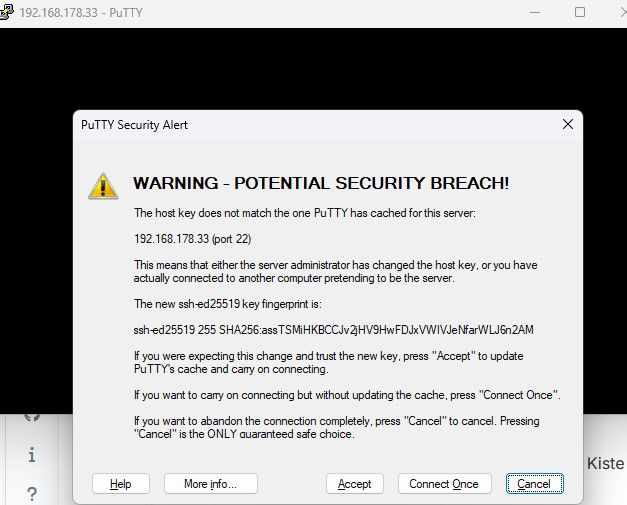
Dies immer Accept
Das habe ich nun schon dreimal gemacht, weil mir der Putty immer mein Passwort ablehnt.
Wo ist denn diesmal mein Fehler?
-
@Homoran
@thomas-braun
Hallo zusammen, bin wieder zurück und habe Backups angelegt und auf einer neuen SD-Karte mittels des Pi-Imagers die Software installiert. und die neue Karte in den Rasp gesteckt.Dies immer Accept
Das habe ich nun schon dreimal gemacht, weil mir der Putty immer mein Passwort ablehnt.
Wo ist denn diesmal mein Fehler?
Keine Ahnung. Ich verwende weder puTTY noch Windows. Da wird wohl noch ein alter Key irgendwo im Cache liegen.
-
@Homoran
@thomas-braun
Hallo zusammen, bin wieder zurück und habe Backups angelegt und auf einer neuen SD-Karte mittels des Pi-Imagers die Software installiert. und die neue Karte in den Rasp gesteckt.Dies immer Accept
Das habe ich nun schon dreimal gemacht, weil mir der Putty immer mein Passwort ablehnt.
Wo ist denn diesmal mein Fehler?
Wo ist denn diesmal mein Fehler?

Was hast du denn genau gemacht?
auf einer neuen SD-Karte mittels des Pi-Imagers die Software installiert.
Mit welchen Einstellungen?
- User angelegt?
- SSH aktiv?
- wahrscheinlich ja!
Dies immer Accept
Das habe ich nun schon dreimal gemacht,
Sollte eigentlich nur einmal nach Neuinstallation passieren
weil mir der Putty immer mein Passwort ablehnt.
Wann und wie?
-
Keine Ahnung. Ich verwende weder puTTY noch Windows. Da wird wohl noch ein alter Key irgendwo im Cache liegen.
Da wird wohl noch ein alter Key irgendwo im Cache liegen.
Nach accept sollte der aber bei den known hosts überschrieben werden
Hab da auch nie ein Problem mit dem Passwort gehabt.
@bernd_l
Ggf z und y vertauscht? -
Wo ist denn diesmal mein Fehler?
Was hast du denn genau gemacht?
auf einer neuen SD-Karte mittels des Pi-Imagers die Software installiert.
Mit welchen Einstellungen?
- User angelegt?
- SSH aktiv?
- wahrscheinlich ja!
Dies immer Accept
Das habe ich nun schon dreimal gemacht,
Sollte eigentlich nur einmal nach Neuinstallation passieren
weil mir der Putty immer mein Passwort ablehnt.
Wann und wie?
Wo ist denn diesmal mein Fehler?
Was hast du denn genau gemacht?
auf einer neuen SD-Karte mittels des Pi-Imagers die Software installiert.
Mit welchen Einstellungen?
- User angelegt?
- SSH aktiv?
- wahrscheinlich ja!
Die Installation fragte nach Username und Passwort, beides angegeben, allerdings gegenüber vorherigen Installationen die gleichen.
SSH kann ich jetzt nicht explizit beantwortenDies immer Accept
Das habe ich nun schon dreimal gemacht,
Sollte eigentlich nur einmal nach Neuinstallation passieren
weil mir der Putty immer mein Passwort ablehnt.
Wann und wie?
Immer direkt nach der Passwortabfrage
-
Wo ist denn diesmal mein Fehler?
Was hast du denn genau gemacht?
auf einer neuen SD-Karte mittels des Pi-Imagers die Software installiert.
Mit welchen Einstellungen?
- User angelegt?
- SSH aktiv?
- wahrscheinlich ja!
Die Installation fragte nach Username und Passwort, beides angegeben, allerdings gegenüber vorherigen Installationen die gleichen.
SSH kann ich jetzt nicht explizit beantwortenDies immer Accept
Das habe ich nun schon dreimal gemacht,
Sollte eigentlich nur einmal nach Neuinstallation passieren
weil mir der Putty immer mein Passwort ablehnt.
Wann und wie?
Immer direkt nach der Passwortabfrage





Hey! Du scheinst an dieser Unterhaltung interessiert zu sein, hast aber noch kein Konto.
Hast du es satt, bei jedem Besuch durch die gleichen Beiträge zu scrollen? Wenn du dich für ein Konto anmeldest, kommst du immer genau dorthin zurück, wo du zuvor warst, und kannst dich über neue Antworten benachrichtigen lassen (entweder per E-Mail oder Push-Benachrichtigung). Du kannst auch Lesezeichen speichern und Beiträge positiv bewerten, um anderen Community-Mitgliedern deine Wertschätzung zu zeigen.
Mit deinem Input könnte dieser Beitrag noch besser werden 💗
Registrieren AnmeldenSupport us
487
Online33.0k
Benutzer83.6k
Themen1.3m
Beiträge