




[Neuer Adapter] Reolink Kamera
-
Hallo zusammen,
da ich jetzt auch Besitzer einer Reolink Kamera bin und es dafür noch keinen Adapter gibt, würde ich mich gerne an der Entwicklung eines Adapters versuchen. Zudem gibt es zu einem Reolink Adapter auch schon einen Adapter Request. (https://github.com/ioBroker/AdapterRequests/issues/596)Aktuell habe ich schon einen Prototypen entwickelt, welcher auch schon getestet werden kann: https://github.com/aendue/ioBroker.reolink
Features:
- Kamera Infos auslesen
- Netzwerk Infos auslesen
- Motion Detection überwachen
Eine offizielle API Doku seitens Reolink gibt es leider nicht wirklich, dafür aber folgendes Dokument:
https://drive.google.com/drive/folders/19vQBJia0wKvzwscA-EpTDSFV5OfNYUL6Über Tests und euer Feedback freue ich mich sehr.
Fragen, wünsche oder Anregungen sind gerne gesehen.Viele Grüße
Andy@Andy-Grundt Danke das du die akku Kamera mit reingenommen hast . Die Argus Magic wird erkannt aber es werden keine Datenpunkte angelegt . ich vermute die ist noch nicht kompatibel ? Wird das noch kommen ?
-
@chucky666 Das war die Arbeit von bloop16 (siehe github und readme), ich weiß aber nicht, ob er das hier mit liest.
-
@Andy-Grundt Danke das du die akku Kamera mit reingenommen hast . Die Argus Magic wird erkannt aber es werden keine Datenpunkte angelegt . ich vermute die ist noch nicht kompatibel ? Wird das noch kommen ?
-
@chucky666 Die Argus Magic kann iich leider seelbst nicht testen.
Kannst du mir einen auszug aus dem Log + Debug zukommen lassen?@bloop danke für deine mühe
reicht das ?2026-06-05 12:11:39.065 info Battery camera ready! reolink.2 2026-06-05 12:11:39.017 debug RTSP Sub Stream URL (when enabled): rtsp://127.0.0.1:8554/Haustuer/subStream reolink.2 2026-06-05 12:11:39.016 debug RTSP Main Stream URL (when enabled): rtsp://127.0.0.1:8554/Haustuer/mainStream reolink.2 2026-06-05 12:11:39.016 debug Battery camera states created reolink.2 2026-06-05 12:11:38.961 debug MQTT topics will use camera name: Haustuer reolink.2 2026-06-05 12:11:38.961 info Battery camera configured: Haustuer reolink.2 2026-06-05 12:11:38.952 info ✅ ffmpeg found (7.1.3-0+deb13u1) - Snapshot feature available reolink.2 2026-06-05 12:11:38.952 info ✅ GStreamer RTSP library found (installed) reolink.2 2026-06-05 12:11:38.899 debug Checking system dependencies for battery camera... reolink.2 2026-06-05 12:11:38.899 debug HTTP camera states cleanup complete reolink.2 2026-06-05 12:11:38.892 debug Cleaning up HTTP camera states... reolink.2 2026-06-05 12:11:38.892 info Battery-powered camera detected - using neolink reolink.2 2026-06-05 12:11:38.892 info Reolink adapter has started reolink.2 2026-06-05 12:11:38.839 info starting. Version 1.4.2 in /opt/iobroker/node_modules/iobroker.reolink, node: v22.22.0, js-controller: 7.0.7 reolink.2 2026-06-05 12:11:38.772 debug States connected to redis: 127.0.0.1:9000 reolink.2 2026-06-05 12:11:38.695 debug States create User PubSub Client reolink.2 2026-06-05 12:11:38.695 debug States create System PubSub Client reolink.2 2026-06-05 12:11:38.677 debug Redis States: Use Redis connection: 127.0.0.1:9000 reolink.2 2026-06-05 12:11:38.645 debug Objects connected to redis: 127.0.0.1:9001 reolink.2 2026-06-05 12:11:38.644 debug Objects client initialize lua scripts reolink.2 2026-06-05 12:11:38.584 debug Objects create User PubSub Client reolink.2 2026-06-05 12:11:38.584 debug Objects create System PubSub Client reolink.2 2026-06-05 12:11:38.538 debug Objects client ready ... initialize now reolink.2 2026-06-05 12:11:38.505 debug Redis Objects: Use Redis connection: 127.0.0.1:9001 -
@bloop danke für deine mühe
reicht das ?2026-06-05 12:11:39.065 info Battery camera ready! reolink.2 2026-06-05 12:11:39.017 debug RTSP Sub Stream URL (when enabled): rtsp://127.0.0.1:8554/Haustuer/subStream reolink.2 2026-06-05 12:11:39.016 debug RTSP Main Stream URL (when enabled): rtsp://127.0.0.1:8554/Haustuer/mainStream reolink.2 2026-06-05 12:11:39.016 debug Battery camera states created reolink.2 2026-06-05 12:11:38.961 debug MQTT topics will use camera name: Haustuer reolink.2 2026-06-05 12:11:38.961 info Battery camera configured: Haustuer reolink.2 2026-06-05 12:11:38.952 info ✅ ffmpeg found (7.1.3-0+deb13u1) - Snapshot feature available reolink.2 2026-06-05 12:11:38.952 info ✅ GStreamer RTSP library found (installed) reolink.2 2026-06-05 12:11:38.899 debug Checking system dependencies for battery camera... reolink.2 2026-06-05 12:11:38.899 debug HTTP camera states cleanup complete reolink.2 2026-06-05 12:11:38.892 debug Cleaning up HTTP camera states... reolink.2 2026-06-05 12:11:38.892 info Battery-powered camera detected - using neolink reolink.2 2026-06-05 12:11:38.892 info Reolink adapter has started reolink.2 2026-06-05 12:11:38.839 info starting. Version 1.4.2 in /opt/iobroker/node_modules/iobroker.reolink, node: v22.22.0, js-controller: 7.0.7 reolink.2 2026-06-05 12:11:38.772 debug States connected to redis: 127.0.0.1:9000 reolink.2 2026-06-05 12:11:38.695 debug States create User PubSub Client reolink.2 2026-06-05 12:11:38.695 debug States create System PubSub Client reolink.2 2026-06-05 12:11:38.677 debug Redis States: Use Redis connection: 127.0.0.1:9000 reolink.2 2026-06-05 12:11:38.645 debug Objects connected to redis: 127.0.0.1:9001 reolink.2 2026-06-05 12:11:38.644 debug Objects client initialize lua scripts reolink.2 2026-06-05 12:11:38.584 debug Objects create User PubSub Client reolink.2 2026-06-05 12:11:38.584 debug Objects create System PubSub Client reolink.2 2026-06-05 12:11:38.538 debug Objects client ready ... initialize now reolink.2 2026-06-05 12:11:38.505 debug Redis Objects: Use Redis connection: 127.0.0.1:9001@chucky666 Sieht alles ganz normal und vor allem korrekt aus...
Wenn der Adapter korrekt eingerichtet ist und Startet sollten dir folgende Datenpunkte erstellt werden - unabhängig von der Kamera Version.
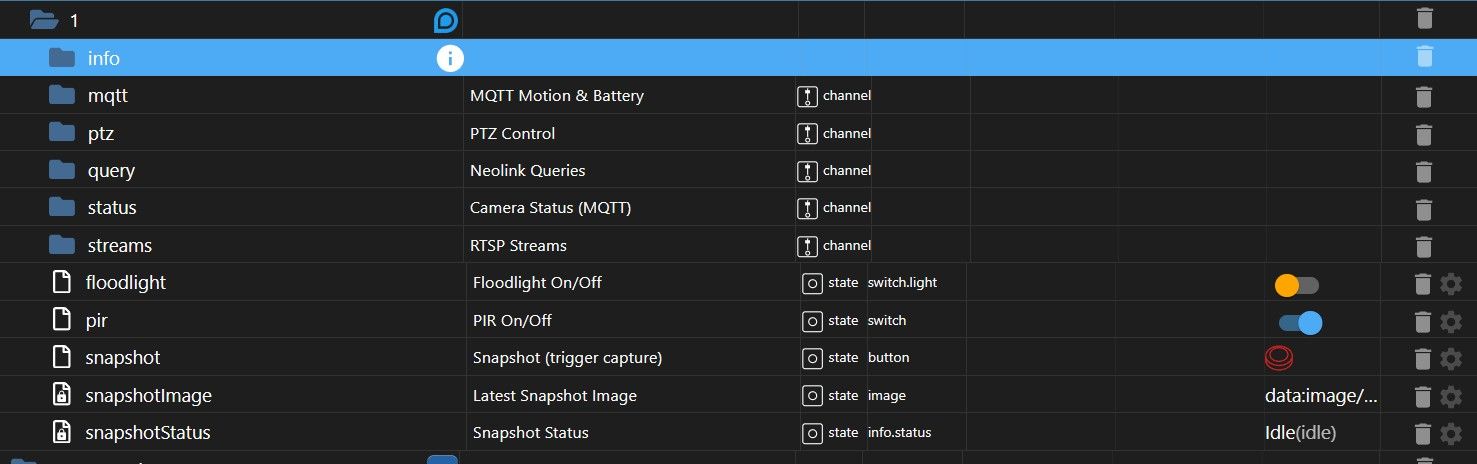
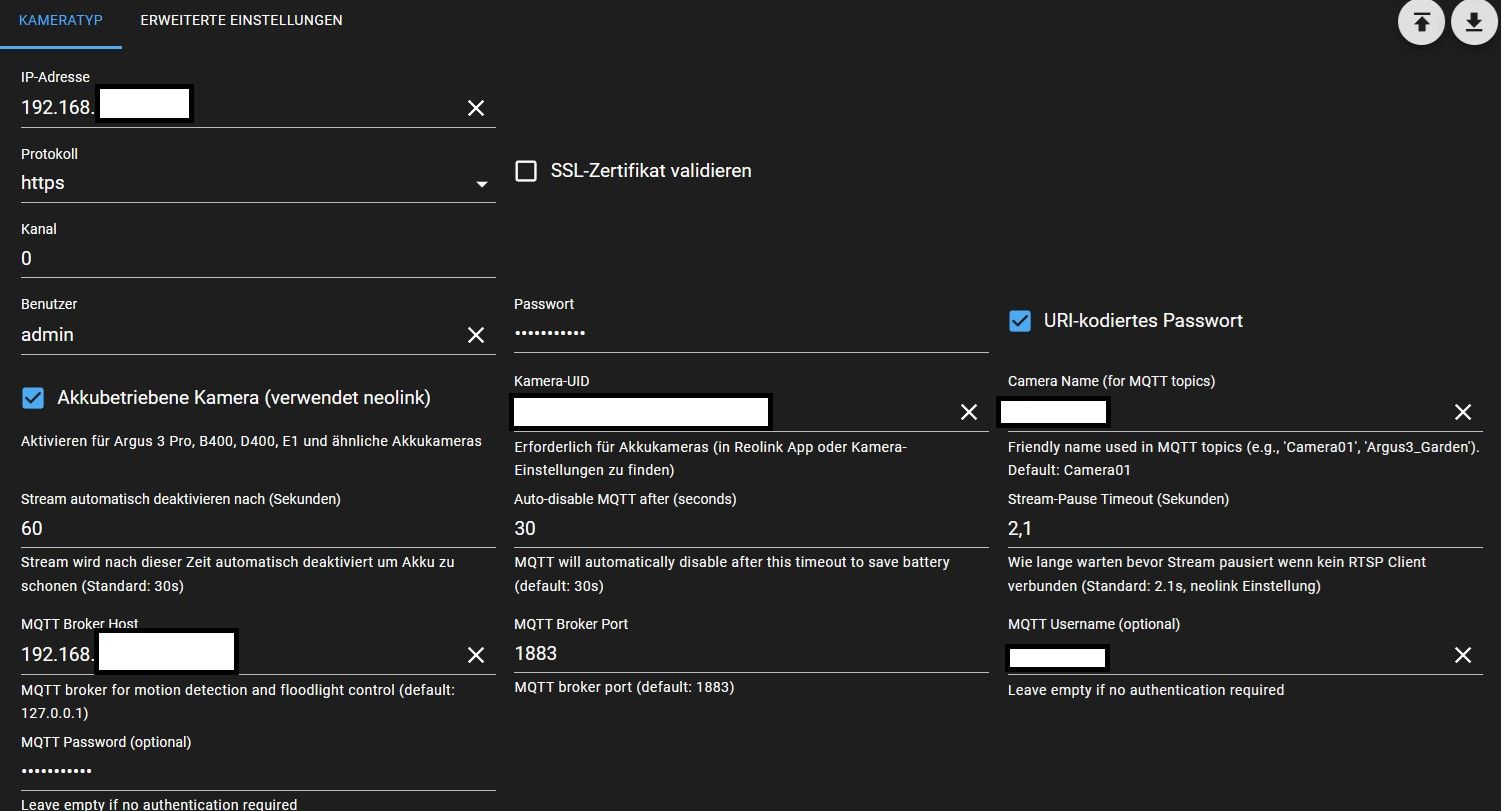
Hast du sämtliche Einstellungen gemacht?
-
@chucky666 Sieht alles ganz normal und vor allem korrekt aus...
Wenn der Adapter korrekt eingerichtet ist und Startet sollten dir folgende Datenpunkte erstellt werden - unabhängig von der Kamera Version.
Hast du sämtliche Einstellungen gemacht?
-
welche Ip Adresse muss beim Broker rein ? Die von ioBroker oder ?
Edit: Jetzt genauer gelesen... Du meinst wohl den MQTT Host.
Die IP des Host, auf dem MQTT läuft.
-
@chucky666 funktioniert?
-
Ich schicke mir ein Bild so per cgi:
<block xmlns="https://developers.google.com/blockly/xml" type="procedures_defnoreturn" id="31W4)co*hfllBmNKD0j2" x="2713" y="-113"> <field name="NAME">HaustuerBilderSchicken</field> <comment pinned="false" h="80" w="160">holt ein Bild vom der Cam und schickt es per Telegram</comment> <statement name="STACK"> <block type="controls_if" id="A6cOkP*h,n}ZilH7=u]+"> <mutation else="1"></mutation> <value name="IF0"> <block type="get_value" id="2xz7D/{7Cr;$%oJ]Qkn-"> <field name="ATTR">val</field> <field name="OID">reolink.0.network.connected</field> </block> </value> <statement name="DO0"> <block type="http_get" id="P^;u4LBNv`?U^}YD(64+"> <field name="TIMEOUT">2000</field> <field name="UNIT">ms</field> <field name="TYPE">arraybuffer</field> <value name="URL"> <shadow type="text" id="H]!+Lf(Nc%5_V~fo4v7O"> <field name="TEXT">http://192.168.253.148/cgi-bin/api.cgi?cmd=Snap&channel=0&rs=&user=admin&password=xyz</field> </shadow> </value> <statement name="STATEMENT"> <block type="telegram" id="r8,YW-hqOMW(=su_.DVb"> <field name="INSTANCE">.0</field> <field name="LOG"></field> <field name="SILENT">FALSE</field> <field name="PARSEMODE">default</field> <field name="ESCAPING">FALSE</field> <field name="DISABLE_WEB_PAGE_PREVIEW">FALSE</field> <value name="MESSAGE"> <shadow type="text" id="9eq;NDr4^eD/Qs0(3wN5"> <field name="TEXT">text</field> </shadow> <block type="http_response_tofile" id="!:Ngwi;@%%gZV,lT;T,x"> <value name="FILENAME"> <shadow type="text" id="tO6FZSDjDBqC[fXo`v+?"> <field name="TEXT">temp.jpg</field> </shadow> </value> </block> </value> </block> </statement> </block> </statement> <statement name="ELSE"> <block type="telegram" id="Ov9ho$a#M2b#*oVML:(|"> <field name="INSTANCE">.0</field> <field name="LOG"></field> <field name="SILENT">FALSE</field> <field name="PARSEMODE">default</field> <field name="ESCAPING">FALSE</field> <field name="DISABLE_WEB_PAGE_PREVIEW">FALSE</field> <value name="MESSAGE"> <shadow type="text" id="]ynKN#t)%{I1c=V__Q(U"> <field name="TEXT">Kamera Haustüre nicht erreichbar!</field> </shadow> </value> </block> </statement> </block> </statement> </block>Alternativ per rtsp ein Video so, wenn aktiviert (ffmpeg muss installiert sein, ich speichere das Video/ Bild lokal ab)
<block xmlns="https://developers.google.com/blockly/xml" type="procedures_defnoreturn" id=":u%-]}+:Oq#$%z.*G/X`" x="1897" y="-321">
  <field name="NAME">HaustuereVideoSchicken</field>
  <comment pinned="false" h="80" w="160">Beschreibe diese Funktion …</comment>
  <statement name="STACK">
    <block type="comment" id="=;Hz#?O{6CO(;J.tKZ}z">
      <field name="COMMENT">h264Preview_01_ext</field>
      <next>
        <block type="variables_set" id="CSw$Oh|zU}or7j|W4sSn">
          <field name="VAR" id="fJUJCIN5HrB8Akm?Xu?R">Befehl</field>
          <value name="VALUE">
            <block type="text_join" id="D6.783^7hR8$?`tMsiG~">
              <mutation items="3"></mutation>
              <value name="ADD0">
                <block type="text" id="GKb14HP_!Jd~d|6;SWTH">
                  <field name="TEXT">ffmpeg -y -i rtsp://admin:xyz@192.168.253.148:554/h264Preview_01_main -t </field>
                </block>
              </value>
              <value name="ADD1">
                <block type="math_number" id="M_4$tL0mfoUN(A`|pHri">
                  <field name="NUM">30</field>
                </block>
              </value>
              <value name="ADD2">
                <block type="text" id="Wj-o%7;;v,y(I~6-t*bK">
                  <field name="TEXT"> -f mp4 -vcodec libx264 -pix_fmt yuv420p -an -vf scale=1024:768 -r 15 /opt/iobroker/CamSnapshots/Haustuere.mp4</field>
                </block>
              </value>
            </block>
          </value>
          <next>
            <block type="exec" id="]Mmgt=)}fsMT=2m/c0ub">
              <mutation xmlns="http://www.w3.org/1999/xhtml" with_statement="true"></mutation>
              <field name="WITH_STATEMENT">TRUE</field>
              <field name="LOG"></field>
              <value name="COMMAND">
                <shadow type="text" id="e.P0Y4sWi?jQvW0Ikv9n">
                  <field name="TEXT">text</field>
                </shadow>
                <block type="variables_get" id="qF?QeOdsvtvtsgYP][Aq">
                  <field name="VAR" id="fJUJCIN5HrB8Akm?Xu?R">Befehl</field>
                </block>
              </value>
              <statement name="STATEMENT">
                <block type="telegram" id="Ch~%tXvQ*FvZheza+M.o">
                  <field name="INSTANCE">.0</field>
                  <field name="LOG"></field>
                  <field name="SILENT">FALSE</field>
                  <field name="PARSEMODE">default</field>
                  <field name="ESCAPING">FALSE</field>
                  <field name="DISABLE_WEB_PAGE_PREVIEW">FALSE</field>
                  <value name="MESSAGE">
                    <shadow type="text" id="`}*6Z.:`6}.?55h*`(Nb">
                      <field name="TEXT">/opt/iobroker/AlarmCam/ImouFlur.jpg</field>
                    </shadow>
                    <block type="text" id="Mp89tz^y0ft*:zf$N__P">
                      <field name="TEXT">/opt/iobroker/CamSnapshots/Haustuere.mp4</field>
                    </block>
                  </value>
                  <next>
                    <block type="timeouts_wait" id="gDyq4a]Em:EvTOg?ONqG">
                      <field name="DELAY">10</field>
                      <field name="UNIT">sec</field>
                      <next>
                        <block type="exec" id="N64}k!dt^P+9a7-86D//">
                          <mutation xmlns="http://www.w3.org/1999/xhtml" with_statement="false"></mutation>
                          <field name="WITH_STATEMENT">FALSE</field>
                          <field name="LOG"></field>
                          <value name="COMMAND">
                            <shadow type="text" id="e.P0Y4sWi?jQvW0Ikv9n">
                              <field name="TEXT">text</field>
                            </shadow>
                            <block type="text" id="^([ZI#zcti8E-p5%1bvt">
                              <field name="TEXT">rm /opt/iobroker/CamSnapshots/Haustuere.mp4</field>
                            </block>
                          </value>
                        </block>
                      </next>
                    </block>
                  </next>
                </block>
              </statement>
            </block>
          </next>
        </block>
      </next>
    </block>
  </statement>
</block>
Oder per rtsp ein Bild:
<block xmlns="https://developers.google.com/blockly/xml" type="procedures_defnoreturn" id="cNF_P%7p$3q@)VlD9RcI" x="687" y="-637"> <field name="NAME">GarageBilderSchicken</field> <comment pinned="false" h="80" w="160">holt ein Bild vom der Cam und schickt es per Telegram</comment> <statement name="STACK"> <block type="controls_if" id="5tw0Kk9C6KhbOhQ~+3d8"> <mutation else="1"></mutation> <value name="IF0"> <block type="get_value" id="1N0(UgIDYHG19GwbbI+$"> <field name="ATTR">val</field> <field name="OID">eusec.0.T8410P41223309EE.station.connection</field> </block> </value> <statement name="DO0"> <block type="comment" id="C8uJ;_BHTJphhr/4j,xx"> <field name="COMMENT">http://192.168.253.11:8082/cameras.0/Garage</field> <next> <block type="exec" id="LewQAJP*XK;thd40bnp:"> <mutation xmlns="http://www.w3.org/1999/xhtml" with_statement="true"></mutation> <field name="WITH_STATEMENT">TRUE</field> <field name="LOG"></field> <value name="COMMAND"> <shadow type="text" id="e.P0Y4sWi?jQvW0Ikv9n"> <field name="TEXT">text</field> </shadow> <block type="text" id="m^y_-S$pJwo56SgTek/E"> <field name="TEXT">ffmpeg -i rtsp://Tu8OYn4QhkgG:xyz@192.168.253.62:554/live0 -y -f image2 -vframes 1 -pix_fmt yuvj420p /opt/iobroker/CamSnapshots/CamGarageSnapshot.jpg</field> </block> </value> <statement name="STATEMENT"> <block type="comment" id="bAfw8iK2x[QY2B?+Itin"> <field name="COMMENT">drei Sekunden notwendig, sonst ist das Bild nicht da!</field> <next> <block type="telegram" id="EgJ0^+uDz,a1M]:Y~|EW"> <field name="INSTANCE">.0</field> <field name="LOG"></field> <field name="SILENT">FALSE</field> <field name="PARSEMODE">default</field> <field name="ESCAPING">FALSE</field> <field name="DISABLE_WEB_PAGE_PREVIEW">FALSE</field> <value name="MESSAGE"> <shadow type="text" id="`}*6Z.:`6}.?55h*`(Nb"> <field name="TEXT">/opt/iobroker/AlarmCam/ImouFlur.jpg</field> </shadow> <block type="text" id="c~%%IGop3Y?SJSFM^g%j"> <field name="TEXT">/opt/iobroker/CamSnapshots/CamGarageSnapshot.jpg</field> </block> </value> <next> <block type="timeouts_wait" id="aNb2$yz%UDoh|4Z]1Z=3"> <field name="DELAY">3</field> <field name="UNIT">sec</field> </block> </next> </block> </next> </block> </statement> <next> <block type="exec" id="cST;?A^C7P*WEs9=5yN6"> <mutation xmlns="http://www.w3.org/1999/xhtml" with_statement="false"></mutation> <field name="WITH_STATEMENT">FALSE</field> <field name="LOG"></field> <value name="COMMAND"> <shadow type="text" id="e.P0Y4sWi?jQvW0Ikv9n"> <field name="TEXT">text</field> </shadow> <block type="text" id="Ef4JUzA*l21b9$@?Bu8q"> <field name="TEXT">rm /opt/iobroker/CamSnapshots/CamGarageSnapshot.jpg</field> </block> </value> </block> </next> </block> </next> </block> </statement> <statement name="ELSE"> <block type="telegram" id="L#,-Ju-EW_M0@;:vhv_#"> <field name="INSTANCE">.0</field> <field name="LOG"></field> <field name="SILENT">FALSE</field> <field name="PARSEMODE">default</field> <field name="ESCAPING">FALSE</field> <field name="DISABLE_WEB_PAGE_PREVIEW">FALSE</field> <value name="MESSAGE"> <shadow type="text" id="/[jrJ1?-TV.rY/7Hj[R_"> <field name="TEXT">Kamera Garage nicht erreichbar!</field> </shadow> </value> </block> </statement> </block> </statement> </block> -
Ich schicke mir ein Bild so per cgi:
<block xmlns="https://developers.google.com/blockly/xml" type="procedures_defnoreturn" id="31W4)co*hfllBmNKD0j2" x="2713" y="-113"> <field name="NAME">HaustuerBilderSchicken</field> <comment pinned="false" h="80" w="160">holt ein Bild vom der Cam und schickt es per Telegram</comment> <statement name="STACK"> <block type="controls_if" id="A6cOkP*h,n}ZilH7=u]+"> <mutation else="1"></mutation> <value name="IF0"> <block type="get_value" id="2xz7D/{7Cr;$%oJ]Qkn-"> <field name="ATTR">val</field> <field name="OID">reolink.0.network.connected</field> </block> </value> <statement name="DO0"> <block type="http_get" id="P^;u4LBNv`?U^}YD(64+"> <field name="TIMEOUT">2000</field> <field name="UNIT">ms</field> <field name="TYPE">arraybuffer</field> <value name="URL"> <shadow type="text" id="H]!+Lf(Nc%5_V~fo4v7O"> <field name="TEXT">http://192.168.253.148/cgi-bin/api.cgi?cmd=Snap&channel=0&rs=&user=admin&password=xyz</field> </shadow> </value> <statement name="STATEMENT"> <block type="telegram" id="r8,YW-hqOMW(=su_.DVb"> <field name="INSTANCE">.0</field> <field name="LOG"></field> <field name="SILENT">FALSE</field> <field name="PARSEMODE">default</field> <field name="ESCAPING">FALSE</field> <field name="DISABLE_WEB_PAGE_PREVIEW">FALSE</field> <value name="MESSAGE"> <shadow type="text" id="9eq;NDr4^eD/Qs0(3wN5"> <field name="TEXT">text</field> </shadow> <block type="http_response_tofile" id="!:Ngwi;@%%gZV,lT;T,x"> <value name="FILENAME"> <shadow type="text" id="tO6FZSDjDBqC[fXo`v+?"> <field name="TEXT">temp.jpg</field> </shadow> </value> </block> </value> </block> </statement> </block> </statement> <statement name="ELSE"> <block type="telegram" id="Ov9ho$a#M2b#*oVML:(|"> <field name="INSTANCE">.0</field> <field name="LOG"></field> <field name="SILENT">FALSE</field> <field name="PARSEMODE">default</field> <field name="ESCAPING">FALSE</field> <field name="DISABLE_WEB_PAGE_PREVIEW">FALSE</field> <value name="MESSAGE"> <shadow type="text" id="]ynKN#t)%{I1c=V__Q(U"> <field name="TEXT">Kamera Haustüre nicht erreichbar!</field> </shadow> </value> </block> </statement> </block> </statement> </block>Alternativ per rtsp ein Video so, wenn aktiviert (ffmpeg muss installiert sein, ich speichere das Video/ Bild lokal ab)
<block xmlns="https://developers.google.com/blockly/xml" type="procedures_defnoreturn" id=":u%-]}+:Oq#$%z.*G/X`" x="1897" y="-321">
  <field name="NAME">HaustuereVideoSchicken</field>
  <comment pinned="false" h="80" w="160">Beschreibe diese Funktion …</comment>
  <statement name="STACK">
    <block type="comment" id="=;Hz#?O{6CO(;J.tKZ}z">
      <field name="COMMENT">h264Preview_01_ext</field>
      <next>
        <block type="variables_set" id="CSw$Oh|zU}or7j|W4sSn">
          <field name="VAR" id="fJUJCIN5HrB8Akm?Xu?R">Befehl</field>
          <value name="VALUE">
            <block type="text_join" id="D6.783^7hR8$?`tMsiG~">
              <mutation items="3"></mutation>
              <value name="ADD0">
                <block type="text" id="GKb14HP_!Jd~d|6;SWTH">
                  <field name="TEXT">ffmpeg -y -i rtsp://admin:xyz@192.168.253.148:554/h264Preview_01_main -t </field>
                </block>
              </value>
              <value name="ADD1">
                <block type="math_number" id="M_4$tL0mfoUN(A`|pHri">
                  <field name="NUM">30</field>
                </block>
              </value>
              <value name="ADD2">
                <block type="text" id="Wj-o%7;;v,y(I~6-t*bK">
                  <field name="TEXT"> -f mp4 -vcodec libx264 -pix_fmt yuv420p -an -vf scale=1024:768 -r 15 /opt/iobroker/CamSnapshots/Haustuere.mp4</field>
                </block>
              </value>
            </block>
          </value>
          <next>
            <block type="exec" id="]Mmgt=)}fsMT=2m/c0ub">
              <mutation xmlns="http://www.w3.org/1999/xhtml" with_statement="true"></mutation>
              <field name="WITH_STATEMENT">TRUE</field>
              <field name="LOG"></field>
              <value name="COMMAND">
                <shadow type="text" id="e.P0Y4sWi?jQvW0Ikv9n">
                  <field name="TEXT">text</field>
                </shadow>
                <block type="variables_get" id="qF?QeOdsvtvtsgYP][Aq">
                  <field name="VAR" id="fJUJCIN5HrB8Akm?Xu?R">Befehl</field>
                </block>
              </value>
              <statement name="STATEMENT">
                <block type="telegram" id="Ch~%tXvQ*FvZheza+M.o">
                  <field name="INSTANCE">.0</field>
                  <field name="LOG"></field>
                  <field name="SILENT">FALSE</field>
                  <field name="PARSEMODE">default</field>
                  <field name="ESCAPING">FALSE</field>
                  <field name="DISABLE_WEB_PAGE_PREVIEW">FALSE</field>
                  <value name="MESSAGE">
                    <shadow type="text" id="`}*6Z.:`6}.?55h*`(Nb">
                      <field name="TEXT">/opt/iobroker/AlarmCam/ImouFlur.jpg</field>
                    </shadow>
                    <block type="text" id="Mp89tz^y0ft*:zf$N__P">
                      <field name="TEXT">/opt/iobroker/CamSnapshots/Haustuere.mp4</field>
                    </block>
                  </value>
                  <next>
                    <block type="timeouts_wait" id="gDyq4a]Em:EvTOg?ONqG">
                      <field name="DELAY">10</field>
                      <field name="UNIT">sec</field>
                      <next>
                        <block type="exec" id="N64}k!dt^P+9a7-86D//">
                          <mutation xmlns="http://www.w3.org/1999/xhtml" with_statement="false"></mutation>
                          <field name="WITH_STATEMENT">FALSE</field>
                          <field name="LOG"></field>
                          <value name="COMMAND">
                            <shadow type="text" id="e.P0Y4sWi?jQvW0Ikv9n">
                              <field name="TEXT">text</field>
                            </shadow>
                            <block type="text" id="^([ZI#zcti8E-p5%1bvt">
                              <field name="TEXT">rm /opt/iobroker/CamSnapshots/Haustuere.mp4</field>
                            </block>
                          </value>
                        </block>
                      </next>
                    </block>
                  </next>
                </block>
              </statement>
            </block>
          </next>
        </block>
      </next>
    </block>
  </statement>
</block>
Oder per rtsp ein Bild:
<block xmlns="https://developers.google.com/blockly/xml" type="procedures_defnoreturn" id="cNF_P%7p$3q@)VlD9RcI" x="687" y="-637"> <field name="NAME">GarageBilderSchicken</field> <comment pinned="false" h="80" w="160">holt ein Bild vom der Cam und schickt es per Telegram</comment> <statement name="STACK"> <block type="controls_if" id="5tw0Kk9C6KhbOhQ~+3d8"> <mutation else="1"></mutation> <value name="IF0"> <block type="get_value" id="1N0(UgIDYHG19GwbbI+$"> <field name="ATTR">val</field> <field name="OID">eusec.0.T8410P41223309EE.station.connection</field> </block> </value> <statement name="DO0"> <block type="comment" id="C8uJ;_BHTJphhr/4j,xx"> <field name="COMMENT">http://192.168.253.11:8082/cameras.0/Garage</field> <next> <block type="exec" id="LewQAJP*XK;thd40bnp:"> <mutation xmlns="http://www.w3.org/1999/xhtml" with_statement="true"></mutation> <field name="WITH_STATEMENT">TRUE</field> <field name="LOG"></field> <value name="COMMAND"> <shadow type="text" id="e.P0Y4sWi?jQvW0Ikv9n"> <field name="TEXT">text</field> </shadow> <block type="text" id="m^y_-S$pJwo56SgTek/E"> <field name="TEXT">ffmpeg -i rtsp://Tu8OYn4QhkgG:xyz@192.168.253.62:554/live0 -y -f image2 -vframes 1 -pix_fmt yuvj420p /opt/iobroker/CamSnapshots/CamGarageSnapshot.jpg</field> </block> </value> <statement name="STATEMENT"> <block type="comment" id="bAfw8iK2x[QY2B?+Itin"> <field name="COMMENT">drei Sekunden notwendig, sonst ist das Bild nicht da!</field> <next> <block type="telegram" id="EgJ0^+uDz,a1M]:Y~|EW"> <field name="INSTANCE">.0</field> <field name="LOG"></field> <field name="SILENT">FALSE</field> <field name="PARSEMODE">default</field> <field name="ESCAPING">FALSE</field> <field name="DISABLE_WEB_PAGE_PREVIEW">FALSE</field> <value name="MESSAGE"> <shadow type="text" id="`}*6Z.:`6}.?55h*`(Nb"> <field name="TEXT">/opt/iobroker/AlarmCam/ImouFlur.jpg</field> </shadow> <block type="text" id="c~%%IGop3Y?SJSFM^g%j"> <field name="TEXT">/opt/iobroker/CamSnapshots/CamGarageSnapshot.jpg</field> </block> </value> <next> <block type="timeouts_wait" id="aNb2$yz%UDoh|4Z]1Z=3"> <field name="DELAY">3</field> <field name="UNIT">sec</field> </block> </next> </block> </next> </block> </statement> <next> <block type="exec" id="cST;?A^C7P*WEs9=5yN6"> <mutation xmlns="http://www.w3.org/1999/xhtml" with_statement="false"></mutation> <field name="WITH_STATEMENT">FALSE</field> <field name="LOG"></field> <value name="COMMAND"> <shadow type="text" id="e.P0Y4sWi?jQvW0Ikv9n"> <field name="TEXT">text</field> </shadow> <block type="text" id="Ef4JUzA*l21b9$@?Bu8q"> <field name="TEXT">rm /opt/iobroker/CamSnapshots/CamGarageSnapshot.jpg</field> </block> </value> </block> </next> </block> </next> </block> </statement> <statement name="ELSE"> <block type="telegram" id="L#,-Ju-EW_M0@;:vhv_#"> <field name="INSTANCE">.0</field> <field name="LOG"></field> <field name="SILENT">FALSE</field> <field name="PARSEMODE">default</field> <field name="ESCAPING">FALSE</field> <field name="DISABLE_WEB_PAGE_PREVIEW">FALSE</field> <value name="MESSAGE"> <shadow type="text" id="/[jrJ1?-TV.rY/7Hj[R_"> <field name="TEXT">Kamera Garage nicht erreichbar!</field> </shadow> </value> </block> </statement> </block> </statement> </block> -
@bloop er hat die Datenpunkte angelegt
jetzt muss ich mich noch reinfuchsen , wie ich mir ein bild schicken kann .
mqtt wird über zb bewegungsmelder aktiviert , habe ich das richtig verstanden ?@chucky666
mqtt ist bei den Akku Kameras Standard aus, und kann über den State reolink.0.mqtt.enable für die in den Einstellungen unter "Auto-disable MQTT" eingestellte Zeit Aktiviert werden. Wenn du bei den Akku Kameras mqtt an lassen würdest ist der Akku binnen 24std leer. nur wenn mqtt aktiv ist, kommen auch Meldungen vom Bewegungsmelder.
Einzige mir bekannte Möglichkeit von einer Akku Kamera einen Eingangs "Eventtrigger" zu erhalten ist über den Mail Server...Um dir einen Snapshot schicken zu lassen gibt es folgende States:

"snapshot" triggern
kurz warten und du hast das aktuell Bild im State "snapshotImage" -
@chucky666
mqtt ist bei den Akku Kameras Standard aus, und kann über den State reolink.0.mqtt.enable für die in den Einstellungen unter "Auto-disable MQTT" eingestellte Zeit Aktiviert werden. Wenn du bei den Akku Kameras mqtt an lassen würdest ist der Akku binnen 24std leer. nur wenn mqtt aktiv ist, kommen auch Meldungen vom Bewegungsmelder.
Einzige mir bekannte Möglichkeit von einer Akku Kamera einen Eingangs "Eventtrigger" zu erhalten ist über den Mail Server...Um dir einen Snapshot schicken zu lassen gibt es folgende States:
"snapshot" triggern
kurz warten und du hast das aktuell Bild im State "snapshotImage" -
Hey, erstmal vielen Dank für den Adapter und die Mühe :)
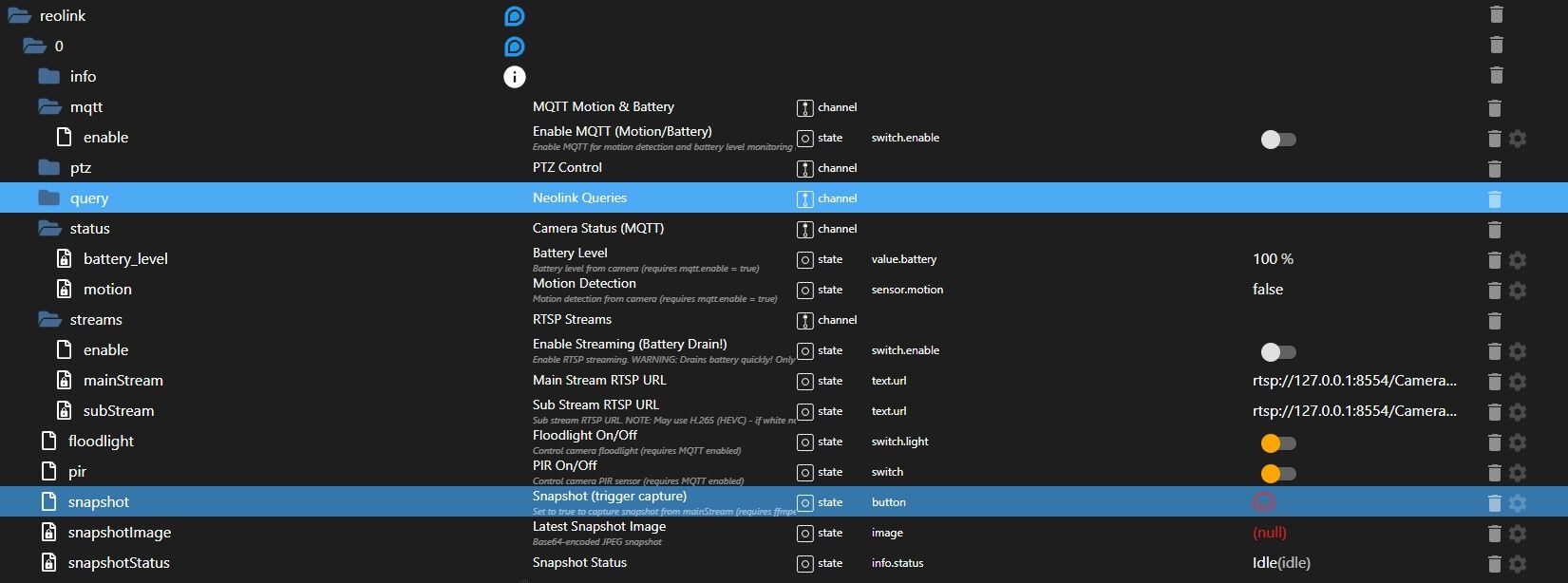
Ich hänge gerade aktuell an der Anbindung meiner Solar Kameras über den Hub. Wenn ich im Hub die RTSP Einstellungen aktiviere und im Adapter die IP von dem Hub eintrage, dann erstellt er Datenpunkte für den rtsp-Stream, allerdings mit der lokalen Adresse 127.0.0.1 und nicht mit der IP von meinem iobroker Host oder Reolink Hub(?).
iobroker läuft bei mir im Docker Container, daher keine Ahnung, ob das die Ursache ist.
Faktisch kann ich den Stream leider nicht öffnen. Wenn ich über die IP vom Hub direkt gehe mit dem link: rtsp://admin:pass@hubip:554/h264Preview_01_main dann bekomme ich ein Bild.
Logischerweise gehen Snapshots ebenfalls nicht, da er den Stream nicht öffnen kann. Daher die Frage: Woher nimmt er sich die Komponenten für den Stream zusammen?Das sind meine Settings:
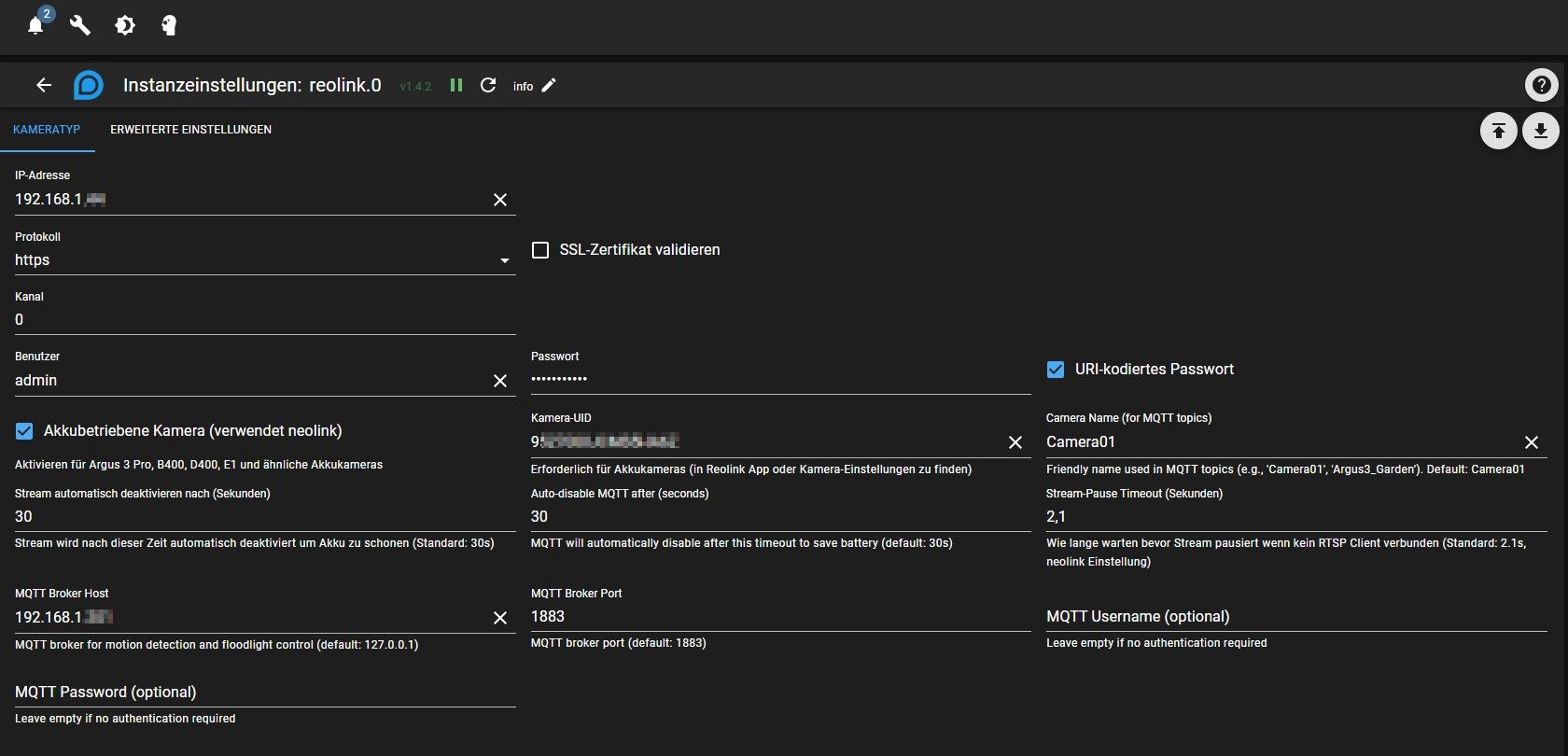
und so siehen die Objekte dazu aus:
-
Hallo,
ich habe RLC-811WA von Reolink.
In iOBroker erfolgreich integriert, aber Push-Steuerung geht bei mir nicht.
Ich habe hier gelesen, dass möglicherwiese true/false von der Kamera nicht akzeptieren wird.
Mit oben beschriebenen Scripts komme ich nicht klar, weil ich nicht weiß, in welche Dateien ich sie schreiben soll.
Kann jemand das für solche Anfänger wie ich deutlicher beschreiben oder gibt es schon andere Möglichkeiten?
Danke! -
Hey, erstmal vielen Dank für den Adapter und die Mühe :)
Ich hänge gerade aktuell an der Anbindung meiner Solar Kameras über den Hub. Wenn ich im Hub die RTSP Einstellungen aktiviere und im Adapter die IP von dem Hub eintrage, dann erstellt er Datenpunkte für den rtsp-Stream, allerdings mit der lokalen Adresse 127.0.0.1 und nicht mit der IP von meinem iobroker Host oder Reolink Hub(?).
iobroker läuft bei mir im Docker Container, daher keine Ahnung, ob das die Ursache ist.
Faktisch kann ich den Stream leider nicht öffnen. Wenn ich über die IP vom Hub direkt gehe mit dem link: rtsp://admin:pass@hubip:554/h264Preview_01_main dann bekomme ich ein Bild.
Logischerweise gehen Snapshots ebenfalls nicht, da er den Stream nicht öffnen kann. Daher die Frage: Woher nimmt er sich die Komponenten für den Stream zusammen?Das sind meine Settings:
und so siehen die Objekte dazu aus:
@Elirion
Guten Abend,
In der Akku Kamera Funktion wurde eine Verwendung des Hubs von Reolink nicht beachtet. Es gibt bisher keine RTSP-Host/Port-Option für eine Verwendung von Akku Kameras über Hub. Allerdings sollte ein Betrieb ohne den Extra Hacken bei Akkubetriebene Kamera möglich sein. Du sprichst aktuell ja mit dem Hub und nicht mit der Kamera direkt.Ich arbeite bereits an einer Lösung. Bitte versuche die Version auf Github:
https://github.com/bloop16/ioBroker.reolink/tree/fix/rtsp-stream-stability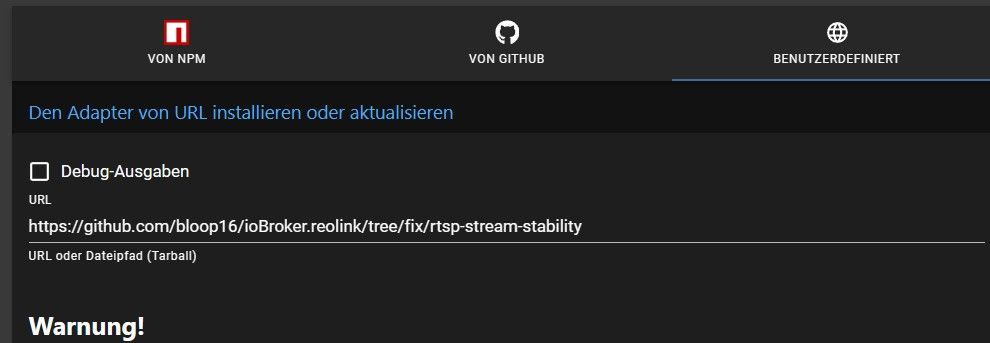
Habe eine fix eingespielt mit dem nun die angegebenen Adressen korrekt übernommen werden sollten.
Leider habe ich keinen Hub weshalb ich mir mit einer Umsetzung schwer tue. -
Hey @bloop,
danke dir für die Rückmeldung.
Also ich hab mich da auch etwas eingelesen.Der Verbindungsaufbau bei dem Hub ist wie folgt:
Hub baut eigene Netze (2,4 und 5GHz) auf und die kameras verbinden sich dann dazu. Ansprechbar im eigenen Netz ist nur der Hub.
Wenn man einen Stream öffnen will, läuft es über die Adresse vom Hub.Der Aufbau des Streams ist dann wie folgt:
rtsp://admin:<Passwort>@<IP des Hubs>:<hinterlegter Port, Standard ist 554, kann aber auch geändert werden>/h264Preview_<Kamera Channel>_mainSo ergibt sich dann bspw.:
rtsp://admin:Password@192.168.1.44:8554/h264Preview_01_main für Kamera 1 und für die 2 Preview02_main.Eventuell reicht das ja schon um etwas in deinen Adapter zu integrieren? Ob hier allerdings dann auch Pushnachrichten bei Bewegung rausgeschickt werden, weiß ich nicht.
Ich wäre gern bereit zu testen :)
-
Hallo,
ich habe RLC-811WA von Reolink.
In iOBroker erfolgreich integriert, aber Push-Steuerung geht bei mir nicht.
Ich habe hier gelesen, dass möglicherwiese true/false von der Kamera nicht akzeptieren wird.
Mit oben beschriebenen Scripts komme ich nicht klar, weil ich nicht weiß, in welche Dateien ich sie schreiben soll.
Kann jemand das für solche Anfänger wie ich deutlicher beschreiben oder gibt es schon andere Möglichkeiten?
Danke! -
@andre1de
Hast du Push in der Kamera aktiviert? Das muss aktiviert sein, sonst kann der Adapter nichts machen.@bommel_030
Push ist in der Kamera aktiviert. Ich versuche in ioBroker beim Objekt „push“ den Wert auf „false“ zu setzen. In der Kamera bleibt Push jedoch weiterhin aktiv.
Genauso ist es umgekehrt: Wenn Push in der Kamera ausgeschaltet ist, kann ich es über ioBroker mit „true“ nicht einschalten.
Das Umschalten anderer Funktionen, zum Beispiel der Aufnahme (scheduledRecording), funktioniert dagegen.
Die Kamera ist per WLAN mit dem Netzwerk verbunden. Und den Wert von "push" ( true/false) in IoBroker wird rot angezeigt.
Andere Kameras sind an den NVR angeschlossen – dort lässt sich Push über ioBroker problemlos steuern.







Hey! Du scheinst an dieser Unterhaltung interessiert zu sein, hast aber noch kein Konto.
Hast du es satt, bei jedem Besuch durch die gleichen Beiträge zu scrollen? Wenn du dich für ein Konto anmeldest, kommst du immer genau dorthin zurück, wo du zuvor warst, und kannst dich über neue Antworten benachrichtigen lassen (entweder per E-Mail oder Push-Benachrichtigung). Du kannst auch Lesezeichen speichern und Beiträge positiv bewerten, um anderen Community-Mitgliedern deine Wertschätzung zu zeigen.
Mit deinem Input könnte dieser Beitrag noch besser werden 💗
Registrieren AnmeldenSupport us
310
Online33.1k
Benutzende83.7k
Themen1.3m
Beiträge