



Weiter zum Inhalt
  • Home
  • Aktuell
  • Tags
  • 0 Ungelesen 0
  • Kategorien
  • Unreplied
  • Beliebt
  • GitHub
  • Docu
  • Hilfe
Skins
  • Hell
  • Brite
  • Cerulean
  • Cosmo
  • Flatly
  • Journal
  • Litera
  • Lumen
  • Lux
  • Materia
  • Minty
  • Morph
  • Pulse
  • Sandstone
  • Simplex
  • Sketchy
  • Spacelab
  • United
  • Yeti
  • Zephyr
  • Dunkel
  • Cyborg
  • Darkly
  • Quartz
  • Slate
  • Solar
  • Superhero
  • Vapor

  • Standard: (Kein Skin)
  • Kein Skin
Einklappen
ioBroker Logo

Community Forum

donate donate
  1. ioBroker Community Home
  2. Deutsch
  3. Einsteigerfragen
  4. Installation
  5. Re-Installation von ioBroker Migration Bookworm -> Trixie

NEWS

  • Neuer ioBroker-Blog online: Monatsrückblick März/April 2026
    BluefoxB
    Bluefox
    8
    1
    448

  • Verwendung von KI bitte immer deutlich kennzeichnen
    HomoranH
    Homoran
    10
    1
    374

  • Monatsrückblick Januar/Februar 2026 ist online!
    BluefoxB
    Bluefox
    18
    1
    968

Re-Installation von ioBroker Migration Bookworm -> Trixie

Geplant Angeheftet Gesperrt Verschoben Installation
32 Beiträge 5 Kommentatoren 98 Aufrufe 5 Beobachtet
  • Älteste zuerst
  • Neuste zuerst
  • Meiste Stimmen
Antworten
  • In einem neuen Thema antworten
Anmelden zum Antworten
Dieses Thema wurde gelöscht. Nur Nutzer mit entsprechenden Rechten können es sehen.
  • S Offline
    S Offline
    Sneak-L8
    schrieb am zuletzt editiert von
    #1

    Hallo zusammen,
    habe gerade den Versuch unternommen, meinen Raspi mit ioBroker von Bookworm auf Trixie upzudaten. Alte Installation mit Backitup gesichert und Einstellungen von backitup gesichert. Dann neues Raspi-Image mit Imager gemäß Anleitung ("...einfacher geht's nicht") im Forum erstellt.

    ioBroker fuhr auch sauber hoch und Ersteinstellungen und Adapter-Updates wurden problemlos durchgeführt. Dann habe ich in Backitup die gesicherten Einstellungen hochgeladen.
    Da blieb er dann ewig hängen (ioBroker-Seite wird grau und nichts tut sich mehr). Irgendwann war er wieder da, aber es waren keine (wiederhergestellten) Einstellungen von CIFS etc. zu sehen. Also noch mal gemacht: wieder ioBroker-Hänger (in der linken oberen Ecke lief ein Kreisel mit einer 1 drin). Ab dann war die IP von ioBroker nicht mehr erreichbar.

    Reboot gemacht, iob diag => "all good", aber jetzt reagiert der Host nichts mehr (keine Verbindung zu 192.168.97.59 möglich"). Laut Fritzbox hat der Rapsi aber weiterhin diese IP und sei online. Mit SSH kann ich mich weiterhin verbinden.

    system.adapter.admin.0 : admin : RaspberryPi4B - enabled, port: 8081, bind: 0.0.0.0, run as: admin
    iob fix habe ich auch schon gemacht, leider keine Besserung.

    Jetzt habe ich den Raspi 4 mit der neuen SD-Karte nach ein paar Stunden nochmals gestartet. Jetzt kommt der Anmeldebildschirm (hab erstmals angegeben, dass ioBroker die Credentials bei Start der Admin-Seite abfragt). Nach Eingabe der Daten passiert aber erstmal nichts. auch nach 10 Minuten bleibt die Anzeige unverändert.
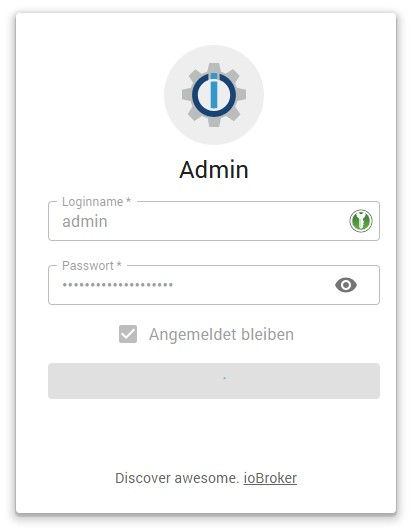
    21ece6f0-c3c4-479e-820c-b637e6d6e4ee-image.jpeg

    Hat jemand einen Tipp?

    Script v.2026-01-31
    
    *** BASE SYSTEM ***
    Operating System: Debian GNU/Linux 13 (trixie)
    Static hostname: RaspberryPi4B
          Icon name: computer
             Kernel: Linux 6.12.75+rpt-rpi-v8
       Architecture: arm64
    OS is similar to:
    
    Model           : Raspberry Pi 4 Model B Rev 1.5
    Docker          : false
    Virtualization  : none
    Kernel          : aarch64
    Userland        : 64 bit
    
    Systemuptime and Load:
    17:13:15 up 7 min,  1 user,  load average: 0.91, 0.87, 0.44
    CPU threads: 4
    
    
    *** LIFE CYCLE STATUS ***
    Operating System is the current Debian stable version codenamed 'trixie'!
    
    *** RASPBERRY THROTTLING ***
    Current issues:
    No throttling issues detected.
    
    Previously detected issues:
    No throttling issues detected.
    
    *** TIME AND TIMEZONES ***
                  Local time: Mon 2026-04-27 17:13:15 CEST
              Universal time: Mon 2026-04-27 15:13:15 UTC
                    RTC time: n/a
                   Time zone: Europe/Berlin (CEST, +0200)
    System clock synchronized: yes
                 NTP service: active
             RTC in local TZ: no
    
    *** Users and Groups ***
    User that called 'iob diag':
    pi
    HOME=/home/pi
    GROUPS=pi adm dialout cdrom sudo audio video plugdev games users netdev gpio i2c spi render input iobroker
    
    User that is running 'js-controller':
    js-controller is not running
    
    *** DISPLAY-SERVER SETUP ***
    Display-Server:         false
    Unit display-manager.service could not be found.
    Display-Manager:
    Desktop:
    Session:                tty
    
    *** MEMORY ***
                  total        used        free      shared  buff/cache   available
    Mem:            4.0G        320M        3.3G        9.9M        399M        3.7G
    Swap:           2.1G          0B        2.1G
    Total:          6.1G        320M        5.5G
    
    Active iob-Instances:   2
    
            3796 M total memory
             306 M used memory
             331 M active memory
             124 M inactive memory
            3180 M free memory
              37 M buffer memory
             343 M swap cache
            2047 M total swap
               0 M used swap
            2047 M free swap
    
    *** top - Table Of Processes  ***
    top - 17:13:16 up 7 min,  1 user,  load average: 0.91, 0.87, 0.44
    Tasks: 183 total,   1 running, 182 sleeping,   0 stopped,   0 zombie
    %Cpu(s):  2.1 us,  0.0 sy,  0.0 ni, 95.8 id,  2.1 wa,  0.0 hi,  0.0 si,  0.0 st
    MiB Mem :   3796.7 total,   3180.1 free,    306.4 used,    381.3 buff/cache
    MiB Swap:   2048.0 total,   2048.0 free,      0.0 used.   3490.3 avail Mem
    
    *** FAILED SERVICES ***
    
     UNIT LOAD ACTIVE SUB DESCRIPTION
    
    0 loaded units listed.
    
    
    *** DMESG CRITICAL ERRORS ***
    No critical errors detected
    
    *** FILESYSTEM ***
    Filesystem     Type      Size  Used Avail Use% Mounted on
    udev           devtmpfs  1.6G     0  1.6G   0% /dev
    tmpfs          tmpfs     760M  9.0M  751M   2% /run
    /dev/mmcblk0p2 ext4       29G  6.0G   22G  22% /
    tmpfs          tmpfs     1.9G     0  1.9G   0% /dev/shm
    tmpfs          tmpfs     5.0M   16K  5.0M   1% /run/lock
    tmpfs          tmpfs     1.0M     0  1.0M   0% /run/credentials/systemd-journald.service
    tmpfs          tmpfs     1.9G  400K  1.9G   1% /tmp
    /dev/mmcblk0p1 vfat      505M   65M  440M  13% /boot/firmware
    tmpfs          tmpfs     1.0M     0  1.0M   0% /run/credentials/getty@tty1.service
    tmpfs          tmpfs     1.0M     0  1.0M   0% /run/credentials/serial-getty@ttyS0.service
    tmpfs          tmpfs     380M  8.0K  380M   1% /run/user/1000
    
    Messages concerning ext4 filesystem in dmesg:
    [Mon Apr 27 17:05:41 2026] EXT4-fs (mmcblk0p2): orphan cleanup on readonly fs
    [Mon Apr 27 17:05:41 2026] EXT4-fs (mmcblk0p2): mounted filesystem e634e0a4-a958-46cb-abad-862d2102573f ro with ordered data mode. Quota mode: none.
    [Mon Apr 27 17:05:44 2026] EXT4-fs (mmcblk0p2): re-mounted e634e0a4-a958-46cb-abad-862d2102573f r/w.
    
    Show mounted filesystems:
    TARGET           SOURCE         FSTYPE OPTIONS
    /                /dev/mmcblk0p2 ext4   rw,noatime,commit=600
    `-/boot/firmware /dev/mmcblk0p1 vfat   rw,relatime,fmask=0022,dmask=0022,codepage=437,iocharset=ascii,shortname=mixed,errors=remount-ro
    
    Files in neuralgic directories:
    
    /var:
    2.5G    /var/
    236M    /var/cache
    230M    /var/cache/apt
    178M    /var/lib
    146M    /var/lib/apt
    
    Archived and active journals take up 8M in the file system.
    
    /opt/iobroker/backups:
    4.0K    /opt/iobroker/backups/
    
    /opt/iobroker/iobroker-data:
    165M    /opt/iobroker/iobroker-data/
    158M    /opt/iobroker/iobroker-data/files
    47M     /opt/iobroker/iobroker-data/files/admin.admin
    46M     /opt/iobroker/iobroker-data/files/admin.admin/custom/assets
    46M     /opt/iobroker/iobroker-data/files/admin.admin/custom
    
    The five largest files in iobroker-data are:
    9.8M    /opt/iobroker/iobroker-data/files/vis-2/material-icons/knx-uf.json
    8.2M    /opt/iobroker/iobroker-data/files/backitup.admin/assets/index-BDfRPp5J.js
    6.8M    /opt/iobroker/iobroker-data/objects.jsonl
    4.6M    /opt/iobroker/iobroker-data/files/javascript.admin/vs/language/typescript/tsWorker.js
    4.1M    /opt/iobroker/iobroker-data/files/vis-2/assets/index-Vp8lqiIh.js
    
    USB-Devices by-id:
    USB-Sticks - Avoid direct links to /dev/tty* in your adapter setups,
    please always prefer the links 'by-id':
    
    No Devices found 'by-id'
    
    No nvbackup.json found.
    
    *** NodeJS-Installation ***
    
    /usr/bin/nodejs         v22.22.2
    /usr/bin/node           v22.22.2
    /usr/bin/npm            10.9.7
    /usr/bin/npx            10.9.7
    
    ✓ Node.js installation is correct
    
    nodejs:
     Installed: 22.22.2-1nodesource1
     Candidate: 22.22.2-1nodesource1
     Version table:
    *** 22.22.2-1nodesource1 1001
           500 https://deb.nodesource.com/node_22.x nodistro/main arm64 Packages
           100 /var/lib/dpkg/status
        22.22.1-1nodesource1 1001
           500 https://deb.nodesource.com/node_22.x nodistro/main arm64 Packages
        22.22.0-1nodesource1 1001
           500 https://deb.nodesource.com/node_22.x nodistro/main arm64 Packages
        22.21.0-1nodesource1 1001
           500 https://deb.nodesource.com/node_22.x nodistro/main arm64 Packages
        22.20.0-1nodesource1 1001
           500 https://deb.nodesource.com/node_22.x nodistro/main arm64 Packages
        22.19.0-1nodesource1 1001
           500 https://deb.nodesource.com/node_22.x nodistro/main arm64 Packages
        22.18.0-1nodesource1 1001
           500 https://deb.nodesource.com/node_22.x nodistro/main arm64 Packages
        22.17.1-1nodesource1 1001
           500 https://deb.nodesource.com/node_22.x nodistro/main arm64 Packages
        22.17.0-1nodesource1 1001
           500 https://deb.nodesource.com/node_22.x nodistro/main arm64 Packages
        22.16.0-1nodesource1 1001
           500 https://deb.nodesource.com/node_22.x nodistro/main arm64 Packages
        22.15.1-1nodesource1 1001
           500 https://deb.nodesource.com/node_22.x nodistro/main arm64 Packages
        22.15.0-1nodesource1 1001
           500 https://deb.nodesource.com/node_22.x nodistro/main arm64 Packages
        22.14.0-1nodesource1 1001
           500 https://deb.nodesource.com/node_22.x nodistro/main arm64 Packages
        22.13.1-1nodesource1 1001
           500 https://deb.nodesource.com/node_22.x nodistro/main arm64 Packages
        22.13.0-1nodesource1 1001
           500 https://deb.nodesource.com/node_22.x nodistro/main arm64 Packages
        22.12.0-1nodesource1 1001
           500 https://deb.nodesource.com/node_22.x nodistro/main arm64 Packages
        22.11.0-1nodesource1 1001
           500 https://deb.nodesource.com/node_22.x nodistro/main arm64 Packages
        22.10.0-1nodesource1 1001
           500 https://deb.nodesource.com/node_22.x nodistro/main arm64 Packages
        22.9.0-1nodesource1 1001
           500 https://deb.nodesource.com/node_22.x nodistro/main arm64 Packages
        22.8.0-1nodesource1 1001
           500 https://deb.nodesource.com/node_22.x nodistro/main arm64 Packages
        22.7.0-1nodesource1 1001
           500 https://deb.nodesource.com/node_22.x nodistro/main arm64 Packages
        22.6.0-1nodesource1 1001
           500 https://deb.nodesource.com/node_22.x nodistro/main arm64 Packages
        22.5.1-1nodesource1 1001
           500 https://deb.nodesource.com/node_22.x nodistro/main arm64 Packages
        22.5.0-1nodesource1 1001
           500 https://deb.nodesource.com/node_22.x nodistro/main arm64 Packages
        22.4.1-1nodesource1 1001
           500 https://deb.nodesource.com/node_22.x nodistro/main arm64 Packages
        22.4.0-1nodesource1 1001
           500 https://deb.nodesource.com/node_22.x nodistro/main arm64 Packages
        22.3.0-1nodesource1 1001
           500 https://deb.nodesource.com/node_22.x nodistro/main arm64 Packages
        22.2.0-1nodesource1 1001
           500 https://deb.nodesource.com/node_22.x nodistro/main arm64 Packages
        22.1.0-1nodesource1 1001
           500 https://deb.nodesource.com/node_22.x nodistro/main arm64 Packages
        22.0.0-1nodesource1 1001
           500 https://deb.nodesource.com/node_22.x nodistro/main arm64 Packages
        20.19.2+dfsg-1+deb13u2 500
           500 http://deb.debian.org/debian-security trixie-security/main arm64 Packages
        20.19.2+dfsg-1 500
           500 http://deb.debian.org/debian trixie/main arm64 Packages
    
    Temp directories causing deletion problem: 0
    No problems detected
    
    Errors in npm tree: 0
    No problems detected
    
    Checking for nodejs vulnerability:
    
    
    █████  ██      ██           ██████   ██████   ██████  ██████         ██
    ██   ██ ██      ██          ██       ██    ██ ██    ██ ██   ██     ██  ██
    ███████ ██      ██          ██   ███ ██    ██ ██    ██ ██   ██         ██
    ██   ██ ██      ██          ██    ██ ██    ██ ██    ██ ██   ██     ██  ██
    ██   ██ ███████ ███████      ██████   ██████   ██████  ██████         ██


    *** ioBroker-Installation ***
    
    ioBroker Status
    Server Cannot start inMem-states on port 9000: Failed to lock DB file "/opt/iobroker/iobroker-data/states.jsonl"!
    
    Hosts:
    RaspberryPi4B       RaspberryPi4B (version: 7.0.7, hostname: RaspberryPi4B , alive, uptime: 2)
    
    Core adapters versions
    js-controller:  7.0.7
    admin:          7.7.22
    javascript:     9.0.18
    
    nodejs modules from github:     0
    
    Adapter State
    + system.adapter.admin.0                  : admin                 : RaspberryPi4B                            -  enabled, port: 8081, bind: 0.0.0.0, run as: admin
     system.adapter.backitup.0               : backitup              : RaspberryPi4B                            -  enabled
     system.adapter.discovery.0              : discovery             : RaspberryPi4B                            -  enabled
     system.adapter.email.0                  : email                 : RaspberryPi4B                            -  enabled
     system.adapter.javascript.0             : javascript            : RaspberryPi4B                            -  enabled
     system.adapter.sql.0                    : sql                   : RaspberryPi4B                            -  enabled
     system.adapter.vis-2.0                  : vis-2                 : RaspberryPi4B                            -  enabled
     system.adapter.web.0                    : web                   : RaspberryPi4B                            -  enabled, port: 8082, bind: 0.0.0.0, run as: admin
    
    + instance is alive
    
    Enabled adapters with bindings
    + system.adapter.admin.0                  : admin                 : RaspberryPi4B                            -  enabled, port: 8081, bind: 0.0.0.0, run as: admin
     system.adapter.web.0                    : web                   : RaspberryPi4B                            -  enabled, port: 8082, bind: 0.0.0.0, run as: admin
    
    ioBroker-Repositories
    ┌─────────┬──────────┬─────────────────────────────────────────────────────────┬──────────────┐
    │ (index) │ name     │ url                                                     │ auto upgrade │
    ├─────────┼──────────┼─────────────────────────────────────────────────────────┼──────────────┤
    │ 0       │ 'stable' │ 'http://download.iobroker.net/sources-dist.json'        │ false        │
    │ 1       │ 'beta'   │ 'http://download.iobroker.net/sources-dist-latest.json' │ false        │
    └─────────┴──────────┴─────────────────────────────────────────────────────────┴──────────────┘
    
    Active repo(s): stable
    Upgrade policy: none
    
    Installed ioBroker-Adapters
    Server Cannot start inMem-states on port 9000: Failed to lock DB file "/opt/iobroker/iobroker-data/states.jsonl"!
    
    Objects and States
    Please stand by - This may take a while
    Objects:        307
    States:         154
    
    *** OS-Repositories and Updates ***
    Hit:1 http://deb.debian.org/debian trixie InRelease
    Hit:2 http://deb.debian.org/debian trixie-updates InRelease
    Hit:3 http://deb.debian.org/debian-security trixie-security InRelease
    Hit:4 http://archive.raspberrypi.com/debian trixie InRelease
    Hit:5 https://deb.nodesource.com/node_22.x nodistro InRelease
    Reading package lists...
    Pending systemupdates: 0
    
    *** Listening Ports ***
    Active Internet connections (only servers)
    Proto Recv-Q Send-Q Local Address           Foreign Address         State       User       Inode      PID/Program name
    tcp        0      0 0.0.0.0:111             0.0.0.0:*               LISTEN      0          1786       1/init
    tcp        0      0 0.0.0.0:22              0.0.0.0:*               LISTEN      0          5092       832/sshd: /usr/sbin
    tcp6       0      0 :::111                  :::*                    LISTEN      0          4235       1/init
    tcp6       0      0 :::22                   :::*                    LISTEN      0          5094       832/sshd: /usr/sbin
    udp        0      0 0.0.0.0:5353            0.0.0.0:*                           101        5786       618/avahi-daemon: r
    udp        0      0 0.0.0.0:111             0.0.0.0:*                           0          310        1/init
    udp        0      0 0.0.0.0:49308           0.0.0.0:*                           101        5788       618/avahi-daemon: r
    udp6       0      0 :::5353                 :::*                                101        5787       618/avahi-daemon: r
    udp6       0      0 :::38517                :::*                                101        5789       618/avahi-daemon: r
    udp6       0      0 :::111                  :::*                                0          311        1/init
    udp6       0      0 fe80::40c2:682b:e9a:546 :::*                                0          9218       673/NetworkManager
    
    *** Log File - Last 25 Lines ***
    
    2026-04-27 17:14:22.706  - info: host.RaspberryPi4B stopInstance system.adapter.backitup.0 (force=false, process=false)
    2026-04-27 17:14:22.706  - info: host.RaspberryPi4B stopInstance system.adapter.discovery.0 (force=false, process=true)
    2026-04-27 17:14:22.707  - info: host.RaspberryPi4B stopInstance system.adapter.email.0 (force=false, process=false)
    2026-04-27 17:14:22.707  - info: host.RaspberryPi4B stopInstance system.adapter.web.0 (force=false, process=false)
    2026-04-27 17:14:22.708  - info: host.RaspberryPi4B stopInstance system.adapter.vis-2.0 (force=false, process=false)
    2026-04-27 17:14:22.722  - info: javascript.0 (3041) Got terminate signal TERMINATE_YOURSELF
    2026-04-27 17:14:22.725  - info: admin.0 (3022) Got terminate signal TERMINATE_YOURSELF
    2026-04-27 17:14:22.733  - info: host.RaspberryPi4B stopInstance system.adapter.admin.0 send kill signal
    2026-04-27 17:14:22.735  - info: host.RaspberryPi4B stopInstance system.adapter.javascript.0 send kill signal
    2026-04-27 17:14:22.735  - info: host.RaspberryPi4B stopInstance system.adapter.discovery.0 send kill signal
    2026-04-27 17:14:22.730  - info: javascript.0 (3041) terminating
    2026-04-27 17:14:22.736  - info: javascript.0 (3041) Terminated (ADAPTER_REQUESTED_TERMINATION): Without reason
    2026-04-27 17:14:22.727  - info: admin.0 (3022) terminating http server on port 8081
    2026-04-27 17:14:22.738  - info: admin.0 (3022) terminating
    2026-04-27 17:14:22.744  - info: admin.0 (3022) Terminated (ADAPTER_REQUESTED_TERMINATION): Without reason
    2026-04-27 17:14:23.229  - info: javascript.0 (3041) terminating
    2026-04-27 17:14:23.246  - info: admin.0 (3022) terminating
    2026-04-27 17:14:23.314  - info: host.RaspberryPi4B instance system.adapter.javascript.0 terminated with code 11 (ADAPTER_REQUESTED_TERMINATION)
    2026-04-27 17:14:23.337  - info: host.RaspberryPi4B instance system.adapter.admin.0 terminated with code 11 (ADAPTER_REQUESTED_TERMINATION)
    2026-04-27 17:14:28.781  - error: sql.0 (3090) Objects database error: connect ECONNREFUSED 127.0.0.1:9001
    2026-04-27 17:14:28.784  - error: sql.0 (3090) States database error: connect ECONNREFUSED 127.0.0.1:9000
    2026-04-27 17:14:33.792  - error: sql.0 (3090) States database error: connect ECONNREFUSED 127.0.0.1:9000
    2026-04-27 17:14:33.795  - error: sql.0 (3090) Objects database error: connect ECONNREFUSED 127.0.0.1:9001
    2026-04-27 17:14:33.922  - info: sql.0 (3090) terminating with timeout
    2026-04-27 17:14:33.924  - info: sql.0 (3090) Terminated (NO_ERROR): Without reason


    HomoranH 2 Antworten Letzte Antwort
    0
    • S Sneak-L8

      Hallo zusammen,
      habe gerade den Versuch unternommen, meinen Raspi mit ioBroker von Bookworm auf Trixie upzudaten. Alte Installation mit Backitup gesichert und Einstellungen von backitup gesichert. Dann neues Raspi-Image mit Imager gemäß Anleitung ("...einfacher geht's nicht") im Forum erstellt.

      ioBroker fuhr auch sauber hoch und Ersteinstellungen und Adapter-Updates wurden problemlos durchgeführt. Dann habe ich in Backitup die gesicherten Einstellungen hochgeladen.
      Da blieb er dann ewig hängen (ioBroker-Seite wird grau und nichts tut sich mehr). Irgendwann war er wieder da, aber es waren keine (wiederhergestellten) Einstellungen von CIFS etc. zu sehen. Also noch mal gemacht: wieder ioBroker-Hänger (in der linken oberen Ecke lief ein Kreisel mit einer 1 drin). Ab dann war die IP von ioBroker nicht mehr erreichbar.

      Reboot gemacht, iob diag => "all good", aber jetzt reagiert der Host nichts mehr (keine Verbindung zu 192.168.97.59 möglich"). Laut Fritzbox hat der Rapsi aber weiterhin diese IP und sei online. Mit SSH kann ich mich weiterhin verbinden.

      system.adapter.admin.0 : admin : RaspberryPi4B - enabled, port: 8081, bind: 0.0.0.0, run as: admin
      iob fix habe ich auch schon gemacht, leider keine Besserung.

      Jetzt habe ich den Raspi 4 mit der neuen SD-Karte nach ein paar Stunden nochmals gestartet. Jetzt kommt der Anmeldebildschirm (hab erstmals angegeben, dass ioBroker die Credentials bei Start der Admin-Seite abfragt). Nach Eingabe der Daten passiert aber erstmal nichts. auch nach 10 Minuten bleibt die Anzeige unverändert.
      21ece6f0-c3c4-479e-820c-b637e6d6e4ee-image.jpeg

      Hat jemand einen Tipp?

      Script v.2026-01-31
      
      *** BASE SYSTEM ***
      Operating System: Debian GNU/Linux 13 (trixie)
      Static hostname: RaspberryPi4B
            Icon name: computer
               Kernel: Linux 6.12.75+rpt-rpi-v8
         Architecture: arm64
      OS is similar to:
      
      Model           : Raspberry Pi 4 Model B Rev 1.5
      Docker          : false
      Virtualization  : none
      Kernel          : aarch64
      Userland        : 64 bit
      
      Systemuptime and Load:
      17:13:15 up 7 min,  1 user,  load average: 0.91, 0.87, 0.44
      CPU threads: 4
      
      
      *** LIFE CYCLE STATUS ***
      Operating System is the current Debian stable version codenamed 'trixie'!
      
      *** RASPBERRY THROTTLING ***
      Current issues:
      No throttling issues detected.
      
      Previously detected issues:
      No throttling issues detected.
      
      *** TIME AND TIMEZONES ***
                    Local time: Mon 2026-04-27 17:13:15 CEST
                Universal time: Mon 2026-04-27 15:13:15 UTC
                      RTC time: n/a
                     Time zone: Europe/Berlin (CEST, +0200)
      System clock synchronized: yes
                   NTP service: active
               RTC in local TZ: no
      
      *** Users and Groups ***
      User that called 'iob diag':
      pi
      HOME=/home/pi
      GROUPS=pi adm dialout cdrom sudo audio video plugdev games users netdev gpio i2c spi render input iobroker
      
      User that is running 'js-controller':
      js-controller is not running
      
      *** DISPLAY-SERVER SETUP ***
      Display-Server:         false
      Unit display-manager.service could not be found.
      Display-Manager:
      Desktop:
      Session:                tty
      
      *** MEMORY ***
                    total        used        free      shared  buff/cache   available
      Mem:            4.0G        320M        3.3G        9.9M        399M        3.7G
      Swap:           2.1G          0B        2.1G
      Total:          6.1G        320M        5.5G
      
      Active iob-Instances:   2
      
              3796 M total memory
               306 M used memory
               331 M active memory
               124 M inactive memory
              3180 M free memory
                37 M buffer memory
               343 M swap cache
              2047 M total swap
                 0 M used swap
              2047 M free swap
      
      *** top - Table Of Processes  ***
      top - 17:13:16 up 7 min,  1 user,  load average: 0.91, 0.87, 0.44
      Tasks: 183 total,   1 running, 182 sleeping,   0 stopped,   0 zombie
      %Cpu(s):  2.1 us,  0.0 sy,  0.0 ni, 95.8 id,  2.1 wa,  0.0 hi,  0.0 si,  0.0 st
      MiB Mem :   3796.7 total,   3180.1 free,    306.4 used,    381.3 buff/cache
      MiB Swap:   2048.0 total,   2048.0 free,      0.0 used.   3490.3 avail Mem
      
      *** FAILED SERVICES ***
      
       UNIT LOAD ACTIVE SUB DESCRIPTION
      
      0 loaded units listed.
      
      
      *** DMESG CRITICAL ERRORS ***
      No critical errors detected
      
      *** FILESYSTEM ***
      Filesystem     Type      Size  Used Avail Use% Mounted on
      udev           devtmpfs  1.6G     0  1.6G   0% /dev
      tmpfs          tmpfs     760M  9.0M  751M   2% /run
      /dev/mmcblk0p2 ext4       29G  6.0G   22G  22% /
      tmpfs          tmpfs     1.9G     0  1.9G   0% /dev/shm
      tmpfs          tmpfs     5.0M   16K  5.0M   1% /run/lock
      tmpfs          tmpfs     1.0M     0  1.0M   0% /run/credentials/systemd-journald.service
      tmpfs          tmpfs     1.9G  400K  1.9G   1% /tmp
      /dev/mmcblk0p1 vfat      505M   65M  440M  13% /boot/firmware
      tmpfs          tmpfs     1.0M     0  1.0M   0% /run/credentials/getty@tty1.service
      tmpfs          tmpfs     1.0M     0  1.0M   0% /run/credentials/serial-getty@ttyS0.service
      tmpfs          tmpfs     380M  8.0K  380M   1% /run/user/1000
      
      Messages concerning ext4 filesystem in dmesg:
      [Mon Apr 27 17:05:41 2026] EXT4-fs (mmcblk0p2): orphan cleanup on readonly fs
      [Mon Apr 27 17:05:41 2026] EXT4-fs (mmcblk0p2): mounted filesystem e634e0a4-a958-46cb-abad-862d2102573f ro with ordered data mode. Quota mode: none.
      [Mon Apr 27 17:05:44 2026] EXT4-fs (mmcblk0p2): re-mounted e634e0a4-a958-46cb-abad-862d2102573f r/w.
      
      Show mounted filesystems:
      TARGET           SOURCE         FSTYPE OPTIONS
      /                /dev/mmcblk0p2 ext4   rw,noatime,commit=600
      `-/boot/firmware /dev/mmcblk0p1 vfat   rw,relatime,fmask=0022,dmask=0022,codepage=437,iocharset=ascii,shortname=mixed,errors=remount-ro
      
      Files in neuralgic directories:
      
      /var:
      2.5G    /var/
      236M    /var/cache
      230M    /var/cache/apt
      178M    /var/lib
      146M    /var/lib/apt
      
      Archived and active journals take up 8M in the file system.
      
      /opt/iobroker/backups:
      4.0K    /opt/iobroker/backups/
      
      /opt/iobroker/iobroker-data:
      165M    /opt/iobroker/iobroker-data/
      158M    /opt/iobroker/iobroker-data/files
      47M     /opt/iobroker/iobroker-data/files/admin.admin
      46M     /opt/iobroker/iobroker-data/files/admin.admin/custom/assets
      46M     /opt/iobroker/iobroker-data/files/admin.admin/custom
      
      The five largest files in iobroker-data are:
      9.8M    /opt/iobroker/iobroker-data/files/vis-2/material-icons/knx-uf.json
      8.2M    /opt/iobroker/iobroker-data/files/backitup.admin/assets/index-BDfRPp5J.js
      6.8M    /opt/iobroker/iobroker-data/objects.jsonl
      4.6M    /opt/iobroker/iobroker-data/files/javascript.admin/vs/language/typescript/tsWorker.js
      4.1M    /opt/iobroker/iobroker-data/files/vis-2/assets/index-Vp8lqiIh.js
      
      USB-Devices by-id:
      USB-Sticks - Avoid direct links to /dev/tty* in your adapter setups,
      please always prefer the links 'by-id':
      
      No Devices found 'by-id'
      
      No nvbackup.json found.
      
      *** NodeJS-Installation ***
      
      /usr/bin/nodejs         v22.22.2
      /usr/bin/node           v22.22.2
      /usr/bin/npm            10.9.7
      /usr/bin/npx            10.9.7
      
      ✓ Node.js installation is correct
      
      nodejs:
       Installed: 22.22.2-1nodesource1
       Candidate: 22.22.2-1nodesource1
       Version table:
      *** 22.22.2-1nodesource1 1001
             500 https://deb.nodesource.com/node_22.x nodistro/main arm64 Packages
             100 /var/lib/dpkg/status
          22.22.1-1nodesource1 1001
             500 https://deb.nodesource.com/node_22.x nodistro/main arm64 Packages
          22.22.0-1nodesource1 1001
             500 https://deb.nodesource.com/node_22.x nodistro/main arm64 Packages
          22.21.0-1nodesource1 1001
             500 https://deb.nodesource.com/node_22.x nodistro/main arm64 Packages
          22.20.0-1nodesource1 1001
             500 https://deb.nodesource.com/node_22.x nodistro/main arm64 Packages
          22.19.0-1nodesource1 1001
             500 https://deb.nodesource.com/node_22.x nodistro/main arm64 Packages
          22.18.0-1nodesource1 1001
             500 https://deb.nodesource.com/node_22.x nodistro/main arm64 Packages
          22.17.1-1nodesource1 1001
             500 https://deb.nodesource.com/node_22.x nodistro/main arm64 Packages
          22.17.0-1nodesource1 1001
             500 https://deb.nodesource.com/node_22.x nodistro/main arm64 Packages
          22.16.0-1nodesource1 1001
             500 https://deb.nodesource.com/node_22.x nodistro/main arm64 Packages
          22.15.1-1nodesource1 1001
             500 https://deb.nodesource.com/node_22.x nodistro/main arm64 Packages
          22.15.0-1nodesource1 1001
             500 https://deb.nodesource.com/node_22.x nodistro/main arm64 Packages
          22.14.0-1nodesource1 1001
             500 https://deb.nodesource.com/node_22.x nodistro/main arm64 Packages
          22.13.1-1nodesource1 1001
             500 https://deb.nodesource.com/node_22.x nodistro/main arm64 Packages
          22.13.0-1nodesource1 1001
             500 https://deb.nodesource.com/node_22.x nodistro/main arm64 Packages
          22.12.0-1nodesource1 1001
             500 https://deb.nodesource.com/node_22.x nodistro/main arm64 Packages
          22.11.0-1nodesource1 1001
             500 https://deb.nodesource.com/node_22.x nodistro/main arm64 Packages
          22.10.0-1nodesource1 1001
             500 https://deb.nodesource.com/node_22.x nodistro/main arm64 Packages
          22.9.0-1nodesource1 1001
             500 https://deb.nodesource.com/node_22.x nodistro/main arm64 Packages
          22.8.0-1nodesource1 1001
             500 https://deb.nodesource.com/node_22.x nodistro/main arm64 Packages
          22.7.0-1nodesource1 1001
             500 https://deb.nodesource.com/node_22.x nodistro/main arm64 Packages
          22.6.0-1nodesource1 1001
             500 https://deb.nodesource.com/node_22.x nodistro/main arm64 Packages
          22.5.1-1nodesource1 1001
             500 https://deb.nodesource.com/node_22.x nodistro/main arm64 Packages
          22.5.0-1nodesource1 1001
             500 https://deb.nodesource.com/node_22.x nodistro/main arm64 Packages
          22.4.1-1nodesource1 1001
             500 https://deb.nodesource.com/node_22.x nodistro/main arm64 Packages
          22.4.0-1nodesource1 1001
             500 https://deb.nodesource.com/node_22.x nodistro/main arm64 Packages
          22.3.0-1nodesource1 1001
             500 https://deb.nodesource.com/node_22.x nodistro/main arm64 Packages
          22.2.0-1nodesource1 1001
             500 https://deb.nodesource.com/node_22.x nodistro/main arm64 Packages
          22.1.0-1nodesource1 1001
             500 https://deb.nodesource.com/node_22.x nodistro/main arm64 Packages
          22.0.0-1nodesource1 1001
             500 https://deb.nodesource.com/node_22.x nodistro/main arm64 Packages
          20.19.2+dfsg-1+deb13u2 500
             500 http://deb.debian.org/debian-security trixie-security/main arm64 Packages
          20.19.2+dfsg-1 500
             500 http://deb.debian.org/debian trixie/main arm64 Packages
      
      Temp directories causing deletion problem: 0
      No problems detected
      
      Errors in npm tree: 0
      No problems detected
      
      Checking for nodejs vulnerability:
      
      
      █████  ██      ██           ██████   ██████   ██████  ██████         ██
      ██   ██ ██      ██          ██       ██    ██ ██    ██ ██   ██     ██  ██
      ███████ ██      ██          ██   ███ ██    ██ ██    ██ ██   ██         ██
      ██   ██ ██      ██          ██    ██ ██    ██ ██    ██ ██   ██     ██  ██
      ██   ██ ███████ ███████      ██████   ██████   ██████  ██████         ██


      *** ioBroker-Installation ***
      
      ioBroker Status
      Server Cannot start inMem-states on port 9000: Failed to lock DB file "/opt/iobroker/iobroker-data/states.jsonl"!
      
      Hosts:
      RaspberryPi4B       RaspberryPi4B (version: 7.0.7, hostname: RaspberryPi4B , alive, uptime: 2)
      
      Core adapters versions
      js-controller:  7.0.7
      admin:          7.7.22
      javascript:     9.0.18
      
      nodejs modules from github:     0
      
      Adapter State
      + system.adapter.admin.0                  : admin                 : RaspberryPi4B                            -  enabled, port: 8081, bind: 0.0.0.0, run as: admin
       system.adapter.backitup.0               : backitup              : RaspberryPi4B                            -  enabled
       system.adapter.discovery.0              : discovery             : RaspberryPi4B                            -  enabled
       system.adapter.email.0                  : email                 : RaspberryPi4B                            -  enabled
       system.adapter.javascript.0             : javascript            : RaspberryPi4B                            -  enabled
       system.adapter.sql.0                    : sql                   : RaspberryPi4B                            -  enabled
       system.adapter.vis-2.0                  : vis-2                 : RaspberryPi4B                            -  enabled
       system.adapter.web.0                    : web                   : RaspberryPi4B                            -  enabled, port: 8082, bind: 0.0.0.0, run as: admin
      
      + instance is alive
      
      Enabled adapters with bindings
      + system.adapter.admin.0                  : admin                 : RaspberryPi4B                            -  enabled, port: 8081, bind: 0.0.0.0, run as: admin
       system.adapter.web.0                    : web                   : RaspberryPi4B                            -  enabled, port: 8082, bind: 0.0.0.0, run as: admin
      
      ioBroker-Repositories
      ┌─────────┬──────────┬─────────────────────────────────────────────────────────┬──────────────┐
      │ (index) │ name     │ url                                                     │ auto upgrade │
      ├─────────┼──────────┼─────────────────────────────────────────────────────────┼──────────────┤
      │ 0       │ 'stable' │ 'http://download.iobroker.net/sources-dist.json'        │ false        │
      │ 1       │ 'beta'   │ 'http://download.iobroker.net/sources-dist-latest.json' │ false        │
      └─────────┴──────────┴─────────────────────────────────────────────────────────┴──────────────┘
      
      Active repo(s): stable
      Upgrade policy: none
      
      Installed ioBroker-Adapters
      Server Cannot start inMem-states on port 9000: Failed to lock DB file "/opt/iobroker/iobroker-data/states.jsonl"!
      
      Objects and States
      Please stand by - This may take a while
      Objects:        307
      States:         154
      
      *** OS-Repositories and Updates ***
      Hit:1 http://deb.debian.org/debian trixie InRelease
      Hit:2 http://deb.debian.org/debian trixie-updates InRelease
      Hit:3 http://deb.debian.org/debian-security trixie-security InRelease
      Hit:4 http://archive.raspberrypi.com/debian trixie InRelease
      Hit:5 https://deb.nodesource.com/node_22.x nodistro InRelease
      Reading package lists...
      Pending systemupdates: 0
      
      *** Listening Ports ***
      Active Internet connections (only servers)
      Proto Recv-Q Send-Q Local Address           Foreign Address         State       User       Inode      PID/Program name
      tcp        0      0 0.0.0.0:111             0.0.0.0:*               LISTEN      0          1786       1/init
      tcp        0      0 0.0.0.0:22              0.0.0.0:*               LISTEN      0          5092       832/sshd: /usr/sbin
      tcp6       0      0 :::111                  :::*                    LISTEN      0          4235       1/init
      tcp6       0      0 :::22                   :::*                    LISTEN      0          5094       832/sshd: /usr/sbin
      udp        0      0 0.0.0.0:5353            0.0.0.0:*                           101        5786       618/avahi-daemon: r
      udp        0      0 0.0.0.0:111             0.0.0.0:*                           0          310        1/init
      udp        0      0 0.0.0.0:49308           0.0.0.0:*                           101        5788       618/avahi-daemon: r
      udp6       0      0 :::5353                 :::*                                101        5787       618/avahi-daemon: r
      udp6       0      0 :::38517                :::*                                101        5789       618/avahi-daemon: r
      udp6       0      0 :::111                  :::*                                0          311        1/init
      udp6       0      0 fe80::40c2:682b:e9a:546 :::*                                0          9218       673/NetworkManager
      
      *** Log File - Last 25 Lines ***
      
      2026-04-27 17:14:22.706  - info: host.RaspberryPi4B stopInstance system.adapter.backitup.0 (force=false, process=false)
      2026-04-27 17:14:22.706  - info: host.RaspberryPi4B stopInstance system.adapter.discovery.0 (force=false, process=true)
      2026-04-27 17:14:22.707  - info: host.RaspberryPi4B stopInstance system.adapter.email.0 (force=false, process=false)
      2026-04-27 17:14:22.707  - info: host.RaspberryPi4B stopInstance system.adapter.web.0 (force=false, process=false)
      2026-04-27 17:14:22.708  - info: host.RaspberryPi4B stopInstance system.adapter.vis-2.0 (force=false, process=false)
      2026-04-27 17:14:22.722  - info: javascript.0 (3041) Got terminate signal TERMINATE_YOURSELF
      2026-04-27 17:14:22.725  - info: admin.0 (3022) Got terminate signal TERMINATE_YOURSELF
      2026-04-27 17:14:22.733  - info: host.RaspberryPi4B stopInstance system.adapter.admin.0 send kill signal
      2026-04-27 17:14:22.735  - info: host.RaspberryPi4B stopInstance system.adapter.javascript.0 send kill signal
      2026-04-27 17:14:22.735  - info: host.RaspberryPi4B stopInstance system.adapter.discovery.0 send kill signal
      2026-04-27 17:14:22.730  - info: javascript.0 (3041) terminating
      2026-04-27 17:14:22.736  - info: javascript.0 (3041) Terminated (ADAPTER_REQUESTED_TERMINATION): Without reason
      2026-04-27 17:14:22.727  - info: admin.0 (3022) terminating http server on port 8081
      2026-04-27 17:14:22.738  - info: admin.0 (3022) terminating
      2026-04-27 17:14:22.744  - info: admin.0 (3022) Terminated (ADAPTER_REQUESTED_TERMINATION): Without reason
      2026-04-27 17:14:23.229  - info: javascript.0 (3041) terminating
      2026-04-27 17:14:23.246  - info: admin.0 (3022) terminating
      2026-04-27 17:14:23.314  - info: host.RaspberryPi4B instance system.adapter.javascript.0 terminated with code 11 (ADAPTER_REQUESTED_TERMINATION)
      2026-04-27 17:14:23.337  - info: host.RaspberryPi4B instance system.adapter.admin.0 terminated with code 11 (ADAPTER_REQUESTED_TERMINATION)
      2026-04-27 17:14:28.781  - error: sql.0 (3090) Objects database error: connect ECONNREFUSED 127.0.0.1:9001
      2026-04-27 17:14:28.784  - error: sql.0 (3090) States database error: connect ECONNREFUSED 127.0.0.1:9000
      2026-04-27 17:14:33.792  - error: sql.0 (3090) States database error: connect ECONNREFUSED 127.0.0.1:9000
      2026-04-27 17:14:33.795  - error: sql.0 (3090) Objects database error: connect ECONNREFUSED 127.0.0.1:9001
      2026-04-27 17:14:33.922  - info: sql.0 (3090) terminating with timeout
      2026-04-27 17:14:33.924  - info: sql.0 (3090) Terminated (NO_ERROR): Without reason


      HomoranH Nicht stören
      HomoranH Nicht stören
      Homoran
      Global Moderator Administrators
      schrieb zuletzt editiert von
      #2

      @Sneak-L8 sagte:

      iob diag => "all good"

      Bedeutet ausschließlich dass keine node Pakete mit bekannten Sicherheitslücken in deiner Installation vorhanden sind.

      Also bitte den ganzen output zeigen

      kein Support per PN! - Fragen im Forum stellen -
      Benutzt das Voting rechts unten im Beitrag wenn er euch geholfen hat.
      Das Forum freut sich über eine Spende. Benutzt dazu den Spendenbutton oben rechts. Danke!
      der Installationsfixer: curl -fsL https://iobroker.net/fix.sh | bash -

      1 Antwort Letzte Antwort
      0
      • S Offline
        S Offline
        Sneak-L8
        schrieb zuletzt editiert von
        #3

        Der ist doch am Ende des Posts im Spoiler.

        1 Antwort Letzte Antwort
        0
        • S Sneak-L8

          Hallo zusammen,
          habe gerade den Versuch unternommen, meinen Raspi mit ioBroker von Bookworm auf Trixie upzudaten. Alte Installation mit Backitup gesichert und Einstellungen von backitup gesichert. Dann neues Raspi-Image mit Imager gemäß Anleitung ("...einfacher geht's nicht") im Forum erstellt.

          ioBroker fuhr auch sauber hoch und Ersteinstellungen und Adapter-Updates wurden problemlos durchgeführt. Dann habe ich in Backitup die gesicherten Einstellungen hochgeladen.
          Da blieb er dann ewig hängen (ioBroker-Seite wird grau und nichts tut sich mehr). Irgendwann war er wieder da, aber es waren keine (wiederhergestellten) Einstellungen von CIFS etc. zu sehen. Also noch mal gemacht: wieder ioBroker-Hänger (in der linken oberen Ecke lief ein Kreisel mit einer 1 drin). Ab dann war die IP von ioBroker nicht mehr erreichbar.

          Reboot gemacht, iob diag => "all good", aber jetzt reagiert der Host nichts mehr (keine Verbindung zu 192.168.97.59 möglich"). Laut Fritzbox hat der Rapsi aber weiterhin diese IP und sei online. Mit SSH kann ich mich weiterhin verbinden.

          system.adapter.admin.0 : admin : RaspberryPi4B - enabled, port: 8081, bind: 0.0.0.0, run as: admin
          iob fix habe ich auch schon gemacht, leider keine Besserung.

          Jetzt habe ich den Raspi 4 mit der neuen SD-Karte nach ein paar Stunden nochmals gestartet. Jetzt kommt der Anmeldebildschirm (hab erstmals angegeben, dass ioBroker die Credentials bei Start der Admin-Seite abfragt). Nach Eingabe der Daten passiert aber erstmal nichts. auch nach 10 Minuten bleibt die Anzeige unverändert.
          21ece6f0-c3c4-479e-820c-b637e6d6e4ee-image.jpeg

          Hat jemand einen Tipp?

          Script v.2026-01-31
          
          *** BASE SYSTEM ***
          Operating System: Debian GNU/Linux 13 (trixie)
          Static hostname: RaspberryPi4B
                Icon name: computer
                   Kernel: Linux 6.12.75+rpt-rpi-v8
             Architecture: arm64
          OS is similar to:
          
          Model           : Raspberry Pi 4 Model B Rev 1.5
          Docker          : false
          Virtualization  : none
          Kernel          : aarch64
          Userland        : 64 bit
          
          Systemuptime and Load:
          17:13:15 up 7 min,  1 user,  load average: 0.91, 0.87, 0.44
          CPU threads: 4
          
          
          *** LIFE CYCLE STATUS ***
          Operating System is the current Debian stable version codenamed 'trixie'!
          
          *** RASPBERRY THROTTLING ***
          Current issues:
          No throttling issues detected.
          
          Previously detected issues:
          No throttling issues detected.
          
          *** TIME AND TIMEZONES ***
                        Local time: Mon 2026-04-27 17:13:15 CEST
                    Universal time: Mon 2026-04-27 15:13:15 UTC
                          RTC time: n/a
                         Time zone: Europe/Berlin (CEST, +0200)
          System clock synchronized: yes
                       NTP service: active
                   RTC in local TZ: no
          
          *** Users and Groups ***
          User that called 'iob diag':
          pi
          HOME=/home/pi
          GROUPS=pi adm dialout cdrom sudo audio video plugdev games users netdev gpio i2c spi render input iobroker
          
          User that is running 'js-controller':
          js-controller is not running
          
          *** DISPLAY-SERVER SETUP ***
          Display-Server:         false
          Unit display-manager.service could not be found.
          Display-Manager:
          Desktop:
          Session:                tty
          
          *** MEMORY ***
                        total        used        free      shared  buff/cache   available
          Mem:            4.0G        320M        3.3G        9.9M        399M        3.7G
          Swap:           2.1G          0B        2.1G
          Total:          6.1G        320M        5.5G
          
          Active iob-Instances:   2
          
                  3796 M total memory
                   306 M used memory
                   331 M active memory
                   124 M inactive memory
                  3180 M free memory
                    37 M buffer memory
                   343 M swap cache
                  2047 M total swap
                     0 M used swap
                  2047 M free swap
          
          *** top - Table Of Processes  ***
          top - 17:13:16 up 7 min,  1 user,  load average: 0.91, 0.87, 0.44
          Tasks: 183 total,   1 running, 182 sleeping,   0 stopped,   0 zombie
          %Cpu(s):  2.1 us,  0.0 sy,  0.0 ni, 95.8 id,  2.1 wa,  0.0 hi,  0.0 si,  0.0 st
          MiB Mem :   3796.7 total,   3180.1 free,    306.4 used,    381.3 buff/cache
          MiB Swap:   2048.0 total,   2048.0 free,      0.0 used.   3490.3 avail Mem
          
          *** FAILED SERVICES ***
          
           UNIT LOAD ACTIVE SUB DESCRIPTION
          
          0 loaded units listed.
          
          
          *** DMESG CRITICAL ERRORS ***
          No critical errors detected
          
          *** FILESYSTEM ***
          Filesystem     Type      Size  Used Avail Use% Mounted on
          udev           devtmpfs  1.6G     0  1.6G   0% /dev
          tmpfs          tmpfs     760M  9.0M  751M   2% /run
          /dev/mmcblk0p2 ext4       29G  6.0G   22G  22% /
          tmpfs          tmpfs     1.9G     0  1.9G   0% /dev/shm
          tmpfs          tmpfs     5.0M   16K  5.0M   1% /run/lock
          tmpfs          tmpfs     1.0M     0  1.0M   0% /run/credentials/systemd-journald.service
          tmpfs          tmpfs     1.9G  400K  1.9G   1% /tmp
          /dev/mmcblk0p1 vfat      505M   65M  440M  13% /boot/firmware
          tmpfs          tmpfs     1.0M     0  1.0M   0% /run/credentials/getty@tty1.service
          tmpfs          tmpfs     1.0M     0  1.0M   0% /run/credentials/serial-getty@ttyS0.service
          tmpfs          tmpfs     380M  8.0K  380M   1% /run/user/1000
          
          Messages concerning ext4 filesystem in dmesg:
          [Mon Apr 27 17:05:41 2026] EXT4-fs (mmcblk0p2): orphan cleanup on readonly fs
          [Mon Apr 27 17:05:41 2026] EXT4-fs (mmcblk0p2): mounted filesystem e634e0a4-a958-46cb-abad-862d2102573f ro with ordered data mode. Quota mode: none.
          [Mon Apr 27 17:05:44 2026] EXT4-fs (mmcblk0p2): re-mounted e634e0a4-a958-46cb-abad-862d2102573f r/w.
          
          Show mounted filesystems:
          TARGET           SOURCE         FSTYPE OPTIONS
          /                /dev/mmcblk0p2 ext4   rw,noatime,commit=600
          `-/boot/firmware /dev/mmcblk0p1 vfat   rw,relatime,fmask=0022,dmask=0022,codepage=437,iocharset=ascii,shortname=mixed,errors=remount-ro
          
          Files in neuralgic directories:
          
          /var:
          2.5G    /var/
          236M    /var/cache
          230M    /var/cache/apt
          178M    /var/lib
          146M    /var/lib/apt
          
          Archived and active journals take up 8M in the file system.
          
          /opt/iobroker/backups:
          4.0K    /opt/iobroker/backups/
          
          /opt/iobroker/iobroker-data:
          165M    /opt/iobroker/iobroker-data/
          158M    /opt/iobroker/iobroker-data/files
          47M     /opt/iobroker/iobroker-data/files/admin.admin
          46M     /opt/iobroker/iobroker-data/files/admin.admin/custom/assets
          46M     /opt/iobroker/iobroker-data/files/admin.admin/custom
          
          The five largest files in iobroker-data are:
          9.8M    /opt/iobroker/iobroker-data/files/vis-2/material-icons/knx-uf.json
          8.2M    /opt/iobroker/iobroker-data/files/backitup.admin/assets/index-BDfRPp5J.js
          6.8M    /opt/iobroker/iobroker-data/objects.jsonl
          4.6M    /opt/iobroker/iobroker-data/files/javascript.admin/vs/language/typescript/tsWorker.js
          4.1M    /opt/iobroker/iobroker-data/files/vis-2/assets/index-Vp8lqiIh.js
          
          USB-Devices by-id:
          USB-Sticks - Avoid direct links to /dev/tty* in your adapter setups,
          please always prefer the links 'by-id':
          
          No Devices found 'by-id'
          
          No nvbackup.json found.
          
          *** NodeJS-Installation ***
          
          /usr/bin/nodejs         v22.22.2
          /usr/bin/node           v22.22.2
          /usr/bin/npm            10.9.7
          /usr/bin/npx            10.9.7
          
          ✓ Node.js installation is correct
          
          nodejs:
           Installed: 22.22.2-1nodesource1
           Candidate: 22.22.2-1nodesource1
           Version table:
          *** 22.22.2-1nodesource1 1001
                 500 https://deb.nodesource.com/node_22.x nodistro/main arm64 Packages
                 100 /var/lib/dpkg/status
              22.22.1-1nodesource1 1001
                 500 https://deb.nodesource.com/node_22.x nodistro/main arm64 Packages
              22.22.0-1nodesource1 1001
                 500 https://deb.nodesource.com/node_22.x nodistro/main arm64 Packages
              22.21.0-1nodesource1 1001
                 500 https://deb.nodesource.com/node_22.x nodistro/main arm64 Packages
              22.20.0-1nodesource1 1001
                 500 https://deb.nodesource.com/node_22.x nodistro/main arm64 Packages
              22.19.0-1nodesource1 1001
                 500 https://deb.nodesource.com/node_22.x nodistro/main arm64 Packages
              22.18.0-1nodesource1 1001
                 500 https://deb.nodesource.com/node_22.x nodistro/main arm64 Packages
              22.17.1-1nodesource1 1001
                 500 https://deb.nodesource.com/node_22.x nodistro/main arm64 Packages
              22.17.0-1nodesource1 1001
                 500 https://deb.nodesource.com/node_22.x nodistro/main arm64 Packages
              22.16.0-1nodesource1 1001
                 500 https://deb.nodesource.com/node_22.x nodistro/main arm64 Packages
              22.15.1-1nodesource1 1001
                 500 https://deb.nodesource.com/node_22.x nodistro/main arm64 Packages
              22.15.0-1nodesource1 1001
                 500 https://deb.nodesource.com/node_22.x nodistro/main arm64 Packages
              22.14.0-1nodesource1 1001
                 500 https://deb.nodesource.com/node_22.x nodistro/main arm64 Packages
              22.13.1-1nodesource1 1001
                 500 https://deb.nodesource.com/node_22.x nodistro/main arm64 Packages
              22.13.0-1nodesource1 1001
                 500 https://deb.nodesource.com/node_22.x nodistro/main arm64 Packages
              22.12.0-1nodesource1 1001
                 500 https://deb.nodesource.com/node_22.x nodistro/main arm64 Packages
              22.11.0-1nodesource1 1001
                 500 https://deb.nodesource.com/node_22.x nodistro/main arm64 Packages
              22.10.0-1nodesource1 1001
                 500 https://deb.nodesource.com/node_22.x nodistro/main arm64 Packages
              22.9.0-1nodesource1 1001
                 500 https://deb.nodesource.com/node_22.x nodistro/main arm64 Packages
              22.8.0-1nodesource1 1001
                 500 https://deb.nodesource.com/node_22.x nodistro/main arm64 Packages
              22.7.0-1nodesource1 1001
                 500 https://deb.nodesource.com/node_22.x nodistro/main arm64 Packages
              22.6.0-1nodesource1 1001
                 500 https://deb.nodesource.com/node_22.x nodistro/main arm64 Packages
              22.5.1-1nodesource1 1001
                 500 https://deb.nodesource.com/node_22.x nodistro/main arm64 Packages
              22.5.0-1nodesource1 1001
                 500 https://deb.nodesource.com/node_22.x nodistro/main arm64 Packages
              22.4.1-1nodesource1 1001
                 500 https://deb.nodesource.com/node_22.x nodistro/main arm64 Packages
              22.4.0-1nodesource1 1001
                 500 https://deb.nodesource.com/node_22.x nodistro/main arm64 Packages
              22.3.0-1nodesource1 1001
                 500 https://deb.nodesource.com/node_22.x nodistro/main arm64 Packages
              22.2.0-1nodesource1 1001
                 500 https://deb.nodesource.com/node_22.x nodistro/main arm64 Packages
              22.1.0-1nodesource1 1001
                 500 https://deb.nodesource.com/node_22.x nodistro/main arm64 Packages
              22.0.0-1nodesource1 1001
                 500 https://deb.nodesource.com/node_22.x nodistro/main arm64 Packages
              20.19.2+dfsg-1+deb13u2 500
                 500 http://deb.debian.org/debian-security trixie-security/main arm64 Packages
              20.19.2+dfsg-1 500
                 500 http://deb.debian.org/debian trixie/main arm64 Packages
          
          Temp directories causing deletion problem: 0
          No problems detected
          
          Errors in npm tree: 0
          No problems detected
          
          Checking for nodejs vulnerability:
          
          
          █████  ██      ██           ██████   ██████   ██████  ██████         ██
          ██   ██ ██      ██          ██       ██    ██ ██    ██ ██   ██     ██  ██
          ███████ ██      ██          ██   ███ ██    ██ ██    ██ ██   ██         ██
          ██   ██ ██      ██          ██    ██ ██    ██ ██    ██ ██   ██     ██  ██
          ██   ██ ███████ ███████      ██████   ██████   ██████  ██████         ██


          *** ioBroker-Installation ***
          
          ioBroker Status
          Server Cannot start inMem-states on port 9000: Failed to lock DB file "/opt/iobroker/iobroker-data/states.jsonl"!
          
          Hosts:
          RaspberryPi4B       RaspberryPi4B (version: 7.0.7, hostname: RaspberryPi4B , alive, uptime: 2)
          
          Core adapters versions
          js-controller:  7.0.7
          admin:          7.7.22
          javascript:     9.0.18
          
          nodejs modules from github:     0
          
          Adapter State
          + system.adapter.admin.0                  : admin                 : RaspberryPi4B                            -  enabled, port: 8081, bind: 0.0.0.0, run as: admin
           system.adapter.backitup.0               : backitup              : RaspberryPi4B                            -  enabled
           system.adapter.discovery.0              : discovery             : RaspberryPi4B                            -  enabled
           system.adapter.email.0                  : email                 : RaspberryPi4B                            -  enabled
           system.adapter.javascript.0             : javascript            : RaspberryPi4B                            -  enabled
           system.adapter.sql.0                    : sql                   : RaspberryPi4B                            -  enabled
           system.adapter.vis-2.0                  : vis-2                 : RaspberryPi4B                            -  enabled
           system.adapter.web.0                    : web                   : RaspberryPi4B                            -  enabled, port: 8082, bind: 0.0.0.0, run as: admin
          
          + instance is alive
          
          Enabled adapters with bindings
          + system.adapter.admin.0                  : admin                 : RaspberryPi4B                            -  enabled, port: 8081, bind: 0.0.0.0, run as: admin
           system.adapter.web.0                    : web                   : RaspberryPi4B                            -  enabled, port: 8082, bind: 0.0.0.0, run as: admin
          
          ioBroker-Repositories
          ┌─────────┬──────────┬─────────────────────────────────────────────────────────┬──────────────┐
          │ (index) │ name     │ url                                                     │ auto upgrade │
          ├─────────┼──────────┼─────────────────────────────────────────────────────────┼──────────────┤
          │ 0       │ 'stable' │ 'http://download.iobroker.net/sources-dist.json'        │ false        │
          │ 1       │ 'beta'   │ 'http://download.iobroker.net/sources-dist-latest.json' │ false        │
          └─────────┴──────────┴─────────────────────────────────────────────────────────┴──────────────┘
          
          Active repo(s): stable
          Upgrade policy: none
          
          Installed ioBroker-Adapters
          Server Cannot start inMem-states on port 9000: Failed to lock DB file "/opt/iobroker/iobroker-data/states.jsonl"!
          
          Objects and States
          Please stand by - This may take a while
          Objects:        307
          States:         154
          
          *** OS-Repositories and Updates ***
          Hit:1 http://deb.debian.org/debian trixie InRelease
          Hit:2 http://deb.debian.org/debian trixie-updates InRelease
          Hit:3 http://deb.debian.org/debian-security trixie-security InRelease
          Hit:4 http://archive.raspberrypi.com/debian trixie InRelease
          Hit:5 https://deb.nodesource.com/node_22.x nodistro InRelease
          Reading package lists...
          Pending systemupdates: 0
          
          *** Listening Ports ***
          Active Internet connections (only servers)
          Proto Recv-Q Send-Q Local Address           Foreign Address         State       User       Inode      PID/Program name
          tcp        0      0 0.0.0.0:111             0.0.0.0:*               LISTEN      0          1786       1/init
          tcp        0      0 0.0.0.0:22              0.0.0.0:*               LISTEN      0          5092       832/sshd: /usr/sbin
          tcp6       0      0 :::111                  :::*                    LISTEN      0          4235       1/init
          tcp6       0      0 :::22                   :::*                    LISTEN      0          5094       832/sshd: /usr/sbin
          udp        0      0 0.0.0.0:5353            0.0.0.0:*                           101        5786       618/avahi-daemon: r
          udp        0      0 0.0.0.0:111             0.0.0.0:*                           0          310        1/init
          udp        0      0 0.0.0.0:49308           0.0.0.0:*                           101        5788       618/avahi-daemon: r
          udp6       0      0 :::5353                 :::*                                101        5787       618/avahi-daemon: r
          udp6       0      0 :::38517                :::*                                101        5789       618/avahi-daemon: r
          udp6       0      0 :::111                  :::*                                0          311        1/init
          udp6       0      0 fe80::40c2:682b:e9a:546 :::*                                0          9218       673/NetworkManager
          
          *** Log File - Last 25 Lines ***
          
          2026-04-27 17:14:22.706  - info: host.RaspberryPi4B stopInstance system.adapter.backitup.0 (force=false, process=false)
          2026-04-27 17:14:22.706  - info: host.RaspberryPi4B stopInstance system.adapter.discovery.0 (force=false, process=true)
          2026-04-27 17:14:22.707  - info: host.RaspberryPi4B stopInstance system.adapter.email.0 (force=false, process=false)
          2026-04-27 17:14:22.707  - info: host.RaspberryPi4B stopInstance system.adapter.web.0 (force=false, process=false)
          2026-04-27 17:14:22.708  - info: host.RaspberryPi4B stopInstance system.adapter.vis-2.0 (force=false, process=false)
          2026-04-27 17:14:22.722  - info: javascript.0 (3041) Got terminate signal TERMINATE_YOURSELF
          2026-04-27 17:14:22.725  - info: admin.0 (3022) Got terminate signal TERMINATE_YOURSELF
          2026-04-27 17:14:22.733  - info: host.RaspberryPi4B stopInstance system.adapter.admin.0 send kill signal
          2026-04-27 17:14:22.735  - info: host.RaspberryPi4B stopInstance system.adapter.javascript.0 send kill signal
          2026-04-27 17:14:22.735  - info: host.RaspberryPi4B stopInstance system.adapter.discovery.0 send kill signal
          2026-04-27 17:14:22.730  - info: javascript.0 (3041) terminating
          2026-04-27 17:14:22.736  - info: javascript.0 (3041) Terminated (ADAPTER_REQUESTED_TERMINATION): Without reason
          2026-04-27 17:14:22.727  - info: admin.0 (3022) terminating http server on port 8081
          2026-04-27 17:14:22.738  - info: admin.0 (3022) terminating
          2026-04-27 17:14:22.744  - info: admin.0 (3022) Terminated (ADAPTER_REQUESTED_TERMINATION): Without reason
          2026-04-27 17:14:23.229  - info: javascript.0 (3041) terminating
          2026-04-27 17:14:23.246  - info: admin.0 (3022) terminating
          2026-04-27 17:14:23.314  - info: host.RaspberryPi4B instance system.adapter.javascript.0 terminated with code 11 (ADAPTER_REQUESTED_TERMINATION)
          2026-04-27 17:14:23.337  - info: host.RaspberryPi4B instance system.adapter.admin.0 terminated with code 11 (ADAPTER_REQUESTED_TERMINATION)
          2026-04-27 17:14:28.781  - error: sql.0 (3090) Objects database error: connect ECONNREFUSED 127.0.0.1:9001
          2026-04-27 17:14:28.784  - error: sql.0 (3090) States database error: connect ECONNREFUSED 127.0.0.1:9000
          2026-04-27 17:14:33.792  - error: sql.0 (3090) States database error: connect ECONNREFUSED 127.0.0.1:9000
          2026-04-27 17:14:33.795  - error: sql.0 (3090) Objects database error: connect ECONNREFUSED 127.0.0.1:9001
          2026-04-27 17:14:33.922  - info: sql.0 (3090) terminating with timeout
          2026-04-27 17:14:33.924  - info: sql.0 (3090) Terminated (NO_ERROR): Without reason


          HomoranH Nicht stören
          HomoranH Nicht stören
          Homoran
          Global Moderator Administrators
          schrieb zuletzt editiert von
          #4

          @Sneak-L8 sagte:

          2026-04-27 17:14:28.781 - error: sql.0 (3090) Objects database error: connect ECONNREFUSED 127.0.0.1:9001
          2026-04-27 17:14:28.784 - error: sql.0 (3090) States database error: connect ECONNREFUSED 127.0.0.1:9000
          2026-04-27 17:14:33.792 - error: sql.0 (3090) States database error: connect ECONNREFUSED 127.0.0.1:9000
          2026-04-27 17:14:33.795 - error: sql.0 (3090) Objects database error: connect ECONNREFUSED 127.0.0.1:9001

          Was macht sql an port 9000 und 9001?
          Die Ports sind für die states und objects Systemdatenbanken

          kein Support per PN! - Fragen im Forum stellen -
          Benutzt das Voting rechts unten im Beitrag wenn er euch geholfen hat.
          Das Forum freut sich über eine Spende. Benutzt dazu den Spendenbutton oben rechts. Danke!
          der Installationsfixer: curl -fsL https://iobroker.net/fix.sh | bash -

          1 Antwort Letzte Antwort
          0
          • S Offline
            S Offline
            Sneak-L8
            schrieb zuletzt editiert von
            #5

            Weiß ich nicht. Ich habe nur ioBroker gemäß Anleitung installiert.
            Ich hatte mir vom letzten Mal (Update auf Bookworm) nur notiert: "mysql installieren, damit Backup und Restore der DB möglich sind: sudo apt-get install default-mysql-client".
            Kann es ein Problem sein, dass ich diesen mysql-Client installiert habe? Oder kommt das eher vom Laden der backitup-Einstellungen?

            HomoranH 1 Antwort Letzte Antwort
            0
            • S Sneak-L8

              Weiß ich nicht. Ich habe nur ioBroker gemäß Anleitung installiert.
              Ich hatte mir vom letzten Mal (Update auf Bookworm) nur notiert: "mysql installieren, damit Backup und Restore der DB möglich sind: sudo apt-get install default-mysql-client".
              Kann es ein Problem sein, dass ich diesen mysql-Client installiert habe? Oder kommt das eher vom Laden der backitup-Einstellungen?

              HomoranH Nicht stören
              HomoranH Nicht stören
              Homoran
              Global Moderator Administrators
              schrieb zuletzt editiert von Homoran
              #6

              @Sneak-L8 sagte:

              kommt das eher vom Laden der backitup-Einstellungen?

              Nein, das müsste aus dem Backup kommen.

              Da ist es auch angemeckert

              @Sneak-L8 sagte:

              Server Cannot start inMem-states on port 9000: Failed to lock DB file "/opt/iobroker/iobroker-data/states.jsonl"!

              Irgendetwas blockiert deine Ports

              kein Support per PN! - Fragen im Forum stellen -
              Benutzt das Voting rechts unten im Beitrag wenn er euch geholfen hat.
              Das Forum freut sich über eine Spende. Benutzt dazu den Spendenbutton oben rechts. Danke!
              der Installationsfixer: curl -fsL https://iobroker.net/fix.sh | bash -

              Meister MopperM 1 Antwort Letzte Antwort
              0
              • S Offline
                S Offline
                Sneak-L8
                schrieb zuletzt editiert von
                #7

                Verstehe Deine Antwort leider nicht ganz.
                "Sollte aus dem Backup kommen" . der Fehler soll aus dem Backup kommen? Den Restore habe ich noch gar nicht angestoßen...
                Ich habe mal in die backitup.0.json geschaut. Da ist auch kein Port 9000 angegeben.
                Mit "sudo ss -tunap | grep :9000" schauen, wer den Port nutzt? Wie gesagt, es trat erst auf, als ich die Backitup-Einstellungen geladen habe. Und außer dem mysql habe ich keine zusätzlichen Schritte gemacht.
                Noch mal neu aufsetzen und die mysql-Installation erst mal weglassen?

                HomoranH 1 Antwort Letzte Antwort
                0
                • HomoranH Homoran

                  @Sneak-L8 sagte:

                  kommt das eher vom Laden der backitup-Einstellungen?

                  Nein, das müsste aus dem Backup kommen.

                  Da ist es auch angemeckert

                  @Sneak-L8 sagte:

                  Server Cannot start inMem-states on port 9000: Failed to lock DB file "/opt/iobroker/iobroker-data/states.jsonl"!

                  Irgendetwas blockiert deine Ports

                  Meister MopperM Online
                  Meister MopperM Online
                  Meister Mopper
                  Most Active
                  schrieb zuletzt editiert von
                  #8

                  @Homoran sagte:

                  angemeckertangemeckeri

                  😨 Huch was passiert denn da? 😀

                  Proxmox und HA - dank KI/AI endlich "blocklyfrei"

                  HomoranH 1 Antwort Letzte Antwort
                  0
                  • Meister MopperM Meister Mopper

                    @Homoran sagte:

                    angemeckertangemeckeri

                    😨 Huch was passiert denn da? 😀

                    HomoranH Nicht stören
                    HomoranH Nicht stören
                    Homoran
                    Global Moderator Administrators
                    schrieb zuletzt editiert von
                    #9

                    @Meister-Mopper sagte:

                    passiert denn da?

                    Der Feuerfux spinnt seit dem letzten Update und verdoppeldreifacht Dinge 😞

                    kein Support per PN! - Fragen im Forum stellen -
                    Benutzt das Voting rechts unten im Beitrag wenn er euch geholfen hat.
                    Das Forum freut sich über eine Spende. Benutzt dazu den Spendenbutton oben rechts. Danke!
                    der Installationsfixer: curl -fsL https://iobroker.net/fix.sh | bash -

                    1 Antwort Letzte Antwort
                    0
                    • S Sneak-L8

                      Verstehe Deine Antwort leider nicht ganz.
                      "Sollte aus dem Backup kommen" . der Fehler soll aus dem Backup kommen? Den Restore habe ich noch gar nicht angestoßen...
                      Ich habe mal in die backitup.0.json geschaut. Da ist auch kein Port 9000 angegeben.
                      Mit "sudo ss -tunap | grep :9000" schauen, wer den Port nutzt? Wie gesagt, es trat erst auf, als ich die Backitup-Einstellungen geladen habe. Und außer dem mysql habe ich keine zusätzlichen Schritte gemacht.
                      Noch mal neu aufsetzen und die mysql-Installation erst mal weglassen?

                      HomoranH Nicht stören
                      HomoranH Nicht stören
                      Homoran
                      Global Moderator Administrators
                      schrieb zuletzt editiert von
                      #10

                      @Sneak-L8 sagte:

                      Den Restore habe ich noch gar nicht angestoßen...

                      Ah, aber eine Neuinstallation ist das auch nicht?

                      kein Support per PN! - Fragen im Forum stellen -
                      Benutzt das Voting rechts unten im Beitrag wenn er euch geholfen hat.
                      Das Forum freut sich über eine Spende. Benutzt dazu den Spendenbutton oben rechts. Danke!
                      der Installationsfixer: curl -fsL https://iobroker.net/fix.sh | bash -

                      1 Antwort Letzte Antwort
                      0
                      • S Offline
                        S Offline
                        Sneak-L8
                        schrieb zuletzt editiert von
                        #11

                        Doch, Image aufgespielt, Updates eingespielt und ioBroker installiert. Dann die Willkommens-Prozedur durchgespielt. Dann kam die normale ioBroker-Oberfläche. Dort habe ich zwei Adapter aktualisiert, zu denen es schon Updates gab. Dann hab ich zum Reiter Backup gewechselt und dort die Backitup-Einstellungen wiederhergestellt. Dann ging das Malheur los ...

                        Meister MopperM HomoranH 2 Antworten Letzte Antwort
                        0
                        • S Sneak-L8

                          Doch, Image aufgespielt, Updates eingespielt und ioBroker installiert. Dann die Willkommens-Prozedur durchgespielt. Dann kam die normale ioBroker-Oberfläche. Dort habe ich zwei Adapter aktualisiert, zu denen es schon Updates gab. Dann hab ich zum Reiter Backup gewechselt und dort die Backitup-Einstellungen wiederhergestellt. Dann ging das Malheur los ...

                          Meister MopperM Online
                          Meister MopperM Online
                          Meister Mopper
                          Most Active
                          schrieb zuletzt editiert von
                          #12

                          @Sneak-L8

                          Nach dem Oneliner-Install des ioBroker sollte doch ein iob diag in der Konsole möglich sein.

                          Wie sieht es da aus?

                          Proxmox und HA - dank KI/AI endlich "blocklyfrei"

                          1 Antwort Letzte Antwort
                          0
                          • S Sneak-L8

                            Doch, Image aufgespielt, Updates eingespielt und ioBroker installiert. Dann die Willkommens-Prozedur durchgespielt. Dann kam die normale ioBroker-Oberfläche. Dort habe ich zwei Adapter aktualisiert, zu denen es schon Updates gab. Dann hab ich zum Reiter Backup gewechselt und dort die Backitup-Einstellungen wiederhergestellt. Dann ging das Malheur los ...

                            HomoranH Nicht stören
                            HomoranH Nicht stören
                            Homoran
                            Global Moderator Administrators
                            schrieb zuletzt editiert von
                            #13

                            @Sneak-L8 sagte:

                            dort die Backitup-Einstellungen wiederhergestellt.

                            Hattest du die denn gesichert?
                            Wenn ja, wie?

                            kein Support per PN! - Fragen im Forum stellen -
                            Benutzt das Voting rechts unten im Beitrag wenn er euch geholfen hat.
                            Das Forum freut sich über eine Spende. Benutzt dazu den Spendenbutton oben rechts. Danke!
                            der Installationsfixer: curl -fsL https://iobroker.net/fix.sh | bash -

                            1 Antwort Letzte Antwort
                            0
                            • S Offline
                              S Offline
                              Sneak-L8
                              schrieb zuletzt editiert von
                              #14

                              Ja, die hatte ich von der alten Installation gesichert (habe 2 SD-Karten, so dass ich aktuell noch zwischen alter und neuer Karte und somit Installation wechseln kann).
                              Oh, mir dämmert was. Ich habe sowohl über den Reiter Backup und den Button "Backitup-Konfiguration sichern" als auch in den Einstellungen der Instanz über den Button rechts oben gesichert. Und ich glaube, ich habe die Sicherung aus der Instanz im Reiter eingespielt. Das könnte sein.
                              Das einfachste ich vermutlich, dann einfach von vorne anzufangen und dieses Mal die richtige Datei zu nehmen, oder?

                              HomoranH 1 Antwort Letzte Antwort
                              1
                              • S Sneak-L8

                                Ja, die hatte ich von der alten Installation gesichert (habe 2 SD-Karten, so dass ich aktuell noch zwischen alter und neuer Karte und somit Installation wechseln kann).
                                Oh, mir dämmert was. Ich habe sowohl über den Reiter Backup und den Button "Backitup-Konfiguration sichern" als auch in den Einstellungen der Instanz über den Button rechts oben gesichert. Und ich glaube, ich habe die Sicherung aus der Instanz im Reiter eingespielt. Das könnte sein.
                                Das einfachste ich vermutlich, dann einfach von vorne anzufangen und dieses Mal die richtige Datei zu nehmen, oder?

                                HomoranH Nicht stören
                                HomoranH Nicht stören
                                Homoran
                                Global Moderator Administrators
                                schrieb zuletzt editiert von
                                #15

                                @Sneak-L8 sagte:

                                Oh, mir dämmert was.

                                Genau das hab ich vermutet!

                                @Sneak-L8 sagte:

                                einfach von vorne anzufangen und dieses Mal die richtige Datei zu nehmen, oder?

                                Jepp

                                kein Support per PN! - Fragen im Forum stellen -
                                Benutzt das Voting rechts unten im Beitrag wenn er euch geholfen hat.
                                Das Forum freut sich über eine Spende. Benutzt dazu den Spendenbutton oben rechts. Danke!
                                der Installationsfixer: curl -fsL https://iobroker.net/fix.sh | bash -

                                1 Antwort Letzte Antwort
                                0
                                • S Offline
                                  S Offline
                                  Sneak-L8
                                  schrieb zuletzt editiert von
                                  #16

                                  Danke beim 2. Versuch hat es geklappt. Allerdings auch nicht ganz ohne Komplikationen.
                                  Ich habe im Reiter Backup die (richtigen) Einstellungen geladen. Dann hat es mir zwar alles korrekt angezeigt, aber keine Backups über CIFS gefunden. Also bin ich in die Instanz von BackItUp und wollte die Einstellungen öffnen. Da kam dann der Hinweis, dass die Instanz backitup.0 nicht gefunden würde und die Einstellungs-Seite blieb leer.
                                  Hab dann die Instanz gelöscht und neu hinzugefügt. Dann aber die Einstellungen über den "Upload-Pfeil" in den Instanz-Einstellungen wiederhergestellt (mit der richtigen Datei).
                                  Dann wurde auch alles korrekt angezeigt und die Backups gefunden. Jetzt läuft der Restore ....

                                  1 Antwort Letzte Antwort
                                  0
                                  • S Offline
                                    S Offline
                                    Sneak-L8
                                    schrieb zuletzt editiert von
                                    #17

                                    Was jetzt noch klemmt:

                                    • flot ist wohl kein offizieller Adapter mehr. Hab ihn jetzt manuell von git installiert. Aber was ist die empfohlene Alternative?
                                    • rpi2 lässt sich nicht installieren. Obwohl ich die korrekte Lib-Version habe:
                                    pi@RaspberryPi4B:~ $ apt policy libgpiod-dev
                                    libgpiod-dev:
                                      Installed: 2.2.1-2+deb13u1
                                      Candidate: 2.2.1-2+deb13u1
                                      Version table:
                                     *** 2.2.1-2+deb13u1 500
                                            500 http://deb.debian.org/debian trixie/main arm64 Packages
                                            100 /var/lib/dpkg/status


                                    iobroker url iobroker-community-adapters/ioBroker.rpi2 --host RaspberryPi4B --debug

                                    install iobroker-community-adapters/ioBroker.rpi2

                                    NPM version: 10.9.7

                                    Installing iobroker-community-adapters/ioBroker.rpi2... (System call)

                                    iobroker.rpi2@3.0.2 preinstall> bash ./preinstall-check.sh

                                    Checking package: libgpiod-dev >= 2.2

                                    libgpiod-dev version OK: 2.2.1-2+deb13u1

                                    node-dht-sensor@0.4.5 install> node-gyp configure

                                    gyp info it worked if it ends with ok

                                    gyp info using node-gyp@8.4.1

                                    gyp info using node@22.22.2 | linux | arm64

                                    (node:7055) [DEP0060] DeprecationWarning: The util._extend API is deprecated. Please use Object.assign() instead.(Use node --trace-deprecation ... to show where the warning was created)

                                    gyp info find Python using Python version 3.13.5 found at "/usr/bin/python3"

                                    gyp info spawn /usr/bin/python3gyp info spawn args [gyp info spawn args '/opt/iobroker/node_modules/node-gyp/gyp/gyp_main.py',gyp info spawn args 'binding.gyp',gyp info spawn args '-f',gyp info spawn args 'make',gyp info spawn args '-I',gyp info spawn args '/opt/iobroker/node_modules/node-dht-sensor/build/config.gypi',gyp info spawn args '-I',gyp info spawn args '/opt/iobroker/node_modules/node-gyp/addon.gypi',gyp info spawn args '-I',gyp info spawn args '/home/iobroker/.cache/node-gyp/22.22.2/include/node/common.gypi',gyp info spawn args '-Dlibrary=shared_library',gyp info spawn args '-Dvisibility=default',gyp info spawn args '-Dnode_root_dir=/home/iobroker/.cache/node-gyp/22.22.2',gyp info spawn args '-Dnode_gyp_dir=/opt/iobroker/node_modules/node-gyp',gyp info spawn args '-Dnode_lib_file=/home/iobroker/.cache/node-gyp/22.22.2/<(target_arch)/node.lib',gyp info spawn args '-Dmodule_root_dir=/opt/iobroker/node_modules/node-dht-sensor',gyp info spawn args '-Dnode_engine=v8',gyp info spawn args '--depth=.',gyp info spawn args '--no-parallel',gyp info spawn args '--generator-output',gyp info spawn args 'build',gyp info spawn args '-Goutput_dir=.'gyp info spawn args ]

                                    Traceback (most recent call last):

                                    File "/opt/iobroker/node_modules/node-gyp/gyp/gyp_main.py", line 42, in <module> import gyp # noqa: E402 ^^^^^^^^^^ File "/opt/iobroker/node_modules/node-gyp/gyp/pylib/gyp/init.py", line 9, in <module> import gyp.input File "/opt/iobroker/node_modules/node-gyp/gyp/pylib/gyp/input.py", line 19, in <module> from distutils.version import StrictVersionModuleNotFoundError: No module named 'distutils'

                                    gyp ERR! configure error

                                    gyp ERR! stack Error: gyp failed with exit code: 1gyp ERR! stack at ChildProcess.onCpExit (/opt/iobroker/node_modules/node-gyp/lib/configure.js:259:16)gyp ERR! stack at ChildProcess.emit (node:events:519:28)gyp ERR! stack at ChildProcess._handle.onexit (node:internal/child_process:293:12)gyp ERR! System Linux 6.12.75+rpt-rpi-v8gyp ERR! command "/usr/bin/node" "/opt/iobroker/node_modules/.bin/node-gyp" "configure"gyp ERR! cwd /opt/iobroker/node_modules/node-dht-sensorgyp ERR! node -v v22.22.2gyp ERR! node-gyp -v v8.4.1gyp ERR! not ok

                                    opengpio@2.0.2 install> node-gyp rebuild

                                    gyp info it worked if it ends with ok

                                    gyp info using node-gyp@8.4.1

                                    gyp info using node@22.22.2 | linux | arm64

                                    (node:7072) [DEP0060] DeprecationWarning: The util._extend API is deprecated. Please use Object.assign() instead.(Use node --trace-deprecation ... to show where the warning was created)

                                    gyp info find Python using Python version 3.13.5 found at "/usr/bin/python3"

                                    gyp info spawn /usr/bin/python3

                                    gyp info spawn args [gyp info spawn args '/opt/iobroker/node_modules/node-gyp/gyp/gyp_main.py',gyp info spawn args 'binding.gyp',gyp info spawn args '-f',gyp info spawn args 'make',gyp info spawn args '-I',

                                    gyp info spawn args '/opt/iobroker/node_modules/opengpio/build/config.gypi',gyp info spawn args '-I',gyp info spawn args '/opt/iobroker/node_modules/node-gyp/addon.gypi',gyp info spawn args '-I',gyp info spawn args '/home/iobroker/.cache/node-gyp/22.22.2/include/node/common.gypi',gyp info spawn args '-Dlibrary=shared_library',gyp info spawn args '-Dvisibility=default',gyp info spawn args '-Dnode_root_dir=/home/iobroker/.cache/node-gyp/22.22.2',gyp info spawn args '-Dnode_gyp_dir=/opt/iobroker/node_modules/node-gyp',gyp info spawn args '-Dnode_lib_file=/home/iobroker/.cache/node-gyp/22.22.2/<(target_arch)/node.lib',gyp info spawn args '-Dmodule_root_dir=/opt/iobroker/node_modules/opengpio',gyp info spawn args '-Dnode_engine=v8',gyp info spawn args '--depth=.',gyp info spawn args '--no-parallel',gyp info spawn args '--generator-output',gyp info spawn args 'build',gyp info spawn args '-Goutput_dir=.'gyp info spawn args ]

                                    Traceback (most recent call last):

                                    File "/opt/iobroker/node_modules/node-gyp/gyp/gyp_main.py", line 42, in <module> import gyp # noqa: E402 ^^^^^^^^^^ File "/opt/iobroker/node_modules/node-gyp/gyp/pylib/gyp/init.py", line 9, in <module> import gyp.input File "/opt/iobroker/node_modules/node-gyp/gyp/pylib/gyp/input.py", line 19, in <module> from distutils.version import StrictVersion

                                    ModuleNotFoundError: No module named 'distutils'

                                    gyp ERR! configure error

                                    gyp ERR! System Linux 6.12.75+rpt-rpi-v8gyp ERR! command "/usr/bin/node" "/opt/iobroker/node_modules/.bin/node-gyp" "rebuild"gyp ERR! cwd /opt/iobroker/node_modules/opengpiogyp ERR! node -v v22.22.2gyp ERR! node-gyp -v v8.4.1gyp ERR! not ok

                                    npm error code 1

                                    npm error path /opt/iobroker/node_modules/opengpionpm error command failednpm error command sh -c node-gyp rebuild

                                    npm error A complete log of this run can be found in: /home/iobroker/.npm/_logs/2026-04-28T09_17_35_007Z-debug-0.log

                                    gyp info it worked if it ends with okgyp info using node-gyp@8.4.1gyp info using node@22.22.2 | linux | arm64(node:7055) [DEP0060] DeprecationWarning: The util._extend API is deprecated. Please use Object.assign() instead.(Use node --trace-deprecation ... to show where the warning was created)gyp info find Python using Python version 3.13.5 found at "/usr/bin/python3"gyp info spawn /usr/bin/python3gyp info spawn args [gyp info spawn args '/opt/iobroker/node_modules/node-gyp/gyp/gyp_main.py',gyp info spawn args 'binding.gyp',gyp info spawn args '-f',gyp info spawn args 'make',gyp info spawn args '-I',gyp info spawn args '/opt/iobroker/node_modules/node-dht-sensor/build/config.gypi',gyp info spawn args '-I',gyp info spawn args '/opt/iobroker/node_modules/node-gyp/addon.gypi',gyp info spawn args '-I',gyp info spawn args '/home/iobroker/.cache/node-gyp/22.22.2/include/node/common.gypi',gyp info spawn args '-Dlibrary=shared_library',gyp info spawn args '-Dvisibility=default',gyp info spawn args '-Dnode_root_dir=/home/iobroker/.cache/node-gyp/22.22.2',gyp info spawn args '-Dnode_gyp_dir=/opt/iobroker/node_modules/node-gyp',gyp info spawn args '-Dnode_lib_file=/home/iobroker/.cache/node-gyp/22.22.2/<(target_arch)/node.lib',gyp info spawn args '-Dmodule_root_dir=/opt/iobroker/node_modules/node-dht-sensor',gyp info spawn args '-Dnode_engine=v8',gyp info spawn args '--depth=.',gyp info spawn args '--no-parallel',gyp info spawn args '--generator-output',gyp info spawn args 'build',gyp info spawn args '-Goutput_dir=.'gyp info spawn args ]Traceback (most recent call last): File "/opt/iobroker/node_modules/node-gyp/gyp/gyp_main.py", line 42, in <module> import gyp # noqa: E402 ^^^^^^^^^^ File "/opt/iobroker/node_modules/node-gyp/gyp/pylib/gyp/init.py", line 9, in <module> import gyp.input File "/opt/iobroker/node_modules/node-gyp/gyp/pylib/gyp/input.py", line 19, in <module> from distutils.version import StrictVersionModuleNotFoundError: No module named 'distutils'gyp ERR! configure error gyp ERR! stack Error: gyp failed with exit code: 1gyp ERR! stack at ChildProcess.onCpExit (/opt/iobroker/node_modules/node-gyp/lib/configure.js:259:16)gyp ERR! stack at ChildProcess.emit (node:events:519:28)gyp ERR! stack at ChildProcess._handle.onexit (node:internal/child_process:293:12)gyp ERR! System Linux 6.12.75+rpt-rpi-v8gyp ERR! command "/usr/bin/node" "/opt/iobroker/node_modules/.bin/node-gyp" "configure"gyp ERR! cwd /opt/iobroker/node_modules/node-dht-sensorgyp ERR! node -v v22.22.2gyp ERR! node-gyp -v v8.4.1gyp ERR! not ok gyp info it worked if it ends with okgyp info using node-gyp@8.4.1gyp info using node@22.22.2 | linux | arm64(node:7072) [DEP0060] DeprecationWarning: The util._extend API is deprecated. Please use Object.assign() instead.(Use node --trace-deprecation ... to show where the warning was created)gyp info find Python using Python version 3.13.5 found at "/usr/bin/python3"gyp info spawn /usr/bin/python3gyp info spawn args [gyp info spawn args '/opt/iobroker/node_modules/node-gyp/gyp/gyp_main.py',gyp info spawn args 'binding.gyp',gyp info spawn args '-f',gyp info spawn args 'make',gyp info spawn args '-I',gyp info spawn args '/opt/iobroker/node_modules/opengpio/build/config.gypi',gyp info spawn args '-I',gyp info spawn args '/opt/iobroker/node_modules/node-gyp/addon.gypi',gyp info spawn args '-I',gyp info spawn args '/home/iobroker/.cache/node-gyp/22.22.2/include/node/common.gypi',gyp info spawn args '-Dlibrary=shared_library',gyp info spawn args '-Dvisibility=default',gyp info spawn args '-Dnode_root_dir=/home/iobroker/.cache/node-gyp/22.22.2',gyp info spawn args '-Dnode_gyp_dir=/opt/iobroker/node_modules/node-gyp',gyp info spawn args '-Dnode_lib_file=/home/iobroker/.cache/node-gyp/22.22.2/<(target_arch)/node.lib',gyp info spawn args '-Dmodule_root_dir=/opt/iobroker/node_modules/opengpio',gyp info spawn args '-Dnode_engine=v8',gyp info spawn args '--depth=.',gyp info spawn args '--no-parallel',gyp info spawn args '--generator-output',gyp info spawn args 'build',gyp info spawn args '-Goutput_dir=.'gyp info spawn args ]Traceback (most recent call last): File "/opt/iobroker/node_modules/node-gyp/gyp/gyp_main.py", line 42, in <module> import gyp # noqa: E402 ^^^^^^^^^^ File "/opt/iobroker/node_modules/node-gyp/gyp/pylib/gyp/init.py", line 9, in <module> import gyp.input File "/opt/iobroker/node_modules/node-gyp/gyp/pylib/gyp/input.py", line 19, in <module> from distutils.version import StrictVersionModuleNotFoundError: No module named 'distutils'gyp ERR! configure error gyp ERR! stack Error: gyp failed with exit code: 1gyp ERR! stack at ChildProcess.onCpExit (/opt/iobroker/node_modules/node-gyp/lib/configure.js:259:16)gyp ERR! stack at ChildProcess.emit (node:events:519:28)gyp ERR! stack at ChildProcess._handle.onexit (node:internal/child_process:293:12)gyp ERR! System Linux 6.12.75+rpt-rpi-v8gyp ERR! command "/usr/bin/node" "/opt/iobroker/node_modules/.bin/node-gyp" "rebuild"gyp ERR! cwd /opt/iobroker/node_modules/opengpiogyp ERR! node -v v22.22.2gyp ERR! node-gyp -v v8.4.1gyp ERR! not ok npm error code 1npm error path /opt/iobroker/node_modules/opengpionpm error command failednpm error command sh -c node-gyp rebuildnpm error A complete log of this run can be found in: /home/iobroker/.npm/_logs/2026-04-28T09_17_35_007Z-debug-0.log

                                    host.RaspberryPi4B Cannot install iobroker-community-adapters/ioBroker.rpi2: 1

                                    ERROR: Process exited with code 25

                                    HomoranH mcm1957M 2 Antworten Letzte Antwort
                                    0
                                    • S Sneak-L8

                                      Was jetzt noch klemmt:

                                      • flot ist wohl kein offizieller Adapter mehr. Hab ihn jetzt manuell von git installiert. Aber was ist die empfohlene Alternative?
                                      • rpi2 lässt sich nicht installieren. Obwohl ich die korrekte Lib-Version habe:
                                      pi@RaspberryPi4B:~ $ apt policy libgpiod-dev
                                      libgpiod-dev:
                                        Installed: 2.2.1-2+deb13u1
                                        Candidate: 2.2.1-2+deb13u1
                                        Version table:
                                       *** 2.2.1-2+deb13u1 500
                                              500 http://deb.debian.org/debian trixie/main arm64 Packages
                                              100 /var/lib/dpkg/status


                                      iobroker url iobroker-community-adapters/ioBroker.rpi2 --host RaspberryPi4B --debug

                                      install iobroker-community-adapters/ioBroker.rpi2

                                      NPM version: 10.9.7

                                      Installing iobroker-community-adapters/ioBroker.rpi2... (System call)

                                      iobroker.rpi2@3.0.2 preinstall> bash ./preinstall-check.sh

                                      Checking package: libgpiod-dev >= 2.2

                                      libgpiod-dev version OK: 2.2.1-2+deb13u1

                                      node-dht-sensor@0.4.5 install> node-gyp configure

                                      gyp info it worked if it ends with ok

                                      gyp info using node-gyp@8.4.1

                                      gyp info using node@22.22.2 | linux | arm64

                                      (node:7055) [DEP0060] DeprecationWarning: The util._extend API is deprecated. Please use Object.assign() instead.(Use node --trace-deprecation ... to show where the warning was created)

                                      gyp info find Python using Python version 3.13.5 found at "/usr/bin/python3"

                                      gyp info spawn /usr/bin/python3gyp info spawn args [gyp info spawn args '/opt/iobroker/node_modules/node-gyp/gyp/gyp_main.py',gyp info spawn args 'binding.gyp',gyp info spawn args '-f',gyp info spawn args 'make',gyp info spawn args '-I',gyp info spawn args '/opt/iobroker/node_modules/node-dht-sensor/build/config.gypi',gyp info spawn args '-I',gyp info spawn args '/opt/iobroker/node_modules/node-gyp/addon.gypi',gyp info spawn args '-I',gyp info spawn args '/home/iobroker/.cache/node-gyp/22.22.2/include/node/common.gypi',gyp info spawn args '-Dlibrary=shared_library',gyp info spawn args '-Dvisibility=default',gyp info spawn args '-Dnode_root_dir=/home/iobroker/.cache/node-gyp/22.22.2',gyp info spawn args '-Dnode_gyp_dir=/opt/iobroker/node_modules/node-gyp',gyp info spawn args '-Dnode_lib_file=/home/iobroker/.cache/node-gyp/22.22.2/<(target_arch)/node.lib',gyp info spawn args '-Dmodule_root_dir=/opt/iobroker/node_modules/node-dht-sensor',gyp info spawn args '-Dnode_engine=v8',gyp info spawn args '--depth=.',gyp info spawn args '--no-parallel',gyp info spawn args '--generator-output',gyp info spawn args 'build',gyp info spawn args '-Goutput_dir=.'gyp info spawn args ]

                                      Traceback (most recent call last):

                                      File "/opt/iobroker/node_modules/node-gyp/gyp/gyp_main.py", line 42, in <module> import gyp # noqa: E402 ^^^^^^^^^^ File "/opt/iobroker/node_modules/node-gyp/gyp/pylib/gyp/init.py", line 9, in <module> import gyp.input File "/opt/iobroker/node_modules/node-gyp/gyp/pylib/gyp/input.py", line 19, in <module> from distutils.version import StrictVersionModuleNotFoundError: No module named 'distutils'

                                      gyp ERR! configure error

                                      gyp ERR! stack Error: gyp failed with exit code: 1gyp ERR! stack at ChildProcess.onCpExit (/opt/iobroker/node_modules/node-gyp/lib/configure.js:259:16)gyp ERR! stack at ChildProcess.emit (node:events:519:28)gyp ERR! stack at ChildProcess._handle.onexit (node:internal/child_process:293:12)gyp ERR! System Linux 6.12.75+rpt-rpi-v8gyp ERR! command "/usr/bin/node" "/opt/iobroker/node_modules/.bin/node-gyp" "configure"gyp ERR! cwd /opt/iobroker/node_modules/node-dht-sensorgyp ERR! node -v v22.22.2gyp ERR! node-gyp -v v8.4.1gyp ERR! not ok

                                      opengpio@2.0.2 install> node-gyp rebuild

                                      gyp info it worked if it ends with ok

                                      gyp info using node-gyp@8.4.1

                                      gyp info using node@22.22.2 | linux | arm64

                                      (node:7072) [DEP0060] DeprecationWarning: The util._extend API is deprecated. Please use Object.assign() instead.(Use node --trace-deprecation ... to show where the warning was created)

                                      gyp info find Python using Python version 3.13.5 found at "/usr/bin/python3"

                                      gyp info spawn /usr/bin/python3

                                      gyp info spawn args [gyp info spawn args '/opt/iobroker/node_modules/node-gyp/gyp/gyp_main.py',gyp info spawn args 'binding.gyp',gyp info spawn args '-f',gyp info spawn args 'make',gyp info spawn args '-I',

                                      gyp info spawn args '/opt/iobroker/node_modules/opengpio/build/config.gypi',gyp info spawn args '-I',gyp info spawn args '/opt/iobroker/node_modules/node-gyp/addon.gypi',gyp info spawn args '-I',gyp info spawn args '/home/iobroker/.cache/node-gyp/22.22.2/include/node/common.gypi',gyp info spawn args '-Dlibrary=shared_library',gyp info spawn args '-Dvisibility=default',gyp info spawn args '-Dnode_root_dir=/home/iobroker/.cache/node-gyp/22.22.2',gyp info spawn args '-Dnode_gyp_dir=/opt/iobroker/node_modules/node-gyp',gyp info spawn args '-Dnode_lib_file=/home/iobroker/.cache/node-gyp/22.22.2/<(target_arch)/node.lib',gyp info spawn args '-Dmodule_root_dir=/opt/iobroker/node_modules/opengpio',gyp info spawn args '-Dnode_engine=v8',gyp info spawn args '--depth=.',gyp info spawn args '--no-parallel',gyp info spawn args '--generator-output',gyp info spawn args 'build',gyp info spawn args '-Goutput_dir=.'gyp info spawn args ]

                                      Traceback (most recent call last):

                                      File "/opt/iobroker/node_modules/node-gyp/gyp/gyp_main.py", line 42, in <module> import gyp # noqa: E402 ^^^^^^^^^^ File "/opt/iobroker/node_modules/node-gyp/gyp/pylib/gyp/init.py", line 9, in <module> import gyp.input File "/opt/iobroker/node_modules/node-gyp/gyp/pylib/gyp/input.py", line 19, in <module> from distutils.version import StrictVersion

                                      ModuleNotFoundError: No module named 'distutils'

                                      gyp ERR! configure error

                                      gyp ERR! System Linux 6.12.75+rpt-rpi-v8gyp ERR! command "/usr/bin/node" "/opt/iobroker/node_modules/.bin/node-gyp" "rebuild"gyp ERR! cwd /opt/iobroker/node_modules/opengpiogyp ERR! node -v v22.22.2gyp ERR! node-gyp -v v8.4.1gyp ERR! not ok

                                      npm error code 1

                                      npm error path /opt/iobroker/node_modules/opengpionpm error command failednpm error command sh -c node-gyp rebuild

                                      npm error A complete log of this run can be found in: /home/iobroker/.npm/_logs/2026-04-28T09_17_35_007Z-debug-0.log

                                      gyp info it worked if it ends with okgyp info using node-gyp@8.4.1gyp info using node@22.22.2 | linux | arm64(node:7055) [DEP0060] DeprecationWarning: The util._extend API is deprecated. Please use Object.assign() instead.(Use node --trace-deprecation ... to show where the warning was created)gyp info find Python using Python version 3.13.5 found at "/usr/bin/python3"gyp info spawn /usr/bin/python3gyp info spawn args [gyp info spawn args '/opt/iobroker/node_modules/node-gyp/gyp/gyp_main.py',gyp info spawn args 'binding.gyp',gyp info spawn args '-f',gyp info spawn args 'make',gyp info spawn args '-I',gyp info spawn args '/opt/iobroker/node_modules/node-dht-sensor/build/config.gypi',gyp info spawn args '-I',gyp info spawn args '/opt/iobroker/node_modules/node-gyp/addon.gypi',gyp info spawn args '-I',gyp info spawn args '/home/iobroker/.cache/node-gyp/22.22.2/include/node/common.gypi',gyp info spawn args '-Dlibrary=shared_library',gyp info spawn args '-Dvisibility=default',gyp info spawn args '-Dnode_root_dir=/home/iobroker/.cache/node-gyp/22.22.2',gyp info spawn args '-Dnode_gyp_dir=/opt/iobroker/node_modules/node-gyp',gyp info spawn args '-Dnode_lib_file=/home/iobroker/.cache/node-gyp/22.22.2/<(target_arch)/node.lib',gyp info spawn args '-Dmodule_root_dir=/opt/iobroker/node_modules/node-dht-sensor',gyp info spawn args '-Dnode_engine=v8',gyp info spawn args '--depth=.',gyp info spawn args '--no-parallel',gyp info spawn args '--generator-output',gyp info spawn args 'build',gyp info spawn args '-Goutput_dir=.'gyp info spawn args ]Traceback (most recent call last): File "/opt/iobroker/node_modules/node-gyp/gyp/gyp_main.py", line 42, in <module> import gyp # noqa: E402 ^^^^^^^^^^ File "/opt/iobroker/node_modules/node-gyp/gyp/pylib/gyp/init.py", line 9, in <module> import gyp.input File "/opt/iobroker/node_modules/node-gyp/gyp/pylib/gyp/input.py", line 19, in <module> from distutils.version import StrictVersionModuleNotFoundError: No module named 'distutils'gyp ERR! configure error gyp ERR! stack Error: gyp failed with exit code: 1gyp ERR! stack at ChildProcess.onCpExit (/opt/iobroker/node_modules/node-gyp/lib/configure.js:259:16)gyp ERR! stack at ChildProcess.emit (node:events:519:28)gyp ERR! stack at ChildProcess._handle.onexit (node:internal/child_process:293:12)gyp ERR! System Linux 6.12.75+rpt-rpi-v8gyp ERR! command "/usr/bin/node" "/opt/iobroker/node_modules/.bin/node-gyp" "configure"gyp ERR! cwd /opt/iobroker/node_modules/node-dht-sensorgyp ERR! node -v v22.22.2gyp ERR! node-gyp -v v8.4.1gyp ERR! not ok gyp info it worked if it ends with okgyp info using node-gyp@8.4.1gyp info using node@22.22.2 | linux | arm64(node:7072) [DEP0060] DeprecationWarning: The util._extend API is deprecated. Please use Object.assign() instead.(Use node --trace-deprecation ... to show where the warning was created)gyp info find Python using Python version 3.13.5 found at "/usr/bin/python3"gyp info spawn /usr/bin/python3gyp info spawn args [gyp info spawn args '/opt/iobroker/node_modules/node-gyp/gyp/gyp_main.py',gyp info spawn args 'binding.gyp',gyp info spawn args '-f',gyp info spawn args 'make',gyp info spawn args '-I',gyp info spawn args '/opt/iobroker/node_modules/opengpio/build/config.gypi',gyp info spawn args '-I',gyp info spawn args '/opt/iobroker/node_modules/node-gyp/addon.gypi',gyp info spawn args '-I',gyp info spawn args '/home/iobroker/.cache/node-gyp/22.22.2/include/node/common.gypi',gyp info spawn args '-Dlibrary=shared_library',gyp info spawn args '-Dvisibility=default',gyp info spawn args '-Dnode_root_dir=/home/iobroker/.cache/node-gyp/22.22.2',gyp info spawn args '-Dnode_gyp_dir=/opt/iobroker/node_modules/node-gyp',gyp info spawn args '-Dnode_lib_file=/home/iobroker/.cache/node-gyp/22.22.2/<(target_arch)/node.lib',gyp info spawn args '-Dmodule_root_dir=/opt/iobroker/node_modules/opengpio',gyp info spawn args '-Dnode_engine=v8',gyp info spawn args '--depth=.',gyp info spawn args '--no-parallel',gyp info spawn args '--generator-output',gyp info spawn args 'build',gyp info spawn args '-Goutput_dir=.'gyp info spawn args ]Traceback (most recent call last): File "/opt/iobroker/node_modules/node-gyp/gyp/gyp_main.py", line 42, in <module> import gyp # noqa: E402 ^^^^^^^^^^ File "/opt/iobroker/node_modules/node-gyp/gyp/pylib/gyp/init.py", line 9, in <module> import gyp.input File "/opt/iobroker/node_modules/node-gyp/gyp/pylib/gyp/input.py", line 19, in <module> from distutils.version import StrictVersionModuleNotFoundError: No module named 'distutils'gyp ERR! configure error gyp ERR! stack Error: gyp failed with exit code: 1gyp ERR! stack at ChildProcess.onCpExit (/opt/iobroker/node_modules/node-gyp/lib/configure.js:259:16)gyp ERR! stack at ChildProcess.emit (node:events:519:28)gyp ERR! stack at ChildProcess._handle.onexit (node:internal/child_process:293:12)gyp ERR! System Linux 6.12.75+rpt-rpi-v8gyp ERR! command "/usr/bin/node" "/opt/iobroker/node_modules/.bin/node-gyp" "rebuild"gyp ERR! cwd /opt/iobroker/node_modules/opengpiogyp ERR! node -v v22.22.2gyp ERR! node-gyp -v v8.4.1gyp ERR! not ok npm error code 1npm error path /opt/iobroker/node_modules/opengpionpm error command failednpm error command sh -c node-gyp rebuildnpm error A complete log of this run can be found in: /home/iobroker/.npm/_logs/2026-04-28T09_17_35_007Z-debug-0.log

                                      host.RaspberryPi4B Cannot install iobroker-community-adapters/ioBroker.rpi2: 1

                                      ERROR: Process exited with code 25

                                      HomoranH Nicht stören
                                      HomoranH Nicht stören
                                      Homoran
                                      Global Moderator Administrators
                                      schrieb zuletzt editiert von
                                      #18

                                      @Sneak-L8 sagte:

                                      flot ist wohl kein offizieller Adapter mehr. Hab ihn jetzt manuell von git installiert.

                                      Bitte nicht von git, sondern via npm

                                      @Sneak-L8 sagte:

                                      was ist die empfohlene Alternative?

                                      ECharts

                                      @Sneak-L8 sagte:

                                      rpi2 lässt sich nicht installieren. Obwohl ich die korrekte Lib-Version habe:

                                      Trixie braucht rpi2 v3

                                      kein Support per PN! - Fragen im Forum stellen -
                                      Benutzt das Voting rechts unten im Beitrag wenn er euch geholfen hat.
                                      Das Forum freut sich über eine Spende. Benutzt dazu den Spendenbutton oben rechts. Danke!
                                      der Installationsfixer: curl -fsL https://iobroker.net/fix.sh | bash -

                                      1 Antwort Letzte Antwort
                                      0
                                      • S Offline
                                        S Offline
                                        Sneak-L8
                                        schrieb zuletzt editiert von
                                        #19

                                        Danke für die Info. ECharts schaue ich mir an.

                                        Und wie bekomme ich die V3 installiert? Muss ich die V2 erst löschen? Adapter->Install->npm geht nicht. Der npm install iobroker.rpi2 hat auch nichts updagedatet (up to date, audited 15 packages in 2s).

                                        HomoranH 1 Antwort Letzte Antwort
                                        0
                                        • S Sneak-L8

                                          Danke für die Info. ECharts schaue ich mir an.

                                          Und wie bekomme ich die V3 installiert? Muss ich die V2 erst löschen? Adapter->Install->npm geht nicht. Der npm install iobroker.rpi2 hat auch nichts updagedatet (up to date, audited 15 packages in 2s).

                                          HomoranH Nicht stören
                                          HomoranH Nicht stören
                                          Homoran
                                          Global Moderator Administrators
                                          schrieb zuletzt editiert von
                                          #20

                                          @Sneak-L8 sagte:

                                          Und wie bekomme ich die V3 installiert?

                                          Sollte im Beta repo zur Verfügung stehen

                                          kein Support per PN! - Fragen im Forum stellen -
                                          Benutzt das Voting rechts unten im Beitrag wenn er euch geholfen hat.
                                          Das Forum freut sich über eine Spende. Benutzt dazu den Spendenbutton oben rechts. Danke!
                                          der Installationsfixer: curl -fsL https://iobroker.net/fix.sh | bash -

                                          1 Antwort Letzte Antwort
                                          0

                                          Hey! Du scheinst an dieser Unterhaltung interessiert zu sein, hast aber noch kein Konto.

                                          Hast du es satt, bei jedem Besuch durch die gleichen Beiträge zu scrollen? Wenn du dich für ein Konto anmeldest, kommst du immer genau dorthin zurück, wo du zuvor warst, und kannst dich über neue Antworten benachrichtigen lassen (entweder per E-Mail oder Push-Benachrichtigung). Du kannst auch Lesezeichen speichern und Beiträge positiv bewerten, um anderen Community-Mitgliedern deine Wertschätzung zu zeigen.

                                          Mit deinem Input könnte dieser Beitrag noch besser werden 💗

                                          Registrieren Anmelden
                                          Antworten
                                          • In einem neuen Thema antworten
                                          Anmelden zum Antworten
                                          • Älteste zuerst
                                          • Neuste zuerst
                                          • Meiste Stimmen


                                          Support us

                                          ioBroker
                                          Community Adapters
                                          Donate

                                          560

                                          Online

                                          32.8k

                                          Benutzer

                                          82.8k

                                          Themen

                                          1.3m

                                          Beiträge
                                          Community
                                          Impressum | Datenschutz-Bestimmungen | Nutzungsbedingungen | Einwilligungseinstellungen
                                          ioBroker Community 2014-2025
                                          logo
                                          • Anmelden

                                          • Du hast noch kein Konto? Registrieren

                                          • Anmelden oder registrieren, um zu suchen
                                          • Erster Beitrag
                                            Letzter Beitrag
                                          0
                                          • Home
                                          • Aktuell
                                          • Tags
                                          • Ungelesen 0
                                          • Kategorien
                                          • Unreplied
                                          • Beliebt
                                          • GitHub
                                          • Docu
                                          • Hilfe