Weiter zum Inhalt
  • Home
  • Aktuell
  • Tags
  • 0 Ungelesen 0
  • Kategorien
  • Unreplied
  • Beliebt
  • GitHub
  • Docu
  • Hilfe
Skins
  • Hell
  • Brite
  • Cerulean
  • Cosmo
  • Flatly
  • Journal
  • Litera
  • Lumen
  • Lux
  • Materia
  • Minty
  • Morph
  • Pulse
  • Sandstone
  • Simplex
  • Sketchy
  • Spacelab
  • United
  • Yeti
  • Zephyr
  • Dunkel
  • Cyborg
  • Darkly
  • Quartz
  • Slate
  • Solar
  • Superhero
  • Vapor

  • Standard: (Kein Skin)
  • Kein Skin
Einklappen
ioBroker Logo

Community Forum

donate donate
  1. ioBroker Community Home
  2. Deutsch
  3. ioBroker Allgemein
  4. IOT: Keine Konfigurationsoberfläche nach Update auf 5.0.12

NEWS

  • Neuer ioBroker-Blog online: Monatsrückblick März/April 2026
    BluefoxB
    Bluefox
    8
    1
    429

  • Verwendung von KI bitte immer deutlich kennzeichnen
    HomoranH
    Homoran
    10
    1
    354

  • Monatsrückblick Januar/Februar 2026 ist online!
    BluefoxB
    Bluefox
    18
    1
    959

IOT: Keine Konfigurationsoberfläche nach Update auf 5.0.12

Geplant Angeheftet Gesperrt Verschoben ioBroker Allgemein
57 Beiträge 5 Kommentatoren 1.0k Aufrufe 5 Beobachtet
  • Älteste zuerst
  • Neuste zuerst
  • Meiste Stimmen
Antworten
  • In einem neuen Thema antworten
Anmelden zum Antworten
Dieses Thema wurde gelöscht. Nur Nutzer mit entsprechenden Rechten können es sehen.
  • D Offline
    D Offline
    derrapf
    schrieb am zuletzt editiert von
    #41

    Stimmt.
    Der Full upgrade ist durch, rebootet hab ich auch und der sudo apt update liefert nun

    Debian GNU/Linux comes with ABSOLUTELY NO WARRANTY, to the extent
    permitted by applicable law.
    Last login: Sat Apr 11 00:55:31 2026 from 192.168.111.47
    pi@iobroker-proxmox:~$ sudo apt update
    [sudo] Passwort für pi:
    OK:1 http://security.debian.org/debian-security bookworm-security InRelease
    OK:2 http://deb.debian.org/debian bookworm InRelease
    OK:3 http://deb.debian.org/debian bookworm-updates InRelease
    OK:4 https://deb.nodesource.com/node_22.x nodistro InRelease
    Paketlisten werden gelesen… Fertig
    Abhängigkeitsbaum wird aufgebaut… Fertig
    Statusinformationen werden eingelesen… Fertig
    Alle Pakete sind aktuell.
    pi@iobroker-proxmox:~$

    Soweit so gut. Aber die Scripte sind wieder weg und IOT zeigt wieder nix an.
    Soll ich weiter machen?

    Thomas BraunT 1 Antwort Letzte Antwort
    0
    • D derrapf

      Stimmt.
      Der Full upgrade ist durch, rebootet hab ich auch und der sudo apt update liefert nun

      Debian GNU/Linux comes with ABSOLUTELY NO WARRANTY, to the extent
      permitted by applicable law.
      Last login: Sat Apr 11 00:55:31 2026 from 192.168.111.47
      pi@iobroker-proxmox:~$ sudo apt update
      [sudo] Passwort für pi:
      OK:1 http://security.debian.org/debian-security bookworm-security InRelease
      OK:2 http://deb.debian.org/debian bookworm InRelease
      OK:3 http://deb.debian.org/debian bookworm-updates InRelease
      OK:4 https://deb.nodesource.com/node_22.x nodistro InRelease
      Paketlisten werden gelesen… Fertig
      Abhängigkeitsbaum wird aufgebaut… Fertig
      Statusinformationen werden eingelesen… Fertig
      Alle Pakete sind aktuell.
      pi@iobroker-proxmox:~$

      Soweit so gut. Aber die Scripte sind wieder weg und IOT zeigt wieder nix an.
      Soll ich weiter machen?

      Thomas BraunT Online
      Thomas BraunT Online
      Thomas Braun
      Most Active
      schrieb am zuletzt editiert von
      #42

      @derrapf

      Dann kannste ja jetzt von bookworm auf trixie springen. Wenn du dann in der Gegenwart angekommen bist kannste dich um die ioBroker-Dinge kümmern.

      Linux-Werkzeugkasten:
      https://forum.iobroker.net/topic/42952/der-kleine-iobroker-linux-werkzeugkasten
      NodeJS Fixer Skript:
      https://forum.iobroker.net/topic/68035/iob-node-fix-skript
      iob_diag: curl -sLf -o diag.sh https://iobroker.net/diag.sh && bash diag.sh

      1 Antwort Letzte Antwort
      0
      • D Offline
        D Offline
        derrapf
        schrieb am zuletzt editiert von derrapf
        #43

        Ich hab nochmal rebootet und nun kommt die Kiste gar nicht mehr hoch. Die Console auf Proxmox zeigt

        960492f5-3e7c-42a8-b693-7e7a2986fef2-image.jpeg
        Keine Ahnung warum er jetzt die Synology nicht mehr mounten kann. Da ist ist auf jeden Fall.
        Aber ich denke das war's jetzt. Ich komm ja per SSH nicht mehr drauf.

        Edit.
        Geht doch wieder. Hat nur ewig gedauert. Ich war schon kurz vor'm Infarkt.
        Keine Ahnung warum der jetzt Minuten gebraucht hat.

        Also weiter gehts. Zweite Anleitung ist dran...

        Thomas BraunT 1 Antwort Letzte Antwort
        0
        • D derrapf

          Ich hab nochmal rebootet und nun kommt die Kiste gar nicht mehr hoch. Die Console auf Proxmox zeigt

          960492f5-3e7c-42a8-b693-7e7a2986fef2-image.jpeg
          Keine Ahnung warum er jetzt die Synology nicht mehr mounten kann. Da ist ist auf jeden Fall.
          Aber ich denke das war's jetzt. Ich komm ja per SSH nicht mehr drauf.

          Edit.
          Geht doch wieder. Hat nur ewig gedauert. Ich war schon kurz vor'm Infarkt.
          Keine Ahnung warum der jetzt Minuten gebraucht hat.

          Also weiter gehts. Zweite Anleitung ist dran...

          Thomas BraunT Online
          Thomas BraunT Online
          Thomas Braun
          Most Active
          schrieb am zuletzt editiert von
          #44

          @derrapf

          Zu Proxmox kann ich dir nix sagen.

          Linux-Werkzeugkasten:
          https://forum.iobroker.net/topic/42952/der-kleine-iobroker-linux-werkzeugkasten
          NodeJS Fixer Skript:
          https://forum.iobroker.net/topic/68035/iob-node-fix-skript
          iob_diag: curl -sLf -o diag.sh https://iobroker.net/diag.sh && bash diag.sh

          1 Antwort Letzte Antwort
          0
          • D Offline
            D Offline
            derrapf
            schrieb am zuletzt editiert von
            #45

            Siehe oben. Hat nur ewig gedauert.. Ich mach weiter.

            1 Antwort Letzte Antwort
            0
            • D Offline
              D Offline
              derrapf
              schrieb am zuletzt editiert von derrapf
              #46

              So Trixie sollte nun drauf sein
              iob diag liefert nun das hier

              ========== Start marking the full check here ===========

              Script v.2026-01-31
              
              *** BASE SYSTEM ***
              Operating System: Debian GNU/Linux 13 (trixie)
              Failed to query product UUID, ignoring: Access denied
              Failed to query hardware serial, ignoring: Access denied
               Static hostname: iobroker-proxmox
                     Icon name: computer-vm
                       Chassis: vm 🖴
                  AF_VSOCK CID: 1
                Virtualization: kvm
                        Kernel: Linux 6.12.74+deb13+1-amd64
                  Architecture: x86-64
               Hardware Vendor: QEMU
                Hardware Model: Standard PC _i440FX + PIIX, 1996_
              Firmware Version: rel-1.16.3-0-ga6ed6b701f0a-prebuilt.qemu.org
                 Firmware Date: Tue 2014-04-01
                  Firmware Age: 12y 1w 2d
              OS is similar to:
              
              model name      : Common KVM processor
              Docker          : false
              Virtualization  : kvm
              Kernel          : x86_64
              Userland        : 64 bit
              
              Systemuptime and Load:
               01:50:26 up 1 min,  1 user,  load average: 3.25, 1.02, 0.36
              CPU threads: 4
              
              
              *** LIFE CYCLE STATUS ***
              Operating System is the current Debian stable version codenamed 'trixie'!
              
              *** TIME AND TIMEZONES ***
                             Local time: Sat 2026-04-11 01:50:26 CEST
                         Universal time: Fri 2026-04-10 23:50:26 UTC
                               RTC time: Fri 2026-04-10 23:50:26
                              Time zone: Europe/Berlin (CEST, +0200)
              System clock synchronized: yes
                            NTP service: active
                        RTC in local TZ: no
              
              *** Users and Groups ***
              User that called 'iob diag':
              pi
              HOME=/home/pi
              GROUPS=pi cdrom floppy sudo audio dip video plugdev netdev iobroker
              
              User that is running 'js-controller':
              iobroker
              HOME=/home/iobroker
              SUDO_HOME=/home/pi
              GROUPS=iobroker tty dialout audio video plugdev bluetooth
              
              *** DISPLAY-SERVER SETUP ***
              Display-Server:         false
              Unit display-manager.service could not be found.
              Display-Manager:
              Desktop:
              Session:                tty
              
              System is booting into 'graphical.target'. Usually a server is running in 'multi-user.target'. Please set BootTarget to 'multi-user.target' or run 'iobroker fix'
              
              *** MEMORY ***
                             total        used        free      shared  buff/cache   available
              Mem:             10G        2.4G        7.7G        4.4M        634M        8.0G
              Swap:           1.0G          0B        1.0G
              Total:           11G        2.4G        8.7G
              
              Active iob-Instances:   19
              
                       9951 M total memory
                       2301 M used memory
                       2029 M active memory
                        419 M inactive memory
                       7290 M free memory
                         62 M buffer memory
                        543 M swap cache
                        974 M total swap
                          0 M used swap
                        974 M free swap
              
              *** top - Table Of Processes  ***
              top - 01:50:27 up 1 min,  1 user,  load average: 3.25, 1.02, 0.36
              Tasks: 140 total,   2 running, 138 sleeping,   0 stopped,   0 zombie
              %Cpu(s): 66.7 us,  4.8 sy,  0.0 ni, 28.6 id,  0.0 wa,  0.0 hi,  0.0 si,  0.0 st
              MiB Mem :   9951.8 total,   7277.2 free,   2314.9 used,    605.7 buff/cache
              MiB Swap:    975.0 total,    975.0 free,      0.0 used.   7636.9 avail Mem
              
              *** FAILED SERVICES ***
              
                UNIT LOAD ACTIVE SUB DESCRIPTION
              
              0 loaded units listed.
              
              
              *** DMESG CRITICAL ERRORS ***
              No critical errors detected
              
              *** FILESYSTEM ***
              Filesystem                                                             Type      Size  Used Avail Use% Mounted on
              udev                                                                   devtmpfs  4.9G     0  4.9G   0% /dev
              tmpfs                                                                  tmpfs     996M  520K  995M   1% /run
              /dev/sda1                                                              ext4       62G   14G   46G  23% /
              tmpfs                                                                  tmpfs     4.9G     0  4.9G   0% /dev/shm
              tmpfs                                                                  tmpfs     5.0M     0  5.0M   0% /run/lock
              tmpfs                                                                  tmpfs     1.0M     0  1.0M   0% /run/credentials/systemd-journald.service
              tmpfs                                                                  tmpfs     4.9G  3.7M  4.9G   1% /tmp
              tmpfs                                                                  tmpfs     1.0M     0  1.0M   0% /run/credentials/getty@tty1.service
              192.168.111.180:/volume1/Medien/server-extern/proxmox/iobroker.proxmox nfs4       32T   20T   13T  62% /mnt/nas
              tmpfs                                                                  tmpfs     996M  8.0K  996M   1% /run/user/1000
              
              Messages concerning ext4 filesystem in dmesg:
              [Sat Apr 11 01:48:55 2026] EXT4-fs (sda1): mounted filesystem efda7004-4ce2-40d2-a327-632e29fabba4 ro with ordered data mode. Quota mode: none.
              [Sat Apr 11 01:48:56 2026] EXT4-fs (sda1): re-mounted efda7004-4ce2-40d2-a327-632e29fabba4 r/w.
              
              Show mounted filesystems:
              TARGET     SOURCE                                                                 FSTYPE OPTIONS
              /          /dev/sda1                                                              ext4   rw,relatime,errors=remount-ro
              `-/mnt/nas 192.168.111.180:/volume1/Medien/server-extern/proxmox/iobroker.proxmox nfs4   rw,relatime,vers=4.1,rsize=131072,wsize=131072,namlen=255,hard,proto=tcp,timeo=600,retrans=2,sec=sys,clientaddr=192.168.111.176,local_lock=none,addr=192.168.111.180
              
              Files in neuralgic directories:
              
              /var:
              4.8G    /var/
              4.0G    /var/log/journal/859785959aeb4757902d42cd65c93d04
              4.0G    /var/log/journal
              4.0G    /var/log
              547M    /var/cache
              
              Hint: You are currently not seeing messages from other users and the system.
                    Users in groups 'adm', 'systemd-journal' can see all messages.
                    Pass -q to turn off this notice.
              Archived and active journals take up 186.8M in the file system.
              
              /opt/iobroker/backups:
              31M     /opt/iobroker/backups/
              
              /opt/iobroker/iobroker-data:
              739M    /opt/iobroker/iobroker-data/
              541M    /opt/iobroker/iobroker-data/files
              140M    /opt/iobroker/iobroker-data/backup-objects
              80M     /opt/iobroker/iobroker-data/files/vis
              78M     /opt/iobroker/iobroker-data/files/icons-open-icon-library-png
              
              The five largest files in iobroker-data are:
              41M     /opt/iobroker/iobroker-data/files/material/static/js/main.c5478f66.js.map
              38M     /opt/iobroker/iobroker-data/objects.jsonl
              21M     /opt/iobroker/iobroker-data/states.jsonl
              15M     /opt/iobroker/iobroker-data/files/vis.0/main/vis-views.json
              9.9M    /opt/iobroker/iobroker-data/files/material/static/js/main.c5478f66.js
              
              USB-Devices by-id:
              USB-Sticks - Avoid direct links to /dev/tty* in your adapter setups,
              please always prefer the links 'by-id':
              
              No Devices found 'by-id'
              
              No nvbackup.json found.
              
              *** NodeJS-Installation ***
              
              /usr/bin/nodejs         v22.22.2
              /usr/bin/node           v22.22.2
              /usr/bin/npm            10.9.7
              /usr/bin/npx            10.9.7
              
              ✓ Node.js installation is correct
              
              nodejs:
                Installed: 22.22.2-1nodesource1
                Candidate: 22.22.2-1nodesource1
                Version table:
               *** 22.22.2-1nodesource1 1001
                      500 https://deb.nodesource.com/node_22.x nodistro/main amd64 Packages
                      100 /var/lib/dpkg/status
                   22.22.1-1nodesource1 1001
                      500 https://deb.nodesource.com/node_22.x nodistro/main amd64 Packages
                   22.22.0-1nodesource1 1001
                      500 https://deb.nodesource.com/node_22.x nodistro/main amd64 Packages
                   22.21.0-1nodesource1 1001
                      500 https://deb.nodesource.com/node_22.x nodistro/main amd64 Packages
                   22.20.0-1nodesource1 1001
                      500 https://deb.nodesource.com/node_22.x nodistro/main amd64 Packages
                   22.19.0-1nodesource1 1001
                      500 https://deb.nodesource.com/node_22.x nodistro/main amd64 Packages
                   22.18.0-1nodesource1 1001
                      500 https://deb.nodesource.com/node_22.x nodistro/main amd64 Packages
                   22.17.1-1nodesource1 1001
                      500 https://deb.nodesource.com/node_22.x nodistro/main amd64 Packages
                   22.17.0-1nodesource1 1001
                      500 https://deb.nodesource.com/node_22.x nodistro/main amd64 Packages
                   22.16.0-1nodesource1 1001
                      500 https://deb.nodesource.com/node_22.x nodistro/main amd64 Packages
                   22.15.1-1nodesource1 1001
                      500 https://deb.nodesource.com/node_22.x nodistro/main amd64 Packages
                   22.15.0-1nodesource1 1001
                      500 https://deb.nodesource.com/node_22.x nodistro/main amd64 Packages
                   22.14.0-1nodesource1 1001
                      500 https://deb.nodesource.com/node_22.x nodistro/main amd64 Packages
                   22.13.1-1nodesource1 1001
                      500 https://deb.nodesource.com/node_22.x nodistro/main amd64 Packages
                   22.13.0-1nodesource1 1001
                      500 https://deb.nodesource.com/node_22.x nodistro/main amd64 Packages
                   22.12.0-1nodesource1 1001
                      500 https://deb.nodesource.com/node_22.x nodistro/main amd64 Packages
                   22.11.0-1nodesource1 1001
                      500 https://deb.nodesource.com/node_22.x nodistro/main amd64 Packages
                   22.10.0-1nodesource1 1001
                      500 https://deb.nodesource.com/node_22.x nodistro/main amd64 Packages
                   22.9.0-1nodesource1 1001
                      500 https://deb.nodesource.com/node_22.x nodistro/main amd64 Packages
                   22.8.0-1nodesource1 1001
                      500 https://deb.nodesource.com/node_22.x nodistro/main amd64 Packages
                   22.7.0-1nodesource1 1001
                      500 https://deb.nodesource.com/node_22.x nodistro/main amd64 Packages
                   22.6.0-1nodesource1 1001
                      500 https://deb.nodesource.com/node_22.x nodistro/main amd64 Packages
                   22.5.1-1nodesource1 1001
                      500 https://deb.nodesource.com/node_22.x nodistro/main amd64 Packages
                   22.5.0-1nodesource1 1001
                      500 https://deb.nodesource.com/node_22.x nodistro/main amd64 Packages
                   22.4.1-1nodesource1 1001
                      500 https://deb.nodesource.com/node_22.x nodistro/main amd64 Packages
                   22.4.0-1nodesource1 1001
                      500 https://deb.nodesource.com/node_22.x nodistro/main amd64 Packages
                   22.3.0-1nodesource1 1001
                      500 https://deb.nodesource.com/node_22.x nodistro/main amd64 Packages
                   22.2.0-1nodesource1 1001
                      500 https://deb.nodesource.com/node_22.x nodistro/main amd64 Packages
                   22.1.0-1nodesource1 1001
                      500 https://deb.nodesource.com/node_22.x nodistro/main amd64 Packages
                   22.0.0-1nodesource1 1001
                      500 https://deb.nodesource.com/node_22.x nodistro/main amd64 Packages
                   20.19.2+dfsg-1+deb13u2 500
                      500 http://security.debian.org/debian-security trixie-security/main amd64 Packages
                   20.19.2+dfsg-1 500
                      500 http://deb.debian.org/debian trixie/main amd64 Packages
              
              Temp directories causing deletion problem: 0
              No problems detected
              
              Errors in npm tree: 0
              No problems detected
              
              Checking for nodejs vulnerability:
              
              
               █████  ██      ██           ██████   ██████   ██████  ██████         ██
              ██   ██ ██      ██          ██       ██    ██ ██    ██ ██   ██     ██  ██
              ███████ ██      ██          ██   ███ ██    ██ ██    ██ ██   ██         ██
              ██   ██ ██      ██          ██    ██ ██    ██ ██    ██ ██   ██     ██  ██
              ██   ██ ███████ ███████      ██████   ██████   ██████  ██████         ██


              *** ioBroker-Installation ***
              
              ioBroker Status
              iobroker is running on this host.
              
              
              Objects type: jsonl
              States  type: jsonl
              
              Hosts:
              iobroker-proxmox    iobroker-proxmox (version: 7.0.7, hostname: iobroker-proxmox, alive, uptime: 94)
              
              Core adapters versions
              js-controller:  7.0.7
              admin:          7.7.22
              javascript:     9.0.18
              
              nodejs modules from github:     3
              +-- iobroker.icons-material-png@0.1.1 (git+ssh://git@github.com/ioBroker/ioBroker.icons-material-png.git#0afbbed4a08abb136aef6a8aac4115012e15faab)
              +-- iobroker.icons-material-svg@0.1.1 (git+ssh://git@github.com/ioBroker/ioBroker.icons-material-svg.git#7b2b0ed264d568350d048b3f77dc9610629b860c)
              | +-- syno@3.0.0 (git+ssh://git@github.com/MeisterTR/syno.git#0104a973d33fe332aa6b1ab5be7fe8c57d3c68b0)
              
              Adapter State
              + system.adapter.admin.0                  : admin                 : iobroker-proxmox                         -  enabled, port: 8081, bind: 0.0.0.0, run as: admin
              + system.adapter.alexa2.0                 : alexa2                : iobroker-proxmox                         -  enabled
                system.adapter.alpha-ess.0              : alpha-ess             : iobroker-proxmox                         -  enabled
                system.adapter.awtrix-light.0           : awtrix-light          : iobroker-proxmox                         -  enabled
              + system.adapter.backitup.0               : backitup              : iobroker-proxmox                         -  enabled
                system.adapter.daswetter.0              : daswetter             : iobroker-proxmox                         -  enabled
                system.adapter.devices.0                : devices               : iobroker-proxmox                         -  enabled
                system.adapter.discovery.0              : discovery             : iobroker-proxmox                         -  enabled
                system.adapter.dwd.0                    : dwd                   : iobroker-proxmox                         -  enabled
                system.adapter.echarts.0                : echarts               : iobroker-proxmox                         -  enabled
                system.adapter.energiefluss-erweitert.0 : energiefluss-erweitert: iobroker-proxmox                         -  enabled
                system.adapter.enigma2.0                : enigma2               : iobroker-proxmox                         -  enabled
                system.adapter.flot.0                   : flot                  : iobroker-proxmox                         - disabled
              + system.adapter.fritzbox.0               : fritzbox              : iobroker-proxmox                         -  enabled
              + system.adapter.fullybrowser.0           : fullybrowser          : iobroker-proxmox                         -  enabled
                system.adapter.heizoel.0                : heizoel               : iobroker-proxmox                         -  enabled
              + system.adapter.history.0                : history               : iobroker-proxmox                         -  enabled
              + system.adapter.hm-rega.0                : hm-rega               : iobroker-proxmox                         -  enabled
              + system.adapter.hm-rpc.0                 : hm-rpc                : iobroker-proxmox                         -  enabled, port: 2
              + system.adapter.hm-rpc.1                 : hm-rpc                : iobroker-proxmox                         -  enabled, port: 0
              + system.adapter.hm-rpc.2                 : hm-rpc                : iobroker-proxmox                         -  enabled, port: 0
              + system.adapter.hs100.0                  : hs100                 : iobroker-proxmox                         -  enabled
                system.adapter.ical.0                   : ical                  : iobroker-proxmox                         -  enabled
                system.adapter.icons-addictive-flavour-png.0: icons-addictive-flavour-png: iobroker-proxmox                         - disabled
                system.adapter.icons-fatcow-hosting.0   : icons-fatcow-hosting  : iobroker-proxmox                         -  enabled
                system.adapter.icons-icons8.0           : icons-icons8          : iobroker-proxmox                         - disabled
                system.adapter.icons-material-png.0     : icons-material-png    : iobroker-proxmox                         - disabled
                system.adapter.icons-material-svg.0     : icons-material-svg    : iobroker-proxmox                         - disabled
                system.adapter.icons-mfd-svg.0          : icons-mfd-svg         : iobroker-proxmox                         - disabled
                system.adapter.icons-open-icon-library-png.0: icons-open-icon-library-png: iobroker-proxmox                         - disabled
                system.adapter.icons-ultimate-png.0     : icons-ultimate-png    : iobroker-proxmox                         - disabled
                system.adapter.iot.0                    : iot                   : iobroker-proxmox                         -  enabled
              + system.adapter.javascript.0             : javascript            : iobroker-proxmox                         -  enabled
                system.adapter.js-controller.0          : js-controller         : iobroker-proxmox                         - disabled
                system.adapter.luftdaten.0              : luftdaten             : iobroker-proxmox                         -  enabled
                system.adapter.luftdaten.1              : luftdaten             : iobroker-proxmox                         -  enabled
                system.adapter.material.0               : material              : iobroker-proxmox                         - disabled
              + system.adapter.melcloud.0               : melcloud              : iobroker-proxmox                         -  enabled
                system.adapter.mobile.0                 : mobile                : iobroker-proxmox                         - disabled
                system.adapter.modbus.0                 : modbus                : iobroker-proxmox                         -  enabled
                system.adapter.mqtt-client.0            : mqtt-client           : iobroker-proxmox                         - disabled, port: 18383
                system.adapter.musiccast.0              : musiccast             : iobroker-proxmox                         -  enabled
                system.adapter.octoprint.0              : octoprint             : iobroker-proxmox                         -  enabled
              + system.adapter.owntracks.0              : owntracks             : iobroker-proxmox                         -  enabled, port: 1883, bind: 192.168.111.176
                system.adapter.proxmox.0                : proxmox               : iobroker-proxmox                         -  enabled, port: 8006
                system.adapter.rickshaw.0               : rickshaw              : iobroker-proxmox                         - disabled
              + system.adapter.rpi2.0                   : rpi2                  : iobroker-proxmox                         -  enabled
              + system.adapter.samsung_tizen.0          : samsung_tizen         : iobroker-proxmox                         -  enabled, port: 8002
                system.adapter.sayit.0                  : sayit                 : iobroker-proxmox                         -  enabled
              + system.adapter.scenes.0                 : scenes                : iobroker-proxmox                         -  enabled
                system.adapter.shelly.0                 : shelly                : iobroker-proxmox                         -  enabled, port: 1882, bind: 0.0.0.0
                system.adapter.simple-api.0             : simple-api            : iobroker-proxmox                         -  enabled, port: 8087, bind: 0.0.0.0, run as: admin
                system.adapter.snmp.0                   : snmp                  : iobroker-proxmox                         -  enabled
                system.adapter.socketio.0               : socketio              : iobroker-proxmox                         - disabled, port: 8084, bind: 0.0.0.0, run as: admin
                system.adapter.synology.0               : synology              : iobroker-proxmox                         -  enabled, port: 5000
                system.adapter.synology.1               : synology              : iobroker-proxmox                         -  enabled, port: 5000
              + system.adapter.telegram.0               : telegram              : iobroker-proxmox                         -  enabled, port: 8443, bind: 0.0.0.0
                system.adapter.text2command.0           : text2command          : iobroker-proxmox                         -  enabled
                system.adapter.tr-064.0                 : tr-064                : iobroker-proxmox                         -  enabled
                system.adapter.tvspielfilm.0            : tvspielfilm           : iobroker-proxmox                         -  enabled
                system.adapter.vis-bars.0               : vis-bars              : iobroker-proxmox                         - disabled
                system.adapter.vis-canvas-gauges.0      : vis-canvas-gauges     : iobroker-proxmox                         - disabled
                system.adapter.vis-colorpicker.0        : vis-colorpicker       : iobroker-proxmox                         - disabled
                system.adapter.vis-fancyswitch.0        : vis-fancyswitch       : iobroker-proxmox                         - disabled
                system.adapter.vis-google-fonts.0       : vis-google-fonts      : iobroker-proxmox                         -  enabled
                system.adapter.vis-history.0            : vis-history           : iobroker-proxmox                         - disabled
                system.adapter.vis-hqwidgets.0          : vis-hqwidgets         : iobroker-proxmox                         - disabled
                system.adapter.vis-icontwo.0            : vis-icontwo           : iobroker-proxmox                         -  enabled
                system.adapter.vis-inventwo.0           : vis-inventwo          : iobroker-proxmox                         -  enabled
                system.adapter.vis-jqui-mfd.0           : vis-jqui-mfd          : iobroker-proxmox                         - disabled
                system.adapter.vis-justgage.0           : vis-justgage          : iobroker-proxmox                         - disabled
                system.adapter.vis-keyboard.0           : vis-keyboard          : iobroker-proxmox                         - disabled
                system.adapter.vis-lcars.0              : vis-lcars             : iobroker-proxmox                         - disabled
                system.adapter.vis-map.0                : vis-map               : iobroker-proxmox                         - disabled
                system.adapter.vis-material-advanced.0  : vis-material-advanced : iobroker-proxmox                         - disabled
                system.adapter.vis-materialdesign.0     : vis-materialdesign    : iobroker-proxmox                         - disabled
                system.adapter.vis-metro.0              : vis-metro             : iobroker-proxmox                         - disabled
                system.adapter.vis-players.0            : vis-players           : iobroker-proxmox                         - disabled
                system.adapter.vis-plumb.0              : vis-plumb             : iobroker-proxmox                         - disabled
                system.adapter.vis-rgraph.0             : vis-rgraph            : iobroker-proxmox                         - disabled
                system.adapter.vis-timeandweather.0     : vis-timeandweather    : iobroker-proxmox                         - disabled
                system.adapter.vis.0                    : vis                   : iobroker-proxmox                         -  enabled
                system.adapter.vw-connect.0             : vw-connect            : iobroker-proxmox                         -  enabled
                system.adapter.web.0                    : web                   : iobroker-proxmox                         -  enabled, port: 8082, bind: 0.0.0.0, run as: admin
                system.adapter.web.1                    : web                   : iobroker-proxmox                         -  enabled, port: 20002, bind: 0.0.0.0, run as: admin
                system.adapter.ws.0                     : ws                    : iobroker-proxmox                         -  enabled, port: 8084, bind: 0.0.0.0, run as: admin
              
              + instance is alive
              
              Enabled adapters with bindings
              + system.adapter.admin.0                  : admin                 : iobroker-proxmox                         -  enabled, port: 8081, bind: 0.0.0.0, run as: admin
              + system.adapter.hm-rpc.0                 : hm-rpc                : iobroker-proxmox                         -  enabled, port: 2
              + system.adapter.hm-rpc.1                 : hm-rpc                : iobroker-proxmox                         -  enabled, port: 0
              + system.adapter.hm-rpc.2                 : hm-rpc                : iobroker-proxmox                         -  enabled, port: 0
              + system.adapter.owntracks.0              : owntracks             : iobroker-proxmox                         -  enabled, port: 1883, bind: 192.168.111.176
                system.adapter.proxmox.0                : proxmox               : iobroker-proxmox                         -  enabled, port: 8006
              + system.adapter.samsung_tizen.0          : samsung_tizen         : iobroker-proxmox                         -  enabled, port: 8002
                system.adapter.shelly.0                 : shelly                : iobroker-proxmox                         -  enabled, port: 1882, bind: 0.0.0.0
                system.adapter.simple-api.0             : simple-api            : iobroker-proxmox                         -  enabled, port: 8087, bind: 0.0.0.0, run as: admin
                system.adapter.synology.0               : synology              : iobroker-proxmox                         -  enabled, port: 5000
                system.adapter.synology.1               : synology              : iobroker-proxmox                         -  enabled, port: 5000
              + system.adapter.telegram.0               : telegram              : iobroker-proxmox                         -  enabled, port: 8443, bind: 0.0.0.0
                system.adapter.web.0                    : web                   : iobroker-proxmox                         -  enabled, port: 8082, bind: 0.0.0.0, run as: admin
                system.adapter.web.1                    : web                   : iobroker-proxmox                         -  enabled, port: 20002, bind: 0.0.0.0, run as: admin
                system.adapter.ws.0                     : ws                    : iobroker-proxmox                         -  enabled, port: 8084, bind: 0.0.0.0, run as: admin
              
              ioBroker-Repositories
              ┌─────────┬──────────┬─────────────────────────────────────────────────────────┬──────────────┐
              │ (index) │ name     │ url                                                     │ auto upgrade │
              ├─────────┼──────────┼─────────────────────────────────────────────────────────┼──────────────┤
              │ 0       │ 'stable' │ 'http://download.iobroker.net/sources-dist.json'        │ false        │
              │ 1       │ 'beta'   │ 'http://download.iobroker.net/sources-dist-latest.json' │ false        │
              └─────────┴──────────┴─────────────────────────────────────────────────────────┴──────────────┘
              
              Active repo(s): stable
              Upgrade policy: none
              
              Installed ioBroker-Adapters
              Used repository: stable
              Adapter    "admin"        : 7.7.22   , installed 7.7.22
              Adapter    "alexa2"       : 3.27.4   , installed 3.27.4
              Adapter    "alpha-ess"    : 3.0.1    , installed 3.0.1
              Adapter    "awtrix-light" : 3.0.0    , installed 3.0.0
              Adapter    "backitup"     : 3.3.14   , installed 3.3.14
              Adapter    "ble"          : 0.14.0   , installed 0.14.1
              Adapter    "daswetter"    : 4.5.3    , installed 4.5.3
              Adapter    "devices"      : 1.2.14   , installed 1.2.14
              Adapter    "discovery"    : 5.0.0    , installed 5.0.0
              Adapter    "dwd"          : 2.8.5    , installed 2.8.5
              Adapter    "echarts"      : 3.1.0    , installed 3.1.0
              Adapter    "energiefluss-erweitert": 0.8.1, installed 0.8.1
              Adapter    "enigma2"      : 2.3.0    , installed 2.3.0
              Adapter    "fritzbox"     : 0.7.0    , installed 0.7.0
              Adapter    "fullybrowser" : 3.1.2    , installed 3.1.2
              Adapter    "heizoel"      : 1.0.3    , installed 1.0.3
              Adapter    "history"      : 3.0.1    , installed 3.0.1
              Adapter    "hm-rega"      : 5.1.0    , installed 5.1.0
              Adapter    "hm-rpc"       : 3.0.1    , installed 3.0.1
              Adapter    "hs100"        : 3.0.5    , installed 3.0.5
              Adapter    "ical"         : 1.19.7   , installed 1.19.7
              Adapter    "icons-addictive-flavour-png": 0.1.0, installed 0.1.0
              Adapter    "icons-fatcow-hosting": 0.1.0, installed 0.1.0
              Adapter    "icons-icons8" : 0.0.1    , installed 0.0.1
              Adapter    "icons-material-png": 0.1.0, installed 0.1.1
              Adapter    "icons-material-svg": 0.1.0, installed 0.1.1
              Adapter    "icons-mfd-svg": 1.2.0    , installed 1.2.0
              Adapter    "icons-open-icon-library-png": 0.1.2, installed 0.1.2
              Adapter    "icons-ultimate-png": 1.0.1, installed 1.0.1
              Adapter    "iot"          : 5.0.12   , installed 5.0.12
              Adapter    "javascript"   : 9.0.18   , installed 9.0.18
              Controller "js-controller": 7.0.7    , installed 7.0.7
              Adapter    "luftdaten"    : 4.0.0    , installed 4.0.0
              Adapter    "material"     : 1.3.1    , installed 1.3.1
              Adapter    "melcloud"     : 3.0.3    , installed 3.0.3
              Adapter    "mihome-vacuum": 5.2.0    , installed 5.2.0
              Adapter    "mobile"       : 1.0.1    , installed 1.0.1
              Adapter    "modbus"       : 8.0.3    , installed 8.0.3
              Adapter    "mqtt-client"  : 3.0.0    , installed 3.0.0
              Adapter    "musiccast"    : 1.1.4    , installed 1.1.4
              Adapter    "octoprint"    : 5.1.0    , installed 5.1.0
              Adapter    "owntracks"    : 1.1.0    , installed 1.1.0
              Adapter    "proxmox"      : 2.4.10   , installed 2.4.10
              Adapter    "rickshaw"     : 1.0.0    , installed 1.0.0
              Adapter    "rpi2"         : 3.0.2    , installed 2.4.0  [Updatable]
              Adapter    "samsung_tizen": 1.1.0    , installed 1.1.0
              Adapter    "sayit"        : 5.1.0    , installed 5.1.0
              Adapter    "scenes"       : 4.0.4    , installed 4.0.4
              Adapter    "shelly"       : 10.6.1   , installed 10.6.1
              Adapter    "simple-api"   : 3.0.7    , installed 3.0.7
              Adapter    "snmp"         : 3.4.0    , installed 3.4.0
              Adapter    "socketio"     : 7.0.8    , installed 7.0.8
              Adapter    "synology"     : 3.1.0    , installed 3.1.0
              Adapter    "telegram"     : 4.1.0    , installed 4.1.0
              Adapter    "text2command" : 4.0.0    , installed 4.0.0
              Adapter    "tr-064"       : 4.3.0    , installed 4.3.0
              Adapter    "tvspielfilm"  : 2.1.0    , installed 2.1.0
              Adapter    "vis"          : 1.5.6    , installed 1.5.6
              Adapter    "vis-bars"     : 0.1.4    , installed 0.1.4
              Adapter    "vis-canvas-gauges": 1.0.1, installed 1.0.1
              Adapter    "vis-colorpicker": 2.1.0  , installed 2.1.0
              Adapter    "vis-fancyswitch": 1.1.0  , installed 1.1.0
              Adapter    "vis-google-fonts": 1.0.4 , installed 1.0.4
              Adapter    "vis-history"  : 1.0.0    , installed 1.0.0
              Adapter    "vis-hqwidgets": 1.6.0    , installed 1.6.0
              Adapter    "vis-icontwo"  : 2.11.1   , installed 2.11.1
              Adapter    "vis-inventwo" : 3.3.5    , installed 3.3.5
              Adapter    "vis-jqui-mfd" : 1.1.3    , installed 1.1.3
              Adapter    "vis-justgage" : 2.1.7    , installed 2.1.7
              Adapter    "vis-keyboard" : 0.0.3    , installed 0.0.3
              Adapter    "vis-lcars"    : 1.1.1    , installed 1.1.1
              Adapter    "vis-map"      : 1.1.2    , installed 1.1.2
              Adapter    "vis-material-advanced": 1.7.4, installed 1.7.4
              Adapter    "vis-materialdesign": 0.5.9, installed 0.5.9
              Adapter    "vis-metro"    : 1.2.0    , installed 1.2.0
              Adapter    "vis-players"  : 0.1.6    , installed 0.1.6
              Adapter    "vis-plumb"    : 1.0.2    , installed 1.0.2
              Adapter    "vis-rgraph"   : 0.0.2    , installed 0.0.2
              Adapter    "vis-timeandweather": 1.2.2, installed 1.2.2
              Adapter    "web"          : 8.0.0    , installed 8.0.0
              Adapter    "ws"           : 4.0.0    , installed 4.0.0
              Adapter    "yahka"        : 1.1.5    , installed 1.1.5
              Adapter    "yamaha"       : 0.5.4    , installed 0.5.4
              
              Objects and States
              Please stand by - This may take a while
              Objects:        25659
              States:         16483
              
              *** OS-Repositories and Updates ***
              Hit:1 http://deb.debian.org/debian trixie InRelease
              Hit:2 http://deb.debian.org/debian trixie-updates InRelease
              Hit:3 http://security.debian.org/debian-security trixie-security InRelease
              Hit:4 https://deb.nodesource.com/node_22.x nodistro InRelease
              Reading package lists...
              Pending systemupdates: 0
              
              *** Listening Ports ***
              Active Internet connections (only servers)
              Proto Recv-Q Send-Q Local Address           Foreign Address         State       User       Inode      PID/Program name
              tcp        0      0 0.0.0.0:22              0.0.0.0:*               LISTEN      0          6825       678/sshd: /usr/sbin
              tcp        0      0 0.0.0.0:111             0.0.0.0:*               LISTEN      0          3030       1/init
              tcp        0      0 192.168.111.176:2       0.0.0.0:*               LISTEN      1001       8060       1268/io.hm-rpc.0
              tcp        0      0 192.168.111.176:8701    0.0.0.0:*               LISTEN      1001       8763       1284/io.hm-rpc.1
              tcp        0      0 192.168.111.176:1883    0.0.0.0:*               LISTEN      1001       9392       1392/io.owntracks.0
              tcp        0      0 0.0.0.0:1882            0.0.0.0:*               LISTEN      1001       9694       1535/io.shelly.0
              tcp        0      0 192.168.111.176:2010    0.0.0.0:*               LISTEN      1001       8927       1312/io.hm-rpc.2
              tcp        0      0 127.0.0.1:9001          0.0.0.0:*               LISTEN      1001       5837       617/iobroker.js-con
              tcp        0      0 127.0.0.1:9000          0.0.0.0:*               LISTEN      1001       6942       617/iobroker.js-con
              tcp        0      0 127.0.0.1:25            0.0.0.0:*               LISTEN      0          5825       881/exim4
              tcp6       0      0 ::1:25                  :::*                    LISTEN      0          5826       881/exim4
              tcp6       0      0 :::22                   :::*                    LISTEN      0          6827       678/sshd: /usr/sbin
              tcp6       0      0 :::111                  :::*                    LISTEN      0          3032       1/init
              tcp6       0      0 :::8081                 :::*                    LISTEN      1001       5906       899/io.admin.0
              udp        0      0 192.168.111.176:5353    0.0.0.0:*                           1001       13493      1870/io.tr-064.0
              udp        0      0 0.0.0.0:111             0.0.0.0:*                           0          3031       1/init
              udp        0      0 0.0.0.0:35742           0.0.0.0:*                           1001       9715       1563/io.snmp.0
              udp6       0      0 :::111                  :::*                                0          3033       1/init
              
              *** Log File - Last 25 Lines ***
              
              2026-04-11 01:51:01.880  - error: daswetter.0 (2090) DasWetter_0: no location hash available, please check postcode and city settings
              2026-04-11 01:51:01.883  - error: daswetter.0 (2090) DasWetter_0: no location hash available, please check postcode and city settings
              2026-04-11 01:51:01.893  - info: shelly.0 (1535) [authEnabled] 192.168.111.183 (shelly1minig3 / shelly1minig3-e4b32318d5ac_HWR / shelly1minig3#e4b32318d5ac_HWR#1): This device is not protected via restricted login (see adapter documentation for details)
              2026-04-11 01:51:01.918  - info: shelly.0 (1535) [authEnabled] 192.168.111.196 (shellyplus1pm / shellyplus1pm-441793a6e200 / shellyplus1pm#441793a6e200#1): This device is not protected via restricted login (see adapter documentation for details)
              2026-04-11 01:51:01.920  - info: shelly.0 (1535) [Shelly Debug Message] 192.168.111.196 (shellyplus1pm / shellyplus1pm-441793a6e200 / shellyplus1pm#441793a6e200#1): shellyplus1pm-441793a6e200 228468 1775865061.918 2|shos_rpc_inst.c:243     Shelly.GetDeviceInfo [1989063681@] via HTTP_in GET 192.168.111.176:35268
              2026-04-11 01:51:01.960  - info: shelly.0 (1535) [Shelly Debug Message] 192.168.111.196 (shellyplus1pm / shellyplus1pm-441793a6e200 / shellyplus1pm#441793a6e200#1): shellyplus1pm-441793a6e200 228469 1775865061.956 2|shos_rpc_inst.c:243     Sys.GetConfig [1191527647@] via HTTP_in GET 192.168.111.176:35274
              2026-04-11 01:51:02.004  - info: shelly.0 (1535) [Shelly Debug Message] 192.168.111.196 (shellyplus1pm / shellyplus1pm-441793a6e200 / shellyplus1pm#441793a6e200#1): shellyplus1pm-441793a6e200 228470 1775865061.986 2|shos_rpc_inst.c:243     WiFi.GetConfig [768864327@] via HTTP_in GET 192.168.111.176:35286
              2026-04-11 01:51:02.041  - info: shelly.0 (1535) [Shelly Debug Message] 192.168.111.196 (shellyplus1pm / shellyplus1pm-441793a6e200 / shellyplus1pm#441793a6e200#1): shellyplus1pm-441793a6e200 228471 1775865062.040 2|shos_rpc_inst.c:243     Mqtt.GetConfig [1638728291@] via HTTP_in GET 192.168.111.176:35296
              2026-04-11 01:51:02.073  - info: shelly.0 (1535) [Shelly Debug Message] 192.168.111.196 (shellyplus1pm / shellyplus1pm-441793a6e200 / shellyplus1pm#441793a6e200#1): shellyplus1pm-441793a6e200 228472 1775865062.071 2|shos_rpc_inst.c:243     Cloud.GetConfig [242390274@] via HTTP_in GET 192.168.111.176:35300
              2026-04-11 01:51:02.110  - info: shelly.0 (1535) [Shelly Debug Message] 192.168.111.196 (shellyplus1pm / shellyplus1pm-441793a6e200 / shellyplus1pm#441793a6e200#1): shellyplus1pm-441793a6e200 228473 1775865062.104 2|shos_rpc_inst.c:243     Switch.GetConfig [1194679377@] via HTTP_in GET 192.168.111.176:35308
              2026-04-11 01:51:02.143  - info: shelly.0 (1535) [authEnabled] 192.168.111.194 (shellyplus1pm / shellyplus1pm-441793a6cc14 / shellyplus1pm#441793a6cc14#1): This device is not protected via restricted login (see adapter documentation for details)
              2026-04-11 01:51:02.255  - info: shelly.0 (1535) [Shelly Debug Message] 192.168.111.196 (shellyplus1pm / shellyplus1pm-441793a6e200 / shellyplus1pm#441793a6e200#1): shellyplus1pm-441793a6e200 228474 1775865062.254 2|shos_rpc_inst.c:243     Input.GetConfig [1315156528@] via HTTP_in GET 192.168.111.176:35318
              2026-04-11 01:51:02.281  - info: enigma2.0 (1975) State value to set for "enigma2.0.enigma2.MESSAGE_ANSWER" has to be type "integer" but received type "string"
              2026-04-11 01:51:02.752  - info: enigma2.0 (1975) State value to set for "enigma2.0.enigma2.EVENTDURATION" has to be type "number" but received type "string"
              2026-04-11 01:51:02.805  - info: enigma2.0 (1975) State value to set for "enigma2.0.enigma2.EVENTREMAINING" has to be type "number" but received type "string"
              2026-04-11 01:51:02.915  - info: shelly.0 (1535) [Shelly Debug Message] 192.168.111.188 (shellyplus1pm / shellyplus1pm-3c610579a700 / shellyplus1pm#3c610579a700#1): shellyplus1pm-3c610579a700 246386 1775865062.877 2|shos_rpc_inst.c:243     Shelly.GetStatus [357086842@] via HTTP_in GET 192.168.111.176:59406 user admin
              2026-04-11 01:51:02.968  - info: shelly.0 (1535) [Shelly Debug Message] 192.168.111.188 (shellyplus1pm / shellyplus1pm-3c610579a700 / shellyplus1pm#3c610579a700#1): shellyplus1pm-3c610579a700 246387 1775865062.973 2|shos_rpc_inst.c:243     Shelly.GetDeviceInfo [1059757366@] via HTTP_in GET 192.168.111.176:59408
              2026-04-11 01:51:03.432  - info: host.iobroker-proxmox instance system.adapter.discovery.0 in version "5.0.0" started with pid 2122
              2026-04-11 01:51:03.492  - info: shelly.0 (1535) [Shelly Debug Message] 192.168.111.188 (shellyplus1pm / shellyplus1pm-3c610579a700 / shellyplus1pm#3c610579a700#1): shellyplus1pm-3c610579a700 246388 1775865063.465 2|shos_rpc_inst.c:243     Sys.GetConfig [778448543@] via HTTP_in GET 192.168.111.176:59424 user admin
              2026-04-11 01:51:03.677  - info: shelly.0 (1535) [Shelly Debug Message] 192.168.111.188 (shellyplus1pm / shellyplus1pm-3c610579a700 / shellyplus1pm#3c610579a700#1): shellyplus1pm-3c610579a700 246389 1775865063.678 2|shos_rpc_inst.c:243     WiFi.GetConfig [611660771@] via HTTP_in GET 192.168.111.176:59442 user admin
              2026-04-11 01:51:03.749  - info: shelly.0 (1535) [Shelly Debug Message] 192.168.111.188 (shellyplus1pm / shellyplus1pm-3c610579a700 / shellyplus1pm#3c610579a700#1): shellyplus1pm-3c610579a700 246390 1775865063.740 2|shos_rpc_inst.c:243     Mqtt.GetConfig [860638609@] via HTTP_in GET 192.168.111.176:59458 user admin
              2026-04-11 01:51:03.876  - info: shelly.0 (1535) [Shelly Debug Message] 192.168.111.188 (shellyplus1pm / shellyplus1pm-3c610579a700 / shellyplus1pm#3c610579a700#1): shellyplus1pm-3c610579a700 246391 1775865063.821 2|shos_rpc_inst.c:243     Cloud.GetConfig [447553791@] via HTTP_in GET 192.168.111.176:59470 user admin
              2026-04-11 01:51:03.971  - info: shelly.0 (1535) [Shelly Debug Message] 192.168.111.188 (shellyplus1pm / shellyplus1pm-3c610579a700 / shellyplus1pm#3c610579a700#1): shellyplus1pm-3c610579a700 246392 1775865063.974 2|shos_rpc_inst.c:243     Switch.GetConfig [139990080@] via HTTP_in GET 192.168.111.176:59494 user admin
              2026-04-11 01:51:04.051  - info: shelly.0 (1535) [Shelly Debug Message] 192.168.111.188 (shellyplus1pm / shellyplus1pm-3c610579a700 / shellyplus1pm#3c610579a700#1): shellyplus1pm-3c610579a700 246393 1775865064.037 2|shos_rpc_inst.c:243     Input.GetConfig [761970774@] via HTTP_in GET 192.168.111.176:59522 user admin
              2026-04-11 01:51:05.333  - info: discovery.0 (2122) starting. Version 5.0.0 in /opt/iobroker/node_modules/iobroker.discovery, node: v22.22.2, js-controller: 7.0.7


              ============ Mark until here for C&P =============

              iob diag has finished.

              ABER:
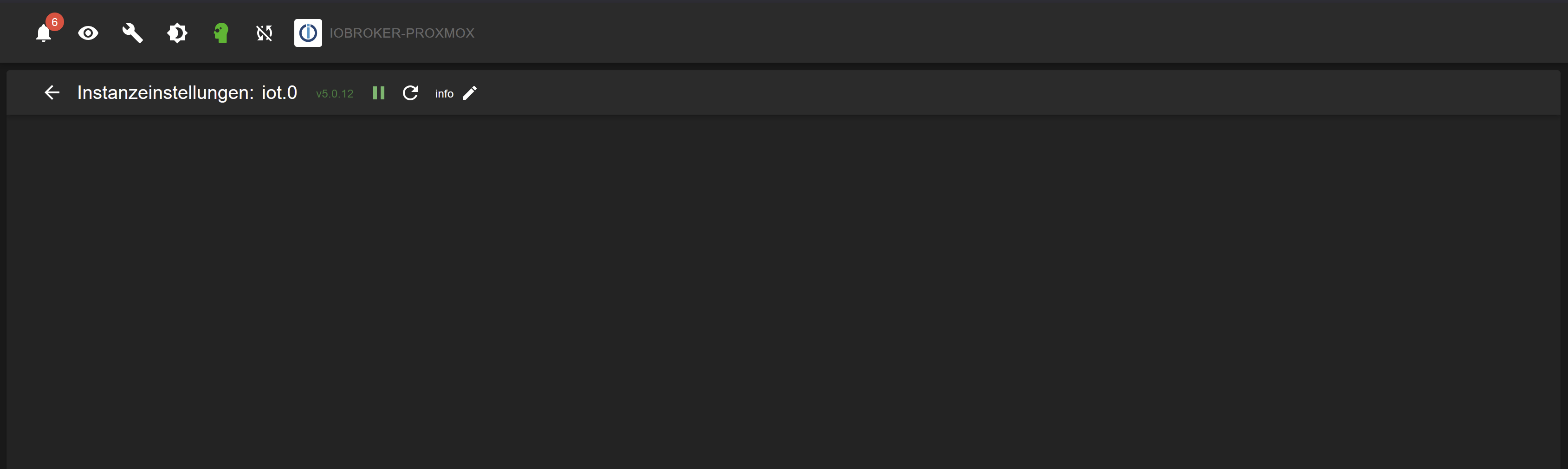
              Jetzt bin ich genau da wo ich auch nach der Aktion mit Copilot war: Die Konfigurationsoberfläche IOT ist weiterhin leer und die Scripte sind weg.

              Hab mal sukzessive IOT downgegraded. Erst ab 5.0.7 läuft er. Alle höheren Versionen zeigen den Effekt dass die Konfigoberefläche weg ist.

              1 Antwort Letzte Antwort
              0
              • D Offline
                D Offline
                derrapf
                schrieb am zuletzt editiert von derrapf
                #47

                Zu dem Problem mit den Scripts:
                Ich habe aus dem Backup ein Zip aller meiner Scripts gemacht und importiert. Da bekam ich eine riesige Liste an Syntax Fehlern.
                Dann habe ich einfach mal neue Scripte mit den alten Namen angelegt und den Quellcode dort reinkopiert. Auch die Verzeichnisse angelegt die ich früher hatte.
                Es gab ja immer ein Common und ein Global Verzeichnis.
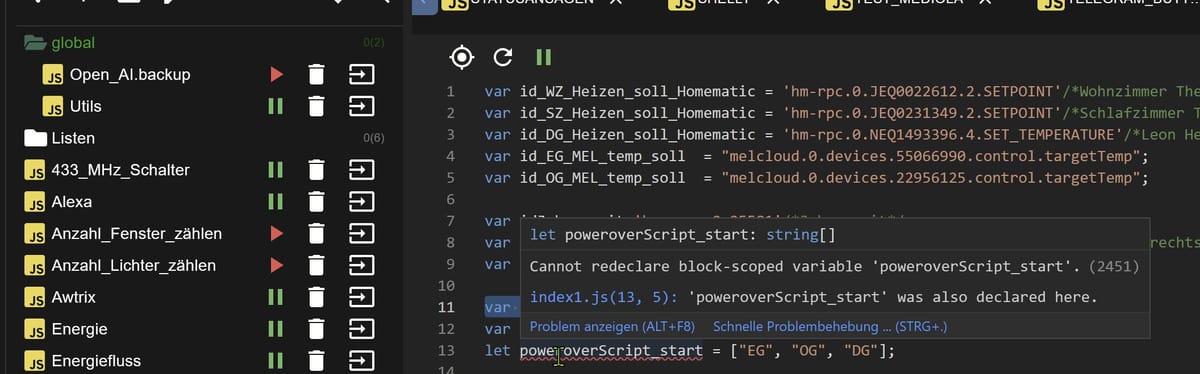
                Da diese Verzeichnisse auch nicht existierten, hab ich die auch angelegt. Jetzt sind alle Verzeichnisse und Scripte wieder da, aber ich bekomme weiterhin Fehler im Editor. Irgendwas ist noch schräg:

                85137071-8d0c-4eb2-9ee3-2ca64b8cd6d2-image.jpeg
                Vor allem: Was ist das für eine index1.js Datei?
                Wenn ich die anklicke kriege ich eine 404 vom Browser.
                Den Fehler konnt eich beheben in dem ich Var. umbenannt habe. Komisch ist es aber allemal.

                Gruss Ralf

                1 Antwort Letzte Antwort
                0
                • D Offline
                  D Offline
                  derrapf
                  schrieb am zuletzt editiert von
                  #48

                  Ich habe jetzt tabula Rasa gemacht: Script Adapter gelöscht; neu installiert; alles Scripte aus dem Backup neu reingeholt und mit Copilot die Syntax korrigiert da offensichtlich nun alles viel strikter geprüft wird.

                  1 Antwort Letzte Antwort
                  0
                  • D Offline
                    D Offline
                    derrapf
                    schrieb zuletzt editiert von derrapf
                    #49

                    Hallo alle
                    Nochmal ich.
                    Im Grunde geht jetzt alles bis auf IOT. Wir sind also wieder da warum ich diesen Thread aufgemacht habe.
                    Unter Trixi und Node 22.22.2 scheint nur die IOT Version 5.0.7 zu funktionieren.
                    Alles drüber liefert eine leere Konfigurationsoberfläche.
                    Copilot meinte es wäre eine gute Idee wieder auf Node 18 zu gehen:


                    Der iot‑Adapter hat eine der komplexesten Admin‑Oberflächen im ioBroker‑Universum:

                    multi‑tab React UI
                    dynamische Komponenten
                    ältere Build‑Artefakte
                    lange Entwicklungszyklen

                    👉 Diese Kombination reagiert empfindlich auf:

                    neue V8‑Version
                    neue ESM‑Regeln
                    geändertes Bundling in Node 22

                    Andere Adapter:

                    einfache JSON‑Formulare ✅
                    keine React‑UI ✅
                    ➡️ keine sichtbaren Probleme

                    ➡️ Das ist ein Laufzeitproblem, kein klassischer Bug in einer einzelnen iot‑Version.
                    Konkret:

                    iot 5.0.7, 5.0.10, 5.0.12
                    → alle verwenden dieselbe UI‑Architektur
                    Unter Node 22 schlägt die Initialisierung still fehl
                    Deshalb bringt auch „ältere Version = stabiler“ hier nichts

                    Ich habe genau dieses Muster schon bei mehreren Nutzern gesehen:
                    iot‑Downgrade + Node 22 = exakt gleicher leerer Screen.


                    Macht das Sinn?

                    Gruss Ralf

                    Thomas BraunT Samson71S 2 Antworten Letzte Antwort
                    0
                    • D derrapf

                      Hallo alle
                      Nochmal ich.
                      Im Grunde geht jetzt alles bis auf IOT. Wir sind also wieder da warum ich diesen Thread aufgemacht habe.
                      Unter Trixi und Node 22.22.2 scheint nur die IOT Version 5.0.7 zu funktionieren.
                      Alles drüber liefert eine leere Konfigurationsoberfläche.
                      Copilot meinte es wäre eine gute Idee wieder auf Node 18 zu gehen:


                      Der iot‑Adapter hat eine der komplexesten Admin‑Oberflächen im ioBroker‑Universum:

                      multi‑tab React UI
                      dynamische Komponenten
                      ältere Build‑Artefakte
                      lange Entwicklungszyklen

                      👉 Diese Kombination reagiert empfindlich auf:

                      neue V8‑Version
                      neue ESM‑Regeln
                      geändertes Bundling in Node 22

                      Andere Adapter:

                      einfache JSON‑Formulare ✅
                      keine React‑UI ✅
                      ➡️ keine sichtbaren Probleme

                      ➡️ Das ist ein Laufzeitproblem, kein klassischer Bug in einer einzelnen iot‑Version.
                      Konkret:

                      iot 5.0.7, 5.0.10, 5.0.12
                      → alle verwenden dieselbe UI‑Architektur
                      Unter Node 22 schlägt die Initialisierung still fehl
                      Deshalb bringt auch „ältere Version = stabiler“ hier nichts

                      Ich habe genau dieses Muster schon bei mehreren Nutzern gesehen:
                      iot‑Downgrade + Node 22 = exakt gleicher leerer Screen.


                      Macht das Sinn?

                      Gruss Ralf

                      Thomas BraunT Online
                      Thomas BraunT Online
                      Thomas Braun
                      Most Active
                      schrieb zuletzt editiert von Thomas Braun
                      #50

                      @derrapf sagte:

                      Macht das Sinn?

                      NEIN!!!!!
                      nodejs 18 ist seit Jahren TOT!

                      Linux-Werkzeugkasten:
                      https://forum.iobroker.net/topic/42952/der-kleine-iobroker-linux-werkzeugkasten
                      NodeJS Fixer Skript:
                      https://forum.iobroker.net/topic/68035/iob-node-fix-skript
                      iob_diag: curl -sLf -o diag.sh https://iobroker.net/diag.sh && bash diag.sh

                      1 Antwort Letzte Antwort
                      0
                      • D derrapf

                        Hallo alle
                        Nochmal ich.
                        Im Grunde geht jetzt alles bis auf IOT. Wir sind also wieder da warum ich diesen Thread aufgemacht habe.
                        Unter Trixi und Node 22.22.2 scheint nur die IOT Version 5.0.7 zu funktionieren.
                        Alles drüber liefert eine leere Konfigurationsoberfläche.
                        Copilot meinte es wäre eine gute Idee wieder auf Node 18 zu gehen:


                        Der iot‑Adapter hat eine der komplexesten Admin‑Oberflächen im ioBroker‑Universum:

                        multi‑tab React UI
                        dynamische Komponenten
                        ältere Build‑Artefakte
                        lange Entwicklungszyklen

                        👉 Diese Kombination reagiert empfindlich auf:

                        neue V8‑Version
                        neue ESM‑Regeln
                        geändertes Bundling in Node 22

                        Andere Adapter:

                        einfache JSON‑Formulare ✅
                        keine React‑UI ✅
                        ➡️ keine sichtbaren Probleme

                        ➡️ Das ist ein Laufzeitproblem, kein klassischer Bug in einer einzelnen iot‑Version.
                        Konkret:

                        iot 5.0.7, 5.0.10, 5.0.12
                        → alle verwenden dieselbe UI‑Architektur
                        Unter Node 22 schlägt die Initialisierung still fehl
                        Deshalb bringt auch „ältere Version = stabiler“ hier nichts

                        Ich habe genau dieses Muster schon bei mehreren Nutzern gesehen:
                        iot‑Downgrade + Node 22 = exakt gleicher leerer Screen.


                        Macht das Sinn?

                        Gruss Ralf

                        Samson71S Offline
                        Samson71S Offline
                        Samson71
                        Global Moderator
                        schrieb zuletzt editiert von
                        #51

                        @derrapf
                        Es gibt im Beta eine 5.0.13 und sogar schon eine 6.0.x. Die mal probiert?

                        Markus

                        Bitte beachten:
                        Hinweise für gute Forenbeiträge
                        Maßnahmen zum Schutz des Forums

                        Thomas BraunT D 2 Antworten Letzte Antwort
                        0
                        • Samson71S Samson71

                          @derrapf
                          Es gibt im Beta eine 5.0.13 und sogar schon eine 6.0.x. Die mal probiert?

                          Thomas BraunT Online
                          Thomas BraunT Online
                          Thomas Braun
                          Most Active
                          schrieb zuletzt editiert von
                          #52
                          iot
                          latest:	6.0.3 for 3 days
                          stable:	5.0.12 for 4 months
                          

                          Linux-Werkzeugkasten:
                          https://forum.iobroker.net/topic/42952/der-kleine-iobroker-linux-werkzeugkasten
                          NodeJS Fixer Skript:
                          https://forum.iobroker.net/topic/68035/iob-node-fix-skript
                          iob_diag: curl -sLf -o diag.sh https://iobroker.net/diag.sh && bash diag.sh

                          1 Antwort Letzte Antwort
                          0
                          • Samson71S Samson71

                            @derrapf
                            Es gibt im Beta eine 5.0.13 und sogar schon eine 6.0.x. Die mal probiert?

                            D Offline
                            D Offline
                            derrapf
                            schrieb zuletzt editiert von
                            #53

                            @Samson71 sagte:

                            @derrapf
                            Es gibt im Beta eine 5.0.13 und sogar schon eine 6.0.x. Die mal probiert?

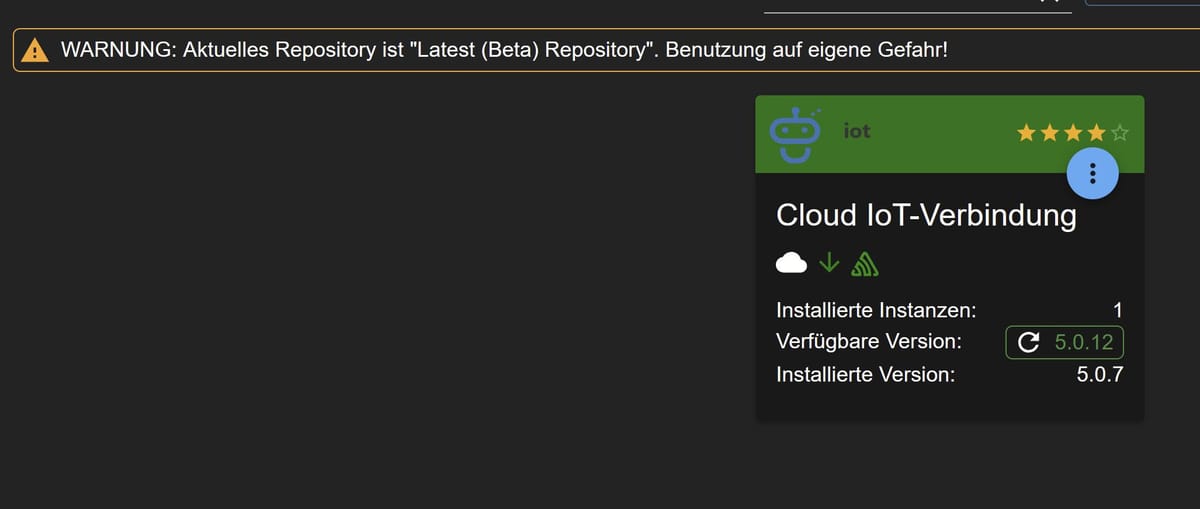
                            Nein hab ich noch nicht, aber ich finde die auch nicht:
                            8ee9ed61-a329-45e2-8533-95cd40bab464-image.jpeg
                            Gruss Ralf

                            Thomas BraunT 1 Antwort Letzte Antwort
                            0
                            • D Offline
                              D Offline
                              derrapf
                              schrieb zuletzt editiert von
                              #54

                              Ich habe nochmal geschaut: Beta sieht so aus:
                              http://download.iobroker.net/sources-dist-latest.json
                              Das ist doch richtig oder?
                              Gruss Ralf

                              1 Antwort Letzte Antwort
                              0
                              • D derrapf

                                @Samson71 sagte:

                                @derrapf
                                Es gibt im Beta eine 5.0.13 und sogar schon eine 6.0.x. Die mal probiert?

                                Nein hab ich noch nicht, aber ich finde die auch nicht:
                                8ee9ed61-a329-45e2-8533-95cd40bab464-image.jpeg
                                Gruss Ralf

                                Thomas BraunT Online
                                Thomas BraunT Online
                                Thomas Braun
                                Most Active
                                schrieb zuletzt editiert von
                                #55

                                @derrapf sagte:

                                Nein hab ich noch nicht, aber ich finde die auch nicht:

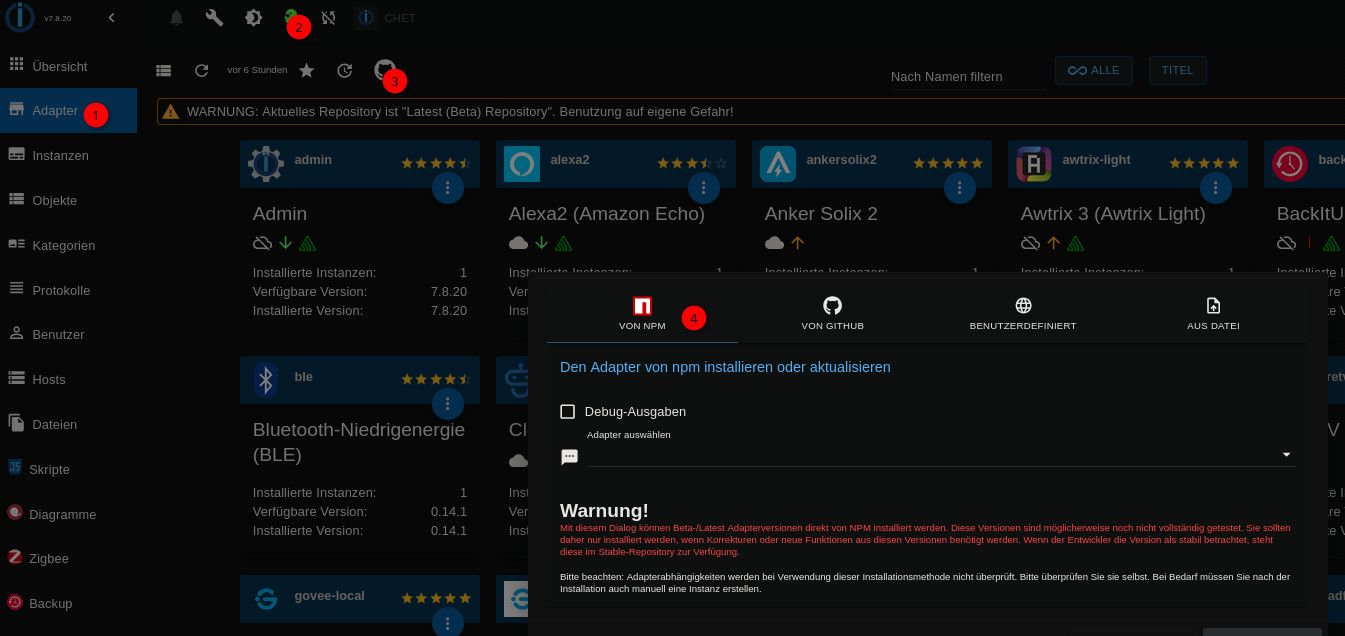
                                Du musst das Repo einmal aktualisieren.
                                Davon unabhängig hätte ich das Beta-Repo aber an deiner Stelle gar nicht komplett freigeschaltet sondern wäre über npm gegangen:

                                cd67473e-ebdb-4646-8d36-63db23f02e47-image.jpeg

                                Linux-Werkzeugkasten:
                                https://forum.iobroker.net/topic/42952/der-kleine-iobroker-linux-werkzeugkasten
                                NodeJS Fixer Skript:
                                https://forum.iobroker.net/topic/68035/iob-node-fix-skript
                                iob_diag: curl -sLf -o diag.sh https://iobroker.net/diag.sh && bash diag.sh

                                1 Antwort Letzte Antwort
                                0
                                • D Offline
                                  D Offline
                                  derrapf
                                  schrieb zuletzt editiert von
                                  #56

                                  Tatsache, das funktioniert!
                                  Super!
                                  Danke für diesen Trick!
                                  Gruss Ralf

                                  Thomas BraunT 1 Antwort Letzte Antwort
                                  0
                                  • D derrapf

                                    Tatsache, das funktioniert!
                                    Super!
                                    Danke für diesen Trick!
                                    Gruss Ralf

                                    Thomas BraunT Online
                                    Thomas BraunT Online
                                    Thomas Braun
                                    Most Active
                                    schrieb zuletzt editiert von
                                    #57

                                    @derrapf

                                    Dann stell das generelle Repo wieder auf stable zurück.

                                    Linux-Werkzeugkasten:
                                    https://forum.iobroker.net/topic/42952/der-kleine-iobroker-linux-werkzeugkasten
                                    NodeJS Fixer Skript:
                                    https://forum.iobroker.net/topic/68035/iob-node-fix-skript
                                    iob_diag: curl -sLf -o diag.sh https://iobroker.net/diag.sh && bash diag.sh

                                    1 Antwort Letzte Antwort
                                    0

                                    Hey! Du scheinst an dieser Unterhaltung interessiert zu sein, hast aber noch kein Konto.

                                    Hast du es satt, bei jedem Besuch durch die gleichen Beiträge zu scrollen? Wenn du dich für ein Konto anmeldest, kommst du immer genau dorthin zurück, wo du zuvor warst, und kannst dich über neue Antworten benachrichtigen lassen (entweder per E-Mail oder Push-Benachrichtigung). Du kannst auch Lesezeichen speichern und Beiträge positiv bewerten, um anderen Community-Mitgliedern deine Wertschätzung zu zeigen.

                                    Mit deinem Input könnte dieser Beitrag noch besser werden 💗

                                    Registrieren Anmelden
                                    Antworten
                                    • In einem neuen Thema antworten
                                    Anmelden zum Antworten
                                    • Älteste zuerst
                                    • Neuste zuerst
                                    • Meiste Stimmen


                                    Support us

                                    ioBroker
                                    Community Adapters
                                    Donate
                                    FAQ Cloud / IOT
                                    HowTo: Node.js-Update
                                    HowTo: Backup/Restore
                                    Downloads
                                    BLOG

                                    242

                                    Online

                                    32.8k

                                    Benutzer

                                    82.8k

                                    Themen

                                    1.3m

                                    Beiträge
                                    Community
                                    Impressum | Datenschutz-Bestimmungen | Nutzungsbedingungen | Einwilligungseinstellungen
                                    ioBroker Community 2014-2025
                                    logo
                                    • Anmelden

                                    • Du hast noch kein Konto? Registrieren

                                    • Anmelden oder registrieren, um zu suchen
                                    • Erster Beitrag
                                      Letzter Beitrag
                                    0
                                    • Home
                                    • Aktuell
                                    • Tags
                                    • Ungelesen 0
                                    • Kategorien
                                    • Unreplied
                                    • Beliebt
                                    • GitHub
                                    • Docu
                                    • Hilfe