




IOB im Docker Startet nicht mehr!!!
-
@Homoran sagte in Multihost Fragen!:
@Happyuser20 sagte in Multihost Fragen!:
Ich bezeichne mich nicht als Pro User
ehrlich?
sind wir jetzt auf dem Niveau?

hast du denn mittlerweile
iob setup customausgeführt.
da gibt es auch die OptionJJa mein Gott, dann bin da eben vor Jahren beigetreten, Nobody´s perfect.
Das habe ich beim Master durchgeführt
Current configuration:
- Objects database:
  - Type: jsonl
  - Host/Unix Socket: 0.0.0.0
  - Port: 9001
- States database:
  - Type: jsonl
  - Host/Unix Socket: 0.0.0.0
  - Port: 9000
- Data Directory: ../../iobroker-data/
- Host name: iobroker

Type of objects DB [(j)sonl, (f)ile, (r)edis, ...], default [jsonl]: j
Host / Unix Socket of objects DB(jsonl), default[0.0.0.0]:
Port of objects DB(jsonl), default[9001]:
Type of states DB [(j)sonl, (f)file, (r)edis, ...], default [jsonl]:
Host / Unix Socket of states DB (jsonl), default[0.0.0.0]:
Port of states DB (jsonl), default[9000]:
Data directory (file), default[../../iobroker-data/]:
Host name of this machine [iobroker]:
updating conf/iobroker.json
root@iobroker:/opt/iobroker# iobroker multihost enable
Please check the binding of the configured jsonl server to allow remote connections.
No configuration change needed.


Multihost discovery server: enabled
Discovery authentication:   enabled
Persistent activation:      disabled
Objects:                    jsonl on 0.0.0.0
States:                     jsonl on 0.0.0.0
Vom Slave
iobroker setup custom Current configuration: - Objects database: - Type: jsonl - Host/Unix Socket: 192.168.1.111 - Port: 9001 - States database: - Type: jsonl - Host/Unix Socket: 192.168.1.111 - Port: 9000 - Data Directory: ../../iobroker-data/ Type of objects DB [(j)sonl, (f)ile, (r)edis, ...], default [jsonl]: Host / Unix Socket of objects DB(jsonl), default[192.168.1.111]: Port of objects DB(jsonl), default[9001]: Type of states DB [(j)sonl, (f)file, (r)edis, ...], default [jsonl]: Host / Unix Socket of states DB (jsonl), default[192.168.1.111]: Port of states DB (jsonl), default[9000]: Host name of this machine [SlaveIOBroker]: updating conf/iobroker.json pi@SlaveIOBroker:~ $ iobroker multihost connect No Multihost server found. Make sure iobroker is running on the host where you enabled multihost discovery ( and it is not this host)!Du musst die IP des Host eingeben.
Da wo iobroker auf dem Master installiert ist.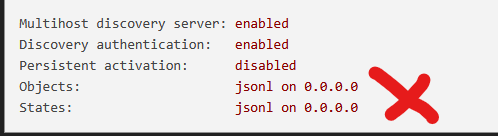
Kurze Anmerkung :
"Evtl. kannst du mir das Containerkonstrukt erklären, dann stelle ich evtl. nicht so Dumme Fragen."
Ich erkläre Dir da gar nichts. Das steht alles fein säuberlich aufbereit als Doku hier oder bei buanet (https://blog.buanet.de/)
Das Lesen und verstehen kann Dir keiner abnehmen. -
@Homoran sagte in Multihost Fragen!:
@Happyuser20 sagte in Multihost Fragen!:
Ich bezeichne mich nicht als Pro User
ehrlich?
sind wir jetzt auf dem Niveau?
hast du denn mittlerweile
iob setup customausgeführt.
da gibt es auch die OptionJJa mein Gott, dann bin da eben vor Jahren beigetreten, Nobody´s perfect.
Das habe ich beim Master durchgeführt
Current configuration:
- Objects database:
  - Type: jsonl
  - Host/Unix Socket: 0.0.0.0
  - Port: 9001
- States database:
  - Type: jsonl
  - Host/Unix Socket: 0.0.0.0
  - Port: 9000
- Data Directory: ../../iobroker-data/
- Host name: iobroker

Type of objects DB [(j)sonl, (f)ile, (r)edis, ...], default [jsonl]: j
Host / Unix Socket of objects DB(jsonl), default[0.0.0.0]:
Port of objects DB(jsonl), default[9001]:
Type of states DB [(j)sonl, (f)file, (r)edis, ...], default [jsonl]:
Host / Unix Socket of states DB (jsonl), default[0.0.0.0]:
Port of states DB (jsonl), default[9000]:
Data directory (file), default[../../iobroker-data/]:
Host name of this machine [iobroker]:
updating conf/iobroker.json
root@iobroker:/opt/iobroker# iobroker multihost enable
Please check the binding of the configured jsonl server to allow remote connections.
No configuration change needed.


Multihost discovery server: enabled
Discovery authentication:   enabled
Persistent activation:      disabled
Objects:                    jsonl on 0.0.0.0
States:                     jsonl on 0.0.0.0
Vom Slave
iobroker setup custom Current configuration: - Objects database: - Type: jsonl - Host/Unix Socket: 192.168.1.111 - Port: 9001 - States database: - Type: jsonl - Host/Unix Socket: 192.168.1.111 - Port: 9000 - Data Directory: ../../iobroker-data/ Type of objects DB [(j)sonl, (f)ile, (r)edis, ...], default [jsonl]: Host / Unix Socket of objects DB(jsonl), default[192.168.1.111]: Port of objects DB(jsonl), default[9001]: Type of states DB [(j)sonl, (f)file, (r)edis, ...], default [jsonl]: Host / Unix Socket of states DB (jsonl), default[192.168.1.111]: Port of states DB (jsonl), default[9000]: Host name of this machine [SlaveIOBroker]: updating conf/iobroker.json pi@SlaveIOBroker:~ $ iobroker multihost connect No Multihost server found. Make sure iobroker is running on the host where you enabled multihost discovery ( and it is not this host)!@Happyuser20 sagte in Multihost Fragen!:
192.168.1.111
ist das die IP vom Master?
und alles von außerhalb des containers zugänglich?
-
@Happyuser20 sagte in Multihost Fragen!:
192.168.1.111
ist das die IP vom Master?
und alles von außerhalb des containers zugänglich?
@Homoran sagte in Multihost Fragen!:
@Happyuser20 sagte in Multihost Fragen!:
192.168.1.111
ist das die IP vom Master?
und alles von außerhalb des containers zugänglich?
Das wäre die IP vom Master ja, und die ist auch zugänglich von außen.
-
Die Betonung liegt auf "WÄRE", jetzt bin ich wieder genau so weit wie vor drei Tagen. Container bootet in einer Endlosschleife.
Wie ich das vor Jahren mal alles hinbekommen habe, keine Ahnung.
Fang ich eben wieder von vorne an. -
Die Betonung liegt auf "WÄRE", jetzt bin ich wieder genau so weit wie vor drei Tagen. Container bootet in einer Endlosschleife.
Wie ich das vor Jahren mal alles hinbekommen habe, keine Ahnung.
Fang ich eben wieder von vorne an.@Happyuser20 sagte in Multihost Fragen!:
Container bootet in einer Endlosschleife.
warum?
Die Multihost Konfiguration des ioBrokers sollte nichts mit dem Grundgerüst machen.Aber wie im anderen Thread bereits gesagt, kenne ich mich mit Containern jeder Art nicht aus.
Da ist mir zuviel Konfiguration mit verbunden.Wenn Multihost nicht liefe/Host nicht gefunden würde ist das was anderes.
ODER meinst du damit, dass ioBroker im Container dauernd neustartet?
-
@Happyuser20 sagte in Multihost Fragen!:
Container bootet in einer Endlosschleife.
warum?
Die Multihost Konfiguration des ioBrokers sollte nichts mit dem Grundgerüst machen.Aber wie im anderen Thread bereits gesagt, kenne ich mich mit Containern jeder Art nicht aus.
Da ist mir zuviel Konfiguration mit verbunden.Wenn Multihost nicht liefe/Host nicht gefunden würde ist das was anderes.
ODER meinst du damit, dass ioBroker im Container dauernd neustartet?
@Homoran sagte in Multihost Fragen!:
@Happyuser20 sagte in Multihost Fragen!:
Container bootet in einer Endlosschleife.
warum?
Die Multihost Konfiguration des ioBrokers sollte nichts mit dem Grundgerüst machen.Aber wie im anderen Thread bereits gesagt, kenne ich mich mit Containern jeder Art nicht aus.
Da ist mir zuviel Konfiguration mit verbunden.Wenn Multihost nicht liefe/Host nicht gefunden würde ist das was anderes.
ODER meinst du damit, dass ioBroker im Container dauernd neustartet?
Ich habe den IoBroker immer im Container neu gestartet, weil über Admin vom IoBroker er nicht wieder anlief.
Im Docker stand dann "unhealthy", desshalb der Start über den Container. -
@Homoran sagte in Multihost Fragen!:
@Happyuser20 sagte in Multihost Fragen!:
Container bootet in einer Endlosschleife.
warum?
Die Multihost Konfiguration des ioBrokers sollte nichts mit dem Grundgerüst machen.Aber wie im anderen Thread bereits gesagt, kenne ich mich mit Containern jeder Art nicht aus.
Da ist mir zuviel Konfiguration mit verbunden.Wenn Multihost nicht liefe/Host nicht gefunden würde ist das was anderes.
ODER meinst du damit, dass ioBroker im Container dauernd neustartet?
Ich habe den IoBroker immer im Container neu gestartet, weil über Admin vom IoBroker er nicht wieder anlief.
Im Docker stand dann "unhealthy", desshalb der Start über den Container.@Happyuser20 sagte in Multihost Fragen!:
weil über Admin vom IoBroker er nicht wieder anlief.
das wäre dann der Moment gewesen über logs etc. die Ursache zu finden
-
@Homoran sagte in Multihost Fragen!:
@Happyuser20 sagte in Multihost Fragen!:
Container bootet in einer Endlosschleife.
warum?
Die Multihost Konfiguration des ioBrokers sollte nichts mit dem Grundgerüst machen.Aber wie im anderen Thread bereits gesagt, kenne ich mich mit Containern jeder Art nicht aus.
Da ist mir zuviel Konfiguration mit verbunden.Wenn Multihost nicht liefe/Host nicht gefunden würde ist das was anderes.
ODER meinst du damit, dass ioBroker im Container dauernd neustartet?
Ich habe den IoBroker immer im Container neu gestartet, weil über Admin vom IoBroker er nicht wieder anlief.
Im Docker stand dann "unhealthy", desshalb der Start über den Container.Eigentlich ist das ganz easy. Was du noch nicht eindeutig gesagt hast: sind denn die Ports 9000/9001 des Master erreichbar / gemappt (falls im Bridge-Netzwerk)? Zeigen.
Das hier:
pi@SlaveIOBroker:~ $ iobroker multihost connectfunktioniert in unterschiedlichen Subnetzen und damit Docker (Bridge) nicht. Ist aber auch unnötig, wenn
iob setup customauf dem Slave sauber ausgeführt wird. -
Ist jetzt so wie es ist.
Ich fang nochmal von vorne an.Ich will als ehemaliger Pro-User nicht schlau reden, aber...
....Vor drei Tagen war es die gleiche Situation. Habe beim Slave auf Debian umgestellt, weil ich Node und JS Controller nicht mehr updaten konnte. Den neuen Slave wollte ich wieder als Slave einbinden. Das endete damit , dass ein Jahrelang laufender IOB im Container seinen Dienst verweigerte.
Die letzten Aktionen waren auch das rumspielen mit dem Multihost, etwas mag er da vermutlich nicht. -
Ist jetzt so wie es ist.
Ich fang nochmal von vorne an.Ich will als ehemaliger Pro-User nicht schlau reden, aber...
....Vor drei Tagen war es die gleiche Situation. Habe beim Slave auf Debian umgestellt, weil ich Node und JS Controller nicht mehr updaten konnte. Den neuen Slave wollte ich wieder als Slave einbinden. Das endete damit , dass ein Jahrelang laufender IOB im Container seinen Dienst verweigerte.
Die letzten Aktionen waren auch das rumspielen mit dem Multihost, etwas mag er da vermutlich nicht.@Happyuser20 sagte in Multihost Fragen!:
ein Jahrelang laufender IOB im Container seinen Dienst verweigerte.
ist aber etwas anderes als
@Happyuser20 sagte in Multihost Fragen!:
Container bootet...
was denn jetzt?
Wenn der Master seinen Dienst quittiert, und du glaubst es sei der Slave schuld ist es doch ganz einfach den Slave wieder abzukoppeln. Dann müsste ja der Master als Solo wieder laufen.
und wie @marc-berg jetzt nochmals deutlich gemacht hat ist deine Antwort auf die Frage.
sagte in Multihost Fragen!:
und alles von außerhalb des containers zugänglich?
mit
@Happyuser20 sagte in Multihost Fragen!:
die ist auch zugänglich von außen.
nicht beantwortet
-
@Happyuser20 sagte in Multihost Fragen!:
ein Jahrelang laufender IOB im Container seinen Dienst verweigerte.
ist aber etwas anderes als
@Happyuser20 sagte in Multihost Fragen!:
Container bootet...
was denn jetzt?
Wenn der Master seinen Dienst quittiert, und du glaubst es sei der Slave schuld ist es doch ganz einfach den Slave wieder abzukoppeln. Dann müsste ja der Master als Solo wieder laufen.
und wie @marc-berg jetzt nochmals deutlich gemacht hat ist deine Antwort auf die Frage.
sagte in Multihost Fragen!:
und alles von außerhalb des containers zugänglich?
mit
@Happyuser20 sagte in Multihost Fragen!:
die ist auch zugänglich von außen.
nicht beantwortet
@Homoran sagte in Multihost Fragen!:
was denn jetzt?
Wenn der Master seinen Dienst quittiert, und du glaubst es sei der Slave schuld ist es doch ganz einfach den Slave wieder abzukoppeln. Dann müsste ja der Master als Solo wieder laufen.
und wie @marc-berg jetzt nochmals deutlich gemacht hat ist deine Antwort auf die Frage.
Ich sage ja nicht das der Slave schuld ist. Ich denke bei den Multihost Einstellungen, die auch am Master durchführen muss, geht was schief
@Marc-Berg sagte in Multihost Fragen!:
Eigentlich ist das ganz easy. Was du noch nicht eindeutig gesagt hast: sind denn die Ports 9000/9001 des Master erreichbar / gemappt (falls im Bridge-Netzwerk)? Zeigen.
Das hier:
pi@SlaveIOBroker:~ $ iobroker multihost connectfunktioniert in unterschiedlichen Subnetzen und damit Docker (Bridge) nicht. Ist aber auch unnötig, wenn
iob setup customauf dem Slave sauber ausgeführt wird.Kann ich nicht mehr zeigen, da alles wieder auf 0
Die Ports 9000/9001 waren freigegeben
und ja, alles war von außen erreichbar. -
Ich mach hier mal einen Schnitt
-
Ich richte mich nach dieser (https://blog.buanet.de/posts/2023/02/27_iobroker_unter_docker_auf_der_synology_diskstation/) Anleitung von Buanet.
Ich erzeuge einen Stack im Container mit dieser einfachen yml-Datei, wie zuvor auch!
version: "3"
services:
  iobroker:
    container_name: iobroker
    image: buanet/iobroker:latest
    network_mode: host
    restart: always
    environment:
      - PACKAGES=nano
    volumes:
      - /volume1/docker/iobroker-data:/opt/iobroker
Wenn der Container dann läuft ist die Admin Oberfläche in meinem Fall über 192.168.1.111:8081 erreichbar
Es liegt bereits ein Adapter update von "Backitup" vor, das ich ausführe.
Es sind nur drei Instanzen installiert
"Admin"
"Backitup"
"Discovery"Wenn ich nun in diesem Zustand Den Host neu starte, verweigert er hier schon den Neustart.
Das Log dazu- 2026/03/24 18:18:47 stdout ================================== > LOG REDIRECT system.adapter.admin.0 => false [system.adapter.admin.0.logging] 2026/03/24 18:18:47 stdout ================================== > LOG REDIRECT system.adapter.admin.0 => false [Process stopped] 2026/03/24 18:16:41 stdout Send diag info: {"uuid":"36904f0e-52a8-4fb2-acad-c5a19de0589d","language":"de","country":"Germany","hosts":[{"version":"7.0.7","platform":"Javascript/Node.js","type":"linux"}],"node":"v22.22.1","arch":"x64","docker":true,"adapters":{"admin":{"version":"7.7.22","platform":"Javascript/Node.js"},"discovery":{"version":"5.0.0","platform":"Javascript/Node.js"},"backitup":{"version":"3.3.13","platform":"Javascript/Node.js"}},"statesType":"jsonl","objectsType":"jsonl","noInstances":3,"compactMode":false,"noCompactInstances":0,"model":"Intel(R) Celeron(R) CPU J3355 @ 2.00GHz","cpus":2,"mem":16624197632,"ostype":"Linux","city":"Arrach"} 2026/03/24 18:15:30 stdout ================================== > LOG REDIRECT system.adapter.admin.0 => true [system.adapter.admin.0.logging] 2026/03/24 18:14:04 stdout ================================== > LOG REDIRECT system.adapter.admin.0 => false [system.adapter.admin.0.logging] 2026/03/24 18:14:00 stdout host.OldNo7NAS check instance "system.adapter.discovery.0" for host "OldNo7NAS" 2026/03/24 18:14:00 stdout host.OldNo7NAS check instance "system.adapter.backitup.0" for host "OldNo7NAS" 2026/03/24 18:14:00 stdout host.OldNo7NAS check instance "system.adapter.admin.0" for host "OldNo7NAS" 2026/03/24 18:13:58 stdout ##### #### ### ## # iobroker.js-controller log output # ## ### #### ##### 2026/03/24 18:13:58 stdout 2026/03/24 18:13:58 stdout Starting ioBroker... 2026/03/24 18:13:58 stdout 2026/03/24 18:13:58 stdout -------------------------------------------------------------------------------- 2026/03/24 18:13:58 stdout ----- Step 5 of 5: ioBroker Startup ----- 2026/03/24 18:13:58 stdout -------------------------------------------------------------------------------- 2026/03/24 18:13:58 stdout 2026/03/24 18:13:58 stdout For more information see ioBroker Docker image docs (https://docs.buanet.de/iobroker-docker-image/docs/). 2026/03/24 18:13:58 stdout Some adapters have special requirements/ settings which can be activated by the use of environment variables. 2026/03/24 18:13:58 stdout 2026/03/24 18:13:58 stdout -------------------------------------------------------------------------------- 2026/03/24 18:13:58 stdout ----- Step 4 of 5: Applying Special Settings ----- 2026/03/24 18:13:58 stdout -------------------------------------------------------------------------------- 2026/03/24 18:13:58 stdout 2026/03/24 18:13:58 stdout Done. 2026/03/24 18:13:57 stdout The host for instance "system.adapter.backitup.0" was changed from "buildkitsandbox" to "OldNo7NAS". 2026/03/24 18:13:57 stdout The host for instance "system.adapter.discovery.0" was changed from "buildkitsandbox" to "OldNo7NAS". 2026/03/24 18:13:57 stdout The host for instance "system.adapter.admin.0" was changed from "buildkitsandbox" to "OldNo7NAS". 2026/03/24 18:13:57 stdout Updating hostname to "OldNo7NAS"... Host "buildkitsandbox" successfully renamed to "OldNo7NAS". 2026/03/24 18:13:45 stdout Hostname in ioBroker does not match the hostname of this container. 2026/03/24 18:13:19 stdout 2026/03/24 18:13:19 stdout Initializing a fresh installation of ioBroker... Done. 2026/03/24 18:13:04 stdout 2026/03/24 18:13:04 stdout (Re)setting permissions (This might take a while! Please be patient!)... Done. 2026/03/24 18:13:04 stdout 2026/03/24 18:13:04 stdout Replacing ioBroker executable to fix sudo bug... Done. 2026/03/24 18:13:04 stdout 2026/03/24 18:13:04 stdout -------------------------------------------------------------------------------- 2026/03/24 18:13:04 stdout ----- Step 3 of 5: Checking ioBroker Installation ----- 2026/03/24 18:13:04 stdout -------------------------------------------------------------------------------- 2026/03/24 18:13:04 stdout 2026/03/24 18:13:04 stdout Restoring initial ioBroker installation... Done. 2026/03/24 18:13:00 stdout There is no data detected in /opt/iobroker. 2026/03/24 18:13:00 stdout 2026/03/24 18:13:00 stdout -------------------------------------------------------------------------------- 2026/03/24 18:13:00 stdout ----- Step 2 of 5: Detecting ioBroker Installation ----- 2026/03/24 18:13:00 stdout -------------------------------------------------------------------------------- 2026/03/24 18:13:00 stdout 2026/03/24 18:13:00 stdout 2026/03/24 18:12:55 stdout nano is not installed. Installing... Done. 2026/03/24 18:12:46 stdout 2026/03/24 18:12:46 stdout PACKAGES is set. Installing the following additional Linux packages: nano 2026/03/24 18:12:46 stdout 2026/03/24 18:12:46 stdout -------------------------------------------------------------------------------- 2026/03/24 18:12:46 stdout ----- Step 1 of 5: Preparing Container ----- 2026/03/24 18:12:46 stdout -------------------------------------------------------------------------------- 2026/03/24 18:12:46 stdout 2026/03/24 18:12:46 stdout -------------------------------------------------------------------------------- 2026/03/24 18:12:46 stdout ----- SETUID: 1000 ----- 2026/03/24 18:12:46 stdout ----- SETGID: 1000 ----- 2026/03/24 18:12:46 stdout ----- PACKAGES: nano ----- 2026/03/24 18:12:46 stdout ----- Environment Variables ----- 2026/03/24 18:12:46 stdout ----- ----- 2026/03/24 18:12:46 stdout ----- npm: 10.9.4 ----- 2026/03/24 18:12:45 stdout ----- node: v22.22.1 ----- 2026/03/24 18:12:45 stdout ----- build: 20260316.235601 ----- 2026/03/24 18:12:45 stdout ----- image: v11.1.0 ----- 2026/03/24 18:12:45 stdout ----- Version Information ----- 2026/03/24 18:12:45 stdout ----- ----- 2026/03/24 18:12:45 stdout ----- hostname: OldNo7NAS ----- 2026/03/24 18:12:45 stdout ----- arch: x86_64 ----- 2026/03/24 18:12:45 stdout ----- System Information ----- 2026/03/24 18:12:45 stdout -------------------------------------------------------------------------------- 2026/03/24 18:12:45 stdout 2026/03/24 18:12:45 stdout -------------------------------------------------------------------------------- 2026/03/24 18:12:45 stdout ----- Please be patient! ----- 2026/03/24 18:12:45 stdout ----- Startupscript is now running! ----- 2026/03/24 18:12:45 stdout ----- Welcome to your ioBroker Docker container! ----- 2026/03/24 18:12:45 stdout ----- ----- 2026/03/24 18:12:45 stdout ----- ╚═╝ ╚═════╝ ╚═════╝ ╚═╝ ╚═╝ ╚═════╝ ╚═╝ ╚═╝ ╚══════╝ ╚═╝ ╚═╝ ----- 2026/03/24 18:12:45 stdout ----- ██║ ╚██████╔╝ ██████╔╝ ██║ ██║ ╚██████╔╝ ██║ ██╗ ███████╗ ██║ ██║ ----- 2026/03/24 18:12:45 stdout ----- ██║ ██║ ██║ ██╔══██╗ ██╔══██╗ ██║ ██║ ██╔═██╗ ██╔══╝ ██╔══██╗ ----- 2026/03/24 18:12:45 stdout ----- ██║ ██║ ██║ ██████╔╝ ██████╔╝ ██║ ██║ █████╔╝ █████╗ ██████╔╝ ----- 2026/03/24 18:12:45 stdout ----- ██║ ██╔═══██╗ ██╔══██╗ ██╔══██╗ ██╔═══██╗ ██║ ██╔╝ ██╔════╝ ██╔══██╗ ----- 2026/03/24 18:12:45 stdout ----- ██╗ ██████╗ ██████╗ ██████╗ ██████╗ ██╗ ██╗ ███████╗ ██████╗ ----- 2026/03/24 18:12:45 stdout ----- ----- 2026/03/24 18:12:45 stdout -------------------------------------------------------------------------------- 2026/03/24 18:12:45 stdout ------------------------- 2026-03-24 18:12:45 ------------------------- 2026/03/24 18:12:45 stdout -------------------------------------------------------------------------------- 2026/03/24 18:12:45 stdoutMir bleibt nichts anderes übrig als den Container neu zu starten.
Mache ich hier schon was falsch?
-
Ich richte mich nach dieser (https://blog.buanet.de/posts/2023/02/27_iobroker_unter_docker_auf_der_synology_diskstation/) Anleitung von Buanet.
Ich erzeuge einen Stack im Container mit dieser einfachen yml-Datei, wie zuvor auch!
version: "3"
services:
  iobroker:
    container_name: iobroker
    image: buanet/iobroker:latest
    network_mode: host
    restart: always
    environment:
      - PACKAGES=nano
    volumes:
      - /volume1/docker/iobroker-data:/opt/iobroker
Wenn der Container dann läuft ist die Admin Oberfläche in meinem Fall über 192.168.1.111:8081 erreichbar
Es liegt bereits ein Adapter update von "Backitup" vor, das ich ausführe.
Es sind nur drei Instanzen installiert
"Admin"
"Backitup"
"Discovery"Wenn ich nun in diesem Zustand Den Host neu starte, verweigert er hier schon den Neustart.
Das Log dazu- 2026/03/24 18:18:47 stdout ================================== > LOG REDIRECT system.adapter.admin.0 => false [system.adapter.admin.0.logging] 2026/03/24 18:18:47 stdout ================================== > LOG REDIRECT system.adapter.admin.0 => false [Process stopped] 2026/03/24 18:16:41 stdout Send diag info: {"uuid":"36904f0e-52a8-4fb2-acad-c5a19de0589d","language":"de","country":"Germany","hosts":[{"version":"7.0.7","platform":"Javascript/Node.js","type":"linux"}],"node":"v22.22.1","arch":"x64","docker":true,"adapters":{"admin":{"version":"7.7.22","platform":"Javascript/Node.js"},"discovery":{"version":"5.0.0","platform":"Javascript/Node.js"},"backitup":{"version":"3.3.13","platform":"Javascript/Node.js"}},"statesType":"jsonl","objectsType":"jsonl","noInstances":3,"compactMode":false,"noCompactInstances":0,"model":"Intel(R) Celeron(R) CPU J3355 @ 2.00GHz","cpus":2,"mem":16624197632,"ostype":"Linux","city":"Arrach"} 2026/03/24 18:15:30 stdout ================================== > LOG REDIRECT system.adapter.admin.0 => true [system.adapter.admin.0.logging] 2026/03/24 18:14:04 stdout ================================== > LOG REDIRECT system.adapter.admin.0 => false [system.adapter.admin.0.logging] 2026/03/24 18:14:00 stdout host.OldNo7NAS check instance "system.adapter.discovery.0" for host "OldNo7NAS" 2026/03/24 18:14:00 stdout host.OldNo7NAS check instance "system.adapter.backitup.0" for host "OldNo7NAS" 2026/03/24 18:14:00 stdout host.OldNo7NAS check instance "system.adapter.admin.0" for host "OldNo7NAS" 2026/03/24 18:13:58 stdout ##### #### ### ## # iobroker.js-controller log output # ## ### #### ##### 2026/03/24 18:13:58 stdout 2026/03/24 18:13:58 stdout Starting ioBroker... 2026/03/24 18:13:58 stdout 2026/03/24 18:13:58 stdout -------------------------------------------------------------------------------- 2026/03/24 18:13:58 stdout ----- Step 5 of 5: ioBroker Startup ----- 2026/03/24 18:13:58 stdout -------------------------------------------------------------------------------- 2026/03/24 18:13:58 stdout 2026/03/24 18:13:58 stdout For more information see ioBroker Docker image docs (https://docs.buanet.de/iobroker-docker-image/docs/). 2026/03/24 18:13:58 stdout Some adapters have special requirements/ settings which can be activated by the use of environment variables. 2026/03/24 18:13:58 stdout 2026/03/24 18:13:58 stdout -------------------------------------------------------------------------------- 2026/03/24 18:13:58 stdout ----- Step 4 of 5: Applying Special Settings ----- 2026/03/24 18:13:58 stdout -------------------------------------------------------------------------------- 2026/03/24 18:13:58 stdout 2026/03/24 18:13:58 stdout Done. 2026/03/24 18:13:57 stdout The host for instance "system.adapter.backitup.0" was changed from "buildkitsandbox" to "OldNo7NAS". 2026/03/24 18:13:57 stdout The host for instance "system.adapter.discovery.0" was changed from "buildkitsandbox" to "OldNo7NAS". 2026/03/24 18:13:57 stdout The host for instance "system.adapter.admin.0" was changed from "buildkitsandbox" to "OldNo7NAS". 2026/03/24 18:13:57 stdout Updating hostname to "OldNo7NAS"... Host "buildkitsandbox" successfully renamed to "OldNo7NAS". 2026/03/24 18:13:45 stdout Hostname in ioBroker does not match the hostname of this container. 2026/03/24 18:13:19 stdout 2026/03/24 18:13:19 stdout Initializing a fresh installation of ioBroker... Done. 2026/03/24 18:13:04 stdout 2026/03/24 18:13:04 stdout (Re)setting permissions (This might take a while! Please be patient!)... Done. 2026/03/24 18:13:04 stdout 2026/03/24 18:13:04 stdout Replacing ioBroker executable to fix sudo bug... Done. 2026/03/24 18:13:04 stdout 2026/03/24 18:13:04 stdout -------------------------------------------------------------------------------- 2026/03/24 18:13:04 stdout ----- Step 3 of 5: Checking ioBroker Installation ----- 2026/03/24 18:13:04 stdout -------------------------------------------------------------------------------- 2026/03/24 18:13:04 stdout 2026/03/24 18:13:04 stdout Restoring initial ioBroker installation... Done. 2026/03/24 18:13:00 stdout There is no data detected in /opt/iobroker. 2026/03/24 18:13:00 stdout 2026/03/24 18:13:00 stdout -------------------------------------------------------------------------------- 2026/03/24 18:13:00 stdout ----- Step 2 of 5: Detecting ioBroker Installation ----- 2026/03/24 18:13:00 stdout -------------------------------------------------------------------------------- 2026/03/24 18:13:00 stdout 2026/03/24 18:13:00 stdout 2026/03/24 18:12:55 stdout nano is not installed. Installing... Done. 2026/03/24 18:12:46 stdout 2026/03/24 18:12:46 stdout PACKAGES is set. Installing the following additional Linux packages: nano 2026/03/24 18:12:46 stdout 2026/03/24 18:12:46 stdout -------------------------------------------------------------------------------- 2026/03/24 18:12:46 stdout ----- Step 1 of 5: Preparing Container ----- 2026/03/24 18:12:46 stdout -------------------------------------------------------------------------------- 2026/03/24 18:12:46 stdout 2026/03/24 18:12:46 stdout -------------------------------------------------------------------------------- 2026/03/24 18:12:46 stdout ----- SETUID: 1000 ----- 2026/03/24 18:12:46 stdout ----- SETGID: 1000 ----- 2026/03/24 18:12:46 stdout ----- PACKAGES: nano ----- 2026/03/24 18:12:46 stdout ----- Environment Variables ----- 2026/03/24 18:12:46 stdout ----- ----- 2026/03/24 18:12:46 stdout ----- npm: 10.9.4 ----- 2026/03/24 18:12:45 stdout ----- node: v22.22.1 ----- 2026/03/24 18:12:45 stdout ----- build: 20260316.235601 ----- 2026/03/24 18:12:45 stdout ----- image: v11.1.0 ----- 2026/03/24 18:12:45 stdout ----- Version Information ----- 2026/03/24 18:12:45 stdout ----- ----- 2026/03/24 18:12:45 stdout ----- hostname: OldNo7NAS ----- 2026/03/24 18:12:45 stdout ----- arch: x86_64 ----- 2026/03/24 18:12:45 stdout ----- System Information ----- 2026/03/24 18:12:45 stdout -------------------------------------------------------------------------------- 2026/03/24 18:12:45 stdout 2026/03/24 18:12:45 stdout -------------------------------------------------------------------------------- 2026/03/24 18:12:45 stdout ----- Please be patient! ----- 2026/03/24 18:12:45 stdout ----- Startupscript is now running! ----- 2026/03/24 18:12:45 stdout ----- Welcome to your ioBroker Docker container! ----- 2026/03/24 18:12:45 stdout ----- ----- 2026/03/24 18:12:45 stdout ----- ╚═╝ ╚═════╝ ╚═════╝ ╚═╝ ╚═╝ ╚═════╝ ╚═╝ ╚═╝ ╚══════╝ ╚═╝ ╚═╝ ----- 2026/03/24 18:12:45 stdout ----- ██║ ╚██████╔╝ ██████╔╝ ██║ ██║ ╚██████╔╝ ██║ ██╗ ███████╗ ██║ ██║ ----- 2026/03/24 18:12:45 stdout ----- ██║ ██║ ██║ ██╔══██╗ ██╔══██╗ ██║ ██║ ██╔═██╗ ██╔══╝ ██╔══██╗ ----- 2026/03/24 18:12:45 stdout ----- ██║ ██║ ██║ ██████╔╝ ██████╔╝ ██║ ██║ █████╔╝ █████╗ ██████╔╝ ----- 2026/03/24 18:12:45 stdout ----- ██║ ██╔═══██╗ ██╔══██╗ ██╔══██╗ ██╔═══██╗ ██║ ██╔╝ ██╔════╝ ██╔══██╗ ----- 2026/03/24 18:12:45 stdout ----- ██╗ ██████╗ ██████╗ ██████╗ ██████╗ ██╗ ██╗ ███████╗ ██████╗ ----- 2026/03/24 18:12:45 stdout ----- ----- 2026/03/24 18:12:45 stdout -------------------------------------------------------------------------------- 2026/03/24 18:12:45 stdout ------------------------- 2026-03-24 18:12:45 ------------------------- 2026/03/24 18:12:45 stdout -------------------------------------------------------------------------------- 2026/03/24 18:12:45 stdoutMir bleibt nichts anderes übrig als den Container neu zu starten.
Mache ich hier schon was falsch?
Das ist nicht die Anleitung von buanet, Stacks sind eine andere Möglichkeit der Installation und eine Bonus Auskopplung seiner Anleitung.
Und sorry, jetzt werde ich Dir sehr nahe treten, dass Thema überfordert Dich komplett.
Du zeigst auch keine Einsicht oder Bemühung Dich in die Thematik einlesen zu wollen.
Fragen werden nicht beantwortet etc.
Und deswegen bin ich raus (was Du vermutlich nicht schlimm finden wirst 😉) -
Ob das von buanet oder eine Auskopplung ist, spielt doch keine Rolle.
Das Thema überfordert mich aktuell, da gebe ich dir recht, weil es nicht so läuft wie es soll. Wo ich dir nicht recht gebe, das ich mich nicht damit befassen würde. Das Gegenteil ist der Fall, ich will das wieder zu laufen bringen, So wie ich es vor ca. 6 Jahren auch schon geschafft habe.
Ich war immer der Ansicht, Community Foren sind für Rookies da und das Ihnen da geholfen wird.
Hass hat sich anscheinend hier mittlerweile geändert. -
Ob das von buanet oder eine Auskopplung ist, spielt doch keine Rolle.
Das Thema überfordert mich aktuell, da gebe ich dir recht, weil es nicht so läuft wie es soll. Wo ich dir nicht recht gebe, das ich mich nicht damit befassen würde. Das Gegenteil ist der Fall, ich will das wieder zu laufen bringen, So wie ich es vor ca. 6 Jahren auch schon geschafft habe.
Ich war immer der Ansicht, Community Foren sind für Rookies da und das Ihnen da geholfen wird.
Hass hat sich anscheinend hier mittlerweile geändert.@Happyuser20 sagte in Multihost Fragen!:
Das Thema überfordert mich aktuell, da gebe ich dir recht, weil es nicht so läuft wie es soll.
warum machst du es dann mit dieser Sonderlocke?
und es sind tatsächlich noch viele Fragen offen.
Da du jetzt nochmal anfängst:@haselchen sagte in IOB im Docker Startet nicht mehr!!!:
Als was hast Du den Container installiert?
Ich hoffe als Host.auch zwei parallele Threads zum selben Thema sind nicht sinnvoll.
Die Informationen liegen dann verstreutEDIT:
Bitte kein nachträgliches Hinzufügen ohne Kennzeichnung.@Happyuser20 sagte in Multihost Fragen!:
Hass hat sich anscheinend hier mittlerweile geändert.
was meinst du damit
-
Ich richte mich nach dieser (https://blog.buanet.de/posts/2023/02/27_iobroker_unter_docker_auf_der_synology_diskstation/) Anleitung von Buanet.
Ich erzeuge einen Stack im Container mit dieser einfachen yml-Datei, wie zuvor auch!
version: "3"
services:
  iobroker:
    container_name: iobroker
    image: buanet/iobroker:latest
    network_mode: host
    restart: always
    environment:
      - PACKAGES=nano
    volumes:
      - /volume1/docker/iobroker-data:/opt/iobroker
Wenn der Container dann läuft ist die Admin Oberfläche in meinem Fall über 192.168.1.111:8081 erreichbar
Es liegt bereits ein Adapter update von "Backitup" vor, das ich ausführe.
Es sind nur drei Instanzen installiert
"Admin"
"Backitup"
"Discovery"Wenn ich nun in diesem Zustand Den Host neu starte, verweigert er hier schon den Neustart.
Das Log dazu- 2026/03/24 18:18:47 stdout ================================== > LOG REDIRECT system.adapter.admin.0 => false [system.adapter.admin.0.logging] 2026/03/24 18:18:47 stdout ================================== > LOG REDIRECT system.adapter.admin.0 => false [Process stopped] 2026/03/24 18:16:41 stdout Send diag info: {"uuid":"36904f0e-52a8-4fb2-acad-c5a19de0589d","language":"de","country":"Germany","hosts":[{"version":"7.0.7","platform":"Javascript/Node.js","type":"linux"}],"node":"v22.22.1","arch":"x64","docker":true,"adapters":{"admin":{"version":"7.7.22","platform":"Javascript/Node.js"},"discovery":{"version":"5.0.0","platform":"Javascript/Node.js"},"backitup":{"version":"3.3.13","platform":"Javascript/Node.js"}},"statesType":"jsonl","objectsType":"jsonl","noInstances":3,"compactMode":false,"noCompactInstances":0,"model":"Intel(R) Celeron(R) CPU J3355 @ 2.00GHz","cpus":2,"mem":16624197632,"ostype":"Linux","city":"Arrach"} 2026/03/24 18:15:30 stdout ================================== > LOG REDIRECT system.adapter.admin.0 => true [system.adapter.admin.0.logging] 2026/03/24 18:14:04 stdout ================================== > LOG REDIRECT system.adapter.admin.0 => false [system.adapter.admin.0.logging] 2026/03/24 18:14:00 stdout host.OldNo7NAS check instance "system.adapter.discovery.0" for host "OldNo7NAS" 2026/03/24 18:14:00 stdout host.OldNo7NAS check instance "system.adapter.backitup.0" for host "OldNo7NAS" 2026/03/24 18:14:00 stdout host.OldNo7NAS check instance "system.adapter.admin.0" for host "OldNo7NAS" 2026/03/24 18:13:58 stdout ##### #### ### ## # iobroker.js-controller log output # ## ### #### ##### 2026/03/24 18:13:58 stdout 2026/03/24 18:13:58 stdout Starting ioBroker... 2026/03/24 18:13:58 stdout 2026/03/24 18:13:58 stdout -------------------------------------------------------------------------------- 2026/03/24 18:13:58 stdout ----- Step 5 of 5: ioBroker Startup ----- 2026/03/24 18:13:58 stdout -------------------------------------------------------------------------------- 2026/03/24 18:13:58 stdout 2026/03/24 18:13:58 stdout For more information see ioBroker Docker image docs (https://docs.buanet.de/iobroker-docker-image/docs/). 2026/03/24 18:13:58 stdout Some adapters have special requirements/ settings which can be activated by the use of environment variables. 2026/03/24 18:13:58 stdout 2026/03/24 18:13:58 stdout -------------------------------------------------------------------------------- 2026/03/24 18:13:58 stdout ----- Step 4 of 5: Applying Special Settings ----- 2026/03/24 18:13:58 stdout -------------------------------------------------------------------------------- 2026/03/24 18:13:58 stdout 2026/03/24 18:13:58 stdout Done. 2026/03/24 18:13:57 stdout The host for instance "system.adapter.backitup.0" was changed from "buildkitsandbox" to "OldNo7NAS". 2026/03/24 18:13:57 stdout The host for instance "system.adapter.discovery.0" was changed from "buildkitsandbox" to "OldNo7NAS". 2026/03/24 18:13:57 stdout The host for instance "system.adapter.admin.0" was changed from "buildkitsandbox" to "OldNo7NAS". 2026/03/24 18:13:57 stdout Updating hostname to "OldNo7NAS"... Host "buildkitsandbox" successfully renamed to "OldNo7NAS". 2026/03/24 18:13:45 stdout Hostname in ioBroker does not match the hostname of this container. 2026/03/24 18:13:19 stdout 2026/03/24 18:13:19 stdout Initializing a fresh installation of ioBroker... Done. 2026/03/24 18:13:04 stdout 2026/03/24 18:13:04 stdout (Re)setting permissions (This might take a while! Please be patient!)... Done. 2026/03/24 18:13:04 stdout 2026/03/24 18:13:04 stdout Replacing ioBroker executable to fix sudo bug... Done. 2026/03/24 18:13:04 stdout 2026/03/24 18:13:04 stdout -------------------------------------------------------------------------------- 2026/03/24 18:13:04 stdout ----- Step 3 of 5: Checking ioBroker Installation ----- 2026/03/24 18:13:04 stdout -------------------------------------------------------------------------------- 2026/03/24 18:13:04 stdout 2026/03/24 18:13:04 stdout Restoring initial ioBroker installation... Done. 2026/03/24 18:13:00 stdout There is no data detected in /opt/iobroker. 2026/03/24 18:13:00 stdout 2026/03/24 18:13:00 stdout -------------------------------------------------------------------------------- 2026/03/24 18:13:00 stdout ----- Step 2 of 5: Detecting ioBroker Installation ----- 2026/03/24 18:13:00 stdout -------------------------------------------------------------------------------- 2026/03/24 18:13:00 stdout 2026/03/24 18:13:00 stdout 2026/03/24 18:12:55 stdout nano is not installed. Installing... Done. 2026/03/24 18:12:46 stdout 2026/03/24 18:12:46 stdout PACKAGES is set. Installing the following additional Linux packages: nano 2026/03/24 18:12:46 stdout 2026/03/24 18:12:46 stdout -------------------------------------------------------------------------------- 2026/03/24 18:12:46 stdout ----- Step 1 of 5: Preparing Container ----- 2026/03/24 18:12:46 stdout -------------------------------------------------------------------------------- 2026/03/24 18:12:46 stdout 2026/03/24 18:12:46 stdout -------------------------------------------------------------------------------- 2026/03/24 18:12:46 stdout ----- SETUID: 1000 ----- 2026/03/24 18:12:46 stdout ----- SETGID: 1000 ----- 2026/03/24 18:12:46 stdout ----- PACKAGES: nano ----- 2026/03/24 18:12:46 stdout ----- Environment Variables ----- 2026/03/24 18:12:46 stdout ----- ----- 2026/03/24 18:12:46 stdout ----- npm: 10.9.4 ----- 2026/03/24 18:12:45 stdout ----- node: v22.22.1 ----- 2026/03/24 18:12:45 stdout ----- build: 20260316.235601 ----- 2026/03/24 18:12:45 stdout ----- image: v11.1.0 ----- 2026/03/24 18:12:45 stdout ----- Version Information ----- 2026/03/24 18:12:45 stdout ----- ----- 2026/03/24 18:12:45 stdout ----- hostname: OldNo7NAS ----- 2026/03/24 18:12:45 stdout ----- arch: x86_64 ----- 2026/03/24 18:12:45 stdout ----- System Information ----- 2026/03/24 18:12:45 stdout -------------------------------------------------------------------------------- 2026/03/24 18:12:45 stdout 2026/03/24 18:12:45 stdout -------------------------------------------------------------------------------- 2026/03/24 18:12:45 stdout ----- Please be patient! ----- 2026/03/24 18:12:45 stdout ----- Startupscript is now running! ----- 2026/03/24 18:12:45 stdout ----- Welcome to your ioBroker Docker container! ----- 2026/03/24 18:12:45 stdout ----- ----- 2026/03/24 18:12:45 stdout ----- ╚═╝ ╚═════╝ ╚═════╝ ╚═╝ ╚═╝ ╚═════╝ ╚═╝ ╚═╝ ╚══════╝ ╚═╝ ╚═╝ ----- 2026/03/24 18:12:45 stdout ----- ██║ ╚██████╔╝ ██████╔╝ ██║ ██║ ╚██████╔╝ ██║ ██╗ ███████╗ ██║ ██║ ----- 2026/03/24 18:12:45 stdout ----- ██║ ██║ ██║ ██╔══██╗ ██╔══██╗ ██║ ██║ ██╔═██╗ ██╔══╝ ██╔══██╗ ----- 2026/03/24 18:12:45 stdout ----- ██║ ██║ ██║ ██████╔╝ ██████╔╝ ██║ ██║ █████╔╝ █████╗ ██████╔╝ ----- 2026/03/24 18:12:45 stdout ----- ██║ ██╔═══██╗ ██╔══██╗ ██╔══██╗ ██╔═══██╗ ██║ ██╔╝ ██╔════╝ ██╔══██╗ ----- 2026/03/24 18:12:45 stdout ----- ██╗ ██████╗ ██████╗ ██████╗ ██████╗ ██╗ ██╗ ███████╗ ██████╗ ----- 2026/03/24 18:12:45 stdout ----- ----- 2026/03/24 18:12:45 stdout -------------------------------------------------------------------------------- 2026/03/24 18:12:45 stdout ------------------------- 2026-03-24 18:12:45 ------------------------- 2026/03/24 18:12:45 stdout -------------------------------------------------------------------------------- 2026/03/24 18:12:45 stdoutMir bleibt nichts anderes übrig als den Container neu zu starten.
Mache ich hier schon was falsch?
@Happyuser20 sagte in Multihost Fragen!:
Wenn ich nun in diesem Zustand Den Host neu starte, verweigert er hier schon den Neustart.
Das Log dazuDas Log sieht mir ziemlich unspektakulär und okay aus, was heißt bei dir "verweigert Neustart"? Was passiert konkret?
/volume1/docker/iobroker-dataist komplett leer beim Start?Stacks --> Inhalt ist so korrekt und ausreichend.
Setz mal noch die Umgebungvariable "debug" auf "true", dann sieht man noch mal mehr im Log.
-
@Happyuser20 sagte in Multihost Fragen!:
Das Thema überfordert mich aktuell, da gebe ich dir recht, weil es nicht so läuft wie es soll.
warum machst du es dann mit dieser Sonderlocke?
und es sind tatsächlich noch viele Fragen offen.
Da du jetzt nochmal anfängst:@haselchen sagte in IOB im Docker Startet nicht mehr!!!:
Als was hast Du den Container installiert?
Ich hoffe als Host.auch zwei parallele Threads zum selben Thema sind nicht sinnvoll.
Die Informationen liegen dann verstreutEDIT:
Bitte kein nachträgliches Hinzufügen ohne Kennzeichnung.@Happyuser20 sagte in Multihost Fragen!:
Hass hat sich anscheinend hier mittlerweile geändert.
was meinst du damit
@Homoran sagte in Multihost Fragen!:
warum machst du es dann mit dieser Sonderlocke?
und es sind tatsächlich noch viele Fragen offen.
Da du jetzt nochmal anfängst:Wenn du mit Sonderlocke den Container meinst? Weil es sich für für von den Gegebenheiten anbietet.
Die austehenden Fragen habe ich mittlerweile beantwortet, denke ich, wenn auch vielleicht etwas zu spät.@Homoran sagte in Multihost Fragen!:
auch zwei parallele Threads zum selben Thema sind nicht sinnvoll.
Die Informationen liegen dann verstreutBei dem Thread war am Ende alles wieder gut und für mich abgeschlossen. Bis das Problem mit dem Multihost aufkam. Dann habe ich diesen Thread eröffnet.
Das mit der Multihost-Config ging leider wieder schief, was mich wieder zum Stand des ersten Threads bringt.
@Homoran sagte in Multihost Fragen!:
was meinst du damit
wie ich es geschrieben habe.
Man merkt in anderen Foren, das Fragende Nutzer immer zunhmender negativ behandelt werden. Mir scheint das ist hier mittlerweile auch so, leider. Was schade ist
Als ich 2014 hier beigetreten bin, konnte ich das Thema über das wir jetzt schreiben mit Hilfe der User hier erfolgreich abschließen. Wofür ich auch dankbar bin und den Helfern meinen größten Respekt ausspreche, dass Sie sich dafür die Zeit nehmen.Aktuell stehe ich wieder auf Anfang
sagte in Multihost Fragen!:
Ich richte mich nach dieser (https://blog.buanet.de/posts/2023/02/27_iobroker_unter_docker_auf_der_synology_diskstation/) Anleitung von Buanet.
Ich erzeuge einen Stack im Container mit dieser einfachen yml-Datei, wie zuvor auch!
version: "3"
services:
  iobroker:
    container_name: iobroker
    image: buanet/iobroker:latest
    network_mode: host
    restart: always
    environment:
      - PACKAGES=nano
    volumes:
      - /volume1/docker/iobroker-data:/opt/iobroker
Wenn der Container dann läuft ist die Admin Oberfläche in meinem Fall über 192.168.1.111:8081 erreichbar
Es liegt bereits ein Adapter update von "Backitup" vor, das ich ausführe.
Es sind nur drei Instanzen installiert
"Admin"
"Backitup"
"Discovery"Wenn ich nun in diesem Zustand Den Host neu starte, verweigert er hier schon den Neustart.
Das Log dazu- 2026/03/24 18:18:47 stdout ================================== > LOG REDIRECT system.adapter.admin.0 => false [system.adapter.admin.0.logging] 2026/03/24 18:18:47 stdout ================================== > LOG REDIRECT system.adapter.admin.0 => false [Process stopped] 2026/03/24 18:16:41 stdout Send diag info: {"uuid":"36904f0e-52a8-4fb2-acad-c5a19de0589d","language":"de","country":"Germany","hosts":[{"version":"7.0.7","platform":"Javascript/Node.js","type":"linux"}],"node":"v22.22.1","arch":"x64","docker":true,"adapters":{"admin":{"version":"7.7.22","platform":"Javascript/Node.js"},"discovery":{"version":"5.0.0","platform":"Javascript/Node.js"},"backitup":{"version":"3.3.13","platform":"Javascript/Node.js"}},"statesType":"jsonl","objectsType":"jsonl","noInstances":3,"compactMode":false,"noCompactInstances":0,"model":"Intel(R) Celeron(R) CPU J3355 @ 2.00GHz","cpus":2,"mem":16624197632,"ostype":"Linux","city":"Arrach"} 2026/03/24 18:15:30 stdout ================================== > LOG REDIRECT system.adapter.admin.0 => true [system.adapter.admin.0.logging] 2026/03/24 18:14:04 stdout ================================== > LOG REDIRECT system.adapter.admin.0 => false [system.adapter.admin.0.logging] 2026/03/24 18:14:00 stdout host.OldNo7NAS check instance "system.adapter.discovery.0" for host "OldNo7NAS" 2026/03/24 18:14:00 stdout host.OldNo7NAS check instance "system.adapter.backitup.0" for host "OldNo7NAS" 2026/03/24 18:14:00 stdout host.OldNo7NAS check instance "system.adapter.admin.0" for host "OldNo7NAS" 2026/03/24 18:13:58 stdout ##### #### ### ## # iobroker.js-controller log output # ## ### #### ##### 2026/03/24 18:13:58 stdout 2026/03/24 18:13:58 stdout Starting ioBroker... 2026/03/24 18:13:58 stdout 2026/03/24 18:13:58 stdout -------------------------------------------------------------------------------- 2026/03/24 18:13:58 stdout ----- Step 5 of 5: ioBroker Startup ----- 2026/03/24 18:13:58 stdout -------------------------------------------------------------------------------- 2026/03/24 18:13:58 stdout 2026/03/24 18:13:58 stdout For more information see ioBroker Docker image docs (https://docs.buanet.de/iobroker-docker-image/docs/). 2026/03/24 18:13:58 stdout Some adapters have special requirements/ settings which can be activated by the use of environment variables. 2026/03/24 18:13:58 stdout 2026/03/24 18:13:58 stdout -------------------------------------------------------------------------------- 2026/03/24 18:13:58 stdout ----- Step 4 of 5: Applying Special Settings ----- 2026/03/24 18:13:58 stdout -------------------------------------------------------------------------------- 2026/03/24 18:13:58 stdout 2026/03/24 18:13:58 stdout Done. 2026/03/24 18:13:57 stdout The host for instance "system.adapter.backitup.0" was changed from "buildkitsandbox" to "OldNo7NAS". 2026/03/24 18:13:57 stdout The host for instance "system.adapter.discovery.0" was changed from "buildkitsandbox" to "OldNo7NAS". 2026/03/24 18:13:57 stdout The host for instance "system.adapter.admin.0" was changed from "buildkitsandbox" to "OldNo7NAS". 2026/03/24 18:13:57 stdout Updating hostname to "OldNo7NAS"... Host "buildkitsandbox" successfully renamed to "OldNo7NAS". 2026/03/24 18:13:45 stdout Hostname in ioBroker does not match the hostname of this container. 2026/03/24 18:13:19 stdout 2026/03/24 18:13:19 stdout Initializing a fresh installation of ioBroker... Done. 2026/03/24 18:13:04 stdout 2026/03/24 18:13:04 stdout (Re)setting permissions (This might take a while! Please be patient!)... Done. 2026/03/24 18:13:04 stdout 2026/03/24 18:13:04 stdout Replacing ioBroker executable to fix sudo bug... Done. 2026/03/24 18:13:04 stdout 2026/03/24 18:13:04 stdout -------------------------------------------------------------------------------- 2026/03/24 18:13:04 stdout ----- Step 3 of 5: Checking ioBroker Installation ----- 2026/03/24 18:13:04 stdout -------------------------------------------------------------------------------- 2026/03/24 18:13:04 stdout 2026/03/24 18:13:04 stdout Restoring initial ioBroker installation... Done. 2026/03/24 18:13:00 stdout There is no data detected in /opt/iobroker. 2026/03/24 18:13:00 stdout 2026/03/24 18:13:00 stdout -------------------------------------------------------------------------------- 2026/03/24 18:13:00 stdout ----- Step 2 of 5: Detecting ioBroker Installation ----- 2026/03/24 18:13:00 stdout -------------------------------------------------------------------------------- 2026/03/24 18:13:00 stdout 2026/03/24 18:13:00 stdout 2026/03/24 18:12:55 stdout nano is not installed. Installing... Done. 2026/03/24 18:12:46 stdout 2026/03/24 18:12:46 stdout PACKAGES is set. Installing the following additional Linux packages: nano 2026/03/24 18:12:46 stdout 2026/03/24 18:12:46 stdout -------------------------------------------------------------------------------- 2026/03/24 18:12:46 stdout ----- Step 1 of 5: Preparing Container ----- 2026/03/24 18:12:46 stdout -------------------------------------------------------------------------------- 2026/03/24 18:12:46 stdout 2026/03/24 18:12:46 stdout -------------------------------------------------------------------------------- 2026/03/24 18:12:46 stdout ----- SETUID: 1000 ----- 2026/03/24 18:12:46 stdout ----- SETGID: 1000 ----- 2026/03/24 18:12:46 stdout ----- PACKAGES: nano ----- 2026/03/24 18:12:46 stdout ----- Environment Variables ----- 2026/03/24 18:12:46 stdout ----- ----- 2026/03/24 18:12:46 stdout ----- npm: 10.9.4 ----- 2026/03/24 18:12:45 stdout ----- node: v22.22.1 ----- 2026/03/24 18:12:45 stdout ----- build: 20260316.235601 ----- 2026/03/24 18:12:45 stdout ----- image: v11.1.0 ----- 2026/03/24 18:12:45 stdout ----- Version Information ----- 2026/03/24 18:12:45 stdout ----- ----- 2026/03/24 18:12:45 stdout ----- hostname: OldNo7NAS ----- 2026/03/24 18:12:45 stdout ----- arch: x86_64 ----- 2026/03/24 18:12:45 stdout ----- System Information ----- 2026/03/24 18:12:45 stdout -------------------------------------------------------------------------------- 2026/03/24 18:12:45 stdout 2026/03/24 18:12:45 stdout -------------------------------------------------------------------------------- 2026/03/24 18:12:45 stdout ----- Please be patient! ----- 2026/03/24 18:12:45 stdout ----- Startupscript is now running! ----- 2026/03/24 18:12:45 stdout ----- Welcome to your ioBroker Docker container! ----- 2026/03/24 18:12:45 stdout ----- ----- 2026/03/24 18:12:45 stdout ----- ╚═╝ ╚═════╝ ╚═════╝ ╚═╝ ╚═╝ ╚═════╝ ╚═╝ ╚═╝ ╚══════╝ ╚═╝ ╚═╝ ----- 2026/03/24 18:12:45 stdout ----- ██║ ╚██████╔╝ ██████╔╝ ██║ ██║ ╚██████╔╝ ██║ ██╗ ███████╗ ██║ ██║ ----- 2026/03/24 18:12:45 stdout ----- ██║ ██║ ██║ ██╔══██╗ ██╔══██╗ ██║ ██║ ██╔═██╗ ██╔══╝ ██╔══██╗ ----- 2026/03/24 18:12:45 stdout ----- ██║ ██║ ██║ ██████╔╝ ██████╔╝ ██║ ██║ █████╔╝ █████╗ ██████╔╝ ----- 2026/03/24 18:12:45 stdout ----- ██║ ██╔═══██╗ ██╔══██╗ ██╔══██╗ ██╔═══██╗ ██║ ██╔╝ ██╔════╝ ██╔══██╗ ----- 2026/03/24 18:12:45 stdout ----- ██╗ ██████╗ ██████╗ ██████╗ ██████╗ ██╗ ██╗ ███████╗ ██████╗ ----- 2026/03/24 18:12:45 stdout ----- ----- 2026/03/24 18:12:45 stdout -------------------------------------------------------------------------------- 2026/03/24 18:12:45 stdout ------------------------- 2026-03-24 18:12:45 ------------------------- 2026/03/24 18:12:45 stdout -------------------------------------------------------------------------------- 2026/03/24 18:12:45 stdoutMir bleibt nichts anderes übrig als den Container neu zu starten.
Mache ich hier schon was falsch?
Ich kann dazu auch gerne einen neuen Thread aufmachen, zu Gunsten der Übersicht.
-
@Happyuser20 sagte in Multihost Fragen!:
Wenn ich nun in diesem Zustand Den Host neu starte, verweigert er hier schon den Neustart.
Das Log dazuDas Log sieht mir ziemlich unspektakulär und okay aus, was heißt bei dir "verweigert Neustart"? Was passiert konkret?
/volume1/docker/iobroker-dataist komplett leer beim Start?Stacks --> Inhalt ist so korrekt und ausreichend.
Setz mal noch die Umgebungvariable "debug" auf "true", dann sieht man noch mal mehr im Log.
@Marc-Berg sagte in Multihost Fragen!:
Wenn ich nun in diesem Zustand Den Host neu starte, verweigert er hier schon den Neustart.
Das Log dazuDas Log sieht mir ziemlich unspektakulär und okay aus, was heißt bei dir "verweigert Neustart"? Was passiert konkret?
/volume1/docker/iobroker-data ist komplett leer beim Start?
Stacks --> Inhalt ist so korrekt und ausreichend.
Mit "verweigert den Neustart" meine ich; IoB ist nicht mehr erreichbar und der Container wird nach ca. 40s im Portainer als "unhealthy" angezeigt.
Wird der Container dann neu gestartet läuft alles wieder.@Marc-Berg sagte in Multihost Fragen!:
Setz mal noch die Umgebungvariable "debug" auf "true", dann sieht man noch mal mehr im Log.
das mach ich dann mal morgen.
-
@Homoran sagte in Multihost Fragen!:
warum machst du es dann mit dieser Sonderlocke?
und es sind tatsächlich noch viele Fragen offen.
Da du jetzt nochmal anfängst:Wenn du mit Sonderlocke den Container meinst? Weil es sich für für von den Gegebenheiten anbietet.
Die austehenden Fragen habe ich mittlerweile beantwortet, denke ich, wenn auch vielleicht etwas zu spät.@Homoran sagte in Multihost Fragen!:
auch zwei parallele Threads zum selben Thema sind nicht sinnvoll.
Die Informationen liegen dann verstreutBei dem Thread war am Ende alles wieder gut und für mich abgeschlossen. Bis das Problem mit dem Multihost aufkam. Dann habe ich diesen Thread eröffnet.
Das mit der Multihost-Config ging leider wieder schief, was mich wieder zum Stand des ersten Threads bringt.
@Homoran sagte in Multihost Fragen!:
was meinst du damit
wie ich es geschrieben habe.
Man merkt in anderen Foren, das Fragende Nutzer immer zunhmender negativ behandelt werden. Mir scheint das ist hier mittlerweile auch so, leider. Was schade ist
Als ich 2014 hier beigetreten bin, konnte ich das Thema über das wir jetzt schreiben mit Hilfe der User hier erfolgreich abschließen. Wofür ich auch dankbar bin und den Helfern meinen größten Respekt ausspreche, dass Sie sich dafür die Zeit nehmen.Aktuell stehe ich wieder auf Anfang
sagte in Multihost Fragen!:
Ich richte mich nach dieser (https://blog.buanet.de/posts/2023/02/27_iobroker_unter_docker_auf_der_synology_diskstation/) Anleitung von Buanet.
Ich erzeuge einen Stack im Container mit dieser einfachen yml-Datei, wie zuvor auch!
version: "3"
services:
  iobroker:
    container_name: iobroker
    image: buanet/iobroker:latest
    network_mode: host
    restart: always
    environment:
      - PACKAGES=nano
    volumes:
      - /volume1/docker/iobroker-data:/opt/iobroker
Wenn der Container dann läuft ist die Admin Oberfläche in meinem Fall über 192.168.1.111:8081 erreichbar
Es liegt bereits ein Adapter update von "Backitup" vor, das ich ausführe.
Es sind nur drei Instanzen installiert
"Admin"
"Backitup"
"Discovery"Wenn ich nun in diesem Zustand Den Host neu starte, verweigert er hier schon den Neustart.
Das Log dazu- 2026/03/24 18:18:47 stdout ================================== > LOG REDIRECT system.adapter.admin.0 => false [system.adapter.admin.0.logging] 2026/03/24 18:18:47 stdout ================================== > LOG REDIRECT system.adapter.admin.0 => false [Process stopped] 2026/03/24 18:16:41 stdout Send diag info: {"uuid":"36904f0e-52a8-4fb2-acad-c5a19de0589d","language":"de","country":"Germany","hosts":[{"version":"7.0.7","platform":"Javascript/Node.js","type":"linux"}],"node":"v22.22.1","arch":"x64","docker":true,"adapters":{"admin":{"version":"7.7.22","platform":"Javascript/Node.js"},"discovery":{"version":"5.0.0","platform":"Javascript/Node.js"},"backitup":{"version":"3.3.13","platform":"Javascript/Node.js"}},"statesType":"jsonl","objectsType":"jsonl","noInstances":3,"compactMode":false,"noCompactInstances":0,"model":"Intel(R) Celeron(R) CPU J3355 @ 2.00GHz","cpus":2,"mem":16624197632,"ostype":"Linux","city":"Arrach"} 2026/03/24 18:15:30 stdout ================================== > LOG REDIRECT system.adapter.admin.0 => true [system.adapter.admin.0.logging] 2026/03/24 18:14:04 stdout ================================== > LOG REDIRECT system.adapter.admin.0 => false [system.adapter.admin.0.logging] 2026/03/24 18:14:00 stdout host.OldNo7NAS check instance "system.adapter.discovery.0" for host "OldNo7NAS" 2026/03/24 18:14:00 stdout host.OldNo7NAS check instance "system.adapter.backitup.0" for host "OldNo7NAS" 2026/03/24 18:14:00 stdout host.OldNo7NAS check instance "system.adapter.admin.0" for host "OldNo7NAS" 2026/03/24 18:13:58 stdout ##### #### ### ## # iobroker.js-controller log output # ## ### #### ##### 2026/03/24 18:13:58 stdout 2026/03/24 18:13:58 stdout Starting ioBroker... 2026/03/24 18:13:58 stdout 2026/03/24 18:13:58 stdout -------------------------------------------------------------------------------- 2026/03/24 18:13:58 stdout ----- Step 5 of 5: ioBroker Startup ----- 2026/03/24 18:13:58 stdout -------------------------------------------------------------------------------- 2026/03/24 18:13:58 stdout 2026/03/24 18:13:58 stdout For more information see ioBroker Docker image docs (https://docs.buanet.de/iobroker-docker-image/docs/). 2026/03/24 18:13:58 stdout Some adapters have special requirements/ settings which can be activated by the use of environment variables. 2026/03/24 18:13:58 stdout 2026/03/24 18:13:58 stdout -------------------------------------------------------------------------------- 2026/03/24 18:13:58 stdout ----- Step 4 of 5: Applying Special Settings ----- 2026/03/24 18:13:58 stdout -------------------------------------------------------------------------------- 2026/03/24 18:13:58 stdout 2026/03/24 18:13:58 stdout Done. 2026/03/24 18:13:57 stdout The host for instance "system.adapter.backitup.0" was changed from "buildkitsandbox" to "OldNo7NAS". 2026/03/24 18:13:57 stdout The host for instance "system.adapter.discovery.0" was changed from "buildkitsandbox" to "OldNo7NAS". 2026/03/24 18:13:57 stdout The host for instance "system.adapter.admin.0" was changed from "buildkitsandbox" to "OldNo7NAS". 2026/03/24 18:13:57 stdout Updating hostname to "OldNo7NAS"... Host "buildkitsandbox" successfully renamed to "OldNo7NAS". 2026/03/24 18:13:45 stdout Hostname in ioBroker does not match the hostname of this container. 2026/03/24 18:13:19 stdout 2026/03/24 18:13:19 stdout Initializing a fresh installation of ioBroker... Done. 2026/03/24 18:13:04 stdout 2026/03/24 18:13:04 stdout (Re)setting permissions (This might take a while! Please be patient!)... Done. 2026/03/24 18:13:04 stdout 2026/03/24 18:13:04 stdout Replacing ioBroker executable to fix sudo bug... Done. 2026/03/24 18:13:04 stdout 2026/03/24 18:13:04 stdout -------------------------------------------------------------------------------- 2026/03/24 18:13:04 stdout ----- Step 3 of 5: Checking ioBroker Installation ----- 2026/03/24 18:13:04 stdout -------------------------------------------------------------------------------- 2026/03/24 18:13:04 stdout 2026/03/24 18:13:04 stdout Restoring initial ioBroker installation... Done. 2026/03/24 18:13:00 stdout There is no data detected in /opt/iobroker. 2026/03/24 18:13:00 stdout 2026/03/24 18:13:00 stdout -------------------------------------------------------------------------------- 2026/03/24 18:13:00 stdout ----- Step 2 of 5: Detecting ioBroker Installation ----- 2026/03/24 18:13:00 stdout -------------------------------------------------------------------------------- 2026/03/24 18:13:00 stdout 2026/03/24 18:13:00 stdout 2026/03/24 18:12:55 stdout nano is not installed. Installing... Done. 2026/03/24 18:12:46 stdout 2026/03/24 18:12:46 stdout PACKAGES is set. Installing the following additional Linux packages: nano 2026/03/24 18:12:46 stdout 2026/03/24 18:12:46 stdout -------------------------------------------------------------------------------- 2026/03/24 18:12:46 stdout ----- Step 1 of 5: Preparing Container ----- 2026/03/24 18:12:46 stdout -------------------------------------------------------------------------------- 2026/03/24 18:12:46 stdout 2026/03/24 18:12:46 stdout -------------------------------------------------------------------------------- 2026/03/24 18:12:46 stdout ----- SETUID: 1000 ----- 2026/03/24 18:12:46 stdout ----- SETGID: 1000 ----- 2026/03/24 18:12:46 stdout ----- PACKAGES: nano ----- 2026/03/24 18:12:46 stdout ----- Environment Variables ----- 2026/03/24 18:12:46 stdout ----- ----- 2026/03/24 18:12:46 stdout ----- npm: 10.9.4 ----- 2026/03/24 18:12:45 stdout ----- node: v22.22.1 ----- 2026/03/24 18:12:45 stdout ----- build: 20260316.235601 ----- 2026/03/24 18:12:45 stdout ----- image: v11.1.0 ----- 2026/03/24 18:12:45 stdout ----- Version Information ----- 2026/03/24 18:12:45 stdout ----- ----- 2026/03/24 18:12:45 stdout ----- hostname: OldNo7NAS ----- 2026/03/24 18:12:45 stdout ----- arch: x86_64 ----- 2026/03/24 18:12:45 stdout ----- System Information ----- 2026/03/24 18:12:45 stdout -------------------------------------------------------------------------------- 2026/03/24 18:12:45 stdout 2026/03/24 18:12:45 stdout -------------------------------------------------------------------------------- 2026/03/24 18:12:45 stdout ----- Please be patient! ----- 2026/03/24 18:12:45 stdout ----- Startupscript is now running! ----- 2026/03/24 18:12:45 stdout ----- Welcome to your ioBroker Docker container! ----- 2026/03/24 18:12:45 stdout ----- ----- 2026/03/24 18:12:45 stdout ----- ╚═╝ ╚═════╝ ╚═════╝ ╚═╝ ╚═╝ ╚═════╝ ╚═╝ ╚═╝ ╚══════╝ ╚═╝ ╚═╝ ----- 2026/03/24 18:12:45 stdout ----- ██║ ╚██████╔╝ ██████╔╝ ██║ ██║ ╚██████╔╝ ██║ ██╗ ███████╗ ██║ ██║ ----- 2026/03/24 18:12:45 stdout ----- ██║ ██║ ██║ ██╔══██╗ ██╔══██╗ ██║ ██║ ██╔═██╗ ██╔══╝ ██╔══██╗ ----- 2026/03/24 18:12:45 stdout ----- ██║ ██║ ██║ ██████╔╝ ██████╔╝ ██║ ██║ █████╔╝ █████╗ ██████╔╝ ----- 2026/03/24 18:12:45 stdout ----- ██║ ██╔═══██╗ ██╔══██╗ ██╔══██╗ ██╔═══██╗ ██║ ██╔╝ ██╔════╝ ██╔══██╗ ----- 2026/03/24 18:12:45 stdout ----- ██╗ ██████╗ ██████╗ ██████╗ ██████╗ ██╗ ██╗ ███████╗ ██████╗ ----- 2026/03/24 18:12:45 stdout ----- ----- 2026/03/24 18:12:45 stdout -------------------------------------------------------------------------------- 2026/03/24 18:12:45 stdout ------------------------- 2026-03-24 18:12:45 ------------------------- 2026/03/24 18:12:45 stdout -------------------------------------------------------------------------------- 2026/03/24 18:12:45 stdoutMir bleibt nichts anderes übrig als den Container neu zu starten.
Mache ich hier schon was falsch?
Ich kann dazu auch gerne einen neuen Thread aufmachen, zu Gunsten der Übersicht.
@Happyuser20 sagte in Multihost Fragen!:
Mir scheint das ist hier mittlerweile auch so, leider.
dann nimmst du Nachfragen nach fehlenden Informationen um dir helfen zu können also negativ wahr?
Schade!und
@Happyuser20 sagte in Multihost Fragen!:was meinst du damit
wie ich es geschrieben habe.
und genau das
ergibt für mich gar keinen Sinn, daher die Nachfrage
@Happyuser20 sagte in Multihost Fragen!:
Hass hat sich anscheinend hier mittlerweile geändert.
welcher Hass?
@Happyuser20 sagte in Multihost Fragen!:
Wenn du mit Sonderlocke den Container meinst?
nein! die Art des anlegens
@Happyuser20 sagte in Multihost Fragen!:
Die austehenden Fragen habe ich mittlerweile beantwortet, denke ich
was hast du denn jetzt für einen Container?
ich hab da die Antwort wohl übersehen.@Happyuser20 sagte in Multihost Fragen!:
Ich kann dazu auch gerne einen neuen Thread aufmachen,
bitte nicht!
ich überlege die ganze Zeit schon die zwei bisherigen zu verheiraten um die Informationen zusammen zu halten!Anscheinend hast du tatsächlich ein Problem mit deiner Docker Installation, da wäre natürlich die Rubrik "Docker" sinnvoller, da sich dort die Dockerkenner aufhalten.
Bei reinen Multihost Problemen könnten ggf.andere (auch ich) helfen.
Aber im Moment sieht es nicht danach aus.Das kann an fehlenden Informationen oder eben auch am Docker liegen.
Ich mache das hier seit 12 Jahren.
Multihostprobleme waren fast immer nach wenigen Posts erledigt


Hey! Du scheinst an dieser Unterhaltung interessiert zu sein, hast aber noch kein Konto.
Hast du es satt, bei jedem Besuch durch die gleichen Beiträge zu scrollen? Wenn du dich für ein Konto anmeldest, kommst du immer genau dorthin zurück, wo du zuvor warst, und kannst dich über neue Antworten benachrichtigen lassen (entweder per E-Mail oder Push-Benachrichtigung). Du kannst auch Lesezeichen speichern und Beiträge positiv bewerten, um anderen Community-Mitgliedern deine Wertschätzung zu zeigen.
Mit deinem Input könnte dieser Beitrag noch besser werden 💗
Registrieren Anmelden440
Online33.0k
Benutzer83.6k
Themen1.3m
Beiträge