




Fehler bei update
-
Do you want to continue? [Y/n] Y
Reading changelogs... Done
Extracting templates from packages: 100%
Preconfiguring packages ...
(Reading database ... 43860 files and directories currently installed.)
Preparing to unpack .../base-files_13.8+deb13u2_amd64.deb ...
- The base-files package cannot be installed because
- /bin is a directory, but should be a symbolic link.
- Please install the usrmerge package to convert this system to merged-/usr.
- For more information please read https://wiki.debian.org/UsrMerge.
dpkg: error processing archive /var/cache/apt/archives/base-files_13.8+deb13u2_amd64.deb (--unpack):
new base-files package pre-installation script subprocess returned error exit status 1
Errors were encountered while processing:
/var/cache/apt/archives/base-files_13.8+deb13u2_amd64.deb
E: Sub-process /usr/bin/dpkg returned an error code (1)
root@iobroker:~# -
Do you want to continue? [Y/n] Y
Reading changelogs... Done
Extracting templates from packages: 100%
Preconfiguring packages ...
(Reading database ... 43860 files and directories currently installed.)
Preparing to unpack .../base-files_13.8+deb13u2_amd64.deb ...
- The base-files package cannot be installed because
- /bin is a directory, but should be a symbolic link.
- Please install the usrmerge package to convert this system to merged-/usr.
- For more information please read https://wiki.debian.org/UsrMerge.
dpkg: error processing archive /var/cache/apt/archives/base-files_13.8+deb13u2_amd64.deb (--unpack):
new base-files package pre-installation script subprocess returned error exit status 1
Errors were encountered while processing:
/var/cache/apt/archives/base-files_13.8+deb13u2_amd64.deb
E: Sub-process /usr/bin/dpkg returned an error code (1)
root@iobroker:~#Wie immer: NICHT als root herumhampeln.
System regelmäßiger updaten.
usrmerge installieren:sudo apt install usrmergeSiehe auch:
Wie alt ist denn das Grundsystem? Ist das Buster / Debian 11 gewesen?
Du kannst/solltest ohnehin keine Releases überspringen.Und die Paketquellen für die Fremdpakete musst du auch aufräumen/anpassen. yarn kann komplett raus, influx muss neuangelegt werden. Fehlt grafana oder setzt du das nicht ein?
-
Wie immer: NICHT als root herumhampeln.
System regelmäßiger updaten.
usrmerge installieren:sudo apt install usrmergeSiehe auch:
Wie alt ist denn das Grundsystem? Ist das Buster / Debian 11 gewesen?
Du kannst/solltest ohnehin keine Releases überspringen.Und die Paketquellen für die Fremdpakete musst du auch aufräumen/anpassen. yarn kann komplett raus, influx muss neuangelegt werden. Fehlt grafana oder setzt du das nicht ein?
@Thomas-Braun sagte in Fehler bei update:
Ist das Buster / Debian 11 gewesen?
so sieht's aus
@marcel-drzal sagte in Fehler bei update:
Debian GNU/Linux 11 iobroker tty1
-
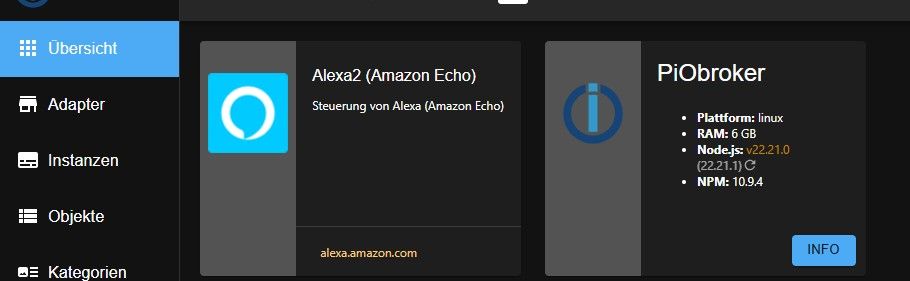
habe es nun geschafft und habe das System neu aufgesetzt. Nun habe ich nur das Problem, das ich 22.21.0 auf 22.21.1 nicht bekomme
-
habe es nun geschafft und habe das System neu aufgesetzt. Nun habe ich nur das Problem, das ich 22.21.0 auf 22.21.1 nicht bekomme
@marcel-drzal sagte in Fehler bei update:
Nun habe ich nur das Problem, das ich 22.21.0 auf 22.21.1 nicht bekomme
-
wie gehe ich das im iObroker vor das er sich die Datei zieht?
-
wie gehe ich das im iObroker vor das er sich die Datei zieht?
@marcel-drzal sagte in Fehler bei update:
wie gehe ich das im iObroker vor das er sich die Datei zieht?
Im ioBroker besser gar nicht. Software wird über deinen Pakemanager verwaltet.
Halte die Kiste regelmäßig auf Stand, dann kommt schon irgendwann ein update vorbeigeschwommen.sudo apt update sudo apt full-upgrade -
wie und wo stelle ich das ein?
marcel@PiObroker:~$ sudo apt update sudo apt full-upgrade [sudo] password for marcel: Hit:1 http://deb.debian.org/debian trixie InRelease Hit:2 http://security.debian.org trixie-security InRelease Get:3 http://deb.debian.org/debian trixie-updates InRelease [47.3 kB] Hit:4 https://deb.nodesource.com/node_22.x nodistro InRelease Fetched 47.3 kB in 0s (311 kB/s) All packages are up to date. Warning: https://deb.nodesource.com/node_22.x/dists/nodistro/InRelease: Policy will reject signature within a year, see --audit for details Summary: Upgrading: 0, Installing: 0, Removing: 0, Not Upgrading: 0 marcel@PiObroker:~$ -
wie und wo stelle ich das ein?
marcel@PiObroker:~$ sudo apt update sudo apt full-upgrade [sudo] password for marcel: Hit:1 http://deb.debian.org/debian trixie InRelease Hit:2 http://security.debian.org trixie-security InRelease Get:3 http://deb.debian.org/debian trixie-updates InRelease [47.3 kB] Hit:4 https://deb.nodesource.com/node_22.x nodistro InRelease Fetched 47.3 kB in 0s (311 kB/s) All packages are up to date. Warning: https://deb.nodesource.com/node_22.x/dists/nodistro/InRelease: Policy will reject signature within a year, see --audit for details Summary: Upgrading: 0, Installing: 0, Removing: 0, Not Upgrading: 0 marcel@PiObroker:~$@marcel-drzal sagte in Fehler bei update:
wie und wo stelle ich das ein?
Das ist alles okay. Nix einstellen. Die 22.21.1 ist einfach im nodesource-Repo nicht vorhanden. Siehe auch:
https://github.com/nodesource/distributions/issues/1897 -
ok danke dir.
das Warning hat mich irritiert -
ok danke dir.
das Warning hat mich irritiertInsgesamt scheint das Repo Probleme zu haben. Auch zum key gibt es seit Monaten ein offenes Issue:
-
Man könnte statt nodejs auch nsolid verwenden. Das meldet sich mit aktueller Version, würde aber z. B. von 'iob diag' nicht gefunden. Das ganze würde ich daher als inoffiziellen, experimentellen Handstrick bezeichnen.
Wer es 'für die Optik' probieren will:
iob stop
sudo apt update && sudo apt install nsolid
iob start
Aber ich würde weiterhin einfach auf ein Update von nodejs warten.
-
ok mache ich danke


Hey! Du scheinst an dieser Unterhaltung interessiert zu sein, hast aber noch kein Konto.
Hast du es satt, bei jedem Besuch durch die gleichen Beiträge zu scrollen? Wenn du dich für ein Konto anmeldest, kommst du immer genau dorthin zurück, wo du zuvor warst, und kannst dich über neue Antworten benachrichtigen lassen (entweder per E-Mail oder Push-Benachrichtigung). Du kannst auch Lesezeichen speichern und Beiträge positiv bewerten, um anderen Community-Mitgliedern deine Wertschätzung zu zeigen.
Mit deinem Input könnte dieser Beitrag noch besser werden 💗
Registrieren AnmeldenSupport us
379
Online33.0k
Benutzer83.6k
Themen1.3m
Beiträge