




Update proxmox 8 to 9
-
@shellyrulestheworld sagte in Update proxmox 8 to 9:
WARN: Deprecated config '/etc/sysctl.conf' contains settings - move them to a dedicated file in '/etc/sysctl.d/'.
Die Einstellungen aus der
/etc/sysctl.confwerden nun in einer separaten Datei im Verzeichnis/etc/sysctl.d/abgelegt.Und das andere war?
@thomas-braun muss ich diese Datei sysctl.conf verschieben oder kann man das ignorieren.
Vielen Dank für deinen tollen Support! -
Guten Morgen,
ich möchte proxmox 8.4.1 auf 9 updaten. Beim check mit pve8to9 bekomme ich folgende Meldungen:
= CHECKING VERSION INFORMATION FOR PVE PACKAGES =

Checking for package updates..
PASS: all packages up-to-date

Checking proxmox-ve package version..
PASS: proxmox-ve package has version >= 8.4-0

Checking running kernel version..
PASS: running kernel '6.8.12-15-pve' is considered suitable for upgrade.

= CHECKING CLUSTER HEALTH/SETTINGS =

SKIP: standalone node.

= CHECKING HYPER-CONVERGED CEPH STATUS =

SKIP: no hyper-converged ceph setup detected!

= CHECKING CONFIGURED STORAGES =

PASS: storage 'local' enabled and active.
PASS: storage 'local-lvm' enabled and active.
PASS: storage 'nas-backup-neu' enabled and active.
INFO: Checking storage content type configuration..
PASS: no storage content problems found
PASS: no storage re-uses a directory for multiple content types.
INFO: Check for usage of native GlusterFS storage plugin...
PASS: No GlusterFS storage found.
INFO: Checking whether all external RBD storages have the 'keyring' option configured
SKIP: No RBD storage configured.

= VIRTUAL GUEST CHECKS =

INFO: Checking for running guests..
WARN: 7 running guest(s) detected - consider migrating or stopping them.
INFO: Checking if LXCFS is running with FUSE3 library, if already upgraded..
SKIP: not yet upgraded, no need to check the FUSE library version LXCFS uses
INFO: Checking for VirtIO devices that would change their MTU...
PASS: All guest config descriptions fit in the new limit of 8 KiB
INFO: Checking container configs for deprecated lxc.cgroup entries
PASS: No legacy 'lxc.cgroup' keys found.
INFO: Checking VM configurations for outdated machine versions
PASS: All VM machine versions are recent enough

= MISCELLANEOUS CHECKS =

INFO: Checking common daemon services..
PASS: systemd unit 'pveproxy.service' is in state 'active'
PASS: systemd unit 'pvedaemon.service' is in state 'active'
PASS: systemd unit 'pvescheduler.service' is in state 'active'
PASS: systemd unit 'pvestatd.service' is in state 'active'
INFO: Checking for supported & active NTP service..
PASS: Detected active time synchronisation unit 'chrony.service'
INFO: Checking if the local node's hostname 'proxmox' is resolvable..
INFO: Checking if resolved IP is configured on local node..
PASS: Resolved node IP '192.168.178.19' configured and active on single interface.
INFO: Check node certificate's RSA key size
PASS: Certificate 'pve-root-ca.pem' passed Debian Busters (and newer) security level for TLS connections (4096 >= 2048)
PASS: Certificate 'pve-ssl.pem' passed Debian Busters (and newer) security level for TLS connections (2048 >= 2048)
INFO: Checking backup retention settings..
PASS: no backup retention problems found.
INFO: checking CIFS credential location..
PASS: no CIFS credentials at outdated location found.
INFO: Checking permission system changes..
INFO: Checking custom role IDs
PASS: no custom roles defined
INFO: Checking node and guest description/note length..
PASS: All node config descriptions fit in the new limit of 64 KiB
INFO: Checking if the suite for the Debian security repository is correct..
PASS: found no suite mismatch
INFO: Checking for existence of NVIDIA vGPU Manager..
PASS: No NVIDIA vGPU Service found.
INFO: Checking bootloader configuration...
PASS: bootloader packages installed correctly
INFO: Check for dkms modules...
SKIP: could not get dkms status
INFO: Check for legacy 'filter' or 'group' sections in /etc/pve/notifications.cfg...
INFO: Check for legacy 'notification-policy' or 'notification-target' options in /etc/pve/jobs.cfg...
PASS: No legacy 'notification-policy' or 'notification-target' options found!
INFO: Check for LVM autoactivation settings on LVM and LVM-thin storages...
NOTICE: storage 'local-lvm' has guest volumes with autoactivation enabled
NOTICE: Starting with PVE 9, autoactivation will be disabled for new LVM/LVM-thin guest volumes. This system has some volumes that still have autoactivation enabled. All volumes with autoactivations reside on local storage, where this normally does not cause any issues.
You can run the following command to disable autoactivation for existing LVM/LVM-thin guest volumes:

        /usr/share/pve-manager/migrations/pve-lvm-disable-autoactivation

INFO: Checking lvm config for thin_check_options...
PASS: Check for correct thin_check_options passed
INFO: Check space requirements for RRD migration...
PASS: Enough free disk space for increased RRD metric granularity requirements, which is roughly 19.22 MiB.
INFO: Checking for IPAM DB files that have not yet been migrated.
PASS: No legacy IPAM DB found.
PASS: No legacy MAC DB found.
INFO: Checking if the legacy sysctl file '/etc/sysctl.conf' needs to be migrated to new '/etc/sysctl.d/' path.
WARN: Deprecated config '/etc/sysctl.conf' contains settings - move them to a dedicated file in '/etc/sysctl.d/'.
INFO: Checking if matching CPU microcode package is installed.
PASS: Found matching CPU microcode package 'intel-microcode' installed.
SKIP: NOTE: Expensive checks, like CT cgroupv2 compat, not performed without '--full' parameter

= SUMMARY =

TOTAL:    43
PASSED:   33
SKIPPED:  6
WARNINGS: 2
FAILURES: 0

ATTENTION: Please check the output for detailed information!
Hat mir bitte jemand einen Tipp, wie ich die warnings beheben kann?
@shellyrulestheworld naja, er möchte das du eine Datei verschiebst:
WARN: Deprecated config '/etc/sysctl.conf' contains settings - move them to a dedicated file in '/etc/sysctl.d/'.Ich weis gar nicht ob es das Verzeichnis schon gibt, ansonsten
sudo mv /etc/sysctl.conf /etc/sysctl.d/Wenn es das nicht gibt, vorher erstellen:
sudo mkdir /etc/sysctl.d/Die andere Warnung ist ja nur das gerade 7 VMs oder Container am laufen sind.
Kannst ja sonst mal nachsehen was denn in deiner/etc/sysctl.confdrin steht. Eigentlich ist darin alles auskommentiert, nach dem Upgrade benennt er die Datei in/etc/sysctl.conf.dpkg-bakum und deaktiviert diese damit.Auf dem Lehrgang gab es den Tipp dort
vm.swappiness = 5eizutragen damit er möglichst spät bis gar nicht auslagert (RAM in Swapdatei)
Wichtig: Nach dem Upgrade und vor dem Neustart den Upgradetest noch einmal ausführen und beachten!
-
@thomas-braun muss ich diese Datei sysctl.conf verschieben oder kann man das ignorieren.
Vielen Dank für deinen tollen Support!@shellyrulestheworld sagte in Update proxmox 8 to 9:
muss ich diese Datei sysctl.conf verschieben oder kann man das ignorieren.
Du solltest reinschauen. Und dann schaust du, welche Dateien es im Zielverzeichnis schon gibt und und schaust da nach, ob du nicht ggfls. doppelte Einträge fabrizieren würdest.
Und dann verschiebst du die Datei entweder als ganzes oder fügst die Einstellungen in einer der schon vorhandenen Dateien ein.Edit: Da hat @BananaJoe schneller die Bananen gepflückt.
-
@shellyrulestheworld sagte in Update proxmox 8 to 9:
muss ich diese Datei sysctl.conf verschieben oder kann man das ignorieren.
Du solltest reinschauen. Und dann schaust du, welche Dateien es im Zielverzeichnis schon gibt und und schaust da nach, ob du nicht ggfls. doppelte Einträge fabrizieren würdest.
Und dann verschiebst du die Datei entweder als ganzes oder fügst die Einstellungen in einer der schon vorhandenen Dateien ein.Edit: Da hat @BananaJoe schneller die Bananen gepflückt.
@thomas-braun herzlichen Dank euch beiden :-)
-
@thomas-braun herzlichen Dank euch beiden :-)
so, update ist gemacht. Vielen Dank für euere Hilfe. Nur eine kurze Frage noch. Was bedeutet dieses failed?
root@proxmox:~# apt update Hit:1 http://security.debian.org trixie-security InRelease Hit:2 http://ftp.de.debian.org/debian trixie InRelease Hit:3 http://ftp.de.debian.org/debian trixie-updates InRelease Err:4 https://enterprise.proxmox.com/debian/pve trixie InRelease 401 Unauthorized [IP: 45.84.67.xx4 443] Hit:5 http://download.proxmox.com/debian/pve trixie InRelease Error: Failed to fetch https://enterprise.proxmox.com/debian/pve/dists/trixie/InRelease 401 Unauthorized [IP: 45.84.67.xx4 443] Error: The repository 'https://enterprise.proxmox.com/debian/pve trixie InRelease' is not signed. Notice: Updating from such a repository can't be done securely, and is therefore disabled by default. Notice: See apt-secure(8) manpage for repository creation and user configuration details. -
so, update ist gemacht. Vielen Dank für euere Hilfe. Nur eine kurze Frage noch. Was bedeutet dieses failed?
root@proxmox:~# apt update Hit:1 http://security.debian.org trixie-security InRelease Hit:2 http://ftp.de.debian.org/debian trixie InRelease Hit:3 http://ftp.de.debian.org/debian trixie-updates InRelease Err:4 https://enterprise.proxmox.com/debian/pve trixie InRelease 401 Unauthorized [IP: 45.84.67.xx4 443] Hit:5 http://download.proxmox.com/debian/pve trixie InRelease Error: Failed to fetch https://enterprise.proxmox.com/debian/pve/dists/trixie/InRelease 401 Unauthorized [IP: 45.84.67.xx4 443] Error: The repository 'https://enterprise.proxmox.com/debian/pve trixie InRelease' is not signed. Notice: Updating from such a repository can't be done securely, and is therefore disabled by default. Notice: See apt-secure(8) manpage for repository creation and user configuration details.Du hast den 'enterprise'-Support nicht erworben und keinen Zugang zum entsprechenden Repo, würde ich sagen.
-
Du hast den 'enterprise'-Support nicht erworben und keinen Zugang zum entsprechenden Repo, würde ich sagen.
@thomas-braun stimmt, da hatte sich was aktiviert:
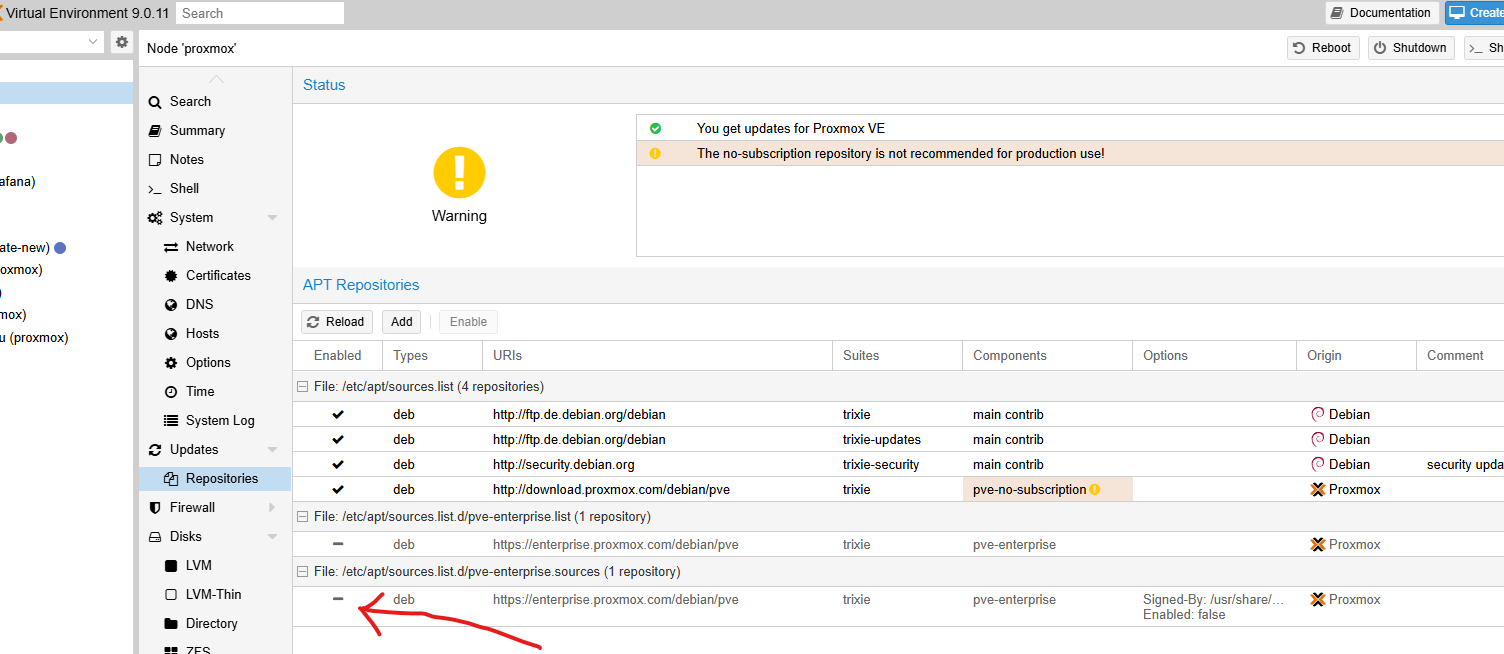
jetzt habe ich es hier deaktiviert und dann kommt diese Meldung nicht mehr. Dankeschön :-)
-
@thomas-braun stimmt, da hatte sich was aktiviert:
jetzt habe ich es hier deaktiviert und dann kommt diese Meldung nicht mehr. Dankeschön :-)
Noch eine allgemeine Frage nebenbei zum Proxmox-Update: Wie geht man mit den beherbergten Virtuellen Maschinen und LXC Containern um?
Erst den Proxmox-Unterbau updaten, und dann sukzessive die beherbergten Virtuellen Maschinen usw auf das nächste Debian bringen?
Intel(R) Celeron(R) CPU N3000 @1.04GHz 8G RAM 480G SSD * Virtualization : unprivileged lxc container on Proxmox * 6 GByte RAM für den iobroker Container * Remote-Access über Wireguard meiner Fritzbox
-
Noch eine allgemeine Frage nebenbei zum Proxmox-Update: Wie geht man mit den beherbergten Virtuellen Maschinen und LXC Containern um?
Erst den Proxmox-Unterbau updaten, und dann sukzessive die beherbergten Virtuellen Maschinen usw auf das nächste Debian bringen?
-
Noch eine allgemeine Frage nebenbei zum Proxmox-Update: Wie geht man mit den beherbergten Virtuellen Maschinen und LXC Containern um?
Erst den Proxmox-Unterbau updaten, und dann sukzessive die beherbergten Virtuellen Maschinen usw auf das nächste Debian bringen?
@martinp sagte in Update proxmox 8 to 9:
Noch eine allgemeine Frage nebenbei zum Proxmox-Update: Wie geht man mit den beherbergten Virtuellen Maschinen und LXC Containern um?
Erst den Proxmox-Unterbau updaten, und dann sukzessive die beherbergten Virtuellen Maschinen usw auf das nächste Debian bringen?
Ich hatte erst Proxmox auf 9.0.0 geupdated.
Danach meine VMc und CTs.
Die CTs haben danach nicht mehr gestartet.
Musste in den Confs der CTs das BS auf "unmanaged" stellen.Mit dem Update auf 9.0.1 wurde das gefixt und habe wieder das korrekte OS eingetragen.
-
@martinp sagte in Update proxmox 8 to 9:
Noch eine allgemeine Frage nebenbei zum Proxmox-Update: Wie geht man mit den beherbergten Virtuellen Maschinen und LXC Containern um?
Erst den Proxmox-Unterbau updaten, und dann sukzessive die beherbergten Virtuellen Maschinen usw auf das nächste Debian bringen?
Ich hatte erst Proxmox auf 9.0.0 geupdated.
Danach meine VMc und CTs.
Die CTs haben danach nicht mehr gestartet.
Musste in den Confs der CTs das BS auf "unmanaged" stellen.Mit dem Update auf 9.0.1 wurde das gefixt und habe wieder das korrekte OS eingetragen.
@david-g Ahh, also gibt die alte Bauernregel immer noch: Nie eine Doppelnull (x.0.0) installieren ;-)
Intel(R) Celeron(R) CPU N3000 @1.04GHz 8G RAM 480G SSD * Virtualization : unprivileged lxc container on Proxmox * 6 GByte RAM für den iobroker Container * Remote-Access über Wireguard meiner Fritzbox
-
@david-g Ahh, also gibt die alte Bauernregel immer noch: Nie eine Doppelnull (x.0.0) installieren ;-)
@martinp sagte in Update proxmox 8 to 9:
Nie eine Doppelnull (x.0.0) installieren
Genau so halte ich es und bin damit gut gefahren.
Erfolgreich auf Proxmox 9.0.10 unterwegs....iobroker in Debian-VM auf Proxmox Server (Ryzen 7 / 32GB / 1TB NVMe SSD) als Master - mehrere Raspberry Pis (3+4) als Slaves. InfluxDB V2 und Grafana auf LXC.
*Wer freundlich ist, dem wird freundlich geholfen *
-
@martinp sagte in Update proxmox 8 to 9:
Nie eine Doppelnull (x.0.0) installieren
Genau so halte ich es und bin damit gut gefahren.
Erfolgreich auf Proxmox 9.0.10 unterwegs.... -
Irgend ein doofer muss es ja testen 🤣
Dafür habe ich 2 Systeme falls as erste bei sowas versagt ^^ -
@david-g Ahh, also gibt die alte Bauernregel immer noch: Nie eine Doppelnull (x.0.0) installieren ;-)
@martinp sagte in Update proxmox 8 to 9:
@david-g Ahh, also gibt die alte Bauernregel immer noch: Nie eine Doppelnull (x.0.0) installieren ;-)
Ich habe da auch erstmal zwei Wochen gewartet. Es hat sich bisher gut bewährt
 .
.






Hey! Du scheinst an dieser Unterhaltung interessiert zu sein, hast aber noch kein Konto.
Hast du es satt, bei jedem Besuch durch die gleichen Beiträge zu scrollen? Wenn du dich für ein Konto anmeldest, kommst du immer genau dorthin zurück, wo du zuvor warst, und kannst dich über neue Antworten benachrichtigen lassen (entweder per E-Mail oder Push-Benachrichtigung). Du kannst auch Lesezeichen speichern und Beiträge positiv bewerten, um anderen Community-Mitgliedern deine Wertschätzung zu zeigen.
Mit deinem Input könnte dieser Beitrag noch besser werden 💗
Registrieren AnmeldenSupport us
359
Online33.0k
Benutzer83.4k
Themen1.3m
Beiträge