




Conbee 2 - Deconz/Phoscon + Debian Trixie ?
-
Hallo,
vielleicht kann mir hier ja jemand sagen ob die Software Deconz/Phoscon des Conbee 2 schon mit Debian Trixie läuft. Hat das schon wer hier am laufen ? Auf deren Seite konnte ich nur das finden.

und da steht noch nichts mit Trixie -
Hallo,
vielleicht kann mir hier ja jemand sagen ob die Software Deconz/Phoscon des Conbee 2 schon mit Debian Trixie läuft. Hat das schon wer hier am laufen ? Auf deren Seite konnte ich nur das finden.
und da steht noch nichts mit TrixieDann warte doch bis es offiziell dort steht oder was hetzt Dich jetzt auf Trixie?
Für das Upgrade von Debian 12 auf 13 haste knapp nen Jahr Zeit . -
Hallo,
vielleicht kann mir hier ja jemand sagen ob die Software Deconz/Phoscon des Conbee 2 schon mit Debian Trixie läuft. Hat das schon wer hier am laufen ? Auf deren Seite konnte ich nur das finden.
und da steht noch nichts mit TrixieDie Version aus der Bookworm-Quelle dürfte auch unter Trixie funktionieren.
Die sind da nicht so schnell beim Anpassen der Quellen.
Zumal RaspberryOS 'Trixie' auch noch nicht veröffentlicht wurde. -
Hallo zusammen,
könnte jemand bestätigen, dass das Upgrade auf Trixie mit dem DeConz-Repo funktioniert?
Im offiziellen Forum wird berichtet, dass DeConz nicht mit Trixie kompatibel ist,
da im Trixie nun kein QT5 mehr bei ist.
Siehe: https://forum.phoscon.de/t/debain-13-und-deconz/6568Danke im Voraus.
-
Hallo zusammen,
könnte jemand bestätigen, dass das Upgrade auf Trixie mit dem DeConz-Repo funktioniert?
Im offiziellen Forum wird berichtet, dass DeConz nicht mit Trixie kompatibel ist,
da im Trixie nun kein QT5 mehr bei ist.
Siehe: https://forum.phoscon.de/t/debain-13-und-deconz/6568Danke im Voraus.
Die Installation würde hier funktionieren:
echad@chet:~ $ apt install deconz --dry-run NOTE: This is only a simulation! apt needs root privileges for real execution. Keep also in mind that locking is deactivated, so don't depend on the relevance to the real current situation! Installing: deconz Installing dependencies: adwaita-icon-theme libatk-bridge2.0-0t64 libgl1 libinput10 libqt5qml5 libqt5waylandcompositor5 libxcb-glx0 libxcb-xinput0 libxkbcommon-x11-0 qtwayland5 at-spi2-common libatk1.0-0t64 libgl1-mesa-dri liblcms2-2 libqt5qmlmodels5 libqt5websockets5 libxcb-icccm4 libxcb-xkb1 libxkbcommon0 sqlite3 at-spi2-core libatspi2.0-0t64 libglx-mesa0 libmd4c0 libqt5quick5 libqt5widgets5t64 libxcb-image0 libxcomposite1 libxrandr2 dconf-gsettings-backend libcloudproviders0 libglx0 libmtdev1t64 libqt5serialport5 libvulkan1 libxcb-keysyms1 libxcursor1 libxtst6 dconf-service libcolord2 libgtk-3-0t64 libqt5core5t64 libqt5sql5-sqlite libwacom-common libxcb-render-util0 libxdamage1 libxxf86vm1 gsettings-desktop-schemas libcups2t64 libgtk-3-bin libqt5dbus5t64 libqt5sql5t64 libwacom9 libxcb-shape0 libxfixes3 mesa-vulkan-drivers gtk-update-icon-cache libepoxy0 libgtk-3-common libqt5gui5t64 libqt5svg5 libwayland-cursor0 libxcb-util1 libxi6 qt5-gtk-platformtheme hicolor-icon-theme libevdev2 libinput-bin libqt5network5t64 libqt5waylandclient5 libwayland-egl1 libxcb-xinerama0 libxinerama1 qttranslations5-l10n Suggested packages: adwaita-icon-theme-legacy colord cups-common gvfs liblcms2-utils qgnomeplatform-qt5 qt5-image-formats-plugins qt5-qmltooling-plugins libwacom-bin sqlite3-doc Summary: Upgrading: 0, Installing: 75, Removing: 0, Not Upgrading: 0 Inst gtk-update-icon-cache (4.18.6+ds-2 Debian:13.1/stable [arm64]) Inst hicolor-icon-theme (0.18-2 Debian:13.1/stable [all]) Inst adwaita-icon-theme (48.1-1 Debian:13.1/stable [all]) Inst at-spi2-common (2.56.2-1 Debian:13.1/stable [all]) Inst libxi6 (2:1.8.2-1 Debian:13.1/stable [arm64]) Inst libatspi2.0-0t64 (2.56.2-1 Debian:13.1/stable [arm64]) Inst libxtst6 (2:1.2.5-1 Debian:13.1/stable [arm64]) Inst dconf-service (0.40.0-5 Debian:13.1/stable [arm64]) Inst dconf-gsettings-backend (0.40.0-5 Debian:13.1/stable [arm64]) Inst gsettings-desktop-schemas (48.0-1+rpt1 Raspberry Pi Foundation:testing [all]) Inst at-spi2-core (2.56.2-1 Debian:13.1/stable [arm64]) Inst libqt5core5t64 (5.15.15+dfsg-6 Debian:13.1/stable [arm64]) Inst libqt5dbus5t64 (5.15.15+dfsg-6 Debian:13.1/stable [arm64]) Inst libqt5network5t64 (5.15.15+dfsg-6 Debian:13.1/stable [arm64]) Inst libxcb-glx0 (1.17.0-2+b1 Debian:13.1/stable [arm64]) Inst libxxf86vm1 (1:1.1.4-1+b4 Debian:13.1/stable [arm64]) Inst libvulkan1 (1.4.309.0-1 Debian:13.1/stable [arm64]) Inst libgl1-mesa-dri (25.0.7-2+rpt3 Raspberry Pi Foundation:testing [arm64]) Inst libglx-mesa0 (25.0.7-2+rpt3 Raspberry Pi Foundation:testing [arm64]) Inst libglx0 (1.7.0-1+b2 Debian:13.1/stable [arm64]) Inst libgl1 (1.7.0-1+b2 Debian:13.1/stable [arm64]) Inst libevdev2 (1.13.4+dfsg-1 Debian:13.1/stable [arm64]) Inst libmtdev1t64 (1.1.7-1 Debian:13.1/stable [arm64]) Inst libwacom-common (2.14.0-1 Debian:13.1/stable [all]) Inst libwacom9 (2.14.0-1 Debian:13.1/stable [arm64]) Inst libinput-bin (1.28.1-1 Debian:13.1/stable [arm64]) Inst libinput10 (1.28.1-1 Debian:13.1/stable [arm64]) Inst libmd4c0 (0.5.2-2+b1 Debian:13.1/stable [arm64]) Inst libxcb-icccm4 (0.4.2-1 Debian:13.1/stable [arm64]) Inst libxcb-util1 (0.4.1-1 Debian:13.1/stable [arm64]) Inst libxcb-image0 (0.4.0-2+b2 Debian:13.1/stable [arm64]) Inst libxcb-keysyms1 (0.4.1-1 Debian:13.1/stable [arm64]) Inst libxcb-render-util0 (0.3.10-1 Debian:13.1/stable [arm64]) Inst libxcb-shape0 (1.17.0-2+b1 Debian:13.1/stable [arm64]) Inst libxcb-xinerama0 (1.17.0-2+b1 Debian:13.1/stable [arm64]) Inst libxcb-xinput0 (1.17.0-2+b1 Debian:13.1/stable [arm64]) Inst libxcb-xkb1 (1.17.0-2+b1 Debian:13.1/stable [arm64]) Inst libxkbcommon0 (1.7.0-2 Debian:13.1/stable [arm64]) Inst libxkbcommon-x11-0 (1.7.0-2 Debian:13.1/stable [arm64]) Inst libqt5gui5t64 (5.15.15+dfsg-6 Debian:13.1/stable [arm64]) Inst libqt5widgets5t64 (5.15.15+dfsg-6 Debian:13.1/stable [arm64]) Inst libqt5serialport5 (5.15.15-2 Debian:13.1/stable [arm64]) Inst libqt5websockets5 (5.15.15-2 Debian:13.1/stable [arm64]) Inst libqt5sql5t64 (5.15.15+dfsg-6 Debian:13.1/stable [arm64]) Inst libqt5qml5 (5.15.15+dfsg-3 Debian:13.1/stable [arm64]) Inst sqlite3 (3.46.1-7 Debian:13.1/stable [arm64]) Inst deconz (2.31.2 phoscon.de [arm64]) Inst libatk1.0-0t64 (2.56.2-1 Debian:13.1/stable [arm64]) Inst libatk-bridge2.0-0t64 (2.56.2-1 Debian:13.1/stable [arm64]) Inst libcloudproviders0 (0.3.6-2 Debian:13.1/stable [arm64]) Inst liblcms2-2 (2.16-2 Debian:13.1/stable [arm64]) Inst libcolord2 (1.4.7-3 Debian:13.1/stable [arm64]) Inst libcups2t64 (2.4.10-3+deb13u1 Debian-Security:13/stable-security [arm64]) Inst libepoxy0 (1.5.10-2 Debian:13.1/stable [arm64]) Inst libwayland-cursor0 (1.23.1-3+rpt1+b1 Raspberry Pi Foundation:testing [arm64]) Inst libwayland-egl1 (1.23.1-3+rpt1+b1 Raspberry Pi Foundation:testing [arm64]) Inst libxcomposite1 (1:0.4.6-1 Debian:13.1/stable [arm64]) Inst libxfixes3 (1:6.0.0-2+b4 Debian:13.1/stable [arm64]) Inst libxcursor1 (1:1.2.3-1 Debian:13.1/stable [arm64]) Inst libxdamage1 (1:1.1.6-1+b2 Debian:13.1/stable [arm64]) Inst libxinerama1 (2:1.1.4-3+b4 Debian:13.1/stable [arm64]) Inst libxrandr2 (2:1.5.4-1+b3 Debian:13.1/stable [arm64]) Inst libgtk-3-common (1:3.24.49-3+rpt7 Raspberry Pi Foundation:testing [all]) Inst libgtk-3-0t64 (1:3.24.49-3+rpt7 Raspberry Pi Foundation:testing [arm64]) Inst libgtk-3-bin (1:3.24.49-3+rpt7 Raspberry Pi Foundation:testing [arm64]) Inst libqt5qmlmodels5 (5.15.15+dfsg-3 Debian:13.1/stable [arm64]) Inst libqt5quick5 (5.15.15+dfsg-3 Debian:13.1/stable [arm64]) Inst libqt5sql5-sqlite (5.15.15+dfsg-6 Debian:13.1/stable [arm64]) Inst libqt5svg5 (5.15.15-2 Debian:13.1/stable [arm64]) Inst libqt5waylandclient5 (5.15.15-3 Debian:13.1/stable [arm64]) Inst libqt5waylandcompositor5 (5.15.15-3 Debian:13.1/stable [arm64]) Inst mesa-vulkan-drivers (25.0.7-2+rpt3 Raspberry Pi Foundation:testing [arm64]) Inst qt5-gtk-platformtheme (5.15.15+dfsg-6 Debian:13.1/stable [arm64]) Inst qttranslations5-l10n (5.15.15-2 Debian:13.1/stable [all]) Inst qtwayland5 (5.15.15-3 Debian:13.1/stable [arm64]) Conf gtk-update-icon-cache (4.18.6+ds-2 Debian:13.1/stable [arm64]) Conf hicolor-icon-theme (0.18-2 Debian:13.1/stable [all]) Conf adwaita-icon-theme (48.1-1 Debian:13.1/stable [all]) Conf at-spi2-common (2.56.2-1 Debian:13.1/stable [all]) Conf libxi6 (2:1.8.2-1 Debian:13.1/stable [arm64]) Conf libatspi2.0-0t64 (2.56.2-1 Debian:13.1/stable [arm64]) Conf libxtst6 (2:1.2.5-1 Debian:13.1/stable [arm64]) Conf dconf-service (0.40.0-5 Debian:13.1/stable [arm64]) Conf dconf-gsettings-backend (0.40.0-5 Debian:13.1/stable [arm64]) Conf gsettings-desktop-schemas (48.0-1+rpt1 Raspberry Pi Foundation:testing [all]) Conf at-spi2-core (2.56.2-1 Debian:13.1/stable [arm64]) Conf libqt5core5t64 (5.15.15+dfsg-6 Debian:13.1/stable [arm64]) Conf libqt5dbus5t64 (5.15.15+dfsg-6 Debian:13.1/stable [arm64]) Conf libqt5network5t64 (5.15.15+dfsg-6 Debian:13.1/stable [arm64]) Conf libxcb-glx0 (1.17.0-2+b1 Debian:13.1/stable [arm64]) Conf libxxf86vm1 (1:1.1.4-1+b4 Debian:13.1/stable [arm64]) Conf libvulkan1 (1.4.309.0-1 Debian:13.1/stable [arm64]) Conf libgl1-mesa-dri (25.0.7-2+rpt3 Raspberry Pi Foundation:testing [arm64]) Conf libglx-mesa0 (25.0.7-2+rpt3 Raspberry Pi Foundation:testing [arm64]) Conf libglx0 (1.7.0-1+b2 Debian:13.1/stable [arm64]) Conf libgl1 (1.7.0-1+b2 Debian:13.1/stable [arm64]) Conf libevdev2 (1.13.4+dfsg-1 Debian:13.1/stable [arm64]) Conf libmtdev1t64 (1.1.7-1 Debian:13.1/stable [arm64]) Conf libwacom-common (2.14.0-1 Debian:13.1/stable [all]) Conf libwacom9 (2.14.0-1 Debian:13.1/stable [arm64]) Conf libinput-bin (1.28.1-1 Debian:13.1/stable [arm64]) Conf libinput10 (1.28.1-1 Debian:13.1/stable [arm64]) Conf libmd4c0 (0.5.2-2+b1 Debian:13.1/stable [arm64]) Conf libxcb-icccm4 (0.4.2-1 Debian:13.1/stable [arm64]) Conf libxcb-util1 (0.4.1-1 Debian:13.1/stable [arm64]) Conf libxcb-image0 (0.4.0-2+b2 Debian:13.1/stable [arm64]) Conf libxcb-keysyms1 (0.4.1-1 Debian:13.1/stable [arm64]) Conf libxcb-render-util0 (0.3.10-1 Debian:13.1/stable [arm64]) Conf libxcb-shape0 (1.17.0-2+b1 Debian:13.1/stable [arm64]) Conf libxcb-xinerama0 (1.17.0-2+b1 Debian:13.1/stable [arm64]) Conf libxcb-xinput0 (1.17.0-2+b1 Debian:13.1/stable [arm64]) Conf libxcb-xkb1 (1.17.0-2+b1 Debian:13.1/stable [arm64]) Conf libxkbcommon0 (1.7.0-2 Debian:13.1/stable [arm64]) Conf libxkbcommon-x11-0 (1.7.0-2 Debian:13.1/stable [arm64]) Conf libqt5gui5t64 (5.15.15+dfsg-6 Debian:13.1/stable [arm64]) Conf libqt5widgets5t64 (5.15.15+dfsg-6 Debian:13.1/stable [arm64]) Conf libqt5serialport5 (5.15.15-2 Debian:13.1/stable [arm64]) Conf libqt5websockets5 (5.15.15-2 Debian:13.1/stable [arm64]) Conf libqt5sql5t64 (5.15.15+dfsg-6 Debian:13.1/stable [arm64]) Conf libqt5qml5 (5.15.15+dfsg-3 Debian:13.1/stable [arm64]) Conf sqlite3 (3.46.1-7 Debian:13.1/stable [arm64]) Conf deconz (2.31.2 phoscon.de [arm64]) Conf libatk1.0-0t64 (2.56.2-1 Debian:13.1/stable [arm64]) Conf libatk-bridge2.0-0t64 (2.56.2-1 Debian:13.1/stable [arm64]) Conf libcloudproviders0 (0.3.6-2 Debian:13.1/stable [arm64]) Conf liblcms2-2 (2.16-2 Debian:13.1/stable [arm64]) Conf libcolord2 (1.4.7-3 Debian:13.1/stable [arm64]) Conf libcups2t64 (2.4.10-3+deb13u1 Debian-Security:13/stable-security [arm64]) Conf libepoxy0 (1.5.10-2 Debian:13.1/stable [arm64]) Conf libwayland-cursor0 (1.23.1-3+rpt1+b1 Raspberry Pi Foundation:testing [arm64]) Conf libwayland-egl1 (1.23.1-3+rpt1+b1 Raspberry Pi Foundation:testing [arm64]) Conf libxcomposite1 (1:0.4.6-1 Debian:13.1/stable [arm64]) Conf libxfixes3 (1:6.0.0-2+b4 Debian:13.1/stable [arm64]) Conf libxcursor1 (1:1.2.3-1 Debian:13.1/stable [arm64]) Conf libxdamage1 (1:1.1.6-1+b2 Debian:13.1/stable [arm64]) Conf libxinerama1 (2:1.1.4-3+b4 Debian:13.1/stable [arm64]) Conf libxrandr2 (2:1.5.4-1+b3 Debian:13.1/stable [arm64]) Conf libgtk-3-common (1:3.24.49-3+rpt7 Raspberry Pi Foundation:testing [all]) Conf libgtk-3-0t64 (1:3.24.49-3+rpt7 Raspberry Pi Foundation:testing [arm64]) Conf libgtk-3-bin (1:3.24.49-3+rpt7 Raspberry Pi Foundation:testing [arm64]) Conf libqt5qmlmodels5 (5.15.15+dfsg-3 Debian:13.1/stable [arm64]) Conf libqt5quick5 (5.15.15+dfsg-3 Debian:13.1/stable [arm64]) Conf libqt5sql5-sqlite (5.15.15+dfsg-6 Debian:13.1/stable [arm64]) Conf libqt5svg5 (5.15.15-2 Debian:13.1/stable [arm64]) Conf libqt5waylandclient5 (5.15.15-3 Debian:13.1/stable [arm64]) Conf libqt5waylandcompositor5 (5.15.15-3 Debian:13.1/stable [arm64]) Conf mesa-vulkan-drivers (25.0.7-2+rpt3 Raspberry Pi Foundation:testing [arm64]) Conf qt5-gtk-platformtheme (5.15.15+dfsg-6 Debian:13.1/stable [arm64]) Conf qttranslations5-l10n (5.15.15-2 Debian:13.1/stable [all]) Conf qtwayland5 (5.15.15-3 Debian:13.1/stable [arm64]) -
Hallo zusammen,
könnte jemand bestätigen, dass das Upgrade auf Trixie mit dem DeConz-Repo funktioniert?
Im offiziellen Forum wird berichtet, dass DeConz nicht mit Trixie kompatibel ist,
da im Trixie nun kein QT5 mehr bei ist.
Siehe: https://forum.phoscon.de/t/debain-13-und-deconz/6568Danke im Voraus.
@siggi0904 bei mir hat es mit der Anleitung von @Thomas-Braun funtioniert und läuft.
-
Hallo zusammen,
könnte jemand bestätigen, dass das Upgrade auf Trixie mit dem DeConz-Repo funktioniert?
Im offiziellen Forum wird berichtet, dass DeConz nicht mit Trixie kompatibel ist,
da im Trixie nun kein QT5 mehr bei ist.
Siehe: https://forum.phoscon.de/t/debain-13-und-deconz/6568Danke im Voraus.
Bitte aber das neue Repo für deconz verwenden:
https://forum.iobroker.net/topic/59231/phantastische-repositories-und-wo-sie-zu-finden-sind
Edit: In dem Forum wird auch wieder mal ziemlicher Quark erzählt...
Dennechad@chet:~ $ apt search libqt5network5 libqt5network5t64/stable 5.15.15+dfsg-6 arm64 Qt 5 network module echad@chet:~ $QT5 ist natürlich vorhanden, wenn man seine Paketquellen sauber hat...
-
Hallo zusammen,
könnte jemand bestätigen, dass das Upgrade auf Trixie mit dem DeConz-Repo funktioniert?
Im offiziellen Forum wird berichtet, dass DeConz nicht mit Trixie kompatibel ist,
da im Trixie nun kein QT5 mehr bei ist.
Siehe: https://forum.phoscon.de/t/debain-13-und-deconz/6568Danke im Voraus.
@siggi0904 wobei ich denke gelesen zu haben, dass es mittlerweile für den Raspberry Pi Imager auch schon Trixie gibt. Also besser das Bookworm soweit alles updaten/upgraden und dann ein Backup ziehen. (Backup von Phoscon/Deconz noch machen) und dann Trixier sauber komplett neuinstallieren.
Stimmt das so @Thomas-Braun ?
-
@siggi0904 wobei ich denke gelesen zu haben, dass es mittlerweile für den Raspberry Pi Imager auch schon Trixie gibt. Also besser das Bookworm soweit alles updaten/upgraden und dann ein Backup ziehen. (Backup von Phoscon/Deconz noch machen) und dann Trixier sauber komplett neuinstallieren.
Stimmt das so @Thomas-Braun ?
Ja, Raspberry OS 13 Trixie ist draußen.
Die Empfehlung der Raspberry Pi Foundation ist die Neuinstallation. -
@Thomas-Braun danke für das checken. Dass die Aussage im DeConz-Forum falsch ist, hatte ich fast vermutet. Sonst wären mehr Meldungen hier oder im www zu finden.
Upgrade und Reboot ist durch. Läuft auch wieder.
Ich habe DeConz in einem eigenen LXC laufen.
Einzig musst ich nachsudo apt modernize-sourcesden Keyring neu holen und in die Sources eintragen. Aber da war die Vorlage von Thomas super.@Michael-Schmitt Danke für den Hinweis. Hab ich so mit dem Upgrade gemacht.
-
Hallo,
ich klinke mich hier mal ein....
Ich habe seit Jahren erfolgreich einen Raspi4 mit einem Conbee2-USB-Stick und dem Deconz-Adapter am laufen und nie Probleme damit gehabt.
Ich habe jetzt meinen alten Raspi4 mit einem Raspi5 (8GB RAM) und TRIXIE ersetzt und auch erfolgreich unter Trixie die aktuelle Beta Deconz-App (deconz-qt6 / aktuelle Beta 2.32.2) installieren können. Läuft soweit ganz gut. Auch der IoBroker-Deconz-Adapter läuft soweit (Grün), ich kann wieder alle ZigBee-Geräte sehen und steuern, außer alle batteriebetriebenen Zigbee-Sensoren/Schalter, sogenannte Sleeper. Die werden im IoBroker nur kurz nachdem Start/Neustart des Deconz-Adapater im IoBroker aktualisiert. Nach ca. 1 Minute nach Start/Neustart des Deconz-Adapter werden alle batteriebetriebenen Sensoren/Schalter nicht mehr aktualisiert, obwohl diese Sensoren in der Phoscon-WebApp einwandfrei angezeigt werden und auch live auf Tastendruck dort reagieren und sie erscheinen auch eindeutig live in der Event-Liste. Am Conbee2-Stick und an Deconz auf dem Raspi5 kann es also nicht liegen?Hat hier jemand eine Idee woran das liegen könnte?
Raspi5 / Raspbian Trixie / Deconz Beta 2.32.2 / IoBroker 7.1.0 / Deconz-Adapter 1.6.4
Node.js: v22.21.0
NPM:10.9.4Raspi5, Trixie, Conbee2 USB Zigbee,
-
Hi,
hast du das System komplett neu aufgesetzt oder Backups verwendet ?
Falls ja hast du davor auch schon die Deconz beta verwendet ?
Hast du mal probiert einen Sensor zu löschen und diesen neu zu pairen ? -
Hallo Michael,
ich habe das System neu aufgesetzt, allerdings habe ich für Deconz Backups aller Zigbee-Geräte über die Phoscon-WebApp eingespielt und natürlich ein IoBroker-Backup wiederhergestellt.
Ich habe auch schon einen Sensor gelöscht und neu angelernt. bringt leider nichts, anlernen funktioniert einwandfrei, in Deconz/Phoscon funktionieren die Sensoren, im IoBroker nur für ein paar Sekunden nach dem Start/Neustart des Deconz-Adapter, danach keine Aktualisierungen mehr. Alle anderen Zigbee-Geräte funktionieren aber einwandfrei.Nach einem Neustart des Deconz-Adapters habe ich immer wieder folgende Fehlermeldung im IoBroker-Log:
Code 404: Ressource not found set group state 3: [{"error":{"address":"/groups/3","description":"resource, /groups/3, not available","type":3}}]
Ich benutze keine Gruppen mit Deconz/Phoscon, habe alle Gruppen die mal testweise erstellt wurden gelöscht. Die Fehlermeldung bleibt aber...
Raspi5, Trixie, Conbee2 USB Zigbee,
-
Hallo Michael,
ich habe das System neu aufgesetzt, allerdings habe ich für Deconz Backups aller Zigbee-Geräte über die Phoscon-WebApp eingespielt und natürlich ein IoBroker-Backup wiederhergestellt.
Ich habe auch schon einen Sensor gelöscht und neu angelernt. bringt leider nichts, anlernen funktioniert einwandfrei, in Deconz/Phoscon funktionieren die Sensoren, im IoBroker nur für ein paar Sekunden nach dem Start/Neustart des Deconz-Adapter, danach keine Aktualisierungen mehr. Alle anderen Zigbee-Geräte funktionieren aber einwandfrei.Nach einem Neustart des Deconz-Adapters habe ich immer wieder folgende Fehlermeldung im IoBroker-Log:
Code 404: Ressource not found set group state 3: [{"error":{"address":"/groups/3","description":"resource, /groups/3, not available","type":3}}]
Ich benutze keine Gruppen mit Deconz/Phoscon, habe alle Gruppen die mal testweise erstellt wurden gelöscht. Die Fehlermeldung bleibt aber...
hast du schon mal die Deconz v2.31.2 (stable) probiert ?
oder mal in Iobroker in den Objekten einen Sensor gelöscht
z.b
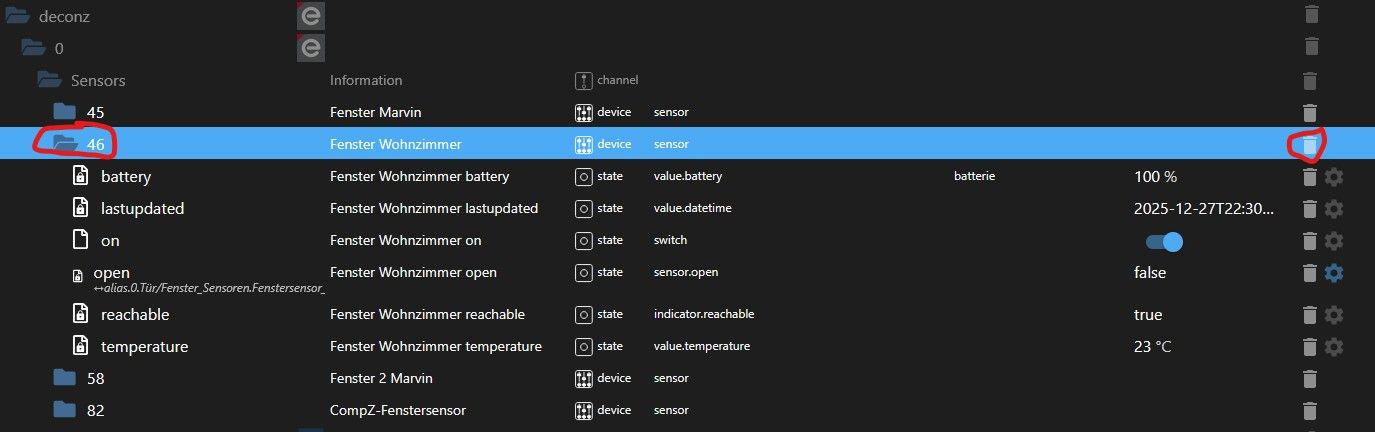
danach den Deconz Adapter neustarten, dann wird der Ordner wieder hergestellt. -
soweit ich informiert bin, muss man für Debian 13 Trixie mind. die Version 2.32.1 wegen der Qt6-Unterstützung nutzen.
https://phoscon.de/de/changelog#v2.32.1Ja, ich habe auch schon Objekte komplett gelöscht. Diese werden nach einem Adapter-Neustart auch wieder neu angelegt. Aber auch die Objekte werden nur einige Sekunden nach Neustart des Adapters aktualisiert, danach nicht mehr.
Kannst du was mit dieser Fehlermeldung anfangen?
Code 404: Ressource not found set group state 3: [{"error":{"address":"/groups/3","description":"resource, /groups/3, not available","type":3}}] -
ich nutze Trixie und die stable und das läuft soweit.
Bei den neuesten Betas mußt man den Befehl "sudo apt install deconz-qt6" ausgeführen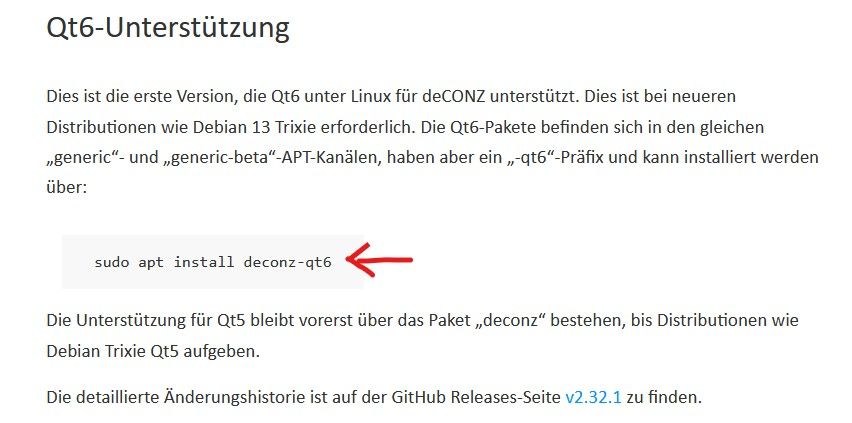
Die Fehlermeldung sagt mir garnichts, da müßen die Profis ran (ich bin nur ein Noob) Vielleicht kann @jey-cee was dazu sagen (Dev. vom Deconz Adapter)
-
Guten Morgen Michael,
oh man……manche Lösungen sind oft so einfach. Ich habe jetzt Deconz 2.31.2 installiert und es läuft wieder alles.
Warum wird denn überall geschrieben, dass man für Trixie unbedingt diese Qt6-Unterstützung benötigt? Aber egal. Es läuft wieder alles! Und diese merkwürdige Warnung im Log vom IoBroker ist auch weg.Vielen Dank für den Tipp!
Raspi5, Trixie, Conbee2 USB Zigbee,
-
Guten Morgen Michael,
oh man……manche Lösungen sind oft so einfach. Ich habe jetzt Deconz 2.31.2 installiert und es läuft wieder alles.
Warum wird denn überall geschrieben, dass man für Trixie unbedingt diese Qt6-Unterstützung benötigt? Aber egal. Es läuft wieder alles! Und diese merkwürdige Warnung im Log vom IoBroker ist auch weg.Vielen Dank für den Tipp!
-
Hallo,
ich klinke mich hier mal ein....
Ich habe seit Jahren erfolgreich einen Raspi4 mit einem Conbee2-USB-Stick und dem Deconz-Adapter am laufen und nie Probleme damit gehabt.
Ich habe jetzt meinen alten Raspi4 mit einem Raspi5 (8GB RAM) und TRIXIE ersetzt und auch erfolgreich unter Trixie die aktuelle Beta Deconz-App (deconz-qt6 / aktuelle Beta 2.32.2) installieren können. Läuft soweit ganz gut. Auch der IoBroker-Deconz-Adapter läuft soweit (Grün), ich kann wieder alle ZigBee-Geräte sehen und steuern, außer alle batteriebetriebenen Zigbee-Sensoren/Schalter, sogenannte Sleeper. Die werden im IoBroker nur kurz nachdem Start/Neustart des Deconz-Adapater im IoBroker aktualisiert. Nach ca. 1 Minute nach Start/Neustart des Deconz-Adapter werden alle batteriebetriebenen Sensoren/Schalter nicht mehr aktualisiert, obwohl diese Sensoren in der Phoscon-WebApp einwandfrei angezeigt werden und auch live auf Tastendruck dort reagieren und sie erscheinen auch eindeutig live in der Event-Liste. Am Conbee2-Stick und an Deconz auf dem Raspi5 kann es also nicht liegen?Hat hier jemand eine Idee woran das liegen könnte?
Raspi5 / Raspbian Trixie / Deconz Beta 2.32.2 / IoBroker 7.1.0 / Deconz-Adapter 1.6.4
Node.js: v22.21.0
NPM:10.9.4@schween sagte in Conbee 2 - Deconz/Phoscon + Debian Trixie ?:
Die werden im IoBroker nur kurz nachdem Start/Neustart des Deconz-Adapater im IoBroker aktualisiert. Nach ca. 1 Minute nach Start/Neustart des Deconz-Adapter werden alle batteriebetriebenen Sensoren/Schalter nicht mehr aktualisiert,
Das liegt ziemlich sicher daran das die Websocketverbindung nicht funktioniert. Dazu müsste es auch eine Meldung im Log geben.
Die Ursache ist fast immer das in den Adapter Einstellungen ein falscher Port eingetragen ist. In deinem Fall hat er sich dann wohl in deConz geändert.@schween sagte in Conbee 2 - Deconz/Phoscon + Debian Trixie ?:
Nach einem Neustart des Deconz-Adapters habe ich immer wieder folgende Fehlermeldung im IoBroker-Log:
Code 404: Ressource not found set group state 3: [{"error":{"address":"/groups/3","description":"resource, /groups/3, not available","type":3}}]
Beim start wird die Liste der Gruppen von deConz abgefragt und anschließend jede einzelne Gruppe um alle Zustände zu bekommen. deConz liefert hier wohl eine falsche Liste bzw. einen falschen Eintrag aus.
@schween sagte in Conbee 2 - Deconz/Phoscon + Debian Trixie ?:
Warum wird denn überall geschrieben, dass man für Trixie unbedingt diese Qt6-Unterstützung benötigt?
Qt6 ist ein Framework für Grafische interfaces, das ist unter Trixie der neue Standard.
-
Installed: 2.31.2
Candidate: 2.31.2
Version table:
*** 2.31.2 500
500 http://phoscon.de/apt/deconz generic/main arm64 Packages
100 /var/lib/dpkg/status





Hey! Du scheinst an dieser Unterhaltung interessiert zu sein, hast aber noch kein Konto.
Hast du es satt, bei jedem Besuch durch die gleichen Beiträge zu scrollen? Wenn du dich für ein Konto anmeldest, kommst du immer genau dorthin zurück, wo du zuvor warst, und kannst dich über neue Antworten benachrichtigen lassen (entweder per E-Mail oder Push-Benachrichtigung). Du kannst auch Lesezeichen speichern und Beiträge positiv bewerten, um anderen Community-Mitgliedern deine Wertschätzung zu zeigen.
Mit deinem Input könnte dieser Beitrag noch besser werden 💗
Registrieren AnmeldenSupport us
477
Online33.0k
Benutzer83.6k
Themen1.3m
Beiträge