




Visu App macht Probleme
-
@crunchip
Und was mache ich jetzt? Weil ja nur die App Probleme macht. Die Cloudanbindung funktioniert ja, wie ich ja geschrieben hatte.*** ioBroker Diagnosis *** Please stretch the window of your terminal programm (puTTY) as wide ========== Start marking the full check here =========== ```bash Script v.2025-08-09 *** BASE SYSTEM *** Operating System: Debian GNU/Linux 13 (trixie) Static hostname: ioBroker Icon name: computer-vm Chassis: vm 🖴 AF_VSOCK CID: 1 Virtualization: kvm Kernel: Linux 6.12.43+deb13-amd64 Architecture: x86-64 Hardware Vendor: QEMU Hardware Model: Standard PC _i440FX + PIIX, 1996_ Firmware Version: rel-1.16.3-0-ga6ed6b701f0a-prebuilt.qemu.org Firmware Date: Tue 2014-04-01 Firmware Age: 11y 5month 3w 3d OS is similar to: model name : Common KVM processor Docker : false Virtualization : kvm Kernel : x86_64 Userland : 64 bit Systemuptime and Load: 19:44:16 up 9 days, 2:42, 1 user, load average: 0.28, 0.63, 0.80CPU threads: 4 *** LIFE CYCLE STATUS *** Operating System is the current Debian stable version codenamed 'trixie'! This system needs to be REBOOTED! *** TIME AND TIMEZONES *** Local time: Wed 2025-09-24 19:44:16 CEST Universal time: Wed 2025-09-24 17:44:16 UTC RTC time: Wed 2025-09-24 17:44:16 Time zone: Europe/Berlin (CEST, +0200) System clock synchronized: yes NTP service: active RTC in local TZ: no *** Users and Groups *** User that called 'iob diag': brokeradmin HOME=/home/brokeradmin GROUPS=brokeradmin adm dialout sudo audio video plugdev users iobroker User that is running 'js-controller': iobroker HOME=/home/iobroker SUDO_HOME=/home/brokeradmin GROUPS=iobroker tty dialout cdrom floppy sudo audio dip video plugdev netdev *** DISPLAY-SERVER SETUP *** Display-Server: false Unit display-manager.service could not be found. Display-Manager: Desktop: Session: tty *** MEMORY *** total used free shared buff/cache available Mem: 8.3G 5.8G 1.6G 2.8M 1.3G 2.5G Swap: 1.0G 676M 346M Total: 9.4G 6.5G 1.9G Active iob-Instances: 73 7947 M total memory 5546 M used memory 4783 M active memory 1204 M inactive memory 1496 M free memory 73 M buffer memory 1120 M swap cache 974 M total swap 644 M used swap 330 M free swap *** top - Table Of Processes *** top - 19:44:17 up 9 days, 2:42, 1 user, load average: 0.28, 0.63, 0.80 Tasks: 177 total, 1 running, 176 sleeping, 0 stopped, 0 zombie%Cpu(s): 42.9 us, 4.8 sy, 0.0 ni, 47.6 id, 0.0 wa, 0.0 hi, 0.0 si, 4.8 st MiB Mem : 7947.8 total, 1496.4 free, 5545.8 used, 1194.4 buff/cache MiB Swap: 975.0 total, 330.1 free, 644.9 used. 2402.0 avail Mem *** FAILED SERVICES *** UNIT LOAD ACTIVE SUB DESCRIPTION 0 loaded units listed. *** DMESG CRITICAL ERRORS *** No critical errors detected *** FILESYSTEM *** Filesystem Type Size Used Avail Use% Mounted on udev devtmpfs 3.9G 0 3.9G 0% /dev tmpfs tmpfs 795M 560K 795M 1% /run /dev/sda1 ext4 31G 25G 4.5G 85% / tmpfs tmpfs 3.9G 0 3.9G 0% /dev/shm tmpfs tmpfs 5.0M 0 5.0M 0% /run/lock tmpfs tmpfs 1.0M 0 1.0M 0% /run/credentials/systemd-journald.service tmpfs tmpfs 3.9G 2.3M 3.9G 1% /tmp tmpfs tmpfs 1.0M 0 1.0M 0% /run/credentials/getty@tty1.service tmpfs tmpfs 795M 8.0K 795M 1% /run/user/1002 Messages concerning ext4 filesystem in dmesg: [Mon Sep 15 17:02:01 2025] EXT4-fs (sda1): mounted filesystem a6df39e5-8210-4c92-b9c8-b4b557b9e693 ro with ordered data mode. Quota mode: none. [Mon Sep 15 17:02:02 2025] EXT4-fs (sda1): re-mounted a6df39e5-8210-4c92-b9c8-b4b557b9e693 r/w. Show mounted filesystems: TARGET SOURCE FSTYPE OPTIONS / /dev/sda1 ext4 rw,relatime,errors=remount-ro Files in neuralgic directories: /var: 1.2G /var/ 834M /var/log 804M /var/log/journal/58d2cc2a97184623922200d7fac194bf 804M /var/log/journal 189M /var/lib Archived and active journals take up 803.1M in the file system. /opt/iobroker/backups: 6.5G /opt/iobroker/backups/ /opt/iobroker/iobroker-data: 2.4G /opt/iobroker/iobroker-data/ 1.3G /opt/iobroker/iobroker-data/files 718M /opt/iobroker/iobroker-data/history 301M /opt/iobroker/iobroker-data/backup-objects 211M /opt/iobroker/iobroker-data/files/vis The five largest files in iobroker-data are: 58M /opt/iobroker/iobroker-data/objects.jsonl 38M /opt/iobroker/iobroker-data/states.jsonl 30M /opt/iobroker/iobroker-data/files/notification-manager.admin/build/index.js.map 27M /opt/iobroker/iobroker-data/files/tankerkoenig.admin/build/index.js.map 26M /opt/iobroker/iobroker-data/files/echarts/static/js/main.41cee985.js.map USB-Devices by-id: USB-Sticks - Avoid direct links to /dev/tty* in your adapter setups, please always prefer the links 'by-id': No Devices found 'by-id' *** ZigBee Settings *** HINT: Your zigbee.0 COM-Port is NOT matching 'by-id'. Please check your setting: tcp Zigbee Network Settings on your coordinator/in nvbackup are: zigbee.X Extended Pan ID: *** MASKED *** Pan ID: *** MASKED *** Channel: *** MASKED *** Network Key: *** MASKED *** To unmask the settings run 'iob diag --unmask' *** NodeJS-Installation *** /usr/bin/nodejs v20.19.5 /usr/bin/node v20.19.5 /usr/bin/npm 10.8.2 /usr/bin/npx 10.8.2 /usr/bin/corepack 0.33.0 nodejs: Installed: 20.19.5-1nodesource1 Candidate: 20.19.5-1nodesource1 Version table: *** 20.19.5-1nodesource1 1001 500 https://deb.nodesource.com/node_20.x nodistro/main amd64 Packages 100 /var/lib/dpkg/status 20.19.4-1nodesource1 1001 500 https://deb.nodesource.com/node_20.x nodistro/main amd64 Packages 20.19.3-1nodesource1 1001 500 https://deb.nodesource.com/node_20.x nodistro/main amd64 Packages 20.19.2+dfsg-1 500 500 http://deb.debian.org/debian trixie/main amd64 Packages 20.19.2-1nodesource1 1001 500 https://deb.nodesource.com/node_20.x nodistro/main amd64 Packages 20.19.1-1nodesource1 1001 500 https://deb.nodesource.com/node_20.x nodistro/main amd64 Packages 20.19.0-1nodesource1 1001 500 https://deb.nodesource.com/node_20.x nodistro/main amd64 Packages 20.18.3-1nodesource1 1001 500 https://deb.nodesource.com/node_20.x nodistro/main amd64 Packages 20.18.2-1nodesource1 1001 500 https://deb.nodesource.com/node_20.x nodistro/main amd64 Packages 20.18.1-1nodesource1 1001 500 https://deb.nodesource.com/node_20.x nodistro/main amd64 Packages 20.18.0-1nodesource1 1001 500 https://deb.nodesource.com/node_20.x nodistro/main amd64 Packages 20.17.0-1nodesource1 1001 500 https://deb.nodesource.com/node_20.x nodistro/main amd64 Packages 20.16.0-1nodesource1 1001 500 https://deb.nodesource.com/node_20.x nodistro/main amd64 Packages 20.15.1-1nodesource1 1001 500 https://deb.nodesource.com/node_20.x nodistro/main amd64 Packages 20.15.0-1nodesource1 1001 500 https://deb.nodesource.com/node_20.x nodistro/main amd64 Packages 20.14.0-1nodesource1 1001 500 https://deb.nodesource.com/node_20.x nodistro/main amd64 Packages 20.13.1-1nodesource1 1001 500 https://deb.nodesource.com/node_20.x nodistro/main amd64 Packages 20.13.0-1nodesource1 1001 500 https://deb.nodesource.com/node_20.x nodistro/main amd64 Packages 20.12.2-1nodesource1 1001 500 https://deb.nodesource.com/node_20.x nodistro/main amd64 Packages 20.12.1-1nodesource1 1001 500 https://deb.nodesource.com/node_20.x nodistro/main amd64 Packages 20.12.0-1nodesource1 1001 500 https://deb.nodesource.com/node_20.x nodistro/main amd64 Packages 20.11.1-1nodesource1 1001 500 https://deb.nodesource.com/node_20.x nodistro/main amd64 Packages 20.11.0-1nodesource1 1001 500 https://deb.nodesource.com/node_20.x nodistro/main amd64 Packages 20.10.0-1nodesource1 1001 500 https://deb.nodesource.com/node_20.x nodistro/main amd64 Packages 20.9.0-1nodesource1 1001 500 https://deb.nodesource.com/node_20.x nodistro/main amd64 Packages 20.8.1-1nodesource1 1001 500 https://deb.nodesource.com/node_20.x nodistro/main amd64 Packages 20.8.0-1nodesource1 1001 500 https://deb.nodesource.com/node_20.x nodistro/main amd64 Packages 20.7.0-1nodesource1 1001 500 https://deb.nodesource.com/node_20.x nodistro/main amd64 Packages 20.6.1-1nodesource1 1001 500 https://deb.nodesource.com/node_20.x nodistro/main amd64 Packages 20.6.0-1nodesource1 1001 500 https://deb.nodesource.com/node_20.x nodistro/main amd64 Packages 20.5.1-1nodesource1 1001 500 https://deb.nodesource.com/node_20.x nodistro/main amd64 Packages 20.5.0-1nodesource1 1001 500 https://deb.nodesource.com/node_20.x nodistro/main amd64 Packages 20.4.0-1nodesource1 1001 500 https://deb.nodesource.com/node_20.x nodistro/main amd64 Packages 20.3.1-1nodesource1 1001 500 https://deb.nodesource.com/node_20.x nodistro/main amd64 Packages 20.3.0-1nodesource1 1001 500 https://deb.nodesource.com/node_20.x nodistro/main amd64 Packages 20.2.0-1nodesource1 1001 500 https://deb.nodesource.com/node_20.x nodistro/main amd64 Packages 20.1.0-1nodesource1 1001 500 https://deb.nodesource.com/node_20.x nodistro/main amd64 Packages 20.0.0-1nodesource1 1001 500 https://deb.nodesource.com/node_20.x nodistro/main amd64 Packages Temp directories causing deletion problem: 0 No problems detected Errors in npm tree: 0 No problems detected Checking for nodejs vulnerability: █████ ██ ██ ██████ ██████ ██████ ██████ ██ ██ ██ ██ ██ ██ ██ ██ ██ ██ ██ ██ ██ ██ ███████ ██ ██ ██ ███ ██ ██ ██ ██ ██ ██ ██ ██ ██ ██ ██ ██ ██ ██ ██ ██ ██ ██ ██ ██ ██ ██ ██ ███████ ███████ ██████ ██████ ██████ ██████ ██ *** ioBroker-Installation *** ioBroker Status iobroker is running on this host. Objects type: jsonl States type: jsonl Hosts: ioBroker ioBroker (version: 7.0.7, hostname: ioBroker , alive, uptime: 787337) Core adapters versions js-controller: 7.0.7 admin: 7.7.2 javascript: 9.0.6 nodejs modules from github: 4 +-- iobroker.apsystemsez1@0.0.7 (git+ssh://git@github.com/hefegraphie/ioBroker.apsystemsez1.git#0e771c9d92c4bb4e662b09022820f2aa48358c50) +-- iobroker.icons-open-icon-library-png@0.1.3 (git+ssh://git@github.com/ioBroker/ioBroker.icons-open-icon-library-png.git#0847a79d713ee6725ccb6ccfb044c025b73ec946) | +-- samsungtv@0.0.0 (git+https://git@github.com/luca-saggese/samsungtv.git#7fc20107455414e2afb94022682e0787e8635550) +-- iobroker.vis-fancyswitch@1.1.0 (git+ssh://git@github.com/ioBroker/ioBroker.vis-fancyswitch.git#62fe89a9bf646392c6a53e7f91744352409135ae) Adapter State + system.adapter.adguard.0 : adguard : ioBroker - enabled + system.adapter.admin.0 : admin : ioBroker - enabled, port: 8081, bind: 0.0.0.0, run as: admin + system.adapter.apsystemsez1.0 : apsystemsez1 : ioBroker - enabled + system.adapter.awtrix-light.0 : awtrix-light : ioBroker - enabled + system.adapter.backitup.0 : backitup : ioBroker - enabled + system.adapter.bambulab.0 : bambulab : ioBroker - enabled, port: 8883 + system.adapter.broadlink2.0 : broadlink2 : ioBroker - enabled + system.adapter.chromecast.0 : chromecast : ioBroker - enabled + system.adapter.cloud.0 : cloud : ioBroker - enabled + system.adapter.countdown.0 : countdown : ioBroker - enabled + system.adapter.device-reminder.0 : device-reminder : ioBroker - enabled + system.adapter.device-watcher.0 : device-watcher : ioBroker - enabled system.adapter.devices.0 : devices : ioBroker - enabled + system.adapter.discovery.0 : discovery : ioBroker - enabled system.adapter.dwd.0 : dwd : ioBroker - enabled + system.adapter.echarts.0 : echarts : ioBroker - enabled + system.adapter.ecovacs-deebot.0 : ecovacs-deebot : ioBroker - enabled + system.adapter.email.0 : email : ioBroker - enabled + system.adapter.energiefluss.0 : energiefluss : ioBroker - enabled system.adapter.feiertage.0 : feiertage : ioBroker - enabled system.adapter.flot.0 : flot : ioBroker - disabled + system.adapter.followthesun.0 : followthesun : ioBroker - enabled + system.adapter.fritzdect.0 : fritzdect : ioBroker - enabled + system.adapter.fullybrowser.0 : fullybrowser : ioBroker - enabled + system.adapter.history.0 : history : ioBroker - enabled system.adapter.ical.0 : ical : ioBroker - enabled system.adapter.ical.1 : ical : ioBroker - enabled system.adapter.iceroad.0 : iceroad : ioBroker - enabled system.adapter.icons-addictive-flavour-png.0: icons-addictive-flavour-png: ioBroker - disabled system.adapter.icons-eclipse-smarthome-classic.0: icons-eclipse-smarthome-classic: ioBroker - enabled system.adapter.icons-fatcow-hosting.0 : icons-fatcow-hosting : ioBroker - disabled system.adapter.icons-freepic.0 : icons-freepic : ioBroker - enabled system.adapter.icons-icons8.0 : icons-icons8 : ioBroker - disabled system.adapter.icons-material-png.0 : icons-material-png : ioBroker - disabled system.adapter.icons-material-svg.0 : icons-material-svg : ioBroker - disabled system.adapter.icons-mfd-svg.0 : icons-mfd-svg : ioBroker - disabled system.adapter.icons-open-icon-library-png.0: icons-open-icon-library-png: ioBroker - disabled system.adapter.icons-smarthome.0 : icons-smarthome : ioBroker - enabled system.adapter.icons-ultimate-png.0 : icons-ultimate-png : ioBroker - disabled + system.adapter.imap.0 : imap : ioBroker - enabled + system.adapter.iot.0 : iot : ioBroker - enabled + system.adapter.javascript.0 : javascript : ioBroker - enabled + system.adapter.logparser.0 : logparser : ioBroker - enabled + system.adapter.matter.0 : matter : ioBroker - enabled + system.adapter.meross.0 : meross : ioBroker - enabled + system.adapter.meross.1 : meross : ioBroker - enabled + system.adapter.mqtt.0 : mqtt : ioBroker - enabled, port: 1890, bind: 192.168.178.3 + system.adapter.mytime.0 : mytime : ioBroker - enabled + system.adapter.net-tools.0 : net-tools : ioBroker - enabled + system.adapter.nina.0 : nina : ioBroker - enabled + system.adapter.notification-manager.0 : notification-manager : ioBroker - enabled + system.adapter.notificationforandroidtv.0: notificationforandroidtv: ioBroker - enabled + system.adapter.nuki-extended.0 : nuki-extended : ioBroker - enabled + system.adapter.nut.0 : nut : ioBroker - enabled system.adapter.octoprint.0 : octoprint : ioBroker - disabled system.adapter.odl.0 : odl : ioBroker - enabled system.adapter.openweathermap.0 : openweathermap : ioBroker - enabled system.adapter.parcel.0 : parcel : ioBroker - disabled + system.adapter.philips-tv.0 : philips-tv : ioBroker - enabled + system.adapter.ping.0 : ping : ioBroker - enabled + system.adapter.pollenflug.0 : pollenflug : ioBroker - enabled + system.adapter.proxmox.0 : proxmox : ioBroker - enabled, port: 8006 + system.adapter.pushsafer.0 : pushsafer : ioBroker - enabled system.adapter.rickshaw.0 : rickshaw : ioBroker - disabled + system.adapter.ring.0 : ring : ioBroker - enabled + system.adapter.samsung.0 : samsung : ioBroker - enabled system.adapter.sayit.0 : sayit : ioBroker - disabled system.adapter.schoolfree.0 : schoolfree : ioBroker - enabled system.adapter.schoolfree.1 : schoolfree : ioBroker - enabled + system.adapter.shuttercontrol.0 : shuttercontrol : ioBroker - enabled + system.adapter.signal-cmb.0 : signal-cmb : ioBroker - enabled + system.adapter.simple-api.0 : simple-api : ioBroker - enabled, port: 8087, bind: 0.0.0.0, run as: admin + system.adapter.socketio.0 : socketio : ioBroker - enabled, port: 8084, bind: 0.0.0.0, run as: admin + system.adapter.sonoff.0 : sonoff : ioBroker - enabled, port: 1883, bind: 192.168.178.3 + system.adapter.tankerkoenig.0 : tankerkoenig : ioBroker - enabled system.adapter.telegram-menu.0 : telegram-menu : ioBroker - disabled + system.adapter.telegram.0 : telegram : ioBroker - enabled, port: 8443, bind: 0.0.0.0 + system.adapter.telegram.1 : telegram : ioBroker - enabled, port: 8443, bind: 0.0.0.0 + system.adapter.telegram.2 : telegram : ioBroker - enabled, port: 8443, bind: 0.0.0.0 + system.adapter.telegram.3 : telegram : ioBroker - enabled, port: 8443, bind: 0.0.0.0 + system.adapter.telegram.4 : telegram : ioBroker - enabled, port: 8443, bind: 0.0.0.0 + system.adapter.telegram.5 : telegram : ioBroker - enabled, port: 8443, bind: 0.0.0.0 + system.adapter.text2command.0 : text2command : ioBroker - enabled + system.adapter.text2command.1 : text2command : ioBroker - enabled + system.adapter.tr-064.0 : tr-064 : ioBroker - enabled + system.adapter.trashschedule.0 : trashschedule : ioBroker - enabled + system.adapter.tuya.0 : tuya : ioBroker - enabled + system.adapter.unifi.0 : unifi : ioBroker - enabled + system.adapter.upnp.0 : upnp : ioBroker - enabled system.adapter.vis-2-widgets-collection.0: vis-2-widgets-collection: ioBroker - enabled system.adapter.vis-2-widgets-energy.0 : vis-2-widgets-energy : ioBroker - enabled system.adapter.vis-2-widgets-gauges.0 : vis-2-widgets-gauges : ioBroker - enabled system.adapter.vis-2-widgets-inventwo.0 : vis-2-widgets-inventwo: ioBroker - enabled system.adapter.vis-2-widgets-material.0 : vis-2-widgets-material: ioBroker - enabled system.adapter.vis-2-widgets-weather-and-heating.0: vis-2-widgets-weather-and-heating: ioBroker - enabled + system.adapter.vis-2.0 : vis-2 : ioBroker - enabled system.adapter.vis-bars.0 : vis-bars : ioBroker - enabled system.adapter.vis-canvas-gauges.0 : vis-canvas-gauges : ioBroker - disabled system.adapter.vis-colorpicker.0 : vis-colorpicker : ioBroker - disabled system.adapter.vis-fancyswitch.0 : vis-fancyswitch : ioBroker - disabled system.adapter.vis-google-fonts.0 : vis-google-fonts : ioBroker - enabled system.adapter.vis-history.0 : vis-history : ioBroker - disabled system.adapter.vis-hqwidgets.0 : vis-hqwidgets : ioBroker - disabled system.adapter.vis-icontwo.0 : vis-icontwo : ioBroker - disabled + system.adapter.vis-inventwo.0 : vis-inventwo : ioBroker - enabled system.adapter.vis-jqui-mfd.0 : vis-jqui-mfd : ioBroker - disabled system.adapter.vis-justgage.0 : vis-justgage : ioBroker - disabled system.adapter.vis-keyboard.0 : vis-keyboard : ioBroker - disabled system.adapter.vis-lcars.0 : vis-lcars : ioBroker - disabled system.adapter.vis-material-advanced.0 : vis-material-advanced : ioBroker - disabled system.adapter.vis-material-webfont.0 : vis-material-webfont : ioBroker - disabled system.adapter.vis-material.0 : vis-material : ioBroker - disabled system.adapter.vis-materialdesign.0 : vis-materialdesign : ioBroker - disabled system.adapter.vis-metro.0 : vis-metro : ioBroker - disabled system.adapter.vis-players.0 : vis-players : ioBroker - disabled system.adapter.vis-plumb.0 : vis-plumb : ioBroker - disabled system.adapter.vis-rgraph.0 : vis-rgraph : ioBroker - disabled system.adapter.vis-timeandweather.0 : vis-timeandweather : ioBroker - disabled system.adapter.vis-weather.0 : vis-weather : ioBroker - disabled system.adapter.vis.0 : vis : ioBroker - enabled + system.adapter.weather-warnings.0 : weather-warnings : ioBroker - enabled + system.adapter.web.0 : web : ioBroker - enabled, port: 8082, bind: 0.0.0.0, run as: admin + system.adapter.whatsapp-cmb.0 : whatsapp-cmb : ioBroker - enabled + system.adapter.windows-control.0 : windows-control : ioBroker - enabled + system.adapter.wireguard.0 : wireguard : ioBroker - enabled + system.adapter.wled.0 : wled : ioBroker - enabled + system.adapter.ws.0 : ws : ioBroker - enabled, port: 8086, bind: 0.0.0.0, run as: admin + system.adapter.zigbee.0 : zigbee : ioBroker - enabled, port: tcp://192.168.178.222:6638 + instance is alive Enabled adapters with bindings + system.adapter.admin.0 : admin : ioBroker - enabled, port: 8081, bind: 0.0.0.0, run as: admin + system.adapter.bambulab.0 : bambulab : ioBroker - enabled, port: 8883 + system.adapter.mqtt.0 : mqtt : ioBroker - enabled, port: 1890, bind: 192.168.178.3 + system.adapter.proxmox.0 : proxmox : ioBroker - enabled, port: 8006 + system.adapter.simple-api.0 : simple-api : ioBroker - enabled, port: 8087, bind: 0.0.0.0, run as: admin + system.adapter.socketio.0 : socketio : ioBroker - enabled, port: 8084, bind: 0.0.0.0, run as: admin + system.adapter.sonoff.0 : sonoff : ioBroker - enabled, port: 1883, bind: 192.168.178.3 + system.adapter.telegram.0 : telegram : ioBroker - enabled, port: 8443, bind: 0.0.0.0 + system.adapter.telegram.1 : telegram : ioBroker - enabled, port: 8443, bind: 0.0.0.0 + system.adapter.telegram.2 : telegram : ioBroker - enabled, port: 8443, bind: 0.0.0.0 + system.adapter.telegram.3 : telegram : ioBroker - enabled, port: 8443, bind: 0.0.0.0 + system.adapter.telegram.4 : telegram : ioBroker - enabled, port: 8443, bind: 0.0.0.0 + system.adapter.telegram.5 : telegram : ioBroker - enabled, port: 8443, bind: 0.0.0.0 + system.adapter.web.0 : web : ioBroker - enabled, port: 8082, bind: 0.0.0.0, run as: admin + system.adapter.ws.0 : ws : ioBroker - enabled, port: 8086, bind: 0.0.0.0, run as: admin + system.adapter.zigbee.0 : zigbee : ioBroker - enabled, port: tcp://192.168.178.222:6638 ioBroker-Repositories ┌─────────┬──────────┬─────────────────────────────────────────────────────────┬──────────────┐ │ (index) │ name │ url │ auto upgrade │ ├─────────┼──────────┼─────────────────────────────────────────────────────────┼──────────────┤ │ 0 │ 'stable' │ 'http://download.iobroker.net/sources-dist.json' │ true │ │ 1 │ 'beta' │ 'http://download.iobroker.net/sources-dist-latest.json' │ false │ └─────────┴──────────┴─────────────────────────────────────────────────────────┴──────────────┘ Active repo(s): stable Upgrade policy: none Installed ioBroker-Adapters Used repository: stable Adapter "adguard" : 1.0.1 , installed 1.0.1 Adapter "admin" : 7.7.2 , installed 7.7.2 Adapter "awtrix-light" : 2.0.0 , installed 2.0.0 Adapter "backitup" : 3.3.5 , installed 3.3.5 Adapter "broadlink2" : 2.3.0 , installed 2.3.0 Adapter "chromecast" : 4.0.0 , installed 4.0.0 Adapter "cloud" : 5.0.1 , installed 5.0.1 Adapter "countdown" : 3.0.0 , installed 3.0.0 Adapter "device-reminder": 3.1.2 , installed 3.1.2 Adapter "device-watcher": 2.13.1 , installed 2.13.1 Adapter "devices" : 1.2.8 , installed 1.2.8 Adapter "discovery" : 5.0.0 , installed 5.0.0 Adapter "dwd" : 2.8.5 , installed 2.8.5 Adapter "echarts" : 1.9.2 , installed 1.9.2 Adapter "ecovacs-deebot": 1.4.15 , installed 1.4.15 Adapter "email" : 2.0.4 , installed 2.0.4 Adapter "energiefluss" : 3.6.2 , installed 3.6.2 Adapter "feiertage" : 1.2.1 , installed 1.2.1 Adapter "flot" : 1.12.0 , installed 1.12.0 Adapter "followthesun" : 0.5.2 , installed 0.5.2 Adapter "fritzdect" : 2.6.2 , installed 2.6.2 Adapter "fullybrowser" : 3.1.2 , installed 3.1.2 Adapter "history" : 3.0.1 , installed 3.0.1 Adapter "ical" : 1.16.2 , installed 1.16.2 Adapter "iceroad" : 1.2.1 , installed 1.2.1 Adapter "icons-addictive-flavour-png": 0.1.0, installed 0.1.0 Adapter "icons-eclipse-smarthome-classic": 1.0.0, installed 1.0.0Adapter "icons-fatcow-hosting": 0.1.0, installed 0.1.0 Adapter "icons-freepic": 1.0.0 , installed 1.0.0 Adapter "icons-icons8" : 0.0.1 , installed 0.0.1 Adapter "icons-material-png": 0.1.0, installed 0.1.0 Adapter "icons-material-svg": 0.1.0, installed 0.1.0 Adapter "icons-mfd-svg": 1.2.0 , installed 1.2.0 Adapter "icons-open-icon-library-png": 0.1.2, installed 0.1.3 Adapter "icons-smarthome": 1.0.0 , installed 1.0.0 Adapter "icons-ultimate-png": 1.0.1, installed 1.0.1 Adapter "imap" : 0.3.0 , installed 0.3.0 Adapter "iot" : 3.3.0 , installed 3.5.2 Adapter "javascript" : 8.9.2 , installed 9.0.6 Controller "js-controller": 7.0.7 , installed 7.0.7 Adapter "logparser" : 2.4.0 , installed 2.4.0 Adapter "matter" : 0.5.2 , installed 0.5.2 Adapter "meross" : 1.17.0 , installed 1.17.0 Adapter "mqtt" : 6.1.4 , installed 6.1.4 Adapter "mytime" : 1.4.7 , installed 1.4.7 Adapter "net-tools" : 1.1.2 , installed 1.2.0 Adapter "nina" : 0.0.25 , installed 0.0.26 Adapter "notification-manager": 1.3.0, installed 1.3.0 Adapter "nuki-extended": 2.7.0 , installed 2.7.0 Adapter "nut" : 1.6.0 , installed 1.6.0 Adapter "octoprint" : 5.1.0 , installed 5.1.0 Adapter "odl" : 5.0.0 , installed 5.0.0 Adapter "openweathermap": 1.1.2 , installed 1.1.2 Adapter "philips-tv" : 0.5.4 , installed 0.5.4 Adapter "ping" : 1.6.2 , installed 1.7.9 Adapter "pollenflug" : 2.0.0 , installed 2.0.0 Adapter "proxmox" : 2.4.0 , installed 2.4.0 Adapter "pushsafer" : 1.1.0 , installed 1.1.0 Adapter "rickshaw" : 1.0.0 , installed 1.0.0 Adapter "ring" : 6.4.0 , installed 6.3.0 [Updatable] Adapter "samsung" : 0.6.1 , installed 0.6.1 Adapter "sayit" : 5.0.0 , installed 5.0.0 Adapter "schoolfree" : 1.1.12 , installed 1.1.12 Adapter "shuttercontrol": 2.0.5 , installed 2.0.5 Adapter "signal-cmb" : 0.3.0 , installed 0.3.0 Adapter "simple-api" : 2.8.0 , installed 2.8.0 Adapter "socketio" : 6.7.1 , installed 6.7.1 Adapter "sonoff" : 3.2.1 , installed 3.2.1 Adapter "tankerkoenig" : 3.4.0 , installed 3.4.0 Adapter "telegram" : 4.1.0 , installed 4.1.0 Adapter "telegram-menu": 2.4.4 , installed 2.4.4 Adapter "text2command" : 3.0.3 , installed 3.0.3 Adapter "tr-064" : 4.3.0 , installed 4.3.0 Adapter "trashschedule": 3.3.0 , installed 4.0.0 Adapter "tuya" : 3.16.0 , installed 3.17.0 Adapter "unifi" : 0.7.0 , installed 0.7.0 Adapter "upnp" : 1.1.0 , installed 1.1.0 Adapter "vis" : 1.5.6 , installed 1.5.6 Adapter "vis-2" : 2.13.4 , installed 2.13.4 Adapter "vis-2-widgets-collection": 1.8.1, installed 1.8.1 Adapter "vis-2-widgets-energy": 1.0.2, installed 1.0.2 Adapter "vis-2-widgets-gauges": 2.0.1, installed 2.0.1 Adapter "vis-2-widgets-inventwo": 0.2.2, installed 0.2.2 Adapter "vis-2-widgets-material": 1.4.10, installed 1.4.10 Adapter "vis-2-widgets-weather-and-heating": 1.1.3, installed 1.1.3 Adapter "vis-bars" : 0.1.4 , installed 0.1.4 Adapter "vis-canvas-gauges": 1.0.1, installed 1.0.1 Adapter "vis-colorpicker": 2.0.3 , installed 2.0.3 Adapter "vis-fancyswitch": 1.1.0 , installed 1.1.0 Adapter "vis-google-fonts": 1.0.4 , installed 1.0.4 Adapter "vis-history" : 1.0.0 , installed 1.0.0 Adapter "vis-hqwidgets": 1.5.1 , installed 1.5.1 Adapter "vis-icontwo" : 1.18.0 , installed 1.18.0 Adapter "vis-inventwo" : 3.3.5 , installed 3.3.5 Adapter "vis-jqui-mfd" : 1.1.1 , installed 1.1.1 Adapter "vis-justgage" : 2.1.7 , installed 2.1.7 Adapter "vis-keyboard" : 0.0.2 , installed 0.0.2 Adapter "vis-lcars" : 1.1.1 , installed 1.1.1 Adapter "vis-material" : 0.2.0 , installed 0.2.0 Adapter "vis-material-advanced": 1.7.4, installed 1.7.4 Adapter "vis-materialdesign": 0.5.9, installed 0.5.9 Adapter "vis-metro" : 1.2.0 , installed 1.2.0 Adapter "vis-players" : 0.1.6 , installed 0.1.6 Adapter "vis-plumb" : 1.0.2 , installed 1.0.2 Adapter "vis-rgraph" : 0.0.2 , installed 0.0.2 Adapter "vis-timeandweather": 1.2.2, installed 1.2.2 Adapter "vis-weather" : 2.5.12 , installed 2.5.12 Adapter "weather-warnings": 0.7.4 , installed 0.7.4 Adapter "web" : 7.0.8 , installed 7.0.8 Adapter "whatsapp-cmb" : 0.3.0 , installed 0.3.0 Adapter "windows-control": 0.1.5 , installed 0.1.5 Adapter "wireguard" : 1.7.0 , installed 1.8.0 Adapter "wled" : 0.7.2 , installed 0.7.3 Adapter "ws" : 2.6.2 , installed 2.6.2 Adapter "zigbee" : 3.0.5 , installed 3.0.5 Objects and States Please stand by - This may take a while Objects: 32011 States: 27020 *** OS-Repositories and Updates *** W: https://deb.nodesource.com/node_20.x/dists/nodistro/InRelease: Policy will reject signature within a year, see --audit for details Hit:1 http://security.debian.org/debian-security trixie-security InRelease Hit:2 http://deb.debian.org/debian trixie InRelease Hit:3 http://deb.debian.org/debian trixie-updates InRelease Hit:4 https://packagecloud.io/ookla/speedtest-cli/debian trixie InRelease Hit:5 https://deb.nodesource.com/node_20.x nodistro InRelease Reading package lists... W: https://deb.nodesource.com/node_20.x/dists/nodistro/InRelease: Policy will reject signature within a year, see --audit for details Pending Updates: 0 *** Listening Ports *** Active Internet connections (only servers) Proto Recv-Q Send-Q Local Address Foreign Address State User Inode PID/Program name tcp 0 0 192.168.178.3:1883 0.0.0.0:* LISTEN 1000 10257 1823/io.sonoff.0 tcp 0 0 192.168.178.3:1890 0.0.0.0:* LISTEN 1000 9885 1561/io.mqtt.0 tcp 0 0 192.168.178.3:1891 0.0.0.0:* LISTEN 1000 9886 1561/io.mqtt.0 tcp 0 0 127.0.0.1:9000 0.0.0.0:* LISTEN 1000 7270 609/iobroker.js-con tcp 0 0 127.0.0.1:9001 0.0.0.0:* LISTEN 1000 7265 609/iobroker.js-con tcp 0 0 127.0.0.1:25 0.0.0.0:* LISTEN 0 7366 884/exim4 tcp 0 0 0.0.0.0:22 0.0.0.0:* LISTEN 0 6346 643/sshd: /usr/sbin tcp 0 0 0.0.0.0:111 0.0.0.0:* LISTEN 0 372 1/init tcp6 0 0 :::8087 :::* LISTEN 1000 15444 2932/io.simple-api. tcp6 0 0 :::8086 :::* LISTEN 1000 15581 2978/io.ws.0 tcp6 0 0 :::8084 :::* LISTEN 1000 15505 2910/io.socketio.0 tcp6 0 0 :::8082 :::* LISTEN 1000 15627 2880/io.web.0 tcp6 0 0 :::8081 :::* LISTEN 1000 7564 991/io.admin.0 tcp6 0 0 :::8000 :::* LISTEN 1000 4135600 2853/io.upnp.0 tcp6 0 0 ::1:25 :::* LISTEN 0 7367 884/exim4 tcp6 0 0 :::51989 :::* LISTEN 1000 15244 3342/io.nuki-extend tcp6 0 0 :::22 :::* LISTEN 0 6348 643/sshd: /usr/sbin tcp6 0 0 :::111 :::* LISTEN 0 374 1/init udp 0 0 0.0.0.0:111 0.0.0.0:* 0 373 1/init udp 0 0 0.0.0.0:49424 0.0.0.0:* 1000 14268 2853/io.upnp.0 udp 0 0 0.0.0.0:50209 0.0.0.0:* 1000 10652473 1504/io.broadlink2. udp 0 0 0.0.0.0:5353 0.0.0.0:* 1000 15261 3250/io.matter.0 udp 0 0 0.0.0.0:5353 0.0.0.0:* 1000 15253 3250/io.matter.0 udp 0 0 0.0.0.0:5353 0.0.0.0:* 1000 13131 2908/io.wled.0 udp 0 0 0.0.0.0:5353 0.0.0.0:* 1000 10296 1911/io.chromecast. udp 0 0 0.0.0.0:5541 0.0.0.0:* 1000 15278 3250/io.matter.0 udp 0 0 0.0.0.0:54888 0.0.0.0:* 1000 9694 1504/io.broadlink2. udp 0 0 0.0.0.0:1900 0.0.0.0:* 1000 15677 2853/io.upnp.0 udp 0 0 0.0.0.0:47532 0.0.0.0:* 1000 15289 3250/io.matter.0 udp 0 0 0.0.0.0:6666 0.0.0.0:* 1000 13879 2323/io.tuya.0 udp 0 0 0.0.0.0:6667 0.0.0.0:* 1000 13880 2323/io.tuya.0 udp 0 0 0.0.0.0:15001 0.0.0.0:* 1000 9674 1504/io.broadlink2. udp6 0 0 :::111 :::* 0 375 1/init udp6 0 0 :::5353 :::* 1000 15264 3250/io.matter.0 udp6 0 0 :::5353 :::* 1000 15256 3250/io.matter.0 udp6 0 0 :::5541 :::* 1000 15269 3250/io.matter.0 udp6 0 0 :::47532 :::* 1000 15288 3250/io.matter.0 *** Log File - Last 25 Lines *** 2025-09-24 19:30:13.731 - info: host.ioBroker instance system.adapter.odl.0 having pid 648294 terminated with code 0 (NO_ERROR) 2025-09-24 19:30:16.485 - info: host.ioBroker instance system.adapter.dwd.0 having pid 648310 terminated with code 11 (ADAPTER_REQUESTED_TERMINATION) 2025-09-24 19:30:16.966 - info: host.ioBroker instance system.adapter.ical.0 having pid 648278 terminated with code 0 (NO_ERROR) 2025-09-24 19:30:34.369 - info: device-watcher.0 (496529) Das folgende Gerät ist nicht mehr erreichbar: Garagentoröffner (19:30) 2025-09-24 19:32:04.375 - info: device-watcher.0 (496529) Das folgende Gerät ist nicht mehr erreichbar: Garagentoröffner (19:32) 2025-09-24 19:33:34.370 - info: device-watcher.0 (496529) Das folgende Gerät ist nicht mehr erreichbar: Garagentoröffner (19:33) 2025-09-24 19:35:03.018 - info: host.ioBroker instance system.adapter.dwd.0 in version "2.8.5" started with pid 648541 2025-09-24 19:35:07.405 - info: host.ioBroker instance system.adapter.dwd.0 having pid 648541 terminated with code 11 (ADAPTER_REQUESTED_TERMINATION) 2025-09-24 19:36:34.374 - info: device-watcher.0 (496529) Das folgende Gerät ist nicht mehr erreichbar: Garagentoröffner (19:36) 2025-09-24 19:38:34.382 - info: device-watcher.0 (496529) Das folgende Gerät ist nicht mehr erreichbar: Garagentoröffner (19:38) 2025-09-24 19:40:03.011 - info: host.ioBroker instance system.adapter.dwd.0 in version "2.8.5" started with pid 648768 2025-09-24 19:40:04.441 - info: device-watcher.0 (496529) Das folgende Gerät ist nicht mehr erreichbar: Garagentoröffner (19:40) 2025-09-24 19:40:08.258 - info: host.ioBroker instance system.adapter.dwd.0 having pid 648768 terminated with code 11 (ADAPTER_REQUESTED_TERMINATION) 2025-09-24 19:41:34.386 - info: device-watcher.0 (496529) Das folgende Gerät ist nicht mehr erreichbar: Garagentoröffner (19:41) 2025-09-24 19:43:04.385 - info: device-watcher.0 (496529) Das folgende Gerät ist nicht mehr erreichbar: Garagentoröffner (19:43) 2025-09-24 19:44:34.393 - info: device-watcher.0 (496529) Das folgende Gerät ist nicht mehr erreichbar: Garagentoröffner (19:44)@dragon sagte in Visu App macht Probleme:
Und was mache ich jetzt
Entsprechende Einstellungen in der App tätigen?
Ich selbst nutze das nicht -
@dragon sagte in Visu App macht Probleme:
Und was mache ich jetzt
Entsprechende Einstellungen in der App tätigen?
Ich selbst nutze das nichtWenn ich ein Update auf nodejs 22 mache verbindet sich der cloud adapter nicht mehr.
Einstellungen in der App auf was? Sie funktioniert ja hin und wieder. Es liegt also nicht an der App sondern an der Cloudverbindung, es sei denn in der App ist etwas kaputt geupdated worden. Im App Thread scheint es genau um mein Problem zu gehen. Scheine nicht der einzige zu sein.
Mit dem Update auf nodejs22 warte ich glaub ich lieber noch. wenn dann die cloudanbindung garnicht mehr funktioniert ist das für mich gar keine Lösung.
Das mit dem System reboot kommt von automatisch gemachten updates. Wenn ich immer sofort neu starte wenn darum gebeten wird bin ich gefühlt täglich am neustarten. Seitdem ist aber auch schon mehrfach neu gestartet worden.
-
Wenn ich ein Update auf nodejs 22 mache verbindet sich der cloud adapter nicht mehr.
Einstellungen in der App auf was? Sie funktioniert ja hin und wieder. Es liegt also nicht an der App sondern an der Cloudverbindung, es sei denn in der App ist etwas kaputt geupdated worden. Im App Thread scheint es genau um mein Problem zu gehen. Scheine nicht der einzige zu sein.
Mit dem Update auf nodejs22 warte ich glaub ich lieber noch. wenn dann die cloudanbindung garnicht mehr funktioniert ist das für mich gar keine Lösung.
Das mit dem System reboot kommt von automatisch gemachten updates. Wenn ich immer sofort neu starte wenn darum gebeten wird bin ich gefühlt täglich am neustarten. Seitdem ist aber auch schon mehrfach neu gestartet worden.
@dragon sagte in Visu App macht Probleme:
Wenn ich immer sofort neu starte wenn darum gebeten wird bin ich gefühlt täglich am neustarten.
Die Meldung wird eigentlich zurückgesetzt, wenn gebootet wurde. Und die erscheint auch nur bei sehr systemnahen Updates, das sind aber nicht besonders viele.
-
Wenn ich ein Update auf nodejs 22 mache verbindet sich der cloud adapter nicht mehr.
Einstellungen in der App auf was? Sie funktioniert ja hin und wieder. Es liegt also nicht an der App sondern an der Cloudverbindung, es sei denn in der App ist etwas kaputt geupdated worden. Im App Thread scheint es genau um mein Problem zu gehen. Scheine nicht der einzige zu sein.
Mit dem Update auf nodejs22 warte ich glaub ich lieber noch. wenn dann die cloudanbindung garnicht mehr funktioniert ist das für mich gar keine Lösung.
Das mit dem System reboot kommt von automatisch gemachten updates. Wenn ich immer sofort neu starte wenn darum gebeten wird bin ich gefühlt täglich am neustarten. Seitdem ist aber auch schon mehrfach neu gestartet worden.
@dragon sagte in Visu App macht Probleme:
Wenn ich ein Update auf nodejs 22 mache verbindet sich der cloud adapter nicht mehr.
Hier schon. Was gibt es für Meldungen im Log dazu?
-
@dragon sagte in Visu App macht Probleme:
Wenn ich ein Update auf nodejs 22 mache verbindet sich der cloud adapter nicht mehr.
Hier schon. Was gibt es für Meldungen im Log dazu?
host.ioBroker 2025-09-15 15:22:43.253 error instance system.adapter.cloud.0 terminated with code 1 (JS_CONTROLLER_STOPPED) host.ioBroker 2025-09-15 15:22:43.253 error Caught by controller[3]: at Socket.onError (/opt/iobroker/node_modules/engine.io-client/lib/socket.js:681:8) host.ioBroker 2025-09-15 15:22:43.253 error Caught by controller[3]: at Socket.onClose (/opt/iobroker/node_modules/engine.io-client/lib/socket.js:703:20) host.ioBroker 2025-09-15 15:22:43.253 error Caught by controller[3]: at WS.Transport.close (/opt/iobroker/node_modules/engine.io-client/lib/transport.js:94:10) host.ioBroker 2025-09-15 15:22:43.253 error Caught by controller[3]: at WS.doClose (/opt/iobroker/node_modules/engine.io-client/lib/transports/websocket.js:234:13) host.ioBroker 2025-09-15 15:22:43.253 error Caught by controller[3]: at WebSocket.close (node:internal/deps/undici/undici:12676:9) host.ioBroker 2025-09-15 15:22:43.253 error Caught by controller[3]: at closeWebSocketConnection (node:internal/deps/undici/undici:12015:9) host.ioBroker 2025-09-15 15:22:43.253 error Caught by controller[3]: at failWebsocketConnection (node:internal/deps/undici/undici:11744:9) host.ioBroker 2025-09-15 15:22:43.253 error Caught by controller[3]: at fireEvent (node:internal/deps/undici/undici:11663:14) host.ioBroker 2025-09-15 15:22:43.253 error Caught by controller[3]: at WebSocket.dispatchEvent (node:internal/event_target:762:26) host.ioBroker 2025-09-15 15:22:43.253 error Caught by controller[3]: at WebSocket.[nodejs.internal.kHybridDispatch] (node:internal/event_target:835:9) host.ioBroker 2025-09-15 15:22:43.253 error Caught by controller[3]: RangeError: Maximum call stack size exceeded host.ioBroker 2025-09-15 15:22:43.253 error Caught by controller[2]: at Socket.onError (/opt/iobroker/node_modules/engine.io-client/lib/socket.js:681:8) host.ioBroker 2025-09-15 15:22:43.252 error Caught by controller[2]: at Socket.onClose (/opt/iobroker/node_modules/engine.io-client/lib/socket.js:703:20) host.ioBroker 2025-09-15 15:22:43.252 error Caught by controller[2]: at WS.Transport.close (/opt/iobroker/node_modules/engine.io-client/lib/transport.js:94:10) host.ioBroker 2025-09-15 15:22:43.252 error Caught by controller[2]: at WS.doClose (/opt/iobroker/node_modules/engine.io-client/lib/transports/websocket.js:234:13) host.ioBroker 2025-09-15 15:22:43.252 error Caught by controller[2]: at WebSocket.close (node:internal/deps/undici/undici:12676:9) host.ioBroker 2025-09-15 15:22:43.252 error Caught by controller[2]: at closeWebSocketConnection (node:internal/deps/undici/undici:12015:9) host.ioBroker 2025-09-15 15:22:43.252 error Caught by controller[2]: at failWebsocketConnection (node:internal/deps/undici/undici:11744:9) host.ioBroker 2025-09-15 15:22:43.252 error Caught by controller[2]: at fireEvent (node:internal/deps/undici/undici:11663:14) host.ioBroker 2025-09-15 15:22:43.252 error Caught by controller[2]: at WebSocket.dispatchEvent (node:internal/event_target:762:26) host.ioBroker 2025-09-15 15:22:43.252 error Caught by controller[2]: at WebSocket.[nodejs.internal.kHybridDispatch] (node:internal/event_target:835:9) host.ioBroker 2025-09-15 15:22:43.252 error Caught by controller[2]: RangeError: Maximum call stack size exceeded host.ioBroker 2025-09-15 15:22:43.252 error Caught by controller[1]: at Pool.[Intercepted Dispatch] (node:internal/deps/undici/undici:565:33) host.ioBroker 2025-09-15 15:22:43.252 error Caught by controller[1]: at Pool.[dispatch] (node:internal/deps/undici/undici:819:32) host.ioBroker 2025-09-15 15:22:43.252 error Caught by controller[1]: at Client.dispatch (node:internal/deps/undici/undici:588:44) host.ioBroker 2025-09-15 15:22:43.252 error Caught by controller[1]: at Client.[Intercepted Dispatch] (node:internal/deps/undici/undici:572:16) host.ioBroker 2025-09-15 15:22:43.252 error Caught by controller[1]: at Intercept (node:internal/deps/undici/undici:7535:20) host.ioBroker 2025-09-15 15:22:43.252 error Caught by controller[1]: at Client.[dispatch] (node:internal/deps/undici/undici:7802:25) host.ioBroker 2025-09-15 15:22:43.252 error Caught by controller[1]: at new Request (node:internal/deps/undici/undici:2008:27) host.ioBroker 2025-09-15 15:22:43.252 error Caught by controller[1]: at Channel.publish (node:diagnostics_channel:150:9) host.ioBroker 2025-09-15 15:22:43.252 error Caught by controller[1]: at _onRequestCreate (/opt/iobroker/node_modules/@sentry/src/integrations/undici/index.ts:192:9) host.ioBroker 2025-09-15 15:22:43.252 error Caught by controller[1]: at setHeadersOnRequest (/opt/iobroker/node_modules/@sentry/src/integrations/undici/index.ts:282:39) host.ioBroker 2025-09-15 15:22:43.252 error Caught by controller[1]: TypeError: request.headers.split is not a function host.ioBroker 2025-09-15 15:22:43.252 error Caught by controller[0]: at Pool.[Intercepted Dispatch] (node:internal/deps/undici/undici:565:33) host.ioBroker 2025-09-15 15:22:43.252 error Caught by controller[0]: at Pool.[dispatch] (node:internal/deps/undici/undici:819:32) host.ioBroker 2025-09-15 15:22:43.252 error Caught by controller[0]: at Client.dispatch (node:internal/deps/undici/undici:588:44) host.ioBroker 2025-09-15 15:22:43.252 error Caught by controller[0]: at Client.[Intercepted Dispatch] (node:internal/deps/undici/undici:572:16) host.ioBroker 2025-09-15 15:22:43.252 error Caught by controller[0]: at Intercept (node:internal/deps/undici/undici:7535:20) host.ioBroker 2025-09-15 15:22:43.252 error Caught by controller[0]: at Client.[dispatch] (node:internal/deps/undici/undici:7802:25) host.ioBroker 2025-09-15 15:22:43.252 error Caught by controller[0]: at new Request (node:internal/deps/undici/undici:2008:27) host.ioBroker 2025-09-15 15:22:43.252 error Caught by controller[0]: at Channel.publish (node:diagnostics_channel:150:9) host.ioBroker 2025-09-15 15:22:43.252 error Caught by controller[0]: at _onRequestCreate (/opt/iobroker/node_modules/@sentry/src/integrations/undici/index.ts:192:9) host.ioBroker 2025-09-15 15:22:43.252 error Caught by controller[0]: at setHeadersOnRequest (/opt/iobroker/node_modules/@sentry/src/integrations/undici/index.ts:282:39) host.ioBroker 2025-09-15 15:22:43.251 error Caught by controller[0]: TypeError: request.headers.split is not a function cloud.0 2025-09-15 15:22:43.060 error Maximum call stack size exceeded cloud.0 2025-09-15 15:22:43.059 error RangeError: Maximum call stack size exceeded at WebSocket.[nodejs.internal.kHybridDispatch] (node:internal/event_target:835:9) at WebSocket.dispatchEvent (node:internal/event_target:762:26) at fireEvent (node:internal/deps/undici/undici:11663:14) at failWebsocketConnection (node:internal/deps/undici/undici:11744:9) at closeWebSocketConnection (node:internal/deps/undici/undici:12015:9) at WebSocket.close (node:internal/deps/undici/undici:12676:9) at WS.doClose (/opt/iobroker/node_modules/engine.io-client/lib/transports/websocket.js:234:13) at WS.Transport.close (/opt/iobroker/node_modules/engine.io-client/lib/transport.js:94:10) at Socket.onClose (/opt/iobroker/node_modules/engine.io-client/lib/socket.js:703:20) at Socket.onError (/opt/iobroker/node_modules/engine.io-client/lib/socket.js:681:8) cloud.0 2025-09-15 15:22:43.059 error uncaught exception: Maximum call stack size exceeded -
host.ioBroker 2025-09-15 15:22:43.253 error instance system.adapter.cloud.0 terminated with code 1 (JS_CONTROLLER_STOPPED) host.ioBroker 2025-09-15 15:22:43.253 error Caught by controller[3]: at Socket.onError (/opt/iobroker/node_modules/engine.io-client/lib/socket.js:681:8) host.ioBroker 2025-09-15 15:22:43.253 error Caught by controller[3]: at Socket.onClose (/opt/iobroker/node_modules/engine.io-client/lib/socket.js:703:20) host.ioBroker 2025-09-15 15:22:43.253 error Caught by controller[3]: at WS.Transport.close (/opt/iobroker/node_modules/engine.io-client/lib/transport.js:94:10) host.ioBroker 2025-09-15 15:22:43.253 error Caught by controller[3]: at WS.doClose (/opt/iobroker/node_modules/engine.io-client/lib/transports/websocket.js:234:13) host.ioBroker 2025-09-15 15:22:43.253 error Caught by controller[3]: at WebSocket.close (node:internal/deps/undici/undici:12676:9) host.ioBroker 2025-09-15 15:22:43.253 error Caught by controller[3]: at closeWebSocketConnection (node:internal/deps/undici/undici:12015:9) host.ioBroker 2025-09-15 15:22:43.253 error Caught by controller[3]: at failWebsocketConnection (node:internal/deps/undici/undici:11744:9) host.ioBroker 2025-09-15 15:22:43.253 error Caught by controller[3]: at fireEvent (node:internal/deps/undici/undici:11663:14) host.ioBroker 2025-09-15 15:22:43.253 error Caught by controller[3]: at WebSocket.dispatchEvent (node:internal/event_target:762:26) host.ioBroker 2025-09-15 15:22:43.253 error Caught by controller[3]: at WebSocket.[nodejs.internal.kHybridDispatch] (node:internal/event_target:835:9) host.ioBroker 2025-09-15 15:22:43.253 error Caught by controller[3]: RangeError: Maximum call stack size exceeded host.ioBroker 2025-09-15 15:22:43.253 error Caught by controller[2]: at Socket.onError (/opt/iobroker/node_modules/engine.io-client/lib/socket.js:681:8) host.ioBroker 2025-09-15 15:22:43.252 error Caught by controller[2]: at Socket.onClose (/opt/iobroker/node_modules/engine.io-client/lib/socket.js:703:20) host.ioBroker 2025-09-15 15:22:43.252 error Caught by controller[2]: at WS.Transport.close (/opt/iobroker/node_modules/engine.io-client/lib/transport.js:94:10) host.ioBroker 2025-09-15 15:22:43.252 error Caught by controller[2]: at WS.doClose (/opt/iobroker/node_modules/engine.io-client/lib/transports/websocket.js:234:13) host.ioBroker 2025-09-15 15:22:43.252 error Caught by controller[2]: at WebSocket.close (node:internal/deps/undici/undici:12676:9) host.ioBroker 2025-09-15 15:22:43.252 error Caught by controller[2]: at closeWebSocketConnection (node:internal/deps/undici/undici:12015:9) host.ioBroker 2025-09-15 15:22:43.252 error Caught by controller[2]: at failWebsocketConnection (node:internal/deps/undici/undici:11744:9) host.ioBroker 2025-09-15 15:22:43.252 error Caught by controller[2]: at fireEvent (node:internal/deps/undici/undici:11663:14) host.ioBroker 2025-09-15 15:22:43.252 error Caught by controller[2]: at WebSocket.dispatchEvent (node:internal/event_target:762:26) host.ioBroker 2025-09-15 15:22:43.252 error Caught by controller[2]: at WebSocket.[nodejs.internal.kHybridDispatch] (node:internal/event_target:835:9) host.ioBroker 2025-09-15 15:22:43.252 error Caught by controller[2]: RangeError: Maximum call stack size exceeded host.ioBroker 2025-09-15 15:22:43.252 error Caught by controller[1]: at Pool.[Intercepted Dispatch] (node:internal/deps/undici/undici:565:33) host.ioBroker 2025-09-15 15:22:43.252 error Caught by controller[1]: at Pool.[dispatch] (node:internal/deps/undici/undici:819:32) host.ioBroker 2025-09-15 15:22:43.252 error Caught by controller[1]: at Client.dispatch (node:internal/deps/undici/undici:588:44) host.ioBroker 2025-09-15 15:22:43.252 error Caught by controller[1]: at Client.[Intercepted Dispatch] (node:internal/deps/undici/undici:572:16) host.ioBroker 2025-09-15 15:22:43.252 error Caught by controller[1]: at Intercept (node:internal/deps/undici/undici:7535:20) host.ioBroker 2025-09-15 15:22:43.252 error Caught by controller[1]: at Client.[dispatch] (node:internal/deps/undici/undici:7802:25) host.ioBroker 2025-09-15 15:22:43.252 error Caught by controller[1]: at new Request (node:internal/deps/undici/undici:2008:27) host.ioBroker 2025-09-15 15:22:43.252 error Caught by controller[1]: at Channel.publish (node:diagnostics_channel:150:9) host.ioBroker 2025-09-15 15:22:43.252 error Caught by controller[1]: at _onRequestCreate (/opt/iobroker/node_modules/@sentry/src/integrations/undici/index.ts:192:9) host.ioBroker 2025-09-15 15:22:43.252 error Caught by controller[1]: at setHeadersOnRequest (/opt/iobroker/node_modules/@sentry/src/integrations/undici/index.ts:282:39) host.ioBroker 2025-09-15 15:22:43.252 error Caught by controller[1]: TypeError: request.headers.split is not a function host.ioBroker 2025-09-15 15:22:43.252 error Caught by controller[0]: at Pool.[Intercepted Dispatch] (node:internal/deps/undici/undici:565:33) host.ioBroker 2025-09-15 15:22:43.252 error Caught by controller[0]: at Pool.[dispatch] (node:internal/deps/undici/undici:819:32) host.ioBroker 2025-09-15 15:22:43.252 error Caught by controller[0]: at Client.dispatch (node:internal/deps/undici/undici:588:44) host.ioBroker 2025-09-15 15:22:43.252 error Caught by controller[0]: at Client.[Intercepted Dispatch] (node:internal/deps/undici/undici:572:16) host.ioBroker 2025-09-15 15:22:43.252 error Caught by controller[0]: at Intercept (node:internal/deps/undici/undici:7535:20) host.ioBroker 2025-09-15 15:22:43.252 error Caught by controller[0]: at Client.[dispatch] (node:internal/deps/undici/undici:7802:25) host.ioBroker 2025-09-15 15:22:43.252 error Caught by controller[0]: at new Request (node:internal/deps/undici/undici:2008:27) host.ioBroker 2025-09-15 15:22:43.252 error Caught by controller[0]: at Channel.publish (node:diagnostics_channel:150:9) host.ioBroker 2025-09-15 15:22:43.252 error Caught by controller[0]: at _onRequestCreate (/opt/iobroker/node_modules/@sentry/src/integrations/undici/index.ts:192:9) host.ioBroker 2025-09-15 15:22:43.252 error Caught by controller[0]: at setHeadersOnRequest (/opt/iobroker/node_modules/@sentry/src/integrations/undici/index.ts:282:39) host.ioBroker 2025-09-15 15:22:43.251 error Caught by controller[0]: TypeError: request.headers.split is not a function cloud.0 2025-09-15 15:22:43.060 error Maximum call stack size exceeded cloud.0 2025-09-15 15:22:43.059 error RangeError: Maximum call stack size exceeded at WebSocket.[nodejs.internal.kHybridDispatch] (node:internal/event_target:835:9) at WebSocket.dispatchEvent (node:internal/event_target:762:26) at fireEvent (node:internal/deps/undici/undici:11663:14) at failWebsocketConnection (node:internal/deps/undici/undici:11744:9) at closeWebSocketConnection (node:internal/deps/undici/undici:12015:9) at WebSocket.close (node:internal/deps/undici/undici:12676:9) at WS.doClose (/opt/iobroker/node_modules/engine.io-client/lib/transports/websocket.js:234:13) at WS.Transport.close (/opt/iobroker/node_modules/engine.io-client/lib/transport.js:94:10) at Socket.onClose (/opt/iobroker/node_modules/engine.io-client/lib/socket.js:703:20) at Socket.onError (/opt/iobroker/node_modules/engine.io-client/lib/socket.js:681:8) cloud.0 2025-09-15 15:22:43.059 error uncaught exception: Maximum call stack size exceededWelcher Typ ist bei WebSockets eingestellt?
-
Welcher Typ ist bei WebSockets eingestellt?
-
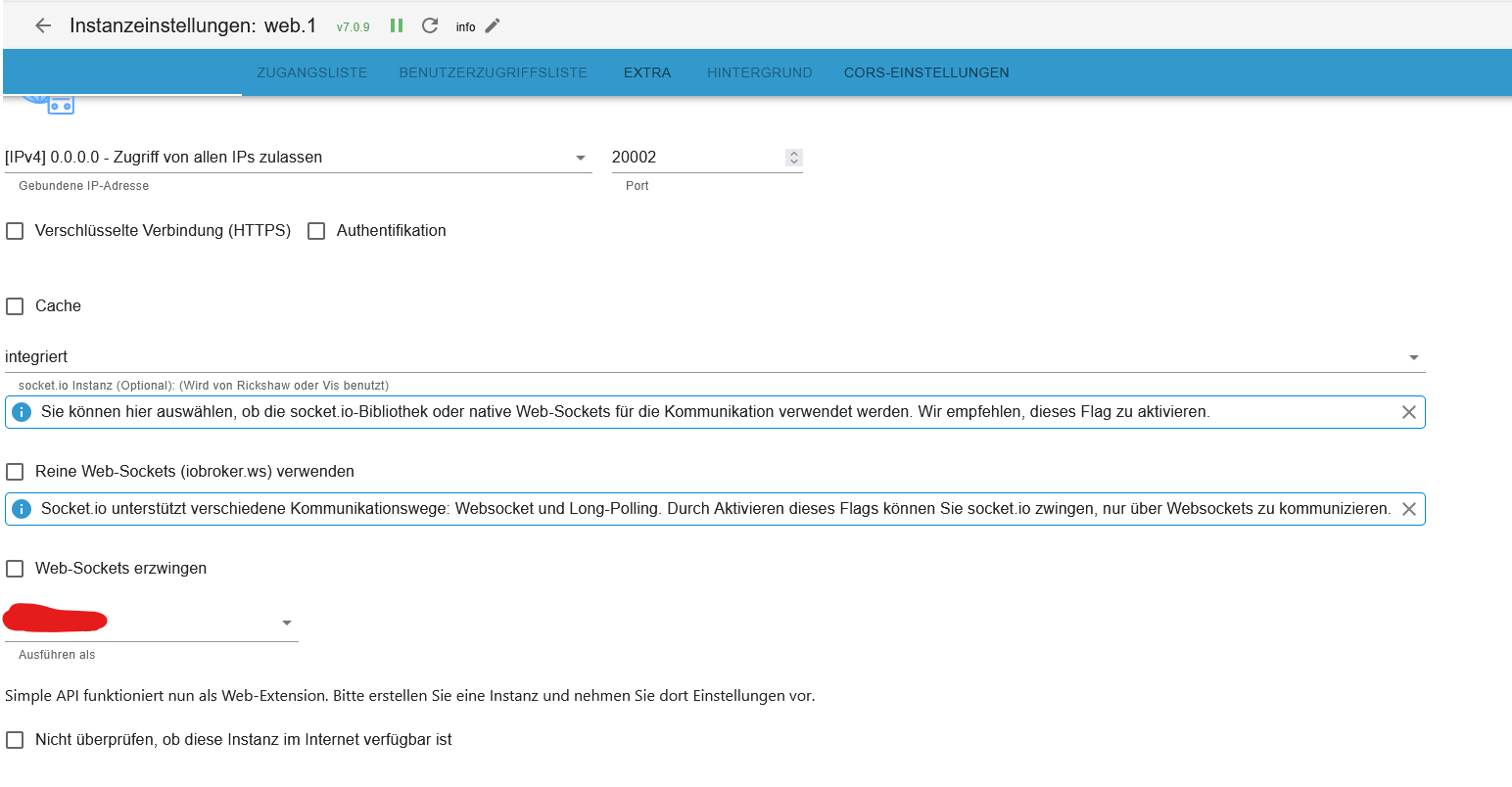
@thomas-braun in den einstellungen des cloudadapters steht web.0 ist das das was du meintest?
im web adapter steht das hier:
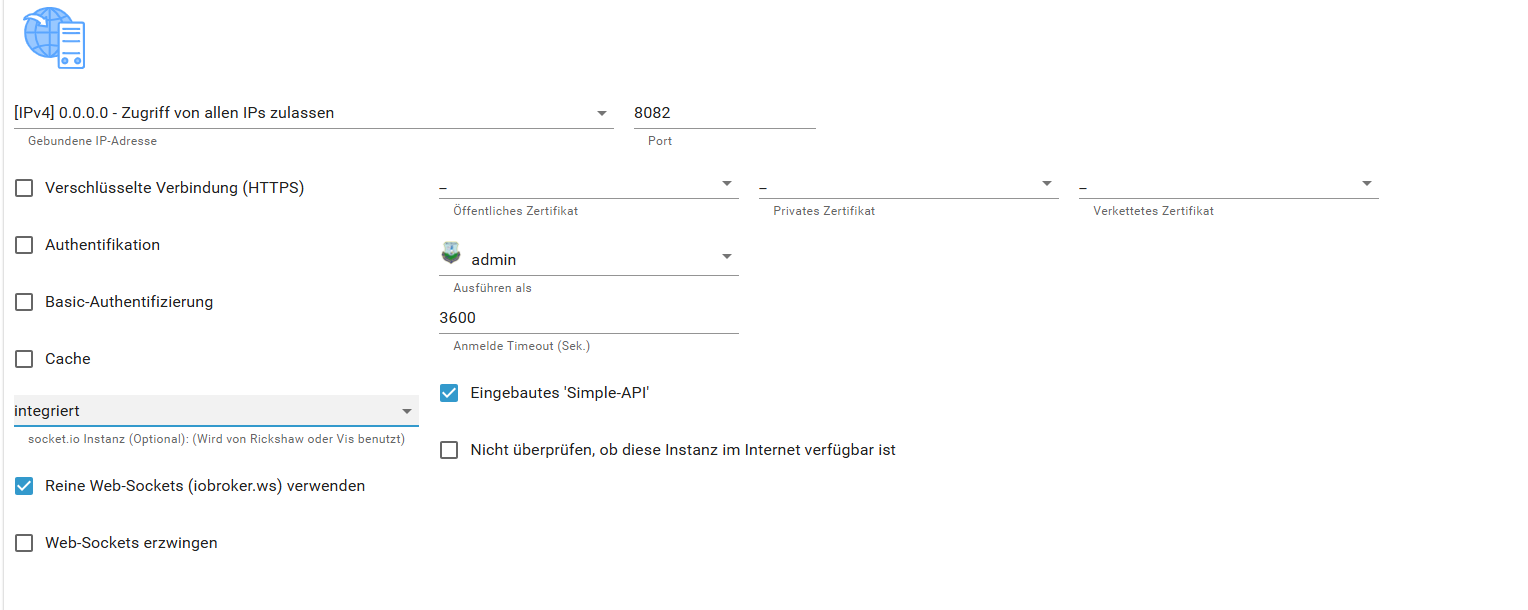
Oder war die Frage nach etwas anderem?
-
@haselchen Was ist mit den anderen Einstellungen? Die in deinem Bild fehlen.
-
@haselchen
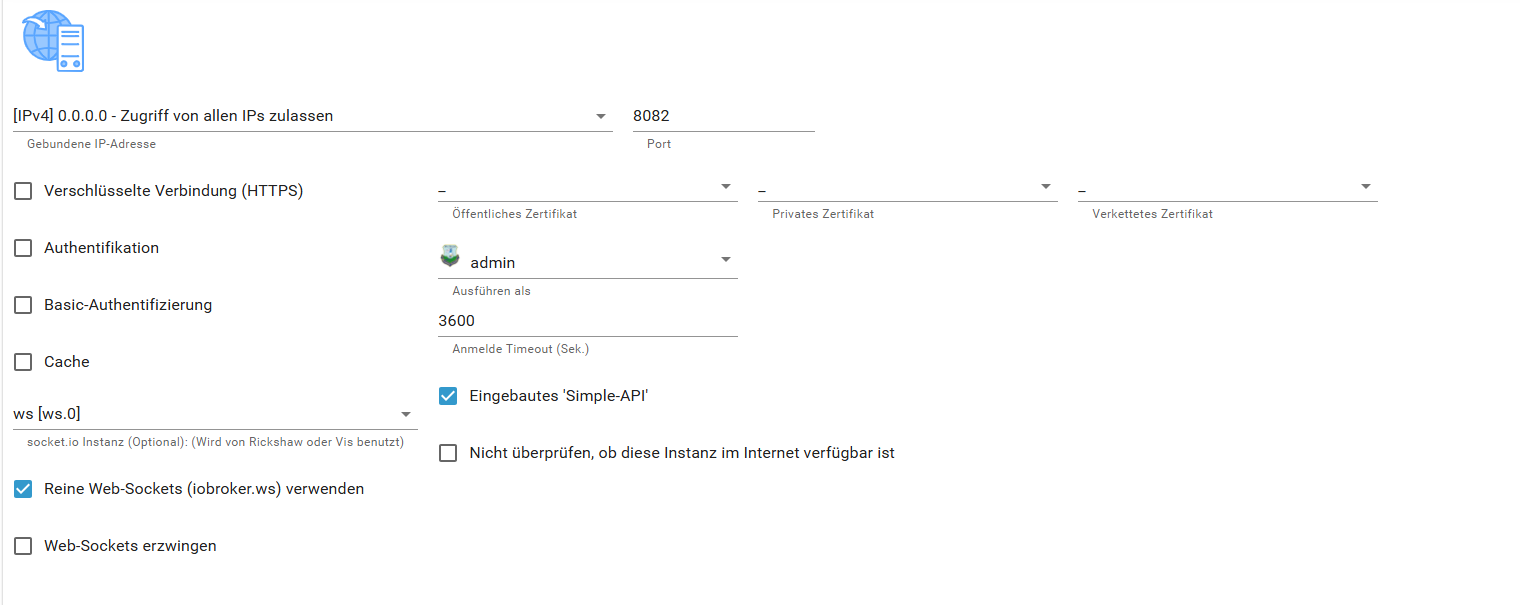
Einstellung geändert. Die übrigen Infos fehlen trotzdem... -
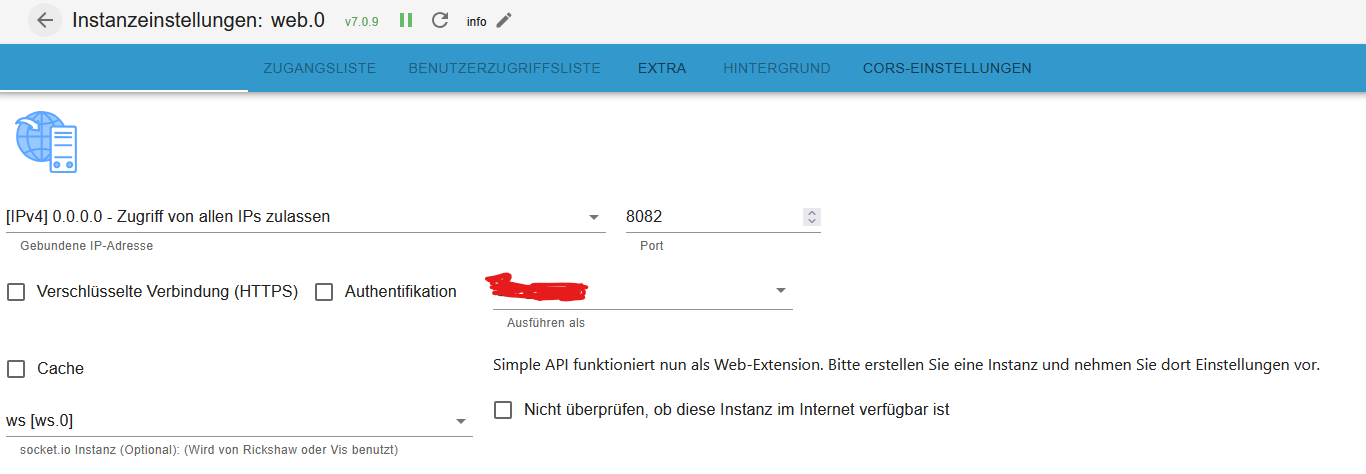
Welche Adapter Version von Web.0 hast Du?
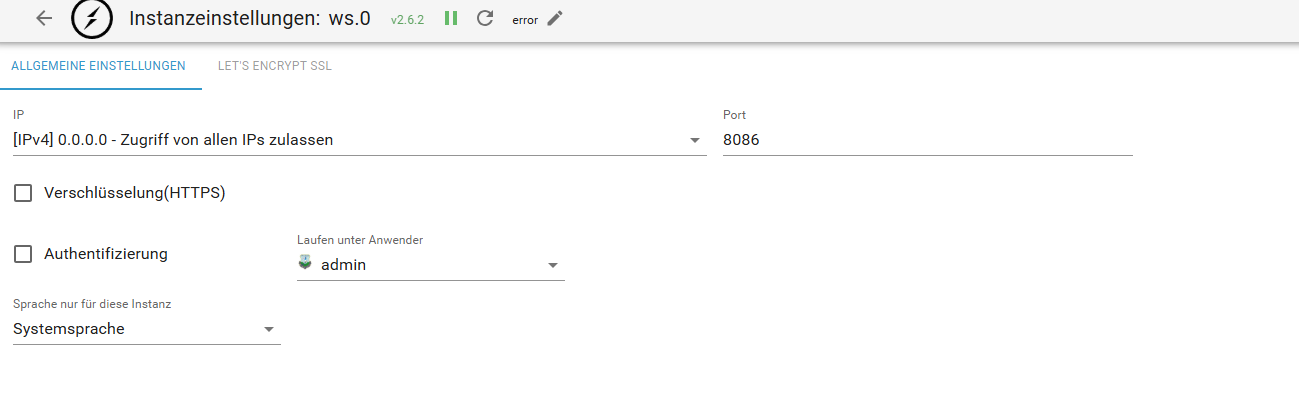
Wie sehen Deine WS.0 Einstellungen aus?
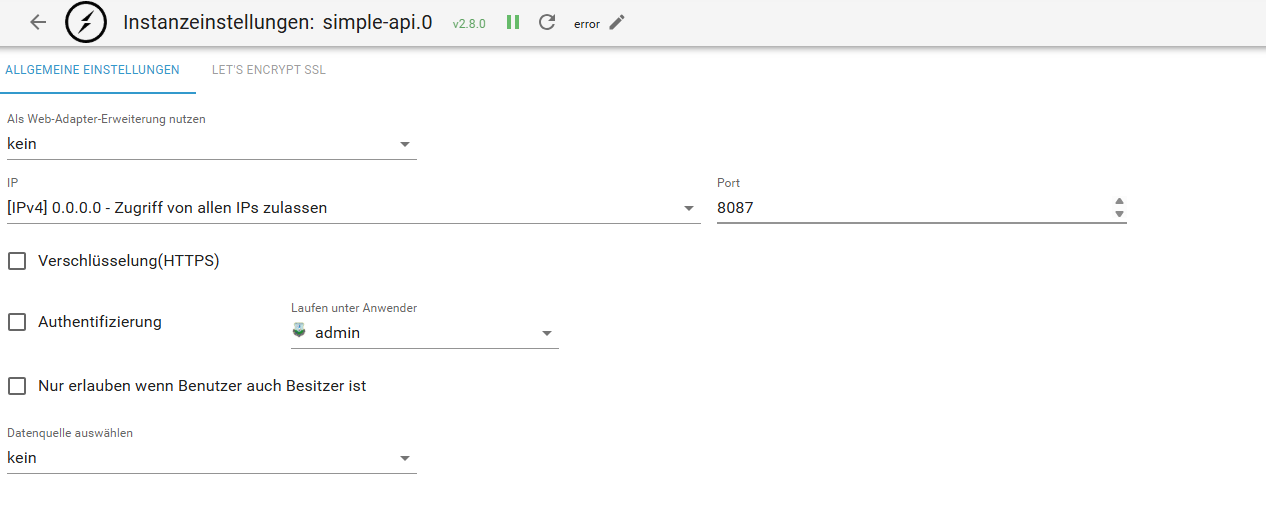
Und Simple Api Einstellungen (hast Du eine Instanz davon installiert?) -
Im Grunde hast Du auch meine Einstellungen in den 3 Adaptern.
Ich bin bei allen im Latest (Beta)
Ob dadurch andere Einstellungsmöglichkeiten erscheinen oder nicht mehr erscheinen , kann ich Dir nicht mehr sagen.
Bei web.0 jedenfalls habe ich keine anderen Einstellungen mehr wenn ich "ws" angebe.Edit: ich denke mal, dass liegt vermutlich an den Versionen, da Du im Web.0 den Haken für Simple Api hast, trotz "Ws" Auswahl.
-
Im Grunde hast Du auch meine Einstellungen in den 3 Adaptern.
Ich bin bei allen im Latest (Beta)
Ob dadurch andere Einstellungsmöglichkeiten erscheinen oder nicht mehr erscheinen , kann ich Dir nicht mehr sagen.
Bei web.0 jedenfalls habe ich keine anderen Einstellungen mehr wenn ich "ws" angebe.Edit: ich denke mal, dass liegt vermutlich an den Versionen, da Du im Web.0 den Haken für Simple Api hast, trotz "Ws" Auswahl.
-
@haselchen ich bin bei allen auf stable. Welche Einstellungen muss ich denn nehmen im webadapter. und bei simple ist ja quasi nichts eingestellt. sollte man da etwas einstellen?
-
Ich hab bei Simple Api auch nichts eingestellt.
Bei web, ws, simple api....kommt es ja darauf an , was Du vor hast.Ich hab das damals so eingestellt, damit Flot und die VISU App funktionieren.
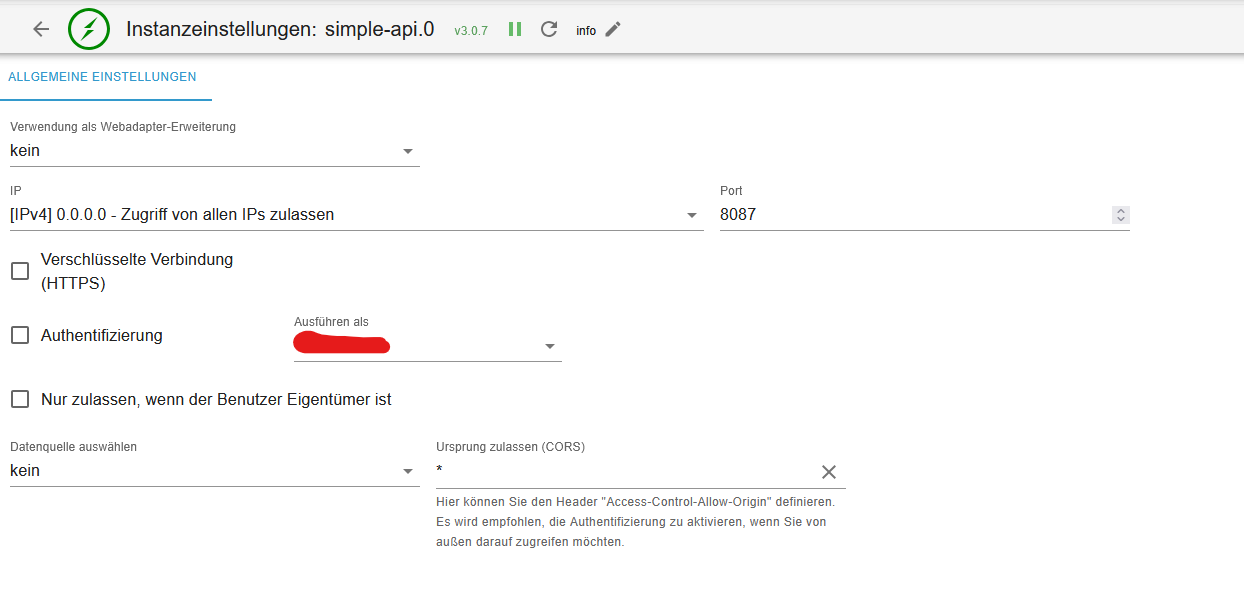

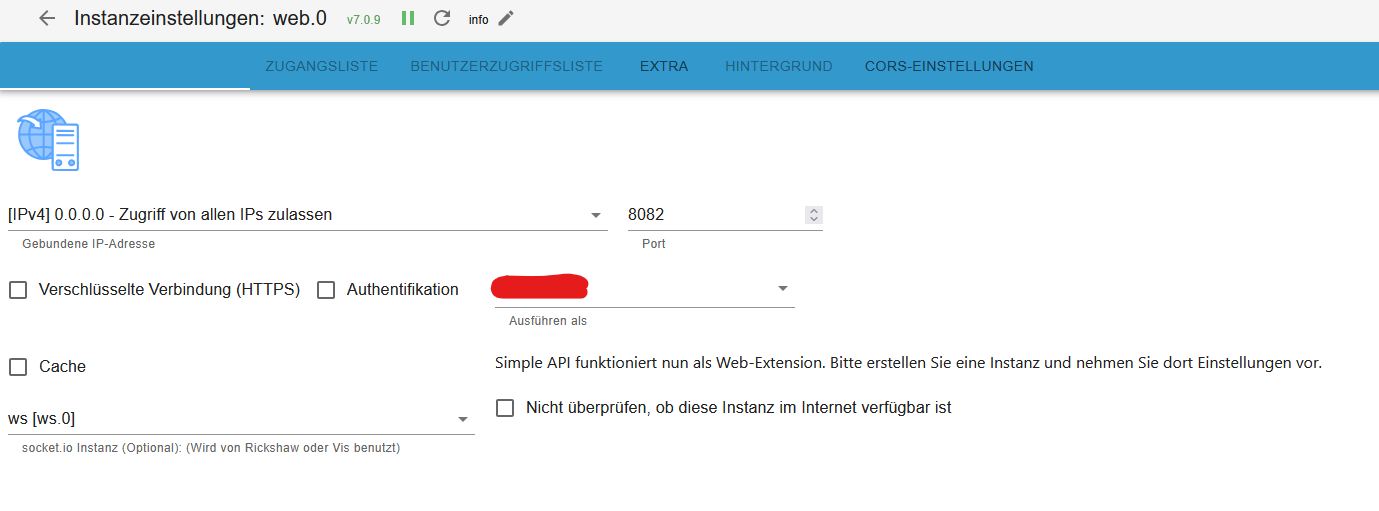
-
@haselchen Ich hatte meine Einstellungen gemacht, damit der Fully Browser und die Visu App funktionieren. Noch irgendeine Idee?
-
Ich hab Dir unten auf Seite 1 mal meine Einstellungen gepostet, mit denen das seit Jahren funktioniert.
Kannst es ja zur Probe übernehmen. -
@haselchen Was für eine Seite 1?



Hey! Du scheinst an dieser Unterhaltung interessiert zu sein, hast aber noch kein Konto.
Hast du es satt, bei jedem Besuch durch die gleichen Beiträge zu scrollen? Wenn du dich für ein Konto anmeldest, kommst du immer genau dorthin zurück, wo du zuvor warst, und kannst dich über neue Antworten benachrichtigen lassen (entweder per E-Mail oder Push-Benachrichtigung). Du kannst auch Lesezeichen speichern und Beiträge positiv bewerten, um anderen Community-Mitgliedern deine Wertschätzung zu zeigen.
Mit deinem Input könnte dieser Beitrag noch besser werden 💗
Registrieren AnmeldenSupport us
390
Online33.0k
Benutzer83.6k
Themen1.3m
Beiträge