Skip to content
  • Home
  • Aktuell
  • Tags
  • 0 Ungelesen 0
  • Kategorien
  • Unreplied
  • Beliebt
  • GitHub
  • Docu
  • Hilfe
Skins
  • Light
  • Brite
  • Cerulean
  • Cosmo
  • Flatly
  • Journal
  • Litera
  • Lumen
  • Lux
  • Materia
  • Minty
  • Morph
  • Pulse
  • Sandstone
  • Simplex
  • Sketchy
  • Spacelab
  • United
  • Yeti
  • Zephyr
  • Dark
  • Cyborg
  • Darkly
  • Quartz
  • Slate
  • Solar
  • Superhero
  • Vapor

  • Standard: (Kein Skin)
  • Kein Skin
Einklappen
ioBroker Logo

Community Forum

donate donate
  1. ioBroker Community Home
  2. Deutsch
  3. Einsteigerfragen
  4. Einbindung von Geräten
  5. ESPHome .yaml Fehlermeldung Pillow Version

NEWS

  • Jahresrückblick 2025 – unser neuer Blogbeitrag ist online! ✨
    BluefoxB
    Bluefox
    16
    1
    1.2k

  • Neuer Blogbeitrag: Monatsrückblick - Dezember 2025 🎄
    BluefoxB
    Bluefox
    13
    1
    738

  • Weihnachtsangebot 2025! 🎄
    BluefoxB
    Bluefox
    25
    1
    2.0k

ESPHome .yaml Fehlermeldung Pillow Version

Geplant Angeheftet Gesperrt Verschoben Einbindung von Geräten
45 Beiträge 4 Kommentatoren 4.3k Aufrufe 3 Watching
  • Älteste zuerst
  • Neuste zuerst
  • Meiste Stimmen
Antworten
  • In einem neuen Thema antworten
Anmelden zum Antworten
Dieses Thema wurde gelöscht. Nur Nutzer mit entsprechenden Rechten können es sehen.
  • Thomas BraunT Thomas Braun

    @wibear

    Die Kernelupdates auch einspielen...
    Solange bis da nix mehr gemeldet wird.
    Hat aber nix mit deiner pillow-Installation zu tun, ist grundsätzlich aktuell zu halten.

    W Offline
    W Offline
    wibear
    schrieb am zuletzt editiert von
    #15

    @thomas-braun sagte in ESPHome .yaml Fehlermeldung Pillow Version:

    Kernelupdates auch einspielen

    Updates eingespielt.
    Hast Du irgendeine weitere Idee zu Pillow?

    Thomas BraunT 1 Antwort Letzte Antwort
    0
    • W wibear

      @thomas-braun sagte in ESPHome .yaml Fehlermeldung Pillow Version:

      Kernelupdates auch einspielen

      Updates eingespielt.
      Hast Du irgendeine weitere Idee zu Pillow?

      Thomas BraunT Online
      Thomas BraunT Online
      Thomas Braun
      Most Active
      schrieb am zuletzt editiert von
      #16

      @wibear

      Du musst dir anschauen, wie mehrere unterschiedliche Installationen (via Paketmanager und via Environment) auf dem System koexistieren können und wie man die Reihenfolge des Auffindens im $PATH beinflussen kann.
      Bei Python weiß ich das aber nicht, muss ich selber nachlesen.
      Alternativ könntest du auch das Paket python3-pil deinstallieren und schauen, was dann passiert.

      Linux-Werkzeugkasten:
      https://forum.iobroker.net/topic/42952/der-kleine-iobroker-linux-werkzeugkasten
      NodeJS Fixer Skript:
      https://forum.iobroker.net/topic/68035/iob-node-fix-skript
      iob_diag: curl -sLf -o diag.sh https://iobroker.net/diag.sh && bash diag.sh

      W 1 Antwort Letzte Antwort
      0
      • Thomas BraunT Thomas Braun

        @wibear

        Du musst dir anschauen, wie mehrere unterschiedliche Installationen (via Paketmanager und via Environment) auf dem System koexistieren können und wie man die Reihenfolge des Auffindens im $PATH beinflussen kann.
        Bei Python weiß ich das aber nicht, muss ich selber nachlesen.
        Alternativ könntest du auch das Paket python3-pil deinstallieren und schauen, was dann passiert.

        W Offline
        W Offline
        wibear
        schrieb am zuletzt editiert von
        #17

        @thomas-braun

        Guten Morgen,

        ich bin wie hier "https://forum.iobroker.net/topic/79199/esphome-und-pillow/12?_=1746878720690" vorgegangen und habe diesen Fehler bekommen:

        raspi@raspi:~ $ source /home/iobroker/.cache/autopy/venv/esphome/bin/activate
        (esphome) raspi@raspi:~ $ pip install "pillow==10.2.0"
        Looking in indexes: https://pypi.org/simple, https://www.piwheels.org/simple
        Collecting pillow==10.2.0
          Downloading pillow-10.2.0-cp311-cp311-manylinux_2_28_aarch64.whl.metadata (9.7 kB)
        Downloading pillow-10.2.0-cp311-cp311-manylinux_2_28_aarch64.whl (4.3 MB)
           ━━━━━━━━━━━━━━━━━━━━━━━━━━━━━━━━━━━━━━━━ 4.3/4.3 MB 5.6 MB/s eta 0:00:00
        Installing collected packages: pillow
          Attempting uninstall: pillow
            Found existing installation: Pillow 10.0.1
            Uninstalling Pillow-10.0.1:
        ERROR: Could not install packages due to an OSError: [Errno 13] Permission denied: 'BufrStubImagePlugin.py'
        Check the permissions.
        
        [notice] A new release of pip is available: 24.0 -> 25.1.1
        [notice] To update, run: pip install --upgrade pip
        (esphome) raspi@raspi:~ $
        

        Muss es mit sudo gemacht werden?
        Danke und Grüße

        1 Antwort Letzte Antwort
        0
        • Thomas BraunT Thomas Braun

          @wibear

          Ich würde es mit

          sudo -H -u iobroker HIER_DIE_PIP_KOMMANDOS
          

          mal versuchen. Dann sollte das eigentlich alles im home des iobrokers passieren.

          W Offline
          W Offline
          wibear
          schrieb am zuletzt editiert von wibear
          #18

          @thomas-braun sagte in ESPHome .yaml Fehlermeldung Pillow Version:

          @wibear

          Ich würde es mit

          sudo -H -u iobroker HIER_DIE_PIP_KOMMANDOS
          

          mal versuchen. Dann sollte das eigentlich alles im home des iobrokers passieren.

          Es kommt eine Fehlermeldung, wenn ich sudo.... voranstelle:

          raspi@raspi:~ $ sudo -H -u iobroker python3 -m venv .venv/Pillow                Error: [Errno 13] Permission denied: '/home/raspi/.venv'
          

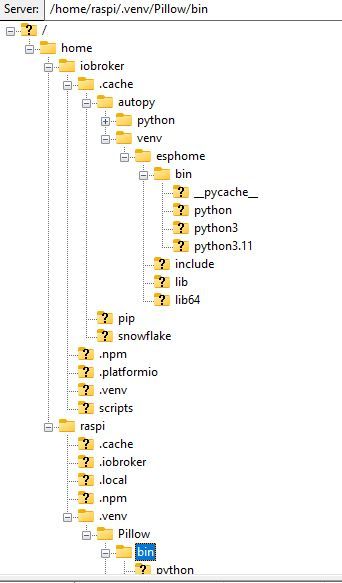
          Das ist die Ordner-Struktur:

          struktur.jpg

          Was fehlt hier?

          Es werden auch unterschiedliche Pillow Versionen angezeigt, wenn ich sie unter (Pillow) oder ohne abfrage.

          raspi@raspi:~ $ python3 -m venv .venv/Pillow
          raspi@raspi:~ $ source .venv/Pillow/bin/activate
          (Pillow) raspi@raspi:~ $ pip install "pillow==10.3.0"
          Looking in indexes: https://pypi.org/simple, https://www.piwheels.org/simple
          Requirement already satisfied: pillow==10.3.0 in ./.venv/Pillow/lib/python3.11/site-packages (10.3.0)
          (Pillow) raspi@raspi:~ $ pip3 install "pillow==10.3.0"
          Looking in indexes: https://pypi.org/simple, https://www.piwheels.org/simple
          Requirement already satisfied: pillow==10.3.0 in ./.venv/Pillow/lib/python3.11/site-packages (10.3.0)
          (Pillow) raspi@raspi:~ $ pip3 install "pillow==11.2.1"
          Looking in indexes: https://pypi.org/simple, https://www.piwheels.org/simple
          Collecting pillow==11.2.1
            Using cached pillow-11.2.1-cp311-cp311-manylinux_2_28_aarch64.whl.metadata (8.9 kB)
          Using cached pillow-11.2.1-cp311-cp311-manylinux_2_28_aarch64.whl (4.5 MB)
          Installing collected packages: pillow
            Attempting uninstall: pillow
              Found existing installation: pillow 10.3.0
              Uninstalling pillow-10.3.0:
                Successfully uninstalled pillow-10.3.0
          Successfully installed pillow-11.2.1
          (Pillow) raspi@raspi:~ $ pip3 show pillow
          Name: pillow
          Version: 11.2.1
          
          (Pillow) raspi@raspi:~ $ pip3 install "pillow==10.3.0"
          Looking in indexes: https://pypi.org/simple, https://www.piwheels.org/simple
          Collecting pillow==10.3.0
            Using cached pillow-10.3.0-cp311-cp311-manylinux_2_28_aarch64.whl.metadata (9.2 kB)
          Using cached pillow-10.3.0-cp311-cp311-manylinux_2_28_aarch64.whl (4.3 MB)
          Installing collected packages: pillow
            Attempting uninstall: pillow
              Found existing installation: pillow 11.2.1
              Uninstalling pillow-11.2.1:
                Successfully uninstalled pillow-11.2.1
          Successfully installed pillow-10.3.0
          (Pillow) raspi@raspi:~ $ pip3 show pillow
          Name: pillow
          Version: 10.3.0
          
          (Pillow) raspi@raspi:~ $ deactivate
          raspi@raspi:~ $ pip3 show pillow
          Name: Pillow
          Version: 9.4.0
          Summary: Python Imaging Library (Fork)
          
          (Pillow) raspi@raspi:~ $ pip list
          Package    Version
          ---------- -------
          pillow     10.3.0
          pip        25.1.1
          setuptools 66.1.1
          (Pillow) raspi@raspi:~ $
          raspi@raspi:~ $ pip list
          Package            Version
          ------------------ ------------
          
          Pillow             9.4.0


          Danke und Grüße

          Thomas BraunT 1 Antwort Letzte Antwort
          0
          • W wibear

            @thomas-braun sagte in ESPHome .yaml Fehlermeldung Pillow Version:

            @wibear

            Ich würde es mit

            sudo -H -u iobroker HIER_DIE_PIP_KOMMANDOS
            

            mal versuchen. Dann sollte das eigentlich alles im home des iobrokers passieren.

            Es kommt eine Fehlermeldung, wenn ich sudo.... voranstelle:

            raspi@raspi:~ $ sudo -H -u iobroker python3 -m venv .venv/Pillow                Error: [Errno 13] Permission denied: '/home/raspi/.venv'
            

            Das ist die Ordner-Struktur:

            struktur.jpg

            Was fehlt hier?

            Es werden auch unterschiedliche Pillow Versionen angezeigt, wenn ich sie unter (Pillow) oder ohne abfrage.

            raspi@raspi:~ $ python3 -m venv .venv/Pillow
            raspi@raspi:~ $ source .venv/Pillow/bin/activate
            (Pillow) raspi@raspi:~ $ pip install "pillow==10.3.0"
            Looking in indexes: https://pypi.org/simple, https://www.piwheels.org/simple
            Requirement already satisfied: pillow==10.3.0 in ./.venv/Pillow/lib/python3.11/site-packages (10.3.0)
            (Pillow) raspi@raspi:~ $ pip3 install "pillow==10.3.0"
            Looking in indexes: https://pypi.org/simple, https://www.piwheels.org/simple
            Requirement already satisfied: pillow==10.3.0 in ./.venv/Pillow/lib/python3.11/site-packages (10.3.0)
            (Pillow) raspi@raspi:~ $ pip3 install "pillow==11.2.1"
            Looking in indexes: https://pypi.org/simple, https://www.piwheels.org/simple
            Collecting pillow==11.2.1
              Using cached pillow-11.2.1-cp311-cp311-manylinux_2_28_aarch64.whl.metadata (8.9 kB)
            Using cached pillow-11.2.1-cp311-cp311-manylinux_2_28_aarch64.whl (4.5 MB)
            Installing collected packages: pillow
              Attempting uninstall: pillow
                Found existing installation: pillow 10.3.0
                Uninstalling pillow-10.3.0:
                  Successfully uninstalled pillow-10.3.0
            Successfully installed pillow-11.2.1
            (Pillow) raspi@raspi:~ $ pip3 show pillow
            Name: pillow
            Version: 11.2.1
            
            (Pillow) raspi@raspi:~ $ pip3 install "pillow==10.3.0"
            Looking in indexes: https://pypi.org/simple, https://www.piwheels.org/simple
            Collecting pillow==10.3.0
              Using cached pillow-10.3.0-cp311-cp311-manylinux_2_28_aarch64.whl.metadata (9.2 kB)
            Using cached pillow-10.3.0-cp311-cp311-manylinux_2_28_aarch64.whl (4.3 MB)
            Installing collected packages: pillow
              Attempting uninstall: pillow
                Found existing installation: pillow 11.2.1
                Uninstalling pillow-11.2.1:
                  Successfully uninstalled pillow-11.2.1
            Successfully installed pillow-10.3.0
            (Pillow) raspi@raspi:~ $ pip3 show pillow
            Name: pillow
            Version: 10.3.0
            
            (Pillow) raspi@raspi:~ $ deactivate
            raspi@raspi:~ $ pip3 show pillow
            Name: Pillow
            Version: 9.4.0
            Summary: Python Imaging Library (Fork)
            
            (Pillow) raspi@raspi:~ $ pip list
            Package    Version
            ---------- -------
            pillow     10.3.0
            pip        25.1.1
            setuptools 66.1.1
            (Pillow) raspi@raspi:~ $
            raspi@raspi:~ $ pip list
            Package            Version
            ------------------ ------------
            
            Pillow             9.4.0


            Danke und Grüße

            Thomas BraunT Online
            Thomas BraunT Online
            Thomas Braun
            Most Active
            schrieb am zuletzt editiert von Thomas Braun
            #19

            @wibear

            sudo apt remove python3-pil
            sudo mv /usr/lib/python3.11/EXTERNALLY-MANAGED /usr/lib/python3.11/EXTERNALLY-MANAGED.orig 
            sudo -H -u iobroker python3 -m pip install --upgrade Pillow
            sudo mv /usr/lib/python3.11/EXTERNALLY-MANAGED.orig /usr/lib/python3.11/EXTERNALLY-MANAGED
            

            Führt zu:

            echad@chet:~ $ sudo -H -u iobroker pip show pillow
            Name: pillow
            Version: 11.2.1
            Summary: Python Imaging Library (Fork)
            Home-page: 
            Author: 
            Author-email: "Jeffrey A. Clark" <aclark@aclark.net>
            License: 
            Location: /home/iobroker/.local/lib/python3.11/site-packages
            Requires: 
            Required-by: 
            echad@chet:~ $
            

            Linux-Werkzeugkasten:
            https://forum.iobroker.net/topic/42952/der-kleine-iobroker-linux-werkzeugkasten
            NodeJS Fixer Skript:
            https://forum.iobroker.net/topic/68035/iob-node-fix-skript
            iob_diag: curl -sLf -o diag.sh https://iobroker.net/diag.sh && bash diag.sh

            W 1 Antwort Letzte Antwort
            0
            • Thomas BraunT Thomas Braun

              @wibear

              sudo apt remove python3-pil
              sudo mv /usr/lib/python3.11/EXTERNALLY-MANAGED /usr/lib/python3.11/EXTERNALLY-MANAGED.orig 
              sudo -H -u iobroker python3 -m pip install --upgrade Pillow
              sudo mv /usr/lib/python3.11/EXTERNALLY-MANAGED.orig /usr/lib/python3.11/EXTERNALLY-MANAGED
              

              Führt zu:

              echad@chet:~ $ sudo -H -u iobroker pip show pillow
              Name: pillow
              Version: 11.2.1
              Summary: Python Imaging Library (Fork)
              Home-page: 
              Author: 
              Author-email: "Jeffrey A. Clark" <aclark@aclark.net>
              License: 
              Location: /home/iobroker/.local/lib/python3.11/site-packages
              Requires: 
              Required-by: 
              echad@chet:~ $
              
              W Offline
              W Offline
              wibear
              schrieb am zuletzt editiert von
              #20

              @thomas-braun

              Guten Morrgen Thomas,
              danke für Deine Antwort. Die Befehle wurden fehlerfrei ausgeführt, aber die Fehlermeldung mit der Pillow Version wie im #1 wird weiterhin angezeigt.

              Außerdem wird Pillow ohne sudo -H -u iobroker nicht gefunden:

              raspi@raspi:~ $ pip show pillow
              WARNING: Package(s) not found: pillow
              raspi@raspi:~ $ pip list
              Package            Version
              ------------------ ------------
              argcomplete        2.0.0
              .....
              packaging          23.0
              pigpio             1.78
              pip                23.0.1
              pipx               1.1.0
              

              Was muss ich noch prüfen?
              Danke und Grüße

              Thomas BraunT 1 Antwort Letzte Antwort
              0
              • W wibear

                @thomas-braun

                Guten Morrgen Thomas,
                danke für Deine Antwort. Die Befehle wurden fehlerfrei ausgeführt, aber die Fehlermeldung mit der Pillow Version wie im #1 wird weiterhin angezeigt.

                Außerdem wird Pillow ohne sudo -H -u iobroker nicht gefunden:

                raspi@raspi:~ $ pip show pillow
                WARNING: Package(s) not found: pillow
                raspi@raspi:~ $ pip list
                Package            Version
                ------------------ ------------
                argcomplete        2.0.0
                .....
                packaging          23.0
                pigpio             1.78
                pip                23.0.1
                pipx               1.1.0
                

                Was muss ich noch prüfen?
                Danke und Grüße

                Thomas BraunT Online
                Thomas BraunT Online
                Thomas Braun
                Most Active
                schrieb am zuletzt editiert von Thomas Braun
                #21

                @wibear sagte in ESPHome .yaml Fehlermeldung Pillow Version:

                Außerdem wird Pillow ohne sudo -H -u iobroker nicht gefunden:

                Normal, für den user raspi liegt pillow ja nicht mehr im $PATH. Dafür aber im $PATH des users iobroker
                Benötigt esphome denn genau die Version 10.2.0?

                Linux-Werkzeugkasten:
                https://forum.iobroker.net/topic/42952/der-kleine-iobroker-linux-werkzeugkasten
                NodeJS Fixer Skript:
                https://forum.iobroker.net/topic/68035/iob-node-fix-skript
                iob_diag: curl -sLf -o diag.sh https://iobroker.net/diag.sh && bash diag.sh

                W 2 Antworten Letzte Antwort
                0
                • Thomas BraunT Thomas Braun

                  @wibear sagte in ESPHome .yaml Fehlermeldung Pillow Version:

                  Außerdem wird Pillow ohne sudo -H -u iobroker nicht gefunden:

                  Normal, für den user raspi liegt pillow ja nicht mehr im $PATH. Dafür aber im $PATH des users iobroker
                  Benötigt esphome denn genau die Version 10.2.0?

                  W Offline
                  W Offline
                  wibear
                  schrieb am zuletzt editiert von
                  #22

                  @thomas-braun sagte in [ESPHome .yaml Fehlermeldung Pillow Version]

                  Benötigt esphome denn genau die Version 10.2.0?

                  Ich bin es mir nicht sicher, habe dazu nichts gefunden.
                  Wie kann ich bitte genau diese Version installieren?
                  Danke und Gruß

                  1 Antwort Letzte Antwort
                  0
                  • Thomas BraunT Thomas Braun

                    @wibear sagte in ESPHome .yaml Fehlermeldung Pillow Version:

                    Außerdem wird Pillow ohne sudo -H -u iobroker nicht gefunden:

                    Normal, für den user raspi liegt pillow ja nicht mehr im $PATH. Dafür aber im $PATH des users iobroker
                    Benötigt esphome denn genau die Version 10.2.0?

                    W Offline
                    W Offline
                    wibear
                    schrieb am zuletzt editiert von
                    #23

                    @thomas-braun

                    Jetzt habe ich die geforderte Version installiert:

                    raspi@raspi:~ $ sudo -H -u iobroker pip show pillow
                    Name: pillow
                    Version: 10.2.0
                    Summary: Python Imaging Library (Fork)
                    

                    Der Fehler mit der Version ist nach wie vor da:
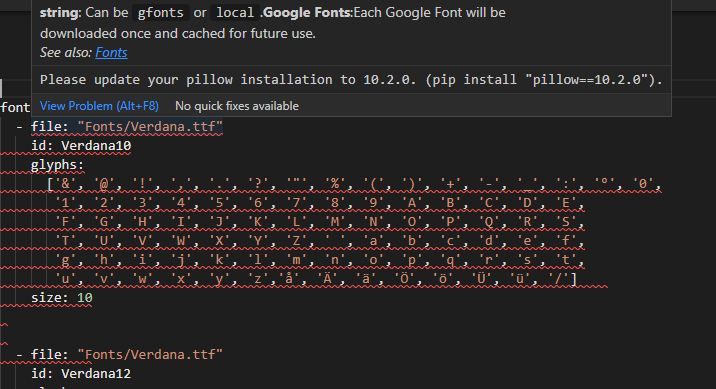
                    error2.jpg

                    Thomas BraunT arteckA 2 Antworten Letzte Antwort
                    0
                    • W wibear

                      @thomas-braun

                      Jetzt habe ich die geforderte Version installiert:

                      raspi@raspi:~ $ sudo -H -u iobroker pip show pillow
                      Name: pillow
                      Version: 10.2.0
                      Summary: Python Imaging Library (Fork)
                      

                      Der Fehler mit der Version ist nach wie vor da:

                      error2.jpg

                      Thomas BraunT Online
                      Thomas BraunT Online
                      Thomas Braun
                      Most Active
                      schrieb am zuletzt editiert von
                      #24

                      @wibear

                      Möglich, dass der Adapter nun nochmal neu gegen diese Versionen gebaut werden muss.

                      Linux-Werkzeugkasten:
                      https://forum.iobroker.net/topic/42952/der-kleine-iobroker-linux-werkzeugkasten
                      NodeJS Fixer Skript:
                      https://forum.iobroker.net/topic/68035/iob-node-fix-skript
                      iob_diag: curl -sLf -o diag.sh https://iobroker.net/diag.sh && bash diag.sh

                      1 Antwort Letzte Antwort
                      0
                      • W wibear

                        @thomas-braun

                        Jetzt habe ich die geforderte Version installiert:

                        raspi@raspi:~ $ sudo -H -u iobroker pip show pillow
                        Name: pillow
                        Version: 10.2.0
                        Summary: Python Imaging Library (Fork)
                        

                        Der Fehler mit der Version ist nach wie vor da:

                        error2.jpg

                        arteckA Offline
                        arteckA Offline
                        arteck
                        Developer Most Active
                        schrieb am zuletzt editiert von
                        #25

                        @wibear

                        poste mal die yaml

                        zigbee hab ich, zwave auch, nuc's genauso und HA auch

                        W 1 Antwort Letzte Antwort
                        0
                        • arteckA arteck

                          @wibear

                          poste mal die yaml

                          W Offline
                          W Offline
                          wibear
                          schrieb am zuletzt editiert von
                          #26

                          @arteck sagte in ESPHome .yaml Fehlermeldung Pillow Version:

                          poste mal die yaml

                          Guten Morgen,

                          hier ist die .yaml:

                          esphome:
                            name: displaytft
                            friendly_name: DisplayTFT
                          
                          esp32:
                            board: esp32dev
                            framework:
                              type: arduino
                          
                          
                          # Enable logging
                          logger:
                          
                          
                          # Enable Home Assistant API
                          api:
                            encryption:
                              key: "IO4KEPOkPtz/jTPUSMm0g/cXfLLVaASBj0sPdVqBXIA="
                          
                          ota:
                            - platform: esphome
                              password: "496d71850f34c0a977a7758765a1371b"
                          
                          
                          wifi:
                            ssid: !secret wifi_ssid
                            password: !secret wifi_password
                          
                            # Enable fallback hotspot (captive portal) in case wifi connection fails
                            ap:
                              ssid: "Displaytft Fallback Hotspot"
                              password: "IGrMeYGG3HaB"
                          
                          
                          captive_portal:
                          
                          
                          # Enable MQTT
                          mqtt:
                              discovery: true
                              broker: 192.168.178.10
                              port: 1883
                              username: !secret mqtt_username
                              password: !secret mqtt_password
                              client_id: DisplayTFT
                              topic_prefix: esphome
                             
                          
                          # Subscribe data
                          text_sensor:
                            - platform: mqtt_subscribe
                              id: PV_Einspeisung_Aktuell
                              topic: esphome/Display/PV/Einspeisung_Aktuell
                            - platform: mqtt_subscribe
                              id: Netz_Verbrauch_Aktuell
                              topic: esphome/Display/Netz/Verbrauch_Aktuell
                            - platform: mqtt_subscribe
                              id: PV_Einspeisung_Monat
                              topic: esphome/Display/PV/Einspeisung_Monat
                            - platform: mqtt_subscribe
                              id: Netz_Verbrauch_Monat
                              topic: esphome/Display/Netz/Verbrauch_Monat
                          
                          
                          # PSRAM an
                          psram:
                            mode: octal
                            speed: 80MHz
                          
                          
                          font:
                            - file: "Fonts/Verdana.ttf"
                              id: Verdana10
                              glyphs:
                                ['&', '@', '!', ',', '.', '?', '"', '%', '(', ')', '+', '-', '_', ':', '°', '0',
                                 '1', '2', '3', '4', '5', '6', '7', '8', '9', 'A', 'B', 'C', 'D', 'E',
                                 'F', 'G', 'H', 'I', 'J', 'K', 'L', 'M', 'N', 'O', 'P', 'Q', 'R', 'S',
                                 'T', 'U', 'V', 'W', 'X', 'Y', 'Z', ' ', 'a', 'b', 'c', 'd', 'e', 'f',
                                 'g', 'h', 'i', 'j', 'k', 'l', 'm', 'n', 'o', 'p', 'q', 'r', 's', 't',
                                 'u', 'v', 'w', 'x', 'y', 'z','å', 'Ä', 'ä', 'Ö', 'ö', 'Ü', 'ü', '/']    
                              size: 10
                          
                          
                            - file: "Fonts/Verdana.ttf"
                              id: Verdana12
                              glyphs:
                                ['&', '@', '!', ',', '.', '?', '"', '%', '(', ')', '+', '-', '_', ':', '°', '0',
                                 '1', '2', '3', '4', '5', '6', '7', '8', '9', 'A', 'B', 'C', 'D', 'E',
                                 'F', 'G', 'H', 'I', 'J', 'K', 'L', 'M', 'N', 'O', 'P', 'Q', 'R', 'S',
                                 'T', 'U', 'V', 'W', 'X', 'Y', 'Z', ' ', 'a', 'b', 'c', 'd', 'e', 'f',
                                 'g', 'h', 'i', 'j', 'k', 'l', 'm', 'n', 'o', 'p', 'q', 'r', 's', 't',
                                 'u', 'v', 'w', 'x', 'y', 'z','å', 'Ä', 'ä', 'Ö', 'ö', 'Ü', 'ü', '/']    
                              size: 12
                          
                          
                            - file: "Fonts/Verdana.ttf"
                              id: Verdana16
                              glyphs:
                                ['&', '@', '!', ',', '.', '?', '"', '%', '(', ')', '+', '-', '_', ':', '°', '0',
                                 '1', '2', '3', '4', '5', '6', '7', '8', '9', 'A', 'B', 'C', 'D', 'E',
                                 'F', 'G', 'H', 'I', 'J', 'K', 'L', 'M', 'N', 'O', 'P', 'Q', 'R', 'S',
                                 'T', 'U', 'V', 'W', 'X', 'Y', 'Z', ' ', 'a', 'b', 'c', 'd', 'e', 'f',
                                 'g', 'h', 'i', 'j', 'k', 'l', 'm', 'n', 'o', 'p', 'q', 'r', 's', 't',
                                 'u', 'v', 'w', 'x', 'y', 'z','å', 'Ä', 'ä', 'Ö', 'ö', 'Ü', 'ü', '/']    
                              size: 16
                          
                          
                            - file: "Fonts/Verdana_Bold.ttf"
                              id: VerdanaBold16
                              glyphs:
                                ['&', '@', '!', ',', '.', '?', '"', '%', '(', ')', '+', '-', '_', ':', '°', '0',
                                 '1', '2', '3', '4', '5', '6', '7', '8', '9', 'A', 'B', 'C', 'D', 'E',
                                 'F', 'G', 'H', 'I', 'J', 'K', 'L', 'M', 'N', 'O', 'P', 'Q', 'R', 'S',
                                 'T', 'U', 'V', 'W', 'X', 'Y', 'Z', ' ', 'a', 'b', 'c', 'd', 'e', 'f',
                                 'g', 'h', 'i', 'j', 'k', 'l', 'm', 'n', 'o', 'p', 'q', 'r', 's', 't',
                                 'u', 'v', 'w', 'x', 'y', 'z','å', 'Ä', 'ä', 'Ö', 'ö', 'Ü', 'ü', '/']    
                              size: 16
                          
                          
                            - file: "Fonts/materialdesignicons.ttf"
                              id: Icons60
                              size: 25
                              glyphs:
                              - "\U000F1A74" # Solar
                              - "\U000F1904" # Haus
                              - "\U000F1AAF" # Heizung
                              - "\U000F058F" # Wasserhahn
                          
                          
                          # Display configuration
                          spi:
                            clk_pin: GPIO22 # SCK
                            mosi_pin: GPIO21 # SDA
                          
                          display:
                            - platform: ili9xxx
                              model: ILI9488
                              dc_pin: GPIO19 # Register select / data-command 
                              reset_pin: GPIO4 # Chip select
                              cs_pin: GPIO18
                              device_width: 480
                              device_height: 320
                              rotation: 0
                              col_start: 0
                              row_start: 0
                              invert_colors: false
                              show_test_card: true
                              eight_bit_color: true
                              update_interval: 1s   
                          

                          Danke und Grüße

                          arteckA 1 Antwort Letzte Antwort
                          0
                          • W wibear

                            @arteck sagte in ESPHome .yaml Fehlermeldung Pillow Version:

                            poste mal die yaml

                            Guten Morgen,

                            hier ist die .yaml:

                            esphome:
                              name: displaytft
                              friendly_name: DisplayTFT
                            
                            esp32:
                              board: esp32dev
                              framework:
                                type: arduino
                            
                            
                            # Enable logging
                            logger:
                            
                            
                            # Enable Home Assistant API
                            api:
                              encryption:
                                key: "IO4KEPOkPtz/jTPUSMm0g/cXfLLVaASBj0sPdVqBXIA="
                            
                            ota:
                              - platform: esphome
                                password: "496d71850f34c0a977a7758765a1371b"
                            
                            
                            wifi:
                              ssid: !secret wifi_ssid
                              password: !secret wifi_password
                            
                              # Enable fallback hotspot (captive portal) in case wifi connection fails
                              ap:
                                ssid: "Displaytft Fallback Hotspot"
                                password: "IGrMeYGG3HaB"
                            
                            
                            captive_portal:
                            
                            
                            # Enable MQTT
                            mqtt:
                                discovery: true
                                broker: 192.168.178.10
                                port: 1883
                                username: !secret mqtt_username
                                password: !secret mqtt_password
                                client_id: DisplayTFT
                                topic_prefix: esphome
                               
                            
                            # Subscribe data
                            text_sensor:
                              - platform: mqtt_subscribe
                                id: PV_Einspeisung_Aktuell
                                topic: esphome/Display/PV/Einspeisung_Aktuell
                              - platform: mqtt_subscribe
                                id: Netz_Verbrauch_Aktuell
                                topic: esphome/Display/Netz/Verbrauch_Aktuell
                              - platform: mqtt_subscribe
                                id: PV_Einspeisung_Monat
                                topic: esphome/Display/PV/Einspeisung_Monat
                              - platform: mqtt_subscribe
                                id: Netz_Verbrauch_Monat
                                topic: esphome/Display/Netz/Verbrauch_Monat
                            
                            
                            # PSRAM an
                            psram:
                              mode: octal
                              speed: 80MHz
                            
                            
                            font:
                              - file: "Fonts/Verdana.ttf"
                                id: Verdana10
                                glyphs:
                                  ['&', '@', '!', ',', '.', '?', '"', '%', '(', ')', '+', '-', '_', ':', '°', '0',
                                   '1', '2', '3', '4', '5', '6', '7', '8', '9', 'A', 'B', 'C', 'D', 'E',
                                   'F', 'G', 'H', 'I', 'J', 'K', 'L', 'M', 'N', 'O', 'P', 'Q', 'R', 'S',
                                   'T', 'U', 'V', 'W', 'X', 'Y', 'Z', ' ', 'a', 'b', 'c', 'd', 'e', 'f',
                                   'g', 'h', 'i', 'j', 'k', 'l', 'm', 'n', 'o', 'p', 'q', 'r', 's', 't',
                                   'u', 'v', 'w', 'x', 'y', 'z','å', 'Ä', 'ä', 'Ö', 'ö', 'Ü', 'ü', '/']    
                                size: 10
                            
                            
                              - file: "Fonts/Verdana.ttf"
                                id: Verdana12
                                glyphs:
                                  ['&', '@', '!', ',', '.', '?', '"', '%', '(', ')', '+', '-', '_', ':', '°', '0',
                                   '1', '2', '3', '4', '5', '6', '7', '8', '9', 'A', 'B', 'C', 'D', 'E',
                                   'F', 'G', 'H', 'I', 'J', 'K', 'L', 'M', 'N', 'O', 'P', 'Q', 'R', 'S',
                                   'T', 'U', 'V', 'W', 'X', 'Y', 'Z', ' ', 'a', 'b', 'c', 'd', 'e', 'f',
                                   'g', 'h', 'i', 'j', 'k', 'l', 'm', 'n', 'o', 'p', 'q', 'r', 's', 't',
                                   'u', 'v', 'w', 'x', 'y', 'z','å', 'Ä', 'ä', 'Ö', 'ö', 'Ü', 'ü', '/']    
                                size: 12
                            
                            
                              - file: "Fonts/Verdana.ttf"
                                id: Verdana16
                                glyphs:
                                  ['&', '@', '!', ',', '.', '?', '"', '%', '(', ')', '+', '-', '_', ':', '°', '0',
                                   '1', '2', '3', '4', '5', '6', '7', '8', '9', 'A', 'B', 'C', 'D', 'E',
                                   'F', 'G', 'H', 'I', 'J', 'K', 'L', 'M', 'N', 'O', 'P', 'Q', 'R', 'S',
                                   'T', 'U', 'V', 'W', 'X', 'Y', 'Z', ' ', 'a', 'b', 'c', 'd', 'e', 'f',
                                   'g', 'h', 'i', 'j', 'k', 'l', 'm', 'n', 'o', 'p', 'q', 'r', 's', 't',
                                   'u', 'v', 'w', 'x', 'y', 'z','å', 'Ä', 'ä', 'Ö', 'ö', 'Ü', 'ü', '/']    
                                size: 16
                            
                            
                              - file: "Fonts/Verdana_Bold.ttf"
                                id: VerdanaBold16
                                glyphs:
                                  ['&', '@', '!', ',', '.', '?', '"', '%', '(', ')', '+', '-', '_', ':', '°', '0',
                                   '1', '2', '3', '4', '5', '6', '7', '8', '9', 'A', 'B', 'C', 'D', 'E',
                                   'F', 'G', 'H', 'I', 'J', 'K', 'L', 'M', 'N', 'O', 'P', 'Q', 'R', 'S',
                                   'T', 'U', 'V', 'W', 'X', 'Y', 'Z', ' ', 'a', 'b', 'c', 'd', 'e', 'f',
                                   'g', 'h', 'i', 'j', 'k', 'l', 'm', 'n', 'o', 'p', 'q', 'r', 's', 't',
                                   'u', 'v', 'w', 'x', 'y', 'z','å', 'Ä', 'ä', 'Ö', 'ö', 'Ü', 'ü', '/']    
                                size: 16
                            
                            
                              - file: "Fonts/materialdesignicons.ttf"
                                id: Icons60
                                size: 25
                                glyphs:
                                - "\U000F1A74" # Solar
                                - "\U000F1904" # Haus
                                - "\U000F1AAF" # Heizung
                                - "\U000F058F" # Wasserhahn
                            
                            
                            # Display configuration
                            spi:
                              clk_pin: GPIO22 # SCK
                              mosi_pin: GPIO21 # SDA
                            
                            display:
                              - platform: ili9xxx
                                model: ILI9488
                                dc_pin: GPIO19 # Register select / data-command 
                                reset_pin: GPIO4 # Chip select
                                cs_pin: GPIO18
                                device_width: 480
                                device_height: 320
                                rotation: 0
                                col_start: 0
                                row_start: 0
                                invert_colors: false
                                show_test_card: true
                                eight_bit_color: true
                                update_interval: 1s   
                            

                            Danke und Grüße

                            arteckA Offline
                            arteckA Offline
                            arteck
                            Developer Most Active
                            schrieb am zuletzt editiert von
                            #27

                            @wibear hast du die Fonts enstperechend runtergeladen und abgelegt ?

                            zigbee hab ich, zwave auch, nuc's genauso und HA auch

                            W 1 Antwort Letzte Antwort
                            0
                            • arteckA arteck

                              @wibear hast du die Fonts enstperechend runtergeladen und abgelegt ?

                              W Offline
                              W Offline
                              wibear
                              schrieb am zuletzt editiert von wibear
                              #28

                              @arteck

                              Ja, die Fonts sind abgelegt. Ich habe es auch mit Google gfonts versucht: der gleiche Fehler.
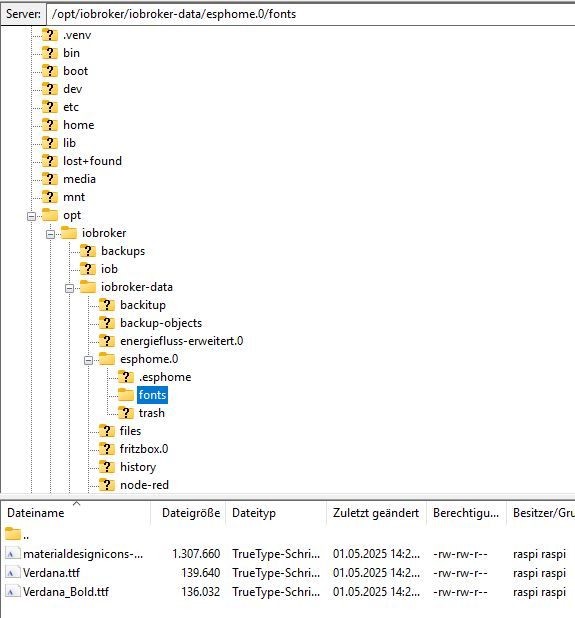
                              fonts.jpg

                              arteckA 1 Antwort Letzte Antwort
                              0
                              • W wibear

                                @arteck

                                Ja, die Fonts sind abgelegt. Ich habe es auch mit Google gfonts versucht: der gleiche Fehler.

                                fonts.jpg

                                arteckA Offline
                                arteckA Offline
                                arteck
                                Developer Most Active
                                schrieb am zuletzt editiert von
                                #29

                                @wibear passen auch die rechte ??

                                zigbee hab ich, zwave auch, nuc's genauso und HA auch

                                W 1 Antwort Letzte Antwort
                                0
                                • W Offline
                                  W Offline
                                  wibear
                                  schrieb am zuletzt editiert von
                                  #30

                                  @arteck
                                  Guten Morgen, die Rechte habe ich nicht geändert.
                                  Was meinst Du konkret bzw was soll ich überprüfen?
                                  Gruß

                                  1 Antwort Letzte Antwort
                                  0
                                  • arteckA arteck

                                    @wibear passen auch die rechte ??

                                    W Offline
                                    W Offline
                                    wibear
                                    schrieb am zuletzt editiert von
                                    #31

                                    @arteck
                                    Kann man im Code nachvollziehen, wann diese Fehlermeldung kommt?

                                    arteckA 1 Antwort Letzte Antwort
                                    0
                                    • W wibear

                                      @arteck
                                      Kann man im Code nachvollziehen, wann diese Fehlermeldung kommt?

                                      arteckA Offline
                                      arteckA Offline
                                      arteck
                                      Developer Most Active
                                      schrieb am zuletzt editiert von
                                      #32

                                      @wibear sagte in ESPHome .yaml Fehlermeldung Pillow Version:

                                      @arteck
                                      Kann man im Code nachvollziehen, wann diese Fehlermeldung kommt?

                                      das hab ich mir garnicht angeschaut.. zuerst sollten die parameter stimmen bevor ich anfange den Fehler zu suchen wo vielleicht keiner sit

                                      also pass die rechte an

                                      oder lass den

                                      iob fix
                                      

                                      laufen

                                      zigbee hab ich, zwave auch, nuc's genauso und HA auch

                                      W 1 Antwort Letzte Antwort
                                      0
                                      • arteckA arteck

                                        @wibear sagte in ESPHome .yaml Fehlermeldung Pillow Version:

                                        @arteck
                                        Kann man im Code nachvollziehen, wann diese Fehlermeldung kommt?

                                        das hab ich mir garnicht angeschaut.. zuerst sollten die parameter stimmen bevor ich anfange den Fehler zu suchen wo vielleicht keiner sit

                                        also pass die rechte an

                                        oder lass den

                                        iob fix
                                        

                                        laufen

                                        W Offline
                                        W Offline
                                        wibear
                                        schrieb am zuletzt editiert von
                                        #33

                                        @arteck
                                        Welche Rechte konkret meinst Du?
                                        Wie gesagt, ich habe keine geändert.
                                        Gruß

                                        1 Antwort Letzte Antwort
                                        0
                                        • simonf04S Offline
                                          simonf04S Offline
                                          simonf04
                                          schrieb am zuletzt editiert von simonf04
                                          #34

                                          @wibear
                                          Der Adapter verwendet sein eigenes venv in /home/iobroker/.cache/autopy/venv/esphome. Damit hier keine externen Abhängigkeiten bestehen.

                                          Um das Permission Problem zu loesen am besten einfach komplett loeschen, Adapter erstellt es eh wieder neu:
                                          sudo rm -rf /home/iobroker/.cache/autopy/venv/esphome.

                                          Um eine aktuelle pillow version zu haben kannste meinen Branch testen:
                                          https://github.com/SimonFischer04/ioBroker.esphome/tree/beta

                                          W 2 Antworten Letzte Antwort
                                          0
                                          Antworten
                                          • In einem neuen Thema antworten
                                          Anmelden zum Antworten
                                          • Älteste zuerst
                                          • Neuste zuerst
                                          • Meiste Stimmen


                                          Support us

                                          ioBroker
                                          Community Adapters
                                          Donate

                                          673

                                          Online

                                          32.6k

                                          Benutzer

                                          82.0k

                                          Themen

                                          1.3m

                                          Beiträge
                                          Community
                                          Impressum | Datenschutz-Bestimmungen | Nutzungsbedingungen | Einwilligungseinstellungen
                                          ioBroker Community 2014-2025
                                          logo
                                          • Anmelden

                                          • Du hast noch kein Konto? Registrieren

                                          • Anmelden oder registrieren, um zu suchen
                                          • Erster Beitrag
                                            Letzter Beitrag
                                          0
                                          • Home
                                          • Aktuell
                                          • Tags
                                          • Ungelesen 0
                                          • Kategorien
                                          • Unreplied
                                          • Beliebt
                                          • GitHub
                                          • Docu
                                          • Hilfe