




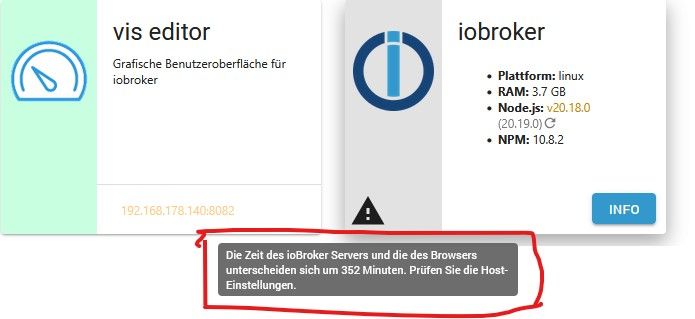
Meldung über Zeitfehler - Was ist das ?

-
@dogfight76 sagte in Meldung über Zeitfehler - Was ist das ?:
Das war in Ordnung
Das war auch bevor du die Einstellungen geändert hast
@homoran said in Meldung über Zeitfehler - Was ist das ?:
Das war auch bevor du die Einstellungen geändert hast
Ok, stimmt.
Hier ein ganz frisches:
========== Start marking the full check here ===========

```bash
Script v.2025-02-23

*** BASE SYSTEM ***
 Static hostname: ioBroker-neu
       Icon name: computer
Operating System: Debian GNU/Linux 12 (bookworm)
          Kernel: Linux 6.12.20+rpt-rpi-v8
    Architecture: arm64
OS is similar to:

Model           : Raspberry Pi 4 Model B Rev 1.1
Docker          : false
Virtualization  : none
Kernel          : aarch64
Userland        : 64 bit

Systemuptime and Load:
 19:15:20 up  7:34,  2 users,  load average: 0.10, 0.15, 0.15
CPU threads: 4


*** LIFE CYCLE STATUS ***
Operating System is the current Debian stable version codenamed 'bookworm'!

*** RASPBERRY THROTTLING ***
Current issues:
No throttling issues detected.

Previously detected issues:
No throttling issues detected.

*** TIME AND TIMEZONES ***
               Local time: Sat 2025-04-05 19:15:20 CEST
           Universal time: Sat 2025-04-05 17:15:20 UTC
                 RTC time: n/a
                Time zone: Europe/Berlin (CEST, +0200)
System clock synchronized: yes
              NTP service: active
          RTC in local TZ: no

*** Users and Groups ***
User that called 'iob diag':
dogfight76
HOME=/home/dogfight76
GROUPS=dogfight76 adm dialout cdrom sudo audio video plugdev games users input render netdev gpio i2c spi iobroker

User that is running 'js-controller':
iobroker
HOME=/home/iobroker
GROUPS=iobroker tty dialout audio video plugdev bluetooth gpio i2c

*** DISPLAY-SERVER SETUP ***
Display-Server: false
Desktop:
Terminal:       tty

*** MEMORY ***
               total        used        free      shared  buff/cache   available
Mem:            4.0G        1.1G        2.5G        1.2M        473M        2.9G
Swap:           536M          0B        536M
Total:          4.5G        1.1G        3.0G

Active iob-Instances:   14

         3791 M total memory
         1072 M used memory
         1113 M active memory
          217 M inactive memory
         2340 M free memory
           52 M buffer memory
          399 M swap cache
          511 M total swap
            0 M used swap
          511 M free swap

*** top - Table Of Processes  ***
top - 19:15:21 up  7:34,  2 users,  load average: 0.10, 0.15, 0.15
Tasks: 183 total,   1 running, 182 sleeping,   0 stopped,   0 zombie
%Cpu(s): 16.7 us, 16.7 sy,  0.0 ni, 66.7 id,  0.0 wa,  0.0 hi,  0.0 si,  0.0 st
MiB Mem :   3791.4 total,   2340.5 free,   1072.7 used,    451.9 buff/cache
MiB Swap:    512.0 total,    512.0 free,      0.0 used.   2718.7 avail Mem

*** FAILED SERVICES ***

  UNIT LOAD ACTIVE SUB DESCRIPTION
0 loaded units listed.


*** DMESG CRITICAL ERRORS ***
No critical errors detected

*** FILESYSTEM ***
Filesystem     Type      Size  Used Avail Use% Mounted on
udev           devtmpfs  1.6G     0  1.6G   0% /dev
tmpfs          tmpfs     380M  1.2M  379M   1% /run
/dev/mmcblk0p2 ext4      117G  5.8G  106G   6% /
tmpfs          tmpfs     1.9G     0  1.9G   0% /dev/shm
tmpfs          tmpfs     5.0M   16K  5.0M   1% /run/lock
/dev/mmcblk0p1 vfat      510M   56M  455M  11% /boot/firmware
tmpfs          tmpfs     380M     0  380M   0% /run/user/1000

Messages concerning ext4 filesystem in dmesg:
[Sat Apr  5 11:41:17 2025] Kernel command line: coherent_pool=1M 8250.nr_uarts=0 snd_bcm2835.enable_headphones=0 cgroup_disable=memory numa_policy=inter                             leave snd_bcm2835.enable_headphones=1 snd_bcm2835.enable_hdmi=1 snd_bcm2835.enable_hdmi=0  smsc95xx.macaddr=DC:A6:32:0D:BC:95 vc_mem.mem_base=0x3ec00000                              vc_mem.mem_size=0x40000000  console=ttyS0,115200 console=tty1 root=PARTUUID=d72bd49f-02 rootfstype=ext4 fsck.repair=yes rootwait cfg80211.ieee80211_reg                             dom=DE
[Sat Apr  5 11:41:19 2025] EXT4-fs (mmcblk0p2): mounted filesystem ce208fd3-38a8-424a-87a2-cd44114eb820 ro with ordered data mode. Quota mode: none.
[Sat Apr  5 11:41:20 2025] EXT4-fs (mmcblk0p2): re-mounted ce208fd3-38a8-424a-87a2-cd44114eb820 r/w. Quota mode: none.

Show mounted filesystems:
TARGET           SOURCE         FSTYPE OPTIONS
/                /dev/mmcblk0p2 ext4   rw,noatime,commit=600
`-/boot/firmware /dev/mmcblk0p1 vfat   rw,relatime,fmask=0022,dmask=0022,codepage=437,iocharset=ascii,shortname=mixed,errors=remount-ro

Files in neuralgic directories:

/var:
968M    /var/
204M    /var/cache
199M    /var/cache/apt
167M    /var/lib
135M    /var/lib/apt/lists

Archived and active journals take up 84.0M in the file system.

/opt/iobroker/backups:
8.5M    /opt/iobroker/backups/

/opt/iobroker/iobroker-data:
752M    /opt/iobroker/iobroker-data/
727M    /opt/iobroker/iobroker-data/files
617M    /opt/iobroker/iobroker-data/files/javascript.admin
560M    /opt/iobroker/iobroker-data/files/javascript.admin/static
558M    /opt/iobroker/iobroker-data/files/javascript.admin/static/js

The five largest files in iobroker-data are:
13M     /opt/iobroker/iobroker-data/objects.jsonl
8.7M    /opt/iobroker/iobroker-data/files/javascript.admin/static/js/838.0aa41cb0.chunk.js.map
8.6M    /opt/iobroker/iobroker-data/files/javascript.admin/static/js/310.89a60ae1.chunk.js.map
7.3M    /opt/iobroker/iobroker-data/states.jsonl
7.0M    /opt/iobroker/iobroker-data/files/javascript.admin/static/js/675.a9c6d34a.chunk.js.map

USB-Devices by-id:
USB-Sticks -  Avoid direct links to /dev/tty* in your adapter setups, please always prefer the links 'by-id':

No Devices found 'by-id'

Zigbee Network Settings on your coordinator/in nvbackup are:

zigbee.X
Extended Pan ID:
*** MASKED ***
Pan ID:
*** MASKED ***
Channel:
*** MASKED ***
Network Key:
*** MASKED ***

To unmask the settings run 'iob diag --unmask'


*** NodeJS-Installation ***

/usr/bin/nodejs         v20.19.0
/usr/bin/node           v20.19.0
/usr/bin/npm            10.8.2
/usr/bin/npx            10.8.2
/usr/bin/corepack       0.31.0

nodejs:
  Installed: 20.19.0-1nodesource1
  Candidate: 20.19.0-1nodesource1
  Version table:
 *** 20.19.0-1nodesource1 1001
        500 https://deb.nodesource.com/node_20.x nodistro/main arm64 Packages
        100 /var/lib/dpkg/status
     20.18.3-1nodesource1 1001
        500 https://deb.nodesource.com/node_20.x nodistro/main arm64 Packages
     20.18.2-1nodesource1 1001
        500 https://deb.nodesource.com/node_20.x nodistro/main arm64 Packages
     20.18.1-1nodesource1 1001
        500 https://deb.nodesource.com/node_20.x nodistro/main arm64 Packages
     20.18.0-1nodesource1 1001
        500 https://deb.nodesource.com/node_20.x nodistro/main arm64 Packages
     20.17.0-1nodesource1 1001
        500 https://deb.nodesource.com/node_20.x nodistro/main arm64 Packages
     20.16.0-1nodesource1 1001
        500 https://deb.nodesource.com/node_20.x nodistro/main arm64 Packages
     20.15.1-1nodesource1 1001
        500 https://deb.nodesource.com/node_20.x nodistro/main arm64 Packages
     20.15.0-1nodesource1 1001
        500 https://deb.nodesource.com/node_20.x nodistro/main arm64 Packages
     20.14.0-1nodesource1 1001
        500 https://deb.nodesource.com/node_20.x nodistro/main arm64 Packages
     20.13.1-1nodesource1 1001
        500 https://deb.nodesource.com/node_20.x nodistro/main arm64 Packages
     20.13.0-1nodesource1 1001
        500 https://deb.nodesource.com/node_20.x nodistro/main arm64 Packages
     20.12.2-1nodesource1 1001
        500 https://deb.nodesource.com/node_20.x nodistro/main arm64 Packages
     20.12.1-1nodesource1 1001
        500 https://deb.nodesource.com/node_20.x nodistro/main arm64 Packages
     20.12.0-1nodesource1 1001
        500 https://deb.nodesource.com/node_20.x nodistro/main arm64 Packages
     20.11.1-1nodesource1 1001
        500 https://deb.nodesource.com/node_20.x nodistro/main arm64 Packages
     20.11.0-1nodesource1 1001
        500 https://deb.nodesource.com/node_20.x nodistro/main arm64 Packages
     20.10.0-1nodesource1 1001
        500 https://deb.nodesource.com/node_20.x nodistro/main arm64 Packages
     20.9.0-1nodesource1 1001
        500 https://deb.nodesource.com/node_20.x nodistro/main arm64 Packages
     20.8.1-1nodesource1 1001
        500 https://deb.nodesource.com/node_20.x nodistro/main arm64 Packages
     20.8.0-1nodesource1 1001
        500 https://deb.nodesource.com/node_20.x nodistro/main arm64 Packages
     20.7.0-1nodesource1 1001
        500 https://deb.nodesource.com/node_20.x nodistro/main arm64 Packages
     20.6.1-1nodesource1 1001
        500 https://deb.nodesource.com/node_20.x nodistro/main arm64 Packages
     20.6.0-1nodesource1 1001
        500 https://deb.nodesource.com/node_20.x nodistro/main arm64 Packages
     20.5.1-1nodesource1 1001
        500 https://deb.nodesource.com/node_20.x nodistro/main arm64 Packages
     20.5.0-1nodesource1 1001
        500 https://deb.nodesource.com/node_20.x nodistro/main arm64 Packages
     20.4.0-1nodesource1 1001
        500 https://deb.nodesource.com/node_20.x nodistro/main arm64 Packages
     20.3.1-1nodesource1 1001
        500 https://deb.nodesource.com/node_20.x nodistro/main arm64 Packages
     20.3.0-1nodesource1 1001
        500 https://deb.nodesource.com/node_20.x nodistro/main arm64 Packages
     20.2.0-1nodesource1 1001
        500 https://deb.nodesource.com/node_20.x nodistro/main arm64 Packages
     20.1.0-1nodesource1 1001
        500 https://deb.nodesource.com/node_20.x nodistro/main arm64 Packages
     20.0.0-1nodesource1 1001
        500 https://deb.nodesource.com/node_20.x nodistro/main arm64 Packages
     18.19.0+dfsg-6~deb12u2 500
        500 http://deb.debian.org/debian bookworm/main arm64 Packages
     18.19.0+dfsg-6~deb12u1 500
        500 http://deb.debian.org/debian-security bookworm-security/main arm64 Packages

Temp directories causing deletion problem: 0
No problems detected

Errors in npm tree: 0
No problems detected

*** ioBroker-Installation ***

ioBroker Status
iobroker is running on this host.


Objects type: jsonl
States  type: jsonl

Hosts:
ioBroker-neu        ioBroker-neu (version: 7.0.6, hostname: ioBroker-neu  , alive, uptime: 15753)

Core adapters versions
js-controller:  7.0.6
admin:          7.6.3
javascript:     8.8.3

nodejs modules from github:     1
+-- iobroker.time-switch@2.2.2 (git+ssh://git@github.com/walli545/ioBroker.time-switch.git#45b5addb484d270dcac6d1bfdb1a9f86b444d80e)

Adapter State
+ system.adapter.admin.0                  : admin                 : ioBroker-neu                             -  enabled, port: 8081, bind: 0.0.0.0, run                              as: admin
+ system.adapter.backitup.0               : backitup              : ioBroker-neu                             -  enabled
+ system.adapter.chromecast.0             : chromecast            : ioBroker-neu                             -  enabled
+ system.adapter.cloud.0                  : cloud                 : ioBroker-neu                             -  enabled
  system.adapter.discovery.0              : discovery             : ioBroker-neu                             - disabled
  system.adapter.fritzdect.0              : fritzdect             : ioBroker-neu                             - disabled
+ system.adapter.history.0                : history               : ioBroker-neu                             -  enabled
  system.adapter.hm-rega.0                : hm-rega               : ioBroker-neu                             - disabled
  system.adapter.hm-rpc.0                 : hm-rpc                : ioBroker-neu                             - disabled, port: 18701
  system.adapter.hm-rpc.1                 : hm-rpc                : ioBroker-neu                             - disabled, port: 12001
  system.adapter.hm-rpc.2                 : hm-rpc                : ioBroker-neu                             - disabled, port: 12010
  system.adapter.influxdb.0               : influxdb              : ioBroker-neu                             - disabled, port: 8086
+ system.adapter.jarvis.0                 : jarvis                : ioBroker-neu                             -  enabled
+ system.adapter.javascript.0             : javascript            : ioBroker-neu                             -  enabled
+ system.adapter.mqtt.0                   : mqtt                  : ioBroker-neu                             -  enabled, port: 8885, bind: 0.0.0.0
+ system.adapter.net-tools.0              : net-tools             : ioBroker-neu                             -  enabled
+ system.adapter.ping.0                   : ping                  : ioBroker-neu                             -  enabled
  system.adapter.solarlog.0               : solarlog              : ioBroker-neu                             - disabled, port: 80
+ system.adapter.time-switch.0            : time-switch           : ioBroker-neu                             -  enabled
  system.adapter.tr-064.0                 : tr-064                : ioBroker-neu                             - disabled
+ system.adapter.vis-inventwo.0           : vis-inventwo          : ioBroker-neu                             -  enabled
  system.adapter.vis-timeandweather.0     : vis-timeandweather    : ioBroker-neu                             - disabled
  system.adapter.vis.0                    : vis                   : ioBroker-neu                             -  enabled
+ system.adapter.web.0                    : web                   : ioBroker-neu                             -  enabled, port: 8082, bind: 0.0.0.0, run                              as: admin

+ instance is alive

Enabled adapters with bindings
+ system.adapter.admin.0                  : admin                 : ioBroker-neu                             -  enabled, port: 8081, bind: 0.0.0.0, run                              as: admin
+ system.adapter.mqtt.0                   : mqtt                  : ioBroker-neu                             -  enabled, port: 8885, bind: 0.0.0.0
+ system.adapter.web.0                    : web                   : ioBroker-neu                             -  enabled, port: 8082, bind: 0.0.0.0, run                              as: admin

ioBroker-Repositories
┌─────────┬──────────┬─────────────────────────────────────────────────────────┬──────────────┐
│ (index) │ name     │ url                                                     │ auto upgrade │
├─────────┼──────────┼─────────────────────────────────────────────────────────┼──────────────┤
│ 0       │ 'stable' │ 'http://download.iobroker.net/sources-dist.json'        │ false        │
│ 1       │ 'beta'   │ 'http://download.iobroker.net/sources-dist-latest.json' │ false        │
└─────────┴──────────┴─────────────────────────────────────────────────────────┴──────────────┘

Active repo(s): stable
Upgrade policy: none

Installed ioBroker-Adapters
Used repository: stable
Adapter    "admin"        : 7.6.3    , installed 7.6.3
Adapter    "backitup"     : 3.0.31   , installed 3.0.31
Adapter    "chromecast"   : 4.0.0    , installed 4.0.0
Adapter    "cloud"        : 5.0.1    , installed 5.0.1
Adapter    "discovery"    : 5.0.0    , installed 5.0.0
Adapter    "fritzdect"    : 2.5.11   , installed 2.5.11
Adapter    "history"      : 3.0.1    , installed 3.0.1
Adapter    "hm-rega"      : 5.1.0    , installed 5.1.0
Adapter    "hm-rpc"       : 2.0.2    , installed 2.0.2
Adapter    "influxdb"     : 4.0.2    , installed 4.0.2
Adapter    "jarvis"       : 3.1.8    , installed 3.1.8
Adapter    "javascript"   : 8.8.3    , installed 8.8.3
Controller "js-controller": 7.0.6    , installed 7.0.6
Adapter    "mqtt"         : 6.1.2    , installed 6.1.2
Adapter    "net-tools"    : 1.0.11   , installed 1.0.11
Adapter    "ping"         : 1.6.2    , installed 1.6.2
Adapter    "socketio"     : 6.7.1    , installed 7.0.8
Adapter    "solarlog"     : 2.3.0    , installed 2.3.0
Adapter    "tr-064"       : 4.3.0    , installed 4.3.0
Adapter    "vis"          : 1.5.6    , installed 1.5.6
Adapter    "vis-inventwo" : 3.3.4    , installed 3.3.4
Adapter    "vis-timeandweather": 1.2.2, installed 1.2.2
Adapter    "web"          : 7.0.8    , installed 7.0.8
Adapter    "ws"           : 2.6.2    , installed 3.0.19

Objects and States
Please stand by - This may take a while
Objects:        1196
States:         915

*** OS-Repositories and Updates ***
Hit:1 http://deb.debian.org/debian bookworm InRelease
Hit:2 http://archive.raspberrypi.com/debian bookworm InRelease
Hit:3 http://deb.debian.org/debian-security bookworm-security InRelease
Hit:4 http://deb.debian.org/debian bookworm-updates InRelease
Hit:5 https://deb.nodesource.com/node_20.x nodistro InRelease
Reading package lists...
Pending Updates: 3

*** Listening Ports ***
Active Internet connections (only servers)
Proto Recv-Q Send-Q Local Address           Foreign Address         State       User       Inode      PID/Program name
tcp        0      0 0.0.0.0:8885            0.0.0.0:*               LISTEN      1001       202366     19207/io.mqtt.0
tcp        0      0 0.0.0.0:8400            0.0.0.0:*               LISTEN      1001       91535      8929/io.jarvis.0
tcp        0      0 127.0.0.1:9001          0.0.0.0:*               LISTEN      1001       90278      8727/iobroker.js-co
tcp        0      0 127.0.0.1:9000          0.0.0.0:*               LISTEN      1001       90283      8727/iobroker.js-co
tcp        0      0 0.0.0.0:22              0.0.0.0:*               LISTEN      0          3938       595/sshd: /usr/sbin
tcp6       0      0 :::8082                 :::*                    LISTEN      1001       89781      9020/io.web.0
tcp6       0      0 :::8081                 :::*                    LISTEN      1001       91245      8745/io.admin.0
tcp6       0      0 :::22                   :::*                    LISTEN      0          3940       595/sshd: /usr/sbin
udp        0      0 0.0.0.0:44223           0.0.0.0:*                           104        5622       456/avahi-daemon: r
udp        0      0 0.0.0.0:5353            0.0.0.0:*                           1001       153775     14695/io.chromecast
udp        0      0 0.0.0.0:5353            0.0.0.0:*                           104        5620       456/avahi-daemon: r
udp6       0      0 :::38634                :::*                                104        5623       456/avahi-daemon: r
udp6       0      0 fe80::6a9e:ba30:f44:546 :::*                                0          4996       534/NetworkManager
udp6       0      0 :::5353                 :::*                                104        5621       456/avahi-daemon: r

*** Log File - Last 25 Lines ***

2025-04-05 19:08:53.412  - debug: mqtt.0 (19192) stateChange mqtt.0.info.connection: {"val":"","ack":true,"ts":1743872933408,"q":0,"from":"system.adapter.mqtt.0","user":"system.user.admin","lc":1743788862251}
2025-04-05 19:09:09.522  - info: host.ioBroker-neu stopInstance system.adapter.mqtt.0 (force=false, process=true)
2025-04-05 19:09:09.533  - info: mqtt.0 (19192) Got terminate signal TERMINATE_YOURSELF
2025-04-05 19:09:09.538  - info: mqtt.0 (19192) terminating
2025-04-05 19:09:09.540  - debug: mqtt.0 (19192) Plugin sentry destroyed
2025-04-05 19:09:09.542  - info: mqtt.0 (19192) Terminated (ADAPTER_REQUESTED_TERMINATION): Without reason
2025-04-05 19:09:09.570  - info: host.ioBroker-neu stopInstance system.adapter.mqtt.0 send kill signal
2025-04-05 19:09:10.046  - info: mqtt.0 (19192) terminating
2025-04-05 19:09:10.124  - info: host.ioBroker-neu instance system.adapter.mqtt.0 terminated with code 11 (ADAPTER_REQUESTED_TERMINATION)
2025-04-05 19:09:13.466  - info: host.ioBroker-neu instance system.adapter.mqtt.0 in version "6.1.2" started with pid 19207
2025-04-05 19:09:15.327  - debug: mqtt.0 (19207) Redis Objects: Use Redis connection: 127.0.0.1:9001
2025-04-05 19:09:15.381  - debug: mqtt.0 (19207) Objects client ready ... initialize now
2025-04-05 19:09:15.392  - debug: mqtt.0 (19207) Objects create System PubSub Client
2025-04-05 19:09:15.395  - debug: mqtt.0 (19207) Objects create User PubSub Client
2025-04-05 19:09:15.418  - debug: mqtt.0 (19207) Objects client initialize lua scripts
2025-04-05 19:09:15.428  - debug: mqtt.0 (19207) Objects connected to redis: 127.0.0.1:9001
2025-04-05 19:09:15.450  - debug: mqtt.0 (19207) Redis States: Use Redis connection: 127.0.0.1:9000
2025-04-05 19:09:15.461  - debug: mqtt.0 (19207) States create System PubSub Client
2025-04-05 19:09:15.462  - debug: mqtt.0 (19207) States create User PubSub Client
2025-04-05 19:09:15.518  - debug: mqtt.0 (19207) States connected to redis: 127.0.0.1:9000
2025-04-05 19:09:15.556  - debug: mqtt.0 (19207) Plugin sentry Initialize Plugin (enabled=true)
2025-04-05 19:09:15.967  - info: mqtt.0 (19207) starting. Version 6.1.2 in /opt/iobroker/node_modules/iobroker.mqtt, node: v20.19.0, js-controller: 7.0.6
2025-04-05 19:09:16.136  - info: mqtt.0 (19207) Starting MQTT authenticated server on 0.0.0.0:8885
2025-04-05 19:09:16.217  - debug: mqtt.0 (19207) stateChange mqtt.0.info.clients.HeishaMon: {"val":false,"ack":true,"ts":1743872956212,"q":0,"from":"system.adapter.mqtt.0","user":"system.user.admin","lc":1743788862234}
2025-04-05 19:09:16.269  - debug: mqtt.0 (19207) stateChange mqtt.0.info.connection: {"val":"","ack":true,"ts":1743872956265,"q":0,"from":"system.adapter.mqtt.0","user":"system.user.admin","lc":1743788862251}


============ Mark until here for C&P =============
Hoffe es gibt aufschluss.....
-
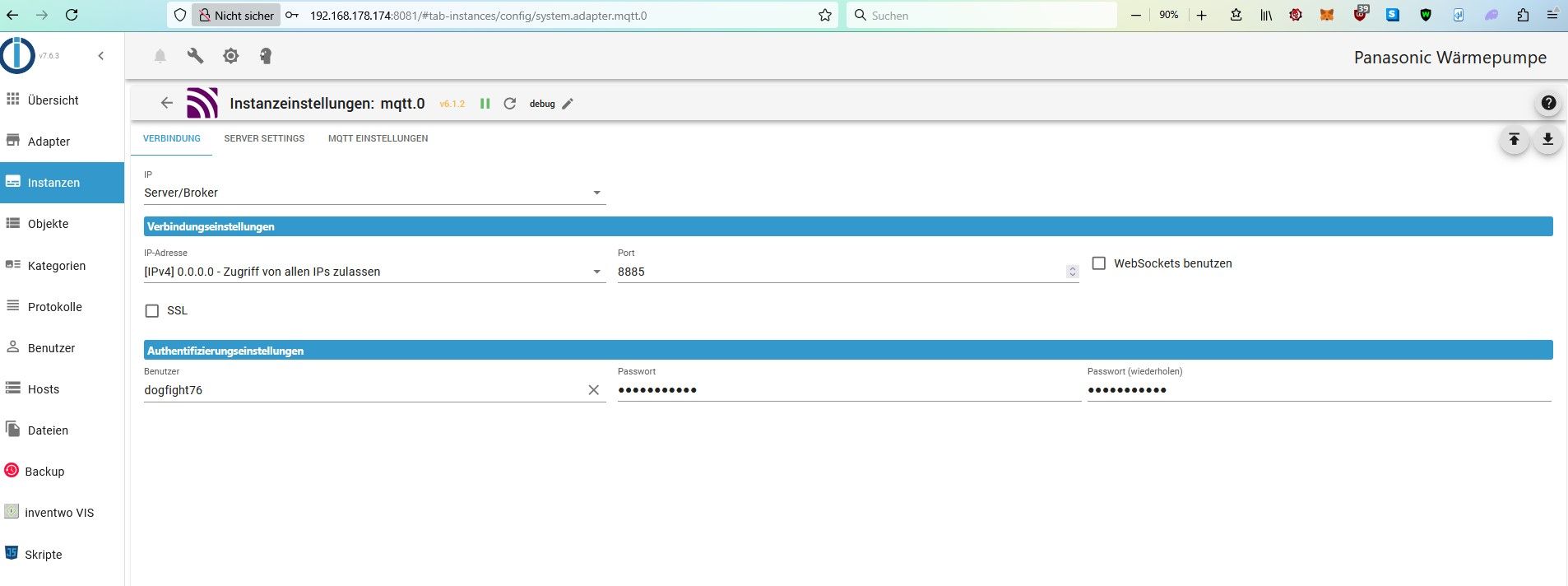
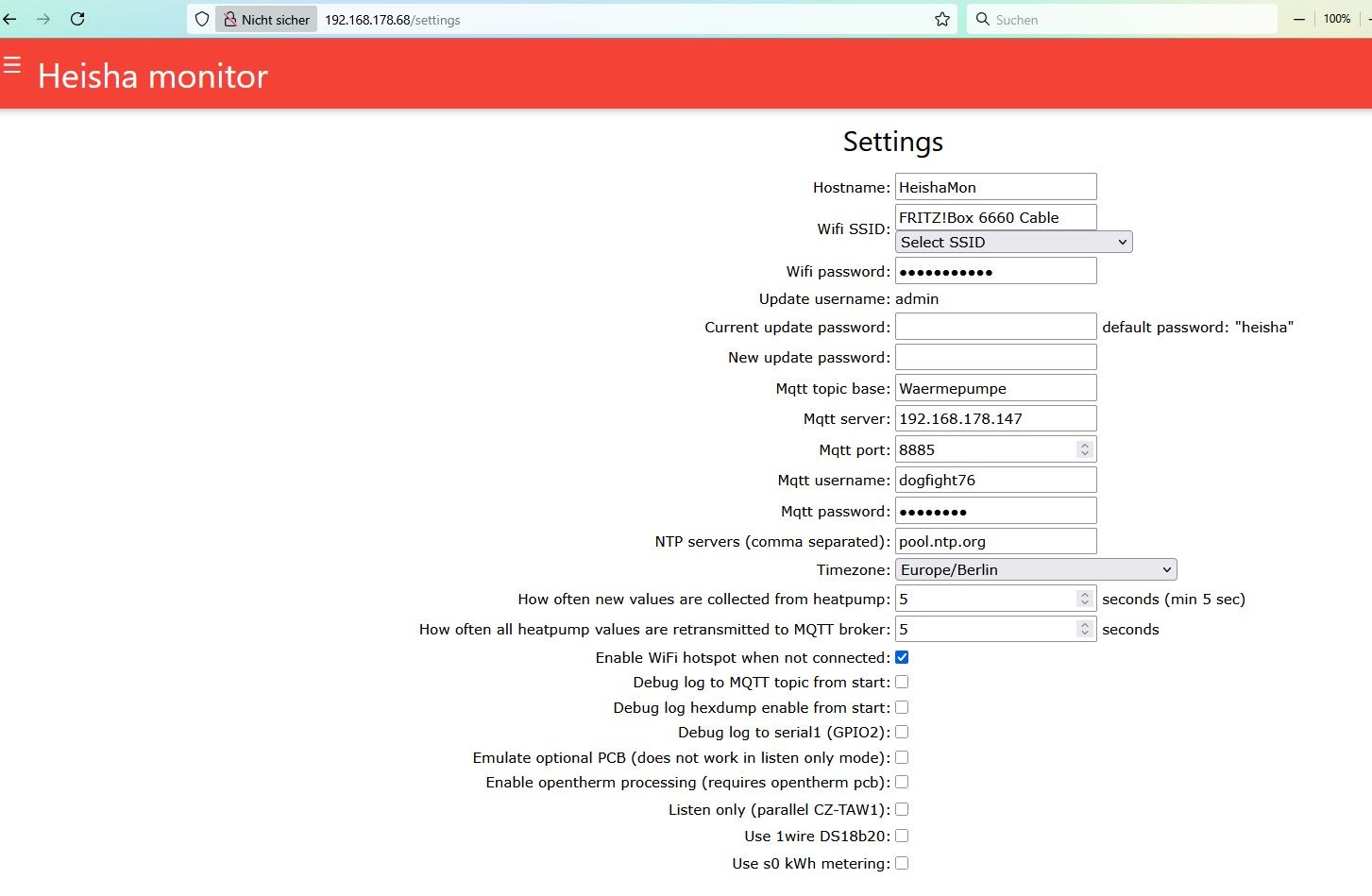
Die Einstellungen sind doch korrekt, oder ??
-
Die Einstellungen sind doch korrekt, oder ??
@dogfight76 sagte in Meldung über Zeitfehler - Was ist das ?:
Die Einstellungen sind doch korrekt,
weiss ich nicht.
jetzt hast du user passwort!
ist das auch auf der Platine bekanntkein Support per PN! - Fragen im Forum stellen - Benutzt das Voting rechts unten im Beitrag wenn er euch geholfen hat.
Das Forum freut sich über eine Spende. Benutzt dazu den Spendenbutton oben rechts. Danke!
der Installationsfixer: curl -fsL https://iobroker.net/fix.sh | bash - -
@dogfight76 sagte in Meldung über Zeitfehler - Was ist das ?:
Die Einstellungen sind doch korrekt,
weiss ich nicht.
jetzt hast du user passwort!
ist das auch auf der Platine bekannt@homoran
Ich muss ja etwas probieren , also User und Passwort bei beiden eingetragen ! Ist auf den Screenshots extra festgehalten.Denn anscheinend geben die Logs auch keine Hinweise. Oder jemand etwas entdeckt ?
Eigentlich hat sich ja nur die IP Endung von .140 auf .174 geändert.
Kein Plan warum mqtt die heishamon nicht findetGruß
-
Die Einstellungen sind doch korrekt, oder ??
@dogfight76 sagte in Meldung über Zeitfehler - Was ist das ?:
Die Einstellungen sind doch korrekt, oder ??
Du hast da bei der IP im Heisha einen Zahlendreher. Dein iobroker hat hinten 174, Du hast aber 147 drin. So kann es ja nix werden!
Gruss, Jürgen
-
@dogfight76 sagte in Meldung über Zeitfehler - Was ist das ?:
Die Einstellungen sind doch korrekt, oder ??
Du hast da bei der IP im Heisha einen Zahlendreher. Dein iobroker hat hinten 174, Du hast aber 147 drin. So kann es ja nix werden!
Gruss, Jürgen
Fuck my life.......
Natürlich, das war´s !
Vor lauter Bäumen......
Danke , jetzt ist natürlich Verbindung da !!
-
Da der Pi ja ein anderer ist als vorher , hat sich die IP geändert auf 192.168.178.174 (vorher .140)
Jetzt meckert die MQTT-Instanz , weil dort ja die .140 eingetragen war.

Ich also in den Settings von mqtt die IP im Auswahlfenster geändert auf:
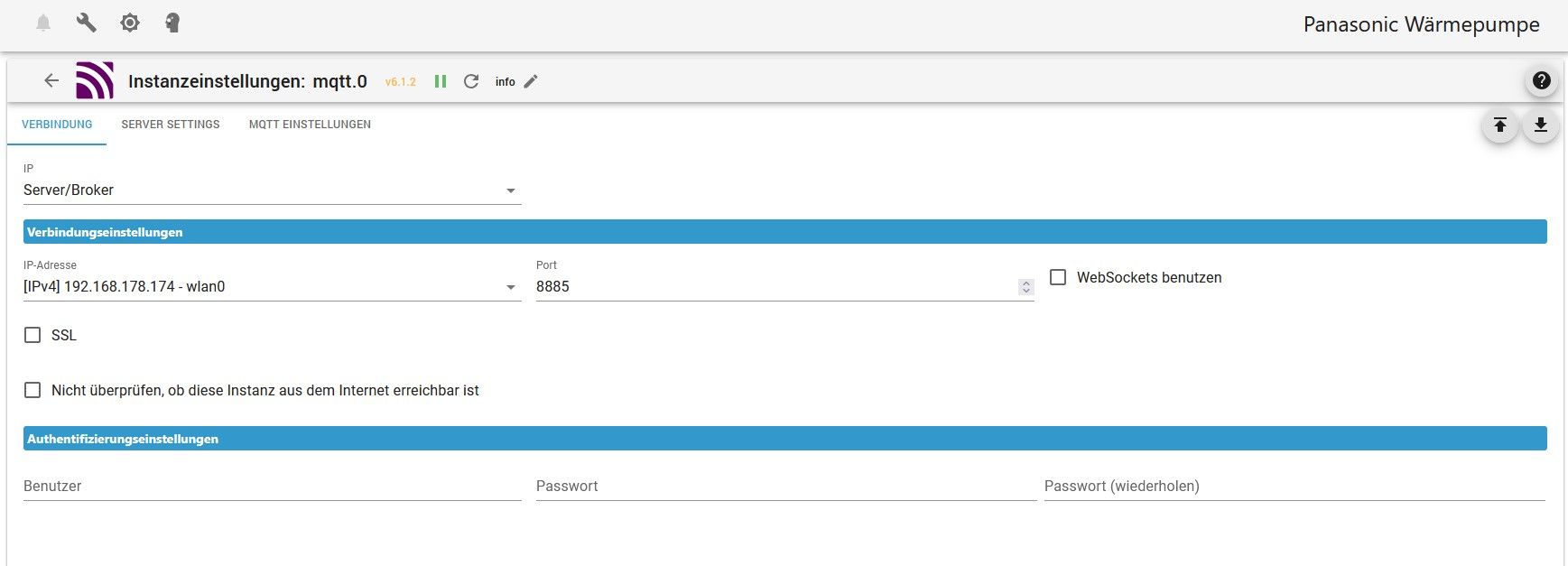
(ipv4) 192.168.178.174-wlan0 , beim Port steht ja die 8885.
Muss das der Port sein wo man die VIS aufruft ?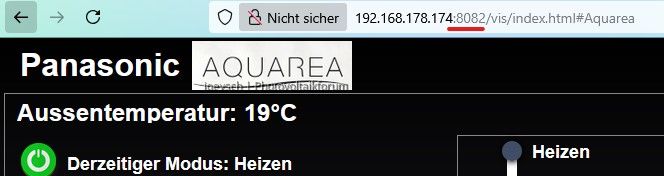
@dogfight76 sagte in Meldung über Zeitfehler - Was ist das ?:
Da der Pi ja ein anderer ist als vorher , hat sich die IP geändert auf 192.168.178.174 (vorher .140)
Wäre es nicht einfacher gewesen, dem neuen Pi die Adresse des alten Pi zu verpassen?

-
@dogfight76 sagte in Meldung über Zeitfehler - Was ist das ?:
Da der Pi ja ein anderer ist als vorher , hat sich die IP geändert auf 192.168.178.174 (vorher .140)
Wäre es nicht einfacher gewesen, dem neuen Pi die Adresse des alten Pi zu verpassen?
-
Ja im nachhinein wäre es wohl klüger gewesen.....
Aber jetzt läuft ja alles wieder ;)
Danke für eure Hilferstellung
Gruß
Oder man verwendet hostnames statt IPs.
-
Oder man verwendet hostnames statt IPs.
@thomas-braun Das geht aber in die Hose, wenn alle Raspis "raspberrypi" heißen
kein Support per PN! - Fragen im Forum stellen - Benutzt das Voting rechts unten im Beitrag wenn er euch geholfen hat.
Das Forum freut sich über eine Spende. Benutzt dazu den Spendenbutton oben rechts. Danke!
der Installationsfixer: curl -fsL https://iobroker.net/fix.sh | bash - -
@thomas-braun Das geht aber in die Hose, wenn alle Raspis "raspberrypi" heißen
Hostnames müssen natürlich im Netzwerk eindeutig sein. Ist aber eine grundlegende Netzwerktechnik.
Kann/sollte/müsste man wissen.


Hey! Du scheinst an dieser Unterhaltung interessiert zu sein, hast aber noch kein Konto.
Hast du es satt, bei jedem Besuch durch die gleichen Beiträge zu scrollen? Wenn du dich für ein Konto anmeldest, kommst du immer genau dorthin zurück, wo du zuvor warst, und kannst dich über neue Antworten benachrichtigen lassen (entweder per E-Mail oder Push-Benachrichtigung). Du kannst auch Lesezeichen speichern und Beiträge positiv bewerten, um anderen Community-Mitgliedern deine Wertschätzung zu zeigen.
Mit deinem Input könnte dieser Beitrag noch besser werden 💗
Registrieren AnmeldenSupport us
471
Online33.0k
Benutzer83.6k
Themen1.3m
Beiträge