Skip to content
  • Home
  • Aktuell
  • Tags
  • 0 Ungelesen 0
  • Kategorien
  • Unreplied
  • Beliebt
  • GitHub
  • Docu
  • Hilfe
Skins
  • Light
  • Brite
  • Cerulean
  • Cosmo
  • Flatly
  • Journal
  • Litera
  • Lumen
  • Lux
  • Materia
  • Minty
  • Morph
  • Pulse
  • Sandstone
  • Simplex
  • Sketchy
  • Spacelab
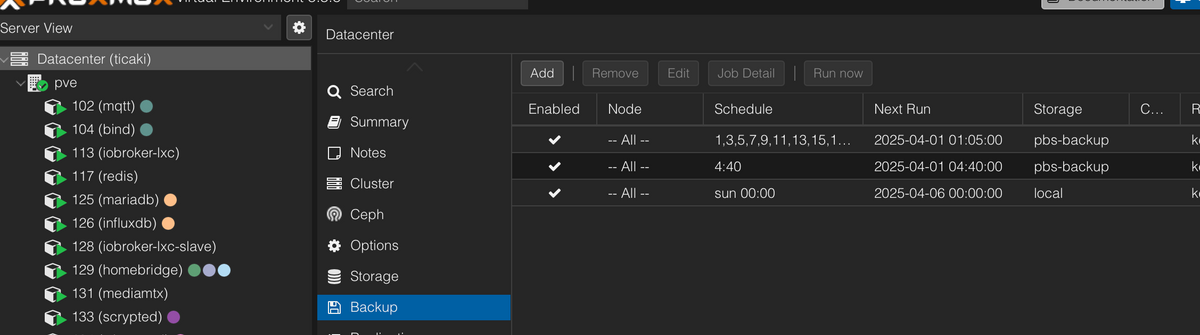
  • United
  • Yeti
  • Zephyr
  • Dark
  • Cyborg
  • Darkly
  • Quartz
  • Slate
  • Solar
  • Superhero
  • Vapor

  • Standard: (Kein Skin)
  • Kein Skin
Einklappen
ioBroker Logo

Community Forum

donate donate
  1. ioBroker Community Home
  2. Deutsch
  3. Off Topic
  4. Proxmox
  5. Problem mit Proxmox Speicher
NEWS

  • Weihnachtsangebot 2025! 🎄
    BluefoxB
    Bluefox
    22
    1
    1.0k

  • UPDATE 31.10.: Amazon Alexa - ioBroker Skill läuft aus ?
    apollon77A
    apollon77
    48
    3
    9.1k

  • Monatsrückblick – September 2025
    BluefoxB
    Bluefox
    14
    1
    2.4k

Problem mit Proxmox Speicher

Geplant Angeheftet Gesperrt Verschoben Proxmox
67 Beiträge 5 Kommentatoren 6.3k Aufrufe 3 Watching
  • Älteste zuerst
  • Neuste zuerst
  • Meiste Stimmen
Antworten
  • In einem neuen Thema antworten
Anmelden zum Antworten
Dieses Thema wurde gelöscht. Nur Nutzer mit entsprechenden Rechten können es sehen.
  • G guitardoc

    @martinp Hmmm, was bedeutet das und was kann ich da tun?

    BananaJoeB Offline
    BananaJoeB Offline
    BananaJoe
    Most Active
    schrieb am zuletzt editiert von BananaJoe
    #14

    @guitardoc wie groß ist den dein local-lvm Laufwerk? Eigentlich sollten da die VMs hin
    Verschieben kannst du die Festplatten der VMs über diesen Weg:
    7cad82e4-6eca-496d-aad8-62ac76b11be4-image.png

    ioBroker@Ubuntu 24.04 LTS (VMware) für: >260 Geräte, 5 Switche, 7 AP, 9 IP-Cam, 1 NAS 42TB, 1 ESXi 15TB, 4 Proxmox 1TB, 1 Hyper-V 48TB, 14 x Echo, 5x FireTV, 5 x Tablett/Handy VIS || >=160 Tasmota/Shelly || >=95 ZigBee || PV 8.1kW / Akku 14kWh || 2x USV 750W kaskadiert || Creality CR-10 SE 3D-Drucker

    1 Antwort Letzte Antwort
    1
    • G guitardoc

      @martinp Hmmm, was bedeutet das und was kann ich da tun?

      MartinPM Online
      MartinPM Online
      MartinP
      schrieb am zuletzt editiert von
      #15

      @guitardoc Weiter eintauchen, ich bin aber auch ein linux-Autodidakt ...

      oot@pve:~# ls -l /dev/mapper
      total 0
      crw------- 1 root root 10, 236 Mar 30 18:03 control
      lrwxrwxrwx 1 root root       7 Mar 30 18:03 pve-data -> ../dm-5
      lrwxrwxrwx 1 root root       7 Mar 30 18:03 pve-data_tdata -> ../dm-3
      lrwxrwxrwx 1 root root       7 Mar 30 18:03 pve-data_tmeta -> ../dm-2
      lrwxrwxrwx 1 root root       7 Mar 30 18:03 pve-data-tpool -> ../dm-4
      lrwxrwxrwx 1 root root       7 Mar 30 18:03 pve-root -> ../dm-1
      lrwxrwxrwx 1 root root       7 Mar 30 18:03 pve-swap -> ../dm-0
      lrwxrwxrwx 1 root root       7 Mar 30 18:03 pve-vm--100--disk--0 -> ../dm-8
      lrwxrwxrwx 1 root root       8 Mar 30 18:03 pve-vm--100--disk--1 -> ../dm-11
      lrwxrwxrwx 1 root root       7 Mar 30 18:03 pve-vm--101--disk--0 -> ../dm-6
      lrwxrwxrwx 1 root root       8 Mar 30 18:03 pve-vm--103--disk--0 -> ../dm-10
      lrwxrwxrwx 1 root root       7 Mar 30 18:03 pve-vm--104--disk--0 -> ../dm-7
      lrwxrwxrwx 1 root root       7 Mar 30 18:03 pve-vm--107--disk--0 -> ../dm-9
      root@pve:~# 
      

      alles anscheinend symlinks

      Da kann man sich dann durchhangeln

      root@pve:~# df /dev/dm-4
      Filesystem     1K-blocks  Used Available Use% Mounted on
      udev             3956076     0   3956076   0% /dev
      root@pve:~# 
      

      Intel(R) Celeron(R) CPU N3000 @ 1.04GHz 8G RAM 480G SSD
      Virtualization : unprivileged lxc container (debian 12 on Proxmox 8.4.14)
      Linux pve 6.8.12-16-pve
      6 GByte RAM für den Container
      Fritzbox 6591 FW 8.03 (Vodafone Leih-Box)
      Remote-Access über Wireguard der Fritzbox

      1 Antwort Letzte Antwort
      1
      • G guitardoc

        @haselchen

        Iobroker: 32 GB
        Homebridge: 12 GB
        Homeassistant: 8 GB
        Tailscale: 4 GB
        Pihole: 4 GB

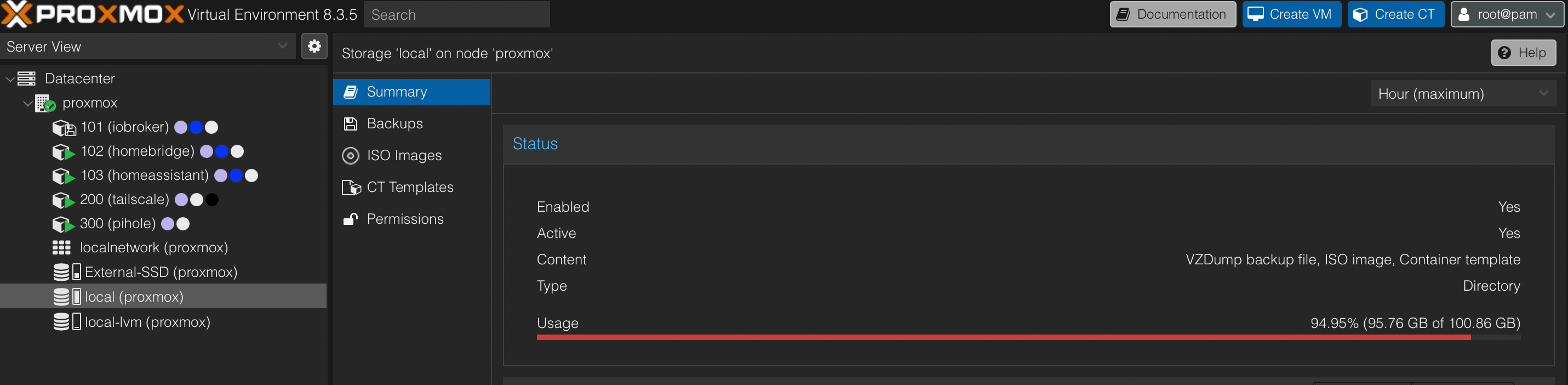
        Möglicherweise hab ich Proxmox zu wenig Speicher gegeben, denn die Platte hat insgesamt 1 TB (local-lvm) und davon sind 60 GB belegt.

        BananaJoeB Offline
        BananaJoeB Offline
        BananaJoe
        Most Active
        schrieb am zuletzt editiert von
        #16

        @guitardoc sagte in Problem mit Proxmox Speicher:

        Möglicherweise hab ich Proxmox zu wenig Speicher gegeben, denn die Platte hat insgesamt 1 TB (local-lvm) und davon sind 60 GB belegt.

        Na siehste, ist doch genug Platz. Du hast die Daten mit auf das Bootlaufwerk gegeben, verschiebe die ausgeschalteten VMs
        Eine zum testen! Dann die nächste!

        ioBroker@Ubuntu 24.04 LTS (VMware) für: >260 Geräte, 5 Switche, 7 AP, 9 IP-Cam, 1 NAS 42TB, 1 ESXi 15TB, 4 Proxmox 1TB, 1 Hyper-V 48TB, 14 x Echo, 5x FireTV, 5 x Tablett/Handy VIS || >=160 Tasmota/Shelly || >=95 ZigBee || PV 8.1kW / Akku 14kWh || 2x USV 750W kaskadiert || Creality CR-10 SE 3D-Drucker

        G 1 Antwort Letzte Antwort
        1
        • BananaJoeB BananaJoe

          @guitardoc sagte in Problem mit Proxmox Speicher:

          Möglicherweise hab ich Proxmox zu wenig Speicher gegeben, denn die Platte hat insgesamt 1 TB (local-lvm) und davon sind 60 GB belegt.

          Na siehste, ist doch genug Platz. Du hast die Daten mit auf das Bootlaufwerk gegeben, verschiebe die ausgeschalteten VMs
          Eine zum testen! Dann die nächste!

          G Offline
          G Offline
          guitardoc
          schrieb am zuletzt editiert von guitardoc
          #17

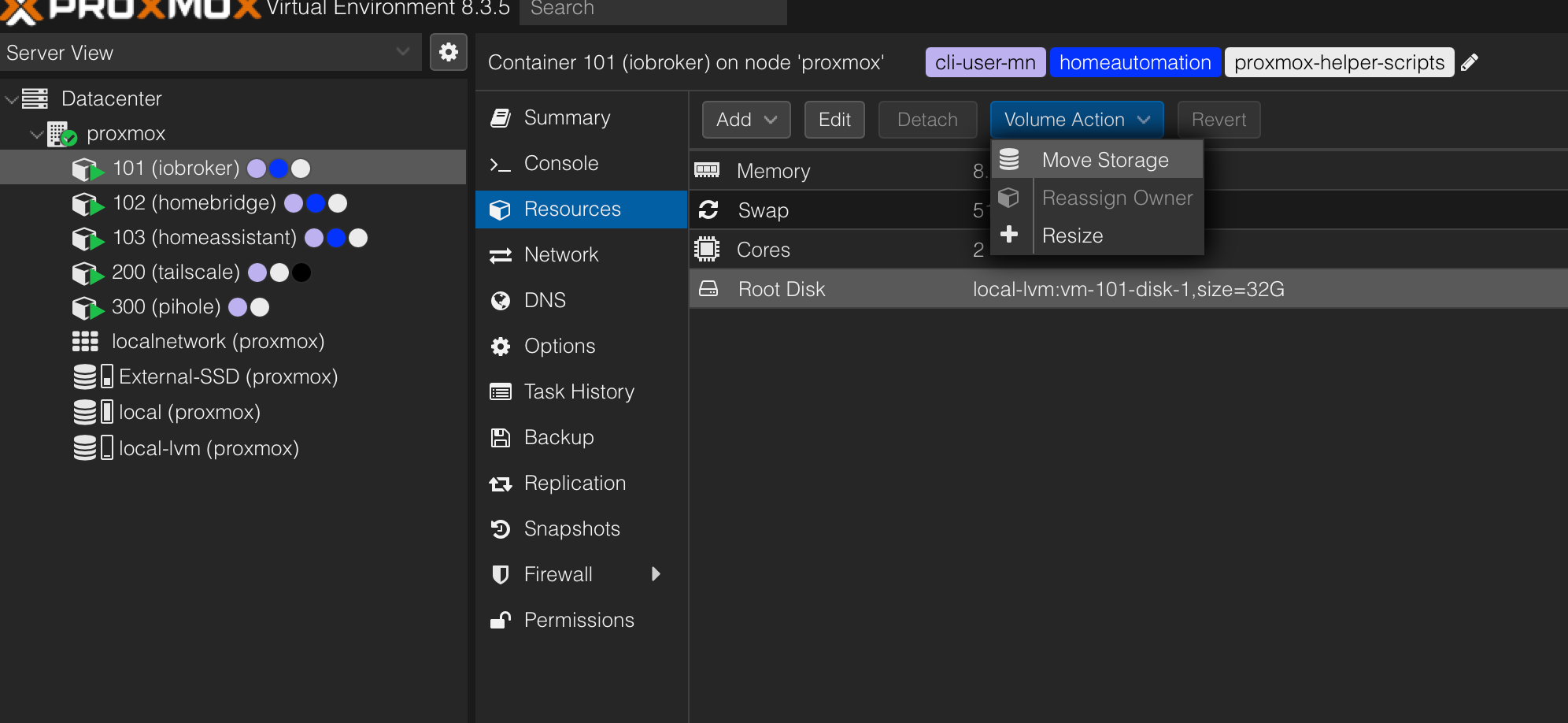
          @bananajoe Hmm, hoffentlich mache ich da nichts falsch… Bei mir sieht das alles etwas anders aus, da es LXC und keine VM sind.

          Ist das hier richtig:
          837fa121-427f-41a3-87d1-f09697878bd8-image.png

          Und wohin verschiebe ich das jetzt?

          haselchenH 1 Antwort Letzte Antwort
          0
          • G guitardoc

            @bananajoe Hmm, hoffentlich mache ich da nichts falsch… Bei mir sieht das alles etwas anders aus, da es LXC und keine VM sind.

            Ist das hier richtig:

            837fa121-427f-41a3-87d1-f09697878bd8-image.png

            Und wohin verschiebe ich das jetzt?

            haselchenH Offline
            haselchenH Offline
            haselchen
            Most Active
            schrieb am zuletzt editiert von
            #18

            @guitardoc

            Local-LVM

            Synology DS218+ & 2 x Fujitsu Esprimo (VM/Container) + FritzBox7590 + 2 AVM 3000 Repeater & Homematic & HUE & Osram & Xiaomi, NPM 10.9.4, Nodejs 22.21.0 ,JS Controller 7.0.7 ,Admin 7.7.19

            G 1 Antwort Letzte Antwort
            1
            • haselchenH haselchen

              @guitardoc

              Local-LVM

              G Offline
              G Offline
              guitardoc
              schrieb am zuletzt editiert von guitardoc
              #19

              @haselchen OK, also den Container stoppen, dann die Root-Disk des Containers per Move-Storage nach local-lvm verschieben und dann den Container wieder starten? Und dann läuft alles wieder wie gehabt? Ich hab ein bisschen Bammel… :-)

              Da passiert nichts. Die Root-Disk liegt irgendwie schon auf local-lvm (siehe Screenshot oben)?

              haselchenH 1 Antwort Letzte Antwort
              0
              • G guitardoc

                @haselchen OK, also den Container stoppen, dann die Root-Disk des Containers per Move-Storage nach local-lvm verschieben und dann den Container wieder starten? Und dann läuft alles wieder wie gehabt? Ich hab ein bisschen Bammel… :-)

                Da passiert nichts. Die Root-Disk liegt irgendwie schon auf local-lvm (siehe Screenshot oben)?

                haselchenH Offline
                haselchenH Offline
                haselchen
                Most Active
                schrieb am zuletzt editiert von
                #20

                @guitardoc

                Wo liegen denn die anderen Container ?
                Local?
                Local-LVM?

                Synology DS218+ & 2 x Fujitsu Esprimo (VM/Container) + FritzBox7590 + 2 AVM 3000 Repeater & Homematic & HUE & Osram & Xiaomi, NPM 10.9.4, Nodejs 22.21.0 ,JS Controller 7.0.7 ,Admin 7.7.19

                G 1 Antwort Letzte Antwort
                1
                • haselchenH haselchen

                  @guitardoc

                  Wo liegen denn die anderen Container ?
                  Local?
                  Local-LVM?

                  G Offline
                  G Offline
                  guitardoc
                  schrieb am zuletzt editiert von guitardoc
                  #21

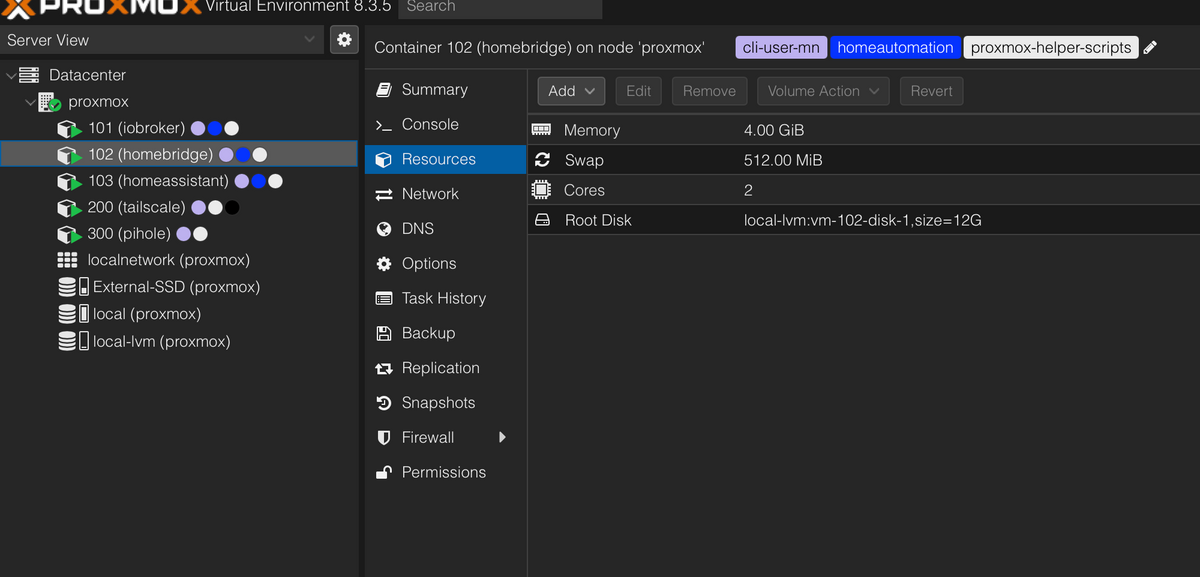
                  @haselchen Die liegen alle auf local-lvm, hier mal noch ein anderer Container:
                  9c1fcfc4-bd2e-47d5-806f-947707632d59-image.png

                  Und das passt auch, die Container zusammen haben 60 GB und das ist es auch was auf local-lvm liegt:
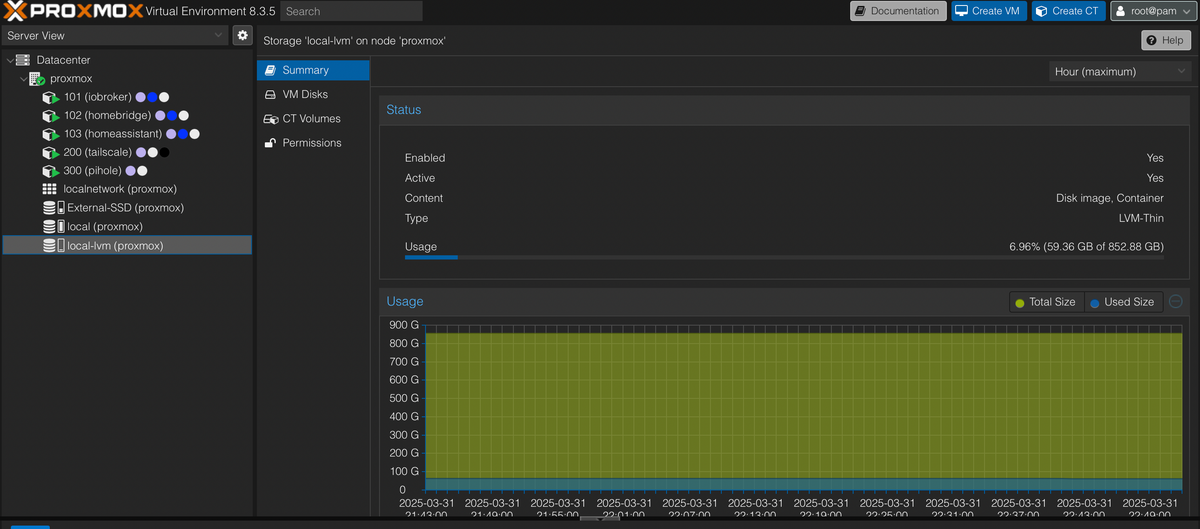
                  51917719-5bb8-4ef2-ba83-955d41c8c643-image.png

                  Nur was liegt dann auf local und belegt den ganzen Speicher?

                  T 1 Antwort Letzte Antwort
                  0
                  • G guitardoc

                    @haselchen Die liegen alle auf local-lvm, hier mal noch ein anderer Container:

                    9c1fcfc4-bd2e-47d5-806f-947707632d59-image.png

                    Und das passt auch, die Container zusammen haben 60 GB und das ist es auch was auf local-lvm liegt:

                    51917719-5bb8-4ef2-ba83-955d41c8c643-image.png

                    Nur was liegt dann auf local und belegt den ganzen Speicher?

                    T Nicht stören
                    T Nicht stören
                    ticaki
                    schrieb am zuletzt editiert von
                    #22

                    @guitardoc

                     sudo du /* -sh --exclude={/proc,/dev,/sys}
                    

                    Wenn du root bist ohne sudo.

                    Weather-Warnings Espresense NSPanel-Lovelace-ui Tagesschau

                    Spenden

                    G 1 Antwort Letzte Antwort
                    1
                    • T ticaki

                      @guitardoc

                       sudo du /* -sh --exclude={/proc,/dev,/sys}
                      

                      Wenn du root bist ohne sudo.

                      G Offline
                      G Offline
                      guitardoc
                      schrieb am zuletzt editiert von
                      #23

                      @ticaki

                      
                      0       /bin
                      817M    /boot
                      9.9M    /etc
                      36K     /home
                      0       /lib
                      0       /lib64
                      16K     /lost+found
                      4.0K    /media
                      89G     /mnt
                      4.0K    /opt
                      68K     /root
                      1.9M    /run
                      0       /sbin
                      4.0K    /srv
                      36K     /tmp
                      7.3G    /usr
                      2.8G    /var
                      
                      
                      T 1 Antwort Letzte Antwort
                      0
                      • G guitardoc

                        @ticaki

                        
                        0       /bin
                        817M    /boot
                        9.9M    /etc
                        36K     /home
                        0       /lib
                        0       /lib64
                        16K     /lost+found
                        4.0K    /media
                        89G     /mnt
                        4.0K    /opt
                        68K     /root
                        1.9M    /run
                        0       /sbin
                        4.0K    /srv
                        36K     /tmp
                        7.3G    /usr
                        2.8G    /var
                        
                        
                        T Nicht stören
                        T Nicht stören
                        ticaki
                        schrieb am zuletzt editiert von
                        #24

                        @guitardoc

                         sudo du /mnt/* -sh 
                        

                        :)

                        Weather-Warnings Espresense NSPanel-Lovelace-ui Tagesschau

                        Spenden

                        G 1 Antwort Letzte Antwort
                        1
                        • T ticaki

                          @guitardoc

                           sudo du /mnt/* -sh 
                          

                          :)

                          G Offline
                          G Offline
                          guitardoc
                          schrieb am zuletzt editiert von guitardoc
                          #25

                          @ticaki

                          
                          root@proxmox:~# du /mnt/* -sh
                          89G     /mnt/sda
                          4.0K    /mnt/vzsnap0
                          root@proxmox:~# du /mnt/sda/* -sh
                          89G     /mnt/sda/dump
                          4.0K    /mnt/sda/images
                          16K     /mnt/sda/lost+found
                          4.0K    /mnt/sda/private
                          4.0K    /mnt/sda/snippets
                          12K     /mnt/sda/template
                          root@proxmox:~# du /mnt/sda/dump/* -sh
                          4.0K    /mnt/sda/dump/vzdump-lxc-101-2024_09_06-02_30_02.log
                          4.0K    /mnt/sda/dump/vzdump-lxc-101-2024_09_07-02_30_05.log
                          4.0K    /mnt/sda/dump/vzdump-lxc-101-2025_03_24-02_30_00.log
                          8.9G    /mnt/sda/dump/vzdump-lxc-101-2025_03_24-02_30_00.tar.zst
                          4.0K    /mnt/sda/dump/vzdump-lxc-101-2025_03_24-02_30_00.tar.zst.notes
                          4.0K    /mnt/sda/dump/vzdump-lxc-101-2025_03_25-02_30_03.log
                          8.9G    /mnt/sda/dump/vzdump-lxc-101-2025_03_25-02_30_03.tar.zst
                          4.0K    /mnt/sda/dump/vzdump-lxc-101-2025_03_25-02_30_03.tar.zst.notes
                          4.0K    /mnt/sda/dump/vzdump-lxc-101-2025_03_26-02_30_05.log
                          8.9G    /mnt/sda/dump/vzdump-lxc-101-2025_03_26-02_30_05.tar.zst
                          4.0K    /mnt/sda/dump/vzdump-lxc-101-2025_03_26-02_30_05.tar.zst.notes
                          4.0K    /mnt/sda/dump/vzdump-lxc-101-2025_03_27-02_30_07.log
                          8.9G    /mnt/sda/dump/vzdump-lxc-101-2025_03_27-02_30_07.tar.zst
                          4.0K    /mnt/sda/dump/vzdump-lxc-101-2025_03_27-02_30_07.tar.zst.notes
                          4.0K    /mnt/sda/dump/vzdump-lxc-101-2025_03_31-21_20_16.log
                          9.0G    /mnt/sda/dump/vzdump-lxc-101-2025_03_31-21_20_16.tar.zst
                          4.0K    /mnt/sda/dump/vzdump-lxc-101-2025_03_31-21_20_16.tar.zst.notes
                          4.0K    /mnt/sda/dump/vzdump-lxc-102-2023_12_24-02_30_38.log
                          4.0K    /mnt/sda/dump/vzdump-lxc-102-2025_03_24-02_31_44.log
                          4.8G    /mnt/sda/dump/vzdump-lxc-102-2025_03_24-02_31_44.tar.zst
                          4.0K    /mnt/sda/dump/vzdump-lxc-102-2025_03_24-02_31_44.tar.zst.notes
                          4.0K    /mnt/sda/dump/vzdump-lxc-102-2025_03_25-02_31_48.log
                          4.8G    /mnt/sda/dump/vzdump-lxc-102-2025_03_25-02_31_48.tar.zst
                          4.0K    /mnt/sda/dump/vzdump-lxc-102-2025_03_25-02_31_48.tar.zst.notes
                          4.0K    /mnt/sda/dump/vzdump-lxc-102-2025_03_26-02_31_50.log
                          4.8G    /mnt/sda/dump/vzdump-lxc-102-2025_03_26-02_31_50.tar.zst
                          4.0K    /mnt/sda/dump/vzdump-lxc-102-2025_03_26-02_31_50.tar.zst.notes
                          4.0K    /mnt/sda/dump/vzdump-lxc-102-2025_03_27-02_31_52.log
                          4.8G    /mnt/sda/dump/vzdump-lxc-102-2025_03_27-02_31_52.tar.zst
                          4.0K    /mnt/sda/dump/vzdump-lxc-102-2025_03_27-02_31_52.tar.zst.notes
                          4.0K    /mnt/sda/dump/vzdump-lxc-102-2025_03_31-21_22_05.log
                          4.9G    /mnt/sda/dump/vzdump-lxc-102-2025_03_31-21_22_05.tar.zst
                          4.0K    /mnt/sda/dump/vzdump-lxc-102-2025_03_31-21_22_05.tar.zst.notes
                          4.0K    /mnt/sda/dump/vzdump-lxc-103-2025_03_24-02_32_32.log
                          2.1G    /mnt/sda/dump/vzdump-lxc-103-2025_03_24-02_32_32.tar.zst
                          4.0K    /mnt/sda/dump/vzdump-lxc-103-2025_03_24-02_32_32.tar.zst.notes
                          4.0K    /mnt/sda/dump/vzdump-lxc-103-2025_03_25-02_32_38.log
                          2.1G    /mnt/sda/dump/vzdump-lxc-103-2025_03_25-02_32_38.tar.zst
                          4.0K    /mnt/sda/dump/vzdump-lxc-103-2025_03_25-02_32_38.tar.zst.notes
                          4.0K    /mnt/sda/dump/vzdump-lxc-103-2025_03_26-02_32_40.log
                          2.1G    /mnt/sda/dump/vzdump-lxc-103-2025_03_26-02_32_40.tar.zst
                          4.0K    /mnt/sda/dump/vzdump-lxc-103-2025_03_26-02_32_40.tar.zst.notes
                          4.0K    /mnt/sda/dump/vzdump-lxc-103-2025_03_27-02_32_41.log
                          2.1G    /mnt/sda/dump/vzdump-lxc-103-2025_03_27-02_32_41.tar.zst
                          4.0K    /mnt/sda/dump/vzdump-lxc-103-2025_03_27-02_32_41.tar.zst.notes
                          4.0K    /mnt/sda/dump/vzdump-lxc-103-2025_03_31-21_22_56.log
                          2.1G    /mnt/sda/dump/vzdump-lxc-103-2025_03_31-21_22_56.tar.zst
                          4.0K    /mnt/sda/dump/vzdump-lxc-103-2025_03_31-21_22_56.tar.zst.notes
                          4.0K    /mnt/sda/dump/vzdump-lxc-200-2025_03_24-02_33_27.log
                          1.1G    /mnt/sda/dump/vzdump-lxc-200-2025_03_24-02_33_27.tar.zst
                          4.0K    /mnt/sda/dump/vzdump-lxc-200-2025_03_24-02_33_27.tar.zst.notes
                          4.0K    /mnt/sda/dump/vzdump-lxc-200-2025_03_25-02_33_34.log
                          1.1G    /mnt/sda/dump/vzdump-lxc-200-2025_03_25-02_33_34.tar.zst
                          4.0K    /mnt/sda/dump/vzdump-lxc-200-2025_03_25-02_33_34.tar.zst.notes
                          4.0K    /mnt/sda/dump/vzdump-lxc-200-2025_03_26-02_33_36.log
                          1.1G    /mnt/sda/dump/vzdump-lxc-200-2025_03_26-02_33_36.tar.zst
                          4.0K    /mnt/sda/dump/vzdump-lxc-200-2025_03_26-02_33_36.tar.zst.notes
                          4.0K    /mnt/sda/dump/vzdump-lxc-200-2025_03_27-02_33_37.log
                          1.1G    /mnt/sda/dump/vzdump-lxc-200-2025_03_27-02_33_37.tar.zst
                          4.0K    /mnt/sda/dump/vzdump-lxc-200-2025_03_27-02_33_37.tar.zst.notes
                          4.0K    /mnt/sda/dump/vzdump-lxc-200-2025_03_31-21_23_53.log
                          1.2G    /mnt/sda/dump/vzdump-lxc-200-2025_03_31-21_23_53.tar.zst
                          4.0K    /mnt/sda/dump/vzdump-lxc-200-2025_03_31-21_23_53.tar.zst.notes
                          4.0K    /mnt/sda/dump/vzdump-lxc-300-2025_03_24-02_33_40.log
                          950M    /mnt/sda/dump/vzdump-lxc-300-2025_03_24-02_33_40.tar.zst
                          4.0K    /mnt/sda/dump/vzdump-lxc-300-2025_03_24-02_33_40.tar.zst.notes
                          4.0K    /mnt/sda/dump/vzdump-lxc-300-2025_03_25-02_33_47.log
                          949M    /mnt/sda/dump/vzdump-lxc-300-2025_03_25-02_33_47.tar.zst
                          4.0K    /mnt/sda/dump/vzdump-lxc-300-2025_03_25-02_33_47.tar.zst.notes
                          4.0K    /mnt/sda/dump/vzdump-lxc-300-2025_03_26-02_33_49.log
                          951M    /mnt/sda/dump/vzdump-lxc-300-2025_03_26-02_33_49.tar.zst
                          4.0K    /mnt/sda/dump/vzdump-lxc-300-2025_03_26-02_33_49.tar.zst.notes
                          4.0K    /mnt/sda/dump/vzdump-lxc-300-2025_03_27-02_33_50.log
                          952M    /mnt/sda/dump/vzdump-lxc-300-2025_03_27-02_33_50.tar.zst
                          4.0K    /mnt/sda/dump/vzdump-lxc-300-2025_03_27-02_33_50.tar.zst.notes
                          4.0K    /mnt/sda/dump/vzdump-lxc-300-2025_03_31-21_24_06.log
                          960M    /mnt/sda/dump/vzdump-lxc-300-2025_03_31-21_24_06.tar.zst
                          4.0K    /mnt/sda/dump/vzdump-lxc-300-2025_03_31-21_24_06.tar.zst.notes
                          root@proxmox:~# 


                          Ich habe keine Ahnung was das alles ist und vor allem wo das herkommt…

                          T 1 Antwort Letzte Antwort
                          0
                          • G guitardoc

                            @ticaki

                            
                            root@proxmox:~# du /mnt/* -sh
                            89G     /mnt/sda
                            4.0K    /mnt/vzsnap0
                            root@proxmox:~# du /mnt/sda/* -sh
                            89G     /mnt/sda/dump
                            4.0K    /mnt/sda/images
                            16K     /mnt/sda/lost+found
                            4.0K    /mnt/sda/private
                            4.0K    /mnt/sda/snippets
                            12K     /mnt/sda/template
                            root@proxmox:~# du /mnt/sda/dump/* -sh
                            4.0K    /mnt/sda/dump/vzdump-lxc-101-2024_09_06-02_30_02.log
                            4.0K    /mnt/sda/dump/vzdump-lxc-101-2024_09_07-02_30_05.log
                            4.0K    /mnt/sda/dump/vzdump-lxc-101-2025_03_24-02_30_00.log
                            8.9G    /mnt/sda/dump/vzdump-lxc-101-2025_03_24-02_30_00.tar.zst
                            4.0K    /mnt/sda/dump/vzdump-lxc-101-2025_03_24-02_30_00.tar.zst.notes
                            4.0K    /mnt/sda/dump/vzdump-lxc-101-2025_03_25-02_30_03.log
                            8.9G    /mnt/sda/dump/vzdump-lxc-101-2025_03_25-02_30_03.tar.zst
                            4.0K    /mnt/sda/dump/vzdump-lxc-101-2025_03_25-02_30_03.tar.zst.notes
                            4.0K    /mnt/sda/dump/vzdump-lxc-101-2025_03_26-02_30_05.log
                            8.9G    /mnt/sda/dump/vzdump-lxc-101-2025_03_26-02_30_05.tar.zst
                            4.0K    /mnt/sda/dump/vzdump-lxc-101-2025_03_26-02_30_05.tar.zst.notes
                            4.0K    /mnt/sda/dump/vzdump-lxc-101-2025_03_27-02_30_07.log
                            8.9G    /mnt/sda/dump/vzdump-lxc-101-2025_03_27-02_30_07.tar.zst
                            4.0K    /mnt/sda/dump/vzdump-lxc-101-2025_03_27-02_30_07.tar.zst.notes
                            4.0K    /mnt/sda/dump/vzdump-lxc-101-2025_03_31-21_20_16.log
                            9.0G    /mnt/sda/dump/vzdump-lxc-101-2025_03_31-21_20_16.tar.zst
                            4.0K    /mnt/sda/dump/vzdump-lxc-101-2025_03_31-21_20_16.tar.zst.notes
                            4.0K    /mnt/sda/dump/vzdump-lxc-102-2023_12_24-02_30_38.log
                            4.0K    /mnt/sda/dump/vzdump-lxc-102-2025_03_24-02_31_44.log
                            4.8G    /mnt/sda/dump/vzdump-lxc-102-2025_03_24-02_31_44.tar.zst
                            4.0K    /mnt/sda/dump/vzdump-lxc-102-2025_03_24-02_31_44.tar.zst.notes
                            4.0K    /mnt/sda/dump/vzdump-lxc-102-2025_03_25-02_31_48.log
                            4.8G    /mnt/sda/dump/vzdump-lxc-102-2025_03_25-02_31_48.tar.zst
                            4.0K    /mnt/sda/dump/vzdump-lxc-102-2025_03_25-02_31_48.tar.zst.notes
                            4.0K    /mnt/sda/dump/vzdump-lxc-102-2025_03_26-02_31_50.log
                            4.8G    /mnt/sda/dump/vzdump-lxc-102-2025_03_26-02_31_50.tar.zst
                            4.0K    /mnt/sda/dump/vzdump-lxc-102-2025_03_26-02_31_50.tar.zst.notes
                            4.0K    /mnt/sda/dump/vzdump-lxc-102-2025_03_27-02_31_52.log
                            4.8G    /mnt/sda/dump/vzdump-lxc-102-2025_03_27-02_31_52.tar.zst
                            4.0K    /mnt/sda/dump/vzdump-lxc-102-2025_03_27-02_31_52.tar.zst.notes
                            4.0K    /mnt/sda/dump/vzdump-lxc-102-2025_03_31-21_22_05.log
                            4.9G    /mnt/sda/dump/vzdump-lxc-102-2025_03_31-21_22_05.tar.zst
                            4.0K    /mnt/sda/dump/vzdump-lxc-102-2025_03_31-21_22_05.tar.zst.notes
                            4.0K    /mnt/sda/dump/vzdump-lxc-103-2025_03_24-02_32_32.log
                            2.1G    /mnt/sda/dump/vzdump-lxc-103-2025_03_24-02_32_32.tar.zst
                            4.0K    /mnt/sda/dump/vzdump-lxc-103-2025_03_24-02_32_32.tar.zst.notes
                            4.0K    /mnt/sda/dump/vzdump-lxc-103-2025_03_25-02_32_38.log
                            2.1G    /mnt/sda/dump/vzdump-lxc-103-2025_03_25-02_32_38.tar.zst
                            4.0K    /mnt/sda/dump/vzdump-lxc-103-2025_03_25-02_32_38.tar.zst.notes
                            4.0K    /mnt/sda/dump/vzdump-lxc-103-2025_03_26-02_32_40.log
                            2.1G    /mnt/sda/dump/vzdump-lxc-103-2025_03_26-02_32_40.tar.zst
                            4.0K    /mnt/sda/dump/vzdump-lxc-103-2025_03_26-02_32_40.tar.zst.notes
                            4.0K    /mnt/sda/dump/vzdump-lxc-103-2025_03_27-02_32_41.log
                            2.1G    /mnt/sda/dump/vzdump-lxc-103-2025_03_27-02_32_41.tar.zst
                            4.0K    /mnt/sda/dump/vzdump-lxc-103-2025_03_27-02_32_41.tar.zst.notes
                            4.0K    /mnt/sda/dump/vzdump-lxc-103-2025_03_31-21_22_56.log
                            2.1G    /mnt/sda/dump/vzdump-lxc-103-2025_03_31-21_22_56.tar.zst
                            4.0K    /mnt/sda/dump/vzdump-lxc-103-2025_03_31-21_22_56.tar.zst.notes
                            4.0K    /mnt/sda/dump/vzdump-lxc-200-2025_03_24-02_33_27.log
                            1.1G    /mnt/sda/dump/vzdump-lxc-200-2025_03_24-02_33_27.tar.zst
                            4.0K    /mnt/sda/dump/vzdump-lxc-200-2025_03_24-02_33_27.tar.zst.notes
                            4.0K    /mnt/sda/dump/vzdump-lxc-200-2025_03_25-02_33_34.log
                            1.1G    /mnt/sda/dump/vzdump-lxc-200-2025_03_25-02_33_34.tar.zst
                            4.0K    /mnt/sda/dump/vzdump-lxc-200-2025_03_25-02_33_34.tar.zst.notes
                            4.0K    /mnt/sda/dump/vzdump-lxc-200-2025_03_26-02_33_36.log
                            1.1G    /mnt/sda/dump/vzdump-lxc-200-2025_03_26-02_33_36.tar.zst
                            4.0K    /mnt/sda/dump/vzdump-lxc-200-2025_03_26-02_33_36.tar.zst.notes
                            4.0K    /mnt/sda/dump/vzdump-lxc-200-2025_03_27-02_33_37.log
                            1.1G    /mnt/sda/dump/vzdump-lxc-200-2025_03_27-02_33_37.tar.zst
                            4.0K    /mnt/sda/dump/vzdump-lxc-200-2025_03_27-02_33_37.tar.zst.notes
                            4.0K    /mnt/sda/dump/vzdump-lxc-200-2025_03_31-21_23_53.log
                            1.2G    /mnt/sda/dump/vzdump-lxc-200-2025_03_31-21_23_53.tar.zst
                            4.0K    /mnt/sda/dump/vzdump-lxc-200-2025_03_31-21_23_53.tar.zst.notes
                            4.0K    /mnt/sda/dump/vzdump-lxc-300-2025_03_24-02_33_40.log
                            950M    /mnt/sda/dump/vzdump-lxc-300-2025_03_24-02_33_40.tar.zst
                            4.0K    /mnt/sda/dump/vzdump-lxc-300-2025_03_24-02_33_40.tar.zst.notes
                            4.0K    /mnt/sda/dump/vzdump-lxc-300-2025_03_25-02_33_47.log
                            949M    /mnt/sda/dump/vzdump-lxc-300-2025_03_25-02_33_47.tar.zst
                            4.0K    /mnt/sda/dump/vzdump-lxc-300-2025_03_25-02_33_47.tar.zst.notes
                            4.0K    /mnt/sda/dump/vzdump-lxc-300-2025_03_26-02_33_49.log
                            951M    /mnt/sda/dump/vzdump-lxc-300-2025_03_26-02_33_49.tar.zst
                            4.0K    /mnt/sda/dump/vzdump-lxc-300-2025_03_26-02_33_49.tar.zst.notes
                            4.0K    /mnt/sda/dump/vzdump-lxc-300-2025_03_27-02_33_50.log
                            952M    /mnt/sda/dump/vzdump-lxc-300-2025_03_27-02_33_50.tar.zst
                            4.0K    /mnt/sda/dump/vzdump-lxc-300-2025_03_27-02_33_50.tar.zst.notes
                            4.0K    /mnt/sda/dump/vzdump-lxc-300-2025_03_31-21_24_06.log
                            960M    /mnt/sda/dump/vzdump-lxc-300-2025_03_31-21_24_06.tar.zst
                            4.0K    /mnt/sda/dump/vzdump-lxc-300-2025_03_31-21_24_06.tar.zst.notes
                            root@proxmox:~# 


                            Ich habe keine Ahnung was das alles ist und vor allem wo das herkommt…

                            T Nicht stören
                            T Nicht stören
                            ticaki
                            schrieb am zuletzt editiert von ticaki
                            #26

                            @guitardoc
                            Der rechnet den inhalt von /mnt/sda deinem root zu, obwohl oben steht das /dev/sda auf /mnt/sda gemoutet ist.

                            EDIT: ich hab alle meine Festplatten über proxmox hinzugefügt.. naja ich hab aber auch nur zfs volumen

                            Weather-Warnings Espresense NSPanel-Lovelace-ui Tagesschau

                            Spenden

                            1 Antwort Letzte Antwort
                            1
                            • BananaJoeB Offline
                              BananaJoeB Offline
                              BananaJoe
                              Most Active
                              schrieb am zuletzt editiert von
                              #27

                              sind die dumps nicht Backups?

                              ioBroker@Ubuntu 24.04 LTS (VMware) für: >260 Geräte, 5 Switche, 7 AP, 9 IP-Cam, 1 NAS 42TB, 1 ESXi 15TB, 4 Proxmox 1TB, 1 Hyper-V 48TB, 14 x Echo, 5x FireTV, 5 x Tablett/Handy VIS || >=160 Tasmota/Shelly || >=95 ZigBee || PV 8.1kW / Akku 14kWh || 2x USV 750W kaskadiert || Creality CR-10 SE 3D-Drucker

                              1 Antwort Letzte Antwort
                              1
                              • haselchenH Offline
                                haselchenH Offline
                                haselchen
                                Most Active
                                schrieb am zuletzt editiert von haselchen
                                #28

                                @bananajoe

                                Jup.

                                Was ist vzdump? vzdump ist eine Befehlszeilentool in Proxmox VE zum Erstellen von Sicherungskopien von VMs und Containern. Es ermöglicht Ihnen das Erstellen vollständiger Sicherungen von Containern, einschließlich ihrer Konfiguration, Daten und Metadaten

                                Das sind alte Sicherungen.
                                Vielleicht auch schiefgelaufene.

                                Synology DS218+ & 2 x Fujitsu Esprimo (VM/Container) + FritzBox7590 + 2 AVM 3000 Repeater & Homematic & HUE & Osram & Xiaomi, NPM 10.9.4, Nodejs 22.21.0 ,JS Controller 7.0.7 ,Admin 7.7.19

                                G 1 Antwort Letzte Antwort
                                1
                                • BananaJoeB Offline
                                  BananaJoeB Offline
                                  BananaJoe
                                  Most Active
                                  schrieb am zuletzt editiert von
                                  #29

                                  @guitardoc wie sehen die Backups deiner VMs aus, was ist da eingestellt:

                                  144bc125-8c53-4934-a5f1-efd6391ad2df-image.png

                                  Ansonsten dort mal durchschalten

                                  ioBroker@Ubuntu 24.04 LTS (VMware) für: >260 Geräte, 5 Switche, 7 AP, 9 IP-Cam, 1 NAS 42TB, 1 ESXi 15TB, 4 Proxmox 1TB, 1 Hyper-V 48TB, 14 x Echo, 5x FireTV, 5 x Tablett/Handy VIS || >=160 Tasmota/Shelly || >=95 ZigBee || PV 8.1kW / Akku 14kWh || 2x USV 750W kaskadiert || Creality CR-10 SE 3D-Drucker

                                  1 Antwort Letzte Antwort
                                  1
                                  • haselchenH haselchen

                                    @bananajoe

                                    Jup.

                                    Was ist vzdump? vzdump ist eine Befehlszeilentool in Proxmox VE zum Erstellen von Sicherungskopien von VMs und Containern. Es ermöglicht Ihnen das Erstellen vollständiger Sicherungen von Containern, einschließlich ihrer Konfiguration, Daten und Metadaten

                                    Das sind alte Sicherungen.
                                    Vielleicht auch schiefgelaufene.

                                    G Offline
                                    G Offline
                                    guitardoc
                                    schrieb am zuletzt editiert von
                                    #30

                                    Das könnten Backups sein. Vor allem, weil die letzten Tage keine Backups auf die externe Platte geschrieben wurden, auf den ersten Blick sind das genau die Backups die fehlen. Nur was machen die hier? Die externe Platte ist ja nicht mal halb voll…

                                    BananaJoeB 1 Antwort Letzte Antwort
                                    0
                                    • G guitardoc

                                      Das könnten Backups sein. Vor allem, weil die letzten Tage keine Backups auf die externe Platte geschrieben wurden, auf den ersten Blick sind das genau die Backups die fehlen. Nur was machen die hier? Die externe Platte ist ja nicht mal halb voll…

                                      BananaJoeB Offline
                                      BananaJoeB Offline
                                      BananaJoe
                                      Most Active
                                      schrieb am zuletzt editiert von
                                      #31

                                      @guitardoc schlechter screenshot:
                                      b2c34d3b-a9fc-49b6-acab-08dc540146c3-image.png
                                      Backups löschen!
                                      Und woanders hinsichern! also anderen Ort auswählen, die SSD z.B.

                                      ioBroker@Ubuntu 24.04 LTS (VMware) für: >260 Geräte, 5 Switche, 7 AP, 9 IP-Cam, 1 NAS 42TB, 1 ESXi 15TB, 4 Proxmox 1TB, 1 Hyper-V 48TB, 14 x Echo, 5x FireTV, 5 x Tablett/Handy VIS || >=160 Tasmota/Shelly || >=95 ZigBee || PV 8.1kW / Akku 14kWh || 2x USV 750W kaskadiert || Creality CR-10 SE 3D-Drucker

                                      G 1 Antwort Letzte Antwort
                                      1
                                      • BananaJoeB BananaJoe

                                        @guitardoc schlechter screenshot:
                                        b2c34d3b-a9fc-49b6-acab-08dc540146c3-image.png
                                        Backups löschen!
                                        Und woanders hinsichern! also anderen Ort auswählen, die SSD z.B.

                                        G Offline
                                        G Offline
                                        guitardoc
                                        schrieb am zuletzt editiert von guitardoc
                                        #32

                                        @bananajoe Die Backups gehen alle auf die externe SSD:
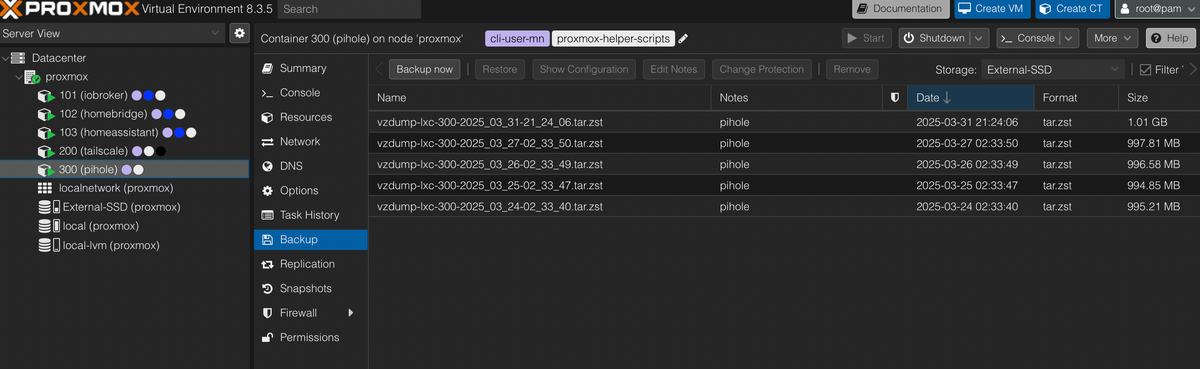
                                        2bf51228-98c5-485e-9a5e-59e8cb49a214-image.png

                                        Und in der Liste fehlen genau die mit dem Datum, welche auf local gelandet sind. Wie passiert denn sowas? Hmm, sehr mysteriös.

                                        EDIT: Ich vermute, dass ich da auf Local die Backups löschen kann. Nur wie, ohne was anderes mit in den Abgrund zu reißen?

                                        1 Antwort Letzte Antwort
                                        0
                                        • T Nicht stören
                                          T Nicht stören
                                          ticaki
                                          schrieb am zuletzt editiert von
                                          #33

                                          Bildschirmfoto 2025-03-31 um 23.20.16.png

                                          und wie sieht es da aus?

                                          Weather-Warnings Espresense NSPanel-Lovelace-ui Tagesschau

                                          Spenden

                                          G 1 Antwort Letzte Antwort
                                          1
                                          Antworten
                                          • In einem neuen Thema antworten
                                          Anmelden zum Antworten
                                          • Älteste zuerst
                                          • Neuste zuerst
                                          • Meiste Stimmen


                                          Support us

                                          ioBroker
                                          Community Adapters
                                          Donate

                                          554

                                          Online

                                          32.5k

                                          Benutzer

                                          81.6k

                                          Themen

                                          1.3m

                                          Beiträge
                                          Community
                                          Impressum | Datenschutz-Bestimmungen | Nutzungsbedingungen | Einwilligungseinstellungen
                                          ioBroker Community 2014-2025
                                          logo
                                          • Anmelden

                                          • Du hast noch kein Konto? Registrieren

                                          • Anmelden oder registrieren, um zu suchen
                                          • Erster Beitrag
                                            Letzter Beitrag
                                          0
                                          • Home
                                          • Aktuell
                                          • Tags
                                          • Ungelesen 0
                                          • Kategorien
                                          • Unreplied
                                          • Beliebt
                                          • GitHub
                                          • Docu
                                          • Hilfe