Skip to content
  • Home
  • Aktuell
  • Tags
  • 0 Ungelesen 0
  • Kategorien
  • Unreplied
  • Beliebt
  • GitHub
  • Docu
  • Hilfe
Skins
  • Light
  • Brite
  • Cerulean
  • Cosmo
  • Flatly
  • Journal
  • Litera
  • Lumen
  • Lux
  • Materia
  • Minty
  • Morph
  • Pulse
  • Sandstone
  • Simplex
  • Sketchy
  • Spacelab
  • United
  • Yeti
  • Zephyr
  • Dark
  • Cyborg
  • Darkly
  • Quartz
  • Slate
  • Solar
  • Superhero
  • Vapor

  • Standard: (Kein Skin)
  • Kein Skin
Einklappen
ioBroker Logo

Community Forum

donate donate
  1. ioBroker Community Home
  2. Deutsch
  3. ioBroker Allgemein
  4. Error admin0 (783) socket.io [init] No user found in cookies

NEWS

  • Weihnachtsangebot 2025! 🎄
    BluefoxB
    Bluefox
    23
    1
    1.3k

  • UPDATE 31.10.: Amazon Alexa - ioBroker Skill läuft aus ?
    apollon77A
    apollon77
    48
    3
    9.2k

  • Monatsrückblick – September 2025
    BluefoxB
    Bluefox
    14
    1
    2.5k

Error admin0 (783) socket.io [init] No user found in cookies

Geplant Angeheftet Gesperrt Verschoben ioBroker Allgemein
26 Beiträge 13 Kommentatoren 3.3k Aufrufe 14 Watching
  • Älteste zuerst
  • Neuste zuerst
  • Meiste Stimmen
Antworten
  • In einem neuen Thema antworten
Anmelden zum Antworten
Dieses Thema wurde gelöscht. Nur Nutzer mit entsprechenden Rechten können es sehen.
  • MartinSUM Offline
    MartinSUM Offline
    MartinSU
    schrieb am zuletzt editiert von
    #1

    Hallo.
    ich erhalte immer mal wieder diese Fehlermeldung:
    Error admin.0:admin.0 (783) socket.io [init] No user found in cookies
    Was der Auslöser ist, kann ich nicht genau sagen.
    Wenn ich so im Internet suche, finde ich ähnliche Probleme, aber dann können sich die Leute nicht mehr einloggen oder ähnliches.
    Bei mir klappt alles, kann mich einloggen (https), arbeiten/programmieren, ...
    Nur eine Fehlermeldung möchte ich nicht so einfach ignorieren.
    Hat jemand eine Idee?
    (ioBroker ist aktuell, Node.js: v20.18.1, NPM: 10.8.2 und einige Linux Updates stehen aus)

    HomoranH gelberlemmyG 2 Antworten Letzte Antwort
    0
    • MartinSUM MartinSU

      Hallo.
      ich erhalte immer mal wieder diese Fehlermeldung:
      Error admin.0:admin.0 (783) socket.io [init] No user found in cookies
      Was der Auslöser ist, kann ich nicht genau sagen.
      Wenn ich so im Internet suche, finde ich ähnliche Probleme, aber dann können sich die Leute nicht mehr einloggen oder ähnliches.
      Bei mir klappt alles, kann mich einloggen (https), arbeiten/programmieren, ...
      Nur eine Fehlermeldung möchte ich nicht so einfach ignorieren.
      Hat jemand eine Idee?
      (ioBroker ist aktuell, Node.js: v20.18.1, NPM: 10.8.2 und einige Linux Updates stehen aus)

      HomoranH Nicht stören
      HomoranH Nicht stören
      Homoran
      Global Moderator Administrators
      schrieb am zuletzt editiert von
      #2

      @martinsu sagte in Error admin0 (783) socket.io [init] No user found in cookies:

      diese Fehlermeldung:

      wo?

      bitte Original zeigen, so

      @martinsu sagte in Error admin0 (783) socket.io [init] No user found in cookies:

      Error admin.0:admin.0 (783) socket.io [init] No user found in cookies

      sieht kein iob logeintrag aus.

      Am besten mit Kontext

      kein Support per PN! - Fragen im Forum stellen - es gibt fast nichts, was nicht auch für andere interessant ist.

      Benutzt das Voting rechts unten im Beitrag wenn er euch geholfen hat.

      der Installationsfixer: curl -fsL https://iobroker.net/fix.sh | bash -

      MartinSUM 1 Antwort Letzte Antwort
      0
      • HomoranH Homoran

        @martinsu sagte in Error admin0 (783) socket.io [init] No user found in cookies:

        diese Fehlermeldung:

        wo?

        bitte Original zeigen, so

        @martinsu sagte in Error admin0 (783) socket.io [init] No user found in cookies:

        Error admin.0:admin.0 (783) socket.io [init] No user found in cookies

        sieht kein iob logeintrag aus.

        Am besten mit Kontext

        MartinSUM Offline
        MartinSUM Offline
        MartinSU
        schrieb am zuletzt editiert von MartinSU
        #3

        @homoran
        ich fange den Fehler mit "onlog() ab und lasse ihn mir anzeigen.
        im Protokoll steht an der Stelle:

        2025-03-12 09:11:31.444 - info: admin.0 (783) <== Disconnect system.user.admin from ::ffff:192.168.XXX.YYY javascript
        2025-03-12 09:11:31.452 - info: admin.0 (783) <== Disconnect system.user.admin from ::ffff:192.168..XXX.YYY admin
        2025-03-12 09:11:33.131 - error: admin.0 (783) socket.io [init] No user found in cookies
        2025-03-12 09:11:33.566 - info: admin.0 (783) failed connection to socket.io from ::ffff:192.168..XXX.YYY: Passport was not initialized
        2025-03-12 09:12:00.604 - info: admin.0 (783) <== Disconnect system.user.admin from ::ffff:192.168..XXX.YYY admin
        2025-03-12 09:12:01.495 - info: web.0 (2155) ==> Connected system.user.admin from ::ffff:192.168..XXX.YYY
        

        MOD-EDIT: Code in code-tags gesetzt!

        (192.168.XXX.YYY ist mein Notebook.)
        oder meinst Du mit Original etwas anderes?

        E 1 Antwort Letzte Antwort
        0
        • MartinSUM MartinSU

          @homoran
          ich fange den Fehler mit "onlog() ab und lasse ihn mir anzeigen.
          im Protokoll steht an der Stelle:

          2025-03-12 09:11:31.444 - info: admin.0 (783) <== Disconnect system.user.admin from ::ffff:192.168.XXX.YYY javascript
          2025-03-12 09:11:31.452 - info: admin.0 (783) <== Disconnect system.user.admin from ::ffff:192.168..XXX.YYY admin
          2025-03-12 09:11:33.131 - error: admin.0 (783) socket.io [init] No user found in cookies
          2025-03-12 09:11:33.566 - info: admin.0 (783) failed connection to socket.io from ::ffff:192.168..XXX.YYY: Passport was not initialized
          2025-03-12 09:12:00.604 - info: admin.0 (783) <== Disconnect system.user.admin from ::ffff:192.168..XXX.YYY admin
          2025-03-12 09:12:01.495 - info: web.0 (2155) ==> Connected system.user.admin from ::ffff:192.168..XXX.YYY
          

          MOD-EDIT: Code in code-tags gesetzt!

          (192.168.XXX.YYY ist mein Notebook.)
          oder meinst Du mit Original etwas anderes?

          E Offline
          E Offline
          Eugen
          schrieb am zuletzt editiert von
          #4

          Ich habe ein ähnliches Problem. Jeden Morgen nach dem Einloggen erscheint derselbe Fehler. Bisher konnte ich jedoch keine Einschränkungen oder Funktionsstörungen feststellen. Trotzdem frage ich mich, warum dieser Fehler immer wieder auftaucht.

          admin.0 2025-03-21 07:49:30.622	error	socket.io [init] Cannot detect user
          

          Admin: v7.6.3
          Node.js: v20.18.3
          NPM: 10.8.2
          js-controller: 7.0.6

          D 1 Antwort Letzte Antwort
          0
          • E Eugen

            Ich habe ein ähnliches Problem. Jeden Morgen nach dem Einloggen erscheint derselbe Fehler. Bisher konnte ich jedoch keine Einschränkungen oder Funktionsstörungen feststellen. Trotzdem frage ich mich, warum dieser Fehler immer wieder auftaucht.

            admin.0 2025-03-21 07:49:30.622	error	socket.io [init] Cannot detect user
            

            Admin: v7.6.3
            Node.js: v20.18.3
            NPM: 10.8.2
            js-controller: 7.0.6

            D Offline
            D Offline
            Diamand2k22
            schrieb am zuletzt editiert von
            #5

            Bei mir selbes Problem und selbe Konstellation wie bei @Eugen

            MartinSUM 1 Antwort Letzte Antwort
            0
            • D Diamand2k22

              Bei mir selbes Problem und selbe Konstellation wie bei @Eugen

              MartinSUM Offline
              MartinSUM Offline
              MartinSU
              schrieb am zuletzt editiert von
              #6

              @diamand2k22
              ich habe auch noch keine Lösung gefunden.
              Dafür kam heute schon dreimal:

              2025-03-25 21:07:58 Error admin.0:admin.0 (777) socket.io [init] Cannot detect user
              
              jolicJ T 2 Antworten Letzte Antwort
              0
              • M Offline
                M Offline
                mpa9
                schrieb am zuletzt editiert von
                #7

                bei mir kommt auch die gleiche Fehlermeldung, socket.io [init] Cannot detect user
                nach 2maliger Eingabe von Benutzer und Passwort kommt das:
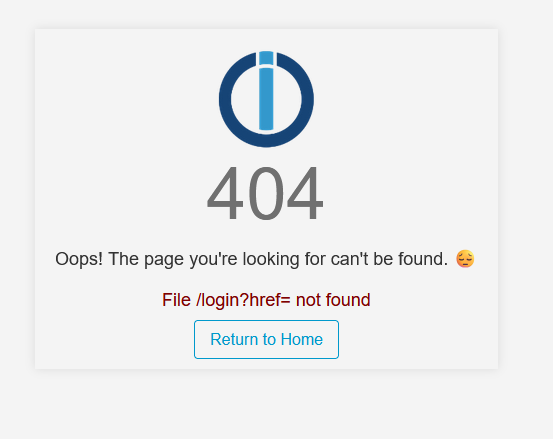
                4a0b8745-a257-4372-bb78-2ddd5e53bcc9-grafik.png
                wenn ich auf return to home klicke bin ich normal auf meiner Übersicht
                aber mit 2 Einträgen: socket.io [init] Cannot detect user

                Vielleicht hilft das bei der Fehlereingränzung

                1 Antwort Letzte Antwort
                0
                • MartinSUM MartinSU

                  @diamand2k22
                  ich habe auch noch keine Lösung gefunden.
                  Dafür kam heute schon dreimal:

                  2025-03-25 21:07:58 Error admin.0:admin.0 (777) socket.io [init] Cannot detect user
                  
                  jolicJ Offline
                  jolicJ Offline
                  jolic
                  schrieb am zuletzt editiert von jolic
                  #8

                  Hi, kann ich bestätigen, tritt bei mir seit dem letzten AdminRelease v7.6.3 ebenfalls bei jedem Login auf. Scheint aber unkritisch zu sein, alles funktioniert wie gewohnt.

                  W 1 Antwort Letzte Antwort
                  0
                  • MartinSUM MartinSU

                    @diamand2k22
                    ich habe auch noch keine Lösung gefunden.
                    Dafür kam heute schon dreimal:

                    2025-03-25 21:07:58 Error admin.0:admin.0 (777) socket.io [init] Cannot detect user
                    
                    T Nicht stören
                    T Nicht stören
                    ticaki
                    schrieb am zuletzt editiert von ticaki
                    #9
                    2025-03-25 21:07:58 Error admin.0:admin.0 (777) socket.io [init] Cannot detect user
                    

                    Bei mir ebenfalls (log zeile ist gleich nur zeit anders)

                    Weather-Warnings Espresense NSPanel-Lovelace-ui Tagesschau

                    Spenden

                    Michael SchmittM 1 Antwort Letzte Antwort
                    0
                    • T ticaki
                      2025-03-25 21:07:58 Error admin.0:admin.0 (777) socket.io [init] Cannot detect user
                      

                      Bei mir ebenfalls (log zeile ist gleich nur zeit anders)

                      Michael SchmittM Offline
                      Michael SchmittM Offline
                      Michael Schmitt
                      schrieb am zuletzt editiert von Michael Schmitt
                      #10

                      Hallo,
                      ich habe den selben Fehler.

                      admin.0 2025-03-27 00:46:03.359	error	socket.io [init] Cannot detect user 
                      

                      ich weiß nicht ob es damit zusammen hängt, aber seit dem Update von Admin + Web Adapter habe ich auch ein Problem mit Material UI = Fehler: Umleitungsfehler

                      Zum Beitrag

                      1 Antwort Letzte Antwort
                      0
                      • jolicJ jolic

                        Hi, kann ich bestätigen, tritt bei mir seit dem letzten AdminRelease v7.6.3 ebenfalls bei jedem Login auf. Scheint aber unkritisch zu sein, alles funktioniert wie gewohnt.

                        W Offline
                        W Offline
                        wibear
                        schrieb am zuletzt editiert von
                        #11

                        @jolic

                        Bei mir tritt derselbe Fehler auf.

                        1 Antwort Letzte Antwort
                        0
                        • FenriswolfF Offline
                          FenriswolfF Offline
                          Fenriswolf
                          schrieb am zuletzt editiert von
                          #12

                          Bei mir tritt ebenfalls dieser Fehler auf.
                          Nach Update von admin.0 von 7.4.x auf 7.6.3

                          Press any key to continue or any other to quit

                          G 1 Antwort Letzte Antwort
                          0
                          • MartinSUM MartinSU

                            Hallo.
                            ich erhalte immer mal wieder diese Fehlermeldung:
                            Error admin.0:admin.0 (783) socket.io [init] No user found in cookies
                            Was der Auslöser ist, kann ich nicht genau sagen.
                            Wenn ich so im Internet suche, finde ich ähnliche Probleme, aber dann können sich die Leute nicht mehr einloggen oder ähnliches.
                            Bei mir klappt alles, kann mich einloggen (https), arbeiten/programmieren, ...
                            Nur eine Fehlermeldung möchte ich nicht so einfach ignorieren.
                            Hat jemand eine Idee?
                            (ioBroker ist aktuell, Node.js: v20.18.1, NPM: 10.8.2 und einige Linux Updates stehen aus)

                            gelberlemmyG Offline
                            gelberlemmyG Offline
                            gelberlemmy
                            schrieb am zuletzt editiert von
                            #13

                            @martinsu ich habe das selbe Problem wie hier beschieben

                            mcm1957M 1 Antwort Letzte Antwort
                            0
                            • gelberlemmyG gelberlemmy

                              @martinsu ich habe das selbe Problem wie hier beschieben

                              mcm1957M Online
                              mcm1957M Online
                              mcm1957
                              schrieb am zuletzt editiert von
                              #14

                              Zur Erinnerung:
                              Bitte bei echten Fehlern ein ISSUE beim Adapter aufmachen.

                              Falls ihr also neue Infos habt, dann bitte mals chaun ob dieses Issue bei euch poasst und dort eure Infos ergänzen:
                              https://github.com/ioBroker/ioBroker.admin/issues/3030

                              Entwicklung u Betreuung: envertech-pv, hoymiles-ms, ns-client, pid, snmp Adapter;
                              Support Repositoryverwaltung.

                              Wer Danke sagen will, kann nen Kaffee spendieren: https://paypal.me/mcm1957atiobroker

                              LESEN - gute Forenbeitrage

                              1 Antwort Letzte Antwort
                              0
                              • FenriswolfF Fenriswolf

                                Bei mir tritt ebenfalls dieser Fehler auf.
                                Nach Update von admin.0 von 7.4.x auf 7.6.3

                                G Offline
                                G Offline
                                Gismoh
                                schrieb am zuletzt editiert von
                                #15

                                @fenriswolf said in Error admin0 (783) socket.io [init] No user found in cookies:

                                Bei mir tritt ebenfalls dieser Fehler auf.
                                Nach Update von admin.0 von 7.4.x auf 7.6.3

                                Auch bei mir. Hatte heute Nacht "geupdatet".

                                ioBroker auf: Lenovo ThinkCentre M910Q Tiny i5-7500T 16 GB mit proxmox in VM (Bookworm)

                                mcm1957M 1 Antwort Letzte Antwort
                                0
                                • G Gismoh

                                  @fenriswolf said in Error admin0 (783) socket.io [init] No user found in cookies:

                                  Bei mir tritt ebenfalls dieser Fehler auf.
                                  Nach Update von admin.0 von 7.4.x auf 7.6.3

                                  Auch bei mir. Hatte heute Nacht "geupdatet".

                                  mcm1957M Online
                                  mcm1957M Online
                                  mcm1957
                                  schrieb am zuletzt editiert von
                                  #16

                                  @gismoh

                                  Ist mit 7.6.4 behoben
                                  https://github.com/ioBroker/ioBroker.admin/issues/3030

                                  Entwicklung u Betreuung: envertech-pv, hoymiles-ms, ns-client, pid, snmp Adapter;
                                  Support Repositoryverwaltung.

                                  Wer Danke sagen will, kann nen Kaffee spendieren: https://paypal.me/mcm1957atiobroker

                                  LESEN - gute Forenbeitrage

                                  G 1 Antwort Letzte Antwort
                                  2
                                  • mcm1957M mcm1957

                                    @gismoh

                                    Ist mit 7.6.4 behoben
                                    https://github.com/ioBroker/ioBroker.admin/issues/3030

                                    G Offline
                                    G Offline
                                    Gismoh
                                    schrieb am zuletzt editiert von Gismoh
                                    #17

                                    @mcm1957
                                    Merci, wird gerade installiert ;)

                                    Edit:
                                    Installation scheint sich "Tot zu laufen".
                                    Habe in dem Log zur Installation aber auch Probleme gesehen:

                                    gyp info it worked if it ends with ok
                                    
                                    gyp info using node-gyp@7.1.2
                                    
                                    gyp info using node@20.18.3 | linux | x64
                                    
                                    gyp info find Python using Python version 3.11.2 found at "/usr/bin/python3"
                                    
                                    gyp ERR! UNCAUGHT EXCEPTION
                                    
                                    gyp ERR! System Linux 6.1.0-31-amd64gyp ERR! command "/usr/bin/node" "/opt/iobroker/node_modules/usocket/node_modules/.bin/node-gyp" "rebuild"gyp ERR! cwd /opt/iobroker/node_modules/usocketgyp ERR! node -v v20.18.3gyp ERR! node-gyp -v v7.1.2gyp ERR! Node-gyp failed to build your package.gyp ERR! Try to update npm and/or node-gyp and if it does not help file an issue with the package author.
                                    
                                    npm error Cannot destructure property 'package' of 'node.target' as it is null.
                                    
                                    npm error A complete log of this run can be found in: /home/iobroker/.npm/_logs/2025-04-07T06_39_08_885Z-debug-0.log
                                    

                                    Der Vollständige Log:

                                    
                                    admin
                                    v7.6.3
                                    
                                    Nach Namen filtern
                                    admin
                                    Ausgewählte Adapter
                                    1
                                    Adapter insgesamt:
                                    563
                                    Installierte Adapter:
                                    71
                                    Adapter im letzten Monat aktualisiert:
                                    19
                                    
                                    admin
                                    Admin
                                    
                                    Installierte Instanzen:
                                    1
                                    Verfügbare Version:
                                    7.6.3
                                    Installierte Version:
                                    7.6.3
                                    Befehl ausführen
                                    weniger
                                    mehr
                                    $ iobroker url https://github.com/ioBroker/ioBroker.admin/archive/refs/tags/v7.6.4.zip --host ioBrokerVM --debug
                                    
                                    install ioBroker/ioBroker.admin#refs/tags/v7.6.4
                                    
                                    NPM version: 10.8.2
                                    
                                    Installing ioBroker/ioBroker.admin#refs/tags/v7.6.4... (System call)
                                    
                                    > usocket@0.3.0 install> node-gyp rebuild
                                    
                                    gyp info it worked if it ends with ok
                                    
                                    gyp info using node-gyp@7.1.2
                                    
                                    gyp info using node@20.18.3 | linux | x64
                                    
                                    gyp info find Python using Python version 3.11.2 found at "/usr/bin/python3"
                                    
                                    gyp ERR! UNCAUGHT EXCEPTION
                                    
                                    gyp ERR! System Linux 6.1.0-31-amd64gyp ERR! command "/usr/bin/node" "/opt/iobroker/node_modules/usocket/node_modules/.bin/node-gyp" "rebuild"gyp ERR! cwd /opt/iobroker/node_modules/usocketgyp ERR! node -v v20.18.3gyp ERR! node-gyp -v v7.1.2gyp ERR! Node-gyp failed to build your package.gyp ERR! Try to update npm and/or node-gyp and if it does not help file an issue with the package author.
                                    
                                    npm error Cannot destructure property 'package' of 'node.target' as it is null.
                                    
                                    npm error A complete log of this run can be found in: /home/iobroker/.npm/_logs/2025-04-07T06_39_08_885Z-debug-0.log
                                    
                                    upload [149] admin.admin /opt/iobroker/node_modules/iobroker.admin/admin/admin.png admin.png image/png
                                    
                                    upload [100] admin.admin /opt/iobroker/node_modules/iobroker.admin/admin/custom/assets/emotion-react.browser.esm-BuFM-c4M.js custom/assets/emotion-react.browser.esm-BuFM-c4M.js application/javascript
                                    
                                    upload [90] admin.admin /opt/iobroker/node_modules/iobroker.admin/admin/custom/assets/index-6YAx3tu6.js custom/assets/index-6YAx3tu6.js application/javascript
                                    
                                    upload [80] admin.admin /opt/iobroker/node_modules/iobroker.admin/admin/custom/assets/index-Bwqdok6R.js custom/assets/index-Bwqdok6R.js application/javascript
                                    
                                    upload [70] admin.admin /opt/iobroker/node_modules/iobroker.admin/admin/custom/assets/index-CcWdaO-A.js custom/assets/index-CcWdaO-A.js application/javascript
                                    
                                    upload [60] admin.admin /opt/iobroker/node_modules/iobroker.admin/admin/custom/assets/index-Di7Jseht.js custom/assets/index-Di7Jseht.js application/javascript
                                    
                                    upload [50] admin.admin /opt/iobroker/node_modules/iobroker.admin/admin/custom/assets/index-VCQPKkxj.js custom/assets/index-VCQPKkxj.js application/javascript
                                    
                                    upload [40] admin.admin /opt/iobroker/node_modules/iobroker.admin/admin/custom/assets/jsx-runtime-CTWygAA3.js custom/assets/jsx-runtime-CTWygAA3.js application/javascript
                                    
                                    upload [30] admin.admin /opt/iobroker/node_modules/iobroker.admin/admin/custom/assets/useTheme-Vt4pBeH8.js custom/assets/useTheme-Vt4pBeH8.js application/javascript
                                    
                                    upload [20] admin.admin /opt/iobroker/node_modules/iobroker.admin/admin/custom/i18n/es.json custom/i18n/es.json application/json
                                    
                                    upload [19] admin.admin /opt/iobroker/node_modules/iobroker.admin/admin/custom/i18n/fr.json custom/i18n/fr.json application/json
                                    
                                    upload [18] admin.admin /opt/iobroker/node_modules/iobroker.admin/admin/custom/i18n/it.json custom/i18n/it.json application/json
                                    
                                    upload [17] admin.admin /opt/iobroker/node_modules/iobroker.admin/admin/custom/i18n/nl.json custom/i18n/nl.json application/json
                                    
                                    upload [16] admin.admin /opt/iobroker/node_modules/iobroker.admin/admin/custom/i18n/pl.json custom/i18n/pl.json application/json
                                    
                                    upload [15] admin.admin /opt/iobroker/node_modules/iobroker.admin/admin/custom/i18n/pt.json custom/i18n/pt.json application/json
                                    
                                    upload [14] admin.admin /opt/iobroker/node_modules/iobroker.admin/admin/custom/i18n/ru.json custom/i18n/ru.json application/json
                                    
                                    upload [13] admin.admin /opt/iobroker/node_modules/iobroker.admin/admin/custom/i18n/zh-cn.json custom/i18n/zh-cn.json application/json
                                    
                                    upload [12] admin.admin /opt/iobroker/node_modules/iobroker.admin/admin/favicon.ico favicon.ico image/vnd.microsoft.icon
                                    
                                    upload [11] admin.admin /opt/iobroker/node_modules/iobroker.admin/admin/i18n/de/translations.json i18n/de/translations.json application/json
                                    
                                    upload [10] admin.admin /opt/iobroker/node_modules/iobroker.admin/admin/i18n/en/translations.json i18n/en/translations.json application/json
                                    
                                    upload [9] admin.admin /opt/iobroker/node_modules/iobroker.admin/admin/i18n/es/translations.json i18n/es/translations.json application/json
                                    
                                    upload [8] admin.admin /opt/iobroker/node_modules/iobroker.admin/admin/i18n/fr/translations.json i18n/fr/translations.json application/json
                                    
                                    upload [7] admin.admin /opt/iobroker/node_modules/iobroker.admin/admin/i18n/it/translations.json i18n/it/translations.json application/json
                                    
                                    upload [6] admin.admin /opt/iobroker/node_modules/iobroker.admin/admin/i18n/nl/translations.json i18n/nl/translations.json application/json
                                    
                                    upload [5] admin.admin /opt/iobroker/node_modules/iobroker.admin/admin/i18n/pl/translations.json i18n/pl/translations.json application/json
                                    
                                    upload [4] admin.admin /opt/iobroker/node_modules/iobroker.admin/admin/i18n/pt/translations.json i18n/pt/translations.json application/json
                                    
                                    upload [3] admin.admin /opt/iobroker/node_modules/iobroker.admin/admin/i18n/ru/translations.json i18n/ru/translations.json application/json
                                    
                                    upload [2] admin.admin /opt/iobroker/node_modules/iobroker.admin/admin/i18n/uk/translations.json i18n/uk/translations.json application/json
                                    
                                    upload [1] admin.admin /opt/iobroker/node_modules/iobroker.admin/admin/i18n/zh-cn/translations.json i18n/zh-cn/translations.json application/json
                                    
                                    upload [0] admin.admin /opt/iobroker/node_modules/iobroker.admin/admin/jsonConfig.json5 jsonConfig.json5 application/json5
                                    
                                    Updating objects from io-package.json for adapter "admin" with version "7.6.3"
                                    
                                    Update "system.adapter.admin.0"


                                    Weis jemand, was bei mir schief läuft und wie ich es ggf. beheben kann?

                                    Edit2:
                                    Okay, scheint doch geklappt zu haben.

                                    Server is running on http://localhost:8081
                                    Successfully upgraded admin to version 7.6.4
                                    
                                    ---------------------------------------------------
                                    admin wurde erfolgreich auf 7.6.4 aktualisiert
                                    

                                    Habe es nun direkt im Adpater aktualisiert und nicht als "manueller" Download aus "Link".
                                    Also Adapter -> Bestimmte Version installieren.

                                    ioBroker auf: Lenovo ThinkCentre M910Q Tiny i5-7500T 16 GB mit proxmox in VM (Bookworm)

                                    mcm1957M 1 Antwort Letzte Antwort
                                    0
                                    • G Gismoh

                                      @mcm1957
                                      Merci, wird gerade installiert ;)

                                      Edit:
                                      Installation scheint sich "Tot zu laufen".
                                      Habe in dem Log zur Installation aber auch Probleme gesehen:

                                      gyp info it worked if it ends with ok
                                      
                                      gyp info using node-gyp@7.1.2
                                      
                                      gyp info using node@20.18.3 | linux | x64
                                      
                                      gyp info find Python using Python version 3.11.2 found at "/usr/bin/python3"
                                      
                                      gyp ERR! UNCAUGHT EXCEPTION
                                      
                                      gyp ERR! System Linux 6.1.0-31-amd64gyp ERR! command "/usr/bin/node" "/opt/iobroker/node_modules/usocket/node_modules/.bin/node-gyp" "rebuild"gyp ERR! cwd /opt/iobroker/node_modules/usocketgyp ERR! node -v v20.18.3gyp ERR! node-gyp -v v7.1.2gyp ERR! Node-gyp failed to build your package.gyp ERR! Try to update npm and/or node-gyp and if it does not help file an issue with the package author.
                                      
                                      npm error Cannot destructure property 'package' of 'node.target' as it is null.
                                      
                                      npm error A complete log of this run can be found in: /home/iobroker/.npm/_logs/2025-04-07T06_39_08_885Z-debug-0.log
                                      

                                      Der Vollständige Log:

                                      
                                      admin
                                      v7.6.3
                                      
                                      Nach Namen filtern
                                      admin
                                      Ausgewählte Adapter
                                      1
                                      Adapter insgesamt:
                                      563
                                      Installierte Adapter:
                                      71
                                      Adapter im letzten Monat aktualisiert:
                                      19
                                      
                                      admin
                                      Admin
                                      
                                      Installierte Instanzen:
                                      1
                                      Verfügbare Version:
                                      7.6.3
                                      Installierte Version:
                                      7.6.3
                                      Befehl ausführen
                                      weniger
                                      mehr
                                      $ iobroker url https://github.com/ioBroker/ioBroker.admin/archive/refs/tags/v7.6.4.zip --host ioBrokerVM --debug
                                      
                                      install ioBroker/ioBroker.admin#refs/tags/v7.6.4
                                      
                                      NPM version: 10.8.2
                                      
                                      Installing ioBroker/ioBroker.admin#refs/tags/v7.6.4... (System call)
                                      
                                      > usocket@0.3.0 install> node-gyp rebuild
                                      
                                      gyp info it worked if it ends with ok
                                      
                                      gyp info using node-gyp@7.1.2
                                      
                                      gyp info using node@20.18.3 | linux | x64
                                      
                                      gyp info find Python using Python version 3.11.2 found at "/usr/bin/python3"
                                      
                                      gyp ERR! UNCAUGHT EXCEPTION
                                      
                                      gyp ERR! System Linux 6.1.0-31-amd64gyp ERR! command "/usr/bin/node" "/opt/iobroker/node_modules/usocket/node_modules/.bin/node-gyp" "rebuild"gyp ERR! cwd /opt/iobroker/node_modules/usocketgyp ERR! node -v v20.18.3gyp ERR! node-gyp -v v7.1.2gyp ERR! Node-gyp failed to build your package.gyp ERR! Try to update npm and/or node-gyp and if it does not help file an issue with the package author.
                                      
                                      npm error Cannot destructure property 'package' of 'node.target' as it is null.
                                      
                                      npm error A complete log of this run can be found in: /home/iobroker/.npm/_logs/2025-04-07T06_39_08_885Z-debug-0.log
                                      
                                      upload [149] admin.admin /opt/iobroker/node_modules/iobroker.admin/admin/admin.png admin.png image/png
                                      
                                      upload [100] admin.admin /opt/iobroker/node_modules/iobroker.admin/admin/custom/assets/emotion-react.browser.esm-BuFM-c4M.js custom/assets/emotion-react.browser.esm-BuFM-c4M.js application/javascript
                                      
                                      upload [90] admin.admin /opt/iobroker/node_modules/iobroker.admin/admin/custom/assets/index-6YAx3tu6.js custom/assets/index-6YAx3tu6.js application/javascript
                                      
                                      upload [80] admin.admin /opt/iobroker/node_modules/iobroker.admin/admin/custom/assets/index-Bwqdok6R.js custom/assets/index-Bwqdok6R.js application/javascript
                                      
                                      upload [70] admin.admin /opt/iobroker/node_modules/iobroker.admin/admin/custom/assets/index-CcWdaO-A.js custom/assets/index-CcWdaO-A.js application/javascript
                                      
                                      upload [60] admin.admin /opt/iobroker/node_modules/iobroker.admin/admin/custom/assets/index-Di7Jseht.js custom/assets/index-Di7Jseht.js application/javascript
                                      
                                      upload [50] admin.admin /opt/iobroker/node_modules/iobroker.admin/admin/custom/assets/index-VCQPKkxj.js custom/assets/index-VCQPKkxj.js application/javascript
                                      
                                      upload [40] admin.admin /opt/iobroker/node_modules/iobroker.admin/admin/custom/assets/jsx-runtime-CTWygAA3.js custom/assets/jsx-runtime-CTWygAA3.js application/javascript
                                      
                                      upload [30] admin.admin /opt/iobroker/node_modules/iobroker.admin/admin/custom/assets/useTheme-Vt4pBeH8.js custom/assets/useTheme-Vt4pBeH8.js application/javascript
                                      
                                      upload [20] admin.admin /opt/iobroker/node_modules/iobroker.admin/admin/custom/i18n/es.json custom/i18n/es.json application/json
                                      
                                      upload [19] admin.admin /opt/iobroker/node_modules/iobroker.admin/admin/custom/i18n/fr.json custom/i18n/fr.json application/json
                                      
                                      upload [18] admin.admin /opt/iobroker/node_modules/iobroker.admin/admin/custom/i18n/it.json custom/i18n/it.json application/json
                                      
                                      upload [17] admin.admin /opt/iobroker/node_modules/iobroker.admin/admin/custom/i18n/nl.json custom/i18n/nl.json application/json
                                      
                                      upload [16] admin.admin /opt/iobroker/node_modules/iobroker.admin/admin/custom/i18n/pl.json custom/i18n/pl.json application/json
                                      
                                      upload [15] admin.admin /opt/iobroker/node_modules/iobroker.admin/admin/custom/i18n/pt.json custom/i18n/pt.json application/json
                                      
                                      upload [14] admin.admin /opt/iobroker/node_modules/iobroker.admin/admin/custom/i18n/ru.json custom/i18n/ru.json application/json
                                      
                                      upload [13] admin.admin /opt/iobroker/node_modules/iobroker.admin/admin/custom/i18n/zh-cn.json custom/i18n/zh-cn.json application/json
                                      
                                      upload [12] admin.admin /opt/iobroker/node_modules/iobroker.admin/admin/favicon.ico favicon.ico image/vnd.microsoft.icon
                                      
                                      upload [11] admin.admin /opt/iobroker/node_modules/iobroker.admin/admin/i18n/de/translations.json i18n/de/translations.json application/json
                                      
                                      upload [10] admin.admin /opt/iobroker/node_modules/iobroker.admin/admin/i18n/en/translations.json i18n/en/translations.json application/json
                                      
                                      upload [9] admin.admin /opt/iobroker/node_modules/iobroker.admin/admin/i18n/es/translations.json i18n/es/translations.json application/json
                                      
                                      upload [8] admin.admin /opt/iobroker/node_modules/iobroker.admin/admin/i18n/fr/translations.json i18n/fr/translations.json application/json
                                      
                                      upload [7] admin.admin /opt/iobroker/node_modules/iobroker.admin/admin/i18n/it/translations.json i18n/it/translations.json application/json
                                      
                                      upload [6] admin.admin /opt/iobroker/node_modules/iobroker.admin/admin/i18n/nl/translations.json i18n/nl/translations.json application/json
                                      
                                      upload [5] admin.admin /opt/iobroker/node_modules/iobroker.admin/admin/i18n/pl/translations.json i18n/pl/translations.json application/json
                                      
                                      upload [4] admin.admin /opt/iobroker/node_modules/iobroker.admin/admin/i18n/pt/translations.json i18n/pt/translations.json application/json
                                      
                                      upload [3] admin.admin /opt/iobroker/node_modules/iobroker.admin/admin/i18n/ru/translations.json i18n/ru/translations.json application/json
                                      
                                      upload [2] admin.admin /opt/iobroker/node_modules/iobroker.admin/admin/i18n/uk/translations.json i18n/uk/translations.json application/json
                                      
                                      upload [1] admin.admin /opt/iobroker/node_modules/iobroker.admin/admin/i18n/zh-cn/translations.json i18n/zh-cn/translations.json application/json
                                      
                                      upload [0] admin.admin /opt/iobroker/node_modules/iobroker.admin/admin/jsonConfig.json5 jsonConfig.json5 application/json5
                                      
                                      Updating objects from io-package.json for adapter "admin" with version "7.6.3"
                                      
                                      Update "system.adapter.admin.0"


                                      Weis jemand, was bei mir schief läuft und wie ich es ggf. beheben kann?

                                      Edit2:
                                      Okay, scheint doch geklappt zu haben.

                                      Server is running on http://localhost:8081
                                      Successfully upgraded admin to version 7.6.4
                                      
                                      ---------------------------------------------------
                                      admin wurde erfolgreich auf 7.6.4 aktualisiert
                                      

                                      Habe es nun direkt im Adpater aktualisiert und nicht als "manueller" Download aus "Link".
                                      Also Adapter -> Bestimmte Version installieren.

                                      mcm1957M Online
                                      mcm1957M Online
                                      mcm1957
                                      schrieb am zuletzt editiert von mcm1957
                                      #18

                                      @gismoh
                                      Bin mir nicht wirklich klar was du versucht hast. Aber nicht als "manueller" Download aus "Link" klinht nach GitHub Installation. Das hat dir keiner (hier) geraten. Von direkten Github Installationen wird (außer in Sonderfällen und in Abstimmung mit dem Dev) abgeraten. Und admin ist - wie einige andere Adapter - nicht (sauber) von Github installierbar.

                                      Admin 7.6.4 ist ganz normal über das LATEST / BETA Repository installierbar. Alternativ kann man auch "von npm" installieren auswählen um die LATEST Version zu installieren.

                                      Entwicklung u Betreuung: envertech-pv, hoymiles-ms, ns-client, pid, snmp Adapter;
                                      Support Repositoryverwaltung.

                                      Wer Danke sagen will, kann nen Kaffee spendieren: https://paypal.me/mcm1957atiobroker

                                      LESEN - gute Forenbeitrage

                                      G 1 Antwort Letzte Antwort
                                      0
                                      • mcm1957M mcm1957

                                        @gismoh
                                        Bin mir nicht wirklich klar was du versucht hast. Aber nicht als "manueller" Download aus "Link" klinht nach GitHub Installation. Das hat dir keiner (hier) geraten. Von direkten Github Installationen wird (außer in Sonderfällen und in Abstimmung mit dem Dev) abgeraten. Und admin ist - wie einige andere Adapter - nicht (sauber) von Github installierbar.

                                        Admin 7.6.4 ist ganz normal über das LATEST / BETA Repository installierbar. Alternativ kann man auch "von npm" installieren auswählen um die LATEST Version zu installieren.

                                        G Offline
                                        G Offline
                                        Gismoh
                                        schrieb am zuletzt editiert von Gismoh
                                        #19

                                        @mcm1957
                                        Ja, wieder etwas dazugelernt.
                                        Da nur max. 7.6.3 direkt auswählbar war, hatte ich es über die "Katze" versucht.
                                        Erst danach durch probieren gesehen, das man auch wenn die 7.6.4 nicht "Direkt" aus wählbar ist,
                                        wenn man im Adapter über "bestimmte Version installieren" geht -
                                        Trotzdem die 7.6.4 eintragen kann - und diese dann installiert wird.

                                        Daher - wieder minimal schlauer geworden xD
                                        Merci!

                                        ioBroker auf: Lenovo ThinkCentre M910Q Tiny i5-7500T 16 GB mit proxmox in VM (Bookworm)

                                        mcm1957M 1 Antwort Letzte Antwort
                                        1
                                        • G Gismoh

                                          @mcm1957
                                          Ja, wieder etwas dazugelernt.
                                          Da nur max. 7.6.3 direkt auswählbar war, hatte ich es über die "Katze" versucht.
                                          Erst danach durch probieren gesehen, das man auch wenn die 7.6.4 nicht "Direkt" aus wählbar ist,
                                          wenn man im Adapter über "bestimmte Version installieren" geht -
                                          Trotzdem die 7.6.4 eintragen kann - und diese dann installiert wird.

                                          Daher - wieder minimal schlauer geworden xD
                                          Merci!

                                          mcm1957M Online
                                          mcm1957M Online
                                          mcm1957
                                          schrieb am zuletzt editiert von
                                          #20

                                          @gismoh
                                          Die aktuelle LATEST / BETA bekommst du ganz einfach hier:
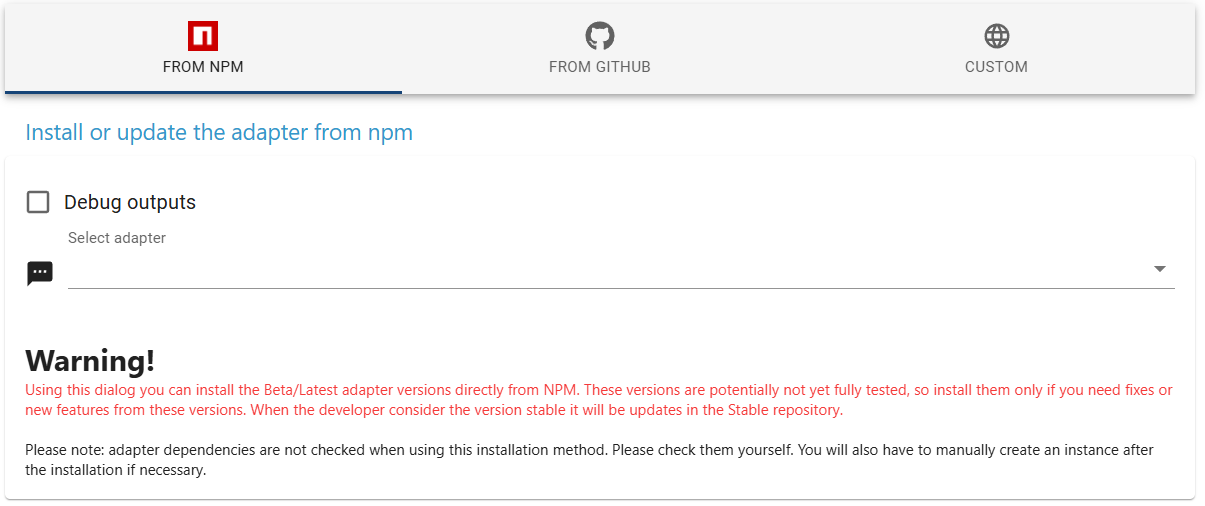
                                          0ce399ec-02c5-4524-bfbf-6e63e6e41a74-image.png

                                          Lies den roten Text :-)

                                          Alternativ (und für nicht experten empfohlen)

                                          • Repo LATEST auswählen
                                          • Nach Updates suchen klicken
                                          • gewünschte BETA Versionen installieren (nicht alles aktualisiseren - außer das ist ein Testsystem)
                                          • Repo STABLE auswählen

                                          Entwicklung u Betreuung: envertech-pv, hoymiles-ms, ns-client, pid, snmp Adapter;
                                          Support Repositoryverwaltung.

                                          Wer Danke sagen will, kann nen Kaffee spendieren: https://paypal.me/mcm1957atiobroker

                                          LESEN - gute Forenbeitrage

                                          1 Antwort Letzte Antwort
                                          0
                                          Antworten
                                          • In einem neuen Thema antworten
                                          Anmelden zum Antworten
                                          • Älteste zuerst
                                          • Neuste zuerst
                                          • Meiste Stimmen


                                          Support us

                                          ioBroker
                                          Community Adapters
                                          Donate
                                          FAQ Cloud / IOT
                                          HowTo: Node.js-Update
                                          HowTo: Backup/Restore
                                          Downloads
                                          BLOG

                                          829

                                          Online

                                          32.5k

                                          Benutzer

                                          81.7k

                                          Themen

                                          1.3m

                                          Beiträge
                                          Community
                                          Impressum | Datenschutz-Bestimmungen | Nutzungsbedingungen | Einwilligungseinstellungen
                                          ioBroker Community 2014-2025
                                          logo
                                          • Anmelden

                                          • Du hast noch kein Konto? Registrieren

                                          • Anmelden oder registrieren, um zu suchen
                                          • Erster Beitrag
                                            Letzter Beitrag
                                          0
                                          • Home
                                          • Aktuell
                                          • Tags
                                          • Ungelesen 0
                                          • Kategorien
                                          • Unreplied
                                          • Beliebt
                                          • GitHub
                                          • Docu
                                          • Hilfe