




Error admin0 (783) socket.io [init] No user found in cookies
-
2025-03-25 21:07:58 Error admin.0:admin.0 (777) socket.io [init] Cannot detect userBei mir ebenfalls (log zeile ist gleich nur zeit anders)
Hallo,
ich habe den selben Fehler.admin.0 2025-03-27 00:46:03.359 error socket.io [init] Cannot detect userich weiß nicht ob es damit zusammen hängt, aber seit dem Update von Admin + Web Adapter habe ich auch ein Problem mit Material UI = Fehler: Umleitungsfehler
-
Hi, kann ich bestätigen, tritt bei mir seit dem letzten AdminRelease v7.6.3 ebenfalls bei jedem Login auf. Scheint aber unkritisch zu sein, alles funktioniert wie gewohnt.
-
Bei mir tritt ebenfalls dieser Fehler auf.
Nach Update von admin.0 von 7.4.x auf 7.6.3 -
Hallo.
ich erhalte immer mal wieder diese Fehlermeldung:
Error admin.0:admin.0 (783) socket.io [init] No user found in cookies
Was der Auslöser ist, kann ich nicht genau sagen.
Wenn ich so im Internet suche, finde ich ähnliche Probleme, aber dann können sich die Leute nicht mehr einloggen oder ähnliches.
Bei mir klappt alles, kann mich einloggen (https), arbeiten/programmieren, ...
Nur eine Fehlermeldung möchte ich nicht so einfach ignorieren.
Hat jemand eine Idee?
(ioBroker ist aktuell, Node.js: v20.18.1, NPM: 10.8.2 und einige Linux Updates stehen aus) -
@martinsu ich habe das selbe Problem wie hier beschieben
Zur Erinnerung:
Bitte bei echten Fehlern ein ISSUE beim Adapter aufmachen.Falls ihr also neue Infos habt, dann bitte mals chaun ob dieses Issue bei euch poasst und dort eure Infos ergänzen:
https://github.com/ioBroker/ioBroker.admin/issues/3030 -
Bei mir tritt ebenfalls dieser Fehler auf.
Nach Update von admin.0 von 7.4.x auf 7.6.3@fenriswolf said in Error admin0 (783) socket.io [init] No user found in cookies:
Bei mir tritt ebenfalls dieser Fehler auf.
Nach Update von admin.0 von 7.4.x auf 7.6.3Auch bei mir. Hatte heute Nacht "geupdatet".
ioBroker auf: Lenovo ThinkCentre M910Q Tiny i5-7500T 16 GB mit proxmox in VM (Bookworm)
-
@fenriswolf said in Error admin0 (783) socket.io [init] No user found in cookies:
Bei mir tritt ebenfalls dieser Fehler auf.
Nach Update von admin.0 von 7.4.x auf 7.6.3Auch bei mir. Hatte heute Nacht "geupdatet".
Ist mit 7.6.4 behoben
https://github.com/ioBroker/ioBroker.admin/issues/3030 -
Ist mit 7.6.4 behoben
https://github.com/ioBroker/ioBroker.admin/issues/3030@mcm1957
Merci, wird gerade installiert ;)Edit:
Installation scheint sich "Tot zu laufen".
Habe in dem Log zur Installation aber auch Probleme gesehen:gyp info it worked if it ends with ok gyp info using node-gyp@7.1.2 gyp info using node@20.18.3 | linux | x64 gyp info find Python using Python version 3.11.2 found at "/usr/bin/python3" gyp ERR! UNCAUGHT EXCEPTION gyp ERR! System Linux 6.1.0-31-amd64gyp ERR! command "/usr/bin/node" "/opt/iobroker/node_modules/usocket/node_modules/.bin/node-gyp" "rebuild"gyp ERR! cwd /opt/iobroker/node_modules/usocketgyp ERR! node -v v20.18.3gyp ERR! node-gyp -v v7.1.2gyp ERR! Node-gyp failed to build your package.gyp ERR! Try to update npm and/or node-gyp and if it does not help file an issue with the package author. npm error Cannot destructure property 'package' of 'node.target' as it is null. npm error A complete log of this run can be found in: /home/iobroker/.npm/_logs/2025-04-07T06_39_08_885Z-debug-0.logDer Vollständige Log:
admin
v7.6.3

Nach Namen filtern
admin
Ausgewählte Adapter
1
Adapter insgesamt:
563
Installierte Adapter:
71
Adapter im letzten Monat aktualisiert:
19

admin
Admin

Installierte Instanzen:
1
Verfügbare Version:
7.6.3
Installierte Version:
7.6.3
Befehl ausführen
weniger
mehr
$ iobroker url https://github.com/ioBroker/ioBroker.admin/archive/refs/tags/v7.6.4.zip --host ioBrokerVM --debug

install ioBroker/ioBroker.admin#refs/tags/v7.6.4

NPM version: 10.8.2

Installing ioBroker/ioBroker.admin#refs/tags/v7.6.4... (System call)

> usocket@0.3.0 install> node-gyp rebuild

gyp info it worked if it ends with ok

gyp info using node-gyp@7.1.2

gyp info using node@20.18.3 | linux | x64

gyp info find Python using Python version 3.11.2 found at "/usr/bin/python3"

gyp ERR! UNCAUGHT EXCEPTION

gyp ERR! System Linux 6.1.0-31-amd64gyp ERR! command "/usr/bin/node" "/opt/iobroker/node_modules/usocket/node_modules/.bin/node-gyp" "rebuild"gyp ERR! cwd /opt/iobroker/node_modules/usocketgyp ERR! node -v v20.18.3gyp ERR! node-gyp -v v7.1.2gyp ERR! Node-gyp failed to build your package.gyp ERR! Try to update npm and/or node-gyp and if it does not help file an issue with the package author.

npm error Cannot destructure property 'package' of 'node.target' as it is null.

npm error A complete log of this run can be found in: /home/iobroker/.npm/_logs/2025-04-07T06_39_08_885Z-debug-0.log

upload [149] admin.admin /opt/iobroker/node_modules/iobroker.admin/admin/admin.png admin.png image/png

upload [100] admin.admin /opt/iobroker/node_modules/iobroker.admin/admin/custom/assets/emotion-react.browser.esm-BuFM-c4M.js custom/assets/emotion-react.browser.esm-BuFM-c4M.js application/javascript

upload [90] admin.admin /opt/iobroker/node_modules/iobroker.admin/admin/custom/assets/index-6YAx3tu6.js custom/assets/index-6YAx3tu6.js application/javascript

upload [80] admin.admin /opt/iobroker/node_modules/iobroker.admin/admin/custom/assets/index-Bwqdok6R.js custom/assets/index-Bwqdok6R.js application/javascript

upload [70] admin.admin /opt/iobroker/node_modules/iobroker.admin/admin/custom/assets/index-CcWdaO-A.js custom/assets/index-CcWdaO-A.js application/javascript

upload [60] admin.admin /opt/iobroker/node_modules/iobroker.admin/admin/custom/assets/index-Di7Jseht.js custom/assets/index-Di7Jseht.js application/javascript

upload [50] admin.admin /opt/iobroker/node_modules/iobroker.admin/admin/custom/assets/index-VCQPKkxj.js custom/assets/index-VCQPKkxj.js application/javascript

upload [40] admin.admin /opt/iobroker/node_modules/iobroker.admin/admin/custom/assets/jsx-runtime-CTWygAA3.js custom/assets/jsx-runtime-CTWygAA3.js application/javascript

upload [30] admin.admin /opt/iobroker/node_modules/iobroker.admin/admin/custom/assets/useTheme-Vt4pBeH8.js custom/assets/useTheme-Vt4pBeH8.js application/javascript

upload [20] admin.admin /opt/iobroker/node_modules/iobroker.admin/admin/custom/i18n/es.json custom/i18n/es.json application/json

upload [19] admin.admin /opt/iobroker/node_modules/iobroker.admin/admin/custom/i18n/fr.json custom/i18n/fr.json application/json

upload [18] admin.admin /opt/iobroker/node_modules/iobroker.admin/admin/custom/i18n/it.json custom/i18n/it.json application/json

upload [17] admin.admin /opt/iobroker/node_modules/iobroker.admin/admin/custom/i18n/nl.json custom/i18n/nl.json application/json

upload [16] admin.admin /opt/iobroker/node_modules/iobroker.admin/admin/custom/i18n/pl.json custom/i18n/pl.json application/json

upload [15] admin.admin /opt/iobroker/node_modules/iobroker.admin/admin/custom/i18n/pt.json custom/i18n/pt.json application/json

upload [14] admin.admin /opt/iobroker/node_modules/iobroker.admin/admin/custom/i18n/ru.json custom/i18n/ru.json application/json

upload [13] admin.admin /opt/iobroker/node_modules/iobroker.admin/admin/custom/i18n/zh-cn.json custom/i18n/zh-cn.json application/json

upload [12] admin.admin /opt/iobroker/node_modules/iobroker.admin/admin/favicon.ico favicon.ico image/vnd.microsoft.icon

upload [11] admin.admin /opt/iobroker/node_modules/iobroker.admin/admin/i18n/de/translations.json i18n/de/translations.json application/json

upload [10] admin.admin /opt/iobroker/node_modules/iobroker.admin/admin/i18n/en/translations.json i18n/en/translations.json application/json

upload [9] admin.admin /opt/iobroker/node_modules/iobroker.admin/admin/i18n/es/translations.json i18n/es/translations.json application/json

upload [8] admin.admin /opt/iobroker/node_modules/iobroker.admin/admin/i18n/fr/translations.json i18n/fr/translations.json application/json

upload [7] admin.admin /opt/iobroker/node_modules/iobroker.admin/admin/i18n/it/translations.json i18n/it/translations.json application/json

upload [6] admin.admin /opt/iobroker/node_modules/iobroker.admin/admin/i18n/nl/translations.json i18n/nl/translations.json application/json

upload [5] admin.admin /opt/iobroker/node_modules/iobroker.admin/admin/i18n/pl/translations.json i18n/pl/translations.json application/json

upload [4] admin.admin /opt/iobroker/node_modules/iobroker.admin/admin/i18n/pt/translations.json i18n/pt/translations.json application/json

upload [3] admin.admin /opt/iobroker/node_modules/iobroker.admin/admin/i18n/ru/translations.json i18n/ru/translations.json application/json

upload [2] admin.admin /opt/iobroker/node_modules/iobroker.admin/admin/i18n/uk/translations.json i18n/uk/translations.json application/json

upload [1] admin.admin /opt/iobroker/node_modules/iobroker.admin/admin/i18n/zh-cn/translations.json i18n/zh-cn/translations.json application/json

upload [0] admin.admin /opt/iobroker/node_modules/iobroker.admin/admin/jsonConfig.json5 jsonConfig.json5 application/json5

Updating objects from io-package.json for adapter "admin" with version "7.6.3"

Update "system.adapter.admin.0"
Weis jemand, was bei mir schief läuft und wie ich es ggf. beheben kann?
Edit2:
Okay, scheint doch geklappt zu haben.Server is running on http://localhost:8081 Successfully upgraded admin to version 7.6.4 --------------------------------------------------- admin wurde erfolgreich auf 7.6.4 aktualisiertHabe es nun direkt im Adpater aktualisiert und nicht als "manueller" Download aus "Link".
Also Adapter -> Bestimmte Version installieren.ioBroker auf: Lenovo ThinkCentre M910Q Tiny i5-7500T 16 GB mit proxmox in VM (Bookworm)
-
@mcm1957
Merci, wird gerade installiert ;)Edit:
Installation scheint sich "Tot zu laufen".
Habe in dem Log zur Installation aber auch Probleme gesehen:gyp info it worked if it ends with ok gyp info using node-gyp@7.1.2 gyp info using node@20.18.3 | linux | x64 gyp info find Python using Python version 3.11.2 found at "/usr/bin/python3" gyp ERR! UNCAUGHT EXCEPTION gyp ERR! System Linux 6.1.0-31-amd64gyp ERR! command "/usr/bin/node" "/opt/iobroker/node_modules/usocket/node_modules/.bin/node-gyp" "rebuild"gyp ERR! cwd /opt/iobroker/node_modules/usocketgyp ERR! node -v v20.18.3gyp ERR! node-gyp -v v7.1.2gyp ERR! Node-gyp failed to build your package.gyp ERR! Try to update npm and/or node-gyp and if it does not help file an issue with the package author. npm error Cannot destructure property 'package' of 'node.target' as it is null. npm error A complete log of this run can be found in: /home/iobroker/.npm/_logs/2025-04-07T06_39_08_885Z-debug-0.logDer Vollständige Log:
admin
v7.6.3

Nach Namen filtern
admin
Ausgewählte Adapter
1
Adapter insgesamt:
563
Installierte Adapter:
71
Adapter im letzten Monat aktualisiert:
19

admin
Admin

Installierte Instanzen:
1
Verfügbare Version:
7.6.3
Installierte Version:
7.6.3
Befehl ausführen
weniger
mehr
$ iobroker url https://github.com/ioBroker/ioBroker.admin/archive/refs/tags/v7.6.4.zip --host ioBrokerVM --debug

install ioBroker/ioBroker.admin#refs/tags/v7.6.4

NPM version: 10.8.2

Installing ioBroker/ioBroker.admin#refs/tags/v7.6.4... (System call)

> usocket@0.3.0 install> node-gyp rebuild

gyp info it worked if it ends with ok

gyp info using node-gyp@7.1.2

gyp info using node@20.18.3 | linux | x64

gyp info find Python using Python version 3.11.2 found at "/usr/bin/python3"

gyp ERR! UNCAUGHT EXCEPTION

gyp ERR! System Linux 6.1.0-31-amd64gyp ERR! command "/usr/bin/node" "/opt/iobroker/node_modules/usocket/node_modules/.bin/node-gyp" "rebuild"gyp ERR! cwd /opt/iobroker/node_modules/usocketgyp ERR! node -v v20.18.3gyp ERR! node-gyp -v v7.1.2gyp ERR! Node-gyp failed to build your package.gyp ERR! Try to update npm and/or node-gyp and if it does not help file an issue with the package author.

npm error Cannot destructure property 'package' of 'node.target' as it is null.

npm error A complete log of this run can be found in: /home/iobroker/.npm/_logs/2025-04-07T06_39_08_885Z-debug-0.log

upload [149] admin.admin /opt/iobroker/node_modules/iobroker.admin/admin/admin.png admin.png image/png

upload [100] admin.admin /opt/iobroker/node_modules/iobroker.admin/admin/custom/assets/emotion-react.browser.esm-BuFM-c4M.js custom/assets/emotion-react.browser.esm-BuFM-c4M.js application/javascript

upload [90] admin.admin /opt/iobroker/node_modules/iobroker.admin/admin/custom/assets/index-6YAx3tu6.js custom/assets/index-6YAx3tu6.js application/javascript

upload [80] admin.admin /opt/iobroker/node_modules/iobroker.admin/admin/custom/assets/index-Bwqdok6R.js custom/assets/index-Bwqdok6R.js application/javascript

upload [70] admin.admin /opt/iobroker/node_modules/iobroker.admin/admin/custom/assets/index-CcWdaO-A.js custom/assets/index-CcWdaO-A.js application/javascript

upload [60] admin.admin /opt/iobroker/node_modules/iobroker.admin/admin/custom/assets/index-Di7Jseht.js custom/assets/index-Di7Jseht.js application/javascript

upload [50] admin.admin /opt/iobroker/node_modules/iobroker.admin/admin/custom/assets/index-VCQPKkxj.js custom/assets/index-VCQPKkxj.js application/javascript

upload [40] admin.admin /opt/iobroker/node_modules/iobroker.admin/admin/custom/assets/jsx-runtime-CTWygAA3.js custom/assets/jsx-runtime-CTWygAA3.js application/javascript

upload [30] admin.admin /opt/iobroker/node_modules/iobroker.admin/admin/custom/assets/useTheme-Vt4pBeH8.js custom/assets/useTheme-Vt4pBeH8.js application/javascript

upload [20] admin.admin /opt/iobroker/node_modules/iobroker.admin/admin/custom/i18n/es.json custom/i18n/es.json application/json

upload [19] admin.admin /opt/iobroker/node_modules/iobroker.admin/admin/custom/i18n/fr.json custom/i18n/fr.json application/json

upload [18] admin.admin /opt/iobroker/node_modules/iobroker.admin/admin/custom/i18n/it.json custom/i18n/it.json application/json

upload [17] admin.admin /opt/iobroker/node_modules/iobroker.admin/admin/custom/i18n/nl.json custom/i18n/nl.json application/json

upload [16] admin.admin /opt/iobroker/node_modules/iobroker.admin/admin/custom/i18n/pl.json custom/i18n/pl.json application/json

upload [15] admin.admin /opt/iobroker/node_modules/iobroker.admin/admin/custom/i18n/pt.json custom/i18n/pt.json application/json

upload [14] admin.admin /opt/iobroker/node_modules/iobroker.admin/admin/custom/i18n/ru.json custom/i18n/ru.json application/json

upload [13] admin.admin /opt/iobroker/node_modules/iobroker.admin/admin/custom/i18n/zh-cn.json custom/i18n/zh-cn.json application/json

upload [12] admin.admin /opt/iobroker/node_modules/iobroker.admin/admin/favicon.ico favicon.ico image/vnd.microsoft.icon

upload [11] admin.admin /opt/iobroker/node_modules/iobroker.admin/admin/i18n/de/translations.json i18n/de/translations.json application/json

upload [10] admin.admin /opt/iobroker/node_modules/iobroker.admin/admin/i18n/en/translations.json i18n/en/translations.json application/json

upload [9] admin.admin /opt/iobroker/node_modules/iobroker.admin/admin/i18n/es/translations.json i18n/es/translations.json application/json

upload [8] admin.admin /opt/iobroker/node_modules/iobroker.admin/admin/i18n/fr/translations.json i18n/fr/translations.json application/json

upload [7] admin.admin /opt/iobroker/node_modules/iobroker.admin/admin/i18n/it/translations.json i18n/it/translations.json application/json

upload [6] admin.admin /opt/iobroker/node_modules/iobroker.admin/admin/i18n/nl/translations.json i18n/nl/translations.json application/json

upload [5] admin.admin /opt/iobroker/node_modules/iobroker.admin/admin/i18n/pl/translations.json i18n/pl/translations.json application/json

upload [4] admin.admin /opt/iobroker/node_modules/iobroker.admin/admin/i18n/pt/translations.json i18n/pt/translations.json application/json

upload [3] admin.admin /opt/iobroker/node_modules/iobroker.admin/admin/i18n/ru/translations.json i18n/ru/translations.json application/json

upload [2] admin.admin /opt/iobroker/node_modules/iobroker.admin/admin/i18n/uk/translations.json i18n/uk/translations.json application/json

upload [1] admin.admin /opt/iobroker/node_modules/iobroker.admin/admin/i18n/zh-cn/translations.json i18n/zh-cn/translations.json application/json

upload [0] admin.admin /opt/iobroker/node_modules/iobroker.admin/admin/jsonConfig.json5 jsonConfig.json5 application/json5

Updating objects from io-package.json for adapter "admin" with version "7.6.3"

Update "system.adapter.admin.0"
Weis jemand, was bei mir schief läuft und wie ich es ggf. beheben kann?
Edit2:
Okay, scheint doch geklappt zu haben.Server is running on http://localhost:8081 Successfully upgraded admin to version 7.6.4 --------------------------------------------------- admin wurde erfolgreich auf 7.6.4 aktualisiertHabe es nun direkt im Adpater aktualisiert und nicht als "manueller" Download aus "Link".
Also Adapter -> Bestimmte Version installieren.@gismoh
Bin mir nicht wirklich klar was du versucht hast. Abernicht als "manueller" Download aus "Link"klinht nach GitHub Installation. Das hat dir keiner (hier) geraten. Von direkten Github Installationen wird (außer in Sonderfällen und in Abstimmung mit dem Dev) abgeraten. Und admin ist - wie einige andere Adapter - nicht (sauber) von Github installierbar.Admin 7.6.4 ist ganz normal über das LATEST / BETA Repository installierbar. Alternativ kann man auch "von npm" installieren auswählen um die LATEST Version zu installieren.
-
@gismoh
Bin mir nicht wirklich klar was du versucht hast. Abernicht als "manueller" Download aus "Link"klinht nach GitHub Installation. Das hat dir keiner (hier) geraten. Von direkten Github Installationen wird (außer in Sonderfällen und in Abstimmung mit dem Dev) abgeraten. Und admin ist - wie einige andere Adapter - nicht (sauber) von Github installierbar.Admin 7.6.4 ist ganz normal über das LATEST / BETA Repository installierbar. Alternativ kann man auch "von npm" installieren auswählen um die LATEST Version zu installieren.
@mcm1957
Ja, wieder etwas dazugelernt.
Da nur max. 7.6.3 direkt auswählbar war, hatte ich es über die "Katze" versucht.
Erst danach durch probieren gesehen, das man auch wenn die 7.6.4 nicht "Direkt" aus wählbar ist,
wenn man im Adapter über "bestimmte Version installieren" geht -
Trotzdem die 7.6.4 eintragen kann - und diese dann installiert wird.Daher - wieder minimal schlauer geworden xD
Merci!ioBroker auf: Lenovo ThinkCentre M910Q Tiny i5-7500T 16 GB mit proxmox in VM (Bookworm)
-
@mcm1957
Ja, wieder etwas dazugelernt.
Da nur max. 7.6.3 direkt auswählbar war, hatte ich es über die "Katze" versucht.
Erst danach durch probieren gesehen, das man auch wenn die 7.6.4 nicht "Direkt" aus wählbar ist,
wenn man im Adapter über "bestimmte Version installieren" geht -
Trotzdem die 7.6.4 eintragen kann - und diese dann installiert wird.Daher - wieder minimal schlauer geworden xD
Merci!@gismoh
Die aktuelle LATEST / BETA bekommst du ganz einfach hier:
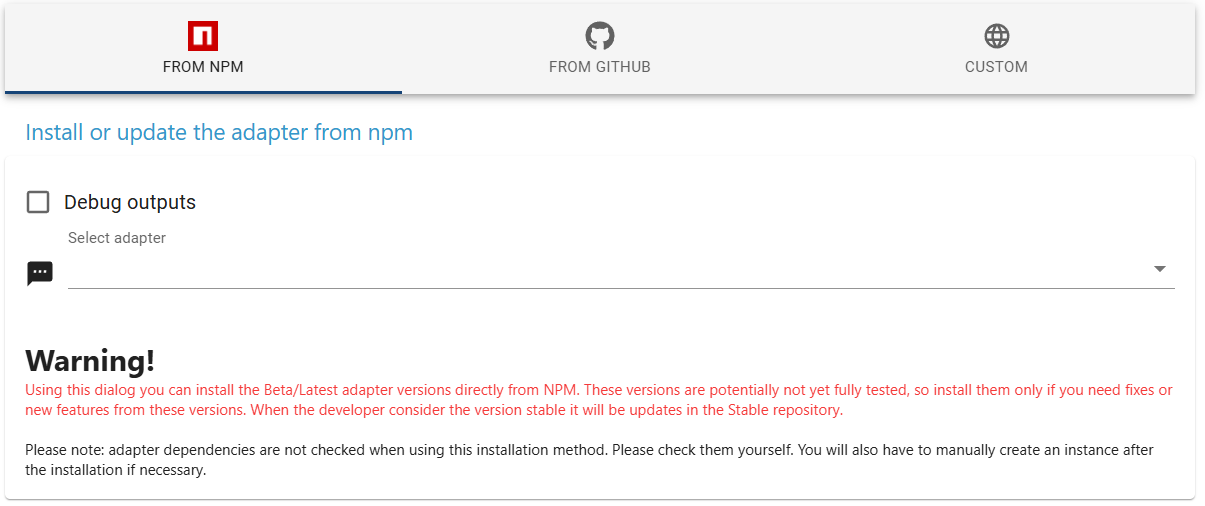
Lies den roten Text :-)
Alternativ (und für nicht experten empfohlen)
- Repo LATEST auswählen
- Nach Updates suchen klicken
- gewünschte BETA Versionen installieren (nicht alles aktualisiseren - außer das ist ein Testsystem)
- Repo STABLE auswählen
-
Guten Morgen,
dieses Problem habe ich auch. Wen ich mich an IOBroker anmelden möchte, kommt dann noch einmal mal das Anmeldefenster. Wenn ich dann die Daten noch einmal eingebe, kommt die Fehlermeldung. Wobei er gleich nach der Eingabe automatisch versucht sich anzumelden.
Klicke dann auch "Return to Home" und bin dann angemeldet und kann ganz normal arbeiten. Bin aktuell auf 7.6.4.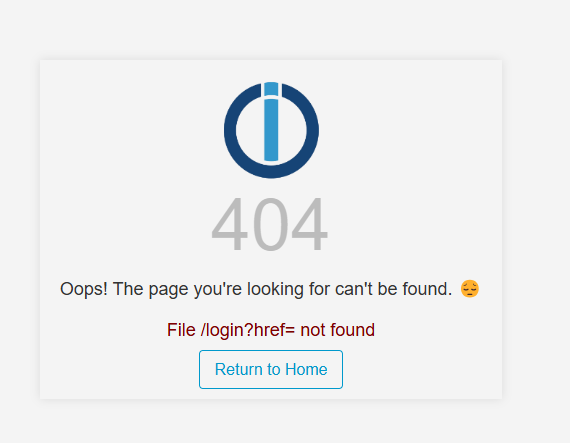
Habe aktuell schon IOB Diag gemacht. Ich persönlich werde daraus nicht schlau.....Habe auch schon die Browserdaten in Chrome gelöscht.Gibt es da einen Tipp ? Ach ja, bevor ich es vergesse, ich lasse die Daten aus meinen Passwortmanager 1Password einfügen. Werde es demnächst einmal ohne diesen Probieren. Wobei es ja immer geklappt hat...... bis vor den Updates.....
Gruss André
-
Guten Morgen,
dieses Problem habe ich auch. Wen ich mich an IOBroker anmelden möchte, kommt dann noch einmal mal das Anmeldefenster. Wenn ich dann die Daten noch einmal eingebe, kommt die Fehlermeldung. Wobei er gleich nach der Eingabe automatisch versucht sich anzumelden.
Klicke dann auch "Return to Home" und bin dann angemeldet und kann ganz normal arbeiten. Bin aktuell auf 7.6.4.
Habe aktuell schon IOB Diag gemacht. Ich persönlich werde daraus nicht schlau.....Habe auch schon die Browserdaten in Chrome gelöscht.Gibt es da einen Tipp ? Ach ja, bevor ich es vergesse, ich lasse die Daten aus meinen Passwortmanager 1Password einfügen. Werde es demnächst einmal ohne diesen Probieren. Wobei es ja immer geklappt hat...... bis vor den Updates.....
Gruss André
@gelberlemmy
Hast du einen Passwortmanager?
Dann ists ev das Issue: https://github.com/ioBroker/ioBroker.admin/issues/3047Entwicklung u Betreuung: envertech-pv, hoymiles-ms, ns-client, pid, snmp Adapter;
Support Repositoryverwaltung.Wer 'nen Kaffee spendieren will: https://paypal.me
-
@gelberlemmy
Hast du einen Passwortmanager?
Dann ists ev das Issue: https://github.com/ioBroker/ioBroker.admin/issues/3047@mcm1957 super danke. Habe mich da einmal mit angehängt. Das hatte ich da glatt übersehen.
-
Guten Morgen,
dieses Problem habe ich auch. Wen ich mich an IOBroker anmelden möchte, kommt dann noch einmal mal das Anmeldefenster. Wenn ich dann die Daten noch einmal eingebe, kommt die Fehlermeldung. Wobei er gleich nach der Eingabe automatisch versucht sich anzumelden.
Klicke dann auch "Return to Home" und bin dann angemeldet und kann ganz normal arbeiten. Bin aktuell auf 7.6.4.
Habe aktuell schon IOB Diag gemacht. Ich persönlich werde daraus nicht schlau.....Habe auch schon die Browserdaten in Chrome gelöscht.Gibt es da einen Tipp ? Ach ja, bevor ich es vergesse, ich lasse die Daten aus meinen Passwortmanager 1Password einfügen. Werde es demnächst einmal ohne diesen Probieren. Wobei es ja immer geklappt hat...... bis vor den Updates.....
Gruss André
Hallo zusammen,
mir ist da noch etwas aufgefallen.
Wenn ich ein FLOT Diagram in VIS habe, funktioniert dies so wie schon sehr lange Zeit.
Nur wenn ich im VIS Editor bin, sehe ich:
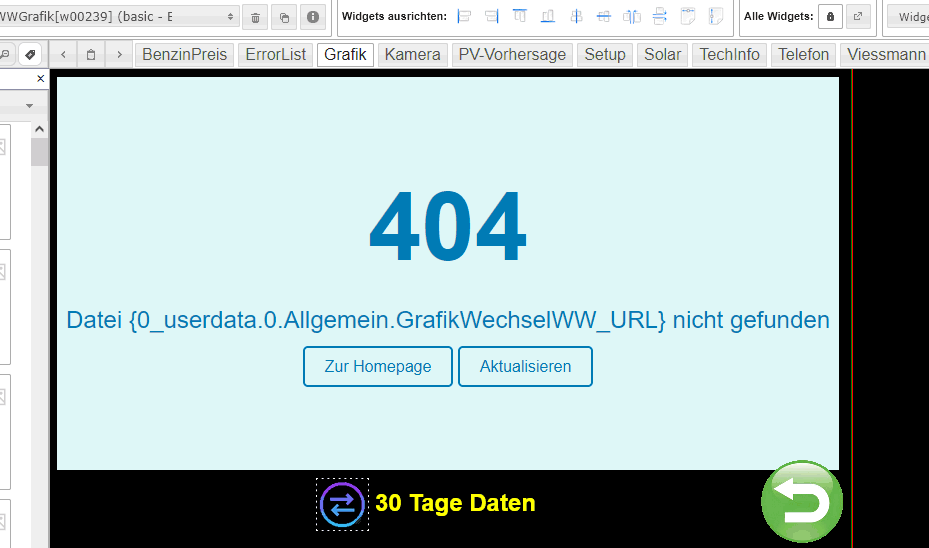
Das ist ein Basic-iFrame.
Die URL steht in einer Variablen, die durch den Button wechselt (andere Zeitachse).
Früher sah man im VIS Editor immer die Grafik.
Ist da ein Zusammenhang mit den o.a. Fehlermeldungen?
Leider stecke ich nicht tief genug in der Materie...
(mit admin.0 7.6.3) -
Hallo zusammen,
mir ist da noch etwas aufgefallen.
Wenn ich ein FLOT Diagram in VIS habe, funktioniert dies so wie schon sehr lange Zeit.
Nur wenn ich im VIS Editor bin, sehe ich:
Das ist ein Basic-iFrame.
Die URL steht in einer Variablen, die durch den Button wechselt (andere Zeitachse).
Früher sah man im VIS Editor immer die Grafik.
Ist da ein Zusammenhang mit den o.a. Fehlermeldungen?
Leider stecke ich nicht tief genug in der Materie...
(mit admin.0 7.6.3)@martinsu sagte in Error admin0 (783) socket.io [init] No user found in cookies:
Das ist ein Basic-iFrame.
Die URL steht in einer Variablen, die durch den Button wechselt (andere Zeitachse).hast du in der ID statt des DP ein Binding?
oder auch: enthält der Wert des Datenpunkts ein Binding?Ist aber anderes Thema, nicht Admin!
kein Support per PN! - Fragen im Forum stellen - Benutzt das Voting rechts unten im Beitrag wenn er euch geholfen hat.
Das Forum freut sich über eine Spende. Benutzt dazu den Spendenbutton oben rechts. Danke!
der Installationsfixer: curl -fsL https://iobroker.net/fix.sh | bash - -
@martinsu sagte in Error admin0 (783) socket.io [init] No user found in cookies:
Das ist ein Basic-iFrame.
Die URL steht in einer Variablen, die durch den Button wechselt (andere Zeitachse).hast du in der ID statt des DP ein Binding?
oder auch: enthält der Wert des Datenpunkts ein Binding?Ist aber anderes Thema, nicht Admin!
@homoran
Ich habe eine String-Variable "GrafikwechselWW_URL"
Da schreibe ich abwechseln URLs rein, die durch FLOT erzeugt wurden.

In VIS steht bei dem Basic-iFrame ein Binding:

Je nach dem, welche URL da im String steht, wird ein anderes FLOT Diagramm angezeigt.
Es mag vielleicht eleganter gehen, aber so funktioniert es bei mir.
Früher sah man im VIS-Editor auch ein FLOT-Diagramm, seit einiger Zeit die 404.
Meine Idee war, dass es da vielleicht einen Zusammenhang gibt und so die Fehlerursache ev. vereinfacht.....





Hey! Du scheinst an dieser Unterhaltung interessiert zu sein, hast aber noch kein Konto.
Hast du es satt, bei jedem Besuch durch die gleichen Beiträge zu scrollen? Wenn du dich für ein Konto anmeldest, kommst du immer genau dorthin zurück, wo du zuvor warst, und kannst dich über neue Antworten benachrichtigen lassen (entweder per E-Mail oder Push-Benachrichtigung). Du kannst auch Lesezeichen speichern und Beiträge positiv bewerten, um anderen Community-Mitgliedern deine Wertschätzung zu zeigen.
Mit deinem Input könnte dieser Beitrag noch besser werden 💗
Registrieren Anmelden456
Online33.0k
Benutzer83.7k
Themen1.3m
Beiträge