




Gelöst! Backitup Fehler (Berechtigungen?)
-
Gerne, das wird ausgespuckt
========== Start marking the full check here =========== ```bash Script v.2024-10-19 *** BASE SYSTEM *** Static hostname: iobroker Icon name: computer Operating System: Debian GNU/Linux 12 (bookworm) Kernel: Linux 6.6.62+rpt-rpi-2712 Architecture: arm64 OS is similar to: Model : Raspberry Pi 5 Model B Rev 1.0 Docker : false Virtualization : none Kernel : aarch64 Userland : 64 bit Systemuptime and Load: 22:53:07 up 1:04, 2 users, load average: 0.37, 0.21, 0.10 CPU threads: 4 *** LIFE CYCLE STATUS *** Operating System is the current Debian stable version codenamed 'bookworm'! *** RASPBERRY THROTTLING *** Current issues: No throttling issues detected. Previously detected issues: No throttling issues detected. *** TIME AND TIMEZONES *** Local time: Wed 2025-01-08 22:53:08 CET Universal time: Wed 2025-01-08 21:53:08 UTC RTC time: Wed 2025-01-08 21:53:08 Time zone: Europe/Zurich (CET, +0100) System clock synchronized: yes NTP service: active RTC in local TZ: no *** Users and Groups *** User that called 'iob diag': pi HOME=/home/pi GROUPS=pi adm dialout cdrom sudo audio video plugdev games users input render netdev gpio i2c spi iobroker User that is running 'js-controller': iobroker HOME=/home/iobroker GROUPS=iobroker tty dialout audio video plugdev bluetooth gpio i2c *** DISPLAY-SERVER SETUP *** Display-Server: false Desktop: Terminal: tty *** MEMORY *** total used free shared buff/cache available Mem: 8.5G 2.0G 5.6G 5.9M 986M 6.5G Swap: 536M 0B 536M Total: 9.0G 2.0G 6.1G Active iob-Instances: 24 8060 M total memory 1903 M used memory 1635 M active memory 713 M inactive memory 5308 M free memory 113 M buffer memory 827 M swap cache 511 M total swap 0 M used swap 511 M free swap *** top - Table Of Processes *** top - 22:53:08 up 1:04, 2 users, load average: 0.37, 0.21, 0.10 Tasks: 196 total, 1 running, 195 sleeping, 0 stopped, 0 zombie %Cpu(s): 0.0 us, 50.0 sy, 0.0 ni, 50.0 id, 0.0 wa, 0.0 hi, 0.0 si, 0.0 st MiB Mem : 8060.1 total, 5308.9 free, 1903.5 used, 941.2 buff/cache MiB Swap: 512.0 total, 512.0 free, 0.0 used. 6156.7 avail Mem *** FAILED SERVICES *** UNIT LOAD ACTIVE SUB DESCRIPTION 0 loaded units listed. *** DMESG CRITICAL ERRORS *** No critical errors detected *** FILESYSTEM *** Filesystem Type Size Used Avail Use% Mounted on udev devtmpfs 3.9G 0 3.9G 0% /dev tmpfs tmpfs 807M 5.6M 801M 1% /run /dev/nvme0n1p2 ext4 470G 6.7G 439G 2% / tmpfs tmpfs 4.0G 0 4.0G 0% /dev/shm tmpfs tmpfs 5.0M 48K 5.0M 1% /run/lock /dev/nvme0n1p1 vfat 510M 57M 454M 12% /boot/firmware tmpfs tmpfs 806M 0 806M 0% /run/user/1000 Messages concerning ext4 filesystem in dmesg: [Wed Jan 8 21:48:54 2025] Kernel command line: reboot=w coherent_pool=1M 8250.nr_uarts=1 pci=pcie_bus_safe cgroup_disable=memory numa_policy=interleave numa=fake=8 system_heap.max_order=0 smsc95xx.macaddr=2C:CF:67:7F:48:3D vc_mem.mem_base=0x3fc00000 vc_mem.mem_size=0x40000000 console=ttyAMA10,115200 console=tty1 root=PARTUUID=c8cea5e4-02 rootfstype=ext4 fsck.repair=yes rootwait cfg80211.ieee80211_regdom=CH [Wed Jan 8 21:48:59 2025] EXT4-fs (nvme0n1p2): mounted filesystem ce208fd3-38a8-424a-87a2-cd44114eb820 ro with ordered data mode. Quota mode: none. [Wed Jan 8 21:48:59 2025] EXT4-fs (nvme0n1p2): re-mounted ce208fd3-38a8-424a-87a2-cd44114eb820 r/w. Quota mode: none. Show mounted filesystems: TARGET SOURCE FSTYPE OPTIONS / /dev/nvme0n1p2 ext4 rw,noatime `-/boot/firmware /dev/nvme0n1p1 vfat rw,relatime,fmask=0022,dmask=0022,codepage=437,iocharset=ascii,shortname=mixed,errors=remount-ro Files in neuralgic directories: /var: 925M /var/ 206M /var/cache 200M /var/cache/apt 167M /var/lib 135M /var/lib/apt/lists Archived and active journals take up 39.7M in the file system. /opt/iobroker/backups: 12M /opt/iobroker/backups/ /opt/iobroker/iobroker-data: 1.2G /opt/iobroker/iobroker-data/ 1.1G /opt/iobroker/iobroker-data/files 617M /opt/iobroker/iobroker-data/files/javascript.admin 560M /opt/iobroker/iobroker-data/files/javascript.admin/static 558M /opt/iobroker/iobroker-data/files/javascript.admin/static/js The five largest files in iobroker-data are: 38M /opt/iobroker/iobroker-data/files/iot.admin/static/js/main.d3d286bd.js.map 24M /opt/iobroker/iobroker-data/files/web.admin/static/js/main.135279a0.js.map 24M /opt/iobroker/iobroker-data/files/vis-2/static/js/main.f305bc29.js.map 24M /opt/iobroker/iobroker-data/files/vis-2/static/js/main.8e80ccb0.js.map 24M /opt/iobroker/iobroker-data/files/vis-2/customWidgets.js.map USB-Devices by-id: USB-Sticks - Avoid direct links to /dev/tty* in your adapter setups, please always prefer the links 'by-id': /dev/serial/by-id/usb-1a86_USB2.0-Serial-if00-port0 HINT: Your zigbee.0 COM-Port is NOT matching 'by-id'. Please check your setting: /dev/ttyUSB0 *** NodeJS-Installation *** /usr/bin/nodejs v20.18.1 /usr/bin/node v20.18.1 /usr/bin/npm 10.8.2 /usr/bin/npx 10.8.2 /usr/bin/corepack 0.29.4 nodejs: Installed: 20.18.1-1nodesource1 Candidate: 20.18.1-1nodesource1 Version table: *** 20.18.1-1nodesource1 1001 500 https://deb.nodesource.com/node_20.x nodistro/main arm64 Packages 100 /var/lib/dpkg/status 20.18.0-1nodesource1 1001 500 https://deb.nodesource.com/node_20.x nodistro/main arm64 Packages 20.17.0-1nodesource1 1001 500 https://deb.nodesource.com/node_20.x nodistro/main arm64 Packages 20.16.0-1nodesource1 1001 500 https://deb.nodesource.com/node_20.x nodistro/main arm64 Packages 20.15.1-1nodesource1 1001 500 https://deb.nodesource.com/node_20.x nodistro/main arm64 Packages 20.15.0-1nodesource1 1001 500 https://deb.nodesource.com/node_20.x nodistro/main arm64 Packages 20.14.0-1nodesource1 1001 500 https://deb.nodesource.com/node_20.x nodistro/main arm64 Packages 20.13.1-1nodesource1 1001 500 https://deb.nodesource.com/node_20.x nodistro/main arm64 Packages 20.13.0-1nodesource1 1001 500 https://deb.nodesource.com/node_20.x nodistro/main arm64 Packages 20.12.2-1nodesource1 1001 500 https://deb.nodesource.com/node_20.x nodistro/main arm64 Packages 20.12.1-1nodesource1 1001 500 https://deb.nodesource.com/node_20.x nodistro/main arm64 Packages 20.12.0-1nodesource1 1001 500 https://deb.nodesource.com/node_20.x nodistro/main arm64 Packages 20.11.1-1nodesource1 1001 500 https://deb.nodesource.com/node_20.x nodistro/main arm64 Packages 20.11.0-1nodesource1 1001 500 https://deb.nodesource.com/node_20.x nodistro/main arm64 Packages 20.10.0-1nodesource1 1001 500 https://deb.nodesource.com/node_20.x nodistro/main arm64 Packages 20.9.0-1nodesource1 1001 500 https://deb.nodesource.com/node_20.x nodistro/main arm64 Packages 20.8.1-1nodesource1 1001 500 https://deb.nodesource.com/node_20.x nodistro/main arm64 Packages 20.8.0-1nodesource1 1001 500 https://deb.nodesource.com/node_20.x nodistro/main arm64 Packages 20.7.0-1nodesource1 1001 500 https://deb.nodesource.com/node_20.x nodistro/main arm64 Packages 20.6.1-1nodesource1 1001 500 https://deb.nodesource.com/node_20.x nodistro/main arm64 Packages 20.6.0-1nodesource1 1001 500 https://deb.nodesource.com/node_20.x nodistro/main arm64 Packages 20.5.1-1nodesource1 1001 500 https://deb.nodesource.com/node_20.x nodistro/main arm64 Packages 20.5.0-1nodesource1 1001 500 https://deb.nodesource.com/node_20.x nodistro/main arm64 Packages 20.4.0-1nodesource1 1001 500 https://deb.nodesource.com/node_20.x nodistro/main arm64 Packages 20.3.1-1nodesource1 1001 500 https://deb.nodesource.com/node_20.x nodistro/main arm64 Packages 20.3.0-1nodesource1 1001 500 https://deb.nodesource.com/node_20.x nodistro/main arm64 Packages 20.2.0-1nodesource1 1001 500 https://deb.nodesource.com/node_20.x nodistro/main arm64 Packages 20.1.0-1nodesource1 1001 500 https://deb.nodesource.com/node_20.x nodistro/main arm64 Packages 20.0.0-1nodesource1 1001 500 https://deb.nodesource.com/node_20.x nodistro/main arm64 Packages 18.19.0+dfsg-6~deb12u2 500 500 http://deb.debian.org/debian bookworm/main arm64 Packages 18.19.0+dfsg-6~deb12u1 500 500 http://deb.debian.org/debian-security bookworm-security/main arm64 Packages Temp directories causing deletion problem: 0 No problems detected Errors in npm tree: 0 No problems detected *** ioBroker-Installation *** ioBroker Status iobroker is running on this host. Objects type: jsonl States type: jsonl Hosts: iobroker iobroker (version: 7.0.6, hostname: iobroker , alive, uptime: 3841) Core adapters versions js-controller: 7.0.6 admin: 7.4.10 javascript: 8.8.3 nodejs modules from github: 0 Adapter State + system.adapter.admin.0 : admin : iobroker - enabled, port: 8081, bind: 0.0.0.0, run as: admin + system.adapter.alexa2.0 : alexa2 : iobroker - enabled + system.adapter.backitup.0 : backitup : iobroker - enabled + system.adapter.discovery.0 : discovery : iobroker - enabled system.adapter.flot.0 : flot : iobroker - enabled + system.adapter.harmony.0 : harmony : iobroker - enabled + system.adapter.history.0 : history : iobroker - enabled + system.adapter.hm-rega.0 : hm-rega : iobroker - enabled + system.adapter.hm-rpc.0 : hm-rpc : iobroker - enabled, port: 0 system.adapter.homeconnect.0 : homeconnect : iobroker - disabled + system.adapter.hue.0 : hue : iobroker - enabled, port: 443 + system.adapter.iot.0 : iot : iobroker - enabled + system.adapter.javascript.0 : javascript : iobroker - enabled + system.adapter.mqtt.0 : mqtt : iobroker - enabled, port: 1883, bind: 0.0.0.0 + system.adapter.node-red.0 : node-red : iobroker - enabled, port: 1880, bind: 0.0.0.0 + system.adapter.pushover.0 : pushover : iobroker - enabled + system.adapter.robonect.0 : robonect : iobroker - enabled + system.adapter.roomba.0 : roomba : iobroker - enabled + system.adapter.sainlogic.0 : sainlogic : iobroker - enabled, port: 80, bind: 0.0.0.0 + system.adapter.simple-api.0 : simple-api : iobroker - enabled, port: 8087, bind: 0.0.0.0, run as: admin + system.adapter.terminal.0 : terminal : iobroker - enabled, port: 8088, bind: 0.0.0.0, run as: admin + system.adapter.vis-2.0 : vis-2 : iobroker - enabled system.adapter.vis-hqwidgets.0 : vis-hqwidgets : iobroker - enabled + system.adapter.vis-inventwo.0 : vis-inventwo : iobroker - enabled system.adapter.vis-jqui-mfd.0 : vis-jqui-mfd : iobroker - enabled system.adapter.vis-metro.0 : vis-metro : iobroker - enabled system.adapter.vis-timeandweather.0 : vis-timeandweather : iobroker - enabled system.adapter.vis.0 : vis : iobroker - enabled + system.adapter.web.0 : web : iobroker - enabled, port: 8082, bind: 0.0.0.0, run as: admin + system.adapter.zigbee.0 : zigbee : iobroker - enabled, port: /dev/ttyUSB0 + instance is alive Enabled adapters with bindings + system.adapter.admin.0 : admin : iobroker - enabled, port: 8081, bind: 0.0.0.0, run as: admin + system.adapter.hm-rpc.0 : hm-rpc : iobroker - enabled, port: 0 + system.adapter.hue.0 : hue : iobroker - enabled, port: 443 + system.adapter.mqtt.0 : mqtt : iobroker - enabled, port: 1883, bind: 0.0.0.0 + system.adapter.node-red.0 : node-red : iobroker - enabled, port: 1880, bind: 0.0.0.0 + system.adapter.sainlogic.0 : sainlogic : iobroker - enabled, port: 80, bind: 0.0.0.0 + system.adapter.simple-api.0 : simple-api : iobroker - enabled, port: 8087, bind: 0.0.0.0, run as: admin + system.adapter.terminal.0 : terminal : iobroker - enabled, port: 8088, bind: 0.0.0.0, run as: admin + system.adapter.web.0 : web : iobroker - enabled, port: 8082, bind: 0.0.0.0, run as: admin + system.adapter.zigbee.0 : zigbee : iobroker - enabled, port: /dev/ttyUSB0 ioBroker-Repositories ┌─────────┬──────────┬─────────────────────────────────────────────────────────┬──────────────┐ │ (index) │ name │ url │ auto upgrade │ ├─────────┼──────────┼─────────────────────────────────────────────────────────┼──────────────┤ │ 0 │ 'stable' │ 'http://download.iobroker.net/sources-dist.json' │ false │ │ 1 │ 'beta' │ 'http://download.iobroker.net/sources-dist-latest.json' │ false │ └─────────┴──────────┴─────────────────────────────────────────────────────────┴──────────────┘ Active repo(s): stable Upgrade policy: none Installed ioBroker-Instances Used repository: stable Adapter "admin" : 7.4.10 , installed 7.4.10 Adapter "alexa2" : 3.26.5 , installed 3.26.5 Adapter "backitup" : 3.0.25 , installed 3.0.25 Adapter "discovery" : 5.0.0 , installed 5.0.0 Adapter "flot" : 1.12.0 , installed 1.12.0 Adapter "harmony" : 1.5.0 , installed 1.5.0 Adapter "history" : 3.0.1 , installed 3.0.1 Adapter "hm-rega" : 5.1.0 , installed 5.1.0 Adapter "hm-rpc" : 2.0.2 , installed 2.0.2 Adapter "homeconnect" : 1.4.3 , installed 1.4.3 Adapter "hue" : 3.13.1 , installed 3.13.1 Adapter "iot" : 3.3.0 , installed 3.3.0 Adapter "javascript" : 8.8.3 , installed 8.8.3 Controller "js-controller": 7.0.6 , installed 7.0.6 Adapter "mqtt" : 6.1.2 , installed 6.1.2 Adapter "node-red" : 5.2.1 , installed 5.2.1 Adapter "pushover" : 4.1.0 , installed 4.1.0 Adapter "robonect" : 1.4.2 , installed 1.4.2 Adapter "roomba" : 1.3.0 , installed 1.3.0 Adapter "sainlogic" : 0.11.4 , installed 0.11.4 Adapter "simple-api" : 2.8.0 , installed 2.8.0 Adapter "socketio" : 6.7.1 , installed 6.7.1 Adapter "solax" : 0.9.13 , installed 0.9.13 Adapter "terminal" : 1.0.0 , installed 1.0.0 Adapter "vis" : 1.5.6 , installed 1.5.6 Adapter "vis-2" : 2.9.64 , installed 2.9.64 Adapter "vis-hqwidgets": 1.5.1 , installed 1.5.1 Adapter "vis-inventwo" : 3.3.4 , installed 3.3.4 Adapter "vis-jqui-mfd" : 1.1.1 , installed 1.1.1 Adapter "vis-metro" : 1.2.0 , installed 1.2.0 Adapter "vis-timeandweather": 1.2.2, installed 1.2.2 Adapter "web" : 6.2.5 , installed 6.2.5 Adapter "ws" : 2.6.2 , installed 2.6.2 Adapter "zigbee" : 1.10.14 , installed 1.10.14 Objects and States Please stand by - This may take a while Objects: 4859 States: 3704 *** OS-Repositories and Updates *** Hit:1 http://deb.debian.org/debian bookworm InRelease Hit:2 http://archive.raspberrypi.com/debian bookworm InRelease Hit:3 http://deb.debian.org/debian-security bookworm-security InRelease Hit:4 http://deb.debian.org/debian bookworm-updates InRelease Hit:5 https://deb.nodesource.com/node_20.x nodistro InRelease Reading package lists... Pending Updates: 0 *** Listening Ports *** Active Internet connections (only servers) Proto Recv-Q Send-Q Local Address Foreign Address State User Inode PID/Program name tcp 0 0 192.168.1.170:2001 0.0.0.0:* LISTEN 1001 9183 1537/io.hm-rpc.0 tcp 0 0 0.0.0.0:80 0.0.0.0:* LISTEN 1001 6004 1066/io.sainlogic.0 tcp 0 0 0.0.0.0:22 0.0.0.0:* LISTEN 0 4804 693/sshd: /usr/sbin tcp 0 0 0.0.0.0:1883 0.0.0.0:* LISTEN 1001 6486 974/io.mqtt.0 tcp 0 0 0.0.0.0:1880 0.0.0.0:* LISTEN 1001 10177 1633/node-red tcp 0 0 127.0.0.1:9000 0.0.0.0:* LISTEN 1001 5669 677/iobroker.js-con tcp 0 0 127.0.0.1:9001 0.0.0.0:* LISTEN 1001 5664 677/iobroker.js-con tcp6 0 0 :::8088 :::* LISTEN 1001 6024 1096/io.terminal.0 tcp6 0 0 :::8087 :::* LISTEN 1001 8292 1081/io.simple-api. tcp6 0 0 :::8082 :::* LISTEN 1001 6659 1156/io.web.0 tcp6 0 0 :::8081 :::* LISTEN 1001 6248 720/io.admin.0 tcp6 0 0 :::61991 :::* LISTEN 1001 7561 905/io.harmony.0 tcp6 0 0 :::22 :::* LISTEN 0 4806 693/sshd: /usr/sbin udp 0 0 0.0.0.0:61991 0.0.0.0:* 1001 5054 905/io.harmony.0 udp 0 0 0.0.0.0:5353 0.0.0.0:* 104 4086 567/avahi-daemon: r udp 0 0 0.0.0.0:42290 0.0.0.0:* 104 4088 567/avahi-daemon: r udp6 87040 0 fe80::33f7:e112:3e3:546 :::* 0 4873 626/NetworkManager udp6 0 0 fe80::33f7:e112:3e3:546 :::* 998 7325 321/systemd-network udp6 0 0 :::5353 :::* 104 4087 567/avahi-daemon: r udp6 0 0 :::34623 :::* 104 4089 567/avahi-daemon: r *** Log File - Last 25 Lines *** 2025-01-08 22:35:31.038 - info: node-red.0 (1633) 6d5bf105e4a45c87: Automatic objects creation is not enabled. You can enable it in the node configuration 2025-01-08 22:35:31.080 - info: node-red.0 (1633) da34e3fbb8058576: "ioBroker in" Cannot set state of non-existing object "hm-rpc.0.OEQ0570733.1.WORKING". 2025-01-08 22:35:31.080 - info: node-red.0 (1633) da34e3fbb8058576: Automatic objects creation is not enabled. You can enable it in the node configuration 2025-01-08 22:35:31.162 - info: node-red.0 (1633) 02e8a8dc953a12de: "ioBroker in" Cannot set state of non-existing object "solax.0.data.acpower". 2025-01-08 22:35:31.163 - info: node-red.0 (1633) 02e8a8dc953a12de: Automatic objects creation is not enabled. You can enable it in the node configuration 2025-01-08 22:36:22.248 - warn: zigbee.0 (1020) Send command to 0x804b50fffe4340e4 failed with: Code 205 (No network route) 2025-01-08 22:37:03.636 - info: node-red.0 (1633) 6d5bf105e4a45c87: "ioBroker get" Cannot set state of non-existing object "hm-rpc.0.OEQ0570733.1.LEVEL". 2025-01-08 22:37:03.637 - info: node-red.0 (1633) 6d5bf105e4a45c87: Automatic objects creation is not enabled. You can enable it in the node configuration 2025-01-08 22:37:03.637 - info: node-red.0 (1633) da34e3fbb8058576: "ioBroker in" Cannot set state of non-existing object "hm-rpc.0.OEQ0570733.1.WORKING". 2025-01-08 22:37:03.637 - info: node-red.0 (1633) da34e3fbb8058576: Automatic objects creation is not enabled. You can enable it in the node configuration 2025-01-08 22:40:04.896 - warn: robonect.0 (989) No connection to lawn mower (Not able to ping it). Check network connection. 2025-01-08 22:45:29.635 - info: host.iobroker stopInstance system.adapter.backitup.0 (force=false, process=true) 2025-01-08 22:45:29.637 - info: backitup.0 (1503) Got terminate signal TERMINATE_YOURSELF 2025-01-08 22:45:29.638 - info: backitup.0 (1503) cleaned everything up... 2025-01-08 22:45:29.638 - info: backitup.0 (1503) terminating 2025-01-08 22:45:29.639 - info: backitup.0 (1503) Terminated (ADAPTER_REQUESTED_TERMINATION): Without reason 2025-01-08 22:45:29.681 - info: host.iobroker stopInstance system.adapter.backitup.0 send kill signal 2025-01-08 22:45:30.139 - info: backitup.0 (1503) terminating 2025-01-08 22:45:30.179 - info: host.iobroker instance system.adapter.backitup.0 terminated with code 11 (ADAPTER_REQUESTED_TERMINATION) 2025-01-08 22:45:33.499 - info: host.iobroker instance system.adapter.backitup.0 in version "3.0.25" started with pid 1661 2025-01-08 22:45:34.305 - info: backitup.0 (1661) starting. Version 3.0.25 in /opt/iobroker/node_modules/iobroker.backitup, node: v20.18.1, js-controller: 7.0.6 2025-01-08 22:45:34.329 - info: backitup.0 (1661) [iobroker] backup will be activated at 02:40 every 1 day(s) 2025-01-08 22:45:34.364 - info: backitup.0 (1661) [ccu] backup will be activated at 01:30 every 3 day(s) 2025-01-08 22:45:34.599 - warn: backitup.0 (1661) Source cannot be reached: Error: EACCES: permission denied, scandir '/opt/iobroker/backups' 2025-01-08 22:50:11.789 - info: admin.0 (720) <== Disconnect system.user.admin from ::ffff:192.168.1.176 adminich hoffe das hilft weiter. Für heute mache ich aber schluss. -
Gerne, das wird ausgespuckt
========== Start marking the full check here =========== ```bash Script v.2024-10-19 *** BASE SYSTEM *** Static hostname: iobroker Icon name: computer Operating System: Debian GNU/Linux 12 (bookworm) Kernel: Linux 6.6.62+rpt-rpi-2712 Architecture: arm64 OS is similar to: Model : Raspberry Pi 5 Model B Rev 1.0 Docker : false Virtualization : none Kernel : aarch64 Userland : 64 bit Systemuptime and Load: 22:53:07 up 1:04, 2 users, load average: 0.37, 0.21, 0.10 CPU threads: 4 *** LIFE CYCLE STATUS *** Operating System is the current Debian stable version codenamed 'bookworm'! *** RASPBERRY THROTTLING *** Current issues: No throttling issues detected. Previously detected issues: No throttling issues detected. *** TIME AND TIMEZONES *** Local time: Wed 2025-01-08 22:53:08 CET Universal time: Wed 2025-01-08 21:53:08 UTC RTC time: Wed 2025-01-08 21:53:08 Time zone: Europe/Zurich (CET, +0100) System clock synchronized: yes NTP service: active RTC in local TZ: no *** Users and Groups *** User that called 'iob diag': pi HOME=/home/pi GROUPS=pi adm dialout cdrom sudo audio video plugdev games users input render netdev gpio i2c spi iobroker User that is running 'js-controller': iobroker HOME=/home/iobroker GROUPS=iobroker tty dialout audio video plugdev bluetooth gpio i2c *** DISPLAY-SERVER SETUP *** Display-Server: false Desktop: Terminal: tty *** MEMORY *** total used free shared buff/cache available Mem: 8.5G 2.0G 5.6G 5.9M 986M 6.5G Swap: 536M 0B 536M Total: 9.0G 2.0G 6.1G Active iob-Instances: 24 8060 M total memory 1903 M used memory 1635 M active memory 713 M inactive memory 5308 M free memory 113 M buffer memory 827 M swap cache 511 M total swap 0 M used swap 511 M free swap *** top - Table Of Processes *** top - 22:53:08 up 1:04, 2 users, load average: 0.37, 0.21, 0.10 Tasks: 196 total, 1 running, 195 sleeping, 0 stopped, 0 zombie %Cpu(s): 0.0 us, 50.0 sy, 0.0 ni, 50.0 id, 0.0 wa, 0.0 hi, 0.0 si, 0.0 st MiB Mem : 8060.1 total, 5308.9 free, 1903.5 used, 941.2 buff/cache MiB Swap: 512.0 total, 512.0 free, 0.0 used. 6156.7 avail Mem *** FAILED SERVICES *** UNIT LOAD ACTIVE SUB DESCRIPTION 0 loaded units listed. *** DMESG CRITICAL ERRORS *** No critical errors detected *** FILESYSTEM *** Filesystem Type Size Used Avail Use% Mounted on udev devtmpfs 3.9G 0 3.9G 0% /dev tmpfs tmpfs 807M 5.6M 801M 1% /run /dev/nvme0n1p2 ext4 470G 6.7G 439G 2% / tmpfs tmpfs 4.0G 0 4.0G 0% /dev/shm tmpfs tmpfs 5.0M 48K 5.0M 1% /run/lock /dev/nvme0n1p1 vfat 510M 57M 454M 12% /boot/firmware tmpfs tmpfs 806M 0 806M 0% /run/user/1000 Messages concerning ext4 filesystem in dmesg: [Wed Jan 8 21:48:54 2025] Kernel command line: reboot=w coherent_pool=1M 8250.nr_uarts=1 pci=pcie_bus_safe cgroup_disable=memory numa_policy=interleave numa=fake=8 system_heap.max_order=0 smsc95xx.macaddr=2C:CF:67:7F:48:3D vc_mem.mem_base=0x3fc00000 vc_mem.mem_size=0x40000000 console=ttyAMA10,115200 console=tty1 root=PARTUUID=c8cea5e4-02 rootfstype=ext4 fsck.repair=yes rootwait cfg80211.ieee80211_regdom=CH [Wed Jan 8 21:48:59 2025] EXT4-fs (nvme0n1p2): mounted filesystem ce208fd3-38a8-424a-87a2-cd44114eb820 ro with ordered data mode. Quota mode: none. [Wed Jan 8 21:48:59 2025] EXT4-fs (nvme0n1p2): re-mounted ce208fd3-38a8-424a-87a2-cd44114eb820 r/w. Quota mode: none. Show mounted filesystems: TARGET SOURCE FSTYPE OPTIONS / /dev/nvme0n1p2 ext4 rw,noatime `-/boot/firmware /dev/nvme0n1p1 vfat rw,relatime,fmask=0022,dmask=0022,codepage=437,iocharset=ascii,shortname=mixed,errors=remount-ro Files in neuralgic directories: /var: 925M /var/ 206M /var/cache 200M /var/cache/apt 167M /var/lib 135M /var/lib/apt/lists Archived and active journals take up 39.7M in the file system. /opt/iobroker/backups: 12M /opt/iobroker/backups/ /opt/iobroker/iobroker-data: 1.2G /opt/iobroker/iobroker-data/ 1.1G /opt/iobroker/iobroker-data/files 617M /opt/iobroker/iobroker-data/files/javascript.admin 560M /opt/iobroker/iobroker-data/files/javascript.admin/static 558M /opt/iobroker/iobroker-data/files/javascript.admin/static/js The five largest files in iobroker-data are: 38M /opt/iobroker/iobroker-data/files/iot.admin/static/js/main.d3d286bd.js.map 24M /opt/iobroker/iobroker-data/files/web.admin/static/js/main.135279a0.js.map 24M /opt/iobroker/iobroker-data/files/vis-2/static/js/main.f305bc29.js.map 24M /opt/iobroker/iobroker-data/files/vis-2/static/js/main.8e80ccb0.js.map 24M /opt/iobroker/iobroker-data/files/vis-2/customWidgets.js.map USB-Devices by-id: USB-Sticks - Avoid direct links to /dev/tty* in your adapter setups, please always prefer the links 'by-id': /dev/serial/by-id/usb-1a86_USB2.0-Serial-if00-port0 HINT: Your zigbee.0 COM-Port is NOT matching 'by-id'. Please check your setting: /dev/ttyUSB0 *** NodeJS-Installation *** /usr/bin/nodejs v20.18.1 /usr/bin/node v20.18.1 /usr/bin/npm 10.8.2 /usr/bin/npx 10.8.2 /usr/bin/corepack 0.29.4 nodejs: Installed: 20.18.1-1nodesource1 Candidate: 20.18.1-1nodesource1 Version table: *** 20.18.1-1nodesource1 1001 500 https://deb.nodesource.com/node_20.x nodistro/main arm64 Packages 100 /var/lib/dpkg/status 20.18.0-1nodesource1 1001 500 https://deb.nodesource.com/node_20.x nodistro/main arm64 Packages 20.17.0-1nodesource1 1001 500 https://deb.nodesource.com/node_20.x nodistro/main arm64 Packages 20.16.0-1nodesource1 1001 500 https://deb.nodesource.com/node_20.x nodistro/main arm64 Packages 20.15.1-1nodesource1 1001 500 https://deb.nodesource.com/node_20.x nodistro/main arm64 Packages 20.15.0-1nodesource1 1001 500 https://deb.nodesource.com/node_20.x nodistro/main arm64 Packages 20.14.0-1nodesource1 1001 500 https://deb.nodesource.com/node_20.x nodistro/main arm64 Packages 20.13.1-1nodesource1 1001 500 https://deb.nodesource.com/node_20.x nodistro/main arm64 Packages 20.13.0-1nodesource1 1001 500 https://deb.nodesource.com/node_20.x nodistro/main arm64 Packages 20.12.2-1nodesource1 1001 500 https://deb.nodesource.com/node_20.x nodistro/main arm64 Packages 20.12.1-1nodesource1 1001 500 https://deb.nodesource.com/node_20.x nodistro/main arm64 Packages 20.12.0-1nodesource1 1001 500 https://deb.nodesource.com/node_20.x nodistro/main arm64 Packages 20.11.1-1nodesource1 1001 500 https://deb.nodesource.com/node_20.x nodistro/main arm64 Packages 20.11.0-1nodesource1 1001 500 https://deb.nodesource.com/node_20.x nodistro/main arm64 Packages 20.10.0-1nodesource1 1001 500 https://deb.nodesource.com/node_20.x nodistro/main arm64 Packages 20.9.0-1nodesource1 1001 500 https://deb.nodesource.com/node_20.x nodistro/main arm64 Packages 20.8.1-1nodesource1 1001 500 https://deb.nodesource.com/node_20.x nodistro/main arm64 Packages 20.8.0-1nodesource1 1001 500 https://deb.nodesource.com/node_20.x nodistro/main arm64 Packages 20.7.0-1nodesource1 1001 500 https://deb.nodesource.com/node_20.x nodistro/main arm64 Packages 20.6.1-1nodesource1 1001 500 https://deb.nodesource.com/node_20.x nodistro/main arm64 Packages 20.6.0-1nodesource1 1001 500 https://deb.nodesource.com/node_20.x nodistro/main arm64 Packages 20.5.1-1nodesource1 1001 500 https://deb.nodesource.com/node_20.x nodistro/main arm64 Packages 20.5.0-1nodesource1 1001 500 https://deb.nodesource.com/node_20.x nodistro/main arm64 Packages 20.4.0-1nodesource1 1001 500 https://deb.nodesource.com/node_20.x nodistro/main arm64 Packages 20.3.1-1nodesource1 1001 500 https://deb.nodesource.com/node_20.x nodistro/main arm64 Packages 20.3.0-1nodesource1 1001 500 https://deb.nodesource.com/node_20.x nodistro/main arm64 Packages 20.2.0-1nodesource1 1001 500 https://deb.nodesource.com/node_20.x nodistro/main arm64 Packages 20.1.0-1nodesource1 1001 500 https://deb.nodesource.com/node_20.x nodistro/main arm64 Packages 20.0.0-1nodesource1 1001 500 https://deb.nodesource.com/node_20.x nodistro/main arm64 Packages 18.19.0+dfsg-6~deb12u2 500 500 http://deb.debian.org/debian bookworm/main arm64 Packages 18.19.0+dfsg-6~deb12u1 500 500 http://deb.debian.org/debian-security bookworm-security/main arm64 Packages Temp directories causing deletion problem: 0 No problems detected Errors in npm tree: 0 No problems detected *** ioBroker-Installation *** ioBroker Status iobroker is running on this host. Objects type: jsonl States type: jsonl Hosts: iobroker iobroker (version: 7.0.6, hostname: iobroker , alive, uptime: 3841) Core adapters versions js-controller: 7.0.6 admin: 7.4.10 javascript: 8.8.3 nodejs modules from github: 0 Adapter State + system.adapter.admin.0 : admin : iobroker - enabled, port: 8081, bind: 0.0.0.0, run as: admin + system.adapter.alexa2.0 : alexa2 : iobroker - enabled + system.adapter.backitup.0 : backitup : iobroker - enabled + system.adapter.discovery.0 : discovery : iobroker - enabled system.adapter.flot.0 : flot : iobroker - enabled + system.adapter.harmony.0 : harmony : iobroker - enabled + system.adapter.history.0 : history : iobroker - enabled + system.adapter.hm-rega.0 : hm-rega : iobroker - enabled + system.adapter.hm-rpc.0 : hm-rpc : iobroker - enabled, port: 0 system.adapter.homeconnect.0 : homeconnect : iobroker - disabled + system.adapter.hue.0 : hue : iobroker - enabled, port: 443 + system.adapter.iot.0 : iot : iobroker - enabled + system.adapter.javascript.0 : javascript : iobroker - enabled + system.adapter.mqtt.0 : mqtt : iobroker - enabled, port: 1883, bind: 0.0.0.0 + system.adapter.node-red.0 : node-red : iobroker - enabled, port: 1880, bind: 0.0.0.0 + system.adapter.pushover.0 : pushover : iobroker - enabled + system.adapter.robonect.0 : robonect : iobroker - enabled + system.adapter.roomba.0 : roomba : iobroker - enabled + system.adapter.sainlogic.0 : sainlogic : iobroker - enabled, port: 80, bind: 0.0.0.0 + system.adapter.simple-api.0 : simple-api : iobroker - enabled, port: 8087, bind: 0.0.0.0, run as: admin + system.adapter.terminal.0 : terminal : iobroker - enabled, port: 8088, bind: 0.0.0.0, run as: admin + system.adapter.vis-2.0 : vis-2 : iobroker - enabled system.adapter.vis-hqwidgets.0 : vis-hqwidgets : iobroker - enabled + system.adapter.vis-inventwo.0 : vis-inventwo : iobroker - enabled system.adapter.vis-jqui-mfd.0 : vis-jqui-mfd : iobroker - enabled system.adapter.vis-metro.0 : vis-metro : iobroker - enabled system.adapter.vis-timeandweather.0 : vis-timeandweather : iobroker - enabled system.adapter.vis.0 : vis : iobroker - enabled + system.adapter.web.0 : web : iobroker - enabled, port: 8082, bind: 0.0.0.0, run as: admin + system.adapter.zigbee.0 : zigbee : iobroker - enabled, port: /dev/ttyUSB0 + instance is alive Enabled adapters with bindings + system.adapter.admin.0 : admin : iobroker - enabled, port: 8081, bind: 0.0.0.0, run as: admin + system.adapter.hm-rpc.0 : hm-rpc : iobroker - enabled, port: 0 + system.adapter.hue.0 : hue : iobroker - enabled, port: 443 + system.adapter.mqtt.0 : mqtt : iobroker - enabled, port: 1883, bind: 0.0.0.0 + system.adapter.node-red.0 : node-red : iobroker - enabled, port: 1880, bind: 0.0.0.0 + system.adapter.sainlogic.0 : sainlogic : iobroker - enabled, port: 80, bind: 0.0.0.0 + system.adapter.simple-api.0 : simple-api : iobroker - enabled, port: 8087, bind: 0.0.0.0, run as: admin + system.adapter.terminal.0 : terminal : iobroker - enabled, port: 8088, bind: 0.0.0.0, run as: admin + system.adapter.web.0 : web : iobroker - enabled, port: 8082, bind: 0.0.0.0, run as: admin + system.adapter.zigbee.0 : zigbee : iobroker - enabled, port: /dev/ttyUSB0 ioBroker-Repositories ┌─────────┬──────────┬─────────────────────────────────────────────────────────┬──────────────┐ │ (index) │ name │ url │ auto upgrade │ ├─────────┼──────────┼─────────────────────────────────────────────────────────┼──────────────┤ │ 0 │ 'stable' │ 'http://download.iobroker.net/sources-dist.json' │ false │ │ 1 │ 'beta' │ 'http://download.iobroker.net/sources-dist-latest.json' │ false │ └─────────┴──────────┴─────────────────────────────────────────────────────────┴──────────────┘ Active repo(s): stable Upgrade policy: none Installed ioBroker-Instances Used repository: stable Adapter "admin" : 7.4.10 , installed 7.4.10 Adapter "alexa2" : 3.26.5 , installed 3.26.5 Adapter "backitup" : 3.0.25 , installed 3.0.25 Adapter "discovery" : 5.0.0 , installed 5.0.0 Adapter "flot" : 1.12.0 , installed 1.12.0 Adapter "harmony" : 1.5.0 , installed 1.5.0 Adapter "history" : 3.0.1 , installed 3.0.1 Adapter "hm-rega" : 5.1.0 , installed 5.1.0 Adapter "hm-rpc" : 2.0.2 , installed 2.0.2 Adapter "homeconnect" : 1.4.3 , installed 1.4.3 Adapter "hue" : 3.13.1 , installed 3.13.1 Adapter "iot" : 3.3.0 , installed 3.3.0 Adapter "javascript" : 8.8.3 , installed 8.8.3 Controller "js-controller": 7.0.6 , installed 7.0.6 Adapter "mqtt" : 6.1.2 , installed 6.1.2 Adapter "node-red" : 5.2.1 , installed 5.2.1 Adapter "pushover" : 4.1.0 , installed 4.1.0 Adapter "robonect" : 1.4.2 , installed 1.4.2 Adapter "roomba" : 1.3.0 , installed 1.3.0 Adapter "sainlogic" : 0.11.4 , installed 0.11.4 Adapter "simple-api" : 2.8.0 , installed 2.8.0 Adapter "socketio" : 6.7.1 , installed 6.7.1 Adapter "solax" : 0.9.13 , installed 0.9.13 Adapter "terminal" : 1.0.0 , installed 1.0.0 Adapter "vis" : 1.5.6 , installed 1.5.6 Adapter "vis-2" : 2.9.64 , installed 2.9.64 Adapter "vis-hqwidgets": 1.5.1 , installed 1.5.1 Adapter "vis-inventwo" : 3.3.4 , installed 3.3.4 Adapter "vis-jqui-mfd" : 1.1.1 , installed 1.1.1 Adapter "vis-metro" : 1.2.0 , installed 1.2.0 Adapter "vis-timeandweather": 1.2.2, installed 1.2.2 Adapter "web" : 6.2.5 , installed 6.2.5 Adapter "ws" : 2.6.2 , installed 2.6.2 Adapter "zigbee" : 1.10.14 , installed 1.10.14 Objects and States Please stand by - This may take a while Objects: 4859 States: 3704 *** OS-Repositories and Updates *** Hit:1 http://deb.debian.org/debian bookworm InRelease Hit:2 http://archive.raspberrypi.com/debian bookworm InRelease Hit:3 http://deb.debian.org/debian-security bookworm-security InRelease Hit:4 http://deb.debian.org/debian bookworm-updates InRelease Hit:5 https://deb.nodesource.com/node_20.x nodistro InRelease Reading package lists... Pending Updates: 0 *** Listening Ports *** Active Internet connections (only servers) Proto Recv-Q Send-Q Local Address Foreign Address State User Inode PID/Program name tcp 0 0 192.168.1.170:2001 0.0.0.0:* LISTEN 1001 9183 1537/io.hm-rpc.0 tcp 0 0 0.0.0.0:80 0.0.0.0:* LISTEN 1001 6004 1066/io.sainlogic.0 tcp 0 0 0.0.0.0:22 0.0.0.0:* LISTEN 0 4804 693/sshd: /usr/sbin tcp 0 0 0.0.0.0:1883 0.0.0.0:* LISTEN 1001 6486 974/io.mqtt.0 tcp 0 0 0.0.0.0:1880 0.0.0.0:* LISTEN 1001 10177 1633/node-red tcp 0 0 127.0.0.1:9000 0.0.0.0:* LISTEN 1001 5669 677/iobroker.js-con tcp 0 0 127.0.0.1:9001 0.0.0.0:* LISTEN 1001 5664 677/iobroker.js-con tcp6 0 0 :::8088 :::* LISTEN 1001 6024 1096/io.terminal.0 tcp6 0 0 :::8087 :::* LISTEN 1001 8292 1081/io.simple-api. tcp6 0 0 :::8082 :::* LISTEN 1001 6659 1156/io.web.0 tcp6 0 0 :::8081 :::* LISTEN 1001 6248 720/io.admin.0 tcp6 0 0 :::61991 :::* LISTEN 1001 7561 905/io.harmony.0 tcp6 0 0 :::22 :::* LISTEN 0 4806 693/sshd: /usr/sbin udp 0 0 0.0.0.0:61991 0.0.0.0:* 1001 5054 905/io.harmony.0 udp 0 0 0.0.0.0:5353 0.0.0.0:* 104 4086 567/avahi-daemon: r udp 0 0 0.0.0.0:42290 0.0.0.0:* 104 4088 567/avahi-daemon: r udp6 87040 0 fe80::33f7:e112:3e3:546 :::* 0 4873 626/NetworkManager udp6 0 0 fe80::33f7:e112:3e3:546 :::* 998 7325 321/systemd-network udp6 0 0 :::5353 :::* 104 4087 567/avahi-daemon: r udp6 0 0 :::34623 :::* 104 4089 567/avahi-daemon: r *** Log File - Last 25 Lines *** 2025-01-08 22:35:31.038 - info: node-red.0 (1633) 6d5bf105e4a45c87: Automatic objects creation is not enabled. You can enable it in the node configuration 2025-01-08 22:35:31.080 - info: node-red.0 (1633) da34e3fbb8058576: "ioBroker in" Cannot set state of non-existing object "hm-rpc.0.OEQ0570733.1.WORKING". 2025-01-08 22:35:31.080 - info: node-red.0 (1633) da34e3fbb8058576: Automatic objects creation is not enabled. You can enable it in the node configuration 2025-01-08 22:35:31.162 - info: node-red.0 (1633) 02e8a8dc953a12de: "ioBroker in" Cannot set state of non-existing object "solax.0.data.acpower". 2025-01-08 22:35:31.163 - info: node-red.0 (1633) 02e8a8dc953a12de: Automatic objects creation is not enabled. You can enable it in the node configuration 2025-01-08 22:36:22.248 - warn: zigbee.0 (1020) Send command to 0x804b50fffe4340e4 failed with: Code 205 (No network route) 2025-01-08 22:37:03.636 - info: node-red.0 (1633) 6d5bf105e4a45c87: "ioBroker get" Cannot set state of non-existing object "hm-rpc.0.OEQ0570733.1.LEVEL". 2025-01-08 22:37:03.637 - info: node-red.0 (1633) 6d5bf105e4a45c87: Automatic objects creation is not enabled. You can enable it in the node configuration 2025-01-08 22:37:03.637 - info: node-red.0 (1633) da34e3fbb8058576: "ioBroker in" Cannot set state of non-existing object "hm-rpc.0.OEQ0570733.1.WORKING". 2025-01-08 22:37:03.637 - info: node-red.0 (1633) da34e3fbb8058576: Automatic objects creation is not enabled. You can enable it in the node configuration 2025-01-08 22:40:04.896 - warn: robonect.0 (989) No connection to lawn mower (Not able to ping it). Check network connection. 2025-01-08 22:45:29.635 - info: host.iobroker stopInstance system.adapter.backitup.0 (force=false, process=true) 2025-01-08 22:45:29.637 - info: backitup.0 (1503) Got terminate signal TERMINATE_YOURSELF 2025-01-08 22:45:29.638 - info: backitup.0 (1503) cleaned everything up... 2025-01-08 22:45:29.638 - info: backitup.0 (1503) terminating 2025-01-08 22:45:29.639 - info: backitup.0 (1503) Terminated (ADAPTER_REQUESTED_TERMINATION): Without reason 2025-01-08 22:45:29.681 - info: host.iobroker stopInstance system.adapter.backitup.0 send kill signal 2025-01-08 22:45:30.139 - info: backitup.0 (1503) terminating 2025-01-08 22:45:30.179 - info: host.iobroker instance system.adapter.backitup.0 terminated with code 11 (ADAPTER_REQUESTED_TERMINATION) 2025-01-08 22:45:33.499 - info: host.iobroker instance system.adapter.backitup.0 in version "3.0.25" started with pid 1661 2025-01-08 22:45:34.305 - info: backitup.0 (1661) starting. Version 3.0.25 in /opt/iobroker/node_modules/iobroker.backitup, node: v20.18.1, js-controller: 7.0.6 2025-01-08 22:45:34.329 - info: backitup.0 (1661) [iobroker] backup will be activated at 02:40 every 1 day(s) 2025-01-08 22:45:34.364 - info: backitup.0 (1661) [ccu] backup will be activated at 01:30 every 3 day(s) 2025-01-08 22:45:34.599 - warn: backitup.0 (1661) Source cannot be reached: Error: EACCES: permission denied, scandir '/opt/iobroker/backups' 2025-01-08 22:50:11.789 - info: admin.0 (720) <== Disconnect system.user.admin from ::ffff:192.168.1.176 adminich hoffe das hilft weiter. Für heute mache ich aber schluss.@hafo
Das sieht erstmal unverfänglich aus.Sieht mir nach einem Rechteproblem in
192.168.1.160:/volume1/iobrokerbackup/iobrokerausCannot create backup: EACCES: permission denied, open '/opt/iobroker/backups/iobroker_2025_01_08-21_51_45_iobroker_backupiobroker.tar.gz' -
@hafo
Das sieht erstmal unverfänglich aus.Sieht mir nach einem Rechteproblem in
192.168.1.160:/volume1/iobrokerbackup/iobrokerausCannot create backup: EACCES: permission denied, open '/opt/iobroker/backups/iobroker_2025_01_08-21_51_45_iobroker_backupiobroker.tar.gz'@codierknecht seltsam, das ist die falsche Ip. Ich verstehe auch nicht weshalb da überhaupt eine Ip steht, das ist doch der lokale Speicherpfad.
Nun weiss ich aber zumindest wo suchen. Danke für den Hinweis. -
@codierknecht seltsam, das ist die falsche Ip. Ich verstehe auch nicht weshalb da überhaupt eine Ip steht, das ist doch der lokale Speicherpfad.
Nun weiss ich aber zumindest wo suchen. Danke für den Hinweis.Es gibt im Mount zwei Pfadangaben.
Zum einen die Freigabe und dann den Mountpunkt, wo die Freigabe hingehängt werden soll. -
@codierknecht seltsam, das ist die falsche Ip. Ich verstehe auch nicht weshalb da überhaupt eine Ip steht, das ist doch der lokale Speicherpfad.
Nun weiss ich aber zumindest wo suchen. Danke für den Hinweis.@hafo
Da dürften die Einstellungen für's NAS nicht passen.
Vielleicht zeigst Du die mal. -
@hafo
Da dürften die Einstellungen für's NAS nicht passen.
Vielleicht zeigst Du die mal.@codierknecht ich habe den Fehler gefunden. Ich musste bei Synology die NFS Regel Squash abändern zu "Alle Benutzer zu Admin".
Hast du auch eine Idee weshalb ich Homematic nicht sichern kann? Ich habe das auch neu auf einen Pi aufgesetzt, sollte also auch alles sauber installiert sein. Aber wenn ich auf Konfiguration ermitteln klicke findet er nichts
-
@codierknecht ich habe den Fehler gefunden. Ich musste bei Synology die NFS Regel Squash abändern zu "Alle Benutzer zu Admin".
Hast du auch eine Idee weshalb ich Homematic nicht sichern kann? Ich habe das auch neu auf einen Pi aufgesetzt, sollte also auch alles sauber installiert sein. Aber wenn ich auf Konfiguration ermitteln klicke findet er nichts
@hafo sagte in Backitup Fehler (Berechtigungen?):
Hast du auch eine Idee weshalb ich Homematic nicht sichern kann?
Wenn ich mir deine Konfiguration der CCU-Sicherung ansehe, sehe ich...nichts!
bitte nachliefern
-
@hafo sagte in Backitup Fehler (Berechtigungen?):
Hast du auch eine Idee weshalb ich Homematic nicht sichern kann?
Wenn ich mir deine Konfiguration der CCU-Sicherung ansehe, sehe ich...nichts!
bitte nachliefern
-
@homoran na klar,
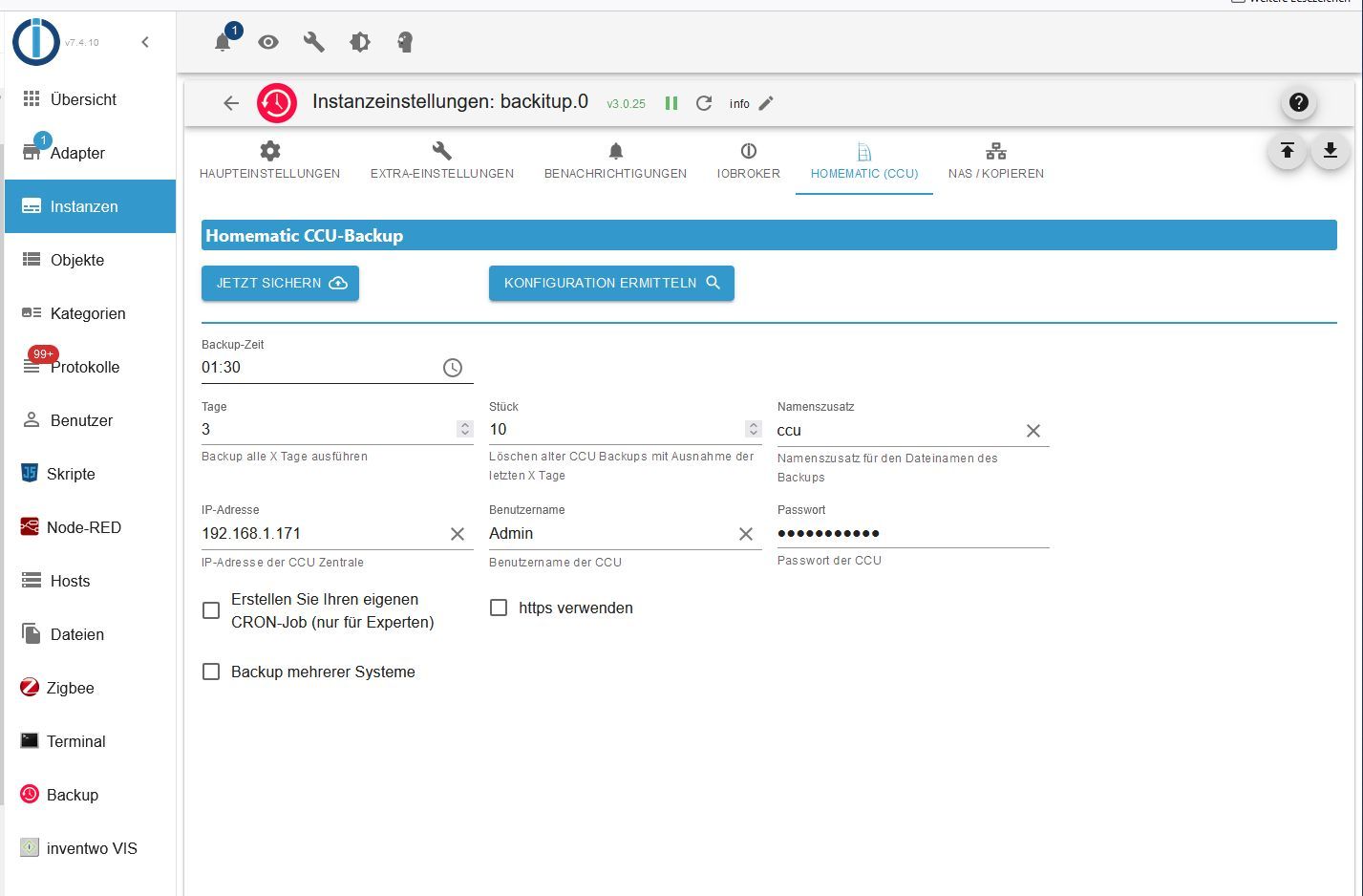
ich vermutete den Fehler bei der Firewall der CCU, hatte da aber keinen Erfolg mit alles öffnen. Das sieht nun wieder so aus
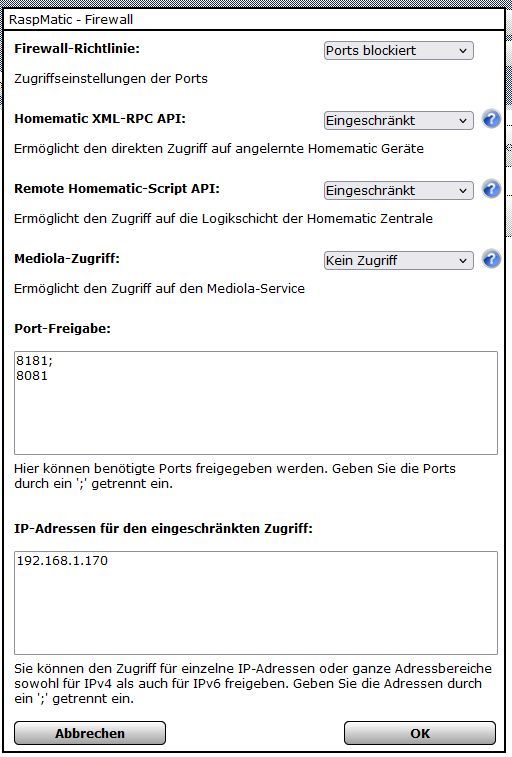
@hafo wenn du mit credentials arbeitest musstcdu meines Wissens nach auch https aktivieren
-
@hafo wenn du mit credentials arbeitest musstcdu meines Wissens nach auch https aktivieren
-
@homoran Ich benötige das Anmeldezeugs eigentlich nicht, das wurde bei der Installation von Homematic gefordert. Aber auch wenn ich https aktiviere hilft das nicht weiter.
@hafo und in den 99+ errors im log steht nichts aussagekräftiges dazu?
auch nicht im debug-log? -
@hafo und in den 99+ errors im log steht nichts aussagekräftiges dazu?
auch nicht im debug-log?@homoran ich bin noch am einrichten und Geräte anlernen, da kommen einige Meldungen zusammen, vor allem weil einige Geräte schon vorhanden sind, aber nicht mehr richtig verknüpft.
Die Log Datei von heute hänge ich aber dennoch hier einmal an. log.txt ich sehe allerdings nichts was auf den Fehler hinweisen könnte, den Neustart des Adapters wird hoffentlich durchs abspeichern der Einstellungen ausgelöst.ich habe gerade hier (https://github.com/simatec/ioBroker.backitup/issues/1143) gesehen dass er die Instanz nur findet wenn sie auf demselben host läuft. ich muss mal schauen ob das backup auch so geht.
-
@homoran ich bin noch am einrichten und Geräte anlernen, da kommen einige Meldungen zusammen, vor allem weil einige Geräte schon vorhanden sind, aber nicht mehr richtig verknüpft.
Die Log Datei von heute hänge ich aber dennoch hier einmal an. log.txt ich sehe allerdings nichts was auf den Fehler hinweisen könnte, den Neustart des Adapters wird hoffentlich durchs abspeichern der Einstellungen ausgelöst.ich habe gerade hier (https://github.com/simatec/ioBroker.backitup/issues/1143) gesehen dass er die Instanz nur findet wenn sie auf demselben host läuft. ich muss mal schauen ob das backup auch so geht.
@hafo sagte in Backitup Fehler (Berechtigungen?):
ich habe gerade hier (https://github.com/simatec/ioBroker.backitup/issues/1143) gesehen dass er die Instanz nur findet wenn sie auf demselben host läuft.
was hast du da verstanden?
Hast du keine hm-rpc Instanz in deiner iob Installation?
wenn doch
Hast du mitvder Firewall da keine Probleme? -
@hafo sagte in Backitup Fehler (Berechtigungen?):
ich habe gerade hier (https://github.com/simatec/ioBroker.backitup/issues/1143) gesehen dass er die Instanz nur findet wenn sie auf demselben host läuft.
was hast du da verstanden?
Hast du keine hm-rpc Instanz in deiner iob Installation?
wenn doch
Hast du mitvder Firewall da keine Probleme? -
@homoran doch, ich habe die rpc und die rega instanz. Da die Geräte unter Objekte aufgetaucht und steuerbar sind, habe ich mich darum noch gar nicht gekümmert. Ich schau mir das einmal an.
@hafo sagte in Backitup Fehler (Berechtigungen?):
doch, ich habe die rpc und die rega instanz.
und was meintest du dann mit
@hafo sagte in Backitup Fehler (Berechtigungen?):
ich habe gerade hier (https://github.com/simatec/ioBroker.backitup/issues/1143) gesehen dass er die Instanz nur findet wenn sie auf demselben host läuft
-
@hafo sagte in Backitup Fehler (Berechtigungen?):
doch, ich habe die rpc und die rega instanz.
und was meintest du dann mit
@hafo sagte in Backitup Fehler (Berechtigungen?):
ich habe gerade hier (https://github.com/simatec/ioBroker.backitup/issues/1143) gesehen dass er die Instanz nur findet wenn sie auf demselben host läuft
-
@homoran ich dachte das bedeutet dass Homematic auf demselben rechner läuft wie iobroker. demnach heisst das was anderes.
Also der Rpc Adapter findet auch kein Gerät...@hafo sagte in Backitup Fehler (Berechtigungen?):
Also der Rpc Adapter findet auch kein Gerät...
wundert mich bei den firewall Einstellungen nicht wirklich.
alle ports geschlossen!
wo soll da was durchkommen -
@hafo sagte in Backitup Fehler (Berechtigungen?):
Also der Rpc Adapter findet auch kein Gerät...
wundert mich bei den firewall Einstellungen nicht wirklich.
alle ports geschlossen!
wo soll da was durchkommen -
@homoran Zumindest die Geräte funktionieren. Aber ich habe auch die Ports 8181,8081 und neu 42001 freigegeben
ich habe nun erfolglos alles geöffnet. Danke für deine Hilfe, ich mache am Wochenende weiter.
@hafo sagte in Backitup Fehler (Berechtigungen?):
Aber ich habe auch die Ports 8181,8081 und neu 42001 freigegeben
wofür 8080 und 8081?
Aber wenn du oben ports blockiert einstellst, kannst du eintragen was du willst.
blockiert ist blockiertkein Support per PN! - Fragen im Forum stellen - Benutzt das Voting rechts unten im Beitrag wenn er euch geholfen hat.
Das Forum freut sich über eine Spende. Benutzt dazu den Spendenbutton oben rechts. Danke!
der Installationsfixer: curl -fsL https://iobroker.net/fix.sh | bash - -
@hafo sagte in Backitup Fehler (Berechtigungen?):
Aber ich habe auch die Ports 8181,8081 und neu 42001 freigegeben
wofür 8080 und 8081?
Aber wenn du oben ports blockiert einstellst, kannst du eintragen was du willst.
blockiert ist blockiert@homoran sagte in Backitup Fehler (Berechtigungen?):
wofür 8080 und 8081?
Das habe ich irgendwo gelesen, finde es gerade nicht mehr
@homoran sagte in Backitup Fehler (Berechtigungen?):
Aber wenn du oben ports blockiert einstellst, kannst du eintragen was du willst.
blockiert ist blockiertIch hatte in der Firewall auch schon alles offen, ohne Erfolg.


Hey! Du scheinst an dieser Unterhaltung interessiert zu sein, hast aber noch kein Konto.
Hast du es satt, bei jedem Besuch durch die gleichen Beiträge zu scrollen? Wenn du dich für ein Konto anmeldest, kommst du immer genau dorthin zurück, wo du zuvor warst, und kannst dich über neue Antworten benachrichtigen lassen (entweder per E-Mail oder Push-Benachrichtigung). Du kannst auch Lesezeichen speichern und Beiträge positiv bewerten, um anderen Community-Mitgliedern deine Wertschätzung zu zeigen.
Mit deinem Input könnte dieser Beitrag noch besser werden 💗
Registrieren Anmelden385
Online33.0k
Benutzer83.7k
Themen1.3m
Beiträge