




Zigbee-Adapter 1.10.3 Lonsonho QS-Zigbee-D02-TRIAC-LN_1
-
Ich habe mehrere 1-Ch-Dimmer vom Typ: QS-Zigbee-D02-TRIAC-LN_1 und bei allen habe ich seit je her das Problem, dass das Stutusupdate für "state" nicht im Objektbaum aktualisiert wird. Die Zigbee-Message ist aber klar:
Taster gedrückt zum einschalten...
{"type":"attributeReport","data":{"onOff":1},"linkquality":183,"groupID":null,"cluster":"genOnOff","meta":{"zclTransactionSequenceNumber":9,"manufacturerCode":null,"frameControl":{"frameType":0,"manufacturerSpecific":false,"direction":1,"disableDefaultResponse":false,"reservedBits":0}},"endpoint_id":1}
Taster erneut gedrückt zum ausschalten...
{"type":"attributeReport","data":{"onOff":0},"linkquality":175,"groupID":null,"cluster":"genOnOff","meta":{"zclTransactionSequenceNumber":10,"manufacturerCode":null,"frameControl":{"frameType":0,"manufacturerSpecific":false,"direction":1,"disableDefaultResponse":false,"reservedBits":0}},"endpoint_id":1}
Die Brightnessänderungen kommen an, State (on/off) leider nicht
- Adaptername: Zigbee
- Adapterversion: 1.10.3
- js-controller Version: 7.0.3
- Admin Version: 7.1.5
- Hardwaresystem: Pi4
- Arbeitsspeicher: 8GB
- Festplattenart: MikroSDHC 32GB SANDISK
- Betriebssystem: RaspiOS
- Nodejs-Version: 18.20.4
- NPM-Version: 10.7.0
- Installationsart: Skript
- Image, Docker genutzt: Nein
iob diag
*** iob diag is starting up, please wait ***
iob diag needs to be updated. Please execute 'iobroker fix' first.
( habe iobroker fix unmittelbar davor jedoch erfolgreich ausgeführt)IOBroker on Raspberry PI4B
js-controller 7.0.3 -
Ich habe mehrere 1-Ch-Dimmer vom Typ: QS-Zigbee-D02-TRIAC-LN_1 und bei allen habe ich seit je her das Problem, dass das Stutusupdate für "state" nicht im Objektbaum aktualisiert wird. Die Zigbee-Message ist aber klar:
Taster gedrückt zum einschalten...
{"type":"attributeReport","data":{"onOff":1},"linkquality":183,"groupID":null,"cluster":"genOnOff","meta":{"zclTransactionSequenceNumber":9,"manufacturerCode":null,"frameControl":{"frameType":0,"manufacturerSpecific":false,"direction":1,"disableDefaultResponse":false,"reservedBits":0}},"endpoint_id":1}
Taster erneut gedrückt zum ausschalten...
{"type":"attributeReport","data":{"onOff":0},"linkquality":175,"groupID":null,"cluster":"genOnOff","meta":{"zclTransactionSequenceNumber":10,"manufacturerCode":null,"frameControl":{"frameType":0,"manufacturerSpecific":false,"direction":1,"disableDefaultResponse":false,"reservedBits":0}},"endpoint_id":1}
Die Brightnessänderungen kommen an, State (on/off) leider nicht
- Adaptername: Zigbee
- Adapterversion: 1.10.3
- js-controller Version: 7.0.3
- Admin Version: 7.1.5
- Hardwaresystem: Pi4
- Arbeitsspeicher: 8GB
- Festplattenart: MikroSDHC 32GB SANDISK
- Betriebssystem: RaspiOS
- Nodejs-Version: 18.20.4
- NPM-Version: 10.7.0
- Installationsart: Skript
- Image, Docker genutzt: Nein
iob diag
*** iob diag is starting up, please wait ***
iob diag needs to be updated. Please execute 'iobroker fix' first.
( habe iobroker fix unmittelbar davor jedoch erfolgreich ausgeführt)@chrischn82 sagte in Zigbee-Adapter 1.10.3 Lonsonho QS-Zigbee-D02-TRIAC-LN_1:
( habe iobroker fix unmittelbar davor jedoch erfolgreich ausgeführt)
Verwende die Raspbian-Version vorübergehend. Muss gefixt werden, ist aber momentan blockiert...
-
@chrischn82 sagte in Zigbee-Adapter 1.10.3 Lonsonho QS-Zigbee-D02-TRIAC-LN_1:
( habe iobroker fix unmittelbar davor jedoch erfolgreich ausgeführt)
Verwende die Raspbian-Version vorübergehend. Muss gefixt werden, ist aber momentan blockiert...
@thomas-braun
Ich verstehe nicht.
Du verwendest die Raspbian-Version oder ich soll die Raspbian-Version verwenden?IOBroker on Raspberry PI4B
js-controller 7.0.3 -
@thomas-braun
Ich verstehe nicht.
Du verwendest die Raspbian-Version oder ich soll die Raspbian-Version verwenden?Beim Raspberry ist im Moment was 'kaputt'
Verwende bitte die Raspbian-Version vorübergehend von hier
-
@thomas-braun
Ich verstehe nicht.
Du verwendest die Raspbian-Version oder ich soll die Raspbian-Version verwenden? -
Beim Raspberry ist im Moment was 'kaputt'
Verwende bitte die Raspbian-Version vorübergehend von hier
```bash
Script v.2024-09-21

*** BASE SYSTEM ***
   Static hostname: raspberrypi
         Icon name: computer
  Operating System: Raspbian GNU/Linux 10 (buster)
            Kernel: Linux 5.10.103-v7l+
      Architecture: arm
OS is similar to: debian

Model           : Raspberry Pi 4 Model B Rev 1.4
Docker          : false
Virtualization  : none
Kernel          : armv7l
Userland        : 32 bit

Systemuptime and Load:
 20:32:30 up  2:22,  4 users,  load average: 0.50, 0.34, 0.30
CPU threads: 4


*** LIFE CYCLE STATUS ***
Debian Release codenamed 'buster' reached its END OF LIFE and needs to be updated to the latest stable release 'bookworm' NOW!

*** RASPBERRY THROTTLING ***
Current issues:
No throttling issues detected.

Previously detected issues:
No throttling issues detected.

*** TIME AND TIMEZONES ***
               Local time: Mon 2024-12-02 20:32:30 CET
           Universal time: Mon 2024-12-02 19:32:30 UTC
                 RTC time: n/a
                Time zone: Europe/Berlin (CET, +0100)
System clock synchronized: yes
              NTP service: inactive
          RTC in local TZ: no

*** Users and Groups ***
User that called 'iob diag':
pi
HOME=/home/pi
GROUPS=pi adm dialout cdrom sudo audio video plugdev games users input netdev lpadmin gpio i2c spi iobroker

User that is running 'js-controller':
iobroker
HOME=/home/iobroker
GROUPS=iobroker tty dialout audio video plugdev bluetooth gpio i2c

*** DISPLAY-SERVER SETUP ***
Display-Server: false
Desktop:
Terminal:       tty

*** MEMORY ***
              total        used        free      shared  buff/cache   available
Mem:           7.9G        1.1G        5.8G         30M        1.0G        6.5G
Swap:           99M          0B         99M
Total:         8.0G        1.1G        5.9G

Active iob-Instances:   15

         7898 M total memory
         1051 M used memory
          575 M active memory
         1282 M inactive memory
         5800 M free memory
          294 M buffer memory
          752 M swap cache
           99 M total swap
            0 M used swap
           99 M free swap

*** top - Table Of Processes  ***
top - 20:32:30 up  2:22,  4 users,  load average: 0.50, 0.34, 0.30
Tasks: 187 total,   1 running, 185 sleeping,   0 stopped,   1 zombie
%Cpu(s):  0.0 us,  4.3 sy,  0.0 ni, 95.7 id,  0.0 wa,  0.0 hi,  0.0 si,  0.0 st
MiB Mem :   7898.7 total,   5800.8 free,   1050.7 used,   1047.2 buff/cache
MiB Swap:    100.0 total,    100.0 free,      0.0 used.   6533.6 avail Mem

*** FAILED SERVICES ***

  UNIT                         LOAD   ACTIVE SUB    DESCRIPTION
* rc-local.service             loaded failed failed /etc/rc.local Compatibility
* systemd-modules-load.service loaded failed failed Load Kernel Modules

LOAD   = Reflects whether the unit definition was properly loaded.
ACTIVE = The high-level unit activation state, i.e. generalization of SUB.
SUB    = The low-level unit activation state, values depend on unit type.

2 loaded units listed. Pass --all to see loaded but inactive units, too.
To show all installed unit files use 'systemctl list-unit-files'.


*** DMESG CRITICAL ERRORS ***
No critical errors detected

*** FILESYSTEM ***
Filesystem     Type      Size  Used Avail Use% Mounted on
/dev/root      ext4       29G   12G   17G  41% /
devtmpfs       devtmpfs  3.7G     0  3.7G   0% /dev
tmpfs          tmpfs     3.9G     0  3.9G   0% /dev/shm
tmpfs          tmpfs     3.9G   17M  3.9G   1% /run
tmpfs          tmpfs     5.0M  4.0K  5.0M   1% /run/lock
tmpfs          tmpfs     3.9G     0  3.9G   0% /sys/fs/cgroup
/dev/mmcblk0p1 vfat      253M   49M  204M  20% /boot
tmpfs          tmpfs     790M  4.0K  790M   1% /run/user/1000

Messages concerning ext4 filesystem in dmesg:
[Mon Dec  2 18:09:31 2024] Kernel command line: coherent_pool=1M 8250.nr_uarts=0 snd_bcm2835.enable_compat_alsa=0 snd_bcm2835.enable_hdmi=1 video=HDMI-A-1:1024x768M@60D smsc95xx.macaddr=DC:A6:32:D7:C3:5F vc_mem.mem_base=0x3ec00000 vc_mem.mem_size=0x40000000  console=ttyS0,115200 console=tty1 root=PARTUUID=1d3550b7-02 rootfstype=ext4 elevator=deadline fsck.repair=yes rootwait quiet splash plymouth.ignore-serial-consoles
[Mon Dec  2 18:09:32 2024] EXT4-fs (mmcblk0p2): mounted filesystem with ordered data mode. Opts: (null)
[Mon Dec  2 18:09:32 2024] VFS: Mounted root (ext4 filesystem) readonly on device 179:2.
[Mon Dec  2 18:09:34 2024] EXT4-fs (mmcblk0p2): re-mounted. Opts: (null)

Show mounted filesystems:
TARGET                SOURCE         FSTYPE          OPTIONS
/                     /dev/mmcblk0p2 ext4            rw,noatime
|-/sys/fs/bpf         none           bpf             rw,nosuid,nodev,noexec,relatime,mode=700
|-/run/user/1000/gvfs gvfsd-fuse     fuse.gvfsd-fuse rw,nosuid,nodev,relatime,user_id=1000,group_id=1000
`-/boot               /dev/mmcblk0p1 vfat            rw,relatime,fmask=0022,dmask=0022,codepage=437,iocharset=ascii,shortname=mixed,errors=remount-ro

Files in neuralgic directories:

/var:
333M    /var/
139M    /var/lib
86M     /var/cache
73M     /var/cache/apt
69M     /var/lib/apt/lists

Archived and active journals take up 16.0M in the file system.

/opt/iobroker/backups:
17M     /opt/iobroker/backups/

/opt/iobroker/iobroker-data:
1.3G    /opt/iobroker/iobroker-data/
783M    /opt/iobroker/iobroker-data/files
617M    /opt/iobroker/iobroker-data/files/javascript.admin
560M    /opt/iobroker/iobroker-data/files/javascript.admin/static
558M    /opt/iobroker/iobroker-data/files/javascript.admin/static/js

The five largest files in iobroker-data are:
35M     /opt/iobroker/iobroker-data/files/devices.admin/static/js/main.24f2bb56.js.map
24M     /opt/iobroker/iobroker-data/files/web.admin/static/js/main.135279a0.js.map
13M     /opt/iobroker/iobroker-data/objects.jsonl
12M     /opt/iobroker/iobroker-data/files/backitup.admin/static/js/main.bd24114f.js
8.7M    /opt/iobroker/iobroker-data/files/javascript.admin/static/js/838.0aa41cb0.chunk.js.map

USB-Devices by-id:
USB-Sticks -  Avoid direct links to /dev/tty* in your adapter setups, please always prefer the links 'by-id':

/dev/serial/by-id/usb-dresden_elektronik_ingenieurtechnik_GmbH_ConBee_II_DE2435915-if00
/dev/serial/by-id/usb-1a86_USB_Serial-if00-port0

Your zigbee.0 COM-Port is matching 'by-id'. Very good!

*** NodeJS-Installation ***

/usr/bin/nodejs         v18.20.4
/usr/bin/node           v18.20.4
/usr/bin/npm            10.7.0
/usr/bin/npx            10.7.0
/usr/bin/corepack       0.28.0

nodejs:
  Installed: 18.20.4-1nodesource1
  Candidate: 18.20.5-1nodesource1
  Version table:
     18.20.5-1nodesource1 1001
        500 https://deb.nodesource.com/node_18.x nodistro/main armhf Packages
 *** 18.20.4-1nodesource1 1001
        500 https://deb.nodesource.com/node_18.x nodistro/main armhf Packages
        100 /var/lib/dpkg/status
     18.20.3-1nodesource1 1001
        500 https://deb.nodesource.com/node_18.x nodistro/main armhf Packages
     18.20.2-1nodesource1 1001
        500 https://deb.nodesource.com/node_18.x nodistro/main armhf Packages
     18.20.1-1nodesource1 1001
        500 https://deb.nodesource.com/node_18.x nodistro/main armhf Packages
     18.20.0-1nodesource1 1001
        500 https://deb.nodesource.com/node_18.x nodistro/main armhf Packages
     18.19.1-1nodesource1 1001
        500 https://deb.nodesource.com/node_18.x nodistro/main armhf Packages
     18.19.0-1nodesource1 1001
        500 https://deb.nodesource.com/node_18.x nodistro/main armhf Packages
     18.18.2-1nodesource1 1001
        500 https://deb.nodesource.com/node_18.x nodistro/main armhf Packages
     18.18.1-1nodesource1 1001
        500 https://deb.nodesource.com/node_18.x nodistro/main armhf Packages
     18.18.0-1nodesource1 1001
        500 https://deb.nodesource.com/node_18.x nodistro/main armhf Packages
     18.17.1-1nodesource1 1001
        500 https://deb.nodesource.com/node_18.x nodistro/main armhf Packages
     18.17.0-1nodesource1 1001
        500 https://deb.nodesource.com/node_18.x nodistro/main armhf Packages
     18.16.1-1nodesource1 1001
        500 https://deb.nodesource.com/node_18.x nodistro/main armhf Packages
     18.16.0-1nodesource1 1001
        500 https://deb.nodesource.com/node_18.x nodistro/main armhf Packages
     18.15.0-1nodesource1 1001
        500 https://deb.nodesource.com/node_18.x nodistro/main armhf Packages
     18.14.2-1nodesource1 1001
        500 https://deb.nodesource.com/node_18.x nodistro/main armhf Packages
     18.14.1-1nodesource1 1001
        500 https://deb.nodesource.com/node_18.x nodistro/main armhf Packages
     18.14.0-1nodesource1 1001
        500 https://deb.nodesource.com/node_18.x nodistro/main armhf Packages
     18.13.0-1nodesource1 1001
        500 https://deb.nodesource.com/node_18.x nodistro/main armhf Packages
     18.12.0-1nodesource1 1001
        500 https://deb.nodesource.com/node_18.x nodistro/main armhf Packages
     18.11.0-1nodesource1 1001
        500 https://deb.nodesource.com/node_18.x nodistro/main armhf Packages
     18.10.0-1nodesource1 1001
        500 https://deb.nodesource.com/node_18.x nodistro/main armhf Packages
     18.9.1-1nodesource1 1001
        500 https://deb.nodesource.com/node_18.x nodistro/main armhf Packages
     18.9.0-1nodesource1 1001
        500 https://deb.nodesource.com/node_18.x nodistro/main armhf Packages
     18.8.0-1nodesource1 1001
        500 https://deb.nodesource.com/node_18.x nodistro/main armhf Packages
     18.7.0-1nodesource1 1001
        500 https://deb.nodesource.com/node_18.x nodistro/main armhf Packages
     18.6.0-1nodesource1 1001
        500 https://deb.nodesource.com/node_18.x nodistro/main armhf Packages
     18.5.0-1nodesource1 1001
        500 https://deb.nodesource.com/node_18.x nodistro/main armhf Packages
     18.4.0-1nodesource1 1001
        500 https://deb.nodesource.com/node_18.x nodistro/main armhf Packages
     18.3.0-1nodesource1 1001
        500 https://deb.nodesource.com/node_18.x nodistro/main armhf Packages
     18.2.0-1nodesource1 1001
        500 https://deb.nodesource.com/node_18.x nodistro/main armhf Packages
     18.1.0-1nodesource1 1001
        500 https://deb.nodesource.com/node_18.x nodistro/main armhf Packages
     18.0.0-1nodesource1 1001
        500 https://deb.nodesource.com/node_18.x nodistro/main armhf Packages
     10.24.0~dfsg-1~deb10u3 500
        500 http://raspbian.raspberrypi.org/raspbian buster/main armhf Packages

Temp directories causing deletion problem: 0
No problems detected

Errors in npm tree: 0
No problems detected

*** ioBroker-Installation ***

ioBroker Status
iobroker is running on this host.


Objects type: jsonl
States  type: jsonl

Hosts:
raspberrypi         raspberrypi (version: 7.0.3, hostname: raspberrypi   , alive, uptime: 6065)

Core adapters versions
js-controller:  7.0.3
admin:          7.1.5
javascript:     8.8.3

nodejs modules from github:     0

Adapter State
+ system.adapter.admin.0                  : admin                 : raspberrypi                              -  enabled, port: 8080, bind: 0.0.0.0, run as: admin
+ system.adapter.alexa2.0                 : alexa2                : raspberrypi                              -  enabled
+ system.adapter.backitup.0               : backitup              : raspberrypi                              -  enabled
+ system.adapter.denon.0                  : denon                 : raspberrypi                              -  enabled
  system.adapter.devices.0                : devices               : raspberrypi                              - disabled
+ system.adapter.discovery.0              : discovery             : raspberrypi                              -  enabled
+ system.adapter.fronius.0                : fronius               : raspberrypi                              -  enabled
+ system.adapter.history.0                : history               : raspberrypi                              -  enabled
+ system.adapter.javascript.0             : javascript            : raspberrypi                              -  enabled
  system.adapter.javascript.1             : javascript            : raspberrypi                              - disabled
+ system.adapter.lovelace.0               : lovelace              : raspberrypi                              -  enabled, port: 8091, bind: 0.0.0.0, run as: admin
+ system.adapter.ping.0                   : ping                  : raspberrypi                              -  enabled
+ system.adapter.pushover.0               : pushover              : raspberrypi                              -  enabled
+ system.adapter.simple-api.0             : simple-api            : raspberrypi                              -  enabled, port: 8087, bind: 0.0.0.0, run as: admin
+ system.adapter.web.0                    : web                   : raspberrypi                              -  enabled, port: 8082, bind: 0.0.0.0, run as: admin
+ system.adapter.zigbee.0                 : zigbee                : raspberrypi                              -  enabled, port: /dev/serial/by-id/usb-dresden_elektronik_ingenieurtechnik_GmbH_ConBee_II_DE2435915-if00

+ instance is alive

Enabled adapters with bindings
+ system.adapter.admin.0                  : admin                 : raspberrypi                              -  enabled, port: 8080, bind: 0.0.0.0, run as: admin
+ system.adapter.lovelace.0               : lovelace              : raspberrypi                              -  enabled, port: 8091, bind: 0.0.0.0, run as: admin
+ system.adapter.simple-api.0             : simple-api            : raspberrypi                              -  enabled, port: 8087, bind: 0.0.0.0, run as: admin
+ system.adapter.web.0                    : web                   : raspberrypi                              -  enabled, port: 8082, bind: 0.0.0.0, run as: admin
+ system.adapter.zigbee.0                 : zigbee                : raspberrypi                              -  enabled, port: /dev/serial/by-id/usb-dresden_elektronik_ingenieurtechnik_GmbH_ConBee_II_DE2435915-if00

ioBroker-Repositories
┌─────────┬──────────┬─────────────────────────────────────────────────────────┬──────────────┐
│ (index) │   name   │                           url                           │ auto upgrade │
├─────────┼──────────┼─────────────────────────────────────────────────────────┼──────────────┤
│    0    │ 'stable' │    'http://download.iobroker.net/sources-dist.json'     │    false     │
│    1    │  'beta'  │ 'http://download.iobroker.net/sources-dist-latest.json' │    false     │
└─────────┴──────────┴─────────────────────────────────────────────────────────┴──────────────┘

Active repo(s): stable
Upgrade policy: none

Installed ioBroker-Instances
Used repository: stable
Adapter    "admin"        : 7.1.5    , installed 7.1.5
Adapter    "alexa2"       : 3.26.5   , installed 3.26.5
Adapter    "backitup"     : 3.0.25   , installed 3.0.25
Adapter    "denon"        : 1.15.12  , installed 1.15.12
Adapter    "devices"      : 1.1.5    , installed 1.1.5
Adapter    "discovery"    : 5.0.0    , installed 5.0.0
Adapter    "fronius"      : 2.1.1    , installed 2.1.1
Adapter    "history"      : 3.0.1    , installed 3.0.1
Adapter    "javascript"   : 8.8.3    , installed 8.8.3
Controller "js-controller": 7.0.3    , installed 7.0.3
Adapter    "lovelace"     : 4.1.10   , installed 4.1.10
Adapter    "net-tools"    : 1.0.11   , installed 1.0.11
Adapter    "ping"         : 1.6.2    , installed 1.6.2
Adapter    "pushover"     : 4.1.0    , installed 4.1.0
Adapter    "pvforecast"   : 3.0.0    , installed 3.0.0
Adapter    "simple-api"   : 2.8.0    , installed 2.8.0
Adapter    "socketio"     : 6.7.1    , installed 6.7.1
Adapter    "systeminfo"   : 1.2.0    , installed 1.2.0
Adapter    "web"          : 6.2.5    , installed 6.2.5
Adapter    "ws"           : 2.6.2    , installed 2.6.2
Adapter    "zigbee"       : 1.10.3   , installed 1.10.3

Objects and States
Please stand by - This may take a while
Objects:        3771
States:         2531

*** OS-Repositories and Updates ***
Hit:1 http://raspbian.raspberrypi.org/raspbian buster InRelease
Hit:2 http://phoscon.de/apt/deconz buster InRelease
Hit:3 http://archive.raspberrypi.org/debian buster InRelease
Hit:4 https://deb.nodesource.com/node_18.x nodistro InRelease
Hit:5 https://dl.yarnpkg.com/debian stable InRelease
Hit:6 https://openhab.jfrog.io/artifactory/openhab-linuxpkg stable InRelease
Reading package lists... Done
Pending Updates: 1

*** Listening Ports ***
Active Internet connections (only servers)
Proto Recv-Q Send-Q Local Address           Foreign Address         State       User       Inode      PID/Program name
tcp        0      0 0.0.0.0:80              0.0.0.0:*               LISTEN      0          22708      543/java
tcp        0      0 0.0.0.0:22              0.0.0.0:*               LISTEN      0          17865      576/sshd
tcp        0      0 127.0.0.1:631           0.0.0.0:*               LISTEN      0          18800      391/cupsd
tcp        0      0 127.0.0.1:9000          0.0.0.0:*               LISTEN      1001       64023      9689/iobroker.js-co
tcp        0      0 127.0.0.1:9001          0.0.0.0:*               LISTEN      1001       65826      9689/iobroker.js-co
tcp        0      0 0.0.0.0:5900            0.0.0.0:*               LISTEN      0          19471      541/vncserver-x11-c
tcp6       0      0 :::8080                 :::*                    LISTEN      1001       65215      9722/io.admin.0
tcp6       0      0 :::8082                 :::*                    LISTEN      1001       64493      10054/io.web.0
tcp6       0      0 :::22                   :::*                    LISTEN      0          17867      576/sshd
tcp6       0      0 :::8087                 :::*                    LISTEN      1001       67671      10030/io.simple-api
tcp6       0      0 :::8091                 :::*                    LISTEN      1001       64460      10006/io.lovelace.0
tcp6       0      0 :::5900                 :::*                    LISTEN      0          19470      541/vncserver-x11-c
udp        0      0 0.0.0.0:68              0.0.0.0:*                           0          22969      459/dhcpcd
udp        0      0 0.0.0.0:631             0.0.0.0:*                           0          17629      458/cups-browsed
udp        0      0 192.168.1.40:123        0.0.0.0:*                           115        21015      575/ntpd
udp        0      0 127.0.0.1:123           0.0.0.0:*                           0          17169      575/ntpd
udp        0      0 0.0.0.0:123             0.0.0.0:*                           0          17165      575/ntpd
udp        0      0 0.0.0.0:5353            0.0.0.0:*                           108        15692      414/avahi-daemon: r
udp        0      0 0.0.0.0:48935           0.0.0.0:*                           108        15694      414/avahi-daemon: r
udp        0      0 0.0.0.0:50000           0.0.0.0:*                           0          19682      543/java
udp        0      0 0.0.0.0:1900            0.0.0.0:*                           0          19916      543/java
udp6       0      0 :::123                  :::*                                0          17162      575/ntpd
udp6       0      0 :::5353                 :::*                                108        15693      414/avahi-daemon: r
udp6       0      0 :::43315                :::*                                108        15695      414/avahi-daemon: r

*** Log File - Last 25 Lines ***
IOBroker on Raspberry PI4B
js-controller 7.0.3 -
@thomas-braun said in Zigbee-Adapter 1.10.3 Lonsonho QS-Zigbee-D02-TRIAC-LN_1:
iob nodejs-update
pi@raspberrypi:~ $ iob nodejs-update
Debian 10 'Buster' has reached End of Life and is not supported anymore.
Recent versions of nodejs won't install.
Please install the current Debian Stable
-
@thomas-braun said in Zigbee-Adapter 1.10.3 Lonsonho QS-Zigbee-D02-TRIAC-LN_1:
iob nodejs-update
pi@raspberrypi:~ $ iob nodejs-update
Debian 10 'Buster' has reached End of Life and is not supported anymore.
Recent versions of nodejs won't install.
Please install the current Debian Stable@chrischn82 should i have to ?
-
Ich habe mehrere 1-Ch-Dimmer vom Typ: QS-Zigbee-D02-TRIAC-LN_1 und bei allen habe ich seit je her das Problem, dass das Stutusupdate für "state" nicht im Objektbaum aktualisiert wird. Die Zigbee-Message ist aber klar:
Taster gedrückt zum einschalten...
{"type":"attributeReport","data":{"onOff":1},"linkquality":183,"groupID":null,"cluster":"genOnOff","meta":{"zclTransactionSequenceNumber":9,"manufacturerCode":null,"frameControl":{"frameType":0,"manufacturerSpecific":false,"direction":1,"disableDefaultResponse":false,"reservedBits":0}},"endpoint_id":1}
Taster erneut gedrückt zum ausschalten...
{"type":"attributeReport","data":{"onOff":0},"linkquality":175,"groupID":null,"cluster":"genOnOff","meta":{"zclTransactionSequenceNumber":10,"manufacturerCode":null,"frameControl":{"frameType":0,"manufacturerSpecific":false,"direction":1,"disableDefaultResponse":false,"reservedBits":0}},"endpoint_id":1}
Die Brightnessänderungen kommen an, State (on/off) leider nicht
- Adaptername: Zigbee
- Adapterversion: 1.10.3
- js-controller Version: 7.0.3
- Admin Version: 7.1.5
- Hardwaresystem: Pi4
- Arbeitsspeicher: 8GB
- Festplattenart: MikroSDHC 32GB SANDISK
- Betriebssystem: RaspiOS
- Nodejs-Version: 18.20.4
- NPM-Version: 10.7.0
- Installationsart: Skript
- Image, Docker genutzt: Nein
iob diag
*** iob diag is starting up, please wait ***
iob diag needs to be updated. Please execute 'iobroker fix' first.
( habe iobroker fix unmittelbar davor jedoch erfolgreich ausgeführt)@chrischn82 sagte in Zigbee-Adapter 1.10.3 Lonsonho QS-Zigbee-D02-TRIAC-LN_1:
Ich habe mehrere 1-Ch-Dimmer vom Typ: QS-Zigbee-D02-TRIAC-LN_1 und bei allen habe ich seit je her das Problem, dass das Stutusupdate für "state" nicht im Objektbaum aktualisiert wird. Die Zigbee-Message ist aber klar:
Taster gedrückt zum einschalten...
{"type":"attributeReport","data":{"onOff":1},"linkquality":183,"groupID":null,"cluster":"genOnOff","meta":{"zclTransactionSequenceNumber":9,"manufacturerCode":null,"frameControl":{"frameType":0,"manufacturerSpecific":false,"direction":1,"disableDefaultResponse":false,"reservedBits":0}},"endpoint_id":1}
Taster erneut gedrückt zum ausschalten...
{"type":"attributeReport","data":{"onOff":0},"linkquality":175,"groupID":null,"cluster":"genOnOff","meta":{"zclTransactionSequenceNumber":10,"manufacturerCode":null,"frameControl":{"frameType":0,"manufacturerSpecific":false,"direction":1,"disableDefaultResponse":false,"reservedBits":0}},"endpoint_id":1}
Die Brightnessänderungen kommen an, State (on/off) leider nicht
Bitte folgende Testen:
- Gerät in die Ausschlussliste eintragen
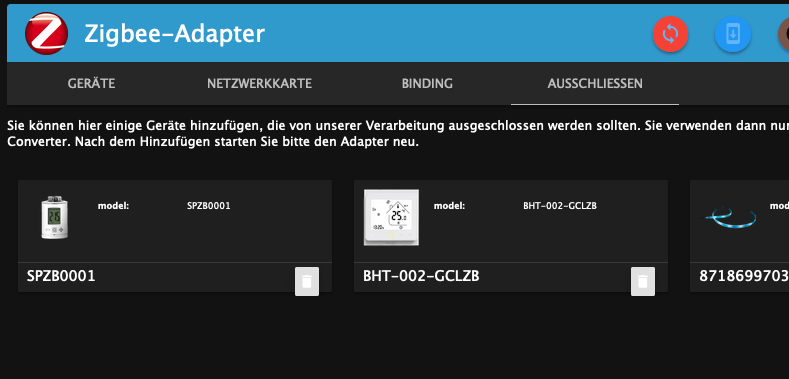
- Adapter neu starten
- State cleanup durchführen - (der rote button mit den runden Pfeilen)
DP anschauen die es dann gibt.
iob diag
*** iob diag is starting up, please wait ***
iob diag needs to be updated. Please execute 'iobroker fix' first.
( habe iobroker fix unmittelbar davor jedoch erfolgreich ausgeführt)Dieses Problem sollte gefixed werden, hat aber wenig bis nichts mit dem Problem der Lonsho Geräte zu tun.
A.
-
```bash Script v.2024-09-21 *** BASE SYSTEM *** Static hostname: raspberrypi Icon name: computer Operating System: Raspbian GNU/Linux 10 (buster) Kernel: Linux 5.10.103-v7l+ Architecture: arm OS is similar to: debian Model : Raspberry Pi 4 Model B Rev 1.4 Docker : false Virtualization : none Kernel : armv7l Userland : 32 bit Systemuptime and Load: 20:32:30 up 2:22, 4 users, load average: 0.50, 0.34, 0.30 CPU threads: 4 *** LIFE CYCLE STATUS *** Debian Release codenamed 'buster' reached its END OF LIFE and needs to be updated to the latest stable release 'bookworm' NOW! *** RASPBERRY THROTTLING *** Current issues: No throttling issues detected. Previously detected issues: No throttling issues detected. *** TIME AND TIMEZONES *** Local time: Mon 2024-12-02 20:32:30 CET Universal time: Mon 2024-12-02 19:32:30 UTC RTC time: n/a Time zone: Europe/Berlin (CET, +0100) System clock synchronized: yes NTP service: inactive RTC in local TZ: no *** Users and Groups *** User that called 'iob diag': pi HOME=/home/pi GROUPS=pi adm dialout cdrom sudo audio video plugdev games users input netdev lpadmin gpio i2c spi iobroker User that is running 'js-controller': iobroker HOME=/home/iobroker GROUPS=iobroker tty dialout audio video plugdev bluetooth gpio i2c *** DISPLAY-SERVER SETUP *** Display-Server: false Desktop: Terminal: tty *** MEMORY *** total used free shared buff/cache available Mem: 7.9G 1.1G 5.8G 30M 1.0G 6.5G Swap: 99M 0B 99M Total: 8.0G 1.1G 5.9G Active iob-Instances: 15 7898 M total memory 1051 M used memory 575 M active memory 1282 M inactive memory 5800 M free memory 294 M buffer memory 752 M swap cache 99 M total swap 0 M used swap 99 M free swap *** top - Table Of Processes *** top - 20:32:30 up 2:22, 4 users, load average: 0.50, 0.34, 0.30 Tasks: 187 total, 1 running, 185 sleeping, 0 stopped, 1 zombie %Cpu(s): 0.0 us, 4.3 sy, 0.0 ni, 95.7 id, 0.0 wa, 0.0 hi, 0.0 si, 0.0 st MiB Mem : 7898.7 total, 5800.8 free, 1050.7 used, 1047.2 buff/cache MiB Swap: 100.0 total, 100.0 free, 0.0 used. 6533.6 avail Mem *** FAILED SERVICES *** UNIT LOAD ACTIVE SUB DESCRIPTION * rc-local.service loaded failed failed /etc/rc.local Compatibility * systemd-modules-load.service loaded failed failed Load Kernel Modules LOAD = Reflects whether the unit definition was properly loaded. ACTIVE = The high-level unit activation state, i.e. generalization of SUB. SUB = The low-level unit activation state, values depend on unit type. 2 loaded units listed. Pass --all to see loaded but inactive units, too. To show all installed unit files use 'systemctl list-unit-files'. *** DMESG CRITICAL ERRORS *** No critical errors detected *** FILESYSTEM *** Filesystem Type Size Used Avail Use% Mounted on /dev/root ext4 29G 12G 17G 41% / devtmpfs devtmpfs 3.7G 0 3.7G 0% /dev tmpfs tmpfs 3.9G 0 3.9G 0% /dev/shm tmpfs tmpfs 3.9G 17M 3.9G 1% /run tmpfs tmpfs 5.0M 4.0K 5.0M 1% /run/lock tmpfs tmpfs 3.9G 0 3.9G 0% /sys/fs/cgroup /dev/mmcblk0p1 vfat 253M 49M 204M 20% /boot tmpfs tmpfs 790M 4.0K 790M 1% /run/user/1000 Messages concerning ext4 filesystem in dmesg: [Mon Dec 2 18:09:31 2024] Kernel command line: coherent_pool=1M 8250.nr_uarts=0 snd_bcm2835.enable_compat_alsa=0 snd_bcm2835.enable_hdmi=1 video=HDMI-A-1:1024x768M@60D smsc95xx.macaddr=DC:A6:32:D7:C3:5F vc_mem.mem_base=0x3ec00000 vc_mem.mem_size=0x40000000 console=ttyS0,115200 console=tty1 root=PARTUUID=1d3550b7-02 rootfstype=ext4 elevator=deadline fsck.repair=yes rootwait quiet splash plymouth.ignore-serial-consoles [Mon Dec 2 18:09:32 2024] EXT4-fs (mmcblk0p2): mounted filesystem with ordered data mode. Opts: (null) [Mon Dec 2 18:09:32 2024] VFS: Mounted root (ext4 filesystem) readonly on device 179:2. [Mon Dec 2 18:09:34 2024] EXT4-fs (mmcblk0p2): re-mounted. Opts: (null) Show mounted filesystems: TARGET SOURCE FSTYPE OPTIONS / /dev/mmcblk0p2 ext4 rw,noatime |-/sys/fs/bpf none bpf rw,nosuid,nodev,noexec,relatime,mode=700 |-/run/user/1000/gvfs gvfsd-fuse fuse.gvfsd-fuse rw,nosuid,nodev,relatime,user_id=1000,group_id=1000 `-/boot /dev/mmcblk0p1 vfat rw,relatime,fmask=0022,dmask=0022,codepage=437,iocharset=ascii,shortname=mixed,errors=remount-ro Files in neuralgic directories: /var: 333M /var/ 139M /var/lib 86M /var/cache 73M /var/cache/apt 69M /var/lib/apt/lists Archived and active journals take up 16.0M in the file system. /opt/iobroker/backups: 17M /opt/iobroker/backups/ /opt/iobroker/iobroker-data: 1.3G /opt/iobroker/iobroker-data/ 783M /opt/iobroker/iobroker-data/files 617M /opt/iobroker/iobroker-data/files/javascript.admin 560M /opt/iobroker/iobroker-data/files/javascript.admin/static 558M /opt/iobroker/iobroker-data/files/javascript.admin/static/js The five largest files in iobroker-data are: 35M /opt/iobroker/iobroker-data/files/devices.admin/static/js/main.24f2bb56.js.map 24M /opt/iobroker/iobroker-data/files/web.admin/static/js/main.135279a0.js.map 13M /opt/iobroker/iobroker-data/objects.jsonl 12M /opt/iobroker/iobroker-data/files/backitup.admin/static/js/main.bd24114f.js 8.7M /opt/iobroker/iobroker-data/files/javascript.admin/static/js/838.0aa41cb0.chunk.js.map USB-Devices by-id: USB-Sticks - Avoid direct links to /dev/tty* in your adapter setups, please always prefer the links 'by-id': /dev/serial/by-id/usb-dresden_elektronik_ingenieurtechnik_GmbH_ConBee_II_DE2435915-if00 /dev/serial/by-id/usb-1a86_USB_Serial-if00-port0 Your zigbee.0 COM-Port is matching 'by-id'. Very good! *** NodeJS-Installation *** /usr/bin/nodejs v18.20.4 /usr/bin/node v18.20.4 /usr/bin/npm 10.7.0 /usr/bin/npx 10.7.0 /usr/bin/corepack 0.28.0 nodejs: Installed: 18.20.4-1nodesource1 Candidate: 18.20.5-1nodesource1 Version table: 18.20.5-1nodesource1 1001 500 https://deb.nodesource.com/node_18.x nodistro/main armhf Packages *** 18.20.4-1nodesource1 1001 500 https://deb.nodesource.com/node_18.x nodistro/main armhf Packages 100 /var/lib/dpkg/status 18.20.3-1nodesource1 1001 500 https://deb.nodesource.com/node_18.x nodistro/main armhf Packages 18.20.2-1nodesource1 1001 500 https://deb.nodesource.com/node_18.x nodistro/main armhf Packages 18.20.1-1nodesource1 1001 500 https://deb.nodesource.com/node_18.x nodistro/main armhf Packages 18.20.0-1nodesource1 1001 500 https://deb.nodesource.com/node_18.x nodistro/main armhf Packages 18.19.1-1nodesource1 1001 500 https://deb.nodesource.com/node_18.x nodistro/main armhf Packages 18.19.0-1nodesource1 1001 500 https://deb.nodesource.com/node_18.x nodistro/main armhf Packages 18.18.2-1nodesource1 1001 500 https://deb.nodesource.com/node_18.x nodistro/main armhf Packages 18.18.1-1nodesource1 1001 500 https://deb.nodesource.com/node_18.x nodistro/main armhf Packages 18.18.0-1nodesource1 1001 500 https://deb.nodesource.com/node_18.x nodistro/main armhf Packages 18.17.1-1nodesource1 1001 500 https://deb.nodesource.com/node_18.x nodistro/main armhf Packages 18.17.0-1nodesource1 1001 500 https://deb.nodesource.com/node_18.x nodistro/main armhf Packages 18.16.1-1nodesource1 1001 500 https://deb.nodesource.com/node_18.x nodistro/main armhf Packages 18.16.0-1nodesource1 1001 500 https://deb.nodesource.com/node_18.x nodistro/main armhf Packages 18.15.0-1nodesource1 1001 500 https://deb.nodesource.com/node_18.x nodistro/main armhf Packages 18.14.2-1nodesource1 1001 500 https://deb.nodesource.com/node_18.x nodistro/main armhf Packages 18.14.1-1nodesource1 1001 500 https://deb.nodesource.com/node_18.x nodistro/main armhf Packages 18.14.0-1nodesource1 1001 500 https://deb.nodesource.com/node_18.x nodistro/main armhf Packages 18.13.0-1nodesource1 1001 500 https://deb.nodesource.com/node_18.x nodistro/main armhf Packages 18.12.0-1nodesource1 1001 500 https://deb.nodesource.com/node_18.x nodistro/main armhf Packages 18.11.0-1nodesource1 1001 500 https://deb.nodesource.com/node_18.x nodistro/main armhf Packages 18.10.0-1nodesource1 1001 500 https://deb.nodesource.com/node_18.x nodistro/main armhf Packages 18.9.1-1nodesource1 1001 500 https://deb.nodesource.com/node_18.x nodistro/main armhf Packages 18.9.0-1nodesource1 1001 500 https://deb.nodesource.com/node_18.x nodistro/main armhf Packages 18.8.0-1nodesource1 1001 500 https://deb.nodesource.com/node_18.x nodistro/main armhf Packages 18.7.0-1nodesource1 1001 500 https://deb.nodesource.com/node_18.x nodistro/main armhf Packages 18.6.0-1nodesource1 1001 500 https://deb.nodesource.com/node_18.x nodistro/main armhf Packages 18.5.0-1nodesource1 1001 500 https://deb.nodesource.com/node_18.x nodistro/main armhf Packages 18.4.0-1nodesource1 1001 500 https://deb.nodesource.com/node_18.x nodistro/main armhf Packages 18.3.0-1nodesource1 1001 500 https://deb.nodesource.com/node_18.x nodistro/main armhf Packages 18.2.0-1nodesource1 1001 500 https://deb.nodesource.com/node_18.x nodistro/main armhf Packages 18.1.0-1nodesource1 1001 500 https://deb.nodesource.com/node_18.x nodistro/main armhf Packages 18.0.0-1nodesource1 1001 500 https://deb.nodesource.com/node_18.x nodistro/main armhf Packages 10.24.0~dfsg-1~deb10u3 500 500 http://raspbian.raspberrypi.org/raspbian buster/main armhf Packages Temp directories causing deletion problem: 0 No problems detected Errors in npm tree: 0 No problems detected *** ioBroker-Installation *** ioBroker Status iobroker is running on this host. Objects type: jsonl States type: jsonl Hosts: raspberrypi raspberrypi (version: 7.0.3, hostname: raspberrypi , alive, uptime: 6065) Core adapters versions js-controller: 7.0.3 admin: 7.1.5 javascript: 8.8.3 nodejs modules from github: 0 Adapter State + system.adapter.admin.0 : admin : raspberrypi - enabled, port: 8080, bind: 0.0.0.0, run as: admin + system.adapter.alexa2.0 : alexa2 : raspberrypi - enabled + system.adapter.backitup.0 : backitup : raspberrypi - enabled + system.adapter.denon.0 : denon : raspberrypi - enabled system.adapter.devices.0 : devices : raspberrypi - disabled + system.adapter.discovery.0 : discovery : raspberrypi - enabled + system.adapter.fronius.0 : fronius : raspberrypi - enabled + system.adapter.history.0 : history : raspberrypi - enabled + system.adapter.javascript.0 : javascript : raspberrypi - enabled system.adapter.javascript.1 : javascript : raspberrypi - disabled + system.adapter.lovelace.0 : lovelace : raspberrypi - enabled, port: 8091, bind: 0.0.0.0, run as: admin + system.adapter.ping.0 : ping : raspberrypi - enabled + system.adapter.pushover.0 : pushover : raspberrypi - enabled + system.adapter.simple-api.0 : simple-api : raspberrypi - enabled, port: 8087, bind: 0.0.0.0, run as: admin + system.adapter.web.0 : web : raspberrypi - enabled, port: 8082, bind: 0.0.0.0, run as: admin + system.adapter.zigbee.0 : zigbee : raspberrypi - enabled, port: /dev/serial/by-id/usb-dresden_elektronik_ingenieurtechnik_GmbH_ConBee_II_DE2435915-if00 + instance is alive Enabled adapters with bindings + system.adapter.admin.0 : admin : raspberrypi - enabled, port: 8080, bind: 0.0.0.0, run as: admin + system.adapter.lovelace.0 : lovelace : raspberrypi - enabled, port: 8091, bind: 0.0.0.0, run as: admin + system.adapter.simple-api.0 : simple-api : raspberrypi - enabled, port: 8087, bind: 0.0.0.0, run as: admin + system.adapter.web.0 : web : raspberrypi - enabled, port: 8082, bind: 0.0.0.0, run as: admin + system.adapter.zigbee.0 : zigbee : raspberrypi - enabled, port: /dev/serial/by-id/usb-dresden_elektronik_ingenieurtechnik_GmbH_ConBee_II_DE2435915-if00 ioBroker-Repositories ┌─────────┬──────────┬─────────────────────────────────────────────────────────┬──────────────┐ │ (index) │ name │ url │ auto upgrade │ ├─────────┼──────────┼─────────────────────────────────────────────────────────┼──────────────┤ │ 0 │ 'stable' │ 'http://download.iobroker.net/sources-dist.json' │ false │ │ 1 │ 'beta' │ 'http://download.iobroker.net/sources-dist-latest.json' │ false │ └─────────┴──────────┴─────────────────────────────────────────────────────────┴──────────────┘ Active repo(s): stable Upgrade policy: none Installed ioBroker-Instances Used repository: stable Adapter "admin" : 7.1.5 , installed 7.1.5 Adapter "alexa2" : 3.26.5 , installed 3.26.5 Adapter "backitup" : 3.0.25 , installed 3.0.25 Adapter "denon" : 1.15.12 , installed 1.15.12 Adapter "devices" : 1.1.5 , installed 1.1.5 Adapter "discovery" : 5.0.0 , installed 5.0.0 Adapter "fronius" : 2.1.1 , installed 2.1.1 Adapter "history" : 3.0.1 , installed 3.0.1 Adapter "javascript" : 8.8.3 , installed 8.8.3 Controller "js-controller": 7.0.3 , installed 7.0.3 Adapter "lovelace" : 4.1.10 , installed 4.1.10 Adapter "net-tools" : 1.0.11 , installed 1.0.11 Adapter "ping" : 1.6.2 , installed 1.6.2 Adapter "pushover" : 4.1.0 , installed 4.1.0 Adapter "pvforecast" : 3.0.0 , installed 3.0.0 Adapter "simple-api" : 2.8.0 , installed 2.8.0 Adapter "socketio" : 6.7.1 , installed 6.7.1 Adapter "systeminfo" : 1.2.0 , installed 1.2.0 Adapter "web" : 6.2.5 , installed 6.2.5 Adapter "ws" : 2.6.2 , installed 2.6.2 Adapter "zigbee" : 1.10.3 , installed 1.10.3 Objects and States Please stand by - This may take a while Objects: 3771 States: 2531 *** OS-Repositories and Updates *** Hit:1 http://raspbian.raspberrypi.org/raspbian buster InRelease Hit:2 http://phoscon.de/apt/deconz buster InRelease Hit:3 http://archive.raspberrypi.org/debian buster InRelease Hit:4 https://deb.nodesource.com/node_18.x nodistro InRelease Hit:5 https://dl.yarnpkg.com/debian stable InRelease Hit:6 https://openhab.jfrog.io/artifactory/openhab-linuxpkg stable InRelease Reading package lists... Done Pending Updates: 1 *** Listening Ports *** Active Internet connections (only servers) Proto Recv-Q Send-Q Local Address Foreign Address State User Inode PID/Program name tcp 0 0 0.0.0.0:80 0.0.0.0:* LISTEN 0 22708 543/java tcp 0 0 0.0.0.0:22 0.0.0.0:* LISTEN 0 17865 576/sshd tcp 0 0 127.0.0.1:631 0.0.0.0:* LISTEN 0 18800 391/cupsd tcp 0 0 127.0.0.1:9000 0.0.0.0:* LISTEN 1001 64023 9689/iobroker.js-co tcp 0 0 127.0.0.1:9001 0.0.0.0:* LISTEN 1001 65826 9689/iobroker.js-co tcp 0 0 0.0.0.0:5900 0.0.0.0:* LISTEN 0 19471 541/vncserver-x11-c tcp6 0 0 :::8080 :::* LISTEN 1001 65215 9722/io.admin.0 tcp6 0 0 :::8082 :::* LISTEN 1001 64493 10054/io.web.0 tcp6 0 0 :::22 :::* LISTEN 0 17867 576/sshd tcp6 0 0 :::8087 :::* LISTEN 1001 67671 10030/io.simple-api tcp6 0 0 :::8091 :::* LISTEN 1001 64460 10006/io.lovelace.0 tcp6 0 0 :::5900 :::* LISTEN 0 19470 541/vncserver-x11-c udp 0 0 0.0.0.0:68 0.0.0.0:* 0 22969 459/dhcpcd udp 0 0 0.0.0.0:631 0.0.0.0:* 0 17629 458/cups-browsed udp 0 0 192.168.1.40:123 0.0.0.0:* 115 21015 575/ntpd udp 0 0 127.0.0.1:123 0.0.0.0:* 0 17169 575/ntpd udp 0 0 0.0.0.0:123 0.0.0.0:* 0 17165 575/ntpd udp 0 0 0.0.0.0:5353 0.0.0.0:* 108 15692 414/avahi-daemon: r udp 0 0 0.0.0.0:48935 0.0.0.0:* 108 15694 414/avahi-daemon: r udp 0 0 0.0.0.0:50000 0.0.0.0:* 0 19682 543/java udp 0 0 0.0.0.0:1900 0.0.0.0:* 0 19916 543/java udp6 0 0 :::123 :::* 0 17162 575/ntpd udp6 0 0 :::5353 :::* 108 15693 414/avahi-daemon: r udp6 0 0 :::43315 :::* 108 15695 414/avahi-daemon: r *** Log File - Last 25 Lines ***@chrischn82 sagte in Zigbee-Adapter 1.10.3 Lonsonho QS-Zigbee-D02-TRIAC-LN_1:
buster
Tot... Und zwar schon geraume Zeit.
Installier da NEU das aktuelle RspberryOS 12 (in der 64Bit-Lite-Version). -
@chrischn82 sagte in Zigbee-Adapter 1.10.3 Lonsonho QS-Zigbee-D02-TRIAC-LN_1:
buster
Tot... Und zwar schon geraume Zeit.
Installier da NEU das aktuelle RspberryOS 12 (in der 64Bit-Lite-Version).@thomas-braun sagte in Zigbee-Adapter 1.10.3 Lonsonho QS-Zigbee-D02-TRIAC-LN_1:
@chrischn82 sagte in Zigbee-Adapter 1.10.3 Lonsonho QS-Zigbee-D02-TRIAC-LN_1:
buster
Tot... Und zwar schon geraume Zeit.
Installier da NEU das aktuelle RspberryOS 12 (in der 64Bit-Lite-Version).Auch hier gilt - das ist etwas welches gefixed werden sollte - hat aber mit dem Zigbee Problem nichts zu tun. @chrischn82 : Wenn Du diesen Weg gehst solltest du das erst einmal komplett durch gehen, und danach einen neuen Thread wegen des Zigbee-Problems aufmachen.
A.
ioBroker auf RPi4 - Hardware soweit wie möglich via Zigbee.
"Shit don't work" ist keine Fehlermeldung, sondern ein Fluch. -
@chrischn82 sagte in Zigbee-Adapter 1.10.3 Lonsonho QS-Zigbee-D02-TRIAC-LN_1:
Ich habe mehrere 1-Ch-Dimmer vom Typ: QS-Zigbee-D02-TRIAC-LN_1 und bei allen habe ich seit je her das Problem, dass das Stutusupdate für "state" nicht im Objektbaum aktualisiert wird. Die Zigbee-Message ist aber klar:
Taster gedrückt zum einschalten...
{"type":"attributeReport","data":{"onOff":1},"linkquality":183,"groupID":null,"cluster":"genOnOff","meta":{"zclTransactionSequenceNumber":9,"manufacturerCode":null,"frameControl":{"frameType":0,"manufacturerSpecific":false,"direction":1,"disableDefaultResponse":false,"reservedBits":0}},"endpoint_id":1}
Taster erneut gedrückt zum ausschalten...
{"type":"attributeReport","data":{"onOff":0},"linkquality":175,"groupID":null,"cluster":"genOnOff","meta":{"zclTransactionSequenceNumber":10,"manufacturerCode":null,"frameControl":{"frameType":0,"manufacturerSpecific":false,"direction":1,"disableDefaultResponse":false,"reservedBits":0}},"endpoint_id":1}
Die Brightnessänderungen kommen an, State (on/off) leider nicht
Bitte folgende Testen:
- Gerät in die Ausschlussliste eintragen
- Adapter neu starten
- State cleanup durchführen - (der rote button mit den runden Pfeilen)
DP anschauen die es dann gibt.
iob diag
*** iob diag is starting up, please wait ***
iob diag needs to be updated. Please execute 'iobroker fix' first.
( habe iobroker fix unmittelbar davor jedoch erfolgreich ausgeführt)Dieses Problem sollte gefixed werden, hat aber wenig bis nichts mit dem Problem der Lonsho Geräte zu tun.
A.
@asgothian okay danke, das werde ich morgen durchgehen. Und sonst ggfs. System neu installieren #horrorvorstellung
IOBroker on Raspberry PI4B
js-controller 7.0.3 - Gerät in die Ausschlussliste eintragen
-
@thomas-braun sagte in Zigbee-Adapter 1.10.3 Lonsonho QS-Zigbee-D02-TRIAC-LN_1:
@chrischn82 sagte in Zigbee-Adapter 1.10.3 Lonsonho QS-Zigbee-D02-TRIAC-LN_1:
buster
Tot... Und zwar schon geraume Zeit.
Installier da NEU das aktuelle RspberryOS 12 (in der 64Bit-Lite-Version).Auch hier gilt - das ist etwas welches gefixed werden sollte - hat aber mit dem Zigbee Problem nichts zu tun. @chrischn82 : Wenn Du diesen Weg gehst solltest du das erst einmal komplett durch gehen, und danach einen neuen Thread wegen des Zigbee-Problems aufmachen.
A.
@asgothian sagte in Zigbee-Adapter 1.10.3 Lonsonho QS-Zigbee-D02-TRIAC-LN_1:
Auch hier gilt - das ist etwas welches gefixed werden sollte - hat aber mit dem Zigbee Problem nichts zu tun.
Das hab ich auch nicht behauptet.
Aber es ist nur sinnvoll, sich mit einer noch unterstützten Distribution zu beschäftigen.
Buster ist aber seit 814 Tagen abgekündigt. Zeit das Ding zu beerdigen, das wird nicht wieder lebendiger. -
@asgothian okay danke, das werde ich morgen durchgehen. Und sonst ggfs. System neu installieren #horrorvorstellung
@chrischn82 sagte in Zigbee-Adapter 1.10.3 Lonsonho QS-Zigbee-D02-TRIAC-LN_1:
#horrorvorstellung
nope
#happyafter1hour -
@chrischn82 sagte in Zigbee-Adapter 1.10.3 Lonsonho QS-Zigbee-D02-TRIAC-LN_1:
#horrorvorstellung
nope
#happyafter1hour@homoran
ich habe ewig viele Zigbeegeräte , skripte und Ha-bridge draufaber unterm Strich wirst du Recht haben..
IOBroker on Raspberry PI4B
js-controller 7.0.3 -
@homoran
ich habe ewig viele Zigbeegeräte , skripte und Ha-bridge draufaber unterm Strich wirst du Recht haben..
@chrischn82 sagte in Zigbee-Adapter 1.10.3 Lonsonho QS-Zigbee-D02-TRIAC-LN_1:
ich habe ewig viele Zigbeegeräte , skripte und Ha-bridge drauf
Und ein Backup, welches man dann wieder einspielt.
-
@homoran
ich habe ewig viele Zigbeegeräte , skripte und Ha-bridge draufaber unterm Strich wirst du Recht haben..
@chrischn82 sagte in Zigbee-Adapter 1.10.3 Lonsonho QS-Zigbee-D02-TRIAC-LN_1:
@homoran
ich habe ewig viele Zigbeegeräte , skripte und Ha-bridge draufund kein Backup davon?
-
@asgothian sagte in Zigbee-Adapter 1.10.3 Lonsonho QS-Zigbee-D02-TRIAC-LN_1:
Auch hier gilt - das ist etwas welches gefixed werden sollte - hat aber mit dem Zigbee Problem nichts zu tun.
Das hab ich auch nicht behauptet.
Aber es ist nur sinnvoll, sich mit einer noch unterstützten Distribution zu beschäftigen.
Buster ist aber seit 814 Tagen abgekündigt. Zeit das Ding zu beerdigen, das wird nicht wieder lebendiger.@thomas-braun sagte in Zigbee-Adapter 1.10.3 Lonsonho QS-Zigbee-D02-TRIAC-LN_1:
Das hab ich auch nicht behauptet.
Aber es ist nur sinnvoll, sich mit einer noch unterstützten Distribution zu beschäftigen.
Buster ist aber seit 814 Tagen abgekündigt. Zeit das Ding zu beerdigen, das wird nicht wieder lebendiger.Ist mir klar. Ich wollte nur zum OP klarstellen das es keinen Sinn macht beides parallel zu machen. Entweder Umzug auf RaspberryOS12 und dann das Zigbee Problem angehen oder umgekehrt.
Das der Umzug sinnvoll ist steht da überhaupt nicht zur Debatte - das ist so.
ioBroker auf RPi4 - Hardware soweit wie möglich via Zigbee.
"Shit don't work" ist keine Fehlermeldung, sondern ein Fluch. -
@thomas-braun sagte in Zigbee-Adapter 1.10.3 Lonsonho QS-Zigbee-D02-TRIAC-LN_1:
Das hab ich auch nicht behauptet.
Aber es ist nur sinnvoll, sich mit einer noch unterstützten Distribution zu beschäftigen.
Buster ist aber seit 814 Tagen abgekündigt. Zeit das Ding zu beerdigen, das wird nicht wieder lebendiger.Ist mir klar. Ich wollte nur zum OP klarstellen das es keinen Sinn macht beides parallel zu machen. Entweder Umzug auf RaspberryOS12 und dann das Zigbee Problem angehen oder umgekehrt.
Das der Umzug sinnvoll ist steht da überhaupt nicht zur Debatte - das ist so.
Das baut sich ja von 'unten nach oben' auf. Zuerst mal muss das Fundament stehen, dann kannst du an den Ausbau der Zimmer gehen.
-
@chrischn82 sagte in Zigbee-Adapter 1.10.3 Lonsonho QS-Zigbee-D02-TRIAC-LN_1:
buster
Tot... Und zwar schon geraume Zeit.
Installier da NEU das aktuelle RspberryOS 12 (in der 64Bit-Lite-Version).habe jetzt das neueste PIOS, iobroker per Skript neu und backup rein.
An dem Problem hat sicht nichts geändert. Ein Bug im Converter oder wo mag das herkommen?IOBroker on Raspberry PI4B
js-controller 7.0.3


Hey! Du scheinst an dieser Unterhaltung interessiert zu sein, hast aber noch kein Konto.
Hast du es satt, bei jedem Besuch durch die gleichen Beiträge zu scrollen? Wenn du dich für ein Konto anmeldest, kommst du immer genau dorthin zurück, wo du zuvor warst, und kannst dich über neue Antworten benachrichtigen lassen (entweder per E-Mail oder Push-Benachrichtigung). Du kannst auch Lesezeichen speichern und Beiträge positiv bewerten, um anderen Community-Mitgliedern deine Wertschätzung zu zeigen.
Mit deinem Input könnte dieser Beitrag noch besser werden 💗
Registrieren AnmeldenSupport us
301
Online33.0k
Benutzer83.6k
Themen1.3m
Beiträge