




Backitup Error
-
Und was ist jetzt konkret dein Thema?
-
@thomas-braun Gleiches Problem wie der Threadersteller: nodejs upgedatet, Backup läuft nicht mehr mit o.g. Fehlermeldung.
-
@thomas-braun Ah, hab's schon kapiert. Man muss das machen, um es zu fixen: Beitrag von dir von weiter oben
Danke für den Denkanstoss... -
@thomas-braun
Hab's jetzt interessehalber doch mal laufen lassen:========== Start marking the full check here =========== ```bash Script v.2024-10-19 *** BASE SYSTEM *** Failed to query system properties: Connection timed out OS is similar to: model name : Intel(R) Core(TM) i5-7500T CPU @ 2.70GHz Docker : false Virtualization : lxc Kernel : x86_64 Userland : 64 bit Systemuptime and Load: 16:36:28 up 16 days, 22:35, 0 user, load average: 0.61, 0.31, 0.16 CPU threads: 1 *** LIFE CYCLE STATUS *** Operating System is the current Debian stable version codenamed 'bookworm'! *** TIME AND TIMEZONES *** Failed to query server: Failed to activate service 'org.freedesktop.timedate1': timed out (service_start_timeout=25000ms) Failed to parse bus message: Connection timed out Failed to parse bus message: Connection timed out *** Users and Groups *** User that called 'iob diag': iobrokeradmin HOME=/home/iobrokeradmin GROUPS=iobrokeradmin sudo users iobroker User that is running 'js-controller': iobroker HOME=/home/iobroker GROUPS=iobroker tty dialout audio video plugdev *** DISPLAY-SERVER SETUP *** Display-Server: false Desktop: Terminal: System is booting into 'graphical.target'. Usually a server is running in 'multi-user.target'. Please set BootTarget to 'multi-user.target' or run 'iobroker fix' *** MEMORY *** total used free shared buff/cache available Mem: 2.1G 905M 411M 61K 830M 1.2G Swap: 536M 49K 536M Total: 2.7G 905M 948M Active iob-Instances: 6 2048 M total memory 863 M used memory 881 M active memory 652 M inactive memory 392 M free memory 0 M buffer memory 792 M swap cache 512 M total swap 0 M used swap 511 M free swap *** top - Table Of Processes *** top - 16:37:43 up 16 days, 22:36, 0 user, load average: 0.58, 0.36, 0.19 Tasks: 36 total, 1 running, 35 sleeping, 0 stopped, 0 zombie %Cpu(s): 0.0 us, 0.0 sy, 0.0 ni,100.0 id, 0.0 wa, 0.0 hi, 0.0 si, 0.0 st MiB Mem : 2048.0 total, 390.3 free, 865.0 used, 792.7 buff/cache MiB Swap: 512.0 total, 512.0 free, 0.0 used. 1183.0 avail Mem *** FAILED SERVICES *** UNIT LOAD ACTIVE SUB DESCRIPTION * influxdb.service loaded failed failed InfluxDB is an open-source, distributed, time series database * logrotate.service loaded failed failed Rotate log files * man-db.service loaded failed failed Daily man-db regeneration * nftables.service loaded failed failed nftables * systemd-hostnamed.service loaded failed failed Hostname Service * systemd-logind.service loaded failed failed User Login Management * systemd-networkd.service loaded failed failed Network Configuration * systemd-sysctl.service loaded failed failed Apply Kernel Variables * systemd-sysusers.service loaded failed failed Create System Users * systemd-timedated.service loaded failed failed Time & Date Service * systemd-tmpfiles-clean.service loaded failed failed Cleanup of Temporary Directories * systemd-tmpfiles-setup-dev.service loaded failed failed Create Static Device Nodes in /dev * systemd-tmpfiles-setup.service loaded failed failed Create Volatile Files and Directories * systemd-networkd.socket loaded failed failed Network Service Netlink Socket LOAD = Reflects whether the unit definition was properly loaded. ACTIVE = The high-level unit activation state, i.e. generalization of SUB. SUB = The low-level unit activation state, values depend on unit type. 14 loaded units listed. *** DMESG CRITICAL ERRORS *** No critical errors detected *** FILESYSTEM *** Filesystem Type Size Used Avail Use% Mounted on /dev/mapper/pve-vm--102--disk--0 ext4 7.8G 4.6G 2.8G 63% / none tmpfs 492K 4.0K 488K 1% /dev tmpfs tmpfs 5.8G 0 5.8G 0% /dev/shm tmpfs tmpfs 2.4G 80K 2.4G 1% /run tmpfs tmpfs 5.0M 0 5.0M 0% /run/lock Messages concerning ext4 filesystem in dmesg: [Thu Oct 24 18:58:08 2024] EXT4-fs (dm-1): mounted filesystem b474fcca-8614-4935-abf2-ede52e720980 ro with ordered data mode. Quota mode: none. [Thu Oct 24 18:58:13 2024] EXT4-fs (dm-1): re-mounted b474fcca-8614-4935-abf2-ede52e720980 r/w. Quota mode: none. [Thu Oct 24 18:58:38 2024] EXT4-fs warning (device dm-9): ext4_multi_mount_protect:328: MMP interval 42 higher than expected, please wait. [Thu Oct 24 18:59:23 2024] EXT4-fs (dm-9): 2 orphan inodes deleted [Thu Oct 24 18:59:23 2024] EXT4-fs (dm-9): recovery complete [Thu Oct 24 18:59:23 2024] EXT4-fs (dm-9): mounted filesystem 729e62f2-e3df-4c83-b6f9-7c0df692d94d r/w with ordered data mode. Quota mode: none. [Thu Oct 24 18:59:34 2024] EXT4-fs warning (device dm-6): ext4_multi_mount_protect:328: MMP interval 42 higher than expected, please wait. [Thu Oct 24 18:59:34 2024] EXT4-fs (dm-9): unmounting filesystem 729e62f2-e3df-4c83-b6f9-7c0df692d94d. [Thu Oct 24 19:00:20 2024] EXT4-fs (dm-6): 67 orphan inodes deleted [Thu Oct 24 19:00:20 2024] EXT4-fs (dm-6): recovery complete [Thu Oct 24 19:00:20 2024] EXT4-fs (dm-6): mounted filesystem 2a77a66a-4a65-4c74-8799-6529f6aaa336 r/w with ordered data mode. Quota mode: none. [Thu Oct 24 19:00:23 2024] EXT4-fs warning (device dm-7): ext4_multi_mount_protect:328: MMP interval 42 higher than expected, please wait. [Thu Oct 24 19:01:07 2024] EXT4-fs (dm-7): 5 orphan inodes deleted [Thu Oct 24 19:01:07 2024] EXT4-fs (dm-7): recovery complete [Thu Oct 24 19:01:07 2024] EXT4-fs (dm-7): mounted filesystem ec249153-85f6-426f-b869-e8f68e6afc8c r/w with ordered data mode. Quota mode: none. [Thu Oct 24 19:11:16 2024] EXT4-fs (dm-9): mounted filesystem 729e62f2-e3df-4c83-b6f9-7c0df692d94d r/w with ordered data mode. Quota mode: none. [Thu Oct 24 19:11:52 2024] EXT4-fs (dm-9): unmounting filesystem 729e62f2-e3df-4c83-b6f9-7c0df692d94d. [Thu Oct 24 19:11:53 2024] EXT4-fs (dm-9): mounted filesystem 729e62f2-e3df-4c83-b6f9-7c0df692d94d r/w with ordered data mode. Quota mode: none. [Mon Nov 4 03:00:02 2024] EXT4-fs (dm-10): write access unavailable, skipping orphan cleanup [Mon Nov 4 03:00:02 2024] EXT4-fs (dm-10): mounted filesystem 729e62f2-e3df-4c83-b6f9-7c0df692d94d ro without journal. Quota mode: none. [Mon Nov 4 03:01:18 2024] EXT4-fs (dm-10): unmounting filesystem 729e62f2-e3df-4c83-b6f9-7c0df692d94d. [Mon Nov 4 03:01:19 2024] EXT4-fs (dm-10): write access unavailable, skipping orphan cleanup [Mon Nov 4 03:01:19 2024] EXT4-fs (dm-10): mounted filesystem 2a77a66a-4a65-4c74-8799-6529f6aaa336 ro without journal. Quota mode: none. [Mon Nov 4 03:03:42 2024] EXT4-fs (dm-10): unmounting filesystem 2a77a66a-4a65-4c74-8799-6529f6aaa336. [Mon Nov 4 03:03:43 2024] EXT4-fs (dm-10): write access unavailable, skipping orphan cleanup [Mon Nov 4 03:03:43 2024] EXT4-fs (dm-10): mounted filesystem ec249153-85f6-426f-b869-e8f68e6afc8c ro without journal. Quota mode: none. [Mon Nov 4 03:09:55 2024] EXT4-fs (dm-10): unmounting filesystem ec249153-85f6-426f-b869-e8f68e6afc8c. Show mounted filesystems: TARGET SOURCE FSTYPE OPTIONS / /dev/mapper/pve-vm--102--disk--0 ext4 rw,relatime,stripe=16 Files in neuralgic directories: /var: 625M /var/ 330M /var/cache 326M /var/cache/apt 250M /var/cache/apt/archives 149M /var/log Hint: You are currently not seeing messages from other users and the system. Users in the 'systemd-journal' group can see all messages. Pass -q to turn off this notice. Archived and active journals take up 21.8M in the file system. /opt/iobroker/backups: 5.5M /opt/iobroker/backups/ 4.0K /opt/iobroker/backups/influxDB_2024_04_15-11_04_32_Proxmox102_backupiobroker /opt/iobroker/iobroker-data: 803M /opt/iobroker/iobroker-data/ 741M /opt/iobroker/iobroker-data/files 617M /opt/iobroker/iobroker-data/files/javascript.admin 560M /opt/iobroker/iobroker-data/files/javascript.admin/static 558M /opt/iobroker/iobroker-data/files/javascript.admin/static/js The five largest files in iobroker-data are: 24M /opt/iobroker/iobroker-data/files/web.admin/static/js/main.135279a0.js.map 12M /opt/iobroker/iobroker-data/objects.jsonl 12M /opt/iobroker/iobroker-data/files/backitup.admin/static/js/main.bd24114f.js 8.7M /opt/iobroker/iobroker-data/files/javascript.admin/static/js/838.0aa41cb0.chunk.js.map 8.6M /opt/iobroker/iobroker-data/files/javascript.admin/static/js/310.89a60ae1.chunk.js.map USB-Devices by-id: USB-Sticks - Avoid direct links to /dev/tty* in your adapter setups, please always prefer the links 'by-id': No Devices found 'by-id' *** NodeJS-Installation *** /usr/bin/nodejs v20.15.1 /usr/bin/node v20.15.1 /usr/bin/npm 10.7.0 /usr/bin/npx 10.7.0 /usr/bin/corepack 0.28.1 nodejs: Installed: 20.15.1-1nodesource1 Candidate: 20.18.0-1nodesource1 Version table: 20.18.0-1nodesource1 1001 500 https://deb.nodesource.com/node_20.x nodistro/main amd64 Packages 20.17.0-1nodesource1 1001 500 https://deb.nodesource.com/node_20.x nodistro/main amd64 Packages 20.16.0-1nodesource1 1001 500 https://deb.nodesource.com/node_20.x nodistro/main amd64 Packages *** 20.15.1-1nodesource1 1001 500 https://deb.nodesource.com/node_20.x nodistro/main amd64 Packages 100 /var/lib/dpkg/status 20.15.0-1nodesource1 1001 500 https://deb.nodesource.com/node_20.x nodistro/main amd64 Packages 20.14.0-1nodesource1 1001 500 https://deb.nodesource.com/node_20.x nodistro/main amd64 Packages 20.13.1-1nodesource1 1001 500 https://deb.nodesource.com/node_20.x nodistro/main amd64 Packages 20.13.0-1nodesource1 1001 500 https://deb.nodesource.com/node_20.x nodistro/main amd64 Packages 20.12.2-1nodesource1 1001 500 https://deb.nodesource.com/node_20.x nodistro/main amd64 Packages 20.12.1-1nodesource1 1001 500 https://deb.nodesource.com/node_20.x nodistro/main amd64 Packages 20.12.0-1nodesource1 1001 500 https://deb.nodesource.com/node_20.x nodistro/main amd64 Packages 20.11.1-1nodesource1 1001 500 https://deb.nodesource.com/node_20.x nodistro/main amd64 Packages 20.11.0-1nodesource1 1001 500 https://deb.nodesource.com/node_20.x nodistro/main amd64 Packages 20.10.0-1nodesource1 1001 500 https://deb.nodesource.com/node_20.x nodistro/main amd64 Packages 20.9.0-1nodesource1 1001 500 https://deb.nodesource.com/node_20.x nodistro/main amd64 Packages 20.8.1-1nodesource1 1001 500 https://deb.nodesource.com/node_20.x nodistro/main amd64 Packages 20.8.0-1nodesource1 1001 500 https://deb.nodesource.com/node_20.x nodistro/main amd64 Packages 20.7.0-1nodesource1 1001 500 https://deb.nodesource.com/node_20.x nodistro/main amd64 Packages 20.6.1-1nodesource1 1001 500 https://deb.nodesource.com/node_20.x nodistro/main amd64 Packages 20.6.0-1nodesource1 1001 500 https://deb.nodesource.com/node_20.x nodistro/main amd64 Packages 20.5.1-1nodesource1 1001 500 https://deb.nodesource.com/node_20.x nodistro/main amd64 Packages 20.5.0-1nodesource1 1001 500 https://deb.nodesource.com/node_20.x nodistro/main amd64 Packages 20.4.0-1nodesource1 1001 500 https://deb.nodesource.com/node_20.x nodistro/main amd64 Packages 20.3.1-1nodesource1 1001 500 https://deb.nodesource.com/node_20.x nodistro/main amd64 Packages 20.3.0-1nodesource1 1001 500 https://deb.nodesource.com/node_20.x nodistro/main amd64 Packages 20.2.0-1nodesource1 1001 500 https://deb.nodesource.com/node_20.x nodistro/main amd64 Packages 20.1.0-1nodesource1 1001 500 https://deb.nodesource.com/node_20.x nodistro/main amd64 Packages 20.0.0-1nodesource1 1001 500 https://deb.nodesource.com/node_20.x nodistro/main amd64 Packages 18.19.0+dfsg-6~deb12u2 500 500 http://deb.debian.org/debian bookworm/main amd64 Packages 18.19.0+dfsg-6~deb12u1 500 500 http://security.debian.org bookworm-security/main amd64 Packages Temp directories causing deletion problem: 0 No problems detected Errors in npm tree: 0 No problems detected *** ioBroker-Installation *** ioBroker Status iobroker is running on this host. Objects type: jsonl States type: jsonl Hosts: ioBroker8 ioBroker8 (version: 6.0.11, hostname: ioBroker8 , alive, uptime: 136) Core adapters versions js-controller: 6.0.11 admin: 7.1.5 javascript: 8.8.3 nodejs modules from github: 0 Adapter State + system.adapter.admin.0 : admin : ioBroker8 - enabled, port: 8081, bind: 0.0.0.0, run as: admin system.adapter.backitup.0 : backitup : ioBroker8 - enabled system.adapter.discovery.0 : discovery : ioBroker8 - enabled + system.adapter.email.0 : email : ioBroker8 - enabled system.adapter.enigma2.0 : enigma2 : ioBroker8 - enabled system.adapter.habpanel.0 : habpanel : ioBroker8 - disabled + system.adapter.influxdb.0 : influxdb : ioBroker8 - enabled, port: 8086 + system.adapter.javascript.0 : javascript : ioBroker8 - enabled system.adapter.lg-thinq.0 : lg-thinq : ioBroker8 - enabled system.adapter.mqtt.0 : mqtt : ioBroker8 - enabled, port: 1883, bind: 0.0.0.0 system.adapter.tuya.0 : tuya : ioBroker8 - disabled system.adapter.upnp.0 : upnp : ioBroker8 - enabled system.adapter.viessmannapi.0 : viessmannapi : ioBroker8 - enabled system.adapter.web.0 : web : ioBroker8 - enabled, port: 8082, bind: 0.0.0.0, run as: admin + system.adapter.whatsapp-cmb.0 : whatsapp-cmb : ioBroker8 - enabled + instance is alive Enabled adapters with bindings + system.adapter.admin.0 : admin : ioBroker8 - enabled, port: 8081, bind: 0.0.0.0, run as: admin + system.adapter.influxdb.0 : influxdb : ioBroker8 - enabled, port: 8086 system.adapter.mqtt.0 : mqtt : ioBroker8 - enabled, port: 1883, bind: 0.0.0.0 system.adapter.web.0 : web : ioBroker8 - enabled, port: 8082, bind: 0.0.0.0, run as: admin ioBroker-Repositories ┌─────────┬──────────┬─────────────────────────────────────────────────────────┬──────────────┐ │ (index) │ name │ url │ auto upgrade │ ├─────────┼──────────┼─────────────────────────────────────────────────────────┼──────────────┤ │ 0 │ 'stable' │ 'http://download.iobroker.net/sources-dist.json' │ false │ │ 1 │ 'beta' │ 'http://download.iobroker.net/sources-dist-latest.json' │ false │ └─────────┴──────────┴─────────────────────────────────────────────────────────┴──────────────┘ Active repo(s): stable Upgrade policy: none Installed ioBroker-Instances Used repository: stable Adapter "admin" : 7.1.5 , installed 7.1.5 Adapter "backitup" : 3.0.25 , installed 3.0.25 Adapter "discovery" : 5.0.0 , installed 5.0.0 Adapter "email" : 1.3.1 , installed 1.3.1 Adapter "enigma2" : 2.1.1 , installed 2.1.1 Adapter "habpanel" : 0.5.0 , installed 0.5.0 Adapter "influxdb" : 4.0.2 , installed 4.0.2 Adapter "javascript" : 8.8.3 , installed 8.8.3 Controller "js-controller": 6.0.11 , installed 6.0.11 Adapter "lg-thinq" : 1.0.2 , installed 1.0.2 Adapter "mqtt" : 6.1.2 , installed 6.1.2 Adapter "simple-api" : 2.8.0 , installed 2.8.0 Adapter "socketio" : 6.7.1 , installed 6.7.1 Adapter "tuya" : 3.16.0 , installed 3.15.0 [Updatable] Adapter "upnp" : 1.0.21 , installed 1.0.21 Adapter "viessmannapi" : 2.3.0 , installed 2.3.0 Adapter "web" : 6.2.5 , installed 6.2.5 Adapter "whatsapp-cmb" : 0.3.0 , installed 0.3.0 Adapter "ws" : 2.6.2 , installed 2.6.2 Objects and States Please stand by - This may take a while Objects: 13431 States: 9861 *** OS-Repositories and Updates *** Hit:1 http://security.debian.org bookworm-security InRelease Hit:2 http://deb.debian.org/debian bookworm InRelease Hit:3 https://repos.influxdata.com/debian stable InRelease Hit:4 http://deb.debian.org/debian bookworm-updates InRelease Hit:5 https://deb.nodesource.com/node_20.x nodistro InRelease Reading package lists... Pending Updates: 59 *** Listening Ports *** Active Internet connections (only servers) Proto Recv-Q Send-Q Local Address Foreign Address State User Inode PID/Program name tcp 0 0 0.0.0.0:111 0.0.0.0:* LISTEN 0 33304 1/init tcp 0 0 0.0.0.0:1883 0.0.0.0:* LISTEN 1001 39996541 60808/io.mqtt.0 tcp 0 0 127.0.0.1:9000 0.0.0.0:* LISTEN 1001 39994458 60531/iobroker.js-c tcp 0 0 127.0.0.1:9001 0.0.0.0:* LISTEN 1001 39994433 60531/iobroker.js-c tcp 0 0 127.0.0.1:25 0.0.0.0:* LISTEN 0 34299 322/master tcp6 0 0 :::22 :::* LISTEN 0 33634 1/init tcp6 0 0 :::111 :::* LISTEN 0 33310 1/init tcp6 0 0 ::1:25 :::* LISTEN 0 34300 322/master tcp6 0 0 :::8082 :::* LISTEN 1001 39996749 60847/io.web.0 tcp6 0 0 :::8081 :::* LISTEN 1001 39994573 60553/io.admin.0 udp 0 0 0.0.0.0:38426 0.0.0.0:* 1001 39996822 60865/io.upnp.0 udp 0 0 0.0.0.0:68 0.0.0.0:* 0 33575 87/dhclient udp 0 0 0.0.0.0:111 0.0.0.0:* 0 33307 1/init udp 0 0 0.0.0.0:1900 0.0.0.0:* 1001 39996984 60865/io.upnp.0 udp6 0 0 :::111 :::* 0 33313 1/init *** Log File - Last 25 Lines *** 2024-11-10 16:36:06.316 - info: mqtt.0 (60808) Client [SmartPlug2] subscribes on "SmartPlug2/+/get" with regex /SmartPlug2\.[^.]*\.get/ 2024-11-10 16:36:06.317 - info: mqtt.0 (60808) Client [SmartPlug2] subscribes on "SmartPlug2/+/get" with regex /mqtt\.0\.SmartPlug2\.[^.]*\.get/ 2024-11-10 16:36:06.927 - info: host.ioBroker8 instance system.adapter.web.0 in version "6.2.5" started with pid 60847 2024-11-10 16:36:07.305 - info: mqtt.0 (60808) Client [SmartPlug1] subscribes on "SmartPlug1/+/set" with regex /SmartPlug1\.[^.]*\.set/ 2024-11-10 16:36:07.305 - info: mqtt.0 (60808) Client [SmartPlug1] subscribes on "SmartPlug1/+/set" with regex /mqtt\.0\.SmartPlug1\.[^.]*\.set/ 2024-11-10 16:36:07.305 - info: mqtt.0 (60808) Client [SmartPlug1] subscribes on "obks/+/set" with regex /obks\.[^.]*\.set/ 2024-11-10 16:36:07.305 - info: mqtt.0 (60808) Client [SmartPlug1] subscribes on "obks/+/set" with regex /mqtt\.0\.obks\.[^.]*\.set/ 2024-11-10 16:36:07.306 - info: mqtt.0 (60808) Client [SmartPlug1] subscribes on "cmnd/SmartPlug1/+" with regex /cmnd\.SmartPlug1\.[^\.]*$/ 2024-11-10 16:36:07.306 - info: mqtt.0 (60808) Client [SmartPlug1] subscribes on "cmnd/SmartPlug1/+" with regex /mqtt\.0\.cmnd\.SmartPlug1\.[^\.]*$/ 2024-11-10 16:36:07.306 - info: mqtt.0 (60808) Client [SmartPlug1] subscribes on "cmnd/obks/+" with regex /cmnd\.obks\.[^\.]*$/ 2024-11-10 16:36:07.306 - info: mqtt.0 (60808) Client [SmartPlug1] subscribes on "cmnd/obks/+" with regex /mqtt\.0\.cmnd\.obks\.[^\.]*$/ 2024-11-10 16:36:07.306 - info: mqtt.0 (60808) Client [SmartPlug1] subscribes on "SmartPlug1/+/get" with regex /SmartPlug1\.[^.]*\.get/ 2024-11-10 16:36:07.306 - info: mqtt.0 (60808) Client [SmartPlug1] subscribes on "SmartPlug1/+/get" with regex /mqtt\.0\.SmartPlug1\.[^.]*\.get/ 2024-11-10 16:36:08.010 - info: web.0 (60847) starting. Version 6.2.5 in /opt/iobroker/node_modules/iobroker.web, node: v20.15.1, js-controller: 6.0.11 2024-11-10 16:36:08.081 - info: web.0 (60847) socket.io server listening on port 8082 2024-11-10 16:36:08.083 - info: web.0 (60847) http server listening on port 8082 2024-11-10 16:36:10.927 - info: host.ioBroker8 instance system.adapter.upnp.0 in version "1.0.21" started with pid 60865 2024-11-10 16:36:12.028 - info: upnp.0 (60865) starting. Version 1.0.21 in /opt/iobroker/node_modules/iobroker.upnp, node: v20.15.1, js-controller: 6.0.11 2024-11-10 16:36:12.035 - info: upnp.0 (60865) Auto discover: true 2024-11-10 16:36:15.004 - info: host.ioBroker8 instance system.adapter.viessmannapi.0 in version "2.3.0" started with pid 60880 2024-11-10 16:36:16.243 - info: viessmannapi.0 (60880) starting. Version 2.3.0 in /opt/iobroker/node_modules/iobroker.viessmannapi, node: v20.15.1, js-controller: 6.0.11 2024-11-10 16:36:27.312 - info: viessmannapi.0 (60880) No installation found 2024-11-10 16:37:15.342 - info: admin.0 (60553) ==> Connected system.user.admin from ::ffff:192.168.0.28 2024-11-10 16:37:15.388 - info: admin.0 (60553) ==> Connected system.user.admin from ::ffff:192.168.0.28 2024-11-10 16:37:18.976 - info: admin.0 (60553) <== Disconnect system.user.admin from ::ffff:192.168.0.28 backitup============ Mark until here for C&P =============
-
@thomas-braun
Hab's jetzt interessehalber doch mal laufen lassen:========== Start marking the full check here =========== ```bash Script v.2024-10-19 *** BASE SYSTEM *** Failed to query system properties: Connection timed out OS is similar to: model name : Intel(R) Core(TM) i5-7500T CPU @ 2.70GHz Docker : false Virtualization : lxc Kernel : x86_64 Userland : 64 bit Systemuptime and Load: 16:36:28 up 16 days, 22:35, 0 user, load average: 0.61, 0.31, 0.16 CPU threads: 1 *** LIFE CYCLE STATUS *** Operating System is the current Debian stable version codenamed 'bookworm'! *** TIME AND TIMEZONES *** Failed to query server: Failed to activate service 'org.freedesktop.timedate1': timed out (service_start_timeout=25000ms) Failed to parse bus message: Connection timed out Failed to parse bus message: Connection timed out *** Users and Groups *** User that called 'iob diag': iobrokeradmin HOME=/home/iobrokeradmin GROUPS=iobrokeradmin sudo users iobroker User that is running 'js-controller': iobroker HOME=/home/iobroker GROUPS=iobroker tty dialout audio video plugdev *** DISPLAY-SERVER SETUP *** Display-Server: false Desktop: Terminal: System is booting into 'graphical.target'. Usually a server is running in 'multi-user.target'. Please set BootTarget to 'multi-user.target' or run 'iobroker fix' *** MEMORY *** total used free shared buff/cache available Mem: 2.1G 905M 411M 61K 830M 1.2G Swap: 536M 49K 536M Total: 2.7G 905M 948M Active iob-Instances: 6 2048 M total memory 863 M used memory 881 M active memory 652 M inactive memory 392 M free memory 0 M buffer memory 792 M swap cache 512 M total swap 0 M used swap 511 M free swap *** top - Table Of Processes *** top - 16:37:43 up 16 days, 22:36, 0 user, load average: 0.58, 0.36, 0.19 Tasks: 36 total, 1 running, 35 sleeping, 0 stopped, 0 zombie %Cpu(s): 0.0 us, 0.0 sy, 0.0 ni,100.0 id, 0.0 wa, 0.0 hi, 0.0 si, 0.0 st MiB Mem : 2048.0 total, 390.3 free, 865.0 used, 792.7 buff/cache MiB Swap: 512.0 total, 512.0 free, 0.0 used. 1183.0 avail Mem *** FAILED SERVICES *** UNIT LOAD ACTIVE SUB DESCRIPTION * influxdb.service loaded failed failed InfluxDB is an open-source, distributed, time series database * logrotate.service loaded failed failed Rotate log files * man-db.service loaded failed failed Daily man-db regeneration * nftables.service loaded failed failed nftables * systemd-hostnamed.service loaded failed failed Hostname Service * systemd-logind.service loaded failed failed User Login Management * systemd-networkd.service loaded failed failed Network Configuration * systemd-sysctl.service loaded failed failed Apply Kernel Variables * systemd-sysusers.service loaded failed failed Create System Users * systemd-timedated.service loaded failed failed Time & Date Service * systemd-tmpfiles-clean.service loaded failed failed Cleanup of Temporary Directories * systemd-tmpfiles-setup-dev.service loaded failed failed Create Static Device Nodes in /dev * systemd-tmpfiles-setup.service loaded failed failed Create Volatile Files and Directories * systemd-networkd.socket loaded failed failed Network Service Netlink Socket LOAD = Reflects whether the unit definition was properly loaded. ACTIVE = The high-level unit activation state, i.e. generalization of SUB. SUB = The low-level unit activation state, values depend on unit type. 14 loaded units listed. *** DMESG CRITICAL ERRORS *** No critical errors detected *** FILESYSTEM *** Filesystem Type Size Used Avail Use% Mounted on /dev/mapper/pve-vm--102--disk--0 ext4 7.8G 4.6G 2.8G 63% / none tmpfs 492K 4.0K 488K 1% /dev tmpfs tmpfs 5.8G 0 5.8G 0% /dev/shm tmpfs tmpfs 2.4G 80K 2.4G 1% /run tmpfs tmpfs 5.0M 0 5.0M 0% /run/lock Messages concerning ext4 filesystem in dmesg: [Thu Oct 24 18:58:08 2024] EXT4-fs (dm-1): mounted filesystem b474fcca-8614-4935-abf2-ede52e720980 ro with ordered data mode. Quota mode: none. [Thu Oct 24 18:58:13 2024] EXT4-fs (dm-1): re-mounted b474fcca-8614-4935-abf2-ede52e720980 r/w. Quota mode: none. [Thu Oct 24 18:58:38 2024] EXT4-fs warning (device dm-9): ext4_multi_mount_protect:328: MMP interval 42 higher than expected, please wait. [Thu Oct 24 18:59:23 2024] EXT4-fs (dm-9): 2 orphan inodes deleted [Thu Oct 24 18:59:23 2024] EXT4-fs (dm-9): recovery complete [Thu Oct 24 18:59:23 2024] EXT4-fs (dm-9): mounted filesystem 729e62f2-e3df-4c83-b6f9-7c0df692d94d r/w with ordered data mode. Quota mode: none. [Thu Oct 24 18:59:34 2024] EXT4-fs warning (device dm-6): ext4_multi_mount_protect:328: MMP interval 42 higher than expected, please wait. [Thu Oct 24 18:59:34 2024] EXT4-fs (dm-9): unmounting filesystem 729e62f2-e3df-4c83-b6f9-7c0df692d94d. [Thu Oct 24 19:00:20 2024] EXT4-fs (dm-6): 67 orphan inodes deleted [Thu Oct 24 19:00:20 2024] EXT4-fs (dm-6): recovery complete [Thu Oct 24 19:00:20 2024] EXT4-fs (dm-6): mounted filesystem 2a77a66a-4a65-4c74-8799-6529f6aaa336 r/w with ordered data mode. Quota mode: none. [Thu Oct 24 19:00:23 2024] EXT4-fs warning (device dm-7): ext4_multi_mount_protect:328: MMP interval 42 higher than expected, please wait. [Thu Oct 24 19:01:07 2024] EXT4-fs (dm-7): 5 orphan inodes deleted [Thu Oct 24 19:01:07 2024] EXT4-fs (dm-7): recovery complete [Thu Oct 24 19:01:07 2024] EXT4-fs (dm-7): mounted filesystem ec249153-85f6-426f-b869-e8f68e6afc8c r/w with ordered data mode. Quota mode: none. [Thu Oct 24 19:11:16 2024] EXT4-fs (dm-9): mounted filesystem 729e62f2-e3df-4c83-b6f9-7c0df692d94d r/w with ordered data mode. Quota mode: none. [Thu Oct 24 19:11:52 2024] EXT4-fs (dm-9): unmounting filesystem 729e62f2-e3df-4c83-b6f9-7c0df692d94d. [Thu Oct 24 19:11:53 2024] EXT4-fs (dm-9): mounted filesystem 729e62f2-e3df-4c83-b6f9-7c0df692d94d r/w with ordered data mode. Quota mode: none. [Mon Nov 4 03:00:02 2024] EXT4-fs (dm-10): write access unavailable, skipping orphan cleanup [Mon Nov 4 03:00:02 2024] EXT4-fs (dm-10): mounted filesystem 729e62f2-e3df-4c83-b6f9-7c0df692d94d ro without journal. Quota mode: none. [Mon Nov 4 03:01:18 2024] EXT4-fs (dm-10): unmounting filesystem 729e62f2-e3df-4c83-b6f9-7c0df692d94d. [Mon Nov 4 03:01:19 2024] EXT4-fs (dm-10): write access unavailable, skipping orphan cleanup [Mon Nov 4 03:01:19 2024] EXT4-fs (dm-10): mounted filesystem 2a77a66a-4a65-4c74-8799-6529f6aaa336 ro without journal. Quota mode: none. [Mon Nov 4 03:03:42 2024] EXT4-fs (dm-10): unmounting filesystem 2a77a66a-4a65-4c74-8799-6529f6aaa336. [Mon Nov 4 03:03:43 2024] EXT4-fs (dm-10): write access unavailable, skipping orphan cleanup [Mon Nov 4 03:03:43 2024] EXT4-fs (dm-10): mounted filesystem ec249153-85f6-426f-b869-e8f68e6afc8c ro without journal. Quota mode: none. [Mon Nov 4 03:09:55 2024] EXT4-fs (dm-10): unmounting filesystem ec249153-85f6-426f-b869-e8f68e6afc8c. Show mounted filesystems: TARGET SOURCE FSTYPE OPTIONS / /dev/mapper/pve-vm--102--disk--0 ext4 rw,relatime,stripe=16 Files in neuralgic directories: /var: 625M /var/ 330M /var/cache 326M /var/cache/apt 250M /var/cache/apt/archives 149M /var/log Hint: You are currently not seeing messages from other users and the system. Users in the 'systemd-journal' group can see all messages. Pass -q to turn off this notice. Archived and active journals take up 21.8M in the file system. /opt/iobroker/backups: 5.5M /opt/iobroker/backups/ 4.0K /opt/iobroker/backups/influxDB_2024_04_15-11_04_32_Proxmox102_backupiobroker /opt/iobroker/iobroker-data: 803M /opt/iobroker/iobroker-data/ 741M /opt/iobroker/iobroker-data/files 617M /opt/iobroker/iobroker-data/files/javascript.admin 560M /opt/iobroker/iobroker-data/files/javascript.admin/static 558M /opt/iobroker/iobroker-data/files/javascript.admin/static/js The five largest files in iobroker-data are: 24M /opt/iobroker/iobroker-data/files/web.admin/static/js/main.135279a0.js.map 12M /opt/iobroker/iobroker-data/objects.jsonl 12M /opt/iobroker/iobroker-data/files/backitup.admin/static/js/main.bd24114f.js 8.7M /opt/iobroker/iobroker-data/files/javascript.admin/static/js/838.0aa41cb0.chunk.js.map 8.6M /opt/iobroker/iobroker-data/files/javascript.admin/static/js/310.89a60ae1.chunk.js.map USB-Devices by-id: USB-Sticks - Avoid direct links to /dev/tty* in your adapter setups, please always prefer the links 'by-id': No Devices found 'by-id' *** NodeJS-Installation *** /usr/bin/nodejs v20.15.1 /usr/bin/node v20.15.1 /usr/bin/npm 10.7.0 /usr/bin/npx 10.7.0 /usr/bin/corepack 0.28.1 nodejs: Installed: 20.15.1-1nodesource1 Candidate: 20.18.0-1nodesource1 Version table: 20.18.0-1nodesource1 1001 500 https://deb.nodesource.com/node_20.x nodistro/main amd64 Packages 20.17.0-1nodesource1 1001 500 https://deb.nodesource.com/node_20.x nodistro/main amd64 Packages 20.16.0-1nodesource1 1001 500 https://deb.nodesource.com/node_20.x nodistro/main amd64 Packages *** 20.15.1-1nodesource1 1001 500 https://deb.nodesource.com/node_20.x nodistro/main amd64 Packages 100 /var/lib/dpkg/status 20.15.0-1nodesource1 1001 500 https://deb.nodesource.com/node_20.x nodistro/main amd64 Packages 20.14.0-1nodesource1 1001 500 https://deb.nodesource.com/node_20.x nodistro/main amd64 Packages 20.13.1-1nodesource1 1001 500 https://deb.nodesource.com/node_20.x nodistro/main amd64 Packages 20.13.0-1nodesource1 1001 500 https://deb.nodesource.com/node_20.x nodistro/main amd64 Packages 20.12.2-1nodesource1 1001 500 https://deb.nodesource.com/node_20.x nodistro/main amd64 Packages 20.12.1-1nodesource1 1001 500 https://deb.nodesource.com/node_20.x nodistro/main amd64 Packages 20.12.0-1nodesource1 1001 500 https://deb.nodesource.com/node_20.x nodistro/main amd64 Packages 20.11.1-1nodesource1 1001 500 https://deb.nodesource.com/node_20.x nodistro/main amd64 Packages 20.11.0-1nodesource1 1001 500 https://deb.nodesource.com/node_20.x nodistro/main amd64 Packages 20.10.0-1nodesource1 1001 500 https://deb.nodesource.com/node_20.x nodistro/main amd64 Packages 20.9.0-1nodesource1 1001 500 https://deb.nodesource.com/node_20.x nodistro/main amd64 Packages 20.8.1-1nodesource1 1001 500 https://deb.nodesource.com/node_20.x nodistro/main amd64 Packages 20.8.0-1nodesource1 1001 500 https://deb.nodesource.com/node_20.x nodistro/main amd64 Packages 20.7.0-1nodesource1 1001 500 https://deb.nodesource.com/node_20.x nodistro/main amd64 Packages 20.6.1-1nodesource1 1001 500 https://deb.nodesource.com/node_20.x nodistro/main amd64 Packages 20.6.0-1nodesource1 1001 500 https://deb.nodesource.com/node_20.x nodistro/main amd64 Packages 20.5.1-1nodesource1 1001 500 https://deb.nodesource.com/node_20.x nodistro/main amd64 Packages 20.5.0-1nodesource1 1001 500 https://deb.nodesource.com/node_20.x nodistro/main amd64 Packages 20.4.0-1nodesource1 1001 500 https://deb.nodesource.com/node_20.x nodistro/main amd64 Packages 20.3.1-1nodesource1 1001 500 https://deb.nodesource.com/node_20.x nodistro/main amd64 Packages 20.3.0-1nodesource1 1001 500 https://deb.nodesource.com/node_20.x nodistro/main amd64 Packages 20.2.0-1nodesource1 1001 500 https://deb.nodesource.com/node_20.x nodistro/main amd64 Packages 20.1.0-1nodesource1 1001 500 https://deb.nodesource.com/node_20.x nodistro/main amd64 Packages 20.0.0-1nodesource1 1001 500 https://deb.nodesource.com/node_20.x nodistro/main amd64 Packages 18.19.0+dfsg-6~deb12u2 500 500 http://deb.debian.org/debian bookworm/main amd64 Packages 18.19.0+dfsg-6~deb12u1 500 500 http://security.debian.org bookworm-security/main amd64 Packages Temp directories causing deletion problem: 0 No problems detected Errors in npm tree: 0 No problems detected *** ioBroker-Installation *** ioBroker Status iobroker is running on this host. Objects type: jsonl States type: jsonl Hosts: ioBroker8 ioBroker8 (version: 6.0.11, hostname: ioBroker8 , alive, uptime: 136) Core adapters versions js-controller: 6.0.11 admin: 7.1.5 javascript: 8.8.3 nodejs modules from github: 0 Adapter State + system.adapter.admin.0 : admin : ioBroker8 - enabled, port: 8081, bind: 0.0.0.0, run as: admin system.adapter.backitup.0 : backitup : ioBroker8 - enabled system.adapter.discovery.0 : discovery : ioBroker8 - enabled + system.adapter.email.0 : email : ioBroker8 - enabled system.adapter.enigma2.0 : enigma2 : ioBroker8 - enabled system.adapter.habpanel.0 : habpanel : ioBroker8 - disabled + system.adapter.influxdb.0 : influxdb : ioBroker8 - enabled, port: 8086 + system.adapter.javascript.0 : javascript : ioBroker8 - enabled system.adapter.lg-thinq.0 : lg-thinq : ioBroker8 - enabled system.adapter.mqtt.0 : mqtt : ioBroker8 - enabled, port: 1883, bind: 0.0.0.0 system.adapter.tuya.0 : tuya : ioBroker8 - disabled system.adapter.upnp.0 : upnp : ioBroker8 - enabled system.adapter.viessmannapi.0 : viessmannapi : ioBroker8 - enabled system.adapter.web.0 : web : ioBroker8 - enabled, port: 8082, bind: 0.0.0.0, run as: admin + system.adapter.whatsapp-cmb.0 : whatsapp-cmb : ioBroker8 - enabled + instance is alive Enabled adapters with bindings + system.adapter.admin.0 : admin : ioBroker8 - enabled, port: 8081, bind: 0.0.0.0, run as: admin + system.adapter.influxdb.0 : influxdb : ioBroker8 - enabled, port: 8086 system.adapter.mqtt.0 : mqtt : ioBroker8 - enabled, port: 1883, bind: 0.0.0.0 system.adapter.web.0 : web : ioBroker8 - enabled, port: 8082, bind: 0.0.0.0, run as: admin ioBroker-Repositories ┌─────────┬──────────┬─────────────────────────────────────────────────────────┬──────────────┐ │ (index) │ name │ url │ auto upgrade │ ├─────────┼──────────┼─────────────────────────────────────────────────────────┼──────────────┤ │ 0 │ 'stable' │ 'http://download.iobroker.net/sources-dist.json' │ false │ │ 1 │ 'beta' │ 'http://download.iobroker.net/sources-dist-latest.json' │ false │ └─────────┴──────────┴─────────────────────────────────────────────────────────┴──────────────┘ Active repo(s): stable Upgrade policy: none Installed ioBroker-Instances Used repository: stable Adapter "admin" : 7.1.5 , installed 7.1.5 Adapter "backitup" : 3.0.25 , installed 3.0.25 Adapter "discovery" : 5.0.0 , installed 5.0.0 Adapter "email" : 1.3.1 , installed 1.3.1 Adapter "enigma2" : 2.1.1 , installed 2.1.1 Adapter "habpanel" : 0.5.0 , installed 0.5.0 Adapter "influxdb" : 4.0.2 , installed 4.0.2 Adapter "javascript" : 8.8.3 , installed 8.8.3 Controller "js-controller": 6.0.11 , installed 6.0.11 Adapter "lg-thinq" : 1.0.2 , installed 1.0.2 Adapter "mqtt" : 6.1.2 , installed 6.1.2 Adapter "simple-api" : 2.8.0 , installed 2.8.0 Adapter "socketio" : 6.7.1 , installed 6.7.1 Adapter "tuya" : 3.16.0 , installed 3.15.0 [Updatable] Adapter "upnp" : 1.0.21 , installed 1.0.21 Adapter "viessmannapi" : 2.3.0 , installed 2.3.0 Adapter "web" : 6.2.5 , installed 6.2.5 Adapter "whatsapp-cmb" : 0.3.0 , installed 0.3.0 Adapter "ws" : 2.6.2 , installed 2.6.2 Objects and States Please stand by - This may take a while Objects: 13431 States: 9861 *** OS-Repositories and Updates *** Hit:1 http://security.debian.org bookworm-security InRelease Hit:2 http://deb.debian.org/debian bookworm InRelease Hit:3 https://repos.influxdata.com/debian stable InRelease Hit:4 http://deb.debian.org/debian bookworm-updates InRelease Hit:5 https://deb.nodesource.com/node_20.x nodistro InRelease Reading package lists... Pending Updates: 59 *** Listening Ports *** Active Internet connections (only servers) Proto Recv-Q Send-Q Local Address Foreign Address State User Inode PID/Program name tcp 0 0 0.0.0.0:111 0.0.0.0:* LISTEN 0 33304 1/init tcp 0 0 0.0.0.0:1883 0.0.0.0:* LISTEN 1001 39996541 60808/io.mqtt.0 tcp 0 0 127.0.0.1:9000 0.0.0.0:* LISTEN 1001 39994458 60531/iobroker.js-c tcp 0 0 127.0.0.1:9001 0.0.0.0:* LISTEN 1001 39994433 60531/iobroker.js-c tcp 0 0 127.0.0.1:25 0.0.0.0:* LISTEN 0 34299 322/master tcp6 0 0 :::22 :::* LISTEN 0 33634 1/init tcp6 0 0 :::111 :::* LISTEN 0 33310 1/init tcp6 0 0 ::1:25 :::* LISTEN 0 34300 322/master tcp6 0 0 :::8082 :::* LISTEN 1001 39996749 60847/io.web.0 tcp6 0 0 :::8081 :::* LISTEN 1001 39994573 60553/io.admin.0 udp 0 0 0.0.0.0:38426 0.0.0.0:* 1001 39996822 60865/io.upnp.0 udp 0 0 0.0.0.0:68 0.0.0.0:* 0 33575 87/dhclient udp 0 0 0.0.0.0:111 0.0.0.0:* 0 33307 1/init udp 0 0 0.0.0.0:1900 0.0.0.0:* 1001 39996984 60865/io.upnp.0 udp6 0 0 :::111 :::* 0 33313 1/init *** Log File - Last 25 Lines *** 2024-11-10 16:36:06.316 - info: mqtt.0 (60808) Client [SmartPlug2] subscribes on "SmartPlug2/+/get" with regex /SmartPlug2\.[^.]*\.get/ 2024-11-10 16:36:06.317 - info: mqtt.0 (60808) Client [SmartPlug2] subscribes on "SmartPlug2/+/get" with regex /mqtt\.0\.SmartPlug2\.[^.]*\.get/ 2024-11-10 16:36:06.927 - info: host.ioBroker8 instance system.adapter.web.0 in version "6.2.5" started with pid 60847 2024-11-10 16:36:07.305 - info: mqtt.0 (60808) Client [SmartPlug1] subscribes on "SmartPlug1/+/set" with regex /SmartPlug1\.[^.]*\.set/ 2024-11-10 16:36:07.305 - info: mqtt.0 (60808) Client [SmartPlug1] subscribes on "SmartPlug1/+/set" with regex /mqtt\.0\.SmartPlug1\.[^.]*\.set/ 2024-11-10 16:36:07.305 - info: mqtt.0 (60808) Client [SmartPlug1] subscribes on "obks/+/set" with regex /obks\.[^.]*\.set/ 2024-11-10 16:36:07.305 - info: mqtt.0 (60808) Client [SmartPlug1] subscribes on "obks/+/set" with regex /mqtt\.0\.obks\.[^.]*\.set/ 2024-11-10 16:36:07.306 - info: mqtt.0 (60808) Client [SmartPlug1] subscribes on "cmnd/SmartPlug1/+" with regex /cmnd\.SmartPlug1\.[^\.]*$/ 2024-11-10 16:36:07.306 - info: mqtt.0 (60808) Client [SmartPlug1] subscribes on "cmnd/SmartPlug1/+" with regex /mqtt\.0\.cmnd\.SmartPlug1\.[^\.]*$/ 2024-11-10 16:36:07.306 - info: mqtt.0 (60808) Client [SmartPlug1] subscribes on "cmnd/obks/+" with regex /cmnd\.obks\.[^\.]*$/ 2024-11-10 16:36:07.306 - info: mqtt.0 (60808) Client [SmartPlug1] subscribes on "cmnd/obks/+" with regex /mqtt\.0\.cmnd\.obks\.[^\.]*$/ 2024-11-10 16:36:07.306 - info: mqtt.0 (60808) Client [SmartPlug1] subscribes on "SmartPlug1/+/get" with regex /SmartPlug1\.[^.]*\.get/ 2024-11-10 16:36:07.306 - info: mqtt.0 (60808) Client [SmartPlug1] subscribes on "SmartPlug1/+/get" with regex /mqtt\.0\.SmartPlug1\.[^.]*\.get/ 2024-11-10 16:36:08.010 - info: web.0 (60847) starting. Version 6.2.5 in /opt/iobroker/node_modules/iobroker.web, node: v20.15.1, js-controller: 6.0.11 2024-11-10 16:36:08.081 - info: web.0 (60847) socket.io server listening on port 8082 2024-11-10 16:36:08.083 - info: web.0 (60847) http server listening on port 8082 2024-11-10 16:36:10.927 - info: host.ioBroker8 instance system.adapter.upnp.0 in version "1.0.21" started with pid 60865 2024-11-10 16:36:12.028 - info: upnp.0 (60865) starting. Version 1.0.21 in /opt/iobroker/node_modules/iobroker.upnp, node: v20.15.1, js-controller: 6.0.11 2024-11-10 16:36:12.035 - info: upnp.0 (60865) Auto discover: true 2024-11-10 16:36:15.004 - info: host.ioBroker8 instance system.adapter.viessmannapi.0 in version "2.3.0" started with pid 60880 2024-11-10 16:36:16.243 - info: viessmannapi.0 (60880) starting. Version 2.3.0 in /opt/iobroker/node_modules/iobroker.viessmannapi, node: v20.15.1, js-controller: 6.0.11 2024-11-10 16:36:27.312 - info: viessmannapi.0 (60880) No installation found 2024-11-10 16:37:15.342 - info: admin.0 (60553) ==> Connected system.user.admin from ::ffff:192.168.0.28 2024-11-10 16:37:15.388 - info: admin.0 (60553) ==> Connected system.user.admin from ::ffff:192.168.0.28 2024-11-10 16:37:18.976 - info: admin.0 (60553) <== Disconnect system.user.admin from ::ffff:192.168.0.28 backitup============ Mark until here for C&P =============
Dein Host-System scheint aber schwer in den Seilen zu hängen.
Die ganzen failed services und deleted inodes sind jedenfalls nicht normal. -
Dein Host-System scheint aber schwer in den Seilen zu hängen.
Die ganzen failed services und deleted inodes sind jedenfalls nicht normal.@thomas-braun Ich bin leider der komplette Laie wenn es um iobroker geht. Ich hab's aber immerhin mit einer A-Z Anleitung geschafft, es aufzusetzen.
Aber wenn es Tipps gibt, was wie zu verbessern wäre, bemühe ich mich gerne, das umzusetzen. -
@thomas-braun Ich bin leider der komplette Laie wenn es um iobroker geht. Ich hab's aber immerhin mit einer A-Z Anleitung geschafft, es aufzusetzen.
Aber wenn es Tipps gibt, was wie zu verbessern wäre, bemühe ich mich gerne, das umzusetzen.Muss dir einer LXCler was zu sagen...
-
Muss dir einer LXCler was zu sagen...
@thomas-braun Puhh, verstehe leider nix. Was ist LXCI ? Und in welcher Abteilung kann ich jemand was dazu fragen?
-
@thomas-braun Puhh, verstehe leider nix. Was ist LXCI ? Und in welcher Abteilung kann ich jemand was dazu fragen?
@io2345 sagte in Backitup Error:
LXC ist das was du da auch verwendest. Ein Linux-Container.
Da ich die Dinger aber nicht verwende muss dir da jemand helfen der da mehr Ahnung als ich hat. -
@thomas-braun Puhh, verstehe leider nix. Was ist LXCI ? Und in welcher Abteilung kann ich jemand was dazu fragen?
@io2345 sagte in Backitup Error:
Und in welcher Abteilung kann ich jemand was dazu fragen?
https://de.wikipedia.org/wiki/LXC
Edit
Du hast ein halbwegs aktuelles Backup?
Dann würde ich den LXC-Container platt machen und neu aufsetzen. -
@io2345 sagte in Backitup Error:
Und in welcher Abteilung kann ich jemand was dazu fragen?
https://de.wikipedia.org/wiki/LXC
Edit
Du hast ein halbwegs aktuelles Backup?
Dann würde ich den LXC-Container platt machen und neu aufsetzen.@codierknecht OK, habe gesehen, dass es unter dem genannten Link ein Kapitel gibt "Warnungen / Fehlermeldungen bzgl. nicht gestarteter Services beheben". Da kann ich mich mal dran versuchen.
Backup wird jede Nacht erstellt, ist also aktuell. Einfach in einen neuen Container einspielen?
Witzig, das heißt LXC. Ich hatte es als LXCI gelesen, dabei ist das kein großes i sondern ein kleines L. Sorry für meine Unwissenheit...

-
@codierknecht OK, habe gesehen, dass es unter dem genannten Link ein Kapitel gibt "Warnungen / Fehlermeldungen bzgl. nicht gestarteter Services beheben". Da kann ich mich mal dran versuchen.
Backup wird jede Nacht erstellt, ist also aktuell. Einfach in einen neuen Container einspielen?
Witzig, das heißt LXC. Ich hatte es als LXCI gelesen, dabei ist das kein großes i sondern ein kleines L. Sorry für meine Unwissenheit...
@io2345 sagte in Backitup Error:
Einfach in einen neuen Container einspielen?
Yes!
Neuen Container erstellen, ioBroker mit dem Einzeiler installieren und dann das Backup hochladen und wiederherstellen.
Beim Installieren des Containers: Keinen Desktop mit installieren! -
@codierknecht OK, habe gesehen, dass es unter dem genannten Link ein Kapitel gibt "Warnungen / Fehlermeldungen bzgl. nicht gestarteter Services beheben". Da kann ich mich mal dran versuchen.
Backup wird jede Nacht erstellt, ist also aktuell. Einfach in einen neuen Container einspielen?
Witzig, das heißt LXC. Ich hatte es als LXCI gelesen, dabei ist das kein großes i sondern ein kleines L. Sorry für meine Unwissenheit...
-
@io2345 sagte in Backitup Error:
Einfach in einen neuen Container einspielen?
Yes!
Neuen Container erstellen, ioBroker mit dem Einzeiler installieren und dann das Backup hochladen und wiederherstellen.
Beim Installieren des Containers: Keinen Desktop mit installieren!@codierknecht said in Backitup Error:
@io2345 sagte in Backitup Error:
Einfach in einen neuen Container einspielen?
Yes!
Neuen Container erstellen, ioBroker mit dem Einzeiler installieren und dann das Backup hochladen und wiederherstellen.
Beim Installieren des Containers: Keinen Desktop mit installieren!Wenn wir hier von "Backup hochladen" sprechen: Gemeint ist sicherlich das Backup direkt vom Proxmox-Container aus. Oder doch vom "Backitup"-Plugin des iobroker?
Also das:
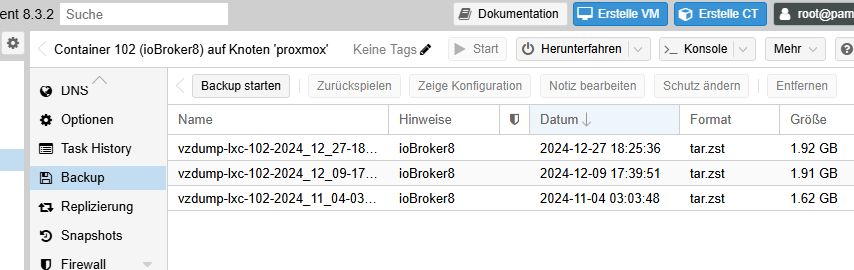
und nicht das:
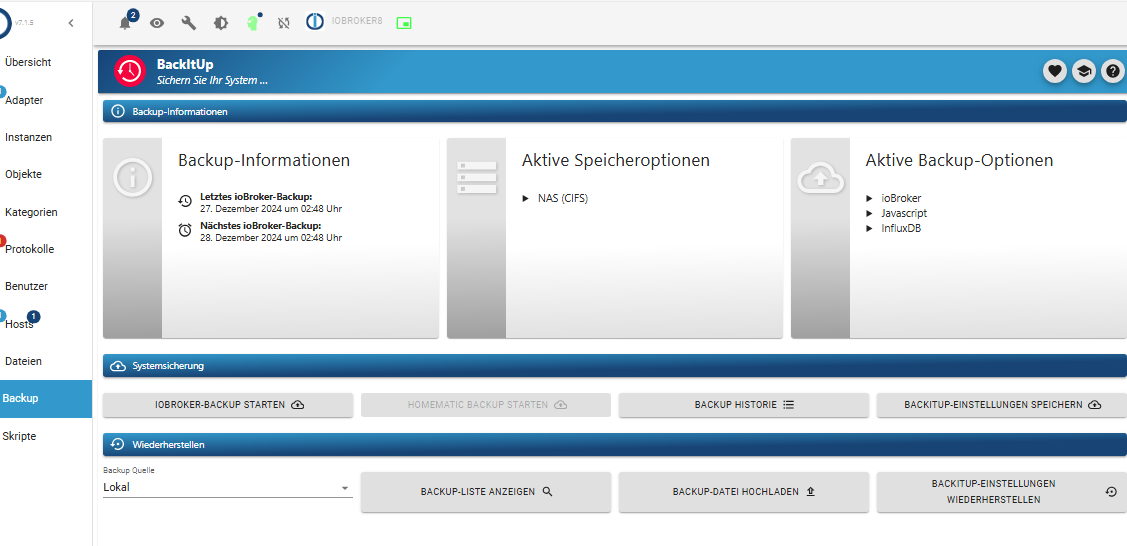
-
@codierknecht said in Backitup Error:
@io2345 sagte in Backitup Error:
Einfach in einen neuen Container einspielen?
Yes!
Neuen Container erstellen, ioBroker mit dem Einzeiler installieren und dann das Backup hochladen und wiederherstellen.
Beim Installieren des Containers: Keinen Desktop mit installieren!Wenn wir hier von "Backup hochladen" sprechen: Gemeint ist sicherlich das Backup direkt vom Proxmox-Container aus. Oder doch vom "Backitup"-Plugin des iobroker?
Also das:
und nicht das:
@io2345 said in Backitup Error:
Keinen Desktop mit installieren!
Und noch eine Frage zum Thema "Keinen Desktop mit installieren!".
An welcher Stelle wird man denn gefragt, ob mit oder ohne Desktop. Da kam bei mir nichts. -
@codierknecht said in Backitup Error:
@io2345 sagte in Backitup Error:
Einfach in einen neuen Container einspielen?
Yes!
Neuen Container erstellen, ioBroker mit dem Einzeiler installieren und dann das Backup hochladen und wiederherstellen.
Beim Installieren des Containers: Keinen Desktop mit installieren!Wenn wir hier von "Backup hochladen" sprechen: Gemeint ist sicherlich das Backup direkt vom Proxmox-Container aus. Oder doch vom "Backitup"-Plugin des iobroker?
Also das:
und nicht das:
@io2345 sagte in Backitup Error:
vom "Backitup"-Plugin des iobroker?
Natürlich NUR vom ioBroker. Sonst ziehst du dir doch den krummen Kram wieder rein.
-
@io2345 said in Backitup Error:
Keinen Desktop mit installieren!
Und noch eine Frage zum Thema "Keinen Desktop mit installieren!".
An welcher Stelle wird man denn gefragt, ob mit oder ohne Desktop. Da kam bei mir nichts.@io2345 sagte in Backitup Error:
@io2345 said in Backitup Error:
Keinen Desktop mit installieren!
Und noch eine Frage zum Thema "Keinen Desktop mit installieren!".
An welcher Stelle wird man denn gefragt, ob mit oder ohne Desktop. Da kam bei mir nichts.Das kommt auf das Image an, das man lädt.
Viele Images booten automatisch in den runlevel 5. Das kann man leicht mit
who -rprüfen.Läuft der runlevel 5, kann dies mit
sudo systemctl set-default multi-user.targetund einem reboot permanent geändert werden. -
@io2345 said in Backitup Error:
Keinen Desktop mit installieren!
Und noch eine Frage zum Thema "Keinen Desktop mit installieren!".
An welcher Stelle wird man denn gefragt, ob mit oder ohne Desktop. Da kam bei mir nichts.@io2345 sagte in Backitup Error:
An welcher Stelle wird man denn gefragt, ob mit oder ohne Desktop
Zum Beispiel hier:
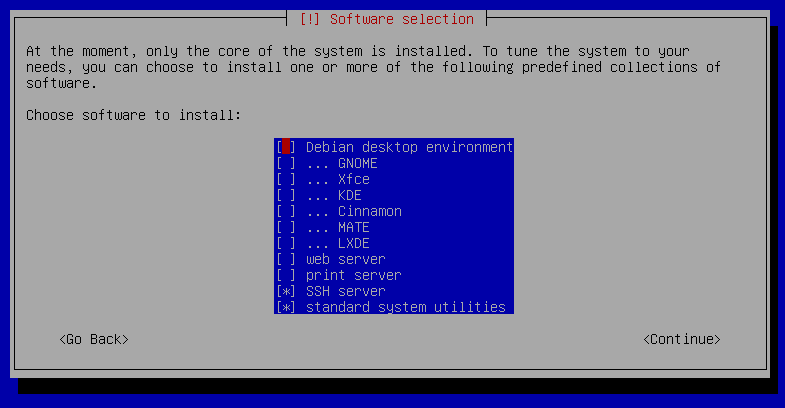
"Any fool can write code that a computer can understand. Good programmers write code that humans can understand." (Martin Fowler, "Refactoring")
Proxmox 9.1.1 LXC|8 GB|Core i7-6700
HmIP|ZigBee|Tasmota|Unifi
Zabbix Certified Specialist
Konnte ich Dir helfen? Dann benutze bitte das Voting unten rechts im Beitrag -
@io2345 sagte in Backitup Error:
An welcher Stelle wird man denn gefragt, ob mit oder ohne Desktop
Zum Beispiel hier:
@codierknecht sagte in Backitup Error:
Zum Beispiel hier:
Das kommt aber bei der Installation eines LXC Templates nicht.
Proxmox und HA ...
Ich schreibe den Code nicht mehr selbst – ich schimpfe mit der KI, bis es funktioniert. -
@codierknecht sagte in Backitup Error:
Zum Beispiel hier:
Das kommt aber bei der Installation eines LXC Templates nicht.
@meister-mopper
Meine letzte LXC-Installation ist schon 'ne Weile her. Aber ich meine, das wäre auch gekommen.
Kann mich aber auch täuschen."Any fool can write code that a computer can understand. Good programmers write code that humans can understand." (Martin Fowler, "Refactoring")
Proxmox 9.1.1 LXC|8 GB|Core i7-6700
HmIP|ZigBee|Tasmota|Unifi
Zabbix Certified Specialist
Konnte ich Dir helfen? Dann benutze bitte das Voting unten rechts im Beitrag



Hey! Du scheinst an dieser Unterhaltung interessiert zu sein, hast aber noch kein Konto.
Hast du es satt, bei jedem Besuch durch die gleichen Beiträge zu scrollen? Wenn du dich für ein Konto anmeldest, kommst du immer genau dorthin zurück, wo du zuvor warst, und kannst dich über neue Antworten benachrichtigen lassen (entweder per E-Mail oder Push-Benachrichtigung). Du kannst auch Lesezeichen speichern und Beiträge positiv bewerten, um anderen Community-Mitgliedern deine Wertschätzung zu zeigen.
Mit deinem Input könnte dieser Beitrag noch besser werden 💗
Registrieren AnmeldenSupport us
343
Online33.0k
Benutzer83.6k
Themen1.3m
Beiträge