




Anzeige Zeit/Datum - Fehler bei Update & InfluxDB
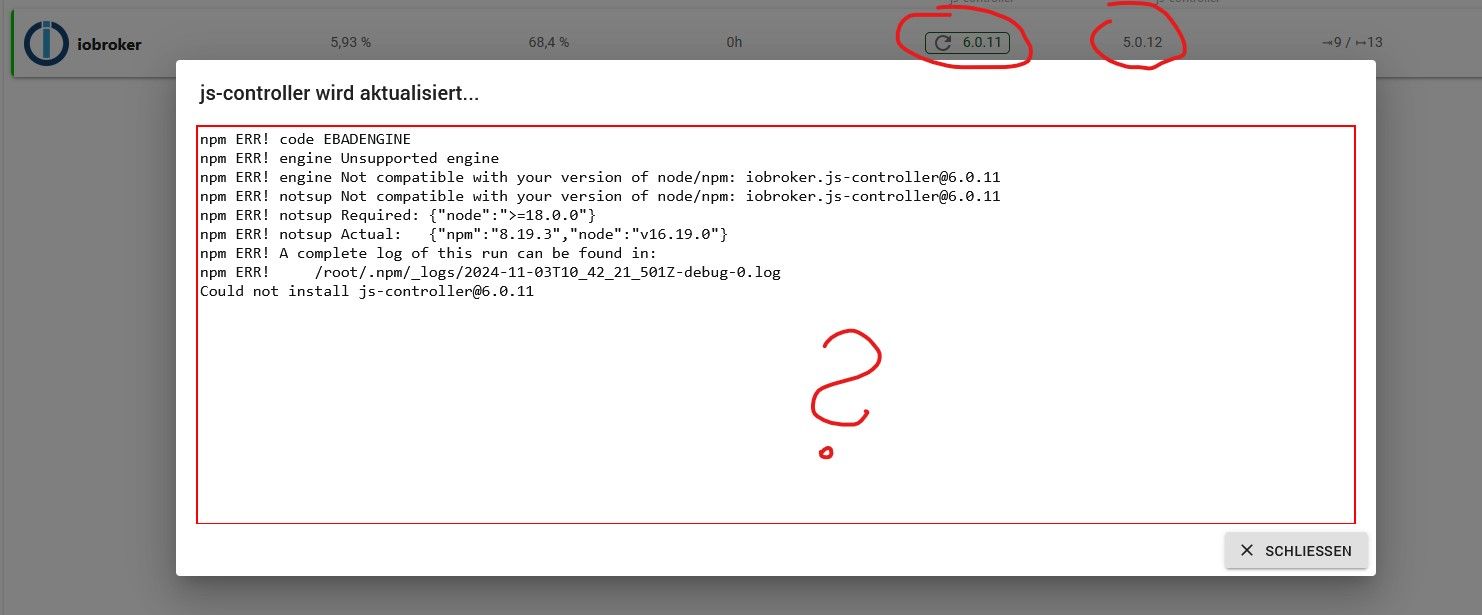
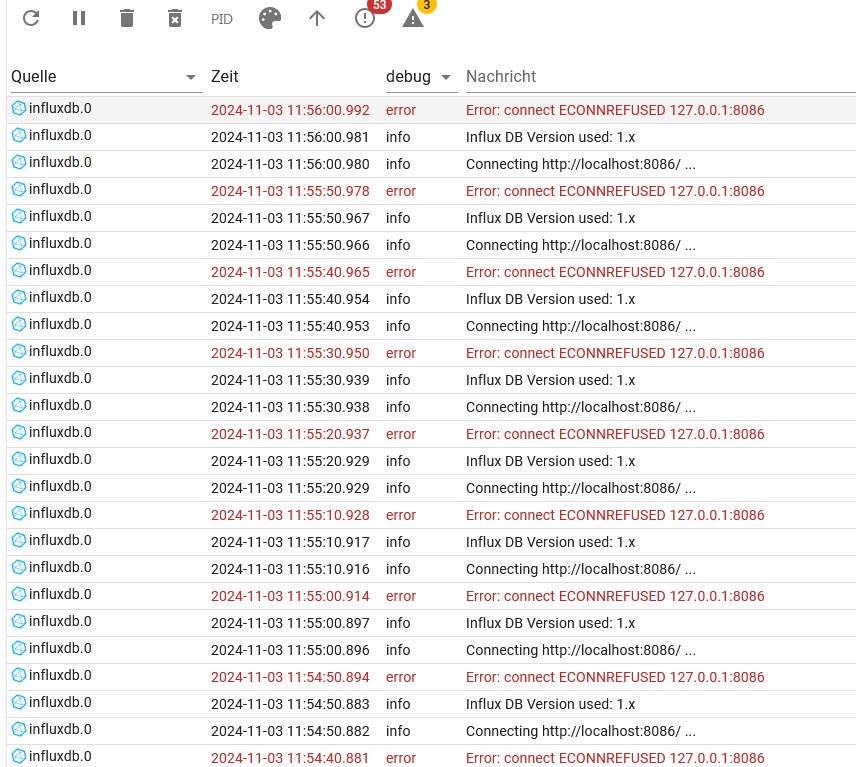
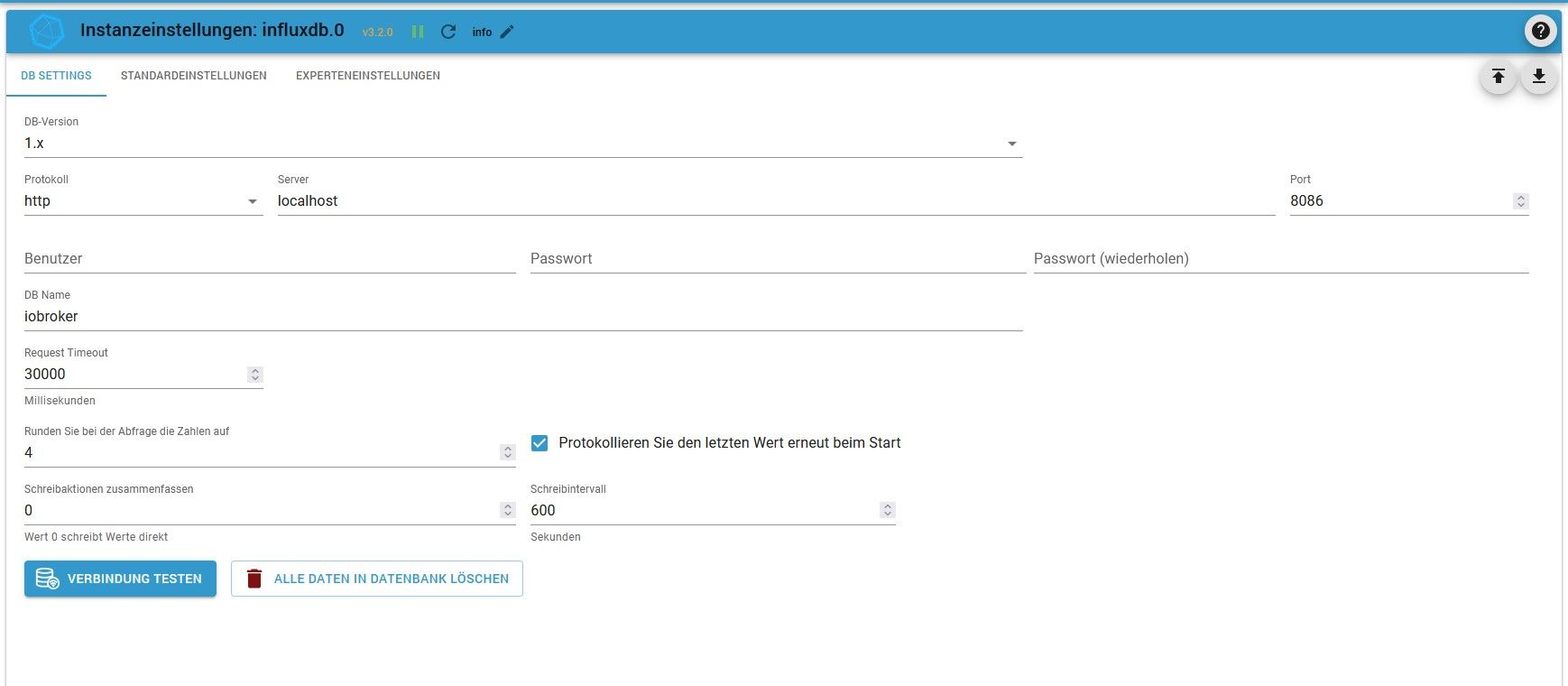
-
Hier das Ergebnis:
========== Start marking the full check here ===========

```bash
Script v.2024-10-19

*** BASE SYSTEM ***
   Static hostname: iobroker
         Icon name: computer
  Operating System: Debian GNU/Linux 11 (bullseye)
            Kernel: Linux 5.15.61-v8+
      Architecture: arm64
OS is similar to:

Model           : Raspberry Pi 4 Model B Rev 1.2
Docker          : false
Virtualization  : none
Kernel          : aarch64
Userland        : 64 bit

Systemuptime and Load:
 15:20:43 up  1:14,  2 users,  load average: 0.73, 0.74, 0.80
CPU threads: 4


*** LIFE CYCLE STATUS ***
Debian 'bullseye' is the current oldstable version. Please upgrade to the latest stable release 'bookworm' in due time!

*** RASPBERRY THROTTLING ***
Current issues:
No throttling issues detected.

Previously detected issues:
No throttling issues detected.

This system needs to be REBOOTED!


*** TIME AND TIMEZONES ***
               Local time: Sun 2024-11-03 15:20:43 CET
           Universal time: Sun 2024-11-03 14:20:43 UTC
                 RTC time: n/a
                Time zone: Europe/Berlin (CET, +0100)
System clock synchronized: yes
              NTP service: active
          RTC in local TZ: no

*** Users and Groups ***
User that called 'iob diag':
dogfight76
HOME=/home/dogfight76
GROUPS=dogfight76 adm dialout cdrom sudo audio video plugdev games users input render netdev lpadmin gpio i2c spi iobroker

User that is running 'js-controller':
iobroker
HOME=/home/iobroker
GROUPS=iobroker tty dialout audio video plugdev bluetooth gpio i2c

*** DISPLAY-SERVER SETUP ***
Display-Server: false
Desktop:
Terminal:       tty

*** MEMORY ***
               total        used        free      shared  buff/cache   available
Mem:            3.8G        802M        117M        1.0M        2.9G        2.9G
Swap:            99M        2.0M         97M
Total:          3.9G        804M        215M

Active iob-Instances:   11

         3794 M total memory
          802 M used memory
          934 M active memory
         2452 M inactive memory
          117 M free memory
          178 M buffer memory
         2696 M swap cache
           99 M total swap
            2 M used swap
           97 M free swap

*** top - Table Of Processes  ***
top - 15:20:43 up  1:14,  2 users,  load average: 0.73, 0.74, 0.80
Tasks: 172 total,   1 running, 171 sleeping,   0 stopped,   0 zombie
%Cpu(s):  1.4 us,  1.4 sy,  0.0 ni, 97.1 id,  0.0 wa,  0.0 hi,  0.0 si,  0.0 st
MiB Mem :   3794.4 total,    117.5 free,    802.3 used,   2874.6 buff/cache
MiB Swap:    100.0 total,     98.0 free,      2.0 used.   2915.6 avail Mem

*** FAILED SERVICES ***

  UNIT LOAD ACTIVE SUB DESCRIPTION
0 loaded units listed.


*** DMESG CRITICAL ERRORS ***
No critical errors detected

*** FILESYSTEM ***
Filesystem     Type      Size  Used Avail Use% Mounted on
/dev/root      ext4       59G  8.6G   48G  16% /
devtmpfs       devtmpfs  1.7G     0  1.7G   0% /dev
tmpfs          tmpfs     1.9G     0  1.9G   0% /dev/shm
tmpfs          tmpfs     759M  1.2M  758M   1% /run
tmpfs          tmpfs     5.0M  4.0K  5.0M   1% /run/lock
/dev/mmcblk0p1 vfat      255M   31M  225M  13% /boot
tmpfs          tmpfs     380M   16K  380M   1% /run/user/1000

Messages concerning ext4 filesystem in dmesg:
[Sun Nov  3 14:06:01 2024] Kernel command line: coherent_pool=1M 8250.nr_uarts=0 snd_bcm2835.enable_compat_alsa=0 snd_bcm2835.enable_hdmi=1  smsc95xx.macaddr=DC:A6:32:98:E4:44 vc_mem.mem_base=0x3ec00000 vc_mem.mem_size=0x40000000  console=ttyS0,115200 console=tty1 root=PARTUUID=e31b91e6-02 rootfstype=ext4 fsck.repair=yes rootwait quiet splash plymouth.ignore-serial-consoles
[Sun Nov  3 14:06:02 2024] EXT4-fs (mmcblk0p2): mounted filesystem with ordered data mode. Opts: (null). Quota mode: none.
[Sun Nov  3 14:06:02 2024] VFS: Mounted root (ext4 filesystem) readonly on device 179:2.
[Sun Nov  3 14:06:04 2024] EXT4-fs (mmcblk0p2): re-mounted. Opts: (null). Quota mode: none.

Show mounted filesystems:
TARGET  SOURCE         FSTYPE OPTIONS
/       /dev/mmcblk0p2 ext4   rw,noatime
`-/boot /dev/mmcblk0p1 vfat   rw,relatime,fmask=0022,dmask=0022,codepage=437,iocharset=ascii,shortname=mixed,errors=remount-ro

Files in neuralgic directories:

/var:
2.0G    /var/
1.1G    /var/log/journal/7d1338ad4ea145258230302c11232948
1.1G    /var/log/journal
1.1G    /var/log
634M    /var/cache

Archived and active journals take up 1.0G in the file system.

/opt/iobroker/backups:
91M     /opt/iobroker/backups/

/opt/iobroker/iobroker-data:
815M    /opt/iobroker/iobroker-data/
761M    /opt/iobroker/iobroker-data/files
617M    /opt/iobroker/iobroker-data/files/javascript.admin
560M    /opt/iobroker/iobroker-data/files/javascript.admin/static
558M    /opt/iobroker/iobroker-data/files/javascript.admin/static/js

The five largest files in iobroker-data are:
24M     /opt/iobroker/iobroker-data/files/web.admin/static/js/main.135279a0.js.map
13M     /opt/iobroker/iobroker-data/objects.jsonl
12M     /opt/iobroker/iobroker-data/files/backitup.admin/static/js/main.bd24114f.js
8.7M    /opt/iobroker/iobroker-data/files/javascript.admin/static/js/838.0aa41cb0.chunk.js.map
8.6M    /opt/iobroker/iobroker-data/files/javascript.admin/static/js/310.89a60ae1.chunk.js.map

USB-Devices by-id:
USB-Sticks -  Avoid direct links to /dev/tty* in your adapter setups, please always prefer the links 'by-id':

No Devices found 'by-id'

*** NodeJS-Installation ***

/usr/bin/nodejs         v20.18.0
/usr/bin/node           v20.18.0
/usr/bin/npm            10.8.2
/usr/bin/npx            10.8.2
/usr/bin/corepack       0.29.3

nodejs:
  Installed: 20.18.0-1nodesource1
  Candidate: 20.18.0-1nodesource1
  Version table:
 *** 20.18.0-1nodesource1 1001
        500 https://deb.nodesource.com/node_20.x nodistro/main arm64 Packages
        100 /var/lib/dpkg/status
     20.17.0-1nodesource1 1001
        500 https://deb.nodesource.com/node_20.x nodistro/main arm64 Packages
     20.16.0-1nodesource1 1001
        500 https://deb.nodesource.com/node_20.x nodistro/main arm64 Packages
     20.15.1-1nodesource1 1001
        500 https://deb.nodesource.com/node_20.x nodistro/main arm64 Packages
     20.15.0-1nodesource1 1001
        500 https://deb.nodesource.com/node_20.x nodistro/main arm64 Packages
     20.14.0-1nodesource1 1001
        500 https://deb.nodesource.com/node_20.x nodistro/main arm64 Packages
     20.13.1-1nodesource1 1001
        500 https://deb.nodesource.com/node_20.x nodistro/main arm64 Packages
     20.13.0-1nodesource1 1001
        500 https://deb.nodesource.com/node_20.x nodistro/main arm64 Packages
     20.12.2-1nodesource1 1001
        500 https://deb.nodesource.com/node_20.x nodistro/main arm64 Packages
     20.12.1-1nodesource1 1001
        500 https://deb.nodesource.com/node_20.x nodistro/main arm64 Packages
     20.12.0-1nodesource1 1001
        500 https://deb.nodesource.com/node_20.x nodistro/main arm64 Packages
     20.11.1-1nodesource1 1001
        500 https://deb.nodesource.com/node_20.x nodistro/main arm64 Packages
     20.11.0-1nodesource1 1001
        500 https://deb.nodesource.com/node_20.x nodistro/main arm64 Packages
     20.10.0-1nodesource1 1001
        500 https://deb.nodesource.com/node_20.x nodistro/main arm64 Packages
     20.9.0-1nodesource1 1001
        500 https://deb.nodesource.com/node_20.x nodistro/main arm64 Packages
     20.8.1-1nodesource1 1001
        500 https://deb.nodesource.com/node_20.x nodistro/main arm64 Packages
     20.8.0-1nodesource1 1001
        500 https://deb.nodesource.com/node_20.x nodistro/main arm64 Packages
     20.7.0-1nodesource1 1001
        500 https://deb.nodesource.com/node_20.x nodistro/main arm64 Packages
     20.6.1-1nodesource1 1001
        500 https://deb.nodesource.com/node_20.x nodistro/main arm64 Packages
     20.6.0-1nodesource1 1001
        500 https://deb.nodesource.com/node_20.x nodistro/main arm64 Packages
     20.5.1-1nodesource1 1001
        500 https://deb.nodesource.com/node_20.x nodistro/main arm64 Packages
     20.5.0-1nodesource1 1001
        500 https://deb.nodesource.com/node_20.x nodistro/main arm64 Packages
     20.4.0-1nodesource1 1001
        500 https://deb.nodesource.com/node_20.x nodistro/main arm64 Packages
     20.3.1-1nodesource1 1001
        500 https://deb.nodesource.com/node_20.x nodistro/main arm64 Packages
     20.3.0-1nodesource1 1001
        500 https://deb.nodesource.com/node_20.x nodistro/main arm64 Packages
     20.2.0-1nodesource1 1001
        500 https://deb.nodesource.com/node_20.x nodistro/main arm64 Packages
     20.1.0-1nodesource1 1001
        500 https://deb.nodesource.com/node_20.x nodistro/main arm64 Packages
     20.0.0-1nodesource1 1001
        500 https://deb.nodesource.com/node_20.x nodistro/main arm64 Packages
     12.22.12~dfsg-1~deb11u5 500
        500 http://security.debian.org/debian-security bullseye-security/main arm64 Packages
     12.22.12~dfsg-1~deb11u4 500
        500 http://deb.debian.org/debian bullseye/main arm64 Packages

Temp directories causing deletion problem: 0
No problems detected

Errors in npm tree: 0
No problems detected

*** ioBroker-Installation ***

ioBroker Status
iobroker is running on this host.


Objects type: jsonl
States  type: jsonl

Hosts:
iobroker            iobroker (version: 6.0.11, hostname: iobroker      , alive, uptime: 333)

Core adapters versions
js-controller:  6.0.11
admin:          7.1.5
javascript:     8.8.3

nodejs modules from github:     2
+-- iobroker.time-switch@2.2.2 (git+ssh://git@github.com/walli545/ioBroker.time-switch.git#45b5addb484d270dcac6d1bfdb1a9f86b444d80e)
+-- iobroker.vis-materialdesign@0.5.94 (git+ssh://git@github.com/Scrounger/ioBroker.vis-materialdesign.git#8b7529d493f223dfc4f1d1f632553fcb35bbcc92)

Adapter State
+ system.adapter.admin.0                  : admin                 : iobroker                                 -  enabled, port: 8081, bind: 0.0.0.0, run as: admin
+ system.adapter.backitup.0               : backitup              : iobroker                                 -  enabled
  system.adapter.chromecast.0             : chromecast            : iobroker                                 - disabled
+ system.adapter.cloud.0                  : cloud                 : iobroker                                 -  enabled
  system.adapter.discovery.0              : discovery             : iobroker                                 - disabled
  system.adapter.fritzdect.0              : fritzdect             : iobroker                                 - disabled
  system.adapter.history.0                : history               : iobroker                                 - disabled
  system.adapter.hm-rega.0                : hm-rega               : iobroker                                 - disabled
  system.adapter.hm-rpc.0                 : hm-rpc                : iobroker                                 - disabled, port: 18701
  system.adapter.hm-rpc.1                 : hm-rpc                : iobroker                                 - disabled, port: 12001
  system.adapter.hm-rpc.2                 : hm-rpc                : iobroker                                 - disabled, port: 12010
+ system.adapter.influxdb.0               : influxdb              : iobroker                                 -  enabled, port: 8086
  system.adapter.jarvis.0                 : jarvis                : iobroker                                 - disabled
+ system.adapter.javascript.0             : javascript            : iobroker                                 -  enabled
+ system.adapter.mqtt.0                   : mqtt                  : iobroker                                 -  enabled, port: 8885, bind: 192.168.178.140
+ system.adapter.net-tools.0              : net-tools             : iobroker                                 -  enabled
  system.adapter.ping.0                   : ping                  : iobroker                                 - disabled
  system.adapter.solarlog.0               : solarlog              : iobroker                                 - disabled, port: 80
+ system.adapter.time-switch.0            : time-switch           : iobroker                                 -  enabled
  system.adapter.tr-064.0                 : tr-064                : iobroker                                 - disabled
+ system.adapter.vis-inventwo.0           : vis-inventwo          : iobroker                                 -  enabled
  system.adapter.vis-timeandweather.0     : vis-timeandweather    : iobroker                                 -  enabled
  system.adapter.vis.0                    : vis                   : iobroker                                 -  enabled
+ system.adapter.web.0                    : web                   : iobroker                                 -  enabled, port: 8082, bind: 0.0.0.0, run as: admin

+ instance is alive

Enabled adapters with bindings
+ system.adapter.admin.0                  : admin                 : iobroker                                 -  enabled, port: 8081, bind: 0.0.0.0, run as: admin
+ system.adapter.influxdb.0               : influxdb              : iobroker                                 -  enabled, port: 8086
+ system.adapter.mqtt.0                   : mqtt                  : iobroker                                 -  enabled, port: 8885, bind: 192.168.178.140
+ system.adapter.web.0                    : web                   : iobroker                                 -  enabled, port: 8082, bind: 0.0.0.0, run as: admin

ioBroker-Repositories
┌─────────┬──────────┬─────────────────────────────────────────────────────────┬──────────────┐
│ (index) │ name     │ url                                                     │ auto upgrade │
├─────────┼──────────┼─────────────────────────────────────────────────────────┼──────────────┤
│ 0       │ 'stable' │ 'http://download.iobroker.net/sources-dist.json'        │ false        │
│ 1       │ 'beta'   │ 'http://download.iobroker.net/sources-dist-latest.json' │ false        │
└─────────┴──────────┴─────────────────────────────────────────────────────────┴──────────────┘

Active repo(s): stable
Upgrade policy: none

Installed ioBroker-Instances
Used repository: stable
Adapter    "admin"        : 7.1.5    , installed 7.1.5
Adapter    "backitup"     : 3.0.25   , installed 3.0.25
Adapter    "chromecast"   : 3.4.1    , installed 3.4.1
Adapter    "cloud"        : 5.0.1    , installed 5.0.1
Adapter    "discovery"    : 5.0.0    , installed 5.0.0
Adapter    "fritzdect"    : 2.5.11   , installed 2.5.11
Adapter    "history"      : 3.0.1    , installed 3.0.1
Adapter    "hm-rega"      : 5.1.0    , installed 5.1.0
Adapter    "hm-rpc"       : 2.0.2    , installed 2.0.2
Adapter    "influxdb"     : 4.0.2    , installed 4.0.2
Adapter    "jarvis"       : 3.1.8    , installed 3.1.8
Adapter    "javascript"   : 8.8.3    , installed 8.8.3
Controller "js-controller": 6.0.11   , installed 6.0.11
Adapter    "mqtt"         : 6.1.2    , installed 6.1.2
Adapter    "net-tools"    : 1.0.11   , installed 1.0.11
Adapter    "ping"         : 1.6.2    , installed 1.6.2
Adapter    "simple-api"   : 2.8.0    , installed 2.8.0
Adapter    "socketio"     : 6.7.1    , installed 6.7.1
Adapter    "solarlog"     : 2.3.0    , installed 2.3.0
Adapter    "tr-064"       : 4.3.0    , installed 4.3.0
Adapter    "vis"          : 1.5.6    , installed 1.5.6
Adapter    "vis-inventwo" : 3.3.4    , installed 3.3.4
Adapter    "vis-materialdesign": 0.5.9, installed 0.5.94
Adapter    "vis-timeandweather": 1.2.2, installed 1.2.2
Adapter    "web"          : 6.2.5    , installed 6.2.5
Adapter    "ws"           : 2.6.2    , installed 2.6.2

Objects and States
Please stand by - This may take a while
Objects:        1050
States:         801

*** OS-Repositories and Updates ***
Hit:1 http://security.debian.org/debian-security bullseye-security InRelease
Hit:2 http://deb.debian.org/debian bullseye InRelease
Hit:3 http://archive.raspberrypi.org/debian bullseye InRelease
Hit:4 http://deb.debian.org/debian bullseye-updates InRelease
Hit:5 https://deb.nodesource.com/node_20.x nodistro InRelease
Reading package lists...
Pending Updates: 0

*** Listening Ports ***
Active Internet connections (only servers)
Proto Recv-Q Send-Q Local Address           Foreign Address         State       User       Inode      PID/Program name
tcp        0      0 127.0.0.1:9000          0.0.0.0:*               LISTEN      1001       53719      21821/iobroker.js-c
tcp        0      0 127.0.0.1:9001          0.0.0.0:*               LISTEN      1001       53714      21821/iobroker.js-c
tcp        0      0 127.0.0.1:631           0.0.0.0:*               LISTEN      0          44849      15025/cupsd
tcp        0      0 0.0.0.0:22              0.0.0.0:*               LISTEN      0          44289      14260/sshd: /usr/sb
tcp        0      0 192.168.178.140:8885    0.0.0.0:*               LISTEN      1001       54447      21916/io.mqtt.0
tcp6       0      0 :::8081                 :::*                    LISTEN      1001       54360      21842/io.admin.0
tcp6       0      0 :::8082                 :::*                    LISTEN      1001       55495      21973/io.web.0
tcp6       0      0 ::1:631                 :::*                    LISTEN      0          44848      15025/cupsd
tcp6       0      0 :::22                   :::*                    LISTEN      0          44291      14260/sshd: /usr/sb
udp        0      0 0.0.0.0:5353            0.0.0.0:*                           108        43779      14911/avahi-daemon:
udp        0      0 0.0.0.0:44664           0.0.0.0:*                           108        43781      14911/avahi-daemon:
udp        0      0 0.0.0.0:68              0.0.0.0:*                           0          14638      497/dhcpcd
udp6       0      0 :::5353                 :::*                                108        43780      14911/avahi-daemon:
udp6       0      0 :::59103                :::*                                108        43782      14911/avahi-daemon:
udp6       0      0 :::546                  :::*                                0          12280      497/dhcpcd

*** Log File - Last 25 Lines ***

2024-11-03 15:20:12.989  - error: influxdb.0 (21907) AggregateError
2024-11-03 15:20:22.990  - info: influxdb.0 (21907) Connecting http://localhost:8086/ ...
2024-11-03 15:20:22.991  - info: influxdb.0 (21907) Influx DB Version used: 1.x
2024-11-03 15:20:22.999  - error: influxdb.0 (21907) AggregateError
2024-11-03 15:20:32.999  - info: influxdb.0 (21907) Connecting http://localhost:8086/ ...
2024-11-03 15:20:33.000  - info: influxdb.0 (21907) Influx DB Version used: 1.x
2024-11-03 15:20:33.013  - error: influxdb.0 (21907) AggregateError
2024-11-03 15:20:43.014  - info: influxdb.0 (21907) Connecting http://localhost:8086/ ...
2024-11-03 15:20:43.015  - info: influxdb.0 (21907) Influx DB Version used: 1.x
2024-11-03 15:20:43.022  - error: influxdb.0 (21907) AggregateError
2024-11-03 15:20:53.023  - info: influxdb.0 (21907) Connecting http://localhost:8086/ ...
2024-11-03 15:20:53.024  - info: influxdb.0 (21907) Influx DB Version used: 1.x
2024-11-03 15:20:53.032  - error: influxdb.0 (21907) AggregateError
2024-11-03 15:21:03.032  - info: influxdb.0 (21907) Connecting http://localhost:8086/ ...
2024-11-03 15:21:03.033  - info: influxdb.0 (21907) Influx DB Version used: 1.x
2024-11-03 15:21:03.040  - error: influxdb.0 (21907) AggregateError
2024-11-03 15:21:13.041  - info: influxdb.0 (21907) Connecting http://localhost:8086/ ...
2024-11-03 15:21:13.042  - info: influxdb.0 (21907) Influx DB Version used: 1.x
2024-11-03 15:21:13.053  - error: influxdb.0 (21907) AggregateError
2024-11-03 15:21:23.054  - info: influxdb.0 (21907) Connecting http://localhost:8086/ ...
2024-11-03 15:21:23.055  - info: influxdb.0 (21907) Influx DB Version used: 1.x
2024-11-03 15:21:23.061  - error: influxdb.0 (21907) AggregateError
2024-11-03 15:21:33.062  - info: influxdb.0 (21907) Connecting http://localhost:8086/ ...
2024-11-03 15:21:33.063  - info: influxdb.0 (21907) Influx DB Version used: 1.x
2024-11-03 15:21:33.071  - error: influxdb.0 (21907) AggregateError
============ Mark until here for C&P =============
iob diag has finished.
Press any key for a summary
@dogfight76 sagte in Anzeige Zeit/Datum - Fehler bei Update & InfluxDB:
This system needs to be REBOOTED!
-
-
Reboot isr durch
Ansonsten sieht das jetzt bis auf die Meldungen von influxdb aber solide aus.
Mit2024-11-03 15:21:13.053 - error: influxdb.0 (21907) AggregateError
muss dir aber wer anders weiterhelfen.
Ich würde vorschlagen, in einem separaten Thread. -
Reboot isr durch
influxdb ist auch aus meiner Sicht nicht ordentlich installiert. Jedenfalls fehlt dir das influx-Repo in deinem Setup.
-
InfluxDB war mal gedacht für die erweiterte grafische Darstellung/Auswertung. Das wird nur dafür benötigt, oder ?
Dann kann das ja deaktiviert werden. Ist das eine Instanz ?Und dann weiter ?
-
InfluxDB war mal gedacht für die erweiterte grafische Darstellung/Auswertung. Das wird nur dafür benötigt, oder ?
Dann kann das ja deaktiviert werden. Ist das eine Instanz ?Und dann weiter ?
@dogfight76 sagte in Anzeige Zeit/Datum - Fehler bei Update & InfluxDB:
Ist das eine Instanz ?
Jein, das ist eine Datenbank, für die es einen iobroker.adapter gibt.
Offenbar läuft die eigentliche Datenbank aber auch gar nicht, weswegen der Adapter da ins Leere schaut..Ob du das brauchst musst du selber entscheiden.
-
Ok, jetzt noch das Update beovr das aktuelle OS-Lite (64bit) auf die microSD-Karte kommt ?
Gruß
-
Ok, jetzt noch das Update beovr das aktuelle OS-Lite (64bit) auf die microSD-Karte kommt ?
Gruß
@dogfight76 sagte in Anzeige Zeit/Datum - Fehler bei Update & InfluxDB:
Ok, jetzt noch das Update
Welches Update? Das Betriebssystem ist aktuell, ebenso wie der ioBroker.
Mit der Basis kannst du jetzt umziehen. -
Sorry, natürlich war das Backup gemeint.
Das muss ich dann ja noch von der SD-Karte auf meinen PC ziehen, um das dann wieder einzuspielen. Oder ?Gruß
-
Sorry, natürlich war das Backup gemeint.
Das muss ich dann ja noch von der SD-Karte auf meinen PC ziehen, um das dann wieder einzuspielen. Oder ?Gruß
@dogfight76 sagte in Anzeige Zeit/Datum - Fehler bei Update & InfluxDB:
Das muss ich dann ja noch von der SD-Karte auf meinen PC ziehen, um das dann wieder einzuspielen. Oder ?
Ich würde eine der anderen Möglichkeiten das Backup zu verstauen vorziehen.
Zur Not tut es aber auch das. -
Und wie ?
Das Backup-Tool aus ioBroker nutzen ?
-
Und wie ?
Das Backup-Tool aus ioBroker nutzen ?
@dogfight76 sagte in Anzeige Zeit/Datum - Fehler bei Update & InfluxDB:
Das Backup-Tool aus ioBroker nutzen ?
Das würde ich ohnehin nutzen.
-
Ok,das Backup habe ich dann auf meinem PC gespeichert. Die Datei Namens:
iobroker_2024_11_03-15_52_56_backupiobroker.tarDann jetzt nach der Anleitung von deinem Link erstmal das OS auf eine 128GB microSD schreiben. (die lag hier noch so rum)
Aber das mache ich nächstes WE
Vielen dank !!!!!!!


Hey! Du scheinst an dieser Unterhaltung interessiert zu sein, hast aber noch kein Konto.
Hast du es satt, bei jedem Besuch durch die gleichen Beiträge zu scrollen? Wenn du dich für ein Konto anmeldest, kommst du immer genau dorthin zurück, wo du zuvor warst, und kannst dich über neue Antworten benachrichtigen lassen (entweder per E-Mail oder Push-Benachrichtigung). Du kannst auch Lesezeichen speichern und Beiträge positiv bewerten, um anderen Community-Mitgliedern deine Wertschätzung zu zeigen.
Mit deinem Input könnte dieser Beitrag noch besser werden 💗
Registrieren AnmeldenSupport us
238
Online33.0k
Benutzer83.5k
Themen1.3m
Beiträge