



Skip to content
  • Home
  • Aktuell
  • Tags
  • 0 Ungelesen 0
  • Kategorien
  • Unreplied
  • Beliebt
  • GitHub
  • Docu
  • Hilfe
Skins
  • Light
  • Brite
  • Cerulean
  • Cosmo
  • Flatly
  • Journal
  • Litera
  • Lumen
  • Lux
  • Materia
  • Minty
  • Morph
  • Pulse
  • Sandstone
  • Simplex
  • Sketchy
  • Spacelab
  • United
  • Yeti
  • Zephyr
  • Dark
  • Cyborg
  • Darkly
  • Quartz
  • Slate
  • Solar
  • Superhero
  • Vapor

  • Standard: (Kein Skin)
  • Kein Skin
Einklappen
ioBroker Logo

Community Forum

donate donate
  1. ioBroker Community Home
  2. Deutsch
  3. Einsteigerfragen
  4. Installation
  5. vw-connect Adapter nicht mehr verfügbar

NEWS

  • Neuer Blogbeitrag: Monatsrückblick - Dezember 2025 🎄
    BluefoxB
    Bluefox
    11
    1
    509

  • Weihnachtsangebot 2025! 🎄
    BluefoxB
    Bluefox
    24
    1
    1.7k

  • UPDATE 31.10.: Amazon Alexa - ioBroker Skill läuft aus ?
    apollon77A
    apollon77
    48
    3
    9.6k

vw-connect Adapter nicht mehr verfügbar

Geplant Angeheftet Gesperrt Verschoben Installation
29 Beiträge 4 Kommentatoren 2.5k Aufrufe 4 Watching
  • Älteste zuerst
  • Neuste zuerst
  • Meiste Stimmen
Antworten
  • In einem neuen Thema antworten
Anmelden zum Antworten
Dieses Thema wurde gelöscht. Nur Nutzer mit entsprechenden Rechten können es sehen.
  • W Online
    W Online
    wibear
    schrieb am zuletzt editiert von
    #1

    Hallo zusammen, der vw-connect Adapter sowie seine Instanz waren bis zuletzt noch installiert und haben funktioniert.. Nach einem Backup-Recovery verschwand der Adapter aus der Liste und ich kann ihn nicht finden, auch bei GitHub nicht.
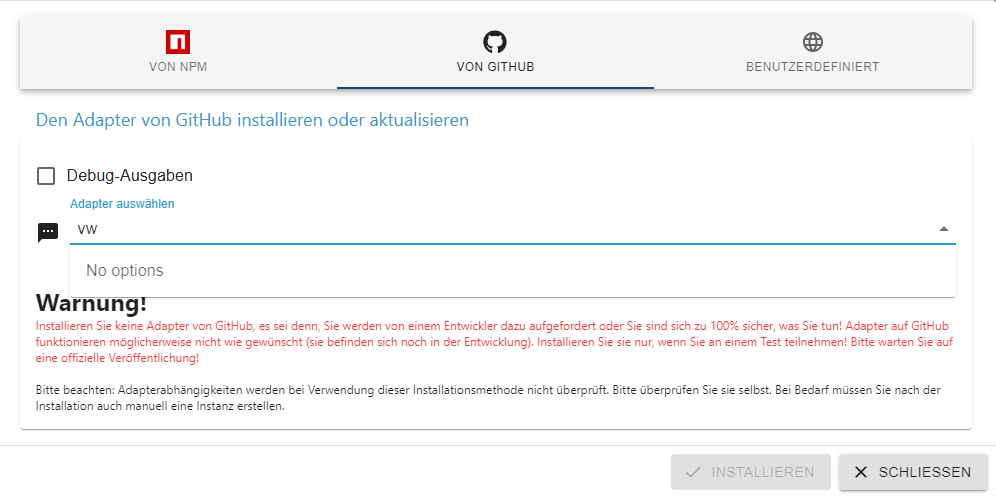
    b4562055-2ba8-45e9-a252-910fd59591a0-grafik.png

    Ist was dazu bekannt?
    Danke und Grüße

    Thomas BraunT mcm1957M 2 Antworten Letzte Antwort
    0
    • W wibear

      Hallo zusammen, der vw-connect Adapter sowie seine Instanz waren bis zuletzt noch installiert und haben funktioniert.. Nach einem Backup-Recovery verschwand der Adapter aus der Liste und ich kann ihn nicht finden, auch bei GitHub nicht.
      b4562055-2ba8-45e9-a252-910fd59591a0-grafik.png

      Ist was dazu bekannt?
      Danke und Grüße

      Thomas BraunT Online
      Thomas BraunT Online
      Thomas Braun
      Most Active
      schrieb am zuletzt editiert von
      #2

      @wibear

      Ist hier verfügbar. Sowohl über npm/beta wie auch github.
      Dein Setup sieht wie aus?

      iob diag
      

      mal anschauen.

      Linux-Werkzeugkasten:
      https://forum.iobroker.net/topic/42952/der-kleine-iobroker-linux-werkzeugkasten
      NodeJS Fixer Skript:
      https://forum.iobroker.net/topic/68035/iob-node-fix-skript
      iob_diag: curl -sLf -o diag.sh https://iobroker.net/diag.sh && bash diag.sh

      W 2 Antworten Letzte Antwort
      0
      • Thomas BraunT Thomas Braun

        @wibear

        Ist hier verfügbar. Sowohl über npm/beta wie auch github.
        Dein Setup sieht wie aus?

        iob diag
        

        mal anschauen.

        W Online
        W Online
        wibear
        schrieb am zuletzt editiert von
        #3

        @thomas-braun

        Soll ich diese Processe stoppen?

        *** iob diag is starting up, please wait ***
        iob diag needs to be updated. Please execute 'iobroker fix' first.
        wibear@iobroker-pi:~ $
        wibear@iobroker-pi:~ $ iobroker fix
        library: loaded
        Library version=2024-10-22
        ioBroker or some processes are still running:
        1634 iobroker.js-con
        1870 io.admin.0
        1909 io.history.0
        1939 io.influxdb.0
        2020 io.javascript.0
        2038 io.whatsapp-cmb
        2081 io.alexa2.0
        2132 io.backitup.0
        2405 io.hm-rega.0
        2422 io.hm-rpc.0
        2447 io.hm-rpc.1
        2471 io.hm-rpc.2
        2488 io.mqtt.0
        2505 io.rpi2.0
        2527 io.shelly.0
        2569 io.tr-064.0
        2610 io.discovery.0
        2644 io.fb-checkpres
        2722 io.fritzdect.0
        2876 io.simple-api.0
        3033 io.ems-esp.0
        3285 io.web.0
        9250 io.device-remin
        Please stop them first and try again!
        
        
        Thomas BraunT 1 Antwort Letzte Antwort
        0
        • W wibear

          @thomas-braun

          Soll ich diese Processe stoppen?

          *** iob diag is starting up, please wait ***
          iob diag needs to be updated. Please execute 'iobroker fix' first.
          wibear@iobroker-pi:~ $
          wibear@iobroker-pi:~ $ iobroker fix
          library: loaded
          Library version=2024-10-22
          ioBroker or some processes are still running:
          1634 iobroker.js-con
          1870 io.admin.0
          1909 io.history.0
          1939 io.influxdb.0
          2020 io.javascript.0
          2038 io.whatsapp-cmb
          2081 io.alexa2.0
          2132 io.backitup.0
          2405 io.hm-rega.0
          2422 io.hm-rpc.0
          2447 io.hm-rpc.1
          2471 io.hm-rpc.2
          2488 io.mqtt.0
          2505 io.rpi2.0
          2527 io.shelly.0
          2569 io.tr-064.0
          2610 io.discovery.0
          2644 io.fb-checkpres
          2722 io.fritzdect.0
          2876 io.simple-api.0
          3033 io.ems-esp.0
          3285 io.web.0
          9250 io.device-remin
          Please stop them first and try again!
          
          
          Thomas BraunT Online
          Thomas BraunT Online
          Thomas Braun
          Most Active
          schrieb am zuletzt editiert von
          #4

          @wibear

          Ja, der kann nur ohne laufende iob-Prozesse funktionieren.

          iob stop
          iob fix
          

          Linux-Werkzeugkasten:
          https://forum.iobroker.net/topic/42952/der-kleine-iobroker-linux-werkzeugkasten
          NodeJS Fixer Skript:
          https://forum.iobroker.net/topic/68035/iob-node-fix-skript
          iob_diag: curl -sLf -o diag.sh https://iobroker.net/diag.sh && bash diag.sh

          W 1 Antwort Letzte Antwort
          0
          • Thomas BraunT Thomas Braun

            @wibear

            Ja, der kann nur ohne laufende iob-Prozesse funktionieren.

            iob stop
            iob fix
            
            W Online
            W Online
            wibear
            schrieb am zuletzt editiert von
            #5

            @thomas-braun
            Ausgeführt und IOB gestartet

            Welcome to the ioBroker installation fixer!
              Script version: 2024-10-22
            
              You might need to enter your password a couple of times.
            
            ==========================================================================
            
            
            ==========================================================================
              Installing prerequisites (1/5)
            ==========================================================================
            
            Hit:1 http://archive.raspberrypi.org/debian bullseye InRelease
            Hit:2 http://raspbian.raspberrypi.org/raspbian bullseye InRelease
            Hit:3 https://apt.pivccu.de/piVCCU stable InRelease
            Hit:4 https://packages.grafana.com/oss/deb stable InRelease
            Hit:5 https://deb.nodesource.com/node_20.x nodistro InRelease
            Hit:6 https://repos.influxdata.com/debian bullseye InRelease
            Reading package lists... Done
            E: Unable to locate package polkitd
            Installed polkitd
            
            ==========================================================================
              Checking ioBroker user and directory permissions (2/5)
            ==========================================================================
            
            Created /etc/sudoers.d/iobroker
            Fixing directory permissions...
            This system does not support setting default permissions.
            Do not use npm to manually install adapters unless you know what you are doing!
            
            ==========================================================================
              Check and cleanup npm temporary directories (3/5)
            ==========================================================================
            
            Done.
            
            ==========================================================================
              Database maintenance (4/5)
            ==========================================================================
            
            Checking for uncompressed JSONL databases... This might take a while!
            
            Compressing /opt/iobroker/iobroker-data/states.jsonl
            Compressing /opt/iobroker/iobroker-data/objects.jsonl
            Compressed 2 JSONL files. Done
            
            ==========================================================================
              Checking autostart (5/5)
            ==========================================================================
            
            Enabling autostart...
            Autostart enabled!
            
            ==========================================================================
            
              Your installation was fixed successfully
              Run iobroker start to start ioBroker again!
            
            
            Thomas BraunT 1 Antwort Letzte Antwort
            0
            • W wibear

              @thomas-braun
              Ausgeführt und IOB gestartet

              Welcome to the ioBroker installation fixer!
                Script version: 2024-10-22
              
                You might need to enter your password a couple of times.
              
              ==========================================================================
              
              
              ==========================================================================
                Installing prerequisites (1/5)
              ==========================================================================
              
              Hit:1 http://archive.raspberrypi.org/debian bullseye InRelease
              Hit:2 http://raspbian.raspberrypi.org/raspbian bullseye InRelease
              Hit:3 https://apt.pivccu.de/piVCCU stable InRelease
              Hit:4 https://packages.grafana.com/oss/deb stable InRelease
              Hit:5 https://deb.nodesource.com/node_20.x nodistro InRelease
              Hit:6 https://repos.influxdata.com/debian bullseye InRelease
              Reading package lists... Done
              E: Unable to locate package polkitd
              Installed polkitd
              
              ==========================================================================
                Checking ioBroker user and directory permissions (2/5)
              ==========================================================================
              
              Created /etc/sudoers.d/iobroker
              Fixing directory permissions...
              This system does not support setting default permissions.
              Do not use npm to manually install adapters unless you know what you are doing!
              
              ==========================================================================
                Check and cleanup npm temporary directories (3/5)
              ==========================================================================
              
              Done.
              
              ==========================================================================
                Database maintenance (4/5)
              ==========================================================================
              
              Checking for uncompressed JSONL databases... This might take a while!
              
              Compressing /opt/iobroker/iobroker-data/states.jsonl
              Compressing /opt/iobroker/iobroker-data/objects.jsonl
              Compressed 2 JSONL files. Done
              
              ==========================================================================
                Checking autostart (5/5)
              ==========================================================================
              
              Enabling autostart...
              Autostart enabled!
              
              ==========================================================================
              
                Your installation was fixed successfully
                Run iobroker start to start ioBroker again!
              
              
              Thomas BraunT Online
              Thomas BraunT Online
              Thomas Braun
              Most Active
              schrieb am zuletzt editiert von
              #6

              @wibear

              Dann dürfte ja jetzt auch

              iob diag
              

              laufen.

              Linux-Werkzeugkasten:
              https://forum.iobroker.net/topic/42952/der-kleine-iobroker-linux-werkzeugkasten
              NodeJS Fixer Skript:
              https://forum.iobroker.net/topic/68035/iob-node-fix-skript
              iob_diag: curl -sLf -o diag.sh https://iobroker.net/diag.sh && bash diag.sh

              W 1 Antwort Letzte Antwort
              0
              • Thomas BraunT Thomas Braun

                @wibear

                Dann dürfte ja jetzt auch

                iob diag
                

                laufen.

                W Online
                W Online
                wibear
                schrieb am zuletzt editiert von
                #7

                @thomas-braun sagte in vw-connect Adapter nicht mehr verfügbar:

                Dann dürfte ja jetzt auch

                leider nicht:

                *** iob diag is starting up, please wait ***
                iob diag needs to be updated. Please execute 'iobroker fix' first.
                
                
                Thomas BraunT 1 Antwort Letzte Antwort
                0
                • W wibear

                  @thomas-braun sagte in vw-connect Adapter nicht mehr verfügbar:

                  Dann dürfte ja jetzt auch

                  leider nicht:

                  *** iob diag is starting up, please wait ***
                  iob diag needs to be updated. Please execute 'iobroker fix' first.
                  
                  
                  Thomas BraunT Online
                  Thomas BraunT Online
                  Thomas Braun
                  Most Active
                  schrieb am zuletzt editiert von
                  #8

                  @wibear

                  sudo apt update && sudo apt install distro-info
                  

                  Wobei das eigentlich auch der Fixer hätte fixen sollen...

                  Linux-Werkzeugkasten:
                  https://forum.iobroker.net/topic/42952/der-kleine-iobroker-linux-werkzeugkasten
                  NodeJS Fixer Skript:
                  https://forum.iobroker.net/topic/68035/iob-node-fix-skript
                  iob_diag: curl -sLf -o diag.sh https://iobroker.net/diag.sh && bash diag.sh

                  W 1 Antwort Letzte Antwort
                  0
                  • Thomas BraunT Thomas Braun

                    @wibear

                    sudo apt update && sudo apt install distro-info
                    

                    Wobei das eigentlich auch der Fixer hätte fixen sollen...

                    W Online
                    W Online
                    wibear
                    schrieb am zuletzt editiert von
                    #9

                    @thomas-braun sagte in vw-connect Adapter nicht mehr verfügbar:

                    sudo apt update && sudo apt install distro-info

                     sudo apt update && sudo apt install distro-info
                    Hit:1 http://raspbian.raspberrypi.org/raspbian bullseye InRelease
                    Hit:2 http://archive.raspberrypi.org/debian bullseye InRelease
                    Hit:3 https://apt.pivccu.de/piVCCU stable InRelease
                    Hit:4 https://deb.nodesource.com/node_20.x nodistro InRelease
                    Hit:5 https://repos.influxdata.com/debian bullseye InRelease
                    Hit:6 https://packages.grafana.com/oss/deb stable InRelease
                    Reading package lists... Done
                    Building dependency tree... Done
                    Reading state information... Done
                    All packages are up to date.
                    Reading package lists... Done
                    Building dependency tree... Done
                    Reading state information... Done
                    distro-info is already the newest version (1.0+deb11u1).
                    distro-info set to manually installed.
                    0 upgraded, 0 newly installed, 0 to remove and 0 not upgraded.
                    
                    
                    Thomas BraunT 1 Antwort Letzte Antwort
                    0
                    • W wibear

                      @thomas-braun sagte in vw-connect Adapter nicht mehr verfügbar:

                      sudo apt update && sudo apt install distro-info

                       sudo apt update && sudo apt install distro-info
                      Hit:1 http://raspbian.raspberrypi.org/raspbian bullseye InRelease
                      Hit:2 http://archive.raspberrypi.org/debian bullseye InRelease
                      Hit:3 https://apt.pivccu.de/piVCCU stable InRelease
                      Hit:4 https://deb.nodesource.com/node_20.x nodistro InRelease
                      Hit:5 https://repos.influxdata.com/debian bullseye InRelease
                      Hit:6 https://packages.grafana.com/oss/deb stable InRelease
                      Reading package lists... Done
                      Building dependency tree... Done
                      Reading state information... Done
                      All packages are up to date.
                      Reading package lists... Done
                      Building dependency tree... Done
                      Reading state information... Done
                      distro-info is already the newest version (1.0+deb11u1).
                      distro-info set to manually installed.
                      0 upgraded, 0 newly installed, 0 to remove and 0 not upgraded.
                      
                      
                      Thomas BraunT Online
                      Thomas BraunT Online
                      Thomas Braun
                      Most Active
                      schrieb am zuletzt editiert von
                      #10

                      @wibear
                      Sollte eigentlich dann aber funktionieren.

                      distro-info --stable
                      

                      sagt? Und bitte immer die vollständige Ein- wie Ausgaben zeigen.

                      Linux-Werkzeugkasten:
                      https://forum.iobroker.net/topic/42952/der-kleine-iobroker-linux-werkzeugkasten
                      NodeJS Fixer Skript:
                      https://forum.iobroker.net/topic/68035/iob-node-fix-skript
                      iob_diag: curl -sLf -o diag.sh https://iobroker.net/diag.sh && bash diag.sh

                      W 1 Antwort Letzte Antwort
                      0
                      • Thomas BraunT Thomas Braun

                        @wibear
                        Sollte eigentlich dann aber funktionieren.

                        distro-info --stable
                        

                        sagt? Und bitte immer die vollständige Ein- wie Ausgaben zeigen.

                        W Online
                        W Online
                        wibear
                        schrieb am zuletzt editiert von
                        #11

                        @thomas-braun
                        Unbekannt?

                        wibear@iobroker-pi:~ $ distro-info --stable
                        -bash: distro-info: command not found
                        
                        
                        Thomas BraunT 1 Antwort Letzte Antwort
                        0
                        • W wibear

                          @thomas-braun
                          Unbekannt?

                          wibear@iobroker-pi:~ $ distro-info --stable
                          -bash: distro-info: command not found
                          
                          
                          Thomas BraunT Online
                          Thomas BraunT Online
                          Thomas Braun
                          Most Active
                          schrieb am zuletzt editiert von
                          #12

                          @wibear

                          ??? Du hast es aber doch installiert???

                          distro-info is already the newest version (1.0+deb11u1).

                          ls -la /usr/bin/distro-info 
                          echo $PATH
                          

                          sagt?

                          Linux-Werkzeugkasten:
                          https://forum.iobroker.net/topic/42952/der-kleine-iobroker-linux-werkzeugkasten
                          NodeJS Fixer Skript:
                          https://forum.iobroker.net/topic/68035/iob-node-fix-skript
                          iob_diag: curl -sLf -o diag.sh https://iobroker.net/diag.sh && bash diag.sh

                          W 1 Antwort Letzte Antwort
                          0
                          • Thomas BraunT Thomas Braun

                            @wibear

                            Ist hier verfügbar. Sowohl über npm/beta wie auch github.
                            Dein Setup sieht wie aus?

                            iob diag
                            

                            mal anschauen.

                            W Online
                            W Online
                            wibear
                            schrieb am zuletzt editiert von
                            #13

                            @thomas-braun sagte in vw-connect Adapter nicht mehr verfügbar:

                            Ist hier verfügbar. Sowohl über npm/beta wie auch github.

                            Wie finde ich das?

                            1 Antwort Letzte Antwort
                            0
                            • Thomas BraunT Thomas Braun

                              @wibear

                              ??? Du hast es aber doch installiert???

                              distro-info is already the newest version (1.0+deb11u1).

                              ls -la /usr/bin/distro-info 
                              echo $PATH
                              

                              sagt?

                              W Online
                              W Online
                              wibear
                              schrieb am zuletzt editiert von
                              #14

                              @thomas-braun sagte in vw-connect Adapter nicht mehr verfügbar:

                              sagt?

                               ls -la /usr/bin/distro-info
                              echo $PATH
                              lrwxrwxrwx 1 root root 20 Oct 29  2023 /usr/bin/distro-info -> raspbian-distro-info
                              /usr/local/sbin:/usr/local/bin:/usr/sbin:/usr/bin:/sbin:/bin:/usr/local/games:/usr/games
                              wibear@iobroker-pi:~ $
                              
                              
                              Thomas BraunT 1 Antwort Letzte Antwort
                              0
                              • W wibear

                                @thomas-braun sagte in vw-connect Adapter nicht mehr verfügbar:

                                sagt?

                                 ls -la /usr/bin/distro-info
                                echo $PATH
                                lrwxrwxrwx 1 root root 20 Oct 29  2023 /usr/bin/distro-info -> raspbian-distro-info
                                /usr/local/sbin:/usr/local/bin:/usr/sbin:/usr/bin:/sbin:/bin:/usr/local/games:/usr/games
                                wibear@iobroker-pi:~ $
                                
                                
                                Thomas BraunT Online
                                Thomas BraunT Online
                                Thomas Braun
                                Most Active
                                schrieb am zuletzt editiert von Thomas Braun
                                #15

                                @wibear sagte in vw-connect Adapter nicht mehr verfügbar:

                                raspbian-distro-info

                                Die Version ist mir unbekannt. Magst du mal die Raspbian-Version von iob-diag testen?
                                https://forum.iobroker.net/topic/59549/iob-diag-skript

                                Und mal die Ausgabe von

                                raspbian-distro-info
                                apt policy distro-info
                                

                                noch?

                                Linux-Werkzeugkasten:
                                https://forum.iobroker.net/topic/42952/der-kleine-iobroker-linux-werkzeugkasten
                                NodeJS Fixer Skript:
                                https://forum.iobroker.net/topic/68035/iob-node-fix-skript
                                iob_diag: curl -sLf -o diag.sh https://iobroker.net/diag.sh && bash diag.sh

                                W 2 Antworten Letzte Antwort
                                0
                                • Thomas BraunT Thomas Braun

                                  @wibear sagte in vw-connect Adapter nicht mehr verfügbar:

                                  raspbian-distro-info

                                  Die Version ist mir unbekannt. Magst du mal die Raspbian-Version von iob-diag testen?
                                  https://forum.iobroker.net/topic/59549/iob-diag-skript

                                  Und mal die Ausgabe von

                                  raspbian-distro-info
                                  apt policy distro-info
                                  

                                  noch?

                                  W Online
                                  W Online
                                  wibear
                                  schrieb am zuletzt editiert von
                                  #16

                                  @thomas-braun

                                  wibear@iobroker-pi:~ $ raspbian-distro-info
                                  apt policy distro-info
                                  -bash: raspbian-distro-info: command not found
                                  distro-info:
                                    Installed: 1.0+deb11u1
                                    Candidate: 1.0+deb11u1
                                    Version table:
                                   *** 1.0+deb11u1 500
                                          500 http://raspbian.raspberrypi.org/raspbian bullseye/main armhf Package   s
                                          100 /var/lib/dpkg/status


                                  Command not founf:

                                  wibear@iobroker-pi:~ $ raspbian-distro-info
                                  -bash: raspbian-distro-info: command not found
                                  
                                  
                                  Thomas BraunT 1 Antwort Letzte Antwort
                                  0
                                  • W wibear

                                    @thomas-braun

                                    wibear@iobroker-pi:~ $ raspbian-distro-info
                                    apt policy distro-info
                                    -bash: raspbian-distro-info: command not found
                                    distro-info:
                                      Installed: 1.0+deb11u1
                                      Candidate: 1.0+deb11u1
                                      Version table:
                                     *** 1.0+deb11u1 500
                                            500 http://raspbian.raspberrypi.org/raspbian bullseye/main armhf Package   s
                                            100 /var/lib/dpkg/status


                                    Command not founf:

                                    wibear@iobroker-pi:~ $ raspbian-distro-info
                                    -bash: raspbian-distro-info: command not found
                                    
                                    
                                    Thomas BraunT Online
                                    Thomas BraunT Online
                                    Thomas Braun
                                    Most Active
                                    schrieb am zuletzt editiert von
                                    #17

                                    @wibear

                                    Eigentlich ergibt das nicht viel Sinn...

                                    ls -l /usr/bin/raspbian-distro-info
                                    ls -l /usr/bin/debian-distro-info
                                    ls -l /usr/bin/ubuntu-distro-info
                                    

                                    sagt?

                                    Linux-Werkzeugkasten:
                                    https://forum.iobroker.net/topic/42952/der-kleine-iobroker-linux-werkzeugkasten
                                    NodeJS Fixer Skript:
                                    https://forum.iobroker.net/topic/68035/iob-node-fix-skript
                                    iob_diag: curl -sLf -o diag.sh https://iobroker.net/diag.sh && bash diag.sh

                                    1 Antwort Letzte Antwort
                                    0
                                    • Thomas BraunT Thomas Braun

                                      @wibear sagte in vw-connect Adapter nicht mehr verfügbar:

                                      raspbian-distro-info

                                      Die Version ist mir unbekannt. Magst du mal die Raspbian-Version von iob-diag testen?
                                      https://forum.iobroker.net/topic/59549/iob-diag-skript

                                      Und mal die Ausgabe von

                                      raspbian-distro-info
                                      apt policy distro-info
                                      

                                      noch?

                                      W Online
                                      W Online
                                      wibear
                                      schrieb am zuletzt editiert von
                                      #18

                                      @thomas-braun

                                      ```bash
                                      ======================= SUMMARY =======================
                                                              v.2024-10-26 Raspbian
                                      
                                      
                                         Static hostname: iobroker-pi
                                               Icon name: computer
                                        Operating System: Raspbian GNU/Linux 11 (bullseye)
                                                  Kernel: Linux 6.1.21-v7l+
                                            Architecture: arm
                                      
                                      Installation:           native
                                      Kernel:                 armv7l
                                      Userland:               32 bit
                                      Timezone:               Europe/Berlin (CEST, +0200)
                                      User-ID:                1000
                                      Display-Server:         false
                                      Boot Target:            multi-user.target
                                      
                                      Pending OS-Updates:     0
                                      Pending iob updates:    0
                                      
                                      Nodejs-Installation:
                                      /usr/bin/nodejs         v20.18.0
                                      /usr/bin/node           v20.18.0
                                      /usr/bin/npm            10.8.2
                                      /usr/bin/npx            10.8.2
                                      /usr/bin/corepack       0.29.3
                                      
                                      Recommended versions are nodejs 20.18.0 and npm 10.8.2
                                      nodeJS installation is correct
                                      
                                      MEMORY:
                                                     total        used        free      shared  buff/cache   available
                                      Mem:            3.9G        1.3G        1.9G        1.0M        688M        2.5G
                                      Swap:            99M          0B         99M
                                      Total:          4.0G        1.3G        2.0G
                                      
                                      Active iob-Instances:   23
                                      Upgrade policy: patch
                                      
                                      ioBroker Core:          js-controller           6.0.11
                                                              admin                   7.1.5
                                      
                                      ioBroker Status:        iobroker is running on this host.
                                      
                                      
                                      Objects type: jsonl
                                      States  type: jsonl
                                      
                                      Status admin and web instance:
                                      + system.adapter.admin.0                  : admin                 : iobroker-pi                              -  enabled, port: 8081, bind: 0.0.0.0, run as: admin
                                      + system.adapter.web.0                    : web                   : iobroker-pi                              -  enabled, port: 8082, bind: 0.0.0.0, run as: admin
                                      
                                      Objects:                6233
                                      States:                 5240
                                      
                                      Size of iob-Database:
                                      
                                      15M     /opt/iobroker/iobroker-data/objects.jsonl
                                      9.4M    /opt/iobroker/iobroker-data/states.jsonl
                                      
                                      
                                      Debian 'bullseye' is the current oldstable version. Please upgrade to the latest stable release 'bookworm' in due time!
                                      
                                      =================== END OF SUMMARY ====================
                                      
                                      Thomas BraunT 1 Antwort Letzte Antwort
                                      0
                                      • W wibear

                                        @thomas-braun

                                        ```bash
                                        ======================= SUMMARY =======================
                                                                v.2024-10-26 Raspbian
                                        
                                        
                                           Static hostname: iobroker-pi
                                                 Icon name: computer
                                          Operating System: Raspbian GNU/Linux 11 (bullseye)
                                                    Kernel: Linux 6.1.21-v7l+
                                              Architecture: arm
                                        
                                        Installation:           native
                                        Kernel:                 armv7l
                                        Userland:               32 bit
                                        Timezone:               Europe/Berlin (CEST, +0200)
                                        User-ID:                1000
                                        Display-Server:         false
                                        Boot Target:            multi-user.target
                                        
                                        Pending OS-Updates:     0
                                        Pending iob updates:    0
                                        
                                        Nodejs-Installation:
                                        /usr/bin/nodejs         v20.18.0
                                        /usr/bin/node           v20.18.0
                                        /usr/bin/npm            10.8.2
                                        /usr/bin/npx            10.8.2
                                        /usr/bin/corepack       0.29.3
                                        
                                        Recommended versions are nodejs 20.18.0 and npm 10.8.2
                                        nodeJS installation is correct
                                        
                                        MEMORY:
                                                       total        used        free      shared  buff/cache   available
                                        Mem:            3.9G        1.3G        1.9G        1.0M        688M        2.5G
                                        Swap:            99M          0B         99M
                                        Total:          4.0G        1.3G        2.0G
                                        
                                        Active iob-Instances:   23
                                        Upgrade policy: patch
                                        
                                        ioBroker Core:          js-controller           6.0.11
                                                                admin                   7.1.5
                                        
                                        ioBroker Status:        iobroker is running on this host.
                                        
                                        
                                        Objects type: jsonl
                                        States  type: jsonl
                                        
                                        Status admin and web instance:
                                        + system.adapter.admin.0                  : admin                 : iobroker-pi                              -  enabled, port: 8081, bind: 0.0.0.0, run as: admin
                                        + system.adapter.web.0                    : web                   : iobroker-pi                              -  enabled, port: 8082, bind: 0.0.0.0, run as: admin
                                        
                                        Objects:                6233
                                        States:                 5240
                                        
                                        Size of iob-Database:
                                        
                                        15M     /opt/iobroker/iobroker-data/objects.jsonl
                                        9.4M    /opt/iobroker/iobroker-data/states.jsonl
                                        
                                        
                                        Debian 'bullseye' is the current oldstable version. Please upgrade to the latest stable release 'bookworm' in due time!
                                        
                                        =================== END OF SUMMARY ====================
                                        
                                        Thomas BraunT Online
                                        Thomas BraunT Online
                                        Thomas Braun
                                        Most Active
                                        schrieb am zuletzt editiert von
                                        #19

                                        @wibear

                                        Die Langfassung? Da dürfte es ein paar Fehler hageln.

                                        Linux-Werkzeugkasten:
                                        https://forum.iobroker.net/topic/42952/der-kleine-iobroker-linux-werkzeugkasten
                                        NodeJS Fixer Skript:
                                        https://forum.iobroker.net/topic/68035/iob-node-fix-skript
                                        iob_diag: curl -sLf -o diag.sh https://iobroker.net/diag.sh && bash diag.sh

                                        W 2 Antworten Letzte Antwort
                                        0
                                        • Thomas BraunT Thomas Braun

                                          @wibear

                                          Die Langfassung? Da dürfte es ein paar Fehler hageln.

                                          W Online
                                          W Online
                                          wibear
                                          schrieb am zuletzt editiert von
                                          #20

                                          @thomas-braun sagte in vw-connect Adapter nicht mehr verfügbar:

                                          Die Langfassung

                                          Wie bekomme ich diese?

                                          Thomas BraunT 1 Antwort Letzte Antwort
                                          0
                                          Antworten
                                          • In einem neuen Thema antworten
                                          Anmelden zum Antworten
                                          • Älteste zuerst
                                          • Neuste zuerst
                                          • Meiste Stimmen


                                          Support us

                                          ioBroker
                                          Community Adapters
                                          Donate

                                          675

                                          Online

                                          32.5k

                                          Benutzer

                                          81.8k

                                          Themen

                                          1.3m

                                          Beiträge
                                          Community
                                          Impressum | Datenschutz-Bestimmungen | Nutzungsbedingungen | Einwilligungseinstellungen
                                          ioBroker Community 2014-2025
                                          logo
                                          • Anmelden

                                          • Du hast noch kein Konto? Registrieren

                                          • Anmelden oder registrieren, um zu suchen
                                          • Erster Beitrag
                                            Letzter Beitrag
                                          0
                                          • Home
                                          • Aktuell
                                          • Tags
                                          • Ungelesen 0
                                          • Kategorien
                                          • Unreplied
                                          • Beliebt
                                          • GitHub
                                          • Docu
                                          • Hilfe