




VIS2 Editor und Runtime laden nicht
-
Hallo zusammen,
ich bin relativ frisch auf dem Gebiet und habe aktuell folgendes Problem:
Ich habe mir Offline direkt auf dem Raspberry Pi 4B (8GB) ein kleines Projekt angelegt. Erreichbar war das Ganze unter der Standard IP 127.0.0.1:8082
soweit so gut. Bin dann zu Hause ans Netzwerk und rufe über den Browser meine IP Adresse für den IOBroker auf: 192.168.x.x:8082 Das Fenster mit Runtime, Editor und Admin öffnen. Klicke ich dann auf Editor oder Runtime bleibt der Browser weiß. Mit der 127er Adresse funktioniert es auf dem Raspy nach wie vor. Hab schon etwas gesucht aber nichts so richtig passendes gefunden. VIS2 Version ist die 2.9.32, die Instanz habe ich auch schon gestoppt und neu gestartet.Sollte es nur ne Kleinigkeit sein, bitte ich um Entschuldigung, aber ich stehe total auf dem Schlauch :-)
-
Hallo zusammen,
ich bin relativ frisch auf dem Gebiet und habe aktuell folgendes Problem:
Ich habe mir Offline direkt auf dem Raspberry Pi 4B (8GB) ein kleines Projekt angelegt. Erreichbar war das Ganze unter der Standard IP 127.0.0.1:8082
soweit so gut. Bin dann zu Hause ans Netzwerk und rufe über den Browser meine IP Adresse für den IOBroker auf: 192.168.x.x:8082 Das Fenster mit Runtime, Editor und Admin öffnen. Klicke ich dann auf Editor oder Runtime bleibt der Browser weiß. Mit der 127er Adresse funktioniert es auf dem Raspy nach wie vor. Hab schon etwas gesucht aber nichts so richtig passendes gefunden. VIS2 Version ist die 2.9.32, die Instanz habe ich auch schon gestoppt und neu gestartet.Sollte es nur ne Kleinigkeit sein, bitte ich um Entschuldigung, aber ich stehe total auf dem Schlauch :-)
Web Adapter läuft und Richtig eingestellt?
-
@thomas-braun bindings habe ich wenn dann unbeabsichtigt gesetzt. laut der Diagnose sind bindings mit 0.0.0.0 gesetzt bei den Adaptern Admin, shelly und web.
Hardware:
-Raspberry Pi 4 8 GB für kleinere Hausautomationen
-7 Zoll Touch Display zur Visualisierung -
@thomas-braun bindings habe ich wenn dann unbeabsichtigt gesetzt. laut der Diagnose sind bindings mit 0.0.0.0 gesetzt bei den Adaptern Admin, shelly und web.
@28michi05 sagte in VIS2 Editor und Runtime laden laden nicht:
laut der Diagnose
bitte immer alles zeigen!
https://forum.iobroker.net/topic/51555/hinweise-für-gute-forenbeiträge/1 -
@28michi05 sagte in VIS2 Editor und Runtime laden laden nicht:
laut der Diagnose
bitte immer alles zeigen!
https://forum.iobroker.net/topic/51555/hinweise-für-gute-forenbeiträge/1======== Start marking the full check here =========
Skript v.2024-05-22

*** BASE SYSTEM ***
 Static hostname: raspberrypi
       Icon name: computer
Operating System: Debian GNU/Linux 12 (bookworm)
          Kernel: Linux 6.6.31+rpt-rpi-v8
    Architecture: arm64

Model           : Raspberry Pi 4 Model B Rev 1.5
Docker          : false
Virtualization  : none
Kernel          : aarch64
Userland        : 64 bit

Systemuptime and Load:
 10:28:01 up 15:25,  5 users,  load average: 0.65, 0.60, 0.54
CPU threads: 4


*** RASPBERRY THROTTLING ***
Current issues:
No throttling issues detected.

Previously detected issues:
No throttling issues detected.

*** Time and Time Zones ***
               Local time: Mon 2024-09-09 10:28:01 CEST
           Universal time: Mon 2024-09-09 08:28:01 UTC
                 RTC time: n/a
                Time zone: Europe/Berlin (CEST, +0200)
System clock synchronized: yes
              NTP service: active
          RTC in local TZ: no

*** Users and Groups ***
User that called 'iob diag':
pi
HOME=/home/pi
GROUPS=pi adm dialout cdrom sudo audio video plugdev games users input render netdev lpadmin gpio i2c spi iobroker

User that is running 'js-controller':
iobroker
HOME=/home/iobroker
GROUPS=iobroker tty dialout audio video plugdev bluetooth gpio i2c

*** Display-Server-Setup ***
Display-Server: true
Desktop:
Terminal:       tty
Boot Target:    graphical.target

*** MEMORY ***
               total        used        free      shared  buff/cache   available
Mem:            8.2G        2.5G        4.0G        600M        2.4G        5.6G
Swap:           209M          0B        209M
Total:          8.4G        2.5G        4.2G

Active iob-Instances:   9

         7810 M total memory
         2427 M used memory
         2229 M active memory
         1010 M inactive memory
         3803 M free memory
          118 M buffer memory
         2163 M swap cache
          199 M total swap
            0 M used swap
          199 M free swap

*** top - Table Of Processes  ***
top - 10:28:01 up 15:25,  5 users,  load average: 0.65, 0.60, 0.54
Tasks: 243 total,   1 running, 242 sleeping,   0 stopped,   0 zombie
%Cpu(s): 33.3 us,  0.0 sy,  0.0 ni, 66.7 id,  0.0 wa,  0.0 hi,  0.0 si,  0.0 st
MiB Mem :   7810.0 total,   3801.9 free,   2428.6 used,   2282.6 buff/cache
MiB Swap:    200.0 total,    200.0 free,      0.0 used.   5381.4 avail Mem

*** FAILED SERVICES ***

  UNIT LOAD ACTIVE SUB DESCRIPTION
0 loaded units listed.

*** FILESYSTEM ***
Filesystem     Type      Size  Used Avail Use% Mounted on
udev           devtmpfs  3.6G     0  3.6G   0% /dev
tmpfs          tmpfs     782M  1.4M  780M   1% /run
/dev/mmcblk0p2 ext4      117G  7.5G  104G   7% /
tmpfs          tmpfs     3.9G   27M  3.8G   1% /dev/shm
tmpfs          tmpfs     5.0M   16K  5.0M   1% /run/lock
/dev/mmcblk0p1 vfat      510M   75M  436M  15% /boot/firmware
tmpfs          tmpfs     781M   44K  781M   1% /run/user/1000

Messages concerning ext4 filesystem in dmesg:
[Sun Sep  8 19:02:04 2024] Kernel command line: coherent_pool=1M 8250.nr_uarts=0 snd_bcm2835.enable_headphones=0 snd_bcm2835.enable_headphones=1 snd_bcm2835.enable_hdmi=1 snd_bcm2835.enable_hdmi=0  smsc95xx.macaddr=D8:3A:DD:B4:0D:C3 vc_mem.mem_base=0x3ec00000 vc_mem.mem_size=0x40000000  console=ttyS0,115200 console=tty1 root=PARTUUID=14353cd3-02 rootfstype=ext4 fsck.repair=yes rootwait quiet splash plymouth.ignore-serial-consoles cfg80211.ieee80211_regdom=DE
[Sun Sep  8 19:02:07 2024] EXT4-fs (mmcblk0p2): mounted filesystem 12974fe2-889e-4060-b497-1d6ac3fbbb4b ro with ordered data mode. Quota mode: none.
[Sun Sep  8 19:02:09 2024] EXT4-fs (mmcblk0p2): re-mounted 12974fe2-889e-4060-b497-1d6ac3fbbb4b r/w. Quota mode: none.

Show mounted filesystems:
TARGET                                                  SOURCE         FSTYPE          OPTIONS
/                                                       /dev/mmcblk0p2 ext4            rw,noatime
|-/sys                                                  sysfs          sysfs           rw,nosuid,nodev,noexec,relatime
| |-/sys/kernel/security                                securityfs     securityfs      rw,nosuid,nodev,noexec,relatime
| |-/sys/fs/cgroup                                      cgroup2        cgroup2         rw,nosuid,nodev,noexec,relatime,nsdelegate,memory_recursiveprot
| |-/sys/fs/pstore                                      pstore         pstore          rw,nosuid,nodev,noexec,relatime
| |-/sys/fs/bpf                                         bpf            bpf             rw,nosuid,nodev,noexec,relatime,mode=700
| |-/sys/kernel/debug                                   debugfs        debugfs         rw,nosuid,nodev,noexec,relatime
| |-/sys/kernel/tracing                                 tracefs        tracefs         rw,nosuid,nodev,noexec,relatime
| |-/sys/fs/fuse/connections                            fusectl        fusectl         rw,nosuid,nodev,noexec,relatime
| `-/sys/kernel/config                                  configfs       configfs        rw,nosuid,nodev,noexec,relatime
|-/proc                                                 proc           proc            rw,relatime
| `-/proc/sys/fs/binfmt_misc                            systemd-1      autofs          rw,relatime,fd=29,pgrp=1,timeout=0,minproto=5,maxproto=5,direct,pipe_ino=4465
|   `-/proc/sys/fs/binfmt_misc                          binfmt_misc    binfmt_misc     rw,nosuid,nodev,noexec,relatime
|-/dev                                                  udev           devtmpfs        rw,nosuid,relatime,size=3725564k,nr_inodes=931391,mode=755
| |-/dev/pts                                            devpts         devpts          rw,nosuid,noexec,relatime,gid=5,mode=620,ptmxmode=000
| |-/dev/shm                                            tmpfs          tmpfs           rw,nosuid,nodev
| `-/dev/mqueue                                         mqueue         mqueue          rw,nosuid,nodev,noexec,relatime
|-/run                                                  tmpfs          tmpfs           rw,nosuid,nodev,noexec,relatime,size=799748k,mode=755
| |-/run/lock                                           tmpfs          tmpfs           rw,nosuid,nodev,noexec,relatime,size=5120k
| |-/run/credentials/systemd-sysusers.service           ramfs          ramfs           ro,nosuid,nodev,noexec,relatime,mode=700
| |-/run/credentials/systemd-tmpfiles-setup-dev.service ramfs          ramfs           ro,nosuid,nodev,noexec,relatime,mode=700
| |-/run/credentials/systemd-sysctl.service             ramfs          ramfs           ro,nosuid,nodev,noexec,relatime,mode=700
| |-/run/rpc_pipefs                                     sunrpc         rpc_pipefs      rw,relatime
| |-/run/credentials/systemd-tmpfiles-setup.service     ramfs          ramfs           ro,nosuid,nodev,noexec,relatime,mode=700
| `-/run/user/1000                                      tmpfs          tmpfs           rw,nosuid,nodev,relatime,size=799744k,nr_inodes=199936,mode=700,uid=1000,gid=1000
|   |-/run/user/1000/gvfs                               gvfsd-fuse     fuse.gvfsd-fuse rw,nosuid,nodev,relatime,user_id=1000,group_id=1000
|   `-/run/user/1000/doc                                portal         fuse.portal     rw,nosuid,nodev,relatime,user_id=1000,group_id=1000
`-/boot/firmware                                        /dev/mmcblk0p1 vfat            rw,relatime,fmask=0022,dmask=0022,codepage=437,iocharset=ascii,shortname=mixed,errors=remount-ro

Files in neuralgic directories:

/var:
674M    /var/
201M    /var/lib
191M    /var/cache
184M    /var/cache/apt
141M    /var/lib/apt/lists

Archived and active journals take up 79.9M in the file system.

/opt/iobroker/backups:
10M     /opt/iobroker/backups/

/opt/iobroker/iobroker-data:
774M    /opt/iobroker/iobroker-data/
716M    /opt/iobroker/iobroker-data/files
441M    /opt/iobroker/iobroker-data/files/javascript.admin
409M    /opt/iobroker/iobroker-data/files/javascript.admin/static
408M    /opt/iobroker/iobroker-data/files/javascript.admin/static/js

The five largest files in iobroker-data are:
24M     /opt/iobroker/iobroker-data/files/web.admin/static/js/main.135279a0.js.map
22M     /opt/iobroker/iobroker-data/files/modbus.admin/static/js/main.18496c94.js.map
19M     /opt/iobroker/iobroker-data/files/vis-2/static/js/main.e7bb655f.js.map
19M     /opt/iobroker/iobroker-data/files/vis-2/static/js/main.368dc292.js.map
19M     /opt/iobroker/iobroker-data/files/vis-2/customWidgets.js.map

USB-Devices by-id:
USB-Sticks -  Avoid direct links to /dev/tty* in your adapter setups, please always prefer the links 'by-id':

No Devices found 'by-id'


*** NodeJS-Installation ***

/usr/bin/nodejs         v20.17.0
/usr/bin/node           v20.17.0
/usr/bin/npm            10.8.2
/usr/bin/npx            10.8.2
/usr/bin/corepack       0.29.3


nodejs:
  Installed: 20.17.0-1nodesource1
  Candidate: 20.17.0-1nodesource1
  Version table:
 *** 20.17.0-1nodesource1 1001
        500 https://deb.nodesource.com/node_20.x nodistro/main arm64 Packages
        100 /var/lib/dpkg/status
     20.16.0-1nodesource1 1001
        500 https://deb.nodesource.com/node_20.x nodistro/main arm64 Packages
     20.15.1-1nodesource1 1001
        500 https://deb.nodesource.com/node_20.x nodistro/main arm64 Packages
     20.15.0-1nodesource1 1001
        500 https://deb.nodesource.com/node_20.x nodistro/main arm64 Packages
     20.14.0-1nodesource1 1001
        500 https://deb.nodesource.com/node_20.x nodistro/main arm64 Packages
     20.13.1-1nodesource1 1001
        500 https://deb.nodesource.com/node_20.x nodistro/main arm64 Packages
     20.13.0-1nodesource1 1001
        500 https://deb.nodesource.com/node_20.x nodistro/main arm64 Packages
     20.12.2-1nodesource1 1001
        500 https://deb.nodesource.com/node_20.x nodistro/main arm64 Packages
     20.12.1-1nodesource1 1001
        500 https://deb.nodesource.com/node_20.x nodistro/main arm64 Packages
     20.12.0-1nodesource1 1001
        500 https://deb.nodesource.com/node_20.x nodistro/main arm64 Packages
     20.11.1-1nodesource1 1001
        500 https://deb.nodesource.com/node_20.x nodistro/main arm64 Packages
     20.11.0-1nodesource1 1001
        500 https://deb.nodesource.com/node_20.x nodistro/main arm64 Packages
     20.10.0-1nodesource1 1001
        500 https://deb.nodesource.com/node_20.x nodistro/main arm64 Packages
     20.9.0-1nodesource1 1001
        500 https://deb.nodesource.com/node_20.x nodistro/main arm64 Packages
     20.8.1-1nodesource1 1001
        500 https://deb.nodesource.com/node_20.x nodistro/main arm64 Packages
     20.8.0-1nodesource1 1001
        500 https://deb.nodesource.com/node_20.x nodistro/main arm64 Packages
     20.7.0-1nodesource1 1001
        500 https://deb.nodesource.com/node_20.x nodistro/main arm64 Packages
     20.6.1-1nodesource1 1001
        500 https://deb.nodesource.com/node_20.x nodistro/main arm64 Packages
     20.6.0-1nodesource1 1001
        500 https://deb.nodesource.com/node_20.x nodistro/main arm64 Packages
     20.5.1-1nodesource1 1001
        500 https://deb.nodesource.com/node_20.x nodistro/main arm64 Packages
     20.5.0-1nodesource1 1001
        500 https://deb.nodesource.com/node_20.x nodistro/main arm64 Packages
     20.4.0-1nodesource1 1001
        500 https://deb.nodesource.com/node_20.x nodistro/main arm64 Packages
     20.3.1-1nodesource1 1001
        500 https://deb.nodesource.com/node_20.x nodistro/main arm64 Packages
     20.3.0-1nodesource1 1001
        500 https://deb.nodesource.com/node_20.x nodistro/main arm64 Packages
     20.2.0-1nodesource1 1001
        500 https://deb.nodesource.com/node_20.x nodistro/main arm64 Packages
     20.1.0-1nodesource1 1001
        500 https://deb.nodesource.com/node_20.x nodistro/main arm64 Packages
     20.0.0-1nodesource1 1001
        500 https://deb.nodesource.com/node_20.x nodistro/main arm64 Packages
     18.19.0+dfsg-6~deb12u2 500
        500 http://deb.debian.org/debian bookworm/main arm64 Packages
     18.19.0+dfsg-6~deb12u1 500
        500 http://deb.debian.org/debian-security bookworm-security/main arm64 Packages

Temp directories causing npm8 problem: 0
No problems detected

Errors in npm tree:

*** ioBroker-Installation ***

ioBroker Status
iobroker is running on this host.


Objects type: jsonl
States  type: jsonl

Core adapters versions
js-controller:  6.0.11
admin:          7.0.23
javascript:     8.7.6

nodejs modules from github:     0

Adapter State
+ system.adapter.admin.0                  : admin                 : raspberrypi                              -  enabled, port: 8081, bind: 0.0.0.0, run as: admin
+ system.adapter.backitup.0               : backitup              : raspberrypi                              -  enabled
+ system.adapter.discovery.0              : discovery             : raspberrypi                              -  enabled
+ system.adapter.javascript.0             : javascript            : raspberrypi                              -  enabled
+ system.adapter.modbus.0                 : modbus                : raspberrypi                              -  enabled
+ system.adapter.shelly.1                 : shelly                : raspberrypi                              -  enabled, port: 1882, bind: 0.0.0.0
  system.adapter.tuya.0                   : tuya                  : raspberrypi                              - disabled
+ system.adapter.vis-2.0                  : vis-2                 : raspberrypi                              -  enabled
+ system.adapter.web.0                    : web                   : raspberrypi                              -  enabled, port: 8082, bind: 0.0.0.0, run as: admin

+ instance is alive

Enabled adapters with bindings
+ system.adapter.admin.0                  : admin                 : raspberrypi                              -  enabled, port: 8081, bind: 0.0.0.0, run as: admin
+ system.adapter.shelly.1                 : shelly                : raspberrypi                              -  enabled, port: 1882, bind: 0.0.0.0
+ system.adapter.web.0                    : web                   : raspberrypi                              -  enabled, port: 8082, bind: 0.0.0.0, run as: admin

ioBroker-Repositories
┌─────────┬──────────┬─────────────────────────────────────────────────────────┬──────────────┐
│ (index) │ name     │ url                                                     │ auto upgrade │
├─────────┼──────────┼─────────────────────────────────────────────────────────┼──────────────┤
│ 0       │ 'stable' │ 'http://download.iobroker.net/sources-dist.json'        │ false        │
│ 1       │ 'beta'   │ 'http://download.iobroker.net/sources-dist-latest.json' │ false        │
└─────────┴──────────┴─────────────────────────────────────────────────────────┴──────────────┘

Active repo(s): stable
Upgrade policy: none

Installed ioBroker-Instances
Used repository: stable
Adapter    "admin"        : 7.0.23   , installed 7.0.23
Adapter    "backitup"     : 3.0.19   , installed 3.0.19
Adapter    "discovery"    : 4.5.0    , installed 4.5.0
Adapter    "javascript"   : 8.7.6    , installed 8.7.6
Controller "js-controller": 6.0.11   , installed 6.0.11
Adapter    "modbus"       : 6.2.3    , installed 6.2.3
Adapter    "shelly"       : 7.0.0    , installed 7.0.0
Adapter    "simple-api"   : 2.8.0    , installed 2.8.0
Adapter    "socketio"     : 6.7.1    , installed 6.7.1
Adapter    "tuya"         : 3.16.0   , installed 3.16.0
Adapter    "vis-2"        : 2.9.32   , installed 2.9.32
Adapter    "web"          : 6.2.5    , installed 6.2.5
Adapter    "ws"           : 2.6.2    , installed 2.6.2

Objects and States
Please stand by - This may take a while
Objects:        665
States:         483

*** OS-Repositories and Updates ***
[BHit:1 http://deb.debian.org/debian bookworm InRelease
Hit:2 http://deb.debian.org/debian-security bookworm-security InRelease
Hit:3 http://archive.raspberrypi.com/debian bookworm InRelease
Hit:4 http://deb.debian.org/debian bookworm-updates InRelease
Hit:5 https://deb.nodesource.com/node_20.x nodistro InRelease
Reading package lists...
Pending Updates: 129

*** Listening Ports ***
Active Internet connections (only servers)
Proto Recv-Q Send-Q Local Address           Foreign Address         State       User       Inode      PID/Program name
tcp        0      0 127.0.0.1:9001          0.0.0.0:*               LISTEN      1001       10485      1417/iobroker.js-co
tcp        0      0 127.0.0.1:9000          0.0.0.0:*               LISTEN      1001       10490      1417/iobroker.js-co
tcp        0      0 127.0.0.1:631           0.0.0.0:*               LISTEN      0          130404     2560/cupsd
tcp        0      0 0.0.0.0:1882            0.0.0.0:*               LISTEN      1001       8114       1586/io.shelly.1
tcp        0      0 0.0.0.0:22              0.0.0.0:*               LISTEN      0          6833       761/sshd: /usr/sbin
tcp6       0      0 ::1:631                 :::*                    LISTEN      0          130403     2560/cupsd
tcp6       0      0 :::8081                 :::*                    LISTEN      1001       8029       1526/io.admin.0
tcp6       0      0 :::8082                 :::*                    LISTEN      1001       10002      1619/io.web.0
tcp6       0      0 :::22                   :::*                    LISTEN      0          6835       761/sshd: /usr/sbin
udp        0      0 224.0.0.251:5353        0.0.0.0:*                           1000       326360     4254/chromium-brows
udp        0      0 0.0.0.0:5353            0.0.0.0:*                           104        6056       555/avahi-daemon: r
udp        0      0 0.0.0.0:38504           0.0.0.0:*                           104        6058       555/avahi-daemon: r
udp        0      0 0.0.0.0:631             0.0.0.0:*                           0          131476     2563/cups-browsed
udp6       0      0 :::50012                :::*                                104        6059       555/avahi-daemon: r
udp6       0      0 :::5353                 :::*                                104        6057       555/avahi-daemon: r
udp6       0      0 fe80::e8e7:82c:8276:546 :::*                                0          326702     665/NetworkManager

*** Log File - Last 25 Lines ***

2024-09-09 09:29:09.240  - info: host.raspberrypi "system.adapter.vis-2.0" disabled
2024-09-09 09:29:09.244  - info: host.raspberrypi stopInstance system.adapter.vis-2.0 (force=false, process=true)
2024-09-09 09:29:09.253  - info: vis-2.0 (1634) Got terminate signal TERMINATE_YOURSELF
2024-09-09 09:29:09.264  - info: vis-2.0 (1634) terminating
2024-09-09 09:29:09.267  - info: vis-2.0 (1634) Terminated (ADAPTER_REQUESTED_TERMINATION): Without reason
2024-09-09 09:29:09.298  - info: host.raspberrypi stopInstance system.adapter.vis-2.0 send kill signal
2024-09-09 09:29:09.770  - info: vis-2.0 (1634) terminating
2024-09-09 09:29:09.822  - info: host.raspberrypi instance system.adapter.vis-2.0 terminated with code 11 (ADAPTER_REQUESTED_TERMINATION)
2024-09-09 09:30:31.408  - info: host.raspberrypi iobroker add vis-2 --host raspberrypi
2024-09-09 09:30:35.000  - error: host.raspberrypi iobroker host.raspberrypi error: this adapter does not allow multiple instances
2024-09-09 09:30:36.062  - info: host.raspberrypi iobroker exit 19
2024-09-09 09:30:59.174  - info: admin.0 (1526) <== Disconnect system.user.admin from ::ffff:192.168.178.33 admin
2024-09-09 09:31:04.357  - info: host.raspberrypi "system.adapter.vis-2.0" enabled
2024-09-09 09:31:04.850  - info: host.raspberrypi instance system.adapter.vis-2.0 in version "2.9.32" started with pid 5026
2024-09-09 09:31:08.049  - info: vis-2.0 (5026) starting. Version 2.9.32 in /opt/iobroker/node_modules/iobroker.vis-2, node: v20.17.0, js-controller: 6.0.11
2024-09-09 09:31:08.422  - info: vis-2.0 (5026) vis-2 license is OK.
2024-09-09 09:31:08.476  - info: vis-2.0 (5026) config.js changed. Upload.
2024-09-09 09:32:13.178  - info: web.0 (1619) ==> Connected system.user.admin from ::ffff:192.168.178.61
2024-09-09 09:44:00.663  - info: web.0 (1619) ==> Connected system.user.admin from ::ffff:127.0.0.1
2024-09-09 09:51:52.070  - info: web.0 (1619) ==> Connected system.user.admin from ::ffff:127.0.0.1
2024-09-09 10:19:44.208  - info: web.0 (1619) <== Disconnect system.user.admin from ::ffff:192.168.178.61
2024-09-09 10:20:28.213  - info: admin.0 (1526) ==> Connected system.user.admin from ::ffff:192.168.178.61
============ Mark until here for C&P =============
iob diag has finished.
Press any key for a summary
-
@28michi05 sagte in VIS2 Editor und Runtime laden laden nicht:
laut der Diagnose
bitte immer alles zeigen!
https://forum.iobroker.net/topic/51555/hinweise-für-gute-forenbeiträge/1@homoran sorry, erledigt

der web adapter läuft auch, Zugriff von allen IP´s erlaubt und der Port sollte mit 8082 auch passen. Ansonsten ist nichts angewählt.
Hardware:
-Raspberry Pi 4 8 GB für kleinere Hausautomationen
-7 Zoll Touch Display zur Visualisierung -
@homoran sorry, erledigt
der web adapter läuft auch, Zugriff von allen IP´s erlaubt und der Port sollte mit 8082 auch passen. Ansonsten ist nichts angewählt.
Pending Updates: 129
Und den Desktop auch ausschalten, wenn da nicht ein Bildschirm unmittelbar dranhängt.
-
Pending Updates: 129
Und den Desktop auch ausschalten, wenn da nicht ein Bildschirm unmittelbar dranhängt.
@thomas-braun hatte eben noch den TV via HDMI mit dem Raspy verbunden. Habe ich jetzt ausgesteckt. Jetzt hängt der Raspy nurnoch am Netzwerk und ich greife per Windows Notebook über Putty drauf zu.
Hier nochmal die Diagnose:
======== Start marking the full check here =========
Skript v.2024-05-22

*** BASE SYSTEM ***
 Static hostname: raspberrypi
       Icon name: computer
Operating System: Debian GNU/Linux 12 (bookworm)
          Kernel: Linux 6.6.31+rpt-rpi-v8
    Architecture: arm64

Model           : Raspberry Pi 4 Model B Rev 1.5
Docker          : false
Virtualization  : none
Kernel          : aarch64
Userland        : 64 bit

Systemuptime and Load:
 11:00:05 up 7 min,  4 users,  load average: 0.42, 0.44, 0.27
CPU threads: 4


*** RASPBERRY THROTTLING ***
Current issues:
No throttling issues detected.

Previously detected issues:
No throttling issues detected.

*** Time and Time Zones ***
               Local time: Mon 2024-09-09 11:00:05 CEST
           Universal time: Mon 2024-09-09 09:00:05 UTC
                 RTC time: n/a
                Time zone: Europe/Berlin (CEST, +0200)
System clock synchronized: yes
              NTP service: active
          RTC in local TZ: no

*** Users and Groups ***
User that called 'iob diag':
pi
HOME=/home/pi
GROUPS=pi adm dialout cdrom sudo audio video plugdev games users input render netdev lpadmin gpio i2c spi iobroker

User that is running 'js-controller':
iobroker
HOME=/home/iobroker
GROUPS=iobroker tty dialout audio video plugdev bluetooth gpio i2c

*** Display-Server-Setup ***
Display-Server: true
Desktop:
Terminal:       tty
Boot Target:    graphical.target

*** MEMORY ***
               total        used        free      shared  buff/cache   available
Mem:            8.2G        1.1G        6.3G         16M        883M        7.1G
Swap:           209M          0B        209M
Total:          8.4G        1.1G        6.6G

Active iob-Instances:   9

         7810 M total memory
         1044 M used memory
         1188 M active memory
          435 M inactive memory
         6053 M free memory
           47 M buffer memory
          795 M swap cache
          199 M total swap
            0 M used swap
          199 M free swap

*** top - Table Of Processes  ***
top - 11:00:06 up 7 min,  4 users,  load average: 0.42, 0.44, 0.27
Tasks: 227 total,   1 running, 226 sleeping,   0 stopped,   0 zombie
%Cpu(s):  0.0 us, 16.7 sy,  0.0 ni, 83.3 id,  0.0 wa,  0.0 hi,  0.0 si,  0.0 st
MiB Mem :   7810.0 total,   6051.5 free,   1046.6 used,    843.1 buff/cache
MiB Swap:    200.0 total,    200.0 free,      0.0 used.   6763.5 avail Mem

*** FAILED SERVICES ***

  UNIT LOAD ACTIVE SUB DESCRIPTION
0 loaded units listed.

*** FILESYSTEM ***
Filesystem     Type      Size  Used Avail Use% Mounted on
udev           devtmpfs  3.6G     0  3.6G   0% /dev
tmpfs          tmpfs     782M  1.3M  780M   1% /run
/dev/mmcblk0p2 ext4      117G  7.5G  104G   7% /
tmpfs          tmpfs     3.9G  148K  3.9G   1% /dev/shm
tmpfs          tmpfs     5.0M   16K  5.0M   1% /run/lock
/dev/mmcblk0p1 vfat      510M   75M  436M  15% /boot/firmware
tmpfs          tmpfs     781M   40K  781M   1% /run/user/1000

Messages concerning ext4 filesystem in dmesg:
[Mon Sep  9 10:52:49 2024] Kernel command line: coherent_pool=1M 8250.nr_uarts=0 snd_bcm2835.enable_headphones=0 snd_bcm2835.enable_headphones=1 snd_bcm2835.enable_hdmi=1 snd_bcm2835.enable_hdmi=0  smsc95xx.macaddr=D8:3A:DD:B4:0D:C3 vc_mem.mem_base=0x3ec00000 vc_mem.mem_size=0x40000000  console=ttyS0,115200 console=tty1 root=PARTUUID=14353cd3-02 rootfstype=ext4 fsck.repair=yes rootwait quiet splash plymouth.ignore-serial-consoles cfg80211.ieee80211_regdom=DE
[Mon Sep  9 10:52:52 2024] EXT4-fs (mmcblk0p2): mounted filesystem 12974fe2-889e-4060-b497-1d6ac3fbbb4b ro with ordered data mode. Quota mode: none.
[Mon Sep  9 10:52:54 2024] EXT4-fs (mmcblk0p2): re-mounted 12974fe2-889e-4060-b497-1d6ac3fbbb4b r/w. Quota mode: none.

Show mounted filesystems:
TARGET                                                  SOURCE         FSTYPE          OPTIONS
/                                                       /dev/mmcblk0p2 ext4            rw,noatime
|-/sys                                                  sysfs          sysfs           rw,nosuid,nodev,noexec,relatime
| |-/sys/kernel/security                                securityfs     securityfs      rw,nosuid,nodev,noexec,relatime
| |-/sys/fs/cgroup                                      cgroup2        cgroup2         rw,nosuid,nodev,noexec,relatime,nsdelegate,memory_recursiveprot
| |-/sys/fs/pstore                                      pstore         pstore          rw,nosuid,nodev,noexec,relatime
| |-/sys/fs/bpf                                         bpf            bpf             rw,nosuid,nodev,noexec,relatime,mode=700
| |-/sys/kernel/debug                                   debugfs        debugfs         rw,nosuid,nodev,noexec,relatime
| |-/sys/kernel/tracing                                 tracefs        tracefs         rw,nosuid,nodev,noexec,relatime
| |-/sys/fs/fuse/connections                            fusectl        fusectl         rw,nosuid,nodev,noexec,relatime
| `-/sys/kernel/config                                  configfs       configfs        rw,nosuid,nodev,noexec,relatime
|-/proc                                                 proc           proc            rw,relatime
| `-/proc/sys/fs/binfmt_misc                            systemd-1      autofs          rw,relatime,fd=29,pgrp=1,timeout=0,minproto=5,maxproto=5,direct,pipe_ino=91
|   `-/proc/sys/fs/binfmt_misc                          binfmt_misc    binfmt_misc     rw,nosuid,nodev,noexec,relatime
|-/dev                                                  udev           devtmpfs        rw,nosuid,relatime,size=3725564k,nr_inodes=931391,mode=755
| |-/dev/pts                                            devpts         devpts          rw,nosuid,noexec,relatime,gid=5,mode=620,ptmxmode=000
| |-/dev/shm                                            tmpfs          tmpfs           rw,nosuid,nodev
| `-/dev/mqueue                                         mqueue         mqueue          rw,nosuid,nodev,noexec,relatime
|-/run                                                  tmpfs          tmpfs           rw,nosuid,nodev,noexec,relatime,size=799748k,mode=755
| |-/run/lock                                           tmpfs          tmpfs           rw,nosuid,nodev,noexec,relatime,size=5120k
| |-/run/credentials/systemd-sysctl.service             ramfs          ramfs           ro,nosuid,nodev,noexec,relatime,mode=700
| |-/run/credentials/systemd-sysusers.service           ramfs          ramfs           ro,nosuid,nodev,noexec,relatime,mode=700
| |-/run/credentials/systemd-tmpfiles-setup-dev.service ramfs          ramfs           ro,nosuid,nodev,noexec,relatime,mode=700
| |-/run/rpc_pipefs                                     sunrpc         rpc_pipefs      rw,relatime
| |-/run/credentials/systemd-tmpfiles-setup.service     ramfs          ramfs           ro,nosuid,nodev,noexec,relatime,mode=700
| `-/run/user/1000                                      tmpfs          tmpfs           rw,nosuid,nodev,relatime,size=799744k,nr_inodes=199936,mode=700,uid=1000,gid=1000
|   |-/run/user/1000/gvfs                               gvfsd-fuse     fuse.gvfsd-fuse rw,nosuid,nodev,relatime,user_id=1000,group_id=1000
|   `-/run/user/1000/doc                                portal         fuse.portal     rw,nosuid,nodev,relatime,user_id=1000,group_id=1000
`-/boot/firmware                                        /dev/mmcblk0p1 vfat            rw,relatime,fmask=0022,dmask=0022,codepage=437,iocharset=ascii,shortname=mixed,errors=remount-ro

Files in neuralgic directories:

/var:
690M    /var/
201M    /var/lib
191M    /var/cache
184M    /var/cache/apt
141M    /var/lib/apt/lists

Archived and active journals take up 95.9M in the file system.

/opt/iobroker/backups:
10M     /opt/iobroker/backups/

/opt/iobroker/iobroker-data:
775M    /opt/iobroker/iobroker-data/
716M    /opt/iobroker/iobroker-data/files
441M    /opt/iobroker/iobroker-data/files/javascript.admin
409M    /opt/iobroker/iobroker-data/files/javascript.admin/static
408M    /opt/iobroker/iobroker-data/files/javascript.admin/static/js

The five largest files in iobroker-data are:
24M     /opt/iobroker/iobroker-data/files/web.admin/static/js/main.135279a0.js.map
22M     /opt/iobroker/iobroker-data/files/modbus.admin/static/js/main.18496c94.js.map
19M     /opt/iobroker/iobroker-data/files/vis-2/static/js/main.e7bb655f.js.map
19M     /opt/iobroker/iobroker-data/files/vis-2/static/js/main.368dc292.js.map
19M     /opt/iobroker/iobroker-data/files/vis-2/customWidgets.js.map

USB-Devices by-id:
USB-Sticks -  Avoid direct links to /dev/tty* in your adapter setups, please always prefer the links 'by-id':

No Devices found 'by-id'


*** NodeJS-Installation ***

/usr/bin/nodejs         v20.17.0
/usr/bin/node           v20.17.0
/usr/bin/npm            10.8.2
/usr/bin/npx            10.8.2
/usr/bin/corepack       0.29.3


nodejs:
  Installed: 20.17.0-1nodesource1
  Candidate: 20.17.0-1nodesource1
  Version table:
 *** 20.17.0-1nodesource1 1001
        500 https://deb.nodesource.com/node_20.x nodistro/main arm64 Packages
        100 /var/lib/dpkg/status
     20.16.0-1nodesource1 1001
        500 https://deb.nodesource.com/node_20.x nodistro/main arm64 Packages
     20.15.1-1nodesource1 1001
        500 https://deb.nodesource.com/node_20.x nodistro/main arm64 Packages
     20.15.0-1nodesource1 1001
        500 https://deb.nodesource.com/node_20.x nodistro/main arm64 Packages
     20.14.0-1nodesource1 1001
        500 https://deb.nodesource.com/node_20.x nodistro/main arm64 Packages
     20.13.1-1nodesource1 1001
        500 https://deb.nodesource.com/node_20.x nodistro/main arm64 Packages
     20.13.0-1nodesource1 1001
        500 https://deb.nodesource.com/node_20.x nodistro/main arm64 Packages
     20.12.2-1nodesource1 1001
        500 https://deb.nodesource.com/node_20.x nodistro/main arm64 Packages
     20.12.1-1nodesource1 1001
        500 https://deb.nodesource.com/node_20.x nodistro/main arm64 Packages
     20.12.0-1nodesource1 1001
        500 https://deb.nodesource.com/node_20.x nodistro/main arm64 Packages
     20.11.1-1nodesource1 1001
        500 https://deb.nodesource.com/node_20.x nodistro/main arm64 Packages
     20.11.0-1nodesource1 1001
        500 https://deb.nodesource.com/node_20.x nodistro/main arm64 Packages
     20.10.0-1nodesource1 1001
        500 https://deb.nodesource.com/node_20.x nodistro/main arm64 Packages
     20.9.0-1nodesource1 1001
        500 https://deb.nodesource.com/node_20.x nodistro/main arm64 Packages
     20.8.1-1nodesource1 1001
        500 https://deb.nodesource.com/node_20.x nodistro/main arm64 Packages
     20.8.0-1nodesource1 1001
        500 https://deb.nodesource.com/node_20.x nodistro/main arm64 Packages
     20.7.0-1nodesource1 1001
        500 https://deb.nodesource.com/node_20.x nodistro/main arm64 Packages
     20.6.1-1nodesource1 1001
        500 https://deb.nodesource.com/node_20.x nodistro/main arm64 Packages
     20.6.0-1nodesource1 1001
        500 https://deb.nodesource.com/node_20.x nodistro/main arm64 Packages
     20.5.1-1nodesource1 1001
        500 https://deb.nodesource.com/node_20.x nodistro/main arm64 Packages
     20.5.0-1nodesource1 1001
        500 https://deb.nodesource.com/node_20.x nodistro/main arm64 Packages
     20.4.0-1nodesource1 1001
        500 https://deb.nodesource.com/node_20.x nodistro/main arm64 Packages
     20.3.1-1nodesource1 1001
        500 https://deb.nodesource.com/node_20.x nodistro/main arm64 Packages
     20.3.0-1nodesource1 1001
        500 https://deb.nodesource.com/node_20.x nodistro/main arm64 Packages
     20.2.0-1nodesource1 1001
        500 https://deb.nodesource.com/node_20.x nodistro/main arm64 Packages
     20.1.0-1nodesource1 1001
        500 https://deb.nodesource.com/node_20.x nodistro/main arm64 Packages
     20.0.0-1nodesource1 1001
        500 https://deb.nodesource.com/node_20.x nodistro/main arm64 Packages
     18.19.0+dfsg-6~deb12u2 500
        500 http://deb.debian.org/debian bookworm/main arm64 Packages
     18.19.0+dfsg-6~deb12u1 500
        500 http://deb.debian.org/debian-security bookworm-security/main arm64 Packages

Temp directories causing npm8 problem: 0
No problems detected

Errors in npm tree:

*** ioBroker-Installation ***

ioBroker Status
iobroker is running on this host.


Objects type: jsonl
States  type: jsonl

Core adapters versions
js-controller:  6.0.11
admin:          7.0.23
javascript:     8.7.6

nodejs modules from github:     0

Adapter State
+ system.adapter.admin.0                  : admin                 : raspberrypi                              -  enabled, port: 8081, bind: 0.0.0.0, run as: admin
+ system.adapter.backitup.0               : backitup              : raspberrypi                              -  enabled
+ system.adapter.discovery.0              : discovery             : raspberrypi                              -  enabled
+ system.adapter.javascript.0             : javascript            : raspberrypi                              -  enabled
+ system.adapter.modbus.0                 : modbus                : raspberrypi                              -  enabled
+ system.adapter.shelly.1                 : shelly                : raspberrypi                              -  enabled, port: 1882, bind: 0.0.0.0
  system.adapter.tuya.0                   : tuya                  : raspberrypi                              - disabled
+ system.adapter.vis-2.0                  : vis-2                 : raspberrypi                              -  enabled
+ system.adapter.web.0                    : web                   : raspberrypi                              -  enabled, port: 8082, bind: 0.0.0.0, run as: admin

+ instance is alive

Enabled adapters with bindings
+ system.adapter.admin.0                  : admin                 : raspberrypi                              -  enabled, port: 8081, bind: 0.0.0.0, run as: admin
+ system.adapter.shelly.1                 : shelly                : raspberrypi                              -  enabled, port: 1882, bind: 0.0.0.0
+ system.adapter.web.0                    : web                   : raspberrypi                              -  enabled, port: 8082, bind: 0.0.0.0, run as: admin

ioBroker-Repositories
┌─────────┬──────────┬─────────────────────────────────────────────────────────┬──────────────┐
│ (index) │ name     │ url                                                     │ auto upgrade │
├─────────┼──────────┼─────────────────────────────────────────────────────────┼──────────────┤
│ 0       │ 'stable' │ 'http://download.iobroker.net/sources-dist.json'        │ false        │
│ 1       │ 'beta'   │ 'http://download.iobroker.net/sources-dist-latest.json' │ false        │
└─────────┴──────────┴─────────────────────────────────────────────────────────┴──────────────┘

Active repo(s): stable
Upgrade policy: none

Installed ioBroker-Instances
Used repository: stable
Adapter    "admin"        : 7.0.23   , installed 7.0.23
Adapter    "backitup"     : 3.0.19   , installed 3.0.19
Adapter    "discovery"    : 4.5.0    , installed 4.5.0
Adapter    "javascript"   : 8.7.6    , installed 8.7.6
Controller "js-controller": 6.0.11   , installed 6.0.11
Adapter    "modbus"       : 6.2.3    , installed 6.2.3
Adapter    "shelly"       : 7.0.0    , installed 7.0.0
Adapter    "simple-api"   : 2.8.0    , installed 2.8.0
Adapter    "socketio"     : 6.7.1    , installed 6.7.1
Adapter    "tuya"         : 3.16.0   , installed 3.16.0
Adapter    "vis-2"        : 2.9.32   , installed 2.9.32
Adapter    "web"          : 6.2.5    , installed 6.2.5
Adapter    "ws"           : 2.6.2    , installed 2.6.2

Objects and States
Please stand by - This may take a while
Objects:        671
States:         489

*** OS-Repositories and Updates ***
[BHit:1 http://deb.debian.org/debian bookworm InRelease
Hit:2 http://deb.debian.org/debian-security bookworm-security InRelease
Hit:3 http://archive.raspberrypi.com/debian bookworm InRelease
Hit:4 http://deb.debian.org/debian bookworm-updates InRelease
Hit:5 https://deb.nodesource.com/node_20.x nodistro InRelease
Reading package lists...
Pending Updates: 129

*** Listening Ports ***
Active Internet connections (only servers)
Proto Recv-Q Send-Q Local Address           Foreign Address         State       User       Inode      PID/Program name
tcp        0      0 127.0.0.1:631           0.0.0.0:*               LISTEN      0          7363       736/cupsd
tcp        0      0 127.0.0.1:9000          0.0.0.0:*               LISTEN      1001       9818       737/iobroker.js-con
tcp        0      0 127.0.0.1:9001          0.0.0.0:*               LISTEN      1001       10327      737/iobroker.js-con
tcp        0      0 0.0.0.0:22              0.0.0.0:*               LISTEN      0          708        755/sshd: /usr/sbin
tcp        0      0 0.0.0.0:1882            0.0.0.0:*               LISTEN      1001       11756      2071/io.shelly.1
tcp6       0      0 :::8082                 :::*                    LISTEN      1001       11791      2101/io.web.0
tcp6       0      0 :::8081                 :::*                    LISTEN      1001       12551      1971/io.admin.0
tcp6       0      0 ::1:631                 :::*                    LISTEN      0          7362       736/cupsd
tcp6       0      0 :::22                   :::*                    LISTEN      0          710        755/sshd: /usr/sbin
udp        0      0 0.0.0.0:631             0.0.0.0:*                           0          8494       1015/cups-browsed
udp        0      0 0.0.0.0:5353            0.0.0.0:*                           104        581        525/avahi-daemon: r
udp        0      0 0.0.0.0:59403           0.0.0.0:*                           104        583        525/avahi-daemon: r
udp6       0      0 :::45324                :::*                                104        584        525/avahi-daemon: r
udp6       0      0 fe80::e8e7:82c:8276:546 :::*                                0          9486       658/NetworkManager
udp6       0      0 :::5353                 :::*                                104        582        525/avahi-daemon: r

*** Log File - Last 25 Lines ***

2024-09-09 10:54:32.980  - info: shelly.1 (2071) [MQTT] Device with client id "shellyplus1pm-c4d8d542c648" connected!
2024-09-09 10:54:50.206  - info: admin.0 (1971) <== Disconnect system.user.admin from ::ffff:192.168.178.35 admin
2024-09-09 10:54:58.240  - info: shelly.1 (2071) [MQTT] Device with client id "shellyplus1pm-e465b8fb0fc8" connected!
2024-09-09 10:55:00.029  - info: shelly.1 (2071) [MQTT] Device with client id "shellyplus1pm-10061cd31974" connected!
============ Mark until here for C&P =============
iob diag has finished.
Press any key for a summary
Hardware:
-Raspberry Pi 4 8 GB für kleinere Hausautomationen
-7 Zoll Touch Display zur Visualisierung -
@thomas-braun hatte eben noch den TV via HDMI mit dem Raspy verbunden. Habe ich jetzt ausgesteckt. Jetzt hängt der Raspy nurnoch am Netzwerk und ich greife per Windows Notebook über Putty drauf zu.
Hier nochmal die Diagnose:
======== Start marking the full check here =========
Skript v.2024-05-22

*** BASE SYSTEM ***
 Static hostname: raspberrypi
       Icon name: computer
Operating System: Debian GNU/Linux 12 (bookworm)
          Kernel: Linux 6.6.31+rpt-rpi-v8
    Architecture: arm64

Model           : Raspberry Pi 4 Model B Rev 1.5
Docker          : false
Virtualization  : none
Kernel          : aarch64
Userland        : 64 bit

Systemuptime and Load:
 11:00:05 up 7 min,  4 users,  load average: 0.42, 0.44, 0.27
CPU threads: 4


*** RASPBERRY THROTTLING ***
Current issues:
No throttling issues detected.

Previously detected issues:
No throttling issues detected.

*** Time and Time Zones ***
               Local time: Mon 2024-09-09 11:00:05 CEST
           Universal time: Mon 2024-09-09 09:00:05 UTC
                 RTC time: n/a
                Time zone: Europe/Berlin (CEST, +0200)
System clock synchronized: yes
              NTP service: active
          RTC in local TZ: no

*** Users and Groups ***
User that called 'iob diag':
pi
HOME=/home/pi
GROUPS=pi adm dialout cdrom sudo audio video plugdev games users input render netdev lpadmin gpio i2c spi iobroker

User that is running 'js-controller':
iobroker
HOME=/home/iobroker
GROUPS=iobroker tty dialout audio video plugdev bluetooth gpio i2c

*** Display-Server-Setup ***
Display-Server: true
Desktop:
Terminal:       tty
Boot Target:    graphical.target

*** MEMORY ***
               total        used        free      shared  buff/cache   available
Mem:            8.2G        1.1G        6.3G         16M        883M        7.1G
Swap:           209M          0B        209M
Total:          8.4G        1.1G        6.6G

Active iob-Instances:   9

         7810 M total memory
         1044 M used memory
         1188 M active memory
          435 M inactive memory
         6053 M free memory
           47 M buffer memory
          795 M swap cache
          199 M total swap
            0 M used swap
          199 M free swap

*** top - Table Of Processes  ***
top - 11:00:06 up 7 min,  4 users,  load average: 0.42, 0.44, 0.27
Tasks: 227 total,   1 running, 226 sleeping,   0 stopped,   0 zombie
%Cpu(s):  0.0 us, 16.7 sy,  0.0 ni, 83.3 id,  0.0 wa,  0.0 hi,  0.0 si,  0.0 st
MiB Mem :   7810.0 total,   6051.5 free,   1046.6 used,    843.1 buff/cache
MiB Swap:    200.0 total,    200.0 free,      0.0 used.   6763.5 avail Mem

*** FAILED SERVICES ***

  UNIT LOAD ACTIVE SUB DESCRIPTION
0 loaded units listed.

*** FILESYSTEM ***
Filesystem     Type      Size  Used Avail Use% Mounted on
udev           devtmpfs  3.6G     0  3.6G   0% /dev
tmpfs          tmpfs     782M  1.3M  780M   1% /run
/dev/mmcblk0p2 ext4      117G  7.5G  104G   7% /
tmpfs          tmpfs     3.9G  148K  3.9G   1% /dev/shm
tmpfs          tmpfs     5.0M   16K  5.0M   1% /run/lock
/dev/mmcblk0p1 vfat      510M   75M  436M  15% /boot/firmware
tmpfs          tmpfs     781M   40K  781M   1% /run/user/1000

Messages concerning ext4 filesystem in dmesg:
[Mon Sep  9 10:52:49 2024] Kernel command line: coherent_pool=1M 8250.nr_uarts=0 snd_bcm2835.enable_headphones=0 snd_bcm2835.enable_headphones=1 snd_bcm2835.enable_hdmi=1 snd_bcm2835.enable_hdmi=0  smsc95xx.macaddr=D8:3A:DD:B4:0D:C3 vc_mem.mem_base=0x3ec00000 vc_mem.mem_size=0x40000000  console=ttyS0,115200 console=tty1 root=PARTUUID=14353cd3-02 rootfstype=ext4 fsck.repair=yes rootwait quiet splash plymouth.ignore-serial-consoles cfg80211.ieee80211_regdom=DE
[Mon Sep  9 10:52:52 2024] EXT4-fs (mmcblk0p2): mounted filesystem 12974fe2-889e-4060-b497-1d6ac3fbbb4b ro with ordered data mode. Quota mode: none.
[Mon Sep  9 10:52:54 2024] EXT4-fs (mmcblk0p2): re-mounted 12974fe2-889e-4060-b497-1d6ac3fbbb4b r/w. Quota mode: none.

Show mounted filesystems:
TARGET                                                  SOURCE         FSTYPE          OPTIONS
/                                                       /dev/mmcblk0p2 ext4            rw,noatime
|-/sys                                                  sysfs          sysfs           rw,nosuid,nodev,noexec,relatime
| |-/sys/kernel/security                                securityfs     securityfs      rw,nosuid,nodev,noexec,relatime
| |-/sys/fs/cgroup                                      cgroup2        cgroup2         rw,nosuid,nodev,noexec,relatime,nsdelegate,memory_recursiveprot
| |-/sys/fs/pstore                                      pstore         pstore          rw,nosuid,nodev,noexec,relatime
| |-/sys/fs/bpf                                         bpf            bpf             rw,nosuid,nodev,noexec,relatime,mode=700
| |-/sys/kernel/debug                                   debugfs        debugfs         rw,nosuid,nodev,noexec,relatime
| |-/sys/kernel/tracing                                 tracefs        tracefs         rw,nosuid,nodev,noexec,relatime
| |-/sys/fs/fuse/connections                            fusectl        fusectl         rw,nosuid,nodev,noexec,relatime
| `-/sys/kernel/config                                  configfs       configfs        rw,nosuid,nodev,noexec,relatime
|-/proc                                                 proc           proc            rw,relatime
| `-/proc/sys/fs/binfmt_misc                            systemd-1      autofs          rw,relatime,fd=29,pgrp=1,timeout=0,minproto=5,maxproto=5,direct,pipe_ino=91
|   `-/proc/sys/fs/binfmt_misc                          binfmt_misc    binfmt_misc     rw,nosuid,nodev,noexec,relatime
|-/dev                                                  udev           devtmpfs        rw,nosuid,relatime,size=3725564k,nr_inodes=931391,mode=755
| |-/dev/pts                                            devpts         devpts          rw,nosuid,noexec,relatime,gid=5,mode=620,ptmxmode=000
| |-/dev/shm                                            tmpfs          tmpfs           rw,nosuid,nodev
| `-/dev/mqueue                                         mqueue         mqueue          rw,nosuid,nodev,noexec,relatime
|-/run                                                  tmpfs          tmpfs           rw,nosuid,nodev,noexec,relatime,size=799748k,mode=755
| |-/run/lock                                           tmpfs          tmpfs           rw,nosuid,nodev,noexec,relatime,size=5120k
| |-/run/credentials/systemd-sysctl.service             ramfs          ramfs           ro,nosuid,nodev,noexec,relatime,mode=700
| |-/run/credentials/systemd-sysusers.service           ramfs          ramfs           ro,nosuid,nodev,noexec,relatime,mode=700
| |-/run/credentials/systemd-tmpfiles-setup-dev.service ramfs          ramfs           ro,nosuid,nodev,noexec,relatime,mode=700
| |-/run/rpc_pipefs                                     sunrpc         rpc_pipefs      rw,relatime
| |-/run/credentials/systemd-tmpfiles-setup.service     ramfs          ramfs           ro,nosuid,nodev,noexec,relatime,mode=700
| `-/run/user/1000                                      tmpfs          tmpfs           rw,nosuid,nodev,relatime,size=799744k,nr_inodes=199936,mode=700,uid=1000,gid=1000
|   |-/run/user/1000/gvfs                               gvfsd-fuse     fuse.gvfsd-fuse rw,nosuid,nodev,relatime,user_id=1000,group_id=1000
|   `-/run/user/1000/doc                                portal         fuse.portal     rw,nosuid,nodev,relatime,user_id=1000,group_id=1000
`-/boot/firmware                                        /dev/mmcblk0p1 vfat            rw,relatime,fmask=0022,dmask=0022,codepage=437,iocharset=ascii,shortname=mixed,errors=remount-ro

Files in neuralgic directories:

/var:
690M    /var/
201M    /var/lib
191M    /var/cache
184M    /var/cache/apt
141M    /var/lib/apt/lists

Archived and active journals take up 95.9M in the file system.

/opt/iobroker/backups:
10M     /opt/iobroker/backups/

/opt/iobroker/iobroker-data:
775M    /opt/iobroker/iobroker-data/
716M    /opt/iobroker/iobroker-data/files
441M    /opt/iobroker/iobroker-data/files/javascript.admin
409M    /opt/iobroker/iobroker-data/files/javascript.admin/static
408M    /opt/iobroker/iobroker-data/files/javascript.admin/static/js

The five largest files in iobroker-data are:
24M     /opt/iobroker/iobroker-data/files/web.admin/static/js/main.135279a0.js.map
22M     /opt/iobroker/iobroker-data/files/modbus.admin/static/js/main.18496c94.js.map
19M     /opt/iobroker/iobroker-data/files/vis-2/static/js/main.e7bb655f.js.map
19M     /opt/iobroker/iobroker-data/files/vis-2/static/js/main.368dc292.js.map
19M     /opt/iobroker/iobroker-data/files/vis-2/customWidgets.js.map

USB-Devices by-id:
USB-Sticks -  Avoid direct links to /dev/tty* in your adapter setups, please always prefer the links 'by-id':

No Devices found 'by-id'


*** NodeJS-Installation ***

/usr/bin/nodejs         v20.17.0
/usr/bin/node           v20.17.0
/usr/bin/npm            10.8.2
/usr/bin/npx            10.8.2
/usr/bin/corepack       0.29.3


nodejs:
  Installed: 20.17.0-1nodesource1
  Candidate: 20.17.0-1nodesource1
  Version table:
 *** 20.17.0-1nodesource1 1001
        500 https://deb.nodesource.com/node_20.x nodistro/main arm64 Packages
        100 /var/lib/dpkg/status
     20.16.0-1nodesource1 1001
        500 https://deb.nodesource.com/node_20.x nodistro/main arm64 Packages
     20.15.1-1nodesource1 1001
        500 https://deb.nodesource.com/node_20.x nodistro/main arm64 Packages
     20.15.0-1nodesource1 1001
        500 https://deb.nodesource.com/node_20.x nodistro/main arm64 Packages
     20.14.0-1nodesource1 1001
        500 https://deb.nodesource.com/node_20.x nodistro/main arm64 Packages
     20.13.1-1nodesource1 1001
        500 https://deb.nodesource.com/node_20.x nodistro/main arm64 Packages
     20.13.0-1nodesource1 1001
        500 https://deb.nodesource.com/node_20.x nodistro/main arm64 Packages
     20.12.2-1nodesource1 1001
        500 https://deb.nodesource.com/node_20.x nodistro/main arm64 Packages
     20.12.1-1nodesource1 1001
        500 https://deb.nodesource.com/node_20.x nodistro/main arm64 Packages
     20.12.0-1nodesource1 1001
        500 https://deb.nodesource.com/node_20.x nodistro/main arm64 Packages
     20.11.1-1nodesource1 1001
        500 https://deb.nodesource.com/node_20.x nodistro/main arm64 Packages
     20.11.0-1nodesource1 1001
        500 https://deb.nodesource.com/node_20.x nodistro/main arm64 Packages
     20.10.0-1nodesource1 1001
        500 https://deb.nodesource.com/node_20.x nodistro/main arm64 Packages
     20.9.0-1nodesource1 1001
        500 https://deb.nodesource.com/node_20.x nodistro/main arm64 Packages
     20.8.1-1nodesource1 1001
        500 https://deb.nodesource.com/node_20.x nodistro/main arm64 Packages
     20.8.0-1nodesource1 1001
        500 https://deb.nodesource.com/node_20.x nodistro/main arm64 Packages
     20.7.0-1nodesource1 1001
        500 https://deb.nodesource.com/node_20.x nodistro/main arm64 Packages
     20.6.1-1nodesource1 1001
        500 https://deb.nodesource.com/node_20.x nodistro/main arm64 Packages
     20.6.0-1nodesource1 1001
        500 https://deb.nodesource.com/node_20.x nodistro/main arm64 Packages
     20.5.1-1nodesource1 1001
        500 https://deb.nodesource.com/node_20.x nodistro/main arm64 Packages
     20.5.0-1nodesource1 1001
        500 https://deb.nodesource.com/node_20.x nodistro/main arm64 Packages
     20.4.0-1nodesource1 1001
        500 https://deb.nodesource.com/node_20.x nodistro/main arm64 Packages
     20.3.1-1nodesource1 1001
        500 https://deb.nodesource.com/node_20.x nodistro/main arm64 Packages
     20.3.0-1nodesource1 1001
        500 https://deb.nodesource.com/node_20.x nodistro/main arm64 Packages
     20.2.0-1nodesource1 1001
        500 https://deb.nodesource.com/node_20.x nodistro/main arm64 Packages
     20.1.0-1nodesource1 1001
        500 https://deb.nodesource.com/node_20.x nodistro/main arm64 Packages
     20.0.0-1nodesource1 1001
        500 https://deb.nodesource.com/node_20.x nodistro/main arm64 Packages
     18.19.0+dfsg-6~deb12u2 500
        500 http://deb.debian.org/debian bookworm/main arm64 Packages
     18.19.0+dfsg-6~deb12u1 500
        500 http://deb.debian.org/debian-security bookworm-security/main arm64 Packages

Temp directories causing npm8 problem: 0
No problems detected

Errors in npm tree:

*** ioBroker-Installation ***

ioBroker Status
iobroker is running on this host.


Objects type: jsonl
States  type: jsonl

Core adapters versions
js-controller:  6.0.11
admin:          7.0.23
javascript:     8.7.6

nodejs modules from github:     0

Adapter State
+ system.adapter.admin.0                  : admin                 : raspberrypi                              -  enabled, port: 8081, bind: 0.0.0.0, run as: admin
+ system.adapter.backitup.0               : backitup              : raspberrypi                              -  enabled
+ system.adapter.discovery.0              : discovery             : raspberrypi                              -  enabled
+ system.adapter.javascript.0             : javascript            : raspberrypi                              -  enabled
+ system.adapter.modbus.0                 : modbus                : raspberrypi                              -  enabled
+ system.adapter.shelly.1                 : shelly                : raspberrypi                              -  enabled, port: 1882, bind: 0.0.0.0
  system.adapter.tuya.0                   : tuya                  : raspberrypi                              - disabled
+ system.adapter.vis-2.0                  : vis-2                 : raspberrypi                              -  enabled
+ system.adapter.web.0                    : web                   : raspberrypi                              -  enabled, port: 8082, bind: 0.0.0.0, run as: admin

+ instance is alive

Enabled adapters with bindings
+ system.adapter.admin.0                  : admin                 : raspberrypi                              -  enabled, port: 8081, bind: 0.0.0.0, run as: admin
+ system.adapter.shelly.1                 : shelly                : raspberrypi                              -  enabled, port: 1882, bind: 0.0.0.0
+ system.adapter.web.0                    : web                   : raspberrypi                              -  enabled, port: 8082, bind: 0.0.0.0, run as: admin

ioBroker-Repositories
┌─────────┬──────────┬─────────────────────────────────────────────────────────┬──────────────┐
│ (index) │ name     │ url                                                     │ auto upgrade │
├─────────┼──────────┼─────────────────────────────────────────────────────────┼──────────────┤
│ 0       │ 'stable' │ 'http://download.iobroker.net/sources-dist.json'        │ false        │
│ 1       │ 'beta'   │ 'http://download.iobroker.net/sources-dist-latest.json' │ false        │
└─────────┴──────────┴─────────────────────────────────────────────────────────┴──────────────┘

Active repo(s): stable
Upgrade policy: none

Installed ioBroker-Instances
Used repository: stable
Adapter    "admin"        : 7.0.23   , installed 7.0.23
Adapter    "backitup"     : 3.0.19   , installed 3.0.19
Adapter    "discovery"    : 4.5.0    , installed 4.5.0
Adapter    "javascript"   : 8.7.6    , installed 8.7.6
Controller "js-controller": 6.0.11   , installed 6.0.11
Adapter    "modbus"       : 6.2.3    , installed 6.2.3
Adapter    "shelly"       : 7.0.0    , installed 7.0.0
Adapter    "simple-api"   : 2.8.0    , installed 2.8.0
Adapter    "socketio"     : 6.7.1    , installed 6.7.1
Adapter    "tuya"         : 3.16.0   , installed 3.16.0
Adapter    "vis-2"        : 2.9.32   , installed 2.9.32
Adapter    "web"          : 6.2.5    , installed 6.2.5
Adapter    "ws"           : 2.6.2    , installed 2.6.2

Objects and States
Please stand by - This may take a while
Objects:        671
States:         489

*** OS-Repositories and Updates ***
[BHit:1 http://deb.debian.org/debian bookworm InRelease
Hit:2 http://deb.debian.org/debian-security bookworm-security InRelease
Hit:3 http://archive.raspberrypi.com/debian bookworm InRelease
Hit:4 http://deb.debian.org/debian bookworm-updates InRelease
Hit:5 https://deb.nodesource.com/node_20.x nodistro InRelease
Reading package lists...
Pending Updates: 129

*** Listening Ports ***
Active Internet connections (only servers)
Proto Recv-Q Send-Q Local Address           Foreign Address         State       User       Inode      PID/Program name
tcp        0      0 127.0.0.1:631           0.0.0.0:*               LISTEN      0          7363       736/cupsd
tcp        0      0 127.0.0.1:9000          0.0.0.0:*               LISTEN      1001       9818       737/iobroker.js-con
tcp        0      0 127.0.0.1:9001          0.0.0.0:*               LISTEN      1001       10327      737/iobroker.js-con
tcp        0      0 0.0.0.0:22              0.0.0.0:*               LISTEN      0          708        755/sshd: /usr/sbin
tcp        0      0 0.0.0.0:1882            0.0.0.0:*               LISTEN      1001       11756      2071/io.shelly.1
tcp6       0      0 :::8082                 :::*                    LISTEN      1001       11791      2101/io.web.0
tcp6       0      0 :::8081                 :::*                    LISTEN      1001       12551      1971/io.admin.0
tcp6       0      0 ::1:631                 :::*                    LISTEN      0          7362       736/cupsd
tcp6       0      0 :::22                   :::*                    LISTEN      0          710        755/sshd: /usr/sbin
udp        0      0 0.0.0.0:631             0.0.0.0:*                           0          8494       1015/cups-browsed
udp        0      0 0.0.0.0:5353            0.0.0.0:*                           104        581        525/avahi-daemon: r
udp        0      0 0.0.0.0:59403           0.0.0.0:*                           104        583        525/avahi-daemon: r
udp6       0      0 :::45324                :::*                                104        584        525/avahi-daemon: r
udp6       0      0 fe80::e8e7:82c:8276:546 :::*                                0          9486       658/NetworkManager
udp6       0      0 :::5353                 :::*                                104        582        525/avahi-daemon: r

*** Log File - Last 25 Lines ***

2024-09-09 10:54:32.980  - info: shelly.1 (2071) [MQTT] Device with client id "shellyplus1pm-c4d8d542c648" connected!
2024-09-09 10:54:50.206  - info: admin.0 (1971) <== Disconnect system.user.admin from ::ffff:192.168.178.35 admin
2024-09-09 10:54:58.240  - info: shelly.1 (2071) [MQTT] Device with client id "shellyplus1pm-e465b8fb0fc8" connected!
2024-09-09 10:55:00.029  - info: shelly.1 (2071) [MQTT] Device with client id "shellyplus1pm-10061cd31974" connected!
============ Mark until here for C&P =============
iob diag has finished.
Press any key for a summary
@28michi05 sagte in VIS2 Editor und Runtime laden laden nicht:
Jetzt hängt der Raspy nurnoch am Netzwerk und ich greife per Windows Notebook über Putty drauf zu.
sehr gut!
aber der Didplay Server läuft immer nochund
@28michi05 sagte in VIS2 Editor und Runtime laden laden nicht:
Pending Updates: 129
gibt es immer noch
-
Ok, Danke erstmal für die Mühe und Geduld mit mir, jetzt komm ich mir schon fast doof vor

Sprich erstmal alle 129 Updates auf dem Raspy durchführen?
Ein Display würde ich aber in Zukunft auch gern verwenden. Trotzdem zum Testen erstmal den Displayserver auf dem Raspy deaktivieren?
Hardware:
-Raspberry Pi 4 8 GB für kleinere Hausautomationen
-7 Zoll Touch Display zur Visualisierung -
Ok, Danke erstmal für die Mühe und Geduld mit mir, jetzt komm ich mir schon fast doof vor
Sprich erstmal alle 129 Updates auf dem Raspy durchführen?
Ein Display würde ich aber in Zukunft auch gern verwenden. Trotzdem zum Testen erstmal den Displayserver auf dem Raspy deaktivieren?
@28michi05 sagte in VIS2 Editor und Runtime laden laden nicht:
Sprich erstmal alle 129 Updates auf dem Raspy durchführen?
Ja, ist eine Grundvoraussetzung für alles andere. Die Kisten sind auf einem aktuellen Stand zu halten.
iob stop
sudo apt update
sudo apt full-upgrade
sudo reboot
Künftig regelmäßiger selber aktiv werden.
Wenn da ein Bildschirm (für eine Visualisierung?) dran soll lass den Display-Server laufen. Aber nur dann! Server werden im Allgemeinen ohne graphischen Mumpitz betrieben.
-
@28michi05 sagte in VIS2 Editor und Runtime laden laden nicht:
Sprich erstmal alle 129 Updates auf dem Raspy durchführen?
Ja, ist eine Grundvoraussetzung für alles andere. Die Kisten sind auf einem aktuellen Stand zu halten.
iob stop
sudo apt update
sudo apt full-upgrade
sudo reboot
Künftig regelmäßiger selber aktiv werden.
Wenn da ein Bildschirm (für eine Visualisierung?) dran soll lass den Display-Server laufen. Aber nur dann! Server werden im Allgemeinen ohne graphischen Mumpitz betrieben.
@thomas-braun Display soll dranhängen.
Das Ganze soll im Endstadium eigentlich nur per Modbus Daten von meinem Wechselrichter abrufen und je nach Einspeisung ins Netz dann je eine Phase eines Heizstabes zur Erwärmung meines Brauchwassers über je einen Shelly schalten. Das Display soll mir dann den aktuellen Zustand und evtl. ein paar Verbrauchswerte anzeigen. Und das sollte ja alles im Paket so möglich sein

An die Updates mache ich mich gleich. Dann schonmal vielen Dank soweit.
-
@28michi05 sagte in VIS2 Editor und Runtime laden laden nicht:
Sprich erstmal alle 129 Updates auf dem Raspy durchführen?
Ja, ist eine Grundvoraussetzung für alles andere. Die Kisten sind auf einem aktuellen Stand zu halten.
iob stop
sudo apt update
sudo apt full-upgrade
sudo reboot
Künftig regelmäßiger selber aktiv werden.
Wenn da ein Bildschirm (für eine Visualisierung?) dran soll lass den Display-Server laufen. Aber nur dann! Server werden im Allgemeinen ohne graphischen Mumpitz betrieben.
@thomas-braun So, danke für eure Geduld, ich musste zwischenzeitlich in die Schicht

Jetzt ist alles upgedatet, sowohl der Raspy, als auch alle Adapter. Leider immernoch das Problem, dass ich nur einen weißen Bildschirm angezeigt bekomme.
======== Start marking the full check here =========
Skript v.2024-05-22

*** BASE SYSTEM ***
 Static hostname: raspberrypi
       Icon name: computer
Operating System: Debian GNU/Linux 12 (bookworm)
          Kernel: Linux 6.6.47+rpt-rpi-v8
    Architecture: arm64

Model           : Raspberry Pi 4 Model B Rev 1.5
Docker          : false
Virtualization  : none
Kernel          : aarch64
Userland        : 64 bit

Systemuptime and Load:
 21:07:26 up 5 min,  4 users,  load average: 0.27, 0.43, 0.24
CPU threads: 4


*** RASPBERRY THROTTLING ***
Current issues:
No throttling issues detected.

Previously detected issues:
No throttling issues detected.

*** Time and Time Zones ***
               Local time: Mon 2024-09-09 21:07:27 CEST
           Universal time: Mon 2024-09-09 19:07:27 UTC
                 RTC time: n/a
                Time zone: Europe/Berlin (CEST, +0200)
System clock synchronized: yes
              NTP service: active
          RTC in local TZ: no

*** Users and Groups ***
User that called 'iob diag':
pi
HOME=/home/pi
GROUPS=pi adm dialout cdrom sudo audio video plugdev games users input render netdev lpadmin gpio i2c spi iobroker

User that is running 'js-controller':
iobroker
HOME=/home/iobroker
GROUPS=iobroker tty dialout audio video plugdev bluetooth gpio i2c

*** Display-Server-Setup ***
Display-Server: true
Desktop:
Terminal:       tty
Boot Target:    graphical.target

*** MEMORY ***
               total        used        free      shared  buff/cache   available
Mem:            8.2G        1.2G        6.1G         16M        1.0G        7.0G
Swap:           209M          0B        209M
Total:          8.4G        1.2G        6.4G

Active iob-Instances:   9

         7809 M total memory
         1129 M used memory
         1278 M active memory
          536 M inactive memory
         5858 M free memory
           48 M buffer memory
          906 M swap cache
          199 M total swap
            0 M used swap
          199 M free swap

*** top - Table Of Processes  ***
top - 21:07:27 up 5 min,  4 users,  load average: 0.27, 0.43, 0.24
Tasks: 222 total,   2 running, 220 sleeping,   0 stopped,   0 zombie
%Cpu(s): 16.7 us,  8.3 sy,  0.0 ni, 75.0 id,  0.0 wa,  0.0 hi,  0.0 si,  0.0 st
MiB Mem :   7810.0 total,   5856.1 free,   1130.9 used,    955.8 buff/cache
MiB Swap:    200.0 total,    200.0 free,      0.0 used.   6679.1 avail Mem

*** FAILED SERVICES ***

  UNIT LOAD ACTIVE SUB DESCRIPTION
0 loaded units listed.

*** FILESYSTEM ***
Filesystem     Type      Size  Used Avail Use% Mounted on
udev           devtmpfs  3.6G     0  3.6G   0% /dev
tmpfs          tmpfs     781M  1.3M  780M   1% /run
/dev/mmcblk0p2 ext4      117G  8.6G  103G   8% /
tmpfs          tmpfs     3.9G  148K  3.9G   1% /dev/shm
tmpfs          tmpfs     5.0M   16K  5.0M   1% /run/lock
/dev/mmcblk0p1 vfat      510M   76M  435M  15% /boot/firmware
tmpfs          tmpfs     781M   40K  781M   1% /run/user/1000

Messages concerning ext4 filesystem in dmesg:
[Mon Sep  9 21:01:52 2024] Kernel command line: coherent_pool=1M 8250.nr_uarts=0 snd_bcm2835.enable_headphones=0 snd_bcm2835.enable_headphones=1 snd_bcm2835.enable_hdmi=1 snd_bcm2835.enable_hdmi=0  smsc95xx.macaddr=D8:3A:DD:B4:0D:C3 vc_mem.mem_base=0x3ec00000 vc_mem.mem_size=0x40000000  console=ttyS0,115200 console=tty1 root=PARTUUID=14353cd3-02 rootfstype=ext4 fsck.repair=yes rootwait quiet splash plymouth.ignore-serial-consoles cfg80211.ieee80211_regdom=DE
[Mon Sep  9 21:01:54 2024] EXT4-fs (mmcblk0p2): mounted filesystem 12974fe2-889e-4060-b497-1d6ac3fbbb4b ro with ordered data mode. Quota mode: none.
[Mon Sep  9 21:01:56 2024] EXT4-fs (mmcblk0p2): re-mounted 12974fe2-889e-4060-b497-1d6ac3fbbb4b r/w. Quota mode: none.

Show mounted filesystems:
TARGET                                                  SOURCE         FSTYPE          OPTIONS
/                                                       /dev/mmcblk0p2 ext4            rw,noatime
|-/sys                                                  sysfs          sysfs           rw,nosuid,nodev,noexec,relatime
| |-/sys/kernel/security                                securityfs     securityfs      rw,nosuid,nodev,noexec,relatime
| |-/sys/fs/cgroup                                      cgroup2        cgroup2         rw,nosuid,nodev,noexec,relatime,nsdelegate,memory_recursiveprot
| |-/sys/fs/pstore                                      pstore         pstore          rw,nosuid,nodev,noexec,relatime
| |-/sys/fs/bpf                                         bpf            bpf             rw,nosuid,nodev,noexec,relatime,mode=700
| |-/sys/kernel/debug                                   debugfs        debugfs         rw,nosuid,nodev,noexec,relatime
| |-/sys/kernel/tracing                                 tracefs        tracefs         rw,nosuid,nodev,noexec,relatime
| |-/sys/kernel/config                                  configfs       configfs        rw,nosuid,nodev,noexec,relatime
| `-/sys/fs/fuse/connections                            fusectl        fusectl         rw,nosuid,nodev,noexec,relatime
|-/proc                                                 proc           proc            rw,relatime
| `-/proc/sys/fs/binfmt_misc                            systemd-1      autofs          rw,relatime,fd=29,pgrp=1,timeout=0,minproto=5,maxproto=5,direct,pipe_ino=5312
|   `-/proc/sys/fs/binfmt_misc                          binfmt_misc    binfmt_misc     rw,nosuid,nodev,noexec,relatime
|-/dev                                                  udev           devtmpfs        rw,nosuid,relatime,size=3725432k,nr_inodes=931358,mode=755
| |-/dev/pts                                            devpts         devpts          rw,nosuid,noexec,relatime,gid=5,mode=620,ptmxmode=000
| |-/dev/shm                                            tmpfs          tmpfs           rw,nosuid,nodev
| `-/dev/mqueue                                         mqueue         mqueue          rw,nosuid,nodev,noexec,relatime
|-/run                                                  tmpfs          tmpfs           rw,nosuid,nodev,noexec,relatime,size=799744k,mode=755
| |-/run/lock                                           tmpfs          tmpfs           rw,nosuid,nodev,noexec,relatime,size=5120k
| |-/run/credentials/systemd-sysctl.service             ramfs          ramfs           ro,nosuid,nodev,noexec,relatime,mode=700
| |-/run/credentials/systemd-sysusers.service           ramfs          ramfs           ro,nosuid,nodev,noexec,relatime,mode=700
| |-/run/credentials/systemd-tmpfiles-setup-dev.service ramfs          ramfs           ro,nosuid,nodev,noexec,relatime,mode=700
| |-/run/rpc_pipefs                                     sunrpc         rpc_pipefs      rw,relatime
| |-/run/credentials/systemd-tmpfiles-setup.service     ramfs          ramfs           ro,nosuid,nodev,noexec,relatime,mode=700
| `-/run/user/1000                                      tmpfs          tmpfs           rw,nosuid,nodev,relatime,size=799740k,nr_inodes=199935,mode=700,uid=1000,gid=1000
|   |-/run/user/1000/gvfs                               gvfsd-fuse     fuse.gvfsd-fuse rw,nosuid,nodev,relatime,user_id=1000,group_id=1000
|   `-/run/user/1000/doc                                portal         fuse.portal     rw,nosuid,nodev,relatime,user_id=1000,group_id=1000
`-/boot/firmware                                        /dev/mmcblk0p1 vfat            rw,relatime,fmask=0022,dmask=0022,codepage=437,iocharset=ascii,shortname=mixed,errors=remount-ro

Files in neuralgic directories:

/var:
1.2G    /var/
701M    /var/cache
688M    /var/cache/apt
575M    /var/cache/apt/archives
204M    /var/lib

Archived and active journals take up 119.9M in the file system.

/opt/iobroker/backups:
10M     /opt/iobroker/backups/

/opt/iobroker/iobroker-data:
885M    /opt/iobroker/iobroker-data/
817M    /opt/iobroker/iobroker-data/files
441M    /opt/iobroker/iobroker-data/files/javascript.admin
409M    /opt/iobroker/iobroker-data/files/javascript.admin/static
408M    /opt/iobroker/iobroker-data/files/javascript.admin/static/js

The five largest files in iobroker-data are:
28M     /opt/iobroker/iobroker-data/objects.jsonl
24M     /opt/iobroker/iobroker-data/files/web.admin/static/js/main.135279a0.js.map
22M     /opt/iobroker/iobroker-data/files/modbus.admin/static/js/main.18496c94.js.map
19M     /opt/iobroker/iobroker-data/files/vis-2/static/js/main.e7bb655f.js.map
19M     /opt/iobroker/iobroker-data/files/vis-2/static/js/main.368dc292.js.map

USB-Devices by-id:
USB-Sticks -  Avoid direct links to /dev/tty* in your adapter setups, please always prefer the links 'by-id':

No Devices found 'by-id'


*** NodeJS-Installation ***

/usr/bin/nodejs         v20.17.0
/usr/bin/node           v20.17.0
/usr/bin/npm            10.8.2
/usr/bin/npx            10.8.2
/usr/bin/corepack       0.29.3


nodejs:
  Installed: 20.17.0-1nodesource1
  Candidate: 20.17.0-1nodesource1
  Version table:
 *** 20.17.0-1nodesource1 1001
        500 https://deb.nodesource.com/node_20.x nodistro/main arm64 Packages
        100 /var/lib/dpkg/status
     20.16.0-1nodesource1 1001
        500 https://deb.nodesource.com/node_20.x nodistro/main arm64 Packages
     20.15.1-1nodesource1 1001
        500 https://deb.nodesource.com/node_20.x nodistro/main arm64 Packages
     20.15.0-1nodesource1 1001
        500 https://deb.nodesource.com/node_20.x nodistro/main arm64 Packages
     20.14.0-1nodesource1 1001
        500 https://deb.nodesource.com/node_20.x nodistro/main arm64 Packages
     20.13.1-1nodesource1 1001
        500 https://deb.nodesource.com/node_20.x nodistro/main arm64 Packages
     20.13.0-1nodesource1 1001
        500 https://deb.nodesource.com/node_20.x nodistro/main arm64 Packages
     20.12.2-1nodesource1 1001
        500 https://deb.nodesource.com/node_20.x nodistro/main arm64 Packages
     20.12.1-1nodesource1 1001
        500 https://deb.nodesource.com/node_20.x nodistro/main arm64 Packages
     20.12.0-1nodesource1 1001
        500 https://deb.nodesource.com/node_20.x nodistro/main arm64 Packages
     20.11.1-1nodesource1 1001
        500 https://deb.nodesource.com/node_20.x nodistro/main arm64 Packages
     20.11.0-1nodesource1 1001
        500 https://deb.nodesource.com/node_20.x nodistro/main arm64 Packages
     20.10.0-1nodesource1 1001
        500 https://deb.nodesource.com/node_20.x nodistro/main arm64 Packages
     20.9.0-1nodesource1 1001
        500 https://deb.nodesource.com/node_20.x nodistro/main arm64 Packages
     20.8.1-1nodesource1 1001
        500 https://deb.nodesource.com/node_20.x nodistro/main arm64 Packages
     20.8.0-1nodesource1 1001
        500 https://deb.nodesource.com/node_20.x nodistro/main arm64 Packages
     20.7.0-1nodesource1 1001
        500 https://deb.nodesource.com/node_20.x nodistro/main arm64 Packages
     20.6.1-1nodesource1 1001
        500 https://deb.nodesource.com/node_20.x nodistro/main arm64 Packages
     20.6.0-1nodesource1 1001
        500 https://deb.nodesource.com/node_20.x nodistro/main arm64 Packages
     20.5.1-1nodesource1 1001
        500 https://deb.nodesource.com/node_20.x nodistro/main arm64 Packages
     20.5.0-1nodesource1 1001
        500 https://deb.nodesource.com/node_20.x nodistro/main arm64 Packages
     20.4.0-1nodesource1 1001
        500 https://deb.nodesource.com/node_20.x nodistro/main arm64 Packages
     20.3.1-1nodesource1 1001
        500 https://deb.nodesource.com/node_20.x nodistro/main arm64 Packages
     20.3.0-1nodesource1 1001
        500 https://deb.nodesource.com/node_20.x nodistro/main arm64 Packages
     20.2.0-1nodesource1 1001
        500 https://deb.nodesource.com/node_20.x nodistro/main arm64 Packages
     20.1.0-1nodesource1 1001
        500 https://deb.nodesource.com/node_20.x nodistro/main arm64 Packages
     20.0.0-1nodesource1 1001
        500 https://deb.nodesource.com/node_20.x nodistro/main arm64 Packages
     18.19.0+dfsg-6~deb12u2 500
        500 http://deb.debian.org/debian bookworm/main arm64 Packages
     18.19.0+dfsg-6~deb12u1 500
        500 http://deb.debian.org/debian-security bookworm-security/main arm64 Packages

Temp directories causing npm8 problem: 0
No problems detected

Errors in npm tree:

*** ioBroker-Installation ***

ioBroker Status
iobroker is running on this host.


Objects type: jsonl
States  type: jsonl

Core adapters versions
js-controller:  6.0.11
admin:          7.0.23
javascript:     8.7.6

nodejs modules from github:     0

Adapter State
+ system.adapter.admin.0                  : admin                 : raspberrypi                              -  enabled, port: 8081, bind: 0.0.0.0, run as: admin
+ system.adapter.backitup.0               : backitup              : raspberrypi                              -  enabled
+ system.adapter.discovery.0              : discovery             : raspberrypi                              -  enabled
  system.adapter.icons-open-icon-library-png.0: icons-open-icon-library-png: raspberrypi                              -  enabled
+ system.adapter.javascript.0             : javascript            : raspberrypi                              -  enabled
+ system.adapter.modbus.0                 : modbus                : raspberrypi                              -  enabled
+ system.adapter.shelly.1                 : shelly                : raspberrypi                              -  enabled, port: 1882, bind: 0.0.0.0
  system.adapter.tuya.0                   : tuya                  : raspberrypi                              - disabled
  system.adapter.vis-2-widgets-energy.0   : vis-2-widgets-energy  : raspberrypi                              -  enabled
+ system.adapter.vis-2.0                  : vis-2                 : raspberrypi                              -  enabled
  system.adapter.vis-plumb.0              : vis-plumb             : raspberrypi                              -  enabled
  system.adapter.vis.0                    : vis                   : raspberrypi                              -  enabled
+ system.adapter.web.0                    : web                   : raspberrypi                              -  enabled, port: 8082, bind: 0.0.0.0, run as: admin

+ instance is alive

Enabled adapters with bindings
+ system.adapter.admin.0                  : admin                 : raspberrypi                              -  enabled, port: 8081, bind: 0.0.0.0, run as: admin
+ system.adapter.shelly.1                 : shelly                : raspberrypi                              -  enabled, port: 1882, bind: 0.0.0.0
+ system.adapter.web.0                    : web                   : raspberrypi                              -  enabled, port: 8082, bind: 0.0.0.0, run as: admin

ioBroker-Repositories
┌─────────┬──────────┬─────────────────────────────────────────────────────────┬──────────────┐
│ (index) │ name     │ url                                                     │ auto upgrade │
├─────────┼──────────┼─────────────────────────────────────────────────────────┼──────────────┤
│ 0       │ 'stable' │ 'http://download.iobroker.net/sources-dist.json'        │ false        │
│ 1       │ 'beta'   │ 'http://download.iobroker.net/sources-dist-latest.json' │ false        │
└─────────┴──────────┴─────────────────────────────────────────────────────────┴──────────────┘

Active repo(s): stable
Upgrade policy: none

Installed ioBroker-Instances
Used repository: stable
Adapter    "admin"        : 7.0.23   , installed 7.0.23
Adapter    "backitup"     : 3.0.22   , installed 3.0.22
Adapter    "discovery"    : 4.5.0    , installed 4.5.0
Adapter    "icons-open-icon-library-png": 0.1.2, installed 0.1.2
Adapter    "javascript"   : 8.7.6    , installed 8.7.6
Controller "js-controller": 6.0.11   , installed 6.0.11
Adapter    "modbus"       : 6.2.3    , installed 6.2.3
Adapter    "shelly"       : 7.0.0    , installed 7.0.0
Adapter    "simple-api"   : 2.8.0    , installed 2.8.0
Adapter    "socketio"     : 6.7.1    , installed 6.7.1
Adapter    "tuya"         : 3.16.0   , installed 3.16.0
Adapter    "vis"          : 1.5.6    , installed 1.5.6
Adapter    "vis-2"        : 2.9.32   , installed 2.9.32
Adapter    "vis-2-widgets-energy": 1.0.0, installed 1.0.0
Adapter    "vis-plumb"    : 1.0.2    , installed 1.0.2
Adapter    "web"          : 6.2.5    , installed 6.2.5
Adapter    "ws"           : 2.6.2    , installed 2.6.2

Objects and States
Please stand by - This may take a while
Objects:        699
States:         500

*** OS-Repositories and Updates ***
[BHit:1 http://archive.raspberrypi.com/debian bookworm InRelease
Hit:2 http://deb.debian.org/debian bookworm InRelease
Hit:3 http://deb.debian.org/debian-security bookworm-security InRelease
Hit:4 http://deb.debian.org/debian bookworm-updates InRelease
Hit:5 https://deb.nodesource.com/node_20.x nodistro InRelease
Reading package lists...
Pending Updates: 0

*** Listening Ports ***
Active Internet connections (only servers)
Proto Recv-Q Send-Q Local Address           Foreign Address         State       User       Inode      PID/Program name
tcp        0      0 0.0.0.0:22              0.0.0.0:*               LISTEN      0          7343       754/sshd: /usr/sbin
tcp        0      0 0.0.0.0:1882            0.0.0.0:*               LISTEN      1001       13762      2470/io.shelly.1
tcp        0      0 127.0.0.1:631           0.0.0.0:*               LISTEN      0          8605       740/cupsd
tcp        0      0 127.0.0.1:9001          0.0.0.0:*               LISTEN      1001       7101       741/iobroker.js-con
tcp        0      0 127.0.0.1:9000          0.0.0.0:*               LISTEN      1001       7107       741/iobroker.js-con
tcp6       0      0 :::22                   :::*                    LISTEN      0          7345       754/sshd: /usr/sbin
tcp6       0      0 ::1:631                 :::*                    LISTEN      0          8604       740/cupsd
tcp6       0      0 :::8082                 :::*                    LISTEN      1001       10193      1939/io.web.0
tcp6       0      0 :::8081                 :::*                    LISTEN      1001       11908      1448/io.admin.0
udp        0      0 0.0.0.0:631             0.0.0.0:*                           0          7523       974/cups-browsed
udp        0      0 0.0.0.0:5353            0.0.0.0:*                           104        8525       552/avahi-daemon: r
udp        0      0 0.0.0.0:55512           0.0.0.0:*                           104        8527       552/avahi-daemon: r
udp6       0      0 fe80::e8e7:82c:8276:546 :::*                                0          6754       673/NetworkManager
udp6       0      0 :::33584                :::*                                104        8528       552/avahi-daemon: r
udp6       0      0 :::5353                 :::*                                104        8526       552/avahi-daemon: r

*** Log File - Last 25 Lines ***

2024-09-09 21:05:34.662  - info: admin.0 (1448) ==> Connected system.user.admin from ::ffff:192.168.178.35
2024-09-09 21:06:02.217  - info: admin.0 (1448) <== Disconnect system.user.admin from ::ffff:192.168.178.35 javascript
2024-09-09 21:06:06.050  - info: admin.0 (1448) <== Disconnect system.user.admin from ::ffff:192.168.178.35 admin
============ Mark until here for C&P =============
iob diag has finished.
Press any key for a summary
-
@homoran sorry, erledigt
der web adapter läuft auch, Zugriff von allen IP´s erlaubt und der Port sollte mit 8082 auch passen. Ansonsten ist nichts angewählt.
@28michi05 sagte in VIS2 Editor und Runtime laden laden nicht:
Ansonsten ist nichts angewählt.
wirklich nichts?
Bitte die Konfiguration zeigen
-
@28michi05 sagte in VIS2 Editor und Runtime laden laden nicht:
Ansonsten ist nichts angewählt.
wirklich nichts?
Bitte die Konfiguration zeigen
-
@28michi05 sagte in VIS2 Editor und Runtime laden laden nicht:
ich hoffe hier sind screenshots ok.
Natürlich!
Und gar nichts hast du zum Glück nicht konfiguriert, immerhin das integrierte socket.io.
Also nochmal zusammengefasst
Auf dem pi mit angeschlossenem Monitor und der 127.0.0.1 läuft es, auf jedem anderen Rechner mit <RaspiIP>:8082 nicht?
Auch nicht auf dem Raspi?Dann hättest du wohl möglicherweise ein Netzwerkproblem oder Firewall.
Am Browser am PC bitte F12 drücken, dort den Reiter Console öffnen und dann die <raspiIP>8082/vis/edit.html Aufrufen.
Anschließend Screenshot von den Fehlermeldungen in der Browserkonsole machen und hier posten
-
Ja, direkt auf dem Pi klappt es mit der 127...
Übers Netzwerk mit der 192... kommt mir das Fenster mit Editor, Runtime,... und sobald ich dann auf Editor klicke erscheint kurz das IO Broker Symbol und dann bleibt alles weiß.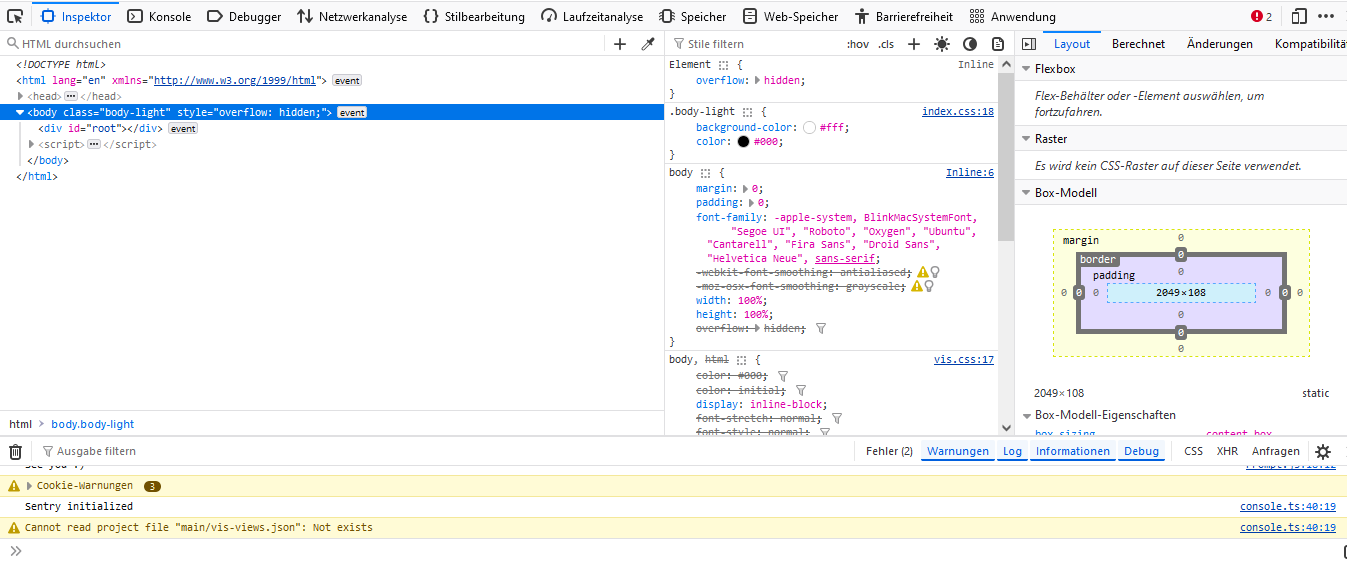
Hardware:
-Raspberry Pi 4 8 GB für kleinere Hausautomationen
-7 Zoll Touch Display zur Visualisierung -
@28michi05 sagte in VIS2 Editor und Runtime laden laden nicht:
ich hoffe hier sind screenshots ok.
Natürlich!
Und gar nichts hast du zum Glück nicht konfiguriert, immerhin das integrierte socket.io.
Also nochmal zusammengefasst
Auf dem pi mit angeschlossenem Monitor und der 127.0.0.1 läuft es, auf jedem anderen Rechner mit <RaspiIP>:8082 nicht?
Auch nicht auf dem Raspi?Dann hättest du wohl möglicherweise ein Netzwerkproblem oder Firewall.
Am Browser am PC bitte F12 drücken, dort den Reiter Console öffnen und dann die <raspiIP>8082/vis/edit.html Aufrufen.
Anschließend Screenshot von den Fehlermeldungen in der Browserkonsole machen und hier posten
-
@28michi05 da sagt er dass er die vis-views.json nicht findet.
jetzt weiss ich nicht ob das die richtige ist, und sie bei vis2 auch so heisst, oder die views von vis öffnen will.
kann aber auch mein Fehler sein, da ich dir den Link für vis gegeben habe.
den von vis2 kenne ich nicht -
Ja, direkt auf dem Pi klappt es mit der 127...
Übers Netzwerk mit der 192... kommt mir das Fenster mit Editor, Runtime,... und sobald ich dann auf Editor klicke erscheint kurz das IO Broker Symbol und dann bleibt alles weiß.@28michi05 sagte in VIS2 Editor und Runtime laden laden nicht:
Übers Netzwerk mit der 192... kommt mir das Fenster mit Editor, Runtime,... und sobald ich dann auf Editor klicke erscheint kurz das IO Broker Symbol und dann bleibt alles weiß.
auch vom RasPi aus?
oder nur vom PC


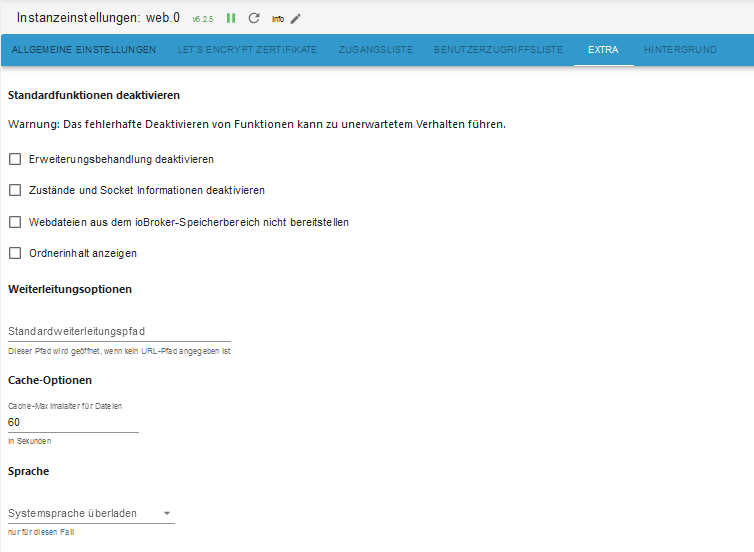
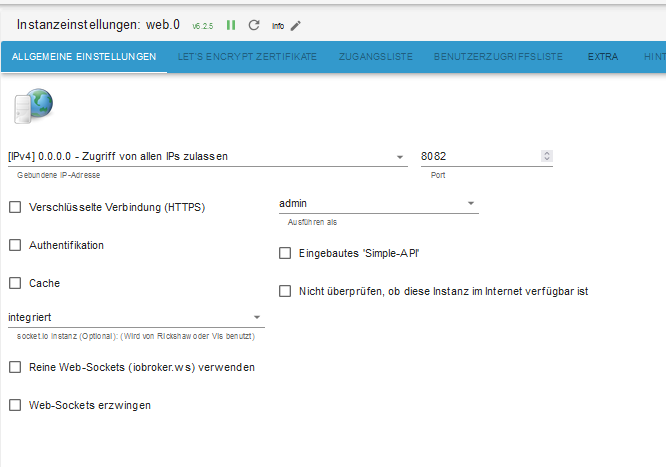
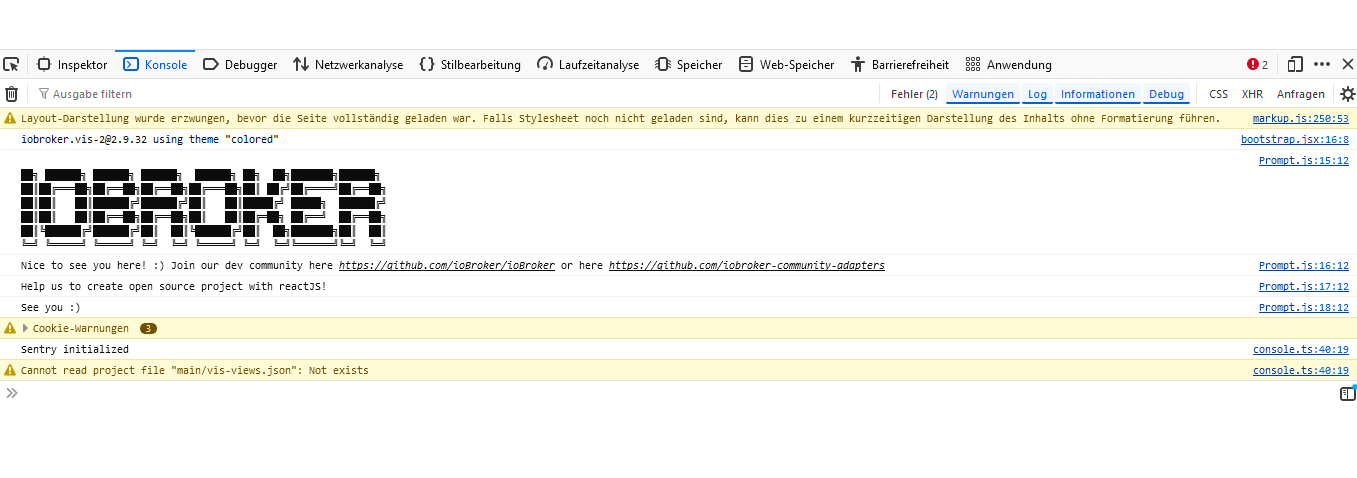
Hey! Du scheinst an dieser Unterhaltung interessiert zu sein, hast aber noch kein Konto.
Hast du es satt, bei jedem Besuch durch die gleichen Beiträge zu scrollen? Wenn du dich für ein Konto anmeldest, kommst du immer genau dorthin zurück, wo du zuvor warst, und kannst dich über neue Antworten benachrichtigen lassen (entweder per E-Mail oder Push-Benachrichtigung). Du kannst auch Lesezeichen speichern und Beiträge positiv bewerten, um anderen Community-Mitgliedern deine Wertschätzung zu zeigen.
Mit deinem Input könnte dieser Beitrag noch besser werden 💗
Registrieren AnmeldenSupport us
384
Online33.0k
Benutzer83.5k
Themen1.3m
Beiträge