
- ioBroker Community Home
- Deutsch
- Einsteigerfragen
- mqtt Adapter startet nicht mehr nach js-controller update




mqtt Adapter startet nicht mehr nach js-controller update

-
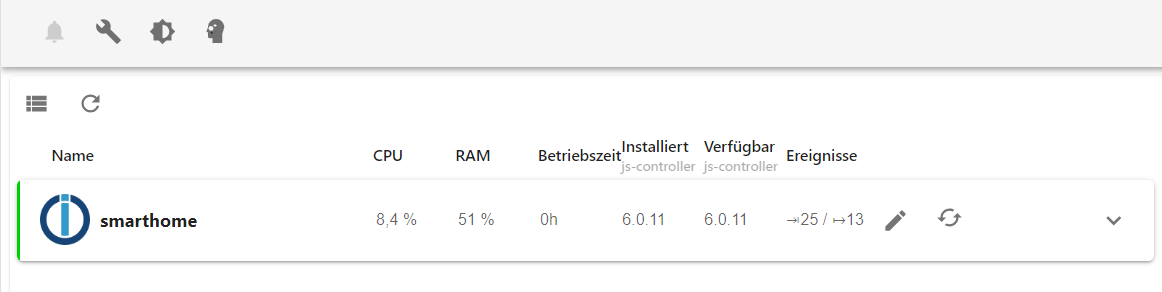
Ich hab heute per Admin den js-controller aktualisiert. bin dabei von der 6.0.9 auf 6.0.11 gewechselt:
seit dem verbindet sich mein MQTT Adapter nicht mehr.
Ich hab dann zusätzlich das System mit folgenden Befehlen aktualisiert:
sudo apt update
iob stop
sudo apt full-upgrade
sudo reboot
das ganze ist dabei auch ohne Probleme durchgelaufen.
auch nach dem reboot und einer wartezeit von 10 min bleibt der MQTT Adapter bei "Verbindung" auf rot.Da ich mit mqtt keinerlei Erfahrung habe und es eigentlich bis jetzt problemlos lief, hab ich keinen Ansatz auf was ich prüfen soll, um das Problem zu lösen. Kann mir hier netterweise jemand unterstützen?
-Peter
-
Ich hab heute per Admin den js-controller aktualisiert. bin dabei von der 6.0.9 auf 6.0.11 gewechselt:
seit dem verbindet sich mein MQTT Adapter nicht mehr.
Ich hab dann zusätzlich das System mit folgenden Befehlen aktualisiert:
sudo apt update
iob stop
sudo apt full-upgrade
sudo reboot
das ganze ist dabei auch ohne Probleme durchgelaufen.
auch nach dem reboot und einer wartezeit von 10 min bleibt der MQTT Adapter bei "Verbindung" auf rot.Da ich mit mqtt keinerlei Erfahrung habe und es eigentlich bis jetzt problemlos lief, hab ich keinen Ansatz auf was ich prüfen soll, um das Problem zu lösen. Kann mir hier netterweise jemand unterstützen?
@rtwl sagte in mqtt Adapter startet nicht mehr nach js-controller update:
hab ich keinen Ansatz auf was ich prüfen soll, um das Problem zu lösen.
Ein Blick in das Log ist immer der erste Ansatz.
Und schau dir das Gesamtkonstrukt an. Per
iob diagin der Langfassung.
-
@rtwl sagte in mqtt Adapter startet nicht mehr nach js-controller update:
hab ich keinen Ansatz auf was ich prüfen soll, um das Problem zu lösen.
Ein Blick in das Log ist immer der erste Ansatz.
Und schau dir das Gesamtkonstrukt an. Per
iob diagin der Langfassung.
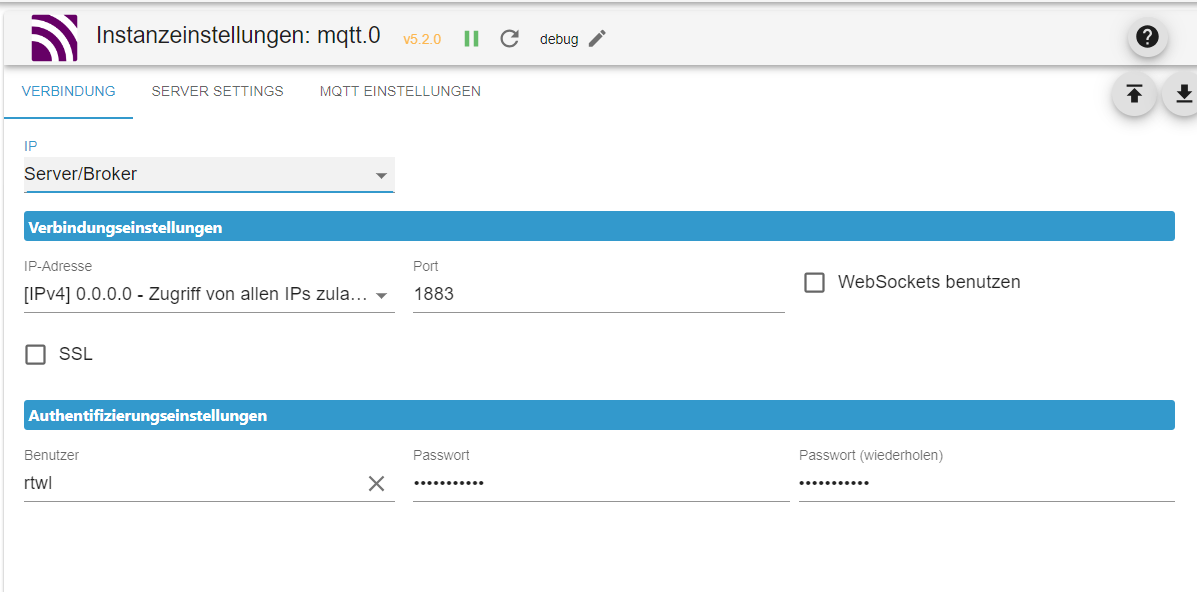
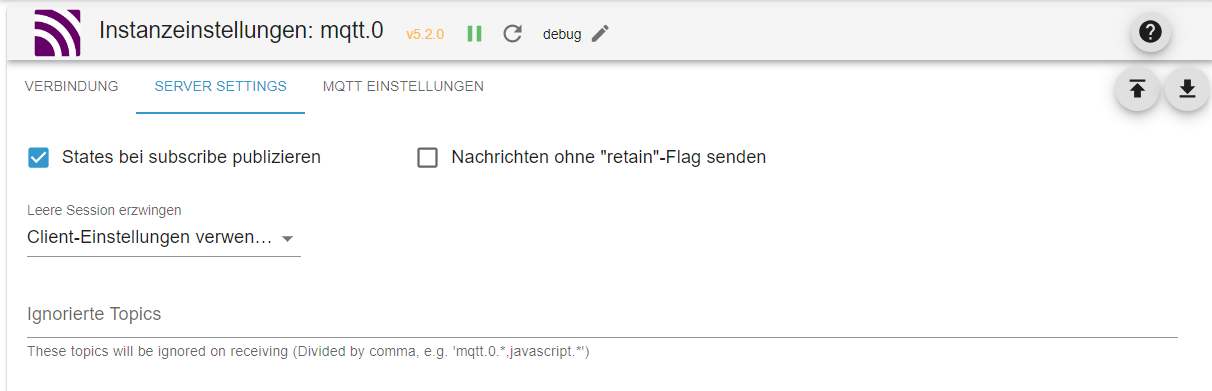
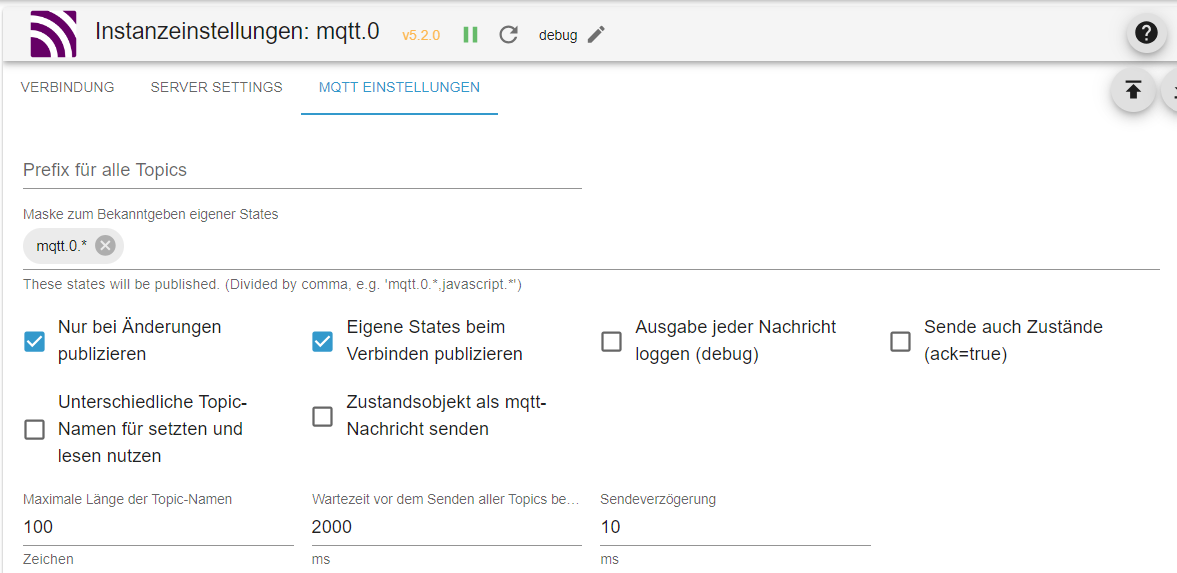
2024-09-04 21:31:38.676 - info: javascript.0 (788) script.js.Haussteuerung.Beleuchtung.Vorhang: Vorhang gedimmt (Nacht) 2024-09-04 21:36:57.935 - info: mqtt.0 (1468) Got terminate signal TERMINATE_YOURSELF 2024-09-04 21:36:57.940 - info: mqtt.0 (1468) terminating 2024-09-04 21:36:57.943 - info: mqtt.0 (1468) Terminated (ADAPTER_REQUESTED_TERMINATION): Without reason 2024-09-04 21:36:58.446 - info: mqtt.0 (1468) terminating 2024-09-04 21:37:03.551 - info: javascript.0 (788) script.js.common.Adapter_check: 🟥 mqtt 2024-09-04 21:37:05.276 - info: mqtt.0 (1563) starting. Version 5.2.0 in /opt/iobroker/node_modules/iobroker.mqtt, node: v18.20.4, js-controller: 6.0.11 2024-09-04 21:37:05.476 - info: mqtt.0 (1563) Starting MQTT authenticated server on 0.0.0.0:1883 2024-09-04 21:39:35.311 - info: javascript.0 (788) script.js.common.Adapter_check: 🟩 mqttSkript v.2024-05-22 *** BASE SYSTEM *** Static hostname: smarthome Icon name: computer Operating System: Debian GNU/Linux 12 (bookworm) Kernel: Linux 6.6.31+rpt-rpi-v8 Architecture: arm64 Model : Raspberry Pi 4 Model B Rev 1.4 Docker : false Virtualization : none Kernel : aarch64 Userland : 64 bit Systemuptime and Load: 21:39:50 up 20 min, 2 users, load average: 0.88, 0.72, 0.79 CPU threads: 4 *** RASPBERRY THROTTLING *** Current issues: No throttling issues detected. Previously detected issues: No throttling issues detected. *** Time and Time Zones *** Local time: Wed 2024-09-04 21:39:50 CEST Universal time: Wed 2024-09-04 19:39:50 UTC RTC time: n/a Time zone: Europe/Berlin (CEST, +0200) System clock synchronized: yes NTP service: active RTC in local TZ: no *** Users and Groups *** User that called 'iob diag': rtwl HOME=/home/rtwl GROUPS=rtwl adm dialout cdrom sudo audio video plugdev games users input render netdev gpio i2c spi iobroker User that is running 'js-controller': iobroker HOME=/home/iobroker GROUPS=iobroker tty dialout audio video bluetooth gpio i2c *** Display-Server-Setup *** Display-Server: false Desktop: Terminal: tty Boot Target: multi-user.target *** MEMORY *** total used free shared buff/cache available Mem: 4.0G 2.2G 1.4G 1.2M 497M 1.8G Swap: 209M 0B 209M Total: 4.2G 2.2G 1.6G Active iob-Instances: 26 3792 M total memory 2066 M used memory 2104 M active memory 234 M inactive memory 1326 M free memory 52 M buffer memory 421 M swap cache 199 M total swap 0 M used swap 199 M free swap *** top - Table Of Processes *** top - 21:39:50 up 20 min, 2 users, load average: 0.89, 0.73, 0.79 Tasks: 190 total, 1 running, 189 sleeping, 0 stopped, 0 zombie %Cpu(s): 0.0 us, 0.0 sy, 0.0 ni,100.0 id, 0.0 wa, 0.0 hi, 0.0 si, 0.0 st MiB Mem : 3792.1 total, 1325.6 free, 2066.9 used, 474.4 buff/cache MiB Swap: 200.0 total, 200.0 free, 0.0 used. 1725.2 avail Mem *** FAILED SERVICES *** UNIT LOAD ACTIVE SUB DESCRIPTION 0 loaded units listed. *** FILESYSTEM *** Filesystem Type Size Used Avail Use% Mounted on udev devtmpfs 1.6G 0 1.6G 0% /dev tmpfs tmpfs 380M 1.2M 379M 1% /run /dev/mmcblk0p2 ext4 15G 11G 3.2G 77% / tmpfs tmpfs 1.9G 0 1.9G 0% /dev/shm tmpfs tmpfs 5.0M 16K 5.0M 1% /run/lock /dev/mmcblk0p1 vfat 510M 64M 447M 13% /boot/firmware tmpfs tmpfs 380M 0 380M 0% /run/user/1000 Messages concerning ext4 filesystem in dmesg: [Wed Sep 4 21:18:54 2024] Kernel command line: coherent_pool=1M 8250.nr_uarts=0 snd_bcm2835.enable_headphones=0 snd_bcm2835.enable_headphones=1 snd_bcm2835.enable_hdmi=1 snd_bcm2835.enable_hdmi=0 smsc95xx.macaddr=E4:5F:01:75:F7:C5 vc_mem.mem_base=0x3ec00000 vc_mem.mem_size=0x40000000 console=ttyS0,115200 console=tty1 root=PARTUUID=c17d14e5-02 rootfstype=ext4 fsck.repair=yes rootwait [Wed Sep 4 21:18:57 2024] EXT4-fs (mmcblk0p2): mounted filesystem 93c89e92-8f2e-4522-ad32-68faed883d2f ro with ordered data mode. Quota mode: none. [Wed Sep 4 21:19:00 2024] EXT4-fs (mmcblk0p2): re-mounted 93c89e92-8f2e-4522-ad32-68faed883d2f r/w. Quota mode: none. Show mounted filesystems: TARGET SOURCE FSTYPE OPTIONS / /dev/mmcblk0p2 ext4 rw,noatime,commit=600 |-/sys sysfs sysfs rw,nosuid,nodev,noexec,relatime | |-/sys/kernel/security securityfs securityfs rw,nosuid,nodev,noexec,relatime | |-/sys/fs/cgroup cgroup2 cgroup2 rw,nosuid,nodev,noexec,relatime,nsdelegate,memory_recursiveprot | |-/sys/fs/pstore pstore pstore rw,nosuid,nodev,noexec,relatime | |-/sys/fs/bpf bpf bpf rw,nosuid,nodev,noexec,relatime,mode=700 | |-/sys/kernel/debug debugfs debugfs rw,nosuid,nodev,noexec,relatime | |-/sys/kernel/tracing tracefs tracefs rw,nosuid,nodev,noexec,relatime | |-/sys/fs/fuse/connections fusectl fusectl rw,nosuid,nodev,noexec,relatime | `-/sys/kernel/config configfs configfs rw,nosuid,nodev,noexec,relatime |-/proc proc proc rw,relatime | `-/proc/sys/fs/binfmt_misc systemd-1 autofs rw,relatime,fd=30,pgrp=1,timeout=0,minproto=5,maxproto=5,direct,pipe_ino=224 | `-/proc/sys/fs/binfmt_misc binfmt_misc binfmt_misc rw,nosuid,nodev,noexec,relatime |-/dev udev devtmpfs rw,nosuid,relatime,size=1671296k,nr_inodes=417824,mode=755 | |-/dev/pts devpts devpts rw,nosuid,noexec,relatime,gid=5,mode=620,ptmxmode=000 | |-/dev/shm tmpfs tmpfs rw,nosuid,nodev | `-/dev/mqueue mqueue mqueue rw,nosuid,nodev,noexec,relatime |-/run tmpfs tmpfs rw,nosuid,nodev,noexec,relatime,size=388308k,mode=755 | |-/run/lock tmpfs tmpfs rw,nosuid,nodev,noexec,relatime,size=5120k | |-/run/credentials/systemd-sysctl.service ramfs ramfs ro,nosuid,nodev,noexec,relatime,mode=700 | |-/run/credentials/systemd-sysusers.service ramfs ramfs ro,nosuid,nodev,noexec,relatime,mode=700 | |-/run/credentials/systemd-tmpfiles-setup-dev.service ramfs ramfs ro,nosuid,nodev,noexec,relatime,mode=700 | |-/run/rpc_pipefs sunrpc rpc_pipefs rw,relatime | |-/run/credentials/systemd-tmpfiles-setup.service ramfs ramfs ro,nosuid,nodev,noexec,relatime,mode=700 | `-/run/user/1000 tmpfs tmpfs rw,nosuid,nodev,relatime,size=388304k,nr_inodes=97076,mode=700,uid=1000,gid=1000 `-/boot/firmware /dev/mmcblk0p1 vfat rw,relatime,fmask=0022,dmask=0022,codepage=437,iocharset=ascii,shortname=mixed,errors=remount-ro Files in neuralgic directories: /var: 832M /var/ 262M /var/log/journal/7abd16222f504c5aa6afc24d57aa23d1 262M /var/log/journal 262M /var/log 204M /var/cache Journal file /var/log/journal/7abd16222f504c5aa6afc24d57aa23d1/system@00061d73cad1ee20-8fe04835cf89423d.journal~ is truncated, ignoring file. Archived and active journals take up 261.2M in the file system. /opt/iobroker/backups: 2.0G /opt/iobroker/backups/ /opt/iobroker/iobroker-data: 2.2G /opt/iobroker/iobroker-data/ 1.3G /opt/iobroker/iobroker-data/history 772M /opt/iobroker/iobroker-data/files 441M /opt/iobroker/iobroker-data/files/javascript.admin 409M /opt/iobroker/iobroker-data/files/javascript.admin/static The five largest files in iobroker-data are: 38M /opt/iobroker/iobroker-data/files/iot.admin/static/js/main.d3d286bd.js.map 24M /opt/iobroker/iobroker-data/files/web.admin/static/js/main.135279a0.js.map 24M /opt/iobroker/iobroker-data/files/eventlist/static/js/main.bf7d9efc.js.map 24M /opt/iobroker/iobroker-data/files/eventlist.admin/static/js/main.bf7d9efc.js.map 20M /opt/iobroker/iobroker-data/objects.jsonl USB-Devices by-id: USB-Sticks - Avoid direct links to /dev/tty* in your adapter setups, please always prefer the links 'by-id': /dev/serial/by-id/usb-ITEAD_SONOFF_Zigbee_3.0_USB_Dongle_Plus_V2_20230804163324-if00 Your zigbee.0 COM-Port is matching 'by-id'. Very good! *** NodeJS-Installation *** /usr/bin/nodejs v18.20.4 /usr/bin/node v18.20.4 /usr/bin/npm 10.7.0 /usr/bin/npx 10.7.0 /usr/bin/corepack 0.28.0 nodejs: Installed: 18.20.4-1nodesource1 Candidate: 18.20.4-1nodesource1 Version table: *** 18.20.4-1nodesource1 1001 500 https://deb.nodesource.com/node_18.x nodistro/main arm64 Packages 100 /var/lib/dpkg/status 18.20.3-1nodesource1 1001 500 https://deb.nodesource.com/node_18.x nodistro/main arm64 Packages 18.20.2-1nodesource1 1001 500 https://deb.nodesource.com/node_18.x nodistro/main arm64 Packages 18.20.1-1nodesource1 1001 500 https://deb.nodesource.com/node_18.x nodistro/main arm64 Packages 18.20.0-1nodesource1 1001 500 https://deb.nodesource.com/node_18.x nodistro/main arm64 Packages 18.19.1-1nodesource1 1001 500 https://deb.nodesource.com/node_18.x nodistro/main arm64 Packages 18.19.0+dfsg-6~deb12u2 500 500 http://deb.debian.org/debian bookworm/main arm64 Packages 18.19.0+dfsg-6~deb12u1 500 500 http://deb.debian.org/debian-security bookworm-security/main arm64 Packages 18.19.0-1nodesource1 1001 500 https://deb.nodesource.com/node_18.x nodistro/main arm64 Packages 18.18.2-1nodesource1 1001 500 https://deb.nodesource.com/node_18.x nodistro/main arm64 Packages 18.18.1-1nodesource1 1001 500 https://deb.nodesource.com/node_18.x nodistro/main arm64 Packages 18.18.0-1nodesource1 1001 500 https://deb.nodesource.com/node_18.x nodistro/main arm64 Packages 18.17.1-1nodesource1 1001 500 https://deb.nodesource.com/node_18.x nodistro/main arm64 Packages 18.17.0-1nodesource1 1001 500 https://deb.nodesource.com/node_18.x nodistro/main arm64 Packages 18.16.1-1nodesource1 1001 500 https://deb.nodesource.com/node_18.x nodistro/main arm64 Packages 18.16.0-1nodesource1 1001 500 https://deb.nodesource.com/node_18.x nodistro/main arm64 Packages 18.15.0-1nodesource1 1001 500 https://deb.nodesource.com/node_18.x nodistro/main arm64 Packages 18.14.2-1nodesource1 1001 500 https://deb.nodesource.com/node_18.x nodistro/main arm64 Packages 18.14.1-1nodesource1 1001 500 https://deb.nodesource.com/node_18.x nodistro/main arm64 Packages 18.14.0-1nodesource1 1001 500 https://deb.nodesource.com/node_18.x nodistro/main arm64 Packages 18.13.0-1nodesource1 1001 500 https://deb.nodesource.com/node_18.x nodistro/main arm64 Packages 18.12.0-1nodesource1 1001 500 https://deb.nodesource.com/node_18.x nodistro/main arm64 Packages 18.11.0-1nodesource1 1001 500 https://deb.nodesource.com/node_18.x nodistro/main arm64 Packages 18.10.0-1nodesource1 1001 500 https://deb.nodesource.com/node_18.x nodistro/main arm64 Packages 18.9.1-1nodesource1 1001 500 https://deb.nodesource.com/node_18.x nodistro/main arm64 Packages 18.9.0-1nodesource1 1001 500 https://deb.nodesource.com/node_18.x nodistro/main arm64 Packages 18.8.0-1nodesource1 1001 500 https://deb.nodesource.com/node_18.x nodistro/main arm64 Packages 18.7.0-1nodesource1 1001 500 https://deb.nodesource.com/node_18.x nodistro/main arm64 Packages 18.6.0-1nodesource1 1001 500 https://deb.nodesource.com/node_18.x nodistro/main arm64 Packages 18.5.0-1nodesource1 1001 500 https://deb.nodesource.com/node_18.x nodistro/main arm64 Packages 18.4.0-1nodesource1 1001 500 https://deb.nodesource.com/node_18.x nodistro/main arm64 Packages 18.3.0-1nodesource1 1001 500 https://deb.nodesource.com/node_18.x nodistro/main arm64 Packages 18.2.0-1nodesource1 1001 500 https://deb.nodesource.com/node_18.x nodistro/main arm64 Packages 18.1.0-1nodesource1 1001 500 https://deb.nodesource.com/node_18.x nodistro/main arm64 Packages 18.0.0-1nodesource1 1001 500 https://deb.nodesource.com/node_18.x nodistro/main arm64 Packages Temp directories causing npm8 problem: 0 No problems detected Errors in npm tree: *** ioBroker-Installation *** ioBroker Status iobroker is running on this host. Objects type: jsonl States type: jsonl Core adapters versions js-controller: 6.0.11 admin: 7.0.23 javascript: 8.7.6 nodejs modules from github: 3 +-- iobroker.alexa-timer-vis@0.3.0 (git+ssh://git@github.com/MiRo1310/ioBroker.alexa-timer-vis.git#c3aaeb68786ce591dd164a98677895d817ca6f0c) +-- iobroker.drops-weather@0.3.1 (git+ssh://git@github.com/inbux/ioBroker.drops-weather.git#608ed1fcbbde3f59b6a09f2f188b92823481ae90) +-- iobroker.sourceanalytix@0.4.15-alpha.1 (git+ssh://git@github.com/DrozmotiX/ioBroker.sourceanalytix.git#fd3b7f9f362a348741cbe18d70a130d2bfee6727) Adapter State + system.adapter.admin.0 : admin : smarthome - enabled, port: 8081, bind: 0.0.0.0, run as: admin + system.adapter.alexa-timer-vis.0 : alexa-timer-vis : smarthome - enabled + system.adapter.alexa2.0 : alexa2 : smarthome - enabled system.adapter.alias-manager.0 : alias-manager : smarthome - disabled + system.adapter.backitup.0 : backitup : smarthome - enabled + system.adapter.bring.0 : bring : smarthome - enabled system.adapter.cloud.0 : cloud : smarthome - disabled system.adapter.daswetter.0 : daswetter : smarthome - enabled system.adapter.discovery.0 : discovery : smarthome - disabled system.adapter.drops-weather.0 : drops-weather : smarthome - disabled + system.adapter.eventlist.0 : eventlist : smarthome - enabled system.adapter.feiertage.0 : feiertage : smarthome - enabled system.adapter.flot.0 : flot : smarthome - disabled + system.adapter.fronius.0 : fronius : smarthome - enabled + system.adapter.harmony.0 : harmony : smarthome - enabled + system.adapter.history.0 : history : smarthome - enabled system.adapter.ical.0 : ical : smarthome - enabled system.adapter.ical.1 : ical : smarthome - enabled system.adapter.iot.0 : iot : smarthome - disabled + system.adapter.javascript.0 : javascript : smarthome - enabled + system.adapter.mqtt.0 : mqtt : smarthome - enabled, port: 1883, bind: 0.0.0.0 system.adapter.netatmo-crawler.0 : netatmo-crawler : smarthome - enabled + system.adapter.onkyo.0 : onkyo : smarthome - enabled system.adapter.openligadb.0 : openligadb : smarthome - disabled + system.adapter.operating-hours.0 : operating-hours : smarthome - enabled system.adapter.pi-hole.0 : pi-hole : smarthome - disabled + system.adapter.pushover.0 : pushover : smarthome - enabled system.adapter.pvforecast.0 : pvforecast : smarthome - disabled + system.adapter.radar2.0 : radar2 : smarthome - enabled + system.adapter.radar2.1 : radar2 : smarthome - enabled + system.adapter.radar2.2 : radar2 : smarthome - enabled + system.adapter.shelly.0 : shelly : smarthome - enabled, port: 1882, bind: 0.0.0.0 + system.adapter.shuttercontrol.0 : shuttercontrol : smarthome - enabled + system.adapter.simple-api.0 : simple-api : smarthome - enabled, port: 8087, bind: 0.0.0.0, run as: admin system.adapter.socketio.0 : socketio : smarthome - disabled, port: 8084, bind: 0.0.0.0, run as: admin system.adapter.sourceanalytix.0 : sourceanalytix : smarthome - disabled + system.adapter.trashschedule.0 : trashschedule : smarthome - enabled system.adapter.uv-protect.0 : uv-protect : smarthome - disabled system.adapter.vis-icontwo.0 : vis-icontwo : smarthome - disabled + system.adapter.vis-inventwo.0 : vis-inventwo : smarthome - enabled system.adapter.vis-materialdesign.0 : vis-materialdesign : smarthome - enabled system.adapter.vis-timeandweather.0 : vis-timeandweather : smarthome - disabled system.adapter.vis.0 : vis : smarthome - enabled + system.adapter.weather-warnings.0 : weather-warnings : smarthome - enabled + system.adapter.web.0 : web : smarthome - enabled, port: 8082, bind: 0.0.0.0, run as: admin + system.adapter.zigbee.0 : zigbee : smarthome - enabled, port: /dev/serial/by-id/usb-ITEAD_SONOFF_Zigbee_3.0_USB_Dongle_Plus_V2_20230804163324-if00 + instance is alive Enabled adapters with bindings + system.adapter.admin.0 : admin : smarthome - enabled, port: 8081, bind: 0.0.0.0, run as: admin + system.adapter.mqtt.0 : mqtt : smarthome - enabled, port: 1883, bind: 0.0.0.0 + system.adapter.shelly.0 : shelly : smarthome - enabled, port: 1882, bind: 0.0.0.0 + system.adapter.simple-api.0 : simple-api : smarthome - enabled, port: 8087, bind: 0.0.0.0, run as: admin + system.adapter.web.0 : web : smarthome - enabled, port: 8082, bind: 0.0.0.0, run as: admin + system.adapter.zigbee.0 : zigbee : smarthome - enabled, port: /dev/serial/by-id/usb-ITEAD_SONOFF_Zigbee_3.0_USB_Dongle_Plus_V2_20230804163324-if00 ioBroker-Repositories ┌─────────┬──────────┬─────────────────────────────────────────────────────────┬──────────────┐ │ (index) │ name │ url │ auto upgrade │ ├─────────┼──────────┼─────────────────────────────────────────────────────────┼──────────────┤ │ 0 │ 'stable' │ 'http://download.iobroker.net/sources-dist.json' │ false │ │ 1 │ 'beta' │ 'http://download.iobroker.net/sources-dist-latest.json' │ false │ └─────────┴──────────┴─────────────────────────────────────────────────────────┴──────────────┘ Active repo(s): stable Upgrade policy: none Installed ioBroker-Instances Used repository: stable Adapter "admin" : 7.0.23 , installed 7.0.23 Adapter "alexa-timer-vis": 1.0.0 , installed 0.3.0 [Updatable] Adapter "alexa2" : 3.26.5 , installed 3.26.5 Adapter "alias-manager": 1.2.6 , installed 1.2.6 Adapter "backitup" : 3.0.19 , installed 3.0.19 Adapter "bring" : 1.8.4 , installed 1.8.4 Adapter "cloud" : 5.0.1 , installed 5.0.1 Adapter "daswetter" : 3.1.15 , installed 3.1.15 Adapter "discovery" : 4.5.0 , installed 4.5.0 Adapter "eventlist" : 2.0.1 , installed 2.0.1 Adapter "feiertage" : 1.2.0 , installed 1.2.0 Adapter "flot" : 1.12.0 , installed 1.12.0 Adapter "fronius" : 2.1.1 , installed 2.1.1 Adapter "fullcalendar" : 2.4.2 , installed 2.4.2 Adapter "harmony" : 1.5.0 , installed 1.5.0 Adapter "history" : 3.0.1 , installed 3.0.1 Adapter "ical" : 1.15.0 , installed 1.15.0 Adapter "iot" : 3.3.0 , installed 3.3.0 Adapter "javascript" : 8.7.6 , installed 8.7.6 Controller "js-controller": 6.0.11 , installed 6.0.11 Adapter "mqtt" : 5.2.0 , installed 5.2.0 Adapter "netatmo-crawler": 0.8.1 , installed 0.8.1 Adapter "onkyo" : 2.1.2 , installed 2.1.2 Adapter "openligadb" : 1.4.11 , installed 1.4.11 Adapter "operating-hours": 1.1.0 , installed 1.1.0 Adapter "pi-hole" : 1.3.6 , installed 1.3.6 Adapter "pushover" : 3.0.6 , installed 3.0.6 Adapter "pvforecast" : 3.0.0 , installed 3.0.0 Adapter "radar2" : 2.2.0 , installed 2.2.0 Adapter "shelly" : 7.0.0 , installed 7.0.0 Adapter "shuttercontrol": 1.7.3 , installed 1.7.3 Adapter "simple-api" : 2.8.0 , installed 2.8.0 Adapter "socketio" : 6.7.1 , installed 6.7.1 Adapter "trashschedule": 3.3.0 , installed 3.3.0 Adapter "uv-protect" : 0.6.0 , installed 0.6.0 Adapter "vis" : 1.5.6 , installed 1.5.6 Adapter "vis-icontwo" : 1.5.0 , installed 1.5.0 Adapter "vis-inventwo" : 3.3.4 , installed 3.3.4 Adapter "vis-materialdesign": 0.5.9, installed 0.5.9 Adapter "vis-timeandweather": 1.2.2, installed 1.2.2 Adapter "weather-warnings": 0.6.7 , installed 0.6.7 Adapter "web" : 6.2.5 , installed 6.2.5 Adapter "ws" : 2.6.2 , installed 2.6.2 Adapter "zigbee" : 1.10.3 , installed 1.10.3 Objects and States Please stand by - This may take a while Objects: 12591 States: 10793 *** OS-Repositories and Updates *** Hit:1 http://deb.debian.org/debian bookworm InRelease Hit:2 http://deb.debian.org/debian-security bookworm-security InRelease Hit:3 http://archive.raspberrypi.com/debian bookworm InRelease Hit:4 http://deb.debian.org/debian bookworm-updates InRelease Hit:5 https://deb.nodesource.com/node_18.x nodistro InRelease Reading package lists... Pending Updates: 0 *** Listening Ports *** Active Internet connections (only servers) Proto Recv-Q Send-Q Local Address Foreign Address State User Inode PID/Program name tcp 0 0 0.0.0.0:1883 0.0.0.0:* LISTEN 1001 15849 1563/io.mqtt.0 tcp 0 0 127.0.0.1:9001 0.0.0.0:* LISTEN 1001 5565 664/iobroker.js-con tcp 0 0 127.0.0.1:9000 0.0.0.0:* LISTEN 1001 6537 664/iobroker.js-con tcp 0 0 0.0.0.0:22 0.0.0.0:* LISTEN 0 743 673/sshd: /usr/sbin tcp6 0 0 :::8087 :::* LISTEN 1001 7813 1370/io.simple-api. tcp6 0 0 :::8082 :::* LISTEN 1001 7855 1355/io.web.0 tcp6 0 0 :::8081 :::* LISTEN 1001 2960 755/io.admin.0 tcp6 0 0 :::22 :::* LISTEN 0 745 673/sshd: /usr/sbin tcp6 0 0 :::61991 :::* LISTEN 1001 910 862/io.harmony.0 udp 0 0 0.0.0.0:5683 0.0.0.0:* 1001 7369 1012/io.shelly.0 udp 0 0 0.0.0.0:46967 0.0.0.0:* 104 2796 527/avahi-daemon: r udp 0 0 0.0.0.0:67 0.0.0.0:* 1001 6102 1109/io.radar2.2 udp 0 0 0.0.0.0:67 0.0.0.0:* 1001 6007 1090/io.radar2.1 udp 0 0 0.0.0.0:67 0.0.0.0:* 1001 6802 997/io.radar2.0 udp 0 0 0.0.0.0:61991 0.0.0.0:* 1001 911 862/io.harmony.0 udp 0 0 0.0.0.0:5353 0.0.0.0:* 104 2794 527/avahi-daemon: r udp6 0 0 :::41433 :::* 104 2797 527/avahi-daemon: r udp6 0 0 :::5353 :::* 104 2795 527/avahi-daemon: r *** Log File - Last 25 Lines *** 2024-09-04 21:24:06.247 - info: mqtt.0 (944) Got terminate signal TERMINATE_YOURSELF 2024-09-04 21:24:06.250 - info: mqtt.0 (944) terminating 2024-09-04 21:24:06.252 - info: mqtt.0 (944) Terminated (ADAPTER_REQUESTED_TERMINATION): Without reason 2024-09-04 21:24:06.755 - info: mqtt.0 (944) terminating 2024-09-04 21:24:11.855 - info: javascript.0 (788) script.js.common.Adapter_check: 🟥 mqtt 2024-09-04 21:24:13.323 - info: mqtt.0 (1447) starting. Version 5.2.0 in /opt/iobroker/node_modules/iobroker.mqtt, node: v18.20.4, js-controller: 6.0.11 2024-09-04 21:24:13.513 - info: mqtt.0 (1447) Starting MQTT authenticated server on 0.0.0.0:1883 2024-09-04 21:25:18.323 - info: mqtt.0 (1447) Got terminate signal TERMINATE_YOURSELF 2024-09-04 21:25:18.327 - info: mqtt.0 (1447) terminating 2024-09-04 21:25:18.330 - info: mqtt.0 (1447) Terminated (ADAPTER_REQUESTED_TERMINATION): Without reason 2024-09-04 21:25:18.833 - info: mqtt.0 (1447) terminating 2024-09-04 21:25:25.357 - info: mqtt.0 (1468) starting. Version 5.2.0 in /opt/iobroker/node_modules/iobroker.mqtt, node: v18.20.4, js-controller: 6.0.11 2024-09-04 21:25:25.661 - info: mqtt.0 (1468) Starting MQTT authenticated server on 0.0.0.0:1883 2024-09-04 21:25:25.663 - info: mqtt.0 (1468) Starting MQTT-WebSocket authenticated server on 0.0.0.0:1884 2024-09-04 21:26:12.196 - info: javascript.0 (788) script.js.common.Adapter_check: 🟩 weather-warnings 2024-09-04 21:27:55.402 - info: javascript.0 (788) script.js.common.Adapter_check: 🟩 mqtt 2024-09-04 21:31:38.676 - info: javascript.0 (788) script.js.Haussteuerung.Beleuchtung.Vorhang: Vorhang gedimmt (Nacht) 2024-09-04 21:36:57.935 - info: mqtt.0 (1468) Got terminate signal TERMINATE_YOURSELF 2024-09-04 21:36:57.940 - info: mqtt.0 (1468) terminating 2024-09-04 21:36:57.943 - info: mqtt.0 (1468) Terminated (ADAPTER_REQUESTED_TERMINATION): Without reason 2024-09-04 21:36:58.446 - info: mqtt.0 (1468) terminating 2024-09-04 21:37:03.551 - info: javascript.0 (788) script.js.common.Adapter_check: 🟥 mqtt 2024-09-04 21:37:05.276 - info: mqtt.0 (1563) starting. Version 5.2.0 in /opt/iobroker/node_modules/iobroker.mqtt, node: v18.20.4, js-controller: 6.0.11 2024-09-04 21:37:05.476 - info: mqtt.0 (1563) Starting MQTT authenticated server on 0.0.0.0:1883 2024-09-04 21:39:35.311 - info: javascript.0 (788) script.js.common.Adapter_check: 🟩 mqttIm Log erkenne ich nur, dass die IP Adresse 0.0.0.0 steht, welche ja offensichtlich falsch ist. Jedoch finde ich in den Adaper-Einstellungen nur eine EInstellung zu IP Adressen. und dort steht bei 0.0.0.0 nur "Zugriff von allen IP´s zulassen" dabei - was mir mich theoretisch okay sein wird.
im iob diag erkenne ich nichts "brauchbares" was mir dabei helfen kann.
Findest du hier einen Hinweis?-Peter
-
2024-09-04 21:31:38.676 - info: javascript.0 (788) script.js.Haussteuerung.Beleuchtung.Vorhang: Vorhang gedimmt (Nacht) 2024-09-04 21:36:57.935 - info: mqtt.0 (1468) Got terminate signal TERMINATE_YOURSELF 2024-09-04 21:36:57.940 - info: mqtt.0 (1468) terminating 2024-09-04 21:36:57.943 - info: mqtt.0 (1468) Terminated (ADAPTER_REQUESTED_TERMINATION): Without reason 2024-09-04 21:36:58.446 - info: mqtt.0 (1468) terminating 2024-09-04 21:37:03.551 - info: javascript.0 (788) script.js.common.Adapter_check: 🟥 mqtt 2024-09-04 21:37:05.276 - info: mqtt.0 (1563) starting. Version 5.2.0 in /opt/iobroker/node_modules/iobroker.mqtt, node: v18.20.4, js-controller: 6.0.11 2024-09-04 21:37:05.476 - info: mqtt.0 (1563) Starting MQTT authenticated server on 0.0.0.0:1883 2024-09-04 21:39:35.311 - info: javascript.0 (788) script.js.common.Adapter_check: 🟩 mqttSkript v.2024-05-22 *** BASE SYSTEM *** Static hostname: smarthome Icon name: computer Operating System: Debian GNU/Linux 12 (bookworm) Kernel: Linux 6.6.31+rpt-rpi-v8 Architecture: arm64 Model : Raspberry Pi 4 Model B Rev 1.4 Docker : false Virtualization : none Kernel : aarch64 Userland : 64 bit Systemuptime and Load: 21:39:50 up 20 min, 2 users, load average: 0.88, 0.72, 0.79 CPU threads: 4 *** RASPBERRY THROTTLING *** Current issues: No throttling issues detected. Previously detected issues: No throttling issues detected. *** Time and Time Zones *** Local time: Wed 2024-09-04 21:39:50 CEST Universal time: Wed 2024-09-04 19:39:50 UTC RTC time: n/a Time zone: Europe/Berlin (CEST, +0200) System clock synchronized: yes NTP service: active RTC in local TZ: no *** Users and Groups *** User that called 'iob diag': rtwl HOME=/home/rtwl GROUPS=rtwl adm dialout cdrom sudo audio video plugdev games users input render netdev gpio i2c spi iobroker User that is running 'js-controller': iobroker HOME=/home/iobroker GROUPS=iobroker tty dialout audio video bluetooth gpio i2c *** Display-Server-Setup *** Display-Server: false Desktop: Terminal: tty Boot Target: multi-user.target *** MEMORY *** total used free shared buff/cache available Mem: 4.0G 2.2G 1.4G 1.2M 497M 1.8G Swap: 209M 0B 209M Total: 4.2G 2.2G 1.6G Active iob-Instances: 26 3792 M total memory 2066 M used memory 2104 M active memory 234 M inactive memory 1326 M free memory 52 M buffer memory 421 M swap cache 199 M total swap 0 M used swap 199 M free swap *** top - Table Of Processes *** top - 21:39:50 up 20 min, 2 users, load average: 0.89, 0.73, 0.79 Tasks: 190 total, 1 running, 189 sleeping, 0 stopped, 0 zombie %Cpu(s): 0.0 us, 0.0 sy, 0.0 ni,100.0 id, 0.0 wa, 0.0 hi, 0.0 si, 0.0 st MiB Mem : 3792.1 total, 1325.6 free, 2066.9 used, 474.4 buff/cache MiB Swap: 200.0 total, 200.0 free, 0.0 used. 1725.2 avail Mem *** FAILED SERVICES *** UNIT LOAD ACTIVE SUB DESCRIPTION 0 loaded units listed. *** FILESYSTEM *** Filesystem Type Size Used Avail Use% Mounted on udev devtmpfs 1.6G 0 1.6G 0% /dev tmpfs tmpfs 380M 1.2M 379M 1% /run /dev/mmcblk0p2 ext4 15G 11G 3.2G 77% / tmpfs tmpfs 1.9G 0 1.9G 0% /dev/shm tmpfs tmpfs 5.0M 16K 5.0M 1% /run/lock /dev/mmcblk0p1 vfat 510M 64M 447M 13% /boot/firmware tmpfs tmpfs 380M 0 380M 0% /run/user/1000 Messages concerning ext4 filesystem in dmesg: [Wed Sep 4 21:18:54 2024] Kernel command line: coherent_pool=1M 8250.nr_uarts=0 snd_bcm2835.enable_headphones=0 snd_bcm2835.enable_headphones=1 snd_bcm2835.enable_hdmi=1 snd_bcm2835.enable_hdmi=0 smsc95xx.macaddr=E4:5F:01:75:F7:C5 vc_mem.mem_base=0x3ec00000 vc_mem.mem_size=0x40000000 console=ttyS0,115200 console=tty1 root=PARTUUID=c17d14e5-02 rootfstype=ext4 fsck.repair=yes rootwait [Wed Sep 4 21:18:57 2024] EXT4-fs (mmcblk0p2): mounted filesystem 93c89e92-8f2e-4522-ad32-68faed883d2f ro with ordered data mode. Quota mode: none. [Wed Sep 4 21:19:00 2024] EXT4-fs (mmcblk0p2): re-mounted 93c89e92-8f2e-4522-ad32-68faed883d2f r/w. Quota mode: none. Show mounted filesystems: TARGET SOURCE FSTYPE OPTIONS / /dev/mmcblk0p2 ext4 rw,noatime,commit=600 |-/sys sysfs sysfs rw,nosuid,nodev,noexec,relatime | |-/sys/kernel/security securityfs securityfs rw,nosuid,nodev,noexec,relatime | |-/sys/fs/cgroup cgroup2 cgroup2 rw,nosuid,nodev,noexec,relatime,nsdelegate,memory_recursiveprot | |-/sys/fs/pstore pstore pstore rw,nosuid,nodev,noexec,relatime | |-/sys/fs/bpf bpf bpf rw,nosuid,nodev,noexec,relatime,mode=700 | |-/sys/kernel/debug debugfs debugfs rw,nosuid,nodev,noexec,relatime | |-/sys/kernel/tracing tracefs tracefs rw,nosuid,nodev,noexec,relatime | |-/sys/fs/fuse/connections fusectl fusectl rw,nosuid,nodev,noexec,relatime | `-/sys/kernel/config configfs configfs rw,nosuid,nodev,noexec,relatime |-/proc proc proc rw,relatime | `-/proc/sys/fs/binfmt_misc systemd-1 autofs rw,relatime,fd=30,pgrp=1,timeout=0,minproto=5,maxproto=5,direct,pipe_ino=224 | `-/proc/sys/fs/binfmt_misc binfmt_misc binfmt_misc rw,nosuid,nodev,noexec,relatime |-/dev udev devtmpfs rw,nosuid,relatime,size=1671296k,nr_inodes=417824,mode=755 | |-/dev/pts devpts devpts rw,nosuid,noexec,relatime,gid=5,mode=620,ptmxmode=000 | |-/dev/shm tmpfs tmpfs rw,nosuid,nodev | `-/dev/mqueue mqueue mqueue rw,nosuid,nodev,noexec,relatime |-/run tmpfs tmpfs rw,nosuid,nodev,noexec,relatime,size=388308k,mode=755 | |-/run/lock tmpfs tmpfs rw,nosuid,nodev,noexec,relatime,size=5120k | |-/run/credentials/systemd-sysctl.service ramfs ramfs ro,nosuid,nodev,noexec,relatime,mode=700 | |-/run/credentials/systemd-sysusers.service ramfs ramfs ro,nosuid,nodev,noexec,relatime,mode=700 | |-/run/credentials/systemd-tmpfiles-setup-dev.service ramfs ramfs ro,nosuid,nodev,noexec,relatime,mode=700 | |-/run/rpc_pipefs sunrpc rpc_pipefs rw,relatime | |-/run/credentials/systemd-tmpfiles-setup.service ramfs ramfs ro,nosuid,nodev,noexec,relatime,mode=700 | `-/run/user/1000 tmpfs tmpfs rw,nosuid,nodev,relatime,size=388304k,nr_inodes=97076,mode=700,uid=1000,gid=1000 `-/boot/firmware /dev/mmcblk0p1 vfat rw,relatime,fmask=0022,dmask=0022,codepage=437,iocharset=ascii,shortname=mixed,errors=remount-ro Files in neuralgic directories: /var: 832M /var/ 262M /var/log/journal/7abd16222f504c5aa6afc24d57aa23d1 262M /var/log/journal 262M /var/log 204M /var/cache Journal file /var/log/journal/7abd16222f504c5aa6afc24d57aa23d1/system@00061d73cad1ee20-8fe04835cf89423d.journal~ is truncated, ignoring file. Archived and active journals take up 261.2M in the file system. /opt/iobroker/backups: 2.0G /opt/iobroker/backups/ /opt/iobroker/iobroker-data: 2.2G /opt/iobroker/iobroker-data/ 1.3G /opt/iobroker/iobroker-data/history 772M /opt/iobroker/iobroker-data/files 441M /opt/iobroker/iobroker-data/files/javascript.admin 409M /opt/iobroker/iobroker-data/files/javascript.admin/static The five largest files in iobroker-data are: 38M /opt/iobroker/iobroker-data/files/iot.admin/static/js/main.d3d286bd.js.map 24M /opt/iobroker/iobroker-data/files/web.admin/static/js/main.135279a0.js.map 24M /opt/iobroker/iobroker-data/files/eventlist/static/js/main.bf7d9efc.js.map 24M /opt/iobroker/iobroker-data/files/eventlist.admin/static/js/main.bf7d9efc.js.map 20M /opt/iobroker/iobroker-data/objects.jsonl USB-Devices by-id: USB-Sticks - Avoid direct links to /dev/tty* in your adapter setups, please always prefer the links 'by-id': /dev/serial/by-id/usb-ITEAD_SONOFF_Zigbee_3.0_USB_Dongle_Plus_V2_20230804163324-if00 Your zigbee.0 COM-Port is matching 'by-id'. Very good! *** NodeJS-Installation *** /usr/bin/nodejs v18.20.4 /usr/bin/node v18.20.4 /usr/bin/npm 10.7.0 /usr/bin/npx 10.7.0 /usr/bin/corepack 0.28.0 nodejs: Installed: 18.20.4-1nodesource1 Candidate: 18.20.4-1nodesource1 Version table: *** 18.20.4-1nodesource1 1001 500 https://deb.nodesource.com/node_18.x nodistro/main arm64 Packages 100 /var/lib/dpkg/status 18.20.3-1nodesource1 1001 500 https://deb.nodesource.com/node_18.x nodistro/main arm64 Packages 18.20.2-1nodesource1 1001 500 https://deb.nodesource.com/node_18.x nodistro/main arm64 Packages 18.20.1-1nodesource1 1001 500 https://deb.nodesource.com/node_18.x nodistro/main arm64 Packages 18.20.0-1nodesource1 1001 500 https://deb.nodesource.com/node_18.x nodistro/main arm64 Packages 18.19.1-1nodesource1 1001 500 https://deb.nodesource.com/node_18.x nodistro/main arm64 Packages 18.19.0+dfsg-6~deb12u2 500 500 http://deb.debian.org/debian bookworm/main arm64 Packages 18.19.0+dfsg-6~deb12u1 500 500 http://deb.debian.org/debian-security bookworm-security/main arm64 Packages 18.19.0-1nodesource1 1001 500 https://deb.nodesource.com/node_18.x nodistro/main arm64 Packages 18.18.2-1nodesource1 1001 500 https://deb.nodesource.com/node_18.x nodistro/main arm64 Packages 18.18.1-1nodesource1 1001 500 https://deb.nodesource.com/node_18.x nodistro/main arm64 Packages 18.18.0-1nodesource1 1001 500 https://deb.nodesource.com/node_18.x nodistro/main arm64 Packages 18.17.1-1nodesource1 1001 500 https://deb.nodesource.com/node_18.x nodistro/main arm64 Packages 18.17.0-1nodesource1 1001 500 https://deb.nodesource.com/node_18.x nodistro/main arm64 Packages 18.16.1-1nodesource1 1001 500 https://deb.nodesource.com/node_18.x nodistro/main arm64 Packages 18.16.0-1nodesource1 1001 500 https://deb.nodesource.com/node_18.x nodistro/main arm64 Packages 18.15.0-1nodesource1 1001 500 https://deb.nodesource.com/node_18.x nodistro/main arm64 Packages 18.14.2-1nodesource1 1001 500 https://deb.nodesource.com/node_18.x nodistro/main arm64 Packages 18.14.1-1nodesource1 1001 500 https://deb.nodesource.com/node_18.x nodistro/main arm64 Packages 18.14.0-1nodesource1 1001 500 https://deb.nodesource.com/node_18.x nodistro/main arm64 Packages 18.13.0-1nodesource1 1001 500 https://deb.nodesource.com/node_18.x nodistro/main arm64 Packages 18.12.0-1nodesource1 1001 500 https://deb.nodesource.com/node_18.x nodistro/main arm64 Packages 18.11.0-1nodesource1 1001 500 https://deb.nodesource.com/node_18.x nodistro/main arm64 Packages 18.10.0-1nodesource1 1001 500 https://deb.nodesource.com/node_18.x nodistro/main arm64 Packages 18.9.1-1nodesource1 1001 500 https://deb.nodesource.com/node_18.x nodistro/main arm64 Packages 18.9.0-1nodesource1 1001 500 https://deb.nodesource.com/node_18.x nodistro/main arm64 Packages 18.8.0-1nodesource1 1001 500 https://deb.nodesource.com/node_18.x nodistro/main arm64 Packages 18.7.0-1nodesource1 1001 500 https://deb.nodesource.com/node_18.x nodistro/main arm64 Packages 18.6.0-1nodesource1 1001 500 https://deb.nodesource.com/node_18.x nodistro/main arm64 Packages 18.5.0-1nodesource1 1001 500 https://deb.nodesource.com/node_18.x nodistro/main arm64 Packages 18.4.0-1nodesource1 1001 500 https://deb.nodesource.com/node_18.x nodistro/main arm64 Packages 18.3.0-1nodesource1 1001 500 https://deb.nodesource.com/node_18.x nodistro/main arm64 Packages 18.2.0-1nodesource1 1001 500 https://deb.nodesource.com/node_18.x nodistro/main arm64 Packages 18.1.0-1nodesource1 1001 500 https://deb.nodesource.com/node_18.x nodistro/main arm64 Packages 18.0.0-1nodesource1 1001 500 https://deb.nodesource.com/node_18.x nodistro/main arm64 Packages Temp directories causing npm8 problem: 0 No problems detected Errors in npm tree: *** ioBroker-Installation *** ioBroker Status iobroker is running on this host. Objects type: jsonl States type: jsonl Core adapters versions js-controller: 6.0.11 admin: 7.0.23 javascript: 8.7.6 nodejs modules from github: 3 +-- iobroker.alexa-timer-vis@0.3.0 (git+ssh://git@github.com/MiRo1310/ioBroker.alexa-timer-vis.git#c3aaeb68786ce591dd164a98677895d817ca6f0c) +-- iobroker.drops-weather@0.3.1 (git+ssh://git@github.com/inbux/ioBroker.drops-weather.git#608ed1fcbbde3f59b6a09f2f188b92823481ae90) +-- iobroker.sourceanalytix@0.4.15-alpha.1 (git+ssh://git@github.com/DrozmotiX/ioBroker.sourceanalytix.git#fd3b7f9f362a348741cbe18d70a130d2bfee6727) Adapter State + system.adapter.admin.0 : admin : smarthome - enabled, port: 8081, bind: 0.0.0.0, run as: admin + system.adapter.alexa-timer-vis.0 : alexa-timer-vis : smarthome - enabled + system.adapter.alexa2.0 : alexa2 : smarthome - enabled system.adapter.alias-manager.0 : alias-manager : smarthome - disabled + system.adapter.backitup.0 : backitup : smarthome - enabled + system.adapter.bring.0 : bring : smarthome - enabled system.adapter.cloud.0 : cloud : smarthome - disabled system.adapter.daswetter.0 : daswetter : smarthome - enabled system.adapter.discovery.0 : discovery : smarthome - disabled system.adapter.drops-weather.0 : drops-weather : smarthome - disabled + system.adapter.eventlist.0 : eventlist : smarthome - enabled system.adapter.feiertage.0 : feiertage : smarthome - enabled system.adapter.flot.0 : flot : smarthome - disabled + system.adapter.fronius.0 : fronius : smarthome - enabled + system.adapter.harmony.0 : harmony : smarthome - enabled + system.adapter.history.0 : history : smarthome - enabled system.adapter.ical.0 : ical : smarthome - enabled system.adapter.ical.1 : ical : smarthome - enabled system.adapter.iot.0 : iot : smarthome - disabled + system.adapter.javascript.0 : javascript : smarthome - enabled + system.adapter.mqtt.0 : mqtt : smarthome - enabled, port: 1883, bind: 0.0.0.0 system.adapter.netatmo-crawler.0 : netatmo-crawler : smarthome - enabled + system.adapter.onkyo.0 : onkyo : smarthome - enabled system.adapter.openligadb.0 : openligadb : smarthome - disabled + system.adapter.operating-hours.0 : operating-hours : smarthome - enabled system.adapter.pi-hole.0 : pi-hole : smarthome - disabled + system.adapter.pushover.0 : pushover : smarthome - enabled system.adapter.pvforecast.0 : pvforecast : smarthome - disabled + system.adapter.radar2.0 : radar2 : smarthome - enabled + system.adapter.radar2.1 : radar2 : smarthome - enabled + system.adapter.radar2.2 : radar2 : smarthome - enabled + system.adapter.shelly.0 : shelly : smarthome - enabled, port: 1882, bind: 0.0.0.0 + system.adapter.shuttercontrol.0 : shuttercontrol : smarthome - enabled + system.adapter.simple-api.0 : simple-api : smarthome - enabled, port: 8087, bind: 0.0.0.0, run as: admin system.adapter.socketio.0 : socketio : smarthome - disabled, port: 8084, bind: 0.0.0.0, run as: admin system.adapter.sourceanalytix.0 : sourceanalytix : smarthome - disabled + system.adapter.trashschedule.0 : trashschedule : smarthome - enabled system.adapter.uv-protect.0 : uv-protect : smarthome - disabled system.adapter.vis-icontwo.0 : vis-icontwo : smarthome - disabled + system.adapter.vis-inventwo.0 : vis-inventwo : smarthome - enabled system.adapter.vis-materialdesign.0 : vis-materialdesign : smarthome - enabled system.adapter.vis-timeandweather.0 : vis-timeandweather : smarthome - disabled system.adapter.vis.0 : vis : smarthome - enabled + system.adapter.weather-warnings.0 : weather-warnings : smarthome - enabled + system.adapter.web.0 : web : smarthome - enabled, port: 8082, bind: 0.0.0.0, run as: admin + system.adapter.zigbee.0 : zigbee : smarthome - enabled, port: /dev/serial/by-id/usb-ITEAD_SONOFF_Zigbee_3.0_USB_Dongle_Plus_V2_20230804163324-if00 + instance is alive Enabled adapters with bindings + system.adapter.admin.0 : admin : smarthome - enabled, port: 8081, bind: 0.0.0.0, run as: admin + system.adapter.mqtt.0 : mqtt : smarthome - enabled, port: 1883, bind: 0.0.0.0 + system.adapter.shelly.0 : shelly : smarthome - enabled, port: 1882, bind: 0.0.0.0 + system.adapter.simple-api.0 : simple-api : smarthome - enabled, port: 8087, bind: 0.0.0.0, run as: admin + system.adapter.web.0 : web : smarthome - enabled, port: 8082, bind: 0.0.0.0, run as: admin + system.adapter.zigbee.0 : zigbee : smarthome - enabled, port: /dev/serial/by-id/usb-ITEAD_SONOFF_Zigbee_3.0_USB_Dongle_Plus_V2_20230804163324-if00 ioBroker-Repositories ┌─────────┬──────────┬─────────────────────────────────────────────────────────┬──────────────┐ │ (index) │ name │ url │ auto upgrade │ ├─────────┼──────────┼─────────────────────────────────────────────────────────┼──────────────┤ │ 0 │ 'stable' │ 'http://download.iobroker.net/sources-dist.json' │ false │ │ 1 │ 'beta' │ 'http://download.iobroker.net/sources-dist-latest.json' │ false │ └─────────┴──────────┴─────────────────────────────────────────────────────────┴──────────────┘ Active repo(s): stable Upgrade policy: none Installed ioBroker-Instances Used repository: stable Adapter "admin" : 7.0.23 , installed 7.0.23 Adapter "alexa-timer-vis": 1.0.0 , installed 0.3.0 [Updatable] Adapter "alexa2" : 3.26.5 , installed 3.26.5 Adapter "alias-manager": 1.2.6 , installed 1.2.6 Adapter "backitup" : 3.0.19 , installed 3.0.19 Adapter "bring" : 1.8.4 , installed 1.8.4 Adapter "cloud" : 5.0.1 , installed 5.0.1 Adapter "daswetter" : 3.1.15 , installed 3.1.15 Adapter "discovery" : 4.5.0 , installed 4.5.0 Adapter "eventlist" : 2.0.1 , installed 2.0.1 Adapter "feiertage" : 1.2.0 , installed 1.2.0 Adapter "flot" : 1.12.0 , installed 1.12.0 Adapter "fronius" : 2.1.1 , installed 2.1.1 Adapter "fullcalendar" : 2.4.2 , installed 2.4.2 Adapter "harmony" : 1.5.0 , installed 1.5.0 Adapter "history" : 3.0.1 , installed 3.0.1 Adapter "ical" : 1.15.0 , installed 1.15.0 Adapter "iot" : 3.3.0 , installed 3.3.0 Adapter "javascript" : 8.7.6 , installed 8.7.6 Controller "js-controller": 6.0.11 , installed 6.0.11 Adapter "mqtt" : 5.2.0 , installed 5.2.0 Adapter "netatmo-crawler": 0.8.1 , installed 0.8.1 Adapter "onkyo" : 2.1.2 , installed 2.1.2 Adapter "openligadb" : 1.4.11 , installed 1.4.11 Adapter "operating-hours": 1.1.0 , installed 1.1.0 Adapter "pi-hole" : 1.3.6 , installed 1.3.6 Adapter "pushover" : 3.0.6 , installed 3.0.6 Adapter "pvforecast" : 3.0.0 , installed 3.0.0 Adapter "radar2" : 2.2.0 , installed 2.2.0 Adapter "shelly" : 7.0.0 , installed 7.0.0 Adapter "shuttercontrol": 1.7.3 , installed 1.7.3 Adapter "simple-api" : 2.8.0 , installed 2.8.0 Adapter "socketio" : 6.7.1 , installed 6.7.1 Adapter "trashschedule": 3.3.0 , installed 3.3.0 Adapter "uv-protect" : 0.6.0 , installed 0.6.0 Adapter "vis" : 1.5.6 , installed 1.5.6 Adapter "vis-icontwo" : 1.5.0 , installed 1.5.0 Adapter "vis-inventwo" : 3.3.4 , installed 3.3.4 Adapter "vis-materialdesign": 0.5.9, installed 0.5.9 Adapter "vis-timeandweather": 1.2.2, installed 1.2.2 Adapter "weather-warnings": 0.6.7 , installed 0.6.7 Adapter "web" : 6.2.5 , installed 6.2.5 Adapter "ws" : 2.6.2 , installed 2.6.2 Adapter "zigbee" : 1.10.3 , installed 1.10.3 Objects and States Please stand by - This may take a while Objects: 12591 States: 10793 *** OS-Repositories and Updates *** Hit:1 http://deb.debian.org/debian bookworm InRelease Hit:2 http://deb.debian.org/debian-security bookworm-security InRelease Hit:3 http://archive.raspberrypi.com/debian bookworm InRelease Hit:4 http://deb.debian.org/debian bookworm-updates InRelease Hit:5 https://deb.nodesource.com/node_18.x nodistro InRelease Reading package lists... Pending Updates: 0 *** Listening Ports *** Active Internet connections (only servers) Proto Recv-Q Send-Q Local Address Foreign Address State User Inode PID/Program name tcp 0 0 0.0.0.0:1883 0.0.0.0:* LISTEN 1001 15849 1563/io.mqtt.0 tcp 0 0 127.0.0.1:9001 0.0.0.0:* LISTEN 1001 5565 664/iobroker.js-con tcp 0 0 127.0.0.1:9000 0.0.0.0:* LISTEN 1001 6537 664/iobroker.js-con tcp 0 0 0.0.0.0:22 0.0.0.0:* LISTEN 0 743 673/sshd: /usr/sbin tcp6 0 0 :::8087 :::* LISTEN 1001 7813 1370/io.simple-api. tcp6 0 0 :::8082 :::* LISTEN 1001 7855 1355/io.web.0 tcp6 0 0 :::8081 :::* LISTEN 1001 2960 755/io.admin.0 tcp6 0 0 :::22 :::* LISTEN 0 745 673/sshd: /usr/sbin tcp6 0 0 :::61991 :::* LISTEN 1001 910 862/io.harmony.0 udp 0 0 0.0.0.0:5683 0.0.0.0:* 1001 7369 1012/io.shelly.0 udp 0 0 0.0.0.0:46967 0.0.0.0:* 104 2796 527/avahi-daemon: r udp 0 0 0.0.0.0:67 0.0.0.0:* 1001 6102 1109/io.radar2.2 udp 0 0 0.0.0.0:67 0.0.0.0:* 1001 6007 1090/io.radar2.1 udp 0 0 0.0.0.0:67 0.0.0.0:* 1001 6802 997/io.radar2.0 udp 0 0 0.0.0.0:61991 0.0.0.0:* 1001 911 862/io.harmony.0 udp 0 0 0.0.0.0:5353 0.0.0.0:* 104 2794 527/avahi-daemon: r udp6 0 0 :::41433 :::* 104 2797 527/avahi-daemon: r udp6 0 0 :::5353 :::* 104 2795 527/avahi-daemon: r *** Log File - Last 25 Lines *** 2024-09-04 21:24:06.247 - info: mqtt.0 (944) Got terminate signal TERMINATE_YOURSELF 2024-09-04 21:24:06.250 - info: mqtt.0 (944) terminating 2024-09-04 21:24:06.252 - info: mqtt.0 (944) Terminated (ADAPTER_REQUESTED_TERMINATION): Without reason 2024-09-04 21:24:06.755 - info: mqtt.0 (944) terminating 2024-09-04 21:24:11.855 - info: javascript.0 (788) script.js.common.Adapter_check: 🟥 mqtt 2024-09-04 21:24:13.323 - info: mqtt.0 (1447) starting. Version 5.2.0 in /opt/iobroker/node_modules/iobroker.mqtt, node: v18.20.4, js-controller: 6.0.11 2024-09-04 21:24:13.513 - info: mqtt.0 (1447) Starting MQTT authenticated server on 0.0.0.0:1883 2024-09-04 21:25:18.323 - info: mqtt.0 (1447) Got terminate signal TERMINATE_YOURSELF 2024-09-04 21:25:18.327 - info: mqtt.0 (1447) terminating 2024-09-04 21:25:18.330 - info: mqtt.0 (1447) Terminated (ADAPTER_REQUESTED_TERMINATION): Without reason 2024-09-04 21:25:18.833 - info: mqtt.0 (1447) terminating 2024-09-04 21:25:25.357 - info: mqtt.0 (1468) starting. Version 5.2.0 in /opt/iobroker/node_modules/iobroker.mqtt, node: v18.20.4, js-controller: 6.0.11 2024-09-04 21:25:25.661 - info: mqtt.0 (1468) Starting MQTT authenticated server on 0.0.0.0:1883 2024-09-04 21:25:25.663 - info: mqtt.0 (1468) Starting MQTT-WebSocket authenticated server on 0.0.0.0:1884 2024-09-04 21:26:12.196 - info: javascript.0 (788) script.js.common.Adapter_check: 🟩 weather-warnings 2024-09-04 21:27:55.402 - info: javascript.0 (788) script.js.common.Adapter_check: 🟩 mqtt 2024-09-04 21:31:38.676 - info: javascript.0 (788) script.js.Haussteuerung.Beleuchtung.Vorhang: Vorhang gedimmt (Nacht) 2024-09-04 21:36:57.935 - info: mqtt.0 (1468) Got terminate signal TERMINATE_YOURSELF 2024-09-04 21:36:57.940 - info: mqtt.0 (1468) terminating 2024-09-04 21:36:57.943 - info: mqtt.0 (1468) Terminated (ADAPTER_REQUESTED_TERMINATION): Without reason 2024-09-04 21:36:58.446 - info: mqtt.0 (1468) terminating 2024-09-04 21:37:03.551 - info: javascript.0 (788) script.js.common.Adapter_check: 🟥 mqtt 2024-09-04 21:37:05.276 - info: mqtt.0 (1563) starting. Version 5.2.0 in /opt/iobroker/node_modules/iobroker.mqtt, node: v18.20.4, js-controller: 6.0.11 2024-09-04 21:37:05.476 - info: mqtt.0 (1563) Starting MQTT authenticated server on 0.0.0.0:1883 2024-09-04 21:39:35.311 - info: javascript.0 (788) script.js.common.Adapter_check: 🟩 mqttIm Log erkenne ich nur, dass die IP Adresse 0.0.0.0 steht, welche ja offensichtlich falsch ist. Jedoch finde ich in den Adaper-Einstellungen nur eine EInstellung zu IP Adressen. und dort steht bei 0.0.0.0 nur "Zugriff von allen IP´s zulassen" dabei - was mir mich theoretisch okay sein wird.
im iob diag erkenne ich nichts "brauchbares" was mir dabei helfen kann.
Findest du hier einen Hinweis?@rtwl sagte in mqtt Adapter startet nicht mehr nach js-controller update:
Der mqtt-Adapter fungiert als Server?
Am Rande: Installier da nodejs@20.
iob nodejs-update -
Stell das loggen für den MQTT mal auf Debug und poste dann das log vom start
Bitte keine Fragen per PN, die gehören ins Forum!
Benutzt das Voting rechts unten im Beitrag wenn er euch geholfen hat.
-
@wendy2702
Hier der Debug Log2024-09-04 21:53:22.196 - warn: zigbee.0 (1081) DeviceAvailability:Stopping to ping 0x000b57fffe2a31ca TRADFRI bulb E27 WS�opal 980lm after 4 ping attempts 2024-09-04 21:59:31.441 - info: mqtt.0 (1563) Got terminate signal TERMINATE_YOURSELF 2024-09-04 21:59:31.445 - info: mqtt.0 (1563) terminating 2024-09-04 21:59:31.447 - info: mqtt.0 (1563) Terminated (ADAPTER_REQUESTED_TERMINATION): Without reason 2024-09-04 21:59:31.949 - info: mqtt.0 (1563) terminating 2024-09-04 21:59:37.058 - info: javascript.0 (788) script.js.common.Adapter_check: 🟥 mqtt 2024-09-04 21:59:37.341 - debug: mqtt.0 (3068) Redis Objects: Use Redis connection: 127.0.0.1:9001 2024-09-04 21:59:37.395 - debug: mqtt.0 (3068) Objects client ready ... initialize now 2024-09-04 21:59:37.398 - debug: mqtt.0 (3068) Objects create System PubSub Client 2024-09-04 21:59:37.400 - debug: mqtt.0 (3068) Objects create User PubSub Client 2024-09-04 21:59:37.516 - debug: mqtt.0 (3068) Objects client initialize lua scripts 2024-09-04 21:59:37.526 - debug: mqtt.0 (3068) Objects connected to redis: 127.0.0.1:9001 2024-09-04 21:59:37.595 - debug: mqtt.0 (3068) Redis States: Use Redis connection: 127.0.0.1:9000 2024-09-04 21:59:37.627 - debug: mqtt.0 (3068) States create System PubSub Client 2024-09-04 21:59:37.628 - debug: mqtt.0 (3068) States create User PubSub Client 2024-09-04 21:59:37.732 - debug: mqtt.0 (3068) States connected to redis: 127.0.0.1:9000 2024-09-04 21:59:37.794 - debug: mqtt.0 (3068) Plugin sentry Initialize Plugin (enabled=true) 2024-09-04 21:59:38.391 - info: mqtt.0 (3068) starting. Version 5.2.0 in /opt/iobroker/node_modules/iobroker.mqtt, node: v18.20.4, js-controller: 6.0.11 2024-09-04 21:59:38.592 - info: mqtt.0 (3068) Starting MQTT authenticated server on 0.0.0.0:1883 2024-09-04 21:59:38.667 - debug: mqtt.0 (3068) stateChange mqtt.0.info.connection: {"val":"","ack":true,"ts":1725479978661,"q":0,"from":"system.adapter.mqtt.0","user":"system.user.admin","lc":1725430558620}@thomas-braun sagte in mqtt Adapter startet nicht mehr nach js-controller update:
Der mqtt-Adapter fungiert als Server?
Ja, so ist er aktuell eingestellt.
Ehrlichgesagt hab ich keine Ahnung was hier korrekt wäre. Aber wenn das nicht automatisch geändert wurde, war das immer so und hab bis heute vor dem js-controller update so funktioniert.-Peter
-
@wendy2702
Hier der Debug Log2024-09-04 21:53:22.196 - warn: zigbee.0 (1081) DeviceAvailability:Stopping to ping 0x000b57fffe2a31ca TRADFRI bulb E27 WS�opal 980lm after 4 ping attempts 2024-09-04 21:59:31.441 - info: mqtt.0 (1563) Got terminate signal TERMINATE_YOURSELF 2024-09-04 21:59:31.445 - info: mqtt.0 (1563) terminating 2024-09-04 21:59:31.447 - info: mqtt.0 (1563) Terminated (ADAPTER_REQUESTED_TERMINATION): Without reason 2024-09-04 21:59:31.949 - info: mqtt.0 (1563) terminating 2024-09-04 21:59:37.058 - info: javascript.0 (788) script.js.common.Adapter_check: 🟥 mqtt 2024-09-04 21:59:37.341 - debug: mqtt.0 (3068) Redis Objects: Use Redis connection: 127.0.0.1:9001 2024-09-04 21:59:37.395 - debug: mqtt.0 (3068) Objects client ready ... initialize now 2024-09-04 21:59:37.398 - debug: mqtt.0 (3068) Objects create System PubSub Client 2024-09-04 21:59:37.400 - debug: mqtt.0 (3068) Objects create User PubSub Client 2024-09-04 21:59:37.516 - debug: mqtt.0 (3068) Objects client initialize lua scripts 2024-09-04 21:59:37.526 - debug: mqtt.0 (3068) Objects connected to redis: 127.0.0.1:9001 2024-09-04 21:59:37.595 - debug: mqtt.0 (3068) Redis States: Use Redis connection: 127.0.0.1:9000 2024-09-04 21:59:37.627 - debug: mqtt.0 (3068) States create System PubSub Client 2024-09-04 21:59:37.628 - debug: mqtt.0 (3068) States create User PubSub Client 2024-09-04 21:59:37.732 - debug: mqtt.0 (3068) States connected to redis: 127.0.0.1:9000 2024-09-04 21:59:37.794 - debug: mqtt.0 (3068) Plugin sentry Initialize Plugin (enabled=true) 2024-09-04 21:59:38.391 - info: mqtt.0 (3068) starting. Version 5.2.0 in /opt/iobroker/node_modules/iobroker.mqtt, node: v18.20.4, js-controller: 6.0.11 2024-09-04 21:59:38.592 - info: mqtt.0 (3068) Starting MQTT authenticated server on 0.0.0.0:1883 2024-09-04 21:59:38.667 - debug: mqtt.0 (3068) stateChange mqtt.0.info.connection: {"val":"","ack":true,"ts":1725479978661,"q":0,"from":"system.adapter.mqtt.0","user":"system.user.admin","lc":1725430558620}@thomas-braun sagte in mqtt Adapter startet nicht mehr nach js-controller update:
Der mqtt-Adapter fungiert als Server?
Ja, so ist er aktuell eingestellt.
Ehrlichgesagt hab ich keine Ahnung was hier korrekt wäre. Aber wenn das nicht automatisch geändert wurde, war das immer so und hab bis heute vor dem js-controller update so funktioniert.@rtwl ok. Mein Fehler.
Log posten vom start bis zu dem Zeitpunkt wenn er wieder ausfällt. Also neu startet
Bitte keine Fragen per PN, die gehören ins Forum!
Benutzt das Voting rechts unten im Beitrag wenn er euch geholfen hat.
-
@rtwl ok. Mein Fehler.
Log posten vom start bis zu dem Zeitpunkt wenn er wieder ausfällt. Also neu startet
@wendy2702
Er fällt ja nicht aus, er Verbindet sich gar nicht.
es werden nur die oberen 2 Punkte grün. Der untere "Verbindung" Punkt bleibt immer Rot.-Peter
-
@wendy2702
Er fällt ja nicht aus, er Verbindet sich gar nicht.
es werden nur die oberen 2 Punkte grün. Der untere "Verbindung" Punkt bleibt immer Rot. -
@wendy2702
nein leider nicht 🤔-Peter
-
@rtwl sagte in mqtt Adapter startet nicht mehr nach js-controller update:
Der untere "Verbindung" Punkt bleibt immer Rot.
die bleibt auch solange rot bis die Gegenstelle(sprich eines deiner Geräte) verbunden/erreichbar ist
umgestiegen von Proxmox auf Unraid
-
@rtwl sagte in mqtt Adapter startet nicht mehr nach js-controller update:
Der untere "Verbindung" Punkt bleibt immer Rot.
die bleibt auch solange rot bis die Gegenstelle(sprich eines deiner Geräte) verbunden/erreichbar ist
@crunchip
oh man - ich sag ja, ich hab keine Erfahrung mit MQTT.
Das war der Fehler. Ich hab die Gegenstelle also meine Smartmeter-Modul rebootet. jetzt läuft es wieder.Sorry und danke für eure Geduld.
Wenigstens bin ich jetzt dank @Thomas-Braun auf nodejs@20 😉-Peter




Hey! Du scheinst an dieser Unterhaltung interessiert zu sein, hast aber noch kein Konto.
Hast du es satt, bei jedem Besuch durch die gleichen Beiträge zu scrollen? Wenn du dich für ein Konto anmeldest, kommst du immer genau dorthin zurück, wo du zuvor warst, und kannst dich über neue Antworten benachrichtigen lassen (entweder per E-Mail oder Push-Benachrichtigung). Du kannst auch Lesezeichen speichern und Beiträge positiv bewerten, um anderen Community-Mitgliedern deine Wertschätzung zu zeigen.
Mit deinem Input könnte dieser Beitrag noch besser werden 💗
Registrieren AnmeldenSupport us
379
Online33.0k
Benutzer83.5k
Themen1.3m
Beiträge