




NPM verschwunden ,Keine Änderungen in der Konsole möglich
-
@thomas-braun
Hallo, bin wieder da, musste kurz nach den Kindern schauen... sorry.
Also der fixer hat sich jetzt ausführen lassen. Habe das als allerdings jetzt auch als root gemacht.
Wenn ich usermod nutze kommt allerdings immer noch :root@ioBroker:/home/burgsteff# usermod -aG adm,dialout,sudo,input,iobroker bash: usermod: command not found root@ioBroker:/home/burgsteff# -
root@ioBroker:/home/burgsteff# apt update apt install passwd sudo Hit:1 http://security.debian.org/debian-security bookworm-security InRelease Hit:2 http://deb.debian.org/debian bookworm InRelease Hit:3 http://deb.debian.org/debian bookworm-updates InRelease Hit:4 https://deb.nodesource.com/node_18.x bookworm InRelease Reading package lists... Done Building dependency tree... Done Reading state information... Done 1 package can be upgraded. Run 'apt list --upgradable' to see it. Reading package lists... Done Building dependency tree... Done Reading state information... Done passwd is already the newest version (1:4.13+dfsg1-1+b1). sudo is already the newest version (1.9.13p3-1+deb12u1). 0 upgraded, 0 newly installed, 0 to remove and 1 not upgraded. root@ioBroker:/home/burgsteff# usermod -aG adm,dialout,sudo,input,iobroker bash: usermod: command not found root@ioBroker:/home/burgsteff# -
@thomas-braun
Hallo, bin wieder da, musste kurz nach den Kindern schauen... sorry.
Also der fixer hat sich jetzt ausführen lassen. Habe das als allerdings jetzt auch als root gemacht.
Wenn ich usermod nutze kommt allerdings immer noch :root@ioBroker:/home/burgsteff# usermod -aG adm,dialout,sudo,input,iobroker bash: usermod: command not found root@ioBroker:/home/burgsteff#@burgsteff sagte in NPM verschwunden ,Keine Änderungen in der Konsole möglich:
Also der fixer hat sich jetzt ausführen lassen. Habe das als allerdings jetzt auch als root gemacht.
was vollkommen widersinnig ist, da der fixer due durch root-Nutzung verbogenen Rechte wieder geradebiegen soll.
-
root@ioBroker:/home/burgsteff# apt update apt install passwd sudo Hit:1 http://security.debian.org/debian-security bookworm-security InRelease Hit:2 http://deb.debian.org/debian bookworm InRelease Hit:3 http://deb.debian.org/debian bookworm-updates InRelease Hit:4 https://deb.nodesource.com/node_18.x bookworm InRelease Reading package lists... Done Building dependency tree... Done Reading state information... Done 1 package can be upgraded. Run 'apt list --upgradable' to see it. Reading package lists... Done Building dependency tree... Done Reading state information... Done passwd is already the newest version (1:4.13+dfsg1-1+b1). sudo is already the newest version (1.9.13p3-1+deb12u1). 0 upgraded, 0 newly installed, 0 to remove and 1 not upgraded. root@ioBroker:/home/burgsteff# usermod -aG adm,dialout,sudo,input,iobroker bash: usermod: command not found root@ioBroker:/home/burgsteff# -
@thomas-braun mit oder ohne root?
-
root@ioBroker:/home/burgsteff# apt update apt install passwd sudo Hit:1 http://security.debian.org/debian-security bookworm-security InRelease Hit:2 http://deb.debian.org/debian bookworm InRelease Hit:3 http://deb.debian.org/debian bookworm-updates InRelease Hit:4 https://deb.nodesource.com/node_18.x bookworm InRelease Reading package lists... Done Building dependency tree... Done Reading state information... Done 1 package can be upgraded. Run 'apt list --upgradable' to see it. Reading package lists... Done Building dependency tree... Done Reading state information... Done passwd is already the newest version (1:4.13+dfsg1-1+b1). sudo is already the newest version (1.9.13p3-1+deb12u1). 0 upgraded, 0 newly installed, 0 to remove and 1 not upgraded. root@ioBroker:/home/burgsteff# usermod -aG adm,dialout,sudo,input,iobroker bash: usermod: command not found root@ioBroker:/home/burgsteff# -
root@ioBroker:/home/burgsteff# type -P usermod root@ioBroker:/home/burgsteff# -
root@ioBroker:/home/burgsteff# /usr/sbin/usermod -a -G adm,dialout,sudo,input,iobroker burgsteff root@ioBroker:/home/burgsteff# -
root@ioBroker:/home/burgsteff# type -P usermod root@ioBroker:/home/burgsteff#echo $PATH sudo -H -u burgsteff echo $PATH -
echo $PATH sudo -H -u burgsteff echo $PATHroot@ioBroker:/home/burgsteff# echo $PATH /usr/local/bin:/usr/bin:/bin:/usr/local/games:/usr/games root@ioBroker:/home/burgsteff# sudo -H -u burgsteff echo $PATH /usr/local/bin:/usr/bin:/bin:/usr/local/games:/usr/games root@ioBroker:/home/burgsteff# -
root@ioBroker:/home/burgsteff# echo $PATH /usr/local/bin:/usr/bin:/bin:/usr/local/games:/usr/games root@ioBroker:/home/burgsteff# sudo -H -u burgsteff echo $PATH /usr/local/bin:/usr/bin:/bin:/usr/local/games:/usr/games root@ioBroker:/home/burgsteff#Da sind nicht alle Verzeichnisse eingetragen. Kümmern wir uns später noch drum.
sudo -H -u burgsteff id -
Da sind nicht alle Verzeichnisse eingetragen. Kümmern wir uns später noch drum.
sudo -H -u burgsteff idroot@ioBroker:/home/burgsteff# sudo -H -u burgsteff id uid=1000(burgsteff) gid=1000(burgsteff) groups=1000(burgsteff),4(adm),20(dialout),24(cdrom),25(floppy),27(sudo),29(audio),30(dip),44(video),46(plugdev),100(users),102(input),106(netdev),1001(iobroker) root@ioBroker:/home/burgsteff# -
root@ioBroker:/home/burgsteff# sudo -H -u burgsteff id uid=1000(burgsteff) gid=1000(burgsteff) groups=1000(burgsteff),4(adm),20(dialout),24(cdrom),25(floppy),27(sudo),29(audio),30(dip),44(video),46(plugdev),100(users),102(input),106(netdev),1001(iobroker) root@ioBroker:/home/burgsteff# -
-
@thomas-braun
Hab mich wieder als burgsteff angemeldet
Danke schon mal.iob nodejs-update -
iob nodejs-updateYour nodejs- Installation seems to be faulty. Shall we try to fix it?
Mit y beantworten oder?
-
Your nodejs- Installation seems to be faulty. Shall we try to fix it?
Mit y beantworten oder?
@burgsteff sagte in NPM verschwunden ,Keine Änderungen in der Konsole möglich:
Your nodejs- Installation seems to be faulty. Shall we try to fix it?
bitte alles zeigen!
-
Your nodejs- Installation seems to be faulty. Shall we try to fix it?
Mit y beantworten oder?
@burgsteff sagte in NPM verschwunden ,Keine Änderungen in der Konsole möglich:
Mit y beantworten oder?
Ja, das soll ja berichtigt werden.
-
@burgsteff sagte in NPM verschwunden ,Keine Änderungen in der Konsole möglich:
Mit y beantworten oder?
Ja, das soll ja berichtigt werden.
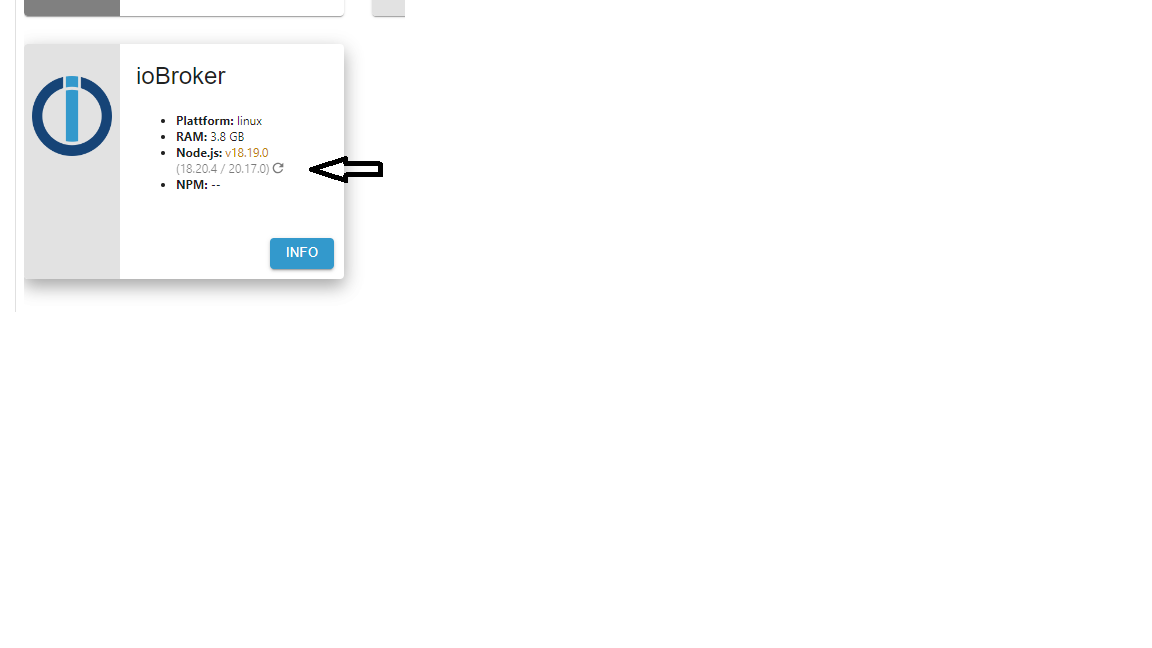
ioBroker nodejs fixer 2024-05-23 Recommended nodejs-version is: 20.17.0 Checking your installation now. Please be patient! Your current setup is: /usr/bin/nodejs v18.19.0 /usr/bin/node v18.19.0 /home/iobroker/.nodejs-update.sh: line 146: npm: command not found /home/iobroker/.nodejs-update.sh: line 147: npx: command not found /home/iobroker/.nodejs-update.sh: line 168: npm: command not found /home/iobroker/.nodejs-update.sh: line 169: npx: command not found *** nodejs is NOT correctly installed *** We found these nodejs versions available for installation: nodejs: Installed: 18.19.0+dfsg-6~deb12u2 Candidate: 18.19.0+dfsg-6~deb12u2 Version table: *** 18.19.0+dfsg-6~deb12u2 500 500 http://deb.debian.org/debian bookworm/main amd64 Packages 100 /var/lib/dpkg/status 18.19.0+dfsg-6~deb12u1 500 500 http://security.debian.org/debian-security bookworm-security/main amd64 Packages 18.17.1-deb-1nodesource1 500 500 https://deb.nodesource.com/node_18.x bookworm/main amd64 Packages Your nodejs-Installation seems to be faulty. Shall we try to fix it? Press <y> to continue or any other key to quit Fixing your nodejs setup *** Deleting *** rm: cannot remove '': No such file or directory *** Deleting *** rm: cannot remove '': No such file or directory Wrong paths have been fixed. Run 'iob diag' or 'iob nodejs-update' again to check if your installation is fine now You are running nodejs v18.19.0. Do you want to install recommended version 20.17.0? Press <y> to continue or any other key to quit Trying to fix your installation now. Please be patient. Virtualization: kvm Waiting for ioBroker to shut down - Give me a minute... ############################################################ *** These repos are active on your system: Hit:1 http://deb.debian.org/debian bookworm InRelease Hit:2 http://deb.debian.org/debian bookworm-updates InRelease Hit:3 http://security.debian.org/debian-security bookworm-security InRelease Reading package lists... Done *** Installing ca-certificates, curl and gnupg, just in case they are missing. *** Creating new /etc/apt/sources.list.d/nodesource.list and pinning source deb [signed-by=/etc/apt/keyrings/nodesource.gpg] https://deb.nodesource.com/node_20.x nodistro main Package: nodejs Pin: origin deb.nodesource.com Pin-Priority: 1001 *** These repos are active after the adjustments: Hit:1 http://security.debian.org/debian-security bookworm-security InRelease Hit:2 http://deb.debian.org/debian bookworm InRelease Hit:3 http://deb.debian.org/debian bookworm-updates InRelease Get:4 https://deb.nodesource.com/node_20.x nodistro InRelease [12.1 kB] Get:5 https://deb.nodesource.com/node_20.x nodistro/main amd64 Packages [8942 B] Fetched 21.1 kB in 1s (29.9 kB/s) Reading package lists... Done Installing nodejs now! E: Broken packages Installing nodejs now! E: Broken packages *** You need to manually restart your container/virtual machine now! *** We tried our best to fix your nodejs. Please run 'iob diag' again to verify. -
ioBroker nodejs fixer 2024-05-23 Recommended nodejs-version is: 20.17.0 Checking your installation now. Please be patient! Your current setup is: /usr/bin/nodejs v18.19.0 /usr/bin/node v18.19.0 /home/iobroker/.nodejs-update.sh: line 146: npm: command not found /home/iobroker/.nodejs-update.sh: line 147: npx: command not found /home/iobroker/.nodejs-update.sh: line 168: npm: command not found /home/iobroker/.nodejs-update.sh: line 169: npx: command not found *** nodejs is NOT correctly installed *** We found these nodejs versions available for installation: nodejs: Installed: 18.19.0+dfsg-6~deb12u2 Candidate: 18.19.0+dfsg-6~deb12u2 Version table: *** 18.19.0+dfsg-6~deb12u2 500 500 http://deb.debian.org/debian bookworm/main amd64 Packages 100 /var/lib/dpkg/status 18.19.0+dfsg-6~deb12u1 500 500 http://security.debian.org/debian-security bookworm-security/main amd64 Packages 18.17.1-deb-1nodesource1 500 500 https://deb.nodesource.com/node_18.x bookworm/main amd64 Packages Your nodejs-Installation seems to be faulty. Shall we try to fix it? Press <y> to continue or any other key to quit Fixing your nodejs setup *** Deleting *** rm: cannot remove '': No such file or directory *** Deleting *** rm: cannot remove '': No such file or directory Wrong paths have been fixed. Run 'iob diag' or 'iob nodejs-update' again to check if your installation is fine now You are running nodejs v18.19.0. Do you want to install recommended version 20.17.0? Press <y> to continue or any other key to quit Trying to fix your installation now. Please be patient. Virtualization: kvm Waiting for ioBroker to shut down - Give me a minute... ############################################################ *** These repos are active on your system: Hit:1 http://deb.debian.org/debian bookworm InRelease Hit:2 http://deb.debian.org/debian bookworm-updates InRelease Hit:3 http://security.debian.org/debian-security bookworm-security InRelease Reading package lists... Done *** Installing ca-certificates, curl and gnupg, just in case they are missing. *** Creating new /etc/apt/sources.list.d/nodesource.list and pinning source deb [signed-by=/etc/apt/keyrings/nodesource.gpg] https://deb.nodesource.com/node_20.x nodistro main Package: nodejs Pin: origin deb.nodesource.com Pin-Priority: 1001 *** These repos are active after the adjustments: Hit:1 http://security.debian.org/debian-security bookworm-security InRelease Hit:2 http://deb.debian.org/debian bookworm InRelease Hit:3 http://deb.debian.org/debian bookworm-updates InRelease Get:4 https://deb.nodesource.com/node_20.x nodistro InRelease [12.1 kB] Get:5 https://deb.nodesource.com/node_20.x nodistro/main amd64 Packages [8942 B] Fetched 21.1 kB in 1s (29.9 kB/s) Reading package lists... Done Installing nodejs now! E: Broken packages Installing nodejs now! E: Broken packages *** You need to manually restart your container/virtual machine now! *** We tried our best to fix your nodejs. Please run 'iob diag' again to verify.Ah, die Version ist nicht aktuell genug.
Versuch es mal mit der Beta:
curl https://raw.githubusercontent.com/Grothesk242/iob_diag/main/iob_node_update.sh > iob_node_update
chmod 744 iob_node_update
./iob_node_update

Hey! Du scheinst an dieser Unterhaltung interessiert zu sein, hast aber noch kein Konto.
Hast du es satt, bei jedem Besuch durch die gleichen Beiträge zu scrollen? Wenn du dich für ein Konto anmeldest, kommst du immer genau dorthin zurück, wo du zuvor warst, und kannst dich über neue Antworten benachrichtigen lassen (entweder per E-Mail oder Push-Benachrichtigung). Du kannst auch Lesezeichen speichern und Beiträge positiv bewerten, um anderen Community-Mitgliedern deine Wertschätzung zu zeigen.
Mit deinem Input könnte dieser Beitrag noch besser werden 💗
Registrieren Anmelden462
Online33.0k
Benutzende83.7k
Themen1.3m
Beiträge