



Skip to content
  • Home
  • Aktuell
  • Tags
  • 0 Ungelesen 0
  • Kategorien
  • Unreplied
  • Beliebt
  • GitHub
  • Docu
  • Hilfe
Skins
  • Light
  • Brite
  • Cerulean
  • Cosmo
  • Flatly
  • Journal
  • Litera
  • Lumen
  • Lux
  • Materia
  • Minty
  • Morph
  • Pulse
  • Sandstone
  • Simplex
  • Sketchy
  • Spacelab
  • United
  • Yeti
  • Zephyr
  • Dark
  • Cyborg
  • Darkly
  • Quartz
  • Slate
  • Solar
  • Superhero
  • Vapor

  • Standard: (Kein Skin)
  • Kein Skin
Einklappen
ioBroker Logo

Community Forum

donate donate
  1. ioBroker Community Home
  2. Deutsch
  3. ioBroker Allgemein
  4. Exception in ebusd_ReceiveData [Error: connect ETIMEDOUT]

NEWS

  • Neuer Blogbeitrag: Monatsrückblick - Dezember 2025 🎄
    BluefoxB
    Bluefox
    11
    1
    511

  • Weihnachtsangebot 2025! 🎄
    BluefoxB
    Bluefox
    24
    1
    1.7k

  • UPDATE 31.10.: Amazon Alexa - ioBroker Skill läuft aus ?
    apollon77A
    apollon77
    48
    3
    9.6k

Exception in ebusd_ReceiveData [Error: connect ETIMEDOUT]

Geplant Angeheftet Gesperrt Verschoben ioBroker Allgemein
45 Beiträge 3 Kommentatoren 3.4k Aufrufe 2 Watching
  • Älteste zuerst
  • Neuste zuerst
  • Meiste Stimmen
Antworten
  • In einem neuen Thema antworten
Anmelden zum Antworten
Dieses Thema wurde gelöscht. Nur Nutzer mit entsprechenden Rechten können es sehen.
  • K Krissie777

    Guten Mogen zusammen,

    zuerst einmal herzlichen Dank für dieses super Forum, Ihr seid echt klasse uns allen zu helfen, das ist für mich nicht selbstverständlich.

    Hintergrund:
    Ich habe jetzt mein Esera Gateway per LAN angeschlossen und es empfängt EBUS Daten (blinkt direkt am Gerät).
    Den EBUS Adapter auf dem RASPI habe ich wie von John auf seiner Seite beschrieben installiert.
    Abschliessend habe ich im iOBroker den EBUS Adapter installiert.
    Im Esera Konfig ist der Port TCP =5002 eingestellt (nicht UDP).
    EBUS ist auf dem Raspi systemseitig ansprechbar, nachdem ich diesen Dienst gestartet habe.

    Nun bekomme ich im Adapter folgenden Fehler:

    exception in ebusd_ReceiveData [Error: connect ETIMEDOUT 192.178.168.70:5002]
    

    Ich habe mich schon so weit eingelesen Im Internet und bei euch, komme jedoch nicht mehr weiter.

    Meine Config sieht so aus:

    EBUSD_OPTS="--device=192.178.168.70:5002 --httpport=8889 --scanconfig --latency=30000 --configpath=http://ebusd.eu/config/"
    

    Und liegt hier auf dem RASPI hier:
    /etc/ebusd

    Ich habe unter dem /etc/ebusd 3 Ordner:
    kromschroeder (Ordner ist leer)
    vaillant (Ordner ist mit Dateien und csv dateien gefüllt)
    Wolf (Ordner ist mit 4 csv Dateien gefüllt)

    Ich denke hier mehrere abschliessende Herausforderungen zu haben:
    A) Die EBUS config muss korrekt sein und auf die Wolf Dateien verweisen (da wir eine Wolf Heizung haben)? => also am Ende ... configpath=/etc/ebusd/etc/ebusd/wolf oder nur generell auf den ebusd Ordner verweisen, also am Ende ... configpath=/etc/ebusd?

    B) Und die EBUSD_OPTS="--device=192.178.168.70:5002 --httpport=8889 --scanconfig --latency=30000 --configpath=http://ebusd.eu/config/" muss wahrscheinlich noch angepasst werden...

    C) Im Ebus Adapter im IOBroker habe ich als Ziel IP die 192.178.168.70 eingestellt und im EBUS Reiter target HTTP Port zum Lesen von Daten: 5002 und Telnet Port zum Schreiben von Daten den Standard gelassen: 8889.
    Ist das so korrekt?

    D) Abschliessend ist es noch wichtig dass scanconfig wie angegeben oder muss es scanconfigfull?... heissen in der EBUS config auf dem RASPI?

    Vielen Dank für alles und jede Hilfe bei der Lösung.:blush:
    Kris :blush:

    MOD-EDIT: Code in code-tags gesetzt!

    HomoranH Nicht stören
    HomoranH Nicht stören
    Homoran
    Global Moderator Administrators
    schrieb am zuletzt editiert von Homoran
    #2

    @krissie777 ich kennecweder ebus noch den Adapter!
    Aber

    @krissie777 sagte in Exception in ebusd_ReceiveData [Error: connect ETIMEDOUT]:

    exception in ebusd_ReceiveData [Error: connect ETIMEDOUT 192.178.168.70:5002]

    scheint mir irgendwie nicht mit

    @krissie777 sagte in Exception in ebusd_ReceiveData [Error: connect ETIMEDOUT]:

    EBUSD_OPTS="--device=192.178.168.70:5002 --httpport=8889 --scanconfig --latency=30000 --

    zu passen.

    und .70 ist das Gateway?

    Bitte rein vorsorglich schon mal die Langfassung von iob diag posten

    kein Support per PN! - Fragen im Forum stellen - es gibt fast nichts, was nicht auch für andere interessant ist.

    Benutzt das Voting rechts unten im Beitrag wenn er euch geholfen hat.

    der Installationsfixer: curl -fsL https://iobroker.net/fix.sh | bash -

    1 Antwort Letzte Antwort
    0
    • K Offline
      K Offline
      Krissie777
      schrieb am zuletzt editiert von
      #3

      Hallo Hormoran,
      vielen Dank.

      Die Langfassung enthält sehr viele sensible Daten, divese IPs und Ports, die ich nicht allgemein veröffentlichen möchte.

      Für Deine Information: Das Summary zeigt keinen Fehler bis auf den bereits kommunizierte ebusd Rceive Data Error (siehe oben) einen und alles zeigt up to date an.

      Ja 70 ist das Gateway.

      Ich hoffe, das hilft Dir auch weiter.
      Danke für alles und Grüße
      Kris

      HomoranH 1 Antwort Letzte Antwort
      0
      • K Krissie777

        Guten Mogen zusammen,

        zuerst einmal herzlichen Dank für dieses super Forum, Ihr seid echt klasse uns allen zu helfen, das ist für mich nicht selbstverständlich.

        Hintergrund:
        Ich habe jetzt mein Esera Gateway per LAN angeschlossen und es empfängt EBUS Daten (blinkt direkt am Gerät).
        Den EBUS Adapter auf dem RASPI habe ich wie von John auf seiner Seite beschrieben installiert.
        Abschliessend habe ich im iOBroker den EBUS Adapter installiert.
        Im Esera Konfig ist der Port TCP =5002 eingestellt (nicht UDP).
        EBUS ist auf dem Raspi systemseitig ansprechbar, nachdem ich diesen Dienst gestartet habe.

        Nun bekomme ich im Adapter folgenden Fehler:

        exception in ebusd_ReceiveData [Error: connect ETIMEDOUT 192.178.168.70:5002]
        

        Ich habe mich schon so weit eingelesen Im Internet und bei euch, komme jedoch nicht mehr weiter.

        Meine Config sieht so aus:

        EBUSD_OPTS="--device=192.178.168.70:5002 --httpport=8889 --scanconfig --latency=30000 --configpath=http://ebusd.eu/config/"
        

        Und liegt hier auf dem RASPI hier:
        /etc/ebusd

        Ich habe unter dem /etc/ebusd 3 Ordner:
        kromschroeder (Ordner ist leer)
        vaillant (Ordner ist mit Dateien und csv dateien gefüllt)
        Wolf (Ordner ist mit 4 csv Dateien gefüllt)

        Ich denke hier mehrere abschliessende Herausforderungen zu haben:
        A) Die EBUS config muss korrekt sein und auf die Wolf Dateien verweisen (da wir eine Wolf Heizung haben)? => also am Ende ... configpath=/etc/ebusd/etc/ebusd/wolf oder nur generell auf den ebusd Ordner verweisen, also am Ende ... configpath=/etc/ebusd?

        B) Und die EBUSD_OPTS="--device=192.178.168.70:5002 --httpport=8889 --scanconfig --latency=30000 --configpath=http://ebusd.eu/config/" muss wahrscheinlich noch angepasst werden...

        C) Im Ebus Adapter im IOBroker habe ich als Ziel IP die 192.178.168.70 eingestellt und im EBUS Reiter target HTTP Port zum Lesen von Daten: 5002 und Telnet Port zum Schreiben von Daten den Standard gelassen: 8889.
        Ist das so korrekt?

        D) Abschliessend ist es noch wichtig dass scanconfig wie angegeben oder muss es scanconfigfull?... heissen in der EBUS config auf dem RASPI?

        Vielen Dank für alles und jede Hilfe bei der Lösung.:blush:
        Kris :blush:

        MOD-EDIT: Code in code-tags gesetzt!

        Marc BergM Offline
        Marc BergM Offline
        Marc Berg
        Most Active
        schrieb am zuletzt editiert von
        #4

        @krissie777 sagte in Exception in ebusd_ReceiveData [Error: connect ETIMEDOUT]:

        C) Im Ebus Adapter im IOBroker habe ich als Ziel IP die 192.178.168.70 eingestellt und im EBUS Reiter target HTTP Port zum Lesen von Daten: 5002 und Telnet Port zum Schreiben von Daten den Standard gelassen: 8889.

        Du bringst da was durcheinander. Der ioBroker Adapter verbindet sich ausschließlich zum ebusd, nicht aber zum Esera-Gateway!

        ioBroker-Adapter <---> ebusd <---> esera Gateway

        D.h. du trägst hier wahrscheinlich localhost oder 127.0.0.1 ein (wenn ebusd mit auf dem Raspi läuft):
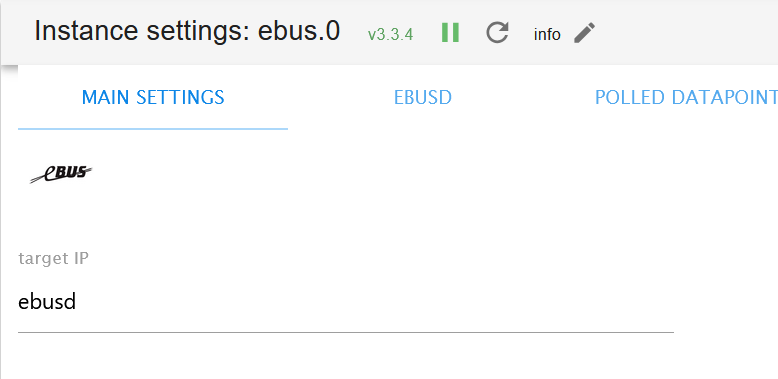
        8d5ea64f-fb69-41da-a3af-a469f4003701-grafik.png

        Und hier müssen die Ports rein, die ebusd bereitstellt:

        bdc90e8c-5145-41fa-b1a3-a66e23138a6b-grafik.png

        Also bei dir 8889 als HTTP Port und 8888 ist Standard für den Telnet-Port.

        NUC10I3+Ubuntu+Docker+ioBroker+influxDB2+Node Red+EMQX+Grafana

        Pi-hole, Traefik, Checkmk, Conbee II+Zigbee2MQTT, ESPSomfy-RTS, LoRaWAN, Arduino, KiCad

        Benutzt das Voting im Beitrag, wenn er euch geholfen hat.

        K 1 Antwort Letzte Antwort
        0
        • Marc BergM Marc Berg

          @krissie777 sagte in Exception in ebusd_ReceiveData [Error: connect ETIMEDOUT]:

          C) Im Ebus Adapter im IOBroker habe ich als Ziel IP die 192.178.168.70 eingestellt und im EBUS Reiter target HTTP Port zum Lesen von Daten: 5002 und Telnet Port zum Schreiben von Daten den Standard gelassen: 8889.

          Du bringst da was durcheinander. Der ioBroker Adapter verbindet sich ausschließlich zum ebusd, nicht aber zum Esera-Gateway!

          ioBroker-Adapter <---> ebusd <---> esera Gateway

          D.h. du trägst hier wahrscheinlich localhost oder 127.0.0.1 ein (wenn ebusd mit auf dem Raspi läuft):

          8d5ea64f-fb69-41da-a3af-a469f4003701-grafik.png

          Und hier müssen die Ports rein, die ebusd bereitstellt:

          bdc90e8c-5145-41fa-b1a3-a66e23138a6b-grafik.png

          Also bei dir 8889 als HTTP Port und 8888 ist Standard für den Telnet-Port.

          K Offline
          K Offline
          Krissie777
          schrieb am zuletzt editiert von
          #5

          @marc-berg
          Hallo Marc,
          herzlichen Dank fü den Lösungsansatz. Das habe ich jetzt gemacht und er gibt mir wieder den gleichen Ebus Receive data Fehler aus.

          Noch eine Frage: In der EBUS config die ich im im Terminal angelegt habe, bleibt es mit der IP und dem Port auf das Esera? Oder muss ich auch hier in de Ebus config auf den RASPI (127.0.0.1:8080) verweisen?

          Vielen Dank für alles
          LG
          KRis

          Marc BergM 1 Antwort Letzte Antwort
          0
          • K Krissie777

            @marc-berg
            Hallo Marc,
            herzlichen Dank fü den Lösungsansatz. Das habe ich jetzt gemacht und er gibt mir wieder den gleichen Ebus Receive data Fehler aus.

            Noch eine Frage: In der EBUS config die ich im im Terminal angelegt habe, bleibt es mit der IP und dem Port auf das Esera? Oder muss ich auch hier in de Ebus config auf den RASPI (127.0.0.1:8080) verweisen?

            Vielen Dank für alles
            LG
            KRis

            Marc BergM Offline
            Marc BergM Offline
            Marc Berg
            Most Active
            schrieb am zuletzt editiert von Marc Berg
            #6

            @krissie777 sagte in Exception in ebusd_ReceiveData [Error: connect ETIMEDOUT]:

            erzlichen Dank fü den Lösungsansatz. Das habe ich jetzt gemacht und er gibt mir wieder den gleichen Ebus Receive data Fehler aus.

            bitte immer alles zeigen, um andere Fehler erkennen zu können.

            Noch eine Frage: In der EBUS config die ich im im Terminal angelegt habe, bleibt es mit der IP und dem Port auf das Esera? Oder muss ich auch hier in de Ebus config auf den RASPI (127.0.0.1:8080) verweisen?

            Darum habe ich die schematische "Zeichnung" gemacht. ebusd baut die Verbindung zum Gateway auf, deshalb ist dort die .70 wohl richtig.

            Edit: was sagt das ebusd Log?

            NUC10I3+Ubuntu+Docker+ioBroker+influxDB2+Node Red+EMQX+Grafana

            Pi-hole, Traefik, Checkmk, Conbee II+Zigbee2MQTT, ESPSomfy-RTS, LoRaWAN, Arduino, KiCad

            Benutzt das Voting im Beitrag, wenn er euch geholfen hat.

            K 1 Antwort Letzte Antwort
            0
            • K Krissie777

              Hallo Hormoran,
              vielen Dank.

              Die Langfassung enthält sehr viele sensible Daten, divese IPs und Ports, die ich nicht allgemein veröffentlichen möchte.

              Für Deine Information: Das Summary zeigt keinen Fehler bis auf den bereits kommunizierte ebusd Rceive Data Error (siehe oben) einen und alles zeigt up to date an.

              Ja 70 ist das Gateway.

              Ich hoffe, das hilft Dir auch weiter.
              Danke für alles und Grüße
              Kris

              HomoranH Nicht stören
              HomoranH Nicht stören
              Homoran
              Global Moderator Administrators
              schrieb am zuletzt editiert von Homoran
              #7

              @krissie777 sagte in Exception in ebusd_ReceiveData [Error: connect ETIMEDOUT]:

              divese IPs und Ports, die ich nicht allgemein veröffentlichen möchte.

              auf genau die kommt es an.

              @krissie777 sagte in Exception in ebusd_ReceiveData [Error: connect ETIMEDOUT]:

              sehr viele sensible Daten

              sind sie eigentlich nicht, da sie nur in deinem Netz, wie in vielen anderen Heimnetzen sind.
              Da ist doch hoffentlich nichts für den Zugriff vom Internet freigegeben!

              kein Support per PN! - Fragen im Forum stellen - es gibt fast nichts, was nicht auch für andere interessant ist.

              Benutzt das Voting rechts unten im Beitrag wenn er euch geholfen hat.

              der Installationsfixer: curl -fsL https://iobroker.net/fix.sh | bash -

              1 Antwort Letzte Antwort
              0
              • Marc BergM Marc Berg

                @krissie777 sagte in Exception in ebusd_ReceiveData [Error: connect ETIMEDOUT]:

                erzlichen Dank fü den Lösungsansatz. Das habe ich jetzt gemacht und er gibt mir wieder den gleichen Ebus Receive data Fehler aus.

                bitte immer alles zeigen, um andere Fehler erkennen zu können.

                Noch eine Frage: In der EBUS config die ich im im Terminal angelegt habe, bleibt es mit der IP und dem Port auf das Esera? Oder muss ich auch hier in de Ebus config auf den RASPI (127.0.0.1:8080) verweisen?

                Darum habe ich die schematische "Zeichnung" gemacht. ebusd baut die Verbindung zum Gateway auf, deshalb ist dort die .70 wohl richtig.

                Edit: was sagt das ebusd Log?

                K Offline
                K Offline
                Krissie777
                schrieb am zuletzt editiert von
                #8

                @marc-berg
                pi@raspberrypi:~ $ ebusctl i
                version: ebusd 23.3.23.3
                update check: OK, broadcast.csv: different version available
                device: 192.178.168.70:5002, TCP
                signal: acquired
                symbol rate: 140
                max symbol rate: 200
                min arbitration micros: 3
                max arbitration micros: 59
                min symbol latency: 20
                max symbol latency: 43
                scan: finished
                reconnects: 0
                masters: 2
                messages: 11
                conditional: 0
                poll: 0
                update: 4
                address 30: master #3
                address 31: master #8, ebusd
                address 36: slave #8, ebusd, scanning
                address c7: slave, scanning

                Marc BergM 1 Antwort Letzte Antwort
                0
                • K Krissie777

                  @marc-berg
                  pi@raspberrypi:~ $ ebusctl i
                  version: ebusd 23.3.23.3
                  update check: OK, broadcast.csv: different version available
                  device: 192.178.168.70:5002, TCP
                  signal: acquired
                  symbol rate: 140
                  max symbol rate: 200
                  min arbitration micros: 3
                  max arbitration micros: 59
                  min symbol latency: 20
                  max symbol latency: 43
                  scan: finished
                  reconnects: 0
                  masters: 2
                  messages: 11
                  conditional: 0
                  poll: 0
                  update: 4
                  address 30: master #3
                  address 31: master #8, ebusd
                  address 36: slave #8, ebusd, scanning
                  address c7: slave, scanning

                  Marc BergM Offline
                  Marc BergM Offline
                  Marc Berg
                  Most Active
                  schrieb am zuletzt editiert von Marc Berg
                  #9

                  @krissie777

                  Dann steht die Verbindung ebusd --> Gateway schon mal sauber. Aber

                  @marc-berg sagte in Exception in ebusd_ReceiveData [Error: connect ETIMEDOUT]:

                  herzlichen Dank fü den Lösungsansatz. Das habe ich jetzt gemacht und er gibt mir wieder den gleichen Ebus Receive data Fehler aus.

                  bitte immer alles zeigen, um andere Fehler erkennen zu können.

                  die aktuelle Fehlermeldung vom Adapter fehlt noch.

                  EDIT: und

                  ebusctl find
                  

                  auch mal ausführen.

                  NUC10I3+Ubuntu+Docker+ioBroker+influxDB2+Node Red+EMQX+Grafana

                  Pi-hole, Traefik, Checkmk, Conbee II+Zigbee2MQTT, ESPSomfy-RTS, LoRaWAN, Arduino, KiCad

                  Benutzt das Voting im Beitrag, wenn er euch geholfen hat.

                  K 2 Antworten Letzte Antwort
                  0
                  • Marc BergM Marc Berg

                    @krissie777

                    Dann steht die Verbindung ebusd --> Gateway schon mal sauber. Aber

                    @marc-berg sagte in Exception in ebusd_ReceiveData [Error: connect ETIMEDOUT]:

                    herzlichen Dank fü den Lösungsansatz. Das habe ich jetzt gemacht und er gibt mir wieder den gleichen Ebus Receive data Fehler aus.

                    bitte immer alles zeigen, um andere Fehler erkennen zu können.

                    die aktuelle Fehlermeldung vom Adapter fehlt noch.

                    EDIT: und

                    ebusctl find
                    

                    auch mal ausführen.

                    K Offline
                    K Offline
                    Krissie777
                    schrieb am zuletzt editiert von
                    #10

                    @marc-berg said in Exception in ebusd_ReceiveData [Error: connect ETIMEDOUT]:

                    ebusctl find

                    @raspberrypi:~ $ ebusctl find
                    broadcast datetime = no data stored
                    broadcast error = no data stored
                    broadcast ident = no data stored
                    broadcast ident = no data stored
                    broadcast signoflife = no data stored
                    memory eeprom = no data stored
                    memory ram = no data stored

                    1 Antwort Letzte Antwort
                    0
                    • Marc BergM Marc Berg

                      @krissie777

                      Dann steht die Verbindung ebusd --> Gateway schon mal sauber. Aber

                      @marc-berg sagte in Exception in ebusd_ReceiveData [Error: connect ETIMEDOUT]:

                      herzlichen Dank fü den Lösungsansatz. Das habe ich jetzt gemacht und er gibt mir wieder den gleichen Ebus Receive data Fehler aus.

                      bitte immer alles zeigen, um andere Fehler erkennen zu können.

                      die aktuelle Fehlermeldung vom Adapter fehlt noch.

                      EDIT: und

                      ebusctl find
                      

                      auch mal ausführen.

                      K Offline
                      K Offline
                      Krissie777
                      schrieb am zuletzt editiert von
                      #11

                      @marc-berg

                      Hallo Marc,
                      anbei die aktuelle Fehlermeldung:

                      exception in ebusd_ReceiveData [Error: connect ECONNREFUSED 127.0.0.1:8080]
                      Vielen Dank und LG

                      Marc BergM 1 Antwort Letzte Antwort
                      0
                      • K Krissie777

                        @marc-berg

                        Hallo Marc,
                        anbei die aktuelle Fehlermeldung:

                        exception in ebusd_ReceiveData [Error: connect ECONNREFUSED 127.0.0.1:8080]
                        Vielen Dank und LG

                        Marc BergM Offline
                        Marc BergM Offline
                        Marc Berg
                        Most Active
                        schrieb am zuletzt editiert von
                        #12

                        @krissie777 sagte in Exception in ebusd_ReceiveData [Error: connect ETIMEDOUT]:

                        exception in ebusd_ReceiveData [Error: connect ECONNREFUSED 127.0.0.1:8080]

                        Du hast doch aber bei dir

                        --httpport=8889
                        

                        eingestellt...

                        @marc-berg sagte in Exception in ebusd_ReceiveData [Error: connect ETIMEDOUT]:

                        Also bei dir 8889 als HTTP Port

                        NUC10I3+Ubuntu+Docker+ioBroker+influxDB2+Node Red+EMQX+Grafana

                        Pi-hole, Traefik, Checkmk, Conbee II+Zigbee2MQTT, ESPSomfy-RTS, LoRaWAN, Arduino, KiCad

                        Benutzt das Voting im Beitrag, wenn er euch geholfen hat.

                        K 1 Antwort Letzte Antwort
                        0
                        • Marc BergM Marc Berg

                          @krissie777 sagte in Exception in ebusd_ReceiveData [Error: connect ETIMEDOUT]:

                          exception in ebusd_ReceiveData [Error: connect ECONNREFUSED 127.0.0.1:8080]

                          Du hast doch aber bei dir

                          --httpport=8889
                          

                          eingestellt...

                          @marc-berg sagte in Exception in ebusd_ReceiveData [Error: connect ETIMEDOUT]:

                          Also bei dir 8889 als HTTP Port

                          K Offline
                          K Offline
                          Krissie777
                          schrieb am zuletzt editiert von
                          #13

                          @marc-berg
                          Hallo Marc,
                          dankeschön.
                          Ich hatte die ebus config auch schon auf den Port 8080 umgestellt, gleiches Ergebnis:
                          exception in ebusd_ReceiveData [Error: connect ECONNREFUSED 127.0.0.1:8080]

                          Grüße Kris

                          Marc BergM 1 Antwort Letzte Antwort
                          0
                          • K Krissie777

                            @marc-berg
                            Hallo Marc,
                            dankeschön.
                            Ich hatte die ebus config auch schon auf den Port 8080 umgestellt, gleiches Ergebnis:
                            exception in ebusd_ReceiveData [Error: connect ECONNREFUSED 127.0.0.1:8080]

                            Grüße Kris

                            Marc BergM Offline
                            Marc BergM Offline
                            Marc Berg
                            Most Active
                            schrieb am zuletzt editiert von Marc Berg
                            #14

                            @krissie777 sagte in Exception in ebusd_ReceiveData [Error: connect ETIMEDOUT]:

                            @marc-berg
                            Hallo Marc,
                            dankeschön.
                            Ich hatte die ebus config auch schon auf den Port 8080 umgestellt, gleiches Ergebnis:
                            exception in ebusd_ReceiveData [Error: connect ECONNREFUSED 127.0.0.1:8080]

                            Grüße Kris

                            Vielleicht ist der Port schon belegt. (Übrigens einer der Punkte, die man mit iob diag gesehen hätte.)

                            NUC10I3+Ubuntu+Docker+ioBroker+influxDB2+Node Red+EMQX+Grafana

                            Pi-hole, Traefik, Checkmk, Conbee II+Zigbee2MQTT, ESPSomfy-RTS, LoRaWAN, Arduino, KiCad

                            Benutzt das Voting im Beitrag, wenn er euch geholfen hat.

                            K 2 Antworten Letzte Antwort
                            1
                            • Marc BergM Marc Berg

                              @krissie777 sagte in Exception in ebusd_ReceiveData [Error: connect ETIMEDOUT]:

                              @marc-berg
                              Hallo Marc,
                              dankeschön.
                              Ich hatte die ebus config auch schon auf den Port 8080 umgestellt, gleiches Ergebnis:
                              exception in ebusd_ReceiveData [Error: connect ECONNREFUSED 127.0.0.1:8080]

                              Grüße Kris

                              Vielleicht ist der Port schon belegt. (Übrigens einer der Punkte, die man mit iob diag gesehen hätte.)

                              K Offline
                              K Offline
                              Krissie777
                              schrieb am zuletzt editiert von
                              #15

                              @marc-berg said in Exception in ebusd_ReceiveData [Error: connect ETIMEDOUT]:

                              iob diag

                              ======== Start marking the full check here =========

                              Skript v.2024-05-22
                              
                              *** BASE SYSTEM ***
                                 Static hostname: raspberrypi
                                       Icon name: computer
                                Operating System: Raspbian GNU/Linux 10 (buster)
                                          Kernel: Linux 5.10.103-v7l+
                                    Architecture: arm
                              
                              Model           : Raspberry Pi 4 Model B Rev 1.4
                              Docker          : false
                              Virtualization  : none
                              Kernel          : armv7l
                              Userland        : 32 bit
                              
                              Systemuptime and Load:
                               13:18:48 up 1 day,  3:43,  2 users,  load average: 1.16, 0.75, 0.59
                              CPU threads: 4
                              
                              
                              *** RASPBERRY THROTTLING ***
                              Current issues:
                              ~ Under-voltage detected
                              ~ Arm frequency capped
                              
                              Previously detected issues:
                              ~ Under-voltage has occurred
                              ~ Arm frequency capping has occurred
                              
                              *** Time and Time Zones ***
                                             Local time: Fri 2024-08-23 13:18:49 CEST
                                         Universal time: Fri 2024-08-23 11:18:49 UTC
                                               RTC time: n/a
                                              Time zone: Europe/Berlin (CEST, +0200)
                              System clock synchronized: yes
                                            NTP service: active
                                        RTC in local TZ: no
                              
                              *** Users and Groups ***
                              User that called 'iob diag':
                              pi
                              HOME=/home/pi
                              GROUPS=pi adm dialout cdrom sudo audio video plugdev games users input netdev gpio i2c spi iobroker
                              
                              User that is running 'js-controller':
                              iobroker
                              HOME=/home/iobroker
                              GROUPS=iobroker tty dialout audio video plugdev bluetooth gpio i2c
                              
                              *** Display-Server-Setup ***
                              Display-Server: false
                              Desktop:
                              Terminal:       tty
                              Boot Target:    graphical.target
                              
                              *** MEMORY ***
                                            total        used        free      shared  buff/cache   available
                              Mem:           3.8G        1.6G        658M         61M        1.5G        2.6G
                              Swap:           99M        7.0M         92M
                              Total:         3.9G        1.7G        751M
                              
                              Active iob-Instances:   15
                              
                                       3837 M total memory
                                       1647 M used memory
                                        621 M active memory
                                       2412 M inactive memory
                                        658 M free memory
                                        118 M buffer memory
                                       1413 M swap cache
                                         99 M total swap
                                          7 M used swap
                                         92 M free swap
                              
                              *** top - Table Of Processes  ***
                              top - 13:18:49 up 1 day,  3:43,  2 users,  load average: 1.16, 0.75, 0.59
                              Tasks: 159 total,   1 running, 158 sleeping,   0 stopped,   0 zombie
                              %Cpu(s):  1.2 us,  6.1 sy,  0.0 ni, 92.7 id,  0.0 wa,  0.0 hi,  0.0 si,  0.0 st
                              MiB Mem :   3837.7 total,    658.6 free,   1647.2 used,   1531.9 buff/cache
                              MiB Swap:    100.0 total,     92.7 free,      7.3 used.   2561.3 avail Mem
                              
                              *** FAILED SERVICES ***
                              
                                UNIT               LOAD   ACTIVE SUB    DESCRIPTION
                              * PiEMItMgmt.service loaded failed failed PiEM-It! Mgmt-Modul, respawn
                              * Webserver.service  loaded failed failed PiEM-It! Webserver-Modul, respawn
                              
                              LOAD   = Reflects whether the unit definition was properly loaded.
                              ACTIVE = The high-level unit activation state, i.e. generalization of SUB.
                              SUB    = The low-level unit activation state, values depend on unit type.
                              
                              2 loaded units listed. Pass --all to see loaded but inactive units, too.
                              To show all installed unit files use 'systemctl list-unit-files'.
                              
                              *** FILESYSTEM ***
                              Filesystem     Type      Size  Used Avail Use% Mounted on
                              /dev/root      ext4       29G   14G   15G  49% /
                              devtmpfs       devtmpfs  1.8G     0  1.8G   0% /dev
                              tmpfs          tmpfs     1.9G     0  1.9G   0% /dev/shm
                              tmpfs          tmpfs     1.9G   66M  1.9G   4% /run
                              tmpfs          tmpfs     5.0M  4.0K  5.0M   1% /run/lock
                              tmpfs          tmpfs     1.9G     0  1.9G   0% /sys/fs/cgroup
                              /dev/sda1      vfat      253M   49M  204M  20% /boot
                              tmpfs          tmpfs     384M     0  384M   0% /run/user/1000
                              
                              Messages concerning ext4 filesystem in dmesg:
                              [Thu Aug 22 09:35:17 2024] Kernel command line: coherent_pool=1M 8250.nr_uarts=0 snd_bcm2835.enable_compat_alsa=0 snd_b                                                                                                                                      cm2835.enable_hdmi=1 video=HDMI-A-1:1920x1080M@60D smsc95xx.macaddr=E4:5F:01:57:C6:34 vc_mem.mem_base=0x3eb00000 vc_mem                                                                                                                                      .mem_size=0x3ff00000  console=ttyS0,115200 console=tty1 root=PARTUUID=d2b297f7-02 rootfstype=ext4 elevator=deadline fsc                                                                                                                                      k.repair=yes rootwait quiet splash plymouth.ignore-serial-consoles
                              [Thu Aug 22 09:35:19 2024] EXT4-fs (sda2): mounted filesystem with ordered data mode. Opts: (null)
                              [Thu Aug 22 09:35:19 2024] VFS: Mounted root (ext4 filesystem) readonly on device 8:2.
                              [Thu Aug 22 09:35:20 2024] EXT4-fs (sda2): re-mounted. Opts: (null)
                              
                              Show mounted filesystems:
                              TARGET                                SOURCE     FSTYPE     OPTIONS
                              /                                     /dev/sda2  ext4       rw,noatime
                              |-/dev                                devtmpfs   devtmpfs   rw,relatime,size=1800056k,nr_inodes=84157,mode=755
                              | |-/dev/shm                          tmpfs      tmpfs      rw,nosuid,nodev
                              | |-/dev/pts                          devpts     devpts     rw,nosuid,noexec,relatime,gid=5,mode=620,ptmxmode=000
                              | `-/dev/mqueue                       mqueue     mqueue     rw,relatime
                              |-/sys                                sysfs      sysfs      rw,nosuid,nodev,noexec,relatime
                              | |-/sys/kernel/security              securityfs securityfs rw,nosuid,nodev,noexec,relatime
                              | |-/sys/fs/cgroup                    tmpfs      tmpfs      ro,nosuid,nodev,noexec,mode=755
                              | | |-/sys/fs/cgroup/unified          cgroup2    cgroup2    rw,nosuid,nodev,noexec,relatime,nsdelegate
                              | | |-/sys/fs/cgroup/systemd          cgroup     cgroup     rw,nosuid,nodev,noexec,relatime,xattr,name=systemd
                              | | |-/sys/fs/cgroup/cpu,cpuacct      cgroup     cgroup     rw,nosuid,nodev,noexec,relatime,cpu,cpuacct
                              | | |-/sys/fs/cgroup/blkio            cgroup     cgroup     rw,nosuid,nodev,noexec,relatime,blkio
                              | | |-/sys/fs/cgroup/net_cls,net_prio cgroup     cgroup     rw,nosuid,nodev,noexec,relatime,net_cls,net_prio
                              | | |-/sys/fs/cgroup/freezer          cgroup     cgroup     rw,nosuid,nodev,noexec,relatime,freezer
                              | | |-/sys/fs/cgroup/devices          cgroup     cgroup     rw,nosuid,nodev,noexec,relatime,devices
                              | | |-/sys/fs/cgroup/perf_event       cgroup     cgroup     rw,nosuid,nodev,noexec,relatime,perf_event
                              | | |-/sys/fs/cgroup/cpuset           cgroup     cgroup     rw,nosuid,nodev,noexec,relatime,cpuset
                              | | `-/sys/fs/cgroup/pids             cgroup     cgroup     rw,nosuid,nodev,noexec,relatime,pids
                              | |-/sys/fs/bpf                       none       bpf        rw,nosuid,nodev,noexec,relatime,mode=700
                              | |-/sys/kernel/debug                 debugfs    debugfs    rw,relatime
                              | `-/sys/kernel/config                configfs   configfs   rw,relatime
                              |-/proc                               proc       proc       rw,relatime
                              | `-/proc/sys/fs/binfmt_misc          systemd-1  autofs     rw,relatime,fd=28,pgrp=1,timeout=0,minproto=5,maxproto=5,di                                                                                                                                      rect
                              |-/run                                tmpfs      tmpfs      rw,nosuid,nodev,mode=755
                              | |-/run/lock                         tmpfs      tmpfs      rw,nosuid,nodev,noexec,relatime,size=5120k
                              | |-/run/rpc_pipefs                   sunrpc     rpc_pipefs rw,relatime
                              | `-/run/user/1000                    tmpfs      tmpfs      rw,nosuid,nodev,relatime,size=392984k,mode=700,uid=1000,gid                                                                                                                                      =1000
                              `-/boot                               /dev/sda1  vfat       rw,relatime,fmask=0022,dmask=0022,codepage=437,iocharset=as                                                                                                                                      cii,shortname=mixed,errors=remount-ro
                              
                              Files in neuralgic directories:
                              
                              /var:
                              2.6G    /var/
                              1.5G    /var/cache/apt
                              1.5G    /var/cache
                              1.4G    /var/cache/apt/archives
                              823M    /var/lib
                              
                              Archived and active journals take up 63.9M in the file system.
                              
                              /opt/iobroker/backups:
                              4.3G    /opt/iobroker/backups/
                              
                              /opt/iobroker/iobroker-data:
                              825M    /opt/iobroker/iobroker-data/
                              696M    /opt/iobroker/iobroker-data/files
                              441M    /opt/iobroker/iobroker-data/files/javascript.admin
                              409M    /opt/iobroker/iobroker-data/files/javascript.admin/static
                              408M    /opt/iobroker/iobroker-data/files/javascript.admin/static/js
                              
                              The five largest files in iobroker-data are:
                              24M     /opt/iobroker/iobroker-data/files/web.admin/static/js/main.135279a0.js.map
                              24M     /opt/iobroker/iobroker-data/files/echarts/static/js/main.2b7495c2.js.map
                              24M     /opt/iobroker/iobroker-data/files/echarts.admin/chart/static/js/main.2b7495c2.js.map
                              23M     /opt/iobroker/iobroker-data/files/echarts.admin/static/js/main.245b61c0.js.map
                              17M     /opt/iobroker/iobroker-data/files/echarts/preview/static/js/main.1b756fe6.js.map
                              
                              USB-Devices by-id:
                              USB-Sticks -  Avoid direct links to /dev/tty* in your adapter setups, please always prefer the links 'by-id':
                              
                              /dev/serial/by-id/usb-Device_GmbH_DvIR-USB_DvIR-USB_000524-if00-port0


                              *** NodeJS-Installation ***
                              
                              /usr/bin/nodejs         v18.20.4
                              /usr/bin/node           v18.20.4
                              /usr/bin/npm            10.7.0
                              /usr/bin/npx            10.7.0
                              /usr/bin/corepack       0.28.0
                              
                              
                              nodejs:
                                Installed: 18.20.4-1nodesource1
                                Candidate: 18.20.4-1nodesource1
                                Version table:
                               *** 18.20.4-1nodesource1 600
                                      500 https://deb.nodesource.com/node_18.x nodistro/main armhf Packages
                                      100 /var/lib/dpkg/status
                                   18.20.3-1nodesource1 600
                                      500 https://deb.nodesource.com/node_18.x nodistro/main armhf Packages
                                   18.20.2-1nodesource1 600
                                      500 https://deb.nodesource.com/node_18.x nodistro/main armhf Packages
                                   18.20.1-1nodesource1 600
                                      500 https://deb.nodesource.com/node_18.x nodistro/main armhf Packages
                                   18.20.0-1nodesource1 600
                                      500 https://deb.nodesource.com/node_18.x nodistro/main armhf Packages
                                   18.19.1-1nodesource1 600
                                      500 https://deb.nodesource.com/node_18.x nodistro/main armhf Packages
                                   18.19.0-1nodesource1 600
                                      500 https://deb.nodesource.com/node_18.x nodistro/main armhf Packages
                                   18.18.2-1nodesource1 600
                                      500 https://deb.nodesource.com/node_18.x nodistro/main armhf Packages
                                   18.18.1-1nodesource1 600
                                      500 https://deb.nodesource.com/node_18.x nodistro/main armhf Packages
                                   18.18.0-1nodesource1 600
                                      500 https://deb.nodesource.com/node_18.x nodistro/main armhf Packages
                                   18.17.1-1nodesource1 600
                                      500 https://deb.nodesource.com/node_18.x nodistro/main armhf Packages
                                   18.17.0-1nodesource1 600
                                      500 https://deb.nodesource.com/node_18.x nodistro/main armhf Packages
                                   18.16.1-1nodesource1 600
                                      500 https://deb.nodesource.com/node_18.x nodistro/main armhf Packages
                                   18.16.0-1nodesource1 600
                                      500 https://deb.nodesource.com/node_18.x nodistro/main armhf Packages
                                   18.15.0-1nodesource1 600
                                      500 https://deb.nodesource.com/node_18.x nodistro/main armhf Packages
                                   18.14.2-1nodesource1 600
                                      500 https://deb.nodesource.com/node_18.x nodistro/main armhf Packages
                                   18.14.1-1nodesource1 600
                                      500 https://deb.nodesource.com/node_18.x nodistro/main armhf Packages
                                   18.14.0-1nodesource1 600
                                      500 https://deb.nodesource.com/node_18.x nodistro/main armhf Packages
                                   18.13.0-1nodesource1 600
                                      500 https://deb.nodesource.com/node_18.x nodistro/main armhf Packages
                                   18.12.0-1nodesource1 600
                                      500 https://deb.nodesource.com/node_18.x nodistro/main armhf Packages
                                   18.11.0-1nodesource1 600
                                      500 https://deb.nodesource.com/node_18.x nodistro/main armhf Packages
                                   18.10.0-1nodesource1 600
                                      500 https://deb.nodesource.com/node_18.x nodistro/main armhf Packages
                                   18.9.1-1nodesource1 600
                                      500 https://deb.nodesource.com/node_18.x nodistro/main armhf Packages
                                   18.9.0-1nodesource1 600
                                      500 https://deb.nodesource.com/node_18.x nodistro/main armhf Packages
                                   18.8.0-1nodesource1 600
                                      500 https://deb.nodesource.com/node_18.x nodistro/main armhf Packages
                                   18.7.0-1nodesource1 600
                                      500 https://deb.nodesource.com/node_18.x nodistro/main armhf Packages
                                   18.6.0-1nodesource1 600
                                      500 https://deb.nodesource.com/node_18.x nodistro/main armhf Packages
                                   18.5.0-1nodesource1 600
                                      500 https://deb.nodesource.com/node_18.x nodistro/main armhf Packages
                                   18.4.0-1nodesource1 600
                                      500 https://deb.nodesource.com/node_18.x nodistro/main armhf Packages
                                   18.3.0-1nodesource1 600
                                      500 https://deb.nodesource.com/node_18.x nodistro/main armhf Packages
                                   18.2.0-1nodesource1 600
                                      500 https://deb.nodesource.com/node_18.x nodistro/main armhf Packages
                                   18.1.0-1nodesource1 600
                                      500 https://deb.nodesource.com/node_18.x nodistro/main armhf Packages
                                   18.0.0-1nodesource1 600
                                      500 https://deb.nodesource.com/node_18.x nodistro/main armhf Packages
                                   10.24.0~dfsg-1~deb10u3 500
                                      500 http://raspbian.raspberrypi.org/raspbian buster/main armhf Packages
                              
                              Temp directories causing npm8 problem: 0
                              No problems detected
                              
                              Errors in npm tree:
                              
                              *** ioBroker-Installation ***
                              
                              ioBroker Status
                              iobroker is running on this host.
                              
                              
                              Objects type: jsonl
                              States  type: jsonl
                              
                              Core adapters versions
                              js-controller:  6.0.9
                              admin:          7.0.23
                              javascript:     8.7.6
                              
                              nodejs modules from github:     0
                              
                              Adapter State
                              + system.adapter.admin.0                  : admin                 : raspberrypi                              -  enabled, port: 8081, bind: 0.0.0.0, run as: admin
                              + system.adapter.backitup.0               : backitup              : raspberrypi                              -  enabled
                                system.adapter.daswetter.0              : daswetter             : raspberrypi                              -  enabled
                              + system.adapter.discovery.0              : discovery             : raspberrypi                              -  enabled
                              + system.adapter.ebus.0                   : ebus                  : raspberrypi                              -  enabled
                                system.adapter.echarts.0                : echarts               : raspberrypi                              -  enabled
                              + system.adapter.email.0                  : email                 : raspberrypi                              -  enabled
                              + system.adapter.hmip.0                   : hmip                  : raspberrypi                              -  enabled
                              + system.adapter.influxdb.0               : influxdb              : raspberrypi                              -  enabled, port: 8086
                              + system.adapter.javascript.0             : javascript            : raspberrypi                              -  enabled
                              + system.adapter.rpi2.0                   : rpi2                  : raspberrypi                              -  enabled
                              + system.adapter.simple-api.0             : simple-api            : raspberrypi                              -  enabled, port: 8087, bind: 0.0.0.0, run as: admin
                              + system.adapter.smartmeter.0             : smartmeter            : raspberrypi                              -  enabled
                              + system.adapter.sourceanalytix.0         : sourceanalytix        : raspberrypi                              -  enabled
                              + system.adapter.wolf-smartset.0          : wolf-smartset         : raspberrypi                              -  enabled
                              + system.adapter.ws.0                     : ws                    : raspberrypi                              -  enabled, port: 8084, bind: 0.0.0.0, run as: admin
                              
                              + instance is alive
                              
                              Enabled adapters with bindings
                              + system.adapter.admin.0                  : admin                 : raspberrypi                              -  enabled, port: 8081, bind: 0.0.0.0, run as: admin
                              + system.adapter.influxdb.0               : influxdb              : raspberrypi                              -  enabled, port: 8086
                              + system.adapter.simple-api.0             : simple-api            : raspberrypi                              -  enabled, port: 8087, bind: 0.0.0.0, run as: admin
                              + system.adapter.ws.0                     : ws                    : raspberrypi                              -  enabled, port: 8084, bind: 0.0.0.0, run as: admin
                              
                              ioBroker-Repositories
                              ┌─────────┬──────────┬─────────────────────────────────────────────────────────┬──────────────┐
                              │ (index) │   name   │                           url                           │ auto upgrade │
                              ├─────────┼──────────┼─────────────────────────────────────────────────────────┼──────────────┤
                              │    0    │ 'stable' │    'http://download.iobroker.net/sources-dist.json'     │    false     │
                              │    1    │  'beta'  │ 'http://download.iobroker.net/sources-dist-latest.json' │    false     │
                              └─────────┴──────────┴─────────────────────────────────────────────────────────┴──────────────┘
                              
                              Active repo(s): stable
                              Upgrade policy: none
                              
                              Installed ioBroker-Instances
                              Used repository: stable
                              Adapter    "accuweather"  : 1.5.0    , installed 1.5.0
                              Adapter    "admin"        : 7.0.23   , installed 7.0.23
                              Adapter    "backitup"     : 3.0.19   , installed 3.0.19
                              Adapter    "daswetter"    : 3.1.15   , installed 3.1.15
                              Adapter    "discovery"    : 4.5.0    , installed 4.5.0
                              Adapter    "ebus"         : 3.3.4    , installed 3.3.4
                              Adapter    "echarts"      : 1.7.2    , installed 1.7.2
                              Adapter    "email"        : 1.3.1    , installed 1.3.1
                              Adapter    "history"      : 3.0.1    , installed 3.0.1
                              Adapter    "hm-rpc"       : 1.17.0   , installed 1.17.0
                              Adapter    "hmip"         : 1.23.3   , installed 1.23.3
                              Adapter    "influxdb"     : 4.0.2    , installed 4.0.2
                              Adapter    "javascript"   : 8.7.6    , installed 8.7.6
                              Controller "js-controller": 6.0.9    , installed 6.0.9
                              Adapter    "mqtt"         : 5.2.0    , installed 5.2.0
                              Adapter    "rpi2"         : 1.3.2    , installed 1.3.2
                              Adapter    "simple-api"   : 2.8.0    , installed 2.8.0
                              Adapter    "smartmeter"   : 3.4.0    , installed 3.4.0
                              Adapter    "socketio"     : 6.7.1    , installed 6.7.1
                              Adapter    "solarwetter"  : 1.2.0    , installed 1.2.0
                              Adapter    "web"          : 6.2.5    , installed 6.2.5
                              Adapter    "wolf-smartset": 1.2.3    , installed 1.2.3
                              Adapter    "ws"           : 2.6.2    , installed 2.6.2
                              
                              Objects and States
                              Please stand by - This may take a while
                              Objects:        9367
                              States:         8906
                              
                              *** OS-Repositories and Updates ***
                              Hit:1 http://raspbian.raspberrypi.org/raspbian buster InRelease
                              Hit:2 http://archive.raspberrypi.org/debian buster InRelease
                              Hit:3 https://repos.influxdata.com/debian stable InRelease
                              Hit:4 https://repos.influxdata.com/debian buster InRelease
                              Hit:5 https://deb.nodesource.com/node_18.x nodistro InRelease
                              Hit:6 https://repo.ebusd.eu/apt/default/buster buster InRelease
                              Reading package lists...
                              Pending Updates: 0
                              
                              *** Listening Ports ***
                              Active Internet connections (only servers)
                              Proto Recv-Q Send-Q Local Address           Foreign Address         State       User       Inode      PID/Program name
                              tcp        0      0 0.0.0.0:22              0.0.0.0:*               LISTEN      0          19485      719/sshd
                              tcp        0      0 0.0.0.0:8888            0.0.0.0:*               LISTEN      0          967459     26805/ebusd
                              tcp        0      0 127.0.0.1:8088          0.0.0.0:*               LISTEN      998        17333      698/influxd
                              tcp        0      0 0.0.0.0:8889            0.0.0.0:*               LISTEN      0          967460     26805/ebusd
                              tcp        0      0 0.0.0.0:445             0.0.0.0:*               LISTEN      0          19744      787/smbd
                              tcp        0      0 127.0.0.1:9000          0.0.0.0:*               LISTEN      1001       93210      11781/iobroker.js-c
                              tcp        0      0 127.0.0.1:9001          0.0.0.0:*               LISTEN      1001       92549      11781/iobroker.js-c
                              tcp        0      0 0.0.0.0:139             0.0.0.0:*               LISTEN      0          19745      787/smbd
                              tcp6       0      0 :::8081                 :::*                    LISTEN      1001       339575     2777/io.admin.0
                              tcp6       0      0 :::8084                 :::*                    LISTEN      1001       93711      11958/io.ws.0
                              tcp6       0      0 :::8086                 :::*                    LISTEN      998        22028      698/influxd
                              tcp6       0      0 :::22                   :::*                    LISTEN      0          19487      719/sshd
                              tcp6       0      0 ::1:3350                :::*                    LISTEN      0          18222      718/xrdp-sesman
                              tcp6       0      0 :::8087                 :::*                    LISTEN      1001       95441      11971/io.simple-api
                              tcp6       0      0 :::3000                 :::*                    LISTEN      109        20748      696/grafana-server
                              tcp6       0      0 :::3389                 :::*                    LISTEN      111        20540      757/xrdp
                              tcp6       0      0 :::445                  :::*                    LISTEN      0          19742      787/smbd
                              tcp6       0      0 :::139                  :::*                    LISTEN      0          19743      787/smbd
                              udp        0      0 0.0.0.0:68              0.0.0.0:*                           0          16697      693/dhcpcd
                              udp        0      0 192.178.168.255:137     0.0.0.0:*                           0          19612      695/nmbd
                              udp        0      0 192.178.168.47:137      0.0.0.0:*                           0          19611      695/nmbd
                              udp        0      0 0.0.0.0:137             0.0.0.0:*                           0          19599      695/nmbd
                              udp        0      0 192.178.168.255:138     0.0.0.0:*                           0          19614      695/nmbd
                              udp        0      0 192.178.168.47:138      0.0.0.0:*                           0          19613      695/nmbd
                              udp        0      0 0.0.0.0:138             0.0.0.0:*                           0          19600      695/nmbd
                              udp        0      0 0.0.0.0:5353            0.0.0.0:*                           108        12744      408/avahi-daemon: r
                              udp        0      0 0.0.0.0:53558           0.0.0.0:*                           108        12746      408/avahi-daemon: r
                              udp6       0      0 :::546                  :::*                                0          16713      693/dhcpcd
                              udp6       0      0 :::5353                 :::*                                108        12745      408/avahi-daemon: r
                              udp6       0      0 :::33559                :::*                                108        12747      408/avahi-daemon: r
                              
                              *** Log File - Last 25 Lines ***
                              
                              2024-08-23 13:17:37.693  - info: smartmeter.0 (11903) Received 6 values, 2 updated
                              2024-08-23 13:17:44.699  - info: smartmeter.0 (11903) Received 6 values, 3 updated
                              2024-08-23 13:17:51.725  - info: smartmeter.0 (11903) Received 6 values, 3 updated
                              2024-08-23 13:17:58.714  - info: smartmeter.0 (11903) Received 6 values, 3 updated
                              2024-08-23 13:18:05.579  - info: smartmeter.0 (11903) Received 6 values, 3 updated
                              2024-08-23 13:18:12.630  - info: smartmeter.0 (11903) Received 6 values, 3 updated
                              2024-08-23 13:18:18.357  - error: ebus.0 (30094) exception in ebusd_ReceiveData [Error: connect ECONNREFUSED 127.0.0.1:8080]
                              2024-08-23 13:18:19.506  - info: smartmeter.0 (11903) Received 6 values, 2 updated
                              2024-08-23 13:18:26.482  - info: smartmeter.0 (11903) Received 6 values, 3 updated
                              2024-08-23 13:18:33.583  - info: smartmeter.0 (11903) Received 6 values, 3 updated
                              2024-08-23 13:18:40.670  - info: smartmeter.0 (11903) Received 6 values, 3 updated
                              2024-08-23 13:18:47.541  - info: smartmeter.0 (11903) Received 6 values, 3 updated
                              2024-08-23 13:18:54.556  - info: smartmeter.0 (11903) Received 6 values, 3 updated
                              2024-08-23 13:19:01.620  - info: smartmeter.0 (11903) Received 6 values, 3 updated
                              2024-08-23 13:19:08.697  - info: smartmeter.0 (11903) Received 6 values, 3 updated
                              2024-08-23 13:19:15.827  - info: smartmeter.0 (11903) Received 6 values, 3 updated
                              2024-08-23 13:19:22.946  - info: smartmeter.0 (11903) Received 6 values, 3 updated
                              2024-08-23 13:19:29.974  - info: smartmeter.0 (11903) Received 6 values, 3 updated
                              2024-08-23 13:19:37.037  - info: smartmeter.0 (11903) Received 6 values, 3 updated
                              2024-08-23 13:19:45.967  - info: smartmeter.0 (11903) Received 6 values, 2 updated
                              2024-08-23 13:19:51.206  - info: smartmeter.0 (11903) Received 6 values, 3 updated
                              2024-08-23 13:19:58.233  - info: smartmeter.0 (11903) Received 6 values, 3 updated
                              2024-08-23 13:20:05.171  - info: smartmeter.0 (11903) Received 6 values, 3 updated
                              2024-08-23 13:20:12.268  - info: smartmeter.0 (11903) Received 6 values, 3 updated
                              2024-08-23 13:20:19.374  - info: smartmeter.0 (11903) Received 6 values, 3 updated


                              ============ Mark until here for C&P =============

                              HomoranH 1 Antwort Letzte Antwort
                              0
                              • Marc BergM Marc Berg

                                @krissie777 sagte in Exception in ebusd_ReceiveData [Error: connect ETIMEDOUT]:

                                @marc-berg
                                Hallo Marc,
                                dankeschön.
                                Ich hatte die ebus config auch schon auf den Port 8080 umgestellt, gleiches Ergebnis:
                                exception in ebusd_ReceiveData [Error: connect ECONNREFUSED 127.0.0.1:8080]

                                Grüße Kris

                                Vielleicht ist der Port schon belegt. (Übrigens einer der Punkte, die man mit iob diag gesehen hätte.)

                                K Offline
                                K Offline
                                Krissie777
                                schrieb am zuletzt editiert von
                                #16

                                @marc-berg
                                Hallo Marc,
                                nochmal vielen Dank, was mich stutzig macht dass beim ebus kein Port im Protokoll angezeigt wird...
                                LG
                                Kris

                                Marc BergM 1 Antwort Letzte Antwort
                                0
                                • K Krissie777

                                  @marc-berg said in Exception in ebusd_ReceiveData [Error: connect ETIMEDOUT]:

                                  iob diag

                                  ======== Start marking the full check here =========

                                  Skript v.2024-05-22
                                  
                                  *** BASE SYSTEM ***
                                     Static hostname: raspberrypi
                                           Icon name: computer
                                    Operating System: Raspbian GNU/Linux 10 (buster)
                                              Kernel: Linux 5.10.103-v7l+
                                        Architecture: arm
                                  
                                  Model           : Raspberry Pi 4 Model B Rev 1.4
                                  Docker          : false
                                  Virtualization  : none
                                  Kernel          : armv7l
                                  Userland        : 32 bit
                                  
                                  Systemuptime and Load:
                                   13:18:48 up 1 day,  3:43,  2 users,  load average: 1.16, 0.75, 0.59
                                  CPU threads: 4
                                  
                                  
                                  *** RASPBERRY THROTTLING ***
                                  Current issues:
                                  ~ Under-voltage detected
                                  ~ Arm frequency capped
                                  
                                  Previously detected issues:
                                  ~ Under-voltage has occurred
                                  ~ Arm frequency capping has occurred
                                  
                                  *** Time and Time Zones ***
                                                 Local time: Fri 2024-08-23 13:18:49 CEST
                                             Universal time: Fri 2024-08-23 11:18:49 UTC
                                                   RTC time: n/a
                                                  Time zone: Europe/Berlin (CEST, +0200)
                                  System clock synchronized: yes
                                                NTP service: active
                                            RTC in local TZ: no
                                  
                                  *** Users and Groups ***
                                  User that called 'iob diag':
                                  pi
                                  HOME=/home/pi
                                  GROUPS=pi adm dialout cdrom sudo audio video plugdev games users input netdev gpio i2c spi iobroker
                                  
                                  User that is running 'js-controller':
                                  iobroker
                                  HOME=/home/iobroker
                                  GROUPS=iobroker tty dialout audio video plugdev bluetooth gpio i2c
                                  
                                  *** Display-Server-Setup ***
                                  Display-Server: false
                                  Desktop:
                                  Terminal:       tty
                                  Boot Target:    graphical.target
                                  
                                  *** MEMORY ***
                                                total        used        free      shared  buff/cache   available
                                  Mem:           3.8G        1.6G        658M         61M        1.5G        2.6G
                                  Swap:           99M        7.0M         92M
                                  Total:         3.9G        1.7G        751M
                                  
                                  Active iob-Instances:   15
                                  
                                           3837 M total memory
                                           1647 M used memory
                                            621 M active memory
                                           2412 M inactive memory
                                            658 M free memory
                                            118 M buffer memory
                                           1413 M swap cache
                                             99 M total swap
                                              7 M used swap
                                             92 M free swap
                                  
                                  *** top - Table Of Processes  ***
                                  top - 13:18:49 up 1 day,  3:43,  2 users,  load average: 1.16, 0.75, 0.59
                                  Tasks: 159 total,   1 running, 158 sleeping,   0 stopped,   0 zombie
                                  %Cpu(s):  1.2 us,  6.1 sy,  0.0 ni, 92.7 id,  0.0 wa,  0.0 hi,  0.0 si,  0.0 st
                                  MiB Mem :   3837.7 total,    658.6 free,   1647.2 used,   1531.9 buff/cache
                                  MiB Swap:    100.0 total,     92.7 free,      7.3 used.   2561.3 avail Mem
                                  
                                  *** FAILED SERVICES ***
                                  
                                    UNIT               LOAD   ACTIVE SUB    DESCRIPTION
                                  * PiEMItMgmt.service loaded failed failed PiEM-It! Mgmt-Modul, respawn
                                  * Webserver.service  loaded failed failed PiEM-It! Webserver-Modul, respawn
                                  
                                  LOAD   = Reflects whether the unit definition was properly loaded.
                                  ACTIVE = The high-level unit activation state, i.e. generalization of SUB.
                                  SUB    = The low-level unit activation state, values depend on unit type.
                                  
                                  2 loaded units listed. Pass --all to see loaded but inactive units, too.
                                  To show all installed unit files use 'systemctl list-unit-files'.
                                  
                                  *** FILESYSTEM ***
                                  Filesystem     Type      Size  Used Avail Use% Mounted on
                                  /dev/root      ext4       29G   14G   15G  49% /
                                  devtmpfs       devtmpfs  1.8G     0  1.8G   0% /dev
                                  tmpfs          tmpfs     1.9G     0  1.9G   0% /dev/shm
                                  tmpfs          tmpfs     1.9G   66M  1.9G   4% /run
                                  tmpfs          tmpfs     5.0M  4.0K  5.0M   1% /run/lock
                                  tmpfs          tmpfs     1.9G     0  1.9G   0% /sys/fs/cgroup
                                  /dev/sda1      vfat      253M   49M  204M  20% /boot
                                  tmpfs          tmpfs     384M     0  384M   0% /run/user/1000
                                  
                                  Messages concerning ext4 filesystem in dmesg:
                                  [Thu Aug 22 09:35:17 2024] Kernel command line: coherent_pool=1M 8250.nr_uarts=0 snd_bcm2835.enable_compat_alsa=0 snd_b                                                                                                                                      cm2835.enable_hdmi=1 video=HDMI-A-1:1920x1080M@60D smsc95xx.macaddr=E4:5F:01:57:C6:34 vc_mem.mem_base=0x3eb00000 vc_mem                                                                                                                                      .mem_size=0x3ff00000  console=ttyS0,115200 console=tty1 root=PARTUUID=d2b297f7-02 rootfstype=ext4 elevator=deadline fsc                                                                                                                                      k.repair=yes rootwait quiet splash plymouth.ignore-serial-consoles
                                  [Thu Aug 22 09:35:19 2024] EXT4-fs (sda2): mounted filesystem with ordered data mode. Opts: (null)
                                  [Thu Aug 22 09:35:19 2024] VFS: Mounted root (ext4 filesystem) readonly on device 8:2.
                                  [Thu Aug 22 09:35:20 2024] EXT4-fs (sda2): re-mounted. Opts: (null)
                                  
                                  Show mounted filesystems:
                                  TARGET                                SOURCE     FSTYPE     OPTIONS
                                  /                                     /dev/sda2  ext4       rw,noatime
                                  |-/dev                                devtmpfs   devtmpfs   rw,relatime,size=1800056k,nr_inodes=84157,mode=755
                                  | |-/dev/shm                          tmpfs      tmpfs      rw,nosuid,nodev
                                  | |-/dev/pts                          devpts     devpts     rw,nosuid,noexec,relatime,gid=5,mode=620,ptmxmode=000
                                  | `-/dev/mqueue                       mqueue     mqueue     rw,relatime
                                  |-/sys                                sysfs      sysfs      rw,nosuid,nodev,noexec,relatime
                                  | |-/sys/kernel/security              securityfs securityfs rw,nosuid,nodev,noexec,relatime
                                  | |-/sys/fs/cgroup                    tmpfs      tmpfs      ro,nosuid,nodev,noexec,mode=755
                                  | | |-/sys/fs/cgroup/unified          cgroup2    cgroup2    rw,nosuid,nodev,noexec,relatime,nsdelegate
                                  | | |-/sys/fs/cgroup/systemd          cgroup     cgroup     rw,nosuid,nodev,noexec,relatime,xattr,name=systemd
                                  | | |-/sys/fs/cgroup/cpu,cpuacct      cgroup     cgroup     rw,nosuid,nodev,noexec,relatime,cpu,cpuacct
                                  | | |-/sys/fs/cgroup/blkio            cgroup     cgroup     rw,nosuid,nodev,noexec,relatime,blkio
                                  | | |-/sys/fs/cgroup/net_cls,net_prio cgroup     cgroup     rw,nosuid,nodev,noexec,relatime,net_cls,net_prio
                                  | | |-/sys/fs/cgroup/freezer          cgroup     cgroup     rw,nosuid,nodev,noexec,relatime,freezer
                                  | | |-/sys/fs/cgroup/devices          cgroup     cgroup     rw,nosuid,nodev,noexec,relatime,devices
                                  | | |-/sys/fs/cgroup/perf_event       cgroup     cgroup     rw,nosuid,nodev,noexec,relatime,perf_event
                                  | | |-/sys/fs/cgroup/cpuset           cgroup     cgroup     rw,nosuid,nodev,noexec,relatime,cpuset
                                  | | `-/sys/fs/cgroup/pids             cgroup     cgroup     rw,nosuid,nodev,noexec,relatime,pids
                                  | |-/sys/fs/bpf                       none       bpf        rw,nosuid,nodev,noexec,relatime,mode=700
                                  | |-/sys/kernel/debug                 debugfs    debugfs    rw,relatime
                                  | `-/sys/kernel/config                configfs   configfs   rw,relatime
                                  |-/proc                               proc       proc       rw,relatime
                                  | `-/proc/sys/fs/binfmt_misc          systemd-1  autofs     rw,relatime,fd=28,pgrp=1,timeout=0,minproto=5,maxproto=5,di                                                                                                                                      rect
                                  |-/run                                tmpfs      tmpfs      rw,nosuid,nodev,mode=755
                                  | |-/run/lock                         tmpfs      tmpfs      rw,nosuid,nodev,noexec,relatime,size=5120k
                                  | |-/run/rpc_pipefs                   sunrpc     rpc_pipefs rw,relatime
                                  | `-/run/user/1000                    tmpfs      tmpfs      rw,nosuid,nodev,relatime,size=392984k,mode=700,uid=1000,gid                                                                                                                                      =1000
                                  `-/boot                               /dev/sda1  vfat       rw,relatime,fmask=0022,dmask=0022,codepage=437,iocharset=as                                                                                                                                      cii,shortname=mixed,errors=remount-ro
                                  
                                  Files in neuralgic directories:
                                  
                                  /var:
                                  2.6G    /var/
                                  1.5G    /var/cache/apt
                                  1.5G    /var/cache
                                  1.4G    /var/cache/apt/archives
                                  823M    /var/lib
                                  
                                  Archived and active journals take up 63.9M in the file system.
                                  
                                  /opt/iobroker/backups:
                                  4.3G    /opt/iobroker/backups/
                                  
                                  /opt/iobroker/iobroker-data:
                                  825M    /opt/iobroker/iobroker-data/
                                  696M    /opt/iobroker/iobroker-data/files
                                  441M    /opt/iobroker/iobroker-data/files/javascript.admin
                                  409M    /opt/iobroker/iobroker-data/files/javascript.admin/static
                                  408M    /opt/iobroker/iobroker-data/files/javascript.admin/static/js
                                  
                                  The five largest files in iobroker-data are:
                                  24M     /opt/iobroker/iobroker-data/files/web.admin/static/js/main.135279a0.js.map
                                  24M     /opt/iobroker/iobroker-data/files/echarts/static/js/main.2b7495c2.js.map
                                  24M     /opt/iobroker/iobroker-data/files/echarts.admin/chart/static/js/main.2b7495c2.js.map
                                  23M     /opt/iobroker/iobroker-data/files/echarts.admin/static/js/main.245b61c0.js.map
                                  17M     /opt/iobroker/iobroker-data/files/echarts/preview/static/js/main.1b756fe6.js.map
                                  
                                  USB-Devices by-id:
                                  USB-Sticks -  Avoid direct links to /dev/tty* in your adapter setups, please always prefer the links 'by-id':
                                  
                                  /dev/serial/by-id/usb-Device_GmbH_DvIR-USB_DvIR-USB_000524-if00-port0


                                  *** NodeJS-Installation ***
                                  
                                  /usr/bin/nodejs         v18.20.4
                                  /usr/bin/node           v18.20.4
                                  /usr/bin/npm            10.7.0
                                  /usr/bin/npx            10.7.0
                                  /usr/bin/corepack       0.28.0
                                  
                                  
                                  nodejs:
                                    Installed: 18.20.4-1nodesource1
                                    Candidate: 18.20.4-1nodesource1
                                    Version table:
                                   *** 18.20.4-1nodesource1 600
                                          500 https://deb.nodesource.com/node_18.x nodistro/main armhf Packages
                                          100 /var/lib/dpkg/status
                                       18.20.3-1nodesource1 600
                                          500 https://deb.nodesource.com/node_18.x nodistro/main armhf Packages
                                       18.20.2-1nodesource1 600
                                          500 https://deb.nodesource.com/node_18.x nodistro/main armhf Packages
                                       18.20.1-1nodesource1 600
                                          500 https://deb.nodesource.com/node_18.x nodistro/main armhf Packages
                                       18.20.0-1nodesource1 600
                                          500 https://deb.nodesource.com/node_18.x nodistro/main armhf Packages
                                       18.19.1-1nodesource1 600
                                          500 https://deb.nodesource.com/node_18.x nodistro/main armhf Packages
                                       18.19.0-1nodesource1 600
                                          500 https://deb.nodesource.com/node_18.x nodistro/main armhf Packages
                                       18.18.2-1nodesource1 600
                                          500 https://deb.nodesource.com/node_18.x nodistro/main armhf Packages
                                       18.18.1-1nodesource1 600
                                          500 https://deb.nodesource.com/node_18.x nodistro/main armhf Packages
                                       18.18.0-1nodesource1 600
                                          500 https://deb.nodesource.com/node_18.x nodistro/main armhf Packages
                                       18.17.1-1nodesource1 600
                                          500 https://deb.nodesource.com/node_18.x nodistro/main armhf Packages
                                       18.17.0-1nodesource1 600
                                          500 https://deb.nodesource.com/node_18.x nodistro/main armhf Packages
                                       18.16.1-1nodesource1 600
                                          500 https://deb.nodesource.com/node_18.x nodistro/main armhf Packages
                                       18.16.0-1nodesource1 600
                                          500 https://deb.nodesource.com/node_18.x nodistro/main armhf Packages
                                       18.15.0-1nodesource1 600
                                          500 https://deb.nodesource.com/node_18.x nodistro/main armhf Packages
                                       18.14.2-1nodesource1 600
                                          500 https://deb.nodesource.com/node_18.x nodistro/main armhf Packages
                                       18.14.1-1nodesource1 600
                                          500 https://deb.nodesource.com/node_18.x nodistro/main armhf Packages
                                       18.14.0-1nodesource1 600
                                          500 https://deb.nodesource.com/node_18.x nodistro/main armhf Packages
                                       18.13.0-1nodesource1 600
                                          500 https://deb.nodesource.com/node_18.x nodistro/main armhf Packages
                                       18.12.0-1nodesource1 600
                                          500 https://deb.nodesource.com/node_18.x nodistro/main armhf Packages
                                       18.11.0-1nodesource1 600
                                          500 https://deb.nodesource.com/node_18.x nodistro/main armhf Packages
                                       18.10.0-1nodesource1 600
                                          500 https://deb.nodesource.com/node_18.x nodistro/main armhf Packages
                                       18.9.1-1nodesource1 600
                                          500 https://deb.nodesource.com/node_18.x nodistro/main armhf Packages
                                       18.9.0-1nodesource1 600
                                          500 https://deb.nodesource.com/node_18.x nodistro/main armhf Packages
                                       18.8.0-1nodesource1 600
                                          500 https://deb.nodesource.com/node_18.x nodistro/main armhf Packages
                                       18.7.0-1nodesource1 600
                                          500 https://deb.nodesource.com/node_18.x nodistro/main armhf Packages
                                       18.6.0-1nodesource1 600
                                          500 https://deb.nodesource.com/node_18.x nodistro/main armhf Packages
                                       18.5.0-1nodesource1 600
                                          500 https://deb.nodesource.com/node_18.x nodistro/main armhf Packages
                                       18.4.0-1nodesource1 600
                                          500 https://deb.nodesource.com/node_18.x nodistro/main armhf Packages
                                       18.3.0-1nodesource1 600
                                          500 https://deb.nodesource.com/node_18.x nodistro/main armhf Packages
                                       18.2.0-1nodesource1 600
                                          500 https://deb.nodesource.com/node_18.x nodistro/main armhf Packages
                                       18.1.0-1nodesource1 600
                                          500 https://deb.nodesource.com/node_18.x nodistro/main armhf Packages
                                       18.0.0-1nodesource1 600
                                          500 https://deb.nodesource.com/node_18.x nodistro/main armhf Packages
                                       10.24.0~dfsg-1~deb10u3 500
                                          500 http://raspbian.raspberrypi.org/raspbian buster/main armhf Packages
                                  
                                  Temp directories causing npm8 problem: 0
                                  No problems detected
                                  
                                  Errors in npm tree:
                                  
                                  *** ioBroker-Installation ***
                                  
                                  ioBroker Status
                                  iobroker is running on this host.
                                  
                                  
                                  Objects type: jsonl
                                  States  type: jsonl
                                  
                                  Core adapters versions
                                  js-controller:  6.0.9
                                  admin:          7.0.23
                                  javascript:     8.7.6
                                  
                                  nodejs modules from github:     0
                                  
                                  Adapter State
                                  + system.adapter.admin.0                  : admin                 : raspberrypi                              -  enabled, port: 8081, bind: 0.0.0.0, run as: admin
                                  + system.adapter.backitup.0               : backitup              : raspberrypi                              -  enabled
                                    system.adapter.daswetter.0              : daswetter             : raspberrypi                              -  enabled
                                  + system.adapter.discovery.0              : discovery             : raspberrypi                              -  enabled
                                  + system.adapter.ebus.0                   : ebus                  : raspberrypi                              -  enabled
                                    system.adapter.echarts.0                : echarts               : raspberrypi                              -  enabled
                                  + system.adapter.email.0                  : email                 : raspberrypi                              -  enabled
                                  + system.adapter.hmip.0                   : hmip                  : raspberrypi                              -  enabled
                                  + system.adapter.influxdb.0               : influxdb              : raspberrypi                              -  enabled, port: 8086
                                  + system.adapter.javascript.0             : javascript            : raspberrypi                              -  enabled
                                  + system.adapter.rpi2.0                   : rpi2                  : raspberrypi                              -  enabled
                                  + system.adapter.simple-api.0             : simple-api            : raspberrypi                              -  enabled, port: 8087, bind: 0.0.0.0, run as: admin
                                  + system.adapter.smartmeter.0             : smartmeter            : raspberrypi                              -  enabled
                                  + system.adapter.sourceanalytix.0         : sourceanalytix        : raspberrypi                              -  enabled
                                  + system.adapter.wolf-smartset.0          : wolf-smartset         : raspberrypi                              -  enabled
                                  + system.adapter.ws.0                     : ws                    : raspberrypi                              -  enabled, port: 8084, bind: 0.0.0.0, run as: admin
                                  
                                  + instance is alive
                                  
                                  Enabled adapters with bindings
                                  + system.adapter.admin.0                  : admin                 : raspberrypi                              -  enabled, port: 8081, bind: 0.0.0.0, run as: admin
                                  + system.adapter.influxdb.0               : influxdb              : raspberrypi                              -  enabled, port: 8086
                                  + system.adapter.simple-api.0             : simple-api            : raspberrypi                              -  enabled, port: 8087, bind: 0.0.0.0, run as: admin
                                  + system.adapter.ws.0                     : ws                    : raspberrypi                              -  enabled, port: 8084, bind: 0.0.0.0, run as: admin
                                  
                                  ioBroker-Repositories
                                  ┌─────────┬──────────┬─────────────────────────────────────────────────────────┬──────────────┐
                                  │ (index) │   name   │                           url                           │ auto upgrade │
                                  ├─────────┼──────────┼─────────────────────────────────────────────────────────┼──────────────┤
                                  │    0    │ 'stable' │    'http://download.iobroker.net/sources-dist.json'     │    false     │
                                  │    1    │  'beta'  │ 'http://download.iobroker.net/sources-dist-latest.json' │    false     │
                                  └─────────┴──────────┴─────────────────────────────────────────────────────────┴──────────────┘
                                  
                                  Active repo(s): stable
                                  Upgrade policy: none
                                  
                                  Installed ioBroker-Instances
                                  Used repository: stable
                                  Adapter    "accuweather"  : 1.5.0    , installed 1.5.0
                                  Adapter    "admin"        : 7.0.23   , installed 7.0.23
                                  Adapter    "backitup"     : 3.0.19   , installed 3.0.19
                                  Adapter    "daswetter"    : 3.1.15   , installed 3.1.15
                                  Adapter    "discovery"    : 4.5.0    , installed 4.5.0
                                  Adapter    "ebus"         : 3.3.4    , installed 3.3.4
                                  Adapter    "echarts"      : 1.7.2    , installed 1.7.2
                                  Adapter    "email"        : 1.3.1    , installed 1.3.1
                                  Adapter    "history"      : 3.0.1    , installed 3.0.1
                                  Adapter    "hm-rpc"       : 1.17.0   , installed 1.17.0
                                  Adapter    "hmip"         : 1.23.3   , installed 1.23.3
                                  Adapter    "influxdb"     : 4.0.2    , installed 4.0.2
                                  Adapter    "javascript"   : 8.7.6    , installed 8.7.6
                                  Controller "js-controller": 6.0.9    , installed 6.0.9
                                  Adapter    "mqtt"         : 5.2.0    , installed 5.2.0
                                  Adapter    "rpi2"         : 1.3.2    , installed 1.3.2
                                  Adapter    "simple-api"   : 2.8.0    , installed 2.8.0
                                  Adapter    "smartmeter"   : 3.4.0    , installed 3.4.0
                                  Adapter    "socketio"     : 6.7.1    , installed 6.7.1
                                  Adapter    "solarwetter"  : 1.2.0    , installed 1.2.0
                                  Adapter    "web"          : 6.2.5    , installed 6.2.5
                                  Adapter    "wolf-smartset": 1.2.3    , installed 1.2.3
                                  Adapter    "ws"           : 2.6.2    , installed 2.6.2
                                  
                                  Objects and States
                                  Please stand by - This may take a while
                                  Objects:        9367
                                  States:         8906
                                  
                                  *** OS-Repositories and Updates ***
                                  Hit:1 http://raspbian.raspberrypi.org/raspbian buster InRelease
                                  Hit:2 http://archive.raspberrypi.org/debian buster InRelease
                                  Hit:3 https://repos.influxdata.com/debian stable InRelease
                                  Hit:4 https://repos.influxdata.com/debian buster InRelease
                                  Hit:5 https://deb.nodesource.com/node_18.x nodistro InRelease
                                  Hit:6 https://repo.ebusd.eu/apt/default/buster buster InRelease
                                  Reading package lists...
                                  Pending Updates: 0
                                  
                                  *** Listening Ports ***
                                  Active Internet connections (only servers)
                                  Proto Recv-Q Send-Q Local Address           Foreign Address         State       User       Inode      PID/Program name
                                  tcp        0      0 0.0.0.0:22              0.0.0.0:*               LISTEN      0          19485      719/sshd
                                  tcp        0      0 0.0.0.0:8888            0.0.0.0:*               LISTEN      0          967459     26805/ebusd
                                  tcp        0      0 127.0.0.1:8088          0.0.0.0:*               LISTEN      998        17333      698/influxd
                                  tcp        0      0 0.0.0.0:8889            0.0.0.0:*               LISTEN      0          967460     26805/ebusd
                                  tcp        0      0 0.0.0.0:445             0.0.0.0:*               LISTEN      0          19744      787/smbd
                                  tcp        0      0 127.0.0.1:9000          0.0.0.0:*               LISTEN      1001       93210      11781/iobroker.js-c
                                  tcp        0      0 127.0.0.1:9001          0.0.0.0:*               LISTEN      1001       92549      11781/iobroker.js-c
                                  tcp        0      0 0.0.0.0:139             0.0.0.0:*               LISTEN      0          19745      787/smbd
                                  tcp6       0      0 :::8081                 :::*                    LISTEN      1001       339575     2777/io.admin.0
                                  tcp6       0      0 :::8084                 :::*                    LISTEN      1001       93711      11958/io.ws.0
                                  tcp6       0      0 :::8086                 :::*                    LISTEN      998        22028      698/influxd
                                  tcp6       0      0 :::22                   :::*                    LISTEN      0          19487      719/sshd
                                  tcp6       0      0 ::1:3350                :::*                    LISTEN      0          18222      718/xrdp-sesman
                                  tcp6       0      0 :::8087                 :::*                    LISTEN      1001       95441      11971/io.simple-api
                                  tcp6       0      0 :::3000                 :::*                    LISTEN      109        20748      696/grafana-server
                                  tcp6       0      0 :::3389                 :::*                    LISTEN      111        20540      757/xrdp
                                  tcp6       0      0 :::445                  :::*                    LISTEN      0          19742      787/smbd
                                  tcp6       0      0 :::139                  :::*                    LISTEN      0          19743      787/smbd
                                  udp        0      0 0.0.0.0:68              0.0.0.0:*                           0          16697      693/dhcpcd
                                  udp        0      0 192.178.168.255:137     0.0.0.0:*                           0          19612      695/nmbd
                                  udp        0      0 192.178.168.47:137      0.0.0.0:*                           0          19611      695/nmbd
                                  udp        0      0 0.0.0.0:137             0.0.0.0:*                           0          19599      695/nmbd
                                  udp        0      0 192.178.168.255:138     0.0.0.0:*                           0          19614      695/nmbd
                                  udp        0      0 192.178.168.47:138      0.0.0.0:*                           0          19613      695/nmbd
                                  udp        0      0 0.0.0.0:138             0.0.0.0:*                           0          19600      695/nmbd
                                  udp        0      0 0.0.0.0:5353            0.0.0.0:*                           108        12744      408/avahi-daemon: r
                                  udp        0      0 0.0.0.0:53558           0.0.0.0:*                           108        12746      408/avahi-daemon: r
                                  udp6       0      0 :::546                  :::*                                0          16713      693/dhcpcd
                                  udp6       0      0 :::5353                 :::*                                108        12745      408/avahi-daemon: r
                                  udp6       0      0 :::33559                :::*                                108        12747      408/avahi-daemon: r
                                  
                                  *** Log File - Last 25 Lines ***
                                  
                                  2024-08-23 13:17:37.693  - info: smartmeter.0 (11903) Received 6 values, 2 updated
                                  2024-08-23 13:17:44.699  - info: smartmeter.0 (11903) Received 6 values, 3 updated
                                  2024-08-23 13:17:51.725  - info: smartmeter.0 (11903) Received 6 values, 3 updated
                                  2024-08-23 13:17:58.714  - info: smartmeter.0 (11903) Received 6 values, 3 updated
                                  2024-08-23 13:18:05.579  - info: smartmeter.0 (11903) Received 6 values, 3 updated
                                  2024-08-23 13:18:12.630  - info: smartmeter.0 (11903) Received 6 values, 3 updated
                                  2024-08-23 13:18:18.357  - error: ebus.0 (30094) exception in ebusd_ReceiveData [Error: connect ECONNREFUSED 127.0.0.1:8080]
                                  2024-08-23 13:18:19.506  - info: smartmeter.0 (11903) Received 6 values, 2 updated
                                  2024-08-23 13:18:26.482  - info: smartmeter.0 (11903) Received 6 values, 3 updated
                                  2024-08-23 13:18:33.583  - info: smartmeter.0 (11903) Received 6 values, 3 updated
                                  2024-08-23 13:18:40.670  - info: smartmeter.0 (11903) Received 6 values, 3 updated
                                  2024-08-23 13:18:47.541  - info: smartmeter.0 (11903) Received 6 values, 3 updated
                                  2024-08-23 13:18:54.556  - info: smartmeter.0 (11903) Received 6 values, 3 updated
                                  2024-08-23 13:19:01.620  - info: smartmeter.0 (11903) Received 6 values, 3 updated
                                  2024-08-23 13:19:08.697  - info: smartmeter.0 (11903) Received 6 values, 3 updated
                                  2024-08-23 13:19:15.827  - info: smartmeter.0 (11903) Received 6 values, 3 updated
                                  2024-08-23 13:19:22.946  - info: smartmeter.0 (11903) Received 6 values, 3 updated
                                  2024-08-23 13:19:29.974  - info: smartmeter.0 (11903) Received 6 values, 3 updated
                                  2024-08-23 13:19:37.037  - info: smartmeter.0 (11903) Received 6 values, 3 updated
                                  2024-08-23 13:19:45.967  - info: smartmeter.0 (11903) Received 6 values, 2 updated
                                  2024-08-23 13:19:51.206  - info: smartmeter.0 (11903) Received 6 values, 3 updated
                                  2024-08-23 13:19:58.233  - info: smartmeter.0 (11903) Received 6 values, 3 updated
                                  2024-08-23 13:20:05.171  - info: smartmeter.0 (11903) Received 6 values, 3 updated
                                  2024-08-23 13:20:12.268  - info: smartmeter.0 (11903) Received 6 values, 3 updated
                                  2024-08-23 13:20:19.374  - info: smartmeter.0 (11903) Received 6 values, 3 updated


                                  ============ Mark until here for C&P =============

                                  HomoranH Nicht stören
                                  HomoranH Nicht stören
                                  Homoran
                                  Global Moderator Administrators
                                  schrieb am zuletzt editiert von Homoran
                                  #17

                                  @krissie777 sagte in Exception in ebusd_ReceiveData [Error: connect ETIMEDOUT]:

                                  Operating System: Raspbian GNU/Linux 10 (buster)

                                  das OS ist tot und wird nicht mehr gepflegt!!

                                  @krissie777 sagte in Exception in ebusd_ReceiveData [Error: connect ETIMEDOUT]:

                                  Under-voltage detected

                                  hat jetzt nichts mit dem aktuellen Thema zu tun, aber das Netzteil ist zu schwach oder/und da hängt zuviel am USB.

                                  @krissie777 sagte in Exception in ebusd_ReceiveData [Error: connect ETIMEDOUT]:

                                  usr/bin/nodejs v18.20.4

                                  auch ein Wechsel auf node 20 wäre demnächst fällig.

                                  @krissie777 sagte in Exception in ebusd_ReceiveData [Error: connect ETIMEDOUT]:

                                  Enabled adapters with bindings

                                  ebus ist nicht dabei :thinking_face:
                                  edit: der Adapter lauscht ja anscheinend nicht auf einem eigenen Port, das macht der daemon.

                                  @krissie777 sagte in Exception in ebusd_ReceiveData [Error: connect ETIMEDOUT]:

                                  > tcp        0      0 0.0.0.0:8889            0.0.0.0:*               LISTEN      0          967460     26805/ebusd
                                  > tcp   


                                  kein Support per PN! - Fragen im Forum stellen - es gibt fast nichts, was nicht auch für andere interessant ist.

                                  Benutzt das Voting rechts unten im Beitrag wenn er euch geholfen hat.

                                  der Installationsfixer: curl -fsL https://iobroker.net/fix.sh | bash -

                                  1 Antwort Letzte Antwort
                                  0
                                  • K Krissie777

                                    @marc-berg
                                    Hallo Marc,
                                    nochmal vielen Dank, was mich stutzig macht dass beim ebus kein Port im Protokoll angezeigt wird...
                                    LG
                                    Kris

                                    Marc BergM Offline
                                    Marc BergM Offline
                                    Marc Berg
                                    Most Active
                                    schrieb am zuletzt editiert von Marc Berg
                                    #18

                                    @krissie777 sagte in Exception in ebusd_ReceiveData [Error: connect ETIMEDOUT]:

                                    nochmal vielen Dank, was mich stutzig macht dass beim ebus kein Port im Protokoll angezeigt wird...

                                    Doch, der ebusd hält zwei Ports offen 8888 (Telnet) und 8889 (HTTP), alles wie erwartet. Hast du den ioBroker-Adapter entsprechend konfiguriert? Das konnte ich so noch nicht sehen.

                                    NUC10I3+Ubuntu+Docker+ioBroker+influxDB2+Node Red+EMQX+Grafana

                                    Pi-hole, Traefik, Checkmk, Conbee II+Zigbee2MQTT, ESPSomfy-RTS, LoRaWAN, Arduino, KiCad

                                    Benutzt das Voting im Beitrag, wenn er euch geholfen hat.

                                    K 2 Antworten Letzte Antwort
                                    0
                                    • Marc BergM Marc Berg

                                      @krissie777 sagte in Exception in ebusd_ReceiveData [Error: connect ETIMEDOUT]:

                                      nochmal vielen Dank, was mich stutzig macht dass beim ebus kein Port im Protokoll angezeigt wird...

                                      Doch, der ebusd hält zwei Ports offen 8888 (Telnet) und 8889 (HTTP), alles wie erwartet. Hast du den ioBroker-Adapter entsprechend konfiguriert? Das konnte ich so noch nicht sehen.

                                      K Offline
                                      K Offline
                                      Krissie777
                                      schrieb am zuletzt editiert von
                                      #19

                                      @marc-berg
                                      Hallo Marc, ja das habe ich selber Fehler.
                                      LG
                                      Christian

                                      HomoranH 1 Antwort Letzte Antwort
                                      0
                                      • Marc BergM Marc Berg

                                        @krissie777 sagte in Exception in ebusd_ReceiveData [Error: connect ETIMEDOUT]:

                                        nochmal vielen Dank, was mich stutzig macht dass beim ebus kein Port im Protokoll angezeigt wird...

                                        Doch, der ebusd hält zwei Ports offen 8888 (Telnet) und 8889 (HTTP), alles wie erwartet. Hast du den ioBroker-Adapter entsprechend konfiguriert? Das konnte ich so noch nicht sehen.

                                        K Offline
                                        K Offline
                                        Krissie777
                                        schrieb am zuletzt editiert von
                                        #20

                                        @marc-berg
                                        Hallo MArc, nach einem zusätzlichen Neustart des RASPI kommt jetzt diese Fehlermeldung:
                                        exception in ebusd_ReceiveData [Error: Parse Error: Expected HTTP/]
                                        Das ist jetzt neu...
                                        LG
                                        Kris

                                        Marc BergM 1 Antwort Letzte Antwort
                                        0
                                        • K Krissie777

                                          @marc-berg
                                          Hallo MArc, nach einem zusätzlichen Neustart des RASPI kommt jetzt diese Fehlermeldung:
                                          exception in ebusd_ReceiveData [Error: Parse Error: Expected HTTP/]
                                          Das ist jetzt neu...
                                          LG
                                          Kris

                                          Marc BergM Offline
                                          Marc BergM Offline
                                          Marc Berg
                                          Most Active
                                          schrieb am zuletzt editiert von
                                          #21

                                          @krissie777

                                          Bitte nochmal die aktuelle ioBroker Adapter Konfiguration zeigen.

                                          NUC10I3+Ubuntu+Docker+ioBroker+influxDB2+Node Red+EMQX+Grafana

                                          Pi-hole, Traefik, Checkmk, Conbee II+Zigbee2MQTT, ESPSomfy-RTS, LoRaWAN, Arduino, KiCad

                                          Benutzt das Voting im Beitrag, wenn er euch geholfen hat.

                                          K 1 Antwort Letzte Antwort
                                          0
                                          Antworten
                                          • In einem neuen Thema antworten
                                          Anmelden zum Antworten
                                          • Älteste zuerst
                                          • Neuste zuerst
                                          • Meiste Stimmen


                                          Support us

                                          ioBroker
                                          Community Adapters
                                          Donate
                                          FAQ Cloud / IOT
                                          HowTo: Node.js-Update
                                          HowTo: Backup/Restore
                                          Downloads
                                          BLOG

                                          388

                                          Online

                                          32.5k

                                          Benutzer

                                          81.8k

                                          Themen

                                          1.3m

                                          Beiträge
                                          Community
                                          Impressum | Datenschutz-Bestimmungen | Nutzungsbedingungen | Einwilligungseinstellungen
                                          ioBroker Community 2014-2025
                                          logo
                                          • Anmelden

                                          • Du hast noch kein Konto? Registrieren

                                          • Anmelden oder registrieren, um zu suchen
                                          • Erster Beitrag
                                            Letzter Beitrag
                                          0
                                          • Home
                                          • Aktuell
                                          • Tags
                                          • Ungelesen 0
                                          • Kategorien
                                          • Unreplied
                                          • Beliebt
                                          • GitHub
                                          • Docu
                                          • Hilfe