




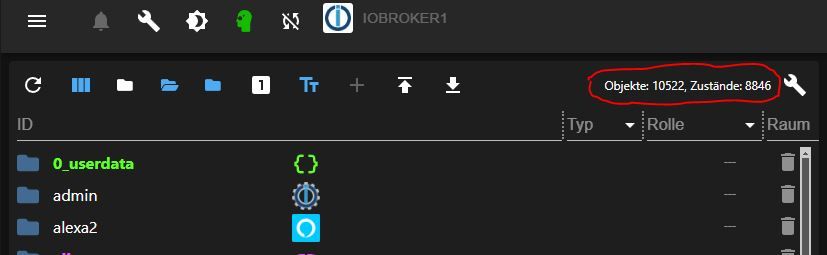
Anzahl der Objekte Unterscheidet sich im Admin vs. IOB Diag
-
@bahnuhr sagte in Anzahl der Objekte Unterscheidet sich im Admin vs. IOB Diag:
Bei mir passt die 2. Zahl nicht so richtig.
Warum? Passt sehr gut.
Die Anzahl der States ändern sich permanent. 10% Abweichung ist da vollkommen im Rahmen, würde ich sagen.
@thomas-braun sagte in Anzahl der Objekte Unterscheidet sich im Admin vs. IOB Diag:
@bahnuhr sagte in Anzahl der Objekte Unterscheidet sich im Admin vs. IOB Diag:
Bei mir passt die 2. Zahl nicht so richtig.
Warum? Passt sehr gut.
Die Anzahl der States ändern sich permanent. 10% Abweichung ist da vollkommen im Rahmen, würde ich sagen.
alles klar.
Hab ich aber auch noch nie drauf geachtet. Erst mit diesem thread mal verglichen. -
@arteck sagte in Anzahl der Objekte Unterscheidet sich im Admin vs. IOB Diag:
ist dann immer noch ein schiefstand ?
ja ist unverändert.
Objects: 10515
States: 46359vs
Objekte: 10522, Zustände: 8846
Skript v.2024-05-22 *** BASE SYSTEM *** Static hostname: iobroker1 Icon name: computer-container Chassis: container Virtualization: lxc Operating System: Ubuntu 22.04.4 LTS Kernel: Linux 6.8.12-1-pve Architecture: x86-64 model name : Intel(R) Core(TM) i7-7567U CPU @ 3.50GHz Docker : false Virtualization : lxc Kernel : x86_64 Userland : 64 bit Systemuptime and Load: 09:24:39 up 3 days, 1:58, 2 users, load average: 0.49, 0.58, 0.35 CPU threads: 4 *** Time and Time Zones *** Local time: Wed 2024-08-14 09:24:39 CEST Universal time: Wed 2024-08-14 07:24:39 UTC RTC time: n/a Time zone: Europe/Berlin (CEST, +0200) System clock synchronized: yes NTP service: inactive RTC in local TZ: no *** Users and Groups *** User that called 'iob diag': christoph HOME=/home/christoph GROUPS=christoph adm sudo iobroker User that is running 'js-controller': js-controller is not running *** Display-Server-Setup *** Display-Server: false Desktop: Terminal: tty Boot Target: multi-user.target *** MEMORY *** total used free shared buff/cache available Mem: 15G 261M 14G 0.0K 1.1G 15G Swap: 8.2G 0B 8.2G Total: 23G 261M 22G Active iob-Instances: 2 15500 M total memory 261 M used memory 250 M active memory 889 M inactive memory 14133 M free memory 0 M buffer memory 1104 M swap cache 8191 M total swap 0 M used swap 8191 M free swap *** top - Table Of Processes *** top - 09:24:39 up 3 days, 1:58, 2 users, load average: 0.49, 0.58, 0.35 Tasks: 28 total, 1 running, 27 sleeping, 0 stopped, 0 zombie %Cpu(s): 0.0 us, 0.0 sy, 0.0 ni,100.0 id, 0.0 wa, 0.0 hi, 0.0 si, 0.0 st MiB Mem : 15500.0 total, 14133.6 free, 262.1 used, 1104.3 buff/cache MiB Swap: 8192.0 total, 8192.0 free, 0.0 used. 15237.8 avail Mem *** FAILED SERVICES *** UNIT LOAD ACTIVE SUB DESCRIPTION * apparmor.service loaded failed failed Load AppArmor profiles * iobroker.service loaded failed failed ioBroker Server * systemd-sysusers.service loaded failed failed Create System Users LOAD = Reflects whether the unit definition was properly loaded. ACTIVE = The high-level unit activation state, i.e. generalization of SUB. SUB = The low-level unit activation state, values depend on unit type. 3 loaded units listed. *** FILESYSTEM *** Filesystem Type Size Used Avail Use% Mounted on /dev/mapper/pve-vm--104--disk--0 ext4 63G 14G 46G 24% / none tmpfs 492K 4.0K 488K 1% /dev tmpfs tmpfs 7.8G 0 7.8G 0% /dev/shm tmpfs tmpfs 3.2G 116K 3.2G 1% /run tmpfs tmpfs 5.0M 0 5.0M 0% /run/lock tmpfs tmpfs 1.6G 0 1.6G 0% /run/user/1000 Messages concerning ext4 filesystem in dmesg: [Sun Aug 11 07:25:04 2024] EXT4-fs (dm-1): mounted filesystem 665bdbd3-7a9d-46d2-9afa-de180c0ccfc9 ro with ordered data mode. Quota mode: none. [Sun Aug 11 07:25:09 2024] EXT4-fs (dm-1): re-mounted 665bdbd3-7a9d-46d2-9afa-de180c0ccfc9 r/w. Quota mode: none. [Sun Aug 11 07:25:44 2024] EXT4-fs (dm-11): mounted filesystem 32f046e3-22f9-4048-8ceb-3fff80bfc146 r/w with ordered data mode. Quota mode: none. [Sun Aug 11 07:25:50 2024] EXT4-fs (dm-13): mounted filesystem a272216f-1dc4-4d89-8106-e180ffbd5bb5 r/w with ordered data mode. Quota mode: none. [Sun Aug 11 07:26:02 2024] EXT4-fs (dm-12): mounted filesystem 4adb5760-eb08-44c1-b51b-6d3cc66727aa r/w with ordered data mode. Quota mode: none. Show mounted filesystems: TARGET SOURCE FSTYPE OPTIONS / /dev/mapper/pve-vm--104--disk--0 ext4 rw,relatime,stripe=16 |-/dev none tmpfs rw,relatime,size=492k,mode=755,inode64 | |-/dev/mqueue mqueue mqueue rw,relatime | |-/dev/pts devpts devpts rw,nosuid,noexec,relatime,gid=5,mode=620,ptmxmode=666,max=1026 | |-/dev/ptmx devpts[/ptmx] devpts rw,nosuid,noexec,relatime,gid=5,mode=620,ptmxmode=666,max=1026 | |-/dev/lxc/console devpts[/0] devpts rw,nosuid,noexec,relatime,gid=5,mode=620,ptmxmode=666,max=1026 | |-/dev/console devpts[/0] devpts rw,nosuid,noexec,relatime,gid=5,mode=620,ptmxmode=666,max=1026 | |-/dev/lxc/tty1 devpts[/1] devpts rw,nosuid,noexec,relatime,gid=5,mode=620,ptmxmode=666,max=1026 | |-/dev/lxc/tty2 devpts[/2] devpts rw,nosuid,noexec,relatime,gid=5,mode=620,ptmxmode=666,max=1026 | |-/dev/shm tmpfs tmpfs rw,nosuid,nodev,inode64 | `-/dev/hugepages hugetlbfs hugetlbfs rw,relatime,pagesize=2M |-/proc proc proc rw,nosuid,nodev,noexec,relatime | |-/proc/sys proc[/sys] proc ro,relatime | | |-/proc/sys/kernel/random/boot_id none[/.lxc-boot-id] tmpfs ro,nosuid,nodev,noexec,relatime,size=492k,mode=755,inode64 | | `-/proc/sys/net proc[/sys/net] proc rw,nosuid,nodev,noexec,relatime | |-/proc/sysrq-trigger proc[/sysrq-trigger] proc ro,relatime | |-/proc/cpuinfo lxcfs[/proc/cpuinfo] fuse.lxcfs rw,nosuid,nodev,relatime,user_id=0,group_id=0,allow_other | |-/proc/diskstats lxcfs[/proc/diskstats] fuse.lxcfs rw,nosuid,nodev,relatime,user_id=0,group_id=0,allow_other | |-/proc/loadavg lxcfs[/proc/loadavg] fuse.lxcfs rw,nosuid,nodev,relatime,user_id=0,group_id=0,allow_other | |-/proc/meminfo lxcfs[/proc/meminfo] fuse.lxcfs rw,nosuid,nodev,relatime,user_id=0,group_id=0,allow_other | |-/proc/slabinfo lxcfs[/proc/slabinfo] fuse.lxcfs rw,nosuid,nodev,relatime,user_id=0,group_id=0,allow_other | |-/proc/stat lxcfs[/proc/stat] fuse.lxcfs rw,nosuid,nodev,relatime,user_id=0,group_id=0,allow_other | |-/proc/swaps lxcfs[/proc/swaps] fuse.lxcfs rw,nosuid,nodev,relatime,user_id=0,group_id=0,allow_other | `-/proc/uptime lxcfs[/proc/uptime] fuse.lxcfs rw,nosuid,nodev,relatime,user_id=0,group_id=0,allow_other |-/sys sysfs sysfs ro,nosuid,nodev,noexec,relatime | |-/sys/fs/fuse/connections fusectl fusectl rw,nosuid,nodev,noexec,relatime | |-/sys/devices/virtual/net sysfs[/devices/virtual/net] sysfs rw,nosuid,nodev,noexec,relatime | |-/sys/kernel/debug debugfs debugfs rw,nosuid,nodev,noexec,relatime | |-/sys/kernel/security securityfs securityfs rw,nosuid,nodev,noexec,relatime | |-/sys/fs/pstore pstore pstore rw,nosuid,nodev,noexec,relatime | |-/sys/fs/cgroup none cgroup2 rw,nosuid,nodev,noexec,relatime | `-/sys/devices/system/cpu lxcfs[/sys/devices/system/cpu] fuse.lxcfs rw,nosuid,nodev,relatime,user_id=0,group_id=0,allow_other `-/run tmpfs tmpfs rw,nosuid,nodev,size=3253548k,nr_inodes=819200,mode=755,inode64 |-/run/lock tmpfs tmpfs rw,nosuid,nodev,noexec,relatime,size=5120k,inode64 `-/run/user/1000 tmpfs tmpfs rw,nosuid,nodev,relatime,size=1626772k,nr_inodes=406693,mode=700,uid=1000,gid=1000,inode64 Files in neuralgic directories: /var: 2.2G /var/ 1.6G /var/log 1.5G /var/log/journal/b354c482f7cc342776f020ee5ea440c3 1.5G /var/log/journal 350M /var/cache Archived and active journals take up 1.4G in the file system. /opt/iobroker/backups: 27M /opt/iobroker/backups/ /opt/iobroker/iobroker-data: 929M /opt/iobroker/iobroker-data/ 745M /opt/iobroker/iobroker-data/files 493M /opt/iobroker/iobroker-data/files/javascript.admin 461M /opt/iobroker/iobroker-data/files/javascript.admin/static 460M /opt/iobroker/iobroker-data/files/javascript.admin/static/js The five largest files in iobroker-data are: 19M /opt/iobroker/iobroker-data/objects.json 19M /opt/iobroker/iobroker-data/files/web.admin/static/js/main.1d90720e.js.map 16M /opt/iobroker/iobroker-data/objects.jsonl 15M /opt/iobroker/iobroker-data/states.json 13M /opt/iobroker/iobroker-data/states.jsonl USB-Devices by-id: USB-Sticks - Avoid direct links to /dev/tty* in your adapter setups, please always prefer the links 'by-id': No Devices found 'by-id' *** NodeJS-Installation *** /usr/bin/nodejs v20.16.0 /usr/bin/node v20.16.0 /usr/bin/npm 10.8.1 /usr/bin/npx 10.8.1 /usr/bin/corepack 0.28.2 nodejs: Installed: 20.16.0-1nodesource1 Candidate: 20.16.0-1nodesource1 Version table: *** 20.16.0-1nodesource1 1001 500 https://deb.nodesource.com/node_20.x nodistro/main amd64 Packages 100 /var/lib/dpkg/status 20.15.1-1nodesource1 1001 500 https://deb.nodesource.com/node_20.x nodistro/main amd64 Packages 20.15.0-1nodesource1 1001 500 https://deb.nodesource.com/node_20.x nodistro/main amd64 Packages 20.14.0-1nodesource1 1001 500 https://deb.nodesource.com/node_20.x nodistro/main amd64 Packages 20.13.1-1nodesource1 1001 500 https://deb.nodesource.com/node_20.x nodistro/main amd64 Packages 20.13.0-1nodesource1 1001 500 https://deb.nodesource.com/node_20.x nodistro/main amd64 Packages 20.12.2-1nodesource1 1001 500 https://deb.nodesource.com/node_20.x nodistro/main amd64 Packages 20.12.1-1nodesource1 1001 500 https://deb.nodesource.com/node_20.x nodistro/main amd64 Packages 20.12.0-1nodesource1 1001 500 https://deb.nodesource.com/node_20.x nodistro/main amd64 Packages 20.11.1-1nodesource1 1001 500 https://deb.nodesource.com/node_20.x nodistro/main amd64 Packages 20.11.0-1nodesource1 1001 500 https://deb.nodesource.com/node_20.x nodistro/main amd64 Packages 20.10.0-1nodesource1 1001 500 https://deb.nodesource.com/node_20.x nodistro/main amd64 Packages 20.9.0-1nodesource1 1001 500 https://deb.nodesource.com/node_20.x nodistro/main amd64 Packages 20.8.1-1nodesource1 1001 500 https://deb.nodesource.com/node_20.x nodistro/main amd64 Packages 20.8.0-1nodesource1 1001 500 https://deb.nodesource.com/node_20.x nodistro/main amd64 Packages 20.7.0-1nodesource1 1001 500 https://deb.nodesource.com/node_20.x nodistro/main amd64 Packages 20.6.1-1nodesource1 1001 500 https://deb.nodesource.com/node_20.x nodistro/main amd64 Packages 20.6.0-1nodesource1 1001 500 https://deb.nodesource.com/node_20.x nodistro/main amd64 Packages 20.5.1-1nodesource1 1001 500 https://deb.nodesource.com/node_20.x nodistro/main amd64 Packages 20.5.0-1nodesource1 1001 500 https://deb.nodesource.com/node_20.x nodistro/main amd64 Packages 20.4.0-1nodesource1 1001 500 https://deb.nodesource.com/node_20.x nodistro/main amd64 Packages 20.3.1-1nodesource1 1001 500 https://deb.nodesource.com/node_20.x nodistro/main amd64 Packages 20.3.0-1nodesource1 1001 500 https://deb.nodesource.com/node_20.x nodistro/main amd64 Packages 20.2.0-1nodesource1 1001 500 https://deb.nodesource.com/node_20.x nodistro/main amd64 Packages 20.1.0-1nodesource1 1001 500 https://deb.nodesource.com/node_20.x nodistro/main amd64 Packages 20.0.0-1nodesource1 1001 500 https://deb.nodesource.com/node_20.x nodistro/main amd64 Packages 12.22.9~dfsg-1ubuntu3.6 500 500 http://archive.ubuntu.com/ubuntu jammy-updates/universe amd64 Packages 500 http://archive.ubuntu.com/ubuntu jammy-security/universe amd64 Packages 12.22.9~dfsg-1ubuntu3 500 500 http://archive.ubuntu.com/ubuntu jammy/universe amd64 Packages Temp directories causing npm8 problem: 0 No problems detected Errors in npm tree: *** ioBroker-Installation *** ioBroker Status iobroker is not running on this host. Objects type: jsonl States type: jsonl Core adapters versions js-controller: 6.0.10 admin: 7.0.23 javascript: 8.8.2 nodejs modules from github: 0 Adapter State system.adapter.admin.0 : admin : iobroker1 - enabled, port: 8081, bind: 192.165.175.15, run as: admin system.adapter.alexa2.0 : alexa2 : iobroker1 - enabled system.adapter.cloud.0 : cloud : iobroker1 - disabled system.adapter.device-reminder.0 : device-reminder : iobroker1 - enabled system.adapter.device-watcher.0 : device-watcher : iobroker1 - enabled system.adapter.discovery.0 : discovery : iobroker1 - disabled system.adapter.dwd.0 : dwd : iobroker1 - enabled system.adapter.eusec.0 : eusec : iobroker1 - disabled system.adapter.feiertage.0 : feiertage : iobroker1 - enabled system.adapter.heatingcontrol.0 : heatingcontrol : iobroker1 - enabled system.adapter.hm-rega.0 : hm-rega : iobroker1 - enabled system.adapter.hm-rpc.0 : hm-rpc : iobroker1 - enabled, port: 0 system.adapter.hm-rpc.1 : hm-rpc : iobroker1 - enabled, port: 0 system.adapter.hm-rpc.3 : hm-rpc : iobroker1 - enabled, port: 0 system.adapter.homeconnect.0 : homeconnect : iobroker1 - enabled system.adapter.hue.0 : hue : iobroker1 - enabled, port: 443 system.adapter.hue.1 : hue : iobroker1 - enabled, port: 443 system.adapter.ical.0 : ical : iobroker1 - enabled system.adapter.icons-fatcow-hosting.0 : icons-fatcow-hosting : iobroker1 - disabled system.adapter.icons-icons8.0 : icons-icons8 : iobroker1 - disabled system.adapter.icons-material-png.0 : icons-material-png : iobroker1 - disabled system.adapter.icons-material-svg.0 : icons-material-svg : iobroker1 - disabled system.adapter.icons-mfd-png.0 : icons-mfd-png : iobroker1 - disabled system.adapter.icons-mfd-svg.0 : icons-mfd-svg : iobroker1 - disabled system.adapter.icons-ultimate-png.0 : icons-ultimate-png : iobroker1 - disabled system.adapter.jarvis.0 : jarvis : iobroker1 - enabled system.adapter.javascript.0 : javascript : iobroker1 - enabled system.adapter.mihome-vacuum.0 : mihome-vacuum : iobroker1 - enabled, port: 54321 system.adapter.panasonic-comfort-cloud.0: panasonic-comfort-cloud: iobroker1 - enabled + system.adapter.radar2.0 : radar2 : iobrokerraspi - enabled system.adapter.shuttercontrol.0 : shuttercontrol : iobroker1 - enabled system.adapter.simple-api.0 : simple-api : iobroker1 - enabled, port: 8087, bind: 0.0.0.0, run as: admin system.adapter.socketio.0 : socketio : iobroker1 - enabled, port: 8084, bind: 0.0.0.0, run as: admin system.adapter.sourceanalytix.0 : sourceanalytix : iobroker1 - enabled system.adapter.telegram.0 : telegram : iobroker1 - enabled, port: 8443, bind: 0.0.0.0 system.adapter.trashschedule.0 : trashschedule : iobroker1 - enabled system.adapter.vis-bars.0 : vis-bars : iobroker1 - disabled system.adapter.vis-canvas-gauges.0 : vis-canvas-gauges : iobroker1 - disabled system.adapter.vis-colorpicker.0 : vis-colorpicker : iobroker1 - disabled system.adapter.vis-fancyswitch.0 : vis-fancyswitch : iobroker1 - disabled system.adapter.vis-google-fonts.0 : vis-google-fonts : iobroker1 - enabled system.adapter.vis-hqwidgets.0 : vis-hqwidgets : iobroker1 - disabled system.adapter.vis-jqui-mfd.0 : vis-jqui-mfd : iobroker1 - disabled system.adapter.vis-justgage.0 : vis-justgage : iobroker1 - disabled system.adapter.vis-material.0 : vis-material : iobroker1 - disabled system.adapter.vis-materialdesign.0 : vis-materialdesign : iobroker1 - disabled system.adapter.vis-metro.0 : vis-metro : iobroker1 - disabled system.adapter.vis-plumb.0 : vis-plumb : iobroker1 - disabled system.adapter.vis-rgraph.0 : vis-rgraph : iobroker1 - disabled system.adapter.vis-timeandweather.0 : vis-timeandweather : iobroker1 - disabled system.adapter.vis-weather.0 : vis-weather : iobroker1 - disabled system.adapter.vis.0 : vis : iobroker1 - enabled system.adapter.weather-warnings.0 : weather-warnings : iobroker1 - enabled system.adapter.web.0 : web : iobroker1 - enabled, port: 8082, bind: 0.0.0.0, run as: admin + instance is alive Enabled adapters with bindings system.adapter.admin.0 : admin : iobroker1 - enabled, port: 8081, bind: 192.165.175.15, run as: admin system.adapter.hm-rpc.0 : hm-rpc : iobroker1 - enabled, port: 0 system.adapter.hm-rpc.1 : hm-rpc : iobroker1 - enabled, port: 0 system.adapter.hm-rpc.3 : hm-rpc : iobroker1 - enabled, port: 0 system.adapter.hue.0 : hue : iobroker1 - enabled, port: 443 system.adapter.hue.1 : hue : iobroker1 - enabled, port: 443 system.adapter.mihome-vacuum.0 : mihome-vacuum : iobroker1 - enabled, port: 54321 system.adapter.simple-api.0 : simple-api : iobroker1 - enabled, port: 8087, bind: 0.0.0.0, run as: admin system.adapter.socketio.0 : socketio : iobroker1 - enabled, port: 8084, bind: 0.0.0.0, run as: admin system.adapter.telegram.0 : telegram : iobroker1 - enabled, port: 8443, bind: 0.0.0.0 system.adapter.web.0 : web : iobroker1 - enabled, port: 8082, bind: 0.0.0.0, run as: admin ioBroker-Repositories ┌─────────┬──────────┬─────────────────────────────────────────────────────────┬──────────────┐ │ (index) │ name │ url │ auto upgrade │ ├─────────┼──────────┼─────────────────────────────────────────────────────────┼──────────────┤ │ 0 │ 'stable' │ 'http://download.iobroker.net/sources-dist.json' │ false │ │ 1 │ 'beta' │ 'http://download.iobroker.net/sources-dist-latest.json' │ false │ └─────────┴──────────┴─────────────────────────────────────────────────────────┴──────────────┘ Active repo(s): beta Upgrade policy: none Installed ioBroker-Instances Used repository: beta Adapter "admin" : 7.0.23 , installed 7.0.23 Adapter "alexa2" : 3.26.5 , installed 3.26.5 Adapter "cloud" : 5.0.1 , installed 5.0.1 Adapter "device-reminder": 3.1.2 , installed 3.1.2 Adapter "device-watcher": 2.12.1 , installed 2.12.1 Adapter "discovery" : 5.0.0 , installed 5.0.0 Adapter "dwd" : 2.8.5 , installed 2.8.5 Adapter "eusec" : 1.2.1 , installed 1.2.1 Adapter "feiertage" : 1.2.0 , installed 1.2.0 Adapter "heatingcontrol": 2.12.8 , installed 2.12.8 Adapter "hm-rega" : 5.0.0 , installed 5.0.0 Adapter "hm-rpc" : 2.0.0 , installed 2.0.0 Adapter "homeconnect" : 1.4.1 , installed 1.4.1 Adapter "hue" : 3.12.0 , installed 3.12.0 Adapter "ical" : 1.15.0 , installed 1.15.0 Adapter "icons-fatcow-hosting": 0.1.0, installed 0.1.0 Adapter "icons-icons8" : 0.0.1 , installed 0.0.1 Adapter "icons-material-png": 0.1.0, installed 0.1.0 Adapter "icons-material-svg": 0.1.0, installed 0.1.0 Adapter "icons-mfd-png": 1.2.1 , installed 1.2.1 Adapter "icons-mfd-svg": 1.2.0 , installed 1.2.0 Adapter "icons-ultimate-png": 1.0.1, installed 1.0.1 Adapter "jarvis" : 3.1.8 , installed 3.1.8 Adapter "javascript" : 8.8.2 , installed 8.8.2 Controller "js-controller": 6.0.10 , installed 6.0.10 Adapter "mihome-vacuum": 4.2.0 , installed 4.2.0 Adapter "panasonic-comfort-cloud": 3.0.2, installed 3.0.2 Adapter "radar2" : 2.2.0 , installed 2.2.0 Adapter "shuttercontrol": 1.7.3 , installed 1.7.3 Adapter "simple-api" : 2.8.0 , installed 2.8.0 Adapter "socketio" : 6.7.1 , installed 6.7.1 Adapter "sourceanalytix": 0.4.14 , installed 0.4.14 Adapter "telegram" : 3.9.0 , installed 3.9.0 Adapter "trashschedule": 3.3.0 , installed 3.3.0 Adapter "vis" : 1.5.6 , installed 1.5.6 Adapter "vis-bars" : 0.1.4 , installed 0.1.4 Adapter "vis-canvas-gauges": 1.0.1, installed 1.0.1 Adapter "vis-colorpicker": 2.0.3 , installed 2.0.3 Adapter "vis-fancyswitch": 1.1.0 , installed 1.1.0 Adapter "vis-google-fonts": 1.0.4 , installed 1.0.4 Adapter "vis-hqwidgets": 1.5.1 , installed 1.5.1 Adapter "vis-jqui-mfd" : 1.1.1 , installed 1.1.1 Adapter "vis-justgage" : 2.1.7 , installed 2.1.7 Adapter "vis-material" : 0.1.3 , installed 0.1.3 Adapter "vis-materialdesign": 0.5.9, installed 0.5.9 Adapter "vis-metro" : 1.2.0 , installed 1.2.0 Adapter "vis-plumb" : 1.0.2 , installed 1.0.2 Adapter "vis-rgraph" : 0.0.2 , installed 0.0.2 Adapter "vis-timeandweather": 1.2.2, installed 1.2.2 Adapter "vis-weather" : 2.5.9 , installed 2.5.9 Adapter "weather-warnings": 0.6.7 , installed 0.6.7 Adapter "web" : 6.3.0 , installed 6.3.0 Adapter "ws" : 2.6.2 , installed 2.6.2 Objects and States Please stand by - This may take a while Objects: 10515 States: 46359 *** OS-Repositories and Updates *** Hit:1 https://deb.nodesource.com/node_20.x nodistro InRelease Hit:2 http://archive.ubuntu.com/ubuntu jammy InRelease Hit:3 http://archive.ubuntu.com/ubuntu jammy-updates InRelease Hit:4 http://archive.ubuntu.com/ubuntu jammy-security InRelease Reading package lists... Pending Updates: 0 *** Listening Ports *** Active Internet connections (only servers) Proto Recv-Q Send-Q Local Address Foreign Address State User Inode PID/Program name tcp 0 0 0.0.0.0:22 0.0.0.0:* LISTEN 0 18109 204/sshd: /usr/sbin tcp 0 0 127.0.0.1:25 0.0.0.0:* LISTEN 0 18990 322/master tcp 0 0 127.0.0.53:53 0.0.0.0:* LISTEN 106 17212 139/systemd-resolve tcp6 0 0 :::22 :::* LISTEN 0 18111 204/sshd: /usr/sbin tcp6 0 0 ::1:25 :::* LISTEN 0 18991 322/master udp 0 0 127.0.0.53:53 0.0.0.0:* 106 17211 139/systemd-resolve *** Log File - Last 25 Lines *** 2024-08-14 09:20:02.982 - info: host.iobroker1 instance system.adapter.hm-rpc.3 terminated with code 0 (NO_ERROR) 2024-08-14 09:20:02.997 - info: host.iobroker1 instance system.adapter.device-watcher.0 terminated with code 0 (NO_ERROR) 2024-08-14 09:20:03.025 - info: host.iobroker1 instance system.adapter.trashschedule.0 terminated with code 0 (NO_ERROR) 2024-08-14 09:20:03.026 - info: host.iobroker1 instance system.adapter.jarvis.0 terminated with code 0 (NO_ERROR) 2024-08-14 09:20:03.038 - info: host.iobroker1 instance system.adapter.socketio.0 terminated with code 0 (NO_ERROR) 2024-08-14 09:20:03.038 - info: host.iobroker1 All instances are stopped. 2024-08-14 09:20:03.065 - info: host.iobroker1 instance system.adapter.weather-warnings.0 terminated with code 0 (NO_ERROR) 2024-08-14 09:20:03.065 - info: host.iobroker1 All instances are stopped. 2024-08-14 09:20:03.065 - info: host.iobroker1 instance system.adapter.device-reminder.0 terminated with code 0 (NO_ERROR) 2024-08-14 09:20:03.065 - info: host.iobroker1 All instances are stopped. 2024-08-14 09:20:03.087 - info: host.iobroker1 instance system.adapter.alexa2.0 terminated with code 0 (NO_ERROR) 2024-08-14 09:20:03.087 - info: host.iobroker1 All instances are stopped. 2024-08-14 09:20:03.133 - warn: host.iobroker1 instance system.adapter.hue.0 terminated due to SIGKILL 2024-08-14 09:20:03.133 - info: host.iobroker1 instance system.adapter.hue.0 terminated with code null () 2024-08-14 09:20:03.139 - info: host.iobroker1 All instances are stopped. 2024-08-14 09:20:03.139 - warn: host.iobroker1 instance system.adapter.hue.1 terminated due to SIGKILL 2024-08-14 09:20:03.139 - info: host.iobroker1 instance system.adapter.hue.1 terminated with code null () 2024-08-14 09:20:03.139 - info: host.iobroker1 All instances are stopped. 2024-08-14 09:20:03.158 - warn: host.iobroker1 instance system.adapter.web.0 terminated due to SIGKILL 2024-08-14 09:20:03.158 - info: host.iobroker1 instance system.adapter.web.0 terminated with code null () 2024-08-14 09:20:03.158 - info: host.iobroker1 All instances are stopped. 2024-08-14 09:20:03.170 - warn: host.iobroker1 instance system.adapter.telegram.0 terminated due to SIGKILL 2024-08-14 09:20:03.170 - info: host.iobroker1 instance system.adapter.telegram.0 terminated with code null () 2024-08-14 09:20:03.170 - info: host.iobroker1 All instances are stopped. 2024-08-14 09:20:03.329 - info: host.iobroker1 terminated -
@martinp sagte in Anzahl der Objekte Unterscheidet sich im Admin vs. IOB Diag:
Was man wohl mit der Differenz-Anzahl an Objekten/States an Schindluder anfangen könnte...
Klär uns auf...
@thomas-braun Ich dachte, die Objekte und Zustände wären das statische Abbild der Iobroker - Welt, die man sich aufgebaut hat. States und Objekte dürfen sich ändern, aber die "Landkarte" muss gleich bleiben.
Wenn für mich als Anwender Objekte und Zustände auftauchen und wieder verschwinden, hinterlässt das ein ungutes Gefühl.Es könnte z.b. ein alias Erzeugt werden, das das abendliche Einschalten der Außenbeleuchtung mit der Ansteuerung des Haustürschlosses verknüpft.
Intel(R) Celeron(R) CPU N3000 @1.04GHz 8G RAM 480G SSD * Virtualization : unprivileged lxc container on Proxmox * 6 GByte RAM für den iobroker Container * Remote-Access über Wireguard meiner Fritzbox
-
@thomas-braun Ich dachte, die Objekte und Zustände wären das statische Abbild der Iobroker - Welt, die man sich aufgebaut hat. States und Objekte dürfen sich ändern, aber die "Landkarte" muss gleich bleiben.
Wenn für mich als Anwender Objekte und Zustände auftauchen und wieder verschwinden, hinterlässt das ein ungutes Gefühl.Es könnte z.b. ein alias Erzeugt werden, das das abendliche Einschalten der Außenbeleuchtung mit der Ansteuerung des Haustürschlosses verknüpft.
@martinp sagte in Anzahl der Objekte Unterscheidet sich im Admin vs. IOB Diag:
Wenn für mich als Anwender Objekte und Zustände auftauchen und wieder verschwinden, hinterlässt das ein ungutes Gefühl.
Das ist aber das grundlegende Prinzip des ioBrokers. Insbesondere die States ändern sich 'am laufenden Band', die Objekte natürlich nicht so schnell.
-
@arteck sagte in Anzahl der Objekte Unterscheidet sich im Admin vs. IOB Diag:
ist dann immer noch ein schiefstand ?
ja ist unverändert.
Objects: 10515
States: 46359vs
Objekte: 10522, Zustände: 8846
Skript v.2024-05-22 *** BASE SYSTEM *** Static hostname: iobroker1 Icon name: computer-container Chassis: container Virtualization: lxc Operating System: Ubuntu 22.04.4 LTS Kernel: Linux 6.8.12-1-pve Architecture: x86-64 model name : Intel(R) Core(TM) i7-7567U CPU @ 3.50GHz Docker : false Virtualization : lxc Kernel : x86_64 Userland : 64 bit Systemuptime and Load: 09:24:39 up 3 days, 1:58, 2 users, load average: 0.49, 0.58, 0.35 CPU threads: 4 *** Time and Time Zones *** Local time: Wed 2024-08-14 09:24:39 CEST Universal time: Wed 2024-08-14 07:24:39 UTC RTC time: n/a Time zone: Europe/Berlin (CEST, +0200) System clock synchronized: yes NTP service: inactive RTC in local TZ: no *** Users and Groups *** User that called 'iob diag': christoph HOME=/home/christoph GROUPS=christoph adm sudo iobroker User that is running 'js-controller': js-controller is not running *** Display-Server-Setup *** Display-Server: false Desktop: Terminal: tty Boot Target: multi-user.target *** MEMORY *** total used free shared buff/cache available Mem: 15G 261M 14G 0.0K 1.1G 15G Swap: 8.2G 0B 8.2G Total: 23G 261M 22G Active iob-Instances: 2 15500 M total memory 261 M used memory 250 M active memory 889 M inactive memory 14133 M free memory 0 M buffer memory 1104 M swap cache 8191 M total swap 0 M used swap 8191 M free swap *** top - Table Of Processes *** top - 09:24:39 up 3 days, 1:58, 2 users, load average: 0.49, 0.58, 0.35 Tasks: 28 total, 1 running, 27 sleeping, 0 stopped, 0 zombie %Cpu(s): 0.0 us, 0.0 sy, 0.0 ni,100.0 id, 0.0 wa, 0.0 hi, 0.0 si, 0.0 st MiB Mem : 15500.0 total, 14133.6 free, 262.1 used, 1104.3 buff/cache MiB Swap: 8192.0 total, 8192.0 free, 0.0 used. 15237.8 avail Mem *** FAILED SERVICES *** UNIT LOAD ACTIVE SUB DESCRIPTION * apparmor.service loaded failed failed Load AppArmor profiles * iobroker.service loaded failed failed ioBroker Server * systemd-sysusers.service loaded failed failed Create System Users LOAD = Reflects whether the unit definition was properly loaded. ACTIVE = The high-level unit activation state, i.e. generalization of SUB. SUB = The low-level unit activation state, values depend on unit type. 3 loaded units listed. *** FILESYSTEM *** Filesystem Type Size Used Avail Use% Mounted on /dev/mapper/pve-vm--104--disk--0 ext4 63G 14G 46G 24% / none tmpfs 492K 4.0K 488K 1% /dev tmpfs tmpfs 7.8G 0 7.8G 0% /dev/shm tmpfs tmpfs 3.2G 116K 3.2G 1% /run tmpfs tmpfs 5.0M 0 5.0M 0% /run/lock tmpfs tmpfs 1.6G 0 1.6G 0% /run/user/1000 Messages concerning ext4 filesystem in dmesg: [Sun Aug 11 07:25:04 2024] EXT4-fs (dm-1): mounted filesystem 665bdbd3-7a9d-46d2-9afa-de180c0ccfc9 ro with ordered data mode. Quota mode: none. [Sun Aug 11 07:25:09 2024] EXT4-fs (dm-1): re-mounted 665bdbd3-7a9d-46d2-9afa-de180c0ccfc9 r/w. Quota mode: none. [Sun Aug 11 07:25:44 2024] EXT4-fs (dm-11): mounted filesystem 32f046e3-22f9-4048-8ceb-3fff80bfc146 r/w with ordered data mode. Quota mode: none. [Sun Aug 11 07:25:50 2024] EXT4-fs (dm-13): mounted filesystem a272216f-1dc4-4d89-8106-e180ffbd5bb5 r/w with ordered data mode. Quota mode: none. [Sun Aug 11 07:26:02 2024] EXT4-fs (dm-12): mounted filesystem 4adb5760-eb08-44c1-b51b-6d3cc66727aa r/w with ordered data mode. Quota mode: none. Show mounted filesystems: TARGET SOURCE FSTYPE OPTIONS / /dev/mapper/pve-vm--104--disk--0 ext4 rw,relatime,stripe=16 |-/dev none tmpfs rw,relatime,size=492k,mode=755,inode64 | |-/dev/mqueue mqueue mqueue rw,relatime | |-/dev/pts devpts devpts rw,nosuid,noexec,relatime,gid=5,mode=620,ptmxmode=666,max=1026 | |-/dev/ptmx devpts[/ptmx] devpts rw,nosuid,noexec,relatime,gid=5,mode=620,ptmxmode=666,max=1026 | |-/dev/lxc/console devpts[/0] devpts rw,nosuid,noexec,relatime,gid=5,mode=620,ptmxmode=666,max=1026 | |-/dev/console devpts[/0] devpts rw,nosuid,noexec,relatime,gid=5,mode=620,ptmxmode=666,max=1026 | |-/dev/lxc/tty1 devpts[/1] devpts rw,nosuid,noexec,relatime,gid=5,mode=620,ptmxmode=666,max=1026 | |-/dev/lxc/tty2 devpts[/2] devpts rw,nosuid,noexec,relatime,gid=5,mode=620,ptmxmode=666,max=1026 | |-/dev/shm tmpfs tmpfs rw,nosuid,nodev,inode64 | `-/dev/hugepages hugetlbfs hugetlbfs rw,relatime,pagesize=2M |-/proc proc proc rw,nosuid,nodev,noexec,relatime | |-/proc/sys proc[/sys] proc ro,relatime | | |-/proc/sys/kernel/random/boot_id none[/.lxc-boot-id] tmpfs ro,nosuid,nodev,noexec,relatime,size=492k,mode=755,inode64 | | `-/proc/sys/net proc[/sys/net] proc rw,nosuid,nodev,noexec,relatime | |-/proc/sysrq-trigger proc[/sysrq-trigger] proc ro,relatime | |-/proc/cpuinfo lxcfs[/proc/cpuinfo] fuse.lxcfs rw,nosuid,nodev,relatime,user_id=0,group_id=0,allow_other | |-/proc/diskstats lxcfs[/proc/diskstats] fuse.lxcfs rw,nosuid,nodev,relatime,user_id=0,group_id=0,allow_other | |-/proc/loadavg lxcfs[/proc/loadavg] fuse.lxcfs rw,nosuid,nodev,relatime,user_id=0,group_id=0,allow_other | |-/proc/meminfo lxcfs[/proc/meminfo] fuse.lxcfs rw,nosuid,nodev,relatime,user_id=0,group_id=0,allow_other | |-/proc/slabinfo lxcfs[/proc/slabinfo] fuse.lxcfs rw,nosuid,nodev,relatime,user_id=0,group_id=0,allow_other | |-/proc/stat lxcfs[/proc/stat] fuse.lxcfs rw,nosuid,nodev,relatime,user_id=0,group_id=0,allow_other | |-/proc/swaps lxcfs[/proc/swaps] fuse.lxcfs rw,nosuid,nodev,relatime,user_id=0,group_id=0,allow_other | `-/proc/uptime lxcfs[/proc/uptime] fuse.lxcfs rw,nosuid,nodev,relatime,user_id=0,group_id=0,allow_other |-/sys sysfs sysfs ro,nosuid,nodev,noexec,relatime | |-/sys/fs/fuse/connections fusectl fusectl rw,nosuid,nodev,noexec,relatime | |-/sys/devices/virtual/net sysfs[/devices/virtual/net] sysfs rw,nosuid,nodev,noexec,relatime | |-/sys/kernel/debug debugfs debugfs rw,nosuid,nodev,noexec,relatime | |-/sys/kernel/security securityfs securityfs rw,nosuid,nodev,noexec,relatime | |-/sys/fs/pstore pstore pstore rw,nosuid,nodev,noexec,relatime | |-/sys/fs/cgroup none cgroup2 rw,nosuid,nodev,noexec,relatime | `-/sys/devices/system/cpu lxcfs[/sys/devices/system/cpu] fuse.lxcfs rw,nosuid,nodev,relatime,user_id=0,group_id=0,allow_other `-/run tmpfs tmpfs rw,nosuid,nodev,size=3253548k,nr_inodes=819200,mode=755,inode64 |-/run/lock tmpfs tmpfs rw,nosuid,nodev,noexec,relatime,size=5120k,inode64 `-/run/user/1000 tmpfs tmpfs rw,nosuid,nodev,relatime,size=1626772k,nr_inodes=406693,mode=700,uid=1000,gid=1000,inode64 Files in neuralgic directories: /var: 2.2G /var/ 1.6G /var/log 1.5G /var/log/journal/b354c482f7cc342776f020ee5ea440c3 1.5G /var/log/journal 350M /var/cache Archived and active journals take up 1.4G in the file system. /opt/iobroker/backups: 27M /opt/iobroker/backups/ /opt/iobroker/iobroker-data: 929M /opt/iobroker/iobroker-data/ 745M /opt/iobroker/iobroker-data/files 493M /opt/iobroker/iobroker-data/files/javascript.admin 461M /opt/iobroker/iobroker-data/files/javascript.admin/static 460M /opt/iobroker/iobroker-data/files/javascript.admin/static/js The five largest files in iobroker-data are: 19M /opt/iobroker/iobroker-data/objects.json 19M /opt/iobroker/iobroker-data/files/web.admin/static/js/main.1d90720e.js.map 16M /opt/iobroker/iobroker-data/objects.jsonl 15M /opt/iobroker/iobroker-data/states.json 13M /opt/iobroker/iobroker-data/states.jsonl USB-Devices by-id: USB-Sticks - Avoid direct links to /dev/tty* in your adapter setups, please always prefer the links 'by-id': No Devices found 'by-id' *** NodeJS-Installation *** /usr/bin/nodejs v20.16.0 /usr/bin/node v20.16.0 /usr/bin/npm 10.8.1 /usr/bin/npx 10.8.1 /usr/bin/corepack 0.28.2 nodejs: Installed: 20.16.0-1nodesource1 Candidate: 20.16.0-1nodesource1 Version table: *** 20.16.0-1nodesource1 1001 500 https://deb.nodesource.com/node_20.x nodistro/main amd64 Packages 100 /var/lib/dpkg/status 20.15.1-1nodesource1 1001 500 https://deb.nodesource.com/node_20.x nodistro/main amd64 Packages 20.15.0-1nodesource1 1001 500 https://deb.nodesource.com/node_20.x nodistro/main amd64 Packages 20.14.0-1nodesource1 1001 500 https://deb.nodesource.com/node_20.x nodistro/main amd64 Packages 20.13.1-1nodesource1 1001 500 https://deb.nodesource.com/node_20.x nodistro/main amd64 Packages 20.13.0-1nodesource1 1001 500 https://deb.nodesource.com/node_20.x nodistro/main amd64 Packages 20.12.2-1nodesource1 1001 500 https://deb.nodesource.com/node_20.x nodistro/main amd64 Packages 20.12.1-1nodesource1 1001 500 https://deb.nodesource.com/node_20.x nodistro/main amd64 Packages 20.12.0-1nodesource1 1001 500 https://deb.nodesource.com/node_20.x nodistro/main amd64 Packages 20.11.1-1nodesource1 1001 500 https://deb.nodesource.com/node_20.x nodistro/main amd64 Packages 20.11.0-1nodesource1 1001 500 https://deb.nodesource.com/node_20.x nodistro/main amd64 Packages 20.10.0-1nodesource1 1001 500 https://deb.nodesource.com/node_20.x nodistro/main amd64 Packages 20.9.0-1nodesource1 1001 500 https://deb.nodesource.com/node_20.x nodistro/main amd64 Packages 20.8.1-1nodesource1 1001 500 https://deb.nodesource.com/node_20.x nodistro/main amd64 Packages 20.8.0-1nodesource1 1001 500 https://deb.nodesource.com/node_20.x nodistro/main amd64 Packages 20.7.0-1nodesource1 1001 500 https://deb.nodesource.com/node_20.x nodistro/main amd64 Packages 20.6.1-1nodesource1 1001 500 https://deb.nodesource.com/node_20.x nodistro/main amd64 Packages 20.6.0-1nodesource1 1001 500 https://deb.nodesource.com/node_20.x nodistro/main amd64 Packages 20.5.1-1nodesource1 1001 500 https://deb.nodesource.com/node_20.x nodistro/main amd64 Packages 20.5.0-1nodesource1 1001 500 https://deb.nodesource.com/node_20.x nodistro/main amd64 Packages 20.4.0-1nodesource1 1001 500 https://deb.nodesource.com/node_20.x nodistro/main amd64 Packages 20.3.1-1nodesource1 1001 500 https://deb.nodesource.com/node_20.x nodistro/main amd64 Packages 20.3.0-1nodesource1 1001 500 https://deb.nodesource.com/node_20.x nodistro/main amd64 Packages 20.2.0-1nodesource1 1001 500 https://deb.nodesource.com/node_20.x nodistro/main amd64 Packages 20.1.0-1nodesource1 1001 500 https://deb.nodesource.com/node_20.x nodistro/main amd64 Packages 20.0.0-1nodesource1 1001 500 https://deb.nodesource.com/node_20.x nodistro/main amd64 Packages 12.22.9~dfsg-1ubuntu3.6 500 500 http://archive.ubuntu.com/ubuntu jammy-updates/universe amd64 Packages 500 http://archive.ubuntu.com/ubuntu jammy-security/universe amd64 Packages 12.22.9~dfsg-1ubuntu3 500 500 http://archive.ubuntu.com/ubuntu jammy/universe amd64 Packages Temp directories causing npm8 problem: 0 No problems detected Errors in npm tree: *** ioBroker-Installation *** ioBroker Status iobroker is not running on this host. Objects type: jsonl States type: jsonl Core adapters versions js-controller: 6.0.10 admin: 7.0.23 javascript: 8.8.2 nodejs modules from github: 0 Adapter State system.adapter.admin.0 : admin : iobroker1 - enabled, port: 8081, bind: 192.165.175.15, run as: admin system.adapter.alexa2.0 : alexa2 : iobroker1 - enabled system.adapter.cloud.0 : cloud : iobroker1 - disabled system.adapter.device-reminder.0 : device-reminder : iobroker1 - enabled system.adapter.device-watcher.0 : device-watcher : iobroker1 - enabled system.adapter.discovery.0 : discovery : iobroker1 - disabled system.adapter.dwd.0 : dwd : iobroker1 - enabled system.adapter.eusec.0 : eusec : iobroker1 - disabled system.adapter.feiertage.0 : feiertage : iobroker1 - enabled system.adapter.heatingcontrol.0 : heatingcontrol : iobroker1 - enabled system.adapter.hm-rega.0 : hm-rega : iobroker1 - enabled system.adapter.hm-rpc.0 : hm-rpc : iobroker1 - enabled, port: 0 system.adapter.hm-rpc.1 : hm-rpc : iobroker1 - enabled, port: 0 system.adapter.hm-rpc.3 : hm-rpc : iobroker1 - enabled, port: 0 system.adapter.homeconnect.0 : homeconnect : iobroker1 - enabled system.adapter.hue.0 : hue : iobroker1 - enabled, port: 443 system.adapter.hue.1 : hue : iobroker1 - enabled, port: 443 system.adapter.ical.0 : ical : iobroker1 - enabled system.adapter.icons-fatcow-hosting.0 : icons-fatcow-hosting : iobroker1 - disabled system.adapter.icons-icons8.0 : icons-icons8 : iobroker1 - disabled system.adapter.icons-material-png.0 : icons-material-png : iobroker1 - disabled system.adapter.icons-material-svg.0 : icons-material-svg : iobroker1 - disabled system.adapter.icons-mfd-png.0 : icons-mfd-png : iobroker1 - disabled system.adapter.icons-mfd-svg.0 : icons-mfd-svg : iobroker1 - disabled system.adapter.icons-ultimate-png.0 : icons-ultimate-png : iobroker1 - disabled system.adapter.jarvis.0 : jarvis : iobroker1 - enabled system.adapter.javascript.0 : javascript : iobroker1 - enabled system.adapter.mihome-vacuum.0 : mihome-vacuum : iobroker1 - enabled, port: 54321 system.adapter.panasonic-comfort-cloud.0: panasonic-comfort-cloud: iobroker1 - enabled + system.adapter.radar2.0 : radar2 : iobrokerraspi - enabled system.adapter.shuttercontrol.0 : shuttercontrol : iobroker1 - enabled system.adapter.simple-api.0 : simple-api : iobroker1 - enabled, port: 8087, bind: 0.0.0.0, run as: admin system.adapter.socketio.0 : socketio : iobroker1 - enabled, port: 8084, bind: 0.0.0.0, run as: admin system.adapter.sourceanalytix.0 : sourceanalytix : iobroker1 - enabled system.adapter.telegram.0 : telegram : iobroker1 - enabled, port: 8443, bind: 0.0.0.0 system.adapter.trashschedule.0 : trashschedule : iobroker1 - enabled system.adapter.vis-bars.0 : vis-bars : iobroker1 - disabled system.adapter.vis-canvas-gauges.0 : vis-canvas-gauges : iobroker1 - disabled system.adapter.vis-colorpicker.0 : vis-colorpicker : iobroker1 - disabled system.adapter.vis-fancyswitch.0 : vis-fancyswitch : iobroker1 - disabled system.adapter.vis-google-fonts.0 : vis-google-fonts : iobroker1 - enabled system.adapter.vis-hqwidgets.0 : vis-hqwidgets : iobroker1 - disabled system.adapter.vis-jqui-mfd.0 : vis-jqui-mfd : iobroker1 - disabled system.adapter.vis-justgage.0 : vis-justgage : iobroker1 - disabled system.adapter.vis-material.0 : vis-material : iobroker1 - disabled system.adapter.vis-materialdesign.0 : vis-materialdesign : iobroker1 - disabled system.adapter.vis-metro.0 : vis-metro : iobroker1 - disabled system.adapter.vis-plumb.0 : vis-plumb : iobroker1 - disabled system.adapter.vis-rgraph.0 : vis-rgraph : iobroker1 - disabled system.adapter.vis-timeandweather.0 : vis-timeandweather : iobroker1 - disabled system.adapter.vis-weather.0 : vis-weather : iobroker1 - disabled system.adapter.vis.0 : vis : iobroker1 - enabled system.adapter.weather-warnings.0 : weather-warnings : iobroker1 - enabled system.adapter.web.0 : web : iobroker1 - enabled, port: 8082, bind: 0.0.0.0, run as: admin + instance is alive Enabled adapters with bindings system.adapter.admin.0 : admin : iobroker1 - enabled, port: 8081, bind: 192.165.175.15, run as: admin system.adapter.hm-rpc.0 : hm-rpc : iobroker1 - enabled, port: 0 system.adapter.hm-rpc.1 : hm-rpc : iobroker1 - enabled, port: 0 system.adapter.hm-rpc.3 : hm-rpc : iobroker1 - enabled, port: 0 system.adapter.hue.0 : hue : iobroker1 - enabled, port: 443 system.adapter.hue.1 : hue : iobroker1 - enabled, port: 443 system.adapter.mihome-vacuum.0 : mihome-vacuum : iobroker1 - enabled, port: 54321 system.adapter.simple-api.0 : simple-api : iobroker1 - enabled, port: 8087, bind: 0.0.0.0, run as: admin system.adapter.socketio.0 : socketio : iobroker1 - enabled, port: 8084, bind: 0.0.0.0, run as: admin system.adapter.telegram.0 : telegram : iobroker1 - enabled, port: 8443, bind: 0.0.0.0 system.adapter.web.0 : web : iobroker1 - enabled, port: 8082, bind: 0.0.0.0, run as: admin ioBroker-Repositories ┌─────────┬──────────┬─────────────────────────────────────────────────────────┬──────────────┐ │ (index) │ name │ url │ auto upgrade │ ├─────────┼──────────┼─────────────────────────────────────────────────────────┼──────────────┤ │ 0 │ 'stable' │ 'http://download.iobroker.net/sources-dist.json' │ false │ │ 1 │ 'beta' │ 'http://download.iobroker.net/sources-dist-latest.json' │ false │ └─────────┴──────────┴─────────────────────────────────────────────────────────┴──────────────┘ Active repo(s): beta Upgrade policy: none Installed ioBroker-Instances Used repository: beta Adapter "admin" : 7.0.23 , installed 7.0.23 Adapter "alexa2" : 3.26.5 , installed 3.26.5 Adapter "cloud" : 5.0.1 , installed 5.0.1 Adapter "device-reminder": 3.1.2 , installed 3.1.2 Adapter "device-watcher": 2.12.1 , installed 2.12.1 Adapter "discovery" : 5.0.0 , installed 5.0.0 Adapter "dwd" : 2.8.5 , installed 2.8.5 Adapter "eusec" : 1.2.1 , installed 1.2.1 Adapter "feiertage" : 1.2.0 , installed 1.2.0 Adapter "heatingcontrol": 2.12.8 , installed 2.12.8 Adapter "hm-rega" : 5.0.0 , installed 5.0.0 Adapter "hm-rpc" : 2.0.0 , installed 2.0.0 Adapter "homeconnect" : 1.4.1 , installed 1.4.1 Adapter "hue" : 3.12.0 , installed 3.12.0 Adapter "ical" : 1.15.0 , installed 1.15.0 Adapter "icons-fatcow-hosting": 0.1.0, installed 0.1.0 Adapter "icons-icons8" : 0.0.1 , installed 0.0.1 Adapter "icons-material-png": 0.1.0, installed 0.1.0 Adapter "icons-material-svg": 0.1.0, installed 0.1.0 Adapter "icons-mfd-png": 1.2.1 , installed 1.2.1 Adapter "icons-mfd-svg": 1.2.0 , installed 1.2.0 Adapter "icons-ultimate-png": 1.0.1, installed 1.0.1 Adapter "jarvis" : 3.1.8 , installed 3.1.8 Adapter "javascript" : 8.8.2 , installed 8.8.2 Controller "js-controller": 6.0.10 , installed 6.0.10 Adapter "mihome-vacuum": 4.2.0 , installed 4.2.0 Adapter "panasonic-comfort-cloud": 3.0.2, installed 3.0.2 Adapter "radar2" : 2.2.0 , installed 2.2.0 Adapter "shuttercontrol": 1.7.3 , installed 1.7.3 Adapter "simple-api" : 2.8.0 , installed 2.8.0 Adapter "socketio" : 6.7.1 , installed 6.7.1 Adapter "sourceanalytix": 0.4.14 , installed 0.4.14 Adapter "telegram" : 3.9.0 , installed 3.9.0 Adapter "trashschedule": 3.3.0 , installed 3.3.0 Adapter "vis" : 1.5.6 , installed 1.5.6 Adapter "vis-bars" : 0.1.4 , installed 0.1.4 Adapter "vis-canvas-gauges": 1.0.1, installed 1.0.1 Adapter "vis-colorpicker": 2.0.3 , installed 2.0.3 Adapter "vis-fancyswitch": 1.1.0 , installed 1.1.0 Adapter "vis-google-fonts": 1.0.4 , installed 1.0.4 Adapter "vis-hqwidgets": 1.5.1 , installed 1.5.1 Adapter "vis-jqui-mfd" : 1.1.1 , installed 1.1.1 Adapter "vis-justgage" : 2.1.7 , installed 2.1.7 Adapter "vis-material" : 0.1.3 , installed 0.1.3 Adapter "vis-materialdesign": 0.5.9, installed 0.5.9 Adapter "vis-metro" : 1.2.0 , installed 1.2.0 Adapter "vis-plumb" : 1.0.2 , installed 1.0.2 Adapter "vis-rgraph" : 0.0.2 , installed 0.0.2 Adapter "vis-timeandweather": 1.2.2, installed 1.2.2 Adapter "vis-weather" : 2.5.9 , installed 2.5.9 Adapter "weather-warnings": 0.6.7 , installed 0.6.7 Adapter "web" : 6.3.0 , installed 6.3.0 Adapter "ws" : 2.6.2 , installed 2.6.2 Objects and States Please stand by - This may take a while Objects: 10515 States: 46359 *** OS-Repositories and Updates *** Hit:1 https://deb.nodesource.com/node_20.x nodistro InRelease Hit:2 http://archive.ubuntu.com/ubuntu jammy InRelease Hit:3 http://archive.ubuntu.com/ubuntu jammy-updates InRelease Hit:4 http://archive.ubuntu.com/ubuntu jammy-security InRelease Reading package lists... Pending Updates: 0 *** Listening Ports *** Active Internet connections (only servers) Proto Recv-Q Send-Q Local Address Foreign Address State User Inode PID/Program name tcp 0 0 0.0.0.0:22 0.0.0.0:* LISTEN 0 18109 204/sshd: /usr/sbin tcp 0 0 127.0.0.1:25 0.0.0.0:* LISTEN 0 18990 322/master tcp 0 0 127.0.0.53:53 0.0.0.0:* LISTEN 106 17212 139/systemd-resolve tcp6 0 0 :::22 :::* LISTEN 0 18111 204/sshd: /usr/sbin tcp6 0 0 ::1:25 :::* LISTEN 0 18991 322/master udp 0 0 127.0.0.53:53 0.0.0.0:* 106 17211 139/systemd-resolve *** Log File - Last 25 Lines *** 2024-08-14 09:20:02.982 - info: host.iobroker1 instance system.adapter.hm-rpc.3 terminated with code 0 (NO_ERROR) 2024-08-14 09:20:02.997 - info: host.iobroker1 instance system.adapter.device-watcher.0 terminated with code 0 (NO_ERROR) 2024-08-14 09:20:03.025 - info: host.iobroker1 instance system.adapter.trashschedule.0 terminated with code 0 (NO_ERROR) 2024-08-14 09:20:03.026 - info: host.iobroker1 instance system.adapter.jarvis.0 terminated with code 0 (NO_ERROR) 2024-08-14 09:20:03.038 - info: host.iobroker1 instance system.adapter.socketio.0 terminated with code 0 (NO_ERROR) 2024-08-14 09:20:03.038 - info: host.iobroker1 All instances are stopped. 2024-08-14 09:20:03.065 - info: host.iobroker1 instance system.adapter.weather-warnings.0 terminated with code 0 (NO_ERROR) 2024-08-14 09:20:03.065 - info: host.iobroker1 All instances are stopped. 2024-08-14 09:20:03.065 - info: host.iobroker1 instance system.adapter.device-reminder.0 terminated with code 0 (NO_ERROR) 2024-08-14 09:20:03.065 - info: host.iobroker1 All instances are stopped. 2024-08-14 09:20:03.087 - info: host.iobroker1 instance system.adapter.alexa2.0 terminated with code 0 (NO_ERROR) 2024-08-14 09:20:03.087 - info: host.iobroker1 All instances are stopped. 2024-08-14 09:20:03.133 - warn: host.iobroker1 instance system.adapter.hue.0 terminated due to SIGKILL 2024-08-14 09:20:03.133 - info: host.iobroker1 instance system.adapter.hue.0 terminated with code null () 2024-08-14 09:20:03.139 - info: host.iobroker1 All instances are stopped. 2024-08-14 09:20:03.139 - warn: host.iobroker1 instance system.adapter.hue.1 terminated due to SIGKILL 2024-08-14 09:20:03.139 - info: host.iobroker1 instance system.adapter.hue.1 terminated with code null () 2024-08-14 09:20:03.139 - info: host.iobroker1 All instances are stopped. 2024-08-14 09:20:03.158 - warn: host.iobroker1 instance system.adapter.web.0 terminated due to SIGKILL 2024-08-14 09:20:03.158 - info: host.iobroker1 instance system.adapter.web.0 terminated with code null () 2024-08-14 09:20:03.158 - info: host.iobroker1 All instances are stopped. 2024-08-14 09:20:03.170 - warn: host.iobroker1 instance system.adapter.telegram.0 terminated due to SIGKILL 2024-08-14 09:20:03.170 - info: host.iobroker1 instance system.adapter.telegram.0 terminated with code null () 2024-08-14 09:20:03.170 - info: host.iobroker1 All instances are stopped. 2024-08-14 09:20:03.329 - info: host.iobroker1 terminated@adnim sagte in Anzahl der Objekte Unterscheidet sich im Admin vs. IOB Diag:
ja ist unverändert.
Objects: 10515
States: 46359Rein technisch ist es ja gar nicht möglich, dass man mehr States als Objekte hat. Jeder State braucht ja ein zugehöriges State-Objekt.
Bei
jsonlwerden ja immer mehr States hinten angehängt und irgendwann komprimiert. Eventuell zählt also das CLI falsch bzw. auch die doppelten Einträge.🧑🎓 Autor des beliebten ioBroker-Master-Kurses
🎥 Tutorials rund um das Thema DIY-Smart-Home: https://haus-automatisierung.com/
📚 Meine Dokumentation -
@adnim sagte in Anzahl der Objekte Unterscheidet sich im Admin vs. IOB Diag:
ja ist unverändert.
Objects: 10515
States: 46359Rein technisch ist es ja gar nicht möglich, dass man mehr States als Objekte hat. Jeder State braucht ja ein zugehöriges State-Objekt.
Bei
jsonlwerden ja immer mehr States hinten angehängt und irgendwann komprimiert. Eventuell zählt also das CLI falsch bzw. auch die doppelten Einträge.@haus-automatisierung sagte in Anzahl der Objekte Unterscheidet sich im Admin vs. IOB Diag:
Jeder State braucht ja ein zugehöriges State-Objekt.
Deswegen ja
@homoran sagte in Anzahl der Objekte Unterscheidet sich im Admin vs. IOB Diag:
....oder states ohne Objekte......
wer weiß wie viele Installationen noch unterwegs sind in denen die states ohne Objekte angelegt wurden
kein Support per PN! - Fragen im Forum stellen - Benutzt das Voting rechts unten im Beitrag wenn er euch geholfen hat.
Das Forum freut sich über eine Spende. Benutzt dazu den Spendenbutton oben rechts. Danke!
der Installationsfixer: curl -fsL https://iobroker.net/fix.sh | bash - -
@haus-automatisierung sagte in Anzahl der Objekte Unterscheidet sich im Admin vs. IOB Diag:
Jeder State braucht ja ein zugehöriges State-Objekt.
Deswegen ja
@homoran sagte in Anzahl der Objekte Unterscheidet sich im Admin vs. IOB Diag:
....oder states ohne Objekte......
wer weiß wie viele Installationen noch unterwegs sind in denen die states ohne Objekte angelegt wurden
@homoran sagte in Anzahl der Objekte Unterscheidet sich im Admin vs. IOB Diag:
in denen die states ohne Objekte angelegt wurden
Wie soll das gehen?
🧑🎓 Autor des beliebten ioBroker-Master-Kurses
🎥 Tutorials rund um das Thema DIY-Smart-Home: https://haus-automatisierung.com/
📚 Meine Dokumentation -
@homoran sagte in Anzahl der Objekte Unterscheidet sich im Admin vs. IOB Diag:
in denen die states ohne Objekte angelegt wurden
Wie soll das gehen?
@haus-automatisierung sagte in Anzahl der Objekte Unterscheidet sich im Admin vs. IOB Diag:
Wie soll das gehen?
frag mich nicht!
War anscheinend früher möglich.
Irgendwann gab's dann eine Meldung, dass kein Objekt existiert.kein Support per PN! - Fragen im Forum stellen - Benutzt das Voting rechts unten im Beitrag wenn er euch geholfen hat.
Das Forum freut sich über eine Spende. Benutzt dazu den Spendenbutton oben rechts. Danke!
der Installationsfixer: curl -fsL https://iobroker.net/fix.sh | bash - -
@haus-automatisierung sagte in Anzahl der Objekte Unterscheidet sich im Admin vs. IOB Diag:
Wie soll das gehen?
frag mich nicht!
War anscheinend früher möglich.
Irgendwann gab's dann eine Meldung, dass kein Objekt existiert.Auf meiner Kiste macht es auch keinen Unterschied, ob Doubletten herausgefiltert werden (geht mit
uniq) :echad@chet:~ $ iob list states 2>/dev/null | uniq | wc -l 9020 echad@chet:~ $ iob list states 2>/dev/null | wc -l 9020 echad@chet:~ $ -
Auf meiner Kiste macht es auch keinen Unterschied, ob Doubletten herausgefiltert werden (geht mit
uniq) :echad@chet:~ $ iob list states 2>/dev/null | uniq | wc -l 9020 echad@chet:~ $ iob list states 2>/dev/null | wc -l 9020 echad@chet:~ $Fehlerhafte Objecte und States werden von Vis1 oder Blockly Imports angelegt. Hatte vor 1 Jahr auch das Thema und musste 3 Tage den Fehler suchen. Das sollte aber iob fix jetzt beheben. Vielleicht daher die Differenz.
-
Auf meiner Kiste macht es auch keinen Unterschied, ob Doubletten herausgefiltert werden (geht mit
uniq) :echad@chet:~ $ iob list states 2>/dev/null | uniq | wc -l 9020 echad@chet:~ $ iob list states 2>/dev/null | wc -l 9020 echad@chet:~ $ -
@thomas-braun
hier auch nichtchristoph@iobroker1:~$ iob list states 2>/dev/null | uniq | wc -l 46585 christoph@iobroker1:~$ iob list states 2>/dev/null | wc -l 46585@adnim sagte in Anzahl der Objekte Unterscheidet sich im Admin vs. IOB Diag:
46585
Also hat die Liste der States bei dir 46585 Zeilen.
Warum die so lang ist und wie der admin die 8846 ermittelt kann ich dir nicht sagen.Auf meinen Testinstallationen kamen immer für mich plausible Werte dabei heraus.
-
@martinp sagte in Anzahl der Objekte Unterscheidet sich im Admin vs. IOB Diag:
Wenn für mich als Anwender Objekte und Zustände auftauchen und wieder verschwinden, hinterlässt das ein ungutes Gefühl.
Das ist aber das grundlegende Prinzip des ioBrokers. Insbesondere die States ändern sich 'am laufenden Band', die Objekte natürlich nicht so schnell.
@thomas-braun dass sich States ÄNDERN sehr ich ein, dass beim Hinzufügen neuer Geräte welche erzeugt werden auch, aber dass das Ganze nicht nachvollziehbar ist nicht...
Da ist es doch ziemlich diskriminierend, dass man den User vom im Objektbaum manuell herumfuhrwerken abhalten will 😎😎😎😎





Hey! Du scheinst an dieser Unterhaltung interessiert zu sein, hast aber noch kein Konto.
Hast du es satt, bei jedem Besuch durch die gleichen Beiträge zu scrollen? Wenn du dich für ein Konto anmeldest, kommst du immer genau dorthin zurück, wo du zuvor warst, und kannst dich über neue Antworten benachrichtigen lassen (entweder per E-Mail oder Push-Benachrichtigung). Du kannst auch Lesezeichen speichern und Beiträge positiv bewerten, um anderen Community-Mitgliedern deine Wertschätzung zu zeigen.
Mit deinem Input könnte dieser Beitrag noch besser werden 💗
Registrieren AnmeldenSupport us
371
Online33.0k
Benutzer83.6k
Themen1.3m
Beiträge