




ioBroker Admin und Vis startet nicht mehr
-
Hallo
Ich brauche bitte Hilfe der Profis hier.
Ich hatte ioBroker seit einigen Monaten erfolgreich am laufen und auf einmal geht nichts mehr. So ganz eingrenzen kann ich das Problem leider nicht.
Ich habe ein paar Adapter updaten wollen (Admin GUI Oberfläche) und u.a. auch JS und ich meine seit dem geht hier alles drunter und drüber.IoBroker fängt irgendwann nach ewiger Zeit an zu laden, aber das Admin Menu, oder die VIS Oberfläche bekomme ich einfach nicht mehr zu sehen, da er sich tot lädt. Ich bin jetzt 2 Wochen dran und hab so viel gelesen und probiert, aber es ändert sich einfach nichts und nun hoffe ich, dass mir hier jemand helfen kann.
Das folgende kann ich euch an Infos geben:
- ioBroker läuft in einem Container auf einem QNAP Nas und ist auch der einzige Container der zur Zeit läuft.
- Ich nutze den Chrome Browser
- ja, ich bin im
/opt/iobroker/Ordner iobroker fixhabe ich mal laufen lassen, hat aber nichts gebracht. Soll, wenn ioBroker in einem Container installiert ist, auch nichts bringen, wenn ich das richtig gelesen habe.- Bei einem Container restart braucht der 5-10 Minuten bis der alle Adapter geladen hat und die Seite dann verfügbar ist. Wenn sie dann verfügbar ist bekomme ich aber außer dem "loading" Symbol nichts zu sehen.
free -h
               total        used        free      shared  buff/cache   available
Mem:           7,9Gi       2,5Gi       3,3Gi       267Mi       2,1Gi       4,1Gi
Swap:           22Gi          0B        22Gi
In der Datei
/opt/iobroker/iobroker-data/iobroker.jsonhatte ich in Bezug auf das Timeout mal folgende Zeilen angepasst:"objects": { "connectTimeout": 30000, "writeFileInterval": 30000, "states": { "connectTimeout": 30000, "writeFileInterval": 30000,- "Tankerkoenig" sind 2 Instanzen
ps -A | grep io
    1 pts/0    00:00:00 iobroker_startu
 8000 ?        00:06:12 iobroker.js-con
 8034 ?        00:00:10 io.admin.0
 8058 ?        00:00:05 io.influxdb.0
 8071 ?        00:00:06 io.javascript.0
 8078 ?        00:00:04 io.scenes.0
 8105 ?        00:00:03 io.backitup.0
 8118 ?        00:00:04 io.alexa2.0
 8154 ?        00:00:04 io.cloud.0
 8165 ?        00:00:04 io.hmip.0
 8176 ?        00:00:05 io.hue.0
 8199 ?        00:00:04 io.ical.0
 8210 ?        00:00:04 io.radar2.0
 8233 ?        00:00:05 io.shelly.0
 8239 ?        00:00:04 io.tuya.0
 8246 ?        00:00:28 io.unifi-protec
 8278 ?        00:00:04 io.unifi.0
 8289 ?        00:00:05 io.nuki-extende
 8300 ?        00:00:04 io.discovery.0
 8324 ?        00:00:03 io.device-remin
 8335 ?        00:00:04 io.pollenflug.0
 8348 ?        00:00:04 io.info.0
 8383 ?        00:00:03 io.parser.0
 8396 ?        00:00:04 io.tankerkoenig
 8419 ?        00:00:03 io.text2command
 8430 ?        00:00:04 io.trashschedul
 8437 ?        00:00:03 io.vis-inventwo
 8452 ?        00:00:04 io.vis.0
 8475 ?        00:00:04 io.web.0
 8481 ?        00:00:06 io.parcel.0
 8497 ?        00:00:04 io.tankerkoenig
iobroker -v; nodejs -v; npm -v 5.0.19 v18.17.1 9.6.7iobroker start Starting iobroker controller daemon... iobroker controller daemon started. PID: 5771iobroker update Used repository: stable Adapter "admin" : 6.13.16 , installed 6.13.16 Adapter "alexa2" : 3.26.5 , installed 3.26.5 Adapter "alias-manager": 1.2.6 , installed 1.2.6 Adapter "backitup" : 2.11.0 , installed 2.11.0 Adapter "cloud" : 5.0.1 , installed 5.0.1 Adapter "daswetter" : 3.1.15 , installed 3.1.15 Adapter "device-reminder": 3.1.2 , installed 3.1.2 Adapter "discovery" : 4.5.0 , installed 4.5.0 Adapter "exchangerates": 0.1.0 , installed 0.1.0 Adapter "hmip" : 1.22.0 , installed 1.22.0 Adapter "homeconnect" : 1.4.0 , installed 1.4.0 Adapter "hue" : 3.11.0 , installed 3.11.0 Adapter "ical" : 1.15.0 , installed 1.15.0 Adapter "icons-mfd-png": 1.2.1 , installed 1.2.1 Adapter "icons-ultimate-png": 1.0.1, installed 1.0.1 Adapter "influxdb" : 4.0.2 , installed 4.0.2 Adapter "javascript" : 8.3.1 , installed 8.3.1 Controller "js-controller": 5.0.19 , installed 5.0.19 Adapter "mihome" : 1.4.0 , installed 1.4.0 Adapter "mihome-vacuum": 4.2.0 , installed 4.2.0 Adapter "nuki-extended": 2.7.0 , installed 2.7.0 Adapter "parser" : 2.1.0 , installed 2.1.0 Adapter "pollenflug" : 1.0.6 , installed 1.0.6 Adapter "radar2" : 2.2.0 , installed 2.2.0 Adapter "scenes" : 3.0.4 , installed 3.0.4 Adapter "shelly" : 7.0.0 , installed 7.0.0 Adapter "simple-api" : 2.8.0 , installed 2.8.0 Adapter "socketio" : 6.7.0 , installed 6.7.0 Adapter "tankerkoenig" : 3.4.0 , installed 3.4.0 Adapter "telegram" : 3.3.2 , installed 3.3.2 Adapter "text2command" : 3.0.3 , installed 3.0.3 Adapter "trashschedule": 3.3.0 , installed 3.3.0 Adapter "tuya" : 3.15.0 , installed 3.15.0 Adapter "unifi" : 0.7.0 , installed 0.7.0 Adapter "unifi-protect": 1.0.0 , installed 1.0.0 Adapter "vis" : 1.5.6 , installed 1.5.6 Adapter "vis-bars" : 0.1.4 , installed 0.1.4 Adapter "vis-colorpicker": 2.0.3 , installed 2.0.3 Adapter "vis-fancyswitch": 1.1.0 , installed 1.1.0 Adapter "vis-hqwidgets": 1.5.1 , installed 1.5.1 Adapter "vis-icontwo" : 1.5.0 , installed 1.5.0 Adapter "vis-inventwo" : 3.3.4 , installed 3.3.4 Adapter "vis-jqui-mfd" : 1.1.1 , installed 1.1.1 Adapter "vis-justgage" : 2.1.7 , installed 2.1.7 Adapter "vis-rgraph" : 0.0.2 , installed 0.0.2 Adapter "vis-timeandweather": 1.2.2, installed 1.2.2 Adapter "web" : 6.2.5 , installed 6.2.5 Adapter "ws" : 2.6.1 , installed 2.6.1iobroker l a system.adapter.admin : admin - v6.13.16 system.adapter.alexa2 : alexa2 - v3.26.5 system.adapter.alias-manager : alias-manager - v1.2.6 system.adapter.backitup : backitup - v2.11.0 system.adapter.cloud : cloud - v5.0.1 system.adapter.daswetter : daswetter - v3.1.13 system.adapter.device-reminder : device-reminder - v3.1.2 system.adapter.discovery : discovery - v4.5.0 system.adapter.exchangerates : exchangerates - v0.1.0 system.adapter.feiertage : feiertage - v1.0.17 system.adapter.hmip : hmip - v1.22.0 system.adapter.homeconnect : homeconnect - v1.4.0 system.adapter.hue : hue - v3.11.0 system.adapter.hue-extended : hue-extended - v2.0.0 system.adapter.ical : ical - v1.15.0 system.adapter.icons-mfd-png : icons-mfd-png - v1.2.1 system.adapter.icons-ultimate-png : icons-ultimate-png - v1.0.1 system.adapter.influxdb : influxdb - v4.0.2 system.adapter.info : info - v2.0.0 system.adapter.javascript : javascript - v8.3.1 system.adapter.mihome : mihome - v1.4.0 system.adapter.mihome-vacuum : mihome-vacuum - v4.2.0 system.adapter.nuki-extended : nuki-extended - v2.7.0 system.adapter.parcel : parcel - v0.0.27 system.adapter.parser : parser - v2.1.0 system.adapter.pollenflug : pollenflug - v1.0.6 system.adapter.powerfox : powerfox - v0.0.2-4 system.adapter.radar2 : radar2 - v2.2.0 system.adapter.scenes : scenes - v3.0.4 system.adapter.shelly : shelly - v7.0.0 system.adapter.simple-api : simple-api - v2.8.0 system.adapter.socketio : socketio - v6.7.0 system.adapter.tankerkoenig : tankerkoenig - v3.4.0 system.adapter.telegram : telegram - v3.3.2 system.adapter.text2command : text2command - v3.0.3 system.adapter.trashschedule : trashschedule - v3.2.0 system.adapter.tuya : tuya - v3.15.0 system.adapter.unifi : unifi - v0.7.0 system.adapter.unifi-protect : unifi-protect - v1.0.0 system.adapter.vis : vis - v1.5.4 system.adapter.vis-bars : vis-bars - v0.1.4 system.adapter.vis-colorpicker : vis-colorpicker - v2.0.3 system.adapter.vis-fancyswitch : vis-fancyswitch - v1.1.0 system.adapter.vis-hqwidgets : vis-hqwidgets - v1.5.1 system.adapter.vis-icontwo : vis-icontwo - v1.5.0 system.adapter.vis-inventwo : vis-inventwo - v3.3.4 system.adapter.vis-jqui-mfd : vis-jqui-mfd - v1.1.1 system.adapter.vis-justgage : vis-justgage - v2.1.7 system.adapter.vis-plumb : vis-plumb - v1.0.2 system.adapter.vis-rgraph : vis-rgraph - v0.0.2 system.adapter.vis-timeandweather : vis-timeandweather - v1.2.2 system.adapter.web : web - v6.2.5 system.adapter.ws : ws - v2.6.1iobroker l i system.adapter.admin.0 : admin : ioBroker - enabled, port: 8081, bind: 0.0.0.0, run as: admin system.adapter.alexa2.0 : alexa2 : ioBroker - enabled system.adapter.alias-manager.0 : alias-manager : ioBroker - disabled system.adapter.backitup.0 : backitup : ioBroker - enabled system.adapter.cloud.0 : cloud : ioBroker - enabled system.adapter.daswetter.0 : daswetter : ioBroker - disabled system.adapter.device-reminder.0 : device-reminder : ioBroker - enabled system.adapter.discovery.0 : discovery : ioBroker - enabled system.adapter.exchangerates.0 : exchangerates : ioBroker - disabled system.adapter.hmip.0 : hmip : ioBroker - enabled system.adapter.homeconnect.0 : homeconnect : ioBroker - disabled system.adapter.hue.0 : hue : ioBroker - enabled, port: 443 system.adapter.ical.0 : ical : ioBroker - enabled system.adapter.icons-mfd-png.0 : icons-mfd-png : ioBroker - disabled system.adapter.icons-ultimate-png.0 : icons-ultimate-png : ioBroker - disabled system.adapter.influxdb.0 : influxdb : ioBroker - enabled, port: 8086 system.adapter.info.0 : info : ioBroker - enabled system.adapter.javascript.0 : javascript : ioBroker - enabled system.adapter.mihome-vacuum.0 : mihome-vacuum : ioBroker - disabled, port: 54321 system.adapter.mihome.0 : mihome : ioBroker - disabled, port: 9898, bind: 192.168.1.126 system.adapter.nuki-extended.0 : nuki-extended : ioBroker - enabled system.adapter.parcel.0 : parcel : ioBroker - enabled system.adapter.parser.0 : parser : ioBroker - enabled system.adapter.pollenflug.0 : pollenflug : ioBroker - enabled system.adapter.radar2.0 : radar2 : ioBroker - enabled system.adapter.scenes.0 : scenes : ioBroker - enabled system.adapter.shelly.0 : shelly : ioBroker - enabled, port: 1882, bind: 0.0.0.0 system.adapter.tankerkoenig.0 : tankerkoenig : ioBroker - enabled system.adapter.tankerkoenig.1 : tankerkoenig : ioBroker - enabled system.adapter.telegram.0 : telegram : ioBroker - disabled, port: 8443, bind: 0.0.0.0 system.adapter.text2command.0 : text2command : ioBroker - enabled system.adapter.trashschedule.0 : trashschedule : ioBroker - enabled system.adapter.tuya.0 : tuya : ioBroker - enabled system.adapter.unifi-protect.0 : unifi-protect : ioBroker - enabled system.adapter.unifi.0 : unifi : ioBroker - enabled system.adapter.vis-bars.0 : vis-bars : ioBroker - disabled system.adapter.vis-colorpicker.0 : vis-colorpicker : ioBroker - disabled system.adapter.vis-fancyswitch.0 : vis-fancyswitch : ioBroker - disabled system.adapter.vis-hqwidgets.0 : vis-hqwidgets : ioBroker - disabled system.adapter.vis-icontwo.0 : vis-icontwo : ioBroker - disabled system.adapter.vis-inventwo.0 : vis-inventwo : ioBroker - enabled system.adapter.vis-jqui-mfd.0 : vis-jqui-mfd : ioBroker - disabled system.adapter.vis-justgage.0 : vis-justgage : ioBroker - disabled system.adapter.vis-rgraph.0 : vis-rgraph : ioBroker - disabled system.adapter.vis-timeandweather.0 : vis-timeandweather : ioBroker - disabled system.adapter.vis.0 : vis : ioBroker - enabled system.adapter.web.0 : web : ioBroker - enabled, port: 8080, bind: 0.0.0.0, run as: admin + instance is aliveiobroker status iobroker is running on this host. Objects type: jsonl States type: jsonlmanchmal kommt auch:
iobroker status
No connection to databases possible ...
Vielen Dank im Voraus. Ich bin wirklich für jeden Tipp dankbar.
LG Oli
-
Hallo
Ich brauche bitte Hilfe der Profis hier.
Ich hatte ioBroker seit einigen Monaten erfolgreich am laufen und auf einmal geht nichts mehr. So ganz eingrenzen kann ich das Problem leider nicht.
Ich habe ein paar Adapter updaten wollen (Admin GUI Oberfläche) und u.a. auch JS und ich meine seit dem geht hier alles drunter und drüber.IoBroker fängt irgendwann nach ewiger Zeit an zu laden, aber das Admin Menu, oder die VIS Oberfläche bekomme ich einfach nicht mehr zu sehen, da er sich tot lädt. Ich bin jetzt 2 Wochen dran und hab so viel gelesen und probiert, aber es ändert sich einfach nichts und nun hoffe ich, dass mir hier jemand helfen kann.
Das folgende kann ich euch an Infos geben:
- ioBroker läuft in einem Container auf einem QNAP Nas und ist auch der einzige Container der zur Zeit läuft.
- Ich nutze den Chrome Browser
- ja, ich bin im
/opt/iobroker/Ordner iobroker fixhabe ich mal laufen lassen, hat aber nichts gebracht. Soll, wenn ioBroker in einem Container installiert ist, auch nichts bringen, wenn ich das richtig gelesen habe.- Bei einem Container restart braucht der 5-10 Minuten bis der alle Adapter geladen hat und die Seite dann verfügbar ist. Wenn sie dann verfügbar ist bekomme ich aber außer dem "loading" Symbol nichts zu sehen.
free -h
               total        used        free      shared  buff/cache   available
Mem:           7,9Gi       2,5Gi       3,3Gi       267Mi       2,1Gi       4,1Gi
Swap:           22Gi          0B        22Gi
In der Datei
/opt/iobroker/iobroker-data/iobroker.jsonhatte ich in Bezug auf das Timeout mal folgende Zeilen angepasst:"objects": { "connectTimeout": 30000, "writeFileInterval": 30000, "states": { "connectTimeout": 30000, "writeFileInterval": 30000,- "Tankerkoenig" sind 2 Instanzen
ps -A | grep io
    1 pts/0    00:00:00 iobroker_startu
 8000 ?        00:06:12 iobroker.js-con
 8034 ?        00:00:10 io.admin.0
 8058 ?        00:00:05 io.influxdb.0
 8071 ?        00:00:06 io.javascript.0
 8078 ?        00:00:04 io.scenes.0
 8105 ?        00:00:03 io.backitup.0
 8118 ?        00:00:04 io.alexa2.0
 8154 ?        00:00:04 io.cloud.0
 8165 ?        00:00:04 io.hmip.0
 8176 ?        00:00:05 io.hue.0
 8199 ?        00:00:04 io.ical.0
 8210 ?        00:00:04 io.radar2.0
 8233 ?        00:00:05 io.shelly.0
 8239 ?        00:00:04 io.tuya.0
 8246 ?        00:00:28 io.unifi-protec
 8278 ?        00:00:04 io.unifi.0
 8289 ?        00:00:05 io.nuki-extende
 8300 ?        00:00:04 io.discovery.0
 8324 ?        00:00:03 io.device-remin
 8335 ?        00:00:04 io.pollenflug.0
 8348 ?        00:00:04 io.info.0
 8383 ?        00:00:03 io.parser.0
 8396 ?        00:00:04 io.tankerkoenig
 8419 ?        00:00:03 io.text2command
 8430 ?        00:00:04 io.trashschedul
 8437 ?        00:00:03 io.vis-inventwo
 8452 ?        00:00:04 io.vis.0
 8475 ?        00:00:04 io.web.0
 8481 ?        00:00:06 io.parcel.0
 8497 ?        00:00:04 io.tankerkoenig
iobroker -v; nodejs -v; npm -v 5.0.19 v18.17.1 9.6.7iobroker start Starting iobroker controller daemon... iobroker controller daemon started. PID: 5771iobroker update Used repository: stable Adapter "admin" : 6.13.16 , installed 6.13.16 Adapter "alexa2" : 3.26.5 , installed 3.26.5 Adapter "alias-manager": 1.2.6 , installed 1.2.6 Adapter "backitup" : 2.11.0 , installed 2.11.0 Adapter "cloud" : 5.0.1 , installed 5.0.1 Adapter "daswetter" : 3.1.15 , installed 3.1.15 Adapter "device-reminder": 3.1.2 , installed 3.1.2 Adapter "discovery" : 4.5.0 , installed 4.5.0 Adapter "exchangerates": 0.1.0 , installed 0.1.0 Adapter "hmip" : 1.22.0 , installed 1.22.0 Adapter "homeconnect" : 1.4.0 , installed 1.4.0 Adapter "hue" : 3.11.0 , installed 3.11.0 Adapter "ical" : 1.15.0 , installed 1.15.0 Adapter "icons-mfd-png": 1.2.1 , installed 1.2.1 Adapter "icons-ultimate-png": 1.0.1, installed 1.0.1 Adapter "influxdb" : 4.0.2 , installed 4.0.2 Adapter "javascript" : 8.3.1 , installed 8.3.1 Controller "js-controller": 5.0.19 , installed 5.0.19 Adapter "mihome" : 1.4.0 , installed 1.4.0 Adapter "mihome-vacuum": 4.2.0 , installed 4.2.0 Adapter "nuki-extended": 2.7.0 , installed 2.7.0 Adapter "parser" : 2.1.0 , installed 2.1.0 Adapter "pollenflug" : 1.0.6 , installed 1.0.6 Adapter "radar2" : 2.2.0 , installed 2.2.0 Adapter "scenes" : 3.0.4 , installed 3.0.4 Adapter "shelly" : 7.0.0 , installed 7.0.0 Adapter "simple-api" : 2.8.0 , installed 2.8.0 Adapter "socketio" : 6.7.0 , installed 6.7.0 Adapter "tankerkoenig" : 3.4.0 , installed 3.4.0 Adapter "telegram" : 3.3.2 , installed 3.3.2 Adapter "text2command" : 3.0.3 , installed 3.0.3 Adapter "trashschedule": 3.3.0 , installed 3.3.0 Adapter "tuya" : 3.15.0 , installed 3.15.0 Adapter "unifi" : 0.7.0 , installed 0.7.0 Adapter "unifi-protect": 1.0.0 , installed 1.0.0 Adapter "vis" : 1.5.6 , installed 1.5.6 Adapter "vis-bars" : 0.1.4 , installed 0.1.4 Adapter "vis-colorpicker": 2.0.3 , installed 2.0.3 Adapter "vis-fancyswitch": 1.1.0 , installed 1.1.0 Adapter "vis-hqwidgets": 1.5.1 , installed 1.5.1 Adapter "vis-icontwo" : 1.5.0 , installed 1.5.0 Adapter "vis-inventwo" : 3.3.4 , installed 3.3.4 Adapter "vis-jqui-mfd" : 1.1.1 , installed 1.1.1 Adapter "vis-justgage" : 2.1.7 , installed 2.1.7 Adapter "vis-rgraph" : 0.0.2 , installed 0.0.2 Adapter "vis-timeandweather": 1.2.2, installed 1.2.2 Adapter "web" : 6.2.5 , installed 6.2.5 Adapter "ws" : 2.6.1 , installed 2.6.1iobroker l a system.adapter.admin : admin - v6.13.16 system.adapter.alexa2 : alexa2 - v3.26.5 system.adapter.alias-manager : alias-manager - v1.2.6 system.adapter.backitup : backitup - v2.11.0 system.adapter.cloud : cloud - v5.0.1 system.adapter.daswetter : daswetter - v3.1.13 system.adapter.device-reminder : device-reminder - v3.1.2 system.adapter.discovery : discovery - v4.5.0 system.adapter.exchangerates : exchangerates - v0.1.0 system.adapter.feiertage : feiertage - v1.0.17 system.adapter.hmip : hmip - v1.22.0 system.adapter.homeconnect : homeconnect - v1.4.0 system.adapter.hue : hue - v3.11.0 system.adapter.hue-extended : hue-extended - v2.0.0 system.adapter.ical : ical - v1.15.0 system.adapter.icons-mfd-png : icons-mfd-png - v1.2.1 system.adapter.icons-ultimate-png : icons-ultimate-png - v1.0.1 system.adapter.influxdb : influxdb - v4.0.2 system.adapter.info : info - v2.0.0 system.adapter.javascript : javascript - v8.3.1 system.adapter.mihome : mihome - v1.4.0 system.adapter.mihome-vacuum : mihome-vacuum - v4.2.0 system.adapter.nuki-extended : nuki-extended - v2.7.0 system.adapter.parcel : parcel - v0.0.27 system.adapter.parser : parser - v2.1.0 system.adapter.pollenflug : pollenflug - v1.0.6 system.adapter.powerfox : powerfox - v0.0.2-4 system.adapter.radar2 : radar2 - v2.2.0 system.adapter.scenes : scenes - v3.0.4 system.adapter.shelly : shelly - v7.0.0 system.adapter.simple-api : simple-api - v2.8.0 system.adapter.socketio : socketio - v6.7.0 system.adapter.tankerkoenig : tankerkoenig - v3.4.0 system.adapter.telegram : telegram - v3.3.2 system.adapter.text2command : text2command - v3.0.3 system.adapter.trashschedule : trashschedule - v3.2.0 system.adapter.tuya : tuya - v3.15.0 system.adapter.unifi : unifi - v0.7.0 system.adapter.unifi-protect : unifi-protect - v1.0.0 system.adapter.vis : vis - v1.5.4 system.adapter.vis-bars : vis-bars - v0.1.4 system.adapter.vis-colorpicker : vis-colorpicker - v2.0.3 system.adapter.vis-fancyswitch : vis-fancyswitch - v1.1.0 system.adapter.vis-hqwidgets : vis-hqwidgets - v1.5.1 system.adapter.vis-icontwo : vis-icontwo - v1.5.0 system.adapter.vis-inventwo : vis-inventwo - v3.3.4 system.adapter.vis-jqui-mfd : vis-jqui-mfd - v1.1.1 system.adapter.vis-justgage : vis-justgage - v2.1.7 system.adapter.vis-plumb : vis-plumb - v1.0.2 system.adapter.vis-rgraph : vis-rgraph - v0.0.2 system.adapter.vis-timeandweather : vis-timeandweather - v1.2.2 system.adapter.web : web - v6.2.5 system.adapter.ws : ws - v2.6.1iobroker l i system.adapter.admin.0 : admin : ioBroker - enabled, port: 8081, bind: 0.0.0.0, run as: admin system.adapter.alexa2.0 : alexa2 : ioBroker - enabled system.adapter.alias-manager.0 : alias-manager : ioBroker - disabled system.adapter.backitup.0 : backitup : ioBroker - enabled system.adapter.cloud.0 : cloud : ioBroker - enabled system.adapter.daswetter.0 : daswetter : ioBroker - disabled system.adapter.device-reminder.0 : device-reminder : ioBroker - enabled system.adapter.discovery.0 : discovery : ioBroker - enabled system.adapter.exchangerates.0 : exchangerates : ioBroker - disabled system.adapter.hmip.0 : hmip : ioBroker - enabled system.adapter.homeconnect.0 : homeconnect : ioBroker - disabled system.adapter.hue.0 : hue : ioBroker - enabled, port: 443 system.adapter.ical.0 : ical : ioBroker - enabled system.adapter.icons-mfd-png.0 : icons-mfd-png : ioBroker - disabled system.adapter.icons-ultimate-png.0 : icons-ultimate-png : ioBroker - disabled system.adapter.influxdb.0 : influxdb : ioBroker - enabled, port: 8086 system.adapter.info.0 : info : ioBroker - enabled system.adapter.javascript.0 : javascript : ioBroker - enabled system.adapter.mihome-vacuum.0 : mihome-vacuum : ioBroker - disabled, port: 54321 system.adapter.mihome.0 : mihome : ioBroker - disabled, port: 9898, bind: 192.168.1.126 system.adapter.nuki-extended.0 : nuki-extended : ioBroker - enabled system.adapter.parcel.0 : parcel : ioBroker - enabled system.adapter.parser.0 : parser : ioBroker - enabled system.adapter.pollenflug.0 : pollenflug : ioBroker - enabled system.adapter.radar2.0 : radar2 : ioBroker - enabled system.adapter.scenes.0 : scenes : ioBroker - enabled system.adapter.shelly.0 : shelly : ioBroker - enabled, port: 1882, bind: 0.0.0.0 system.adapter.tankerkoenig.0 : tankerkoenig : ioBroker - enabled system.adapter.tankerkoenig.1 : tankerkoenig : ioBroker - enabled system.adapter.telegram.0 : telegram : ioBroker - disabled, port: 8443, bind: 0.0.0.0 system.adapter.text2command.0 : text2command : ioBroker - enabled system.adapter.trashschedule.0 : trashschedule : ioBroker - enabled system.adapter.tuya.0 : tuya : ioBroker - enabled system.adapter.unifi-protect.0 : unifi-protect : ioBroker - enabled system.adapter.unifi.0 : unifi : ioBroker - enabled system.adapter.vis-bars.0 : vis-bars : ioBroker - disabled system.adapter.vis-colorpicker.0 : vis-colorpicker : ioBroker - disabled system.adapter.vis-fancyswitch.0 : vis-fancyswitch : ioBroker - disabled system.adapter.vis-hqwidgets.0 : vis-hqwidgets : ioBroker - disabled system.adapter.vis-icontwo.0 : vis-icontwo : ioBroker - disabled system.adapter.vis-inventwo.0 : vis-inventwo : ioBroker - enabled system.adapter.vis-jqui-mfd.0 : vis-jqui-mfd : ioBroker - disabled system.adapter.vis-justgage.0 : vis-justgage : ioBroker - disabled system.adapter.vis-rgraph.0 : vis-rgraph : ioBroker - disabled system.adapter.vis-timeandweather.0 : vis-timeandweather : ioBroker - disabled system.adapter.vis.0 : vis : ioBroker - enabled system.adapter.web.0 : web : ioBroker - enabled, port: 8080, bind: 0.0.0.0, run as: admin + instance is aliveiobroker status iobroker is running on this host. Objects type: jsonl States type: jsonlmanchmal kommt auch:
iobroker status
No connection to databases possible ...
Vielen Dank im Voraus. Ich bin wirklich für jeden Tipp dankbar.
LG Oli
@x-oli sagte in ioBroker Admin und Vis startet nicht mehr:
+ instance is alivebei keiner Instanz ist bei deinem Eintrag ein + zu sehen, somit läuft auch nichts oder Kopierfehler
@x-oli sagte in ioBroker Admin und Vis startet nicht mehr:
Adapter updaten wollen (Admin GUI Oberfläche) und u.a. auch JS
wie hast du das denn gemacht bei nodejs?
-
Hallo
Ich brauche bitte Hilfe der Profis hier.
Ich hatte ioBroker seit einigen Monaten erfolgreich am laufen und auf einmal geht nichts mehr. So ganz eingrenzen kann ich das Problem leider nicht.
Ich habe ein paar Adapter updaten wollen (Admin GUI Oberfläche) und u.a. auch JS und ich meine seit dem geht hier alles drunter und drüber.IoBroker fängt irgendwann nach ewiger Zeit an zu laden, aber das Admin Menu, oder die VIS Oberfläche bekomme ich einfach nicht mehr zu sehen, da er sich tot lädt. Ich bin jetzt 2 Wochen dran und hab so viel gelesen und probiert, aber es ändert sich einfach nichts und nun hoffe ich, dass mir hier jemand helfen kann.
Das folgende kann ich euch an Infos geben:
- ioBroker läuft in einem Container auf einem QNAP Nas und ist auch der einzige Container der zur Zeit läuft.
- Ich nutze den Chrome Browser
- ja, ich bin im
/opt/iobroker/Ordner iobroker fixhabe ich mal laufen lassen, hat aber nichts gebracht. Soll, wenn ioBroker in einem Container installiert ist, auch nichts bringen, wenn ich das richtig gelesen habe.- Bei einem Container restart braucht der 5-10 Minuten bis der alle Adapter geladen hat und die Seite dann verfügbar ist. Wenn sie dann verfügbar ist bekomme ich aber außer dem "loading" Symbol nichts zu sehen.
free -h
               total        used        free      shared  buff/cache   available
Mem:           7,9Gi       2,5Gi       3,3Gi       267Mi       2,1Gi       4,1Gi
Swap:           22Gi          0B        22Gi
In der Datei
/opt/iobroker/iobroker-data/iobroker.jsonhatte ich in Bezug auf das Timeout mal folgende Zeilen angepasst:"objects": { "connectTimeout": 30000, "writeFileInterval": 30000, "states": { "connectTimeout": 30000, "writeFileInterval": 30000,- "Tankerkoenig" sind 2 Instanzen
ps -A | grep io
    1 pts/0    00:00:00 iobroker_startu
 8000 ?        00:06:12 iobroker.js-con
 8034 ?        00:00:10 io.admin.0
 8058 ?        00:00:05 io.influxdb.0
 8071 ?        00:00:06 io.javascript.0
 8078 ?        00:00:04 io.scenes.0
 8105 ?        00:00:03 io.backitup.0
 8118 ?        00:00:04 io.alexa2.0
 8154 ?        00:00:04 io.cloud.0
 8165 ?        00:00:04 io.hmip.0
 8176 ?        00:00:05 io.hue.0
 8199 ?        00:00:04 io.ical.0
 8210 ?        00:00:04 io.radar2.0
 8233 ?        00:00:05 io.shelly.0
 8239 ?        00:00:04 io.tuya.0
 8246 ?        00:00:28 io.unifi-protec
 8278 ?        00:00:04 io.unifi.0
 8289 ?        00:00:05 io.nuki-extende
 8300 ?        00:00:04 io.discovery.0
 8324 ?        00:00:03 io.device-remin
 8335 ?        00:00:04 io.pollenflug.0
 8348 ?        00:00:04 io.info.0
 8383 ?        00:00:03 io.parser.0
 8396 ?        00:00:04 io.tankerkoenig
 8419 ?        00:00:03 io.text2command
 8430 ?        00:00:04 io.trashschedul
 8437 ?        00:00:03 io.vis-inventwo
 8452 ?        00:00:04 io.vis.0
 8475 ?        00:00:04 io.web.0
 8481 ?        00:00:06 io.parcel.0
 8497 ?        00:00:04 io.tankerkoenig
iobroker -v; nodejs -v; npm -v 5.0.19 v18.17.1 9.6.7iobroker start Starting iobroker controller daemon... iobroker controller daemon started. PID: 5771iobroker update Used repository: stable Adapter "admin" : 6.13.16 , installed 6.13.16 Adapter "alexa2" : 3.26.5 , installed 3.26.5 Adapter "alias-manager": 1.2.6 , installed 1.2.6 Adapter "backitup" : 2.11.0 , installed 2.11.0 Adapter "cloud" : 5.0.1 , installed 5.0.1 Adapter "daswetter" : 3.1.15 , installed 3.1.15 Adapter "device-reminder": 3.1.2 , installed 3.1.2 Adapter "discovery" : 4.5.0 , installed 4.5.0 Adapter "exchangerates": 0.1.0 , installed 0.1.0 Adapter "hmip" : 1.22.0 , installed 1.22.0 Adapter "homeconnect" : 1.4.0 , installed 1.4.0 Adapter "hue" : 3.11.0 , installed 3.11.0 Adapter "ical" : 1.15.0 , installed 1.15.0 Adapter "icons-mfd-png": 1.2.1 , installed 1.2.1 Adapter "icons-ultimate-png": 1.0.1, installed 1.0.1 Adapter "influxdb" : 4.0.2 , installed 4.0.2 Adapter "javascript" : 8.3.1 , installed 8.3.1 Controller "js-controller": 5.0.19 , installed 5.0.19 Adapter "mihome" : 1.4.0 , installed 1.4.0 Adapter "mihome-vacuum": 4.2.0 , installed 4.2.0 Adapter "nuki-extended": 2.7.0 , installed 2.7.0 Adapter "parser" : 2.1.0 , installed 2.1.0 Adapter "pollenflug" : 1.0.6 , installed 1.0.6 Adapter "radar2" : 2.2.0 , installed 2.2.0 Adapter "scenes" : 3.0.4 , installed 3.0.4 Adapter "shelly" : 7.0.0 , installed 7.0.0 Adapter "simple-api" : 2.8.0 , installed 2.8.0 Adapter "socketio" : 6.7.0 , installed 6.7.0 Adapter "tankerkoenig" : 3.4.0 , installed 3.4.0 Adapter "telegram" : 3.3.2 , installed 3.3.2 Adapter "text2command" : 3.0.3 , installed 3.0.3 Adapter "trashschedule": 3.3.0 , installed 3.3.0 Adapter "tuya" : 3.15.0 , installed 3.15.0 Adapter "unifi" : 0.7.0 , installed 0.7.0 Adapter "unifi-protect": 1.0.0 , installed 1.0.0 Adapter "vis" : 1.5.6 , installed 1.5.6 Adapter "vis-bars" : 0.1.4 , installed 0.1.4 Adapter "vis-colorpicker": 2.0.3 , installed 2.0.3 Adapter "vis-fancyswitch": 1.1.0 , installed 1.1.0 Adapter "vis-hqwidgets": 1.5.1 , installed 1.5.1 Adapter "vis-icontwo" : 1.5.0 , installed 1.5.0 Adapter "vis-inventwo" : 3.3.4 , installed 3.3.4 Adapter "vis-jqui-mfd" : 1.1.1 , installed 1.1.1 Adapter "vis-justgage" : 2.1.7 , installed 2.1.7 Adapter "vis-rgraph" : 0.0.2 , installed 0.0.2 Adapter "vis-timeandweather": 1.2.2, installed 1.2.2 Adapter "web" : 6.2.5 , installed 6.2.5 Adapter "ws" : 2.6.1 , installed 2.6.1iobroker l a system.adapter.admin : admin - v6.13.16 system.adapter.alexa2 : alexa2 - v3.26.5 system.adapter.alias-manager : alias-manager - v1.2.6 system.adapter.backitup : backitup - v2.11.0 system.adapter.cloud : cloud - v5.0.1 system.adapter.daswetter : daswetter - v3.1.13 system.adapter.device-reminder : device-reminder - v3.1.2 system.adapter.discovery : discovery - v4.5.0 system.adapter.exchangerates : exchangerates - v0.1.0 system.adapter.feiertage : feiertage - v1.0.17 system.adapter.hmip : hmip - v1.22.0 system.adapter.homeconnect : homeconnect - v1.4.0 system.adapter.hue : hue - v3.11.0 system.adapter.hue-extended : hue-extended - v2.0.0 system.adapter.ical : ical - v1.15.0 system.adapter.icons-mfd-png : icons-mfd-png - v1.2.1 system.adapter.icons-ultimate-png : icons-ultimate-png - v1.0.1 system.adapter.influxdb : influxdb - v4.0.2 system.adapter.info : info - v2.0.0 system.adapter.javascript : javascript - v8.3.1 system.adapter.mihome : mihome - v1.4.0 system.adapter.mihome-vacuum : mihome-vacuum - v4.2.0 system.adapter.nuki-extended : nuki-extended - v2.7.0 system.adapter.parcel : parcel - v0.0.27 system.adapter.parser : parser - v2.1.0 system.adapter.pollenflug : pollenflug - v1.0.6 system.adapter.powerfox : powerfox - v0.0.2-4 system.adapter.radar2 : radar2 - v2.2.0 system.adapter.scenes : scenes - v3.0.4 system.adapter.shelly : shelly - v7.0.0 system.adapter.simple-api : simple-api - v2.8.0 system.adapter.socketio : socketio - v6.7.0 system.adapter.tankerkoenig : tankerkoenig - v3.4.0 system.adapter.telegram : telegram - v3.3.2 system.adapter.text2command : text2command - v3.0.3 system.adapter.trashschedule : trashschedule - v3.2.0 system.adapter.tuya : tuya - v3.15.0 system.adapter.unifi : unifi - v0.7.0 system.adapter.unifi-protect : unifi-protect - v1.0.0 system.adapter.vis : vis - v1.5.4 system.adapter.vis-bars : vis-bars - v0.1.4 system.adapter.vis-colorpicker : vis-colorpicker - v2.0.3 system.adapter.vis-fancyswitch : vis-fancyswitch - v1.1.0 system.adapter.vis-hqwidgets : vis-hqwidgets - v1.5.1 system.adapter.vis-icontwo : vis-icontwo - v1.5.0 system.adapter.vis-inventwo : vis-inventwo - v3.3.4 system.adapter.vis-jqui-mfd : vis-jqui-mfd - v1.1.1 system.adapter.vis-justgage : vis-justgage - v2.1.7 system.adapter.vis-plumb : vis-plumb - v1.0.2 system.adapter.vis-rgraph : vis-rgraph - v0.0.2 system.adapter.vis-timeandweather : vis-timeandweather - v1.2.2 system.adapter.web : web - v6.2.5 system.adapter.ws : ws - v2.6.1iobroker l i system.adapter.admin.0 : admin : ioBroker - enabled, port: 8081, bind: 0.0.0.0, run as: admin system.adapter.alexa2.0 : alexa2 : ioBroker - enabled system.adapter.alias-manager.0 : alias-manager : ioBroker - disabled system.adapter.backitup.0 : backitup : ioBroker - enabled system.adapter.cloud.0 : cloud : ioBroker - enabled system.adapter.daswetter.0 : daswetter : ioBroker - disabled system.adapter.device-reminder.0 : device-reminder : ioBroker - enabled system.adapter.discovery.0 : discovery : ioBroker - enabled system.adapter.exchangerates.0 : exchangerates : ioBroker - disabled system.adapter.hmip.0 : hmip : ioBroker - enabled system.adapter.homeconnect.0 : homeconnect : ioBroker - disabled system.adapter.hue.0 : hue : ioBroker - enabled, port: 443 system.adapter.ical.0 : ical : ioBroker - enabled system.adapter.icons-mfd-png.0 : icons-mfd-png : ioBroker - disabled system.adapter.icons-ultimate-png.0 : icons-ultimate-png : ioBroker - disabled system.adapter.influxdb.0 : influxdb : ioBroker - enabled, port: 8086 system.adapter.info.0 : info : ioBroker - enabled system.adapter.javascript.0 : javascript : ioBroker - enabled system.adapter.mihome-vacuum.0 : mihome-vacuum : ioBroker - disabled, port: 54321 system.adapter.mihome.0 : mihome : ioBroker - disabled, port: 9898, bind: 192.168.1.126 system.adapter.nuki-extended.0 : nuki-extended : ioBroker - enabled system.adapter.parcel.0 : parcel : ioBroker - enabled system.adapter.parser.0 : parser : ioBroker - enabled system.adapter.pollenflug.0 : pollenflug : ioBroker - enabled system.adapter.radar2.0 : radar2 : ioBroker - enabled system.adapter.scenes.0 : scenes : ioBroker - enabled system.adapter.shelly.0 : shelly : ioBroker - enabled, port: 1882, bind: 0.0.0.0 system.adapter.tankerkoenig.0 : tankerkoenig : ioBroker - enabled system.adapter.tankerkoenig.1 : tankerkoenig : ioBroker - enabled system.adapter.telegram.0 : telegram : ioBroker - disabled, port: 8443, bind: 0.0.0.0 system.adapter.text2command.0 : text2command : ioBroker - enabled system.adapter.trashschedule.0 : trashschedule : ioBroker - enabled system.adapter.tuya.0 : tuya : ioBroker - enabled system.adapter.unifi-protect.0 : unifi-protect : ioBroker - enabled system.adapter.unifi.0 : unifi : ioBroker - enabled system.adapter.vis-bars.0 : vis-bars : ioBroker - disabled system.adapter.vis-colorpicker.0 : vis-colorpicker : ioBroker - disabled system.adapter.vis-fancyswitch.0 : vis-fancyswitch : ioBroker - disabled system.adapter.vis-hqwidgets.0 : vis-hqwidgets : ioBroker - disabled system.adapter.vis-icontwo.0 : vis-icontwo : ioBroker - disabled system.adapter.vis-inventwo.0 : vis-inventwo : ioBroker - enabled system.adapter.vis-jqui-mfd.0 : vis-jqui-mfd : ioBroker - disabled system.adapter.vis-justgage.0 : vis-justgage : ioBroker - disabled system.adapter.vis-rgraph.0 : vis-rgraph : ioBroker - disabled system.adapter.vis-timeandweather.0 : vis-timeandweather : ioBroker - disabled system.adapter.vis.0 : vis : ioBroker - enabled system.adapter.web.0 : web : ioBroker - enabled, port: 8080, bind: 0.0.0.0, run as: admin + instance is aliveiobroker status iobroker is running on this host. Objects type: jsonl States type: jsonlmanchmal kommt auch:
iobroker status
No connection to databases possible ...
Vielen Dank im Voraus. Ich bin wirklich für jeden Tipp dankbar.
LG Oli
@x-oli sagte in ioBroker Admin und Vis startet nicht mehr:
v18.17.1
Vermutlich die falsche dfsg-nodejs-Version, definitiv aber eine veraltetete Version.
Roll da einen aktuellen Docker drüber.und u.a. auch JS und ich meine seit dem geht hier alles drunter und drüber.
Das macht man ja auch in einem Docker-Container nicht.
-
@crunchip
Woran könnte das liegen, dass da kein "+" zu sehen ist ?
Update von JS habe ich immer "so":iobroker stop iobroker upgrade self iobroker start@Thomas-Braun
Wie genau meinst du das "Das macht man ja auch in einem Docker-Container nicht." ? Ich muß das JS doch auch updaten oder ?
Wie wäre denn der richtige Weg das up to date zu halten ?"falsche dfsg-nodejs-Version"

Bitte hilf mir auf die Sprünge. Soll ich Node JS aktualisieren ? Auf welche Version denn ?Vielen Dank euch schon mal für die schnellen Antworten.
LG Oli
-
@crunchip
Woran könnte das liegen, dass da kein "+" zu sehen ist ?
Update von JS habe ich immer "so":iobroker stop iobroker upgrade self iobroker start@Thomas-Braun
Wie genau meinst du das "Das macht man ja auch in einem Docker-Container nicht." ? Ich muß das JS doch auch updaten oder ?
Wie wäre denn der richtige Weg das up to date zu halten ?"falsche dfsg-nodejs-Version"
Bitte hilf mir auf die Sprünge. Soll ich Node JS aktualisieren ? Auf welche Version denn ?Vielen Dank euch schon mal für die schnellen Antworten.
LG Oli
@x-oli sagte in ioBroker Admin und Vis startet nicht mehr:
Wie wäre denn der richtige Weg das up to date zu halten
mit einem neuen image
@x-oli sagte in ioBroker Admin und Vis startet nicht mehr:
Woran könnte das liegen, dass da kein "+" zu sehen ist
siehst du denn welche? ggf ist es ein Anzeigefehler hier im Forum
-
@crunchip
Woran könnte das liegen, dass da kein "+" zu sehen ist ?
Update von JS habe ich immer "so":iobroker stop iobroker upgrade self iobroker start@Thomas-Braun
Wie genau meinst du das "Das macht man ja auch in einem Docker-Container nicht." ? Ich muß das JS doch auch updaten oder ?
Wie wäre denn der richtige Weg das up to date zu halten ?"falsche dfsg-nodejs-Version"
Bitte hilf mir auf die Sprünge. Soll ich Node JS aktualisieren ? Auf welche Version denn ?Vielen Dank euch schon mal für die schnellen Antworten.
LG Oli
@x-oli sagte in ioBroker Admin und Vis startet nicht mehr:
Ich muß das JS doch auch updaten oder ?
Nein. Aber die Hülle, in die du den ioBroker eingedockert hast. Die bringt dann eine aktuelle nodejs-Version mit.
-
@crunchip
Ich versuche NodeJS mal upzudaten.
"+" sehe ich bei mir tatsächlich auch keine. Nur bei dem Hinweis am Ende.@x-oli sagte in ioBroker Admin und Vis startet nicht mehr:
Ich versuche NodeJS mal upzudaten.
Finger weg!
-
OK .. das habe ich dann tatsächlich immer falsch gemacht .. ich habe tatsächlich versucht NodeJS zu updaten .. wenn ich das jetzt richtig verstanden habe muß ich aber meinen Container updaten und da ist NodeJS dann aktuell mit drin.
Wird mein ioBroker da überschrieben, wenn ich den Container update ? -
OK .. das habe ich dann tatsächlich immer falsch gemacht .. ich habe tatsächlich versucht NodeJS zu updaten .. wenn ich das jetzt richtig verstanden habe muß ich aber meinen Container updaten und da ist NodeJS dann aktuell mit drin.
Wird mein ioBroker da überschrieben, wenn ich den Container update ?@x-oli sagte in ioBroker Admin und Vis startet nicht mehr:
Wird mein ioBroker da überschrieben, wenn ich den Container update ?
Gemeinhin wird der iobroker extern abgelegt und dann nur in den Container gemounted. Jedenfalls in aktuellen Versionen.
Davon abgesehen hast du ja ein Backup. -
Ist das normal ?
iobroker backup host.ioBroker 94120 states saved host.ioBroker 126668 objects saved <--- Last few GCs ---> [11155:0x438db28] 165620 ms: Mark-sweep (reduce) 603.2 (697.5) -> 584.5 (648.4) MB, 508.3 / 0.0 ms (+ 0.0 ms in 0 steps since start of marking, biggest step 0.0 ms, walltime since start of marking 1420 ms) (average mu = 0.863, current mu = 0.746) last [11155:0x438db28] 167220 ms: Mark-sweep (reduce) 584.5 (648.4) -> 584.5 (626.2) MB, 1599.3 / 0.0 ms (average mu = 0.653, current mu = 0.000) last resort; GC in old space requested <--- JS stacktrace ---> FATAL ERROR: CALL_AND_RETRY_LAST Allocation failed - JavaScript heap out of memory /usr/bin/iobroker: line 10: 11155 Aborted gosu iobroker node /opt/iobroker/node_modules/iobroker.js-controller/iobroker.js "$@" -
Ist das normal ?
iobroker backup host.ioBroker 94120 states saved host.ioBroker 126668 objects saved <--- Last few GCs ---> [11155:0x438db28] 165620 ms: Mark-sweep (reduce) 603.2 (697.5) -> 584.5 (648.4) MB, 508.3 / 0.0 ms (+ 0.0 ms in 0 steps since start of marking, biggest step 0.0 ms, walltime since start of marking 1420 ms) (average mu = 0.863, current mu = 0.746) last [11155:0x438db28] 167220 ms: Mark-sweep (reduce) 584.5 (648.4) -> 584.5 (626.2) MB, 1599.3 / 0.0 ms (average mu = 0.653, current mu = 0.000) last resort; GC in old space requested <--- JS stacktrace ---> FATAL ERROR: CALL_AND_RETRY_LAST Allocation failed - JavaScript heap out of memory /usr/bin/iobroker: line 10: 11155 Aborted gosu iobroker node /opt/iobroker/node_modules/iobroker.js-controller/iobroker.js "$@"@x-oli sagte in ioBroker Admin und Vis startet nicht mehr:
JavaScript heap out of memory
Da geht dir auf dem sog. Heap der Speicher aus.
Wie bist du denn da insgesamt unterwegs?
iob diagsagt?
-
@x-oli
Schönes Urlaubsbild. War das Essen gut? Wetter auch?
-
Skript v.2024-05-22 *** BASE SYSTEM *** cat: /sys/devices/virtual/dmi/id/sys_vendor: No such file or directory Hardware Vendor : Kernel : armv7l Userland : 32 bit Docker : v6.1.0 Virtualization : Docker Kernel : armv7l Userland : 32 bit Systemuptime and Load: 15:32:48 up 4:47, 0 users, load average: 2.02, 2.05, 2.48 CPU threads: 4 *** Time and Time Zones *** Mon Jun 17 13:32:48 UTC 2024 Mon Jun 17 15:32:48 CEST 2024 CEST +0200 Etc/UTC *** Users and Groups *** User that called 'iob diag': root HOME=/root GROUPS=root User that is running 'js-controller': js-controller is not running *** Display-Server-Setup *** Display-Server: false Desktop: Terminal: *** MEMORY *** total used free shared buff/cache available Mem: 8.1G 699M 5.1G 267M 2.3G 6.1G Swap: 23G 0B 23G Total: 31G 699M 28G Active iob-Instances: 1 8097 M total memory 699 M used memory 1753 M active memory 922 M inactive memory 5100 M free memory 357 M buffer memory 1940 M swap cache 23447 M total swap 0 M used swap 23447 M free swap *** top - Table Of Processes *** top - 15:32:49 up 4:47, 0 users, load average: 2.02, 2.05, 2.48 Tasks: 11 total, 1 running, 10 sleeping, 0 stopped, 0 zombie %Cpu(s): 15.4 us, 13.8 sy, 0.0 ni, 70.8 id, 0.0 wa, 0.0 hi, 0.0 si, 0.0 st MiB Mem : 8097.5 total, 5099.9 free, 699.8 used, 2297.8 buff/cache MiB Swap: 23447.2 total, 23447.2 free, 0.0 used. 6050.8 avail Mem *** FILESYSTEM *** Filesystem Type Size Used Avail Use% Mounted on overlay overlay 2.0T 28G 2.0T 2% / tmpfs tmpfs 64M 0 64M 0% /dev tmpfs tmpfs 4.0G 0 4.0G 0% /sys/fs/cgroup shm tmpfs 64M 0 64M 0% /dev/shm /dev/mapper/cachedev1 ext4 2.0T 28G 2.0T 2% /opt/iobroker Messages concerning ext4 filesystem in dmesg: [Mon Jun 17 10:45:33 2024] ext4_init_reserve_inode_table0: sda1, 5 [Mon Jun 17 10:45:33 2024] ext4_init_reserve_inode_table2: sda1, 5, 0, 0, 4096 [Mon Jun 17 10:45:33 2024] EXT4-fs (sda1): mounted filesystem with ordered data mode. Opts: data=ordered,barrier=1,nodelalloc [Mon Jun 17 10:45:34 2024] ext4_init_reserve_inode_table0: sda1, 5 [Mon Jun 17 10:45:34 2024] ext4_init_reserve_inode_table2: sda1, 5, 0, 0, 4096 [Mon Jun 17 10:45:34 2024] EXT4-fs (sda1): mounted filesystem with ordered data mode. Opts: [Mon Jun 17 10:45:35 2024] ext4_init_reserve_inode_table0: sdb1, 5 [Mon Jun 17 10:45:35 2024] ext4_init_reserve_inode_table2: sdb1, 5, 0, 0, 4096 [Mon Jun 17 10:45:35 2024] EXT4-fs (sdb1): mounted filesystem with ordered data mode. Opts: [Mon Jun 17 10:45:37 2024] ext4_init_reserve_inode_table0: md9, 5 [Mon Jun 17 10:45:37 2024] ext4_init_reserve_inode_table2: md9, 5, 0, 0, 4096 [Mon Jun 17 10:45:37 2024] EXT4-fs (md9): mounted filesystem with ordered data mode. Opts: data=ordered,barrier=1,nodelalloc [Mon Jun 17 10:45:59 2024] ext4_init_reserve_inode_table0: dm-9, 3 [Mon Jun 17 10:45:59 2024] ext4_init_reserve_inode_table2: dm-9, 3, 0, 0, 4096 [Mon Jun 17 10:45:59 2024] EXT4-fs (dm-9): mounted filesystem with ordered data mode. Opts: data=ordered,barrier=1,nodelalloc [Mon Jun 17 10:46:01 2024] ext4_init_reserve_inode_table0: dm-10, 16384 [Mon Jun 17 10:46:01 2024] ext4_init_reserve_inode_table2: dm-10, 16384, 0, 0, 4096 [Mon Jun 17 10:46:01 2024] EXT4-fs (dm-10): mounted filesystem with ordered data mode. Opts: usrjquota=aquota.user,jqfmt=vfsv1,user_xattr,data=ordered,data_err=abort,delalloc,nopriv,nodiscard,noacl [Mon Jun 17 10:46:31 2024] ext4_init_reserve_inode_table0: md13, 4 [Mon Jun 17 10:46:31 2024] ext4_init_reserve_inode_table2: md13, 4, 0, 0, 4096 [Mon Jun 17 10:46:31 2024] EXT4-fs (md13): mounted filesystem with ordered data mode. Opts: data=ordered,barrier=1,nodelalloc Show mounted filesystems: TARGET SOURCE FSTYPE OPTIONS / overlay overlay rw,relatime,lowerdir=/share/CACHEDEV1_DATA/Container/container-station-data/lib/docker/overlay2/l/MDHKLBLUOMLN2IILOFEXVPWYYR:/share/CACHEDEV1_DATA/Container/container-station-data/lib/docker/overlay2/l/2ICE3G26USP5NVPMCAZAKLR7QQ:/share/CACHEDEV1_DATA/Container/container-station-data/lib/docker/overlay2/l/THNQILDZ73V37ZFKX6VX23X4BY:/share/CACHEDEV1_DATA/Container/container-station-data/lib/docker/overlay2/l/3ZLNKDMCAM2YLLX5LIU7XPTNBF:/share/CACHEDEV1_DATA/Container/container-station-data/lib/docker/overlay2/l/ISHGEGZOH5RJTOVYFE6GKWKISP:/share/CACHEDEV1_DATA/Container/container-station-data/lib/docker/overlay2/l/DNRLD6YXALLPP3ZK2YQ5YUIQBI:/share/CACHEDEV1_DATA/Container/container-station-data/lib/docker/overlay2/l/KZGMW2LGI43JH2MTIU7PJIK43K:/share/CACHEDEV1_DATA/Container/container-station-data/lib/docker/overlay2/l/5KCKSNRENQGGKOZQ3FADL5PJGN:/share/CACHEDEV1_DATA/Container/container-station-data/lib/docker/overlay2/l/EPZS54GJUP6UPVN4LGTQSWAXYJ:/share/CACHEDEV1_DATA/Container/container-station-data/lib/docker/overlay2/l/A6DLUQC6XKOHDPFDKCGXMAGJY3:/share/CACHEDEV1_DATA/Container/container-station-data/lib/docker/overlay2/l/QMPGN475LYPBAAFOF7U6KZKVOE,upperdir=/share/CACHEDEV1_DATA/Container/container-station-data/lib/docker/overlay2/c701b5d32457903c401059c6196702636a20c8bf6d5d3bf1700624fccf18ab85/diff,workdir=/share/CACHEDEV1_DATA/Container/container-station-data/lib/docker/overlay2/c701b5d32457903c401059c6196702636a20c8bf6d5d3bf1700624fccf18ab85/work |-/proc proc proc rw,nosuid,nodev,noexec,relatime |-/dev tmpfs tmpfs rw,nosuid,size=65536k,mode=755 | |-/dev/console devpts[/0] devpts rw,nosuid,noexec,relatime,gid=5,mode=620,ptmxmode=666 | |-/dev/pts devpts devpts rw,nosuid,noexec,relatime,gid=5,mode=620,ptmxmode=666 | |-/dev/mqueue mqueue mqueue rw,nosuid,nodev,noexec,relatime | `-/dev/shm shm tmpfs rw,nosuid,nodev,noexec,relatime,size=65536k |-/sys sysfs sysfs rw,nosuid,nodev,noexec,relatime | `-/sys/fs/cgroup tmpfs tmpfs rw,nosuid,nodev,noexec,relatime,mode=755 | |-/sys/fs/cgroup/memory none[/docker/fa94f29901b66cc16330b8e7e6d27954e7bac673a56443148c226d9e3034a1dd] cgroup rw,nosuid,nodev,noexec,relatime,memory | |-/sys/fs/cgroup/cpu cpu[/docker/fa94f29901b66cc16330b8e7e6d27954e7bac673a56443148c226d9e3034a1dd] cgroup rw,nosuid,nodev,noexec,relatime,cpu | |-/sys/fs/cgroup/cpuset cgroup[/docker/fa94f29901b66cc16330b8e7e6d27954e7bac673a56443148c226d9e3034a1dd] cgroup rw,nosuid,nodev,noexec,relatime,cpuset | |-/sys/fs/cgroup/cpuacct cgroup[/docker/fa94f29901b66cc16330b8e7e6d27954e7bac673a56443148c226d9e3034a1dd] cgroup rw,nosuid,nodev,noexec,relatime,cpuacct | |-/sys/fs/cgroup/blkio cgroup[/docker/fa94f29901b66cc16330b8e7e6d27954e7bac673a56443148c226d9e3034a1dd] cgroup rw,nosuid,nodev,noexec,relatime,blkio | |-/sys/fs/cgroup/devices cgroup[/docker/fa94f29901b66cc16330b8e7e6d27954e7bac673a56443148c226d9e3034a1dd] cgroup rw,nosuid,nodev,noexec,relatime,devices | |-/sys/fs/cgroup/freezer cgroup[/docker/fa94f29901b66cc16330b8e7e6d27954e7bac673a56443148c226d9e3034a1dd] cgroup rw,nosuid,nodev,noexec,relatime,freezer | `-/sys/fs/cgroup/systemd cgroup[/docker/fa94f29901b66cc16330b8e7e6d27954e7bac673a56443148c226d9e3034a1dd] cgroup rw,nosuid,nodev,noexec,relatime,name=systemd |-/opt/iobroker /dev/mapper/cachedev1[/Docker/iobroker-data] ext4 rw,relatime,no_mbcache,(null),stripe=256,data=ordered,jqfmt=vfsv1,usrjquota=aquota.user |-/etc/resolv.conf /dev/mapper/cachedev1[/Container/container-station-data/lib/docker/containers/fa94f29901b66cc16330b8e7e6d27954e7bac673a56443148c226d9e3034a1dd/resolv.conf] ext4 rw,relatime,no_mbcache,(null),stripe=256,data=ordered,jqfmt=vfsv1,usrjquota=aquota.user |-/etc/hostname /dev/mapper/cachedev1[/Container/container-station-data/lib/docker/containers/fa94f29901b66cc16330b8e7e6d27954e7bac673a56443148c226d9e3034a1dd/hostname] ext4 rw,relatime,no_mbcache,(null),stripe=256,data=ordered,jqfmt=vfsv1,usrjquota=aquota.user `-/etc/hosts /dev/mapper/cachedev1[/Container/container-station-data/lib/docker/containers/fa94f29901b66cc16330b8e7e6d27954e7bac673a56443148c226d9e3034a1dd/hosts] ext4 rw,relatime,no_mbcache,(null),stripe=256,data=ordered,jqfmt=vfsv1,usrjquota=aquota.user Files in neuralgic directories: /var: 35M /var/ 32M /var/lib 17M /var/lib/apt/lists 17M /var/lib/apt 15M /var/lib/dpkg /opt/iobroker/backups: 115M /opt/iobroker/backups/ /opt/iobroker/iobroker-data: 717M /opt/iobroker/iobroker-data/ 370M /opt/iobroker/iobroker-data/files 138M /opt/iobroker/iobroker-data/files/javascript.admin 118M /opt/iobroker/iobroker-data/files/javascript.admin/static 118M /opt/iobroker/iobroker-data/backup-objects The five largest files in iobroker-data are: 130M /opt/iobroker/iobroker-data/states.jsonl 100M /opt/iobroker/iobroker-data/objects.jsonl 27M /opt/iobroker/iobroker-data/files/tankerkoenig.admin/build/index.js.map 26M /opt/iobroker/iobroker-data/files/scenes.admin/static/js/main.8947f24d.js.map 24M /opt/iobroker/iobroker-data/files/web.admin/static/js/main.135279a0.js.map USB-Devices by-id: USB-Sticks - Avoid direct links to /dev/tty* in your adapter setups, please always prefer the links 'by-id': No Devices found 'by-id' *** NodeJS-Installation *** /usr/bin/nodejs v18.17.1 /usr/bin/node v18.17.1 /usr/bin/npm 9.6.7 /usr/bin/npx 9.6.7 /usr/bin/corepack 0.18.0 nodejs: Installed: 18.17.1-deb-1nodesource1 Candidate: 18.17.1-deb-1nodesource1 Version table: *** 18.17.1-deb-1nodesource1 500 500 https://deb.nodesource.com/node_18.x bullseye/main armhf Packages 100 /var/lib/dpkg/status 12.22.12~dfsg-1~deb11u4 500 500 http://deb.debian.org/debian bullseye/main armhf Packages 500 http://security.debian.org/debian-security bullseye-security/main armhf Packages Temp directories causing npm8 problem: 0 No problems detected Errors in npm tree: *** ioBroker-Installation *** ioBroker Status iobroker is not running on this host. Objects type: jsonl States type: jsonl Core adapters versions js-controller: 5.0.19 admin: 6.13.16 javascript: 8.3.1 nodejs modules from github: 0 Adapter State system.adapter.admin.0 : admin : ioBroker - enabled, port: 8081, bind: 0.0.0.0, run as: admin system.adapter.alexa2.0 : alexa2 : ioBroker - enabled system.adapter.alias-manager.0 : alias-manager : ioBroker - disabled system.adapter.backitup.0 : backitup : ioBroker - enabled system.adapter.cloud.0 : cloud : ioBroker - enabled system.adapter.daswetter.0 : daswetter : ioBroker - disabled system.adapter.device-reminder.0 : device-reminder : ioBroker - enabled system.adapter.discovery.0 : discovery : ioBroker - enabled system.adapter.exchangerates.0 : exchangerates : ioBroker - disabled system.adapter.hmip.0 : hmip : ioBroker - enabled system.adapter.homeconnect.0 : homeconnect : ioBroker - disabled system.adapter.hue.0 : hue : ioBroker - enabled, port: 443 system.adapter.ical.0 : ical : ioBroker - enabled system.adapter.icons-mfd-png.0 : icons-mfd-png : ioBroker - disabled system.adapter.icons-ultimate-png.0 : icons-ultimate-png : ioBroker - disabled system.adapter.influxdb.0 : influxdb : ioBroker - enabled, port: 8086 system.adapter.info.0 : info : ioBroker - enabled system.adapter.javascript.0 : javascript : ioBroker - enabled system.adapter.mihome-vacuum.0 : mihome-vacuum : ioBroker - disabled, port: 54321 system.adapter.mihome.0 : mihome : ioBroker - disabled, port: 9898, bind: 192.168.1.126 system.adapter.nuki-extended.0 : nuki-extended : ioBroker - enabled system.adapter.parcel.0 : parcel : ioBroker - enabled system.adapter.parser.0 : parser : ioBroker - enabled system.adapter.pollenflug.0 : pollenflug : ioBroker - enabled system.adapter.radar2.0 : radar2 : ioBroker - enabled system.adapter.scenes.0 : scenes : ioBroker - enabled system.adapter.shelly.0 : shelly : ioBroker - enabled, port: 1882, bind: 0.0.0.0 system.adapter.tankerkoenig.0 : tankerkoenig : ioBroker - enabled system.adapter.tankerkoenig.1 : tankerkoenig : ioBroker - enabled system.adapter.telegram.0 : telegram : ioBroker - disabled, port: 8443, bind: 0.0.0.0 system.adapter.text2command.0 : text2command : ioBroker - enabled system.adapter.trashschedule.0 : trashschedule : ioBroker - enabled system.adapter.tuya.0 : tuya : ioBroker - enabled system.adapter.unifi-protect.0 : unifi-protect : ioBroker - enabled system.adapter.unifi.0 : unifi : ioBroker - enabled system.adapter.vis-bars.0 : vis-bars : ioBroker - disabled system.adapter.vis-colorpicker.0 : vis-colorpicker : ioBroker - disabled system.adapter.vis-fancyswitch.0 : vis-fancyswitch : ioBroker - disabled system.adapter.vis-hqwidgets.0 : vis-hqwidgets : ioBroker - disabled system.adapter.vis-icontwo.0 : vis-icontwo : ioBroker - disabled system.adapter.vis-inventwo.0 : vis-inventwo : ioBroker - enabled system.adapter.vis-jqui-mfd.0 : vis-jqui-mfd : ioBroker - disabled system.adapter.vis-justgage.0 : vis-justgage : ioBroker - disabled system.adapter.vis-rgraph.0 : vis-rgraph : ioBroker - disabled system.adapter.vis-timeandweather.0 : vis-timeandweather : ioBroker - disabled system.adapter.vis.0 : vis : ioBroker - enabled system.adapter.web.0 : web : ioBroker - enabled, port: 8080, bind: 0.0.0.0, run as: admin + instance is alive Enabled adapters with bindings system.adapter.admin.0 : admin : ioBroker - enabled, port: 8081, bind: 0.0.0.0, run as: admin system.adapter.hue.0 : hue : ioBroker - enabled, port: 443 system.adapter.influxdb.0 : influxdb : ioBroker - enabled, port: 8086 system.adapter.shelly.0 : shelly : ioBroker - enabled, port: 1882, bind: 0.0.0.0 system.adapter.web.0 : web : ioBroker - enabled, port: 8080, bind: 0.0.0.0, run as: admin ioBroker-Repositories stable : http://download.iobroker.net/sources-dist.json beta : http://download.iobroker.net/sources-dist-latest.json Active repo(s): stable Installed ioBroker-Instances Used repository: stable Adapter "admin" : 6.13.16 , installed 6.13.16 Adapter "alexa2" : 3.26.5 , installed 3.26.5 Adapter "alias-manager": 1.2.6 , installed 1.2.6 Adapter "backitup" : 2.11.0 , installed 2.11.0 Adapter "cloud" : 5.0.1 , installed 5.0.1 Adapter "daswetter" : 3.1.15 , installed 3.1.15 Adapter "device-reminder": 3.1.2 , installed 3.1.2 Adapter "discovery" : 4.5.0 , installed 4.5.0 Adapter "exchangerates": 0.1.0 , installed 0.1.0 Adapter "hmip" : 1.22.0 , installed 1.22.0 Adapter "homeconnect" : 1.4.0 , installed 1.4.0 Adapter "hue" : 3.11.0 , installed 3.11.0 Adapter "ical" : 1.15.0 , installed 1.15.0 Adapter "icons-mfd-png": 1.2.1 , installed 1.2.1 Adapter "icons-ultimate-png": 1.0.1, installed 1.0.1 Adapter "influxdb" : 4.0.2 , installed 4.0.2 Adapter "javascript" : 8.3.1 , installed 8.3.1 Controller "js-controller": 5.0.19 , installed 5.0.19 Adapter "mihome" : 1.4.0 , installed 1.4.0 Adapter "mihome-vacuum": 4.2.0 , installed 4.2.0 Adapter "nuki-extended": 2.7.0 , installed 2.7.0 Adapter "parser" : 2.1.0 , installed 2.1.0 Adapter "pollenflug" : 1.0.6 , installed 1.0.6 Adapter "radar2" : 2.2.0 , installed 2.2.0 Adapter "scenes" : 3.0.4 , installed 3.0.4 Adapter "shelly" : 7.0.0 , installed 7.0.0 Adapter "simple-api" : 2.8.0 , installed 2.8.0 Adapter "socketio" : 6.7.0 , installed 6.7.0 Adapter "tankerkoenig" : 3.4.0 , installed 3.4.0 Adapter "telegram" : 3.3.2 , installed 3.3.2 Adapter "text2command" : 3.0.3 , installed 3.0.3 Adapter "trashschedule": 3.3.0 , installed 3.3.0 Adapter "tuya" : 3.15.0 , installed 3.15.0 Adapter "unifi" : 0.7.0 , installed 0.7.0 Adapter "unifi-protect": 1.0.0 , installed 1.0.0 Adapter "vis" : 1.5.6 , installed 1.5.6 Adapter "vis-bars" : 0.1.4 , installed 0.1.4 Adapter "vis-colorpicker": 2.0.3 , installed 2.0.3 Adapter "vis-fancyswitch": 1.1.0 , installed 1.1.0 Adapter "vis-hqwidgets": 1.5.1 , installed 1.5.1 Adapter "vis-icontwo" : 1.5.0 , installed 1.5.0 Adapter "vis-inventwo" : 3.3.4 , installed 3.3.4 Adapter "vis-jqui-mfd" : 1.1.1 , installed 1.1.1 Adapter "vis-justgage" : 2.1.7 , installed 2.1.7 Adapter "vis-rgraph" : 0.0.2 , installed 0.0.2 Adapter "vis-timeandweather": 1.2.2, installed 1.2.2 Adapter "web" : 6.2.5 , installed 6.2.5 Adapter "ws" : 2.6.1 , installed 2.6.1 Objects and States Please stand by - This may take a while Objects: 126664 States: 94109 *** OS-Repositories and Updates *** W: An error occurred during the signature verification. The repository is not updated and the previous index files will be used. GPG error: https://apt.grafana.com stable InRelease: The following signatures couldn't be verified because the public key is not available: NO_PUBKEY 963FA27710458545 W: Failed to fetch https://apt.grafana.com/dists/stable/InRelease The following signatures couldn't be verified because the public key is not available: NO_PUBKEY 963FA27710458545 W: Some index files failed to download. They have been ignored, or old ones used instead. Hit:1 http://security.debian.org/debian-security bullseye-security InRelease Hit:2 http://deb.debian.org/debian bullseye InRelease Hit:3 http://deb.debian.org/debian bullseye-updates InRelease Get:4 https://apt.grafana.com stable InRelease [7661 B] Hit:5 https://deb.nodesource.com/node_18.x bullseye InRelease Err:4 https://apt.grafana.com stable InRelease The following signatures couldn't be verified because the public key is not available: NO_PUBKEY 963FA27710458545 Reading package lists... W: An error occurred during the signature verification. The repository is not updated and the previous index files will be used. GPG error: https://apt.grafana.com stable InRelease: The following signatures couldn't be verified because the public key is not available: NO_PUBKEY 963FA27710458545 W: Failed to fetch https://apt.grafana.com/dists/stable/InRelease The following signatures couldn't be verified because the public key is not available: NO_PUBKEY 963FA27710458545 W: Some index files failed to download. They have been ignored, or old ones used instead. Pending Updates: 0 *** Listening Ports *** Active Internet connections (only servers) Proto Recv-Q Send-Q Local Address Foreign Address State User Inode PID/Program name tcp 0 0 127.0.0.11:40015 0.0.0.0:* LISTEN 0 459951 - udp 0 0 127.0.0.11:35908 0.0.0.0:* 0 459950 - *** Log File - Last 25 Lines *** 2024-06-17 15:14:20.034 - info: host.ioBroker Adapter ical still running 2024-06-17 15:14:21.583 - info: ical.0 (8199) processing URL: Tischtennis https://calendar.google.com/calendar/ical/6665d41eb9d239670dce8598134a649540a6418044fbe94836e76fac45281ffd%40group.calendar.google.com/public/basic.ics 2024-06-17 15:14:21.742 - info: ical.0 (8199) processing URL: Geburtstage https://calendar.google.com/calendar/ical/5cpno4mivk581uvsid5vfunrt4%40group.calendar.google.com/public/basic.ics 2024-06-17 15:14:22.090 - info: ical.0 (8199) processing URL: Muellkalender https://calendar.google.com/calendar/ical/4s5ukspsqbuurvbssflvleacoo%40group.calendar.google.com/public/basic.ics 2024-06-17 15:14:22.692 - info: ical.0 (8199) processing URL: Feiertage https://calendar.google.com/calendar/ical/e63ctps0hbjl1o21hrhihc671g%40group.calendar.google.com/public/basic.ics 2024-06-17 15:14:22.913 - info: ical.0 (8199) processing URL: Termine https://calendar.google.com/calendar/ical/j5pqrgg9uin4kh8kedp3jkhk58%40group.calendar.google.com/public/basic.ics 2024-06-17 15:14:36.184 - error: ical.0 (8199) Objects database error: connect ECONNREFUSED 127.0.0.1:9001 2024-06-17 15:14:36.204 - error: ical.0 (8199) States database error: connect ECONNREFUSED 127.0.0.1:9000 2024-06-17 15:14:51.188 - error: ical.0 (8199) Objects database error: connect ECONNREFUSED 127.0.0.1:9001 2024-06-17 15:14:51.209 - error: ical.0 (8199) States database error: connect ECONNREFUSED 127.0.0.1:9000 2024-06-17 15:15:06.192 - error: ical.0 (8199) Objects database error: connect ECONNREFUSED 127.0.0.1:9001 2024-06-17 15:15:06.214 - error: ical.0 (8199) States database error: connect ECONNREFUSED 127.0.0.1:9000 2024-06-17 15:15:21.196 - error: ical.0 (8199) Objects database error: connect ECONNREFUSED 127.0.0.1:9001 2024-06-17 15:15:21.217 - error: ical.0 (8199) States database error: connect ECONNREFUSED 127.0.0.1:9000 2024-06-17 15:15:36.199 - error: ical.0 (8199) Objects database error: connect ECONNREFUSED 127.0.0.1:9001 2024-06-17 15:15:36.221 - error: ical.0 (8199) States database error: connect ECONNREFUSED 127.0.0.1:9000 2024-06-17 15:15:51.202 - error: ical.0 (8199) Objects database error: connect ECONNREFUSED 127.0.0.1:9001 2024-06-17 15:15:51.225 - error: ical.0 (8199) States database error: connect ECONNREFUSED 127.0.0.1:9000 2024-06-17 15:16:06.205 - error: ical.0 (8199) Objects database error: connect ECONNREFUSED 127.0.0.1:9001 2024-06-17 15:16:06.230 - error: ical.0 (8199) States database error: connect ECONNREFUSED 127.0.0.1:9000 2024-06-17 15:16:21.209 - info: ical.0 (8199) Objects database successfully reconnected 2024-06-17 15:16:21.234 - info: ical.0 (8199) Objects database successfully reconnected 2024-06-17 15:17:40.236 - info: ical.0 (8199) Terminated (NO_ERROR): Without reason 2024-06-17 15:17:41.095 - warn: ical.0 (8199) get state error: Connection is closed. 2024-06-17 15:17:41.096 - warn: ical.0 (8199) get state error: DB closed======================= SUMMARY ======================= v.2024-05-22 model name : Annapurna Labs Alpine AL314 Quad-core ARM Cortex-A15 CPU @ 1.70GHz Kernel : armv7l Userland : armhf Docker : v6.1.0 Installation: Docker Kernel: armv7l Userland: 32 bit Timezone: CEST +0200 User-ID: 0 Display-Server: false Pending OS-Updates: 0 Pending iob updates: 0 Nodejs-Installation: /usr/bin/nodejs v18.17.1 /usr/bin/node v18.17.1 /usr/bin/npm 9.6.7 /usr/bin/npx 9.6.7 /usr/bin/corepack 0.18.0 Recommended versions are nodejs and npm Your nodejs installation is correct MEMORY: total used free shared buff/cache available Mem: 8.1G 699M 5.1G 267M 2.3G 6.0G Swap: 23G 0B 23G Total: 31G 699M 28G Active iob-Instances: 1 Active repo(s): stable ioBroker Core: js-controller 5.0.19 admin 6.13.16 ioBroker Status: iobroker is not running on this host. Objects type: jsonl States type: jsonl Status admin and web instance: system.adapter.admin.0 : admin : ioBroker - enabled, port: 8081, bind: 0.0.0.0, run as: admin system.adapter.web.0 : web : ioBroker - enabled, port: 8080, bind: 0.0.0.0, run as: admin Objects: 126664 States: 94109 Size of iob-Database: 100M /opt/iobroker/iobroker-data/objects.jsonl 130M /opt/iobroker/iobroker-data/states.jsonl -
@x-oli
Docker : v6.1.0
Mittlerweile sind wir bei v9.irgendwas
Soweit ich das verfolge. -
Oh je .. damit könnte das was zu tun haben ? Ich gebe zu um den Container habe ich mich nie gekümmert.
OK .. ich möchte das alles mal wieder auf Stand haben, bin da aber leider nicht so firm drin.
Backup läuft immer auf den "Heap" Fehler. Bringt es was mir eine .tar Datei von dem gesamten Container zu sichern ? Bekomme ich iobroker dann wieder integriert oder lässt das Container Update den ioBroker Ordner in Ruhe ?Ein Update würde ich jetzt "so" machen:
docker pull iobroker/iobroker:latestPasst das ?
Vielen Dank schon mal
-
Oh je .. damit könnte das was zu tun haben ? Ich gebe zu um den Container habe ich mich nie gekümmert.
OK .. ich möchte das alles mal wieder auf Stand haben, bin da aber leider nicht so firm drin.
Backup läuft immer auf den "Heap" Fehler. Bringt es was mir eine .tar Datei von dem gesamten Container zu sichern ? Bekomme ich iobroker dann wieder integriert oder lässt das Container Update den ioBroker Ordner in Ruhe ?Ein Update würde ich jetzt "so" machen:
docker pull iobroker/iobroker:latestPasst das ?
Vielen Dank schon mal
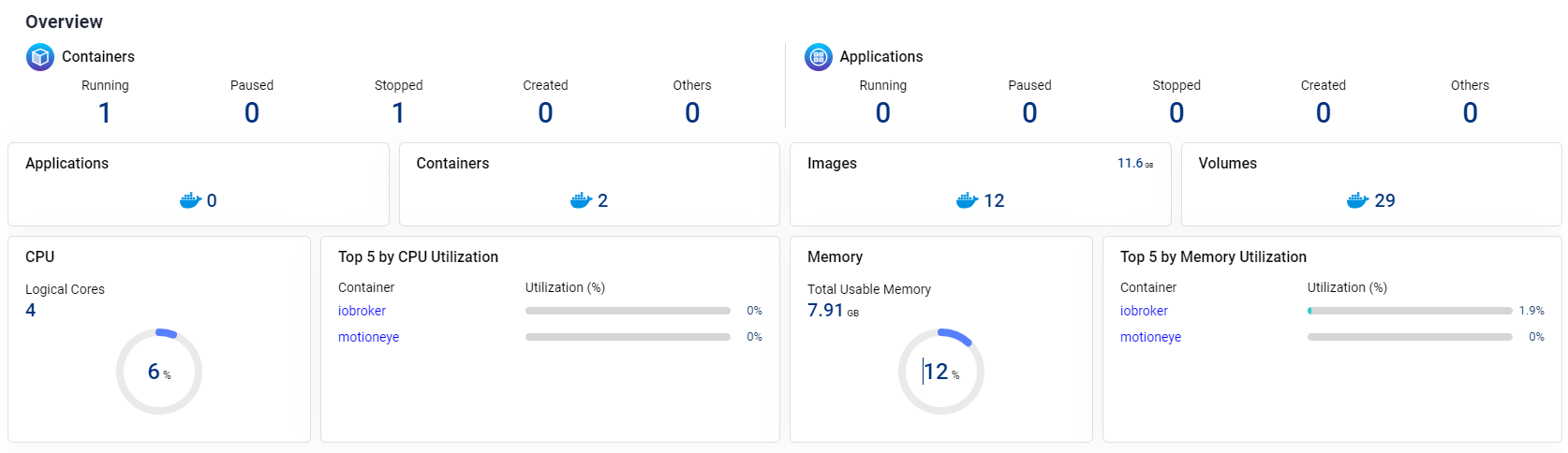
@x-oli
Von Docker hab ich weiter keine Ahnung.
Aber die Doku dazu ist ganz gut.


Hey! Du scheinst an dieser Unterhaltung interessiert zu sein, hast aber noch kein Konto.
Hast du es satt, bei jedem Besuch durch die gleichen Beiträge zu scrollen? Wenn du dich für ein Konto anmeldest, kommst du immer genau dorthin zurück, wo du zuvor warst, und kannst dich über neue Antworten benachrichtigen lassen (entweder per E-Mail oder Push-Benachrichtigung). Du kannst auch Lesezeichen speichern und Beiträge positiv bewerten, um anderen Community-Mitgliedern deine Wertschätzung zu zeigen.
Mit deinem Input könnte dieser Beitrag noch besser werden 💗
Registrieren AnmeldenSupport us
449
Online33.0k
Benutzer83.5k
Themen1.3m
Beiträge