




invalid Key bei Zugriff auf iobroker
-
Hallo Leute!
Nach mühsamer Neuinstallation von VIs und iobroker läuft meine VIS endlich wieder, jedoch komme ich nicht mehr auf iobroker. Wenn ich die Adresse 192.168.220.191:8081 oder http://192.168.220.191:8081/#tab-intro eingebe, kommt sofort die Meldung invalid key im Browser. Hätte ihr eine Idee was ich machen könnte?iob diag liefert folgendes:
The state system.host.raspberrypi.versions.nodeNewestNext was not found!
The state system.host.raspberrypi.versions.npmNewestNext was not found!
The state system.host.raspberrypi.versions.nodeCurrent was not found!======== Start marking the full check here =========
Skript v.2024-05-22 *** BASE SYSTEM *** Static hostname: raspberrypi Icon name: computer Operating System: Debian GNU/Linux 12 (bookworm) Kernel: Linux 6.6.20+rpt-rpi-v8 Architecture: arm64 Model : Raspberry Pi 4 Model B Rev 1.2 Docker : false Virtualization : none Kernel : aarch64 Userland : 64 bit Systemuptime and Load: 12:06:59 up 16:22, 2 users, load average: 0.53, 0.27, 0.21 CPU threads: 4 *** RASPBERRY THROTTLING *** Current issues: No throttling issues detected. Previously detected issues: ~ Under-voltage has occurred ~ Arm frequency capping has occurred *** Time and Time Zones *** Local time: Fri 2024-06-14 12:06:59 CEST Universal time: Fri 2024-06-14 10:06:59 UTC RTC time: n/a Time zone: Europe/Berlin (CEST, +0200) System clock synchronized: yes NTP service: active RTC in local TZ: no *** Users and Groups *** User that called 'iob diag': ioBroker HOME=/home/ioBroker GROUPS=ioBroker adm dialout cdrom sudo audio video plugdev games users input render netdev gpio i2c spi iobroker User that is running 'js-controller': iobroker HOME=/home/iobroker GROUPS=iobroker tty dialout audio video plugdev bluetooth gpio i2c *** Display-Server-Setup *** Display-Server: false Desktop: Terminal: tty Boot Target: multi-user.target *** MEMORY *** total used free shared buff/cache available Mem: 4.0G 986M 1.4G 1.2M 1.7G 3.0G Swap: 104M 0B 104M Total: 4.1G 986M 1.5G Active iob-Instances: 25 3792 M total memory 941 M used memory 939 M active memory 1253 M inactive memory 1334 M free memory 154 M buffer memory 1438 M swap cache 99 M total swap 0 M used swap 99 M free swap *** top - Table Of Processes *** top - 12:07:00 up 16:22, 2 users, load average: 0.53, 0.27, 0.21 Tasks: 175 total, 1 running, 174 sleeping, 0 stopped, 0 zombie %Cpu(s): 20.0 us, 20.0 sy, 0.0 ni, 40.0 id, 20.0 wa, 0.0 hi, 0.0 si, 0.0 st MiB Mem : 3792.1 total, 1333.8 free, 941.9 used, 1593.1 buff/cache MiB Swap: 100.0 total, 100.0 free, 0.0 used. 2850.1 avail Mem *** FAILED SERVICES *** UNIT LOAD ACTIVE SUB DESCRIPTION 0 loaded units listed. *** FILESYSTEM *** Filesystem Type Size Used Avail Use% Mounted on udev devtmpfs 1.6G 0 1.6G 0% /dev tmpfs tmpfs 380M 1.2M 379M 1% /run /dev/mmcblk0p2 ext4 29G 6.0G 22G 22% / tmpfs tmpfs 1.9G 0 1.9G 0% /dev/shm tmpfs tmpfs 5.0M 16K 5.0M 1% /run/lock /dev/mmcblk0p1 vfat 510M 63M 448M 13% /boot/firmware tmpfs tmpfs 380M 0 380M 0% /run/user/1000 Messages concerning ext4 filesystem in dmesg: [Thu Jun 13 19:44:35 2024] Kernel command line: coherent_pool=1M 8250.nr_uarts=0 snd_bcm2835.enable_headphones=0 snd_bcm2835.enable_headphones=1 snd_bcm2835.enable_hdmi=1 snd_bcm2835.enable_hdmi=0 smsc95xx.macaddr=DC:A6:32:84:3E:C9 vc_mem.mem_base=0x3ec00000 vc_mem.mem_size=0x40000000 console=ttyS0,115200 console=tty1 root=PARTUUID=d17a74ee-02 rootfstype=ext4 fsck.repair=yes rootwait cfg80211.ieee80211_regdom=DE [Thu Jun 13 19:44:38 2024] EXT4-fs (mmcblk0p2): mounted filesystem 93c89e92-8f2e-4522-ad32-68faed883d2f ro with ordered data mode. Quota mode: none. [Thu Jun 13 19:44:41 2024] EXT4-fs (mmcblk0p2): re-mounted 93c89e92-8f2e-4522-ad32-68faed883d2f r/w. Quota mode: none. Show mounted filesystems: TARGET SOURCE FSTYPE OPTIONS / /dev/mmcblk0p2 ext4 rw,noatime |-/sys sysfs sysfs rw,nosuid,nodev,noexec,relatime | |-/sys/kernel/security securityfs securityfs rw,nosuid,nodev,noexec,relatime | |-/sys/fs/cgroup cgroup2 cgroup2 rw,nosuid,nodev,noexec,relatime,nsdelegate,memory_recursiveprot | |-/sys/fs/pstore pstore pstore rw,nosuid,nodev,noexec,relatime | |-/sys/fs/bpf bpf bpf rw,nosuid,nodev,noexec,relatime,mode=700 | |-/sys/kernel/debug debugfs debugfs rw,nosuid,nodev,noexec,relatime | |-/sys/kernel/tracing tracefs tracefs rw,nosuid,nodev,noexec,relatime | |-/sys/kernel/config configfs configfs rw,nosuid,nodev,noexec,relatime | `-/sys/fs/fuse/connections fusectl fusectl rw,nosuid,nodev,noexec,relatime |-/proc proc proc rw,relatime | `-/proc/sys/fs/binfmt_misc systemd-1 autofs rw,relatime,fd=30,pgrp=1,timeout=0,minproto=5,maxproto=5,direct,pipe_ino=1140 | `-/proc/sys/fs/binfmt_misc binfmt_misc binfmt_misc rw,nosuid,nodev,noexec,relatime |-/dev udev devtmpfs rw,nosuid,relatime,size=1671540k,nr_inodes=417885,mode=755 | |-/dev/pts devpts devpts rw,nosuid,noexec,relatime,gid=5,mode=620,ptmxmode=000 | |-/dev/shm tmpfs tmpfs rw,nosuid,nodev | `-/dev/mqueue mqueue mqueue rw,nosuid,nodev,noexec,relatime |-/run tmpfs tmpfs rw,nosuid,nodev,noexec,relatime,size=388308k,mode=755 | |-/run/lock tmpfs tmpfs rw,nosuid,nodev,noexec,relatime,size=5120k | |-/run/credentials/systemd-sysctl.service ramfs ramfs ro,nosuid,nodev,noexec,relatime,mode=700 | |-/run/credentials/systemd-sysusers.service ramfs ramfs ro,nosuid,nodev,noexec,relatime,mode=700 | |-/run/credentials/systemd-tmpfiles-setup-dev.service ramfs ramfs ro,nosuid,nodev,noexec,relatime,mode=700 | |-/run/rpc_pipefs sunrpc rpc_pipefs rw,relatime | |-/run/credentials/systemd-tmpfiles-setup.service ramfs ramfs ro,nosuid,nodev,noexec,relatime,mode=700 | `-/run/user/1000 tmpfs tmpfs rw,nosuid,nodev,relatime,size=388304k,nr_inodes=97076,mode=700,uid=1000,gid=1000 `-/boot/firmware /dev/mmcblk0p1 vfat rw,relatime,fmask=0022,dmask=0022,codepage=437,iocharset=ascii,shortname=mixed,errors=remount-ro Files in neuralgic directories: /var: 636M /var/ 325M /var/cache 319M /var/cache/apt 206M /var/cache/apt/archives 166M /var/lib Archived and active journals take up 44.0M in the file system. /opt/iobroker/backups: 89M /opt/iobroker/backups/ /opt/iobroker/iobroker-data: 762M /opt/iobroker/iobroker-data/ 695M /opt/iobroker/iobroker-data/files 156M /opt/iobroker/iobroker-data/files/vis-2 90M /opt/iobroker/iobroker-data/files/echarts.admin 81M /opt/iobroker/iobroker-data/files/vis-2/static The five largest files in iobroker-data are: 24M /opt/iobroker/iobroker-data/files/echarts/static/js/main.5f66c5d9.js.map 24M /opt/iobroker/iobroker-data/files/echarts.admin/static/js/main.9f2a6569.js.map 24M /opt/iobroker/iobroker-data/files/echarts.admin/chart/static/js/main.5f66c5d9.js.map 21M /opt/iobroker/iobroker-data/files/web.admin/static/js/main.aaea95f8.js.map 20M /opt/iobroker/iobroker-data/files/cameras.admin/static/js/main.9f324f1d.js.map USB-Devices by-id: USB-Sticks - Avoid direct links to /dev/tty* in your adapter setups, please always prefer the links 'by-id': No Devices found 'by-id' *** NodeJS-Installation *** /usr/bin/nodejs v20.14.0 /usr/bin/node v20.14.0 /usr/bin/npm 10.7.0 /usr/bin/npx 10.7.0 /usr/bin/corepack 0.28.1 nodejs: Installed: 20.14.0-1nodesource1 Candidate: 20.14.0-1nodesource1 Version table: *** 20.14.0-1nodesource1 1001 500 https://deb.nodesource.com/node_20.x nodistro/main arm64 Packages 100 /var/lib/dpkg/status 20.13.1-1nodesource1 1001 500 https://deb.nodesource.com/node_20.x nodistro/main arm64 Packages 20.13.0-1nodesource1 1001 500 https://deb.nodesource.com/node_20.x nodistro/main arm64 Packages 20.12.2-1nodesource1 1001 500 https://deb.nodesource.com/node_20.x nodistro/main arm64 Packages 20.12.1-1nodesource1 1001 500 https://deb.nodesource.com/node_20.x nodistro/main arm64 Packages 20.12.0-1nodesource1 1001 500 https://deb.nodesource.com/node_20.x nodistro/main arm64 Packages 20.11.1-1nodesource1 1001 500 https://deb.nodesource.com/node_20.x nodistro/main arm64 Packages 20.11.0-1nodesource1 1001 500 https://deb.nodesource.com/node_20.x nodistro/main arm64 Packages 20.10.0-1nodesource1 1001 500 https://deb.nodesource.com/node_20.x nodistro/main arm64 Packages 20.9.0-1nodesource1 1001 500 https://deb.nodesource.com/node_20.x nodistro/main arm64 Packages 20.8.1-1nodesource1 1001 500 https://deb.nodesource.com/node_20.x nodistro/main arm64 Packages 20.8.0-1nodesource1 1001 500 https://deb.nodesource.com/node_20.x nodistro/main arm64 Packages 20.7.0-1nodesource1 1001 500 https://deb.nodesource.com/node_20.x nodistro/main arm64 Packages 20.6.1-1nodesource1 1001 500 https://deb.nodesource.com/node_20.x nodistro/main arm64 Packages 20.6.0-1nodesource1 1001 500 https://deb.nodesource.com/node_20.x nodistro/main arm64 Packages 20.5.1-1nodesource1 1001 500 https://deb.nodesource.com/node_20.x nodistro/main arm64 Packages 20.5.0-1nodesource1 1001 500 https://deb.nodesource.com/node_20.x nodistro/main arm64 Packages 20.4.0-1nodesource1 1001 500 https://deb.nodesource.com/node_20.x nodistro/main arm64 Packages 20.3.1-1nodesource1 1001 500 https://deb.nodesource.com/node_20.x nodistro/main arm64 Packages 20.3.0-1nodesource1 1001 500 https://deb.nodesource.com/node_20.x nodistro/main arm64 Packages 20.2.0-1nodesource1 1001 500 https://deb.nodesource.com/node_20.x nodistro/main arm64 Packages 20.1.0-1nodesource1 1001 500 https://deb.nodesource.com/node_20.x nodistro/main arm64 Packages 20.0.0-1nodesource1 1001 500 https://deb.nodesource.com/node_20.x nodistro/main arm64 Packages 18.19.0+dfsg-6~deb12u1 500 500 http://deb.debian.org/debian-security bookworm-security/main arm64 Packages 18.13.0+dfsg1-1 500 500 http://deb.debian.org/debian bookworm/main arm64 Packages Temp directories causing npm8 problem: 0 No problems detected Errors in npm tree: *** ioBroker-Installation *** ioBroker Status iobroker is running on this host. Objects type: jsonl States type: jsonl Core adapters versions js-controller: 5.0.19 admin: 6.3.5 javascript: 7.1.4 nodejs modules from github: 0 Adapter State + system.adapter.accuweather.0 : accuweather : raspberrypi - enabled, compact enabled (group 1) system.adapter.admin.0 : admin : raspberrypi - enabled, compact disabled, port: 8081, bind: 0.0.0.0, run as: admin system.adapter.alexa2.0 : alexa2 : raspberrypi - enabled, compact disabled + system.adapter.backitup.0 : backitup : raspberrypi - enabled, compact enabled (group 1) + system.adapter.broadlink2.0 : broadlink2 : raspberrypi - enabled + system.adapter.cameras.0 : cameras : raspberrypi - enabled, compact disabled, port: 8081, bind: 192.168.220.191 + system.adapter.chromecast.0 : chromecast : raspberrypi - enabled, compact enabled (group 1) system.adapter.daswetter.0 : daswetter : raspberrypi - enabled, compact enabled (group 1) + system.adapter.deyeidc.0 : deyeidc : raspberrypi - enabled, compact disabled, port: 8899 system.adapter.discovery.0 : discovery : raspberrypi - enabled, compact enabled (group 1) + system.adapter.echarts.0 : echarts : raspberrypi - enabled, compact disabled system.adapter.flot.0 : flot : raspberrypi - enabled + system.adapter.fritzdect.0 : fritzdect : raspberrypi - enabled, compact enabled (group 1) + system.adapter.history.0 : history : raspberrypi - enabled, compact enabled (group 1) system.adapter.hue-extended.0 : hue-extended : raspberrypi - enabled, compact enabled (group 1) system.adapter.hue-extended.1 : hue-extended : raspberrypi - enabled, compact enabled (group 1) system.adapter.hue-extended.2 : hue-extended : raspberrypi - enabled, compact enabled (group 1) + system.adapter.hue.0 : hue : raspberrypi - enabled, compact enabled (group 1), port: 443 + system.adapter.hue.1 : hue : raspberrypi - enabled, compact enabled (group 1), port: 443 + system.adapter.hue.2 : hue : raspberrypi - enabled, compact enabled (group 1), port: 443 system.adapter.ical.0 : ical : raspberrypi - enabled, compact enabled (group 1) system.adapter.icons-addictive-flavour-png.0: icons-addictive-flavour-png: raspberrypi - enabled system.adapter.icons-icons8.0 : icons-icons8 : raspberrypi - enabled system.adapter.icons-mfd-png.0 : icons-mfd-png : raspberrypi - enabled system.adapter.icons-mfd-svg.0 : icons-mfd-svg : raspberrypi - enabled system.adapter.icons-open-icon-library-png.0: icons-open-icon-library-png: raspberrypi - enabled system.adapter.icons-ultimate-png.0 : icons-ultimate-png : raspberrypi - enabled + system.adapter.javascript.0 : javascript : raspberrypi - enabled, compact disabled + system.adapter.net-tools.0 : net-tools : raspberrypi - enabled, compact enabled (group 1) system.adapter.onvif.0 : onvif : raspberrypi - enabled, compact enabled (group 1) + system.adapter.ping.0 : ping : raspberrypi - enabled, compact disabled + system.adapter.pollenflug.0 : pollenflug : raspberrypi - enabled, compact enabled (group 1) + system.adapter.signal-cmb.0 : signal-cmb : raspberrypi - enabled, compact enabled (group 1) + system.adapter.sonoff.0 : sonoff : raspberrypi - enabled, compact disabled, port: 1883, bind: 0.0.0.0 + system.adapter.sourceanalytix.0 : sourceanalytix : raspberrypi - enabled, compact disabled + system.adapter.tankerkoenig.0 : tankerkoenig : raspberrypi - enabled, compact disabled system.adapter.tr-064.0 : tr-064 : raspberrypi - enabled, compact enabled (group 1) + system.adapter.trashschedule.0 : trashschedule : raspberrypi - enabled, compact enabled (group 1) + system.adapter.vesync.0 : vesync : raspberrypi - enabled, compact disabled system.adapter.vis-bars.0 : vis-bars : raspberrypi - enabled system.adapter.vis-history.0 : vis-history : raspberrypi - enabled system.adapter.vis-hqwidgets.0 : vis-hqwidgets : raspberrypi - enabled system.adapter.vis-icontwo.0 : vis-icontwo : raspberrypi - enabled, compact enabled (group 1) system.adapter.vis-jqui-mfd.0 : vis-jqui-mfd : raspberrypi - enabled system.adapter.vis-justgage.0 : vis-justgage : raspberrypi - enabled system.adapter.vis-material-advanced.0 : vis-material-advanced : raspberrypi - enabled system.adapter.vis-metro.0 : vis-metro : raspberrypi - enabled system.adapter.vis-players.0 : vis-players : raspberrypi - enabled system.adapter.vis-timeandweather.0 : vis-timeandweather : raspberrypi - enabled system.adapter.vis-weather.0 : vis-weather : raspberrypi - enabled system.adapter.vis.0 : vis : raspberrypi - enabled, compact disabled + system.adapter.web.0 : web : raspberrypi - enabled, compact enabled (group 1), port: 8082, bind: 0.0.0.0, run as: admin + system.adapter.wifilight.0 : wifilight : raspberrypi - enabled + instance is alive Enabled adapters with bindings system.adapter.admin.0 : admin : raspberrypi - enabled, compact disabled, port: 8081, bind: 0.0.0.0, run as: admin + system.adapter.cameras.0 : cameras : raspberrypi - enabled, compact disabled, port: 8081, bind: 192.168.220.191 + system.adapter.deyeidc.0 : deyeidc : raspberrypi - enabled, compact disabled, port: 8899 + system.adapter.hue.0 : hue : raspberrypi - enabled, compact enabled (group 1), port: 443 + system.adapter.hue.1 : hue : raspberrypi - enabled, compact enabled (group 1), port: 443 + system.adapter.hue.2 : hue : raspberrypi - enabled, compact enabled (group 1), port: 443 + system.adapter.sonoff.0 : sonoff : raspberrypi - enabled, compact disabled, port: 1883, bind: 0.0.0.0 + system.adapter.web.0 : web : raspberrypi - enabled, compact enabled (group 1), port: 8082, bind: 0.0.0.0, run as: admin ioBroker-Repositories stable : http://download.iobroker.net/sources-dist.json beta : http://download.iobroker.net/sources-dist-latest.json Active repo(s): beta Installed ioBroker-Instances Used repository: beta Adapter "accuweather" : 1.4.0 , installed 1.2.4 [Updatable] Adapter "admin" : 6.17.14 , installed 6.3.5 [Updatable] Adapter "alexa2" : 3.26.5 , installed 3.25.2 [Updatable] Adapter "backitup" : 3.0.3 , installed 2.8.1 [Updatable] Adapter "broadlink2" : 2.3.0 , installed 2.1.5 [Updatable] Adapter "cameras" : 2.0.8 , installed 1.2.2 [Updatable] Adapter "chromecast" : 3.4.0 , installed 2.3.1 [Updatable] Adapter "daswetter" : 3.1.15 , installed 3.1.8 [Updatable] Adapter "deyeidc" : 0.0.14 , installed 0.0.14 Adapter "discovery" : 4.5.0 , installed 3.0.3 [Updatable] Adapter "echarts" : 1.8.1 , installed 1.5.4 [Updatable] Adapter "flot" : 1.12.0 , installed 1.12.0 Adapter "fritzdect" : 2.5.9 , installed 2.3.1 [Updatable] Adapter "history" : 3.0.1 , installed 2.2.4 [Updatable] Adapter "hue" : 3.11.0 , installed 3.7.1 [Updatable] Adapter "ical" : 1.15.0 , installed 1.13.2 [Updatable] Adapter "icons-addictive-flavour-png": 0.1.0, installed 0.1.0 Adapter "icons-icons8" : 0.0.1 , installed 0.0.1 Adapter "icons-mfd-png": 1.2.1 , installed 1.1.0 [Updatable] Adapter "icons-mfd-svg": 1.2.0 , installed 1.1.0 [Updatable] Adapter "icons-open-icon-library-png": 0.1.2, installed 0.1.3 Adapter "icons-ultimate-png": 1.0.1, installed 1.0.1 Adapter "javascript" : 8.5.2 , installed 7.1.4 [Updatable] Controller "js-controller": 6.0.4 , installed 5.0.19 [Updatable] Adapter "net-tools" : 1.0.11 , installed 0.2.0 [Updatable] Adapter "onvif" : 1.1.4 , installed 0.4.4 [Updatable] Adapter "ping" : 1.6.2 , installed 1.5.3 [Updatable] Adapter "pollenflug" : 1.0.6 , installed 1.0.6 Adapter "signal-cmb" : 0.3.0 , installed 0.3.0 Adapter "simple-api" : 2.8.0 , installed 2.8.0 Adapter "socketio" : 6.7.0 , installed 6.6.0 [Updatable] Adapter "sonoff" : 3.1.0 , installed 2.5.7 [Updatable] Adapter "sourceanalytix": 0.4.14 , installed 0.4.14 Adapter "tankerkoenig" : 3.4.0 , installed 2.1.1 [Updatable] Adapter "tr-064" : 4.3.0 , installed 4.2.16 [Updatable] Adapter "trashschedule": 3.3.0 , installed 2.0.3 [Updatable] Adapter "vesync" : 0.0.7 , installed 0.0.5 [Updatable] Adapter "vis" : 1.5.6 , installed 1.4.15 [Updatable] Adapter "vis-bars" : 0.1.4 , installed 0.1.4 Adapter "vis-history" : 1.0.0 , installed 1.0.0 Adapter "vis-hqwidgets": 1.5.1 , installed 1.3.1 [Updatable] Adapter "vis-icontwo" : 1.5.0 , installed 0.90.0 [Updatable] Adapter "vis-jqui-mfd" : 1.1.1 , installed 1.0.12 [Updatable] Adapter "vis-justgage" : 2.1.7 , installed 1.0.2 [Updatable] Adapter "vis-material-advanced": 1.7.4, installed 1.7.2 [Updatable] Adapter "vis-metro" : 1.2.0 , installed 1.2.0 Adapter "vis-players" : 0.1.6 , installed 0.1.6 Adapter "vis-timeandweather": 1.2.2, installed 1.2.2 Adapter "vis-weather" : 2.5.9 , installed 2.5.6 [Updatable] Adapter "web" : 6.2.6 , installed 6.1.10 [Updatable] Adapter "wifilight" : 1.2.2 , installed 1.1.4 [Updatable] Adapter "ws" : 2.6.1 , installed 2.5.8 [Updatable] Objects and States Please stand by - This may take a while Objects: 10754 States: 8987 *** OS-Repositories and Updates *** Hit:1 http://archive.raspberrypi.com/debian bookworm InRelease Hit:2 http://deb.debian.org/debian bookworm InRelease Hit:3 http://deb.debian.org/debian-security bookworm-security InRelease Hit:4 http://deb.debian.org/debian bookworm-updates InRelease Hit:5 https://deb.nodesource.com/node_20.x nodistro InRelease Reading package lists... Pending Updates: 23 *** Listening Ports *** Active Internet connections (only servers) Proto Recv-Q Send-Q Local Address Foreign Address State User Inode PID/Program name tcp 0 0 0.0.0.0:1883 0.0.0.0:* LISTEN 1001 140543 15690/io.sonoff.0 tcp 0 0 192.168.220.191:8081 0.0.0.0:* LISTEN 1001 140610 15746/io.cameras.0 tcp 0 0 127.0.0.1:9000 0.0.0.0:* LISTEN 1001 137914 15531/iobroker.js-c tcp 0 0 127.0.0.1:9001 0.0.0.0:* LISTEN 1001 137909 15531/iobroker.js-c tcp 0 0 0.0.0.0:22 0.0.0.0:* LISTEN 0 6204 698/sshd: /usr/sbin tcp6 0 0 :::8082 :::* LISTEN 1001 139723 15586/iobroker.js-c tcp6 0 0 :::22 :::* LISTEN 0 6215 698/sshd: /usr/sbin udp 0 0 0.0.0.0:15001 0.0.0.0:* 1001 139660 15731/io.broadlink2 udp 0 0 0.0.0.0:54058 0.0.0.0:* 1001 138138 15731/io.broadlink2 udp 0 0 0.0.0.0:5353 0.0.0.0:* 1001 138110 15586/iobroker.js-c udp 0 0 0.0.0.0:5353 0.0.0.0:* 104 3065 526/avahi-daemon: r udp 0 0 0.0.0.0:45007 0.0.0.0:* 104 3067 526/avahi-daemon: r udp6 0 0 :::42182 :::* 104 3068 526/avahi-daemon: r udp6 0 0 :::5353 :::* 104 3066 526/avahi-daemon: r udp6 0 0 fe80::b8c3:506d:cd3:546 :::* 0 1780 634/NetworkManager *** Log File - Last 25 Lines *** 2024-06-14 12:07:27.172 - error: hue.1 (COMPACT) Could not poll all: Cannot read properties of undefined (reading 'configuration') 2024-06-14 12:07:27.798 - error: hue.2 (COMPACT) connect ECONNREFUSED 192.168.220.144:443 2024-06-14 12:07:27.799 - warn: hue.2 (COMPACT) Could not get configuration from HUE bridge (192.168.220.144:443) 2024-06-14 12:07:28.318 - error: hue.1 (COMPACT) connect ECONNREFUSED 192.168.220.133:443 2024-06-14 12:07:28.318 - warn: hue.1 (COMPACT) Could not get configuration from HUE bridge (192.168.220.133:443) 2024-06-14 12:07:28.863 - error: hue.2 (COMPACT) Could not poll all: Cannot read properties of undefined (reading 'configuration') 2024-06-14 12:07:32.816 - error: hue.2 (COMPACT) connect ECONNREFUSED 192.168.220.144:443 2024-06-14 12:07:32.816 - warn: hue.2 (COMPACT) Could not get configuration from HUE bridge (192.168.220.144:443) 2024-06-14 12:07:32.966 - error: hue.0 (COMPACT) connect EHOSTUNREACH 192.168.220.115:443 2024-06-14 12:07:32.966 - warn: hue.0 (COMPACT) Could not get configuration from HUE bridge (192.168.220.115:443) 2024-06-14 12:07:33.328 - error: hue.1 (COMPACT) connect ECONNREFUSED 192.168.220.133:443 2024-06-14 12:07:33.328 - warn: hue.1 (COMPACT) Could not get configuration from HUE bridge (192.168.220.133:443) 2024-06-14 12:07:37.177 - error: hue.0 (COMPACT) Could not poll all: Cannot read properties of undefined (reading 'configuration') 2024-06-14 12:07:37.178 - error: hue.1 (COMPACT) Could not poll all: Cannot read properties of undefined (reading 'configuration') 2024-06-14 12:07:37.835 - error: hue.2 (COMPACT) connect ECONNREFUSED 192.168.220.144:443 2024-06-14 12:07:37.835 - warn: hue.2 (COMPACT) Could not get configuration from HUE bridge (192.168.220.144:443) 2024-06-14 12:07:38.351 - error: hue.1 (COMPACT) connect ECONNREFUSED 192.168.220.133:443 2024-06-14 12:07:38.351 - warn: hue.1 (COMPACT) Could not get configuration from HUE bridge (192.168.220.133:443) 2024-06-14 12:07:38.867 - error: hue.2 (COMPACT) Could not poll all: Cannot read properties of undefined (reading 'configuration') 2024-06-14 12:07:41.026 - error: hue.0 (COMPACT) connect EHOSTUNREACH 192.168.220.115:443 2024-06-14 12:07:41.026 - warn: hue.0 (COMPACT) Could not get configuration from HUE bridge (192.168.220.115:443) 2024-06-14 12:07:42.958 - error: hue.2 (COMPACT) connect ECONNREFUSED 192.168.220.144:443 2024-06-14 12:07:42.959 - warn: hue.2 (COMPACT) Could not get configuration from HUE bridge (192.168.220.144:443) 2024-06-14 12:07:43.362 - error: hue.1 (COMPACT) connect ECONNREFUSED 192.168.220.133:443 2024-06-14 12:07:43.362 - warn: hue.1 (COMPACT) Could not get configuration from HUE bridge (192.168.220.133:443)============ Mark until here for C&P =============
iob diag has finished.
-
@loco sagte: leider kein Erfolg....
Läuft die Admin-Instanz jetzt oder kamen Fehlermeldungen beim Start?
iob list instancesBitte verzichtet auf Chat-Nachrichten, denn die Handhabung ist grauenhaft !
Produktiv: Asus PN42 / N100 / 8 GB / 500 GB; Proxmox mit 2 VM (iob / openCCU) -
@loco sagte: leider kein Erfolg....
Läuft die Admin-Instanz jetzt oder kamen Fehlermeldungen beim Start?
iob list instancesioBroker@raspberrypi:~ $ iob list instances + system.adapter.accuweather.0 : accuweather : raspberrypi - enabled, compact enabled (group 1) system.adapter.admin.0 : admin : raspberrypi - enabled, compact disabled, port: 8081, bind: 0.0.0.0, run as: admin system.adapter.alexa2.0 : alexa2 : raspberrypi - enabled, compact disabled + system.adapter.backitup.0 : backitup : raspberrypi - enabled, compact enabled (group 1) + system.adapter.broadlink2.0 : broadlink2 : raspberrypi - enabled + system.adapter.cameras.0 : cameras : raspberrypi - enabled, compact disabled, port: 8081, bind: 192.168.220.191 + system.adapter.chromecast.0 : chromecast : raspberrypi - enabled, compact enabled (group 1) system.adapter.daswetter.0 : daswetter : raspberrypi - enabled, compact enabled (group 1) + system.adapter.deyeidc.0 : deyeidc : raspberrypi - enabled, compact disabled, port: 8899 system.adapter.discovery.0 : discovery : raspberrypi - enabled, compact enabled (group 1) + system.adapter.echarts.0 : echarts : raspberrypi - enabled, compact disabled system.adapter.flot.0 : flot : raspberrypi - enabled + system.adapter.fritzdect.0 : fritzdect : raspberrypi - enabled, compact enabled (group 1) + system.adapter.history.0 : history : raspberrypi - enabled, compact enabled (group 1) system.adapter.hue-extended.0 : hue-extended : raspberrypi - enabled, compact enabled (group 1) system.adapter.hue-extended.1 : hue-extended : raspberrypi - enabled, compact enabled (group 1) system.adapter.hue-extended.2 : hue-extended : raspberrypi - enabled, compact enabled (group 1) + system.adapter.hue.0 : hue : raspberrypi - enabled, compact enabled (group 1), port: 443 + system.adapter.hue.1 : hue : raspberrypi - enabled, compact enabled (group 1), port: 443 + system.adapter.hue.2 : hue : raspberrypi - enabled, compact enabled (group 1), port: 443 system.adapter.ical.0 : ical : raspberrypi - enabled, compact enabled (group 1) system.adapter.icons-addictive-flavour-png.0: icons-addictive-flavour-png: raspberrypi - enabled system.adapter.icons-icons8.0 : icons-icons8 : raspberrypi - enabled system.adapter.icons-mfd-png.0 : icons-mfd-png : raspberrypi - enabled system.adapter.icons-mfd-svg.0 : icons-mfd-svg : raspberrypi - enabled system.adapter.icons-open-icon-library-png.0: icons-open-icon-library-png: raspberrypi - enabled system.adapter.icons-ultimate-png.0 : icons-ultimate-png : raspberrypi - enabled + system.adapter.javascript.0 : javascript : raspberrypi - enabled, compact disabled + system.adapter.net-tools.0 : net-tools : raspberrypi - enabled, compact enabled (group 1) system.adapter.onvif.0 : onvif : raspberrypi - enabled, compact enabled (group 1) + system.adapter.ping.0 : ping : raspberrypi - enabled, compact disabled + system.adapter.pollenflug.0 : pollenflug : raspberrypi - enabled, compact enabled (group 1) + system.adapter.signal-cmb.0 : signal-cmb : raspberrypi - enabled, compact enabled (group 1) + system.adapter.sonoff.0 : sonoff : raspberrypi - enabled, compact disabled, port: 1883, bind: 0.0.0.0 + system.adapter.sourceanalytix.0 : sourceanalytix : raspberrypi - enabled, compact disabled + system.adapter.tankerkoenig.0 : tankerkoenig : raspberrypi - enabled, compact disabled system.adapter.tr-064.0 : tr-064 : raspberrypi - enabled, compact enabled (group 1) + system.adapter.trashschedule.0 : trashschedule : raspberrypi - enabled, compact enabled (group 1) + system.adapter.vesync.0 : vesync : raspberrypi - enabled, compact disabled system.adapter.vis-bars.0 : vis-bars : raspberrypi - enabled system.adapter.vis-history.0 : vis-history : raspberrypi - enabled system.adapter.vis-hqwidgets.0 : vis-hqwidgets : raspberrypi - enabled system.adapter.vis-icontwo.0 : vis-icontwo : raspberrypi - enabled, compact enabled (group 1) system.adapter.vis-jqui-mfd.0 : vis-jqui-mfd : raspberrypi - enabled system.adapter.vis-justgage.0 : vis-justgage : raspberrypi - enabled system.adapter.vis-material-advanced.0 : vis-material-advanced : raspberrypi - enabled system.adapter.vis-metro.0 : vis-metro : raspberrypi - enabled system.adapter.vis-players.0 : vis-players : raspberrypi - enabled system.adapter.vis-timeandweather.0 : vis-timeandweather : raspberrypi - enabled system.adapter.vis-weather.0 : vis-weather : raspberrypi - enabled system.adapter.vis.0 : vis : raspberrypi - enabled, compact disabled + system.adapter.web.0 : web : raspberrypi - enabled, compact enabled (group 1), port: 8082, bind: 0.0.0.0, run as: admin + system.adapter.wifilight.0 : wifilight : raspberrypi - enabled + instance is aliveMOD-EDIT: Code in code-tags gesetzt!
-
Hallo Leute!
Nach mühsamer Neuinstallation von VIs und iobroker läuft meine VIS endlich wieder, jedoch komme ich nicht mehr auf iobroker. Wenn ich die Adresse 192.168.220.191:8081 oder http://192.168.220.191:8081/#tab-intro eingebe, kommt sofort die Meldung invalid key im Browser. Hätte ihr eine Idee was ich machen könnte?iob diag liefert folgendes:
The state system.host.raspberrypi.versions.nodeNewestNext was not found!
The state system.host.raspberrypi.versions.npmNewestNext was not found!
The state system.host.raspberrypi.versions.nodeCurrent was not found!======== Start marking the full check here =========
Skript v.2024-05-22 *** BASE SYSTEM *** Static hostname: raspberrypi Icon name: computer Operating System: Debian GNU/Linux 12 (bookworm) Kernel: Linux 6.6.20+rpt-rpi-v8 Architecture: arm64 Model : Raspberry Pi 4 Model B Rev 1.2 Docker : false Virtualization : none Kernel : aarch64 Userland : 64 bit Systemuptime and Load: 12:06:59 up 16:22, 2 users, load average: 0.53, 0.27, 0.21 CPU threads: 4 *** RASPBERRY THROTTLING *** Current issues: No throttling issues detected. Previously detected issues: ~ Under-voltage has occurred ~ Arm frequency capping has occurred *** Time and Time Zones *** Local time: Fri 2024-06-14 12:06:59 CEST Universal time: Fri 2024-06-14 10:06:59 UTC RTC time: n/a Time zone: Europe/Berlin (CEST, +0200) System clock synchronized: yes NTP service: active RTC in local TZ: no *** Users and Groups *** User that called 'iob diag': ioBroker HOME=/home/ioBroker GROUPS=ioBroker adm dialout cdrom sudo audio video plugdev games users input render netdev gpio i2c spi iobroker User that is running 'js-controller': iobroker HOME=/home/iobroker GROUPS=iobroker tty dialout audio video plugdev bluetooth gpio i2c *** Display-Server-Setup *** Display-Server: false Desktop: Terminal: tty Boot Target: multi-user.target *** MEMORY *** total used free shared buff/cache available Mem: 4.0G 986M 1.4G 1.2M 1.7G 3.0G Swap: 104M 0B 104M Total: 4.1G 986M 1.5G Active iob-Instances: 25 3792 M total memory 941 M used memory 939 M active memory 1253 M inactive memory 1334 M free memory 154 M buffer memory 1438 M swap cache 99 M total swap 0 M used swap 99 M free swap *** top - Table Of Processes *** top - 12:07:00 up 16:22, 2 users, load average: 0.53, 0.27, 0.21 Tasks: 175 total, 1 running, 174 sleeping, 0 stopped, 0 zombie %Cpu(s): 20.0 us, 20.0 sy, 0.0 ni, 40.0 id, 20.0 wa, 0.0 hi, 0.0 si, 0.0 st MiB Mem : 3792.1 total, 1333.8 free, 941.9 used, 1593.1 buff/cache MiB Swap: 100.0 total, 100.0 free, 0.0 used. 2850.1 avail Mem *** FAILED SERVICES *** UNIT LOAD ACTIVE SUB DESCRIPTION 0 loaded units listed. *** FILESYSTEM *** Filesystem Type Size Used Avail Use% Mounted on udev devtmpfs 1.6G 0 1.6G 0% /dev tmpfs tmpfs 380M 1.2M 379M 1% /run /dev/mmcblk0p2 ext4 29G 6.0G 22G 22% / tmpfs tmpfs 1.9G 0 1.9G 0% /dev/shm tmpfs tmpfs 5.0M 16K 5.0M 1% /run/lock /dev/mmcblk0p1 vfat 510M 63M 448M 13% /boot/firmware tmpfs tmpfs 380M 0 380M 0% /run/user/1000 Messages concerning ext4 filesystem in dmesg: [Thu Jun 13 19:44:35 2024] Kernel command line: coherent_pool=1M 8250.nr_uarts=0 snd_bcm2835.enable_headphones=0 snd_bcm2835.enable_headphones=1 snd_bcm2835.enable_hdmi=1 snd_bcm2835.enable_hdmi=0 smsc95xx.macaddr=DC:A6:32:84:3E:C9 vc_mem.mem_base=0x3ec00000 vc_mem.mem_size=0x40000000 console=ttyS0,115200 console=tty1 root=PARTUUID=d17a74ee-02 rootfstype=ext4 fsck.repair=yes rootwait cfg80211.ieee80211_regdom=DE [Thu Jun 13 19:44:38 2024] EXT4-fs (mmcblk0p2): mounted filesystem 93c89e92-8f2e-4522-ad32-68faed883d2f ro with ordered data mode. Quota mode: none. [Thu Jun 13 19:44:41 2024] EXT4-fs (mmcblk0p2): re-mounted 93c89e92-8f2e-4522-ad32-68faed883d2f r/w. Quota mode: none. Show mounted filesystems: TARGET SOURCE FSTYPE OPTIONS / /dev/mmcblk0p2 ext4 rw,noatime |-/sys sysfs sysfs rw,nosuid,nodev,noexec,relatime | |-/sys/kernel/security securityfs securityfs rw,nosuid,nodev,noexec,relatime | |-/sys/fs/cgroup cgroup2 cgroup2 rw,nosuid,nodev,noexec,relatime,nsdelegate,memory_recursiveprot | |-/sys/fs/pstore pstore pstore rw,nosuid,nodev,noexec,relatime | |-/sys/fs/bpf bpf bpf rw,nosuid,nodev,noexec,relatime,mode=700 | |-/sys/kernel/debug debugfs debugfs rw,nosuid,nodev,noexec,relatime | |-/sys/kernel/tracing tracefs tracefs rw,nosuid,nodev,noexec,relatime | |-/sys/kernel/config configfs configfs rw,nosuid,nodev,noexec,relatime | `-/sys/fs/fuse/connections fusectl fusectl rw,nosuid,nodev,noexec,relatime |-/proc proc proc rw,relatime | `-/proc/sys/fs/binfmt_misc systemd-1 autofs rw,relatime,fd=30,pgrp=1,timeout=0,minproto=5,maxproto=5,direct,pipe_ino=1140 | `-/proc/sys/fs/binfmt_misc binfmt_misc binfmt_misc rw,nosuid,nodev,noexec,relatime |-/dev udev devtmpfs rw,nosuid,relatime,size=1671540k,nr_inodes=417885,mode=755 | |-/dev/pts devpts devpts rw,nosuid,noexec,relatime,gid=5,mode=620,ptmxmode=000 | |-/dev/shm tmpfs tmpfs rw,nosuid,nodev | `-/dev/mqueue mqueue mqueue rw,nosuid,nodev,noexec,relatime |-/run tmpfs tmpfs rw,nosuid,nodev,noexec,relatime,size=388308k,mode=755 | |-/run/lock tmpfs tmpfs rw,nosuid,nodev,noexec,relatime,size=5120k | |-/run/credentials/systemd-sysctl.service ramfs ramfs ro,nosuid,nodev,noexec,relatime,mode=700 | |-/run/credentials/systemd-sysusers.service ramfs ramfs ro,nosuid,nodev,noexec,relatime,mode=700 | |-/run/credentials/systemd-tmpfiles-setup-dev.service ramfs ramfs ro,nosuid,nodev,noexec,relatime,mode=700 | |-/run/rpc_pipefs sunrpc rpc_pipefs rw,relatime | |-/run/credentials/systemd-tmpfiles-setup.service ramfs ramfs ro,nosuid,nodev,noexec,relatime,mode=700 | `-/run/user/1000 tmpfs tmpfs rw,nosuid,nodev,relatime,size=388304k,nr_inodes=97076,mode=700,uid=1000,gid=1000 `-/boot/firmware /dev/mmcblk0p1 vfat rw,relatime,fmask=0022,dmask=0022,codepage=437,iocharset=ascii,shortname=mixed,errors=remount-ro Files in neuralgic directories: /var: 636M /var/ 325M /var/cache 319M /var/cache/apt 206M /var/cache/apt/archives 166M /var/lib Archived and active journals take up 44.0M in the file system. /opt/iobroker/backups: 89M /opt/iobroker/backups/ /opt/iobroker/iobroker-data: 762M /opt/iobroker/iobroker-data/ 695M /opt/iobroker/iobroker-data/files 156M /opt/iobroker/iobroker-data/files/vis-2 90M /opt/iobroker/iobroker-data/files/echarts.admin 81M /opt/iobroker/iobroker-data/files/vis-2/static The five largest files in iobroker-data are: 24M /opt/iobroker/iobroker-data/files/echarts/static/js/main.5f66c5d9.js.map 24M /opt/iobroker/iobroker-data/files/echarts.admin/static/js/main.9f2a6569.js.map 24M /opt/iobroker/iobroker-data/files/echarts.admin/chart/static/js/main.5f66c5d9.js.map 21M /opt/iobroker/iobroker-data/files/web.admin/static/js/main.aaea95f8.js.map 20M /opt/iobroker/iobroker-data/files/cameras.admin/static/js/main.9f324f1d.js.map USB-Devices by-id: USB-Sticks - Avoid direct links to /dev/tty* in your adapter setups, please always prefer the links 'by-id': No Devices found 'by-id' *** NodeJS-Installation *** /usr/bin/nodejs v20.14.0 /usr/bin/node v20.14.0 /usr/bin/npm 10.7.0 /usr/bin/npx 10.7.0 /usr/bin/corepack 0.28.1 nodejs: Installed: 20.14.0-1nodesource1 Candidate: 20.14.0-1nodesource1 Version table: *** 20.14.0-1nodesource1 1001 500 https://deb.nodesource.com/node_20.x nodistro/main arm64 Packages 100 /var/lib/dpkg/status 20.13.1-1nodesource1 1001 500 https://deb.nodesource.com/node_20.x nodistro/main arm64 Packages 20.13.0-1nodesource1 1001 500 https://deb.nodesource.com/node_20.x nodistro/main arm64 Packages 20.12.2-1nodesource1 1001 500 https://deb.nodesource.com/node_20.x nodistro/main arm64 Packages 20.12.1-1nodesource1 1001 500 https://deb.nodesource.com/node_20.x nodistro/main arm64 Packages 20.12.0-1nodesource1 1001 500 https://deb.nodesource.com/node_20.x nodistro/main arm64 Packages 20.11.1-1nodesource1 1001 500 https://deb.nodesource.com/node_20.x nodistro/main arm64 Packages 20.11.0-1nodesource1 1001 500 https://deb.nodesource.com/node_20.x nodistro/main arm64 Packages 20.10.0-1nodesource1 1001 500 https://deb.nodesource.com/node_20.x nodistro/main arm64 Packages 20.9.0-1nodesource1 1001 500 https://deb.nodesource.com/node_20.x nodistro/main arm64 Packages 20.8.1-1nodesource1 1001 500 https://deb.nodesource.com/node_20.x nodistro/main arm64 Packages 20.8.0-1nodesource1 1001 500 https://deb.nodesource.com/node_20.x nodistro/main arm64 Packages 20.7.0-1nodesource1 1001 500 https://deb.nodesource.com/node_20.x nodistro/main arm64 Packages 20.6.1-1nodesource1 1001 500 https://deb.nodesource.com/node_20.x nodistro/main arm64 Packages 20.6.0-1nodesource1 1001 500 https://deb.nodesource.com/node_20.x nodistro/main arm64 Packages 20.5.1-1nodesource1 1001 500 https://deb.nodesource.com/node_20.x nodistro/main arm64 Packages 20.5.0-1nodesource1 1001 500 https://deb.nodesource.com/node_20.x nodistro/main arm64 Packages 20.4.0-1nodesource1 1001 500 https://deb.nodesource.com/node_20.x nodistro/main arm64 Packages 20.3.1-1nodesource1 1001 500 https://deb.nodesource.com/node_20.x nodistro/main arm64 Packages 20.3.0-1nodesource1 1001 500 https://deb.nodesource.com/node_20.x nodistro/main arm64 Packages 20.2.0-1nodesource1 1001 500 https://deb.nodesource.com/node_20.x nodistro/main arm64 Packages 20.1.0-1nodesource1 1001 500 https://deb.nodesource.com/node_20.x nodistro/main arm64 Packages 20.0.0-1nodesource1 1001 500 https://deb.nodesource.com/node_20.x nodistro/main arm64 Packages 18.19.0+dfsg-6~deb12u1 500 500 http://deb.debian.org/debian-security bookworm-security/main arm64 Packages 18.13.0+dfsg1-1 500 500 http://deb.debian.org/debian bookworm/main arm64 Packages Temp directories causing npm8 problem: 0 No problems detected Errors in npm tree: *** ioBroker-Installation *** ioBroker Status iobroker is running on this host. Objects type: jsonl States type: jsonl Core adapters versions js-controller: 5.0.19 admin: 6.3.5 javascript: 7.1.4 nodejs modules from github: 0 Adapter State + system.adapter.accuweather.0 : accuweather : raspberrypi - enabled, compact enabled (group 1) system.adapter.admin.0 : admin : raspberrypi - enabled, compact disabled, port: 8081, bind: 0.0.0.0, run as: admin system.adapter.alexa2.0 : alexa2 : raspberrypi - enabled, compact disabled + system.adapter.backitup.0 : backitup : raspberrypi - enabled, compact enabled (group 1) + system.adapter.broadlink2.0 : broadlink2 : raspberrypi - enabled + system.adapter.cameras.0 : cameras : raspberrypi - enabled, compact disabled, port: 8081, bind: 192.168.220.191 + system.adapter.chromecast.0 : chromecast : raspberrypi - enabled, compact enabled (group 1) system.adapter.daswetter.0 : daswetter : raspberrypi - enabled, compact enabled (group 1) + system.adapter.deyeidc.0 : deyeidc : raspberrypi - enabled, compact disabled, port: 8899 system.adapter.discovery.0 : discovery : raspberrypi - enabled, compact enabled (group 1) + system.adapter.echarts.0 : echarts : raspberrypi - enabled, compact disabled system.adapter.flot.0 : flot : raspberrypi - enabled + system.adapter.fritzdect.0 : fritzdect : raspberrypi - enabled, compact enabled (group 1) + system.adapter.history.0 : history : raspberrypi - enabled, compact enabled (group 1) system.adapter.hue-extended.0 : hue-extended : raspberrypi - enabled, compact enabled (group 1) system.adapter.hue-extended.1 : hue-extended : raspberrypi - enabled, compact enabled (group 1) system.adapter.hue-extended.2 : hue-extended : raspberrypi - enabled, compact enabled (group 1) + system.adapter.hue.0 : hue : raspberrypi - enabled, compact enabled (group 1), port: 443 + system.adapter.hue.1 : hue : raspberrypi - enabled, compact enabled (group 1), port: 443 + system.adapter.hue.2 : hue : raspberrypi - enabled, compact enabled (group 1), port: 443 system.adapter.ical.0 : ical : raspberrypi - enabled, compact enabled (group 1) system.adapter.icons-addictive-flavour-png.0: icons-addictive-flavour-png: raspberrypi - enabled system.adapter.icons-icons8.0 : icons-icons8 : raspberrypi - enabled system.adapter.icons-mfd-png.0 : icons-mfd-png : raspberrypi - enabled system.adapter.icons-mfd-svg.0 : icons-mfd-svg : raspberrypi - enabled system.adapter.icons-open-icon-library-png.0: icons-open-icon-library-png: raspberrypi - enabled system.adapter.icons-ultimate-png.0 : icons-ultimate-png : raspberrypi - enabled + system.adapter.javascript.0 : javascript : raspberrypi - enabled, compact disabled + system.adapter.net-tools.0 : net-tools : raspberrypi - enabled, compact enabled (group 1) system.adapter.onvif.0 : onvif : raspberrypi - enabled, compact enabled (group 1) + system.adapter.ping.0 : ping : raspberrypi - enabled, compact disabled + system.adapter.pollenflug.0 : pollenflug : raspberrypi - enabled, compact enabled (group 1) + system.adapter.signal-cmb.0 : signal-cmb : raspberrypi - enabled, compact enabled (group 1) + system.adapter.sonoff.0 : sonoff : raspberrypi - enabled, compact disabled, port: 1883, bind: 0.0.0.0 + system.adapter.sourceanalytix.0 : sourceanalytix : raspberrypi - enabled, compact disabled + system.adapter.tankerkoenig.0 : tankerkoenig : raspberrypi - enabled, compact disabled system.adapter.tr-064.0 : tr-064 : raspberrypi - enabled, compact enabled (group 1) + system.adapter.trashschedule.0 : trashschedule : raspberrypi - enabled, compact enabled (group 1) + system.adapter.vesync.0 : vesync : raspberrypi - enabled, compact disabled system.adapter.vis-bars.0 : vis-bars : raspberrypi - enabled system.adapter.vis-history.0 : vis-history : raspberrypi - enabled system.adapter.vis-hqwidgets.0 : vis-hqwidgets : raspberrypi - enabled system.adapter.vis-icontwo.0 : vis-icontwo : raspberrypi - enabled, compact enabled (group 1) system.adapter.vis-jqui-mfd.0 : vis-jqui-mfd : raspberrypi - enabled system.adapter.vis-justgage.0 : vis-justgage : raspberrypi - enabled system.adapter.vis-material-advanced.0 : vis-material-advanced : raspberrypi - enabled system.adapter.vis-metro.0 : vis-metro : raspberrypi - enabled system.adapter.vis-players.0 : vis-players : raspberrypi - enabled system.adapter.vis-timeandweather.0 : vis-timeandweather : raspberrypi - enabled system.adapter.vis-weather.0 : vis-weather : raspberrypi - enabled system.adapter.vis.0 : vis : raspberrypi - enabled, compact disabled + system.adapter.web.0 : web : raspberrypi - enabled, compact enabled (group 1), port: 8082, bind: 0.0.0.0, run as: admin + system.adapter.wifilight.0 : wifilight : raspberrypi - enabled + instance is alive Enabled adapters with bindings system.adapter.admin.0 : admin : raspberrypi - enabled, compact disabled, port: 8081, bind: 0.0.0.0, run as: admin + system.adapter.cameras.0 : cameras : raspberrypi - enabled, compact disabled, port: 8081, bind: 192.168.220.191 + system.adapter.deyeidc.0 : deyeidc : raspberrypi - enabled, compact disabled, port: 8899 + system.adapter.hue.0 : hue : raspberrypi - enabled, compact enabled (group 1), port: 443 + system.adapter.hue.1 : hue : raspberrypi - enabled, compact enabled (group 1), port: 443 + system.adapter.hue.2 : hue : raspberrypi - enabled, compact enabled (group 1), port: 443 + system.adapter.sonoff.0 : sonoff : raspberrypi - enabled, compact disabled, port: 1883, bind: 0.0.0.0 + system.adapter.web.0 : web : raspberrypi - enabled, compact enabled (group 1), port: 8082, bind: 0.0.0.0, run as: admin ioBroker-Repositories stable : http://download.iobroker.net/sources-dist.json beta : http://download.iobroker.net/sources-dist-latest.json Active repo(s): beta Installed ioBroker-Instances Used repository: beta Adapter "accuweather" : 1.4.0 , installed 1.2.4 [Updatable] Adapter "admin" : 6.17.14 , installed 6.3.5 [Updatable] Adapter "alexa2" : 3.26.5 , installed 3.25.2 [Updatable] Adapter "backitup" : 3.0.3 , installed 2.8.1 [Updatable] Adapter "broadlink2" : 2.3.0 , installed 2.1.5 [Updatable] Adapter "cameras" : 2.0.8 , installed 1.2.2 [Updatable] Adapter "chromecast" : 3.4.0 , installed 2.3.1 [Updatable] Adapter "daswetter" : 3.1.15 , installed 3.1.8 [Updatable] Adapter "deyeidc" : 0.0.14 , installed 0.0.14 Adapter "discovery" : 4.5.0 , installed 3.0.3 [Updatable] Adapter "echarts" : 1.8.1 , installed 1.5.4 [Updatable] Adapter "flot" : 1.12.0 , installed 1.12.0 Adapter "fritzdect" : 2.5.9 , installed 2.3.1 [Updatable] Adapter "history" : 3.0.1 , installed 2.2.4 [Updatable] Adapter "hue" : 3.11.0 , installed 3.7.1 [Updatable] Adapter "ical" : 1.15.0 , installed 1.13.2 [Updatable] Adapter "icons-addictive-flavour-png": 0.1.0, installed 0.1.0 Adapter "icons-icons8" : 0.0.1 , installed 0.0.1 Adapter "icons-mfd-png": 1.2.1 , installed 1.1.0 [Updatable] Adapter "icons-mfd-svg": 1.2.0 , installed 1.1.0 [Updatable] Adapter "icons-open-icon-library-png": 0.1.2, installed 0.1.3 Adapter "icons-ultimate-png": 1.0.1, installed 1.0.1 Adapter "javascript" : 8.5.2 , installed 7.1.4 [Updatable] Controller "js-controller": 6.0.4 , installed 5.0.19 [Updatable] Adapter "net-tools" : 1.0.11 , installed 0.2.0 [Updatable] Adapter "onvif" : 1.1.4 , installed 0.4.4 [Updatable] Adapter "ping" : 1.6.2 , installed 1.5.3 [Updatable] Adapter "pollenflug" : 1.0.6 , installed 1.0.6 Adapter "signal-cmb" : 0.3.0 , installed 0.3.0 Adapter "simple-api" : 2.8.0 , installed 2.8.0 Adapter "socketio" : 6.7.0 , installed 6.6.0 [Updatable] Adapter "sonoff" : 3.1.0 , installed 2.5.7 [Updatable] Adapter "sourceanalytix": 0.4.14 , installed 0.4.14 Adapter "tankerkoenig" : 3.4.0 , installed 2.1.1 [Updatable] Adapter "tr-064" : 4.3.0 , installed 4.2.16 [Updatable] Adapter "trashschedule": 3.3.0 , installed 2.0.3 [Updatable] Adapter "vesync" : 0.0.7 , installed 0.0.5 [Updatable] Adapter "vis" : 1.5.6 , installed 1.4.15 [Updatable] Adapter "vis-bars" : 0.1.4 , installed 0.1.4 Adapter "vis-history" : 1.0.0 , installed 1.0.0 Adapter "vis-hqwidgets": 1.5.1 , installed 1.3.1 [Updatable] Adapter "vis-icontwo" : 1.5.0 , installed 0.90.0 [Updatable] Adapter "vis-jqui-mfd" : 1.1.1 , installed 1.0.12 [Updatable] Adapter "vis-justgage" : 2.1.7 , installed 1.0.2 [Updatable] Adapter "vis-material-advanced": 1.7.4, installed 1.7.2 [Updatable] Adapter "vis-metro" : 1.2.0 , installed 1.2.0 Adapter "vis-players" : 0.1.6 , installed 0.1.6 Adapter "vis-timeandweather": 1.2.2, installed 1.2.2 Adapter "vis-weather" : 2.5.9 , installed 2.5.6 [Updatable] Adapter "web" : 6.2.6 , installed 6.1.10 [Updatable] Adapter "wifilight" : 1.2.2 , installed 1.1.4 [Updatable] Adapter "ws" : 2.6.1 , installed 2.5.8 [Updatable] Objects and States Please stand by - This may take a while Objects: 10754 States: 8987 *** OS-Repositories and Updates *** Hit:1 http://archive.raspberrypi.com/debian bookworm InRelease Hit:2 http://deb.debian.org/debian bookworm InRelease Hit:3 http://deb.debian.org/debian-security bookworm-security InRelease Hit:4 http://deb.debian.org/debian bookworm-updates InRelease Hit:5 https://deb.nodesource.com/node_20.x nodistro InRelease Reading package lists... Pending Updates: 23 *** Listening Ports *** Active Internet connections (only servers) Proto Recv-Q Send-Q Local Address Foreign Address State User Inode PID/Program name tcp 0 0 0.0.0.0:1883 0.0.0.0:* LISTEN 1001 140543 15690/io.sonoff.0 tcp 0 0 192.168.220.191:8081 0.0.0.0:* LISTEN 1001 140610 15746/io.cameras.0 tcp 0 0 127.0.0.1:9000 0.0.0.0:* LISTEN 1001 137914 15531/iobroker.js-c tcp 0 0 127.0.0.1:9001 0.0.0.0:* LISTEN 1001 137909 15531/iobroker.js-c tcp 0 0 0.0.0.0:22 0.0.0.0:* LISTEN 0 6204 698/sshd: /usr/sbin tcp6 0 0 :::8082 :::* LISTEN 1001 139723 15586/iobroker.js-c tcp6 0 0 :::22 :::* LISTEN 0 6215 698/sshd: /usr/sbin udp 0 0 0.0.0.0:15001 0.0.0.0:* 1001 139660 15731/io.broadlink2 udp 0 0 0.0.0.0:54058 0.0.0.0:* 1001 138138 15731/io.broadlink2 udp 0 0 0.0.0.0:5353 0.0.0.0:* 1001 138110 15586/iobroker.js-c udp 0 0 0.0.0.0:5353 0.0.0.0:* 104 3065 526/avahi-daemon: r udp 0 0 0.0.0.0:45007 0.0.0.0:* 104 3067 526/avahi-daemon: r udp6 0 0 :::42182 :::* 104 3068 526/avahi-daemon: r udp6 0 0 :::5353 :::* 104 3066 526/avahi-daemon: r udp6 0 0 fe80::b8c3:506d:cd3:546 :::* 0 1780 634/NetworkManager *** Log File - Last 25 Lines *** 2024-06-14 12:07:27.172 - error: hue.1 (COMPACT) Could not poll all: Cannot read properties of undefined (reading 'configuration') 2024-06-14 12:07:27.798 - error: hue.2 (COMPACT) connect ECONNREFUSED 192.168.220.144:443 2024-06-14 12:07:27.799 - warn: hue.2 (COMPACT) Could not get configuration from HUE bridge (192.168.220.144:443) 2024-06-14 12:07:28.318 - error: hue.1 (COMPACT) connect ECONNREFUSED 192.168.220.133:443 2024-06-14 12:07:28.318 - warn: hue.1 (COMPACT) Could not get configuration from HUE bridge (192.168.220.133:443) 2024-06-14 12:07:28.863 - error: hue.2 (COMPACT) Could not poll all: Cannot read properties of undefined (reading 'configuration') 2024-06-14 12:07:32.816 - error: hue.2 (COMPACT) connect ECONNREFUSED 192.168.220.144:443 2024-06-14 12:07:32.816 - warn: hue.2 (COMPACT) Could not get configuration from HUE bridge (192.168.220.144:443) 2024-06-14 12:07:32.966 - error: hue.0 (COMPACT) connect EHOSTUNREACH 192.168.220.115:443 2024-06-14 12:07:32.966 - warn: hue.0 (COMPACT) Could not get configuration from HUE bridge (192.168.220.115:443) 2024-06-14 12:07:33.328 - error: hue.1 (COMPACT) connect ECONNREFUSED 192.168.220.133:443 2024-06-14 12:07:33.328 - warn: hue.1 (COMPACT) Could not get configuration from HUE bridge (192.168.220.133:443) 2024-06-14 12:07:37.177 - error: hue.0 (COMPACT) Could not poll all: Cannot read properties of undefined (reading 'configuration') 2024-06-14 12:07:37.178 - error: hue.1 (COMPACT) Could not poll all: Cannot read properties of undefined (reading 'configuration') 2024-06-14 12:07:37.835 - error: hue.2 (COMPACT) connect ECONNREFUSED 192.168.220.144:443 2024-06-14 12:07:37.835 - warn: hue.2 (COMPACT) Could not get configuration from HUE bridge (192.168.220.144:443) 2024-06-14 12:07:38.351 - error: hue.1 (COMPACT) connect ECONNREFUSED 192.168.220.133:443 2024-06-14 12:07:38.351 - warn: hue.1 (COMPACT) Could not get configuration from HUE bridge (192.168.220.133:443) 2024-06-14 12:07:38.867 - error: hue.2 (COMPACT) Could not poll all: Cannot read properties of undefined (reading 'configuration') 2024-06-14 12:07:41.026 - error: hue.0 (COMPACT) connect EHOSTUNREACH 192.168.220.115:443 2024-06-14 12:07:41.026 - warn: hue.0 (COMPACT) Could not get configuration from HUE bridge (192.168.220.115:443) 2024-06-14 12:07:42.958 - error: hue.2 (COMPACT) connect ECONNREFUSED 192.168.220.144:443 2024-06-14 12:07:42.959 - warn: hue.2 (COMPACT) Could not get configuration from HUE bridge (192.168.220.144:443) 2024-06-14 12:07:43.362 - error: hue.1 (COMPACT) connect ECONNREFUSED 192.168.220.133:443 2024-06-14 12:07:43.362 - warn: hue.1 (COMPACT) Could not get configuration from HUE bridge (192.168.220.133:443)============ Mark until here for C&P =============
iob diag has finished.
@loco sagte in invalid Key bei Zugriff auf iobroker:
Pending Updates: 23
Updaten...
iob stop
sudo apt update
sudo apt full-upgrade
sudo reboot
Den ioBroker auch updaten, besser aber auf das Stable-Repo zurückgehen.
-
@loco sagte: leider kein Erfolg....
Läuft die Admin-Instanz jetzt oder kamen Fehlermeldungen beim Start?
iob list instances@paul53 sagte in invalid Key bei Zugriff auf iobroker:
Läuft die Admin-Instanz jetz
nöö
@loco sagte in invalid Key bei Zugriff auf iobroker:
- system.adapter.accuweather.0 : accuweather : raspberrypi - enabled, compact enabled (group 1)
system.adapter.admin.0 : admin : raspberrypi - enabled, compact disabled, port: 8081, bind: 0.0.0.0, run as: admin
- system.adapter.accuweather.0 : accuweather : raspberrypi - enabled, compact enabled (group 1)
-
@paul53 sagte in invalid Key bei Zugriff auf iobroker:
Läuft die Admin-Instanz jetz
nöö
@loco sagte in invalid Key bei Zugriff auf iobroker:
- system.adapter.accuweather.0 : accuweather : raspberrypi - enabled, compact enabled (group 1)
system.adapter.admin.0 : admin : raspberrypi - enabled, compact disabled, port: 8081, bind: 0.0.0.0, run as: admin
- system.adapter.accuweather.0 : accuweather : raspberrypi - enabled, compact enabled (group 1)
-
@homoran
ich hab mal iob upgrade ausgeführt. Alle Adapter aktualisiert. Jetz geht es wieder.
Hab keine Ahnung warum! Wie auch immer, Chat kann geschloßen werden....Danke für eure Hilfe!
-
@homoran
ich hab mal iob upgrade ausgeführt. Alle Adapter aktualisiert. Jetz geht es wieder.
Hab keine Ahnung warum! Wie auch immer, Chat kann geschloßen werden....Danke für eure Hilfe!
@loco sagte in invalid Key bei Zugriff auf iobroker:
Alle Adapter aktualisiert. Jetz geht es wieder.
Hab keine Ahnung warumWeil die Kisten halt am besten laufen, wenn die vollständig auf einem aktuellen Stand sind, deswegen.
-
@loco und an das Netzteil denken.
Previously detected issues:
~ Under-voltage has occurred
~ Arm frequency capping has occurred
Ro75.
-
@loco sagte in invalid Key bei Zugriff auf iobroker:
Alle Adapter aktualisiert. Jetz geht es wieder.
Hab keine Ahnung warumWeil die Kisten halt am besten laufen, wenn die vollständig auf einem aktuellen Stand sind, deswegen.
@thomas-braun
Macht Sinn !!!! Sind aber immer diese Meldungen mit denen ein "etwas" Unwissender dann nicht so klarkommt und sich dann da durchbeißen muß (oder will). Finde es aber super das es dieses Forum gibt wo man (Mann) dann da auch mal nachfragen kann...Schönes Wochenende euch allen und genießt die Fußball-EM
-
@thomas-braun
Macht Sinn !!!! Sind aber immer diese Meldungen mit denen ein "etwas" Unwissender dann nicht so klarkommt und sich dann da durchbeißen muß (oder will). Finde es aber super das es dieses Forum gibt wo man (Mann) dann da auch mal nachfragen kann...Schönes Wochenende euch allen und genießt die Fußball-EM
Gibt doch ein Problem, nach Update aller Adapter öffnet das Widget eCharts keine Diagramm mehr:
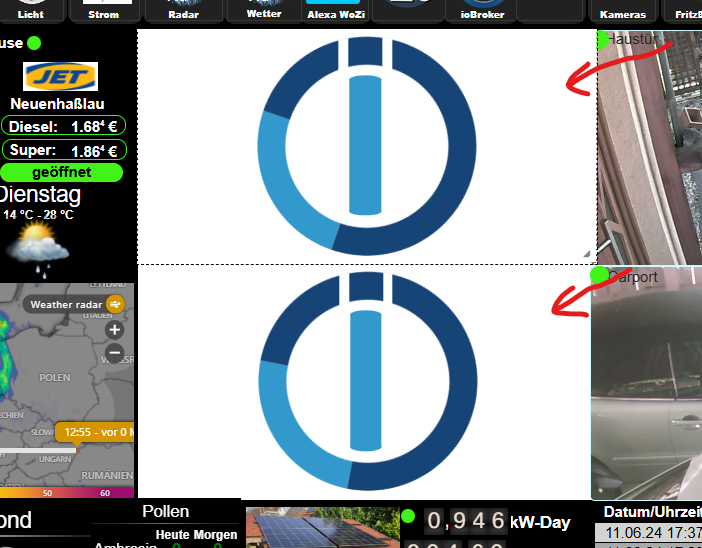
Die Diagramm sind da bei Zugriff auf eCharts über iobroker werden die Diagramm dargestellt. In der VIS jedoch nicht. Hätte jemand eine Idee warum?
Ach ja, die neuste Version von eCharts funzzt überhaupt nicht. Die Instanz wird unter iobroker nichtmal geöffnet. Bin auf Version 1.5.3 zurück, diese Instanz läßt sich öffnen und es werden Diagramme angezeigt (aber im Widget nicht). -
Gibt doch ein Problem, nach Update aller Adapter öffnet das Widget eCharts keine Diagramm mehr:
Die Diagramm sind da bei Zugriff auf eCharts über iobroker werden die Diagramm dargestellt. In der VIS jedoch nicht. Hätte jemand eine Idee warum?
Ach ja, die neuste Version von eCharts funzzt überhaupt nicht. Die Instanz wird unter iobroker nichtmal geöffnet. Bin auf Version 1.5.3 zurück, diese Instanz läßt sich öffnen und es werden Diagramme angezeigt (aber im Widget nicht). -
Gibt doch ein Problem, nach Update aller Adapter öffnet das Widget eCharts keine Diagramm mehr:
Die Diagramm sind da bei Zugriff auf eCharts über iobroker werden die Diagramm dargestellt. In der VIS jedoch nicht. Hätte jemand eine Idee warum?
Ach ja, die neuste Version von eCharts funzzt überhaupt nicht. Die Instanz wird unter iobroker nichtmal geöffnet. Bin auf Version 1.5.3 zurück, diese Instanz läßt sich öffnen und es werden Diagramme angezeigt (aber im Widget nicht).@loco Dann wirf mal einen Blick ins Github. Die Version 1.8.1 von eCharts hat da ein Problem, das ist bereits gemeldet.
Ich bin da gestern auch drauf reingefallen :-)
https://github.com/ioBroker/ioBroker.echarts/issues/630iobroker auf proxmox container
-
@loco Dann wirf mal einen Blick ins Github. Die Version 1.8.1 von eCharts hat da ein Problem, das ist bereits gemeldet.
Ich bin da gestern auch drauf reingefallen :-)
https://github.com/ioBroker/ioBroker.echarts/issues/630 -
-
@bananajoe: ich mußte wegen einem anderen Fehler ein Backup zurückspielen. Interesanterweise läuft eCharts jetzt in Version 1.8.1. Die Diagramme werden sauber angezeigt - keine Fehler mehr.
Kann euch nicht sagen warum es jetzt geht,...@loco sagte in invalid Key bei Zugriff auf iobroker:
Interesanterweise läuft eCharts jetzt in Version 1.8.1
Bei der 1.8.1 werden bei mir die Diagramme in meiner VIS korrekt angezeigt, aber wenn ich auf dem iobroker admin links im Menu auf ECharts klicke, dann habe ich einen leeren Bildschirm
iobroker auf proxmox container
-
@loco sagte in invalid Key bei Zugriff auf iobroker:
Interesanterweise läuft eCharts jetzt in Version 1.8.1
Bei der 1.8.1 werden bei mir die Diagramme in meiner VIS korrekt angezeigt, aber wenn ich auf dem iobroker admin links im Menu auf ECharts klicke, dann habe ich einen leeren Bildschirm
@amg_666 wenn ich das noch richtig in Erinnerung habe führt der Link in der admin-Sidebar über den Adminport :8081.
in der vis über web :8082 -
@loco sagte in invalid Key bei Zugriff auf iobroker:
Interesanterweise läuft eCharts jetzt in Version 1.8.1
Bei der 1.8.1 werden bei mir die Diagramme in meiner VIS korrekt angezeigt, aber wenn ich auf dem iobroker admin links im Menu auf ECharts klicke, dann habe ich einen leeren Bildschirm
@amg_666 sagte in invalid Key bei Zugriff auf iobroker:
@loco sagte in invalid Key bei Zugriff auf iobroker:
Interesanterweise läuft eCharts jetzt in Version 1.8.1
Bei der 1.8.1 werden bei mir die Diagramme in meiner VIS korrekt angezeigt, aber wenn ich auf dem iobroker admin links im Menu auf ECharts klicke, dann habe ich einen leeren Bildschirm
Bei funktioniert 1.8.1 - außer auf einem Fire-Tablet. Schon älter, ungepatcht, mit Fully Kiosk. Da kommt dann einfach nichts.
Eigentlich wollte ich das Tablet gar nicht anfassen, habe ich in 3 Jahren vielleicht 3 mal neu gestartet, das läuft einfach ...ioBroker@Ubuntu 24.04 LTS (Proxmox VM) für: >260 Geräte, 6 Switche, 7 AP, 10 IP-Cam, 1 NAS 42TB, 1 Proxmox 128GB 15TB, 2 Proxmox 32GB 1TB, 1 Hyper-V 52GB 42TB, 14 x Echo, 5x FireTV, 5 x Tablett/Handy VIS || >=160 Tasmota/Shelly || >=95 ZigBee || PV 8.1kW / Akku 14kWh || 2x USV APC 750W kaskadiert || Kobra S1 Max
-
@amg_666 sagte in invalid Key bei Zugriff auf iobroker:
@loco sagte in invalid Key bei Zugriff auf iobroker:
Interesanterweise läuft eCharts jetzt in Version 1.8.1
Bei der 1.8.1 werden bei mir die Diagramme in meiner VIS korrekt angezeigt, aber wenn ich auf dem iobroker admin links im Menu auf ECharts klicke, dann habe ich einen leeren Bildschirm
Bei funktioniert 1.8.1 - außer auf einem Fire-Tablet. Schon älter, ungepatcht, mit Fully Kiosk. Da kommt dann einfach nichts.
Eigentlich wollte ich das Tablet gar nicht anfassen, habe ich in 3 Jahren vielleicht 3 mal neu gestartet, das läuft einfach ...@bananajoe ich hab das nur gepostet um von @Loco zu erfahren, ob bei ihm wirklich alles funkioniert.
Der Fehler, den ich beschrieben habe, ist bekannt und als issue in github gemeldet, ich bin da nicht alleine :-) Man sieht es auch im Admin, bei der 1.8.1 fehlt im iobroker admin das "Logo" neben EChart.





Hey! Du scheinst an dieser Unterhaltung interessiert zu sein, hast aber noch kein Konto.
Hast du es satt, bei jedem Besuch durch die gleichen Beiträge zu scrollen? Wenn du dich für ein Konto anmeldest, kommst du immer genau dorthin zurück, wo du zuvor warst, und kannst dich über neue Antworten benachrichtigen lassen (entweder per E-Mail oder Push-Benachrichtigung). Du kannst auch Lesezeichen speichern und Beiträge positiv bewerten, um anderen Community-Mitgliedern deine Wertschätzung zu zeigen.
Mit deinem Input könnte dieser Beitrag noch besser werden 💗
Registrieren Anmelden335
Online33.0k
Benutzende83.7k
Themen1.3m
Beiträge