




IObroker neu installiert
-
dann wirds wohl daran liegen, dass ich nicht die version 20 drauf hab...
das werde ich noch nach holen.Ich stolper aber gerade über noch mehr Problemchen.
Shelly Adapter installiert und taucht nicht in den Instanzen auf.
Und wie erstellt man gleich nochmal einen API Key für google maps? -
genau nur das ich auch das aktualisierungssymbol nicht davor habe ^^
-
Hallo Leute,
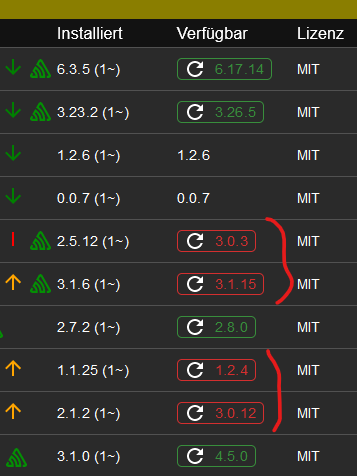
ich habe meinen IObroker neu installiert und habe gerade festgestellt, dass in der Adapterliste manche Versionsnummern rot sind. Was bedeutet das und wie kann ich es beheben?Grüße
@ichwersonst sagte in IObroker neu installiert:
ich habe meinen IObroker neu installiert
bitte die Langfassung (!) von
iob diagzeigen
-
@ichwersonst sagte in IObroker neu installiert:
ich habe meinen IObroker neu installiert
bitte die Langfassung (!) von
iob diagzeigen
======================= SUMMARY ======================= v.2024-05-22 Static hostname: raspberrypiVPN Icon name: computer Operating System: Debian GNU/Linux 12 (bookworm) Kernel: Linux 6.6.31+rpt-rpi-v8 Architecture: arm64 Installation: native Kernel: aarch64 Userland: 64 bit Timezone: Europe/Berlin (CEST, +0200) User-ID: 1000 Display-Server: true Boot Target: graphical.target Pending OS-Updates: 0 Pending iob updates: 2 Nodejs-Installation: /usr/bin/nodejs v18.20.3 /usr/bin/node v18.20.3 /usr/bin/npm 10.7.0 /usr/bin/npx 10.7.0 /usr/bin/corepack 0.28.0 Recommended versions are nodejs 18.20.3 and npm 10.7.0 Your nodejs installation is correct MEMORY: total used free shared buff/cache available Mem: 4.0G 1.2G 1.1G 16M 1.8G 2.7G Swap: 209M 0B 209M Total: 4.2G 1.2G 1.3G Active iob-Instances: 12 Active repo(s): stable ioBroker Core: js-controller 5.0.19 admin 6.13.16 ioBroker Status: iobroker is running on this host. Objects type: jsonl States type: jsonl Status admin and web instance: + system.adapter.admin.0 : admin : raspberrypiVPN - enabled, port: 8081, bind: 0.0.0.0, run as: admin + system.adapter.web.0 : web : raspberrypiVPN - enabled, port: 8082, bind: 0.0.0.0, run as: admin Objects: 1688 States: 1430 Size of iob-Database: 11M /opt/iobroker/iobroker-data/objects.jsonl 2.9M /opt/iobroker/iobroker-data/states.jsonl -
======================= SUMMARY ======================= v.2024-05-22 Static hostname: raspberrypiVPN Icon name: computer Operating System: Debian GNU/Linux 12 (bookworm) Kernel: Linux 6.6.31+rpt-rpi-v8 Architecture: arm64 Installation: native Kernel: aarch64 Userland: 64 bit Timezone: Europe/Berlin (CEST, +0200) User-ID: 1000 Display-Server: true Boot Target: graphical.target Pending OS-Updates: 0 Pending iob updates: 2 Nodejs-Installation: /usr/bin/nodejs v18.20.3 /usr/bin/node v18.20.3 /usr/bin/npm 10.7.0 /usr/bin/npx 10.7.0 /usr/bin/corepack 0.28.0 Recommended versions are nodejs 18.20.3 and npm 10.7.0 Your nodejs installation is correct MEMORY: total used free shared buff/cache available Mem: 4.0G 1.2G 1.1G 16M 1.8G 2.7G Swap: 209M 0B 209M Total: 4.2G 1.2G 1.3G Active iob-Instances: 12 Active repo(s): stable ioBroker Core: js-controller 5.0.19 admin 6.13.16 ioBroker Status: iobroker is running on this host. Objects type: jsonl States type: jsonl Status admin and web instance: + system.adapter.admin.0 : admin : raspberrypiVPN - enabled, port: 8081, bind: 0.0.0.0, run as: admin + system.adapter.web.0 : web : raspberrypiVPN - enabled, port: 8082, bind: 0.0.0.0, run as: admin Objects: 1688 States: 1430 Size of iob-Database: 11M /opt/iobroker/iobroker-data/objects.jsonl 2.9M /opt/iobroker/iobroker-data/states.jsonl@ichwersonst Das ist nicht die Langfassung
-
@ichwersonst Das ist nicht die Langfassung
pardon.... moment
-
@ichwersonst Das ist nicht die Langfassung
Skript v.2024-05-22 *** BASE SYSTEM *** Static hostname: raspberrypiVPN Icon name: computer Operating System: Debian GNU/Linux 12 (bookworm) Kernel: Linux 6.6.31+rpt-rpi-v8 Architecture: arm64 Model : Raspberry Pi 4 Model B Rev 1.5 Docker : false Virtualization : none Kernel : aarch64 Userland : 64 bit Systemuptime and Load: 16:51:46 up 1:24, 4 users, load average: 0.71, 0.67, 0.50 CPU threads: 4 *** RASPBERRY THROTTLING *** Current issues: No throttling issues detected. Previously detected issues: No throttling issues detected. *** Time and Time Zones *** Local time: Thu 2024-06-13 16:51:46 CEST Universal time: Thu 2024-06-13 14:51:46 UTC RTC time: n/a Time zone: Europe/Berlin (CEST, +0200) System clock synchronized: yes NTP service: active RTC in local TZ: no *** Users and Groups *** User that called 'iob diag': pi HOME=/home/pi GROUPS=pi adm dialout cdrom sudo audio video plugdev games users input render netdev lpadmin gpio i2c spi iobroker User that is running 'js-controller': iobroker HOME=/home/iobroker GROUPS=iobroker tty dialout audio video plugdev bluetooth gpio i2c *** Display-Server-Setup *** Display-Server: true Desktop: Terminal: tty Boot Target: graphical.target *** MEMORY *** total used free shared buff/cache available Mem: 4.0G 1.2G 1.1G 16M 1.8G 2.7G Swap: 209M 0B 209M Total: 4.2G 1.2G 1.3G Active iob-Instances: 12 3791 M total memory 1168 M used memory 1374 M active memory 1170 M inactive memory 1014 M free memory 90 M buffer memory 1616 M swap cache 199 M total swap 0 M used swap 199 M free swap *** top - Table Of Processes *** top - 16:51:46 up 1:24, 4 users, load average: 0.71, 0.67, 0.50 Tasks: 222 total, 1 running, 221 sleeping, 0 stopped, 0 zombie %Cpu(s): 0.0 us, 33.3 sy, 0.0 ni, 66.7 id, 0.0 wa, 0.0 hi, 0.0 si, 0.0 st MiB Mem : 3791.0 total, 1013.2 free, 1170.2 used, 1707.4 buff/cache MiB Swap: 200.0 total, 200.0 free, 0.0 used. 2620.9 avail Mem *** FAILED SERVICES *** UNIT LOAD ACTIVE SUB DESCRIPTION 0 loaded units listed. *** FILESYSTEM *** Filesystem Type Size Used Avail Use% Mounted on udev devtmpfs 1.6G 0 1.6G 0% /dev tmpfs tmpfs 380M 1.4M 378M 1% /run /dev/sda2 ext4 56G 6.7G 47G 13% / tmpfs tmpfs 1.9G 148K 1.9G 1% /dev/shm tmpfs tmpfs 5.0M 16K 5.0M 1% /run/lock /dev/sda1 vfat 510M 75M 436M 15% /boot/firmware tmpfs tmpfs 380M 36K 380M 1% /run/user/1000 Messages concerning ext4 filesystem in dmesg: [Thu Jun 13 15:27:33 2024] Kernel command line: coherent_pool=1M 8250.nr_uarts=1 snd_bcm2835.enable_headphones=0 snd_bcm2835.enable_headphones=1 snd_bcm2835.enable_hdmi=1 snd_bcm2835.enable_hdmi=0 smsc95xx.macaddr=D8:3A:DD:37:DD:BE vc_mem.mem_base=0x3eb00000 vc_mem.mem_size=0x3ff00000 console=tty1 root=PARTUUID=edc760d8-02 rootfstype=ext4 fsck.repair=yes rootwait quiet splash plymouth.ignore-serial-consoles [Thu Jun 13 15:27:37 2024] EXT4-fs (sda2): mounted filesystem fc7a1f9e-4967-4f41-a1f5-1b5927e6c5f9 ro with ordered data mode. Quota mode: none. [Thu Jun 13 15:27:39 2024] EXT4-fs (sda2): re-mounted fc7a1f9e-4967-4f41-a1f5-1b5927e6c5f9 r/w. Quota mode: none. Show mounted filesystems: TARGET SOURCE FSTYPE OPTIONS / /dev/sda2 ext4 rw,noatime |-/sys sysfs sysfs rw,nosuid,nodev,noexec,relatime | |-/sys/kernel/security securityfs securityfs rw,nosuid,nodev,noexec,relatime | |-/sys/fs/cgroup cgroup2 cgroup2 rw,nosuid,nodev,noexec,relatime,nsdelegate,memory_recursiveprot | |-/sys/fs/pstore pstore pstore rw,nosuid,nodev,noexec,relatime | |-/sys/fs/bpf bpf bpf rw,nosuid,nodev,noexec,relatime,mode=700 | |-/sys/kernel/debug debugfs debugfs rw,nosuid,nodev,noexec,relatime | |-/sys/kernel/tracing tracefs tracefs rw,nosuid,nodev,noexec,relatime | |-/sys/fs/fuse/connections fusectl fusectl rw,nosuid,nodev,noexec,relatime | `-/sys/kernel/config configfs configfs rw,nosuid,nodev,noexec,relatime |-/proc proc proc rw,relatime | `-/proc/sys/fs/binfmt_misc systemd-1 autofs rw,relatime,fd=29,pgrp=1,timeout=0,minproto=5,maxproto=5,direct,pipe_ino=4462 | `-/proc/sys/fs/binfmt_misc binfmt_misc binfmt_misc rw,nosuid,nodev,noexec,relatime |-/dev udev devtmpfs rw,nosuid,relatime,size=1667844k,nr_inodes=416961,mode=755 | |-/dev/pts devpts devpts rw,nosuid,noexec,relatime,gid=5,mode=620,ptmxmode=000 | |-/dev/shm tmpfs tmpfs rw,nosuid,nodev | `-/dev/mqueue mqueue mqueue rw,nosuid,nodev,noexec,relatime |-/run tmpfs tmpfs rw,nosuid,nodev,noexec,relatime,size=388204k,mode=755 | |-/run/lock tmpfs tmpfs rw,nosuid,nodev,noexec,relatime,size=5120k | |-/run/credentials/systemd-sysctl.service ramfs ramfs ro,nosuid,nodev,noexec,relatime,mode=700 | |-/run/credentials/systemd-sysusers.service ramfs ramfs ro,nosuid,nodev,noexec,relatime,mode=700 | |-/run/credentials/systemd-tmpfiles-setup-dev.service ramfs ramfs ro,nosuid,nodev,noexec,relatime,mode=700 | |-/run/rpc_pipefs sunrpc rpc_pipefs rw,relatime | |-/run/credentials/systemd-tmpfiles-setup.service ramfs ramfs ro,nosuid,nodev,noexec,relatime,mode=700 | `-/run/user/1000 tmpfs tmpfs rw,nosuid,nodev,relatime,size=388200k,nr_inodes=97050,mode=700,uid=1000,gid=1000 | |-/run/user/1000/gvfs gvfsd-fuse fuse.gvfsd-fuse rw,nosuid,nodev,relatime,user_id=1000,group_id=1000 | `-/run/user/1000/doc portal fuse.portal rw,nosuid,nodev,relatime,user_id=1000,group_id=1000 `-/boot/firmware /dev/sda1 vfat rw,relatime,fmask=0022,dmask=0022,codepage=437,iocharset=ascii,shortname=mixed,errors=remount-ro Files in neuralgic directories: /var: 991M /var/ 530M /var/cache 523M /var/cache/apt 410M /var/cache/apt/archives 196M /var/lib Archived and active journals take up 63.8M in the file system. /opt/iobroker/backups: 4.0K /opt/iobroker/backups/ /opt/iobroker/iobroker-data: 109M /opt/iobroker/iobroker-data/ 96M /opt/iobroker/iobroker-data/files 33M /opt/iobroker/iobroker-data/files/web.admin/static 33M /opt/iobroker/iobroker-data/files/web.admin 32M /opt/iobroker/iobroker-data/files/web.admin/static/js The five largest files in iobroker-data are: 24M /opt/iobroker/iobroker-data/files/web.admin/static/js/main.135279a0.js.map 11M /opt/iobroker/iobroker-data/objects.jsonl 8.5M /opt/iobroker/iobroker-data/files/web.admin/static/js/main.135279a0.js 6.3M /opt/iobroker/iobroker-data/files/admin.admin/custom/static/js/vendors-node_modules_iobroker_adapter-react-v5_assets_devices_parseNames_js-node_modules_iobr-99c23e.847b8ad9.chunk.js.map 3.0M /opt/iobroker/iobroker-data/states.jsonl USB-Devices by-id: USB-Sticks - Avoid direct links to /dev/tty* in your adapter setups, please always prefer the links 'by-id': /dev/serial/by-id/usb-dresden_elektronik_ingenieurtechnik_GmbH_ConBee_II_DE2121476-if00 *** NodeJS-Installation *** /usr/bin/nodejs v18.20.3 /usr/bin/node v18.20.3 /usr/bin/npm 10.7.0 /usr/bin/npx 10.7.0 /usr/bin/corepack 0.28.0 nodejs: Installed: 18.20.3-1nodesource1 Candidate: 18.20.3-1nodesource1 Version table: *** 18.20.3-1nodesource1 600 500 https://deb.nodesource.com/node_18.x nodistro/main arm64 Packages 100 /var/lib/dpkg/status 18.20.2-1nodesource1 600 500 https://deb.nodesource.com/node_18.x nodistro/main arm64 Packages 18.20.1-1nodesource1 600 500 https://deb.nodesource.com/node_18.x nodistro/main arm64 Packages 18.20.0-1nodesource1 600 500 https://deb.nodesource.com/node_18.x nodistro/main arm64 Packages 18.19.1-1nodesource1 600 500 https://deb.nodesource.com/node_18.x nodistro/main arm64 Packages 18.19.0+dfsg-6~deb12u1 500 500 http://deb.debian.org/debian-security bookworm-security/main arm64 Packages 18.19.0-1nodesource1 600 500 https://deb.nodesource.com/node_18.x nodistro/main arm64 Packages 18.18.2-1nodesource1 600 500 https://deb.nodesource.com/node_18.x nodistro/main arm64 Packages 18.18.1-1nodesource1 600 500 https://deb.nodesource.com/node_18.x nodistro/main arm64 Packages 18.18.0-1nodesource1 600 500 https://deb.nodesource.com/node_18.x nodistro/main arm64 Packages 18.17.1-1nodesource1 600 500 https://deb.nodesource.com/node_18.x nodistro/main arm64 Packages 18.17.0-1nodesource1 600 500 https://deb.nodesource.com/node_18.x nodistro/main arm64 Packages 18.16.1-1nodesource1 600 500 https://deb.nodesource.com/node_18.x nodistro/main arm64 Packages 18.16.0-1nodesource1 600 500 https://deb.nodesource.com/node_18.x nodistro/main arm64 Packages 18.15.0-1nodesource1 600 500 https://deb.nodesource.com/node_18.x nodistro/main arm64 Packages 18.14.2-1nodesource1 600 500 https://deb.nodesource.com/node_18.x nodistro/main arm64 Packages 18.14.1-1nodesource1 600 500 https://deb.nodesource.com/node_18.x nodistro/main arm64 Packages 18.14.0-1nodesource1 600 500 https://deb.nodesource.com/node_18.x nodistro/main arm64 Packages 18.13.0+dfsg1-1 500 500 http://deb.debian.org/debian bookworm/main arm64 Packages 18.13.0-1nodesource1 600 500 https://deb.nodesource.com/node_18.x nodistro/main arm64 Packages 18.12.0-1nodesource1 600 500 https://deb.nodesource.com/node_18.x nodistro/main arm64 Packages 18.11.0-1nodesource1 600 500 https://deb.nodesource.com/node_18.x nodistro/main arm64 Packages 18.10.0-1nodesource1 600 500 https://deb.nodesource.com/node_18.x nodistro/main arm64 Packages 18.9.1-1nodesource1 600 500 https://deb.nodesource.com/node_18.x nodistro/main arm64 Packages 18.9.0-1nodesource1 600 500 https://deb.nodesource.com/node_18.x nodistro/main arm64 Packages 18.8.0-1nodesource1 600 500 https://deb.nodesource.com/node_18.x nodistro/main arm64 Packages 18.7.0-1nodesource1 600 500 https://deb.nodesource.com/node_18.x nodistro/main arm64 Packages 18.6.0-1nodesource1 600 500 https://deb.nodesource.com/node_18.x nodistro/main arm64 Packages 18.5.0-1nodesource1 600 500 https://deb.nodesource.com/node_18.x nodistro/main arm64 Packages 18.4.0-1nodesource1 600 500 https://deb.nodesource.com/node_18.x nodistro/main arm64 Packages 18.3.0-1nodesource1 600 500 https://deb.nodesource.com/node_18.x nodistro/main arm64 Packages 18.2.0-1nodesource1 600 500 https://deb.nodesource.com/node_18.x nodistro/main arm64 Packages 18.1.0-1nodesource1 600 500 https://deb.nodesource.com/node_18.x nodistro/main arm64 Packages 18.0.0-1nodesource1 600 500 https://deb.nodesource.com/node_18.x nodistro/main arm64 Packages Temp directories causing npm8 problem: 0 No problems detected Errors in npm tree: *** ioBroker-Installation *** ioBroker Status iobroker is running on this host. Objects type: jsonl States type: jsonl Core adapters versions js-controller: 5.0.19 admin: 6.13.16 javascript: "javascript" not found nodejs modules from github: 0 Adapter State + system.adapter.admin.0 : admin : raspberrypiVPN - enabled, port: 8081, bind: 0.0.0.0, run as: admin + system.adapter.backitup.0 : backitup : raspberrypiVPN - enabled + system.adapter.bring.0 : bring : raspberrypiVPN - enabled system.adapter.flot.0 : flot : raspberrypiVPN - enabled + system.adapter.history.0 : history : raspberrypiVPN - enabled system.adapter.icons-icons8.0 : icons-icons8 : raspberrypiVPN - enabled + system.adapter.lgtv.0 : lgtv : raspberrypiVPN - enabled + system.adapter.pushbullet.0 : pushbullet : raspberrypiVPN - enabled + system.adapter.rpi2.0 : rpi2 : raspberrypiVPN - enabled + system.adapter.sayit.0 : sayit : raspberrypiVPN - enabled system.adapter.shelly.0 : shelly : raspberrypiVPN - disabled, port: 1882, bind: 0.0.0.0 + system.adapter.simple-api.0 : simple-api : raspberrypiVPN - enabled, port: 8087, bind: 0.0.0.0, run as: admin system.adapter.vis-hqwidgets.0 : vis-hqwidgets : raspberrypiVPN - enabled system.adapter.vis-jqui-mfd.0 : vis-jqui-mfd : raspberrypiVPN - enabled system.adapter.vis-map.0 : vis-map : raspberrypiVPN - enabled system.adapter.vis-timeandweather.0 : vis-timeandweather : raspberrypiVPN - enabled system.adapter.vis.0 : vis : raspberrypiVPN - enabled system.adapter.weatherunderground.0 : weatherunderground : raspberrypiVPN - enabled + system.adapter.web.0 : web : raspberrypiVPN - enabled, port: 8082, bind: 0.0.0.0, run as: admin + system.adapter.wled.0 : wled : raspberrypiVPN - enabled + instance is alive Enabled adapters with bindings + system.adapter.admin.0 : admin : raspberrypiVPN - enabled, port: 8081, bind: 0.0.0.0, run as: admin + system.adapter.simple-api.0 : simple-api : raspberrypiVPN - enabled, port: 8087, bind: 0.0.0.0, run as: admin + system.adapter.web.0 : web : raspberrypiVPN - enabled, port: 8082, bind: 0.0.0.0, run as: admin ioBroker-Repositories stable : http://download.iobroker.net/sources-dist.json beta : http://download.iobroker.net/sources-dist-latest.json Active repo(s): stable Installed ioBroker-Instances Used repository: stable Adapter "admin" : 6.13.16 , installed 6.13.16 Adapter "backitup" : 2.11.0 , installed 2.11.0 Adapter "bring" : 1.8.4 , installed 1.8.4 Adapter "discovery" : 4.5.0 , installed 4.5.0 Adapter "flot" : 1.12.0 , installed 1.12.0 Adapter "history" : 3.0.1 , installed 3.0.1 Adapter "icons-icons8" : 0.0.1 , installed 0.0.1 Controller "js-controller": 5.0.19 , installed 5.0.19 Adapter "lgtv" : 2.2.0 , installed 2.2.0 Adapter "pushbullet" : 2.1.0 , installed 2.1.0 Adapter "rpi2" : 1.3.2 , installed 1.3.2 Adapter "sayit" : 3.0.5 , installed 3.0.5 Adapter "shelly" : 7.0.0 , installed 7.0.0 Adapter "simple-api" : 2.8.0 , installed 2.8.0 Adapter "socketio" : 6.7.0 , installed 6.6.1 [Updatable] Adapter "systeminfo" : 1.2.0 , installed 1.2.0 Adapter "vis" : 1.5.6 , installed 1.5.6 Adapter "vis-hqwidgets": 1.5.1 , installed 1.5.1 Adapter "vis-jqui-mfd" : 1.1.1 , installed 1.1.1 Adapter "vis-map" : 1.0.5 , installed 1.0.5 Adapter "vis-timeandweather": 1.2.2, installed 1.2.2 Adapter "weatherunderground": 3.7.0, installed 3.7.0 Adapter "web" : 6.2.5 , installed 6.2.5 Adapter "wled" : 0.7.2 , installed 0.7.2 Adapter "ws" : 2.6.1 , installed 2.5.11 [Updatable] Objects and States Please stand by - This may take a while Objects: 1691 States: 1431 *** OS-Repositories and Updates *** W: http://phoscon.de/apt/deconz/dists/bookworm/InRelease: Key is stored in legacy trusted.gpg keyring (/etc/apt/trusted.gpg), see the DEPRECATION section in apt-key(8) for details. Hit:1 http://deb.debian.org/debian bookworm InRelease Hit:2 http://deb.debian.org/debian-security bookworm-security InRelease Hit:3 http://phoscon.de/apt/deconz bookworm InRelease Hit:4 http://deb.debian.org/debian bookworm-updates InRelease Hit:5 http://archive.raspberrypi.com/debian bookworm InRelease Hit:6 https://deb.nodesource.com/node_18.x nodistro InRelease Reading package lists... W: http://phoscon.de/apt/deconz/dists/bookworm/InRelease: Key is stored in legacy trusted.gpg keyring (/etc/apt/trusted.gpg), see the DEPRECATION section in apt-key(8) for details. Pending Updates: 0 *** Listening Ports *** Active Internet connections (only servers) Proto Recv-Q Send-Q Local Address Foreign Address State User Inode PID/Program name tcp 0 0 127.0.0.1:9000 0.0.0.0:* LISTEN 1001 7144 801/iobroker.js-con tcp 0 0 127.0.0.1:9001 0.0.0.0:* LISTEN 1001 8799 801/iobroker.js-con tcp 0 0 127.0.0.1:631 0.0.0.0:* LISTEN 0 8310 800/cupsd tcp 0 0 0.0.0.0:80 0.0.0.0:* LISTEN 1000 18207 4691/deCONZ tcp 0 0 0.0.0.0:22 0.0.0.0:* LISTEN 0 3983 814/sshd: /usr/sbin tcp 0 0 0.0.0.0:443 0.0.0.0:* LISTEN 1000 19350 4691/deCONZ tcp6 0 0 :::8087 :::* LISTEN 1001 11056 2866/io.simple-api. tcp6 0 0 :::8081 :::* LISTEN 1001 10716 1329/io.admin.0 tcp6 0 0 :::8082 :::* LISTEN 1001 15396 3103/io.web.0 tcp6 0 0 ::1:631 :::* LISTEN 0 8309 800/cupsd tcp6 0 0 :::22 :::* LISTEN 0 8314 814/sshd: /usr/sbin udp 0 0 0.0.0.0:5353 0.0.0.0:* 1001 13199 3188/io.wled.0 udp 0 0 0.0.0.0:5353 0.0.0.0:* 104 7508 573/avahi-daemon: r udp 0 0 0.0.0.0:1900 0.0.0.0:* 1000 19353 4691/deCONZ udp 0 0 0.0.0.0:631 0.0.0.0:* 0 7076 1160/cups-browsed udp 0 0 0.0.0.0:50186 0.0.0.0:* 104 7510 573/avahi-daemon: r udp6 0 0 :::5353 :::* 104 7509 573/avahi-daemon: r udp6 0 0 fe80::2bfa:29dc:3b5:546 :::* 0 7793 788/NetworkManager udp6 0 0 :::39830 :::* 104 7511 573/avahi-daemon: r *** Log File - Last 25 Lines *** 2024-06-13 16:49:54.093 - info: host.raspberrypiVPN "system.adapter.vis.0" enabled 2024-06-13 16:49:54.094 - info: host.raspberrypiVPN stopInstance system.adapter.vis.0 (force=false, process=true) 2024-06-13 16:50:02.718 - info: vis.0 (7974) Uploaded. 0 2024-06-13 16:50:03.225 - info: vis.0 (7974) Terminated (NO_ERROR): Without reason 2024-06-13 16:50:03.770 - info: host.raspberrypiVPN instance system.adapter.vis.0 terminated while should be started once 2024-06-13 16:50:17.391 - error: rpi2.0 (4309) Cannot evaluate: Filesystem 1K-blocks Used Available Use% Mounted on /dev/sda2 58550488 7003504 48552912 13% / /1024 2024-06-13 16:50:17.393 - error: rpi2.0 (4309) Cannot evaluate: Filesystem 1K-blocks Used Available Use% Mounted on /dev/sda2 58550488 7003504 48552912 13% / /1024 2024-06-13 16:51:17.348 - error: rpi2.0 (4309) Cannot evaluate: Filesystem 1K-blocks Used Available Use% Mounted on /dev/sda2 58550488 7003532 48552884 13% / /1024 2024-06-13 16:51:17.350 - error: rpi2.0 (4309) Cannot evaluate: Filesystem 1K-blocks Used Available Use% Mounted on /dev/sda2 58550488 7003532 48552884 13% / /1024 2024-06-13 16:52:16.935 - info: admin.0 (1329) <== Disconnect system.user.admin from ::ffff:192.168.178.20 admin 2024-06-13 16:52:17.341 - error: rpi2.0 (4309) Cannot evaluate: Filesystem 1K-blocks Used Available Use% Mounted on /dev/sda2 58550488 6888292 48668124 13% / /1024 2024-06-13 16:52:17.343 - error: rpi2.0 (4309) Cannot evaluate: Filesystem 1K-blocks Used Available Use% Mounted on /dev/sda2 58550488 6888292 48668124 13% / /1024 2024-06-13 16:52:17.664 - info: admin.0 (1329) failed connection to socket.io from ::ffff:192.168.178.20: Passport was not initialized============ Mark until here for C&P =============
iob diag has finished.
-
Skript v.2024-05-22 *** BASE SYSTEM *** Static hostname: raspberrypiVPN Icon name: computer Operating System: Debian GNU/Linux 12 (bookworm) Kernel: Linux 6.6.31+rpt-rpi-v8 Architecture: arm64 Model : Raspberry Pi 4 Model B Rev 1.5 Docker : false Virtualization : none Kernel : aarch64 Userland : 64 bit Systemuptime and Load: 16:51:46 up 1:24, 4 users, load average: 0.71, 0.67, 0.50 CPU threads: 4 *** RASPBERRY THROTTLING *** Current issues: No throttling issues detected. Previously detected issues: No throttling issues detected. *** Time and Time Zones *** Local time: Thu 2024-06-13 16:51:46 CEST Universal time: Thu 2024-06-13 14:51:46 UTC RTC time: n/a Time zone: Europe/Berlin (CEST, +0200) System clock synchronized: yes NTP service: active RTC in local TZ: no *** Users and Groups *** User that called 'iob diag': pi HOME=/home/pi GROUPS=pi adm dialout cdrom sudo audio video plugdev games users input render netdev lpadmin gpio i2c spi iobroker User that is running 'js-controller': iobroker HOME=/home/iobroker GROUPS=iobroker tty dialout audio video plugdev bluetooth gpio i2c *** Display-Server-Setup *** Display-Server: true Desktop: Terminal: tty Boot Target: graphical.target *** MEMORY *** total used free shared buff/cache available Mem: 4.0G 1.2G 1.1G 16M 1.8G 2.7G Swap: 209M 0B 209M Total: 4.2G 1.2G 1.3G Active iob-Instances: 12 3791 M total memory 1168 M used memory 1374 M active memory 1170 M inactive memory 1014 M free memory 90 M buffer memory 1616 M swap cache 199 M total swap 0 M used swap 199 M free swap *** top - Table Of Processes *** top - 16:51:46 up 1:24, 4 users, load average: 0.71, 0.67, 0.50 Tasks: 222 total, 1 running, 221 sleeping, 0 stopped, 0 zombie %Cpu(s): 0.0 us, 33.3 sy, 0.0 ni, 66.7 id, 0.0 wa, 0.0 hi, 0.0 si, 0.0 st MiB Mem : 3791.0 total, 1013.2 free, 1170.2 used, 1707.4 buff/cache MiB Swap: 200.0 total, 200.0 free, 0.0 used. 2620.9 avail Mem *** FAILED SERVICES *** UNIT LOAD ACTIVE SUB DESCRIPTION 0 loaded units listed. *** FILESYSTEM *** Filesystem Type Size Used Avail Use% Mounted on udev devtmpfs 1.6G 0 1.6G 0% /dev tmpfs tmpfs 380M 1.4M 378M 1% /run /dev/sda2 ext4 56G 6.7G 47G 13% / tmpfs tmpfs 1.9G 148K 1.9G 1% /dev/shm tmpfs tmpfs 5.0M 16K 5.0M 1% /run/lock /dev/sda1 vfat 510M 75M 436M 15% /boot/firmware tmpfs tmpfs 380M 36K 380M 1% /run/user/1000 Messages concerning ext4 filesystem in dmesg: [Thu Jun 13 15:27:33 2024] Kernel command line: coherent_pool=1M 8250.nr_uarts=1 snd_bcm2835.enable_headphones=0 snd_bcm2835.enable_headphones=1 snd_bcm2835.enable_hdmi=1 snd_bcm2835.enable_hdmi=0 smsc95xx.macaddr=D8:3A:DD:37:DD:BE vc_mem.mem_base=0x3eb00000 vc_mem.mem_size=0x3ff00000 console=tty1 root=PARTUUID=edc760d8-02 rootfstype=ext4 fsck.repair=yes rootwait quiet splash plymouth.ignore-serial-consoles [Thu Jun 13 15:27:37 2024] EXT4-fs (sda2): mounted filesystem fc7a1f9e-4967-4f41-a1f5-1b5927e6c5f9 ro with ordered data mode. Quota mode: none. [Thu Jun 13 15:27:39 2024] EXT4-fs (sda2): re-mounted fc7a1f9e-4967-4f41-a1f5-1b5927e6c5f9 r/w. Quota mode: none. Show mounted filesystems: TARGET SOURCE FSTYPE OPTIONS / /dev/sda2 ext4 rw,noatime |-/sys sysfs sysfs rw,nosuid,nodev,noexec,relatime | |-/sys/kernel/security securityfs securityfs rw,nosuid,nodev,noexec,relatime | |-/sys/fs/cgroup cgroup2 cgroup2 rw,nosuid,nodev,noexec,relatime,nsdelegate,memory_recursiveprot | |-/sys/fs/pstore pstore pstore rw,nosuid,nodev,noexec,relatime | |-/sys/fs/bpf bpf bpf rw,nosuid,nodev,noexec,relatime,mode=700 | |-/sys/kernel/debug debugfs debugfs rw,nosuid,nodev,noexec,relatime | |-/sys/kernel/tracing tracefs tracefs rw,nosuid,nodev,noexec,relatime | |-/sys/fs/fuse/connections fusectl fusectl rw,nosuid,nodev,noexec,relatime | `-/sys/kernel/config configfs configfs rw,nosuid,nodev,noexec,relatime |-/proc proc proc rw,relatime | `-/proc/sys/fs/binfmt_misc systemd-1 autofs rw,relatime,fd=29,pgrp=1,timeout=0,minproto=5,maxproto=5,direct,pipe_ino=4462 | `-/proc/sys/fs/binfmt_misc binfmt_misc binfmt_misc rw,nosuid,nodev,noexec,relatime |-/dev udev devtmpfs rw,nosuid,relatime,size=1667844k,nr_inodes=416961,mode=755 | |-/dev/pts devpts devpts rw,nosuid,noexec,relatime,gid=5,mode=620,ptmxmode=000 | |-/dev/shm tmpfs tmpfs rw,nosuid,nodev | `-/dev/mqueue mqueue mqueue rw,nosuid,nodev,noexec,relatime |-/run tmpfs tmpfs rw,nosuid,nodev,noexec,relatime,size=388204k,mode=755 | |-/run/lock tmpfs tmpfs rw,nosuid,nodev,noexec,relatime,size=5120k | |-/run/credentials/systemd-sysctl.service ramfs ramfs ro,nosuid,nodev,noexec,relatime,mode=700 | |-/run/credentials/systemd-sysusers.service ramfs ramfs ro,nosuid,nodev,noexec,relatime,mode=700 | |-/run/credentials/systemd-tmpfiles-setup-dev.service ramfs ramfs ro,nosuid,nodev,noexec,relatime,mode=700 | |-/run/rpc_pipefs sunrpc rpc_pipefs rw,relatime | |-/run/credentials/systemd-tmpfiles-setup.service ramfs ramfs ro,nosuid,nodev,noexec,relatime,mode=700 | `-/run/user/1000 tmpfs tmpfs rw,nosuid,nodev,relatime,size=388200k,nr_inodes=97050,mode=700,uid=1000,gid=1000 | |-/run/user/1000/gvfs gvfsd-fuse fuse.gvfsd-fuse rw,nosuid,nodev,relatime,user_id=1000,group_id=1000 | `-/run/user/1000/doc portal fuse.portal rw,nosuid,nodev,relatime,user_id=1000,group_id=1000 `-/boot/firmware /dev/sda1 vfat rw,relatime,fmask=0022,dmask=0022,codepage=437,iocharset=ascii,shortname=mixed,errors=remount-ro Files in neuralgic directories: /var: 991M /var/ 530M /var/cache 523M /var/cache/apt 410M /var/cache/apt/archives 196M /var/lib Archived and active journals take up 63.8M in the file system. /opt/iobroker/backups: 4.0K /opt/iobroker/backups/ /opt/iobroker/iobroker-data: 109M /opt/iobroker/iobroker-data/ 96M /opt/iobroker/iobroker-data/files 33M /opt/iobroker/iobroker-data/files/web.admin/static 33M /opt/iobroker/iobroker-data/files/web.admin 32M /opt/iobroker/iobroker-data/files/web.admin/static/js The five largest files in iobroker-data are: 24M /opt/iobroker/iobroker-data/files/web.admin/static/js/main.135279a0.js.map 11M /opt/iobroker/iobroker-data/objects.jsonl 8.5M /opt/iobroker/iobroker-data/files/web.admin/static/js/main.135279a0.js 6.3M /opt/iobroker/iobroker-data/files/admin.admin/custom/static/js/vendors-node_modules_iobroker_adapter-react-v5_assets_devices_parseNames_js-node_modules_iobr-99c23e.847b8ad9.chunk.js.map 3.0M /opt/iobroker/iobroker-data/states.jsonl USB-Devices by-id: USB-Sticks - Avoid direct links to /dev/tty* in your adapter setups, please always prefer the links 'by-id': /dev/serial/by-id/usb-dresden_elektronik_ingenieurtechnik_GmbH_ConBee_II_DE2121476-if00 *** NodeJS-Installation *** /usr/bin/nodejs v18.20.3 /usr/bin/node v18.20.3 /usr/bin/npm 10.7.0 /usr/bin/npx 10.7.0 /usr/bin/corepack 0.28.0 nodejs: Installed: 18.20.3-1nodesource1 Candidate: 18.20.3-1nodesource1 Version table: *** 18.20.3-1nodesource1 600 500 https://deb.nodesource.com/node_18.x nodistro/main arm64 Packages 100 /var/lib/dpkg/status 18.20.2-1nodesource1 600 500 https://deb.nodesource.com/node_18.x nodistro/main arm64 Packages 18.20.1-1nodesource1 600 500 https://deb.nodesource.com/node_18.x nodistro/main arm64 Packages 18.20.0-1nodesource1 600 500 https://deb.nodesource.com/node_18.x nodistro/main arm64 Packages 18.19.1-1nodesource1 600 500 https://deb.nodesource.com/node_18.x nodistro/main arm64 Packages 18.19.0+dfsg-6~deb12u1 500 500 http://deb.debian.org/debian-security bookworm-security/main arm64 Packages 18.19.0-1nodesource1 600 500 https://deb.nodesource.com/node_18.x nodistro/main arm64 Packages 18.18.2-1nodesource1 600 500 https://deb.nodesource.com/node_18.x nodistro/main arm64 Packages 18.18.1-1nodesource1 600 500 https://deb.nodesource.com/node_18.x nodistro/main arm64 Packages 18.18.0-1nodesource1 600 500 https://deb.nodesource.com/node_18.x nodistro/main arm64 Packages 18.17.1-1nodesource1 600 500 https://deb.nodesource.com/node_18.x nodistro/main arm64 Packages 18.17.0-1nodesource1 600 500 https://deb.nodesource.com/node_18.x nodistro/main arm64 Packages 18.16.1-1nodesource1 600 500 https://deb.nodesource.com/node_18.x nodistro/main arm64 Packages 18.16.0-1nodesource1 600 500 https://deb.nodesource.com/node_18.x nodistro/main arm64 Packages 18.15.0-1nodesource1 600 500 https://deb.nodesource.com/node_18.x nodistro/main arm64 Packages 18.14.2-1nodesource1 600 500 https://deb.nodesource.com/node_18.x nodistro/main arm64 Packages 18.14.1-1nodesource1 600 500 https://deb.nodesource.com/node_18.x nodistro/main arm64 Packages 18.14.0-1nodesource1 600 500 https://deb.nodesource.com/node_18.x nodistro/main arm64 Packages 18.13.0+dfsg1-1 500 500 http://deb.debian.org/debian bookworm/main arm64 Packages 18.13.0-1nodesource1 600 500 https://deb.nodesource.com/node_18.x nodistro/main arm64 Packages 18.12.0-1nodesource1 600 500 https://deb.nodesource.com/node_18.x nodistro/main arm64 Packages 18.11.0-1nodesource1 600 500 https://deb.nodesource.com/node_18.x nodistro/main arm64 Packages 18.10.0-1nodesource1 600 500 https://deb.nodesource.com/node_18.x nodistro/main arm64 Packages 18.9.1-1nodesource1 600 500 https://deb.nodesource.com/node_18.x nodistro/main arm64 Packages 18.9.0-1nodesource1 600 500 https://deb.nodesource.com/node_18.x nodistro/main arm64 Packages 18.8.0-1nodesource1 600 500 https://deb.nodesource.com/node_18.x nodistro/main arm64 Packages 18.7.0-1nodesource1 600 500 https://deb.nodesource.com/node_18.x nodistro/main arm64 Packages 18.6.0-1nodesource1 600 500 https://deb.nodesource.com/node_18.x nodistro/main arm64 Packages 18.5.0-1nodesource1 600 500 https://deb.nodesource.com/node_18.x nodistro/main arm64 Packages 18.4.0-1nodesource1 600 500 https://deb.nodesource.com/node_18.x nodistro/main arm64 Packages 18.3.0-1nodesource1 600 500 https://deb.nodesource.com/node_18.x nodistro/main arm64 Packages 18.2.0-1nodesource1 600 500 https://deb.nodesource.com/node_18.x nodistro/main arm64 Packages 18.1.0-1nodesource1 600 500 https://deb.nodesource.com/node_18.x nodistro/main arm64 Packages 18.0.0-1nodesource1 600 500 https://deb.nodesource.com/node_18.x nodistro/main arm64 Packages Temp directories causing npm8 problem: 0 No problems detected Errors in npm tree: *** ioBroker-Installation *** ioBroker Status iobroker is running on this host. Objects type: jsonl States type: jsonl Core adapters versions js-controller: 5.0.19 admin: 6.13.16 javascript: "javascript" not found nodejs modules from github: 0 Adapter State + system.adapter.admin.0 : admin : raspberrypiVPN - enabled, port: 8081, bind: 0.0.0.0, run as: admin + system.adapter.backitup.0 : backitup : raspberrypiVPN - enabled + system.adapter.bring.0 : bring : raspberrypiVPN - enabled system.adapter.flot.0 : flot : raspberrypiVPN - enabled + system.adapter.history.0 : history : raspberrypiVPN - enabled system.adapter.icons-icons8.0 : icons-icons8 : raspberrypiVPN - enabled + system.adapter.lgtv.0 : lgtv : raspberrypiVPN - enabled + system.adapter.pushbullet.0 : pushbullet : raspberrypiVPN - enabled + system.adapter.rpi2.0 : rpi2 : raspberrypiVPN - enabled + system.adapter.sayit.0 : sayit : raspberrypiVPN - enabled system.adapter.shelly.0 : shelly : raspberrypiVPN - disabled, port: 1882, bind: 0.0.0.0 + system.adapter.simple-api.0 : simple-api : raspberrypiVPN - enabled, port: 8087, bind: 0.0.0.0, run as: admin system.adapter.vis-hqwidgets.0 : vis-hqwidgets : raspberrypiVPN - enabled system.adapter.vis-jqui-mfd.0 : vis-jqui-mfd : raspberrypiVPN - enabled system.adapter.vis-map.0 : vis-map : raspberrypiVPN - enabled system.adapter.vis-timeandweather.0 : vis-timeandweather : raspberrypiVPN - enabled system.adapter.vis.0 : vis : raspberrypiVPN - enabled system.adapter.weatherunderground.0 : weatherunderground : raspberrypiVPN - enabled + system.adapter.web.0 : web : raspberrypiVPN - enabled, port: 8082, bind: 0.0.0.0, run as: admin + system.adapter.wled.0 : wled : raspberrypiVPN - enabled + instance is alive Enabled adapters with bindings + system.adapter.admin.0 : admin : raspberrypiVPN - enabled, port: 8081, bind: 0.0.0.0, run as: admin + system.adapter.simple-api.0 : simple-api : raspberrypiVPN - enabled, port: 8087, bind: 0.0.0.0, run as: admin + system.adapter.web.0 : web : raspberrypiVPN - enabled, port: 8082, bind: 0.0.0.0, run as: admin ioBroker-Repositories stable : http://download.iobroker.net/sources-dist.json beta : http://download.iobroker.net/sources-dist-latest.json Active repo(s): stable Installed ioBroker-Instances Used repository: stable Adapter "admin" : 6.13.16 , installed 6.13.16 Adapter "backitup" : 2.11.0 , installed 2.11.0 Adapter "bring" : 1.8.4 , installed 1.8.4 Adapter "discovery" : 4.5.0 , installed 4.5.0 Adapter "flot" : 1.12.0 , installed 1.12.0 Adapter "history" : 3.0.1 , installed 3.0.1 Adapter "icons-icons8" : 0.0.1 , installed 0.0.1 Controller "js-controller": 5.0.19 , installed 5.0.19 Adapter "lgtv" : 2.2.0 , installed 2.2.0 Adapter "pushbullet" : 2.1.0 , installed 2.1.0 Adapter "rpi2" : 1.3.2 , installed 1.3.2 Adapter "sayit" : 3.0.5 , installed 3.0.5 Adapter "shelly" : 7.0.0 , installed 7.0.0 Adapter "simple-api" : 2.8.0 , installed 2.8.0 Adapter "socketio" : 6.7.0 , installed 6.6.1 [Updatable] Adapter "systeminfo" : 1.2.0 , installed 1.2.0 Adapter "vis" : 1.5.6 , installed 1.5.6 Adapter "vis-hqwidgets": 1.5.1 , installed 1.5.1 Adapter "vis-jqui-mfd" : 1.1.1 , installed 1.1.1 Adapter "vis-map" : 1.0.5 , installed 1.0.5 Adapter "vis-timeandweather": 1.2.2, installed 1.2.2 Adapter "weatherunderground": 3.7.0, installed 3.7.0 Adapter "web" : 6.2.5 , installed 6.2.5 Adapter "wled" : 0.7.2 , installed 0.7.2 Adapter "ws" : 2.6.1 , installed 2.5.11 [Updatable] Objects and States Please stand by - This may take a while Objects: 1691 States: 1431 *** OS-Repositories and Updates *** W: http://phoscon.de/apt/deconz/dists/bookworm/InRelease: Key is stored in legacy trusted.gpg keyring (/etc/apt/trusted.gpg), see the DEPRECATION section in apt-key(8) for details. Hit:1 http://deb.debian.org/debian bookworm InRelease Hit:2 http://deb.debian.org/debian-security bookworm-security InRelease Hit:3 http://phoscon.de/apt/deconz bookworm InRelease Hit:4 http://deb.debian.org/debian bookworm-updates InRelease Hit:5 http://archive.raspberrypi.com/debian bookworm InRelease Hit:6 https://deb.nodesource.com/node_18.x nodistro InRelease Reading package lists... W: http://phoscon.de/apt/deconz/dists/bookworm/InRelease: Key is stored in legacy trusted.gpg keyring (/etc/apt/trusted.gpg), see the DEPRECATION section in apt-key(8) for details. Pending Updates: 0 *** Listening Ports *** Active Internet connections (only servers) Proto Recv-Q Send-Q Local Address Foreign Address State User Inode PID/Program name tcp 0 0 127.0.0.1:9000 0.0.0.0:* LISTEN 1001 7144 801/iobroker.js-con tcp 0 0 127.0.0.1:9001 0.0.0.0:* LISTEN 1001 8799 801/iobroker.js-con tcp 0 0 127.0.0.1:631 0.0.0.0:* LISTEN 0 8310 800/cupsd tcp 0 0 0.0.0.0:80 0.0.0.0:* LISTEN 1000 18207 4691/deCONZ tcp 0 0 0.0.0.0:22 0.0.0.0:* LISTEN 0 3983 814/sshd: /usr/sbin tcp 0 0 0.0.0.0:443 0.0.0.0:* LISTEN 1000 19350 4691/deCONZ tcp6 0 0 :::8087 :::* LISTEN 1001 11056 2866/io.simple-api. tcp6 0 0 :::8081 :::* LISTEN 1001 10716 1329/io.admin.0 tcp6 0 0 :::8082 :::* LISTEN 1001 15396 3103/io.web.0 tcp6 0 0 ::1:631 :::* LISTEN 0 8309 800/cupsd tcp6 0 0 :::22 :::* LISTEN 0 8314 814/sshd: /usr/sbin udp 0 0 0.0.0.0:5353 0.0.0.0:* 1001 13199 3188/io.wled.0 udp 0 0 0.0.0.0:5353 0.0.0.0:* 104 7508 573/avahi-daemon: r udp 0 0 0.0.0.0:1900 0.0.0.0:* 1000 19353 4691/deCONZ udp 0 0 0.0.0.0:631 0.0.0.0:* 0 7076 1160/cups-browsed udp 0 0 0.0.0.0:50186 0.0.0.0:* 104 7510 573/avahi-daemon: r udp6 0 0 :::5353 :::* 104 7509 573/avahi-daemon: r udp6 0 0 fe80::2bfa:29dc:3b5:546 :::* 0 7793 788/NetworkManager udp6 0 0 :::39830 :::* 104 7511 573/avahi-daemon: r *** Log File - Last 25 Lines *** 2024-06-13 16:49:54.093 - info: host.raspberrypiVPN "system.adapter.vis.0" enabled 2024-06-13 16:49:54.094 - info: host.raspberrypiVPN stopInstance system.adapter.vis.0 (force=false, process=true) 2024-06-13 16:50:02.718 - info: vis.0 (7974) Uploaded. 0 2024-06-13 16:50:03.225 - info: vis.0 (7974) Terminated (NO_ERROR): Without reason 2024-06-13 16:50:03.770 - info: host.raspberrypiVPN instance system.adapter.vis.0 terminated while should be started once 2024-06-13 16:50:17.391 - error: rpi2.0 (4309) Cannot evaluate: Filesystem 1K-blocks Used Available Use% Mounted on /dev/sda2 58550488 7003504 48552912 13% / /1024 2024-06-13 16:50:17.393 - error: rpi2.0 (4309) Cannot evaluate: Filesystem 1K-blocks Used Available Use% Mounted on /dev/sda2 58550488 7003504 48552912 13% / /1024 2024-06-13 16:51:17.348 - error: rpi2.0 (4309) Cannot evaluate: Filesystem 1K-blocks Used Available Use% Mounted on /dev/sda2 58550488 7003532 48552884 13% / /1024 2024-06-13 16:51:17.350 - error: rpi2.0 (4309) Cannot evaluate: Filesystem 1K-blocks Used Available Use% Mounted on /dev/sda2 58550488 7003532 48552884 13% / /1024 2024-06-13 16:52:16.935 - info: admin.0 (1329) <== Disconnect system.user.admin from ::ffff:192.168.178.20 admin 2024-06-13 16:52:17.341 - error: rpi2.0 (4309) Cannot evaluate: Filesystem 1K-blocks Used Available Use% Mounted on /dev/sda2 58550488 6888292 48668124 13% / /1024 2024-06-13 16:52:17.343 - error: rpi2.0 (4309) Cannot evaluate: Filesystem 1K-blocks Used Available Use% Mounted on /dev/sda2 58550488 6888292 48668124 13% / /1024 2024-06-13 16:52:17.664 - info: admin.0 (1329) failed connection to socket.io from ::ffff:192.168.178.20: Passport was not initialized============ Mark until here for C&P =============
iob diag has finished.
@ichwersonst sagte in IObroker neu installiert:
Display-Server: true
Schalt den aus.
sudo systemctl set-default multi-user.targetBring nodejs auf Version 20:
iob nodejs-update 20Danach die Adapter aktualisieren.
iob update
iob upgrade all -y
W: http://phoscon.de/apt/deconz/dists/bookworm/InRelease: Key is stored in legacy trusted.gpg keyring (/etc/apt/trusted.gpg), see the DEPRECATION section in apt-key(8) for details.
Leg das phoscon-Repo nochmal an.
sudo rm /etc/apt/sources.list.d/decon* wget -qO- http://phoscon.de/apt/deconz.pub.key | sudo gpg --dearmor -o /usr/share/keyrings/deconz.gpg > /dev/null sudo sh -c "echo 'deb [signed-by=/usr/share/keyrings/deconz.gpg] http://phoscon.de/apt/deconz $(lsb_release -cs) main' > /etc/apt/sources.list.d/deconz.list" -
@ichwersonst sagte in IObroker neu installiert:
Display-Server: true
Schalt den aus.
sudo systemctl set-default multi-user.targetBring nodejs auf Version 20:
iob nodejs-update 20Danach die Adapter aktualisieren.
iob update
iob upgrade all -y
W: http://phoscon.de/apt/deconz/dists/bookworm/InRelease: Key is stored in legacy trusted.gpg keyring (/etc/apt/trusted.gpg), see the DEPRECATION section in apt-key(8) for details.
Leg das phoscon-Repo nochmal an.
sudo rm /etc/apt/sources.list.d/decon* wget -qO- http://phoscon.de/apt/deconz.pub.key | sudo gpg --dearmor -o /usr/share/keyrings/deconz.gpg > /dev/null sudo sh -c "echo 'deb [signed-by=/usr/share/keyrings/deconz.gpg] http://phoscon.de/apt/deconz $(lsb_release -cs) main' > /etc/apt/sources.list.d/deconz.list"Skript v.2024-05-22 *** BASE SYSTEM *** Static hostname: raspberrypiVPN Icon name: computer Operating System: Debian GNU/Linux 12 (bookworm) Kernel: Linux 6.6.31+rpt-rpi-v8 Architecture: arm64 Model : Raspberry Pi 4 Model B Rev 1.5 Docker : false Virtualization : none Kernel : aarch64 Userland : 64 bit Systemuptime and Load: 17:10:02 up 1:42, 4 users, load average: 1.26, 1.16, 0.83 CPU threads: 4 *** RASPBERRY THROTTLING *** Current issues: No throttling issues detected. Previously detected issues: No throttling issues detected. *** Time and Time Zones *** Local time: Thu 2024-06-13 17:10:02 CEST Universal time: Thu 2024-06-13 15:10:02 UTC RTC time: n/a Time zone: Europe/Berlin (CEST, +0200) System clock synchronized: yes NTP service: active RTC in local TZ: no *** Users and Groups *** User that called 'iob diag': pi HOME=/home/pi GROUPS=pi adm dialout cdrom sudo audio video plugdev games users input render netdev lpadmin gpio i2c spi iobroker User that is running 'js-controller': iobroker HOME=/home/iobroker GROUPS=iobroker tty dialout audio video plugdev bluetooth gpio i2c *** Display-Server-Setup *** Display-Server: true Desktop: Terminal: tty Boot Target: multi-user.target *** MEMORY *** total used free shared buff/cache available Mem: 4.0G 999M 585M 16M 2.5G 3.0G Swap: 209M 0B 209M Total: 4.2G 999M 795M Active iob-Instances: 13 3791 M total memory 953 M used memory 1130 M active memory 1819 M inactive memory 558 M free memory 174 M buffer memory 2196 M swap cache 199 M total swap 0 M used swap 199 M free swap *** top - Table Of Processes *** top - 17:10:02 up 1:42, 4 users, load average: 1.26, 1.16, 0.83 Tasks: 220 total, 3 running, 217 sleeping, 0 stopped, 0 zombie %Cpu(s): 20.0 us, 20.0 sy, 0.0 ni, 60.0 id, 0.0 wa, 0.0 hi, 0.0 si, 0.0 st MiB Mem : 3791.0 total, 557.5 free, 954.1 used, 2371.2 buff/cache MiB Swap: 200.0 total, 200.0 free, 0.0 used. 2837.0 avail Mem *** FAILED SERVICES *** UNIT LOAD ACTIVE SUB DESCRIPTION 0 loaded units listed. *** FILESYSTEM *** Filesystem Type Size Used Avail Use% Mounted on udev devtmpfs 1.6G 0 1.6G 0% /dev tmpfs tmpfs 380M 1.4M 378M 1% /run /dev/sda2 ext4 56G 7.1G 46G 14% / tmpfs tmpfs 1.9G 148K 1.9G 1% /dev/shm tmpfs tmpfs 5.0M 16K 5.0M 1% /run/lock /dev/sda1 vfat 510M 75M 436M 15% /boot/firmware tmpfs tmpfs 380M 36K 380M 1% /run/user/1000 Messages concerning ext4 filesystem in dmesg: [Thu Jun 13 15:27:33 2024] Kernel command line: coherent_pool=1M 8250.nr_uarts=1 snd_bcm2835.enable_headphones=0 snd_bcm2835.enable_headphones=1 snd_bcm2835.enable_hdmi=1 snd_bcm2835.enable_hdmi=0 smsc95xx.macaddr=D8:3A:DD:37:DD:BE vc_mem.mem_base=0x3eb00000 vc_mem.mem_size=0x3ff00000 console=tty1 root=PARTUUID=edc760d8-02 rootfstype=ext4 fsck.repair=yes rootwait quiet splash plymouth.ignore-serial-consoles [Thu Jun 13 15:27:37 2024] EXT4-fs (sda2): mounted filesystem fc7a1f9e-4967-4f41-a1f5-1b5927e6c5f9 ro with ordered data mode. Quota mode: none. [Thu Jun 13 15:27:39 2024] EXT4-fs (sda2): re-mounted fc7a1f9e-4967-4f41-a1f5-1b5927e6c5f9 r/w. Quota mode: none. Show mounted filesystems: TARGET SOURCE FSTYPE OPTIONS / /dev/sda2 ext4 rw,noatime |-/sys sysfs sysfs rw,nosuid,nodev,noexec,relatime | |-/sys/kernel/security securityfs securityfs rw,nosuid,nodev,noexec,relatime | |-/sys/fs/cgroup cgroup2 cgroup2 rw,nosuid,nodev,noexec,relatime,nsdelegate,memory_recursiveprot | |-/sys/fs/pstore pstore pstore rw,nosuid,nodev,noexec,relatime | |-/sys/fs/bpf bpf bpf rw,nosuid,nodev,noexec,relatime,mode=700 | |-/sys/kernel/debug debugfs debugfs rw,nosuid,nodev,noexec,relatime | |-/sys/kernel/tracing tracefs tracefs rw,nosuid,nodev,noexec,relatime | |-/sys/fs/fuse/connections fusectl fusectl rw,nosuid,nodev,noexec,relatime | `-/sys/kernel/config configfs configfs rw,nosuid,nodev,noexec,relatime |-/proc proc proc rw,relatime | `-/proc/sys/fs/binfmt_misc systemd-1 autofs rw,relatime,fd=29,pgrp=1,timeout=0,minproto=5,maxproto=5,direct,pipe_ino=4462 | `-/proc/sys/fs/binfmt_misc binfmt_misc binfmt_misc rw,nosuid,nodev,noexec,relatime |-/dev udev devtmpfs rw,nosuid,relatime,size=1667844k,nr_inodes=416961,mode=755 | |-/dev/pts devpts devpts rw,nosuid,noexec,relatime,gid=5,mode=620,ptmxmode=000 | |-/dev/shm tmpfs tmpfs rw,nosuid,nodev | `-/dev/mqueue mqueue mqueue rw,nosuid,nodev,noexec,relatime |-/run tmpfs tmpfs rw,nosuid,nodev,noexec,relatime,size=388204k,mode=755 | |-/run/lock tmpfs tmpfs rw,nosuid,nodev,noexec,relatime,size=5120k | |-/run/credentials/systemd-sysctl.service ramfs ramfs ro,nosuid,nodev,noexec,relatime,mode=700 | |-/run/credentials/systemd-sysusers.service ramfs ramfs ro,nosuid,nodev,noexec,relatime,mode=700 | |-/run/credentials/systemd-tmpfiles-setup-dev.service ramfs ramfs ro,nosuid,nodev,noexec,relatime,mode=700 | |-/run/rpc_pipefs sunrpc rpc_pipefs rw,relatime | |-/run/credentials/systemd-tmpfiles-setup.service ramfs ramfs ro,nosuid,nodev,noexec,relatime,mode=700 | `-/run/user/1000 tmpfs tmpfs rw,nosuid,nodev,relatime,size=388200k,nr_inodes=97050,mode=700,uid=1000,gid=1000 | |-/run/user/1000/gvfs gvfsd-fuse fuse.gvfsd-fuse rw,nosuid,nodev,relatime,user_id=1000,group_id=1000 | `-/run/user/1000/doc portal fuse.portal rw,nosuid,nodev,relatime,user_id=1000,group_id=1000 `-/boot/firmware /dev/sda1 vfat rw,relatime,fmask=0022,dmask=0022,codepage=437,iocharset=ascii,shortname=mixed,errors=remount-ro Files in neuralgic directories: /var: 1020M /var/ 559M /var/cache 552M /var/cache/apt 440M /var/cache/apt/archives 196M /var/lib Archived and active journals take up 63.8M in the file system. /opt/iobroker/backups: 4.0K /opt/iobroker/backups/ /opt/iobroker/iobroker-data: 248M /opt/iobroker/iobroker-data/ 234M /opt/iobroker/iobroker-data/files 138M /opt/iobroker/iobroker-data/files/javascript.admin 118M /opt/iobroker/iobroker-data/files/javascript.admin/static 117M /opt/iobroker/iobroker-data/files/javascript.admin/static/js The five largest files in iobroker-data are: 24M /opt/iobroker/iobroker-data/files/web.admin/static/js/main.135279a0.js.map 11M /opt/iobroker/iobroker-data/objects.jsonl 8.5M /opt/iobroker/iobroker-data/files/web.admin/static/js/main.135279a0.js 7.0M /opt/iobroker/iobroker-data/files/javascript.admin/static/js/675.a9c6d34a.chunk.js.map 7.0M /opt/iobroker/iobroker-data/files/javascript.admin/static/js/61.54b23816.chunk.js.map USB-Devices by-id: USB-Sticks - Avoid direct links to /dev/tty* in your adapter setups, please always prefer the links 'by-id': /dev/serial/by-id/usb-dresden_elektronik_ingenieurtechnik_GmbH_ConBee_II_DE2121476-if00 *** NodeJS-Installation *** /usr/bin/nodejs v20.14.0 /usr/bin/node v20.14.0 /usr/bin/npm 10.7.0 /usr/bin/npx 10.7.0 /usr/bin/corepack 0.28.1 nodejs: Installed: 20.14.0-1nodesource1 Candidate: 20.14.0-1nodesource1 Version table: *** 20.14.0-1nodesource1 600 500 https://deb.nodesource.com/node_20.x nodistro/main arm64 Packages 100 /var/lib/dpkg/status 20.13.1-1nodesource1 600 500 https://deb.nodesource.com/node_20.x nodistro/main arm64 Packages 20.13.0-1nodesource1 600 500 https://deb.nodesource.com/node_20.x nodistro/main arm64 Packages 20.12.2-1nodesource1 600 500 https://deb.nodesource.com/node_20.x nodistro/main arm64 Packages 20.12.1-1nodesource1 600 500 https://deb.nodesource.com/node_20.x nodistro/main arm64 Packages 20.12.0-1nodesource1 600 500 https://deb.nodesource.com/node_20.x nodistro/main arm64 Packages 20.11.1-1nodesource1 600 500 https://deb.nodesource.com/node_20.x nodistro/main arm64 Packages 20.11.0-1nodesource1 600 500 https://deb.nodesource.com/node_20.x nodistro/main arm64 Packages 20.10.0-1nodesource1 600 500 https://deb.nodesource.com/node_20.x nodistro/main arm64 Packages 20.9.0-1nodesource1 600 500 https://deb.nodesource.com/node_20.x nodistro/main arm64 Packages 20.8.1-1nodesource1 600 500 https://deb.nodesource.com/node_20.x nodistro/main arm64 Packages 20.8.0-1nodesource1 600 500 https://deb.nodesource.com/node_20.x nodistro/main arm64 Packages 20.7.0-1nodesource1 600 500 https://deb.nodesource.com/node_20.x nodistro/main arm64 Packages 20.6.1-1nodesource1 600 500 https://deb.nodesource.com/node_20.x nodistro/main arm64 Packages 20.6.0-1nodesource1 600 500 https://deb.nodesource.com/node_20.x nodistro/main arm64 Packages 20.5.1-1nodesource1 600 500 https://deb.nodesource.com/node_20.x nodistro/main arm64 Packages 20.5.0-1nodesource1 600 500 https://deb.nodesource.com/node_20.x nodistro/main arm64 Packages 20.4.0-1nodesource1 600 500 https://deb.nodesource.com/node_20.x nodistro/main arm64 Packages 20.3.1-1nodesource1 600 500 https://deb.nodesource.com/node_20.x nodistro/main arm64 Packages 20.3.0-1nodesource1 600 500 https://deb.nodesource.com/node_20.x nodistro/main arm64 Packages 20.2.0-1nodesource1 600 500 https://deb.nodesource.com/node_20.x nodistro/main arm64 Packages 20.1.0-1nodesource1 600 500 https://deb.nodesource.com/node_20.x nodistro/main arm64 Packages 20.0.0-1nodesource1 600 500 https://deb.nodesource.com/node_20.x nodistro/main arm64 Packages 18.19.0+dfsg-6~deb12u1 500 500 http://deb.debian.org/debian-security bookworm-security/main arm64 Packages 18.13.0+dfsg1-1 500 500 http://deb.debian.org/debian bookworm/main arm64 Packages Temp directories causing npm8 problem: 0 No problems detected Errors in npm tree: *** ioBroker-Installation *** ioBroker Status iobroker is running on this host. Objects type: jsonl States type: jsonl Core adapters versions js-controller: 5.0.19 admin: 6.13.16 javascript: 8.3.1 nodejs modules from github: 0 Adapter State + system.adapter.admin.0 : admin : raspberrypiVPN - enabled, port: 8081, bind: 0.0.0.0, run as: admin + system.adapter.backitup.0 : backitup : raspberrypiVPN - enabled + system.adapter.bring.0 : bring : raspberrypiVPN - enabled system.adapter.flot.0 : flot : raspberrypiVPN - enabled + system.adapter.history.0 : history : raspberrypiVPN - enabled system.adapter.icons-icons8.0 : icons-icons8 : raspberrypiVPN - enabled + system.adapter.javascript.0 : javascript : raspberrypiVPN - enabled + system.adapter.lgtv.0 : lgtv : raspberrypiVPN - enabled + system.adapter.pushbullet.0 : pushbullet : raspberrypiVPN - enabled + system.adapter.rpi2.0 : rpi2 : raspberrypiVPN - enabled + system.adapter.sayit.0 : sayit : raspberrypiVPN - enabled system.adapter.shelly.0 : shelly : raspberrypiVPN - disabled, port: 1882, bind: 0.0.0.0 + system.adapter.simple-api.0 : simple-api : raspberrypiVPN - enabled, port: 8087, bind: 0.0.0.0, run as: admin system.adapter.vis-hqwidgets.0 : vis-hqwidgets : raspberrypiVPN - enabled system.adapter.vis-jqui-mfd.0 : vis-jqui-mfd : raspberrypiVPN - enabled system.adapter.vis-map.0 : vis-map : raspberrypiVPN - enabled system.adapter.vis-timeandweather.0 : vis-timeandweather : raspberrypiVPN - enabled system.adapter.vis.0 : vis : raspberrypiVPN - enabled system.adapter.weatherunderground.0 : weatherunderground : raspberrypiVPN - enabled + system.adapter.web.0 : web : raspberrypiVPN - enabled, port: 8082, bind: 0.0.0.0, run as: admin + system.adapter.wled.0 : wled : raspberrypiVPN - enabled + instance is alive Enabled adapters with bindings + system.adapter.admin.0 : admin : raspberrypiVPN - enabled, port: 8081, bind: 0.0.0.0, run as: admin + system.adapter.simple-api.0 : simple-api : raspberrypiVPN - enabled, port: 8087, bind: 0.0.0.0, run as: admin + system.adapter.web.0 : web : raspberrypiVPN - enabled, port: 8082, bind: 0.0.0.0, run as: admin ioBroker-Repositories stable : http://download.iobroker.net/sources-dist.json beta : http://download.iobroker.net/sources-dist-latest.json Active repo(s): stable Installed ioBroker-Instances Used repository: stable Adapter "admin" : 6.13.16 , installed 6.13.16 Adapter "backitup" : 2.11.0 , installed 2.11.0 Adapter "bring" : 1.8.4 , installed 1.8.4 Adapter "discovery" : 4.5.0 , installed 4.5.0 Adapter "flot" : 1.12.0 , installed 1.12.0 Adapter "history" : 3.0.1 , installed 3.0.1 Adapter "icons-icons8" : 0.0.1 , installed 0.0.1 Adapter "javascript" : 8.3.1 , installed 8.3.1 Controller "js-controller": 5.0.19 , installed 5.0.19 Adapter "lgtv" : 2.2.0 , installed 2.2.0 Adapter "pushbullet" : 2.1.0 , installed 2.1.0 Adapter "rpi2" : 1.3.2 , installed 1.3.2 Adapter "sayit" : 3.0.5 , installed 3.0.5 Adapter "shelly" : 7.0.0 , installed 7.0.0 Adapter "simple-api" : 2.8.0 , installed 2.8.0 Adapter "socketio" : 6.7.0 , installed 6.7.0 Adapter "systeminfo" : 1.2.0 , installed 1.2.0 Adapter "vis" : 1.5.6 , installed 1.5.6 Adapter "vis-hqwidgets": 1.5.1 , installed 1.5.1 Adapter "vis-jqui-mfd" : 1.1.1 , installed 1.1.1 Adapter "vis-map" : 1.0.5 , installed 1.0.5 Adapter "vis-timeandweather": 1.2.2, installed 1.2.2 Adapter "weatherunderground": 3.7.0, installed 3.7.0 Adapter "web" : 6.2.5 , installed 6.2.5 Adapter "wled" : 0.7.2 , installed 0.7.2 Adapter "ws" : 2.6.1 , installed 2.6.1 Objects and States Please stand by - This may take a while Objects: 1729 States: 1453 *** OS-Repositories and Updates *** Hit:1 http://deb.debian.org/debian bookworm InRelease Hit:2 http://deb.debian.org/debian-security bookworm-security InRelease Hit:3 http://phoscon.de/apt/deconz bookworm InRelease Hit:4 http://deb.debian.org/debian bookworm-updates InRelease Hit:5 http://archive.raspberrypi.com/debian bookworm InRelease Hit:6 https://deb.nodesource.com/node_20.x nodistro InRelease Reading package lists... Pending Updates: 0 *** Listening Ports *** Active Internet connections (only servers) Proto Recv-Q Send-Q Local Address Foreign Address State User Inode PID/Program name tcp 0 0 127.0.0.1:9000 0.0.0.0:* LISTEN 1001 54449 12227/iobroker.js-c tcp 0 0 127.0.0.1:9001 0.0.0.0:* LISTEN 1001 54444 12227/iobroker.js-c tcp 0 0 127.0.0.1:631 0.0.0.0:* LISTEN 0 8310 800/cupsd tcp 0 0 0.0.0.0:80 0.0.0.0:* LISTEN 1000 18207 4691/deCONZ tcp 0 0 0.0.0.0:22 0.0.0.0:* LISTEN 0 3983 814/sshd: /usr/sbin tcp 0 0 0.0.0.0:443 0.0.0.0:* LISTEN 1000 19350 4691/deCONZ tcp6 0 0 :::8087 :::* LISTEN 1001 55521 12442/io.simple-api tcp6 0 0 :::8081 :::* LISTEN 1001 53813 12249/io.admin.0 tcp6 0 0 :::8082 :::* LISTEN 1001 54907 12598/io.web.0 tcp6 0 0 ::1:631 :::* LISTEN 0 8309 800/cupsd tcp6 0 0 :::22 :::* LISTEN 0 8314 814/sshd: /usr/sbin udp 0 0 0.0.0.0:5353 0.0.0.0:* 1001 54784 12493/io.wled.0 udp 0 0 0.0.0.0:5353 0.0.0.0:* 104 7508 573/avahi-daemon: r udp 0 0 0.0.0.0:1900 0.0.0.0:* 1000 19353 4691/deCONZ udp 0 0 0.0.0.0:631 0.0.0.0:* 0 7076 1160/cups-browsed udp 0 0 0.0.0.0:50186 0.0.0.0:* 104 7510 573/avahi-daemon: r udp6 0 0 :::5353 :::* 104 7509 573/avahi-daemon: r udp6 0 0 fe80::2bfa:29dc:3b5:546 :::* 0 7793 788/NetworkManager udp6 0 0 :::39830 :::* 104 7511 573/avahi-daemon: r *** Log File - Last 25 Lines *** 2024-06-13 17:08:44.667 - info: web.0 (12477) terminating 2024-06-13 17:08:44.669 - info: web.0 (12477) Terminated (ADAPTER_REQUESTED_TERMINATION): Without reason 2024-06-13 17:08:45.173 - info: host.raspberrypiVPN stopInstance system.adapter.web.0 killing pid 12477 2024-06-13 17:08:45.229 - info: host.raspberrypiVPN instance system.adapter.web.0 terminated with code 11 (ADAPTER_REQUESTED_TERMINATION) 2024-06-13 17:08:47.208 - info: host.raspberrypiVPN instance system.adapter.web.0 started with pid 12583 2024-06-13 17:08:49.714 - info: web.0 (12583) starting. Version 6.2.5 in /opt/iobroker/node_modules/iobroker.web, node: v20.14.0, js-controller: 5.0.19 2024-06-13 17:08:49.968 - info: web.0 (12583) socket.io server listening on port 8082 2024-06-13 17:08:49.978 - info: web.0 (12583) http server listening on port 8082 2024-06-13 17:08:52.789 - info: host.raspberrypiVPN "system.adapter.web.0" disabled 2024-06-13 17:08:52.790 - info: host.raspberrypiVPN stopInstance system.adapter.web.0 (force=false, process=true) 2024-06-13 17:08:52.794 - info: host.raspberrypiVPN stopInstance system.adapter.web.0 send kill signal 2024-06-13 17:08:52.794 - info: web.0 (12583) Got terminate signal TERMINATE_YOURSELF 2024-06-13 17:08:52.796 - warn: web.0 (12583) setTimeout called, but adapter is shutting down 2024-06-13 17:08:52.802 - info: host.raspberrypiVPN "system.adapter.web.0" enabled 2024-06-13 17:08:52.802 - info: host.raspberrypiVPN stopInstance system.adapter.web.0 (force=false, process=true) 2024-06-13 17:08:52.806 - info: web.0 (12583) Got terminate signal TERMINATE_YOURSELF 2024-06-13 17:08:52.807 - info: host.raspberrypiVPN stopInstance system.adapter.web.0 send kill signal 2024-06-13 17:08:53.297 - info: web.0 (12583) terminating 2024-06-13 17:08:53.298 - info: web.0 (12583) Terminated (ADAPTER_REQUESTED_TERMINATION): Without reason 2024-06-13 17:08:53.807 - info: host.raspberrypiVPN stopInstance system.adapter.web.0 killing pid 12583 2024-06-13 17:08:53.846 - info: host.raspberrypiVPN instance system.adapter.web.0 terminated with code 11 (ADAPTER_REQUESTED_TERMINATION) 2024-06-13 17:08:55.834 - info: host.raspberrypiVPN instance system.adapter.web.0 started with pid 12598 2024-06-13 17:08:57.732 - info: web.0 (12598) starting. Version 6.2.5 in /opt/iobroker/node_modules/iobroker.web, node: v20.14.0, js-controller: 5.0.19 2024-06-13 17:08:57.960 - info: web.0 (12598) socket.io server listening on port 8082 2024-06-13 17:08:57.967 - info: web.0 (12598) http server listening on port 8082 -
@ichwersonst sagte in IObroker neu installiert:
Display-Server: true
Schalt den aus.
sudo systemctl set-default multi-user.targetBring nodejs auf Version 20:
iob nodejs-update 20Danach die Adapter aktualisieren.
iob update
iob upgrade all -y
W: http://phoscon.de/apt/deconz/dists/bookworm/InRelease: Key is stored in legacy trusted.gpg keyring (/etc/apt/trusted.gpg), see the DEPRECATION section in apt-key(8) for details.
Leg das phoscon-Repo nochmal an.
sudo rm /etc/apt/sources.list.d/decon* wget -qO- http://phoscon.de/apt/deconz.pub.key | sudo gpg --dearmor -o /usr/share/keyrings/deconz.gpg > /dev/null sudo sh -c "echo 'deb [signed-by=/usr/share/keyrings/deconz.gpg] http://phoscon.de/apt/deconz $(lsb_release -cs) main' > /etc/apt/sources.list.d/deconz.list"Shelly Instanz wird noch nicht angezeigt
Und das hier stand jetzt in den logshost.raspberrypiVPN 2024-06-13 17:11:50.267 error cannot call visUtils: Not exists sayit.0 2024-06-13 17:08:13.766 error amixer is not available, so you may hear no audio. Install manually! sayit.0 2024-06-13 17:08:13.762 error stderr: amixer: Cannot find the given element from control default host.raspberrypiVPN 2024-06-13 16:58:22.752 error cannot call visUtils: Not exists -
@ichwersonst sagte in IObroker neu installiert:
Display-Server: true
Schalt den aus.
sudo systemctl set-default multi-user.targetBring nodejs auf Version 20:
iob nodejs-update 20Danach die Adapter aktualisieren.
iob update
iob upgrade all -y
W: http://phoscon.de/apt/deconz/dists/bookworm/InRelease: Key is stored in legacy trusted.gpg keyring (/etc/apt/trusted.gpg), see the DEPRECATION section in apt-key(8) for details.
Leg das phoscon-Repo nochmal an.
sudo rm /etc/apt/sources.list.d/decon* wget -qO- http://phoscon.de/apt/deconz.pub.key | sudo gpg --dearmor -o /usr/share/keyrings/deconz.gpg > /dev/null sudo sh -c "echo 'deb [signed-by=/usr/share/keyrings/deconz.gpg] http://phoscon.de/apt/deconz $(lsb_release -cs) main' > /etc/apt/sources.list.d/deconz.list"okay der shelly adapter ist jetzt da.
Warum gibt es den VW connect adapter nicht mehr?
Bzw. wie kann ich ihn wieder installieren? -
okay der shelly adapter ist jetzt da.
Warum gibt es den VW connect adapter nicht mehr?
Bzw. wie kann ich ihn wieder installieren?vw-connect github: 0.6.0 latest: 0.6.0 for 63 days stable: -.-.-Also nur als Beta verfügbar.
-
okay der shelly adapter ist jetzt da.
Warum gibt es den VW connect adapter nicht mehr?
Bzw. wie kann ich ihn wieder installieren?Nur mal so am Rande die Frage:
Du hast den iob "neu" installiert... und auch vorher der SD/SSD neu und frisch das passende Debian gegönnt, oder iob einfach so drüber gebügelt ?
-
ich hab den raspi komplett klar gemacht und mit dem aktuellen raspi imager das image erstellt und dann Iobroker installiert.
-
kann mir vielleicht noch jemand bei dem Fehler helfen

sayit.0 2024-06-13 20:43:15.945 error amixer is not available, so you may hear no audio. Install manually! sayit.0 2024-06-13 20:43:15.940 error stderr: Cannot find the given element from control default sayit.0 2024-06-13 20:43:15.936 error stderr: amixer: -
kann mir vielleicht noch jemand bei dem Fehler helfen
sayit.0 2024-06-13 20:43:15.945 error amixer is not available, so you may hear no audio. Install manually! sayit.0 2024-06-13 20:43:15.940 error stderr: Cannot find the given element from control default sayit.0 2024-06-13 20:43:15.936 error stderr: amixer:@ichwersonst sagte in IObroker neu installiert:
amixer is not available, so you may hear no audio. Install manually!
sudo apt update
sudo apt install alsa-utils
Kann sein, dass da noch Gruppen angepasst werden müssen. Aber installier das erstmal.
-
@thomas-braun
Ergebnissudo apt install alsa-utils Reading package lists... Done Building dependency tree... Done Reading state information... Done alsa-utils is already the newest version (1.2.8-1+rpt1). The following packages were automatically installed and are no longer required: libraspberrypi0 libwpe-1.0-1 libwpebackend-fdo-1.0-1 Use 'sudo apt autoremove' to remove them. 0 upgraded, 0 newly installed, 0 to remove and 6 not upgraded. -
@thomas-braun
Ergebnissudo apt install alsa-utils Reading package lists... Done Building dependency tree... Done Reading state information... Done alsa-utils is already the newest version (1.2.8-1+rpt1). The following packages were automatically installed and are no longer required: libraspberrypi0 libwpe-1.0-1 libwpebackend-fdo-1.0-1 Use 'sudo apt autoremove' to remove them. 0 upgraded, 0 newly installed, 0 to remove and 6 not upgraded.@ichwersonst sagte in IObroker neu installiert:
6 not upgraded.
sudo apt full-upgrade
sudo apt autoremove
Da ist bestimmt ein Kernelupdate dabei. Also
iob stop sudo reboot -
@ichwersonst sagte in IObroker neu installiert:
6 not upgraded.
sudo apt full-upgrade
sudo apt autoremove
Da ist bestimmt ein Kernelupdate dabei. Also
iob stop sudo reboot -
@ichwersonst sagte in IObroker neu installiert:
6 not upgraded.
sudo apt full-upgrade
sudo apt autoremove
Da ist bestimmt ein Kernelupdate dabei. Also
iob stop sudo rebootGleich mal noch als Frage, weil ich mir gerne paar Sachen aufschreibe, falls es mich mal wieder trifft.
Was ist der korrekte Befehl um IObroker mit den aktuellen Node-Js und NPM Version zu installieren?
Wenn es irgendwann mal eine Node Version 22 gibt wäre dann der Befehl
iob nodejs-update 22der richtige zum updaten?


Hey! Du scheinst an dieser Unterhaltung interessiert zu sein, hast aber noch kein Konto.
Hast du es satt, bei jedem Besuch durch die gleichen Beiträge zu scrollen? Wenn du dich für ein Konto anmeldest, kommst du immer genau dorthin zurück, wo du zuvor warst, und kannst dich über neue Antworten benachrichtigen lassen (entweder per E-Mail oder Push-Benachrichtigung). Du kannst auch Lesezeichen speichern und Beiträge positiv bewerten, um anderen Community-Mitgliedern deine Wertschätzung zu zeigen.
Mit deinem Input könnte dieser Beitrag noch besser werden 💗
Registrieren Anmelden341
Online33.0k
Benutzende83.7k
Themen1.3m
Beiträge