




IoBroker und VIS verweigert Zugriff
-
@ro75
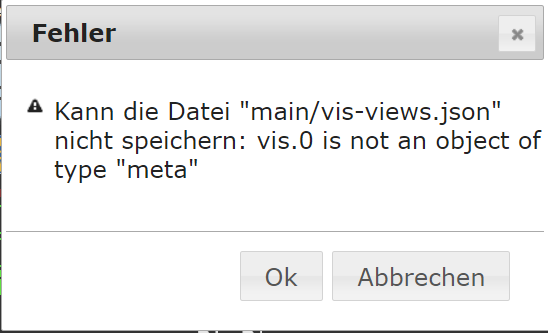
Der Pi hat neu gestartet und bei Zugriff über 192.xxxxxxx kommt die Meldung das Zugriff abgelehnt -
Skript v.2024-05-22

*** BASE SYSTEM ***
 Static hostname: raspberrypi
       Icon name: computer
Operating System: Debian GNU/Linux 12 (bookworm)
          Kernel: Linux 6.6.31+rpt-rpi-v8
    Architecture: arm64

Model           : Raspberry Pi 4 Model B Rev 1.2
Docker          : false
Virtualization  : none
Kernel          : aarch64
Userland        : 64 bit

Systemuptime and Load:
 16:49:43 up  2:36,  2 users,  load average: 0.42, 1.65, 2.18
CPU threads: 4


*** RASPBERRY THROTTLING ***
Current issues:
No throttling issues detected.

Previously detected issues:
~ Under-voltage has occurred
~ Arm frequency capping has occurred

*** Time and Time Zones ***
               Local time: Tue 2024-06-11 16:49:43 CEST
           Universal time: Tue 2024-06-11 14:49:43 UTC
                 RTC time: n/a
                Time zone: Europe/Berlin (CEST, +0200)
System clock synchronized: yes
              NTP service: active
          RTC in local TZ: no

*** Users and Groups ***
User that called 'iob diag':
ioBroker
HOME=/home/ioBroker
GROUPS=ioBroker adm dialout cdrom sudo audio video plugdev games users input render netdev gpio i2c spi iobroker

User that is running 'js-controller':
js-controller is not running

*** Display-Server-Setup ***
Display-Server: false
Desktop:
Terminal:       tty
Boot Target:    multi-user.target

*** MEMORY ***
               total        used        free      shared  buff/cache   available
Mem:            4.0G        187M        1.5G        1.2M        2.3G        3.8G
Swap:           209M          0B        209M
Total:          4.2G        187M        1.7G

Active iob-Instances:   1

         3792 M total memory
          179 M used memory
          404 M active memory
         1703 M inactive memory
         1461 M free memory
          108 M buffer memory
         2120 M swap cache
          199 M total swap
            0 M used swap
          199 M free swap

*** top - Table Of Processes  ***
top - 16:49:43 up  2:36,  2 users,  load average: 0.42, 1.65, 2.18
Tasks: 166 total,   1 running, 165 sleeping,   0 stopped,   0 zombie
%Cpu(s): 40.0 us,  0.0 sy,  0.0 ni, 60.0 id,  0.0 wa,  0.0 hi,  0.0 si,  0.0 st
MiB Mem :   3792.1 total,   1459.9 free,    180.2 used,   2228.7 buff/cache
MiB Swap:    200.0 total,    200.0 free,      0.0 used.   3611.8 avail Mem

*** FAILED SERVICES ***

  UNIT             LOAD   ACTIVE SUB    DESCRIPTION
* iobroker.service loaded failed failed ioBroker Server

LOAD   = Reflects whether the unit definition was properly loaded.
ACTIVE = The high-level unit activation state, i.e. generalization of SUB.
SUB    = The low-level unit activation state, values depend on unit type.
1 loaded units listed.

*** FILESYSTEM ***
Filesystem     Type      Size  Used Avail Use% Mounted on
udev           devtmpfs  1.6G     0  1.6G   0% /dev
tmpfs          tmpfs     380M  1.2M  379M   1% /run
/dev/mmcblk0p2 ext4       29G  3.9G   24G  15% /
tmpfs          tmpfs     1.9G     0  1.9G   0% /dev/shm
tmpfs          tmpfs     5.0M   16K  5.0M   1% /run/lock
/dev/mmcblk0p1 vfat      510M   64M  447M  13% /boot/firmware
tmpfs          tmpfs     380M     0  380M   0% /run/user/1000

Messages concerning ext4 filesystem in dmesg:
[Tue Jun 11 14:13:27 2024] Kernel command line: coherent_pool=1M 8250.nr_uarts=0 snd_bcm2835.enable_headphones=0 snd_bcm2835.enable_headphones=1 snd_bcm2835.enable_hdmi=1 snd_bcm2835.enable_hdmi=0  smsc95xx.macaddr=DC:A6:32:84:3E:C9 vc_mem.mem_base=0x3ec00000 vc_mem.mem_size=0x40000000  console=ttyS0,115200 console=tty1 root=PARTUUID=41700a7d-02 rootfstype=ext4 fsck.repair=yes rootwait cfg80211.ieee80211_regdom=DE
[Tue Jun 11 14:13:30 2024] EXT4-fs (mmcblk0p2): mounted filesystem 93c89e92-8f2e-4522-ad32-68faed883d2f ro with ordered data mode. Quota mode: none.
[Tue Jun 11 14:13:32 2024] EXT4-fs (mmcblk0p2): re-mounted 93c89e92-8f2e-4522-ad32-68faed883d2f r/w. Quota mode: none.

Show mounted filesystems:
TARGET                                                  SOURCE         FSTYPE      OPTIONS
/                                                       /dev/mmcblk0p2 ext4        rw,noatime
|-/sys                                                  sysfs          sysfs       rw,nosuid,nodev,noexec,relatime
| |-/sys/kernel/security                                securityfs     securityfs  rw,nosuid,nodev,noexec,relatime
| |-/sys/fs/cgroup                                      cgroup2        cgroup2     rw,nosuid,nodev,noexec,relatime,nsdelegate,memory_recursiveprot
| |-/sys/fs/pstore                                      pstore         pstore      rw,nosuid,nodev,noexec,relatime
| |-/sys/fs/bpf                                         bpf            bpf         rw,nosuid,nodev,noexec,relatime,mode=700
| |-/sys/kernel/debug                                   debugfs        debugfs     rw,nosuid,nodev,noexec,relatime
| |-/sys/kernel/tracing                                 tracefs        tracefs     rw,nosuid,nodev,noexec,relatime
| |-/sys/fs/fuse/connections                            fusectl        fusectl     rw,nosuid,nodev,noexec,relatime
| `-/sys/kernel/config                                  configfs       configfs    rw,nosuid,nodev,noexec,relatime
|-/proc                                                 proc           proc        rw,relatime
| `-/proc/sys/fs/binfmt_misc                            systemd-1      autofs      rw,relatime,fd=30,pgrp=1,timeout=0,minproto=5,maxproto=5,direct,pipe_ino=5213
|   `-/proc/sys/fs/binfmt_misc                          binfmt_misc    binfmt_misc rw,nosuid,nodev,noexec,relatime
|-/dev                                                  udev           devtmpfs    rw,nosuid,relatime,size=1671308k,nr_inodes=417827,mode=755
| |-/dev/pts                                            devpts         devpts      rw,nosuid,noexec,relatime,gid=5,mode=620,ptmxmode=000
| |-/dev/shm                                            tmpfs          tmpfs       rw,nosuid,nodev
| `-/dev/mqueue                                         mqueue         mqueue      rw,nosuid,nodev,noexec,relatime
|-/run                                                  tmpfs          tmpfs       rw,nosuid,nodev,noexec,relatime,size=388308k,mode=755
| |-/run/lock                                           tmpfs          tmpfs       rw,nosuid,nodev,noexec,relatime,size=5120k
| |-/run/credentials/systemd-sysctl.service             ramfs          ramfs       ro,nosuid,nodev,noexec,relatime,mode=700
| |-/run/credentials/systemd-sysusers.service           ramfs          ramfs       ro,nosuid,nodev,noexec,relatime,mode=700
| |-/run/credentials/systemd-tmpfiles-setup-dev.service ramfs          ramfs       ro,nosuid,nodev,noexec,relatime,mode=700
| |-/run/rpc_pipefs                                     sunrpc         rpc_pipefs  rw,relatime
| |-/run/credentials/systemd-tmpfiles-setup.service     ramfs          ramfs       ro,nosuid,nodev,noexec,relatime,mode=700
| `-/run/user/1000                                      tmpfs          tmpfs       rw,nosuid,nodev,relatime,size=388304k,nr_inodes=97076,mode=700,uid=1000,gid=1000
`-/boot/firmware                                        /dev/mmcblk0p1 vfat        rw,relatime,fmask=0022,dmask=0022,codepage=437,iocharset=ascii,shortname=mixed,errors=remount-ro

Files in neuralgic directories:

/var:
624M    /var/
206M    /var/cache
200M    /var/cache/apt
165M    /var/lib
133M    /var/lib/apt/lists

Archived and active journals take up 52.1M in the file system.

/opt/iobroker/backups:
38M     /opt/iobroker/backups/

/opt/iobroker/iobroker-data:
468M    /opt/iobroker/iobroker-data/
434M    /opt/iobroker/iobroker-data/files
142M    /opt/iobroker/iobroker-data/files/vis-2
138M    /opt/iobroker/iobroker-data/files/javascript.admin
118M    /opt/iobroker/iobroker-data/files/javascript.admin/static

The five largest files in iobroker-data are:
29M     /opt/iobroker/iobroker-data/objects.jsonl
24M     /opt/iobroker/iobroker-data/files/web.admin/static/js/main.135279a0.js.map
19M     /opt/iobroker/iobroker-data/files/vis-2/static/js/main.e7bb655f.js.map
19M     /opt/iobroker/iobroker-data/files/vis-2/static/js/main.368dc292.js.map
19M     /opt/iobroker/iobroker-data/files/vis-2/customWidgets.js.map

USB-Devices by-id:
USB-Sticks -  Avoid direct links to /dev/tty* in your adapter setups, please always prefer the links 'by-id':

No Devices found 'by-id'


*** NodeJS-Installation ***

/usr/bin/nodejs         v20.14.0
/usr/bin/node           v20.14.0
/usr/bin/npm            10.7.0
/usr/bin/npx            10.7.0
/usr/bin/corepack       0.28.1


nodejs:
  Installed: 20.14.0-1nodesource1
  Candidate: 20.14.0-1nodesource1
  Version table:
 *** 20.14.0-1nodesource1 1001
        500 https://deb.nodesource.com/node_20.x nodistro/main arm64 Packages
        100 /var/lib/dpkg/status
     20.13.1-1nodesource1 1001
        500 https://deb.nodesource.com/node_20.x nodistro/main arm64 Packages
     20.13.0-1nodesource1 1001
        500 https://deb.nodesource.com/node_20.x nodistro/main arm64 Packages
     20.12.2-1nodesource1 1001
        500 https://deb.nodesource.com/node_20.x nodistro/main arm64 Packages
     20.12.1-1nodesource1 1001
        500 https://deb.nodesource.com/node_20.x nodistro/main arm64 Packages
     20.12.0-1nodesource1 1001
        500 https://deb.nodesource.com/node_20.x nodistro/main arm64 Packages
     20.11.1-1nodesource1 1001
        500 https://deb.nodesource.com/node_20.x nodistro/main arm64 Packages
     20.11.0-1nodesource1 1001
        500 https://deb.nodesource.com/node_20.x nodistro/main arm64 Packages
     20.10.0-1nodesource1 1001
        500 https://deb.nodesource.com/node_20.x nodistro/main arm64 Packages
     20.9.0-1nodesource1 1001
        500 https://deb.nodesource.com/node_20.x nodistro/main arm64 Packages
     20.8.1-1nodesource1 1001
        500 https://deb.nodesource.com/node_20.x nodistro/main arm64 Packages
     20.8.0-1nodesource1 1001
        500 https://deb.nodesource.com/node_20.x nodistro/main arm64 Packages
     20.7.0-1nodesource1 1001
        500 https://deb.nodesource.com/node_20.x nodistro/main arm64 Packages
     20.6.1-1nodesource1 1001
        500 https://deb.nodesource.com/node_20.x nodistro/main arm64 Packages
     20.6.0-1nodesource1 1001
        500 https://deb.nodesource.com/node_20.x nodistro/main arm64 Packages
     20.5.1-1nodesource1 1001
        500 https://deb.nodesource.com/node_20.x nodistro/main arm64 Packages
     20.5.0-1nodesource1 1001
        500 https://deb.nodesource.com/node_20.x nodistro/main arm64 Packages
     20.4.0-1nodesource1 1001
        500 https://deb.nodesource.com/node_20.x nodistro/main arm64 Packages
     20.3.1-1nodesource1 1001
        500 https://deb.nodesource.com/node_20.x nodistro/main arm64 Packages
     20.3.0-1nodesource1 1001
        500 https://deb.nodesource.com/node_20.x nodistro/main arm64 Packages
     20.2.0-1nodesource1 1001
        500 https://deb.nodesource.com/node_20.x nodistro/main arm64 Packages
     20.1.0-1nodesource1 1001
        500 https://deb.nodesource.com/node_20.x nodistro/main arm64 Packages
     20.0.0-1nodesource1 1001
        500 https://deb.nodesource.com/node_20.x nodistro/main arm64 Packages
     18.19.0+dfsg-6~deb12u1 500
        500 http://deb.debian.org/debian-security bookworm-security/main arm64 Packages
     18.13.0+dfsg1-1 500
        500 http://deb.debian.org/debian bookworm/main arm64 Packages

Temp directories causing npm8 problem: 0
No problems detected

Errors in npm tree:

*** ioBroker-Installation ***

ioBroker Status
iobroker is not running on this host.


Objects type: jsonl
States  type: jsonl

Core adapters versions
js-controller:  5.0.19
admin:          6.13.16
javascript:     "javascript" not found

nodejs modules from github:     0

Adapter State
  system.adapter.admin.0                  : admin                 : raspberrypi                              -  enabled, port: 8081, bind: 0.0.0.0, run as: admin
  system.adapter.backitup.0               : backitup              : raspberrypi                              -  enabled
  system.adapter.cloud.0                  : cloud                 : raspberrypi                              -  enabled
  system.adapter.discovery.0              : discovery             : raspberrypi                              -  enabled
  system.adapter.history.0                : history               : raspberrypi                              -  enabled
  system.adapter.hue.0                    : hue                   : raspberrypi                              -  enabled, port: 443
  system.adapter.hue.1                    : hue                   : raspberrypi                              -  enabled, port: 443
  system.adapter.iqontrol.0               : iqontrol              : raspberrypi                              -  enabled
  system.adapter.jarvis.0                 : jarvis                : raspberrypi                              -  enabled, port: 8082, bind: 0.0.0.0, run as: admin
  system.adapter.javascript.0             : javascript            : raspberrypi                              -  enabled
  system.adapter.ping.0                   : ping                  : raspberrypi                              -  enabled
  system.adapter.tr-064.0                 : tr-064                : raspberrypi                              -  enabled
  system.adapter.vis-2.0                  : vis-2                 : raspberrypi                              -  enabled
  system.adapter.web.0                    : web                   : raspberrypi                              -  enabled, port: 8082, bind: 0.0.0.0, run as: admin
  system.adapter.wifilight.0              : wifilight             : raspberrypi                              -  enabled

+ instance is alive

Enabled adapters with bindings
  system.adapter.admin.0                  : admin                 : raspberrypi                              -  enabled, port: 8081, bind: 0.0.0.0, run as: admin
  system.adapter.hue.0                    : hue                   : raspberrypi                              -  enabled, port: 443
  system.adapter.hue.1                    : hue                   : raspberrypi                              -  enabled, port: 443
  system.adapter.jarvis.0                 : jarvis                : raspberrypi                              -  enabled, port: 8082, bind: 0.0.0.0, run as: admin
  system.adapter.web.0                    : web                   : raspberrypi                              -  enabled, port: 8082, bind: 0.0.0.0, run as: admin

ioBroker-Repositories
stable        : http://download.iobroker.net/sources-dist.json
beta          : http://download.iobroker.net/sources-dist-latest.json

Active repo(s): stable

Installed ioBroker-Instances
Used repository: stable
Adapter    "admin"        : 6.13.16  , installed 6.13.16
Adapter    "backitup"     : 2.11.0   , installed 2.11.0
Controller "js-controller": 5.0.19   , installed 5.0.19

Objects and States
Please stand by - This may take a while
Objects:        446
States:         195

*** OS-Repositories and Updates ***
Hit:1 http://deb.debian.org/debian bookworm InRelease
Hit:2 http://archive.raspberrypi.com/debian bookworm InRelease
Hit:3 http://deb.debian.org/debian-security bookworm-security InRelease
Hit:4 http://deb.debian.org/debian bookworm-updates InRelease
Hit:5 https://deb.nodesource.com/node_20.x nodistro InRelease
Reading package lists...
Pending Updates: 0

*** Listening Ports ***
Active Internet connections (only servers)
Proto Recv-Q Send-Q Local Address           Foreign Address         State       User       Inode      PID/Program name
tcp        0      0 0.0.0.0:22              0.0.0.0:*               LISTEN      0          6154       680/sshd: /usr/sbin
tcp6       0      0 :::22                   :::*                    LISTEN      0          6156       680/sshd: /usr/sbin
udp        0      0 0.0.0.0:56833           0.0.0.0:*                           104        1653       532/avahi-daemon: r
udp        0      0 0.0.0.0:5353            0.0.0.0:*                           104        1651       532/avahi-daemon: r
udp6       0      0 :::40736                :::*                                104        1654       532/avahi-daemon: r
udp6       0      0 fe80::92db:af89:7c1:546 :::*                                0          5927       618/NetworkManager
udp6       0      0 :::5353                 :::*                                104        1652       532/avahi-daemon: r

*** Log File - Last 25 Lines ***

2024-06-11 16:38:11.181  - info: host.raspberrypi stopInstance system.adapter.vis-icontwo.0 (force=false, process=false)
2024-06-11 16:38:11.181  - info: host.raspberrypi stopInstance system.adapter.vis-jqui-mfd.0 (force=false, process=false)
2024-06-11 16:38:11.181  - info: host.raspberrypi stopInstance system.adapter.vis-justgage.0 (force=false, process=false)
2024-06-11 16:38:11.181  - info: host.raspberrypi stopInstance system.adapter.vis-material-advanced.0 (force=false, process=false)
2024-06-11 16:38:11.181  - info: host.raspberrypi stopInstance system.adapter.vis-metro.0 (force=false, process=false)
2024-06-11 16:38:11.181  - info: host.raspberrypi stopInstance system.adapter.vis-players.0 (force=false, process=false)
2024-06-11 16:38:11.181  - info: host.raspberrypi stopInstance system.adapter.vis-timeandweather.0 (force=false, process=false)
2024-06-11 16:38:11.181  - info: host.raspberrypi stopInstance system.adapter.vis-weather.0 (force=false, process=false)
2024-06-11 16:38:11.181  - info: host.raspberrypi stopInstance system.adapter.vis.0 (force=false, process=false)
2024-06-11 16:38:11.182  - info: host.raspberrypi iobroker npm-install: exit null
2024-06-11 16:38:11.188  - info: backitup.0 (COMPACT) Got terminate signal TERMINATE_YOURSELF
2024-06-11 16:38:11.191  - info: host.raspberrypi.compactgroup1 stopInstance system.adapter.backitup.0 send kill signal
2024-06-11 16:38:11.192  - info: backitup.0 (COMPACT) terminating
2024-06-11 16:38:11.193  - info: backitup.0 (COMPACT) Terminated (NO_ERROR): Without reason
2024-06-11 16:38:11.268  - info: backitup.0 (COMPACT) terminating
2024-06-11 16:38:12.183  - warn: host.raspberrypi startInstance cannot find adapter "icons-mfd-png@1.1.0". Try to install it... 1 attempt
2024-06-11 16:38:12.183  - info: host.raspberrypi iobroker install icons-mfd-png@1.1.0 using installedFrom
2024-06-11 16:38:12.267  - info: backitup.0 (COMPACT) terminating with timeout
2024-06-11 16:38:12.330  - info: host.raspberrypi.compactgroup1 instance system.adapter.backitup.0 terminated with code 0 (NO_ERROR)
2024-06-11 16:38:12.336  - info: host.raspberrypi.compactgroup1 All instances are stopped.
2024-06-11 16:38:12.379  - info: host.raspberrypi.compactgroup1 terminated
2024-06-11 16:38:13.404  - info: host.raspberrypi compactgroup controller 1 terminated with code 1 (JS_CONTROLLER_STOPPED)
2024-06-11 16:38:13.530  - info: host.raspberrypi All instances are stopped.
2024-06-11 16:38:13.697  - info: host.raspberrypi terminated
2024-06-11 16:38:14.028  - info: host.raspberrypi iobroker npm-install:  Unable to subscribe to meta namespace "meta." changes: Connection is closed.
============ Mark until here for C&P =============
iob diag has finished.
-
Skript v.2024-05-22

*** BASE SYSTEM ***
 Static hostname: raspberrypi
       Icon name: computer
Operating System: Debian GNU/Linux 12 (bookworm)
          Kernel: Linux 6.6.31+rpt-rpi-v8
    Architecture: arm64

Model           : Raspberry Pi 4 Model B Rev 1.2
Docker          : false
Virtualization  : none
Kernel          : aarch64
Userland        : 64 bit

Systemuptime and Load:
 16:49:43 up  2:36,  2 users,  load average: 0.42, 1.65, 2.18
CPU threads: 4


*** RASPBERRY THROTTLING ***
Current issues:
No throttling issues detected.

Previously detected issues:
~ Under-voltage has occurred
~ Arm frequency capping has occurred

*** Time and Time Zones ***
               Local time: Tue 2024-06-11 16:49:43 CEST
           Universal time: Tue 2024-06-11 14:49:43 UTC
                 RTC time: n/a
                Time zone: Europe/Berlin (CEST, +0200)
System clock synchronized: yes
              NTP service: active
          RTC in local TZ: no

*** Users and Groups ***
User that called 'iob diag':
ioBroker
HOME=/home/ioBroker
GROUPS=ioBroker adm dialout cdrom sudo audio video plugdev games users input render netdev gpio i2c spi iobroker

User that is running 'js-controller':
js-controller is not running

*** Display-Server-Setup ***
Display-Server: false
Desktop:
Terminal:       tty
Boot Target:    multi-user.target

*** MEMORY ***
               total        used        free      shared  buff/cache   available
Mem:            4.0G        187M        1.5G        1.2M        2.3G        3.8G
Swap:           209M          0B        209M
Total:          4.2G        187M        1.7G

Active iob-Instances:   1

         3792 M total memory
          179 M used memory
          404 M active memory
         1703 M inactive memory
         1461 M free memory
          108 M buffer memory
         2120 M swap cache
          199 M total swap
            0 M used swap
          199 M free swap

*** top - Table Of Processes  ***
top - 16:49:43 up  2:36,  2 users,  load average: 0.42, 1.65, 2.18
Tasks: 166 total,   1 running, 165 sleeping,   0 stopped,   0 zombie
%Cpu(s): 40.0 us,  0.0 sy,  0.0 ni, 60.0 id,  0.0 wa,  0.0 hi,  0.0 si,  0.0 st
MiB Mem :   3792.1 total,   1459.9 free,    180.2 used,   2228.7 buff/cache
MiB Swap:    200.0 total,    200.0 free,      0.0 used.   3611.8 avail Mem

*** FAILED SERVICES ***

  UNIT             LOAD   ACTIVE SUB    DESCRIPTION
* iobroker.service loaded failed failed ioBroker Server

LOAD   = Reflects whether the unit definition was properly loaded.
ACTIVE = The high-level unit activation state, i.e. generalization of SUB.
SUB    = The low-level unit activation state, values depend on unit type.
1 loaded units listed.

*** FILESYSTEM ***
Filesystem     Type      Size  Used Avail Use% Mounted on
udev           devtmpfs  1.6G     0  1.6G   0% /dev
tmpfs          tmpfs     380M  1.2M  379M   1% /run
/dev/mmcblk0p2 ext4       29G  3.9G   24G  15% /
tmpfs          tmpfs     1.9G     0  1.9G   0% /dev/shm
tmpfs          tmpfs     5.0M   16K  5.0M   1% /run/lock
/dev/mmcblk0p1 vfat      510M   64M  447M  13% /boot/firmware
tmpfs          tmpfs     380M     0  380M   0% /run/user/1000

Messages concerning ext4 filesystem in dmesg:
[Tue Jun 11 14:13:27 2024] Kernel command line: coherent_pool=1M 8250.nr_uarts=0 snd_bcm2835.enable_headphones=0 snd_bcm2835.enable_headphones=1 snd_bcm2835.enable_hdmi=1 snd_bcm2835.enable_hdmi=0  smsc95xx.macaddr=DC:A6:32:84:3E:C9 vc_mem.mem_base=0x3ec00000 vc_mem.mem_size=0x40000000  console=ttyS0,115200 console=tty1 root=PARTUUID=41700a7d-02 rootfstype=ext4 fsck.repair=yes rootwait cfg80211.ieee80211_regdom=DE
[Tue Jun 11 14:13:30 2024] EXT4-fs (mmcblk0p2): mounted filesystem 93c89e92-8f2e-4522-ad32-68faed883d2f ro with ordered data mode. Quota mode: none.
[Tue Jun 11 14:13:32 2024] EXT4-fs (mmcblk0p2): re-mounted 93c89e92-8f2e-4522-ad32-68faed883d2f r/w. Quota mode: none.

Show mounted filesystems:
TARGET                                                  SOURCE         FSTYPE      OPTIONS
/                                                       /dev/mmcblk0p2 ext4        rw,noatime
|-/sys                                                  sysfs          sysfs       rw,nosuid,nodev,noexec,relatime
| |-/sys/kernel/security                                securityfs     securityfs  rw,nosuid,nodev,noexec,relatime
| |-/sys/fs/cgroup                                      cgroup2        cgroup2     rw,nosuid,nodev,noexec,relatime,nsdelegate,memory_recursiveprot
| |-/sys/fs/pstore                                      pstore         pstore      rw,nosuid,nodev,noexec,relatime
| |-/sys/fs/bpf                                         bpf            bpf         rw,nosuid,nodev,noexec,relatime,mode=700
| |-/sys/kernel/debug                                   debugfs        debugfs     rw,nosuid,nodev,noexec,relatime
| |-/sys/kernel/tracing                                 tracefs        tracefs     rw,nosuid,nodev,noexec,relatime
| |-/sys/fs/fuse/connections                            fusectl        fusectl     rw,nosuid,nodev,noexec,relatime
| `-/sys/kernel/config                                  configfs       configfs    rw,nosuid,nodev,noexec,relatime
|-/proc                                                 proc           proc        rw,relatime
| `-/proc/sys/fs/binfmt_misc                            systemd-1      autofs      rw,relatime,fd=30,pgrp=1,timeout=0,minproto=5,maxproto=5,direct,pipe_ino=5213
|   `-/proc/sys/fs/binfmt_misc                          binfmt_misc    binfmt_misc rw,nosuid,nodev,noexec,relatime
|-/dev                                                  udev           devtmpfs    rw,nosuid,relatime,size=1671308k,nr_inodes=417827,mode=755
| |-/dev/pts                                            devpts         devpts      rw,nosuid,noexec,relatime,gid=5,mode=620,ptmxmode=000
| |-/dev/shm                                            tmpfs          tmpfs       rw,nosuid,nodev
| `-/dev/mqueue                                         mqueue         mqueue      rw,nosuid,nodev,noexec,relatime
|-/run                                                  tmpfs          tmpfs       rw,nosuid,nodev,noexec,relatime,size=388308k,mode=755
| |-/run/lock                                           tmpfs          tmpfs       rw,nosuid,nodev,noexec,relatime,size=5120k
| |-/run/credentials/systemd-sysctl.service             ramfs          ramfs       ro,nosuid,nodev,noexec,relatime,mode=700
| |-/run/credentials/systemd-sysusers.service           ramfs          ramfs       ro,nosuid,nodev,noexec,relatime,mode=700
| |-/run/credentials/systemd-tmpfiles-setup-dev.service ramfs          ramfs       ro,nosuid,nodev,noexec,relatime,mode=700
| |-/run/rpc_pipefs                                     sunrpc         rpc_pipefs  rw,relatime
| |-/run/credentials/systemd-tmpfiles-setup.service     ramfs          ramfs       ro,nosuid,nodev,noexec,relatime,mode=700
| `-/run/user/1000                                      tmpfs          tmpfs       rw,nosuid,nodev,relatime,size=388304k,nr_inodes=97076,mode=700,uid=1000,gid=1000
`-/boot/firmware                                        /dev/mmcblk0p1 vfat        rw,relatime,fmask=0022,dmask=0022,codepage=437,iocharset=ascii,shortname=mixed,errors=remount-ro

Files in neuralgic directories:

/var:
624M    /var/
206M    /var/cache
200M    /var/cache/apt
165M    /var/lib
133M    /var/lib/apt/lists

Archived and active journals take up 52.1M in the file system.

/opt/iobroker/backups:
38M     /opt/iobroker/backups/

/opt/iobroker/iobroker-data:
468M    /opt/iobroker/iobroker-data/
434M    /opt/iobroker/iobroker-data/files
142M    /opt/iobroker/iobroker-data/files/vis-2
138M    /opt/iobroker/iobroker-data/files/javascript.admin
118M    /opt/iobroker/iobroker-data/files/javascript.admin/static

The five largest files in iobroker-data are:
29M     /opt/iobroker/iobroker-data/objects.jsonl
24M     /opt/iobroker/iobroker-data/files/web.admin/static/js/main.135279a0.js.map
19M     /opt/iobroker/iobroker-data/files/vis-2/static/js/main.e7bb655f.js.map
19M     /opt/iobroker/iobroker-data/files/vis-2/static/js/main.368dc292.js.map
19M     /opt/iobroker/iobroker-data/files/vis-2/customWidgets.js.map

USB-Devices by-id:
USB-Sticks -  Avoid direct links to /dev/tty* in your adapter setups, please always prefer the links 'by-id':

No Devices found 'by-id'


*** NodeJS-Installation ***

/usr/bin/nodejs         v20.14.0
/usr/bin/node           v20.14.0
/usr/bin/npm            10.7.0
/usr/bin/npx            10.7.0
/usr/bin/corepack       0.28.1


nodejs:
  Installed: 20.14.0-1nodesource1
  Candidate: 20.14.0-1nodesource1
  Version table:
 *** 20.14.0-1nodesource1 1001
        500 https://deb.nodesource.com/node_20.x nodistro/main arm64 Packages
        100 /var/lib/dpkg/status
     20.13.1-1nodesource1 1001
        500 https://deb.nodesource.com/node_20.x nodistro/main arm64 Packages
     20.13.0-1nodesource1 1001
        500 https://deb.nodesource.com/node_20.x nodistro/main arm64 Packages
     20.12.2-1nodesource1 1001
        500 https://deb.nodesource.com/node_20.x nodistro/main arm64 Packages
     20.12.1-1nodesource1 1001
        500 https://deb.nodesource.com/node_20.x nodistro/main arm64 Packages
     20.12.0-1nodesource1 1001
        500 https://deb.nodesource.com/node_20.x nodistro/main arm64 Packages
     20.11.1-1nodesource1 1001
        500 https://deb.nodesource.com/node_20.x nodistro/main arm64 Packages
     20.11.0-1nodesource1 1001
        500 https://deb.nodesource.com/node_20.x nodistro/main arm64 Packages
     20.10.0-1nodesource1 1001
        500 https://deb.nodesource.com/node_20.x nodistro/main arm64 Packages
     20.9.0-1nodesource1 1001
        500 https://deb.nodesource.com/node_20.x nodistro/main arm64 Packages
     20.8.1-1nodesource1 1001
        500 https://deb.nodesource.com/node_20.x nodistro/main arm64 Packages
     20.8.0-1nodesource1 1001
        500 https://deb.nodesource.com/node_20.x nodistro/main arm64 Packages
     20.7.0-1nodesource1 1001
        500 https://deb.nodesource.com/node_20.x nodistro/main arm64 Packages
     20.6.1-1nodesource1 1001
        500 https://deb.nodesource.com/node_20.x nodistro/main arm64 Packages
     20.6.0-1nodesource1 1001
        500 https://deb.nodesource.com/node_20.x nodistro/main arm64 Packages
     20.5.1-1nodesource1 1001
        500 https://deb.nodesource.com/node_20.x nodistro/main arm64 Packages
     20.5.0-1nodesource1 1001
        500 https://deb.nodesource.com/node_20.x nodistro/main arm64 Packages
     20.4.0-1nodesource1 1001
        500 https://deb.nodesource.com/node_20.x nodistro/main arm64 Packages
     20.3.1-1nodesource1 1001
        500 https://deb.nodesource.com/node_20.x nodistro/main arm64 Packages
     20.3.0-1nodesource1 1001
        500 https://deb.nodesource.com/node_20.x nodistro/main arm64 Packages
     20.2.0-1nodesource1 1001
        500 https://deb.nodesource.com/node_20.x nodistro/main arm64 Packages
     20.1.0-1nodesource1 1001
        500 https://deb.nodesource.com/node_20.x nodistro/main arm64 Packages
     20.0.0-1nodesource1 1001
        500 https://deb.nodesource.com/node_20.x nodistro/main arm64 Packages
     18.19.0+dfsg-6~deb12u1 500
        500 http://deb.debian.org/debian-security bookworm-security/main arm64 Packages
     18.13.0+dfsg1-1 500
        500 http://deb.debian.org/debian bookworm/main arm64 Packages

Temp directories causing npm8 problem: 0
No problems detected

Errors in npm tree:

*** ioBroker-Installation ***

ioBroker Status
iobroker is not running on this host.


Objects type: jsonl
States  type: jsonl

Core adapters versions
js-controller:  5.0.19
admin:          6.13.16
javascript:     "javascript" not found

nodejs modules from github:     0

Adapter State
  system.adapter.admin.0                  : admin                 : raspberrypi                              -  enabled, port: 8081, bind: 0.0.0.0, run as: admin
  system.adapter.backitup.0               : backitup              : raspberrypi                              -  enabled
  system.adapter.cloud.0                  : cloud                 : raspberrypi                              -  enabled
  system.adapter.discovery.0              : discovery             : raspberrypi                              -  enabled
  system.adapter.history.0                : history               : raspberrypi                              -  enabled
  system.adapter.hue.0                    : hue                   : raspberrypi                              -  enabled, port: 443
  system.adapter.hue.1                    : hue                   : raspberrypi                              -  enabled, port: 443
  system.adapter.iqontrol.0               : iqontrol              : raspberrypi                              -  enabled
  system.adapter.jarvis.0                 : jarvis                : raspberrypi                              -  enabled, port: 8082, bind: 0.0.0.0, run as: admin
  system.adapter.javascript.0             : javascript            : raspberrypi                              -  enabled
  system.adapter.ping.0                   : ping                  : raspberrypi                              -  enabled
  system.adapter.tr-064.0                 : tr-064                : raspberrypi                              -  enabled
  system.adapter.vis-2.0                  : vis-2                 : raspberrypi                              -  enabled
  system.adapter.web.0                    : web                   : raspberrypi                              -  enabled, port: 8082, bind: 0.0.0.0, run as: admin
  system.adapter.wifilight.0              : wifilight             : raspberrypi                              -  enabled

+ instance is alive

Enabled adapters with bindings
  system.adapter.admin.0                  : admin                 : raspberrypi                              -  enabled, port: 8081, bind: 0.0.0.0, run as: admin
  system.adapter.hue.0                    : hue                   : raspberrypi                              -  enabled, port: 443
  system.adapter.hue.1                    : hue                   : raspberrypi                              -  enabled, port: 443
  system.adapter.jarvis.0                 : jarvis                : raspberrypi                              -  enabled, port: 8082, bind: 0.0.0.0, run as: admin
  system.adapter.web.0                    : web                   : raspberrypi                              -  enabled, port: 8082, bind: 0.0.0.0, run as: admin

ioBroker-Repositories
stable        : http://download.iobroker.net/sources-dist.json
beta          : http://download.iobroker.net/sources-dist-latest.json

Active repo(s): stable

Installed ioBroker-Instances
Used repository: stable
Adapter    "admin"        : 6.13.16  , installed 6.13.16
Adapter    "backitup"     : 2.11.0   , installed 2.11.0
Controller "js-controller": 5.0.19   , installed 5.0.19

Objects and States
Please stand by - This may take a while
Objects:        446
States:         195

*** OS-Repositories and Updates ***
Hit:1 http://deb.debian.org/debian bookworm InRelease
Hit:2 http://archive.raspberrypi.com/debian bookworm InRelease
Hit:3 http://deb.debian.org/debian-security bookworm-security InRelease
Hit:4 http://deb.debian.org/debian bookworm-updates InRelease
Hit:5 https://deb.nodesource.com/node_20.x nodistro InRelease
Reading package lists...
Pending Updates: 0

*** Listening Ports ***
Active Internet connections (only servers)
Proto Recv-Q Send-Q Local Address           Foreign Address         State       User       Inode      PID/Program name
tcp        0      0 0.0.0.0:22              0.0.0.0:*               LISTEN      0          6154       680/sshd: /usr/sbin
tcp6       0      0 :::22                   :::*                    LISTEN      0          6156       680/sshd: /usr/sbin
udp        0      0 0.0.0.0:56833           0.0.0.0:*                           104        1653       532/avahi-daemon: r
udp        0      0 0.0.0.0:5353            0.0.0.0:*                           104        1651       532/avahi-daemon: r
udp6       0      0 :::40736                :::*                                104        1654       532/avahi-daemon: r
udp6       0      0 fe80::92db:af89:7c1:546 :::*                                0          5927       618/NetworkManager
udp6       0      0 :::5353                 :::*                                104        1652       532/avahi-daemon: r

*** Log File - Last 25 Lines ***

2024-06-11 16:38:11.181  - info: host.raspberrypi stopInstance system.adapter.vis-icontwo.0 (force=false, process=false)
2024-06-11 16:38:11.181  - info: host.raspberrypi stopInstance system.adapter.vis-jqui-mfd.0 (force=false, process=false)
2024-06-11 16:38:11.181  - info: host.raspberrypi stopInstance system.adapter.vis-justgage.0 (force=false, process=false)
2024-06-11 16:38:11.181  - info: host.raspberrypi stopInstance system.adapter.vis-material-advanced.0 (force=false, process=false)
2024-06-11 16:38:11.181  - info: host.raspberrypi stopInstance system.adapter.vis-metro.0 (force=false, process=false)
2024-06-11 16:38:11.181  - info: host.raspberrypi stopInstance system.adapter.vis-players.0 (force=false, process=false)
2024-06-11 16:38:11.181  - info: host.raspberrypi stopInstance system.adapter.vis-timeandweather.0 (force=false, process=false)
2024-06-11 16:38:11.181  - info: host.raspberrypi stopInstance system.adapter.vis-weather.0 (force=false, process=false)
2024-06-11 16:38:11.181  - info: host.raspberrypi stopInstance system.adapter.vis.0 (force=false, process=false)
2024-06-11 16:38:11.182  - info: host.raspberrypi iobroker npm-install: exit null
2024-06-11 16:38:11.188  - info: backitup.0 (COMPACT) Got terminate signal TERMINATE_YOURSELF
2024-06-11 16:38:11.191  - info: host.raspberrypi.compactgroup1 stopInstance system.adapter.backitup.0 send kill signal
2024-06-11 16:38:11.192  - info: backitup.0 (COMPACT) terminating
2024-06-11 16:38:11.193  - info: backitup.0 (COMPACT) Terminated (NO_ERROR): Without reason
2024-06-11 16:38:11.268  - info: backitup.0 (COMPACT) terminating
2024-06-11 16:38:12.183  - warn: host.raspberrypi startInstance cannot find adapter "icons-mfd-png@1.1.0". Try to install it... 1 attempt
2024-06-11 16:38:12.183  - info: host.raspberrypi iobroker install icons-mfd-png@1.1.0 using installedFrom
2024-06-11 16:38:12.267  - info: backitup.0 (COMPACT) terminating with timeout
2024-06-11 16:38:12.330  - info: host.raspberrypi.compactgroup1 instance system.adapter.backitup.0 terminated with code 0 (NO_ERROR)
2024-06-11 16:38:12.336  - info: host.raspberrypi.compactgroup1 All instances are stopped.
2024-06-11 16:38:12.379  - info: host.raspberrypi.compactgroup1 terminated
2024-06-11 16:38:13.404  - info: host.raspberrypi compactgroup controller 1 terminated with code 1 (JS_CONTROLLER_STOPPED)
2024-06-11 16:38:13.530  - info: host.raspberrypi All instances are stopped.
2024-06-11 16:38:13.697  - info: host.raspberrypi terminated
2024-06-11 16:38:14.028  - info: host.raspberrypi iobroker npm-install:  Unable to subscribe to meta namespace "meta." changes: Connection is closed.
============ Mark until here for C&P =============
iob diag has finished.
@loco
iobroker ist erreichbar über http://192.168.220.191:8081/#tab-intro
Vis lehnt Verbindung ab über http://192.168.220.191:8082/vis/edit.html -
@loco
iobroker ist erreichbar über http://192.168.220.191:8081/#tab-intro
Vis lehnt Verbindung ab über http://192.168.220.191:8082/vis/edit.html@loco sagte in IoBroker und VIS verweigert Zugriff:
Vis lehnt Verbindung ab über http://192.168.220.191:8082/vis/edit.html
hast du doch gar nicht installiert!?
@loco sagte in IoBroker und VIS verweigert Zugriff:
system.adapter.ping.0 : ping : raspberrypi - enabled
system.adapter.tr-064.0 : tr-064 : raspberrypi - enabled
system.adapter.vis-2.0 : vis-2 : raspberrypi - enabled
system.adapter.web.0 : web : raspberrypi - enabled, port: 8082, bind: 0.0.0.0, run as: admin
system.adapter.wifilight.0 : wifilight : raspberrypi - enabled -
@loco sagte in IoBroker und VIS verweigert Zugriff:
Vis lehnt Verbindung ab über http://192.168.220.191:8082/vis/edit.html
hast du doch gar nicht installiert!?
@loco sagte in IoBroker und VIS verweigert Zugriff:
system.adapter.ping.0 : ping : raspberrypi - enabled
system.adapter.tr-064.0 : tr-064 : raspberrypi - enabled
system.adapter.vis-2.0 : vis-2 : raspberrypi - enabled
system.adapter.web.0 : web : raspberrypi - enabled, port: 8082, bind: 0.0.0.0, run as: admin
system.adapter.wifilight.0 : wifilight : raspberrypi - enabled -
@ro75
Der Pi hat neu gestartet und bei Zugriff über 192.xxxxxxx kommt die Meldung das Zugriff abgelehnt@loco sagte in IoBroker und VIS verweigert Zugriff:
Der Pi hat neu gestartet
wieso?
der startet nicht von selber neu.@ro75 sagte in IoBroker und VIS verweigert Zugriff:
Das Installieren der Adapter dauert etwas, Geduld. Die Backupdaten sind schnell eingespielt - der Rest dauert.
...bis zu 1h
in der Zeit darf das Wiederherstellen und neu Bauen der Adapter nicht gestört / unterbrochen werden, weil sonst ein undefinierter Zustand entstehen kann.
-
Hab jetzt Zugriff auf Vis --> mußte die Instanz Vis starten, jedoch ist meine Vis total beschädigt und passt überhaupt nicht mehr zusammen....
Denke es fehlen einige Adapter (eCharts u.s.w.)
@loco sagte in IoBroker und VIS verweigert Zugriff:
Denke es fehlen einige Adapter (eCharts u.s.w.)
das dauert!!!
nicht stören!!
-
@loco sagte in IoBroker und VIS verweigert Zugriff:
Denke es fehlen einige Adapter (eCharts u.s.w.)
das dauert!!!
nicht stören!!
-
@homoran
Okay, hab mal alles geschloßen. Ich geh mal nenn Bierchen trinken. Mal schauen wie es heute Abend aussieht. Melde mich....@loco sagte in IoBroker und VIS verweigert Zugriff:
mal alles geschloßen. Ich geh mal nenn Bierchen trinken. Mal schauen wie es heute Abend aussieht. Melde mich....
Hast du einen neuen Restore angestoßen?
wenn durch den Neustart eine Unterbrechung des Restores stattgefunden hat, kannst du Bierchen trinken bis zum abwinken.
du kannst und darfst beim Restore mit
iob logs --watchbeobachtenob das System noch mit der Wiederherstellung beschäftigt ist. -
@loco sagte in IoBroker und VIS verweigert Zugriff:
mal alles geschloßen. Ich geh mal nenn Bierchen trinken. Mal schauen wie es heute Abend aussieht. Melde mich....
Hast du einen neuen Restore angestoßen?
wenn durch den Neustart eine Unterbrechung des Restores stattgefunden hat, kannst du Bierchen trinken bis zum abwinken.
du kannst und darfst beim Restore mit
iob logs --watchbeobachtenob das System noch mit der Wiederherstellung beschäftigt ist. -
@loco sagte in IoBroker und VIS verweigert Zugriff:
mal alles geschloßen. Ich geh mal nenn Bierchen trinken. Mal schauen wie es heute Abend aussieht. Melde mich....
Hast du einen neuen Restore angestoßen?
wenn durch den Neustart eine Unterbrechung des Restores stattgefunden hat, kannst du Bierchen trinken bis zum abwinken.
du kannst und darfst beim Restore mit
iob logs --watchbeobachtenob das System noch mit der Wiederherstellung beschäftigt ist. -
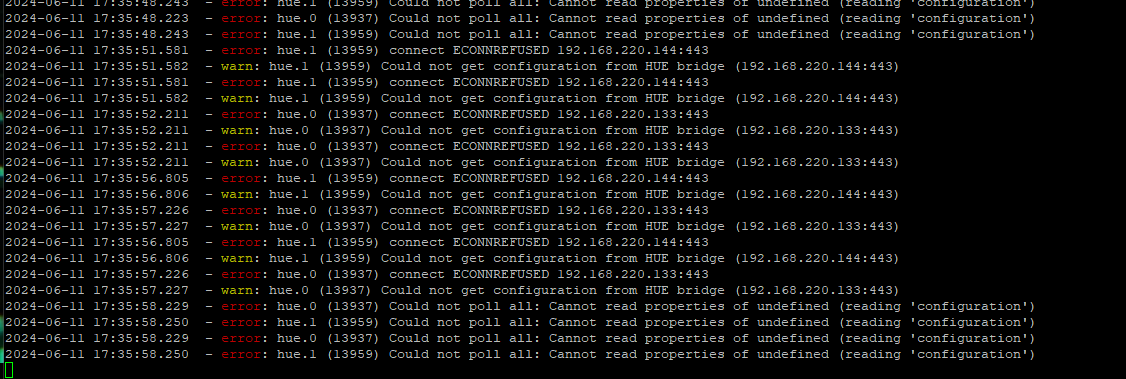
@loco nicht als Screenshot!
als Text in code-tags posten. -
@loco sagte in IoBroker und VIS verweigert Zugriff:
@homoran
geht nicht, ist ja grad aktiv und ich beobachte nur...Natürlich geht das.
welche Controller Version steckt im Backup?
kein Support per PN! - Fragen im Forum stellen - Benutzt das Voting rechts unten im Beitrag wenn er euch geholfen hat.
Das Forum freut sich über eine Spende. Benutzt dazu den Spendenbutton oben rechts. Danke!
der Installationsfixer: curl -fsL https://iobroker.net/fix.sh | bash - -
@loco sagte in IoBroker und VIS verweigert Zugriff:
@homoran
geht nicht, ist ja grad aktiv und ich beobachte nur...Natürlich geht das.
welche Controller Version steckt im Backup?
-
@loco sagte in IoBroker und VIS verweigert Zugriff:
Wo kann ich das denn sehen?
sagen wir es mal so:
wenn die Version im Backup nicht mit v5 der neuen Installation kompatibel ist, gibt es eine Warnmeldung mit Hinweisen wie zu verfahren ist.Leider wird dies Meldung immer wieder ignoriert.
kein Support per PN! - Fragen im Forum stellen - Benutzt das Voting rechts unten im Beitrag wenn er euch geholfen hat.
Das Forum freut sich über eine Spende. Benutzt dazu den Spendenbutton oben rechts. Danke!
der Installationsfixer: curl -fsL https://iobroker.net/fix.sh | bash - -
@loco sagte in IoBroker und VIS verweigert Zugriff:
Wo kann ich das denn sehen?
sagen wir es mal so:
wenn die Version im Backup nicht mit v5 der neuen Installation kompatibel ist, gibt es eine Warnmeldung mit Hinweisen wie zu verfahren ist.Leider wird dies Meldung immer wieder ignoriert.
Hallo,
anbei mein Log
Copy text starting here:
======================= SUMMARY =======================
                        v.2024-05-22


 Static hostname: raspberrypi
       Icon name: computer
Operating System: Debian GNU/Linux 12 (bookworm)
          Kernel: Linux 6.6.31+rpt-rpi-v8
    Architecture: arm64

Installation:           native
Kernel:                 aarch64
Userland:               64 bit
Timezone:               Europe/Berlin (CEST, +0200)
User-ID:                1000
Display-Server:         false
Boot Target:            multi-user.target

Pending OS-Updates:     2
Pending iob updates:    4

Nodejs-Installation:
/usr/bin/nodejs         v20.14.0
/usr/bin/node           v20.14.0
/usr/bin/npm            10.7.0
/usr/bin/npx            10.7.0
/usr/bin/corepack       0.28.1

Recommended versions are nodejs 18.20.3 and npm 10.7.0
Your nodejs installation is correct

MEMORY:
               total        used        free      shared  buff/cache   available
Mem:            4.0G        2.9G        684M        184K        511M        1.1G
Swap:           209M        203M        6.6M
Total:          4.2G        3.1G        691M

Active iob-Instances:   41
Active repo(s): stable

ioBroker Core:          js-controller           5.0.19
                        admin                   6.13.16

ioBroker Status:        iobroker is running on this host.


Objects type: jsonl
States  type: jsonl

Status admin and web instance:
+ system.adapter.admin.0                  : admin                 : raspberrypi                              -  enabled, port: 8081, bind: 0.0.0.0, run as: admin
+ system.adapter.web.0                    : web                   : raspberrypi                              -  enabled, port: 8082, bind: 0.0.0.0, run as: admin

Objects:                17036
States:                 14784

Size of iob-Database:

57M     /opt/iobroker/iobroker-data/objects.jsonl
15M     /opt/iobroker/iobroker-data/states.jsonl


=================== END OF SUMMARY ====================
=== Mark text until here for copying ===
pi@raspberrypi:~ $ Copy text starting here:======================= SUMMARY ======================= v.2024-05-22 Static hostname: raspberrypi Icon name: computer Operating System: Debian GNU/Linux 12 (bookworm) Kernel: Linux 6.6.31+rpt-rpi-v8 Architecture: arm64 Installation: native Kernel: aarch64 Userland: 64 bit Timezone: Europe/Berlin (CEST, +0200) User-ID: 1000 Display-Server: false Boot Target: multi-user.target Pending OS-Updates: 2 Pending iob updates: 4 Nodejs-Installation: /usr/bin/nodejs v20.14.0 /usr/bin/node v20.14.0 /usr/bin/npm 10.7.0 /usr/bin/npx 10.7.0 /usr/bin/corepack 0.28.1 Recommended versions are nodejs 18.20.3 and npm 10.7.0 Your nodejs installation is correct MEMORY: total used free shared buff/cache available Mem: 4.0G 2.9G 684M 184K 511M 1.1G Swap: 209M 203M 6.6M Total: 4.2G 3.1G 691M Active iob-Instances: 41 Active repo(s): stable ioBroker Core: js-controller 5.0.19 admin 6.13.16 ioBroker Status: iobroker is running on this host. Objects type: jsonl States type: jsonl Status admin and web instance: + system.adapter.admin.0 : admin : raspberrypi - enabled, port: 8081, bind: 0.0.0.0, run as: admin + system.adapter.web.0 : web : raspberrypi - enabled, port: 8082, bind: 0.0.0.0, run as: admin Objects: 17036 States: 14784 Size of iob-Database: 57M /opt/iobroker/iobroker-data/objects.jsonl === Mark text until here for copying ================== -
Hallo,
anbei mein Log
Copy text starting here:
======================= SUMMARY =======================
                        v.2024-05-22


 Static hostname: raspberrypi
       Icon name: computer
Operating System: Debian GNU/Linux 12 (bookworm)
          Kernel: Linux 6.6.31+rpt-rpi-v8
    Architecture: arm64

Installation:           native
Kernel:                 aarch64
Userland:               64 bit
Timezone:               Europe/Berlin (CEST, +0200)
User-ID:                1000
Display-Server:         false
Boot Target:            multi-user.target

Pending OS-Updates:     2
Pending iob updates:    4

Nodejs-Installation:
/usr/bin/nodejs         v20.14.0
/usr/bin/node           v20.14.0
/usr/bin/npm            10.7.0
/usr/bin/npx            10.7.0
/usr/bin/corepack       0.28.1

Recommended versions are nodejs 18.20.3 and npm 10.7.0
Your nodejs installation is correct

MEMORY:
               total        used        free      shared  buff/cache   available
Mem:            4.0G        2.9G        684M        184K        511M        1.1G
Swap:           209M        203M        6.6M
Total:          4.2G        3.1G        691M

Active iob-Instances:   41
Active repo(s): stable

ioBroker Core:          js-controller           5.0.19
                        admin                   6.13.16

ioBroker Status:        iobroker is running on this host.


Objects type: jsonl
States  type: jsonl

Status admin and web instance:
+ system.adapter.admin.0                  : admin                 : raspberrypi                              -  enabled, port: 8081, bind: 0.0.0.0, run as: admin
+ system.adapter.web.0                    : web                   : raspberrypi                              -  enabled, port: 8082, bind: 0.0.0.0, run as: admin

Objects:                17036
States:                 14784

Size of iob-Database:

57M     /opt/iobroker/iobroker-data/objects.jsonl
15M     /opt/iobroker/iobroker-data/states.jsonl


=================== END OF SUMMARY ====================
=== Mark text until here for copying ===
pi@raspberrypi:~ $ Copy text starting here:======================= SUMMARY ======================= v.2024-05-22 Static hostname: raspberrypi Icon name: computer Operating System: Debian GNU/Linux 12 (bookworm) Kernel: Linux 6.6.31+rpt-rpi-v8 Architecture: arm64 Installation: native Kernel: aarch64 Userland: 64 bit Timezone: Europe/Berlin (CEST, +0200) User-ID: 1000 Display-Server: false Boot Target: multi-user.target Pending OS-Updates: 2 Pending iob updates: 4 Nodejs-Installation: /usr/bin/nodejs v20.14.0 /usr/bin/node v20.14.0 /usr/bin/npm 10.7.0 /usr/bin/npx 10.7.0 /usr/bin/corepack 0.28.1 Recommended versions are nodejs 18.20.3 and npm 10.7.0 Your nodejs installation is correct MEMORY: total used free shared buff/cache available Mem: 4.0G 2.9G 684M 184K 511M 1.1G Swap: 209M 203M 6.6M Total: 4.2G 3.1G 691M Active iob-Instances: 41 Active repo(s): stable ioBroker Core: js-controller 5.0.19 admin 6.13.16 ioBroker Status: iobroker is running on this host. Objects type: jsonl States type: jsonl Status admin and web instance: + system.adapter.admin.0 : admin : raspberrypi - enabled, port: 8081, bind: 0.0.0.0, run as: admin + system.adapter.web.0 : web : raspberrypi - enabled, port: 8082, bind: 0.0.0.0, run as: admin Objects: 17036 States: 14784 Size of iob-Database: 57M /opt/iobroker/iobroker-data/objects.jsonl === Mark text until here for copying ================== -
 So, jetzt ist alles wieder online aber mein Vis ist nach Restore nicht zu gebrauchen. Es fehlt vieles und ich muß alles anpacken. Keine Ahnung was da schief gelaufen ist.
Sogar mein sOnOff-Adapter wurde nicht übernommen, auch meine eCharts und sehr viele settings fehlen.Ist jetzt doch recht ärgerlich und bedeutet für mich leider wieder Zeit investieren. Blöd....
-
So, jetzt ist alles wieder online aber mein Vis ist nach Restore nicht zu gebrauchen. Es fehlt vieles und ich muß alles anpacken. Keine Ahnung was da schief gelaufen ist.
Sogar mein sOnOff-Adapter wurde nicht übernommen, auch meine eCharts und sehr viele settings fehlen.Ist jetzt doch recht ärgerlich und bedeutet für mich leider wieder Zeit investieren. Blöd....
@loco sagte in IoBroker und VIS verweigert Zugriff:
bedeutet für mich leider wieder Zeit investieren.
Das ist die Zeit, die du zuvor nicht in ein aktuelles System investiert hast. Das holt dich immer ein, je älter die Ausgangsbasis desto mehr musst du in die Sanierung stecken.



Hey! Du scheinst an dieser Unterhaltung interessiert zu sein, hast aber noch kein Konto.
Hast du es satt, bei jedem Besuch durch die gleichen Beiträge zu scrollen? Wenn du dich für ein Konto anmeldest, kommst du immer genau dorthin zurück, wo du zuvor warst, und kannst dich über neue Antworten benachrichtigen lassen (entweder per E-Mail oder Push-Benachrichtigung). Du kannst auch Lesezeichen speichern und Beiträge positiv bewerten, um anderen Community-Mitgliedern deine Wertschätzung zu zeigen.
Mit deinem Input könnte dieser Beitrag noch besser werden 💗
Registrieren Anmelden373
Online33.0k
Benutzende83.7k
Themen1.3m
Beiträge