




KNX Adapter nach Update gelb
-
Hallo zusammen,
ich benötige ein wenig Hilfe.
Ich habe meinen KNX Adapter von der Version 2.0.16 auf 2.0.28 Upgedatet
Danach wird der Adapter nicht mehr grün (Versuchsweise habe ich ein Downgrade auf 2.0.17 gemacht. Da ist das selbe Problem. Auf 2.0.16 zurück, geht wieder alles
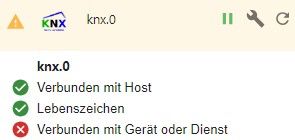
Das System sollte auf dem Aktuellen Stand und sauber sein....
Der Protokoll Eintrag gibt nichts her. Bei beiden Versionen 2.0.16 und 2.0.18 sind die Einträge identisch
knx.0
4414	2024-05-29 13:54:43.723	info	Connecting to knx GW: 192.168.178.40:3674 with phy. Adr: 1.0.253

knx.0
4414	2024-05-29 13:54:43.721	warn	No license found for knx. You can use 500DP for free or you can get a license on https://iobroker.net/accountLicenses !

knx.0
4414	2024-05-29 13:54:43.629	info	starting. Version 2.0.17 in /opt/iobroker/node_modules/iobroker.knx, node: v18.20.3, js-controller: 4.0.24
Hier die Diag:
======================= SUMMARY =======================
                        v.2024-05-22


 Static hostname: IoBroker
       Icon name: computer-container
         Chassis: container
  Virtualization: lxc
Operating System: Ubuntu 22.04.4 LTS
          Kernel: Linux 5.15.102-1-pve
    Architecture: x86-64

Installation:           lxc
Kernel:                 x86_64
Userland:               64 bit
Timezone:               Europe/Berlin (CEST, +0200)
User-ID:                1000
Display-Server:         true
Boot Target:            graphical.target

Pending OS-Updates:     0
Pending iob updates:    39

Nodejs-Installation:
/usr/bin/nodejs         v18.20.3
/usr/bin/node           v18.20.3
/usr/bin/npm            10.7.0
/usr/bin/npx            10.7.0
/usr/bin/corepack       0.28.0

Recommended versions are nodejs 16.20.2 and npm 8.19.4
Your nodejs installation is correct

MEMORY:
               total        used        free      shared  buff/cache   available
Mem:            4.1G        1.3G        1.5G        0.0K        1.2G        2.8G
Swap:           4.1G          0B        4.1G
Total:          8.2G        1.3G        5.6G

Active iob-Instances:   5
Active repo(s): beta

ioBroker Core:          js-controller           5.0.19
                        admin                   6.2.23

ioBroker Status:        iobroker is running on this host.


Objects type: jsonl
States  type: jsonl

Status admin and web instance:
+ system.adapter.admin.0                  : admin                 : IoBroker                                 -  enabled, port: 8081, bind: 0.0.0.0, run as: admin
  system.adapter.web.0                    : web                   : IoBroker                                 -  enabled, port: 8082, bind: 0.0.0.0, run as: admin
  system.adapter.web.1                    : web                   : IoBroker                                 -  enabled, port: 20002, bind: 0.0.0.0, run as: admin
  system.adapter.web.2                    : web                   : IoBroker                                 - disabled, port: 3040, bind: 0.0.0.0, run as: admin

Objects:                10943
States:                 9682

Size of iob-Database:

34M     /opt/iobroker/iobroker-data/objects.jsonl
5.0M    /opt/iobroker/iobroker-data/states.jsonl


=================== END OF SUMMARY ====================
Hat jemand eine Idee wo ich suchen muß?
Vielen Dank & viele Grüße
Matthias
-
Hallo zusammen,
ich benötige ein wenig Hilfe.
Ich habe meinen KNX Adapter von der Version 2.0.16 auf 2.0.28 Upgedatet
Danach wird der Adapter nicht mehr grün (Versuchsweise habe ich ein Downgrade auf 2.0.17 gemacht. Da ist das selbe Problem. Auf 2.0.16 zurück, geht wieder alles
Das System sollte auf dem Aktuellen Stand und sauber sein....
Der Protokoll Eintrag gibt nichts her. Bei beiden Versionen 2.0.16 und 2.0.18 sind die Einträge identisch
knx.0
4414	2024-05-29 13:54:43.723	info	Connecting to knx GW: 192.168.178.40:3674 with phy. Adr: 1.0.253

knx.0
4414	2024-05-29 13:54:43.721	warn	No license found for knx. You can use 500DP for free or you can get a license on https://iobroker.net/accountLicenses !

knx.0
4414	2024-05-29 13:54:43.629	info	starting. Version 2.0.17 in /opt/iobroker/node_modules/iobroker.knx, node: v18.20.3, js-controller: 4.0.24
Hier die Diag:
======================= SUMMARY =======================
                        v.2024-05-22


 Static hostname: IoBroker
       Icon name: computer-container
         Chassis: container
  Virtualization: lxc
Operating System: Ubuntu 22.04.4 LTS
          Kernel: Linux 5.15.102-1-pve
    Architecture: x86-64

Installation:           lxc
Kernel:                 x86_64
Userland:               64 bit
Timezone:               Europe/Berlin (CEST, +0200)
User-ID:                1000
Display-Server:         true
Boot Target:            graphical.target

Pending OS-Updates:     0
Pending iob updates:    39

Nodejs-Installation:
/usr/bin/nodejs         v18.20.3
/usr/bin/node           v18.20.3
/usr/bin/npm            10.7.0
/usr/bin/npx            10.7.0
/usr/bin/corepack       0.28.0

Recommended versions are nodejs 16.20.2 and npm 8.19.4
Your nodejs installation is correct

MEMORY:
               total        used        free      shared  buff/cache   available
Mem:            4.1G        1.3G        1.5G        0.0K        1.2G        2.8G
Swap:           4.1G          0B        4.1G
Total:          8.2G        1.3G        5.6G

Active iob-Instances:   5
Active repo(s): beta

ioBroker Core:          js-controller           5.0.19
                        admin                   6.2.23

ioBroker Status:        iobroker is running on this host.


Objects type: jsonl
States  type: jsonl

Status admin and web instance:
+ system.adapter.admin.0                  : admin                 : IoBroker                                 -  enabled, port: 8081, bind: 0.0.0.0, run as: admin
  system.adapter.web.0                    : web                   : IoBroker                                 -  enabled, port: 8082, bind: 0.0.0.0, run as: admin
  system.adapter.web.1                    : web                   : IoBroker                                 -  enabled, port: 20002, bind: 0.0.0.0, run as: admin
  system.adapter.web.2                    : web                   : IoBroker                                 - disabled, port: 3040, bind: 0.0.0.0, run as: admin

Objects:                10943
States:                 9682

Size of iob-Database:

34M     /opt/iobroker/iobroker-data/objects.jsonl
5.0M    /opt/iobroker/iobroker-data/states.jsonl


=================== END OF SUMMARY ====================
Hat jemand eine Idee wo ich suchen muß?
Vielen Dank & viele Grüße
Matthias
@matthias425 sagte in KNX Adapter nach Update gelb:
Display-Server: true
Ausschalten und nodejs würde ich auf die derzeitige Empfehlung v20 heben:
iob nodejs-update 20Und die Antiquitätensammlung würde ich auch auflösen:
Pending iob updates: 39Da scheint mir aber auch noch anderes im Argen zu liegen.
Bitte die Langfassung vomiob diagnoch nachreichen. -
Vielen Dank für Deine schnelle Antwort!
Ich habe nodejs auf 20 gehoben und aufgeräumt
Hier die lange Diag:Skript v.2024-05-22 *** BASE SYSTEM *** Static hostname: IoBroker Icon name: computer-container Chassis: container Virtualization: lxc Operating System: Ubuntu 22.04.4 LTS Kernel: Linux 5.15.102-1-pve Architecture: x86-64 model name : Intel(R) Core(TM) i5-4590T CPU @ 2.00GHz Docker : false Virtualization : lxc Kernel : x86_64 Userland : 64 bit Systemuptime and Load: 15:23:24 up 8 min, 2 users, load average: 1.49, 1.77, 2.01 CPU threads: 2 *** Time and Time Zones *** Local time: Wed 2024-05-29 15:23:24 CEST Universal time: Wed 2024-05-29 13:23:24 UTC RTC time: n/a Time zone: Europe/Berlin (CEST, +0200) System clock synchronized: yes NTP service: inactive RTC in local TZ: no *** Users and Groups *** User that called 'iob diag': matthias HOME=/home/matthias GROUPS=matthias sudo iobroker User that is running 'js-controller': iobroker HOME=/home/iobroker GROUPS=iobroker tty dialout audio video plugdev *** Display-Server-Setup *** Display-Server: false Desktop: Terminal: Boot Target: graphical.target *** MEMORY *** total used free shared buff/cache available Mem: 4.1G 1.5G 1.4G 0.0K 1.2G 2.6G Swap: 4.1G 0B 4.1G Total: 8.2G 1.5G 5.5G Active iob-Instances: 26 4096 M total memory 1519 M used memory 441 M active memory 2083 M inactive memory 1404 M free memory 0 M buffer memory 1171 M swap cache 4096 M total swap 0 M used swap 4096 M free swap *** top - Table Of Processes *** top - 15:23:24 up 8 min, 2 users, load average: 1.49, 1.77, 2.01 Tasks: 54 total, 1 running, 53 sleeping, 0 stopped, 0 zombie %Cpu(s): 0.0 us, 3.3 sy, 0.0 ni, 96.7 id, 0.0 wa, 0.0 hi, 0.0 si, 0.0 st MiB Mem : 4096.0 total, 1404.4 free, 1519.9 used, 1171.7 buff/cache MiB Swap: 4096.0 total, 4096.0 free, 0.0 used. 2576.1 avail Mem *** FAILED SERVICES *** UNIT LOAD ACTIVE SUB DESCRIPTION * run-rpc_pipefs.mount loaded failed failed RPC Pipe File System LOAD = Reflects whether the unit definition was properly loaded. ACTIVE = The high-level unit activation state, i.e. generalization of SUB. SUB = The low-level unit activation state, values depend on unit type. 1 loaded units listed. *** FILESYSTEM *** Filesystem Type Size Used Avail Use% Mounted on /dev/mapper/pve-vm--101--disk--0 ext4 30G 4.9G 23G 18% / none tmpfs 492K 4.0K 488K 1% /dev tmpfs tmpfs 7.8G 0 7.8G 0% /dev/shm tmpfs tmpfs 3.2G 116K 3.2G 1% /run tmpfs tmpfs 5.0M 0 5.0M 0% /run/lock Messages concerning ext4 filesystem in dmesg: dmesg: read kernel buffer failed: Operation not permitted Show mounted filesystems: TARGET SOURCE FSTYPE OPTIONS / /dev/mapper/pve-vm--101--disk--0 ext4 rw,relatime,stripe=16 |-/run tmpfs tmpfs rw,nosuid,nodev,size=3251500k,nr_inodes=819200,mode=755,uid=100000,gid=100000,inode64 | |-/run/lock tmpfs tmpfs rw,nosuid,nodev,noexec,relatime,size=5120k,uid=100000,gid=100000,inode64 | `-/run/credentials/systemd-sysusers.service none ramfs ro,nosuid,nodev,noexec,relatime,mode=700 |-/dev none tmpfs rw,relatime,size=492k,mode=755,uid=100000,gid=100000,inode64 | |-/dev/shm tmpfs tmpfs rw,nosuid,nodev,uid=100000,gid=100000,inode64 | |-/dev/mqueue mqueue mqueue rw,relatime | |-/dev/.lxc/proc proc proc rw,relatime | |-/dev/.lxc/sys sys sysfs rw,relatime | |-/dev/full udev[/full] devtmpfs rw,nosuid,relatime,size=8095052k,nr_inodes=2023763,mode=755,inode64 | |-/dev/null udev[/null] devtmpfs rw,nosuid,relatime,size=8095052k,nr_inodes=2023763,mode=755,inode64 | |-/dev/random udev[/random] devtmpfs rw,nosuid,relatime,size=8095052k,nr_inodes=2023763,mode=755,inode64 | |-/dev/tty udev[/tty] devtmpfs rw,nosuid,relatime,size=8095052k,nr_inodes=2023763,mode=755,inode64 | |-/dev/urandom udev[/urandom] devtmpfs rw,nosuid,relatime,size=8095052k,nr_inodes=2023763,mode=755,inode64 | |-/dev/zero udev[/zero] devtmpfs rw,nosuid,relatime,size=8095052k,nr_inodes=2023763,mode=755,inode64 | |-/dev/pts devpts devpts rw,nosuid,noexec,relatime,gid=100005,mode=620,ptmxmode=666,max=1026 | |-/dev/ptmx devpts[/ptmx] devpts rw,nosuid,noexec,relatime,gid=100005,mode=620,ptmxmode=666,max=1026 | |-/dev/console devpts[/0] devpts rw,nosuid,noexec,relatime,gid=100005,mode=620,ptmxmode=666,max=1026 | |-/dev/tty1 devpts[/1] devpts rw,nosuid,noexec,relatime,gid=100005,mode=620,ptmxmode=666,max=1026 | `-/dev/tty2 devpts[/2] devpts rw,nosuid,noexec,relatime,gid=100005,mode=620,ptmxmode=666,max=1026 |-/proc proc proc rw,nosuid,nodev,noexec,relatime | |-/proc/sys proc[/sys] proc ro,relatime | | |-/proc/sys/net proc[/sys/net] proc rw,nosuid,nodev,noexec,relatime | | |-/proc/sys/fs/binfmt_misc binfmt_misc binfmt_misc rw,nosuid,nodev,noexec,relatime | | `-/proc/sys/kernel/random/boot_id none[/.lxc-boot-id] tmpfs ro,nosuid,nodev,noexec,relatime,size=492k,mode=755,uid=100000,gid=100000,inode64 | |-/proc/sysrq-trigger proc[/sysrq-trigger] proc ro,relatime | |-/proc/cpuinfo lxcfs[/proc/cpuinfo] fuse.lxcfs rw,nosuid,nodev,relatime,user_id=0,group_id=0,allow_other | |-/proc/diskstats lxcfs[/proc/diskstats] fuse.lxcfs rw,nosuid,nodev,relatime,user_id=0,group_id=0,allow_other | |-/proc/loadavg lxcfs[/proc/loadavg] fuse.lxcfs rw,nosuid,nodev,relatime,user_id=0,group_id=0,allow_other | |-/proc/meminfo lxcfs[/proc/meminfo] fuse.lxcfs rw,nosuid,nodev,relatime,user_id=0,group_id=0,allow_other | |-/proc/slabinfo lxcfs[/proc/slabinfo] fuse.lxcfs rw,nosuid,nodev,relatime,user_id=0,group_id=0,allow_other | |-/proc/stat lxcfs[/proc/stat] fuse.lxcfs rw,nosuid,nodev,relatime,user_id=0,group_id=0,allow_other | |-/proc/swaps lxcfs[/proc/swaps] fuse.lxcfs rw,nosuid,nodev,relatime,user_id=0,group_id=0,allow_other | `-/proc/uptime lxcfs[/proc/uptime] fuse.lxcfs rw,nosuid,nodev,relatime,user_id=0,group_id=0,allow_other `-/sys sysfs sysfs ro,nosuid,nodev,noexec,relatime |-/sys/fs/fuse/connections fusectl fusectl rw,nosuid,nodev,noexec,relatime |-/sys/devices/virtual/net sysfs[/devices/virtual/net] sysfs rw,nosuid,nodev,noexec,relatime |-/sys/kernel/debug debugfs debugfs rw,nosuid,nodev,noexec,relatime |-/sys/kernel/security securityfs securityfs rw,nosuid,nodev,noexec,relatime |-/sys/fs/pstore pstore pstore rw,nosuid,nodev,noexec,relatime |-/sys/fs/cgroup none cgroup2 rw,nosuid,nodev,noexec,relatime `-/sys/devices/system/cpu lxcfs[/sys/devices/system/cpu] fuse.lxcfs rw,nosuid,nodev,relatime,user_id=0,group_id=0,allow_other Files in neuralgic directories: /var: 796M /var/ 276M /var/lib 274M /var/log 273M /var/log/journal/4c3201916fff486ba6021814c5e5352e 273M /var/log/journal Hint: You are currently not seeing messages from other users and the system. Users in groups 'adm', 'systemd-journal' can see all messages. Pass -q to turn off this notice. Archived and active journals take up 24.0M in the file system. /opt/iobroker/backups: 63M /opt/iobroker/backups/ /opt/iobroker/iobroker-data: 574M /opt/iobroker/iobroker-data/ 467M /opt/iobroker/iobroker-data/files 138M /opt/iobroker/iobroker-data/files/javascript.admin 118M /opt/iobroker/iobroker-data/files/javascript.admin/static 117M /opt/iobroker/iobroker-data/files/javascript.admin/static/js The five largest files in iobroker-data are: 24M /opt/iobroker/iobroker-data/files/web.admin/static/js/main.135279a0.js.map 19M /opt/iobroker/iobroker-data/objects.jsonl 19M /opt/iobroker/iobroker-data/files/text2command.admin/static/js/main.02fc3820.js.map 14M /opt/iobroker/iobroker-data/files/radar-trap.admin/build/index.js.map 8.9M /opt/iobroker/iobroker-data/files/scenes.admin/static/js/2.7de3299d.chunk.js.map USB-Devices by-id: USB-Sticks - Avoid direct links to /dev/tty* in your adapter setups, please always prefer the links 'by-id': No Devices found 'by-id' *** NodeJS-Installation *** /usr/bin/nodejs v20.14.0 /usr/bin/node v20.14.0 /usr/bin/npm 10.7.0 /usr/bin/npx 10.7.0 /usr/bin/corepack 0.28.1 nodejs: Installed: 20.14.0-1nodesource1 Candidate: 20.14.0-1nodesource1 Version table: *** 20.14.0-1nodesource1 500 500 https://deb.nodesource.com/node_20.x nodistro/main amd64 Packages 100 /var/lib/dpkg/status 20.13.1-1nodesource1 500 500 https://deb.nodesource.com/node_20.x nodistro/main amd64 Packages 20.13.0-1nodesource1 500 500 https://deb.nodesource.com/node_20.x nodistro/main amd64 Packages 20.12.2-1nodesource1 500 500 https://deb.nodesource.com/node_20.x nodistro/main amd64 Packages 20.12.1-1nodesource1 500 500 https://deb.nodesource.com/node_20.x nodistro/main amd64 Packages 20.12.0-1nodesource1 500 500 https://deb.nodesource.com/node_20.x nodistro/main amd64 Packages 20.11.1-1nodesource1 500 500 https://deb.nodesource.com/node_20.x nodistro/main amd64 Packages 20.11.0-1nodesource1 500 500 https://deb.nodesource.com/node_20.x nodistro/main amd64 Packages 20.10.0-1nodesource1 500 500 https://deb.nodesource.com/node_20.x nodistro/main amd64 Packages 20.9.0-1nodesource1 500 500 https://deb.nodesource.com/node_20.x nodistro/main amd64 Packages 20.8.1-1nodesource1 500 500 https://deb.nodesource.com/node_20.x nodistro/main amd64 Packages 20.8.0-1nodesource1 500 500 https://deb.nodesource.com/node_20.x nodistro/main amd64 Packages 20.7.0-1nodesource1 500 500 https://deb.nodesource.com/node_20.x nodistro/main amd64 Packages 20.6.1-1nodesource1 500 500 https://deb.nodesource.com/node_20.x nodistro/main amd64 Packages 20.6.0-1nodesource1 500 500 https://deb.nodesource.com/node_20.x nodistro/main amd64 Packages 20.5.1-1nodesource1 500 500 https://deb.nodesource.com/node_20.x nodistro/main amd64 Packages 20.5.0-1nodesource1 500 500 https://deb.nodesource.com/node_20.x nodistro/main amd64 Packages 20.4.0-1nodesource1 500 500 https://deb.nodesource.com/node_20.x nodistro/main amd64 Packages 20.3.1-1nodesource1 500 500 https://deb.nodesource.com/node_20.x nodistro/main amd64 Packages 20.3.0-1nodesource1 500 500 https://deb.nodesource.com/node_20.x nodistro/main amd64 Packages 20.2.0-1nodesource1 500 500 https://deb.nodesource.com/node_20.x nodistro/main amd64 Packages 20.1.0-1nodesource1 500 500 https://deb.nodesource.com/node_20.x nodistro/main amd64 Packages 20.0.0-1nodesource1 500 500 https://deb.nodesource.com/node_20.x nodistro/main amd64 Packages 12.22.9~dfsg-1ubuntu3.5 500 500 http://archive.ubuntu.com/ubuntu jammy-updates/universe amd64 Packages 500 http://archive.ubuntu.com/ubuntu jammy-security/universe amd64 Packages 12.22.9~dfsg-1ubuntu3 500 500 http://archive.ubuntu.com/ubuntu jammy/universe amd64 Packages Temp directories causing npm8 problem: 0 No problems detected Errors in npm tree: *** ioBroker-Installation *** ioBroker Status iobroker is running on this host. Objects type: jsonl States type: jsonl Core adapters versions js-controller: 5.0.19 admin: 6.13.16 javascript: 8.3.1 nodejs modules from github: 1 +-- iobroker.radar-trap@1.0.4 (git+ssh://git@github.com/Steiger04/ioBroker.radar-trap.git#48e48c48fdfef9146ff2ba9237922fc6c71a1ef5) Adapter State + system.adapter.admin.0 : admin : IoBroker - enabled, port: 8081, bind: 0.0.0.0, run as: admin + system.adapter.backitup.0 : backitup : IoBroker - enabled system.adapter.daswetter.0 : daswetter : IoBroker - enabled system.adapter.daswetter.1 : daswetter : IoBroker - enabled + system.adapter.discovery.0 : discovery : IoBroker - enabled system.adapter.ecovacs-deebot.0 : ecovacs-deebot : IoBroker - disabled system.adapter.fb-checkpresence.0 : fb-checkpresence : IoBroker - disabled system.adapter.fb-checkpresence.1 : fb-checkpresence : IoBroker - disabled + system.adapter.followthesun.0 : followthesun : IoBroker - enabled system.adapter.ical.0 : ical : IoBroker - disabled system.adapter.icons-addictive-flavour-png.0: icons-addictive-flavour-png: IoBroker - enabled system.adapter.icons-fatcow-hosting.0 : icons-fatcow-hosting : IoBroker - enabled system.adapter.icons-icons8.0 : icons-icons8 : IoBroker - enabled system.adapter.icons-mfd-png.0 : icons-mfd-png : IoBroker - enabled system.adapter.icons-mfd-svg.0 : icons-mfd-svg : IoBroker - enabled system.adapter.icons-open-icon-library-png.0: icons-open-icon-library-png: IoBroker - enabled + system.adapter.influxdb.0 : influxdb : IoBroker - enabled, port: 8086 + system.adapter.javascript.0 : javascript : IoBroker - enabled + system.adapter.knx.0 : knx : IoBroker - enabled, bind: 192.168.178.96 + system.adapter.mqtt.0 : mqtt : IoBroker - enabled, port: 1888, bind: 192.168.178.96 + system.adapter.net-tools.0 : net-tools : IoBroker - enabled + system.adapter.node-red.0 : node-red : IoBroker - enabled, port: 1880, bind: 0.0.0.0 system.adapter.openknx.0 : openknx : IoBroker - disabled + system.adapter.ping.0 : ping : IoBroker - enabled + system.adapter.radar-trap.0 : radar-trap : IoBroker - enabled + system.adapter.radar2.0 : radar2 : IoBroker - enabled + system.adapter.roadtraffic.0 : roadtraffic : IoBroker - enabled + system.adapter.scenes.0 : scenes : IoBroker - enabled + system.adapter.shelly.0 : shelly : IoBroker - enabled, port: 1888, bind: 192.168.178.96 system.adapter.shuttercontrol.0 : shuttercontrol : IoBroker - disabled system.adapter.solarmanpv.0 : solarmanpv : IoBroker - enabled + system.adapter.sonoff.0 : sonoff : IoBroker - enabled, port: 1883, bind: 192.168.178.96 + system.adapter.sourceanalytix.0 : sourceanalytix : IoBroker - enabled + system.adapter.telegram.0 : telegram : IoBroker - enabled, port: 8443, bind: 0.0.0.0 + system.adapter.telegram.1 : telegram : IoBroker - enabled, port: 8443, bind: 0.0.0.0 system.adapter.text2command.0 : text2command : IoBroker - disabled + system.adapter.tr-064.0 : tr-064 : IoBroker - enabled + system.adapter.tr-064.1 : tr-064 : IoBroker - enabled system.adapter.vis-fancyswitch.0 : vis-fancyswitch : IoBroker - enabled system.adapter.vis-hqwidgets.0 : vis-hqwidgets : IoBroker - enabled system.adapter.vis-material-advanced.0 : vis-material-advanced : IoBroker - enabled system.adapter.vis-plumb.0 : vis-plumb : IoBroker - enabled system.adapter.vis.0 : vis : IoBroker - enabled + system.adapter.web.0 : web : IoBroker - enabled, port: 8082, bind: 0.0.0.0, run as: admin + system.adapter.web.1 : web : IoBroker - enabled, port: 20002, bind: 0.0.0.0, run as: admin system.adapter.web.2 : web : IoBroker - disabled, port: 3040, bind: 0.0.0.0, run as: admin + system.adapter.ws.0 : ws : IoBroker - enabled, port: 8084, bind: 0.0.0.0, run as: admin + instance is alive Enabled adapters with bindings + system.adapter.admin.0 : admin : IoBroker - enabled, port: 8081, bind: 0.0.0.0, run as: admin + system.adapter.influxdb.0 : influxdb : IoBroker - enabled, port: 8086 + system.adapter.mqtt.0 : mqtt : IoBroker - enabled, port: 1888, bind: 192.168.178.96 + system.adapter.node-red.0 : node-red : IoBroker - enabled, port: 1880, bind: 0.0.0.0 + system.adapter.shelly.0 : shelly : IoBroker - enabled, port: 1888, bind: 192.168.178.96 + system.adapter.sonoff.0 : sonoff : IoBroker - enabled, port: 1883, bind: 192.168.178.96 + system.adapter.telegram.0 : telegram : IoBroker - enabled, port: 8443, bind: 0.0.0.0 + system.adapter.telegram.1 : telegram : IoBroker - enabled, port: 8443, bind: 0.0.0.0 + system.adapter.web.0 : web : IoBroker - enabled, port: 8082, bind: 0.0.0.0, run as: admin + system.adapter.web.1 : web : IoBroker - enabled, port: 20002, bind: 0.0.0.0, run as: admin + system.adapter.ws.0 : ws : IoBroker - enabled, port: 8084, bind: 0.0.0.0, run as: admin ioBroker-Repositories stable : http://download.iobroker.net/sources-dist.json beta : http://download.iobroker.net/sources-dist-latest.json Active repo(s): stable Installed ioBroker-Instances Used repository: stable Adapter "admin" : 6.13.16 , installed 6.13.16 Adapter "backitup" : 2.11.0 , installed 2.11.0 Adapter "daswetter" : 3.1.13 , installed 3.1.15 Adapter "discovery" : 4.4.0 , installed 4.5.0 Adapter "ecovacs-deebot": 1.4.15 , installed 1.4.15 Adapter "fb-checkpresence": 1.2.4 , installed 1.2.4 Adapter "followthesun" : 0.5.0 , installed 0.5.0 Adapter "ical" : 1.15.0 , installed 1.15.0 Adapter "icons-addictive-flavour-png": 0.1.0, installed 0.1.0 Adapter "icons-fatcow-hosting": 0.1.0, installed 0.1.0 Adapter "icons-icons8" : 0.0.1 , installed 0.0.1 Adapter "icons-mfd-png": 1.2.1 , installed 1.2.1 Adapter "icons-mfd-svg": 1.2.0 , installed 1.2.0 Adapter "icons-open-icon-library-png": 0.1.2, installed 0.1.2 Adapter "influxdb" : 4.0.2 , installed 4.0.2 Adapter "javascript" : 8.3.1 , installed 8.3.1 Controller "js-controller": 5.0.19 , installed 5.0.19 Adapter "knx" : 2.0.28 , installed 2.0.28 Adapter "mqtt" : 5.2.0 , installed 5.2.0 Adapter "net-tools" : 1.0.11 , installed 1.0.11 Adapter "node-red" : 5.2.1 , installed 5.2.1 Adapter "openknx" : 0.9.0 , installed 0.9.0 Adapter "ping" : 1.6.2 , installed 1.6.2 Adapter "radar2" : 2.2.0 , installed 2.2.0 Adapter "scenes" : 2.3.9 , installed 2.3.9 Adapter "shelly" : 6.9.0 , installed 6.9.0 Adapter "shuttercontrol": 1.7.0 , installed 1.7.0 Adapter "simple-api" : 2.8.0 , installed 2.8.0 Adapter "socketio" : 6.7.0 , installed 6.7.0 Adapter "solarmanpv" : 0.5.1 , installed 0.5.1 Adapter "sonoff" : 3.0.3 , installed 3.0.3 Adapter "telegram" : 3.2.1 , installed 3.2.1 Adapter "text2command" : 3.0.3 , installed 3.0.3 Adapter "tr-064" : 4.3.0 , installed 4.3.0 Adapter "vis" : 1.5.4 , installed 1.5.4 Adapter "vis-fancyswitch": 1.1.0 , installed 1.1.0 Adapter "vis-hqwidgets": 1.5.1 , installed 1.5.1 Adapter "vis-icontwo" : 1.5.0 , installed 1.5.0 Adapter "vis-jqui-mfd" : 1.1.1 , installed 1.1.1 Adapter "vis-lcars" : 1.1.1 , installed 1.1.1 Adapter "vis-material-advanced": 1.7.4, installed 1.7.4 Adapter "vis-plumb" : 1.0.2 , installed 1.0.2 Adapter "web" : 6.2.5 , installed 6.2.5 Adapter "ws" : 2.6.1 , installed 2.6.1 Objects and States Please stand by - This may take a while Objects: 11035 States: 9719 *** OS-Repositories and Updates *** Hit:1 https://deb.nodesource.com/node_20.x nodistro InRelease Hit:2 http://archive.ubuntu.com/ubuntu jammy InRelease Hit:3 http://archive.ubuntu.com/ubuntu jammy-updates InRelease Hit:4 http://archive.ubuntu.com/ubuntu jammy-security InRelease Reading package lists... Pending Updates: 0 *** Listening Ports *** Active Internet connections (only servers) Proto Recv-Q Send-Q Local Address Foreign Address State User Inode PID/Program name tcp 0 0 127.0.0.53:53 0.0.0.0:* LISTEN 106 508359228 108/systemd-resolve tcp 0 0 0.0.0.0:54331 0.0.0.0:* LISTEN 111 508360377 588/rpc.statd tcp 0 0 192.168.178.96:1888 0.0.0.0:* LISTEN 1001 508360699 907/io.mqtt.0 tcp 0 0 192.168.178.96:1883 0.0.0.0:* LISTEN 1001 508367506 1215/io.sonoff.0 tcp 0 0 0.0.0.0:111 0.0.0.0:* LISTEN 0 508357854 1/init tcp 0 0 0.0.0.0:1880 0.0.0.0:* LISTEN 1001 508360005 376/node-red tcp 0 0 127.0.0.1:9000 0.0.0.0:* LISTEN 1001 508358646 114/iobroker.js-con tcp 0 0 127.0.0.1:9001 0.0.0.0:* LISTEN 1001 508359375 114/iobroker.js-con tcp 0 0 127.0.0.1:25 0.0.0.0:* LISTEN 0 508358508 284/master tcp6 0 0 ::1:25 :::* LISTEN 0 508358509 284/master tcp6 0 0 :::8084 :::* LISTEN 1001 508371601 1755/io.ws.0 tcp6 0 0 :::8081 :::* LISTEN 1001 508359798 304/io.admin.0 tcp6 0 0 :::8082 :::* LISTEN 1001 508370988 1567/io.web.0 tcp6 0 0 :::111 :::* LISTEN 0 508357856 1/init tcp6 0 0 :::22 :::* LISTEN 0 508359161 1/init tcp6 0 0 :::3040 :::* LISTEN 1001 508371779 1791/io.radar-trap. tcp6 0 0 :::44027 :::* LISTEN 111 508360381 588/rpc.statd tcp6 0 0 :::20002 :::* LISTEN 1001 508373543 1770/io.web.1 udp 0 0 127.0.0.53:53 0.0.0.0:* 106 508359227 108/systemd-resolve udp 0 0 0.0.0.0:67 0.0.0.0:* 1001 508367155 1122/io.radar2.0 udp 0 0 0.0.0.0:111 0.0.0.0:* 0 508357855 1/init udp 0 0 127.0.0.1:764 0.0.0.0:* 0 508360371 588/rpc.statd udp 0 0 0.0.0.0:60745 0.0.0.0:* 111 508360375 588/rpc.statd udp 0 0 0.0.0.0:5683 0.0.0.0:* 1001 508365387 1463/io.shelly.0 udp 0 0 192.168.178.96:47959 0.0.0.0:* 1001 508404221 3053/io.knx.0 udp6 0 0 :::111 :::* 0 508357857 1/init udp6 0 0 :::39800 :::* 111 508360379 588/rpc.statd *** Log File - Last 25 Lines *** 2024-05-29 15:17:45.512 - info: javascript.0 (1879) script.js.Stromzähler.eingespeister_Strom: registered 1 subscription, 0 schedules, 0 messages, 0 logs and 0 file subscriptions 2024-05-29 15:17:45.512 - info: javascript.0 (1879) Start JavaScript script.js.Telegram_Test (Blockly) 2024-05-29 15:17:45.514 - info: javascript.0 (1879) script.js.Telegram_Test: registered 12 subscriptions, 0 schedules, 0 messages, 0 logs and 0 file subscriptions 2024-05-29 15:17:45.514 - info: javascript.0 (1879) Start JavaScript script.js.Zisterne (Blockly) 2024-05-29 15:17:45.516 - info: javascript.0 (1879) script.js.Zisterne: registered 4 subscriptions, 0 schedules, 0 messages, 0 logs and 0 file subscriptions 2024-05-29 15:17:45.521 - info: javascript.0 (1879) Start JavaScript script.js.Verkehr.Staumelder (Blockly) 2024-05-29 15:17:45.524 - info: javascript.0 (1879) script.js.Verkehr.Staumelder: registered 0 subscriptions, 4 schedules, 0 messages, 0 logs and 0 file subscriptions 2024-05-29 15:17:45.704 - debug: javascript.0 (1879) [sunTimeSchedules] Next: 2024-05-29T22:00:01.000Z 2024-05-29 15:18:00.016 - info: host.IoBroker instance system.adapter.solarmanpv.0 started with pid 1909 2024-05-29 15:18:00.691 - info: solarmanpv.0 (1909) starting. Version 0.5.1 in /opt/iobroker/node_modules/iobroker.solarmanpv, node: v20.14.0, js-controller: 5.0.19 2024-05-29 15:18:04.643 - info: javascript.0 (1879) script.js.Stromzähler.eingespeister_Strom: test 2024-05-29 15:18:05.152 - info: solarmanpv.0 (1909) State value to set for "solarmanpv.0.2856190.219767325.NOP" has to be type "number" but received type "string" 2024-05-29 15:18:05.485 - info: solarmanpv.0 (1909) Terminated (ADAPTER_REQUESTED_TERMINATION): Everything done. Going to terminate till next schedule 2024-05-29 15:18:05.999 - info: host.IoBroker instance system.adapter.solarmanpv.0 terminated with code 11 (ADAPTER_REQUESTED_TERMINATION) 2024-05-29 15:20:06.519 - info: host.IoBroker stopInstance system.adapter.knx.0 (force=false, process=true) 2024-05-29 15:20:06.520 - info: knx.0 (684) Got terminate signal TERMINATE_YOURSELF 2024-05-29 15:20:06.523 - info: knx.0 (684) terminating 2024-05-29 15:20:06.525 - info: knx.0 (684) Terminated (ADAPTER_REQUESTED_TERMINATION): Without reason 2024-05-29 15:20:06.567 - info: host.IoBroker stopInstance system.adapter.knx.0 send kill signal 2024-05-29 15:20:07.026 - info: knx.0 (684) terminating 2024-05-29 15:20:07.065 - info: host.IoBroker instance system.adapter.knx.0 terminated with code 11 (ADAPTER_REQUESTED_TERMINATION) 2024-05-29 15:20:09.607 - info: host.IoBroker instance system.adapter.knx.0 started with pid 3053 2024-05-29 15:20:11.005 - info: knx.0 (3053) starting. Version 2.0.28 in /opt/iobroker/node_modules/iobroker.knx, node: v20.14.0, js-controller: 5.0.19 2024-05-29 15:20:14.413 - warn: knx.0 (3053) No license found for knx. You can use 500DP for free or you can get a license on https://iobroker.net/accountLicenses ! 2024-05-29 15:20:14.414 - info: knx.0 (3053) Connecting to knx GW: 192.168.178.40:3674 with phy. Adr: 1.0.253Ich hoffe man kann etwas raus lesen :-)
Lg
Matthias -
Vielen Dank für Deine schnelle Antwort!
Ich habe nodejs auf 20 gehoben und aufgeräumt
Hier die lange Diag:Skript v.2024-05-22 *** BASE SYSTEM *** Static hostname: IoBroker Icon name: computer-container Chassis: container Virtualization: lxc Operating System: Ubuntu 22.04.4 LTS Kernel: Linux 5.15.102-1-pve Architecture: x86-64 model name : Intel(R) Core(TM) i5-4590T CPU @ 2.00GHz Docker : false Virtualization : lxc Kernel : x86_64 Userland : 64 bit Systemuptime and Load: 15:23:24 up 8 min, 2 users, load average: 1.49, 1.77, 2.01 CPU threads: 2 *** Time and Time Zones *** Local time: Wed 2024-05-29 15:23:24 CEST Universal time: Wed 2024-05-29 13:23:24 UTC RTC time: n/a Time zone: Europe/Berlin (CEST, +0200) System clock synchronized: yes NTP service: inactive RTC in local TZ: no *** Users and Groups *** User that called 'iob diag': matthias HOME=/home/matthias GROUPS=matthias sudo iobroker User that is running 'js-controller': iobroker HOME=/home/iobroker GROUPS=iobroker tty dialout audio video plugdev *** Display-Server-Setup *** Display-Server: false Desktop: Terminal: Boot Target: graphical.target *** MEMORY *** total used free shared buff/cache available Mem: 4.1G 1.5G 1.4G 0.0K 1.2G 2.6G Swap: 4.1G 0B 4.1G Total: 8.2G 1.5G 5.5G Active iob-Instances: 26 4096 M total memory 1519 M used memory 441 M active memory 2083 M inactive memory 1404 M free memory 0 M buffer memory 1171 M swap cache 4096 M total swap 0 M used swap 4096 M free swap *** top - Table Of Processes *** top - 15:23:24 up 8 min, 2 users, load average: 1.49, 1.77, 2.01 Tasks: 54 total, 1 running, 53 sleeping, 0 stopped, 0 zombie %Cpu(s): 0.0 us, 3.3 sy, 0.0 ni, 96.7 id, 0.0 wa, 0.0 hi, 0.0 si, 0.0 st MiB Mem : 4096.0 total, 1404.4 free, 1519.9 used, 1171.7 buff/cache MiB Swap: 4096.0 total, 4096.0 free, 0.0 used. 2576.1 avail Mem *** FAILED SERVICES *** UNIT LOAD ACTIVE SUB DESCRIPTION * run-rpc_pipefs.mount loaded failed failed RPC Pipe File System LOAD = Reflects whether the unit definition was properly loaded. ACTIVE = The high-level unit activation state, i.e. generalization of SUB. SUB = The low-level unit activation state, values depend on unit type. 1 loaded units listed. *** FILESYSTEM *** Filesystem Type Size Used Avail Use% Mounted on /dev/mapper/pve-vm--101--disk--0 ext4 30G 4.9G 23G 18% / none tmpfs 492K 4.0K 488K 1% /dev tmpfs tmpfs 7.8G 0 7.8G 0% /dev/shm tmpfs tmpfs 3.2G 116K 3.2G 1% /run tmpfs tmpfs 5.0M 0 5.0M 0% /run/lock Messages concerning ext4 filesystem in dmesg: dmesg: read kernel buffer failed: Operation not permitted Show mounted filesystems: TARGET SOURCE FSTYPE OPTIONS / /dev/mapper/pve-vm--101--disk--0 ext4 rw,relatime,stripe=16 |-/run tmpfs tmpfs rw,nosuid,nodev,size=3251500k,nr_inodes=819200,mode=755,uid=100000,gid=100000,inode64 | |-/run/lock tmpfs tmpfs rw,nosuid,nodev,noexec,relatime,size=5120k,uid=100000,gid=100000,inode64 | `-/run/credentials/systemd-sysusers.service none ramfs ro,nosuid,nodev,noexec,relatime,mode=700 |-/dev none tmpfs rw,relatime,size=492k,mode=755,uid=100000,gid=100000,inode64 | |-/dev/shm tmpfs tmpfs rw,nosuid,nodev,uid=100000,gid=100000,inode64 | |-/dev/mqueue mqueue mqueue rw,relatime | |-/dev/.lxc/proc proc proc rw,relatime | |-/dev/.lxc/sys sys sysfs rw,relatime | |-/dev/full udev[/full] devtmpfs rw,nosuid,relatime,size=8095052k,nr_inodes=2023763,mode=755,inode64 | |-/dev/null udev[/null] devtmpfs rw,nosuid,relatime,size=8095052k,nr_inodes=2023763,mode=755,inode64 | |-/dev/random udev[/random] devtmpfs rw,nosuid,relatime,size=8095052k,nr_inodes=2023763,mode=755,inode64 | |-/dev/tty udev[/tty] devtmpfs rw,nosuid,relatime,size=8095052k,nr_inodes=2023763,mode=755,inode64 | |-/dev/urandom udev[/urandom] devtmpfs rw,nosuid,relatime,size=8095052k,nr_inodes=2023763,mode=755,inode64 | |-/dev/zero udev[/zero] devtmpfs rw,nosuid,relatime,size=8095052k,nr_inodes=2023763,mode=755,inode64 | |-/dev/pts devpts devpts rw,nosuid,noexec,relatime,gid=100005,mode=620,ptmxmode=666,max=1026 | |-/dev/ptmx devpts[/ptmx] devpts rw,nosuid,noexec,relatime,gid=100005,mode=620,ptmxmode=666,max=1026 | |-/dev/console devpts[/0] devpts rw,nosuid,noexec,relatime,gid=100005,mode=620,ptmxmode=666,max=1026 | |-/dev/tty1 devpts[/1] devpts rw,nosuid,noexec,relatime,gid=100005,mode=620,ptmxmode=666,max=1026 | `-/dev/tty2 devpts[/2] devpts rw,nosuid,noexec,relatime,gid=100005,mode=620,ptmxmode=666,max=1026 |-/proc proc proc rw,nosuid,nodev,noexec,relatime | |-/proc/sys proc[/sys] proc ro,relatime | | |-/proc/sys/net proc[/sys/net] proc rw,nosuid,nodev,noexec,relatime | | |-/proc/sys/fs/binfmt_misc binfmt_misc binfmt_misc rw,nosuid,nodev,noexec,relatime | | `-/proc/sys/kernel/random/boot_id none[/.lxc-boot-id] tmpfs ro,nosuid,nodev,noexec,relatime,size=492k,mode=755,uid=100000,gid=100000,inode64 | |-/proc/sysrq-trigger proc[/sysrq-trigger] proc ro,relatime | |-/proc/cpuinfo lxcfs[/proc/cpuinfo] fuse.lxcfs rw,nosuid,nodev,relatime,user_id=0,group_id=0,allow_other | |-/proc/diskstats lxcfs[/proc/diskstats] fuse.lxcfs rw,nosuid,nodev,relatime,user_id=0,group_id=0,allow_other | |-/proc/loadavg lxcfs[/proc/loadavg] fuse.lxcfs rw,nosuid,nodev,relatime,user_id=0,group_id=0,allow_other | |-/proc/meminfo lxcfs[/proc/meminfo] fuse.lxcfs rw,nosuid,nodev,relatime,user_id=0,group_id=0,allow_other | |-/proc/slabinfo lxcfs[/proc/slabinfo] fuse.lxcfs rw,nosuid,nodev,relatime,user_id=0,group_id=0,allow_other | |-/proc/stat lxcfs[/proc/stat] fuse.lxcfs rw,nosuid,nodev,relatime,user_id=0,group_id=0,allow_other | |-/proc/swaps lxcfs[/proc/swaps] fuse.lxcfs rw,nosuid,nodev,relatime,user_id=0,group_id=0,allow_other | `-/proc/uptime lxcfs[/proc/uptime] fuse.lxcfs rw,nosuid,nodev,relatime,user_id=0,group_id=0,allow_other `-/sys sysfs sysfs ro,nosuid,nodev,noexec,relatime |-/sys/fs/fuse/connections fusectl fusectl rw,nosuid,nodev,noexec,relatime |-/sys/devices/virtual/net sysfs[/devices/virtual/net] sysfs rw,nosuid,nodev,noexec,relatime |-/sys/kernel/debug debugfs debugfs rw,nosuid,nodev,noexec,relatime |-/sys/kernel/security securityfs securityfs rw,nosuid,nodev,noexec,relatime |-/sys/fs/pstore pstore pstore rw,nosuid,nodev,noexec,relatime |-/sys/fs/cgroup none cgroup2 rw,nosuid,nodev,noexec,relatime `-/sys/devices/system/cpu lxcfs[/sys/devices/system/cpu] fuse.lxcfs rw,nosuid,nodev,relatime,user_id=0,group_id=0,allow_other Files in neuralgic directories: /var: 796M /var/ 276M /var/lib 274M /var/log 273M /var/log/journal/4c3201916fff486ba6021814c5e5352e 273M /var/log/journal Hint: You are currently not seeing messages from other users and the system. Users in groups 'adm', 'systemd-journal' can see all messages. Pass -q to turn off this notice. Archived and active journals take up 24.0M in the file system. /opt/iobroker/backups: 63M /opt/iobroker/backups/ /opt/iobroker/iobroker-data: 574M /opt/iobroker/iobroker-data/ 467M /opt/iobroker/iobroker-data/files 138M /opt/iobroker/iobroker-data/files/javascript.admin 118M /opt/iobroker/iobroker-data/files/javascript.admin/static 117M /opt/iobroker/iobroker-data/files/javascript.admin/static/js The five largest files in iobroker-data are: 24M /opt/iobroker/iobroker-data/files/web.admin/static/js/main.135279a0.js.map 19M /opt/iobroker/iobroker-data/objects.jsonl 19M /opt/iobroker/iobroker-data/files/text2command.admin/static/js/main.02fc3820.js.map 14M /opt/iobroker/iobroker-data/files/radar-trap.admin/build/index.js.map 8.9M /opt/iobroker/iobroker-data/files/scenes.admin/static/js/2.7de3299d.chunk.js.map USB-Devices by-id: USB-Sticks - Avoid direct links to /dev/tty* in your adapter setups, please always prefer the links 'by-id': No Devices found 'by-id' *** NodeJS-Installation *** /usr/bin/nodejs v20.14.0 /usr/bin/node v20.14.0 /usr/bin/npm 10.7.0 /usr/bin/npx 10.7.0 /usr/bin/corepack 0.28.1 nodejs: Installed: 20.14.0-1nodesource1 Candidate: 20.14.0-1nodesource1 Version table: *** 20.14.0-1nodesource1 500 500 https://deb.nodesource.com/node_20.x nodistro/main amd64 Packages 100 /var/lib/dpkg/status 20.13.1-1nodesource1 500 500 https://deb.nodesource.com/node_20.x nodistro/main amd64 Packages 20.13.0-1nodesource1 500 500 https://deb.nodesource.com/node_20.x nodistro/main amd64 Packages 20.12.2-1nodesource1 500 500 https://deb.nodesource.com/node_20.x nodistro/main amd64 Packages 20.12.1-1nodesource1 500 500 https://deb.nodesource.com/node_20.x nodistro/main amd64 Packages 20.12.0-1nodesource1 500 500 https://deb.nodesource.com/node_20.x nodistro/main amd64 Packages 20.11.1-1nodesource1 500 500 https://deb.nodesource.com/node_20.x nodistro/main amd64 Packages 20.11.0-1nodesource1 500 500 https://deb.nodesource.com/node_20.x nodistro/main amd64 Packages 20.10.0-1nodesource1 500 500 https://deb.nodesource.com/node_20.x nodistro/main amd64 Packages 20.9.0-1nodesource1 500 500 https://deb.nodesource.com/node_20.x nodistro/main amd64 Packages 20.8.1-1nodesource1 500 500 https://deb.nodesource.com/node_20.x nodistro/main amd64 Packages 20.8.0-1nodesource1 500 500 https://deb.nodesource.com/node_20.x nodistro/main amd64 Packages 20.7.0-1nodesource1 500 500 https://deb.nodesource.com/node_20.x nodistro/main amd64 Packages 20.6.1-1nodesource1 500 500 https://deb.nodesource.com/node_20.x nodistro/main amd64 Packages 20.6.0-1nodesource1 500 500 https://deb.nodesource.com/node_20.x nodistro/main amd64 Packages 20.5.1-1nodesource1 500 500 https://deb.nodesource.com/node_20.x nodistro/main amd64 Packages 20.5.0-1nodesource1 500 500 https://deb.nodesource.com/node_20.x nodistro/main amd64 Packages 20.4.0-1nodesource1 500 500 https://deb.nodesource.com/node_20.x nodistro/main amd64 Packages 20.3.1-1nodesource1 500 500 https://deb.nodesource.com/node_20.x nodistro/main amd64 Packages 20.3.0-1nodesource1 500 500 https://deb.nodesource.com/node_20.x nodistro/main amd64 Packages 20.2.0-1nodesource1 500 500 https://deb.nodesource.com/node_20.x nodistro/main amd64 Packages 20.1.0-1nodesource1 500 500 https://deb.nodesource.com/node_20.x nodistro/main amd64 Packages 20.0.0-1nodesource1 500 500 https://deb.nodesource.com/node_20.x nodistro/main amd64 Packages 12.22.9~dfsg-1ubuntu3.5 500 500 http://archive.ubuntu.com/ubuntu jammy-updates/universe amd64 Packages 500 http://archive.ubuntu.com/ubuntu jammy-security/universe amd64 Packages 12.22.9~dfsg-1ubuntu3 500 500 http://archive.ubuntu.com/ubuntu jammy/universe amd64 Packages Temp directories causing npm8 problem: 0 No problems detected Errors in npm tree: *** ioBroker-Installation *** ioBroker Status iobroker is running on this host. Objects type: jsonl States type: jsonl Core adapters versions js-controller: 5.0.19 admin: 6.13.16 javascript: 8.3.1 nodejs modules from github: 1 +-- iobroker.radar-trap@1.0.4 (git+ssh://git@github.com/Steiger04/ioBroker.radar-trap.git#48e48c48fdfef9146ff2ba9237922fc6c71a1ef5) Adapter State + system.adapter.admin.0 : admin : IoBroker - enabled, port: 8081, bind: 0.0.0.0, run as: admin + system.adapter.backitup.0 : backitup : IoBroker - enabled system.adapter.daswetter.0 : daswetter : IoBroker - enabled system.adapter.daswetter.1 : daswetter : IoBroker - enabled + system.adapter.discovery.0 : discovery : IoBroker - enabled system.adapter.ecovacs-deebot.0 : ecovacs-deebot : IoBroker - disabled system.adapter.fb-checkpresence.0 : fb-checkpresence : IoBroker - disabled system.adapter.fb-checkpresence.1 : fb-checkpresence : IoBroker - disabled + system.adapter.followthesun.0 : followthesun : IoBroker - enabled system.adapter.ical.0 : ical : IoBroker - disabled system.adapter.icons-addictive-flavour-png.0: icons-addictive-flavour-png: IoBroker - enabled system.adapter.icons-fatcow-hosting.0 : icons-fatcow-hosting : IoBroker - enabled system.adapter.icons-icons8.0 : icons-icons8 : IoBroker - enabled system.adapter.icons-mfd-png.0 : icons-mfd-png : IoBroker - enabled system.adapter.icons-mfd-svg.0 : icons-mfd-svg : IoBroker - enabled system.adapter.icons-open-icon-library-png.0: icons-open-icon-library-png: IoBroker - enabled + system.adapter.influxdb.0 : influxdb : IoBroker - enabled, port: 8086 + system.adapter.javascript.0 : javascript : IoBroker - enabled + system.adapter.knx.0 : knx : IoBroker - enabled, bind: 192.168.178.96 + system.adapter.mqtt.0 : mqtt : IoBroker - enabled, port: 1888, bind: 192.168.178.96 + system.adapter.net-tools.0 : net-tools : IoBroker - enabled + system.adapter.node-red.0 : node-red : IoBroker - enabled, port: 1880, bind: 0.0.0.0 system.adapter.openknx.0 : openknx : IoBroker - disabled + system.adapter.ping.0 : ping : IoBroker - enabled + system.adapter.radar-trap.0 : radar-trap : IoBroker - enabled + system.adapter.radar2.0 : radar2 : IoBroker - enabled + system.adapter.roadtraffic.0 : roadtraffic : IoBroker - enabled + system.adapter.scenes.0 : scenes : IoBroker - enabled + system.adapter.shelly.0 : shelly : IoBroker - enabled, port: 1888, bind: 192.168.178.96 system.adapter.shuttercontrol.0 : shuttercontrol : IoBroker - disabled system.adapter.solarmanpv.0 : solarmanpv : IoBroker - enabled + system.adapter.sonoff.0 : sonoff : IoBroker - enabled, port: 1883, bind: 192.168.178.96 + system.adapter.sourceanalytix.0 : sourceanalytix : IoBroker - enabled + system.adapter.telegram.0 : telegram : IoBroker - enabled, port: 8443, bind: 0.0.0.0 + system.adapter.telegram.1 : telegram : IoBroker - enabled, port: 8443, bind: 0.0.0.0 system.adapter.text2command.0 : text2command : IoBroker - disabled + system.adapter.tr-064.0 : tr-064 : IoBroker - enabled + system.adapter.tr-064.1 : tr-064 : IoBroker - enabled system.adapter.vis-fancyswitch.0 : vis-fancyswitch : IoBroker - enabled system.adapter.vis-hqwidgets.0 : vis-hqwidgets : IoBroker - enabled system.adapter.vis-material-advanced.0 : vis-material-advanced : IoBroker - enabled system.adapter.vis-plumb.0 : vis-plumb : IoBroker - enabled system.adapter.vis.0 : vis : IoBroker - enabled + system.adapter.web.0 : web : IoBroker - enabled, port: 8082, bind: 0.0.0.0, run as: admin + system.adapter.web.1 : web : IoBroker - enabled, port: 20002, bind: 0.0.0.0, run as: admin system.adapter.web.2 : web : IoBroker - disabled, port: 3040, bind: 0.0.0.0, run as: admin + system.adapter.ws.0 : ws : IoBroker - enabled, port: 8084, bind: 0.0.0.0, run as: admin + instance is alive Enabled adapters with bindings + system.adapter.admin.0 : admin : IoBroker - enabled, port: 8081, bind: 0.0.0.0, run as: admin + system.adapter.influxdb.0 : influxdb : IoBroker - enabled, port: 8086 + system.adapter.mqtt.0 : mqtt : IoBroker - enabled, port: 1888, bind: 192.168.178.96 + system.adapter.node-red.0 : node-red : IoBroker - enabled, port: 1880, bind: 0.0.0.0 + system.adapter.shelly.0 : shelly : IoBroker - enabled, port: 1888, bind: 192.168.178.96 + system.adapter.sonoff.0 : sonoff : IoBroker - enabled, port: 1883, bind: 192.168.178.96 + system.adapter.telegram.0 : telegram : IoBroker - enabled, port: 8443, bind: 0.0.0.0 + system.adapter.telegram.1 : telegram : IoBroker - enabled, port: 8443, bind: 0.0.0.0 + system.adapter.web.0 : web : IoBroker - enabled, port: 8082, bind: 0.0.0.0, run as: admin + system.adapter.web.1 : web : IoBroker - enabled, port: 20002, bind: 0.0.0.0, run as: admin + system.adapter.ws.0 : ws : IoBroker - enabled, port: 8084, bind: 0.0.0.0, run as: admin ioBroker-Repositories stable : http://download.iobroker.net/sources-dist.json beta : http://download.iobroker.net/sources-dist-latest.json Active repo(s): stable Installed ioBroker-Instances Used repository: stable Adapter "admin" : 6.13.16 , installed 6.13.16 Adapter "backitup" : 2.11.0 , installed 2.11.0 Adapter "daswetter" : 3.1.13 , installed 3.1.15 Adapter "discovery" : 4.4.0 , installed 4.5.0 Adapter "ecovacs-deebot": 1.4.15 , installed 1.4.15 Adapter "fb-checkpresence": 1.2.4 , installed 1.2.4 Adapter "followthesun" : 0.5.0 , installed 0.5.0 Adapter "ical" : 1.15.0 , installed 1.15.0 Adapter "icons-addictive-flavour-png": 0.1.0, installed 0.1.0 Adapter "icons-fatcow-hosting": 0.1.0, installed 0.1.0 Adapter "icons-icons8" : 0.0.1 , installed 0.0.1 Adapter "icons-mfd-png": 1.2.1 , installed 1.2.1 Adapter "icons-mfd-svg": 1.2.0 , installed 1.2.0 Adapter "icons-open-icon-library-png": 0.1.2, installed 0.1.2 Adapter "influxdb" : 4.0.2 , installed 4.0.2 Adapter "javascript" : 8.3.1 , installed 8.3.1 Controller "js-controller": 5.0.19 , installed 5.0.19 Adapter "knx" : 2.0.28 , installed 2.0.28 Adapter "mqtt" : 5.2.0 , installed 5.2.0 Adapter "net-tools" : 1.0.11 , installed 1.0.11 Adapter "node-red" : 5.2.1 , installed 5.2.1 Adapter "openknx" : 0.9.0 , installed 0.9.0 Adapter "ping" : 1.6.2 , installed 1.6.2 Adapter "radar2" : 2.2.0 , installed 2.2.0 Adapter "scenes" : 2.3.9 , installed 2.3.9 Adapter "shelly" : 6.9.0 , installed 6.9.0 Adapter "shuttercontrol": 1.7.0 , installed 1.7.0 Adapter "simple-api" : 2.8.0 , installed 2.8.0 Adapter "socketio" : 6.7.0 , installed 6.7.0 Adapter "solarmanpv" : 0.5.1 , installed 0.5.1 Adapter "sonoff" : 3.0.3 , installed 3.0.3 Adapter "telegram" : 3.2.1 , installed 3.2.1 Adapter "text2command" : 3.0.3 , installed 3.0.3 Adapter "tr-064" : 4.3.0 , installed 4.3.0 Adapter "vis" : 1.5.4 , installed 1.5.4 Adapter "vis-fancyswitch": 1.1.0 , installed 1.1.0 Adapter "vis-hqwidgets": 1.5.1 , installed 1.5.1 Adapter "vis-icontwo" : 1.5.0 , installed 1.5.0 Adapter "vis-jqui-mfd" : 1.1.1 , installed 1.1.1 Adapter "vis-lcars" : 1.1.1 , installed 1.1.1 Adapter "vis-material-advanced": 1.7.4, installed 1.7.4 Adapter "vis-plumb" : 1.0.2 , installed 1.0.2 Adapter "web" : 6.2.5 , installed 6.2.5 Adapter "ws" : 2.6.1 , installed 2.6.1 Objects and States Please stand by - This may take a while Objects: 11035 States: 9719 *** OS-Repositories and Updates *** Hit:1 https://deb.nodesource.com/node_20.x nodistro InRelease Hit:2 http://archive.ubuntu.com/ubuntu jammy InRelease Hit:3 http://archive.ubuntu.com/ubuntu jammy-updates InRelease Hit:4 http://archive.ubuntu.com/ubuntu jammy-security InRelease Reading package lists... Pending Updates: 0 *** Listening Ports *** Active Internet connections (only servers) Proto Recv-Q Send-Q Local Address Foreign Address State User Inode PID/Program name tcp 0 0 127.0.0.53:53 0.0.0.0:* LISTEN 106 508359228 108/systemd-resolve tcp 0 0 0.0.0.0:54331 0.0.0.0:* LISTEN 111 508360377 588/rpc.statd tcp 0 0 192.168.178.96:1888 0.0.0.0:* LISTEN 1001 508360699 907/io.mqtt.0 tcp 0 0 192.168.178.96:1883 0.0.0.0:* LISTEN 1001 508367506 1215/io.sonoff.0 tcp 0 0 0.0.0.0:111 0.0.0.0:* LISTEN 0 508357854 1/init tcp 0 0 0.0.0.0:1880 0.0.0.0:* LISTEN 1001 508360005 376/node-red tcp 0 0 127.0.0.1:9000 0.0.0.0:* LISTEN 1001 508358646 114/iobroker.js-con tcp 0 0 127.0.0.1:9001 0.0.0.0:* LISTEN 1001 508359375 114/iobroker.js-con tcp 0 0 127.0.0.1:25 0.0.0.0:* LISTEN 0 508358508 284/master tcp6 0 0 ::1:25 :::* LISTEN 0 508358509 284/master tcp6 0 0 :::8084 :::* LISTEN 1001 508371601 1755/io.ws.0 tcp6 0 0 :::8081 :::* LISTEN 1001 508359798 304/io.admin.0 tcp6 0 0 :::8082 :::* LISTEN 1001 508370988 1567/io.web.0 tcp6 0 0 :::111 :::* LISTEN 0 508357856 1/init tcp6 0 0 :::22 :::* LISTEN 0 508359161 1/init tcp6 0 0 :::3040 :::* LISTEN 1001 508371779 1791/io.radar-trap. tcp6 0 0 :::44027 :::* LISTEN 111 508360381 588/rpc.statd tcp6 0 0 :::20002 :::* LISTEN 1001 508373543 1770/io.web.1 udp 0 0 127.0.0.53:53 0.0.0.0:* 106 508359227 108/systemd-resolve udp 0 0 0.0.0.0:67 0.0.0.0:* 1001 508367155 1122/io.radar2.0 udp 0 0 0.0.0.0:111 0.0.0.0:* 0 508357855 1/init udp 0 0 127.0.0.1:764 0.0.0.0:* 0 508360371 588/rpc.statd udp 0 0 0.0.0.0:60745 0.0.0.0:* 111 508360375 588/rpc.statd udp 0 0 0.0.0.0:5683 0.0.0.0:* 1001 508365387 1463/io.shelly.0 udp 0 0 192.168.178.96:47959 0.0.0.0:* 1001 508404221 3053/io.knx.0 udp6 0 0 :::111 :::* 0 508357857 1/init udp6 0 0 :::39800 :::* 111 508360379 588/rpc.statd *** Log File - Last 25 Lines *** 2024-05-29 15:17:45.512 - info: javascript.0 (1879) script.js.Stromzähler.eingespeister_Strom: registered 1 subscription, 0 schedules, 0 messages, 0 logs and 0 file subscriptions 2024-05-29 15:17:45.512 - info: javascript.0 (1879) Start JavaScript script.js.Telegram_Test (Blockly) 2024-05-29 15:17:45.514 - info: javascript.0 (1879) script.js.Telegram_Test: registered 12 subscriptions, 0 schedules, 0 messages, 0 logs and 0 file subscriptions 2024-05-29 15:17:45.514 - info: javascript.0 (1879) Start JavaScript script.js.Zisterne (Blockly) 2024-05-29 15:17:45.516 - info: javascript.0 (1879) script.js.Zisterne: registered 4 subscriptions, 0 schedules, 0 messages, 0 logs and 0 file subscriptions 2024-05-29 15:17:45.521 - info: javascript.0 (1879) Start JavaScript script.js.Verkehr.Staumelder (Blockly) 2024-05-29 15:17:45.524 - info: javascript.0 (1879) script.js.Verkehr.Staumelder: registered 0 subscriptions, 4 schedules, 0 messages, 0 logs and 0 file subscriptions 2024-05-29 15:17:45.704 - debug: javascript.0 (1879) [sunTimeSchedules] Next: 2024-05-29T22:00:01.000Z 2024-05-29 15:18:00.016 - info: host.IoBroker instance system.adapter.solarmanpv.0 started with pid 1909 2024-05-29 15:18:00.691 - info: solarmanpv.0 (1909) starting. Version 0.5.1 in /opt/iobroker/node_modules/iobroker.solarmanpv, node: v20.14.0, js-controller: 5.0.19 2024-05-29 15:18:04.643 - info: javascript.0 (1879) script.js.Stromzähler.eingespeister_Strom: test 2024-05-29 15:18:05.152 - info: solarmanpv.0 (1909) State value to set for "solarmanpv.0.2856190.219767325.NOP" has to be type "number" but received type "string" 2024-05-29 15:18:05.485 - info: solarmanpv.0 (1909) Terminated (ADAPTER_REQUESTED_TERMINATION): Everything done. Going to terminate till next schedule 2024-05-29 15:18:05.999 - info: host.IoBroker instance system.adapter.solarmanpv.0 terminated with code 11 (ADAPTER_REQUESTED_TERMINATION) 2024-05-29 15:20:06.519 - info: host.IoBroker stopInstance system.adapter.knx.0 (force=false, process=true) 2024-05-29 15:20:06.520 - info: knx.0 (684) Got terminate signal TERMINATE_YOURSELF 2024-05-29 15:20:06.523 - info: knx.0 (684) terminating 2024-05-29 15:20:06.525 - info: knx.0 (684) Terminated (ADAPTER_REQUESTED_TERMINATION): Without reason 2024-05-29 15:20:06.567 - info: host.IoBroker stopInstance system.adapter.knx.0 send kill signal 2024-05-29 15:20:07.026 - info: knx.0 (684) terminating 2024-05-29 15:20:07.065 - info: host.IoBroker instance system.adapter.knx.0 terminated with code 11 (ADAPTER_REQUESTED_TERMINATION) 2024-05-29 15:20:09.607 - info: host.IoBroker instance system.adapter.knx.0 started with pid 3053 2024-05-29 15:20:11.005 - info: knx.0 (3053) starting. Version 2.0.28 in /opt/iobroker/node_modules/iobroker.knx, node: v20.14.0, js-controller: 5.0.19 2024-05-29 15:20:14.413 - warn: knx.0 (3053) No license found for knx. You can use 500DP for free or you can get a license on https://iobroker.net/accountLicenses ! 2024-05-29 15:20:14.414 - info: knx.0 (3053) Connecting to knx GW: 192.168.178.40:3674 with phy. Adr: 1.0.253Ich hoffe man kann etwas raus lesen :-)
Lg
Matthias@matthias425 sagte in KNX Adapter nach Update gelb:
Ich hoffe man kann etwas raus lesen
Insgesamt schaut das jetzt besser aus. Bezüglich knx finde ich aber nichts erhellendes. Aber ich kenne den Adapter auch nicht.
-
Vielen Dank!
Ich hab mal probiert eine zusätzliche Instanz zu installieren. Diese bekommt Verbindung und ist grün.
Vielleicht bringt diese Erkenntnis etwas...
-
Vielen Dank!
Ich hab mal probiert eine zusätzliche Instanz zu installieren. Diese bekommt Verbindung und ist grün.
Vielleicht bringt diese Erkenntnis etwas...Mit den gleichen Einstellungen?
-
Mit den gleichen Einstellungen?


Hey! Du scheinst an dieser Unterhaltung interessiert zu sein, hast aber noch kein Konto.
Hast du es satt, bei jedem Besuch durch die gleichen Beiträge zu scrollen? Wenn du dich für ein Konto anmeldest, kommst du immer genau dorthin zurück, wo du zuvor warst, und kannst dich über neue Antworten benachrichtigen lassen (entweder per E-Mail oder Push-Benachrichtigung). Du kannst auch Lesezeichen speichern und Beiträge positiv bewerten, um anderen Community-Mitgliedern deine Wertschätzung zu zeigen.
Mit deinem Input könnte dieser Beitrag noch besser werden 💗
Registrieren Anmelden409
Online33.0k
Benutzende83.7k
Themen1.3m
Beiträge