Skip to content
  • Home
  • Aktuell
  • Tags
  • 0 Ungelesen 0
  • Kategorien
  • Unreplied
  • Beliebt
  • GitHub
  • Docu
  • Hilfe
Skins
  • Light
  • Brite
  • Cerulean
  • Cosmo
  • Flatly
  • Journal
  • Litera
  • Lumen
  • Lux
  • Materia
  • Minty
  • Morph
  • Pulse
  • Sandstone
  • Simplex
  • Sketchy
  • Spacelab
  • United
  • Yeti
  • Zephyr
  • Dark
  • Cyborg
  • Darkly
  • Quartz
  • Slate
  • Solar
  • Superhero
  • Vapor

  • Standard: (Kein Skin)
  • Kein Skin
Einklappen
ioBroker Logo

Community Forum

donate donate
  1. ioBroker Community Home
  2. Deutsch
  3. ioBroker Allgemein
  4. [gelöst] Harmony Hub nicht erreichbar

NEWS

  • Jahresrückblick 2025 – unser neuer Blogbeitrag ist online! ✨
    BluefoxB
    Bluefox
    6
    1
    32

  • Neuer Blogbeitrag: Monatsrückblick - Dezember 2025 🎄
    BluefoxB
    Bluefox
    11
    1
    554

  • Weihnachtsangebot 2025! 🎄
    BluefoxB
    Bluefox
    24
    1
    1.7k

[gelöst] Harmony Hub nicht erreichbar

Geplant Angeheftet Gesperrt Verschoben ioBroker Allgemein
32 Beiträge 5 Kommentatoren 2.6k Aufrufe 3 Watching
  • Älteste zuerst
  • Neuste zuerst
  • Meiste Stimmen
Antworten
  • In einem neuen Thema antworten
Anmelden zum Antworten
Dieses Thema wurde gelöscht. Nur Nutzer mit entsprechenden Rechten können es sehen.
  • HomoranH Homoran

    @myol sagte in Harmony Hub nicht erreichbar:

    Maschine

    oder

    @myol sagte in Harmony Hub nicht erreichbar:

    Containern

    ??
    letztere gleich konfiguriert?
    Alle notwendigen Ports gemappt?

    M Offline
    M Offline
    myol
    schrieb am zuletzt editiert von
    #13

    @homoran Container. iob läuft im Container und von anderen Containers ist der ping erfolgreich.
    Ich versteh's nicht ....

    1 Antwort Letzte Antwort
    0
    • M myol

      @homoran

      2024-05-27 10:45:16.108 - debug: harmony.0 (232520) Redis Objects: Use Redis connection: 127.0.0.1:9001
      2024-05-27 10:45:16.129 - debug: harmony.0 (232520) Objects client ready ... initialize now
      2024-05-27 10:45:16.130 - debug: harmony.0 (232520) Objects create System PubSub Client
      2024-05-27 10:45:16.131 - debug: harmony.0 (232520) Objects create User PubSub Client
      2024-05-27 10:45:16.166 - debug: harmony.0 (232520) Objects client initialize lua scripts
      2024-05-27 10:45:16.169 - debug: harmony.0 (232520) Objects connected to redis: 127.0.0.1:9001
      2024-05-27 10:45:16.192 - debug: harmony.0 (232520) Redis States: Use Redis connection: 127.0.0.1:9000
      2024-05-27 10:45:16.202 - debug: harmony.0 (232520) States create System PubSub Client
      2024-05-27 10:45:16.203 - debug: harmony.0 (232520) States create User PubSub Client
      2024-05-27 10:45:16.266 - debug: harmony.0 (232520) States connected to redis: 127.0.0.1:9000
      2024-05-27 10:45:16.319 - info: harmony.0 (232520) starting. Version 1.4.0 in /opt/iobroker/node_modules/iobroker.harmony, node: v18.17.1, js-controller: 5.0.19
      2024-05-27 10:45:16.337 - debug: harmony.0 (232520) [START] Subnet: 255.255.255.255, Discovery interval: 10000
      2024-05-27 10:45:16.346 - info: harmony.0 (232520) [DISCOVER] Searching for Harmony Hubs on 255.255.255.255
      
      HomoranH Nicht stören
      HomoranH Nicht stören
      Homoran
      Global Moderator Administrators
      schrieb am zuletzt editiert von
      #14

      @myol sagte in Harmony Hub nicht erreichbar:

      debug

      ok! du bist im debug Modus

      kein Support per PN! - Fragen im Forum stellen - es gibt fast nichts, was nicht auch für andere interessant ist.

      Benutzt das Voting rechts unten im Beitrag wenn er euch geholfen hat.

      der Installationsfixer: curl -fsL https://iobroker.net/fix.sh | bash -

      1 Antwort Letzte Antwort
      0
      • Samson71S Samson71

        @myol
        Im zweiten Block setzt Du doch den Ping auf sich selbst (.28 an .28). Dass da ein OK zurück kommt ist klar.

        M Offline
        M Offline
        myol
        schrieb am zuletzt editiert von
        #15

        @samson71 sagte in Harmony Hub nicht erreichbar:

        @myol
        Im zweiten Block setzt Du doch den Ping auf sich selbst (.28 an .28). Dass da ein OK zurück kommt ist klar.

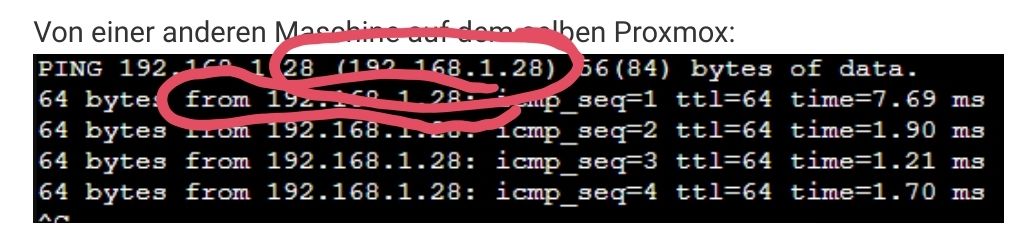
        Nein, das ist von der 90 auf die 28.
        Der Befehl war in beiden fällen der gleiche: "ping 192.168.1.28"

        HomoranH Samson71S 2 Antworten Letzte Antwort
        0
        • M myol

          @samson71 sagte in Harmony Hub nicht erreichbar:

          @myol
          Im zweiten Block setzt Du doch den Ping auf sich selbst (.28 an .28). Dass da ein OK zurück kommt ist klar.

          Nein, das ist von der 90 auf die 28.
          Der Befehl war in beiden fällen der gleiche: "ping 192.168.1.28"

          HomoranH Nicht stören
          HomoranH Nicht stören
          Homoran
          Global Moderator Administrators
          schrieb am zuletzt editiert von
          #16

          @myol bitte nie Screenshots von logs!

          Screenshot_20240527-105250_Firefox.jpg

          https://forum.iobroker.net/topic/51555/hinweise-für-gute-forenbeiträge/1

          kein Support per PN! - Fragen im Forum stellen - es gibt fast nichts, was nicht auch für andere interessant ist.

          Benutzt das Voting rechts unten im Beitrag wenn er euch geholfen hat.

          der Installationsfixer: curl -fsL https://iobroker.net/fix.sh | bash -

          1 Antwort Letzte Antwort
          0
          • M myol

            @samson71 sagte in Harmony Hub nicht erreichbar:

            @myol
            Im zweiten Block setzt Du doch den Ping auf sich selbst (.28 an .28). Dass da ein OK zurück kommt ist klar.

            Nein, das ist von der 90 auf die 28.
            Der Befehl war in beiden fällen der gleiche: "ping 192.168.1.28"

            Samson71S Offline
            Samson71S Offline
            Samson71
            Global Moderator
            schrieb am zuletzt editiert von Samson71
            #17

            @myol
            Dann verstehe ich den ersten Block nicht. Du pingst auf die .28, aber die Antwort kommt von der .30 zurück oder wie?

            4c474dbc-af75-4281-8ddc-e32b5d8aabc9-image.png

            Markus

            Bitte beachten:
            Hinweise für gute Forenbeiträge
            Maßnahmen zum Schutz des Forums

            M 1 Antwort Letzte Antwort
            1
            • H Offline
              H Offline
              hansmeier
              schrieb am zuletzt editiert von
              #18

              Hier mal ein anderer radikaler Ansatz:
              Bevor man sich einen Wolf sucht, kannst du doch schnell ein Restore des Containers machen. Dafür hat man ja schliesslich Proxmox.
              Dauert nur ein paar Minuten und tut nicht weh. :grinning:

              M 1 Antwort Letzte Antwort
              0
              • H hansmeier

                Hier mal ein anderer radikaler Ansatz:
                Bevor man sich einen Wolf sucht, kannst du doch schnell ein Restore des Containers machen. Dafür hat man ja schliesslich Proxmox.
                Dauert nur ein paar Minuten und tut nicht weh. :grinning:

                M Offline
                M Offline
                myol
                schrieb am zuletzt editiert von
                #19

                @hansmeier Könnte ich versuchen. Ich dachte, es gäbe vielleicht ne Idee , was da los ist.

                1 Antwort Letzte Antwort
                0
                • Samson71S Samson71

                  @myol
                  Dann verstehe ich den ersten Block nicht. Du pingst auf die .28, aber die Antwort kommt von der .30 zurück oder wie?

                  4c474dbc-af75-4281-8ddc-e32b5d8aabc9-image.png

                  M Offline
                  M Offline
                  myol
                  schrieb am zuletzt editiert von
                  #20

                  @samson71 So wie ich das verstehe ist das bei ping so.
                  Wenn erfolgreich, kommt die Antwort vom Ziel (hier die 28).
                  Wenn nicht erfolgreich, kommt die Antwort von der Quelle (hier 30), da das Ziel ja nicht antworten kann.

                  M HomoranH 2 Antworten Letzte Antwort
                  0
                  • M myol

                    @samson71 So wie ich das verstehe ist das bei ping so.
                    Wenn erfolgreich, kommt die Antwort vom Ziel (hier die 28).
                    Wenn nicht erfolgreich, kommt die Antwort von der Quelle (hier 30), da das Ziel ja nicht antworten kann.

                    M Offline
                    M Offline
                    myol
                    schrieb am zuletzt editiert von
                    #21

                    Wieso ist ein host von einem host nicht erreichbar, von anderen im gleichen Netz aber schon?
                    Hat jemand ne Idee?

                    1 Antwort Letzte Antwort
                    0
                    • M myol

                      @samson71 So wie ich das verstehe ist das bei ping so.
                      Wenn erfolgreich, kommt die Antwort vom Ziel (hier die 28).
                      Wenn nicht erfolgreich, kommt die Antwort von der Quelle (hier 30), da das Ziel ja nicht antworten kann.

                      HomoranH Nicht stören
                      HomoranH Nicht stören
                      Homoran
                      Global Moderator Administrators
                      schrieb am zuletzt editiert von
                      #22

                      @myol dann bleiben die Fragen

                      @homoran sagte in Harmony Hub nicht erreichbar:

                      Containern

                      ??
                      letztere gleich konfiguriert?
                      Alle notwendigen Ports gemappt?

                      Zusätzlich:
                      lief es früher?
                      wurde irgendetwas geändert?
                      was?

                      kein Support per PN! - Fragen im Forum stellen - es gibt fast nichts, was nicht auch für andere interessant ist.

                      Benutzt das Voting rechts unten im Beitrag wenn er euch geholfen hat.

                      der Installationsfixer: curl -fsL https://iobroker.net/fix.sh | bash -

                      M 1 Antwort Letzte Antwort
                      0
                      • HomoranH Homoran

                        @myol dann bleiben die Fragen

                        @homoran sagte in Harmony Hub nicht erreichbar:

                        Containern

                        ??
                        letztere gleich konfiguriert?
                        Alle notwendigen Ports gemappt?

                        Zusätzlich:
                        lief es früher?
                        wurde irgendetwas geändert?
                        was?

                        M Offline
                        M Offline
                        myol
                        schrieb am zuletzt editiert von
                        #23

                        @homoran Das ist es ja. Das lief so seit Jahren und es wurde nichts (bewusst) geändert.

                        DJMarc75D M 2 Antworten Letzte Antwort
                        0
                        • M myol

                          @homoran Das ist es ja. Das lief so seit Jahren und es wurde nichts (bewusst) geändert.

                          DJMarc75D Offline
                          DJMarc75D Offline
                          DJMarc75
                          schrieb am zuletzt editiert von
                          #24

                          @myol na dann zeig mal bitte die Langfassung von

                          iob diag
                          

                          Lehrling seit 1975 !!!
                          Beitrag geholfen ? dann gerne ein upvote rechts unten im Beitrag klicken ;)
                          https://forum.iobroker.net/topic/51555/hinweise-f%C3%BCr-gute-forenbeitr%C3%A4ge

                          M 1 Antwort Letzte Antwort
                          0
                          • DJMarc75D DJMarc75

                            @myol na dann zeig mal bitte die Langfassung von

                            iob diag
                            
                            M Offline
                            M Offline
                            myol
                            schrieb am zuletzt editiert von
                            #25

                            @djmarc75 Ich vermute zwar mittlerweile, dass es nicht am iob liegt, aber bitte schön:

                            Skript v.2024-05-22
                            
                            *** BASE SYSTEM ***
                             Static hostname: iobroker
                                   Icon name: computer-container
                                     Chassis: container
                              Virtualization: lxc
                            Operating System: Ubuntu 22.04.4 LTS
                                      Kernel: Linux 6.2.16-19-pve
                                Architecture: x86-64
                            
                            model name      : Intel(R) Core(TM) i5-4570T CPU @ 2.90GHz
                            Docker          : false
                            Virtualization  : lxc
                            Kernel          : x86_64
                            Userland        : 64 bit
                            
                            Systemuptime and Load:
                             12:10:42 up 92 days, 19:27,  2 users,  load average: 0.27, 0.26, 0.22
                            CPU threads: 4
                            
                            
                            *** Time and Time Zones ***
                                           Local time: Mon 2024-05-27 12:10:42 CEST
                                       Universal time: Mon 2024-05-27 10:10:42 UTC
                                             RTC time: n/a
                                            Time zone: Europe/Berlin (CEST, +0200)
                            System clock synchronized: yes
                                          NTP service: inactive
                                      RTC in local TZ: no
                            
                            *** Users and Groups ***
                            User that called 'iob diag':
                            pi
                            HOME=/home/pi
                            GROUPS=pi sudo iobroker
                            
                            User that is running 'js-controller':
                            iobroker
                            HOME=/home/iobroker
                            GROUPS=iobroker tty dialout audio video plugdev
                            
                            *** Display-Server-Setup ***
                            Display-Server: false
                            Desktop: 
                            Terminal: 
                            Boot Target:    graphical.target
                            
                            *** MEMORY ***
                                           total        used        free      shared  buff/cache   available
                            Mem:            6.1G        2.5G        2.4G        0.0K        1.2G        3.6G
                            Swap:           1.0G        0.0K        1.0G
                            Total:          7.2G        2.5G        3.5G
                            
                            Active iob-Instances:   30
                            
                                     6144 M total memory
                                     2545 M used memory
                                      527 M active memory
                                     2882 M inactive memory
                                     2442 M free memory
                                        0 M buffer memory
                                     1155 M swap cache
                                     1024 M total swap
                                        0 M used swap
                                     1023 M free swap
                            
                            *** top - Table Of Processes  ***
                            top - 12:10:43 up 92 days, 19:27,  2 users,  load average: 0.27, 0.26, 0.22
                            Tasks:  56 total,   1 running,  55 sleeping,   0 stopped,   0 zombie
                            %Cpu(s):  8.2 us,  0.0 sy,  0.0 ni, 91.8 id,  0.0 wa,  0.0 hi,  0.0 si,  0.0 st
                            MiB Mem :   6144.0 total,   2441.7 free,   2546.4 used,   1155.9 buff/cache
                            MiB Swap:   1024.0 total,   1024.0 free,      0.0 used.   3597.6 avail Mem 
                            
                            *** FAILED SERVICES ***
                            
                              UNIT                 LOAD   ACTIVE SUB    DESCRIPTION
                            * run-rpc_pipefs.mount loaded failed failed RPC Pipe File System
                            
                            LOAD   = Reflects whether the unit definition was properly loaded.
                            ACTIVE = The high-level unit activation state, i.e. generalization of SUB.
                            SUB    = The low-level unit activation state, values depend on unit type.
                            1 loaded units listed.
                            
                            *** FILESYSTEM ***
                            Filesystem                       Type   Size  Used Avail Use% Mounted on
                            /dev/mapper/pve-vm--130--disk--0 ext4    20G  5.2G   14G  28% /
                            none                             tmpfs  492K  4.0K  488K   1% /dev
                            tmpfs                            tmpfs  7.8G     0  7.8G   0% /dev/shm
                            tmpfs                            tmpfs  3.2G  116K  3.2G   1% /run
                            tmpfs                            tmpfs  5.0M     0  5.0M   0% /run/lock
                            
                            Messages concerning ext4 filesystem in dmesg:
                            dmesg: read kernel buffer failed: Operation not permitted
                            
                            Show mounted filesystems:
                            TARGET                                        SOURCE                           FSTYPE      OPTIONS
                            /                                             /dev/mapper/pve-vm--130--disk--0 ext4        rw,relatime,stripe=16
                            |-/run                                        tmpfs                            tmpfs       rw,nosuid,nodev,size=3251364k,nr_inodes=819200,mode=755,uid=100000,gid=100000,inode64
                            | |-/run/lock                                 tmpfs                            tmpfs       rw,nosuid,nodev,noexec,relatime,size=5120k,uid=100000,gid=100000,inode64
                            | `-/run/credentials/systemd-sysusers.service ramfs                            ramfs       ro,nosuid,nodev,noexec,relatime,mode=700
                            |-/dev                                        none                             tmpfs       rw,relatime,size=492k,mode=755,uid=100000,gid=100000,inode64
                            | |-/dev/shm                                  tmpfs                            tmpfs       rw,nosuid,nodev,uid=100000,gid=100000,inode64
                            | |-/dev/mqueue                               mqueue                           mqueue      rw,relatime
                            | |-/dev/ttyACM0                              udev[/ttyACM0]                   devtmpfs    rw,nosuid,relatime,size=8093448k,nr_inodes=2023362,mode=755,inode64
                            | |-/dev/.lxc/proc                            proc                             proc        rw,relatime
                            | |-/dev/.lxc/sys                             sys                              sysfs       rw,relatime
                            | |-/dev/full                                 udev[/full]                      devtmpfs    rw,nosuid,relatime,size=8093448k,nr_inodes=2023362,mode=755,inode64
                            | |-/dev/null                                 udev[/null]                      devtmpfs    rw,nosuid,relatime,size=8093448k,nr_inodes=2023362,mode=755,inode64
                            | |-/dev/random                               udev[/random]                    devtmpfs    rw,nosuid,relatime,size=8093448k,nr_inodes=2023362,mode=755,inode64
                            | |-/dev/tty                                  udev[/tty]                       devtmpfs    rw,nosuid,relatime,size=8093448k,nr_inodes=2023362,mode=755,inode64
                            | |-/dev/urandom                              udev[/urandom]                   devtmpfs    rw,nosuid,relatime,size=8093448k,nr_inodes=2023362,mode=755,inode64
                            | |-/dev/zero                                 udev[/zero]                      devtmpfs    rw,nosuid,relatime,size=8093448k,nr_inodes=2023362,mode=755,inode64
                            | |-/dev/pts                                  devpts                           devpts      rw,nosuid,noexec,relatime,gid=100005,mode=620,ptmxmode=666,max=1026
                            | |-/dev/ptmx                                 devpts[/ptmx]                    devpts      rw,nosuid,noexec,relatime,gid=100005,mode=620,ptmxmode=666,max=1026
                            | |-/dev/console                              devpts[/0]                       devpts      rw,nosuid,noexec,relatime,gid=100005,mode=620,ptmxmode=666,max=1026
                            | |-/dev/tty1                                 devpts[/1]                       devpts      rw,nosuid,noexec,relatime,gid=100005,mode=620,ptmxmode=666,max=1026
                            | `-/dev/tty2                                 devpts[/2]                       devpts      rw,nosuid,noexec,relatime,gid=100005,mode=620,ptmxmode=666,max=1026
                            |-/proc                                       proc                             proc        rw,nosuid,nodev,noexec,relatime
                            | |-/proc/sys                                 proc[/sys]                       proc        ro,relatime
                            | | |-/proc/sys/net                           proc[/sys/net]                   proc        rw,nosuid,nodev,noexec,relatime
                            | | |-/proc/sys/fs/binfmt_misc                binfmt_misc                      binfmt_misc rw,nosuid,nodev,noexec,relatime
                            | | `-/proc/sys/kernel/random/boot_id         none[/.lxc-boot-id]              tmpfs       ro,nosuid,nodev,noexec,relatime,size=492k,mode=755,uid=100000,gid=100000,inode64
                            | |-/proc/sysrq-trigger                       proc[/sysrq-trigger]             proc        ro,relatime
                            | |-/proc/cpuinfo                             lxcfs[/proc/cpuinfo]             fuse.lxcfs  rw,nosuid,nodev,relatime,user_id=0,group_id=0,allow_other
                            | |-/proc/diskstats                           lxcfs[/proc/diskstats]           fuse.lxcfs  rw,nosuid,nodev,relatime,user_id=0,group_id=0,allow_other
                            | |-/proc/loadavg                             lxcfs[/proc/loadavg]             fuse.lxcfs  rw,nosuid,nodev,relatime,user_id=0,group_id=0,allow_other
                            | |-/proc/meminfo                             lxcfs[/proc/meminfo]             fuse.lxcfs  rw,nosuid,nodev,relatime,user_id=0,group_id=0,allow_other
                            | |-/proc/slabinfo                            lxcfs[/proc/slabinfo]            fuse.lxcfs  rw,nosuid,nodev,relatime,user_id=0,group_id=0,allow_other
                            | |-/proc/stat                                lxcfs[/proc/stat]                fuse.lxcfs  rw,nosuid,nodev,relatime,user_id=0,group_id=0,allow_other
                            | |-/proc/swaps                               lxcfs[/proc/swaps]               fuse.lxcfs  rw,nosuid,nodev,relatime,user_id=0,group_id=0,allow_other
                            | `-/proc/uptime                              lxcfs[/proc/uptime]              fuse.lxcfs  rw,nosuid,nodev,relatime,user_id=0,group_id=0,allow_other
                            `-/sys                                        sysfs                            sysfs       ro,nosuid,nodev,noexec,relatime
                              |-/sys/fs/fuse/connections                  fusectl                          fusectl     rw,nosuid,nodev,noexec,relatime
                              |-/sys/devices/virtual/net                  sysfs[/devices/virtual/net]      sysfs       rw,nosuid,nodev,noexec,relatime
                              |-/sys/kernel/debug                         debugfs                          debugfs     rw,nosuid,nodev,noexec,relatime
                              |-/sys/kernel/security                      securityfs                       securityfs  rw,nosuid,nodev,noexec,relatime
                              |-/sys/fs/pstore                            pstore                           pstore      rw,nosuid,nodev,noexec,relatime
                              |-/sys/fs/cgroup                            none                             cgroup2     rw,nosuid,nodev,noexec,relatime
                              `-/sys/devices/system/cpu                   lxcfs[/sys/devices/system/cpu]   fuse.lxcfs  rw,nosuid,nodev,relatime,user_id=0,group_id=0,allow_other
                            
                            Files in neuralgic directories:
                            
                            /var:
                            974M    /var/
                            522M    /var/log
                            521M    /var/log/journal/110492772c8c458590f7d47bea5a2e24
                            521M    /var/log/journal
                            276M    /var/lib
                            
                            Hint: You are currently not seeing messages from other users and the system.
                                  Users in groups 'adm', 'systemd-journal' can see all messages.
                                  Pass -q to turn off this notice.
                            Archived and active journals take up 96.0M in the file system.
                            
                            /opt/iobroker/backups:
                            89M     /opt/iobroker/backups/
                            
                            /opt/iobroker/iobroker-data:
                            622M    /opt/iobroker/iobroker-data/
                            389M    /opt/iobroker/iobroker-data/files
                            138M    /opt/iobroker/iobroker-data/files/javascript.admin
                            118M    /opt/iobroker/iobroker-data/files/javascript.admin/static
                            117M    /opt/iobroker/iobroker-data/files/javascript.admin/static/js
                            
                            The five largest files in iobroker-data are:
                            35M     /opt/iobroker/iobroker-data/files/devices.admin/static/js/main.24f2bb56.js.map
                            28M     /opt/iobroker/iobroker-data/objects.jsonl
                            27M     /opt/iobroker/iobroker-data/files/tankerkoenig.admin/build/index.js.map
                            24M     /opt/iobroker/iobroker-data/files/web.admin/static/js/main.135279a0.js.map
                            22M     /opt/iobroker/iobroker-data/files/modbus.admin/static/js/main.578d79d9.js.map
                            
                            USB-Devices by-id:
                            USB-Sticks -  Avoid direct links to /dev/tty* in your adapter setups, please always prefer the links 'by-id':
                            
                            No Devices found 'by-id'


                            *** NodeJS-Installation ***
                            
                            /usr/bin/nodejs         v18.17.1
                            /usr/bin/node           v18.17.1
                            /usr/bin/npm            9.6.7
                            /usr/bin/npx            9.6.7
                            /usr/bin/corepack       0.18.0
                            
                            
                            nodejs:
                              Installed: 18.17.1-deb-1nodesource1
                              Candidate: 18.17.1-deb-1nodesource1
                              Version table:
                             *** 18.17.1-deb-1nodesource1 500
                                    500 https://deb.nodesource.com/node_18.x jammy/main amd64 Packages
                                    100 /var/lib/dpkg/status
                                 12.22.9~dfsg-1ubuntu3.5 500
                                    500 http://archive.ubuntu.com/ubuntu jammy-updates/universe amd64 Packages
                                    500 http://archive.ubuntu.com/ubuntu jammy-security/universe amd64 Packages
                                 12.22.9~dfsg-1ubuntu3 500
                                    500 http://archive.ubuntu.com/ubuntu jammy/universe amd64 Packages
                            
                            Temp directories causing npm8 problem: 0
                            No problems detected
                            
                            Errors in npm tree:
                            
                            *** ioBroker-Installation ***
                            
                            ioBroker Status
                            iobroker is running on this host.
                            
                            
                            Objects type: jsonl
                            States  type: jsonl
                            
                            Core adapters versions
                            js-controller:  5.0.19
                            admin:          6.13.16
                            javascript:     8.3.1
                            
                            nodejs modules from github:     2
                            +-- iobroker.blockly-plus@0.0.1 (git+ssh://git@github.com/excal-foley/ioBroker.blockly-plus.git#8487239d69fc53c13853013110da15b42bc487e9)
                            | +-- syno@3.0.0 (git+ssh://git@github.com/MeisterTR/syno.git#0104a973d33fe332aa6b1ab5be7fe8c57d3c68b0)
                            
                            Adapter State
                            + system.adapter.admin.0                  : admin                 : iobroker                                 -  enabled, port: 8081, bind: 0.0.0.0, run as: admin
                              system.adapter.alias-manager.0          : alias-manager         : iobroker                                 - disabled
                            + system.adapter.apcups.0                 : apcups                : iobroker                                 -  enabled
                            + system.adapter.backitup.0               : backitup              : iobroker                                 -  enabled
                            + system.adapter.broadlink2.0             : broadlink2            : iobroker                                 -  enabled
                            + system.adapter.cul.0                    : cul                   : iobroker                                 -  enabled, port: 23
                              system.adapter.devices.0                : devices               : iobroker                                 -  enabled
                            + system.adapter.email.0                  : email                 : iobroker                                 -  enabled
                            + system.adapter.fb-checkpresence.0       : fb-checkpresence      : iobroker                                 -  enabled
                              system.adapter.feiertage.0              : feiertage             : iobroker                                 -  enabled
                            + system.adapter.fullybrowser.0           : fullybrowser          : iobroker                                 -  enabled
                            + system.adapter.harmony.0                : harmony               : iobroker                                 -  enabled
                            + system.adapter.hm-rega.0                : hm-rega               : iobroker                                 -  enabled
                            + system.adapter.hm-rpc.0                 : hm-rpc                : iobroker                                 -  enabled, port: 0
                            + system.adapter.hm-rpc.2                 : hm-rpc                : iobroker                                 -  enabled, port: 0
                              system.adapter.icons-mfd-png.0          : icons-mfd-png         : iobroker                                 - disabled
                              system.adapter.icons-mfd-svg.0          : icons-mfd-svg         : iobroker                                 - disabled
                            + system.adapter.influxdb.0               : influxdb              : iobroker                                 -  enabled, port: 8086
                            + system.adapter.javascript.0             : javascript            : iobroker                                 -  enabled
                              system.adapter.modbus.0                 : modbus                : iobroker                                 - disabled
                            + system.adapter.mqtt.0                   : mqtt                  : iobroker                                 -  enabled, port: 1885, bind: 0.0.0.0
                            + system.adapter.mqtt.1                   : mqtt                  : iobroker                                 -  enabled, port: 1889, bind: 0.0.0.0
                              system.adapter.mqtt.2                   : mqtt                  : iobroker                                 - disabled, port: 1875, bind: 0.0.0.0
                            + system.adapter.mqtt.4                   : mqtt                  : iobroker                                 -  enabled, port: 1866, bind: 0.0.0.0
                              system.adapter.nanoleaf-lightpanels.0   : nanoleaf-lightpanels  : iobroker                                 - disabled, port: 16021
                              system.adapter.node-red.0               : node-red              : iobroker                                 - disabled, port: 1880, bind: 192.168.1.30
                            + system.adapter.proxmox.0                : proxmox               : iobroker                                 -  enabled, port: 8006
                            + system.adapter.scenes.0                 : scenes                : iobroker                                 -  enabled
                              system.adapter.schoolfree.0             : schoolfree            : iobroker                                 -  enabled
                            + system.adapter.shelly.0                 : shelly                : iobroker                                 -  enabled, port: 1882, bind: 0.0.0.0
                            + system.adapter.simple-api.0             : simple-api            : iobroker                                 -  enabled, port: 8087, bind: 0.0.0.0, run as: admin
                            + system.adapter.socketio.0               : socketio              : iobroker                                 -  enabled, port: 8084, bind: 0.0.0.0, run as: admin
                            + system.adapter.sonoff.0                 : sonoff                : iobroker                                 -  enabled, port: 1892, bind: 0.0.0.0
                            + system.adapter.synology.0               : synology              : iobroker                                 -  enabled, port: 5000
                            + system.adapter.tankerkoenig.0           : tankerkoenig          : iobroker                                 -  enabled
                            + system.adapter.tuya.0                   : tuya                  : iobroker                                 -  enabled
                            + system.adapter.upnp.0                   : upnp                  : iobroker                                 -  enabled
                              system.adapter.vis-hqwidgets.0          : vis-hqwidgets         : iobroker                                 - disabled
                              system.adapter.vis-icontwo.0            : vis-icontwo           : iobroker                                 - disabled
                            + system.adapter.vis-inventwo.0           : vis-inventwo          : iobroker                                 -  enabled
                              system.adapter.vis-jqui-mfd.0           : vis-jqui-mfd          : iobroker                                 - disabled
                              system.adapter.vis-metro.0              : vis-metro             : iobroker                                 - disabled
                              system.adapter.vis-rgraph.0             : vis-rgraph            : iobroker                                 - disabled
                              system.adapter.vis.0                    : vis                   : iobroker                                 -  enabled
                              system.adapter.wallpanel.0              : wallpanel             : iobroker                                 - disabled
                            + system.adapter.web.0                    : web                   : iobroker                                 -  enabled, port: 8082, bind: 0.0.0.0, run as: admin
                            
                            + instance is alive
                            
                            Enabled adapters with bindings
                            + system.adapter.admin.0                  : admin                 : iobroker                                 -  enabled, port: 8081, bind: 0.0.0.0, run as: admin
                            + system.adapter.cul.0                    : cul                   : iobroker                                 -  enabled, port: 23
                            + system.adapter.hm-rpc.0                 : hm-rpc                : iobroker                                 -  enabled, port: 0
                            + system.adapter.hm-rpc.2                 : hm-rpc                : iobroker                                 -  enabled, port: 0
                            + system.adapter.influxdb.0               : influxdb              : iobroker                                 -  enabled, port: 8086
                            + system.adapter.mqtt.0                   : mqtt                  : iobroker                                 -  enabled, port: 1885, bind: 0.0.0.0
                            + system.adapter.mqtt.1                   : mqtt                  : iobroker                                 -  enabled, port: 1889, bind: 0.0.0.0
                            + system.adapter.mqtt.4                   : mqtt                  : iobroker                                 -  enabled, port: 1866, bind: 0.0.0.0
                            + system.adapter.proxmox.0                : proxmox               : iobroker                                 -  enabled, port: 8006
                            + system.adapter.shelly.0                 : shelly                : iobroker                                 -  enabled, port: 1882, bind: 0.0.0.0
                            + system.adapter.simple-api.0             : simple-api            : iobroker                                 -  enabled, port: 8087, bind: 0.0.0.0, run as: admin
                            + system.adapter.socketio.0               : socketio              : iobroker                                 -  enabled, port: 8084, bind: 0.0.0.0, run as: admin
                            + system.adapter.sonoff.0                 : sonoff                : iobroker                                 -  enabled, port: 1892, bind: 0.0.0.0
                            + system.adapter.synology.0               : synology              : iobroker                                 -  enabled, port: 5000
                            + system.adapter.web.0                    : web                   : iobroker                                 -  enabled, port: 8082, bind: 0.0.0.0, run as: admin
                            
                            ioBroker-Repositories
                            Stable (default): http://download.iobroker.net/sources-dist.json
                            Beta (latest) : http://download.iobroker.net/sources-dist-latest.json
                            
                            Active repo(s): Stable (default)
                            
                            Installed ioBroker-Instances
                            Used repository: Stable (default)
                            Adapter    "admin"        : 6.13.16  , installed 6.13.16
                            Adapter    "alias-manager": 1.2.6    , installed 1.2.6
                            Adapter    "apcups"       : 4.0.0    , installed 4.0.0
                            Adapter    "backitup"     : 2.11.0   , installed 2.11.0
                            Adapter    "broadlink2"   : 2.2.0    , installed 2.2.0
                            Adapter    "cul"          : 2.2.0    , installed 2.2.0
                            Adapter    "devices"      : 1.1.5    , installed 1.1.5
                            Adapter    "email"        : 1.3.0    , installed 1.3.0
                            Adapter    "fb-checkpresence": 1.2.4 , installed 1.2.4
                            Adapter    "feiertage"    : 1.2.0    , installed 1.2.0
                            Adapter    "fullybrowser" : 3.0.12   , installed 3.0.12
                            Adapter    "harmony"      : 1.4.0    , installed 1.4.0
                            Adapter    "hm-rega"      : 4.0.0    , installed 4.0.0
                            Adapter    "hm-rpc"       : 1.17.0   , installed 1.17.0
                            Adapter    "icons-mfd-png": 1.2.1    , installed 1.2.1
                            Adapter    "icons-mfd-svg": 1.2.0    , installed 1.2.0
                            Adapter    "influxdb"     : 4.0.2    , installed 4.0.2
                            Adapter    "javascript"   : 8.3.1    , installed 8.3.1
                            Controller "js-controller": 5.0.19   , installed 5.0.19
                            Adapter    "modbus"       : 6.1.0    , installed 6.1.0
                            Adapter    "mqtt"         : 5.2.0    , installed 5.2.0
                            Adapter    "nanoleaf-lightpanels": 1.4.0, installed 1.4.0
                            Adapter    "node-red"     : 5.2.1    , installed 5.2.1
                            Adapter    "proxmox"      : 2.3.0    , installed 2.3.0
                            Adapter    "scenes"       : 2.3.9    , installed 2.3.9
                            Adapter    "schoolfree"   : 1.1.4    , installed 1.1.4
                            Adapter    "shelly"       : 6.9.0    , installed 6.9.0
                            Adapter    "simple-api"   : 2.7.2    , installed 2.7.2
                            Adapter    "socketio"     : 6.7.0    , installed 6.7.0
                            Adapter    "sonoff"       : 3.0.3    , installed 3.0.3
                            Adapter    "synology"     : 3.1.0    , installed 3.1.0
                            Adapter    "tankerkoenig" : 3.4.0    , installed 3.4.0
                            Adapter    "tuya"         : 3.15.0   , installed 3.15.0
                            Adapter    "upnp"         : 1.0.21   , installed 1.0.21
                            Adapter    "vis"          : 1.5.4    , installed 1.5.4
                            Adapter    "vis-hqwidgets": 1.5.1    , installed 1.5.1
                            Adapter    "vis-icontwo"  : 1.5.0    , installed 1.5.0
                            Adapter    "vis-inventwo" : 3.3.4    , installed 3.3.4
                            Adapter    "vis-jqui-mfd" : 1.1.1    , installed 1.1.1
                            Adapter    "vis-metro"    : 1.2.0    , installed 1.2.0
                            Adapter    "vis-rgraph"   : 0.0.2    , installed 0.0.2
                            Adapter    "wallpanel"    : 0.3.11   , installed 0.3.11
                            Adapter    "web"          : 6.2.5    , installed 6.2.5
                            Adapter    "ws"           : 2.6.1    , installed 2.6.1
                            
                            Objects and States
                            Please stand by - This may take a while
                            Objects:        12988
                            States:         9982
                            
                            *** OS-Repositories and Updates ***
                            Hit:1 http://archive.ubuntu.com/ubuntu jammy InRelease
                            Hit:2 http://archive.ubuntu.com/ubuntu jammy-updates InRelease
                            Hit:3 http://archive.ubuntu.com/ubuntu jammy-security InRelease
                            Hit:4 https://deb.nodesource.com/node_18.x jammy InRelease
                            Reading package lists...
                            Pending Updates: 20
                            
                            *** Listening Ports ***
                            Active Internet connections (only servers)
                            Proto Recv-Q Send-Q Local Address           Foreign Address         State       User       Inode      PID/Program name    
                            tcp        0      0 192.168.1.30:2001       0.0.0.0:*               LISTEN      1001       267196353  230998/io.hm-rpc.0  
                            tcp        0      0 192.168.1.30:2010       0.0.0.0:*               LISTEN      1001       267199517  231013/io.hm-rpc.2  
                            tcp        0      0 127.0.0.53:53           0.0.0.0:*               LISTEN      106        153106666  22836/systemd-resol 
                            tcp        0      0 0.0.0.0:111             0.0.0.0:*               LISTEN      0          29821      1/systemd           
                            tcp        0      0 0.0.0.0:1890            0.0.0.0:*               LISTEN      1001       267197665  231043/io.mqtt.1    
                            tcp        0      0 0.0.0.0:1889            0.0.0.0:*               LISTEN      1001       267197664  231043/io.mqtt.1    
                            tcp        0      0 0.0.0.0:1892            0.0.0.0:*               LISTEN      1001       267200699  231103/io.sonoff.0  
                            tcp        0      0 0.0.0.0:1882            0.0.0.0:*               LISTEN      1001       267198029  231133/io.shelly.0  
                            tcp        0      0 0.0.0.0:1886            0.0.0.0:*               LISTEN      1001       267198718  231028/io.mqtt.0    
                            tcp        0      0 0.0.0.0:1885            0.0.0.0:*               LISTEN      1001       267198717  231028/io.mqtt.0    
                            tcp        0      0 0.0.0.0:1867            0.0.0.0:*               LISTEN      1001       267199880  231148/io.mqtt.4    
                            tcp        0      0 0.0.0.0:1866            0.0.0.0:*               LISTEN      1001       267199879  231148/io.mqtt.4    
                            tcp        0      0 127.0.0.1:9001          0.0.0.0:*               LISTEN      1001       267196586  230833/iobroker.js- 
                            tcp        0      0 127.0.0.1:9000          0.0.0.0:*               LISTEN      1001       267195702  230833/iobroker.js- 
                            tcp        0      0 127.0.0.1:25            0.0.0.0:*               LISTEN      0          153102315  22484/master        
                            tcp6       0      0 :::3000                 :::*                    LISTEN      1001       267240452  232351/io.fullybrow 
                            tcp6       0      0 :::111                  :::*                    LISTEN      0          29823      1/systemd           
                            tcp6       0      0 :::22                   :::*                    LISTEN      0          153106603  1/systemd           
                            tcp6       0      0 ::1:25                  :::*                    LISTEN      0          153102316  22484/master        
                            tcp6       0      0 :::8082                 :::*                    LISTEN      1001       267200428  231283/io.web.0     
                            tcp6       0      0 :::8081                 :::*                    LISTEN      1001       267196650  230851/io.admin.0   
                            tcp6       0      0 :::8087                 :::*                    LISTEN      1001       267199315  231208/io.simple-ap 
                            tcp6       0      0 :::8084                 :::*                    LISTEN      1001       267201165  231223/io.socketio. 
                            tcp6       0      0 :::61991                :::*                    LISTEN      1001       267441242  232520/io.harmony.0 
                            udp        0      0 127.0.0.53:53           0.0.0.0:*                           106        153106665  22836/systemd-resol 
                            udp        0      0 192.168.1.30:68         0.0.0.0:*                           105        263649376  22830/systemd-netwo 
                            udp        0      0 0.0.0.0:111             0.0.0.0:*                           0          29822      1/systemd           
                            udp        0      0 0.0.0.0:1900            0.0.0.0:*                           1001       267203040  231330/io.upnp.0    
                            udp        0      0 0.0.0.0:61991           0.0.0.0:*                           1001       267441243  232520/io.harmony.0 
                            udp        0      0 0.0.0.0:37777           0.0.0.0:*                           1001       267202857  231330/io.upnp.0    
                            udp        0      0 0.0.0.0:6666            0.0.0.0:*                           1001       267199652  231073/io.tuya.0    
                            udp        0      0 0.0.0.0:6667            0.0.0.0:*                           1001       267199653  231073/io.tuya.0    
                            udp        0      0 0.0.0.0:15001           0.0.0.0:*                           1001       267200970  231178/io.broadlink 
                            udp        0      0 0.0.0.0:56103           0.0.0.0:*                           1001       267533404  231178/io.broadlink 
                            udp6       0      0 :::111                  :::*                                0          29824      1/systemd           
                            
                            *** Log File - Last 25 Lines ***
                            
                            2024-05-27 12:01:03.581  - info: mqtt.4 (231148) Client [ESPClient1] connection closed: closed
                            2024-05-27 12:01:04.548  - info: mqtt.4 (231148) Client [ESPClient1] subscribes on "/Gaszaehler/#" with regex /^Gaszaehler\..*/
                            2024-05-27 12:01:04.548  - info: mqtt.4 (231148) Client [ESPClient1] subscribes on "/Gaszaehler/#"  with regex /^mqtt\.4\.Gaszaehler\..*/
                            2024-05-27 12:01:32.475  - info: mqtt.4 (231148) Client [ESPClient1] connected with secret 1716804035041_4597
                            2024-05-27 12:01:32.477  - info: mqtt.4 (231148) Client [ESPClient1] connection closed: closed
                            2024-05-27 12:02:12.473  - info: mqtt.4 (231148) Client [ESPClient1] connected with secret 1716804132417_8808
                            2024-05-27 12:02:12.523  - info: mqtt.4 (231148) Client [ESPClient1] subscribes on "/Gaszaehler/#" with regex /^Gaszaehler\..*/
                            2024-05-27 12:02:12.524  - info: mqtt.4 (231148) Client [ESPClient1] subscribes on "/Gaszaehler/#"  with regex /^mqtt\.4\.Gaszaehler\..*/
                            2024-05-27 12:04:20.125  - info: mqtt.4 (231148) Client [ESPClient1] connection closed: timeout
                            2024-05-27 12:04:41.421  - info: mqtt.4 (231148) Client [ESPClient1] connected with secret 1716804281416_4011
                            2024-05-27 12:04:41.441  - info: mqtt.4 (231148) Client [ESPClient1] subscribes on "/Gaszaehler/#" with regex /^Gaszaehler\..*/
                            2024-05-27 12:04:41.441  - info: mqtt.4 (231148) Client [ESPClient1] subscribes on "/Gaszaehler/#"  with regex /^mqtt\.4\.Gaszaehler\..*/
                            2024-05-27 12:06:18.966  - info: mqtt.4 (231148) Client [ESPClient1] connection closed: timeout
                            2024-05-27 12:06:20.046  - info: mqtt.4 (231148) Client [ESPClient1] connected with secret 1716804380028_6327
                            2024-05-27 12:06:20.073  - info: mqtt.4 (231148) Client [ESPClient1] subscribes on "/Gaszaehler/#" with regex /^Gaszaehler\..*/
                            2024-05-27 12:06:20.074  - info: mqtt.4 (231148) Client [ESPClient1] subscribes on "/Gaszaehler/#"  with regex /^mqtt\.4\.Gaszaehler\..*/
                            2024-05-27 12:06:57.585  - info: mqtt.4 (231148) Client [ESPClient1] connection closed: timeout
                            2024-05-27 12:07:19.989  - info: mqtt.4 (231148) Client [ESPClient1] connected with secret 1716804439988_6035
                            2024-05-27 12:07:20.001  - info: mqtt.4 (231148) Client [ESPClient1] subscribes on "/Gaszaehler/#" with regex /^Gaszaehler\..*/
                            2024-05-27 12:07:20.002  - info: mqtt.4 (231148) Client [ESPClient1] subscribes on "/Gaszaehler/#"  with regex /^mqtt\.4\.Gaszaehler\..*/
                            2024-05-27 12:09:35.985  - info: mqtt.4 (231148) Client [ESPClient1] connection closed: timeout
                            2024-05-27 12:09:52.822  - info: mqtt.4 (231148) Client [ESPClient1] connected with secret 1716804592821_9458
                            2024-05-27 12:09:52.852  - info: mqtt.4 (231148) Client [ESPClient1] subscribes on "/Gaszaehler/#" with regex /^Gaszaehler\..*/
                            2024-05-27 12:09:52.853  - info: mqtt.4 (231148) Client [ESPClient1] subscribes on "/Gaszaehler/#"  with regex /^mqtt\.4\.Gaszaehler\..*/
                            2024-05-27 12:10:35.625  - info: mqtt.4 (231148) Client [ESPClient1] connection closed: timeout
                            
                            
                            M 1 Antwort Letzte Antwort
                            0
                            • M myol

                              @djmarc75 Ich vermute zwar mittlerweile, dass es nicht am iob liegt, aber bitte schön:

                              Skript v.2024-05-22
                              
                              *** BASE SYSTEM ***
                               Static hostname: iobroker
                                     Icon name: computer-container
                                       Chassis: container
                                Virtualization: lxc
                              Operating System: Ubuntu 22.04.4 LTS
                                        Kernel: Linux 6.2.16-19-pve
                                  Architecture: x86-64
                              
                              model name      : Intel(R) Core(TM) i5-4570T CPU @ 2.90GHz
                              Docker          : false
                              Virtualization  : lxc
                              Kernel          : x86_64
                              Userland        : 64 bit
                              
                              Systemuptime and Load:
                               12:10:42 up 92 days, 19:27,  2 users,  load average: 0.27, 0.26, 0.22
                              CPU threads: 4
                              
                              
                              *** Time and Time Zones ***
                                             Local time: Mon 2024-05-27 12:10:42 CEST
                                         Universal time: Mon 2024-05-27 10:10:42 UTC
                                               RTC time: n/a
                                              Time zone: Europe/Berlin (CEST, +0200)
                              System clock synchronized: yes
                                            NTP service: inactive
                                        RTC in local TZ: no
                              
                              *** Users and Groups ***
                              User that called 'iob diag':
                              pi
                              HOME=/home/pi
                              GROUPS=pi sudo iobroker
                              
                              User that is running 'js-controller':
                              iobroker
                              HOME=/home/iobroker
                              GROUPS=iobroker tty dialout audio video plugdev
                              
                              *** Display-Server-Setup ***
                              Display-Server: false
                              Desktop: 
                              Terminal: 
                              Boot Target:    graphical.target
                              
                              *** MEMORY ***
                                             total        used        free      shared  buff/cache   available
                              Mem:            6.1G        2.5G        2.4G        0.0K        1.2G        3.6G
                              Swap:           1.0G        0.0K        1.0G
                              Total:          7.2G        2.5G        3.5G
                              
                              Active iob-Instances:   30
                              
                                       6144 M total memory
                                       2545 M used memory
                                        527 M active memory
                                       2882 M inactive memory
                                       2442 M free memory
                                          0 M buffer memory
                                       1155 M swap cache
                                       1024 M total swap
                                          0 M used swap
                                       1023 M free swap
                              
                              *** top - Table Of Processes  ***
                              top - 12:10:43 up 92 days, 19:27,  2 users,  load average: 0.27, 0.26, 0.22
                              Tasks:  56 total,   1 running,  55 sleeping,   0 stopped,   0 zombie
                              %Cpu(s):  8.2 us,  0.0 sy,  0.0 ni, 91.8 id,  0.0 wa,  0.0 hi,  0.0 si,  0.0 st
                              MiB Mem :   6144.0 total,   2441.7 free,   2546.4 used,   1155.9 buff/cache
                              MiB Swap:   1024.0 total,   1024.0 free,      0.0 used.   3597.6 avail Mem 
                              
                              *** FAILED SERVICES ***
                              
                                UNIT                 LOAD   ACTIVE SUB    DESCRIPTION
                              * run-rpc_pipefs.mount loaded failed failed RPC Pipe File System
                              
                              LOAD   = Reflects whether the unit definition was properly loaded.
                              ACTIVE = The high-level unit activation state, i.e. generalization of SUB.
                              SUB    = The low-level unit activation state, values depend on unit type.
                              1 loaded units listed.
                              
                              *** FILESYSTEM ***
                              Filesystem                       Type   Size  Used Avail Use% Mounted on
                              /dev/mapper/pve-vm--130--disk--0 ext4    20G  5.2G   14G  28% /
                              none                             tmpfs  492K  4.0K  488K   1% /dev
                              tmpfs                            tmpfs  7.8G     0  7.8G   0% /dev/shm
                              tmpfs                            tmpfs  3.2G  116K  3.2G   1% /run
                              tmpfs                            tmpfs  5.0M     0  5.0M   0% /run/lock
                              
                              Messages concerning ext4 filesystem in dmesg:
                              dmesg: read kernel buffer failed: Operation not permitted
                              
                              Show mounted filesystems:
                              TARGET                                        SOURCE                           FSTYPE      OPTIONS
                              /                                             /dev/mapper/pve-vm--130--disk--0 ext4        rw,relatime,stripe=16
                              |-/run                                        tmpfs                            tmpfs       rw,nosuid,nodev,size=3251364k,nr_inodes=819200,mode=755,uid=100000,gid=100000,inode64
                              | |-/run/lock                                 tmpfs                            tmpfs       rw,nosuid,nodev,noexec,relatime,size=5120k,uid=100000,gid=100000,inode64
                              | `-/run/credentials/systemd-sysusers.service ramfs                            ramfs       ro,nosuid,nodev,noexec,relatime,mode=700
                              |-/dev                                        none                             tmpfs       rw,relatime,size=492k,mode=755,uid=100000,gid=100000,inode64
                              | |-/dev/shm                                  tmpfs                            tmpfs       rw,nosuid,nodev,uid=100000,gid=100000,inode64
                              | |-/dev/mqueue                               mqueue                           mqueue      rw,relatime
                              | |-/dev/ttyACM0                              udev[/ttyACM0]                   devtmpfs    rw,nosuid,relatime,size=8093448k,nr_inodes=2023362,mode=755,inode64
                              | |-/dev/.lxc/proc                            proc                             proc        rw,relatime
                              | |-/dev/.lxc/sys                             sys                              sysfs       rw,relatime
                              | |-/dev/full                                 udev[/full]                      devtmpfs    rw,nosuid,relatime,size=8093448k,nr_inodes=2023362,mode=755,inode64
                              | |-/dev/null                                 udev[/null]                      devtmpfs    rw,nosuid,relatime,size=8093448k,nr_inodes=2023362,mode=755,inode64
                              | |-/dev/random                               udev[/random]                    devtmpfs    rw,nosuid,relatime,size=8093448k,nr_inodes=2023362,mode=755,inode64
                              | |-/dev/tty                                  udev[/tty]                       devtmpfs    rw,nosuid,relatime,size=8093448k,nr_inodes=2023362,mode=755,inode64
                              | |-/dev/urandom                              udev[/urandom]                   devtmpfs    rw,nosuid,relatime,size=8093448k,nr_inodes=2023362,mode=755,inode64
                              | |-/dev/zero                                 udev[/zero]                      devtmpfs    rw,nosuid,relatime,size=8093448k,nr_inodes=2023362,mode=755,inode64
                              | |-/dev/pts                                  devpts                           devpts      rw,nosuid,noexec,relatime,gid=100005,mode=620,ptmxmode=666,max=1026
                              | |-/dev/ptmx                                 devpts[/ptmx]                    devpts      rw,nosuid,noexec,relatime,gid=100005,mode=620,ptmxmode=666,max=1026
                              | |-/dev/console                              devpts[/0]                       devpts      rw,nosuid,noexec,relatime,gid=100005,mode=620,ptmxmode=666,max=1026
                              | |-/dev/tty1                                 devpts[/1]                       devpts      rw,nosuid,noexec,relatime,gid=100005,mode=620,ptmxmode=666,max=1026
                              | `-/dev/tty2                                 devpts[/2]                       devpts      rw,nosuid,noexec,relatime,gid=100005,mode=620,ptmxmode=666,max=1026
                              |-/proc                                       proc                             proc        rw,nosuid,nodev,noexec,relatime
                              | |-/proc/sys                                 proc[/sys]                       proc        ro,relatime
                              | | |-/proc/sys/net                           proc[/sys/net]                   proc        rw,nosuid,nodev,noexec,relatime
                              | | |-/proc/sys/fs/binfmt_misc                binfmt_misc                      binfmt_misc rw,nosuid,nodev,noexec,relatime
                              | | `-/proc/sys/kernel/random/boot_id         none[/.lxc-boot-id]              tmpfs       ro,nosuid,nodev,noexec,relatime,size=492k,mode=755,uid=100000,gid=100000,inode64
                              | |-/proc/sysrq-trigger                       proc[/sysrq-trigger]             proc        ro,relatime
                              | |-/proc/cpuinfo                             lxcfs[/proc/cpuinfo]             fuse.lxcfs  rw,nosuid,nodev,relatime,user_id=0,group_id=0,allow_other
                              | |-/proc/diskstats                           lxcfs[/proc/diskstats]           fuse.lxcfs  rw,nosuid,nodev,relatime,user_id=0,group_id=0,allow_other
                              | |-/proc/loadavg                             lxcfs[/proc/loadavg]             fuse.lxcfs  rw,nosuid,nodev,relatime,user_id=0,group_id=0,allow_other
                              | |-/proc/meminfo                             lxcfs[/proc/meminfo]             fuse.lxcfs  rw,nosuid,nodev,relatime,user_id=0,group_id=0,allow_other
                              | |-/proc/slabinfo                            lxcfs[/proc/slabinfo]            fuse.lxcfs  rw,nosuid,nodev,relatime,user_id=0,group_id=0,allow_other
                              | |-/proc/stat                                lxcfs[/proc/stat]                fuse.lxcfs  rw,nosuid,nodev,relatime,user_id=0,group_id=0,allow_other
                              | |-/proc/swaps                               lxcfs[/proc/swaps]               fuse.lxcfs  rw,nosuid,nodev,relatime,user_id=0,group_id=0,allow_other
                              | `-/proc/uptime                              lxcfs[/proc/uptime]              fuse.lxcfs  rw,nosuid,nodev,relatime,user_id=0,group_id=0,allow_other
                              `-/sys                                        sysfs                            sysfs       ro,nosuid,nodev,noexec,relatime
                                |-/sys/fs/fuse/connections                  fusectl                          fusectl     rw,nosuid,nodev,noexec,relatime
                                |-/sys/devices/virtual/net                  sysfs[/devices/virtual/net]      sysfs       rw,nosuid,nodev,noexec,relatime
                                |-/sys/kernel/debug                         debugfs                          debugfs     rw,nosuid,nodev,noexec,relatime
                                |-/sys/kernel/security                      securityfs                       securityfs  rw,nosuid,nodev,noexec,relatime
                                |-/sys/fs/pstore                            pstore                           pstore      rw,nosuid,nodev,noexec,relatime
                                |-/sys/fs/cgroup                            none                             cgroup2     rw,nosuid,nodev,noexec,relatime
                                `-/sys/devices/system/cpu                   lxcfs[/sys/devices/system/cpu]   fuse.lxcfs  rw,nosuid,nodev,relatime,user_id=0,group_id=0,allow_other
                              
                              Files in neuralgic directories:
                              
                              /var:
                              974M    /var/
                              522M    /var/log
                              521M    /var/log/journal/110492772c8c458590f7d47bea5a2e24
                              521M    /var/log/journal
                              276M    /var/lib
                              
                              Hint: You are currently not seeing messages from other users and the system.
                                    Users in groups 'adm', 'systemd-journal' can see all messages.
                                    Pass -q to turn off this notice.
                              Archived and active journals take up 96.0M in the file system.
                              
                              /opt/iobroker/backups:
                              89M     /opt/iobroker/backups/
                              
                              /opt/iobroker/iobroker-data:
                              622M    /opt/iobroker/iobroker-data/
                              389M    /opt/iobroker/iobroker-data/files
                              138M    /opt/iobroker/iobroker-data/files/javascript.admin
                              118M    /opt/iobroker/iobroker-data/files/javascript.admin/static
                              117M    /opt/iobroker/iobroker-data/files/javascript.admin/static/js
                              
                              The five largest files in iobroker-data are:
                              35M     /opt/iobroker/iobroker-data/files/devices.admin/static/js/main.24f2bb56.js.map
                              28M     /opt/iobroker/iobroker-data/objects.jsonl
                              27M     /opt/iobroker/iobroker-data/files/tankerkoenig.admin/build/index.js.map
                              24M     /opt/iobroker/iobroker-data/files/web.admin/static/js/main.135279a0.js.map
                              22M     /opt/iobroker/iobroker-data/files/modbus.admin/static/js/main.578d79d9.js.map
                              
                              USB-Devices by-id:
                              USB-Sticks -  Avoid direct links to /dev/tty* in your adapter setups, please always prefer the links 'by-id':
                              
                              No Devices found 'by-id'


                              *** NodeJS-Installation ***
                              
                              /usr/bin/nodejs         v18.17.1
                              /usr/bin/node           v18.17.1
                              /usr/bin/npm            9.6.7
                              /usr/bin/npx            9.6.7
                              /usr/bin/corepack       0.18.0
                              
                              
                              nodejs:
                                Installed: 18.17.1-deb-1nodesource1
                                Candidate: 18.17.1-deb-1nodesource1
                                Version table:
                               *** 18.17.1-deb-1nodesource1 500
                                      500 https://deb.nodesource.com/node_18.x jammy/main amd64 Packages
                                      100 /var/lib/dpkg/status
                                   12.22.9~dfsg-1ubuntu3.5 500
                                      500 http://archive.ubuntu.com/ubuntu jammy-updates/universe amd64 Packages
                                      500 http://archive.ubuntu.com/ubuntu jammy-security/universe amd64 Packages
                                   12.22.9~dfsg-1ubuntu3 500
                                      500 http://archive.ubuntu.com/ubuntu jammy/universe amd64 Packages
                              
                              Temp directories causing npm8 problem: 0
                              No problems detected
                              
                              Errors in npm tree:
                              
                              *** ioBroker-Installation ***
                              
                              ioBroker Status
                              iobroker is running on this host.
                              
                              
                              Objects type: jsonl
                              States  type: jsonl
                              
                              Core adapters versions
                              js-controller:  5.0.19
                              admin:          6.13.16
                              javascript:     8.3.1
                              
                              nodejs modules from github:     2
                              +-- iobroker.blockly-plus@0.0.1 (git+ssh://git@github.com/excal-foley/ioBroker.blockly-plus.git#8487239d69fc53c13853013110da15b42bc487e9)
                              | +-- syno@3.0.0 (git+ssh://git@github.com/MeisterTR/syno.git#0104a973d33fe332aa6b1ab5be7fe8c57d3c68b0)
                              
                              Adapter State
                              + system.adapter.admin.0                  : admin                 : iobroker                                 -  enabled, port: 8081, bind: 0.0.0.0, run as: admin
                                system.adapter.alias-manager.0          : alias-manager         : iobroker                                 - disabled
                              + system.adapter.apcups.0                 : apcups                : iobroker                                 -  enabled
                              + system.adapter.backitup.0               : backitup              : iobroker                                 -  enabled
                              + system.adapter.broadlink2.0             : broadlink2            : iobroker                                 -  enabled
                              + system.adapter.cul.0                    : cul                   : iobroker                                 -  enabled, port: 23
                                system.adapter.devices.0                : devices               : iobroker                                 -  enabled
                              + system.adapter.email.0                  : email                 : iobroker                                 -  enabled
                              + system.adapter.fb-checkpresence.0       : fb-checkpresence      : iobroker                                 -  enabled
                                system.adapter.feiertage.0              : feiertage             : iobroker                                 -  enabled
                              + system.adapter.fullybrowser.0           : fullybrowser          : iobroker                                 -  enabled
                              + system.adapter.harmony.0                : harmony               : iobroker                                 -  enabled
                              + system.adapter.hm-rega.0                : hm-rega               : iobroker                                 -  enabled
                              + system.adapter.hm-rpc.0                 : hm-rpc                : iobroker                                 -  enabled, port: 0
                              + system.adapter.hm-rpc.2                 : hm-rpc                : iobroker                                 -  enabled, port: 0
                                system.adapter.icons-mfd-png.0          : icons-mfd-png         : iobroker                                 - disabled
                                system.adapter.icons-mfd-svg.0          : icons-mfd-svg         : iobroker                                 - disabled
                              + system.adapter.influxdb.0               : influxdb              : iobroker                                 -  enabled, port: 8086
                              + system.adapter.javascript.0             : javascript            : iobroker                                 -  enabled
                                system.adapter.modbus.0                 : modbus                : iobroker                                 - disabled
                              + system.adapter.mqtt.0                   : mqtt                  : iobroker                                 -  enabled, port: 1885, bind: 0.0.0.0
                              + system.adapter.mqtt.1                   : mqtt                  : iobroker                                 -  enabled, port: 1889, bind: 0.0.0.0
                                system.adapter.mqtt.2                   : mqtt                  : iobroker                                 - disabled, port: 1875, bind: 0.0.0.0
                              + system.adapter.mqtt.4                   : mqtt                  : iobroker                                 -  enabled, port: 1866, bind: 0.0.0.0
                                system.adapter.nanoleaf-lightpanels.0   : nanoleaf-lightpanels  : iobroker                                 - disabled, port: 16021
                                system.adapter.node-red.0               : node-red              : iobroker                                 - disabled, port: 1880, bind: 192.168.1.30
                              + system.adapter.proxmox.0                : proxmox               : iobroker                                 -  enabled, port: 8006
                              + system.adapter.scenes.0                 : scenes                : iobroker                                 -  enabled
                                system.adapter.schoolfree.0             : schoolfree            : iobroker                                 -  enabled
                              + system.adapter.shelly.0                 : shelly                : iobroker                                 -  enabled, port: 1882, bind: 0.0.0.0
                              + system.adapter.simple-api.0             : simple-api            : iobroker                                 -  enabled, port: 8087, bind: 0.0.0.0, run as: admin
                              + system.adapter.socketio.0               : socketio              : iobroker                                 -  enabled, port: 8084, bind: 0.0.0.0, run as: admin
                              + system.adapter.sonoff.0                 : sonoff                : iobroker                                 -  enabled, port: 1892, bind: 0.0.0.0
                              + system.adapter.synology.0               : synology              : iobroker                                 -  enabled, port: 5000
                              + system.adapter.tankerkoenig.0           : tankerkoenig          : iobroker                                 -  enabled
                              + system.adapter.tuya.0                   : tuya                  : iobroker                                 -  enabled
                              + system.adapter.upnp.0                   : upnp                  : iobroker                                 -  enabled
                                system.adapter.vis-hqwidgets.0          : vis-hqwidgets         : iobroker                                 - disabled
                                system.adapter.vis-icontwo.0            : vis-icontwo           : iobroker                                 - disabled
                              + system.adapter.vis-inventwo.0           : vis-inventwo          : iobroker                                 -  enabled
                                system.adapter.vis-jqui-mfd.0           : vis-jqui-mfd          : iobroker                                 - disabled
                                system.adapter.vis-metro.0              : vis-metro             : iobroker                                 - disabled
                                system.adapter.vis-rgraph.0             : vis-rgraph            : iobroker                                 - disabled
                                system.adapter.vis.0                    : vis                   : iobroker                                 -  enabled
                                system.adapter.wallpanel.0              : wallpanel             : iobroker                                 - disabled
                              + system.adapter.web.0                    : web                   : iobroker                                 -  enabled, port: 8082, bind: 0.0.0.0, run as: admin
                              
                              + instance is alive
                              
                              Enabled adapters with bindings
                              + system.adapter.admin.0                  : admin                 : iobroker                                 -  enabled, port: 8081, bind: 0.0.0.0, run as: admin
                              + system.adapter.cul.0                    : cul                   : iobroker                                 -  enabled, port: 23
                              + system.adapter.hm-rpc.0                 : hm-rpc                : iobroker                                 -  enabled, port: 0
                              + system.adapter.hm-rpc.2                 : hm-rpc                : iobroker                                 -  enabled, port: 0
                              + system.adapter.influxdb.0               : influxdb              : iobroker                                 -  enabled, port: 8086
                              + system.adapter.mqtt.0                   : mqtt                  : iobroker                                 -  enabled, port: 1885, bind: 0.0.0.0
                              + system.adapter.mqtt.1                   : mqtt                  : iobroker                                 -  enabled, port: 1889, bind: 0.0.0.0
                              + system.adapter.mqtt.4                   : mqtt                  : iobroker                                 -  enabled, port: 1866, bind: 0.0.0.0
                              + system.adapter.proxmox.0                : proxmox               : iobroker                                 -  enabled, port: 8006
                              + system.adapter.shelly.0                 : shelly                : iobroker                                 -  enabled, port: 1882, bind: 0.0.0.0
                              + system.adapter.simple-api.0             : simple-api            : iobroker                                 -  enabled, port: 8087, bind: 0.0.0.0, run as: admin
                              + system.adapter.socketio.0               : socketio              : iobroker                                 -  enabled, port: 8084, bind: 0.0.0.0, run as: admin
                              + system.adapter.sonoff.0                 : sonoff                : iobroker                                 -  enabled, port: 1892, bind: 0.0.0.0
                              + system.adapter.synology.0               : synology              : iobroker                                 -  enabled, port: 5000
                              + system.adapter.web.0                    : web                   : iobroker                                 -  enabled, port: 8082, bind: 0.0.0.0, run as: admin
                              
                              ioBroker-Repositories
                              Stable (default): http://download.iobroker.net/sources-dist.json
                              Beta (latest) : http://download.iobroker.net/sources-dist-latest.json
                              
                              Active repo(s): Stable (default)
                              
                              Installed ioBroker-Instances
                              Used repository: Stable (default)
                              Adapter    "admin"        : 6.13.16  , installed 6.13.16
                              Adapter    "alias-manager": 1.2.6    , installed 1.2.6
                              Adapter    "apcups"       : 4.0.0    , installed 4.0.0
                              Adapter    "backitup"     : 2.11.0   , installed 2.11.0
                              Adapter    "broadlink2"   : 2.2.0    , installed 2.2.0
                              Adapter    "cul"          : 2.2.0    , installed 2.2.0
                              Adapter    "devices"      : 1.1.5    , installed 1.1.5
                              Adapter    "email"        : 1.3.0    , installed 1.3.0
                              Adapter    "fb-checkpresence": 1.2.4 , installed 1.2.4
                              Adapter    "feiertage"    : 1.2.0    , installed 1.2.0
                              Adapter    "fullybrowser" : 3.0.12   , installed 3.0.12
                              Adapter    "harmony"      : 1.4.0    , installed 1.4.0
                              Adapter    "hm-rega"      : 4.0.0    , installed 4.0.0
                              Adapter    "hm-rpc"       : 1.17.0   , installed 1.17.0
                              Adapter    "icons-mfd-png": 1.2.1    , installed 1.2.1
                              Adapter    "icons-mfd-svg": 1.2.0    , installed 1.2.0
                              Adapter    "influxdb"     : 4.0.2    , installed 4.0.2
                              Adapter    "javascript"   : 8.3.1    , installed 8.3.1
                              Controller "js-controller": 5.0.19   , installed 5.0.19
                              Adapter    "modbus"       : 6.1.0    , installed 6.1.0
                              Adapter    "mqtt"         : 5.2.0    , installed 5.2.0
                              Adapter    "nanoleaf-lightpanels": 1.4.0, installed 1.4.0
                              Adapter    "node-red"     : 5.2.1    , installed 5.2.1
                              Adapter    "proxmox"      : 2.3.0    , installed 2.3.0
                              Adapter    "scenes"       : 2.3.9    , installed 2.3.9
                              Adapter    "schoolfree"   : 1.1.4    , installed 1.1.4
                              Adapter    "shelly"       : 6.9.0    , installed 6.9.0
                              Adapter    "simple-api"   : 2.7.2    , installed 2.7.2
                              Adapter    "socketio"     : 6.7.0    , installed 6.7.0
                              Adapter    "sonoff"       : 3.0.3    , installed 3.0.3
                              Adapter    "synology"     : 3.1.0    , installed 3.1.0
                              Adapter    "tankerkoenig" : 3.4.0    , installed 3.4.0
                              Adapter    "tuya"         : 3.15.0   , installed 3.15.0
                              Adapter    "upnp"         : 1.0.21   , installed 1.0.21
                              Adapter    "vis"          : 1.5.4    , installed 1.5.4
                              Adapter    "vis-hqwidgets": 1.5.1    , installed 1.5.1
                              Adapter    "vis-icontwo"  : 1.5.0    , installed 1.5.0
                              Adapter    "vis-inventwo" : 3.3.4    , installed 3.3.4
                              Adapter    "vis-jqui-mfd" : 1.1.1    , installed 1.1.1
                              Adapter    "vis-metro"    : 1.2.0    , installed 1.2.0
                              Adapter    "vis-rgraph"   : 0.0.2    , installed 0.0.2
                              Adapter    "wallpanel"    : 0.3.11   , installed 0.3.11
                              Adapter    "web"          : 6.2.5    , installed 6.2.5
                              Adapter    "ws"           : 2.6.1    , installed 2.6.1
                              
                              Objects and States
                              Please stand by - This may take a while
                              Objects:        12988
                              States:         9982
                              
                              *** OS-Repositories and Updates ***
                              Hit:1 http://archive.ubuntu.com/ubuntu jammy InRelease
                              Hit:2 http://archive.ubuntu.com/ubuntu jammy-updates InRelease
                              Hit:3 http://archive.ubuntu.com/ubuntu jammy-security InRelease
                              Hit:4 https://deb.nodesource.com/node_18.x jammy InRelease
                              Reading package lists...
                              Pending Updates: 20
                              
                              *** Listening Ports ***
                              Active Internet connections (only servers)
                              Proto Recv-Q Send-Q Local Address           Foreign Address         State       User       Inode      PID/Program name    
                              tcp        0      0 192.168.1.30:2001       0.0.0.0:*               LISTEN      1001       267196353  230998/io.hm-rpc.0  
                              tcp        0      0 192.168.1.30:2010       0.0.0.0:*               LISTEN      1001       267199517  231013/io.hm-rpc.2  
                              tcp        0      0 127.0.0.53:53           0.0.0.0:*               LISTEN      106        153106666  22836/systemd-resol 
                              tcp        0      0 0.0.0.0:111             0.0.0.0:*               LISTEN      0          29821      1/systemd           
                              tcp        0      0 0.0.0.0:1890            0.0.0.0:*               LISTEN      1001       267197665  231043/io.mqtt.1    
                              tcp        0      0 0.0.0.0:1889            0.0.0.0:*               LISTEN      1001       267197664  231043/io.mqtt.1    
                              tcp        0      0 0.0.0.0:1892            0.0.0.0:*               LISTEN      1001       267200699  231103/io.sonoff.0  
                              tcp        0      0 0.0.0.0:1882            0.0.0.0:*               LISTEN      1001       267198029  231133/io.shelly.0  
                              tcp        0      0 0.0.0.0:1886            0.0.0.0:*               LISTEN      1001       267198718  231028/io.mqtt.0    
                              tcp        0      0 0.0.0.0:1885            0.0.0.0:*               LISTEN      1001       267198717  231028/io.mqtt.0    
                              tcp        0      0 0.0.0.0:1867            0.0.0.0:*               LISTEN      1001       267199880  231148/io.mqtt.4    
                              tcp        0      0 0.0.0.0:1866            0.0.0.0:*               LISTEN      1001       267199879  231148/io.mqtt.4    
                              tcp        0      0 127.0.0.1:9001          0.0.0.0:*               LISTEN      1001       267196586  230833/iobroker.js- 
                              tcp        0      0 127.0.0.1:9000          0.0.0.0:*               LISTEN      1001       267195702  230833/iobroker.js- 
                              tcp        0      0 127.0.0.1:25            0.0.0.0:*               LISTEN      0          153102315  22484/master        
                              tcp6       0      0 :::3000                 :::*                    LISTEN      1001       267240452  232351/io.fullybrow 
                              tcp6       0      0 :::111                  :::*                    LISTEN      0          29823      1/systemd           
                              tcp6       0      0 :::22                   :::*                    LISTEN      0          153106603  1/systemd           
                              tcp6       0      0 ::1:25                  :::*                    LISTEN      0          153102316  22484/master        
                              tcp6       0      0 :::8082                 :::*                    LISTEN      1001       267200428  231283/io.web.0     
                              tcp6       0      0 :::8081                 :::*                    LISTEN      1001       267196650  230851/io.admin.0   
                              tcp6       0      0 :::8087                 :::*                    LISTEN      1001       267199315  231208/io.simple-ap 
                              tcp6       0      0 :::8084                 :::*                    LISTEN      1001       267201165  231223/io.socketio. 
                              tcp6       0      0 :::61991                :::*                    LISTEN      1001       267441242  232520/io.harmony.0 
                              udp        0      0 127.0.0.53:53           0.0.0.0:*                           106        153106665  22836/systemd-resol 
                              udp        0      0 192.168.1.30:68         0.0.0.0:*                           105        263649376  22830/systemd-netwo 
                              udp        0      0 0.0.0.0:111             0.0.0.0:*                           0          29822      1/systemd           
                              udp        0      0 0.0.0.0:1900            0.0.0.0:*                           1001       267203040  231330/io.upnp.0    
                              udp        0      0 0.0.0.0:61991           0.0.0.0:*                           1001       267441243  232520/io.harmony.0 
                              udp        0      0 0.0.0.0:37777           0.0.0.0:*                           1001       267202857  231330/io.upnp.0    
                              udp        0      0 0.0.0.0:6666            0.0.0.0:*                           1001       267199652  231073/io.tuya.0    
                              udp        0      0 0.0.0.0:6667            0.0.0.0:*                           1001       267199653  231073/io.tuya.0    
                              udp        0      0 0.0.0.0:15001           0.0.0.0:*                           1001       267200970  231178/io.broadlink 
                              udp        0      0 0.0.0.0:56103           0.0.0.0:*                           1001       267533404  231178/io.broadlink 
                              udp6       0      0 :::111                  :::*                                0          29824      1/systemd           
                              
                              *** Log File - Last 25 Lines ***
                              
                              2024-05-27 12:01:03.581  - info: mqtt.4 (231148) Client [ESPClient1] connection closed: closed
                              2024-05-27 12:01:04.548  - info: mqtt.4 (231148) Client [ESPClient1] subscribes on "/Gaszaehler/#" with regex /^Gaszaehler\..*/
                              2024-05-27 12:01:04.548  - info: mqtt.4 (231148) Client [ESPClient1] subscribes on "/Gaszaehler/#"  with regex /^mqtt\.4\.Gaszaehler\..*/
                              2024-05-27 12:01:32.475  - info: mqtt.4 (231148) Client [ESPClient1] connected with secret 1716804035041_4597
                              2024-05-27 12:01:32.477  - info: mqtt.4 (231148) Client [ESPClient1] connection closed: closed
                              2024-05-27 12:02:12.473  - info: mqtt.4 (231148) Client [ESPClient1] connected with secret 1716804132417_8808
                              2024-05-27 12:02:12.523  - info: mqtt.4 (231148) Client [ESPClient1] subscribes on "/Gaszaehler/#" with regex /^Gaszaehler\..*/
                              2024-05-27 12:02:12.524  - info: mqtt.4 (231148) Client [ESPClient1] subscribes on "/Gaszaehler/#"  with regex /^mqtt\.4\.Gaszaehler\..*/
                              2024-05-27 12:04:20.125  - info: mqtt.4 (231148) Client [ESPClient1] connection closed: timeout
                              2024-05-27 12:04:41.421  - info: mqtt.4 (231148) Client [ESPClient1] connected with secret 1716804281416_4011
                              2024-05-27 12:04:41.441  - info: mqtt.4 (231148) Client [ESPClient1] subscribes on "/Gaszaehler/#" with regex /^Gaszaehler\..*/
                              2024-05-27 12:04:41.441  - info: mqtt.4 (231148) Client [ESPClient1] subscribes on "/Gaszaehler/#"  with regex /^mqtt\.4\.Gaszaehler\..*/
                              2024-05-27 12:06:18.966  - info: mqtt.4 (231148) Client [ESPClient1] connection closed: timeout
                              2024-05-27 12:06:20.046  - info: mqtt.4 (231148) Client [ESPClient1] connected with secret 1716804380028_6327
                              2024-05-27 12:06:20.073  - info: mqtt.4 (231148) Client [ESPClient1] subscribes on "/Gaszaehler/#" with regex /^Gaszaehler\..*/
                              2024-05-27 12:06:20.074  - info: mqtt.4 (231148) Client [ESPClient1] subscribes on "/Gaszaehler/#"  with regex /^mqtt\.4\.Gaszaehler\..*/
                              2024-05-27 12:06:57.585  - info: mqtt.4 (231148) Client [ESPClient1] connection closed: timeout
                              2024-05-27 12:07:19.989  - info: mqtt.4 (231148) Client [ESPClient1] connected with secret 1716804439988_6035
                              2024-05-27 12:07:20.001  - info: mqtt.4 (231148) Client [ESPClient1] subscribes on "/Gaszaehler/#" with regex /^Gaszaehler\..*/
                              2024-05-27 12:07:20.002  - info: mqtt.4 (231148) Client [ESPClient1] subscribes on "/Gaszaehler/#"  with regex /^mqtt\.4\.Gaszaehler\..*/
                              2024-05-27 12:09:35.985  - info: mqtt.4 (231148) Client [ESPClient1] connection closed: timeout
                              2024-05-27 12:09:52.822  - info: mqtt.4 (231148) Client [ESPClient1] connected with secret 1716804592821_9458
                              2024-05-27 12:09:52.852  - info: mqtt.4 (231148) Client [ESPClient1] subscribes on "/Gaszaehler/#" with regex /^Gaszaehler\..*/
                              2024-05-27 12:09:52.853  - info: mqtt.4 (231148) Client [ESPClient1] subscribes on "/Gaszaehler/#"  with regex /^mqtt\.4\.Gaszaehler\..*/
                              2024-05-27 12:10:35.625  - info: mqtt.4 (231148) Client [ESPClient1] connection closed: timeout
                              
                              
                              M Offline
                              M Offline
                              myol
                              schrieb am zuletzt editiert von
                              #26

                              Hmmm, keiner mehr eine Idee?
                              Trotzdem Danke für eure Mühe.

                              HomoranH 1 Antwort Letzte Antwort
                              0
                              • M myol

                                Hmmm, keiner mehr eine Idee?
                                Trotzdem Danke für eure Mühe.

                                HomoranH Nicht stören
                                HomoranH Nicht stören
                                Homoran
                                Global Moderator Administrators
                                schrieb am zuletzt editiert von Homoran
                                #27

                                @myol sagte in Harmony Hub nicht erreichbar:

                                keiner mehr eine Idee?

                                naja: die Suche benutzen.
                                So ein Fall kam schon mal vor.

                                oder das mehrfach angefragte beantworten

                                @homoran sagte in Harmony Hub nicht erreichbar:

                                @myol dann bleiben die Fragen

                                @homoran sagte in Harmony Hub nicht erreichbar:

                                Containern

                                ??
                                letztere %gleich konfiguriert?
                                Alle notwendigen Ports gemappt?

                                Zusätzlich:
                                lief es früher?
                                wurde irgendetwas geändert?
                                was?

                                kein Support per PN! - Fragen im Forum stellen - es gibt fast nichts, was nicht auch für andere interessant ist.

                                Benutzt das Voting rechts unten im Beitrag wenn er euch geholfen hat.

                                der Installationsfixer: curl -fsL https://iobroker.net/fix.sh | bash -

                                1 Antwort Letzte Antwort
                                0
                                • M myol

                                  @homoran Das ist es ja. Das lief so seit Jahren und es wurde nichts (bewusst) geändert.

                                  M Offline
                                  M Offline
                                  myol
                                  schrieb am zuletzt editiert von
                                  #28

                                  Sorry, ich dachte, ich hätte alle Fragen beantwortet.

                                  @myol sagte in Harmony Hub nicht erreichbar:

                                  @homoran Das ist es ja. Das lief so seit Jahren und es wurde nichts (bewusst) geändert.

                                  In der Suche habe ich etwas ähnliches gefunden, aber alle dort vorgeschlagenen Lösungen brachten leider keinen Erfolg.

                                  Trotzdem danke.

                                  HomoranH 1 Antwort Letzte Antwort
                                  0
                                  • M myol

                                    Sorry, ich dachte, ich hätte alle Fragen beantwortet.

                                    @myol sagte in Harmony Hub nicht erreichbar:

                                    @homoran Das ist es ja. Das lief so seit Jahren und es wurde nichts (bewusst) geändert.

                                    In der Suche habe ich etwas ähnliches gefunden, aber alle dort vorgeschlagenen Lösungen brachten leider keinen Erfolg.

                                    Trotzdem danke.

                                    HomoranH Nicht stören
                                    HomoranH Nicht stören
                                    Homoran
                                    Global Moderator Administrators
                                    schrieb am zuletzt editiert von
                                    #29

                                    @myol sagte in Harmony Hub nicht erreichbar:

                                    ich hätte alle Fragen beantwortet.

                                    nicht dascwas jetzt durch mehrfaches zitieren eingeklappt ist

                                    Screenshot_20240527-223451_Firefox.jpg

                                    kein Support per PN! - Fragen im Forum stellen - es gibt fast nichts, was nicht auch für andere interessant ist.

                                    Benutzt das Voting rechts unten im Beitrag wenn er euch geholfen hat.

                                    der Installationsfixer: curl -fsL https://iobroker.net/fix.sh | bash -

                                    M 1 Antwort Letzte Antwort
                                    0
                                    • HomoranH Homoran

                                      @myol sagte in Harmony Hub nicht erreichbar:

                                      ich hätte alle Fragen beantwortet.

                                      nicht dascwas jetzt durch mehrfaches zitieren eingeklappt ist

                                      Screenshot_20240527-223451_Firefox.jpg

                                      M Offline
                                      M Offline
                                      myol
                                      schrieb am zuletzt editiert von
                                      #30

                                      @homoran Ja, sorry, das ist untergegangen.

                                      Mittlerweile bin ich auch schon ein bisschen weiter und es ist tatsächlich iob-Thema und daher hier wohl auch falsch.
                                      Aber vielleicht hast du ja dazu trotzdem ne Idee.
                                      Ich versteh's mittlerweile überhaupt nicht mehr.

                                      Ich habe ne Fritte im Arbeitszimmer als Verbindung in die weite Welt und natürlich mit WLAN.
                                      Daran hängt per LAN-Kabel die zweite Fritte als Access-Point (Mesh) im Wohnzimmer mit dem gleichen WLAN.

                                      Wenn ich das WLAN im WZ abschalte, meldet sich der Hub am schwachen WLAN aus dem AZ an und alles funktioniert.
                                      Sobald er sich im gleichen WLAN im WZ anmeldet, ist er aus dem iobroker nicht mehr zu erreichen. Von anderen Netzwerkteilnehmern (z.B. Harmony App) aber schon. Er wird mit im Mesh in der Fritte auch als normal verbunden angezeigt.
                                      Das gleiche Phänomen habe ich an meinem Wand-Tablet im WZ. Meldet sich das am WLAN im WZ an hat der Browser keine Verbindung zur VIS, aber z.B. Verbindung zum Internet.
                                      Nehme ich das Tablet mit ins WLAN im AZ klappt alles.
                                      Aus irgendeinem Grund sind einzelne Verbindungen im WLAN im WZ ausgenommen, während das meiste normal funktioniert. Auf meinem Handy direkt daneben, läuft VIS einwandfrei im gleichen WLAN.
                                      Das macht keinen Sinn, oder?
                                      Hat jemand sowas schon mal gehabt?

                                      Gruß und schonmal Danke.

                                      M 1 Antwort Letzte Antwort
                                      0
                                      • M myol

                                        @homoran Ja, sorry, das ist untergegangen.

                                        Mittlerweile bin ich auch schon ein bisschen weiter und es ist tatsächlich iob-Thema und daher hier wohl auch falsch.
                                        Aber vielleicht hast du ja dazu trotzdem ne Idee.
                                        Ich versteh's mittlerweile überhaupt nicht mehr.

                                        Ich habe ne Fritte im Arbeitszimmer als Verbindung in die weite Welt und natürlich mit WLAN.
                                        Daran hängt per LAN-Kabel die zweite Fritte als Access-Point (Mesh) im Wohnzimmer mit dem gleichen WLAN.

                                        Wenn ich das WLAN im WZ abschalte, meldet sich der Hub am schwachen WLAN aus dem AZ an und alles funktioniert.
                                        Sobald er sich im gleichen WLAN im WZ anmeldet, ist er aus dem iobroker nicht mehr zu erreichen. Von anderen Netzwerkteilnehmern (z.B. Harmony App) aber schon. Er wird mit im Mesh in der Fritte auch als normal verbunden angezeigt.
                                        Das gleiche Phänomen habe ich an meinem Wand-Tablet im WZ. Meldet sich das am WLAN im WZ an hat der Browser keine Verbindung zur VIS, aber z.B. Verbindung zum Internet.
                                        Nehme ich das Tablet mit ins WLAN im AZ klappt alles.
                                        Aus irgendeinem Grund sind einzelne Verbindungen im WLAN im WZ ausgenommen, während das meiste normal funktioniert. Auf meinem Handy direkt daneben, läuft VIS einwandfrei im gleichen WLAN.
                                        Das macht keinen Sinn, oder?
                                        Hat jemand sowas schon mal gehabt?

                                        Gruß und schonmal Danke.

                                        M Offline
                                        M Offline
                                        myol
                                        schrieb am zuletzt editiert von
                                        #31

                                        Gelöst.
                                        Ich hatte das LAN-Kabel der Fritte im WZ direkt an der Fritte im AZ angeschlossen.
                                        (Das hatte ich in den letzten Tagen tatsächlich beim testen für was anderes geändert.)
                                        Jetzt steckt die Fritte im WZ wieder in einem externen Switch hinter der ersten Fritte und alles geht wieder.
                                        Ich hab ja schon mal gehört, dass man besser über nen Switch hinter der Fritte verteilen sollte, anstatt direkt daran, aber das ist tatsächlich das erste Mal, das das bei mir konkrete Probleme verursacht.

                                        Nichts für ungut und nochmal Danke für eure Zeit.

                                        Gruß

                                        HomoranH 1 Antwort Letzte Antwort
                                        0
                                        • M myol

                                          Gelöst.
                                          Ich hatte das LAN-Kabel der Fritte im WZ direkt an der Fritte im AZ angeschlossen.
                                          (Das hatte ich in den letzten Tagen tatsächlich beim testen für was anderes geändert.)
                                          Jetzt steckt die Fritte im WZ wieder in einem externen Switch hinter der ersten Fritte und alles geht wieder.
                                          Ich hab ja schon mal gehört, dass man besser über nen Switch hinter der Fritte verteilen sollte, anstatt direkt daran, aber das ist tatsächlich das erste Mal, das das bei mir konkrete Probleme verursacht.

                                          Nichts für ungut und nochmal Danke für eure Zeit.

                                          Gruß

                                          HomoranH Nicht stören
                                          HomoranH Nicht stören
                                          Homoran
                                          Global Moderator Administrators
                                          schrieb am zuletzt editiert von
                                          #32

                                          @myol sagte in [gelöst] Harmony Hub nicht erreichbar:

                                          für was anderes geändert

                                          also doch!

                                          kein Support per PN! - Fragen im Forum stellen - es gibt fast nichts, was nicht auch für andere interessant ist.

                                          Benutzt das Voting rechts unten im Beitrag wenn er euch geholfen hat.

                                          der Installationsfixer: curl -fsL https://iobroker.net/fix.sh | bash -

                                          1 Antwort Letzte Antwort
                                          0
                                          Antworten
                                          • In einem neuen Thema antworten
                                          Anmelden zum Antworten
                                          • Älteste zuerst
                                          • Neuste zuerst
                                          • Meiste Stimmen


                                          Support us

                                          ioBroker
                                          Community Adapters
                                          Donate
                                          FAQ Cloud / IOT
                                          HowTo: Node.js-Update
                                          HowTo: Backup/Restore
                                          Downloads
                                          BLOG

                                          833

                                          Online

                                          32.5k

                                          Benutzer

                                          81.8k

                                          Themen

                                          1.3m

                                          Beiträge
                                          Community
                                          Impressum | Datenschutz-Bestimmungen | Nutzungsbedingungen | Einwilligungseinstellungen
                                          ioBroker Community 2014-2025
                                          logo
                                          • Anmelden

                                          • Du hast noch kein Konto? Registrieren

                                          • Anmelden oder registrieren, um zu suchen
                                          • Erster Beitrag
                                            Letzter Beitrag
                                          0
                                          • Home
                                          • Aktuell
                                          • Tags
                                          • Ungelesen 0
                                          • Kategorien
                                          • Unreplied
                                          • Beliebt
                                          • GitHub
                                          • Docu
                                          • Hilfe