




iobroker admin Zugriff nach Wiederherstellung nicht möglich
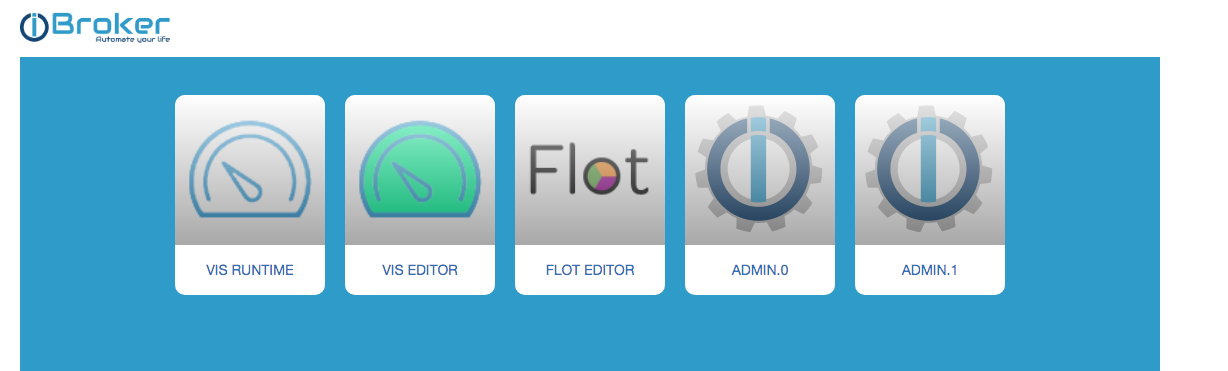
-
@thomas-braun hier die lange Fassung:
======== Start marking the full check here =========
Skript v.2024-04-21 *** BASE SYSTEM *** Static hostname: iobroker Icon name: computer Operating System: Raspbian GNU/Linux 11 (bullseye) Kernel: Linux 5.15.76-v7l+ Architecture: arm Model : Raspberry Pi 4 Model B Rev 1.2 Docker : false Virtualization : none Kernel : armv7l Userland : 32 bit Systemuptime and Load: 13:35:32 up 10 min, 1 user, load average: 1.37, 1.09, 0.74 CPU threads: 4 *** RASPBERRY THROTTLING *** Current issues: No throttling issues detected. Previously detected issues: No throttling issues detected. *** Time and Time Zones *** Local time: Tue 2024-05-21 13:35:32 CEST Universal time: Tue 2024-05-21 11:35:32 UTC RTC time: n/a Time zone: Europe/Berlin (CEST, +0200) System clock synchronized: yes NTP service: active RTC in local TZ: no *** Users and Groups *** User that called 'iob diag': aschenm HOME=/home/aschenm GROUPS=aschenm adm dialout cdrom sudo audio video plugdev games users input render netdev gpio i2c spi iobroker User that is running 'js-controller': iobroker HOME=/home/iobroker GROUPS=iobroker tty dialout audio video plugdev bluetooth gpio i2c *** Display-Server-Setup *** Display-Server: false Desktop: Terminal: tty Boot Target: multi-user.target *** MEMORY *** total used free shared buff/cache available Mem: 3.9G 1.6G 2.0G 1.0M 291M 2.6G Swap: 99M 0B 99M Total: 4.0G 1.6G 2.1G Active iob-Instances: 37 3888 M total memory 1642 M used memory 128 M active memory 1689 M inactive memory 1954 M free memory 38 M buffer memory 253 M swap cache 99 M total swap 0 M used swap 99 M free swap *** top - Table Of Processes *** top - 13:35:32 up 10 min, 1 user, load average: 1.37, 1.09, 0.74 Tasks: 185 total, 2 running, 183 sleeping, 0 stopped, 0 zombie %Cpu(s): 8.1 us, 5.4 sy, 0.0 ni, 86.5 id, 0.0 wa, 0.0 hi, 0.0 si, 0.0 st MiB Mem : 3888.5 total, 1953.9 free, 1642.4 used, 292.1 buff/cache MiB Swap: 100.0 total, 100.0 free, 0.0 used. 2637.2 avail Mem *** FAILED SERVICES *** UNIT LOAD ACTIVE SUB DESCRIPTION 0 loaded units listed. *** FILESYSTEM *** Filesystem Type Size Used Avail Use% Mounted on /dev/root ext4 29G 3.9G 24G 14% / devtmpfs devtmpfs 1.8G 0 1.8G 0% /dev tmpfs tmpfs 1.9G 0 1.9G 0% /dev/shm tmpfs tmpfs 778M 1.1M 777M 1% /run tmpfs tmpfs 5.0M 4.0K 5.0M 1% /run/lock /dev/mmcblk0p1 vfat 255M 52M 204M 21% /boot tmpfs tmpfs 389M 0 389M 0% /run/user/1000 Messages concerning ext4 filesystem in dmesg: [Tue May 21 13:24:39 2024] Kernel command line: coherent_pool=1M 8250.nr_uarts=0 snd_bcm2835.enable_compat_alsa=0 snd_bcm2835.enable_hdmi=1 smsc95xx.macaddr=DC:A6:32:FB:44:94 vc_mem.mem_base=0x3f000000 vc_mem.mem_size=0x3f600000 console=ttyS0,115200 console=tty1 root=PARTUUID=6a4743b9-02 rootfstype=ext4 fsck.repair=yes rootwait [Tue May 21 13:24:40 2024] EXT4-fs (mmcblk0p2): mounted filesystem with ordered data mode. Opts: (null). Quota mode: none. [Tue May 21 13:24:40 2024] VFS: Mounted root (ext4 filesystem) readonly on device 179:2. [Tue May 21 13:24:43 2024] EXT4-fs (mmcblk0p2): re-mounted. Opts: (null). Quota mode: none. Show mounted filesystems: TARGET SOURCE FSTYPE OPTIONS / /dev/mmcblk0p2 ext4 rw,noatime |-/dev devtmpfs devtmpfs rw,relatime,size=1826028k,nr_inodes=84087,mode=755 | |-/dev/shm tmpfs tmpfs rw,nosuid,nodev | |-/dev/pts devpts devpts rw,nosuid,noexec,relatime,gid=5,mode=620,ptmxmode=000 | `-/dev/mqueue mqueue mqueue rw,nosuid,nodev,noexec,relatime |-/proc proc proc rw,relatime | `-/proc/sys/fs/binfmt_misc systemd-1 autofs rw,relatime,fd=30,pgrp=1,timeout=0,minproto=5,maxproto=5,direct |-/sys sysfs sysfs rw,nosuid,nodev,noexec,relatime | |-/sys/kernel/security securityfs securityfs rw,nosuid,nodev,noexec,relatime | |-/sys/fs/cgroup cgroup2 cgroup2 rw,nosuid,nodev,noexec,relatime,nsdelegate,memory_recursiveprot | |-/sys/fs/pstore pstore pstore rw,nosuid,nodev,noexec,relatime | |-/sys/fs/bpf bpf bpf rw,nosuid,nodev,noexec,relatime,mode=700 | |-/sys/kernel/debug debugfs debugfs rw,nosuid,nodev,noexec,relatime | |-/sys/kernel/tracing tracefs tracefs rw,nosuid,nodev,noexec,relatime | |-/sys/kernel/config configfs configfs rw,nosuid,nodev,noexec,relatime | `-/sys/fs/fuse/connections fusectl fusectl rw,nosuid,nodev,noexec,relatime |-/run tmpfs tmpfs rw,nosuid,nodev,size=796360k,nr_inodes=819200,mode=755 | |-/run/lock tmpfs tmpfs rw,nosuid,nodev,noexec,relatime,size=5120k | |-/run/rpc_pipefs sunrpc rpc_pipefs rw,relatime | `-/run/user/1000 tmpfs tmpfs rw,nosuid,nodev,relatime,size=398176k,nr_inodes=99544,mode=700,uid=1000,gid=1000 `-/boot /dev/mmcblk0p1 vfat rw,relatime,fmask=0022,dmask=0022,codepage=437,iocharset=ascii,shortname=mixed,errors=remount-ro Files in neuralgic directories: /var: 475M /var/ 211M /var/log 209M /var/log/journal/c7926a6260574dac96912deb6bc692a0 209M /var/log/journal 93M /var/lib Archived and active journals take up 208.0M in the file system. /opt/iobroker/backups: 53M /opt/iobroker/backups/ /opt/iobroker/iobroker-data: 346M /opt/iobroker/iobroker-data/ 292M /opt/iobroker/iobroker-data/files 78M /opt/iobroker/iobroker-data/files/icons-open-icon-library-png 48M /opt/iobroker/iobroker-data/files/javascript.admin 32M /opt/iobroker/iobroker-data/files/javascript.admin/static The five largest files in iobroker-data are: 19M /opt/iobroker/iobroker-data/files/iot.admin/static/js/main.904d455f.js.map 16M /opt/iobroker/iobroker-data/objects.jsonl 12M /opt/iobroker/iobroker-data/files/javascript.admin/static/js/790.1eb1f33b.chunk.js.map 9.1M /opt/iobroker/iobroker-data/files/echarts.admin/static/js/2.bbf74d5f.chunk.js.map 8.9M /opt/iobroker/iobroker-data/files/scenes.admin/static/js/2.7de3299d.chunk.js.map USB-Devices by-id: USB-Sticks - Avoid direct links to /dev/tty* in your adapter setups, please always prefer the links 'by-id': No Devices found 'by-id' *** NodeJS-Installation *** nodejs: N/A /usr/bin/node v16.18.1 /usr/bin/npm 8.19.2 /usr/bin/npx 8.19.2 /usr/bin/corepack 0.14.1 *** nodejs is NOT correctly installed *** nodejs: Installed: 16.18.1-deb-1nodesource1 Candidate: 16.20.2-deb-1nodesource1 Version table: 16.20.2-deb-1nodesource1 500 500 https://deb.nodesource.com/node_16.x bullseye/main armhf Packages *** 16.18.1-deb-1nodesource1 100 100 /var/lib/dpkg/status 12.22.12~dfsg-1~deb11u4 500 500 http://raspbian.raspberrypi.org/raspbian bullseye/main armhf Packages Temp directories causing npm8 problem: 0 No problems detected Errors in npm tree: *** ioBroker-Installation *** ioBroker Status iobroker is running on this host. Objects type: jsonl States type: jsonl Core adapters versions js-controller: 4.0.24 admin: 6.3.2 javascript: 6.0.3 nodejs modules from github: 1 +-- iobroker.doorbird@0.1.5 (git+ssh://git@github.com/BuZZy1337/ioBroker.doorbird.git#47440ddff9a9074ef1e0beb8ff7b7f2a6e368efb) Adapter State system.adapter.admin.0 : admin : iobroker-pi - enabled, port: 8081, bind: 0.0.0.0, run as: admin system.adapter.admin.1 : admin : iobroker-pi - enabled, port: 8089, bind: 0.0.0.0, run as: admin + system.adapter.alexa2.0 : alexa2 : iobroker-pi - enabled + system.adapter.backitup.0 : backitup : iobroker-pi - enabled + system.adapter.bring.0 : bring : iobroker-pi - enabled + system.adapter.bydhvs.0 : bydhvs : iobroker-pi - enabled + system.adapter.cloud.0 : cloud : iobroker-pi - enabled + system.adapter.denon.0 : denon : iobroker-pi - enabled + system.adapter.discovery.0 : discovery : iobroker-pi - enabled + system.adapter.doorbird.0 : doorbird : iobroker-pi - enabled + system.adapter.echarts.0 : echarts : iobroker-pi - enabled system.adapter.flot.0 : flot : iobroker-pi - enabled + system.adapter.fullybrowser.0 : fullybrowser : iobroker-pi - enabled + system.adapter.history.0 : history : iobroker-pi - enabled + system.adapter.hmip.0 : hmip : iobroker-pi - enabled system.adapter.ical.0 : ical : iobroker-pi - enabled system.adapter.icons-material-png.0 : icons-material-png : iobroker-pi - enabled system.adapter.icons-mfd-svg.0 : icons-mfd-svg : iobroker-pi - enabled system.adapter.icons-open-icon-library-png.0: icons-open-icon-library-png: iobroker-pi - enabled system.adapter.icons-ultimate-png.0 : icons-ultimate-png : iobroker-pi - enabled + system.adapter.info.0 : info : iobroker-pi - enabled + system.adapter.iot.0 : iot : iobroker-pi - enabled + system.adapter.javascript.0 : javascript : iobroker-pi - enabled + system.adapter.kecontact.0 : kecontact : iobroker-pi - enabled + system.adapter.knx.0 : knx : iobroker-pi - enabled, bind: 192.168.0.15 + system.adapter.linux-control.0 : linux-control : iobroker-pi - enabled + system.adapter.mqtt.0 : mqtt : iobroker-pi - enabled, port: 1883, bind: 192.168.0.15 + system.adapter.niu.0 : niu : iobroker-pi - enabled + system.adapter.openknx.0 : openknx : iobroker-pi - enabled + system.adapter.ping.0 : ping : iobroker-pi - enabled + system.adapter.plenticore.0 : plenticore : iobroker-pi - enabled, port: 80 + system.adapter.roomba.0 : roomba : iobroker-pi - enabled + system.adapter.scenes.0 : scenes : iobroker-pi - enabled + system.adapter.shelly.0 : shelly : iobroker-pi - enabled, port: 1882, bind: 0.0.0.0 + system.adapter.solarlog.0 : solarlog : iobroker-pi - enabled, port: 80 + system.adapter.sonoff.0 : sonoff : iobroker-pi - enabled, port: 1884, bind: 192.168.0.15 + system.adapter.squeezeboxrpc.0 : squeezeboxrpc : iobroker-pi - enabled, port: 9000 + system.adapter.tr-064.0 : tr-064 : iobroker-pi - enabled + system.adapter.trashschedule.0 : trashschedule : iobroker-pi - enabled system.adapter.vis-bars.0 : vis-bars : iobroker-pi - enabled system.adapter.vis-canvas-gauges.0 : vis-canvas-gauges : iobroker-pi - enabled system.adapter.vis-fancyswitch.0 : vis-fancyswitch : iobroker-pi - enabled system.adapter.vis-history.0 : vis-history : iobroker-pi - enabled system.adapter.vis-justgage.0 : vis-justgage : iobroker-pi - enabled system.adapter.vis-material-advanced.0 : vis-material-advanced : iobroker-pi - enabled system.adapter.vis-timeandweather.0 : vis-timeandweather : iobroker-pi - enabled system.adapter.vis.0 : vis : iobroker-pi - enabled + system.adapter.volvo.0 : volvo : iobroker-pi - enabled + system.adapter.web.0 : web : iobroker-pi - enabled, port: 8082, bind: 0.0.0.0, run as: admin + system.adapter.whatsapp-cmb.0 : whatsapp-cmb : iobroker-pi - enabled + system.adapter.worx.0 : worx : iobroker-pi - enabled + system.adapter.yahka.0 : yahka : iobroker-pi - enabled system.adapter.zwave2.0 : zwave2 : iobroker-slave - enabled + instance is alive Enabled adapters with bindings system.adapter.admin.0 : admin : iobroker-pi - enabled, port: 8081, bind: 0.0.0.0, run as: admin system.adapter.admin.1 : admin : iobroker-pi - enabled, port: 8089, bind: 0.0.0.0, run as: admin + system.adapter.mqtt.0 : mqtt : iobroker-pi - enabled, port: 1883, bind: 192.168.0.15 + system.adapter.plenticore.0 : plenticore : iobroker-pi - enabled, port: 80 + system.adapter.shelly.0 : shelly : iobroker-pi - enabled, port: 1882, bind: 0.0.0.0 + system.adapter.solarlog.0 : solarlog : iobroker-pi - enabled, port: 80 + system.adapter.sonoff.0 : sonoff : iobroker-pi - enabled, port: 1884, bind: 192.168.0.15 + system.adapter.squeezeboxrpc.0 : squeezeboxrpc : iobroker-pi - enabled, port: 9000 + system.adapter.web.0 : web : iobroker-pi - enabled, port: 8082, bind: 0.0.0.0, run as: admin ioBroker-Repositories Stable (default): http://download.iobroker.net/sources-dist.json Beta (latest) : http://download.iobroker.net/sources-dist-latest.json Active repo(s): Stable (default) Installed ioBroker-Instances Used repository: Stable (default) Adapter "admin" : 6.13.16 , installed 6.3.2 [Updatable] Adapter "alexa2" : 3.26.5 , installed 3.23.2 [Updatable] Adapter "backitup" : 2.11.0 , installed 2.5.12 [Updatable] Adapter "bring" : 1.8.4 , installed 1.8.1 [Updatable] Adapter "bydhvs" : 1.5.0 , installed 1.4.0 [Updatable] Adapter "cloud" : 5.0.1 , installed 4.3.0 [Updatable] Adapter "denon" : 1.15.5 , installed 1.13.4 [Updatable] Adapter "discovery" : 4.4.0 , installed 2.7.5 [Updatable] Adapter "doorbird" : 1.5.0 , installed 0.1.5 [Updatable] Adapter "echarts" : 1.7.2 , installed 1.0.12 [Updatable] Adapter "flot" : 1.12.0 , installed 1.10.7 [Updatable] Adapter "fullybrowser" : 3.0.12 , installed 2.1.2 [Updatable] Adapter "history" : 3.0.1 , installed 2.2.4 [Updatable] Adapter "hmip" : 1.22.0 , installed 1.20.0 [Updatable] Adapter "ical" : 1.15.0 , installed 1.13.1 [Updatable] Adapter "icons-material-png": 0.1.0, installed 0.1.0 Adapter "icons-mfd-svg": 1.2.0 , installed 1.1.0 [Updatable] Adapter "icons-open-icon-library-png": 0.1.2, installed 0.1.2 Adapter "icons-ultimate-png": 1.0.1, installed 1.0.1 Adapter "iot" : 3.2.2 , installed 1.14.2 [Updatable] Adapter "javascript" : 7.8.0 , installed 6.0.3 [Updatable] Controller "js-controller": 5.0.19 , installed 4.0.24 [Updatable] Adapter "kecontact" : 2.1.1 , installed 1.5.2 [Updatable] Adapter "knx" : 2.0.26 , installed 2.0.13 [Updatable] Adapter "linux-control": 1.1.5 , installed 1.1.3 [Updatable] Adapter "mqtt" : 5.2.0 , installed 4.0.7 [Updatable] Adapter "niu" : 0.0.3 , installed 0.0.3 Adapter "openknx" : 0.9.0 , installed 0.2.5 [Updatable] Adapter "ping" : 1.6.2 , installed 1.5.0 [Updatable] Adapter "plenticore" : 2.2.0 , installed 2.2.0 Adapter "roomba" : 1.3.0 , installed 1.1.4 [Updatable] Adapter "scenes" : 2.3.9 , installed 2.3.9 Adapter "shelly" : 6.9.0 , installed 6.4.1 [Updatable] Adapter "simple-api" : 2.7.2 , installed 2.7.2 Adapter "socketio" : 6.7.0 , installed 4.2.0 [Updatable] Adapter "solarlog" : 2.2.8 , installed 2.2.2 [Updatable] Adapter "sonoff" : 3.0.3 , installed 2.5.1 [Updatable] Adapter "squeezeboxrpc": 1.3.9 , installed 1.3.9 Adapter "tr-064" : 4.3.0 , installed 4.2.15 [Updatable] Adapter "trashschedule": 3.2.0 , installed 2.0.3 [Updatable] Adapter "vis" : 1.5.4 , installed 1.4.15 [Updatable] Adapter "vis-bars" : 0.1.4 , installed 0.1.4 Adapter "vis-canvas-gauges": 1.0.1, installed 0.1.5 [Updatable] Adapter "vis-fancyswitch": 1.1.0 , installed 1.1.0 Adapter "vis-history" : 1.0.0 , installed 1.0.0 Adapter "vis-justgage" : 2.1.7 , installed 1.0.2 [Updatable] Adapter "vis-material-advanced": 1.7.4, installed 1.7.2 [Updatable] Adapter "vis-timeandweather": 1.2.2, installed 1.2.2 Adapter "volvo" : 0.1.0 , installed 0.1.0 Adapter "web" : 6.2.5 , installed 4.3.0 [Updatable] Adapter "whatsapp-cmb" : 0.2.3 , installed 0.2.2 [Updatable] Adapter "worx" : 2.3.4 , installed 2.1.3 [Updatable] Adapter "ws" : 2.6.1 , installed 1.3.0 [Updatable] Adapter "yahka" : 1.0.3 , installed 0.13.1 [Updatable] Objects and States Please stand by - This may take a while Objects: 7537 States: 6030 *** OS-Repositories and Updates *** Hit:1 http://raspbian.raspberrypi.org/raspbian bullseye InRelease Hit:2 http://archive.raspberrypi.org/debian bullseye InRelease Hit:3 https://deb.nodesource.com/node_16.x bullseye InRelease Reading package lists... Pending Updates: 144============ Mark until here for C&P =============
iob diag has finished.
Press any key for a summary
Ich hätte die Gelegenheit ja genutzt hier auf ein aktuelles 64Bit-System zu gehen.
Nodejs ist nicht richtig. Bring das auf die aktuelle Empfehlung nodejs@18:
iob nodejs-update
sudo reboot
Dann die iobroker-Adapter inkl. js-controller auf Stand bringen.
iob update iob upgrade all -y iob stop iob upgrade self iob start -
Ich hätte die Gelegenheit ja genutzt hier auf ein aktuelles 64Bit-System zu gehen.
Nodejs ist nicht richtig. Bring das auf die aktuelle Empfehlung nodejs@18:
iob nodejs-update
sudo reboot
Dann die iobroker-Adapter inkl. js-controller auf Stand bringen.
iob update iob upgrade all -y iob stop iob upgrade self iob start@thomas-braun Dane dir, das mache ich als nächstes. Ich hatte auch schon den gedanken einen aktuellen Stand einzusetzen, hier Frage ich mich aber, ob mein altes Backup dann noch tut? Ich hatte nämlich das letzte iobroker Image schon verscuht, mein Backup eingespielt und ein ähnliches verhalten, keine Oberfläche erreichbar und ich kam per SSH Login auch nicht rein...
Was wäre dein Tipp wie mit dem alten Backup umgehen?
Vielen Dank schon mal!
-
@thomas-braun Dane dir, das mache ich als nächstes. Ich hatte auch schon den gedanken einen aktuellen Stand einzusetzen, hier Frage ich mich aber, ob mein altes Backup dann noch tut? Ich hatte nämlich das letzte iobroker Image schon verscuht, mein Backup eingespielt und ein ähnliches verhalten, keine Oberfläche erreichbar und ich kam per SSH Login auch nicht rein...
Was wäre dein Tipp wie mit dem alten Backup umgehen?
Vielen Dank schon mal!
@humpl sagte in iobroker admin Zugriff nach Wiederherstellung nicht möglich:
hier Frage ich mich aber, ob mein altes Backup dann noch tut?
Dann bring das Ding JETZT auf einen aktuellen Stand und zieh dann mit einem Backup davon um. (Kein IMAGE, sondern ein Backup via Backitup-Adapter).
-
@humpl sagte in iobroker admin Zugriff nach Wiederherstellung nicht möglich:
hier Frage ich mich aber, ob mein altes Backup dann noch tut?
Dann bring das Ding JETZT auf einen aktuellen Stand und zieh dann mit einem Backup davon um. (Kein IMAGE, sondern ein Backup via Backitup-Adapter).
@thomas-braun So mit den Anweisungen habe ich ihn nun wieder zum laufen gebraucht. scheint aber immernoch nicht alles aktuell zu sein:

sieht so aus wie wenn der JS-controller auch noch ein update bräuchte:

hast du mir dafür ein Vorgehen? Oder einfach noch mal die Standard Anweisungen zum updaten durchgehen?
Tausend Dank schon vorab, ich bin happy dass er überhaupt wieder lebt!!!
-
@thomas-braun So mit den Anweisungen habe ich ihn nun wieder zum laufen gebraucht. scheint aber immernoch nicht alles aktuell zu sein:
sieht so aus wie wenn der JS-controller auch noch ein update bräuchte:
hast du mir dafür ein Vorgehen? Oder einfach noch mal die Standard Anweisungen zum updaten durchgehen?
Tausend Dank schon vorab, ich bin happy dass er überhaupt wieder lebt!!!
@humpl sagte in iobroker admin Zugriff nach Wiederherstellung nicht möglich:
sieht so aus wie wenn der JS-controller auch noch ein update bräuchte:
ja!
@humpl sagte in iobroker admin Zugriff nach Wiederherstellung nicht möglich:
Oder einfach noch mal die Standard Anweisungen zum updaten durchgehen?
Ja
iob stop iob update iob upgrade self iob start -
@humpl sagte in iobroker admin Zugriff nach Wiederherstellung nicht möglich:
sieht so aus wie wenn der JS-controller auch noch ein update bräuchte:
ja!
@humpl sagte in iobroker admin Zugriff nach Wiederherstellung nicht möglich:
Oder einfach noch mal die Standard Anweisungen zum updaten durchgehen?
Ja
iob stop iob update iob upgrade self iob start -
@homoran
jetzt siehts gut aus:
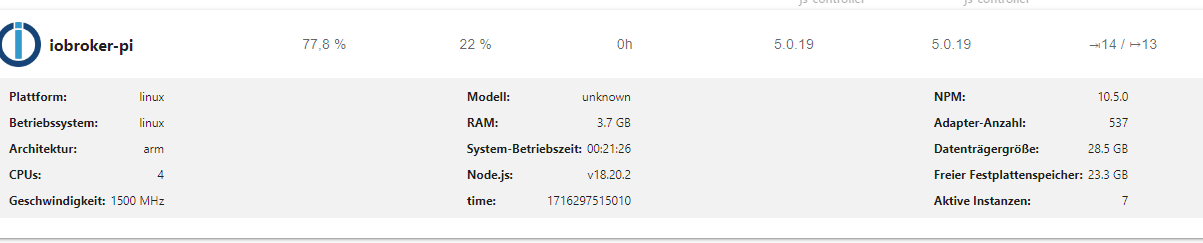
Du meintest nun dennoch ein frisches System aufsetzen und das Backup vom BackitUp einspielen?
VG
@humpl sagte in iobroker admin Zugriff nach Wiederherstellung nicht möglich:
Du meintest nun dennoch ein frisches System aufsetzen
natürlich.
Das Betriebssystem ist ja nicht angefasst worden. -
@humpl sagte in iobroker admin Zugriff nach Wiederherstellung nicht möglich:
Du meintest nun dennoch ein frisches System aufsetzen
natürlich.
Das Betriebssystem ist ja nicht angefasst worden. -
@homoran Stimmt! Aber mit einem nun frischen Backup sollte sich das System dann auch gleich wiederherstellen lassen diesmal oder gibts noch bedenken?
@humpl sagte in iobroker admin Zugriff nach Wiederherstellung nicht möglich:
sollte sich das System dann auch gleich wiederherstellen lassen
ja
-
@homoran Stimmt! Aber mit einem nun frischen Backup sollte sich das System dann auch gleich wiederherstellen lassen diesmal oder gibts noch bedenken?
Okay, Kiste sauber rebootet?
Dann sollte ein erneuter Lauf voniob diagauch nichts mehr zu bemäkeln haben.

Hey! Du scheinst an dieser Unterhaltung interessiert zu sein, hast aber noch kein Konto.
Hast du es satt, bei jedem Besuch durch die gleichen Beiträge zu scrollen? Wenn du dich für ein Konto anmeldest, kommst du immer genau dorthin zurück, wo du zuvor warst, und kannst dich über neue Antworten benachrichtigen lassen (entweder per E-Mail oder Push-Benachrichtigung). Du kannst auch Lesezeichen speichern und Beiträge positiv bewerten, um anderen Community-Mitgliedern deine Wertschätzung zu zeigen.
Mit deinem Input könnte dieser Beitrag noch besser werden 💗
Registrieren Anmelden443
Online33.0k
Benutzende83.7k
Themen1.3m
Beiträge