Skip to content
  • Home
  • Aktuell
  • Tags
  • 0 Ungelesen 0
  • Kategorien
  • Unreplied
  • Beliebt
  • GitHub
  • Docu
  • Hilfe
Skins
  • Light
  • Brite
  • Cerulean
  • Cosmo
  • Flatly
  • Journal
  • Litera
  • Lumen
  • Lux
  • Materia
  • Minty
  • Morph
  • Pulse
  • Sandstone
  • Simplex
  • Sketchy
  • Spacelab
  • United
  • Yeti
  • Zephyr
  • Dark
  • Cyborg
  • Darkly
  • Quartz
  • Slate
  • Solar
  • Superhero
  • Vapor

  • Standard: (Kein Skin)
  • Kein Skin
Einklappen
ioBroker Logo

Community Forum

donate donate
  1. ioBroker Community Home
  2. Deutsch
  3. ioBroker Allgemein
  4. [gelöst] Sonoff Zigbee 3.0 Dongle E startet nicht (mehr)

NEWS

  • Neuer Blogbeitrag: Monatsrückblick - Dezember 2025 🎄
    BluefoxB
    Bluefox
    11
    1
    331

  • Weihnachtsangebot 2025! 🎄
    BluefoxB
    Bluefox
    24
    1
    1.5k

  • UPDATE 31.10.: Amazon Alexa - ioBroker Skill läuft aus ?
    apollon77A
    apollon77
    48
    3
    9.5k

[gelöst] Sonoff Zigbee 3.0 Dongle E startet nicht (mehr)

Geplant Angeheftet Gesperrt Verschoben ioBroker Allgemein
8 Beiträge 3 Kommentatoren 1.0k Aufrufe 4 Watching
  • Älteste zuerst
  • Neuste zuerst
  • Meiste Stimmen
Antworten
  • In einem neuen Thema antworten
Anmelden zum Antworten
Dieses Thema wurde gelöscht. Nur Nutzer mit entsprechenden Rechten können es sehen.
  • bjoernbB Offline
    bjoernbB Offline
    bjoernb
    schrieb am zuletzt editiert von bjoernb
    #1

    Ich habe einen Sonoff Zigbee 3.0 Dongle E, den ich einigermassen erfolgreich auf einem RPi3 unter ioBroker mit dem Zigbee Adapter am laufen hatte. Es gab immer wieder das Problem, dass Geräte die Verbindung verloren haben, also wollte ich den Rpi3 durch einen Rpi4 ersetzen und ein USB Verlängerunskabel anhängen.

    Auf dem Rpi4 (Multihost Slave) bekomm ich den Stick aber nicht mehr erfolgreich eingebunden. Rpi4 ist frisch aufgesetzt mit 64bit Lite und nur nodejs und iobroker drauf. Den Rpi3 hab ich abgesteckt, als Multihost Slave gelöscht, der stört nicht mehr. Auf dem Rpi4 wird der Stick prinzipiell erkannt.

    lrwxrwxrwx 1 root root 13 Apr 27 08:25 usb-ITEAD_SONOFF_Zigbee_3.0_USB_Dongle_Plus_V2_20231101103500-if00 -> ../../ttyACM0
    

    In den Zigbee Settings hab ich sowohl die ../../ttyACM0, als auch /dev/serial/by-id/usb-ITEAD_SONOFF_Zigbee_3.0_USB_Dongle_Plus_V2_20231101103500-if00 eingetragen, beides mal der gleiche Fehler. ExtendedPanId und PanId hab ich geändert, aber ich hab den Eindruck er kann schon gar nicht richtig mit dem Stick kommunizieren. Ich habe den Stick am USB2 und am USB3 Port, mit und ohne Verlängerungskabel angesteckt, gleiches Ergebnis. Den Stick an sich muss man nicht irgendwie resetten, wenn man ihn an einen neuen Host anhängt, oder?

    2024-04-27 08:34:54.762  - info: host.audiopi instance system.adapter.zigbee.0 started with pid 2791
    2024-04-27 08:34:58.548  - debug: zigbee.0 (2791) Redis Objects: Use Redis connection: 192.168.1.10:9001
    2024-04-27 08:34:58.611  - debug: zigbee.0 (2791) Objects client ready ... initialize now
    2024-04-27 08:34:58.617  - debug: zigbee.0 (2791) Objects create System PubSub Client
    2024-04-27 08:34:58.620  - debug: zigbee.0 (2791) Objects create User PubSub Client
    2024-04-27 08:34:58.686  - debug: zigbee.0 (2791) Objects client initialize lua scripts
    2024-04-27 08:34:58.702  - debug: zigbee.0 (2791) Objects connected to redis: 192.168.1.10:9001
    2024-04-27 08:34:58.739  - debug: zigbee.0 (2791) Redis States: Use Redis connection: 192.168.1.10:9000
    2024-04-27 08:34:58.801  - debug: zigbee.0 (2791) States create System PubSub Client
    2024-04-27 08:34:58.803  - debug: zigbee.0 (2791) States create User PubSub Client
    2024-04-27 08:34:58.878  - debug: zigbee.0 (2791) States connected to redis: 192.168.1.10:9000
    2024-04-27 08:34:58.949  - debug: zigbee.0 (2791) Plugin sentry Initialize Plugin (enabled=true)
    2024-04-27 08:34:58.548  - debug: zigbee.0 (2791) Redis Objects: Use Redis connection: 192.168.1.10:9001
    2024-04-27 08:34:58.611  - debug: zigbee.0 (2791) Objects client ready ... initialize now
    2024-04-27 08:34:58.617  - debug: zigbee.0 (2791) Objects create System PubSub Client
    2024-04-27 08:34:58.620  - debug: zigbee.0 (2791) Objects create User PubSub Client
    2024-04-27 08:34:58.686  - debug: zigbee.0 (2791) Objects client initialize lua scripts
    2024-04-27 08:34:58.702  - debug: zigbee.0 (2791) Objects connected to redis: 192.168.1.10:9001
    2024-04-27 08:34:58.739  - debug: zigbee.0 (2791) Redis States: Use Redis connection: 192.168.1.10:9000
    2024-04-27 08:34:58.801  - debug: zigbee.0 (2791) States create System PubSub Client
    2024-04-27 08:34:58.803  - debug: zigbee.0 (2791) States create User PubSub Client
    2024-04-27 08:34:58.878  - debug: zigbee.0 (2791) States connected to redis: 192.168.1.10:9000
    2024-04-27 08:34:58.949  - debug: zigbee.0 (2791) Plugin sentry Initialize Plugin (enabled=true)
    2024-04-27 08:34:59.722  - info: zigbee.0 (2791) starting. Version 1.10.3 in /opt/iobroker/node_modules/iobroker.zigbee, node: v18.20.2, js-controller: 5.0.19
    2024-04-27 08:34:59.752  - debug: zigbee.0 (2791) Using zigbee-herdsman with settings: {"network":{"panID":6132,"extendedPanID":[173,189,29,221,239,190,173,222],"channelList":[11],"networkKey":[1,3,5,7,9,11,13,15,0,2,4,6,8,10,12,13]},"databasePath":"/opt/iobroker/iobroker-data/zigbee_0/shepherd.db","backupPath":"/opt/iobroker/iobroker-data/zigbee_0/nvbackup.json","serialPort":{"baudRate":115200,"rtscts":false,"path":"/dev/ttyACM0","adapter":"ezsp"},"adapter":{"forceStartWithInconsistentAdapterConfiguration":false},"legacy":false}
    2024-04-27 08:34:59.820  - info: zigbee.0 (2791) delete old Backup files. keep only last 10
    2024-04-27 08:34:59.822  - info: zigbee.0 (2791) Starting Zigbee  npm ...
    2024-04-27 08:34:59.861  - debug: zigbee.0 (2791) Backup /opt/iobroker/iobroker-data/zigbee_0/backup_2024_04_27-08_34_59.tar.gz success
    2024-04-27 08:34:59.891  - debug: zigbee.0 (2791) Starting zigbee-herdsman...
    2024-04-27 08:35:00.230  - info: zigbee.0 (2791) Installed Version: iobroker.zigbee@1.10.3
    2024-04-27 08:34:59.722  - info: zigbee.0 (2791) starting. Version 1.10.3 in /opt/iobroker/node_modules/iobroker.zigbee, node: v18.20.2, js-controller: 5.0.19
    2024-04-27 08:34:59.752  - debug: zigbee.0 (2791) Using zigbee-herdsman with settings: {"network":{"panID":6132,"extendedPanID":[173,189,29,221,239,190,173,222],"channelList":[11],"networkKey":[1,3,5,7,9,11,13,15,0,2,4,6,8,10,12,13]},"databasePath":"/opt/iobroker/iobroker-data/zigbee_0/shepherd.db","backupPath":"/opt/iobroker/iobroker-data/zigbee_0/nvbackup.json","serialPort":{"baudRate":115200,"rtscts":false,"path":"/dev/ttyACM0","adapter":"ezsp"},"adapter":{"forceStartWithInconsistentAdapterConfiguration":false},"legacy":false}
    2024-04-27 08:34:59.820  - info: zigbee.0 (2791) delete old Backup files. keep only last 10
    2024-04-27 08:34:59.822  - info: zigbee.0 (2791) Starting Zigbee  npm ...
    2024-04-27 08:34:59.861  - debug: zigbee.0 (2791) Backup /opt/iobroker/iobroker-data/zigbee_0/backup_2024_04_27-08_34_59.tar.gz success
    2024-04-27 08:34:59.891  - debug: zigbee.0 (2791) Starting zigbee-herdsman...
    2024-04-27 08:35:00.230  - info: zigbee.0 (2791) Installed Version: iobroker.zigbee@1.10.3
    2024-04-27 08:35:04.221  - error: zigbee.0 (2791) Starting zigbee-herdsman problem : "startup failed - configuration-adapter mismatch - see logs above for more information"
    2024-04-27 08:35:04.222  - error: zigbee.0 (2791) Failed to start Zigbee
    2024-04-27 08:35:04.223  - error: zigbee.0 (2791) Error herdsman start
    2024-04-27 08:35:04.221  - error: zigbee.0 (2791) Starting zigbee-herdsman problem : "startup failed - configuration-adapter mismatch - see logs above for more information"
    2024-04-27 08:35:04.222  - error: zigbee.0 (2791) Failed to start Zigbee
    2024-04-27 08:35:04.223  - error: zigbee.0 (2791) Error herdsman start
    2024-04-27 08:35:14.230  - info: zigbee.0 (2791) Try to reconnect. 1 attempts left
    2024-04-27 08:35:14.232  - info: zigbee.0 (2791) Starting Zigbee  npm ...
    2024-04-27 08:35:14.250  - debug: zigbee.0 (2791) Starting zigbee-herdsman...
    2024-04-27 08:35:14.266  - info: zigbee.0 (2791) Installed Version: iobroker.zigbee@1.10.3
    2024-04-27 08:35:14.230  - info: zigbee.0 (2791) Try to reconnect. 1 attempts left
    2024-04-27 08:35:14.232  - info: zigbee.0 (2791) Starting Zigbee  npm ...
    2024-04-27 08:35:14.250  - debug: zigbee.0 (2791) Starting zigbee-herdsman...
    2024-04-27 08:35:14.266  - info: zigbee.0 (2791) Installed Version: iobroker.zigbee@1.10.3
    

    Skript v.2023-10-10
    
    *** BASE SYSTEM ***
     Static hostname: audiopi
           Icon name: computer
    Operating System: Debian GNU/Linux 12 (bookworm)
              Kernel: Linux 6.6.28+rpt-rpi-v8
        Architecture: arm64
    
    Model           : Raspberry Pi 4 Model B Rev 1.5
    Docker          : false
    Virtualization  : none
    Kernel          : aarch64
    Userland        : arm64
    
    Systemuptime and Load:
     08:43:05 up 17 min,  1 user,  load average: 0.29, 0.11, 0.09
    CPU threads: 4
    
    
    *** RASPBERRY THROTTLING ***
    Current issues:
    No throttling issues detected.
    
    Previously detected issues:
    No throttling issues detected.
    
    *** Time and Time Zones ***
                   Local time: Sat 2024-04-27 08:43:06 CEST
               Universal time: Sat 2024-04-27 06:43:06 UTC
                     RTC time: n/a
                    Time zone: Europe/Zurich (CEST, +0200)
    System clock synchronized: yes
                  NTP service: active
              RTC in local TZ: no
    
    *** User and Groups ***
    pi
    /home/pi
    pi adm dialout cdrom sudo audio video plugdev games users input render netdev gpio i2c spi iobroker
    
    *** X-Server-Setup ***
    X-Server:       false
    Desktop: 
    Terminal:       tty
    Boot Target:    multi-user.target
    
    *** MEMORY ***
                   total        used        free      shared  buff/cache   available
    Mem:            1.9G        435M        1.2G        1.2M        356M        1.5G
    Swap:           104M          0B        104M
    Total:          2.0G        435M        1.3G
    
             1846 M total memory
              415 M used memory
              544 M active memory
               68 M inactive memory
             1150 M free memory
               22 M buffer memory
              317 M swap cache
               99 M total swap
                0 M used swap
               99 M free swap
    
    Raspberry only:
    oom events: 0
    lifetime oom required: 0 Mbytes
    total time in oom handler: 0 ms
    max time spent in oom handler: 0 ms
    
    
    *** FAILED SERVICES ***
    
      UNIT LOAD ACTIVE SUB DESCRIPTION
    0 loaded units listed.
    
    *** FILESYSTEM ***
    Filesystem     Type      Size  Used Avail Use% Mounted on
    udev           devtmpfs  660M     0  660M   0% /dev
    tmpfs          tmpfs     185M  1.2M  184M   1% /run
    /dev/mmcblk0p2 ext4       15G  3.3G   11G  25% /
    tmpfs          tmpfs     924M     0  924M   0% /dev/shm
    tmpfs          tmpfs     5.0M   16K  5.0M   1% /run/lock
    /dev/mmcblk0p1 vfat      510M   64M  447M  13% /boot/firmware
    tmpfs          tmpfs     185M     0  185M   0% /run/user/1000
    
    Messages concerning ext4 filesystem in dmesg:
    [Sat Apr 27 08:25:58 2024] Kernel command line: coherent_pool=1M 8250.nr_uarts=1 snd_bcm2835.enable_headphones=0 snd_bcm2835.enable_headphones=1 snd_bcm2835.enable_hdmi=1 snd_bcm2835.enable_hdmi=0  smsc95xx.macaddr=D8:3A:DD:8F:E4:70 vc_mem.mem_base=0x3ec00000 vc_mem.mem_size=0x40000000  console=tty1 root=PARTUUID=6bd49e23-02 rootfstype=ext4 fsck.repair=yes rootwait cfg80211.ieee80211_regdom=CH
    [Sat Apr 27 08:26:00 2024] EXT4-fs (mmcblk0p2): mounted filesystem 93c89e92-8f2e-4522-ad32-68faed883d2f ro with ordered data mode. Quota mode: none.
    [Sat Apr 27 08:26:02 2024] EXT4-fs (mmcblk0p2): re-mounted 93c89e92-8f2e-4522-ad32-68faed883d2f r/w. Quota mode: none.
    
    Show mounted filesystems \(real ones only\):
    TARGET           SOURCE         FSTYPE OPTIONS
    /                /dev/mmcblk0p2 ext4   rw,noatime
    `-/boot/firmware /dev/mmcblk0p1 vfat   rw,relatime,fmask=0022,dmask=0022,codepage=437,iocharset=ascii,shortname=mixed,errors=remount-ro
    
    Files in neuralgic directories:
    
    /var:
    546M    /var/
    203M    /var/cache
    197M    /var/cache/apt
    165M    /var/lib
    133M    /var/lib/apt/lists
    
    Archived and active journals take up 76.0M in the file system.
    
    /opt/iobroker/backups:
    4.0K    /opt/iobroker/backups/
    
    /opt/iobroker/iobroker-data:
    18M     /opt/iobroker/iobroker-data/
    13M     /opt/iobroker/iobroker-data/files/admin.admin/custom/static/js
    13M     /opt/iobroker/iobroker-data/files/admin.admin/custom/static
    13M     /opt/iobroker/iobroker-data/files/admin.admin/custom
    13M     /opt/iobroker/iobroker-data/files/admin.admin
    
    The five largest files in iobroker-data are:
    6.3M    /opt/iobroker/iobroker-data/files/admin.admin/custom/static/js/vendors-node_modules_iobroker_adapter-react-v5_assets_devices_parseNames_js-node_modules_iobr-99c23e.847b8ad9.chunk.js.map
    4.5M    /opt/iobroker/iobroker-data/objects.jsonl
    2.8M    /opt/iobroker/iobroker-data/files/admin.admin/custom/static/js/vendors-node_modules_iobroker_adapter-react-v5_assets_devices_parseNames_js-node_modules_iobr-99c23e.847b8ad9.chunk.js
    1.6M    /opt/iobroker/iobroker-data/files/admin.admin/custom/static/js/vendors-node_modules_mui_material_Accordion_index_js-node_modules_mui_material_AccordionDetai-57e02d.0886b730.chunk.js.map
    652K    /opt/iobroker/iobroker-data/files/admin.admin/custom/static/js/vendors-node_modules_mui_material_index_js.40e01f69.chunk.js.map
    
    USB-Devices by-id:
    USB-Sticks -  Avoid direct links to /dev/* in your adapter setups, please always prefer the links 'by-id':
    
    /dev/serial/by-id/usb-ITEAD_SONOFF_Zigbee_3.0_USB_Dongle_Plus_V2_20231101103500-if00
    
    *** NodeJS-Installation ***
    
    /usr/bin/nodejs         v18.20.2
    /usr/bin/node           v18.20.2
    /usr/bin/npm            10.5.0
    /usr/bin/npx            10.5.0
    /usr/bin/corepack       0.25.2
    
    
    nodejs:
      Installed: 18.20.2-1nodesource1
      Candidate: 18.20.2-1nodesource1
      Version table:
     *** 18.20.2-1nodesource1 600
            500 https://deb.nodesource.com/node_18.x nodistro/main arm64 Packages
            100 /var/lib/dpkg/status
         18.20.1-1nodesource1 600
            500 https://deb.nodesource.com/node_18.x nodistro/main arm64 Packages
         18.20.0-1nodesource1 600
            500 https://deb.nodesource.com/node_18.x nodistro/main arm64 Packages
         18.19.1-1nodesource1 600
            500 https://deb.nodesource.com/node_18.x nodistro/main arm64 Packages
         18.19.0+dfsg-6~deb12u1 500
            500 http://deb.debian.org/debian-security bookworm-security/main arm64 Packages
         18.19.0-1nodesource1 600
            500 https://deb.nodesource.com/node_18.x nodistro/main arm64 Packages
         18.18.2-1nodesource1 600
            500 https://deb.nodesource.com/node_18.x nodistro/main arm64 Packages
         18.18.1-1nodesource1 600
            500 https://deb.nodesource.com/node_18.x nodistro/main arm64 Packages
         18.18.0-1nodesource1 600
            500 https://deb.nodesource.com/node_18.x nodistro/main arm64 Packages
         18.17.1-1nodesource1 600
            500 https://deb.nodesource.com/node_18.x nodistro/main arm64 Packages
         18.17.0-1nodesource1 600
            500 https://deb.nodesource.com/node_18.x nodistro/main arm64 Packages
         18.16.1-1nodesource1 600
            500 https://deb.nodesource.com/node_18.x nodistro/main arm64 Packages
         18.16.0-1nodesource1 600
            500 https://deb.nodesource.com/node_18.x nodistro/main arm64 Packages
         18.15.0-1nodesource1 600
            500 https://deb.nodesource.com/node_18.x nodistro/main arm64 Packages
         18.14.2-1nodesource1 600
            500 https://deb.nodesource.com/node_18.x nodistro/main arm64 Packages
         18.14.1-1nodesource1 600
            500 https://deb.nodesource.com/node_18.x nodistro/main arm64 Packages
         18.14.0-1nodesource1 600
            500 https://deb.nodesource.com/node_18.x nodistro/main arm64 Packages
         18.13.0+dfsg1-1 500
            500 http://deb.debian.org/debian bookworm/main arm64 Packages
         18.13.0-1nodesource1 600
            500 https://deb.nodesource.com/node_18.x nodistro/main arm64 Packages
         18.12.0-1nodesource1 600
            500 https://deb.nodesource.com/node_18.x nodistro/main arm64 Packages
         18.11.0-1nodesource1 600
            500 https://deb.nodesource.com/node_18.x nodistro/main arm64 Packages
         18.10.0-1nodesource1 600
            500 https://deb.nodesource.com/node_18.x nodistro/main arm64 Packages
         18.9.1-1nodesource1 600
            500 https://deb.nodesource.com/node_18.x nodistro/main arm64 Packages
         18.9.0-1nodesource1 600
            500 https://deb.nodesource.com/node_18.x nodistro/main arm64 Packages
         18.8.0-1nodesource1 600
            500 https://deb.nodesource.com/node_18.x nodistro/main arm64 Packages
         18.7.0-1nodesource1 600
            500 https://deb.nodesource.com/node_18.x nodistro/main arm64 Packages
         18.6.0-1nodesource1 600
            500 https://deb.nodesource.com/node_18.x nodistro/main arm64 Packages
         18.5.0-1nodesource1 600
            500 https://deb.nodesource.com/node_18.x nodistro/main arm64 Packages
         18.4.0-1nodesource1 600
            500 https://deb.nodesource.com/node_18.x nodistro/main arm64 Packages
         18.3.0-1nodesource1 600
            500 https://deb.nodesource.com/node_18.x nodistro/main arm64 Packages
         18.2.0-1nodesource1 600
            500 https://deb.nodesource.com/node_18.x nodistro/main arm64 Packages
         18.1.0-1nodesource1 600
            500 https://deb.nodesource.com/node_18.x nodistro/main arm64 Packages
         18.0.0-1nodesource1 600
            500 https://deb.nodesource.com/node_18.x nodistro/main arm64 Packages
    
    Temp directories causing npm8 problem: 0
    No problems detected
    
    Errors in npm tree:
    
    *** ioBroker-Installation ***
    
    ioBroker Status
    iobroker is running on this host.
    
    At least one iobroker host is running.
    
    Objects type: jsonl
    States  type: jsonl
    
    Core adapters versions
    js-controller:  5.0.19
    admin:          6.13.16
    javascript:     "javascript" not found
    
    Adapters from github:   0
    
    Adapter State
    + system.adapter.admin.0                  : admin                 : homepi                                   -  enabled, port: 8081, bind: 0.0.0.0, run as: admin
    + system.adapter.alexa2.0                 : alexa2                : homepi                                   -  enabled
    + system.adapter.backitup.0               : backitup              : homepi                                   -  enabled
    + system.adapter.broadlink2.0             : broadlink2            : homepi                                   -  enabled
      system.adapter.discovery.0              : discovery             : homepi                                   - disabled
    + system.adapter.echarts.0                : echarts               : homepi                                   -  enabled
    + system.adapter.history.0                : history               : homepi                                   -  enabled
    + system.adapter.iot.0                    : iot                   : homepi                                   -  enabled
    + system.adapter.jarvis.0                 : jarvis                : homepi                                   -  enabled
    + system.adapter.javascript.0             : javascript            : homepi                                   -  enabled
    + system.adapter.linux-control.0          : linux-control         : homepi                                   -  enabled
    + system.adapter.mqtt.0                   : mqtt                  : homepi                                   -  enabled, port: 1883, bind: 0.0.0.0
    + system.adapter.node-red.0               : node-red              : homepi                                   -  enabled, port: 1880, bind: 0.0.0.0
    + system.adapter.openknx.0                : openknx               : homepi                                   -  enabled
    + system.adapter.rpi2.0                   : rpi2                  : homepi                                   -  enabled
    + system.adapter.shelly.0                 : shelly                : homepi                                   -  enabled, port: 1882, bind: 0.0.0.0
    + system.adapter.signal-cmb.0             : signal-cmb            : homepi                                   -  enabled
    + system.adapter.simple-api.0             : simple-api            : homepi                                   -  enabled, port: 8087, bind: 0.0.0.0, run as: admin
      system.adapter.sony-bravia.0            : sony-bravia           : homepi                                   - disabled
    + system.adapter.telegram.0               : telegram              : homepi                                   -  enabled, port: 8443, bind: 0.0.0.0
    + system.adapter.tr-064.0                 : tr-064                : homepi                                   -  enabled
    + system.adapter.tr-064.1                 : tr-064                : homepi                                   -  enabled
    + system.adapter.web.0                    : web                   : homepi                                   -  enabled, port: 8082, bind: 0.0.0.0, run as: admin
    + system.adapter.zigbee.0                 : zigbee                : audiopi                                  -  enabled, port: /dev/ttyACM0
    
    + instance is alive
    
    Enabled adapters with bindings
    + system.adapter.admin.0                  : admin                 : homepi                                   -  enabled, port: 8081, bind: 0.0.0.0, run as: admin
    + system.adapter.mqtt.0                   : mqtt                  : homepi                                   -  enabled, port: 1883, bind: 0.0.0.0
    + system.adapter.node-red.0               : node-red              : homepi                                   -  enabled, port: 1880, bind: 0.0.0.0
    + system.adapter.shelly.0                 : shelly                : homepi                                   -  enabled, port: 1882, bind: 0.0.0.0
    + system.adapter.simple-api.0             : simple-api            : homepi                                   -  enabled, port: 8087, bind: 0.0.0.0, run as: admin
    + system.adapter.telegram.0               : telegram              : homepi                                   -  enabled, port: 8443, bind: 0.0.0.0
    + system.adapter.web.0                    : web                   : homepi                                   -  enabled, port: 8082, bind: 0.0.0.0, run as: admin
    + system.adapter.zigbee.0                 : zigbee                : audiopi                                  -  enabled, port: /dev/ttyACM0
    
    ioBroker-Repositories
    stable        : http://download.iobroker.net/sources-dist.json
    beta          : http://download.iobroker.net/sources-dist-latest.json
    
    Active repo(s): stable
    
    Installed ioBroker-Instances
    Used repository: stable
    Adapter    "admin"        : 6.13.16  , installed 6.13.16
    Controller "js-controller": 5.0.19   , installed 5.0.19
    Adapter    "zigbee"       : 1.10.3   , installed 1.10.3
    
    Objects and States
    Please stand by - This may take a while
    Objects:        3344
    States:         2569
    
    *** OS-Repositories and Updates ***
    Hit:1 http://deb.debian.org/debian bookworm InRelease
    Hit:2 http://archive.raspberrypi.com/debian bookworm InRelease
    Hit:3 http://deb.debian.org/debian-security bookworm-security InRelease
    Hit:4 http://deb.debian.org/debian bookworm-updates InRelease
    Hit:5 https://dtcooper.github.io/raspotify raspotify InRelease
    Hit:6 https://deb.nodesource.com/node_18.x nodistro InRelease
    Reading package lists...
    Pending Updates: 0
    
    *** Listening Ports ***
    Active Internet connections (only servers)
    Proto Recv-Q Send-Q Local Address           Foreign Address         State       User       Inode      PID/Program name    
    tcp        0      0 0.0.0.0:43695           0.0.0.0:*               LISTEN      62638      4773       666/librespot       
    tcp        0      0 0.0.0.0:22              0.0.0.0:*               LISTEN      0          4741       674/sshd: /usr/sbin 
    tcp        0      0 127.0.0.1:33353         0.0.0.0:*               LISTEN      1000       6422       803/code-e170252f76 
    tcp6       0      0 :::22                   :::*                    LISTEN      0          4743       674/sshd: /usr/sbin 
    udp        0      0 0.0.0.0:54496           0.0.0.0:*                           104        4620       487/avahi-daemon: r 
    udp        0      0 0.0.0.0:5353            0.0.0.0:*                           62638      4774       666/librespot       
    udp        0      0 0.0.0.0:5353            0.0.0.0:*                           104        4618       487/avahi-daemon: r 
    udp6       0      0 :::33854                :::*                                104        4621       487/avahi-daemon: r 
    udp6       0      0 :::5353                 :::*                                104        4619       487/avahi-daemon: r 
    udp6       0      0 :::5353                 :::*                                62638      4776       666/librespot       
    udp6       0      0 fe80::4164:e56e:62c:546 :::*                                0          7283       601/NetworkManager  
    
    *** Log File - Last 25 Lines ***
    
    2024-04-27 08:34:58.620  - debug: zigbee.0 (2791) Objects create User PubSub Client
    2024-04-27 08:34:58.686  - debug: zigbee.0 (2791) Objects client initialize lua scripts
    2024-04-27 08:34:58.702  - debug: zigbee.0 (2791) Objects connected to redis: 192.168.1.10:9001
    2024-04-27 08:34:58.739  - debug: zigbee.0 (2791) Redis States: Use Redis connection: 192.168.1.10:9000
    2024-04-27 08:34:58.801  - debug: zigbee.0 (2791) States create System PubSub Client
    2024-04-27 08:34:58.803  - debug: zigbee.0 (2791) States create User PubSub Client
    2024-04-27 08:34:58.878  - debug: zigbee.0 (2791) States connected to redis: 192.168.1.10:9000
    2024-04-27 08:34:58.949  - debug: zigbee.0 (2791) Plugin sentry Initialize Plugin (enabled=true)
    2024-04-27 08:34:59.722  - info: zigbee.0 (2791) starting. Version 1.10.3 in /opt/iobroker/node_modules/iobroker.zigbee, node: v18.20.2, js-controller: 5.0.19
    2024-04-27 08:34:59.752  - debug: zigbee.0 (2791) Using zigbee-herdsman with settings: {"network":{"panID":6132,"extendedPanID":[173,189,29,221,239,190,173,222],"channelList":[11],"networkKey":[1,3,5,7,9,11,13,15,0,2,4,6,8,10,12,13]},"databasePath":"/opt/iobroker/iobroker-data/zigbee_0/shepherd.db","backupPath":"/opt/iobroker/iobroker-data/zigbee_0/nvbackup.json","serialPort":{"baudRate":115200,"rtscts":false,"path":"/dev/ttyACM0","adapter":"ezsp"},"adapter":{"forceStartWithInconsistentAdapterConfiguration":false},"legacy":false}
    2024-04-27 08:34:59.820  - info: zigbee.0 (2791) delete old Backup files. keep only last 10
    2024-04-27 08:34:59.822  - info: zigbee.0 (2791) Starting Zigbee  npm ...
    2024-04-27 08:34:59.861  - debug: zigbee.0 (2791) Backup /opt/iobroker/iobroker-data/zigbee_0/backup_2024_04_27-08_34_59.tar.gz success
    2024-04-27 08:34:59.891  - debug: zigbee.0 (2791) Starting zigbee-herdsman...
    2024-04-27 08:35:00.230  - info: zigbee.0 (2791) Installed Version: iobroker.zigbee@1.10.3
    2024-04-27 08:35:04.221  - error: zigbee.0 (2791) Starting zigbee-herdsman problem : "startup failed - configuration-adapter mismatch - see logs above for more information"
    2024-04-27 08:35:04.222  - error: zigbee.0 (2791) Failed to start Zigbee
    2024-04-27 08:35:04.223  - error: zigbee.0 (2791) Error herdsman start
    2024-04-27 08:35:14.230  - info: zigbee.0 (2791) Try to reconnect. 1 attempts left
    2024-04-27 08:35:14.232  - info: zigbee.0 (2791) Starting Zigbee  npm ...
    2024-04-27 08:35:14.250  - debug: zigbee.0 (2791) Starting zigbee-herdsman...
    2024-04-27 08:35:14.266  - info: zigbee.0 (2791) Installed Version: iobroker.zigbee@1.10.3
    2024-04-27 08:35:44.638  - error: zigbee.0 (2791) Starting zigbee-herdsman problem : "Failure to connect"
    2024-04-27 08:35:44.639  - error: zigbee.0 (2791) Failed to start Zigbee
    2024-04-27 08:35:44.640  - error: zigbee.0 (2791) Error herdsman start
    
    
    ======================= SUMMARY =======================
                            v.2023-10-10
    
    
     Static hostname: audiopi
           Icon name: computer
    Operating System: Debian GNU/Linux 12 (bookworm)
              Kernel: Linux 6.6.28+rpt-rpi-v8
        Architecture: arm64
    
    Installation:           native
    Kernel:                 aarch64
    Userland:               arm64
    Timezone:               Europe/Zurich (CEST, +0200)
    User-ID:                1000
    X-Server:               false
    Boot Target:            multi-user.target
    
    Pending OS-Updates:     0
    Pending iob updates:    0
    
    Nodejs-Installation:    /usr/bin/nodejs         v18.20.2
                            /usr/bin/node           v18.20.2
                            /usr/bin/npm            10.5.0
                            /usr/bin/npx            10.5.0
                            /usr/bin/corepack       0.25.2
    
    Recommended versions are nodejs  and npm 
    Your nodejs installation is correct
    
    MEMORY: 
                   total        used        free      shared  buff/cache   available
    Mem:            1.9G        453M        964M        1.2M        591M        1.5G
    Swap:           104M          0B        104M
    Total:          2.0G        453M        1.1G
    
    Active iob-Instances:   23
    Active repo(s): stable
    
    ioBroker Core:          js-controller           5.0.19
                            admin                   6.13.16
    
    ioBroker Status:        iobroker is running on this host.
    
    At least one iobroker host is running.
    
    Objects type: jsonl
    States  type: jsonl
    
    Status admin and web instance:
    + system.adapter.admin.0                  : admin                 : homepi                                   -  enabled, port: 8081, bind: 0.0.0.0, run as: admin
    + system.adapter.web.0                    : web                   : homepi                                   -  enabled, port: 8082, bind: 0.0.0.0, run as: admin
    
    Objects:                3344
    States:                 2569
    
    Size of iob-Database:
    
    4.5M    /opt/iobroker/iobroker-data/objects.jsonl
    68K     /opt/iobroker/iobroker-data/states.jsonl


    =================== END OF SUMMARY ====================
    

    Bin für jeden Tipp dankbar.

    Thomas BraunT 1 Antwort Letzte Antwort
    0
    • bjoernbB bjoernb

      Ich habe einen Sonoff Zigbee 3.0 Dongle E, den ich einigermassen erfolgreich auf einem RPi3 unter ioBroker mit dem Zigbee Adapter am laufen hatte. Es gab immer wieder das Problem, dass Geräte die Verbindung verloren haben, also wollte ich den Rpi3 durch einen Rpi4 ersetzen und ein USB Verlängerunskabel anhängen.

      Auf dem Rpi4 (Multihost Slave) bekomm ich den Stick aber nicht mehr erfolgreich eingebunden. Rpi4 ist frisch aufgesetzt mit 64bit Lite und nur nodejs und iobroker drauf. Den Rpi3 hab ich abgesteckt, als Multihost Slave gelöscht, der stört nicht mehr. Auf dem Rpi4 wird der Stick prinzipiell erkannt.

      lrwxrwxrwx 1 root root 13 Apr 27 08:25 usb-ITEAD_SONOFF_Zigbee_3.0_USB_Dongle_Plus_V2_20231101103500-if00 -> ../../ttyACM0
      

      In den Zigbee Settings hab ich sowohl die ../../ttyACM0, als auch /dev/serial/by-id/usb-ITEAD_SONOFF_Zigbee_3.0_USB_Dongle_Plus_V2_20231101103500-if00 eingetragen, beides mal der gleiche Fehler. ExtendedPanId und PanId hab ich geändert, aber ich hab den Eindruck er kann schon gar nicht richtig mit dem Stick kommunizieren. Ich habe den Stick am USB2 und am USB3 Port, mit und ohne Verlängerungskabel angesteckt, gleiches Ergebnis. Den Stick an sich muss man nicht irgendwie resetten, wenn man ihn an einen neuen Host anhängt, oder?

      2024-04-27 08:34:54.762  - info: host.audiopi instance system.adapter.zigbee.0 started with pid 2791
      2024-04-27 08:34:58.548  - debug: zigbee.0 (2791) Redis Objects: Use Redis connection: 192.168.1.10:9001
      2024-04-27 08:34:58.611  - debug: zigbee.0 (2791) Objects client ready ... initialize now
      2024-04-27 08:34:58.617  - debug: zigbee.0 (2791) Objects create System PubSub Client
      2024-04-27 08:34:58.620  - debug: zigbee.0 (2791) Objects create User PubSub Client
      2024-04-27 08:34:58.686  - debug: zigbee.0 (2791) Objects client initialize lua scripts
      2024-04-27 08:34:58.702  - debug: zigbee.0 (2791) Objects connected to redis: 192.168.1.10:9001
      2024-04-27 08:34:58.739  - debug: zigbee.0 (2791) Redis States: Use Redis connection: 192.168.1.10:9000
      2024-04-27 08:34:58.801  - debug: zigbee.0 (2791) States create System PubSub Client
      2024-04-27 08:34:58.803  - debug: zigbee.0 (2791) States create User PubSub Client
      2024-04-27 08:34:58.878  - debug: zigbee.0 (2791) States connected to redis: 192.168.1.10:9000
      2024-04-27 08:34:58.949  - debug: zigbee.0 (2791) Plugin sentry Initialize Plugin (enabled=true)
      2024-04-27 08:34:58.548  - debug: zigbee.0 (2791) Redis Objects: Use Redis connection: 192.168.1.10:9001
      2024-04-27 08:34:58.611  - debug: zigbee.0 (2791) Objects client ready ... initialize now
      2024-04-27 08:34:58.617  - debug: zigbee.0 (2791) Objects create System PubSub Client
      2024-04-27 08:34:58.620  - debug: zigbee.0 (2791) Objects create User PubSub Client
      2024-04-27 08:34:58.686  - debug: zigbee.0 (2791) Objects client initialize lua scripts
      2024-04-27 08:34:58.702  - debug: zigbee.0 (2791) Objects connected to redis: 192.168.1.10:9001
      2024-04-27 08:34:58.739  - debug: zigbee.0 (2791) Redis States: Use Redis connection: 192.168.1.10:9000
      2024-04-27 08:34:58.801  - debug: zigbee.0 (2791) States create System PubSub Client
      2024-04-27 08:34:58.803  - debug: zigbee.0 (2791) States create User PubSub Client
      2024-04-27 08:34:58.878  - debug: zigbee.0 (2791) States connected to redis: 192.168.1.10:9000
      2024-04-27 08:34:58.949  - debug: zigbee.0 (2791) Plugin sentry Initialize Plugin (enabled=true)
      2024-04-27 08:34:59.722  - info: zigbee.0 (2791) starting. Version 1.10.3 in /opt/iobroker/node_modules/iobroker.zigbee, node: v18.20.2, js-controller: 5.0.19
      2024-04-27 08:34:59.752  - debug: zigbee.0 (2791) Using zigbee-herdsman with settings: {"network":{"panID":6132,"extendedPanID":[173,189,29,221,239,190,173,222],"channelList":[11],"networkKey":[1,3,5,7,9,11,13,15,0,2,4,6,8,10,12,13]},"databasePath":"/opt/iobroker/iobroker-data/zigbee_0/shepherd.db","backupPath":"/opt/iobroker/iobroker-data/zigbee_0/nvbackup.json","serialPort":{"baudRate":115200,"rtscts":false,"path":"/dev/ttyACM0","adapter":"ezsp"},"adapter":{"forceStartWithInconsistentAdapterConfiguration":false},"legacy":false}
      2024-04-27 08:34:59.820  - info: zigbee.0 (2791) delete old Backup files. keep only last 10
      2024-04-27 08:34:59.822  - info: zigbee.0 (2791) Starting Zigbee  npm ...
      2024-04-27 08:34:59.861  - debug: zigbee.0 (2791) Backup /opt/iobroker/iobroker-data/zigbee_0/backup_2024_04_27-08_34_59.tar.gz success
      2024-04-27 08:34:59.891  - debug: zigbee.0 (2791) Starting zigbee-herdsman...
      2024-04-27 08:35:00.230  - info: zigbee.0 (2791) Installed Version: iobroker.zigbee@1.10.3
      2024-04-27 08:34:59.722  - info: zigbee.0 (2791) starting. Version 1.10.3 in /opt/iobroker/node_modules/iobroker.zigbee, node: v18.20.2, js-controller: 5.0.19
      2024-04-27 08:34:59.752  - debug: zigbee.0 (2791) Using zigbee-herdsman with settings: {"network":{"panID":6132,"extendedPanID":[173,189,29,221,239,190,173,222],"channelList":[11],"networkKey":[1,3,5,7,9,11,13,15,0,2,4,6,8,10,12,13]},"databasePath":"/opt/iobroker/iobroker-data/zigbee_0/shepherd.db","backupPath":"/opt/iobroker/iobroker-data/zigbee_0/nvbackup.json","serialPort":{"baudRate":115200,"rtscts":false,"path":"/dev/ttyACM0","adapter":"ezsp"},"adapter":{"forceStartWithInconsistentAdapterConfiguration":false},"legacy":false}
      2024-04-27 08:34:59.820  - info: zigbee.0 (2791) delete old Backup files. keep only last 10
      2024-04-27 08:34:59.822  - info: zigbee.0 (2791) Starting Zigbee  npm ...
      2024-04-27 08:34:59.861  - debug: zigbee.0 (2791) Backup /opt/iobroker/iobroker-data/zigbee_0/backup_2024_04_27-08_34_59.tar.gz success
      2024-04-27 08:34:59.891  - debug: zigbee.0 (2791) Starting zigbee-herdsman...
      2024-04-27 08:35:00.230  - info: zigbee.0 (2791) Installed Version: iobroker.zigbee@1.10.3
      2024-04-27 08:35:04.221  - error: zigbee.0 (2791) Starting zigbee-herdsman problem : "startup failed - configuration-adapter mismatch - see logs above for more information"
      2024-04-27 08:35:04.222  - error: zigbee.0 (2791) Failed to start Zigbee
      2024-04-27 08:35:04.223  - error: zigbee.0 (2791) Error herdsman start
      2024-04-27 08:35:04.221  - error: zigbee.0 (2791) Starting zigbee-herdsman problem : "startup failed - configuration-adapter mismatch - see logs above for more information"
      2024-04-27 08:35:04.222  - error: zigbee.0 (2791) Failed to start Zigbee
      2024-04-27 08:35:04.223  - error: zigbee.0 (2791) Error herdsman start
      2024-04-27 08:35:14.230  - info: zigbee.0 (2791) Try to reconnect. 1 attempts left
      2024-04-27 08:35:14.232  - info: zigbee.0 (2791) Starting Zigbee  npm ...
      2024-04-27 08:35:14.250  - debug: zigbee.0 (2791) Starting zigbee-herdsman...
      2024-04-27 08:35:14.266  - info: zigbee.0 (2791) Installed Version: iobroker.zigbee@1.10.3
      2024-04-27 08:35:14.230  - info: zigbee.0 (2791) Try to reconnect. 1 attempts left
      2024-04-27 08:35:14.232  - info: zigbee.0 (2791) Starting Zigbee  npm ...
      2024-04-27 08:35:14.250  - debug: zigbee.0 (2791) Starting zigbee-herdsman...
      2024-04-27 08:35:14.266  - info: zigbee.0 (2791) Installed Version: iobroker.zigbee@1.10.3
      

      Skript v.2023-10-10
      
      *** BASE SYSTEM ***
       Static hostname: audiopi
             Icon name: computer
      Operating System: Debian GNU/Linux 12 (bookworm)
                Kernel: Linux 6.6.28+rpt-rpi-v8
          Architecture: arm64
      
      Model           : Raspberry Pi 4 Model B Rev 1.5
      Docker          : false
      Virtualization  : none
      Kernel          : aarch64
      Userland        : arm64
      
      Systemuptime and Load:
       08:43:05 up 17 min,  1 user,  load average: 0.29, 0.11, 0.09
      CPU threads: 4
      
      
      *** RASPBERRY THROTTLING ***
      Current issues:
      No throttling issues detected.
      
      Previously detected issues:
      No throttling issues detected.
      
      *** Time and Time Zones ***
                     Local time: Sat 2024-04-27 08:43:06 CEST
                 Universal time: Sat 2024-04-27 06:43:06 UTC
                       RTC time: n/a
                      Time zone: Europe/Zurich (CEST, +0200)
      System clock synchronized: yes
                    NTP service: active
                RTC in local TZ: no
      
      *** User and Groups ***
      pi
      /home/pi
      pi adm dialout cdrom sudo audio video plugdev games users input render netdev gpio i2c spi iobroker
      
      *** X-Server-Setup ***
      X-Server:       false
      Desktop: 
      Terminal:       tty
      Boot Target:    multi-user.target
      
      *** MEMORY ***
                     total        used        free      shared  buff/cache   available
      Mem:            1.9G        435M        1.2G        1.2M        356M        1.5G
      Swap:           104M          0B        104M
      Total:          2.0G        435M        1.3G
      
               1846 M total memory
                415 M used memory
                544 M active memory
                 68 M inactive memory
               1150 M free memory
                 22 M buffer memory
                317 M swap cache
                 99 M total swap
                  0 M used swap
                 99 M free swap
      
      Raspberry only:
      oom events: 0
      lifetime oom required: 0 Mbytes
      total time in oom handler: 0 ms
      max time spent in oom handler: 0 ms
      
      
      *** FAILED SERVICES ***
      
        UNIT LOAD ACTIVE SUB DESCRIPTION
      0 loaded units listed.
      
      *** FILESYSTEM ***
      Filesystem     Type      Size  Used Avail Use% Mounted on
      udev           devtmpfs  660M     0  660M   0% /dev
      tmpfs          tmpfs     185M  1.2M  184M   1% /run
      /dev/mmcblk0p2 ext4       15G  3.3G   11G  25% /
      tmpfs          tmpfs     924M     0  924M   0% /dev/shm
      tmpfs          tmpfs     5.0M   16K  5.0M   1% /run/lock
      /dev/mmcblk0p1 vfat      510M   64M  447M  13% /boot/firmware
      tmpfs          tmpfs     185M     0  185M   0% /run/user/1000
      
      Messages concerning ext4 filesystem in dmesg:
      [Sat Apr 27 08:25:58 2024] Kernel command line: coherent_pool=1M 8250.nr_uarts=1 snd_bcm2835.enable_headphones=0 snd_bcm2835.enable_headphones=1 snd_bcm2835.enable_hdmi=1 snd_bcm2835.enable_hdmi=0  smsc95xx.macaddr=D8:3A:DD:8F:E4:70 vc_mem.mem_base=0x3ec00000 vc_mem.mem_size=0x40000000  console=tty1 root=PARTUUID=6bd49e23-02 rootfstype=ext4 fsck.repair=yes rootwait cfg80211.ieee80211_regdom=CH
      [Sat Apr 27 08:26:00 2024] EXT4-fs (mmcblk0p2): mounted filesystem 93c89e92-8f2e-4522-ad32-68faed883d2f ro with ordered data mode. Quota mode: none.
      [Sat Apr 27 08:26:02 2024] EXT4-fs (mmcblk0p2): re-mounted 93c89e92-8f2e-4522-ad32-68faed883d2f r/w. Quota mode: none.
      
      Show mounted filesystems \(real ones only\):
      TARGET           SOURCE         FSTYPE OPTIONS
      /                /dev/mmcblk0p2 ext4   rw,noatime
      `-/boot/firmware /dev/mmcblk0p1 vfat   rw,relatime,fmask=0022,dmask=0022,codepage=437,iocharset=ascii,shortname=mixed,errors=remount-ro
      
      Files in neuralgic directories:
      
      /var:
      546M    /var/
      203M    /var/cache
      197M    /var/cache/apt
      165M    /var/lib
      133M    /var/lib/apt/lists
      
      Archived and active journals take up 76.0M in the file system.
      
      /opt/iobroker/backups:
      4.0K    /opt/iobroker/backups/
      
      /opt/iobroker/iobroker-data:
      18M     /opt/iobroker/iobroker-data/
      13M     /opt/iobroker/iobroker-data/files/admin.admin/custom/static/js
      13M     /opt/iobroker/iobroker-data/files/admin.admin/custom/static
      13M     /opt/iobroker/iobroker-data/files/admin.admin/custom
      13M     /opt/iobroker/iobroker-data/files/admin.admin
      
      The five largest files in iobroker-data are:
      6.3M    /opt/iobroker/iobroker-data/files/admin.admin/custom/static/js/vendors-node_modules_iobroker_adapter-react-v5_assets_devices_parseNames_js-node_modules_iobr-99c23e.847b8ad9.chunk.js.map
      4.5M    /opt/iobroker/iobroker-data/objects.jsonl
      2.8M    /opt/iobroker/iobroker-data/files/admin.admin/custom/static/js/vendors-node_modules_iobroker_adapter-react-v5_assets_devices_parseNames_js-node_modules_iobr-99c23e.847b8ad9.chunk.js
      1.6M    /opt/iobroker/iobroker-data/files/admin.admin/custom/static/js/vendors-node_modules_mui_material_Accordion_index_js-node_modules_mui_material_AccordionDetai-57e02d.0886b730.chunk.js.map
      652K    /opt/iobroker/iobroker-data/files/admin.admin/custom/static/js/vendors-node_modules_mui_material_index_js.40e01f69.chunk.js.map
      
      USB-Devices by-id:
      USB-Sticks -  Avoid direct links to /dev/* in your adapter setups, please always prefer the links 'by-id':
      
      /dev/serial/by-id/usb-ITEAD_SONOFF_Zigbee_3.0_USB_Dongle_Plus_V2_20231101103500-if00
      
      *** NodeJS-Installation ***
      
      /usr/bin/nodejs         v18.20.2
      /usr/bin/node           v18.20.2
      /usr/bin/npm            10.5.0
      /usr/bin/npx            10.5.0
      /usr/bin/corepack       0.25.2
      
      
      nodejs:
        Installed: 18.20.2-1nodesource1
        Candidate: 18.20.2-1nodesource1
        Version table:
       *** 18.20.2-1nodesource1 600
              500 https://deb.nodesource.com/node_18.x nodistro/main arm64 Packages
              100 /var/lib/dpkg/status
           18.20.1-1nodesource1 600
              500 https://deb.nodesource.com/node_18.x nodistro/main arm64 Packages
           18.20.0-1nodesource1 600
              500 https://deb.nodesource.com/node_18.x nodistro/main arm64 Packages
           18.19.1-1nodesource1 600
              500 https://deb.nodesource.com/node_18.x nodistro/main arm64 Packages
           18.19.0+dfsg-6~deb12u1 500
              500 http://deb.debian.org/debian-security bookworm-security/main arm64 Packages
           18.19.0-1nodesource1 600
              500 https://deb.nodesource.com/node_18.x nodistro/main arm64 Packages
           18.18.2-1nodesource1 600
              500 https://deb.nodesource.com/node_18.x nodistro/main arm64 Packages
           18.18.1-1nodesource1 600
              500 https://deb.nodesource.com/node_18.x nodistro/main arm64 Packages
           18.18.0-1nodesource1 600
              500 https://deb.nodesource.com/node_18.x nodistro/main arm64 Packages
           18.17.1-1nodesource1 600
              500 https://deb.nodesource.com/node_18.x nodistro/main arm64 Packages
           18.17.0-1nodesource1 600
              500 https://deb.nodesource.com/node_18.x nodistro/main arm64 Packages
           18.16.1-1nodesource1 600
              500 https://deb.nodesource.com/node_18.x nodistro/main arm64 Packages
           18.16.0-1nodesource1 600
              500 https://deb.nodesource.com/node_18.x nodistro/main arm64 Packages
           18.15.0-1nodesource1 600
              500 https://deb.nodesource.com/node_18.x nodistro/main arm64 Packages
           18.14.2-1nodesource1 600
              500 https://deb.nodesource.com/node_18.x nodistro/main arm64 Packages
           18.14.1-1nodesource1 600
              500 https://deb.nodesource.com/node_18.x nodistro/main arm64 Packages
           18.14.0-1nodesource1 600
              500 https://deb.nodesource.com/node_18.x nodistro/main arm64 Packages
           18.13.0+dfsg1-1 500
              500 http://deb.debian.org/debian bookworm/main arm64 Packages
           18.13.0-1nodesource1 600
              500 https://deb.nodesource.com/node_18.x nodistro/main arm64 Packages
           18.12.0-1nodesource1 600
              500 https://deb.nodesource.com/node_18.x nodistro/main arm64 Packages
           18.11.0-1nodesource1 600
              500 https://deb.nodesource.com/node_18.x nodistro/main arm64 Packages
           18.10.0-1nodesource1 600
              500 https://deb.nodesource.com/node_18.x nodistro/main arm64 Packages
           18.9.1-1nodesource1 600
              500 https://deb.nodesource.com/node_18.x nodistro/main arm64 Packages
           18.9.0-1nodesource1 600
              500 https://deb.nodesource.com/node_18.x nodistro/main arm64 Packages
           18.8.0-1nodesource1 600
              500 https://deb.nodesource.com/node_18.x nodistro/main arm64 Packages
           18.7.0-1nodesource1 600
              500 https://deb.nodesource.com/node_18.x nodistro/main arm64 Packages
           18.6.0-1nodesource1 600
              500 https://deb.nodesource.com/node_18.x nodistro/main arm64 Packages
           18.5.0-1nodesource1 600
              500 https://deb.nodesource.com/node_18.x nodistro/main arm64 Packages
           18.4.0-1nodesource1 600
              500 https://deb.nodesource.com/node_18.x nodistro/main arm64 Packages
           18.3.0-1nodesource1 600
              500 https://deb.nodesource.com/node_18.x nodistro/main arm64 Packages
           18.2.0-1nodesource1 600
              500 https://deb.nodesource.com/node_18.x nodistro/main arm64 Packages
           18.1.0-1nodesource1 600
              500 https://deb.nodesource.com/node_18.x nodistro/main arm64 Packages
           18.0.0-1nodesource1 600
              500 https://deb.nodesource.com/node_18.x nodistro/main arm64 Packages
      
      Temp directories causing npm8 problem: 0
      No problems detected
      
      Errors in npm tree:
      
      *** ioBroker-Installation ***
      
      ioBroker Status
      iobroker is running on this host.
      
      At least one iobroker host is running.
      
      Objects type: jsonl
      States  type: jsonl
      
      Core adapters versions
      js-controller:  5.0.19
      admin:          6.13.16
      javascript:     "javascript" not found
      
      Adapters from github:   0
      
      Adapter State
      + system.adapter.admin.0                  : admin                 : homepi                                   -  enabled, port: 8081, bind: 0.0.0.0, run as: admin
      + system.adapter.alexa2.0                 : alexa2                : homepi                                   -  enabled
      + system.adapter.backitup.0               : backitup              : homepi                                   -  enabled
      + system.adapter.broadlink2.0             : broadlink2            : homepi                                   -  enabled
        system.adapter.discovery.0              : discovery             : homepi                                   - disabled
      + system.adapter.echarts.0                : echarts               : homepi                                   -  enabled
      + system.adapter.history.0                : history               : homepi                                   -  enabled
      + system.adapter.iot.0                    : iot                   : homepi                                   -  enabled
      + system.adapter.jarvis.0                 : jarvis                : homepi                                   -  enabled
      + system.adapter.javascript.0             : javascript            : homepi                                   -  enabled
      + system.adapter.linux-control.0          : linux-control         : homepi                                   -  enabled
      + system.adapter.mqtt.0                   : mqtt                  : homepi                                   -  enabled, port: 1883, bind: 0.0.0.0
      + system.adapter.node-red.0               : node-red              : homepi                                   -  enabled, port: 1880, bind: 0.0.0.0
      + system.adapter.openknx.0                : openknx               : homepi                                   -  enabled
      + system.adapter.rpi2.0                   : rpi2                  : homepi                                   -  enabled
      + system.adapter.shelly.0                 : shelly                : homepi                                   -  enabled, port: 1882, bind: 0.0.0.0
      + system.adapter.signal-cmb.0             : signal-cmb            : homepi                                   -  enabled
      + system.adapter.simple-api.0             : simple-api            : homepi                                   -  enabled, port: 8087, bind: 0.0.0.0, run as: admin
        system.adapter.sony-bravia.0            : sony-bravia           : homepi                                   - disabled
      + system.adapter.telegram.0               : telegram              : homepi                                   -  enabled, port: 8443, bind: 0.0.0.0
      + system.adapter.tr-064.0                 : tr-064                : homepi                                   -  enabled
      + system.adapter.tr-064.1                 : tr-064                : homepi                                   -  enabled
      + system.adapter.web.0                    : web                   : homepi                                   -  enabled, port: 8082, bind: 0.0.0.0, run as: admin
      + system.adapter.zigbee.0                 : zigbee                : audiopi                                  -  enabled, port: /dev/ttyACM0
      
      + instance is alive
      
      Enabled adapters with bindings
      + system.adapter.admin.0                  : admin                 : homepi                                   -  enabled, port: 8081, bind: 0.0.0.0, run as: admin
      + system.adapter.mqtt.0                   : mqtt                  : homepi                                   -  enabled, port: 1883, bind: 0.0.0.0
      + system.adapter.node-red.0               : node-red              : homepi                                   -  enabled, port: 1880, bind: 0.0.0.0
      + system.adapter.shelly.0                 : shelly                : homepi                                   -  enabled, port: 1882, bind: 0.0.0.0
      + system.adapter.simple-api.0             : simple-api            : homepi                                   -  enabled, port: 8087, bind: 0.0.0.0, run as: admin
      + system.adapter.telegram.0               : telegram              : homepi                                   -  enabled, port: 8443, bind: 0.0.0.0
      + system.adapter.web.0                    : web                   : homepi                                   -  enabled, port: 8082, bind: 0.0.0.0, run as: admin
      + system.adapter.zigbee.0                 : zigbee                : audiopi                                  -  enabled, port: /dev/ttyACM0
      
      ioBroker-Repositories
      stable        : http://download.iobroker.net/sources-dist.json
      beta          : http://download.iobroker.net/sources-dist-latest.json
      
      Active repo(s): stable
      
      Installed ioBroker-Instances
      Used repository: stable
      Adapter    "admin"        : 6.13.16  , installed 6.13.16
      Controller "js-controller": 5.0.19   , installed 5.0.19
      Adapter    "zigbee"       : 1.10.3   , installed 1.10.3
      
      Objects and States
      Please stand by - This may take a while
      Objects:        3344
      States:         2569
      
      *** OS-Repositories and Updates ***
      Hit:1 http://deb.debian.org/debian bookworm InRelease
      Hit:2 http://archive.raspberrypi.com/debian bookworm InRelease
      Hit:3 http://deb.debian.org/debian-security bookworm-security InRelease
      Hit:4 http://deb.debian.org/debian bookworm-updates InRelease
      Hit:5 https://dtcooper.github.io/raspotify raspotify InRelease
      Hit:6 https://deb.nodesource.com/node_18.x nodistro InRelease
      Reading package lists...
      Pending Updates: 0
      
      *** Listening Ports ***
      Active Internet connections (only servers)
      Proto Recv-Q Send-Q Local Address           Foreign Address         State       User       Inode      PID/Program name    
      tcp        0      0 0.0.0.0:43695           0.0.0.0:*               LISTEN      62638      4773       666/librespot       
      tcp        0      0 0.0.0.0:22              0.0.0.0:*               LISTEN      0          4741       674/sshd: /usr/sbin 
      tcp        0      0 127.0.0.1:33353         0.0.0.0:*               LISTEN      1000       6422       803/code-e170252f76 
      tcp6       0      0 :::22                   :::*                    LISTEN      0          4743       674/sshd: /usr/sbin 
      udp        0      0 0.0.0.0:54496           0.0.0.0:*                           104        4620       487/avahi-daemon: r 
      udp        0      0 0.0.0.0:5353            0.0.0.0:*                           62638      4774       666/librespot       
      udp        0      0 0.0.0.0:5353            0.0.0.0:*                           104        4618       487/avahi-daemon: r 
      udp6       0      0 :::33854                :::*                                104        4621       487/avahi-daemon: r 
      udp6       0      0 :::5353                 :::*                                104        4619       487/avahi-daemon: r 
      udp6       0      0 :::5353                 :::*                                62638      4776       666/librespot       
      udp6       0      0 fe80::4164:e56e:62c:546 :::*                                0          7283       601/NetworkManager  
      
      *** Log File - Last 25 Lines ***
      
      2024-04-27 08:34:58.620  - debug: zigbee.0 (2791) Objects create User PubSub Client
      2024-04-27 08:34:58.686  - debug: zigbee.0 (2791) Objects client initialize lua scripts
      2024-04-27 08:34:58.702  - debug: zigbee.0 (2791) Objects connected to redis: 192.168.1.10:9001
      2024-04-27 08:34:58.739  - debug: zigbee.0 (2791) Redis States: Use Redis connection: 192.168.1.10:9000
      2024-04-27 08:34:58.801  - debug: zigbee.0 (2791) States create System PubSub Client
      2024-04-27 08:34:58.803  - debug: zigbee.0 (2791) States create User PubSub Client
      2024-04-27 08:34:58.878  - debug: zigbee.0 (2791) States connected to redis: 192.168.1.10:9000
      2024-04-27 08:34:58.949  - debug: zigbee.0 (2791) Plugin sentry Initialize Plugin (enabled=true)
      2024-04-27 08:34:59.722  - info: zigbee.0 (2791) starting. Version 1.10.3 in /opt/iobroker/node_modules/iobroker.zigbee, node: v18.20.2, js-controller: 5.0.19
      2024-04-27 08:34:59.752  - debug: zigbee.0 (2791) Using zigbee-herdsman with settings: {"network":{"panID":6132,"extendedPanID":[173,189,29,221,239,190,173,222],"channelList":[11],"networkKey":[1,3,5,7,9,11,13,15,0,2,4,6,8,10,12,13]},"databasePath":"/opt/iobroker/iobroker-data/zigbee_0/shepherd.db","backupPath":"/opt/iobroker/iobroker-data/zigbee_0/nvbackup.json","serialPort":{"baudRate":115200,"rtscts":false,"path":"/dev/ttyACM0","adapter":"ezsp"},"adapter":{"forceStartWithInconsistentAdapterConfiguration":false},"legacy":false}
      2024-04-27 08:34:59.820  - info: zigbee.0 (2791) delete old Backup files. keep only last 10
      2024-04-27 08:34:59.822  - info: zigbee.0 (2791) Starting Zigbee  npm ...
      2024-04-27 08:34:59.861  - debug: zigbee.0 (2791) Backup /opt/iobroker/iobroker-data/zigbee_0/backup_2024_04_27-08_34_59.tar.gz success
      2024-04-27 08:34:59.891  - debug: zigbee.0 (2791) Starting zigbee-herdsman...
      2024-04-27 08:35:00.230  - info: zigbee.0 (2791) Installed Version: iobroker.zigbee@1.10.3
      2024-04-27 08:35:04.221  - error: zigbee.0 (2791) Starting zigbee-herdsman problem : "startup failed - configuration-adapter mismatch - see logs above for more information"
      2024-04-27 08:35:04.222  - error: zigbee.0 (2791) Failed to start Zigbee
      2024-04-27 08:35:04.223  - error: zigbee.0 (2791) Error herdsman start
      2024-04-27 08:35:14.230  - info: zigbee.0 (2791) Try to reconnect. 1 attempts left
      2024-04-27 08:35:14.232  - info: zigbee.0 (2791) Starting Zigbee  npm ...
      2024-04-27 08:35:14.250  - debug: zigbee.0 (2791) Starting zigbee-herdsman...
      2024-04-27 08:35:14.266  - info: zigbee.0 (2791) Installed Version: iobroker.zigbee@1.10.3
      2024-04-27 08:35:44.638  - error: zigbee.0 (2791) Starting zigbee-herdsman problem : "Failure to connect"
      2024-04-27 08:35:44.639  - error: zigbee.0 (2791) Failed to start Zigbee
      2024-04-27 08:35:44.640  - error: zigbee.0 (2791) Error herdsman start
      
      
      ======================= SUMMARY =======================
                              v.2023-10-10
      
      
       Static hostname: audiopi
             Icon name: computer
      Operating System: Debian GNU/Linux 12 (bookworm)
                Kernel: Linux 6.6.28+rpt-rpi-v8
          Architecture: arm64
      
      Installation:           native
      Kernel:                 aarch64
      Userland:               arm64
      Timezone:               Europe/Zurich (CEST, +0200)
      User-ID:                1000
      X-Server:               false
      Boot Target:            multi-user.target
      
      Pending OS-Updates:     0
      Pending iob updates:    0
      
      Nodejs-Installation:    /usr/bin/nodejs         v18.20.2
                              /usr/bin/node           v18.20.2
                              /usr/bin/npm            10.5.0
                              /usr/bin/npx            10.5.0
                              /usr/bin/corepack       0.25.2
      
      Recommended versions are nodejs  and npm 
      Your nodejs installation is correct
      
      MEMORY: 
                     total        used        free      shared  buff/cache   available
      Mem:            1.9G        453M        964M        1.2M        591M        1.5G
      Swap:           104M          0B        104M
      Total:          2.0G        453M        1.1G
      
      Active iob-Instances:   23
      Active repo(s): stable
      
      ioBroker Core:          js-controller           5.0.19
                              admin                   6.13.16
      
      ioBroker Status:        iobroker is running on this host.
      
      At least one iobroker host is running.
      
      Objects type: jsonl
      States  type: jsonl
      
      Status admin and web instance:
      + system.adapter.admin.0                  : admin                 : homepi                                   -  enabled, port: 8081, bind: 0.0.0.0, run as: admin
      + system.adapter.web.0                    : web                   : homepi                                   -  enabled, port: 8082, bind: 0.0.0.0, run as: admin
      
      Objects:                3344
      States:                 2569
      
      Size of iob-Database:
      
      4.5M    /opt/iobroker/iobroker-data/objects.jsonl
      68K     /opt/iobroker/iobroker-data/states.jsonl


      =================== END OF SUMMARY ====================
      

      Bin für jeden Tipp dankbar.

      Thomas BraunT Online
      Thomas BraunT Online
      Thomas Braun
      Most Active
      schrieb am zuletzt editiert von Thomas Braun
      #2

      @bjoernb sagte in Sonoff Zigbee 3.0 Dongle E startet nicht (mehr):

      Trag beim COM-Port das ein:

      /dev/serial/by-id/usb-ITEAD_SONOFF_Zigbee_3.0_USB_Dongle_Plus_V2_20231101103500-if00
      

      Zum Problem:

      2024-04-27 08:35:04.221 - error: zigbee.0 (2791) Starting zigbee-herdsman problem : "startup failed - configuration-adapter mismatch - see logs above for more information"

      Da wird eine der Einstellungen (Pan-ID, extended PAN, Key usw) wohl nicht übereinstimmen. In früheren Logs wurden die ausgewiesen und man konnte das abgleichen, aktuell leider nicht mehr.
      Hatte dazu mal ein Issue eröffnet, ist leider geschlossen worden...
      https://github.com/ioBroker/ioBroker.zigbee/issues/2117

      Versuch mal den Haken bei 'Start des Adapters mit inkosistenten Einstellungen erzwingen' zu setzen.

      Linux-Werkzeugkasten:
      https://forum.iobroker.net/topic/42952/der-kleine-iobroker-linux-werkzeugkasten
      NodeJS Fixer Skript:
      https://forum.iobroker.net/topic/68035/iob-node-fix-skript
      iob_diag: curl -sLf -o diag.sh https://iobroker.net/diag.sh && bash diag.sh

      bjoernbB 1 Antwort Letzte Antwort
      0
      • Thomas BraunT Thomas Braun

        @bjoernb sagte in Sonoff Zigbee 3.0 Dongle E startet nicht (mehr):

        Trag beim COM-Port das ein:

        /dev/serial/by-id/usb-ITEAD_SONOFF_Zigbee_3.0_USB_Dongle_Plus_V2_20231101103500-if00
        

        Zum Problem:

        2024-04-27 08:35:04.221 - error: zigbee.0 (2791) Starting zigbee-herdsman problem : "startup failed - configuration-adapter mismatch - see logs above for more information"

        Da wird eine der Einstellungen (Pan-ID, extended PAN, Key usw) wohl nicht übereinstimmen. In früheren Logs wurden die ausgewiesen und man konnte das abgleichen, aktuell leider nicht mehr.
        Hatte dazu mal ein Issue eröffnet, ist leider geschlossen worden...
        https://github.com/ioBroker/ioBroker.zigbee/issues/2117

        Versuch mal den Haken bei 'Start des Adapters mit inkosistenten Einstellungen erzwingen' zu setzen.

        bjoernbB Offline
        bjoernbB Offline
        bjoernb
        schrieb am zuletzt editiert von bjoernb
        #3

        @thomas-braun sagte in Sonoff Zigbee 3.0 Dongle E startet nicht (mehr):

        /dev/serial/by-id/usb-ITEAD_SONOFF_Zigbee_3.0_USB_Dongle_Plus_V

        Hab den COM Port so eingestellt und den Haken gesetzt. Dann kann er gar nicht connecten.

        2024-04-27 09:41:09.520  - info: zigbee.0 (2077) starting. Version 1.10.3 in /opt/iobroker/node_modules/iobroker.zigbee, node: v18.20.2, js-controller: 5.0.19
        2024-04-27 09:41:09.548  - debug: zigbee.0 (2077) Using zigbee-herdsman with settings: {"network":{"panID":6132,"extendedPanID":[173,189,29,221,239,190,173,222],"channelList":[11],"networkKey":[1,3,5,7,9,11,13,15,0,2,4,6,8,10,12,13]},"databasePath":"/opt/iobroker/iobroker-data/zigbee_0/shepherd.db","backupPath":"/opt/iobroker/iobroker-data/zigbee_0/nvbackup.json","serialPort":{"baudRate":115200,"rtscts":false,"path":"usb-ITEAD_SONOFF_Zigbee_3.0_USB_Dongle_Plus_V2_20231101103500-if00","adapter":"ezsp"},"adapter":{"forceStartWithInconsistentAdapterConfiguration":true},"legacy":false}
        2024-04-27 09:41:09.617  - info: zigbee.0 (2077) delete old Backup files. keep only last 10
        2024-04-27 09:41:09.619  - info: zigbee.0 (2077) Starting Zigbee  npm ...
        2024-04-27 09:41:09.658  - debug: zigbee.0 (2077) Backup /opt/iobroker/iobroker-data/zigbee_0/backup_2024_04_27-09_41_09.tar.gz success
        2024-04-27 09:41:09.676  - debug: zigbee.0 (2077) Starting zigbee-herdsman...
        2024-04-27 09:41:10.002  - info: zigbee.0 (2077) Installed Version: iobroker.zigbee@1.10.3
        2024-04-27 09:41:40.282  - error: zigbee.0 (2077) Starting zigbee-herdsman problem : "Failure to connect"
        2024-04-27 09:41:40.284  - error: zigbee.0 (2077) Failed to start Zigbee
        2024-04-27 09:41:40.285  - error: zigbee.0 (2077) Error herdsman start
        2024-04-27 09:41:40.282  - error: zigbee.0 (2077) Starting zigbee-herdsman problem : "Failure to connect"
        2024-04-27 09:41:40.284  - error: zigbee.0 (2077) Failed to start Zigbee
        2024-04-27 09:41:40.285  - error: zigbee.0 (2077) Error herdsman start
        2024-04-27 09:41:50.293  - info: zigbee.0 (2077) Try to reconnect. 1 attempts left
        2024-04-27 09:41:50.294  - info: zigbee.0 (2077) Starting Zigbee  npm ...
        2024-04-27 09:41:50.308  - debug: zigbee.0 (2077) Starting zigbee-herdsman...
        2024-04-27 09:41:50.313  - info: zigbee.0 (2077) Installed Version: iobroker.zigbee@1.10.3
        2024-04-27 09:41:50.293  - info: zigbee.0 (2077) Try to reconnect. 1 attempts left
        2024-04-27 09:41:50.294  - info: zigbee.0 (2077) Starting Zigbee  npm ...
        2024-04-27 09:41:50.308  - debug: zigbee.0 (2077) Starting zigbee-herdsman...
        2024-04-27 09:41:50.313  - info: zigbee.0 (2077) Installed Version: iobroker.zigbee@1.10.3
        2024-04-27 09:42:20.343  - error: zigbee.0 (2077) Starting zigbee-herdsman problem : "Failure to connect"
        2024-04-27 09:42:20.345  - error: zigbee.0 (2077) Failed to start Zigbee
        2024-04-27 09:42:20.346  - error: zigbee.0 (2077) Error herdsman start
        2024-04-27 09:42:20.343  - error: zigbee.0 (2077) Starting zigbee-herdsman problem : "Failure to connect"
        2024-04-27 09:42:20.345  - error: zigbee.0 (2077) Failed to start Zigbee
        2024-04-27 09:42:20.346  - error: zigbee.0 (2077) Error herdsman start
        

        Mit dem Shortcut kommt der config mismatch

        2024-04-27 09:43:45.349  - info: zigbee.0 (2407) starting. Version 1.10.3 in /opt/iobroker/node_modules/iobroker.zigbee, node: v18.20.2, js-controller: 5.0.19
        2024-04-27 09:43:45.378  - debug: zigbee.0 (2407) Using zigbee-herdsman with settings: {"network":{"panID":6132,"extendedPanID":[173,189,29,221,239,190,173,222],"channelList":[11],"networkKey":[1,3,5,7,9,11,13,15,0,2,4,6,8,10,12,13]},"databasePath":"/opt/iobroker/iobroker-data/zigbee_0/shepherd.db","backupPath":"/opt/iobroker/iobroker-data/zigbee_0/nvbackup.json","serialPort":{"baudRate":115200,"rtscts":false,"path":"/dev/ttyACM0","adapter":"ezsp"},"adapter":{"forceStartWithInconsistentAdapterConfiguration":true},"legacy":false}
        2024-04-27 09:43:45.447  - info: zigbee.0 (2407) delete old Backup files. keep only last 10
        2024-04-27 09:43:45.449  - info: zigbee.0 (2407) Starting Zigbee  npm ...
        2024-04-27 09:43:45.485  - debug: zigbee.0 (2407) Backup /opt/iobroker/iobroker-data/zigbee_0/backup_2024_04_27-09_43_45.tar.gz success
        2024-04-27 09:43:45.505  - debug: zigbee.0 (2407) Starting zigbee-herdsman...
        2024-04-27 09:43:45.822  - info: zigbee.0 (2407) Installed Version: iobroker.zigbee@1.10.3
        2024-04-27 09:43:49.750  - error: zigbee.0 (2407) Starting zigbee-herdsman problem : "startup failed - configuration-adapter mismatch - see logs above for more information"
        2024-04-27 09:43:49.752  - error: zigbee.0 (2407) Failed to start Zigbee
        2024-04-27 09:43:49.753  - error: zigbee.0 (2407) Error herdsman start
        2024-04-27 09:43:49.750  - error: zigbee.0 (2407) Starting zigbee-herdsman problem : "startup failed - configuration-adapter mismatch - see logs above for more information"
        2024-04-27 09:43:49.752  - error: zigbee.0 (2407) Failed to start Zigbee
        2024-04-27 09:43:49.753  - error: zigbee.0 (2407) Error herdsman start
        2024-04-27 09:43:59.757  - info: zigbee.0 (2407) Try to reconnect. 1 attempts left
        2024-04-27 09:43:59.759  - info: zigbee.0 (2407) Starting Zigbee  npm ...
        2024-04-27 09:43:59.771  - debug: zigbee.0 (2407) Starting zigbee-herdsman...
        2024-04-27 09:43:59.787  - info: zigbee.0 (2407) Installed Version: iobroker.zigbee@1.10.3
        2024-04-27 09:43:59.757  - info: zigbee.0 (2407) Try to reconnect. 1 attempts left
        2024-04-27 09:43:59.759  - info: zigbee.0 (2407) Starting Zigbee  npm ...
        2024-04-27 09:43:59.771  - debug: zigbee.0 (2407) Starting zigbee-herdsman...
        2024-04-27 09:43:59.787  - info: zigbee.0 (2407) Installed Version: iobroker.zigbee@1.10.3
        

        Ich hab sogar noch die alten PanId Werte vom alten Rpi3 eingetragen, aber das macht auch keinen Unterschied. Wie kann man den Stick resetten, so dass er die alten Werte verliert?

        Thomas BraunT 1 Antwort Letzte Antwort
        0
        • bjoernbB bjoernb

          @thomas-braun sagte in Sonoff Zigbee 3.0 Dongle E startet nicht (mehr):

          /dev/serial/by-id/usb-ITEAD_SONOFF_Zigbee_3.0_USB_Dongle_Plus_V

          Hab den COM Port so eingestellt und den Haken gesetzt. Dann kann er gar nicht connecten.

          2024-04-27 09:41:09.520  - info: zigbee.0 (2077) starting. Version 1.10.3 in /opt/iobroker/node_modules/iobroker.zigbee, node: v18.20.2, js-controller: 5.0.19
          2024-04-27 09:41:09.548  - debug: zigbee.0 (2077) Using zigbee-herdsman with settings: {"network":{"panID":6132,"extendedPanID":[173,189,29,221,239,190,173,222],"channelList":[11],"networkKey":[1,3,5,7,9,11,13,15,0,2,4,6,8,10,12,13]},"databasePath":"/opt/iobroker/iobroker-data/zigbee_0/shepherd.db","backupPath":"/opt/iobroker/iobroker-data/zigbee_0/nvbackup.json","serialPort":{"baudRate":115200,"rtscts":false,"path":"usb-ITEAD_SONOFF_Zigbee_3.0_USB_Dongle_Plus_V2_20231101103500-if00","adapter":"ezsp"},"adapter":{"forceStartWithInconsistentAdapterConfiguration":true},"legacy":false}
          2024-04-27 09:41:09.617  - info: zigbee.0 (2077) delete old Backup files. keep only last 10
          2024-04-27 09:41:09.619  - info: zigbee.0 (2077) Starting Zigbee  npm ...
          2024-04-27 09:41:09.658  - debug: zigbee.0 (2077) Backup /opt/iobroker/iobroker-data/zigbee_0/backup_2024_04_27-09_41_09.tar.gz success
          2024-04-27 09:41:09.676  - debug: zigbee.0 (2077) Starting zigbee-herdsman...
          2024-04-27 09:41:10.002  - info: zigbee.0 (2077) Installed Version: iobroker.zigbee@1.10.3
          2024-04-27 09:41:40.282  - error: zigbee.0 (2077) Starting zigbee-herdsman problem : "Failure to connect"
          2024-04-27 09:41:40.284  - error: zigbee.0 (2077) Failed to start Zigbee
          2024-04-27 09:41:40.285  - error: zigbee.0 (2077) Error herdsman start
          2024-04-27 09:41:40.282  - error: zigbee.0 (2077) Starting zigbee-herdsman problem : "Failure to connect"
          2024-04-27 09:41:40.284  - error: zigbee.0 (2077) Failed to start Zigbee
          2024-04-27 09:41:40.285  - error: zigbee.0 (2077) Error herdsman start
          2024-04-27 09:41:50.293  - info: zigbee.0 (2077) Try to reconnect. 1 attempts left
          2024-04-27 09:41:50.294  - info: zigbee.0 (2077) Starting Zigbee  npm ...
          2024-04-27 09:41:50.308  - debug: zigbee.0 (2077) Starting zigbee-herdsman...
          2024-04-27 09:41:50.313  - info: zigbee.0 (2077) Installed Version: iobroker.zigbee@1.10.3
          2024-04-27 09:41:50.293  - info: zigbee.0 (2077) Try to reconnect. 1 attempts left
          2024-04-27 09:41:50.294  - info: zigbee.0 (2077) Starting Zigbee  npm ...
          2024-04-27 09:41:50.308  - debug: zigbee.0 (2077) Starting zigbee-herdsman...
          2024-04-27 09:41:50.313  - info: zigbee.0 (2077) Installed Version: iobroker.zigbee@1.10.3
          2024-04-27 09:42:20.343  - error: zigbee.0 (2077) Starting zigbee-herdsman problem : "Failure to connect"
          2024-04-27 09:42:20.345  - error: zigbee.0 (2077) Failed to start Zigbee
          2024-04-27 09:42:20.346  - error: zigbee.0 (2077) Error herdsman start
          2024-04-27 09:42:20.343  - error: zigbee.0 (2077) Starting zigbee-herdsman problem : "Failure to connect"
          2024-04-27 09:42:20.345  - error: zigbee.0 (2077) Failed to start Zigbee
          2024-04-27 09:42:20.346  - error: zigbee.0 (2077) Error herdsman start
          

          Mit dem Shortcut kommt der config mismatch

          2024-04-27 09:43:45.349  - info: zigbee.0 (2407) starting. Version 1.10.3 in /opt/iobroker/node_modules/iobroker.zigbee, node: v18.20.2, js-controller: 5.0.19
          2024-04-27 09:43:45.378  - debug: zigbee.0 (2407) Using zigbee-herdsman with settings: {"network":{"panID":6132,"extendedPanID":[173,189,29,221,239,190,173,222],"channelList":[11],"networkKey":[1,3,5,7,9,11,13,15,0,2,4,6,8,10,12,13]},"databasePath":"/opt/iobroker/iobroker-data/zigbee_0/shepherd.db","backupPath":"/opt/iobroker/iobroker-data/zigbee_0/nvbackup.json","serialPort":{"baudRate":115200,"rtscts":false,"path":"/dev/ttyACM0","adapter":"ezsp"},"adapter":{"forceStartWithInconsistentAdapterConfiguration":true},"legacy":false}
          2024-04-27 09:43:45.447  - info: zigbee.0 (2407) delete old Backup files. keep only last 10
          2024-04-27 09:43:45.449  - info: zigbee.0 (2407) Starting Zigbee  npm ...
          2024-04-27 09:43:45.485  - debug: zigbee.0 (2407) Backup /opt/iobroker/iobroker-data/zigbee_0/backup_2024_04_27-09_43_45.tar.gz success
          2024-04-27 09:43:45.505  - debug: zigbee.0 (2407) Starting zigbee-herdsman...
          2024-04-27 09:43:45.822  - info: zigbee.0 (2407) Installed Version: iobroker.zigbee@1.10.3
          2024-04-27 09:43:49.750  - error: zigbee.0 (2407) Starting zigbee-herdsman problem : "startup failed - configuration-adapter mismatch - see logs above for more information"
          2024-04-27 09:43:49.752  - error: zigbee.0 (2407) Failed to start Zigbee
          2024-04-27 09:43:49.753  - error: zigbee.0 (2407) Error herdsman start
          2024-04-27 09:43:49.750  - error: zigbee.0 (2407) Starting zigbee-herdsman problem : "startup failed - configuration-adapter mismatch - see logs above for more information"
          2024-04-27 09:43:49.752  - error: zigbee.0 (2407) Failed to start Zigbee
          2024-04-27 09:43:49.753  - error: zigbee.0 (2407) Error herdsman start
          2024-04-27 09:43:59.757  - info: zigbee.0 (2407) Try to reconnect. 1 attempts left
          2024-04-27 09:43:59.759  - info: zigbee.0 (2407) Starting Zigbee  npm ...
          2024-04-27 09:43:59.771  - debug: zigbee.0 (2407) Starting zigbee-herdsman...
          2024-04-27 09:43:59.787  - info: zigbee.0 (2407) Installed Version: iobroker.zigbee@1.10.3
          2024-04-27 09:43:59.757  - info: zigbee.0 (2407) Try to reconnect. 1 attempts left
          2024-04-27 09:43:59.759  - info: zigbee.0 (2407) Starting Zigbee  npm ...
          2024-04-27 09:43:59.771  - debug: zigbee.0 (2407) Starting zigbee-herdsman...
          2024-04-27 09:43:59.787  - info: zigbee.0 (2407) Installed Version: iobroker.zigbee@1.10.3
          

          Ich hab sogar noch die alten PanId Werte vom alten Rpi3 eingetragen, aber das macht auch keinen Unterschied. Wie kann man den Stick resetten, so dass er die alten Werte verliert?

          Thomas BraunT Online
          Thomas BraunT Online
          Thomas Braun
          Most Active
          schrieb am zuletzt editiert von
          #4

          @bjoernb sagte in Sonoff Zigbee 3.0 Dongle E startet nicht (mehr):

          Wie kann man den Stick resetten, so dass er die alten Werte verliert?

          Auch das hat bei mir zuletzt nicht funktioniert. Ich hab dann ein Backup eingespielt, da passten die Einstellungen noch.

          Linux-Werkzeugkasten:
          https://forum.iobroker.net/topic/42952/der-kleine-iobroker-linux-werkzeugkasten
          NodeJS Fixer Skript:
          https://forum.iobroker.net/topic/68035/iob-node-fix-skript
          iob_diag: curl -sLf -o diag.sh https://iobroker.net/diag.sh && bash diag.sh

          bjoernbB 1 Antwort Letzte Antwort
          0
          • Thomas BraunT Thomas Braun

            @bjoernb sagte in Sonoff Zigbee 3.0 Dongle E startet nicht (mehr):

            Wie kann man den Stick resetten, so dass er die alten Werte verliert?

            Auch das hat bei mir zuletzt nicht funktioniert. Ich hab dann ein Backup eingespielt, da passten die Einstellungen noch.

            bjoernbB Offline
            bjoernbB Offline
            bjoernb
            schrieb am zuletzt editiert von
            #5

            @thomas-braun Hm, ich glaub an ein Backup komm ich nicht mehr.

            Hab versucht die FW nochmal zu flashen, aber das hat nicht geholfen. Muss man da auf eine andere Version downgraden, damit er das wirklich wiped? Oder den Zigbee Adapter nochmal downgraden, damit die ausführliche Fehlermeldung wieder kommt?

            Thomas BraunT 1 Antwort Letzte Antwort
            0
            • bjoernbB bjoernb

              @thomas-braun Hm, ich glaub an ein Backup komm ich nicht mehr.

              Hab versucht die FW nochmal zu flashen, aber das hat nicht geholfen. Muss man da auf eine andere Version downgraden, damit er das wirklich wiped? Oder den Zigbee Adapter nochmal downgraden, damit die ausführliche Fehlermeldung wieder kommt?

              Thomas BraunT Online
              Thomas BraunT Online
              Thomas Braun
              Most Active
              schrieb am zuletzt editiert von
              #6

              @bjoernb

              Das kann ich dir nicht beantworten. Vielleicht @arteck oder @Asgothian

              Linux-Werkzeugkasten:
              https://forum.iobroker.net/topic/42952/der-kleine-iobroker-linux-werkzeugkasten
              NodeJS Fixer Skript:
              https://forum.iobroker.net/topic/68035/iob-node-fix-skript
              iob_diag: curl -sLf -o diag.sh https://iobroker.net/diag.sh && bash diag.sh

              bjoernbB 1 Antwort Letzte Antwort
              0
              • Thomas BraunT Thomas Braun

                @bjoernb

                Das kann ich dir nicht beantworten. Vielleicht @arteck oder @Asgothian

                bjoernbB Offline
                bjoernbB Offline
                bjoernb
                schrieb am zuletzt editiert von
                #7

                @thomas-braun Manachmal verstehe ich Computer ja schon nicht. Jetzt hab ich den Adapter deinstalliert und einfach nochmal die Version 1.9.5. installiert, dann konnte er den Stick verbinden. Upgrade auf die aktuelle Version, immernoch grün.

                Sozusagen "solved"...

                Meister MopperM 1 Antwort Letzte Antwort
                0
                • haselchenH haselchen

                  @werner2000x

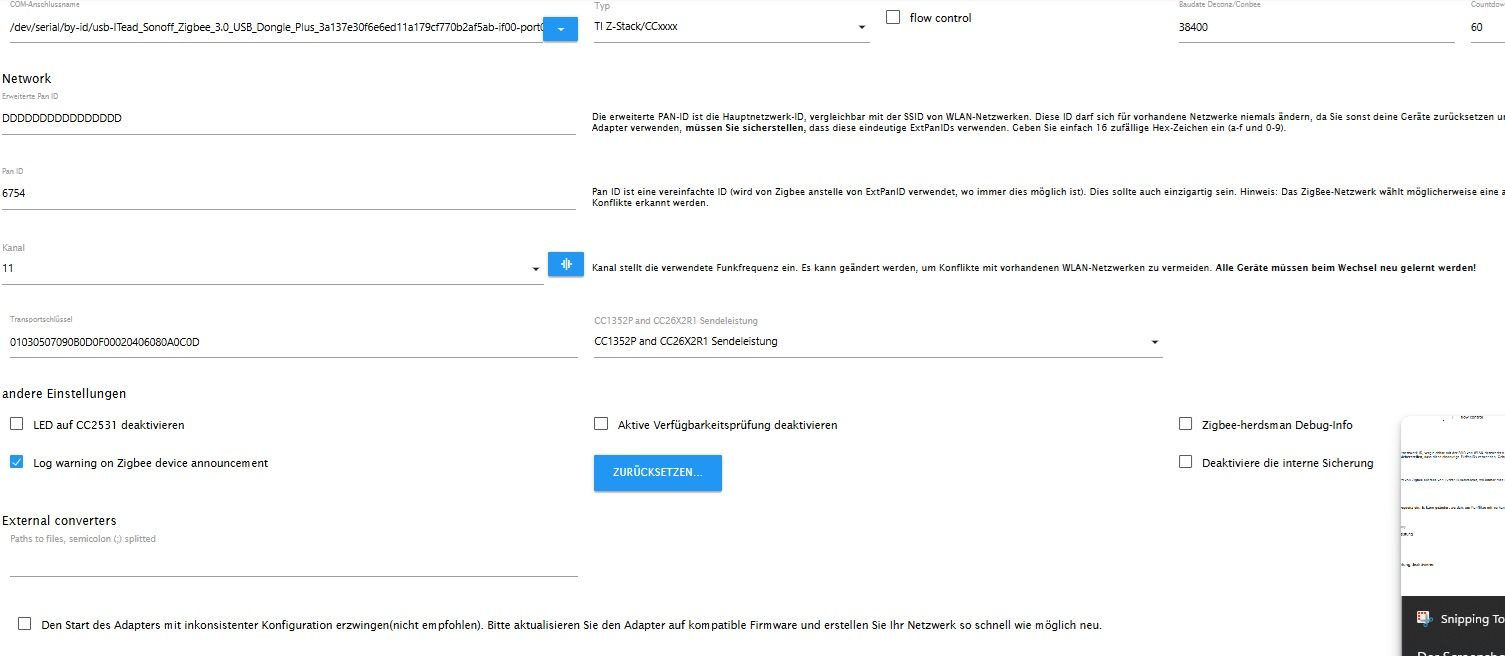
                  Zeig mal nen Screenshot von den Einstellungen im Zigbee Adapter.

                  werner2000xW Offline
                  werner2000xW Offline
                  werner2000x
                  schrieb am zuletzt editiert von
                  #8

                  @haselchen screenshotEinstelungen.jpg

                  Raspi4 8 GB mit Aqara Zigbee USB, iob
                  Innogy Smarthome
                  Bosch Bridge 2
                  HUE Bridge
                  OpenWB Wallbox mit EVU Kit
                  Google Nest Pro Hub
                  HA auf uGreen dxp4800

                  1 Antwort Letzte Antwort
                  0
                  Antworten
                  • In einem neuen Thema antworten
                  Anmelden zum Antworten
                  • Älteste zuerst
                  • Neuste zuerst
                  • Meiste Stimmen


                  Support us

                  ioBroker
                  Community Adapters
                  Donate
                  FAQ Cloud / IOT
                  HowTo: Node.js-Update
                  HowTo: Backup/Restore
                  Downloads
                  BLOG

                  335

                  Online

                  32.5k

                  Benutzer

                  81.7k

                  Themen

                  1.3m

                  Beiträge
                  Community
                  Impressum | Datenschutz-Bestimmungen | Nutzungsbedingungen | Einwilligungseinstellungen
                  ioBroker Community 2014-2025
                  logo
                  • Anmelden

                  • Du hast noch kein Konto? Registrieren

                  • Anmelden oder registrieren, um zu suchen
                  • Erster Beitrag
                    Letzter Beitrag
                  0
                  • Home
                  • Aktuell
                  • Tags
                  • Ungelesen 0
                  • Kategorien
                  • Unreplied
                  • Beliebt
                  • GitHub
                  • Docu
                  • Hilfe