




Adapter rot umrandet?
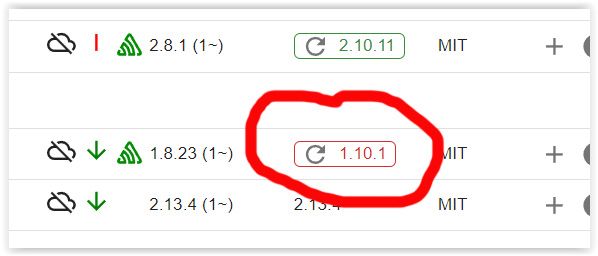
-
@wendy2702
Hab ich eh im ersten Sstz geschrieben. :-)Entwicklung u Betreuung: envertech-pv, hoymiles-ms, ns-client, pid, snmp Adapter;
Support Repositoryverwaltung.Wer 'nen Kaffee spendieren will: https://paypal.me
-
@wendy2702
Hab ich eh im ersten Sstz geschrieben. :-) -
iob nodejs-updatekennst du?
Wenn dein System generell "älter" ist, poste ev ein iob-diag in der Langfassung und klär mit @Thomas-Braun ob ein Update von node alleine Sinn macht oder ev. dass ganze OS schon zu alt ist und du ein wenige mehr Arbeit einplanen solltest.
-
@wendy2702
Hab ich eh im ersten Sstz geschrieben. :-)@mcm57
Ich bin leider kein Experte, da weiss man manchmal nicht, was man tut :-)
Im Prinzip läuft alles, bislang war ich immer der Ansicht "do no disturb a running system" - aber die Sonoff-Thermostate hätte ich schon geren eingebunden - ohne mir das ganze System zu zerschießen :-)*** BASE SYSTEM *** Static hostname: raspberrypi Icon name: computer Operating System: Raspbian GNU/Linux 10 (buster) Kernel: Linux 5.10.103-v7l+ Architecture: arm Model : Raspberry Pi 4 Model B Rev 1.4 Docker : false Virtualization : none Kernel : armv7l Userland : armhf Systemuptime and Load: 12:21:49 up 96 days, 17:44, 1 user, load average: 0.39, 0.37, 0.44 CPU threads: 4 *** RASPBERRY THROTTLING *** Current issues: No throttling issues detected. Previously detected issues: No throttling issues detected. *** Time and Time Zones *** Local time: Mon 2024-02-26 12:21:50 CET Universal time: Mon 2024-02-26 11:21:50 UTC RTC time: n/a Time zone: Europe/Berlin (CET, +0100) System clock synchronized: yes NTP service: active RTC in local TZ: no *** User and Groups *** pi /home/pi pi adm dialout cdrom sudo audio video plugdev games users input netdev gpio i2c spi iobroker *** X-Server-Setup *** X-Server: false Desktop: Terminal: tty Boot Target: graphical.target *** MEMORY *** total used free shared buff/cache available Mem: 1.9G 1.2G 194M 30M 483M 662M Swap: 99M 99M 0.0K Total: 2.0G 1.3G 195M 1871 M total memory 1192 M used memory 411 M active memory 1162 M inactive memory 194 M free memory 82 M buffer memory 401 M swap cache 99 M total swap 99 M used swap 0 M free swap Raspberry only: oom events: 0 lifetime oom required: 0 Mbytes total time in oom handler: 0 ms max time spent in oom handler: 0 ms *** FAILED SERVICES *** 0 loaded units listed. Pass --all to see loaded but inactive units, too. To show all installed unit files use 'systemctl list-unit-files'. *** FILESYSTEM *** Filesystem Type Size Used Avail Use% Mounted on /dev/root ext4 59G 3.6G 53G 7% / devtmpfs devtmpfs 775M 0 775M 0% /dev tmpfs tmpfs 936M 0 936M 0% /dev/shm tmpfs tmpfs 936M 64M 873M 7% /run tmpfs tmpfs 5.0M 4.0K 5.0M 1% /run/lock tmpfs tmpfs 936M 0 936M 0% /sys/fs/cgroup /dev/sda1 vfat 253M 49M 204M 20% /boot tmpfs tmpfs 188M 0 188M 0% /run/user/1000 Messages concerning ext4 filesystem in dmesg: [Tue Nov 21 18:37:19 2023] Kernel command line: coherent_pool=1M 8250.nr_uarts=0 snd_bcm2835.enable_compat_alsa=0 snd_bcm2835.enable_hdmi=1 smsc95xx.macaddr=E4:5F:01:1E:BF:C7 vc_mem.mem_base=0x3eb00000 vc_mem.mem_size=0x3ff00000 console=ttyS0,115200 console=tty1 root=PARTUUID=341e5e98-02 rootfstype=ext4 fsck.repair=yes rootwait [Tue Nov 21 18:37:21 2023] EXT4-fs (sda2): mounted filesystem with ordered data mode. Opts: (null) [Tue Nov 21 18:37:21 2023] VFS: Mounted root (ext4 filesystem) readonly on device 8:2. [Tue Nov 21 18:37:23 2023] EXT4-fs (sda2): re-mounted. Opts: (null) Show mounted filesystems \(real ones only\): TARGET SOURCE FSTYPE OPTIONS / /dev/sda2 ext4 rw,noatime |-/sys/fs/bpf none bpf rw,nosuid,nodev,noexec,relatime,mode=700 `-/boot /dev/sda1 vfat rw,relatime,fmask=0022,dmask=0022,codepage=437,iocharset=ascii,shortname=mixed,errors=remount-ro Files in neuralgic directories: /var: 322M /var/ 128M /var/cache 123M /var/cache/apt 92M /var/lib 69M /var/lib/apt/lists Archived and active journals take up 62.7M in the file system. /opt/iobroker/backups: 448M /opt/iobroker/backups/ /opt/iobroker/iobroker-data: 269M /opt/iobroker/iobroker-data/ 201M /opt/iobroker/iobroker-data/files 78M /opt/iobroker/iobroker-data/files/icons-open-icon-library-png 51M /opt/iobroker/iobroker-data/files/javascript.admin 49M /opt/iobroker/iobroker-data/backup-objects The five largest files in iobroker-data are: 17M /opt/iobroker/iobroker-data/objects.jsonl 6.9M /opt/iobroker/iobroker-data/files/javascript.admin/static/js/610.de0231c9.chunk.js.map 6.3M /opt/iobroker/iobroker-data/files/admin.admin/custom/static/js/vendors-node_modules_iobroker_adapter-react-v5_assets_devices_parseNames_js-node_modules_iobr-99c23e.847b8ad9.chunk.js.map 4.9M /opt/iobroker/iobroker-data/files/javascript.admin/static/js/848.7424922d.chunk.js.map 4.6M /opt/iobroker/iobroker-data/files/javascript.admin/vs/language/typescript/tsWorker.js USB-Devices by-id: USB-Sticks - Avoid direct links to /dev/* in your adapter setups, please always prefer the links 'by-id': /dev/serial/by-id/usb-Silicon_Labs_Sonoff_Zigbee_3.0_USB_Dongle_Plus_0001-if00-port0 *** NodeJS-Installation *** /home/iobroker/.diag.sh: line 277: nodejs: command not found /usr/bin/node v16.19.0 /usr/bin/npm 8.19.3 /usr/bin/npx 8.19.3 /usr/bin/corepack 0.15.1 /home/iobroker/.diag.sh: line 288: nodejs: command not found *** nodejs is NOT correctly installed *** nodejs: Installed: 16.19.0-deb-1nodesource1 Candidate: 16.20.2-deb-1nodesource1 Version table: 16.20.2-deb-1nodesource1 500 500 https://deb.nodesource.com/node_16.x buster/main armhf Packages *** 16.19.0-deb-1nodesource1 100 100 /var/lib/dpkg/status 10.24.0~dfsg-1~deb10u3 500 500 http://raspbian.raspberrypi.org/raspbian buster/main armhf Packages Temp directories causing npm8 problem: 0 No problems detected Errors in npm tree: npm ERR! code ELSPROBLEMS npm ERR! invalid: @types/node@14.18.36 /opt/iobroker/node_modules/iobroker.javascript/node_modules/@types/node npm ERR! A complete log of this run can be found in: npm ERR! /home/pi/.npm/_logs/2024-02-26T11_21_57_808Z-debug-0.log *** ioBroker-Installation *** ioBroker Status iobroker is running on this host. Objects type: jsonl States type: jsonl Core adapters versions js-controller: 4.0.23 admin: 6.3.5 javascript: 6.1.4 Adapters from github: 1 Adapter State + system.adapter.admin.0 : admin : raspberrypi - enabled, port: 8081, bind: 0.0.0.0, run as: admin + system.adapter.backitup.0 : backitup : raspberrypi - enabled + system.adapter.cloud.0 : cloud : raspberrypi - enabled + system.adapter.discovery.0 : discovery : raspberrypi - enabled + system.adapter.fb-checkpresence.0 : fb-checkpresence : raspberrypi - enabled + system.adapter.fritzdect.0 : fritzdect : raspberrypi - enabled system.adapter.ical.0 : ical : raspberrypi - enabled system.adapter.icons-icons8.0 : icons-icons8 : raspberrypi - enabled system.adapter.icons-open-icon-library-png.0: icons-open-icon-library-png: raspberrypi - enabled + system.adapter.javascript.0 : javascript : raspberrypi - enabled + system.adapter.mihome.0 : mihome : raspberrypi - enabled, port: 9898, bind: 0.0.0.0 + system.adapter.mqtt.0 : mqtt : raspberrypi - enabled, port: 1886, bind: 0.0.0.0 + system.adapter.mqtt.1 : mqtt : raspberrypi - enabled, port: 8883, bind: 0.0.0.0 system.adapter.netatmo-crawler.0 : netatmo-crawler : raspberrypi - enabled + system.adapter.ping.0 : ping : raspberrypi - enabled + system.adapter.pushover.0 : pushover : raspberrypi - enabled + system.adapter.radar2.0 : radar2 : raspberrypi - enabled + system.adapter.rpi2.0 : rpi2 : raspberrypi - enabled + system.adapter.shelly.0 : shelly : raspberrypi - enabled, port: 1882, bind: 0.0.0.0 + system.adapter.shelly.1 : shelly : raspberrypi - enabled, port: 1882, bind: 192.168.178.21 + system.adapter.sonoff.0 : sonoff : raspberrypi - enabled, port: 1883, bind: 0.0.0.0 + system.adapter.trashschedule.0 : trashschedule : raspberrypi - enabled system.adapter.vis-bars.0 : vis-bars : raspberrypi - enabled system.adapter.vis-hqwidgets.0 : vis-hqwidgets : raspberrypi - enabled system.adapter.vis-metro.0 : vis-metro : raspberrypi - enabled system.adapter.vis-timeandweather.0 : vis-timeandweather : raspberrypi - enabled system.adapter.vis.0 : vis : raspberrypi - enabled + system.adapter.web.0 : web : raspberrypi - enabled, port: 8082, bind: 0.0.0.0, run as: admin + system.adapter.yeelight-2.0 : yeelight-2 : raspberrypi - enabled + system.adapter.zigbee.0 : zigbee : raspberrypi - enabled, port: /dev/ttyUSB0 system.adapter.zigbee2mqtt.0 : zigbee2mqtt : raspberrypi - disabled + instance is alive Enabled adapters with bindings + system.adapter.admin.0 : admin : raspberrypi - enabled, port: 8081, bind: 0.0.0.0, run as: admin + system.adapter.mihome.0 : mihome : raspberrypi - enabled, port: 9898, bind: 0.0.0.0 + system.adapter.mqtt.0 : mqtt : raspberrypi - enabled, port: 1886, bind: 0.0.0.0 + system.adapter.mqtt.1 : mqtt : raspberrypi - enabled, port: 8883, bind: 0.0.0.0 + system.adapter.shelly.0 : shelly : raspberrypi - enabled, port: 1882, bind: 0.0.0.0 + system.adapter.shelly.1 : shelly : raspberrypi - enabled, port: 1882, bind: 192.168.178.21 + system.adapter.sonoff.0 : sonoff : raspberrypi - enabled, port: 1883, bind: 0.0.0.0 + system.adapter.web.0 : web : raspberrypi - enabled, port: 8082, bind: 0.0.0.0, run as: admin + system.adapter.zigbee.0 : zigbee : raspberrypi - enabled, port: /dev/ttyUSB0 ioBroker-Repositories stable : http://download.iobroker.net/sources-dist.json beta : http://download.iobroker.net/sources-dist-latest.json Active repo(s): stable Installed ioBroker-Instances Used repository: stable Adapter "admin" : 6.13.16 , installed 6.3.5 [Updatable] Adapter "backitup" : 2.10.11 , installed 2.8.1 [Updatable] Adapter "cloud" : 4.4.1 , installed 4.2.1 [Updatable] Adapter "discovery" : 4.2.0 , installed 3.1.0 [Updatable] Adapter "fb-checkpresence": 1.2.3 , installed 1.1.20 [Updatable] Adapter "fritzdect" : 2.5.9 , installed 2.3.1 [Updatable] Adapter "ical" : 1.13.3 , installed 1.13.2 [Updatable] Adapter "icons-icons8" : 0.0.1 , installed 0.0.1 Adapter "icons-open-icon-library-png": 0.1.2, installed 0.1.2 Adapter "javascript" : 7.8.0 , installed 6.1.4 [Updatable] Controller "js-controller": 5.0.19 , installed 4.0.23 [Updatable] Adapter "mihome" : 1.4.0 , installed 1.4.0 Adapter "mqtt" : 5.2.0 , installed 4.0.7 [Updatable] Adapter "netatmo-crawler": 0.8.1 , installed 0.8.1 Adapter "ping" : 1.6.2 , installed 1.5.3 [Updatable] Adapter "pushover" : 3.0.6 , installed 2.0.5 [Updatable] Adapter "radar2" : 2.1.0 , installed 2.0.3 [Updatable] Adapter "rpi2" : 1.3.2 , installed 1.3.2 Adapter "shelly" : 6.6.1 , installed 6.6.1 Adapter "simple-api" : 2.7.2 , installed 2.7.2 Adapter "socketio" : 6.6.0 , installed 4.2.0 [Updatable] Adapter "sonoff" : 3.0.3 , installed 3.0.3 Adapter "trashschedule": 2.3.0 , installed 2.3.0 Adapter "vis" : 1.5.4 , installed 1.4.15 [Updatable] Adapter "vis-bars" : 0.1.4 , installed 0.1.4 Adapter "vis-hqwidgets": 1.4.0 , installed 1.3.0 [Updatable] Adapter "vis-metro" : 1.2.0 , installed 1.2.0 Adapter "vis-timeandweather": 1.2.2, installed 1.2.2 Adapter "web" : 6.2.3 , installed 4.3.0 [Updatable] Adapter "ws" : 2.5.10 , installed 1.3.0 [Updatable] Adapter "yeelight-2" : 1.2.1 , installed 1.1.2 [Updatable] Adapter "zigbee" : 1.10.1 , installed 1.8.23 [Updatable] Adapter "zigbee2mqtt" : 2.13.4 , installed 2.13.4 Objects and States Please stand by - This may take a while Objects: 6065 States: 5112 *** OS-Repositories and Updates *** Hit:1 http://raspbian.raspberrypi.org/raspbian buster InRelease Hit:2 http://archive.raspberrypi.org/debian buster InRelease Hit:3 https://deb.nodesource.com/node_16.x buster InRelease Reading package lists... Pending Updates: 112 *** Listening Ports *** Active Internet connections (only servers) Proto Recv-Q Send-Q Local Address Foreign Address State User Inode PID/Program name tcp 0 0 0.0.0.0:22 0.0.0.0:* LISTEN 0 17550 594/sshd tcp 0 0 192.168.178.21:1882 0.0.0.0:* LISTEN 1001 43812454 5087/io.shelly.1 tcp 0 0 0.0.0.0:1883 0.0.0.0:* LISTEN 1001 73054069 19612/io.sonoff.0 tcp 0 0 0.0.0.0:1886 0.0.0.0:* LISTEN 1001 66740610 21120/io.mqtt.0 tcp 0 0 0.0.0.0:1887 0.0.0.0:* LISTEN 1001 66740611 21120/io.mqtt.0 tcp 0 0 127.0.0.1:9000 0.0.0.0:* LISTEN 1001 16219 588/iobroker.js-con tcp 0 0 127.0.0.1:9001 0.0.0.0:* LISTEN 1001 17638 588/iobroker.js-con tcp6 0 0 :::8081 :::* LISTEN 1001 15206 667/io.admin.0 tcp6 0 0 :::8082 :::* LISTEN 1001 21512 1054/io.web.0 tcp6 0 0 :::22 :::* LISTEN 0 17552 594/sshd udp 0 0 0.0.0.0:5683 0.0.0.0:* 1001 42229772 28958/io.shelly.0 udp 0 0 0.0.0.0:67 0.0.0.0:* 1001 3494084 23479/io.radar2.0 udp 0 0 0.0.0.0:68 0.0.0.0:* 0 14855 586/dhcpcd udp 0 0 0.0.0.0:9898 0.0.0.0:* 1001 48542939 721/io.mihome.0 udp 0 0 0.0.0.0:59611 0.0.0.0:* 108 16515 336/avahi-daemon: r udp 0 0 0.0.0.0:5353 0.0.0.0:* 108 16513 336/avahi-daemon: r udp6 0 0 :::546 :::* 0 52230902 586/dhcpcd udp6 0 0 :::5353 :::* 108 16514 336/avahi-daemon: r udp6 0 0 :::55601 :::* 108 16516 336/avahi-daemon: r *** Log File - Last 25 Lines *** 2024-02-26 12:22:34.604 - warn: shelly.0 (28958) [authEnabled] 192.168.178.43 (ShellyBulbDuo / ShellyBulbDuo-8CAAB55F70E3 / SHBDUO-1#8CAAB55F70E3#1): This device is not protected via restricted login (see adapter documentation for details) 2024-02-26 12:22:36.535 - warn: shelly.0 (28958) [authEnabled] 192.168.178.35 (shellyplug-s / shellyplug-s-6F3F63 / SHPLG-S#6F3F63#1): This device is not protected via restricted login (see adapter documentation for details) 2024-02-26 12:22:36.664 - warn: shelly.0 (28958) [authEnabled] 192.168.178.75 (shellyplug-s / shellyplug-s-284864 / SHPLG2-1#284864#1): This device is not protected via restricted login (see adapter documentation for details) 2024-02-26 12:22:39.063 - info: mqtt.1 (23232) Reconnected to localhost 2024-02-26 12:22:39.065 - error: mqtt.1 (23232) Client error:Error: connect ECONNREFUSED 127.0.0.1:8883 2024-02-26 12:22:39.066 - info: mqtt.1 (23232) Disconnected from localhost 2024-02-26 12:22:39.135 - warn: shelly.0 (28958) [authEnabled] 192.168.178.68 (shellyplug-s / shellyplug-s-2CC717 / SHPLG2-1#2CC717#1): This device is not protected via restricted login (see adapter documentation for details) 2024-02-26 12:22:39.857 - warn: shelly.0 (28958) [authEnabled] 192.168.178.106 (shellyplug-s / shellyplug-s-3CE90ED7C056 / SHPLG-S#3CE90ED7C056#1): This device is not protected via restricted login (see adapter documentation for details) 2024-02-26 12:22:41.309 - warn: shelly.0 (28958) [authEnabled] 192.168.178.37 (shelly1 / shelly1-BCDDC277BD38 / SHSW-1#BCDDC277BD38#1): This device is not protected via restricted login (see adapter documentation for details) 2024-02-26 12:22:41.422 - warn: shelly.0 (28958) [authEnabled] 192.168.178.45 (shellyplug-s / shellyplug-s-2842C8 / SHPLG2-1#2842C8#1): This device is not protected via restricted login (see adapter documentation for details) 2024-02-26 12:22:46.458 - warn: shelly.0 (28958) [authEnabled] 192.168.178.63 (shellyswitch25 / shellyswitch25-98CDAC24B972 / SHSW-25#98CDAC24B972#1): This device is not protected via restricted login (see adapter documentation for details) 2024-02-26 12:22:47.146 - warn: shelly.0 (28958) [authEnabled] 192.168.178.95 (shellycolorbulb / shellycolorbulb-3494546B07F2 / SHCB-1#3494546B07F2#1): This device is not protected via restricted login (see adapter documentation for details) 2024-02-26 12:22:49.068 - info: mqtt.1 (23232) Reconnected to localhost 2024-02-26 12:22:49.070 - error: mqtt.1 (23232) Client error:Error: connect ECONNREFUSED 127.0.0.1:8883 2024-02-26 12:22:49.070 - info: mqtt.1 (23232) Disconnected from localhost 2024-02-26 12:22:49.694 - warn: shelly.0 (28958) [authEnabled] 192.168.178.43 (ShellyBulbDuo / ShellyBulbDuo-8CAAB55F70E3 / SHBDUO-1#8CAAB55F70E3#1): This device is not protected via restricted login (see adapter documentation for details) 2024-02-26 12:22:51.642 - warn: shelly.0 (28958) [authEnabled] 192.168.178.35 (shellyplug-s / shellyplug-s-6F3F63 / SHPLG-S#6F3F63#1): This device is not protected via restricted login (see adapter documentation for details) 2024-02-26 12:22:51.799 - warn: shelly.0 (28958) [authEnabled] 192.168.178.75 (shellyplug-s / shellyplug-s-284864 / SHPLG2-1#284864#1): This device is not protected via restricted login (see adapter documentation for details) 2024-02-26 12:22:54.270 - warn: shelly.0 (28958) [authEnabled] 192.168.178.68 (shellyplug-s / shellyplug-s-2CC717 / SHPLG2-1#2CC717#1): This device is not protected via restricted login (see adapter documentation for details) 2024-02-26 12:22:54.969 - warn: shelly.0 (28958) [authEnabled] 192.168.178.106 (shellyplug-s / shellyplug-s-3CE90ED7C056 / SHPLG-S#3CE90ED7C056#1): This device is not protected via restricted login (see adapter documentation for details) 2024-02-26 12:22:56.551 - warn: shelly.0 (28958) [authEnabled] 192.168.178.45 (shellyplug-s / shellyplug-s-2842C8 / SHPLG2-1#2842C8#1): This device is not protected via restricted login (see adapter documentation for details) 2024-02-26 12:22:56.628 - warn: shelly.0 (28958) [authEnabled] 192.168.178.37 (shelly1 / shelly1-BCDDC277BD38 / SHSW-1#BCDDC277BD38#1): This device is not protected via restricted login (see adapter documentation for details) 2024-02-26 12:22:59.072 - info: mqtt.1 (23232) Reconnected to localhost 2024-02-26 12:22:59.073 - error: mqtt.1 (23232) Client error:Error: connect ECONNREFUSED 127.0.0.1:8883 2024-02-26 12:22:59.074 - info: mqtt.1 (23232) Disconnected from localhostMOD EDIT: LOG in CODE TAGS
-
@mcm57
Ich bin leider kein Experte, da weiss man manchmal nicht, was man tut :-)
Im Prinzip läuft alles, bislang war ich immer der Ansicht "do no disturb a running system" - aber die Sonoff-Thermostate hätte ich schon geren eingebunden - ohne mir das ganze System zu zerschießen :-)*** BASE SYSTEM *** Static hostname: raspberrypi Icon name: computer Operating System: Raspbian GNU/Linux 10 (buster) Kernel: Linux 5.10.103-v7l+ Architecture: arm Model : Raspberry Pi 4 Model B Rev 1.4 Docker : false Virtualization : none Kernel : armv7l Userland : armhf Systemuptime and Load: 12:21:49 up 96 days, 17:44, 1 user, load average: 0.39, 0.37, 0.44 CPU threads: 4 *** RASPBERRY THROTTLING *** Current issues: No throttling issues detected. Previously detected issues: No throttling issues detected. *** Time and Time Zones *** Local time: Mon 2024-02-26 12:21:50 CET Universal time: Mon 2024-02-26 11:21:50 UTC RTC time: n/a Time zone: Europe/Berlin (CET, +0100) System clock synchronized: yes NTP service: active RTC in local TZ: no *** User and Groups *** pi /home/pi pi adm dialout cdrom sudo audio video plugdev games users input netdev gpio i2c spi iobroker *** X-Server-Setup *** X-Server: false Desktop: Terminal: tty Boot Target: graphical.target *** MEMORY *** total used free shared buff/cache available Mem: 1.9G 1.2G 194M 30M 483M 662M Swap: 99M 99M 0.0K Total: 2.0G 1.3G 195M 1871 M total memory 1192 M used memory 411 M active memory 1162 M inactive memory 194 M free memory 82 M buffer memory 401 M swap cache 99 M total swap 99 M used swap 0 M free swap Raspberry only: oom events: 0 lifetime oom required: 0 Mbytes total time in oom handler: 0 ms max time spent in oom handler: 0 ms *** FAILED SERVICES *** 0 loaded units listed. Pass --all to see loaded but inactive units, too. To show all installed unit files use 'systemctl list-unit-files'. *** FILESYSTEM *** Filesystem Type Size Used Avail Use% Mounted on /dev/root ext4 59G 3.6G 53G 7% / devtmpfs devtmpfs 775M 0 775M 0% /dev tmpfs tmpfs 936M 0 936M 0% /dev/shm tmpfs tmpfs 936M 64M 873M 7% /run tmpfs tmpfs 5.0M 4.0K 5.0M 1% /run/lock tmpfs tmpfs 936M 0 936M 0% /sys/fs/cgroup /dev/sda1 vfat 253M 49M 204M 20% /boot tmpfs tmpfs 188M 0 188M 0% /run/user/1000 Messages concerning ext4 filesystem in dmesg: [Tue Nov 21 18:37:19 2023] Kernel command line: coherent_pool=1M 8250.nr_uarts=0 snd_bcm2835.enable_compat_alsa=0 snd_bcm2835.enable_hdmi=1 smsc95xx.macaddr=E4:5F:01:1E:BF:C7 vc_mem.mem_base=0x3eb00000 vc_mem.mem_size=0x3ff00000 console=ttyS0,115200 console=tty1 root=PARTUUID=341e5e98-02 rootfstype=ext4 fsck.repair=yes rootwait [Tue Nov 21 18:37:21 2023] EXT4-fs (sda2): mounted filesystem with ordered data mode. Opts: (null) [Tue Nov 21 18:37:21 2023] VFS: Mounted root (ext4 filesystem) readonly on device 8:2. [Tue Nov 21 18:37:23 2023] EXT4-fs (sda2): re-mounted. Opts: (null) Show mounted filesystems \(real ones only\): TARGET SOURCE FSTYPE OPTIONS / /dev/sda2 ext4 rw,noatime |-/sys/fs/bpf none bpf rw,nosuid,nodev,noexec,relatime,mode=700 `-/boot /dev/sda1 vfat rw,relatime,fmask=0022,dmask=0022,codepage=437,iocharset=ascii,shortname=mixed,errors=remount-ro Files in neuralgic directories: /var: 322M /var/ 128M /var/cache 123M /var/cache/apt 92M /var/lib 69M /var/lib/apt/lists Archived and active journals take up 62.7M in the file system. /opt/iobroker/backups: 448M /opt/iobroker/backups/ /opt/iobroker/iobroker-data: 269M /opt/iobroker/iobroker-data/ 201M /opt/iobroker/iobroker-data/files 78M /opt/iobroker/iobroker-data/files/icons-open-icon-library-png 51M /opt/iobroker/iobroker-data/files/javascript.admin 49M /opt/iobroker/iobroker-data/backup-objects The five largest files in iobroker-data are: 17M /opt/iobroker/iobroker-data/objects.jsonl 6.9M /opt/iobroker/iobroker-data/files/javascript.admin/static/js/610.de0231c9.chunk.js.map 6.3M /opt/iobroker/iobroker-data/files/admin.admin/custom/static/js/vendors-node_modules_iobroker_adapter-react-v5_assets_devices_parseNames_js-node_modules_iobr-99c23e.847b8ad9.chunk.js.map 4.9M /opt/iobroker/iobroker-data/files/javascript.admin/static/js/848.7424922d.chunk.js.map 4.6M /opt/iobroker/iobroker-data/files/javascript.admin/vs/language/typescript/tsWorker.js USB-Devices by-id: USB-Sticks - Avoid direct links to /dev/* in your adapter setups, please always prefer the links 'by-id': /dev/serial/by-id/usb-Silicon_Labs_Sonoff_Zigbee_3.0_USB_Dongle_Plus_0001-if00-port0 *** NodeJS-Installation *** /home/iobroker/.diag.sh: line 277: nodejs: command not found /usr/bin/node v16.19.0 /usr/bin/npm 8.19.3 /usr/bin/npx 8.19.3 /usr/bin/corepack 0.15.1 /home/iobroker/.diag.sh: line 288: nodejs: command not found *** nodejs is NOT correctly installed *** nodejs: Installed: 16.19.0-deb-1nodesource1 Candidate: 16.20.2-deb-1nodesource1 Version table: 16.20.2-deb-1nodesource1 500 500 https://deb.nodesource.com/node_16.x buster/main armhf Packages *** 16.19.0-deb-1nodesource1 100 100 /var/lib/dpkg/status 10.24.0~dfsg-1~deb10u3 500 500 http://raspbian.raspberrypi.org/raspbian buster/main armhf Packages Temp directories causing npm8 problem: 0 No problems detected Errors in npm tree: npm ERR! code ELSPROBLEMS npm ERR! invalid: @types/node@14.18.36 /opt/iobroker/node_modules/iobroker.javascript/node_modules/@types/node npm ERR! A complete log of this run can be found in: npm ERR! /home/pi/.npm/_logs/2024-02-26T11_21_57_808Z-debug-0.log *** ioBroker-Installation *** ioBroker Status iobroker is running on this host. Objects type: jsonl States type: jsonl Core adapters versions js-controller: 4.0.23 admin: 6.3.5 javascript: 6.1.4 Adapters from github: 1 Adapter State + system.adapter.admin.0 : admin : raspberrypi - enabled, port: 8081, bind: 0.0.0.0, run as: admin + system.adapter.backitup.0 : backitup : raspberrypi - enabled + system.adapter.cloud.0 : cloud : raspberrypi - enabled + system.adapter.discovery.0 : discovery : raspberrypi - enabled + system.adapter.fb-checkpresence.0 : fb-checkpresence : raspberrypi - enabled + system.adapter.fritzdect.0 : fritzdect : raspberrypi - enabled system.adapter.ical.0 : ical : raspberrypi - enabled system.adapter.icons-icons8.0 : icons-icons8 : raspberrypi - enabled system.adapter.icons-open-icon-library-png.0: icons-open-icon-library-png: raspberrypi - enabled + system.adapter.javascript.0 : javascript : raspberrypi - enabled + system.adapter.mihome.0 : mihome : raspberrypi - enabled, port: 9898, bind: 0.0.0.0 + system.adapter.mqtt.0 : mqtt : raspberrypi - enabled, port: 1886, bind: 0.0.0.0 + system.adapter.mqtt.1 : mqtt : raspberrypi - enabled, port: 8883, bind: 0.0.0.0 system.adapter.netatmo-crawler.0 : netatmo-crawler : raspberrypi - enabled + system.adapter.ping.0 : ping : raspberrypi - enabled + system.adapter.pushover.0 : pushover : raspberrypi - enabled + system.adapter.radar2.0 : radar2 : raspberrypi - enabled + system.adapter.rpi2.0 : rpi2 : raspberrypi - enabled + system.adapter.shelly.0 : shelly : raspberrypi - enabled, port: 1882, bind: 0.0.0.0 + system.adapter.shelly.1 : shelly : raspberrypi - enabled, port: 1882, bind: 192.168.178.21 + system.adapter.sonoff.0 : sonoff : raspberrypi - enabled, port: 1883, bind: 0.0.0.0 + system.adapter.trashschedule.0 : trashschedule : raspberrypi - enabled system.adapter.vis-bars.0 : vis-bars : raspberrypi - enabled system.adapter.vis-hqwidgets.0 : vis-hqwidgets : raspberrypi - enabled system.adapter.vis-metro.0 : vis-metro : raspberrypi - enabled system.adapter.vis-timeandweather.0 : vis-timeandweather : raspberrypi - enabled system.adapter.vis.0 : vis : raspberrypi - enabled + system.adapter.web.0 : web : raspberrypi - enabled, port: 8082, bind: 0.0.0.0, run as: admin + system.adapter.yeelight-2.0 : yeelight-2 : raspberrypi - enabled + system.adapter.zigbee.0 : zigbee : raspberrypi - enabled, port: /dev/ttyUSB0 system.adapter.zigbee2mqtt.0 : zigbee2mqtt : raspberrypi - disabled + instance is alive Enabled adapters with bindings + system.adapter.admin.0 : admin : raspberrypi - enabled, port: 8081, bind: 0.0.0.0, run as: admin + system.adapter.mihome.0 : mihome : raspberrypi - enabled, port: 9898, bind: 0.0.0.0 + system.adapter.mqtt.0 : mqtt : raspberrypi - enabled, port: 1886, bind: 0.0.0.0 + system.adapter.mqtt.1 : mqtt : raspberrypi - enabled, port: 8883, bind: 0.0.0.0 + system.adapter.shelly.0 : shelly : raspberrypi - enabled, port: 1882, bind: 0.0.0.0 + system.adapter.shelly.1 : shelly : raspberrypi - enabled, port: 1882, bind: 192.168.178.21 + system.adapter.sonoff.0 : sonoff : raspberrypi - enabled, port: 1883, bind: 0.0.0.0 + system.adapter.web.0 : web : raspberrypi - enabled, port: 8082, bind: 0.0.0.0, run as: admin + system.adapter.zigbee.0 : zigbee : raspberrypi - enabled, port: /dev/ttyUSB0 ioBroker-Repositories stable : http://download.iobroker.net/sources-dist.json beta : http://download.iobroker.net/sources-dist-latest.json Active repo(s): stable Installed ioBroker-Instances Used repository: stable Adapter "admin" : 6.13.16 , installed 6.3.5 [Updatable] Adapter "backitup" : 2.10.11 , installed 2.8.1 [Updatable] Adapter "cloud" : 4.4.1 , installed 4.2.1 [Updatable] Adapter "discovery" : 4.2.0 , installed 3.1.0 [Updatable] Adapter "fb-checkpresence": 1.2.3 , installed 1.1.20 [Updatable] Adapter "fritzdect" : 2.5.9 , installed 2.3.1 [Updatable] Adapter "ical" : 1.13.3 , installed 1.13.2 [Updatable] Adapter "icons-icons8" : 0.0.1 , installed 0.0.1 Adapter "icons-open-icon-library-png": 0.1.2, installed 0.1.2 Adapter "javascript" : 7.8.0 , installed 6.1.4 [Updatable] Controller "js-controller": 5.0.19 , installed 4.0.23 [Updatable] Adapter "mihome" : 1.4.0 , installed 1.4.0 Adapter "mqtt" : 5.2.0 , installed 4.0.7 [Updatable] Adapter "netatmo-crawler": 0.8.1 , installed 0.8.1 Adapter "ping" : 1.6.2 , installed 1.5.3 [Updatable] Adapter "pushover" : 3.0.6 , installed 2.0.5 [Updatable] Adapter "radar2" : 2.1.0 , installed 2.0.3 [Updatable] Adapter "rpi2" : 1.3.2 , installed 1.3.2 Adapter "shelly" : 6.6.1 , installed 6.6.1 Adapter "simple-api" : 2.7.2 , installed 2.7.2 Adapter "socketio" : 6.6.0 , installed 4.2.0 [Updatable] Adapter "sonoff" : 3.0.3 , installed 3.0.3 Adapter "trashschedule": 2.3.0 , installed 2.3.0 Adapter "vis" : 1.5.4 , installed 1.4.15 [Updatable] Adapter "vis-bars" : 0.1.4 , installed 0.1.4 Adapter "vis-hqwidgets": 1.4.0 , installed 1.3.0 [Updatable] Adapter "vis-metro" : 1.2.0 , installed 1.2.0 Adapter "vis-timeandweather": 1.2.2, installed 1.2.2 Adapter "web" : 6.2.3 , installed 4.3.0 [Updatable] Adapter "ws" : 2.5.10 , installed 1.3.0 [Updatable] Adapter "yeelight-2" : 1.2.1 , installed 1.1.2 [Updatable] Adapter "zigbee" : 1.10.1 , installed 1.8.23 [Updatable] Adapter "zigbee2mqtt" : 2.13.4 , installed 2.13.4 Objects and States Please stand by - This may take a while Objects: 6065 States: 5112 *** OS-Repositories and Updates *** Hit:1 http://raspbian.raspberrypi.org/raspbian buster InRelease Hit:2 http://archive.raspberrypi.org/debian buster InRelease Hit:3 https://deb.nodesource.com/node_16.x buster InRelease Reading package lists... Pending Updates: 112 *** Listening Ports *** Active Internet connections (only servers) Proto Recv-Q Send-Q Local Address Foreign Address State User Inode PID/Program name tcp 0 0 0.0.0.0:22 0.0.0.0:* LISTEN 0 17550 594/sshd tcp 0 0 192.168.178.21:1882 0.0.0.0:* LISTEN 1001 43812454 5087/io.shelly.1 tcp 0 0 0.0.0.0:1883 0.0.0.0:* LISTEN 1001 73054069 19612/io.sonoff.0 tcp 0 0 0.0.0.0:1886 0.0.0.0:* LISTEN 1001 66740610 21120/io.mqtt.0 tcp 0 0 0.0.0.0:1887 0.0.0.0:* LISTEN 1001 66740611 21120/io.mqtt.0 tcp 0 0 127.0.0.1:9000 0.0.0.0:* LISTEN 1001 16219 588/iobroker.js-con tcp 0 0 127.0.0.1:9001 0.0.0.0:* LISTEN 1001 17638 588/iobroker.js-con tcp6 0 0 :::8081 :::* LISTEN 1001 15206 667/io.admin.0 tcp6 0 0 :::8082 :::* LISTEN 1001 21512 1054/io.web.0 tcp6 0 0 :::22 :::* LISTEN 0 17552 594/sshd udp 0 0 0.0.0.0:5683 0.0.0.0:* 1001 42229772 28958/io.shelly.0 udp 0 0 0.0.0.0:67 0.0.0.0:* 1001 3494084 23479/io.radar2.0 udp 0 0 0.0.0.0:68 0.0.0.0:* 0 14855 586/dhcpcd udp 0 0 0.0.0.0:9898 0.0.0.0:* 1001 48542939 721/io.mihome.0 udp 0 0 0.0.0.0:59611 0.0.0.0:* 108 16515 336/avahi-daemon: r udp 0 0 0.0.0.0:5353 0.0.0.0:* 108 16513 336/avahi-daemon: r udp6 0 0 :::546 :::* 0 52230902 586/dhcpcd udp6 0 0 :::5353 :::* 108 16514 336/avahi-daemon: r udp6 0 0 :::55601 :::* 108 16516 336/avahi-daemon: r *** Log File - Last 25 Lines *** 2024-02-26 12:22:34.604 - warn: shelly.0 (28958) [authEnabled] 192.168.178.43 (ShellyBulbDuo / ShellyBulbDuo-8CAAB55F70E3 / SHBDUO-1#8CAAB55F70E3#1): This device is not protected via restricted login (see adapter documentation for details) 2024-02-26 12:22:36.535 - warn: shelly.0 (28958) [authEnabled] 192.168.178.35 (shellyplug-s / shellyplug-s-6F3F63 / SHPLG-S#6F3F63#1): This device is not protected via restricted login (see adapter documentation for details) 2024-02-26 12:22:36.664 - warn: shelly.0 (28958) [authEnabled] 192.168.178.75 (shellyplug-s / shellyplug-s-284864 / SHPLG2-1#284864#1): This device is not protected via restricted login (see adapter documentation for details) 2024-02-26 12:22:39.063 - info: mqtt.1 (23232) Reconnected to localhost 2024-02-26 12:22:39.065 - error: mqtt.1 (23232) Client error:Error: connect ECONNREFUSED 127.0.0.1:8883 2024-02-26 12:22:39.066 - info: mqtt.1 (23232) Disconnected from localhost 2024-02-26 12:22:39.135 - warn: shelly.0 (28958) [authEnabled] 192.168.178.68 (shellyplug-s / shellyplug-s-2CC717 / SHPLG2-1#2CC717#1): This device is not protected via restricted login (see adapter documentation for details) 2024-02-26 12:22:39.857 - warn: shelly.0 (28958) [authEnabled] 192.168.178.106 (shellyplug-s / shellyplug-s-3CE90ED7C056 / SHPLG-S#3CE90ED7C056#1): This device is not protected via restricted login (see adapter documentation for details) 2024-02-26 12:22:41.309 - warn: shelly.0 (28958) [authEnabled] 192.168.178.37 (shelly1 / shelly1-BCDDC277BD38 / SHSW-1#BCDDC277BD38#1): This device is not protected via restricted login (see adapter documentation for details) 2024-02-26 12:22:41.422 - warn: shelly.0 (28958) [authEnabled] 192.168.178.45 (shellyplug-s / shellyplug-s-2842C8 / SHPLG2-1#2842C8#1): This device is not protected via restricted login (see adapter documentation for details) 2024-02-26 12:22:46.458 - warn: shelly.0 (28958) [authEnabled] 192.168.178.63 (shellyswitch25 / shellyswitch25-98CDAC24B972 / SHSW-25#98CDAC24B972#1): This device is not protected via restricted login (see adapter documentation for details) 2024-02-26 12:22:47.146 - warn: shelly.0 (28958) [authEnabled] 192.168.178.95 (shellycolorbulb / shellycolorbulb-3494546B07F2 / SHCB-1#3494546B07F2#1): This device is not protected via restricted login (see adapter documentation for details) 2024-02-26 12:22:49.068 - info: mqtt.1 (23232) Reconnected to localhost 2024-02-26 12:22:49.070 - error: mqtt.1 (23232) Client error:Error: connect ECONNREFUSED 127.0.0.1:8883 2024-02-26 12:22:49.070 - info: mqtt.1 (23232) Disconnected from localhost 2024-02-26 12:22:49.694 - warn: shelly.0 (28958) [authEnabled] 192.168.178.43 (ShellyBulbDuo / ShellyBulbDuo-8CAAB55F70E3 / SHBDUO-1#8CAAB55F70E3#1): This device is not protected via restricted login (see adapter documentation for details) 2024-02-26 12:22:51.642 - warn: shelly.0 (28958) [authEnabled] 192.168.178.35 (shellyplug-s / shellyplug-s-6F3F63 / SHPLG-S#6F3F63#1): This device is not protected via restricted login (see adapter documentation for details) 2024-02-26 12:22:51.799 - warn: shelly.0 (28958) [authEnabled] 192.168.178.75 (shellyplug-s / shellyplug-s-284864 / SHPLG2-1#284864#1): This device is not protected via restricted login (see adapter documentation for details) 2024-02-26 12:22:54.270 - warn: shelly.0 (28958) [authEnabled] 192.168.178.68 (shellyplug-s / shellyplug-s-2CC717 / SHPLG2-1#2CC717#1): This device is not protected via restricted login (see adapter documentation for details) 2024-02-26 12:22:54.969 - warn: shelly.0 (28958) [authEnabled] 192.168.178.106 (shellyplug-s / shellyplug-s-3CE90ED7C056 / SHPLG-S#3CE90ED7C056#1): This device is not protected via restricted login (see adapter documentation for details) 2024-02-26 12:22:56.551 - warn: shelly.0 (28958) [authEnabled] 192.168.178.45 (shellyplug-s / shellyplug-s-2842C8 / SHPLG2-1#2842C8#1): This device is not protected via restricted login (see adapter documentation for details) 2024-02-26 12:22:56.628 - warn: shelly.0 (28958) [authEnabled] 192.168.178.37 (shelly1 / shelly1-BCDDC277BD38 / SHSW-1#BCDDC277BD38#1): This device is not protected via restricted login (see adapter documentation for details) 2024-02-26 12:22:59.072 - info: mqtt.1 (23232) Reconnected to localhost 2024-02-26 12:22:59.073 - error: mqtt.1 (23232) Client error:Error: connect ECONNREFUSED 127.0.0.1:8883 2024-02-26 12:22:59.074 - info: mqtt.1 (23232) Disconnected from localhostMOD EDIT: LOG in CODE TAGS
@sailor_2011 sagte in Adapter rot umrandet?:
Im Prinzip läuft alles, bislang war ich immer der Ansicht "do no disturb a running system"
Falsche Ansicht.
Bring das Ding in Gänze auf Stand. Buster/Raspberry OS 10 ist abgekündigt.
Installier da NEU ein Raspberry OS 12 'Bookworm' in der 64Bit-Lite-Version.nodejs ist auch veraltet und wird nicht mehr unterstützt. Update auf v18.
Die ganzen Adapter bringst du auch auf einen aktuellen Stand, inkl. js-controller.
-
@sailor_2011 sagte in Adapter rot umrandet?:
Im Prinzip läuft alles, bislang war ich immer der Ansicht "do no disturb a running system"
Falsche Ansicht.
Bring das Ding in Gänze auf Stand. Buster/Raspberry OS 10 ist abgekündigt.
Installier da NEU ein Raspberry OS 12 'Bookworm' in der 64Bit-Lite-Version.nodejs ist auch veraltet und wird nicht mehr unterstützt. Update auf v18.
Die ganzen Adapter bringst du auch auf einen aktuellen Stand, inkl. js-controller.
Ok, danke. Das klingt nach ner Menge Arbeit :-)
-
Ok, danke. Das klingt nach ner Menge Arbeit :-)
@sailor_2011
Bookworm ist jetzt drauf.
Aber den Zigbee-Adapter bekomme ich nicht zum Laufen.
Mit ls -l /dev/serial/by-id habe ich mir die Daten für den com-Anschluss für den Adapter geholt.
Der Zigbee-Stick ist von Sonoff.zigbee.0
2024-02-26 18:34:21.559 info Installed Version: iobroker.zigbee@1.10.1zigbee.0
2024-02-26 18:34:21.519 error Error herdsman startzigbee.0
2024-02-26 18:34:21.518 error Failed to start Zigbeezigbee.0
2024-02-26 18:34:21.514 error Starting zigbee-herdsman problem : "Error while opening serialport 'Error: Error: No such file or directory, cannot open usb-ITead_Sonoff_Zigbee_3.0_USB_Dongle_Plus_c0501f1070d8ed11a2f76f6162c613ac-if00-port0'"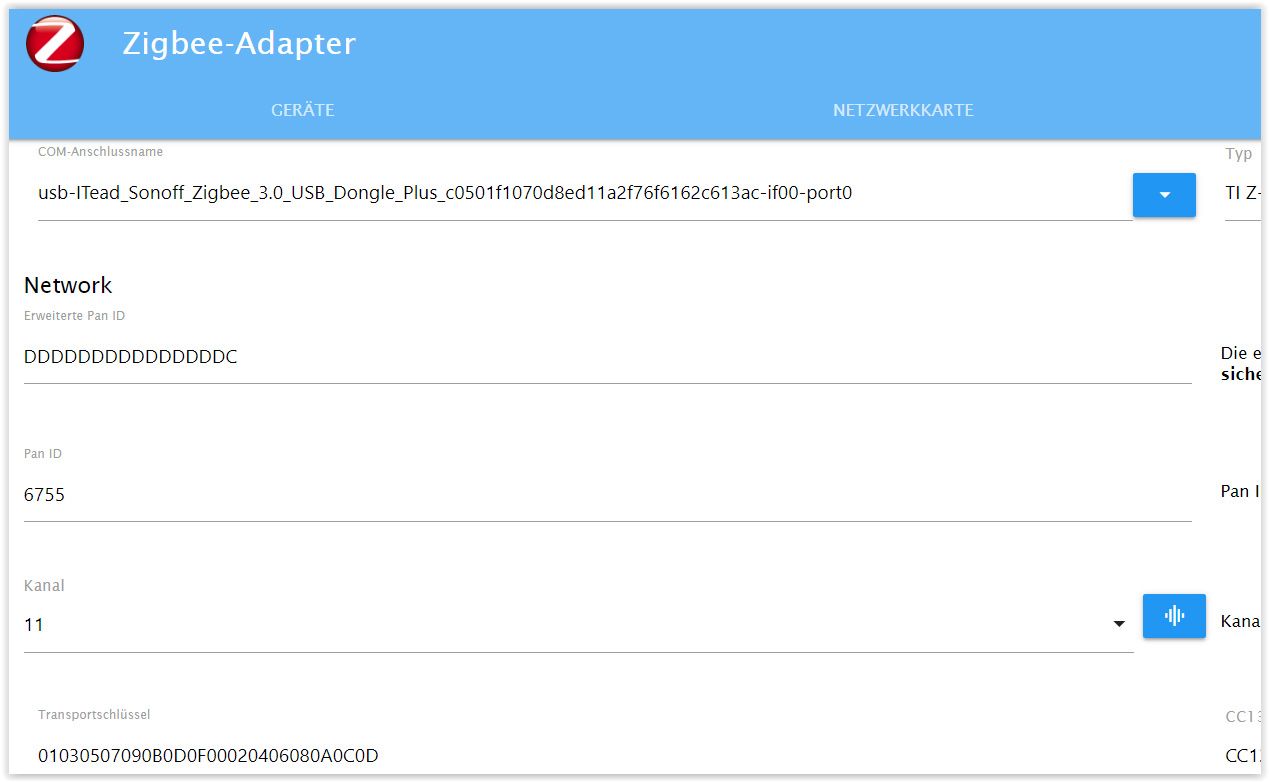
Ich werd´hier noch irre - oder bin ich es schon?
Helft mir bitte mal auf die Sprünge... -
@sailor_2011
Bookworm ist jetzt drauf.
Aber den Zigbee-Adapter bekomme ich nicht zum Laufen.
Mit ls -l /dev/serial/by-id habe ich mir die Daten für den com-Anschluss für den Adapter geholt.
Der Zigbee-Stick ist von Sonoff.zigbee.0
2024-02-26 18:34:21.559 info Installed Version: iobroker.zigbee@1.10.1zigbee.0
2024-02-26 18:34:21.519 error Error herdsman startzigbee.0
2024-02-26 18:34:21.518 error Failed to start Zigbeezigbee.0
2024-02-26 18:34:21.514 error Starting zigbee-herdsman problem : "Error while opening serialport 'Error: Error: No such file or directory, cannot open usb-ITead_Sonoff_Zigbee_3.0_USB_Dongle_Plus_c0501f1070d8ed11a2f76f6162c613ac-if00-port0'"Ich werd´hier noch irre - oder bin ich es schon?
Helft mir bitte mal auf die Sprünge...@sailor_2011 sagte in Adapter rot umrandet?:
Helft mir bitte mal auf die Sprünge...

Da muss der gesamte Pfad rein:
/dev/serial/by-id/usb-ITead_Sonoff_Zigbee_3.0_USB_Dongle_Plus_c0501f1070d8ed11a2f76f6162c613ac-if00-port0 -
@mcm57 sagte in Adapter rot umrandet?:
Bist du ev noch auf node 16?
Ab 1.9.irgendwas ist node 18 erforderlichschließ mich hier mal mit an, allerdings

mario@IoBroker:~$ nodejs -v v18.19.1 -
@sailor_2011 sagte in Adapter rot umrandet?:
Helft mir bitte mal auf die Sprünge...
Da muss der gesamte Pfad rein:
/dev/serial/by-id/usb-ITead_Sonoff_Zigbee_3.0_USB_Dongle_Plus_c0501f1070d8ed11a2f76f6162c613ac-if00-port0Danke - das hab ich geändert.
Aber nun kommt dies hier:zigbee.0
2024-02-26 20:03:57.911 error Error herdsman startzigbee.0
2024-02-26 20:03:57.910 error Failed to start Zigbeezigbee.0
2024-02-26 20:03:57.906 error Starting zigbee-herdsman problem : "network commissioning timed out - most likely network with the same panId or extendedPanId already exists nearby"zigbee.0
2024-02-26 20:02:52.122 info Installed Version: iobroker.zigbee@1.10.1zigbee.0
2024-02-26 20:02:51.833 info Starting Zigbee npm ...zigbee.0
2024-02-26 20:02:51.732 info starting. Version 1.10.1 in /opt/iobroker/node_modules/iobroker.zigbee, node: v18.19.1, js-controller: 5.0.19Diese PAN ID als auch die Erweiterte PAN ID habe ich geändert - trotzdem bleibt der Adapter "gelb"
-
@sailor_2011 sagte in Adapter rot umrandet?:
Helft mir bitte mal auf die Sprünge...
Da muss der gesamte Pfad rein:
/dev/serial/by-id/usb-ITead_Sonoff_Zigbee_3.0_USB_Dongle_Plus_c0501f1070d8ed11a2f76f6162c613ac-if00-port0zigbee.0
2024-02-26 20:10:13.055 error Error herdsman startzigbee.0
2024-02-26 20:10:13.054 error Failed to start Zigbeezigbee.0
2024-02-26 20:10:13.053 error Starting zigbee-herdsman problem : "Error while opening serialport 'Error: Error Resource temporarily unavailable Cannot lock port'"
"
-
@mcm57
Ich bin leider kein Experte, da weiss man manchmal nicht, was man tut :-)
Im Prinzip läuft alles, bislang war ich immer der Ansicht "do no disturb a running system" - aber die Sonoff-Thermostate hätte ich schon geren eingebunden - ohne mir das ganze System zu zerschießen :-)*** BASE SYSTEM *** Static hostname: raspberrypi Icon name: computer Operating System: Raspbian GNU/Linux 10 (buster) Kernel: Linux 5.10.103-v7l+ Architecture: arm Model : Raspberry Pi 4 Model B Rev 1.4 Docker : false Virtualization : none Kernel : armv7l Userland : armhf Systemuptime and Load: 12:21:49 up 96 days, 17:44, 1 user, load average: 0.39, 0.37, 0.44 CPU threads: 4 *** RASPBERRY THROTTLING *** Current issues: No throttling issues detected. Previously detected issues: No throttling issues detected. *** Time and Time Zones *** Local time: Mon 2024-02-26 12:21:50 CET Universal time: Mon 2024-02-26 11:21:50 UTC RTC time: n/a Time zone: Europe/Berlin (CET, +0100) System clock synchronized: yes NTP service: active RTC in local TZ: no *** User and Groups *** pi /home/pi pi adm dialout cdrom sudo audio video plugdev games users input netdev gpio i2c spi iobroker *** X-Server-Setup *** X-Server: false Desktop: Terminal: tty Boot Target: graphical.target *** MEMORY *** total used free shared buff/cache available Mem: 1.9G 1.2G 194M 30M 483M 662M Swap: 99M 99M 0.0K Total: 2.0G 1.3G 195M 1871 M total memory 1192 M used memory 411 M active memory 1162 M inactive memory 194 M free memory 82 M buffer memory 401 M swap cache 99 M total swap 99 M used swap 0 M free swap Raspberry only: oom events: 0 lifetime oom required: 0 Mbytes total time in oom handler: 0 ms max time spent in oom handler: 0 ms *** FAILED SERVICES *** 0 loaded units listed. Pass --all to see loaded but inactive units, too. To show all installed unit files use 'systemctl list-unit-files'. *** FILESYSTEM *** Filesystem Type Size Used Avail Use% Mounted on /dev/root ext4 59G 3.6G 53G 7% / devtmpfs devtmpfs 775M 0 775M 0% /dev tmpfs tmpfs 936M 0 936M 0% /dev/shm tmpfs tmpfs 936M 64M 873M 7% /run tmpfs tmpfs 5.0M 4.0K 5.0M 1% /run/lock tmpfs tmpfs 936M 0 936M 0% /sys/fs/cgroup /dev/sda1 vfat 253M 49M 204M 20% /boot tmpfs tmpfs 188M 0 188M 0% /run/user/1000 Messages concerning ext4 filesystem in dmesg: [Tue Nov 21 18:37:19 2023] Kernel command line: coherent_pool=1M 8250.nr_uarts=0 snd_bcm2835.enable_compat_alsa=0 snd_bcm2835.enable_hdmi=1 smsc95xx.macaddr=E4:5F:01:1E:BF:C7 vc_mem.mem_base=0x3eb00000 vc_mem.mem_size=0x3ff00000 console=ttyS0,115200 console=tty1 root=PARTUUID=341e5e98-02 rootfstype=ext4 fsck.repair=yes rootwait [Tue Nov 21 18:37:21 2023] EXT4-fs (sda2): mounted filesystem with ordered data mode. Opts: (null) [Tue Nov 21 18:37:21 2023] VFS: Mounted root (ext4 filesystem) readonly on device 8:2. [Tue Nov 21 18:37:23 2023] EXT4-fs (sda2): re-mounted. Opts: (null) Show mounted filesystems \(real ones only\): TARGET SOURCE FSTYPE OPTIONS / /dev/sda2 ext4 rw,noatime |-/sys/fs/bpf none bpf rw,nosuid,nodev,noexec,relatime,mode=700 `-/boot /dev/sda1 vfat rw,relatime,fmask=0022,dmask=0022,codepage=437,iocharset=ascii,shortname=mixed,errors=remount-ro Files in neuralgic directories: /var: 322M /var/ 128M /var/cache 123M /var/cache/apt 92M /var/lib 69M /var/lib/apt/lists Archived and active journals take up 62.7M in the file system. /opt/iobroker/backups: 448M /opt/iobroker/backups/ /opt/iobroker/iobroker-data: 269M /opt/iobroker/iobroker-data/ 201M /opt/iobroker/iobroker-data/files 78M /opt/iobroker/iobroker-data/files/icons-open-icon-library-png 51M /opt/iobroker/iobroker-data/files/javascript.admin 49M /opt/iobroker/iobroker-data/backup-objects The five largest files in iobroker-data are: 17M /opt/iobroker/iobroker-data/objects.jsonl 6.9M /opt/iobroker/iobroker-data/files/javascript.admin/static/js/610.de0231c9.chunk.js.map 6.3M /opt/iobroker/iobroker-data/files/admin.admin/custom/static/js/vendors-node_modules_iobroker_adapter-react-v5_assets_devices_parseNames_js-node_modules_iobr-99c23e.847b8ad9.chunk.js.map 4.9M /opt/iobroker/iobroker-data/files/javascript.admin/static/js/848.7424922d.chunk.js.map 4.6M /opt/iobroker/iobroker-data/files/javascript.admin/vs/language/typescript/tsWorker.js USB-Devices by-id: USB-Sticks - Avoid direct links to /dev/* in your adapter setups, please always prefer the links 'by-id': /dev/serial/by-id/usb-Silicon_Labs_Sonoff_Zigbee_3.0_USB_Dongle_Plus_0001-if00-port0 *** NodeJS-Installation *** /home/iobroker/.diag.sh: line 277: nodejs: command not found /usr/bin/node v16.19.0 /usr/bin/npm 8.19.3 /usr/bin/npx 8.19.3 /usr/bin/corepack 0.15.1 /home/iobroker/.diag.sh: line 288: nodejs: command not found *** nodejs is NOT correctly installed *** nodejs: Installed: 16.19.0-deb-1nodesource1 Candidate: 16.20.2-deb-1nodesource1 Version table: 16.20.2-deb-1nodesource1 500 500 https://deb.nodesource.com/node_16.x buster/main armhf Packages *** 16.19.0-deb-1nodesource1 100 100 /var/lib/dpkg/status 10.24.0~dfsg-1~deb10u3 500 500 http://raspbian.raspberrypi.org/raspbian buster/main armhf Packages Temp directories causing npm8 problem: 0 No problems detected Errors in npm tree: npm ERR! code ELSPROBLEMS npm ERR! invalid: @types/node@14.18.36 /opt/iobroker/node_modules/iobroker.javascript/node_modules/@types/node npm ERR! A complete log of this run can be found in: npm ERR! /home/pi/.npm/_logs/2024-02-26T11_21_57_808Z-debug-0.log *** ioBroker-Installation *** ioBroker Status iobroker is running on this host. Objects type: jsonl States type: jsonl Core adapters versions js-controller: 4.0.23 admin: 6.3.5 javascript: 6.1.4 Adapters from github: 1 Adapter State + system.adapter.admin.0 : admin : raspberrypi - enabled, port: 8081, bind: 0.0.0.0, run as: admin + system.adapter.backitup.0 : backitup : raspberrypi - enabled + system.adapter.cloud.0 : cloud : raspberrypi - enabled + system.adapter.discovery.0 : discovery : raspberrypi - enabled + system.adapter.fb-checkpresence.0 : fb-checkpresence : raspberrypi - enabled + system.adapter.fritzdect.0 : fritzdect : raspberrypi - enabled system.adapter.ical.0 : ical : raspberrypi - enabled system.adapter.icons-icons8.0 : icons-icons8 : raspberrypi - enabled system.adapter.icons-open-icon-library-png.0: icons-open-icon-library-png: raspberrypi - enabled + system.adapter.javascript.0 : javascript : raspberrypi - enabled + system.adapter.mihome.0 : mihome : raspberrypi - enabled, port: 9898, bind: 0.0.0.0 + system.adapter.mqtt.0 : mqtt : raspberrypi - enabled, port: 1886, bind: 0.0.0.0 + system.adapter.mqtt.1 : mqtt : raspberrypi - enabled, port: 8883, bind: 0.0.0.0 system.adapter.netatmo-crawler.0 : netatmo-crawler : raspberrypi - enabled + system.adapter.ping.0 : ping : raspberrypi - enabled + system.adapter.pushover.0 : pushover : raspberrypi - enabled + system.adapter.radar2.0 : radar2 : raspberrypi - enabled + system.adapter.rpi2.0 : rpi2 : raspberrypi - enabled + system.adapter.shelly.0 : shelly : raspberrypi - enabled, port: 1882, bind: 0.0.0.0 + system.adapter.shelly.1 : shelly : raspberrypi - enabled, port: 1882, bind: 192.168.178.21 + system.adapter.sonoff.0 : sonoff : raspberrypi - enabled, port: 1883, bind: 0.0.0.0 + system.adapter.trashschedule.0 : trashschedule : raspberrypi - enabled system.adapter.vis-bars.0 : vis-bars : raspberrypi - enabled system.adapter.vis-hqwidgets.0 : vis-hqwidgets : raspberrypi - enabled system.adapter.vis-metro.0 : vis-metro : raspberrypi - enabled system.adapter.vis-timeandweather.0 : vis-timeandweather : raspberrypi - enabled system.adapter.vis.0 : vis : raspberrypi - enabled + system.adapter.web.0 : web : raspberrypi - enabled, port: 8082, bind: 0.0.0.0, run as: admin + system.adapter.yeelight-2.0 : yeelight-2 : raspberrypi - enabled + system.adapter.zigbee.0 : zigbee : raspberrypi - enabled, port: /dev/ttyUSB0 system.adapter.zigbee2mqtt.0 : zigbee2mqtt : raspberrypi - disabled + instance is alive Enabled adapters with bindings + system.adapter.admin.0 : admin : raspberrypi - enabled, port: 8081, bind: 0.0.0.0, run as: admin + system.adapter.mihome.0 : mihome : raspberrypi - enabled, port: 9898, bind: 0.0.0.0 + system.adapter.mqtt.0 : mqtt : raspberrypi - enabled, port: 1886, bind: 0.0.0.0 + system.adapter.mqtt.1 : mqtt : raspberrypi - enabled, port: 8883, bind: 0.0.0.0 + system.adapter.shelly.0 : shelly : raspberrypi - enabled, port: 1882, bind: 0.0.0.0 + system.adapter.shelly.1 : shelly : raspberrypi - enabled, port: 1882, bind: 192.168.178.21 + system.adapter.sonoff.0 : sonoff : raspberrypi - enabled, port: 1883, bind: 0.0.0.0 + system.adapter.web.0 : web : raspberrypi - enabled, port: 8082, bind: 0.0.0.0, run as: admin + system.adapter.zigbee.0 : zigbee : raspberrypi - enabled, port: /dev/ttyUSB0 ioBroker-Repositories stable : http://download.iobroker.net/sources-dist.json beta : http://download.iobroker.net/sources-dist-latest.json Active repo(s): stable Installed ioBroker-Instances Used repository: stable Adapter "admin" : 6.13.16 , installed 6.3.5 [Updatable] Adapter "backitup" : 2.10.11 , installed 2.8.1 [Updatable] Adapter "cloud" : 4.4.1 , installed 4.2.1 [Updatable] Adapter "discovery" : 4.2.0 , installed 3.1.0 [Updatable] Adapter "fb-checkpresence": 1.2.3 , installed 1.1.20 [Updatable] Adapter "fritzdect" : 2.5.9 , installed 2.3.1 [Updatable] Adapter "ical" : 1.13.3 , installed 1.13.2 [Updatable] Adapter "icons-icons8" : 0.0.1 , installed 0.0.1 Adapter "icons-open-icon-library-png": 0.1.2, installed 0.1.2 Adapter "javascript" : 7.8.0 , installed 6.1.4 [Updatable] Controller "js-controller": 5.0.19 , installed 4.0.23 [Updatable] Adapter "mihome" : 1.4.0 , installed 1.4.0 Adapter "mqtt" : 5.2.0 , installed 4.0.7 [Updatable] Adapter "netatmo-crawler": 0.8.1 , installed 0.8.1 Adapter "ping" : 1.6.2 , installed 1.5.3 [Updatable] Adapter "pushover" : 3.0.6 , installed 2.0.5 [Updatable] Adapter "radar2" : 2.1.0 , installed 2.0.3 [Updatable] Adapter "rpi2" : 1.3.2 , installed 1.3.2 Adapter "shelly" : 6.6.1 , installed 6.6.1 Adapter "simple-api" : 2.7.2 , installed 2.7.2 Adapter "socketio" : 6.6.0 , installed 4.2.0 [Updatable] Adapter "sonoff" : 3.0.3 , installed 3.0.3 Adapter "trashschedule": 2.3.0 , installed 2.3.0 Adapter "vis" : 1.5.4 , installed 1.4.15 [Updatable] Adapter "vis-bars" : 0.1.4 , installed 0.1.4 Adapter "vis-hqwidgets": 1.4.0 , installed 1.3.0 [Updatable] Adapter "vis-metro" : 1.2.0 , installed 1.2.0 Adapter "vis-timeandweather": 1.2.2, installed 1.2.2 Adapter "web" : 6.2.3 , installed 4.3.0 [Updatable] Adapter "ws" : 2.5.10 , installed 1.3.0 [Updatable] Adapter "yeelight-2" : 1.2.1 , installed 1.1.2 [Updatable] Adapter "zigbee" : 1.10.1 , installed 1.8.23 [Updatable] Adapter "zigbee2mqtt" : 2.13.4 , installed 2.13.4 Objects and States Please stand by - This may take a while Objects: 6065 States: 5112 *** OS-Repositories and Updates *** Hit:1 http://raspbian.raspberrypi.org/raspbian buster InRelease Hit:2 http://archive.raspberrypi.org/debian buster InRelease Hit:3 https://deb.nodesource.com/node_16.x buster InRelease Reading package lists... Pending Updates: 112 *** Listening Ports *** Active Internet connections (only servers) Proto Recv-Q Send-Q Local Address Foreign Address State User Inode PID/Program name tcp 0 0 0.0.0.0:22 0.0.0.0:* LISTEN 0 17550 594/sshd tcp 0 0 192.168.178.21:1882 0.0.0.0:* LISTEN 1001 43812454 5087/io.shelly.1 tcp 0 0 0.0.0.0:1883 0.0.0.0:* LISTEN 1001 73054069 19612/io.sonoff.0 tcp 0 0 0.0.0.0:1886 0.0.0.0:* LISTEN 1001 66740610 21120/io.mqtt.0 tcp 0 0 0.0.0.0:1887 0.0.0.0:* LISTEN 1001 66740611 21120/io.mqtt.0 tcp 0 0 127.0.0.1:9000 0.0.0.0:* LISTEN 1001 16219 588/iobroker.js-con tcp 0 0 127.0.0.1:9001 0.0.0.0:* LISTEN 1001 17638 588/iobroker.js-con tcp6 0 0 :::8081 :::* LISTEN 1001 15206 667/io.admin.0 tcp6 0 0 :::8082 :::* LISTEN 1001 21512 1054/io.web.0 tcp6 0 0 :::22 :::* LISTEN 0 17552 594/sshd udp 0 0 0.0.0.0:5683 0.0.0.0:* 1001 42229772 28958/io.shelly.0 udp 0 0 0.0.0.0:67 0.0.0.0:* 1001 3494084 23479/io.radar2.0 udp 0 0 0.0.0.0:68 0.0.0.0:* 0 14855 586/dhcpcd udp 0 0 0.0.0.0:9898 0.0.0.0:* 1001 48542939 721/io.mihome.0 udp 0 0 0.0.0.0:59611 0.0.0.0:* 108 16515 336/avahi-daemon: r udp 0 0 0.0.0.0:5353 0.0.0.0:* 108 16513 336/avahi-daemon: r udp6 0 0 :::546 :::* 0 52230902 586/dhcpcd udp6 0 0 :::5353 :::* 108 16514 336/avahi-daemon: r udp6 0 0 :::55601 :::* 108 16516 336/avahi-daemon: r *** Log File - Last 25 Lines *** 2024-02-26 12:22:34.604 - warn: shelly.0 (28958) [authEnabled] 192.168.178.43 (ShellyBulbDuo / ShellyBulbDuo-8CAAB55F70E3 / SHBDUO-1#8CAAB55F70E3#1): This device is not protected via restricted login (see adapter documentation for details) 2024-02-26 12:22:36.535 - warn: shelly.0 (28958) [authEnabled] 192.168.178.35 (shellyplug-s / shellyplug-s-6F3F63 / SHPLG-S#6F3F63#1): This device is not protected via restricted login (see adapter documentation for details) 2024-02-26 12:22:36.664 - warn: shelly.0 (28958) [authEnabled] 192.168.178.75 (shellyplug-s / shellyplug-s-284864 / SHPLG2-1#284864#1): This device is not protected via restricted login (see adapter documentation for details) 2024-02-26 12:22:39.063 - info: mqtt.1 (23232) Reconnected to localhost 2024-02-26 12:22:39.065 - error: mqtt.1 (23232) Client error:Error: connect ECONNREFUSED 127.0.0.1:8883 2024-02-26 12:22:39.066 - info: mqtt.1 (23232) Disconnected from localhost 2024-02-26 12:22:39.135 - warn: shelly.0 (28958) [authEnabled] 192.168.178.68 (shellyplug-s / shellyplug-s-2CC717 / SHPLG2-1#2CC717#1): This device is not protected via restricted login (see adapter documentation for details) 2024-02-26 12:22:39.857 - warn: shelly.0 (28958) [authEnabled] 192.168.178.106 (shellyplug-s / shellyplug-s-3CE90ED7C056 / SHPLG-S#3CE90ED7C056#1): This device is not protected via restricted login (see adapter documentation for details) 2024-02-26 12:22:41.309 - warn: shelly.0 (28958) [authEnabled] 192.168.178.37 (shelly1 / shelly1-BCDDC277BD38 / SHSW-1#BCDDC277BD38#1): This device is not protected via restricted login (see adapter documentation for details) 2024-02-26 12:22:41.422 - warn: shelly.0 (28958) [authEnabled] 192.168.178.45 (shellyplug-s / shellyplug-s-2842C8 / SHPLG2-1#2842C8#1): This device is not protected via restricted login (see adapter documentation for details) 2024-02-26 12:22:46.458 - warn: shelly.0 (28958) [authEnabled] 192.168.178.63 (shellyswitch25 / shellyswitch25-98CDAC24B972 / SHSW-25#98CDAC24B972#1): This device is not protected via restricted login (see adapter documentation for details) 2024-02-26 12:22:47.146 - warn: shelly.0 (28958) [authEnabled] 192.168.178.95 (shellycolorbulb / shellycolorbulb-3494546B07F2 / SHCB-1#3494546B07F2#1): This device is not protected via restricted login (see adapter documentation for details) 2024-02-26 12:22:49.068 - info: mqtt.1 (23232) Reconnected to localhost 2024-02-26 12:22:49.070 - error: mqtt.1 (23232) Client error:Error: connect ECONNREFUSED 127.0.0.1:8883 2024-02-26 12:22:49.070 - info: mqtt.1 (23232) Disconnected from localhost 2024-02-26 12:22:49.694 - warn: shelly.0 (28958) [authEnabled] 192.168.178.43 (ShellyBulbDuo / ShellyBulbDuo-8CAAB55F70E3 / SHBDUO-1#8CAAB55F70E3#1): This device is not protected via restricted login (see adapter documentation for details) 2024-02-26 12:22:51.642 - warn: shelly.0 (28958) [authEnabled] 192.168.178.35 (shellyplug-s / shellyplug-s-6F3F63 / SHPLG-S#6F3F63#1): This device is not protected via restricted login (see adapter documentation for details) 2024-02-26 12:22:51.799 - warn: shelly.0 (28958) [authEnabled] 192.168.178.75 (shellyplug-s / shellyplug-s-284864 / SHPLG2-1#284864#1): This device is not protected via restricted login (see adapter documentation for details) 2024-02-26 12:22:54.270 - warn: shelly.0 (28958) [authEnabled] 192.168.178.68 (shellyplug-s / shellyplug-s-2CC717 / SHPLG2-1#2CC717#1): This device is not protected via restricted login (see adapter documentation for details) 2024-02-26 12:22:54.969 - warn: shelly.0 (28958) [authEnabled] 192.168.178.106 (shellyplug-s / shellyplug-s-3CE90ED7C056 / SHPLG-S#3CE90ED7C056#1): This device is not protected via restricted login (see adapter documentation for details) 2024-02-26 12:22:56.551 - warn: shelly.0 (28958) [authEnabled] 192.168.178.45 (shellyplug-s / shellyplug-s-2842C8 / SHPLG2-1#2842C8#1): This device is not protected via restricted login (see adapter documentation for details) 2024-02-26 12:22:56.628 - warn: shelly.0 (28958) [authEnabled] 192.168.178.37 (shelly1 / shelly1-BCDDC277BD38 / SHSW-1#BCDDC277BD38#1): This device is not protected via restricted login (see adapter documentation for details) 2024-02-26 12:22:59.072 - info: mqtt.1 (23232) Reconnected to localhost 2024-02-26 12:22:59.073 - error: mqtt.1 (23232) Client error:Error: connect ECONNREFUSED 127.0.0.1:8883 2024-02-26 12:22:59.074 - info: mqtt.1 (23232) Disconnected from localhostMOD EDIT: LOG in CODE TAGS
@sailor_2011 sagte in Adapter rot umrandet?:
Adapter "zigbee" : 1.10.1 , installed 1.8.23 [Updatable
@sailor_2011 sagte in Adapter rot umrandet?:
zigbee.0
2024-02-26 20:02:52.122 info Installed Version: iobroker.zigbee@1.10.1verstehe ich irgendwie nicht so ganz
-
@sailor_2011 sagte in Adapter rot umrandet?:
Adapter "zigbee" : 1.10.1 , installed 1.8.23 [Updatable
@sailor_2011 sagte in Adapter rot umrandet?:
zigbee.0
2024-02-26 20:02:52.122 info Installed Version: iobroker.zigbee@1.10.1verstehe ich irgendwie nicht so ganz
Weiss auch nicht, wie es vorhin bei der Installation zu 10.1 kam - hab erst jetrzt gesehen, dass man noch mal updaten konnte - Resultat:
Adapter ist G R Ü N :-)Daaaanke euch allen!

-
@sailor_2011 sagte in Adapter rot umrandet?:
Adapter "zigbee" : 1.10.1 , installed 1.8.23 [Updatable
@sailor_2011 sagte in Adapter rot umrandet?:
zigbee.0
2024-02-26 20:02:52.122 info Installed Version: iobroker.zigbee@1.10.1verstehe ich irgendwie nicht so ganz
ups - er w a r "Grün" - aber nur kurz
-
@sailor_2011 sagte in Adapter rot umrandet?:
Adapter "zigbee" : 1.10.1 , installed 1.8.23 [Updatable
@sailor_2011 sagte in Adapter rot umrandet?:
zigbee.0
2024-02-26 20:02:52.122 info Installed Version: iobroker.zigbee@1.10.1verstehe ich irgendwie nicht so ganz
zigbee.0
2024-02-26 20:18:37.564 error Error herdsman startzigbee.0
2024-02-26 20:18:37.564 error Failed to start Zigbeezigbee.0
2024-02-26 20:18:37.563 error Starting zigbee-herdsman problem : "Error while opening serialport 'Error: Error Resource temporarily unavailable Cannot lock port'"zigbee.0
2024-02-26 20:18:37.350 info Installed Version: iobroker.zigbee@1.10.2Das ist ein Ding ohne Ende...

-
@sailor_2011 sagte in Adapter rot umrandet?:
Adapter "zigbee" : 1.10.1 , installed 1.8.23 [Updatable
@sailor_2011 sagte in Adapter rot umrandet?:
zigbee.0
2024-02-26 20:02:52.122 info Installed Version: iobroker.zigbee@1.10.1verstehe ich irgendwie nicht so ganz
zigbee.0
2024-02-26 20:26:42.021 error Error herdsman startzigbee.0
2024-02-26 20:26:42.020 error Failed to start Zigbeezigbee.0
2024-02-26 20:26:42.019 error Starting zigbee-herdsman problem : "Error while opening serialport 'Error: Error Resource temporarily unavailable Cannot lock port'"zigbee.0
2024-02-26 20:26:41.818 info Installed Version: iobroker.zigbee@1.10.2zigbee.0
2024-02-26 20:26:41.805 info Starting Zigbee npm ...zigbee.0
2024-02-26 20:26:41.804 info Try to reconnect. 1 attempts leftzigbee.0
2024-02-26 20:26:31.800 error Error herdsman startzigbee.0
2024-02-26 20:26:31.800 error Failed to start Zigbeezigbee.0
2024-02-26 20:26:31.799 error Starting zigbee-herdsman problem : "startup failed - configuration-adapter mismatch - see logs above for more information"zigbee.0
2024-02-26 20:26:31.686 error Re-commissioning your network will require re-pairing of all devices!zigbee.0
2024-02-26 20:26:31.686 error If you wish to re-commission your network, please remove coordinator backup at /opt/iobroker/iobroker-data/zigbee_0/nvbackup.json.zigbee.0
2024-02-26 20:26:31.685 error Please update configuration to prevent further issues.zigbee.0
2024-02-26 20:26:31.684 error - Channel List: configured=11, adapter=11zigbee.0
2024-02-26 20:26:31.684 error - Network Key: configured=01030507090b0d0f00020406080a0c0d, adapter=01030507090b0d0f00020406080a0c0dzigbee.0
2024-02-26 20:26:31.683 error - Extended PAN ID: configured=00124b002c3ae63d, adapter=00124b002c3ae63dzigbee.0
2024-02-26 20:26:31.682 error - PAN ID: configured=1419, adapter=1417zigbee.0
2024-02-26 20:26:31.681 error Configuration is not consistent with adapter state/backup!If you wish to re-commission your network, please remove coordinator backup at /opt/iobroker/iobroker-data/zigbee_0/nvbackup.json. - das hab ich eben gemacht...
Und jetzt... bleibt das Lämpchen auf G R Ü N - meine Güte, was für eine Wissenschaft...
Vielen Dank nochmals Euch allen :-) -
zigbee.0
2024-02-26 20:26:42.021 error Error herdsman startzigbee.0
2024-02-26 20:26:42.020 error Failed to start Zigbeezigbee.0
2024-02-26 20:26:42.019 error Starting zigbee-herdsman problem : "Error while opening serialport 'Error: Error Resource temporarily unavailable Cannot lock port'"zigbee.0
2024-02-26 20:26:41.818 info Installed Version: iobroker.zigbee@1.10.2zigbee.0
2024-02-26 20:26:41.805 info Starting Zigbee npm ...zigbee.0
2024-02-26 20:26:41.804 info Try to reconnect. 1 attempts leftzigbee.0
2024-02-26 20:26:31.800 error Error herdsman startzigbee.0
2024-02-26 20:26:31.800 error Failed to start Zigbeezigbee.0
2024-02-26 20:26:31.799 error Starting zigbee-herdsman problem : "startup failed - configuration-adapter mismatch - see logs above for more information"zigbee.0
2024-02-26 20:26:31.686 error Re-commissioning your network will require re-pairing of all devices!zigbee.0
2024-02-26 20:26:31.686 error If you wish to re-commission your network, please remove coordinator backup at /opt/iobroker/iobroker-data/zigbee_0/nvbackup.json.zigbee.0
2024-02-26 20:26:31.685 error Please update configuration to prevent further issues.zigbee.0
2024-02-26 20:26:31.684 error - Channel List: configured=11, adapter=11zigbee.0
2024-02-26 20:26:31.684 error - Network Key: configured=01030507090b0d0f00020406080a0c0d, adapter=01030507090b0d0f00020406080a0c0dzigbee.0
2024-02-26 20:26:31.683 error - Extended PAN ID: configured=00124b002c3ae63d, adapter=00124b002c3ae63dzigbee.0
2024-02-26 20:26:31.682 error - PAN ID: configured=1419, adapter=1417zigbee.0
2024-02-26 20:26:31.681 error Configuration is not consistent with adapter state/backup!If you wish to re-commission your network, please remove coordinator backup at /opt/iobroker/iobroker-data/zigbee_0/nvbackup.json. - das hab ich eben gemacht...
Und jetzt... bleibt das Lämpchen auf G R Ü N - meine Güte, was für eine Wissenschaft...
Vielen Dank nochmals Euch allen :-)@sailor_2011 sagte in Adapter rot umrandet?:
2024-02-26 20:26:31.682 error - PAN ID: configured=1419, adapter=1417
Die muss übereinstimmen. Also im Adapter entsprechend ändern.
-
@sailor_2011 sagte in Adapter rot umrandet?:
2024-02-26 20:26:31.682 error - PAN ID: configured=1419, adapter=1417
Die muss übereinstimmen. Also im Adapter entsprechend ändern.
Hallo Gemeinde.
Ich wollte mich noch mal (abschließend) melden.
Hatte noch mal einen neuen Post bez. des Zigbee-Adapters, Adapter war "Grün", trotzdem ließ sich nichts einbinden, auch keine Meldungen im Protololl.
Viel (mit eurer Hilfe) ausprobiert, irgendwie führte nichts zum Erfolg.
Nun habe ich einen letzten Schritt/Versuch gemacht: Sonoff-Stick zurück gesandt, Conbee bestellt - und nun läuft es - da gab es überhaupt keine Huddelei beim Einbinden, keine Fehlermeldungen, nichts dergleichen. -
@sailor_2011 sagte in Adapter rot umrandet?:
2024-02-26 20:26:31.682 error - PAN ID: configured=1419, adapter=1417
Die muss übereinstimmen. Also im Adapter entsprechend ändern.

Auch die Signalwerte sind bei dem Conbee höher. Bei dem Sonoff-Stick kam es nicht höher, als ca. 125





Hey! Du scheinst an dieser Unterhaltung interessiert zu sein, hast aber noch kein Konto.
Hast du es satt, bei jedem Besuch durch die gleichen Beiträge zu scrollen? Wenn du dich für ein Konto anmeldest, kommst du immer genau dorthin zurück, wo du zuvor warst, und kannst dich über neue Antworten benachrichtigen lassen (entweder per E-Mail oder Push-Benachrichtigung). Du kannst auch Lesezeichen speichern und Beiträge positiv bewerten, um anderen Community-Mitgliedern deine Wertschätzung zu zeigen.
Mit deinem Input könnte dieser Beitrag noch besser werden 💗
Registrieren AnmeldenSupport us
338
Online33.0k
Benutzer83.5k
Themen1.3m
Beiträge