




NPM: 9.2.0 (10.2.3) "Einige Update verfügbar" Update?
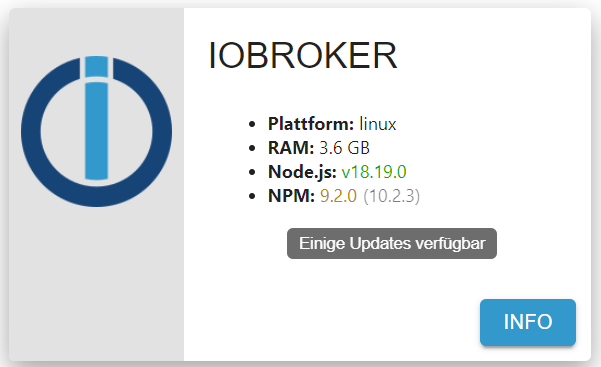
-
@meister-mopper
danke. Auch in der Konsole stehen die gleichen Versionsnummern:
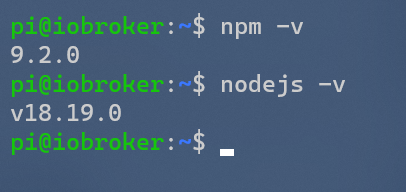
-
@ravsu bitte
iob diagin der Langfassung als Text in code-tags postenhattest du vorher denn den Befehl von @Glasfaser ausgeführt?
danke. Jetzt habe ich gesehen das nodejs nicht korrekt installiert ist.
Wie kann ich das korrigieren?*** NodeJS-Installation *** /usr/bin/nodejs v18.19.0 /usr/bin/node v18.19.0 /usr/bin/npm 9.2.0 /usr/bin/npx 9.2.0 /home/iobroker/.diag.sh: line 281: corepack: command not found *** nodejs is NOT correctly installed *** nodejs: Installed: 18.19.0+dfsg-6~deb12u1 Candidate: 18.19.0+dfsg-6~deb12u1 Version table: *** 18.19.0+dfsg-6~deb12u1 500 500 http://security.debian.org/debian-security bookworm-security/main arm64 Packages 100 /var/lib/dpkg/status 18.13.0+dfsg1-1 500 500 http://deb.debian.org/debian bookworm/main arm64 Packages 14.21.3-deb-1nodesource1 500 500 https://deb.nodesource.com/node_14.x bullseye/main arm64 PackagesMOD-EDIT: Code in code-tags gesetzt!
Ja, den Befehl habe ich ausgeführt
-
danke. Jetzt habe ich gesehen das nodejs nicht korrekt installiert ist.
Wie kann ich das korrigieren?*** NodeJS-Installation *** /usr/bin/nodejs v18.19.0 /usr/bin/node v18.19.0 /usr/bin/npm 9.2.0 /usr/bin/npx 9.2.0 /home/iobroker/.diag.sh: line 281: corepack: command not found *** nodejs is NOT correctly installed *** nodejs: Installed: 18.19.0+dfsg-6~deb12u1 Candidate: 18.19.0+dfsg-6~deb12u1 Version table: *** 18.19.0+dfsg-6~deb12u1 500 500 http://security.debian.org/debian-security bookworm-security/main arm64 Packages 100 /var/lib/dpkg/status 18.13.0+dfsg1-1 500 500 http://deb.debian.org/debian bookworm/main arm64 Packages 14.21.3-deb-1nodesource1 500 500 https://deb.nodesource.com/node_14.x bullseye/main arm64 PackagesMOD-EDIT: Code in code-tags gesetzt!
Ja, den Befehl habe ich ausgeführt
-
danke. Jetzt habe ich gesehen das nodejs nicht korrekt installiert ist.
Wie kann ich das korrigieren?*** NodeJS-Installation *** /usr/bin/nodejs v18.19.0 /usr/bin/node v18.19.0 /usr/bin/npm 9.2.0 /usr/bin/npx 9.2.0 /home/iobroker/.diag.sh: line 281: corepack: command not found *** nodejs is NOT correctly installed *** nodejs: Installed: 18.19.0+dfsg-6~deb12u1 Candidate: 18.19.0+dfsg-6~deb12u1 Version table: *** 18.19.0+dfsg-6~deb12u1 500 500 http://security.debian.org/debian-security bookworm-security/main arm64 Packages 100 /var/lib/dpkg/status 18.13.0+dfsg1-1 500 500 http://deb.debian.org/debian bookworm/main arm64 Packages 14.21.3-deb-1nodesource1 500 500 https://deb.nodesource.com/node_14.x bullseye/main arm64 PackagesMOD-EDIT: Code in code-tags gesetzt!
Ja, den Befehl habe ich ausgeführt
@ravsu leider ist das nicht die Langversion, sondern ur ein Ausschnitt.
bitte nachliefern! -
@ravsu leider ist das nicht die Langversion, sondern ur ein Ausschnitt.
bitte nachliefern!@homoran
======== Start marking the full check here =========Skript v.2023-10-10 *** BASE SYSTEM *** Static hostname: iobroker Icon name: computer Operating System: Debian GNU/Linux 12 (bookworm) Kernel: Linux 6.1.0-18-arm64 Architecture: arm64 Docker : false Virtualization : none Kernel : aarch64 Userland : arm64 Systemuptime and Load: 13:13:27 up 10:12, 2 users, load average: 0.93, 0.95, 0.90 CPU threads: 4 *** Time and Time Zones *** Local time: Sun 2024-02-11 13:13:27 CET Universal time: Sun 2024-02-11 12:13:27 UTC RTC time: n/a Time zone: Europe/Berlin (CET, +0100) System clock synchronized: yes NTP service: n/a RTC in local TZ: no *** User and Groups *** pi /home/pi pi sudo iobroker *** X-Server-Setup *** X-Server: false Desktop: Terminal: tty Boot Target: graphical.target *** MEMORY *** total used free shared buff/cache available Mem: 4.0G 3.0G 437M 704K 676M 924M Swap: 0B 0B 0B Total: 4.0G 3.0G 437M 3786 M total memory 2904 M used memory 293 M active memory 2793 M inactive memory 417 M free memory 87 M buffer memory 557 M swap cache 0 M total swap 0 M used swap 0 M free swap *** FAILED SERVICES *** UNIT LOAD ACTIVE SUB DESCRIPTION * systemd-networkd-wait-online.service loaded failed failed Wait for Network to be Configured LOAD = Reflects whether the unit definition was properly loaded. ACTIVE = The high-level unit activation state, i.e. generalization of SUB. SUB = The low-level unit activation state, values depend on unit type. 1 loaded units listed. *** FILESYSTEM *** Filesystem Type Size Used Avail Use% Mounted on udev devtmpfs 1.9G 0 1.9G 0% /dev tmpfs tmpfs 379M 696K 378M 1% /run /dev/sda2 ext4 118G 23G 90G 20% / tmpfs tmpfs 1.9G 0 1.9G 0% /dev/shm tmpfs tmpfs 5.0M 0 5.0M 0% /run/lock /dev/sda1 vfat 396M 306M 90M 78% /boot/firmware tmpfs tmpfs 379M 0 379M 0% /run/user/1000 Messages concerning ext4 filesystem in dmesg: [Sun Feb 11 03:01:11 2024] EXT4-fs (sda2): mounted filesystem with ordered data mode. Quota mode: none. [Sun Feb 11 03:01:14 2024] EXT4-fs (sda2): re-mounted. Quota mode: none. Show mounted filesystems \(real ones only\): TARGET SOURCE FSTYPE OPTIONS / /dev/sda2 ext4 rw,relatime `-/boot/firmware /dev/sda1 vfat rw,relatime,fmask=0022,dmask=0022,codepage=437,iocharset=ascii,shortname=mixed,utf8,errors=remount-ro Files in neuralgic directories: /var: 12G /var/ 9.4G /var/lib 9.3G /var/lib/influxdb/engine/data 9.3G /var/lib/influxdb/engine 9.3G /var/lib/influxdb Hint: You are currently not seeing messages from other users and the system. Users in groups 'adm', 'systemd-journal' can see all messages. Pass -q to turn off this notice. Archived and active journals take up 15.3M in the file system. /opt/iobroker/backups: 282M /opt/iobroker/backups/ /opt/iobroker/iobroker-data: 2.2G /opt/iobroker/iobroker-data/ 1.4G /opt/iobroker/iobroker-data/history 653M /opt/iobroker/iobroker-data/files 145M /opt/iobroker/iobroker-data/files/vis-2 116M /opt/iobroker/iobroker-data/backup-objects The five largest files in iobroker-data are: 42M /opt/iobroker/iobroker-data/objects.jsonl 41M /opt/iobroker/iobroker-data/files/material/static/js/main.c5478f66.js.map 33M /opt/iobroker/iobroker-data/files/iot.admin/static/js/main.1797d034.js.map 24M /opt/iobroker/iobroker-data/files/echarts/static/js/main.2b7495c2.js.map 24M /opt/iobroker/iobroker-data/files/echarts.admin/chart/static/js/main.2b7495c2.js.map USB-Devices by-id: USB-Sticks - Avoid direct links to /dev/* in your adapter setups, please always prefer the links 'by-id': find: '/dev/serial/by-id/': No such file or directory *** NodeJS-Installation *** /usr/bin/nodejs v18.19.0 /usr/bin/node v18.19.0 /usr/bin/npm 9.2.0 /usr/bin/npx 9.2.0 /home/iobroker/.diag.sh: line 281: corepack: command not found *** nodejs is NOT correctly installed *** nodejs: Installed: 18.19.0+dfsg-6~deb12u1 Candidate: 18.19.0+dfsg-6~deb12u1 Version table: *** 18.19.0+dfsg-6~deb12u1 500 500 http://security.debian.org/debian-security bookworm-security/main arm64 Packages 100 /var/lib/dpkg/status 18.13.0+dfsg1-1 500 500 http://deb.debian.org/debian bookworm/main arm64 Packages 14.21.3-deb-1nodesource1 500 500 https://deb.nodesource.com/node_14.x bullseye/main arm64 Packages Temp directories causing npm8 problem: 0 No problems detected Errors in npm tree: *** ioBroker-Installation *** ioBroker Status iobroker is running on this host. Objects type: jsonl States type: redis Core adapters versions js-controller: 5.0.17 admin: 6.13.16 javascript: 7.1.6 Adapters from github: 0 Adapter State + system.adapter.admin.0 : admin : iobroker - enabled, port: 8081, bind: 0.0.0.0, run as: admin + system.adapter.backitup.0 : backitup : iobroker - enabled + system.adapter.bring.0 : bring : iobroker - enabled + system.adapter.discovery.0 : discovery : iobroker - enabled + system.adapter.echarts.0 : echarts : iobroker - enabled system.adapter.flot.0 : flot : iobroker - enabled + system.adapter.harmony.0 : harmony : iobroker - enabled + system.adapter.history.0 : history : iobroker - enabled system.adapter.ical.0 : ical : iobroker - enabled system.adapter.icons-mfd-svg.0 : icons-mfd-svg : iobroker - enabled + system.adapter.influxdb.0 : influxdb : iobroker - enabled, port: 8086 + system.adapter.iot.0 : iot : iobroker - enabled + system.adapter.iqontrol.0 : iqontrol : iobroker - enabled + system.adapter.javascript.0 : javascript : iobroker - enabled + system.adapter.knx.0 : knx : iobroker - enabled, bind: 192.168.178.64 + system.adapter.knx.1 : knx : iobroker - enabled, bind: 192.168.178.64 system.adapter.material.0 : material : iobroker - enabled + system.adapter.matrix-org.0 : matrix-org : iobroker - enabled system.adapter.modbus.0 : modbus : iobroker - disabled + system.adapter.node-red.0 : node-red : iobroker - enabled, port: 1880, bind: 0.0.0.0 + system.adapter.rpi2.0 : rpi2 : iobroker - enabled + system.adapter.scenes.0 : scenes : iobroker - enabled + system.adapter.senec.0 : senec : iobroker - enabled + system.adapter.simple-api.0 : simple-api : iobroker - enabled, port: 8087, bind: 0.0.0.0, run as: admin system.adapter.synology.0 : synology : iobroker - disabled, port: 5678 system.adapter.telegram.0 : telegram : iobroker - disabled, port: 8443, bind: 0.0.0.0 + system.adapter.terminal.0 : terminal : iobroker - enabled, port: 8088, bind: 0.0.0.0, run as: admin system.adapter.text2command.0 : text2command : iobroker - disabled + system.adapter.tr-064.0 : tr-064 : iobroker - enabled + system.adapter.tradfri.0 : tradfri : iobroker - enabled + system.adapter.trashschedule.0 : trashschedule : iobroker - enabled + system.adapter.vis-2.0 : vis-2 : iobroker - enabled system.adapter.vis-canvas-gauges.0 : vis-canvas-gauges : iobroker - enabled system.adapter.vis-hqwidgets.0 : vis-hqwidgets : iobroker - enabled system.adapter.vis-keyboard.0 : vis-keyboard : iobroker - enabled system.adapter.vis-material-advanced.0 : vis-material-advanced : iobroker - enabled system.adapter.vis-rgraph.0 : vis-rgraph : iobroker - enabled system.adapter.vis-timeandweather.0 : vis-timeandweather : iobroker - enabled system.adapter.vis.0 : vis : iobroker - enabled + system.adapter.web.0 : web : iobroker - enabled, port: 8082, bind: 192.168.178.64, run as: admin + instance is alive Enabled adapters with bindings + system.adapter.admin.0 : admin : iobroker - enabled, port: 8081, bind: 0.0.0.0, run as: admin + system.adapter.influxdb.0 : influxdb : iobroker - enabled, port: 8086 + system.adapter.node-red.0 : node-red : iobroker - enabled, port: 1880, bind: 0.0.0.0 + system.adapter.simple-api.0 : simple-api : iobroker - enabled, port: 8087, bind: 0.0.0.0, run as: admin + system.adapter.terminal.0 : terminal : iobroker - enabled, port: 8088, bind: 0.0.0.0, run as: admin + system.adapter.web.0 : web : iobroker - enabled, port: 8082, bind: 192.168.178.64, run as: admin ioBroker-Repositories stable : http://download.iobroker.net/sources-dist.json beta : http://download.iobroker.net/sources-dist-latest.json __ : Active repo(s): stable Installed ioBroker-Instances Used repository: stable Adapter "admin" : 6.13.16 , installed 6.13.16 Adapter "backitup" : 2.9.8 , installed 2.9.8 Adapter "bring" : 1.8.4 , installed 1.8.4 Adapter "discovery" : 4.2.0 , installed 4.2.0 Adapter "echarts" : 1.7.2 , installed 1.7.2 Adapter "fakeroku" : 0.2.2 , installed 0.2.2 Adapter "flot" : 1.12.0 , installed 1.12.0 Adapter "harmony" : 1.3.0 , installed 1.3.0 Adapter "history" : 3.0.1 , installed 3.0.1 Adapter "ical" : 1.13.3 , installed 1.13.3 Adapter "icons-mfd-svg": 1.2.0 , installed 1.2.0 Adapter "influxdb" : 3.2.0 , installed 3.2.0 Adapter "iot" : 2.0.11 , installed 2.0.11 Adapter "iqontrol" : 2.3.0 , installed 2.3.0 Adapter "javascript" : 7.1.6 , installed 7.1.6 Controller "js-controller": 5.0.17 , installed 5.0.17 Adapter "knx" : 2.0.24 , installed 2.0.24 Adapter "material" : 1.3.1 , installed 1.3.1 Adapter "matrix-org" : 1.0.0 , installed 1.0.0 Adapter "modbus" : 6.1.0 , installed 6.1.0 Adapter "node-red" : 5.1.0 , installed 5.1.0 Adapter "rpi2" : 1.3.2 , installed 1.3.2 Adapter "scenes" : 2.3.9 , installed 2.3.9 Adapter "simple-api" : 2.7.2 , installed 2.7.2 Adapter "socketio" : 6.6.0 , installed 6.6.0 Adapter "synology" : 3.0.1 , installed 3.0.1 Adapter "telegram" : 3.0.1 , installed 3.0.1 Adapter "terminal" : 1.0.0 , installed 1.0.0 Adapter "text2command" : 3.0.3 , installed 3.0.3 Adapter "tr-064" : 4.2.18 , installed 4.2.18 Adapter "tradfri" : 3.1.3 , installed 3.1.3 Adapter "trashschedule": 2.3.0 , installed 2.3.0 Adapter "vis" : 1.5.4 , installed 1.5.4 Adapter "vis-2" : 2.9.11 , installed 2.9.11 Adapter "vis-canvas-gauges": 1.0.1, installed 1.0.1 Adapter "vis-hqwidgets": 1.4.0 , installed 1.4.0 Adapter "vis-keyboard" : 0.0.2 , installed 0.0.2 Adapter "vis-material-advanced": 1.7.4, installed 1.7.4 Adapter "vis-rgraph" : 0.0.2 , installed 0.0.2 Adapter "vis-timeandweather": 1.2.2, installed 1.2.2 Adapter "web" : 6.2.3 , installed 6.2.3 Adapter "ws" : 2.5.10 , installed 2.5.10 Objects and States Please stand by - This may take a while Objects: 3554 States: 2849 *** OS-Repositories and Updates *** Hit:1 http://security.debian.org/debian-security bookworm-security InRelease Hit:2 http://deb.debian.org/debian bookworm InRelease Get:3 https://deb.nodesource.com/node_14.x bullseye InRelease [4586 B] Fetched 4586 B in 1s (4359 B/s) Reading package lists... Pending Updates: 0 *** Listening Ports *** Active Internet connections (only servers) Proto Recv-Q Send-Q Local Address Foreign Address State User Inode PID/Program name tcp 0 0 0.0.0.0:111 0.0.0.0:* LISTEN 0 15724 1/init tcp 0 0 127.0.0.1:39611 0.0.0.0:* LISTEN 998 18660 662/influxd tcp 0 0 127.0.0.1:9001 0.0.0.0:* LISTEN 1001 16987 751/iobroker.js-con tcp 0 0 192.168.178.64:8082 0.0.0.0:* LISTEN 1001 23670 1175/io.web.0 tcp 0 0 0.0.0.0:1880 0.0.0.0:* LISTEN 1001 19083 877/node-red tcp 0 0 127.0.0.1:6379 0.0.0.0:* LISTEN 108 20986 576/redis-server 12 tcp6 0 0 :::22 :::* LISTEN 0 20904 1/init tcp6 0 0 :::111 :::* LISTEN 0 14485 1/init tcp6 0 0 :::3000 :::* LISTEN 109 18640 659/grafana-server tcp6 0 0 :::61991 :::* LISTEN 1001 21531 1032/io.harmony.0 tcp6 0 0 :::8088 :::* LISTEN 1001 19423 1107/io.terminal.0 tcp6 0 0 :::8087 :::* LISTEN 1001 21588 1088/io.simple-api. tcp6 0 0 :::8086 :::* LISTEN 998 21112 662/influxd tcp6 0 0 :::8081 :::* LISTEN 1001 18733 771/io.admin.0 tcp6 0 0 ::1:6379 :::* LISTEN 108 20987 576/redis-server 12 udp 0 0 192.168.178.64:49204 0.0.0.0:* 1001 302103 1077/io.knx.0 udp 0 0 192.168.178.64:57399 0.0.0.0:* 1001 330977 1274/io.knx.1 udp 0 0 0.0.0.0:68 0.0.0.0:* 0 19501 488/dhclient udp 0 0 192.168.178.64:51293 0.0.0.0:* 1001 469823 1274/io.knx.1 udp 0 0 0.0.0.0:111 0.0.0.0:* 0 14484 1/init udp 0 0 192.168.178.64:123 0.0.0.0:* 0 19660 657/ntpd udp 0 0 127.0.0.1:123 0.0.0.0:* 0 19658 657/ntpd udp 0 0 0.0.0.0:123 0.0.0.0:* 0 19654 657/ntpd udp 0 0 192.168.178.64:57504 0.0.0.0:* 1001 429548 1077/io.knx.0 udp 0 0 192.168.178.64:49319 0.0.0.0:* 1001 470534 1077/io.knx.0 udp 0 0 192.168.178.64:51367 0.0.0.0:* 1001 420774 1077/io.knx.0 udp 0 0 192.168.178.64:53529 0.0.0.0:* 1001 22704 1274/io.knx.1 udp 0 0 192.168.178.64:45388 0.0.0.0:* 1001 321213 1274/io.knx.1 udp 0 0 0.0.0.0:35299 0.0.0.0:* 1001 19091 877/node-red udp 0 0 0.0.0.0:61991 0.0.0.0:* 1001 21532 1032/io.harmony.0 udp 0 0 192.168.178.64:55965 0.0.0.0:* 1001 385583 1274/io.knx.1 udp 0 0 192.168.178.64:49892 0.0.0.0:* 1001 505627 1274/io.knx.1 udp 0 0 192.168.178.64:45905 0.0.0.0:* 1001 253074 1077/io.knx.0 udp 0 0 192.168.178.64:50041 0.0.0.0:* 1001 422743 1274/io.knx.1 udp 0 0 192.168.178.64:48017 0.0.0.0:* 1001 211583 1274/io.knx.1 udp 0 0 192.168.178.64:37840 0.0.0.0:* 1001 418223 1077/io.knx.0 udp 0 0 192.168.178.64:39931 0.0.0.0:* 1001 122879 1077/io.knx.0 udp 0 0 192.168.178.64:54375 0.0.0.0:* 1001 101212 1274/io.knx.1 udp 0 0 192.168.178.64:44191 0.0.0.0:* 1001 293347 1077/io.knx.0 udp 0 0 192.168.178.64:52430 0.0.0.0:* 1001 128594 1077/io.knx.0 udp 0 0 192.168.178.64:5353 0.0.0.0:* 1001 19984 933/io.tr-064.0 udp 0 0 192.168.178.64:40188 0.0.0.0:* 1001 156073 1274/io.knx.1 udp 0 0 192.168.178.64:44358 0.0.0.0:* 1001 127381 1077/io.knx.0 udp 0 0 192.168.178.64:50523 0.0.0.0:* 1001 77832 1274/io.knx.1 udp 0 0 192.168.178.64:56678 0.0.0.0:* 1001 233936 1274/io.knx.1 udp 0 0 192.168.178.64:38283 0.0.0.0:* 1001 508554 1274/io.knx.1 udp 0 0 192.168.178.64:40366 0.0.0.0:* 1001 312936 1077/io.knx.0 udp 0 0 192.168.178.64:40379 0.0.0.0:* 1001 477077 1077/io.knx.0 udp 0 0 192.168.178.64:46531 0.0.0.0:* 1001 22542 1077/io.knx.0 udp 0 0 192.168.178.64:56815 0.0.0.0:* 1001 161599 1077/io.knx.0 udp 0 0 192.168.178.64:42485 0.0.0.0:* 1001 155109 1077/io.knx.0 udp 0 0 192.168.178.64:40468 0.0.0.0:* 1001 113953 1077/io.knx.0 udp 0 0 192.168.178.64:36410 0.0.0.0:* 1001 459628 1274/io.knx.1 udp 0 0 192.168.178.64:46655 0.0.0.0:* 1001 282025 1274/io.knx.1 udp 0 0 192.168.178.64:58975 0.0.0.0:* 1001 217741 1274/io.knx.1 udp 0 0 192.168.178.64:36545 0.0.0.0:* 1001 196604 1274/io.knx.1 udp 0 0 192.168.178.64:54978 0.0.0.0:* 1001 46227 1077/io.knx.0 udp 0 0 192.168.178.64:49036 0.0.0.0:* 1001 396197 1274/io.knx.1 udp 0 0 0.0.0.0:36773 0.0.0.0:* 1001 22558 1118/io.tradfri.0 udp 0 0 192.168.178.64:36840 0.0.0.0:* 1001 501851 1274/io.knx.1 udp 0 0 192.168.178.64:34820 0.0.0.0:* 1001 360741 1077/io.knx.0 udp 0 0 192.168.178.64:38926 0.0.0.0:* 1001 155789 1274/io.knx.1 udp6 0 0 :::111 :::* 0 15725 1/init udp6 0 0 fe80::dea6:32ff:fe3:123 :::* 0 19666 657/ntpd udp6 0 0 2003:c5:171c:2200:d:123 :::* 0 19664 657/ntpd udp6 0 0 ::1:123 :::* 0 19662 657/ntpd udp6 0 0 :::123 :::* 0 19651 657/ntpd *** Log File - Last 25 Lines *** 2024-02-11 13:14:52.815 - info: knx.0 (1077) Change state from STATE_READY(7) to STATE_CONNECTION_STATE_REQUEST(5) 2024-02-11 13:14:52.817 - info: knx.0 (1077) Received CONNECTIONSTATE_RESPONSE : 06 10 02 08 00 08 c6 00 192.168.178.57:3671 ChID : 198 SeqCntIN : 75 SeqCntOUT : 0 msgCode : [object Object] 2024-02-11 13:14:52.818 - info: knx.0 (1077) Change state from STATE_CONNECTION_STATE_REQUEST(5) to STATE_CONNECTION_STATE_RESPONSE(6) 2024-02-11 13:14:52.818 - info: knx.0 (1077) Change state from STATE_CONNECTION_STATE_RESPONSE(6) to STATE_READY(7) 2024-02-11 13:14:52.857 - info: knx.0 (1077) ( 3.2 ) Received TUNNEL_REQUEST (WRITE - send ACK ) : 06 10 04 20 00 17 04 c6 4c 00 29 00 bc e0 00 07 00 09 03 00 80 14 a6 ChID: 198 2024-02-11 13:14:52.858 - info: knx.0 (1077) WRITE : mappedName : LichtWert Flur Einganfsbereich dest : 0/0/9 val: 5286 (DPT7.013) LichtWert_Flur_Einganfsbereich 2024-02-11 13:14:52.858 - info: knx.0 (1077) Change state from STATE_READY(7) to STATE_TUNNELLING_REQUEST(13) 2024-02-11 13:14:52.859 - info: knx.0 (1077) Change state from STATE_TUNNELLING_REQUEST(13) to STATE_TUNNELLING_ACK(14) 2024-02-11 13:14:52.859 - info: knx.0 (1077) =====> STATE_TUNNELING_ACK 2024-02-11 13:14:52.860 - info: knx.0 (1077) ( 4 ) Sending Tunnel_Request ACK : 06 10 04 21 00 0a 04 c6 4c 00 ChID : 198 SeqCntIN : 76 SeqCntOUT : 0 queue length : 0 2024-02-11 13:14:52.860 - info: knx.0 (1077) ( 4.b ) return to STATE_READY, processing : false 2024-02-11 13:14:52.861 - info: knx.0 (1077) Change state from STATE_TUNNELLING_ACK(14) to STATE_READY(7) 2024-02-11 13:14:54.862 - info: knx.0 (1077) Send : UDP Connection State Request : 06 10 02 07 00 10 c6 00 08 01 00 00 00 00 9d bb sent from Port: to 192.168.178.57:3671 2024-02-11 13:14:54.863 - info: knx.0 (1077) Change state from STATE_READY(7) to STATE_CONNECTION_STATE_REQUEST(5) 2024-02-11 13:14:54.865 - info: knx.0 (1077) Received CONNECTIONSTATE_RESPONSE : 06 10 02 08 00 08 c6 00 192.168.178.57:3671 ChID : 198 SeqCntIN : 76 SeqCntOUT : 0 msgCode : [object Object] 2024-02-11 13:14:54.866 - info: knx.0 (1077) Change state from STATE_CONNECTION_STATE_REQUEST(5) to STATE_CONNECTION_STATE_RESPONSE(6) 2024-02-11 13:14:54.867 - info: knx.0 (1077) Change state from STATE_CONNECTION_STATE_RESPONSE(6) to STATE_READY(7) 2024-02-11 13:14:55.295 - info: knx.0 (1077) ( 3.2 ) Received TUNNEL_REQUEST (WRITE - send ACK ) : 06 10 04 20 00 19 04 c6 4d 00 29 00 bc e0 00 01 04 0f 05 00 80 42 1c 00 00 ChID: 198 2024-02-11 13:14:55.296 - info: knx.0 (1077) WRITE : mappedName : Leistung Gesmt Ptot dest : 0/4/15 val: 39 (DPT14.056) Leistung_Gesmt_Ptot 2024-02-11 13:14:55.297 - info: knx.0 (1077) Change state from STATE_READY(7) to STATE_TUNNELLING_REQUEST(13) 2024-02-11 13:14:55.297 - info: knx.0 (1077) Change state from STATE_TUNNELLING_REQUEST(13) to STATE_TUNNELLING_ACK(14) 2024-02-11 13:14:55.297 - info: knx.0 (1077) =====> STATE_TUNNELING_ACK 2024-02-11 13:14:55.299 - info: knx.0 (1077) ( 4 ) Sending Tunnel_Request ACK : 06 10 04 21 00 0a 04 c6 4d 00 ChID : 198 SeqCntIN : 77 SeqCntOUT : 0 queue length : 0 2024-02-11 13:14:55.299 - info: knx.0 (1077) ( 4.b ) return to STATE_READY, processing : false 2024-02-11 13:14:55.299 - info: knx.0 (1077) Change state from STATE_TUNNELLING_ACK(14) to STATE_READY(7)============ Mark until here for C&P =============
-
@ravsu leider ist das nicht die Langversion, sondern ur ein Ausschnitt.
bitte nachliefern!@homoran
Hier nochmal die Zusammenfassung:======================= SUMMARY ======================= v.2023-10-10 Static hostname: iobroker Icon name: computer Operating System: Debian GNU/Linux 12 (bookworm) Kernel: Linux 6.1.0-18-arm64 Architecture: arm64 Installation: native Kernel: aarch64 Userland: arm64 Timezone: Europe/Berlin (CET, +0100) User-ID: 1000 X-Server: false Boot Target: graphical.target Pending OS-Updates: 0 Pending iob updates: 0 Nodejs-Installation: /usr/bin/nodejs v18.19.0 /usr/bin/node v18.19.0 /usr/bin/npm 9.2.0 /usr/bin/npx 9.2.0 /home/iobroker/.diag.sh: line 490: corepack: command not found Recommended versions are nodejs 18.19.0 and npm 10.2.3 *** nodejs is NOT correctly installed *** Wrong installation path detected. This needs to be fixed Please check https://forum.iobroker.net/topic/35090/howto-nodejs-installation-und-upgrades-unter-debian for more information on how to fix these errors. MEMORY: total used free shared buff/cache available Mem: 4.0G 3.0G 280M 712K 848M 928M Swap: 0B 0B 0B Total: 4.0G 3.0G 280M Active iob-Instances: 26 Active repo(s): stable ioBroker Core: js-controller 5.0.17 admin 6.13.16 ioBroker Status: iobroker is running on this host. Objects type: jsonl States type: redis Status admin and web instance: + system.adapter.admin.0 : admin : iobroker - enabled, port: 8081, bind: 0.0.0.0, run as: admin + system.adapter.web.0 : web : iobroker - enabled, port: 8082, bind: 192.168.178.64, run as: admin Objects: 3554 States: 2849 Size of iob-Database: 42M /opt/iobroker/iobroker-data/objects.jsonl 8.6M /opt/iobroker/iobroker-data/objects.json.migrated 8.6M /opt/iobroker/iobroker-data/objects.json.bak.migrated 408K /opt/iobroker/iobroker-data/states.json 32K /opt/iobroker/iobroker-data/states.json.bak =================== END OF SUMMARY ==================== -
danke. Jetzt habe ich gesehen das nodejs nicht korrekt installiert ist.
Wie kann ich das korrigieren?*** NodeJS-Installation *** /usr/bin/nodejs v18.19.0 /usr/bin/node v18.19.0 /usr/bin/npm 9.2.0 /usr/bin/npx 9.2.0 /home/iobroker/.diag.sh: line 281: corepack: command not found *** nodejs is NOT correctly installed *** nodejs: Installed: 18.19.0+dfsg-6~deb12u1 Candidate: 18.19.0+dfsg-6~deb12u1 Version table: *** 18.19.0+dfsg-6~deb12u1 500 500 http://security.debian.org/debian-security bookworm-security/main arm64 Packages 100 /var/lib/dpkg/status 18.13.0+dfsg1-1 500 500 http://deb.debian.org/debian bookworm/main arm64 Packages 14.21.3-deb-1nodesource1 500 500 https://deb.nodesource.com/node_14.x bullseye/main arm64 PackagesMOD-EDIT: Code in code-tags gesetzt!
Ja, den Befehl habe ich ausgeführt
@ravsu sagte in NPM: 9.2.0 (10.2.3) "Einige Update verfügbar" Update?:
Wie kann ich das korrigieren?
wurde dir schon gesagt :
@djmarc75 sagte in NPM: 9.2.0 (10.2.3) "Einige Update verfügbar" Update?:
@ravsuhttps://forum.iobroker.net/topic/71478/plötzliche-probleme-durch-nodejs-dfsg-version-npm-fehlt
Synology 918+ 16GB - ioBroker in Docker v9 , VISO auf Trekstor Primebook C13 13,3" , Hikvision Domkameras mit Surveillance Station .. CCU RaspberryMatic in Synology VM .. Zigbee CC2538+CC2592 .. Sonoff .. KNX .. Modbus ..
-
@ravsu sagte in NPM: 9.2.0 (10.2.3) "Einige Update verfügbar" Update?:
Wie kann ich das korrigieren?
wurde dir schon gesagt :
@djmarc75 sagte in NPM: 9.2.0 (10.2.3) "Einige Update verfügbar" Update?:
@ravsuhttps://forum.iobroker.net/topic/71478/plötzliche-probleme-durch-nodejs-dfsg-version-npm-fehlt
@glasfaser sollte das nicht im nodejs-update mit drin sein?
@Thomas-Braun oder wo war das mit drin?
kein Support per PN! - Fragen im Forum stellen - Benutzt das Voting rechts unten im Beitrag wenn er euch geholfen hat.
Das Forum freut sich über eine Spende. Benutzt dazu den Spendenbutton oben rechts. Danke!
der Installationsfixer: curl -fsL https://iobroker.net/fix.sh | bash - -
@glasfaser sollte das nicht im nodejs-update mit drin sein?
@Thomas-Braun oder wo war das mit drin?
-
danke. Jetzt habe ich gesehen das nodejs nicht korrekt installiert ist.
Wie kann ich das korrigieren?*** NodeJS-Installation *** /usr/bin/nodejs v18.19.0 /usr/bin/node v18.19.0 /usr/bin/npm 9.2.0 /usr/bin/npx 9.2.0 /home/iobroker/.diag.sh: line 281: corepack: command not found *** nodejs is NOT correctly installed *** nodejs: Installed: 18.19.0+dfsg-6~deb12u1 Candidate: 18.19.0+dfsg-6~deb12u1 Version table: *** 18.19.0+dfsg-6~deb12u1 500 500 http://security.debian.org/debian-security bookworm-security/main arm64 Packages 100 /var/lib/dpkg/status 18.13.0+dfsg1-1 500 500 http://deb.debian.org/debian bookworm/main arm64 Packages 14.21.3-deb-1nodesource1 500 500 https://deb.nodesource.com/node_14.x bullseye/main arm64 PackagesMOD-EDIT: Code in code-tags gesetzt!
Ja, den Befehl habe ich ausgeführt
@ravsu sagte in NPM: 9.2.0 (10.2.3) "Einige Update verfügbar" Update?:
Ja, den Befehl habe ich ausgeführt
aber leider weder die Eingabe noch die Ausgabe gezeigt
-
@glasfaser sollte das nicht im nodejs-update mit drin sein?
@Thomas-Braun oder wo war das mit drin?
-
@ravsu sagte in NPM: 9.2.0 (10.2.3) "Einige Update verfügbar" Update?:
Ja, den Befehl habe ich ausgeführt
aber leider weder die Eingabe noch die Ausgabe gezeigt
-
pi@iobroker:~$ iob nodejs-update
iobroker nodejs-update [<major-version>]

Upgrade the Node.JS installation to the current LTS

Options:
  --help  Show help  [boolean]
MOD-EDIT: Code in code-tags gesetzt!
-
pi@iobroker:~$ iob nodejs-update
iobroker nodejs-update [<major-version>]

Upgrade the Node.JS installation to the current LTS

Options:
  --help  Show help  [boolean]
MOD-EDIT: Code in code-tags gesetzt!
@ravsu sagte in NPM: 9.2.0 (10.2.3) "Einige Update verfügbar" Update?:
pi@iobroker:~$ iob nodejs-update iobroker nodejs-update [<major-version>] Upgrade the Node.JS installation to the current LTS Options: --help Show help [boolean]MOD-EDIT: Code in code-tags gesetzt!
Das ist ein gutes Beispiel warum immer alles gezeigt werden muss!
hier steht das alles drin
https://forum.iobroker.net/topic/51555/hinweise-für-gute-forenbeiträge/1 -
Danke für die Ausgabe ... dann ist alles klar , warum es nicht geht
Aktualisiere erstmal :
iob stop
iob fix
iob start
dann
iob nodejs-updateiob stop iob fix iob startdann
iob nodejs-updatedurchgeführt
ioBroker nodejs updater 2023-10-13 Recommended nodejs-version is: 18.19.0 Checking your installation now. Please be patient! Your current setup is: /usr/bin/nodejs v18.19.0 /usr/bin/node v18.19.0 /home/iobroker/.nodejs-update.sh: line 130: npm: command not found /home/iobroker/.nodejs-update.sh: line 131: npx: command not found /home/iobroker/.nodejs-update.sh: line 147: npm: command not found /home/iobroker/.nodejs-update.sh: line 148: npx: command not found *** nodejs is NOT correctly installed *** We found these nodejs versions available for installation: nodejs: Installed: 18.19.0+dfsg-6~deb12u1 Candidate: 14.21.3-deb-1nodesource1 Version table: *** 18.19.0+dfsg-6~deb12u1 500 500 http://security.debian.org/debian-security bookworm-security/main arm64 Packages 100 /var/lib/dpkg/status 18.13.0+dfsg1-1 500 500 http://deb.debian.org/debian bookworm/main arm64 Packages 14.21.3-deb-1nodesource1 1001 500 https://deb.nodesource.com/node_14.x bullseye/main arm64 Packages Your nodejs-Installation seems to be faulty. Shall we try to fix it? Press <y> to continue or any other key to quit Fixing your nodejs setup *** Deleting *** rm: cannot remove '': No such file or directory *** Deleting *** rm: cannot remove '': No such file or directory Wrong paths have been fixed. Run 'iob diag' or 'iob nodejs-update' again to check if your installation is fine now Nothing to do - Your version is the recommended one. You can now keep your whole system up-to-date using the usual 'sudo apt update && sudo apt full-upgrade' commands. Please DO NOT USE node version managers like 'nvm', 'n' and others in parallel. They will break your current installation!MOD-EDIT: Code in code-tags gesetzt!
jetzt wird folgendes angezeigt:
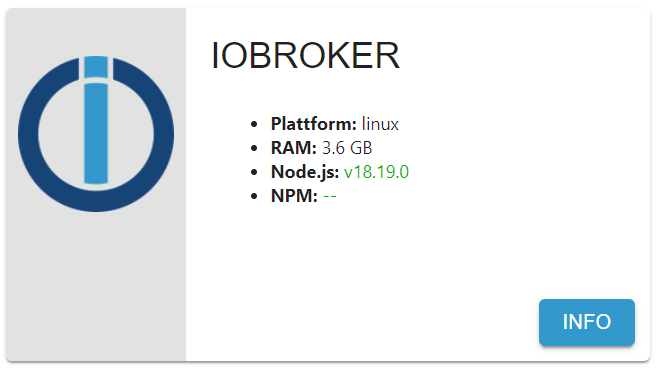
-
iob stop
iob fix
iob start
dann
iob nodejs-updatedurchgeführt
ioBroker nodejs updater 2023-10-13 Recommended nodejs-version is: 18.19.0 Checking your installation now. Please be patient! Your current setup is: /usr/bin/nodejs v18.19.0 /usr/bin/node v18.19.0 /home/iobroker/.nodejs-update.sh: line 130: npm: command not found /home/iobroker/.nodejs-update.sh: line 131: npx: command not found /home/iobroker/.nodejs-update.sh: line 147: npm: command not found /home/iobroker/.nodejs-update.sh: line 148: npx: command not found *** nodejs is NOT correctly installed *** We found these nodejs versions available for installation: nodejs: Installed: 18.19.0+dfsg-6~deb12u1 Candidate: 14.21.3-deb-1nodesource1 Version table: *** 18.19.0+dfsg-6~deb12u1 500 500 http://security.debian.org/debian-security bookworm-security/main arm64 Packages 100 /var/lib/dpkg/status 18.13.0+dfsg1-1 500 500 http://deb.debian.org/debian bookworm/main arm64 Packages 14.21.3-deb-1nodesource1 1001 500 https://deb.nodesource.com/node_14.x bullseye/main arm64 Packages Your nodejs-Installation seems to be faulty. Shall we try to fix it? Press <y> to continue or any other key to quit Fixing your nodejs setup *** Deleting *** rm: cannot remove '': No such file or directory *** Deleting *** rm: cannot remove '': No such file or directory Wrong paths have been fixed. Run 'iob diag' or 'iob nodejs-update' again to check if your installation is fine now Nothing to do - Your version is the recommended one. You can now keep your whole system up-to-date using the usual 'sudo apt update && sudo apt full-upgrade' commands. Please DO NOT USE node version managers like 'nvm', 'n' and others in parallel. They will break your current installation!MOD-EDIT: Code in code-tags gesetzt!
jetzt wird folgendes angezeigt:
-
iob stop
iob fix
iob start
dann
iob nodejs-updatedurchgeführt
ioBroker nodejs updater 2023-10-13

Recommended nodejs-version is: 18.19.0
Checking your installation now. Please be patient!

Your current setup is:
/usr/bin/nodejs         v18.19.0
/usr/bin/node           v18.19.0
/home/iobroker/.nodejs-update.sh: line 130: npm: command not found

/home/iobroker/.nodejs-update.sh: line 131: npx: command not found

/home/iobroker/.nodejs-update.sh: line 147: npm: command not found
/home/iobroker/.nodejs-update.sh: line 148: npx: command not found

*** nodejs is NOT correctly installed ***
We found these nodejs versions available for installation:

nodejs:
  Installed: 18.19.0+dfsg-6~deb12u1
  Candidate: 14.21.3-deb-1nodesource1
  Version table:
 *** 18.19.0+dfsg-6~deb12u1 500
        500 http://security.debian.org/debian-security bookworm-security/main arm64 Packages
        100 /var/lib/dpkg/status
     18.13.0+dfsg1-1 500
        500 http://deb.debian.org/debian bookworm/main arm64 Packages
     14.21.3-deb-1nodesource1 1001
        500 https://deb.nodesource.com/node_14.x bullseye/main arm64 Packages


Your nodejs-Installation seems to be faulty. Shall we try to fix it?
Press <y> to continue or any other key to quit

Fixing your nodejs setup
*** Deleting  ***
rm: cannot remove '': No such file or directory
*** Deleting  ***
rm: cannot remove '': No such file or directory

Wrong paths have been fixed. Run 'iob diag' or 'iob nodejs-update' again to check if your installation is fine now
Nothing to do - Your version is the recommended one.

You can now keep your whole system up-to-date using the usual 'sudo apt update && sudo apt full-upgrade' commands.
Please DO NOT USE node version managers like 'nvm', 'n' and others in parallel. They will break your current installation!
MOD-EDIT: Code in code-tags gesetzt!
jetzt wird folgendes angezeigt:
@ravsu
bitte in code-tags setzen!
bitte nicht nur selektierte Ausschnitte posten! -
Danke für den Link.
Bei dem Befehlsudo apt install nodejs=18.19.0-1nodesource1wird am ende eine Fehlermeldung geliefert:
E: Version '18.19.0-1nodesource1' for 'nodejs' was not foundpi@iobroker:~$ apt policy nodejs nodejs: Installed: 18.19.0+dfsg-6~deb12u1 Candidate: 14.21.3-deb-1nodesource1 Version table: *** 18.19.0+dfsg-6~deb12u1 500 500 http://security.debian.org/debian-security bookworm-security/main arm64 Packages 100 /var/lib/dpkg/status 18.13.0+dfsg1-1 500 500 http://deb.debian.org/debian bookworm/main arm64 Packages 14.21.3-deb-1nodesource1 1001 500 https://deb.nodesource.com/node_14.x bullseye/main arm64 Packages pi@iobroker:~$ echo -e "Package: nodejs\nPin: origin deb.nodesource.com\nPin-Priority: 1001" | sudo tee /etc/apt/preferences.d/nodejs.pref sudo apt update iob stop sudo apt remove npm sudo apt install nodejs=18.19.0-1nodesource1 iob restart Package: nodejs Pin: origin deb.nodesource.com Pin-Priority: 1001 Hit:1 http://security.debian.org/debian-security bookworm-security InRelease Hit:2 http://deb.debian.org/debian bookworm InRelease Get:3 https://deb.nodesource.com/node_14.x bullseye InRelease [4586 B] Fetched 4586 B in 1s (4087 B/s) Reading package lists... Done Building dependency tree... Done Reading state information... Done All packages are up to date. Reading package lists... Done Building dependency tree... Done Reading state information... Done Package 'npm' is not installed, so not removed The following packages were automatically installed and are no longer required: distro-info-data eslint g++-10 giblib1 gyp handlebars javascript-common libauthen-sasl-perl libcbor0 libclone-perl libdata-dump-perl libdrm-amdgpu1 libdrm-common libdrm-nouveau2 libdrm-radeon1 libdrm2 libegl-mesa0 libegl1 libencode-locale-perl libevent-2.1-7 libfile-basedir-perl libfile-desktopentry-perl libfile-listing-perl libfile-mimeinfo-perl libfont-afm-perl libgbm1 libgl1 libgl1-mesa-dri libglapi-mesa libgles2 libglvnd0 libglx-mesa0 libglx0 libhtml-form-perl libhtml-format-perl libhtml-parser-perl libhtml-tagset-perl libhtml-tree-perl libhttp-cookies-perl libhttp-daemon-perl libhttp-date-perl libhttp-message-perl libhttp-negotiate-perl libicu67 libio-html-perl libio-socket-ssl-perl libio-stringy-perl libipc-system-simple-perl libjs-async libjs-events libjs-inherits libjs-is-typedarray libjs-prettify libjs-regenerate libjs-source-map libjs-sprintf-js libjs-typedarray-to-buffer libjs-util libjsoncpp24 libldap-2.4-2 libllvm15 liblua5.1-0 liblwp-mediatypes-perl liblwp-protocol-https-perl libmailtools-perl libmpdec3 libnet-dbus-perl libnet-http-perl libnet-smtp-ssl-perl libnet-ssleay-perl libnode-dev libnotify-bin libnotify4 libpcre16-3 libpcre2-posix2 libpcre3-dev libpcre32-3 libpcrecpp0v5 libperl5.32 libpython3.9-minimal libpython3.9-stdlib libregexp-ipv6-perl libsensors-config libsensors5 libssl-dev libstdc++-10-dev libtevent0 libtie-ixhash-perl libtiff5 libtimedate-perl libtry-tiny-perl liburi-perl libuv1-dev libwayland-client0 libwayland-server0 libwebp6 libwww-perl libwww-robotrules-perl libx11-protocol-perl libxaw7 libxcb-dri2-0 libxcb-dri3-0 libxcb-glx0 libxcb-present0 libxcb-randr0 libxcb-shape0 libxcb-sync1 libxcb-xfixes0 libxcursor1 libxi6 libxkbfile1 libxml-parser-perl libxml-twig-perl libxml-xpathengine-perl libxmu6 libxpm4 libxrandr2 libxshmfence1 libxtst6 libxv1 libxxf86dga1 libxxf86vm1 libz3-4 linux-image-5.10.0-21-arm64 linux-image-5.10.0-23-arm64 linux-image-6.1.0-9-arm64 lua-bitop lua-cjson node-abbrev node-agent-base node-ajv node-ajv-keywords node-ampproject-remapping node-ansi-escapes node-ansi-regex node-ansi-styles node-anymatch node-aproba node-archy node-are-we-there-yet node-argparse node-arrify node-assert node-async node-async-each node-auto-bind node-babel-helper-define-polyfill-provider node-babel-plugin-add-module-exports node-babel-plugin-lodash node-babel-plugin-polyfill-corejs2 node-babel-plugin-polyfill-corejs3 node-babel-plugin-polyfill-regenerator node-babel7 node-babel7-runtime node-balanced-match node-base node-base64-js node-binary-extensions node-brace-expansion node-braces node-browserslist node-builtins node-cacache node-cache-base node-camelcase node-caniuse-lite node-chalk node-chokidar node-chownr node-chrome-trace-event node-ci-info node-cli-boxes node-cli-cursor node-cli-table node-cli-truncate node-cliui node-clone node-clone-deep node-collection-visit node-color-convert node-color-name node-colors node-columnify node-commander node-commondir node-concat-stream node-console-control-strings node-convert-source-map node-copy-concurrently node-core-js node-core-js-compat node-core-js-pure node-core-util-is node-coveralls node-css-loader node-css-selector-tokenizer node-data-uri-to-buffer node-debbundle-es-to-primitive node-debug node-decamelize node-decompress-response node-deep-equal node-deep-is node-defaults node-define-properties node-define-property node-defined node-del node-delegates node-depd node-diff node-doctrine node-electron-to-chromium node-encoding node-end-of-stream node-enhanced-resolve node-err-code node-errno node-error-ex node-es-abstract node-es-module-lexer node-es6-error node-escape-string-regexp node-escodegen node-eslint-scope node-eslint-utils node-eslint-visitor-keys node-espree node-esprima node-esquery node-esrecurse node-estraverse node-esutils node-events node-fancy-log node-fast-deep-equal node-fast-levenshtein node-fetch node-file-entry-cache node-fill-range node-find-cache-dir node-find-up node-flat-cache node-flatted node-for-in node-for-own node-foreground-child node-fs-readdir-recursive node-fs-write-stream-atomic node-fs.realpath node-function-bind node-functional-red-black-tree node-gauge node-get-caller-file node-get-stream node-get-value node-glob node-glob-parent node-globals node-globby node-got node-graceful-fs node-growl node-gyp node-has-flag node-has-unicode node-has-value node-has-values node-hosted-git-info node-https-proxy-agent node-iconv-lite node-icss-utils node-ieee754 node-iferr node-ignore node-imurmurhash node-indent-string node-inflight node-inherits node-ini node-interpret node-ip node-ip-regex node-is-arrayish node-is-binary-path node-is-buffer node-is-descriptor node-is-extendable node-is-extglob node-is-glob node-is-number node-is-path-cwd node-is-path-inside node-is-plain-obj node-is-plain-object node-is-primitive node-is-stream node-is-typedarray node-is-windows node-isarray node-isexe node-isobject node-istanbul node-jest-debbundle node-jest-worker node-js-tokens node-js-yaml node-jsesc node-json-buffer node-json-parse-better-errors node-json-schema node-json-schema-traverse node-json-stable-stringify node-json5 node-jsonify node-jsonparse node-kind-of node-lcov-parse node-levn node-loader-runner node-locate-path node-lodash node-lodash-packages node-log-driver node-lowercase-keys node-lru-cache node-make-dir node-map-visit node-memfs node-memory-fs node-merge-stream node-micromatch node-mime node-mime-types node-mimic-response node-minimatch node-minimist node-minipass node-mixin-deep node-mkdirp node-move-concurrently node-ms node-mute-stream node-n3 node-negotiator node-neo-async node-nopt node-normalize-package-data node-normalize-path node-npm-bundled node-npm-package-arg node-npm-run-path node-npmlog node-object-assign node-object-inspect node-object-visit node-once node-opener node-optimist node-optionator node-osenv node-p-cancelable node-p-limit node-p-locate node-p-map node-parse-json node-pascalcase node-path-dirname node-path-exists node-path-is-absolute node-path-is-inside node-path-type node-picocolors node-pify node-pkg-dir node-postcss node-postcss-modules-extract-imports node-postcss-modules-values node-postcss-value-parser node-prelude-ls node-process-nextick-args node-progress node-promise-inflight node-promise-retry node-promzard node-prr node-pump node-punycode node-quick-lru node-randombytes node-read node-read-package-json node-read-pkg node-readable-stream node-readdirp node-rechoir node-regenerate node-regenerate-unicode-properties node-regenerator-runtime node-regenerator-transform node-regexpp node-regexpu-core node-regjsgen node-regjsparser node-repeat-string node-require-directory node-resolve node-resolve-cwd node-resolve-from node-restore-cursor node-resumer node-retry node-rimraf node-run-queue node-safe-buffer node-schema-utils node-sellside-emitter node-semver node-serialize-javascript node-set-blocking node-set-immediate-shim node-set-value node-shebang-command node-shebang-regex node-shell-quote node-signal-exit node-slash node-slice-ansi node-source-list-map node-source-map node-source-map-support node-spdx-correct node-spdx-exceptions node-spdx-expression-parse node-spdx-license-ids node-sprintf-js node-ssri node-stack-utils node-string-decoder node-string-width node-strip-ansi node-strip-bom node-strip-json-comments node-supports-color node-tap node-tap-mocha-reporter node-tap-parser node-tapable node-tape node-tar node-terser node-text-table node-through node-time-stamp node-to-fast-properties node-to-regex-range node-tslib node-type-check node-typedarray node-typedarray-to-buffer node-unicode-canonical-property-names-ecmascript node-unicode-match-property-ecmascript node-unicode-match-property-value-ecmascript node-unicode-property-aliases-ecmascript node-union-value node-unique-filename node-unset-value node-uri-js node-util node-util-deprecate node-uuid node-v8-compile-cache node-v8flags node-validate-npm-package-license node-validate-npm-package-name node-watchpack node-wcwidth.js node-webassemblyjs node-webpack-sources node-which node-wide-align node-widest-line node-wordwrap node-wrap-ansi node-wrappy node-write node-write-file-atomic node-ws node-y18n node-yallist node-yaml node-yargs node-yargs-parser perl-modules-5.32 perl-openssl-defaults pigz python3-pkg-resources python3-six python3.9 python3.9-minimal terser webpack x11-utils x11-xserver-utils x11proto-xext-dev xdg-utils zutty Use 'sudo apt autoremove' to remove them. 0 upgraded, 0 newly installed, 0 to remove and 0 not upgraded. Reading package lists... Done Building dependency tree... Done Reading state information... Done Package nodejs is not available, but is referred to by another package. This may mean that the package is missing, has been obsoleted, or is only available from another source However the following packages replace it: nodejs-doc E: Version '18.19.0-1nodesource1' for 'nodejs' was not found -
Danke für den Link.
Bei dem Befehlsudo apt install nodejs=18.19.0-1nodesource1wird am ende eine Fehlermeldung geliefert:
E: Version '18.19.0-1nodesource1' for 'nodejs' was not foundpi@iobroker:~$ apt policy nodejs nodejs: Installed: 18.19.0+dfsg-6~deb12u1 Candidate: 14.21.3-deb-1nodesource1 Version table: *** 18.19.0+dfsg-6~deb12u1 500 500 http://security.debian.org/debian-security bookworm-security/main arm64 Packages 100 /var/lib/dpkg/status 18.13.0+dfsg1-1 500 500 http://deb.debian.org/debian bookworm/main arm64 Packages 14.21.3-deb-1nodesource1 1001 500 https://deb.nodesource.com/node_14.x bullseye/main arm64 Packages pi@iobroker:~$ echo -e "Package: nodejs\nPin: origin deb.nodesource.com\nPin-Priority: 1001" | sudo tee /etc/apt/preferences.d/nodejs.pref sudo apt update iob stop sudo apt remove npm sudo apt install nodejs=18.19.0-1nodesource1 iob restart Package: nodejs Pin: origin deb.nodesource.com Pin-Priority: 1001 Hit:1 http://security.debian.org/debian-security bookworm-security InRelease Hit:2 http://deb.debian.org/debian bookworm InRelease Get:3 https://deb.nodesource.com/node_14.x bullseye InRelease [4586 B] Fetched 4586 B in 1s (4087 B/s) Reading package lists... Done Building dependency tree... Done Reading state information... Done All packages are up to date. Reading package lists... Done Building dependency tree... Done Reading state information... Done Package 'npm' is not installed, so not removed The following packages were automatically installed and are no longer required: distro-info-data eslint g++-10 giblib1 gyp handlebars javascript-common libauthen-sasl-perl libcbor0 libclone-perl libdata-dump-perl libdrm-amdgpu1 libdrm-common libdrm-nouveau2 libdrm-radeon1 libdrm2 libegl-mesa0 libegl1 libencode-locale-perl libevent-2.1-7 libfile-basedir-perl libfile-desktopentry-perl libfile-listing-perl libfile-mimeinfo-perl libfont-afm-perl libgbm1 libgl1 libgl1-mesa-dri libglapi-mesa libgles2 libglvnd0 libglx-mesa0 libglx0 libhtml-form-perl libhtml-format-perl libhtml-parser-perl libhtml-tagset-perl libhtml-tree-perl libhttp-cookies-perl libhttp-daemon-perl libhttp-date-perl libhttp-message-perl libhttp-negotiate-perl libicu67 libio-html-perl libio-socket-ssl-perl libio-stringy-perl libipc-system-simple-perl libjs-async libjs-events libjs-inherits libjs-is-typedarray libjs-prettify libjs-regenerate libjs-source-map libjs-sprintf-js libjs-typedarray-to-buffer libjs-util libjsoncpp24 libldap-2.4-2 libllvm15 liblua5.1-0 liblwp-mediatypes-perl liblwp-protocol-https-perl libmailtools-perl libmpdec3 libnet-dbus-perl libnet-http-perl libnet-smtp-ssl-perl libnet-ssleay-perl libnode-dev libnotify-bin libnotify4 libpcre16-3 libpcre2-posix2 libpcre3-dev libpcre32-3 libpcrecpp0v5 libperl5.32 libpython3.9-minimal libpython3.9-stdlib libregexp-ipv6-perl libsensors-config libsensors5 libssl-dev libstdc++-10-dev libtevent0 libtie-ixhash-perl libtiff5 libtimedate-perl libtry-tiny-perl liburi-perl libuv1-dev libwayland-client0 libwayland-server0 libwebp6 libwww-perl libwww-robotrules-perl libx11-protocol-perl libxaw7 libxcb-dri2-0 libxcb-dri3-0 libxcb-glx0 libxcb-present0 libxcb-randr0 libxcb-shape0 libxcb-sync1 libxcb-xfixes0 libxcursor1 libxi6 libxkbfile1 libxml-parser-perl libxml-twig-perl libxml-xpathengine-perl libxmu6 libxpm4 libxrandr2 libxshmfence1 libxtst6 libxv1 libxxf86dga1 libxxf86vm1 libz3-4 linux-image-5.10.0-21-arm64 linux-image-5.10.0-23-arm64 linux-image-6.1.0-9-arm64 lua-bitop lua-cjson node-abbrev node-agent-base node-ajv node-ajv-keywords node-ampproject-remapping node-ansi-escapes node-ansi-regex node-ansi-styles node-anymatch node-aproba node-archy node-are-we-there-yet node-argparse node-arrify node-assert node-async node-async-each node-auto-bind node-babel-helper-define-polyfill-provider node-babel-plugin-add-module-exports node-babel-plugin-lodash node-babel-plugin-polyfill-corejs2 node-babel-plugin-polyfill-corejs3 node-babel-plugin-polyfill-regenerator node-babel7 node-babel7-runtime node-balanced-match node-base node-base64-js node-binary-extensions node-brace-expansion node-braces node-browserslist node-builtins node-cacache node-cache-base node-camelcase node-caniuse-lite node-chalk node-chokidar node-chownr node-chrome-trace-event node-ci-info node-cli-boxes node-cli-cursor node-cli-table node-cli-truncate node-cliui node-clone node-clone-deep node-collection-visit node-color-convert node-color-name node-colors node-columnify node-commander node-commondir node-concat-stream node-console-control-strings node-convert-source-map node-copy-concurrently node-core-js node-core-js-compat node-core-js-pure node-core-util-is node-coveralls node-css-loader node-css-selector-tokenizer node-data-uri-to-buffer node-debbundle-es-to-primitive node-debug node-decamelize node-decompress-response node-deep-equal node-deep-is node-defaults node-define-properties node-define-property node-defined node-del node-delegates node-depd node-diff node-doctrine node-electron-to-chromium node-encoding node-end-of-stream node-enhanced-resolve node-err-code node-errno node-error-ex node-es-abstract node-es-module-lexer node-es6-error node-escape-string-regexp node-escodegen node-eslint-scope node-eslint-utils node-eslint-visitor-keys node-espree node-esprima node-esquery node-esrecurse node-estraverse node-esutils node-events node-fancy-log node-fast-deep-equal node-fast-levenshtein node-fetch node-file-entry-cache node-fill-range node-find-cache-dir node-find-up node-flat-cache node-flatted node-for-in node-for-own node-foreground-child node-fs-readdir-recursive node-fs-write-stream-atomic node-fs.realpath node-function-bind node-functional-red-black-tree node-gauge node-get-caller-file node-get-stream node-get-value node-glob node-glob-parent node-globals node-globby node-got node-graceful-fs node-growl node-gyp node-has-flag node-has-unicode node-has-value node-has-values node-hosted-git-info node-https-proxy-agent node-iconv-lite node-icss-utils node-ieee754 node-iferr node-ignore node-imurmurhash node-indent-string node-inflight node-inherits node-ini node-interpret node-ip node-ip-regex node-is-arrayish node-is-binary-path node-is-buffer node-is-descriptor node-is-extendable node-is-extglob node-is-glob node-is-number node-is-path-cwd node-is-path-inside node-is-plain-obj node-is-plain-object node-is-primitive node-is-stream node-is-typedarray node-is-windows node-isarray node-isexe node-isobject node-istanbul node-jest-debbundle node-jest-worker node-js-tokens node-js-yaml node-jsesc node-json-buffer node-json-parse-better-errors node-json-schema node-json-schema-traverse node-json-stable-stringify node-json5 node-jsonify node-jsonparse node-kind-of node-lcov-parse node-levn node-loader-runner node-locate-path node-lodash node-lodash-packages node-log-driver node-lowercase-keys node-lru-cache node-make-dir node-map-visit node-memfs node-memory-fs node-merge-stream node-micromatch node-mime node-mime-types node-mimic-response node-minimatch node-minimist node-minipass node-mixin-deep node-mkdirp node-move-concurrently node-ms node-mute-stream node-n3 node-negotiator node-neo-async node-nopt node-normalize-package-data node-normalize-path node-npm-bundled node-npm-package-arg node-npm-run-path node-npmlog node-object-assign node-object-inspect node-object-visit node-once node-opener node-optimist node-optionator node-osenv node-p-cancelable node-p-limit node-p-locate node-p-map node-parse-json node-pascalcase node-path-dirname node-path-exists node-path-is-absolute node-path-is-inside node-path-type node-picocolors node-pify node-pkg-dir node-postcss node-postcss-modules-extract-imports node-postcss-modules-values node-postcss-value-parser node-prelude-ls node-process-nextick-args node-progress node-promise-inflight node-promise-retry node-promzard node-prr node-pump node-punycode node-quick-lru node-randombytes node-read node-read-package-json node-read-pkg node-readable-stream node-readdirp node-rechoir node-regenerate node-regenerate-unicode-properties node-regenerator-runtime node-regenerator-transform node-regexpp node-regexpu-core node-regjsgen node-regjsparser node-repeat-string node-require-directory node-resolve node-resolve-cwd node-resolve-from node-restore-cursor node-resumer node-retry node-rimraf node-run-queue node-safe-buffer node-schema-utils node-sellside-emitter node-semver node-serialize-javascript node-set-blocking node-set-immediate-shim node-set-value node-shebang-command node-shebang-regex node-shell-quote node-signal-exit node-slash node-slice-ansi node-source-list-map node-source-map node-source-map-support node-spdx-correct node-spdx-exceptions node-spdx-expression-parse node-spdx-license-ids node-sprintf-js node-ssri node-stack-utils node-string-decoder node-string-width node-strip-ansi node-strip-bom node-strip-json-comments node-supports-color node-tap node-tap-mocha-reporter node-tap-parser node-tapable node-tape node-tar node-terser node-text-table node-through node-time-stamp node-to-fast-properties node-to-regex-range node-tslib node-type-check node-typedarray node-typedarray-to-buffer node-unicode-canonical-property-names-ecmascript node-unicode-match-property-ecmascript node-unicode-match-property-value-ecmascript node-unicode-property-aliases-ecmascript node-union-value node-unique-filename node-unset-value node-uri-js node-util node-util-deprecate node-uuid node-v8-compile-cache node-v8flags node-validate-npm-package-license node-validate-npm-package-name node-watchpack node-wcwidth.js node-webassemblyjs node-webpack-sources node-which node-wide-align node-widest-line node-wordwrap node-wrap-ansi node-wrappy node-write node-write-file-atomic node-ws node-y18n node-yallist node-yaml node-yargs node-yargs-parser perl-modules-5.32 perl-openssl-defaults pigz python3-pkg-resources python3-six python3.9 python3.9-minimal terser webpack x11-utils x11-xserver-utils x11proto-xext-dev xdg-utils zutty Use 'sudo apt autoremove' to remove them. 0 upgraded, 0 newly installed, 0 to remove and 0 not upgraded. Reading package lists... Done Building dependency tree... Done Reading state information... Done Package nodejs is not available, but is referred to by another package. This may mean that the package is missing, has been obsoleted, or is only available from another source However the following packages replace it: nodejs-doc E: Version '18.19.0-1nodesource1' for 'nodejs' was not foundDa fehlt die nodesource.list
iob nodejs-update 18legt die aber eigentlich an.
Zuvor
sudo apt autoremove
sudo apt remove node-* nodejs-doc
dann
iob nodejs-update 18
sudo apt install nodejs=18.19.0-1nodesource1
sollte zu einer richtigen Installation führen.




Hey! Du scheinst an dieser Unterhaltung interessiert zu sein, hast aber noch kein Konto.
Hast du es satt, bei jedem Besuch durch die gleichen Beiträge zu scrollen? Wenn du dich für ein Konto anmeldest, kommst du immer genau dorthin zurück, wo du zuvor warst, und kannst dich über neue Antworten benachrichtigen lassen (entweder per E-Mail oder Push-Benachrichtigung). Du kannst auch Lesezeichen speichern und Beiträge positiv bewerten, um anderen Community-Mitgliedern deine Wertschätzung zu zeigen.
Mit deinem Input könnte dieser Beitrag noch besser werden 💗
Registrieren AnmeldenSupport us
424
Online33.0k
Benutzer83.5k
Themen1.3m
Beiträge