



Skip to content
  • Home
  • Aktuell
  • Tags
  • 0 Ungelesen 0
  • Kategorien
  • Unreplied
  • Beliebt
  • GitHub
  • Docu
  • Hilfe
Skins
  • Light
  • Brite
  • Cerulean
  • Cosmo
  • Flatly
  • Journal
  • Litera
  • Lumen
  • Lux
  • Materia
  • Minty
  • Morph
  • Pulse
  • Sandstone
  • Simplex
  • Sketchy
  • Spacelab
  • United
  • Yeti
  • Zephyr
  • Dark
  • Cyborg
  • Darkly
  • Quartz
  • Slate
  • Solar
  • Superhero
  • Vapor

  • Standard: (Kein Skin)
  • Kein Skin
Einklappen
ioBroker Logo

Community Forum

donate donate
  1. ioBroker Community Home
  2. Deutsch
  3. Einsteigerfragen
  4. NPM: 9.2.0 (10.2.3) "Einige Update verfügbar" Update?

NEWS

  • Jahresrückblick 2025 – unser neuer Blogbeitrag ist online! ✨
    BluefoxB
    Bluefox
    16
    1
    1.5k

  • Neuer Blogbeitrag: Monatsrückblick - Dezember 2025 🎄
    BluefoxB
    Bluefox
    13
    1
    833

  • Weihnachtsangebot 2025! 🎄
    BluefoxB
    Bluefox
    25
    1
    2.1k

NPM: 9.2.0 (10.2.3) "Einige Update verfügbar" Update?

Geplant Angeheftet Gesperrt Verschoben Einsteigerfragen
30 Beiträge 6 Kommentatoren 3.0k Aufrufe 5 Watching
  • Älteste zuerst
  • Neuste zuerst
  • Meiste Stimmen
Antworten
  • In einem neuen Thema antworten
Anmelden zum Antworten
Dieses Thema wurde gelöscht. Nur Nutzer mit entsprechenden Rechten können es sehen.
  • R raVsu

    Hallo,
    mir ist aufgefallen, dass bei es NPM neue verfügbar ist (siehe Bild). Wie kann ich das Update durchführen?
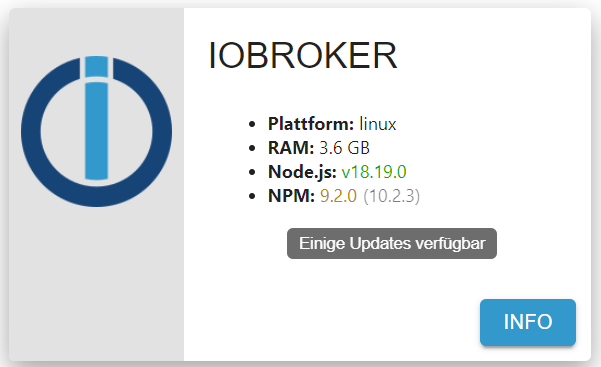
    440b84ec-74e8-4c8f-8bda-f6de6d98e422-image.png

    Danke für eure Unterstützung.

    Meister MopperM Offline
    Meister MopperM Offline
    Meister Mopper
    schrieb am zuletzt editiert von
    #3

    @ravsu sagte in NPM: 9.2.0 (10.2.3) "Einige Update verfügbar" Update?:

    Hallo,
    mir ist aufgefallen, dass bei es NPM neue verfügbar ist (siehe Bild). Wie kann ich das Update durchführen?

    440b84ec-74e8-4c8f-8bda-f6de6d98e422-image.png

    Danke für eure Unterstützung.

    Schau dafür nicht ins GUI, da steht oftmals Unsinn. Schau in der Konsole, die lügt nicht.

    Proxmox und HA

    R 1 Antwort Letzte Antwort
    0
    • Meister MopperM Meister Mopper

      @ravsu sagte in NPM: 9.2.0 (10.2.3) "Einige Update verfügbar" Update?:

      Hallo,
      mir ist aufgefallen, dass bei es NPM neue verfügbar ist (siehe Bild). Wie kann ich das Update durchführen?

      440b84ec-74e8-4c8f-8bda-f6de6d98e422-image.png

      Danke für eure Unterstützung.

      Schau dafür nicht ins GUI, da steht oftmals Unsinn. Schau in der Konsole, die lügt nicht.

      R Offline
      R Offline
      raVsu
      schrieb am zuletzt editiert von
      #4

      @meister-mopper
      danke. Auch in der Konsole stehen die gleichen Versionsnummern:
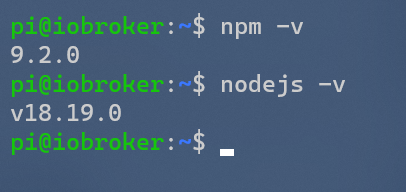
      e5fade11-23d7-4f2b-abd9-22acb1181dc0-image.png

      HomoranH Thomas BraunT 2 Antworten Letzte Antwort
      0
      • R raVsu

        @meister-mopper
        danke. Auch in der Konsole stehen die gleichen Versionsnummern:
        e5fade11-23d7-4f2b-abd9-22acb1181dc0-image.png

        HomoranH Nicht stören
        HomoranH Nicht stören
        Homoran
        Global Moderator Administrators
        schrieb am zuletzt editiert von Homoran
        #5

        @ravsu bitte iob diag in der Langfassung als Text in code-tags posten

        hattest du vorher denn den Befehl von @Glasfaser ausgeführt?

        kein Support per PN! - Fragen im Forum stellen - es gibt fast nichts, was nicht auch für andere interessant ist.

        Benutzt das Voting rechts unten im Beitrag wenn er euch geholfen hat.

        der Installationsfixer: curl -fsL https://iobroker.net/fix.sh | bash -

        R 1 Antwort Letzte Antwort
        0
        • R raVsu

          @meister-mopper
          danke. Auch in der Konsole stehen die gleichen Versionsnummern:
          e5fade11-23d7-4f2b-abd9-22acb1181dc0-image.png

          Thomas BraunT Online
          Thomas BraunT Online
          Thomas Braun
          Most Active
          schrieb am zuletzt editiert von
          #6

          @ravsu

          Dann installier es richtig.
          Per

          iob nodejs-update 18
          

          Linux-Werkzeugkasten:
          https://forum.iobroker.net/topic/42952/der-kleine-iobroker-linux-werkzeugkasten
          NodeJS Fixer Skript:
          https://forum.iobroker.net/topic/68035/iob-node-fix-skript
          iob_diag: curl -sLf -o diag.sh https://iobroker.net/diag.sh && bash diag.sh

          1 Antwort Letzte Antwort
          0
          • HomoranH Homoran

            @ravsu bitte iob diag in der Langfassung als Text in code-tags posten

            hattest du vorher denn den Befehl von @Glasfaser ausgeführt?

            R Offline
            R Offline
            raVsu
            schrieb am zuletzt editiert von Homoran
            #7

            @homoran

            danke. Jetzt habe ich gesehen das nodejs nicht korrekt installiert ist.
            Wie kann ich das korrigieren?

            *** NodeJS-Installation ***
            
            /usr/bin/nodejs         v18.19.0
            /usr/bin/node           v18.19.0
            /usr/bin/npm            9.2.0
            /usr/bin/npx            9.2.0
            /home/iobroker/.diag.sh: line 281: corepack: command not found
            
            *** nodejs is NOT correctly installed ***
            
            nodejs:
              Installed: 18.19.0+dfsg-6~deb12u1
              Candidate: 18.19.0+dfsg-6~deb12u1
              Version table:
             *** 18.19.0+dfsg-6~deb12u1 500
                    500 http://security.debian.org/debian-security bookworm-security/main arm64 Packages
                    100 /var/lib/dpkg/status
                 18.13.0+dfsg1-1 500
                    500 http://deb.debian.org/debian bookworm/main arm64 Packages
                 14.21.3-deb-1nodesource1 500
                    500 https://deb.nodesource.com/node_14.x bullseye/main arm64 Packages
            

            MOD-EDIT: Code in code-tags gesetzt!

            Ja, den Befehl habe ich ausgeführt

            DJMarc75D HomoranH GlasfaserG 4 Antworten Letzte Antwort
            0
            • R raVsu

              @homoran

              danke. Jetzt habe ich gesehen das nodejs nicht korrekt installiert ist.
              Wie kann ich das korrigieren?

              *** NodeJS-Installation ***
              
              /usr/bin/nodejs         v18.19.0
              /usr/bin/node           v18.19.0
              /usr/bin/npm            9.2.0
              /usr/bin/npx            9.2.0
              /home/iobroker/.diag.sh: line 281: corepack: command not found
              
              *** nodejs is NOT correctly installed ***
              
              nodejs:
                Installed: 18.19.0+dfsg-6~deb12u1
                Candidate: 18.19.0+dfsg-6~deb12u1
                Version table:
               *** 18.19.0+dfsg-6~deb12u1 500
                      500 http://security.debian.org/debian-security bookworm-security/main arm64 Packages
                      100 /var/lib/dpkg/status
                   18.13.0+dfsg1-1 500
                      500 http://deb.debian.org/debian bookworm/main arm64 Packages
                   14.21.3-deb-1nodesource1 500
                      500 https://deb.nodesource.com/node_14.x bullseye/main arm64 Packages
              

              MOD-EDIT: Code in code-tags gesetzt!

              Ja, den Befehl habe ich ausgeführt

              DJMarc75D Offline
              DJMarc75D Offline
              DJMarc75
              schrieb am zuletzt editiert von
              #8

              @ravsu

              https://forum.iobroker.net/topic/71478/plötzliche-probleme-durch-nodejs-dfsg-version-npm-fehlt

              Lehrling seit 1975 !!!
              Beitrag geholfen ? dann gerne ein upvote rechts unten im Beitrag klicken ;)
              https://forum.iobroker.net/topic/51555/hinweise-f%C3%BCr-gute-forenbeitr%C3%A4ge

              1 Antwort Letzte Antwort
              0
              • R raVsu

                @homoran

                danke. Jetzt habe ich gesehen das nodejs nicht korrekt installiert ist.
                Wie kann ich das korrigieren?

                *** NodeJS-Installation ***
                
                /usr/bin/nodejs         v18.19.0
                /usr/bin/node           v18.19.0
                /usr/bin/npm            9.2.0
                /usr/bin/npx            9.2.0
                /home/iobroker/.diag.sh: line 281: corepack: command not found
                
                *** nodejs is NOT correctly installed ***
                
                nodejs:
                  Installed: 18.19.0+dfsg-6~deb12u1
                  Candidate: 18.19.0+dfsg-6~deb12u1
                  Version table:
                 *** 18.19.0+dfsg-6~deb12u1 500
                        500 http://security.debian.org/debian-security bookworm-security/main arm64 Packages
                        100 /var/lib/dpkg/status
                     18.13.0+dfsg1-1 500
                        500 http://deb.debian.org/debian bookworm/main arm64 Packages
                     14.21.3-deb-1nodesource1 500
                        500 https://deb.nodesource.com/node_14.x bullseye/main arm64 Packages
                

                MOD-EDIT: Code in code-tags gesetzt!

                Ja, den Befehl habe ich ausgeführt

                HomoranH Nicht stören
                HomoranH Nicht stören
                Homoran
                Global Moderator Administrators
                schrieb am zuletzt editiert von
                #9

                @ravsu leider ist das nicht die Langversion, sondern ur ein Ausschnitt.
                bitte nachliefern!

                kein Support per PN! - Fragen im Forum stellen - es gibt fast nichts, was nicht auch für andere interessant ist.

                Benutzt das Voting rechts unten im Beitrag wenn er euch geholfen hat.

                der Installationsfixer: curl -fsL https://iobroker.net/fix.sh | bash -

                R 2 Antworten Letzte Antwort
                0
                • HomoranH Homoran

                  @ravsu leider ist das nicht die Langversion, sondern ur ein Ausschnitt.
                  bitte nachliefern!

                  R Offline
                  R Offline
                  raVsu
                  schrieb am zuletzt editiert von
                  #10

                  @homoran
                  ======== Start marking the full check here =========

                  Skript v.2023-10-10
                  
                  *** BASE SYSTEM ***
                   Static hostname: iobroker
                         Icon name: computer
                  Operating System: Debian GNU/Linux 12 (bookworm)
                            Kernel: Linux 6.1.0-18-arm64
                      Architecture: arm64
                  
                  Docker          : false
                  Virtualization  : none
                  Kernel          : aarch64
                  Userland        : arm64
                  
                  Systemuptime and Load:
                   13:13:27 up 10:12,  2 users,  load average: 0.93, 0.95, 0.90
                  CPU threads: 4
                  
                  
                  *** Time and Time Zones ***
                                 Local time: Sun 2024-02-11 13:13:27 CET
                             Universal time: Sun 2024-02-11 12:13:27 UTC
                                   RTC time: n/a
                                  Time zone: Europe/Berlin (CET, +0100)
                  System clock synchronized: yes
                                NTP service: n/a
                            RTC in local TZ: no
                  
                  *** User and Groups ***
                  pi
                  /home/pi
                  pi sudo iobroker
                  
                  *** X-Server-Setup ***
                  X-Server:       false
                  Desktop:
                  Terminal:       tty
                  Boot Target:    graphical.target
                  
                  *** MEMORY ***
                                 total        used        free      shared  buff/cache   available
                  Mem:            4.0G        3.0G        437M        704K        676M        924M
                  Swap:             0B          0B          0B
                  Total:          4.0G        3.0G        437M
                  
                           3786 M total memory
                           2904 M used memory
                            293 M active memory
                           2793 M inactive memory
                            417 M free memory
                             87 M buffer memory
                            557 M swap cache
                              0 M total swap
                              0 M used swap
                              0 M free swap
                  
                  *** FAILED SERVICES ***
                  
                    UNIT                                 LOAD   ACTIVE SUB    DESCRIPTION
                  * systemd-networkd-wait-online.service loaded failed failed Wait for Network to be Configured
                  
                  LOAD   = Reflects whether the unit definition was properly loaded.
                  ACTIVE = The high-level unit activation state, i.e. generalization of SUB.
                  SUB    = The low-level unit activation state, values depend on unit type.
                  1 loaded units listed.
                  
                  *** FILESYSTEM ***
                  Filesystem     Type      Size  Used Avail Use% Mounted on
                  udev           devtmpfs  1.9G     0  1.9G   0% /dev
                  tmpfs          tmpfs     379M  696K  378M   1% /run
                  /dev/sda2      ext4      118G   23G   90G  20% /
                  tmpfs          tmpfs     1.9G     0  1.9G   0% /dev/shm
                  tmpfs          tmpfs     5.0M     0  5.0M   0% /run/lock
                  /dev/sda1      vfat      396M  306M   90M  78% /boot/firmware
                  tmpfs          tmpfs     379M     0  379M   0% /run/user/1000
                  
                  Messages concerning ext4 filesystem in dmesg:
                  [Sun Feb 11 03:01:11 2024] EXT4-fs (sda2): mounted filesystem with ordered data mode. Quota mode: none.
                  [Sun Feb 11 03:01:14 2024] EXT4-fs (sda2): re-mounted. Quota mode: none.
                  
                  Show mounted filesystems \(real ones only\):
                  TARGET           SOURCE    FSTYPE OPTIONS
                  /                /dev/sda2 ext4   rw,relatime
                  `-/boot/firmware /dev/sda1 vfat   rw,relatime,fmask=0022,dmask=0022,codepage=437,iocharset=ascii,shortname=mixed,utf8,errors=remount-ro
                  
                  Files in neuralgic directories:
                  
                  /var:
                  12G     /var/
                  9.4G    /var/lib
                  9.3G    /var/lib/influxdb/engine/data
                  9.3G    /var/lib/influxdb/engine
                  9.3G    /var/lib/influxdb
                  
                  Hint: You are currently not seeing messages from other users and the system.
                        Users in groups 'adm', 'systemd-journal' can see all messages.
                        Pass -q to turn off this notice.
                  Archived and active journals take up 15.3M in the file system.
                  
                  /opt/iobroker/backups:
                  282M    /opt/iobroker/backups/
                  
                  /opt/iobroker/iobroker-data:
                  2.2G    /opt/iobroker/iobroker-data/
                  1.4G    /opt/iobroker/iobroker-data/history
                  653M    /opt/iobroker/iobroker-data/files
                  145M    /opt/iobroker/iobroker-data/files/vis-2
                  116M    /opt/iobroker/iobroker-data/backup-objects
                  
                  The five largest files in iobroker-data are:
                  42M     /opt/iobroker/iobroker-data/objects.jsonl
                  41M     /opt/iobroker/iobroker-data/files/material/static/js/main.c5478f66.js.map
                  33M     /opt/iobroker/iobroker-data/files/iot.admin/static/js/main.1797d034.js.map
                  24M     /opt/iobroker/iobroker-data/files/echarts/static/js/main.2b7495c2.js.map
                  24M     /opt/iobroker/iobroker-data/files/echarts.admin/chart/static/js/main.2b7495c2.js.map
                  
                  USB-Devices by-id:
                  USB-Sticks -  Avoid direct links to /dev/* in your adapter setups, please always prefer the links 'by-id':
                  
                  find: '/dev/serial/by-id/': No such file or directory
                  
                  *** NodeJS-Installation ***
                  
                  /usr/bin/nodejs         v18.19.0
                  /usr/bin/node           v18.19.0
                  /usr/bin/npm            9.2.0
                  /usr/bin/npx            9.2.0
                  /home/iobroker/.diag.sh: line 281: corepack: command not found
                  
                  *** nodejs is NOT correctly installed ***
                  
                  nodejs:
                    Installed: 18.19.0+dfsg-6~deb12u1
                    Candidate: 18.19.0+dfsg-6~deb12u1
                    Version table:
                   *** 18.19.0+dfsg-6~deb12u1 500
                          500 http://security.debian.org/debian-security bookworm-security/main arm64 Packages
                          100 /var/lib/dpkg/status
                       18.13.0+dfsg1-1 500
                          500 http://deb.debian.org/debian bookworm/main arm64 Packages
                       14.21.3-deb-1nodesource1 500
                          500 https://deb.nodesource.com/node_14.x bullseye/main arm64 Packages
                  
                  Temp directories causing npm8 problem: 0
                  No problems detected
                  
                  Errors in npm tree:
                  
                  *** ioBroker-Installation ***
                  
                  ioBroker Status
                  iobroker is running on this host.
                  
                  
                  Objects type: jsonl
                  States  type: redis
                  
                  Core adapters versions
                  js-controller:  5.0.17
                  admin:          6.13.16
                  javascript:     7.1.6
                  
                  Adapters from github:   0
                  
                  Adapter State
                  + system.adapter.admin.0                  : admin                 : iobroker                                 -  enabled, port: 8081, bind: 0.0.0.0, run as: admin
                  + system.adapter.backitup.0               : backitup              : iobroker                                 -  enabled
                  + system.adapter.bring.0                  : bring                 : iobroker                                 -  enabled
                  + system.adapter.discovery.0              : discovery             : iobroker                                 -  enabled
                  + system.adapter.echarts.0                : echarts               : iobroker                                 -  enabled
                    system.adapter.flot.0                   : flot                  : iobroker                                 -  enabled
                  + system.adapter.harmony.0                : harmony               : iobroker                                 -  enabled
                  + system.adapter.history.0                : history               : iobroker                                 -  enabled
                    system.adapter.ical.0                   : ical                  : iobroker                                 -  enabled
                    system.adapter.icons-mfd-svg.0          : icons-mfd-svg         : iobroker                                 -  enabled
                  + system.adapter.influxdb.0               : influxdb              : iobroker                                 -  enabled, port: 8086
                  + system.adapter.iot.0                    : iot                   : iobroker                                 -  enabled
                  + system.adapter.iqontrol.0               : iqontrol              : iobroker                                 -  enabled
                  + system.adapter.javascript.0             : javascript            : iobroker                                 -  enabled
                  + system.adapter.knx.0                    : knx                   : iobroker                                 -  enabled, bind: 192.168.178.64
                  + system.adapter.knx.1                    : knx                   : iobroker                                 -  enabled, bind: 192.168.178.64
                    system.adapter.material.0               : material              : iobroker                                 -  enabled
                  + system.adapter.matrix-org.0             : matrix-org            : iobroker                                 -  enabled
                    system.adapter.modbus.0                 : modbus                : iobroker                                 - disabled
                  + system.adapter.node-red.0               : node-red              : iobroker                                 -  enabled, port: 1880, bind: 0.0.0.0
                  + system.adapter.rpi2.0                   : rpi2                  : iobroker                                 -  enabled
                  + system.adapter.scenes.0                 : scenes                : iobroker                                 -  enabled
                  + system.adapter.senec.0                  : senec                 : iobroker                                 -  enabled
                  + system.adapter.simple-api.0             : simple-api            : iobroker                                 -  enabled, port: 8087, bind: 0.0.0.0, run as: admin
                    system.adapter.synology.0               : synology              : iobroker                                 - disabled, port: 5678
                    system.adapter.telegram.0               : telegram              : iobroker                                 - disabled, port: 8443, bind: 0.0.0.0
                  + system.adapter.terminal.0               : terminal              : iobroker                                 -  enabled, port: 8088, bind: 0.0.0.0, run as: admin
                    system.adapter.text2command.0           : text2command          : iobroker                                 - disabled
                  + system.adapter.tr-064.0                 : tr-064                : iobroker                                 -  enabled
                  + system.adapter.tradfri.0                : tradfri               : iobroker                                 -  enabled
                  + system.adapter.trashschedule.0          : trashschedule         : iobroker                                 -  enabled
                  + system.adapter.vis-2.0                  : vis-2                 : iobroker                                 -  enabled
                    system.adapter.vis-canvas-gauges.0      : vis-canvas-gauges     : iobroker                                 -  enabled
                    system.adapter.vis-hqwidgets.0          : vis-hqwidgets         : iobroker                                 -  enabled
                    system.adapter.vis-keyboard.0           : vis-keyboard          : iobroker                                 -  enabled
                    system.adapter.vis-material-advanced.0  : vis-material-advanced : iobroker                                 -  enabled
                    system.adapter.vis-rgraph.0             : vis-rgraph            : iobroker                                 -  enabled
                    system.adapter.vis-timeandweather.0     : vis-timeandweather    : iobroker                                 -  enabled
                    system.adapter.vis.0                    : vis                   : iobroker                                 -  enabled
                  + system.adapter.web.0                    : web                   : iobroker                                 -  enabled, port: 8082, bind: 192.168.178.64, run as: admin
                  
                  + instance is alive
                  
                  Enabled adapters with bindings
                  + system.adapter.admin.0                  : admin                 : iobroker                                 -  enabled, port: 8081, bind: 0.0.0.0, run as: admin
                  + system.adapter.influxdb.0               : influxdb              : iobroker                                 -  enabled, port: 8086
                  + system.adapter.node-red.0               : node-red              : iobroker                                 -  enabled, port: 1880, bind: 0.0.0.0
                  + system.adapter.simple-api.0             : simple-api            : iobroker                                 -  enabled, port: 8087, bind: 0.0.0.0, run as: admin
                  + system.adapter.terminal.0               : terminal              : iobroker                                 -  enabled, port: 8088, bind: 0.0.0.0, run as: admin
                  + system.adapter.web.0                    : web                   : iobroker                                 -  enabled, port: 8082, bind: 192.168.178.64, run as: admin
                  
                  ioBroker-Repositories
                  stable        : http://download.iobroker.net/sources-dist.json
                  beta          : http://download.iobroker.net/sources-dist-latest.json
                  __            :
                  
                  Active repo(s): stable
                  
                  Installed ioBroker-Instances
                  Used repository: stable
                  Adapter    "admin"        : 6.13.16  , installed 6.13.16
                  Adapter    "backitup"     : 2.9.8    , installed 2.9.8
                  Adapter    "bring"        : 1.8.4    , installed 1.8.4
                  Adapter    "discovery"    : 4.2.0    , installed 4.2.0
                  Adapter    "echarts"      : 1.7.2    , installed 1.7.2
                  Adapter    "fakeroku"     : 0.2.2    , installed 0.2.2
                  Adapter    "flot"         : 1.12.0   , installed 1.12.0
                  Adapter    "harmony"      : 1.3.0    , installed 1.3.0
                  Adapter    "history"      : 3.0.1    , installed 3.0.1
                  Adapter    "ical"         : 1.13.3   , installed 1.13.3
                  Adapter    "icons-mfd-svg": 1.2.0    , installed 1.2.0
                  Adapter    "influxdb"     : 3.2.0    , installed 3.2.0
                  Adapter    "iot"          : 2.0.11   , installed 2.0.11
                  Adapter    "iqontrol"     : 2.3.0    , installed 2.3.0
                  Adapter    "javascript"   : 7.1.6    , installed 7.1.6
                  Controller "js-controller": 5.0.17   , installed 5.0.17
                  Adapter    "knx"          : 2.0.24   , installed 2.0.24
                  Adapter    "material"     : 1.3.1    , installed 1.3.1
                  Adapter    "matrix-org"   : 1.0.0    , installed 1.0.0
                  Adapter    "modbus"       : 6.1.0    , installed 6.1.0
                  Adapter    "node-red"     : 5.1.0    , installed 5.1.0
                  Adapter    "rpi2"         : 1.3.2    , installed 1.3.2
                  Adapter    "scenes"       : 2.3.9    , installed 2.3.9
                  Adapter    "simple-api"   : 2.7.2    , installed 2.7.2
                  Adapter    "socketio"     : 6.6.0    , installed 6.6.0
                  Adapter    "synology"     : 3.0.1    , installed 3.0.1
                  Adapter    "telegram"     : 3.0.1    , installed 3.0.1
                  Adapter    "terminal"     : 1.0.0    , installed 1.0.0
                  Adapter    "text2command" : 3.0.3    , installed 3.0.3
                  Adapter    "tr-064"       : 4.2.18   , installed 4.2.18
                  Adapter    "tradfri"      : 3.1.3    , installed 3.1.3
                  Adapter    "trashschedule": 2.3.0    , installed 2.3.0
                  Adapter    "vis"          : 1.5.4    , installed 1.5.4
                  Adapter    "vis-2"        : 2.9.11   , installed 2.9.11
                  Adapter    "vis-canvas-gauges": 1.0.1, installed 1.0.1
                  Adapter    "vis-hqwidgets": 1.4.0    , installed 1.4.0
                  Adapter    "vis-keyboard" : 0.0.2    , installed 0.0.2
                  Adapter    "vis-material-advanced": 1.7.4, installed 1.7.4
                  Adapter    "vis-rgraph"   : 0.0.2    , installed 0.0.2
                  Adapter    "vis-timeandweather": 1.2.2, installed 1.2.2
                  Adapter    "web"          : 6.2.3    , installed 6.2.3
                  Adapter    "ws"           : 2.5.10   , installed 2.5.10
                  
                  Objects and States
                  Please stand by - This may take a while
                  Objects:        3554
                  States:         2849
                  
                  *** OS-Repositories and Updates ***
                  Hit:1 http://security.debian.org/debian-security bookworm-security InRelease
                  Hit:2 http://deb.debian.org/debian bookworm InRelease
                  Get:3 https://deb.nodesource.com/node_14.x bullseye InRelease [4586 B]
                  Fetched 4586 B in 1s (4359 B/s)
                  Reading package lists...
                  Pending Updates: 0
                  
                  *** Listening Ports ***
                  Active Internet connections (only servers)
                  Proto Recv-Q Send-Q Local Address           Foreign Address         State       User       Inode      PID/Program name
                  tcp        0      0 0.0.0.0:111             0.0.0.0:*               LISTEN      0          15724      1/init
                  tcp        0      0 127.0.0.1:39611         0.0.0.0:*               LISTEN      998        18660      662/influxd
                  tcp        0      0 127.0.0.1:9001          0.0.0.0:*               LISTEN      1001       16987      751/iobroker.js-con
                  tcp        0      0 192.168.178.64:8082     0.0.0.0:*               LISTEN      1001       23670      1175/io.web.0
                  tcp        0      0 0.0.0.0:1880            0.0.0.0:*               LISTEN      1001       19083      877/node-red
                  tcp        0      0 127.0.0.1:6379          0.0.0.0:*               LISTEN      108        20986      576/redis-server 12
                  tcp6       0      0 :::22                   :::*                    LISTEN      0          20904      1/init
                  tcp6       0      0 :::111                  :::*                    LISTEN      0          14485      1/init
                  tcp6       0      0 :::3000                 :::*                    LISTEN      109        18640      659/grafana-server
                  tcp6       0      0 :::61991                :::*                    LISTEN      1001       21531      1032/io.harmony.0
                  tcp6       0      0 :::8088                 :::*                    LISTEN      1001       19423      1107/io.terminal.0
                  tcp6       0      0 :::8087                 :::*                    LISTEN      1001       21588      1088/io.simple-api.
                  tcp6       0      0 :::8086                 :::*                    LISTEN      998        21112      662/influxd
                  tcp6       0      0 :::8081                 :::*                    LISTEN      1001       18733      771/io.admin.0
                  tcp6       0      0 ::1:6379                :::*                    LISTEN      108        20987      576/redis-server 12
                  udp        0      0 192.168.178.64:49204    0.0.0.0:*                           1001       302103     1077/io.knx.0
                  udp        0      0 192.168.178.64:57399    0.0.0.0:*                           1001       330977     1274/io.knx.1
                  udp        0      0 0.0.0.0:68              0.0.0.0:*                           0          19501      488/dhclient
                  udp        0      0 192.168.178.64:51293    0.0.0.0:*                           1001       469823     1274/io.knx.1
                  udp        0      0 0.0.0.0:111             0.0.0.0:*                           0          14484      1/init
                  udp        0      0 192.168.178.64:123      0.0.0.0:*                           0          19660      657/ntpd
                  udp        0      0 127.0.0.1:123           0.0.0.0:*                           0          19658      657/ntpd
                  udp        0      0 0.0.0.0:123             0.0.0.0:*                           0          19654      657/ntpd
                  udp        0      0 192.168.178.64:57504    0.0.0.0:*                           1001       429548     1077/io.knx.0
                  udp        0      0 192.168.178.64:49319    0.0.0.0:*                           1001       470534     1077/io.knx.0
                  udp        0      0 192.168.178.64:51367    0.0.0.0:*                           1001       420774     1077/io.knx.0
                  udp        0      0 192.168.178.64:53529    0.0.0.0:*                           1001       22704      1274/io.knx.1
                  udp        0      0 192.168.178.64:45388    0.0.0.0:*                           1001       321213     1274/io.knx.1
                  udp        0      0 0.0.0.0:35299           0.0.0.0:*                           1001       19091      877/node-red
                  udp        0      0 0.0.0.0:61991           0.0.0.0:*                           1001       21532      1032/io.harmony.0
                  udp        0      0 192.168.178.64:55965    0.0.0.0:*                           1001       385583     1274/io.knx.1
                  udp        0      0 192.168.178.64:49892    0.0.0.0:*                           1001       505627     1274/io.knx.1
                  udp        0      0 192.168.178.64:45905    0.0.0.0:*                           1001       253074     1077/io.knx.0
                  udp        0      0 192.168.178.64:50041    0.0.0.0:*                           1001       422743     1274/io.knx.1
                  udp        0      0 192.168.178.64:48017    0.0.0.0:*                           1001       211583     1274/io.knx.1
                  udp        0      0 192.168.178.64:37840    0.0.0.0:*                           1001       418223     1077/io.knx.0
                  udp        0      0 192.168.178.64:39931    0.0.0.0:*                           1001       122879     1077/io.knx.0
                  udp        0      0 192.168.178.64:54375    0.0.0.0:*                           1001       101212     1274/io.knx.1
                  udp        0      0 192.168.178.64:44191    0.0.0.0:*                           1001       293347     1077/io.knx.0
                  udp        0      0 192.168.178.64:52430    0.0.0.0:*                           1001       128594     1077/io.knx.0
                  udp        0      0 192.168.178.64:5353     0.0.0.0:*                           1001       19984      933/io.tr-064.0
                  udp        0      0 192.168.178.64:40188    0.0.0.0:*                           1001       156073     1274/io.knx.1
                  udp        0      0 192.168.178.64:44358    0.0.0.0:*                           1001       127381     1077/io.knx.0
                  udp        0      0 192.168.178.64:50523    0.0.0.0:*                           1001       77832      1274/io.knx.1
                  udp        0      0 192.168.178.64:56678    0.0.0.0:*                           1001       233936     1274/io.knx.1
                  udp        0      0 192.168.178.64:38283    0.0.0.0:*                           1001       508554     1274/io.knx.1
                  udp        0      0 192.168.178.64:40366    0.0.0.0:*                           1001       312936     1077/io.knx.0
                  udp        0      0 192.168.178.64:40379    0.0.0.0:*                           1001       477077     1077/io.knx.0
                  udp        0      0 192.168.178.64:46531    0.0.0.0:*                           1001       22542      1077/io.knx.0
                  udp        0      0 192.168.178.64:56815    0.0.0.0:*                           1001       161599     1077/io.knx.0
                  udp        0      0 192.168.178.64:42485    0.0.0.0:*                           1001       155109     1077/io.knx.0
                  udp        0      0 192.168.178.64:40468    0.0.0.0:*                           1001       113953     1077/io.knx.0
                  udp        0      0 192.168.178.64:36410    0.0.0.0:*                           1001       459628     1274/io.knx.1
                  udp        0      0 192.168.178.64:46655    0.0.0.0:*                           1001       282025     1274/io.knx.1
                  udp        0      0 192.168.178.64:58975    0.0.0.0:*                           1001       217741     1274/io.knx.1
                  udp        0      0 192.168.178.64:36545    0.0.0.0:*                           1001       196604     1274/io.knx.1
                  udp        0      0 192.168.178.64:54978    0.0.0.0:*                           1001       46227      1077/io.knx.0
                  udp        0      0 192.168.178.64:49036    0.0.0.0:*                           1001       396197     1274/io.knx.1
                  udp        0      0 0.0.0.0:36773           0.0.0.0:*                           1001       22558      1118/io.tradfri.0
                  udp        0      0 192.168.178.64:36840    0.0.0.0:*                           1001       501851     1274/io.knx.1
                  udp        0      0 192.168.178.64:34820    0.0.0.0:*                           1001       360741     1077/io.knx.0
                  udp        0      0 192.168.178.64:38926    0.0.0.0:*                           1001       155789     1274/io.knx.1
                  udp6       0      0 :::111                  :::*                                0          15725      1/init
                  udp6       0      0 fe80::dea6:32ff:fe3:123 :::*                                0          19666      657/ntpd
                  udp6       0      0 2003:c5:171c:2200:d:123 :::*                                0          19664      657/ntpd
                  udp6       0      0 ::1:123                 :::*                                0          19662      657/ntpd
                  udp6       0      0 :::123                  :::*                                0          19651      657/ntpd
                  
                  *** Log File - Last 25 Lines ***
                  
                  2024-02-11 13:14:52.815  - info: knx.0 (1077) Change state from STATE_READY(7) to STATE_CONNECTION_STATE_REQUEST(5)
                  2024-02-11 13:14:52.817  - info: knx.0 (1077) Received CONNECTIONSTATE_RESPONSE :    06 10 02 08 00 08 c6 00                                                              192.168.178.57:3671 ChID : 198 SeqCntIN : 75 SeqCntOUT : 0  msgCode : [object Object]
                  2024-02-11 13:14:52.818  - info: knx.0 (1077) Change state from STATE_CONNECTION_STATE_REQUEST(5) to STATE_CONNECTION_STATE_RESPONSE(6)
                  2024-02-11 13:14:52.818  - info: knx.0 (1077) Change state from STATE_CONNECTION_STATE_RESPONSE(6) to STATE_READY(7)
                  2024-02-11 13:14:52.857  - info: knx.0 (1077) ( 3.2 ) Received TUNNEL_REQUEST (WRITE - send ACK )         :    06 10 04 20 00 17 04 c6 4c 00 29 00 bc e0 00 07 00 09 03 00 80 14 a6   ChID: 198
                  2024-02-11 13:14:52.858  - info: knx.0 (1077) WRITE : mappedName : LichtWert Flur Einganfsbereich    dest : 0/0/9  val: 5286   (DPT7.013) LichtWert_Flur_Einganfsbereich
                  2024-02-11 13:14:52.858  - info: knx.0 (1077) Change state from STATE_READY(7) to STATE_TUNNELLING_REQUEST(13)
                  2024-02-11 13:14:52.859  - info: knx.0 (1077) Change state from STATE_TUNNELLING_REQUEST(13) to STATE_TUNNELLING_ACK(14)
                  2024-02-11 13:14:52.859  - info: knx.0 (1077) =====> STATE_TUNNELING_ACK
                  2024-02-11 13:14:52.860  - info: knx.0 (1077) ( 4 ) Sending Tunnel_Request ACK  : 06 10 04 21 00 0a 04 c6 4c 00   ChID : 198 SeqCntIN : 76 SeqCntOUT : 0 queue length : 0
                  2024-02-11 13:14:52.860  - info: knx.0 (1077) ( 4.b ) return to STATE_READY, processing : false
                  2024-02-11 13:14:52.861  - info: knx.0 (1077) Change state from STATE_TUNNELLING_ACK(14) to STATE_READY(7)
                  2024-02-11 13:14:54.862  - info: knx.0 (1077) Send : UDP Connection State Request :  06 10 02 07 00 10 c6 00 08 01 00 00 00 00 9d bb     sent from Port:  to 192.168.178.57:3671
                  2024-02-11 13:14:54.863  - info: knx.0 (1077) Change state from STATE_READY(7) to STATE_CONNECTION_STATE_REQUEST(5)
                  2024-02-11 13:14:54.865  - info: knx.0 (1077) Received CONNECTIONSTATE_RESPONSE :    06 10 02 08 00 08 c6 00                                                              192.168.178.57:3671 ChID : 198 SeqCntIN : 76 SeqCntOUT : 0  msgCode : [object Object]
                  2024-02-11 13:14:54.866  - info: knx.0 (1077) Change state from STATE_CONNECTION_STATE_REQUEST(5) to STATE_CONNECTION_STATE_RESPONSE(6)
                  2024-02-11 13:14:54.867  - info: knx.0 (1077) Change state from STATE_CONNECTION_STATE_RESPONSE(6) to STATE_READY(7)
                  2024-02-11 13:14:55.295  - info: knx.0 (1077) ( 3.2 ) Received TUNNEL_REQUEST (WRITE - send ACK )         :    06 10 04 20 00 19 04 c6 4d 00 29 00 bc e0 00 01 04 0f 05 00 80 42 1c 00 00   ChID: 198
                  2024-02-11 13:14:55.296  - info: knx.0 (1077) WRITE : mappedName : Leistung Gesmt Ptot    dest : 0/4/15  val: 39   (DPT14.056) Leistung_Gesmt_Ptot
                  2024-02-11 13:14:55.297  - info: knx.0 (1077) Change state from STATE_READY(7) to STATE_TUNNELLING_REQUEST(13)
                  2024-02-11 13:14:55.297  - info: knx.0 (1077) Change state from STATE_TUNNELLING_REQUEST(13) to STATE_TUNNELLING_ACK(14)
                  2024-02-11 13:14:55.297  - info: knx.0 (1077) =====> STATE_TUNNELING_ACK
                  2024-02-11 13:14:55.299  - info: knx.0 (1077) ( 4 ) Sending Tunnel_Request ACK  : 06 10 04 21 00 0a 04 c6 4d 00   ChID : 198 SeqCntIN : 77 SeqCntOUT : 0 queue length : 0
                  2024-02-11 13:14:55.299  - info: knx.0 (1077) ( 4.b ) return to STATE_READY, processing : false
                  2024-02-11 13:14:55.299  - info: knx.0 (1077) Change state from STATE_TUNNELLING_ACK(14) to STATE_READY(7)


                  ============ Mark until here for C&P =============

                  1 Antwort Letzte Antwort
                  0
                  • HomoranH Homoran

                    @ravsu leider ist das nicht die Langversion, sondern ur ein Ausschnitt.
                    bitte nachliefern!

                    R Offline
                    R Offline
                    raVsu
                    schrieb am zuletzt editiert von
                    #11

                    @homoran
                    Hier nochmal die Zusammenfassung:

                    ======================= SUMMARY =======================
                                            v.2023-10-10
                    
                    
                     Static hostname: iobroker
                           Icon name: computer
                    Operating System: Debian GNU/Linux 12 (bookworm)
                              Kernel: Linux 6.1.0-18-arm64
                        Architecture: arm64
                    
                    Installation:           native
                    Kernel:                 aarch64
                    Userland:               arm64
                    Timezone:               Europe/Berlin (CET, +0100)
                    User-ID:                1000
                    X-Server:               false
                    Boot Target:            graphical.target
                    
                    Pending OS-Updates:     0
                    Pending iob updates:    0
                    
                    Nodejs-Installation:    /usr/bin/nodejs         v18.19.0
                                            /usr/bin/node           v18.19.0
                                            /usr/bin/npm            9.2.0
                                            /usr/bin/npx            9.2.0
                    /home/iobroker/.diag.sh: line 490: corepack: command not found
                    
                    
                    Recommended versions are nodejs 18.19.0 and npm 10.2.3
                    *** nodejs is NOT correctly installed ***
                    Wrong installation path detected. This needs to be fixed
                    
                    Please check
                    https://forum.iobroker.net/topic/35090/howto-nodejs-installation-und-upgrades-unter-debian
                    for more information on how to fix these errors.
                    
                    MEMORY:
                                   total        used        free      shared  buff/cache   available
                    Mem:            4.0G        3.0G        280M        712K        848M        928M
                    Swap:             0B          0B          0B
                    Total:          4.0G        3.0G        280M
                    
                    Active iob-Instances:   26
                    Active repo(s): stable
                    
                    ioBroker Core:          js-controller           5.0.17
                                            admin                   6.13.16
                    
                    ioBroker Status:        iobroker is running on this host.
                    
                    
                    Objects type: jsonl
                    States  type: redis
                    
                    Status admin and web instance:
                    + system.adapter.admin.0                  : admin                 : iobroker                                 -  enabled, port: 8081, bind: 0.0.0.0, run as: admin
                    + system.adapter.web.0                    : web                   : iobroker                                 -  enabled, port: 8082, bind: 192.168.178.64, run as: admin
                    
                    Objects:                3554
                    States:                 2849
                    
                    Size of iob-Database:
                    
                    42M     /opt/iobroker/iobroker-data/objects.jsonl
                    8.6M    /opt/iobroker/iobroker-data/objects.json.migrated
                    8.6M    /opt/iobroker/iobroker-data/objects.json.bak.migrated
                    408K    /opt/iobroker/iobroker-data/states.json
                    32K     /opt/iobroker/iobroker-data/states.json.bak


                    =================== END OF SUMMARY ====================
                    
                    1 Antwort Letzte Antwort
                    0
                    • R raVsu

                      @homoran

                      danke. Jetzt habe ich gesehen das nodejs nicht korrekt installiert ist.
                      Wie kann ich das korrigieren?

                      *** NodeJS-Installation ***
                      
                      /usr/bin/nodejs         v18.19.0
                      /usr/bin/node           v18.19.0
                      /usr/bin/npm            9.2.0
                      /usr/bin/npx            9.2.0
                      /home/iobroker/.diag.sh: line 281: corepack: command not found
                      
                      *** nodejs is NOT correctly installed ***
                      
                      nodejs:
                        Installed: 18.19.0+dfsg-6~deb12u1
                        Candidate: 18.19.0+dfsg-6~deb12u1
                        Version table:
                       *** 18.19.0+dfsg-6~deb12u1 500
                              500 http://security.debian.org/debian-security bookworm-security/main arm64 Packages
                              100 /var/lib/dpkg/status
                           18.13.0+dfsg1-1 500
                              500 http://deb.debian.org/debian bookworm/main arm64 Packages
                           14.21.3-deb-1nodesource1 500
                              500 https://deb.nodesource.com/node_14.x bullseye/main arm64 Packages
                      

                      MOD-EDIT: Code in code-tags gesetzt!

                      Ja, den Befehl habe ich ausgeführt

                      GlasfaserG Offline
                      GlasfaserG Offline
                      Glasfaser
                      schrieb am zuletzt editiert von
                      #12

                      @ravsu sagte in NPM: 9.2.0 (10.2.3) "Einige Update verfügbar" Update?:

                      Wie kann ich das korrigieren?

                      wurde dir schon gesagt :

                      @djmarc75 sagte in NPM: 9.2.0 (10.2.3) "Einige Update verfügbar" Update?:
                      @ravsu

                      https://forum.iobroker.net/topic/71478/plötzliche-probleme-durch-nodejs-dfsg-version-npm-fehlt

                      Synology 918+ 16GB - ioBroker in Docker v9 , VISO auf Trekstor Primebook C13 13,3" , Hikvision Domkameras mit Surveillance Station .. CCU RaspberryMatic in Synology VM .. Zigbee CC2538+CC2592 .. Sonoff .. KNX .. Modbus ..

                      HomoranH 1 Antwort Letzte Antwort
                      0
                      • GlasfaserG Glasfaser

                        @ravsu sagte in NPM: 9.2.0 (10.2.3) "Einige Update verfügbar" Update?:

                        Wie kann ich das korrigieren?

                        wurde dir schon gesagt :

                        @djmarc75 sagte in NPM: 9.2.0 (10.2.3) "Einige Update verfügbar" Update?:
                        @ravsu

                        https://forum.iobroker.net/topic/71478/plötzliche-probleme-durch-nodejs-dfsg-version-npm-fehlt

                        HomoranH Nicht stören
                        HomoranH Nicht stören
                        Homoran
                        Global Moderator Administrators
                        schrieb am zuletzt editiert von
                        #13

                        @glasfaser sollte das nicht im nodejs-update mit drin sein?

                        @Thomas-Braun oder wo war das mit drin?

                        kein Support per PN! - Fragen im Forum stellen - es gibt fast nichts, was nicht auch für andere interessant ist.

                        Benutzt das Voting rechts unten im Beitrag wenn er euch geholfen hat.

                        der Installationsfixer: curl -fsL https://iobroker.net/fix.sh | bash -

                        GlasfaserG DJMarc75D 2 Antworten Letzte Antwort
                        0
                        • HomoranH Homoran

                          @glasfaser sollte das nicht im nodejs-update mit drin sein?

                          @Thomas-Braun oder wo war das mit drin?

                          GlasfaserG Offline
                          GlasfaserG Offline
                          Glasfaser
                          schrieb am zuletzt editiert von Glasfaser
                          #14

                          @homoran

                          ich kann hier keine Antwort sehen ... was er schon gemacht hat !

                          Synology 918+ 16GB - ioBroker in Docker v9 , VISO auf Trekstor Primebook C13 13,3" , Hikvision Domkameras mit Surveillance Station .. CCU RaspberryMatic in Synology VM .. Zigbee CC2538+CC2592 .. Sonoff .. KNX .. Modbus ..

                          1 Antwort Letzte Antwort
                          0
                          • R raVsu

                            @homoran

                            danke. Jetzt habe ich gesehen das nodejs nicht korrekt installiert ist.
                            Wie kann ich das korrigieren?

                            *** NodeJS-Installation ***
                            
                            /usr/bin/nodejs         v18.19.0
                            /usr/bin/node           v18.19.0
                            /usr/bin/npm            9.2.0
                            /usr/bin/npx            9.2.0
                            /home/iobroker/.diag.sh: line 281: corepack: command not found
                            
                            *** nodejs is NOT correctly installed ***
                            
                            nodejs:
                              Installed: 18.19.0+dfsg-6~deb12u1
                              Candidate: 18.19.0+dfsg-6~deb12u1
                              Version table:
                             *** 18.19.0+dfsg-6~deb12u1 500
                                    500 http://security.debian.org/debian-security bookworm-security/main arm64 Packages
                                    100 /var/lib/dpkg/status
                                 18.13.0+dfsg1-1 500
                                    500 http://deb.debian.org/debian bookworm/main arm64 Packages
                                 14.21.3-deb-1nodesource1 500
                                    500 https://deb.nodesource.com/node_14.x bullseye/main arm64 Packages
                            

                            MOD-EDIT: Code in code-tags gesetzt!

                            Ja, den Befehl habe ich ausgeführt

                            HomoranH Nicht stören
                            HomoranH Nicht stören
                            Homoran
                            Global Moderator Administrators
                            schrieb am zuletzt editiert von
                            #15

                            @Glasfaser

                            @ravsu sagte in NPM: 9.2.0 (10.2.3) "Einige Update verfügbar" Update?:

                            Ja, den Befehl habe ich ausgeführt

                            aber leider weder die Eingabe noch die Ausgabe gezeigt

                            kein Support per PN! - Fragen im Forum stellen - es gibt fast nichts, was nicht auch für andere interessant ist.

                            Benutzt das Voting rechts unten im Beitrag wenn er euch geholfen hat.

                            der Installationsfixer: curl -fsL https://iobroker.net/fix.sh | bash -

                            R 1 Antwort Letzte Antwort
                            1
                            • HomoranH Homoran

                              @glasfaser sollte das nicht im nodejs-update mit drin sein?

                              @Thomas-Braun oder wo war das mit drin?

                              DJMarc75D Offline
                              DJMarc75D Offline
                              DJMarc75
                              schrieb am zuletzt editiert von
                              #16

                              @homoran sagte in NPM: 9.2.0 (10.2.3) "Einige Update verfügbar" Update?:

                              wo war das mit drin?

                              bei einer Neuinstallation über den Einzeiler

                              Lehrling seit 1975 !!!
                              Beitrag geholfen ? dann gerne ein upvote rechts unten im Beitrag klicken ;)
                              https://forum.iobroker.net/topic/51555/hinweise-f%C3%BCr-gute-forenbeitr%C3%A4ge

                              1 Antwort Letzte Antwort
                              1
                              • HomoranH Homoran

                                @Glasfaser

                                @ravsu sagte in NPM: 9.2.0 (10.2.3) "Einige Update verfügbar" Update?:

                                Ja, den Befehl habe ich ausgeführt

                                aber leider weder die Eingabe noch die Ausgabe gezeigt

                                R Offline
                                R Offline
                                raVsu
                                schrieb am zuletzt editiert von Homoran
                                #17

                                @homoran

                                pi@iobroker:~$ iob nodejs-update
                                iobroker nodejs-update [<major-version>]
                                
                                Upgrade the Node.JS installation to the current LTS
                                
                                Options:
                                  --help  Show help  [boolean]
                                

                                MOD-EDIT: Code in code-tags gesetzt!

                                GlasfaserG HomoranH 2 Antworten Letzte Antwort
                                0
                                • R raVsu

                                  @homoran

                                  pi@iobroker:~$ iob nodejs-update
                                  iobroker nodejs-update [<major-version>]
                                  
                                  Upgrade the Node.JS installation to the current LTS
                                  
                                  Options:
                                    --help  Show help  [boolean]
                                  

                                  MOD-EDIT: Code in code-tags gesetzt!

                                  GlasfaserG Offline
                                  GlasfaserG Offline
                                  Glasfaser
                                  schrieb am zuletzt editiert von Glasfaser
                                  #18

                                  @ravsu

                                  Danke für die Ausgabe ... dann ist alles klar , warum es nicht geht

                                  Aktualisiere erstmal :

                                  iob stop
                                  iob fix
                                  iob start
                                  

                                  dann

                                  iob nodejs-update
                                  

                                  Synology 918+ 16GB - ioBroker in Docker v9 , VISO auf Trekstor Primebook C13 13,3" , Hikvision Domkameras mit Surveillance Station .. CCU RaspberryMatic in Synology VM .. Zigbee CC2538+CC2592 .. Sonoff .. KNX .. Modbus ..

                                  R 1 Antwort Letzte Antwort
                                  0
                                  • R raVsu

                                    @homoran

                                    pi@iobroker:~$ iob nodejs-update
                                    iobroker nodejs-update [<major-version>]
                                    
                                    Upgrade the Node.JS installation to the current LTS
                                    
                                    Options:
                                      --help  Show help  [boolean]
                                    

                                    MOD-EDIT: Code in code-tags gesetzt!

                                    HomoranH Nicht stören
                                    HomoranH Nicht stören
                                    Homoran
                                    Global Moderator Administrators
                                    schrieb am zuletzt editiert von
                                    #19

                                    @ravsu sagte in NPM: 9.2.0 (10.2.3) "Einige Update verfügbar" Update?:

                                    @homoran

                                    pi@iobroker:~$ iob nodejs-update
                                    iobroker nodejs-update [<major-version>]
                                    
                                    Upgrade the Node.JS installation to the current LTS
                                    
                                    Options:
                                      --help  Show help  [boolean]
                                    

                                    MOD-EDIT: Code in code-tags gesetzt!

                                    Das ist ein gutes Beispiel warum immer alles gezeigt werden muss!

                                    hier steht das alles drin
                                    https://forum.iobroker.net/topic/51555/hinweise-für-gute-forenbeiträge/1

                                    kein Support per PN! - Fragen im Forum stellen - es gibt fast nichts, was nicht auch für andere interessant ist.

                                    Benutzt das Voting rechts unten im Beitrag wenn er euch geholfen hat.

                                    der Installationsfixer: curl -fsL https://iobroker.net/fix.sh | bash -

                                    1 Antwort Letzte Antwort
                                    0
                                    • GlasfaserG Glasfaser

                                      @ravsu

                                      Danke für die Ausgabe ... dann ist alles klar , warum es nicht geht

                                      Aktualisiere erstmal :

                                      iob stop
                                      iob fix
                                      iob start
                                      

                                      dann

                                      iob nodejs-update
                                      
                                      R Offline
                                      R Offline
                                      raVsu
                                      schrieb am zuletzt editiert von Homoran
                                      #20

                                      @glasfaser

                                      iob stop
                                      iob fix
                                      iob start
                                      

                                      dann

                                      iob nodejs-update
                                      

                                      durchgeführt

                                      ioBroker nodejs updater 2023-10-13
                                      
                                      Recommended nodejs-version is: 18.19.0
                                      Checking your installation now. Please be patient!
                                      
                                      Your current setup is:
                                      /usr/bin/nodejs         v18.19.0
                                      /usr/bin/node           v18.19.0
                                      /home/iobroker/.nodejs-update.sh: line 130: npm: command not found
                                      
                                      /home/iobroker/.nodejs-update.sh: line 131: npx: command not found
                                      
                                      /home/iobroker/.nodejs-update.sh: line 147: npm: command not found
                                      /home/iobroker/.nodejs-update.sh: line 148: npx: command not found
                                      
                                      *** nodejs is NOT correctly installed ***
                                      We found these nodejs versions available for installation:
                                      
                                      nodejs:
                                        Installed: 18.19.0+dfsg-6~deb12u1
                                        Candidate: 14.21.3-deb-1nodesource1
                                        Version table:
                                       *** 18.19.0+dfsg-6~deb12u1 500
                                              500 http://security.debian.org/debian-security bookworm-security/main arm64 Packages
                                              100 /var/lib/dpkg/status
                                           18.13.0+dfsg1-1 500
                                              500 http://deb.debian.org/debian bookworm/main arm64 Packages
                                           14.21.3-deb-1nodesource1 1001
                                              500 https://deb.nodesource.com/node_14.x bullseye/main arm64 Packages


                                      Your nodejs-Installation seems to be faulty. Shall we try to fix it?
                                      Press <y> to continue or any other key to quit
                                      
                                      Fixing your nodejs setup
                                      *** Deleting  ***
                                      rm: cannot remove '': No such file or directory
                                      *** Deleting  ***
                                      rm: cannot remove '': No such file or directory
                                      
                                      Wrong paths have been fixed. Run 'iob diag' or 'iob nodejs-update' again to check if your installation is fine now
                                      Nothing to do - Your version is the recommended one.
                                      
                                      You can now keep your whole system up-to-date using the usual 'sudo apt update && sudo apt full-upgrade' commands.
                                      Please DO NOT USE node version managers like 'nvm', 'n' and others in parallel. They will break your current installation!
                                      

                                      MOD-EDIT: Code in code-tags gesetzt!

                                      jetzt wird folgendes angezeigt:
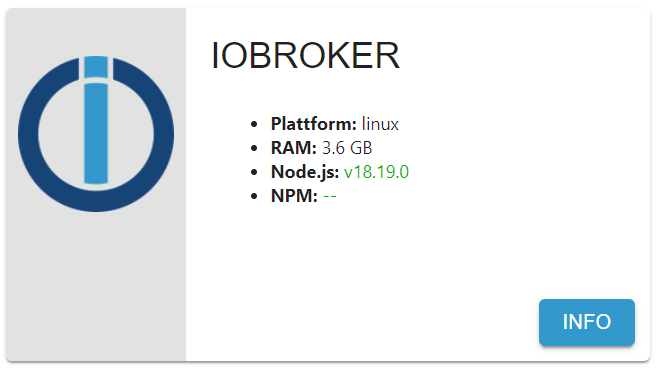
                                      4bdb81aa-b6c2-42e3-b19c-8cc9e0179a1d-image.png

                                      Thomas BraunT HomoranH 2 Antworten Letzte Antwort
                                      0
                                      • R raVsu

                                        @glasfaser

                                        iob stop
                                        iob fix
                                        iob start
                                        

                                        dann

                                        iob nodejs-update
                                        

                                        durchgeführt

                                        ioBroker nodejs updater 2023-10-13
                                        
                                        Recommended nodejs-version is: 18.19.0
                                        Checking your installation now. Please be patient!
                                        
                                        Your current setup is:
                                        /usr/bin/nodejs         v18.19.0
                                        /usr/bin/node           v18.19.0
                                        /home/iobroker/.nodejs-update.sh: line 130: npm: command not found
                                        
                                        /home/iobroker/.nodejs-update.sh: line 131: npx: command not found
                                        
                                        /home/iobroker/.nodejs-update.sh: line 147: npm: command not found
                                        /home/iobroker/.nodejs-update.sh: line 148: npx: command not found
                                        
                                        *** nodejs is NOT correctly installed ***
                                        We found these nodejs versions available for installation:
                                        
                                        nodejs:
                                          Installed: 18.19.0+dfsg-6~deb12u1
                                          Candidate: 14.21.3-deb-1nodesource1
                                          Version table:
                                         *** 18.19.0+dfsg-6~deb12u1 500
                                                500 http://security.debian.org/debian-security bookworm-security/main arm64 Packages
                                                100 /var/lib/dpkg/status
                                             18.13.0+dfsg1-1 500
                                                500 http://deb.debian.org/debian bookworm/main arm64 Packages
                                             14.21.3-deb-1nodesource1 1001
                                                500 https://deb.nodesource.com/node_14.x bullseye/main arm64 Packages


                                        Your nodejs-Installation seems to be faulty. Shall we try to fix it?
                                        Press <y> to continue or any other key to quit
                                        
                                        Fixing your nodejs setup
                                        *** Deleting  ***
                                        rm: cannot remove '': No such file or directory
                                        *** Deleting  ***
                                        rm: cannot remove '': No such file or directory
                                        
                                        Wrong paths have been fixed. Run 'iob diag' or 'iob nodejs-update' again to check if your installation is fine now
                                        Nothing to do - Your version is the recommended one.
                                        
                                        You can now keep your whole system up-to-date using the usual 'sudo apt update && sudo apt full-upgrade' commands.
                                        Please DO NOT USE node version managers like 'nvm', 'n' and others in parallel. They will break your current installation!
                                        

                                        MOD-EDIT: Code in code-tags gesetzt!

                                        jetzt wird folgendes angezeigt:
                                        4bdb81aa-b6c2-42e3-b19c-8cc9e0179a1d-image.png

                                        Thomas BraunT Online
                                        Thomas BraunT Online
                                        Thomas Braun
                                        Most Active
                                        schrieb am zuletzt editiert von
                                        #21

                                        @ravsu

                                        https://forum.iobroker.net/topic/71461/dfsg-nodejs-eingehandelt-hier-die-korrektur

                                        Linux-Werkzeugkasten:
                                        https://forum.iobroker.net/topic/42952/der-kleine-iobroker-linux-werkzeugkasten
                                        NodeJS Fixer Skript:
                                        https://forum.iobroker.net/topic/68035/iob-node-fix-skript
                                        iob_diag: curl -sLf -o diag.sh https://iobroker.net/diag.sh && bash diag.sh

                                        R 1 Antwort Letzte Antwort
                                        0
                                        • R raVsu

                                          @glasfaser

                                          iob stop
                                          iob fix
                                          iob start
                                          

                                          dann

                                          iob nodejs-update
                                          

                                          durchgeführt

                                          ioBroker nodejs updater 2023-10-13
                                          
                                          Recommended nodejs-version is: 18.19.0
                                          Checking your installation now. Please be patient!
                                          
                                          Your current setup is:
                                          /usr/bin/nodejs         v18.19.0
                                          /usr/bin/node           v18.19.0
                                          /home/iobroker/.nodejs-update.sh: line 130: npm: command not found
                                          
                                          /home/iobroker/.nodejs-update.sh: line 131: npx: command not found
                                          
                                          /home/iobroker/.nodejs-update.sh: line 147: npm: command not found
                                          /home/iobroker/.nodejs-update.sh: line 148: npx: command not found
                                          
                                          *** nodejs is NOT correctly installed ***
                                          We found these nodejs versions available for installation:
                                          
                                          nodejs:
                                            Installed: 18.19.0+dfsg-6~deb12u1
                                            Candidate: 14.21.3-deb-1nodesource1
                                            Version table:
                                           *** 18.19.0+dfsg-6~deb12u1 500
                                                  500 http://security.debian.org/debian-security bookworm-security/main arm64 Packages
                                                  100 /var/lib/dpkg/status
                                               18.13.0+dfsg1-1 500
                                                  500 http://deb.debian.org/debian bookworm/main arm64 Packages
                                               14.21.3-deb-1nodesource1 1001
                                                  500 https://deb.nodesource.com/node_14.x bullseye/main arm64 Packages


                                          Your nodejs-Installation seems to be faulty. Shall we try to fix it?
                                          Press <y> to continue or any other key to quit
                                          
                                          Fixing your nodejs setup
                                          *** Deleting  ***
                                          rm: cannot remove '': No such file or directory
                                          *** Deleting  ***
                                          rm: cannot remove '': No such file or directory
                                          
                                          Wrong paths have been fixed. Run 'iob diag' or 'iob nodejs-update' again to check if your installation is fine now
                                          Nothing to do - Your version is the recommended one.
                                          
                                          You can now keep your whole system up-to-date using the usual 'sudo apt update && sudo apt full-upgrade' commands.
                                          Please DO NOT USE node version managers like 'nvm', 'n' and others in parallel. They will break your current installation!
                                          

                                          MOD-EDIT: Code in code-tags gesetzt!

                                          jetzt wird folgendes angezeigt:
                                          4bdb81aa-b6c2-42e3-b19c-8cc9e0179a1d-image.png

                                          HomoranH Nicht stören
                                          HomoranH Nicht stören
                                          Homoran
                                          Global Moderator Administrators
                                          schrieb am zuletzt editiert von
                                          #22

                                          @ravsu
                                          bitte in code-tags setzen!
                                          bitte nicht nur selektierte Ausschnitte posten!

                                          kein Support per PN! - Fragen im Forum stellen - es gibt fast nichts, was nicht auch für andere interessant ist.

                                          Benutzt das Voting rechts unten im Beitrag wenn er euch geholfen hat.

                                          der Installationsfixer: curl -fsL https://iobroker.net/fix.sh | bash -

                                          R 1 Antwort Letzte Antwort
                                          0
                                          Antworten
                                          • In einem neuen Thema antworten
                                          Anmelden zum Antworten
                                          • Älteste zuerst
                                          • Neuste zuerst
                                          • Meiste Stimmen


                                          Support us

                                          ioBroker
                                          Community Adapters
                                          Donate

                                          537

                                          Online

                                          32.6k

                                          Benutzer

                                          82.1k

                                          Themen

                                          1.3m

                                          Beiträge
                                          Community
                                          Impressum | Datenschutz-Bestimmungen | Nutzungsbedingungen | Einwilligungseinstellungen
                                          ioBroker Community 2014-2025
                                          logo
                                          • Anmelden

                                          • Du hast noch kein Konto? Registrieren

                                          • Anmelden oder registrieren, um zu suchen
                                          • Erster Beitrag
                                            Letzter Beitrag
                                          0
                                          • Home
                                          • Aktuell
                                          • Tags
                                          • Ungelesen 0
                                          • Kategorien
                                          • Unreplied
                                          • Beliebt
                                          • GitHub
                                          • Docu
                                          • Hilfe

