




Verzögert - RAM Problem? (Docker)
-
Hallo,
Prinzipiell nutze ich ioBroker schon seit 6 Jahren.
Ich habe seit ein paar Wochen das Problem, dass mein iobroker immer langsamer wird.
Macht sich auch sehr stark bemerkbar, dass Scripte nur sehr verzögert auslösen. zb Licht über Bewegungssmelder geht erst nach 20 Sekunden an. Der Container selbst ist noch nicht soooo alt. Wurde von ca. einem Jahr neu angelegt und Backup eingespielt.Eine Fehlermeldung habe ich noch nicht angezeigt bekommen, außer dass iobroker in der Adminübersicht manchmal diese "timeout". Meldung bringt.
System läuft auf einer DiskStation 218+ mit 6GB RAM im Docker.
Laut "top" ist nur noch sehr wenig Arbeitsspeicher übrig und ich vermute das Problem hier.
Es laufen relativ viele Adapter (im Normalfall ca 40). Problem besteht aber auch, wenn nur der Admin Adapter läuft und alle anderen aus sind.
Wo könnte ich mit meinen rudimentären Linux Kenntnissen ansetzen?
Gruß,
Markus
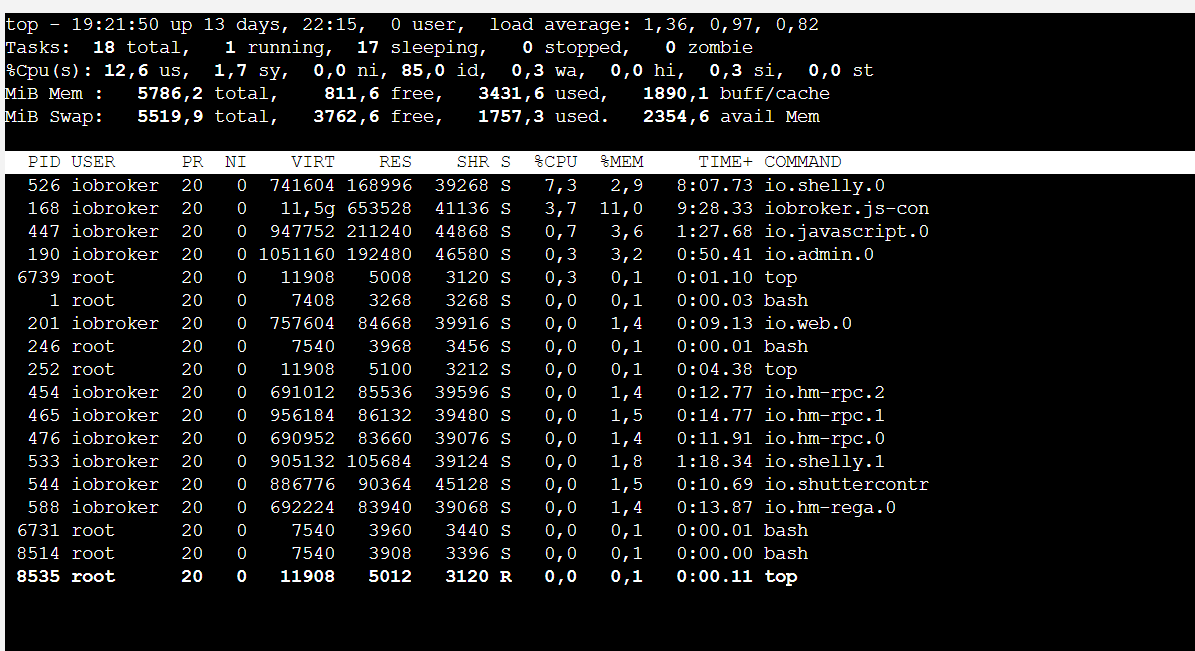

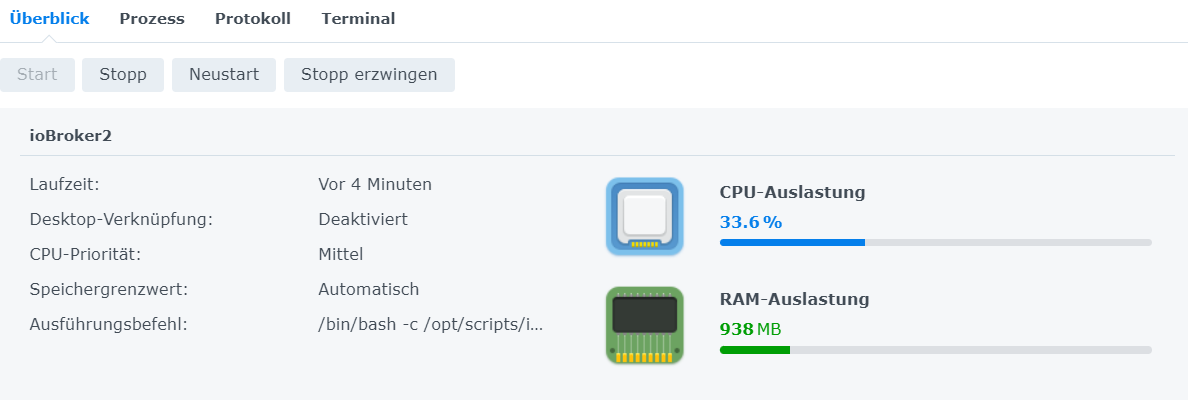
-
Hallo,
Prinzipiell nutze ich ioBroker schon seit 6 Jahren.
Ich habe seit ein paar Wochen das Problem, dass mein iobroker immer langsamer wird.
Macht sich auch sehr stark bemerkbar, dass Scripte nur sehr verzögert auslösen. zb Licht über Bewegungssmelder geht erst nach 20 Sekunden an. Der Container selbst ist noch nicht soooo alt. Wurde von ca. einem Jahr neu angelegt und Backup eingespielt.Eine Fehlermeldung habe ich noch nicht angezeigt bekommen, außer dass iobroker in der Adminübersicht manchmal diese "timeout". Meldung bringt.
System läuft auf einer DiskStation 218+ mit 6GB RAM im Docker.
Laut "top" ist nur noch sehr wenig Arbeitsspeicher übrig und ich vermute das Problem hier.
Es laufen relativ viele Adapter (im Normalfall ca 40). Problem besteht aber auch, wenn nur der Admin Adapter läuft und alle anderen aus sind.
Wo könnte ich mit meinen rudimentären Linux Kenntnissen ansetzen?
Gruß,
Markus
Wir haben fast exakt das gleiche Setup.
Ich hab 10GB RAM, aber dafür auch 46 Adapter installiert.
4GB RAM sind aber noch frei.
Also da ist alles tutti.
Ich habe auch die Timeout oder Langsame Verbindung Meldung.
Ich schätze einfach mal das der Prozessor ordentlich zu tun hat mit den sekündlich abzuarbeitenden Prozessen.Diese Meldungen kommen vereinzelt, stören mich aber nicht.
Es ist alles schaltbar, trotzdem flüssig zu bedienen. Und die Updates gehen auch zügig voran.Wenn das bei Dir ausartet , guck einfach mal alle Instanzeinstellungen durch (Polling Zeiten)
Und dann die Skripte.
Kann man da was "verschlanken" oder Abfragezeiten verlängern. -
Wir haben fast exakt das gleiche Setup.
Ich hab 10GB RAM, aber dafür auch 46 Adapter installiert.
4GB RAM sind aber noch frei.
Also da ist alles tutti.
Ich habe auch die Timeout oder Langsame Verbindung Meldung.
Ich schätze einfach mal das der Prozessor ordentlich zu tun hat mit den sekündlich abzuarbeitenden Prozessen.Diese Meldungen kommen vereinzelt, stören mich aber nicht.
Es ist alles schaltbar, trotzdem flüssig zu bedienen. Und die Updates gehen auch zügig voran.Wenn das bei Dir ausartet , guck einfach mal alle Instanzeinstellungen durch (Polling Zeiten)
Und dann die Skripte.
Kann man da was "verschlanken" oder Abfragezeiten verlängern.@haselchen
Es lief hier auch ja ca. 5 Jahre ohne Probleme.Kann leider nicht sagen, ob es direkt nach einem der letzten Updates begonnen hat.
Verschlanken weiß ich nicht.
Problem besteht auch mit deaktiviertem Javascript Adapter bzw. wenn fast alle Adapter aus sind.
-
@haselchen
Es lief hier auch ja ca. 5 Jahre ohne Probleme.Kann leider nicht sagen, ob es direkt nach einem der letzten Updates begonnen hat.
Verschlanken weiß ich nicht.
Problem besteht auch mit deaktiviertem Javascript Adapter bzw. wenn fast alle Adapter aus sind.
@ghost-talker sagte in Verzögert - RAM Problem? (Docker):
Es lief hier auch ja ca. 5 Jahre ohne Probleme.
Auch immer die gleichen Adapter ... das denke ich mal nicht und der Container ist auch neu du hast die v9.0.1 !
Zeige mal bitte die Full Ausgabe von
iob diag.. aber nicht als Screenshot sondern die Ausgabe in Code-Tags </>
-
@ghost-talker sagte in Verzögert - RAM Problem? (Docker):
Es lief hier auch ja ca. 5 Jahre ohne Probleme.
Auch immer die gleichen Adapter ... das denke ich mal nicht und der Container ist auch neu du hast die v9.0.1 !
Zeige mal bitte die Full Ausgabe von
iob diag.. aber nicht als Screenshot sondern die Ausgabe in Code-Tags </>
@glasfaser
Der Container wurde Anfang der Woche einmal neu erstellt (Portainer > recreate) eben wegen dieses Problems.Natürlich ändern sich die Adapter immer mal wieder. Genauso wie auch immer Skripte dazu kommen.
======== Start marking the full check here ========= Skript v.2023-10-10 *** BASE SYSTEM *** Hardware Vendor : Synology Kernel : x86_64 Userland : amd64 Docker : v9.0.1 Virtualization : Docker Kernel : x86_64 Userland : amd64 Systemuptime and Load: 20:10:32 up 14 days, 23:04, 0 user, load average: 3.26, 3.56, 3.77 CPU threads: 2 *** Time and Time Zones *** Sat Jan 6 19:10:32 UTC 2024 Sat Jan 6 20:10:32 CET 2024 CET +0100 Etc/UTC *** User and Groups *** root /root root *** X-Server-Setup *** X-Server: false Desktop: Terminal: *** MEMORY *** total used free shared buff/cache available Mem: 6.1G 4.9G 530M 101M 956M 1.1G Swap: 5.8G 1.7G 4.1G Total: 11G 6.7G 4.6G 5786 M total memory 4718 M used memory 2714 M active memory 1519 M inactive memory 504 M free memory 26 M buffer memory 885 M swap cache 5519 M total swap 1626 M used swap 3893 M free swap *** FILESYSTEM *** Filesystem Type Size Used Avail Use% Mounted on /dev/vg1000/lv btrfs 2.7T 1.1T 1.6T 40% / tmpfs tmpfs 64M 0 64M 0% /dev tmpfs tmpfs 2.9G 0 2.9G 0% /sys/fs/cgroup shm tmpfs 64M 0 64M 0% /dev/shm /dev/vg1000/lv btrfs 2.7T 1.1T 1.6T 40% /opt/iobroker /dev/vg1000/lv btrfs 2.7T 1.1T 1.6T 40% /etc/hosts tmpfs tmpfs 2.9G 0 2.9G 0% /proc/acpi tmpfs tmpfs 2.9G 0 2.9G 0% /proc/scsi tmpfs tmpfs 2.9G 0 2.9G 0% /sys/firmware Messages concerning ext4 filesystem in dmesg: sudo: unable to resolve host ioBroker2: Name or service not known Show mounted filesystems \(real ones only\): TARGET SOURCE FSTYPE OPTIONS / /dev/vg1000/lv[/@syno/@docker/btrfs/subvolumes/9635c5d33972d5a1d0cdf513b4218f06d80d6c0ec7ac17c214f091116b61142c] btrfs rw,nodev,relatime,ssd,synoacl,space_cache=v2,auto_reclaim_space,metadata_ratio=50,syno_allocator,subvolid=2859,subvol=/@syno/@docker/btrfs/subvolumes/9635c5d33972d5a1d0cdf513b4218f06d80d6c0ec7ac17c214f091116b61142c |-/opt/iobroker /dev/vg1000/lv[/@syno/docker/ioBroker] btrfs rw,nodev,relatime,ssd,synoacl,space_cache=v2,auto_reclaim_space,metadata_ratio=50,syno_allocator,subvolid=259,subvol=/@syno/docker/ioBroker | `-/opt/iobroker/cam /dev/vg1000/lv[/@syno/docker/ioBroker_austausch] btrfs rw,nodev,relatime,ssd,synoacl,space_cache=v2,auto_reclaim_space,metadata_ratio=50,syno_allocator,subvolid=259,subvol=/@syno/docker/ioBroker_austausch |-/etc/resolv.conf /dev/vg1000/lv[/@syno/@docker/containers/3645daa745bb0632bdf6efc0e7eb2146e93c59610aa507824a70c4a337d7d60b/resolv.conf] btrfs rw,nodev,relatime,ssd,synoacl,space_cache=v2,auto_reclaim_space,metadata_ratio=50,syno_allocator,subvolid=257,subvol=/@syno/@docker/containers/3645daa745bb0632bdf6efc0e7eb2146e93c59610aa507824a70c4a337d7d60b/resolv.conf |-/etc/hostname /dev/vg1000/lv[/@syno/@docker/containers/3645daa745bb0632bdf6efc0e7eb2146e93c59610aa507824a70c4a337d7d60b/hostname] btrfs rw,nodev,relatime,ssd,synoacl,space_cache=v2,auto_reclaim_space,metadata_ratio=50,syno_allocator,subvolid=257,subvol=/@syno/@docker/containers/3645daa745bb0632bdf6efc0e7eb2146e93c59610aa507824a70c4a337d7d60b/hostname `-/etc/hosts /dev/vg1000/lv[/@syno/@docker/containers/3645daa745bb0632bdf6efc0e7eb2146e93c59610aa507824a70c4a337d7d60b/hosts] btrfs rw,nodev,relatime,ssd,synoacl,space_cache=v2,auto_reclaim_space,metadata_ratio=50,syno_allocator,subvolid=257,subvol=/@syno/@docker/containers/3645daa745bb0632bdf6efc0e7eb2146e93c59610aa507824a70c4a337d7d60b/hosts Files in neuralgic directories: /var: sudo: unable to resolve host ioBroker2: Name or service not known 34M /var/ 32M /var/lib 19M /var/lib/apt/lists 19M /var/lib/apt 13M /var/lib/dpkg /opt/iobroker/backups: 5.4G /opt/iobroker/backups/ /opt/iobroker/iobroker-data: 1.4G /opt/iobroker/iobroker-data/ 671M /opt/iobroker/iobroker-data/history 364M /opt/iobroker/iobroker-data/files 239M /opt/iobroker/iobroker-data/backup-objects 67M /opt/iobroker/iobroker-data/files/javascript.admin The five largest files in iobroker-data are: 35M /opt/iobroker/iobroker-data/files/devices.admin/static/js/main.24f2bb56.js.map 33M /opt/iobroker/iobroker-data/files/iot.admin/static/js/main.1797d034.js.map 21M /opt/iobroker/iobroker-data/files/web.admin/static/js/main.aaea95f8.js.map 19M /opt/iobroker/iobroker-data/objects.jsonl 18M /opt/iobroker/iobroker-data/states.jsonl USB-Devices by-id: USB-Sticks - Avoid direct links to /dev/* in your adapter setups, please always prefer the links 'by-id': find: '/dev/serial/by-id/': No such file or directory *** NodeJS-Installation *** /usr/bin/nodejs v18.19.0 /usr/bin/node v18.19.0 /usr/bin/npm 10.2.3 /usr/bin/npx 10.2.3 /usr/bin/corepack 0.22.0 nodejs: Installed: 18.19.0-1nodesource1 Candidate: 18.19.0+dfsg-6~deb12u1 Version table: 18.19.0+dfsg-6~deb12u1 500 500 http://deb.debian.org/debian-security bookworm-security/main amd64 Packages *** 18.19.0-1nodesource1 500 500 https://deb.nodesource.com/node_18.x nodistro/main amd64 Packages 100 /var/lib/dpkg/status 18.18.2-1nodesource1 500 500 https://deb.nodesource.com/node_18.x nodistro/main amd64 Packages 18.18.1-1nodesource1 500 500 https://deb.nodesource.com/node_18.x nodistro/main amd64 Packages 18.18.0-1nodesource1 500 500 https://deb.nodesource.com/node_18.x nodistro/main amd64 Packages 18.17.1-1nodesource1 500 500 https://deb.nodesource.com/node_18.x nodistro/main amd64 Packages 18.17.0-1nodesource1 500 500 https://deb.nodesource.com/node_18.x nodistro/main amd64 Packages 18.16.1-1nodesource1 500 500 https://deb.nodesource.com/node_18.x nodistro/main amd64 Packages 18.16.0-1nodesource1 500 500 https://deb.nodesource.com/node_18.x nodistro/main amd64 Packages 18.15.0-1nodesource1 500 500 https://deb.nodesource.com/node_18.x nodistro/main amd64 Packages 18.14.2-1nodesource1 500 500 https://deb.nodesource.com/node_18.x nodistro/main amd64 Packages 18.14.1-1nodesource1 500 500 https://deb.nodesource.com/node_18.x nodistro/main amd64 Packages 18.14.0-1nodesource1 500 500 https://deb.nodesource.com/node_18.x nodistro/main amd64 Packages 18.13.0+dfsg1-1 500 500 http://deb.debian.org/debian bookworm/main amd64 Packages 18.13.0-1nodesource1 500 500 https://deb.nodesource.com/node_18.x nodistro/main amd64 Packages 18.12.0-1nodesource1 500 500 https://deb.nodesource.com/node_18.x nodistro/main amd64 Packages 18.11.0-1nodesource1 500 500 https://deb.nodesource.com/node_18.x nodistro/main amd64 Packages 18.10.0-1nodesource1 500 500 https://deb.nodesource.com/node_18.x nodistro/main amd64 Packages 18.9.1-1nodesource1 500 500 https://deb.nodesource.com/node_18.x nodistro/main amd64 Packages 18.9.0-1nodesource1 500 500 https://deb.nodesource.com/node_18.x nodistro/main amd64 Packages 18.8.0-1nodesource1 500 500 https://deb.nodesource.com/node_18.x nodistro/main amd64 Packages 18.7.0-1nodesource1 500 500 https://deb.nodesource.com/node_18.x nodistro/main amd64 Packages 18.6.0-1nodesource1 500 500 https://deb.nodesource.com/node_18.x nodistro/main amd64 Packages 18.5.0-1nodesource1 500 500 https://deb.nodesource.com/node_18.x nodistro/main amd64 Packages 18.4.0-1nodesource1 500 500 https://deb.nodesource.com/node_18.x nodistro/main amd64 Packages 18.3.0-1nodesource1 500 500 https://deb.nodesource.com/node_18.x nodistro/main amd64 Packages 18.2.0-1nodesource1 500 500 https://deb.nodesource.com/node_18.x nodistro/main amd64 Packages 18.1.0-1nodesource1 500 500 https://deb.nodesource.com/node_18.x nodistro/main amd64 Packages 18.0.0-1nodesource1 500 500 https://deb.nodesource.com/node_18.x nodistro/main amd64 Packages Temp directories causing npm8 problem: 0 No problems detected Errors in npm tree: *** ioBroker-Installation *** ioBroker Status iobroker is running on this host. Objects type: jsonl States type: jsonl Core adapters versions js-controller: 5.0.17 admin: 6.12.0 javascript: 7.1.6 Adapters from github: 4 Adapter State + system.adapter.admin.0 : admin : ioBroker2 - enabled, port: 8081, bind: 0.0.0.0, run as: admin + system.adapter.alexa2.0 : alexa2 : ioBroker2 - enabled + system.adapter.backitup.0 : backitup : ioBroker2 - enabled system.adapter.blockly-plus.0 : blockly-plus : ioBroker2 - disabled system.adapter.chromecast.0 : chromecast : ioBroker2 - disabled + system.adapter.device-reminder.0 : device-reminder : ioBroker2 - enabled + system.adapter.device-watcher.0 : device-watcher : ioBroker2 - enabled system.adapter.devices.0 : devices : ioBroker2 - disabled system.adapter.discovery.0 : discovery : ioBroker2 - disabled + system.adapter.divera247.0 : divera247 : ioBroker2 - enabled + system.adapter.divera247.1 : divera247 : ioBroker2 - enabled system.adapter.dwd.0 : dwd : ioBroker2 - disabled system.adapter.ebus.0 : ebus : ioBroker2 - disabled system.adapter.feiertage.0 : feiertage : ioBroker2 - enabled system.adapter.flot.0 : flot : ioBroker2 - disabled + system.adapter.history.0 : history : ioBroker2 - enabled + system.adapter.hm-rega.0 : hm-rega : ioBroker2 - enabled + system.adapter.hm-rpc.0 : hm-rpc : ioBroker2 - enabled, port: 18701 + system.adapter.hm-rpc.1 : hm-rpc : ioBroker2 - enabled, port: 12001 + system.adapter.hm-rpc.2 : hm-rpc : ioBroker2 - enabled, port: 0 system.adapter.ical.0 : ical : ioBroker2 - enabled system.adapter.info.0 : info : ioBroker2 - disabled system.adapter.iot.0 : iot : ioBroker2 - disabled + system.adapter.jarvis.0 : jarvis : ioBroker2 - enabled + system.adapter.jarvis.1 : jarvis : ioBroker2 - enabled + system.adapter.javascript.0 : javascript : ioBroker2 - enabled + system.adapter.mihome-vacuum.0 : mihome-vacuum : ioBroker2 - enabled, port: 54321 system.adapter.milight.0 : milight : ioBroker2 - disabled, port: 5987 + system.adapter.mqtt.0 : mqtt : ioBroker2 - enabled, port: 1883, bind: 0.0.0.0 + system.adapter.net-tools.0 : net-tools : ioBroker2 - enabled system.adapter.octoprint.0 : octoprint : ioBroker2 - disabled system.adapter.oilfox.0 : oilfox : ioBroker2 - disabled system.adapter.parser.0 : parser : ioBroker2 - disabled + system.adapter.philips-tv.1 : philips-tv : ioBroker2 - enabled system.adapter.ping.0 : ping : ioBroker2 - disabled system.adapter.proxy.0 : proxy : ioBroker2 - disabled + system.adapter.pushover.0 : pushover : ioBroker2 - enabled system.adapter.rtspStream.0 : rtspStream : ioBroker2 - disabled, port: 8083 + system.adapter.sainlogic.0 : sainlogic : ioBroker2 - enabled, port: 45000, bind: 0.0.0.0 + system.adapter.sayit.0 : sayit : ioBroker2 - enabled system.adapter.scenes.0 : scenes : ioBroker2 - disabled + system.adapter.shelly.0 : shelly : ioBroker2 - enabled, port: 1882, bind: 0.0.0.0 + system.adapter.shelly.1 : shelly : ioBroker2 - enabled, port: 1882, bind: 0.0.0.0 + system.adapter.shuttercontrol.2 : shuttercontrol : ioBroker2 - enabled system.adapter.simple-api.0 : simple-api : ioBroker2 - disabled, port: 8087, bind: 0.0.0.0, run as: admin + system.adapter.socketio.0 : socketio : ioBroker2 - enabled, port: 8084, bind: 0.0.0.0, run as: admin + system.adapter.sourceanalytix.0 : sourceanalytix : ioBroker2 - enabled + system.adapter.spotify-premium.0 : spotify-premium : ioBroker2 - enabled + system.adapter.spotify-premium.1 : spotify-premium : ioBroker2 - enabled system.adapter.sql.0 : sql : ioBroker2 - disabled, port: 3307 + system.adapter.synology.0 : synology : ioBroker2 - enabled, port: 5001 + system.adapter.tankerkoenig.0 : tankerkoenig : ioBroker2 - enabled + system.adapter.telegram.0 : telegram : ioBroker2 - enabled, port: 8443, bind: 0.0.0.0 + system.adapter.tr-064.0 : tr-064 : ioBroker2 - enabled + system.adapter.tr-064.1 : tr-064 : ioBroker2 - enabled system.adapter.unifi.0 : unifi : ioBroker2 - disabled system.adapter.upnp.0 : upnp : ioBroker2 - disabled system.adapter.vis-jqui-mfd.0 : vis-jqui-mfd : ioBroker2 - disabled system.adapter.vis-materialdesign.0 : vis-materialdesign : ioBroker2 - disabled system.adapter.vis.0 : vis : ioBroker2 - disabled system.adapter.wallpanel.0 : wallpanel : ioBroker2 - disabled system.adapter.weatherflow_udp.0 : weatherflow_udp : ioBroker2 - disabled system.adapter.weatherunderground.0 : weatherunderground : ioBroker2 - disabled + system.adapter.web.0 : web : ioBroker2 - enabled, port: 8082, bind: 0.0.0.0, run as: admin + system.adapter.wled.0 : wled : ioBroker2 - enabled + system.adapter.zigbee.0 : zigbee : ioBroker2 - enabled, port: tcp://192.168.10.211:20108 + instance is alive Enabled adapters with bindings + system.adapter.admin.0 : admin : ioBroker2 - enabled, port: 8081, bind: 0.0.0.0, run as: admin + system.adapter.hm-rpc.0 : hm-rpc : ioBroker2 - enabled, port: 18701 + system.adapter.hm-rpc.1 : hm-rpc : ioBroker2 - enabled, port: 12001 + system.adapter.hm-rpc.2 : hm-rpc : ioBroker2 - enabled, port: 0 + system.adapter.mihome-vacuum.0 : mihome-vacuum : ioBroker2 - enabled, port: 54321 + system.adapter.mqtt.0 : mqtt : ioBroker2 - enabled, port: 1883, bind: 0.0.0.0 + system.adapter.sainlogic.0 : sainlogic : ioBroker2 - enabled, port: 45000, bind: 0.0.0.0 + system.adapter.shelly.0 : shelly : ioBroker2 - enabled, port: 1882, bind: 0.0.0.0 + system.adapter.shelly.1 : shelly : ioBroker2 - enabled, port: 1882, bind: 0.0.0.0 + system.adapter.socketio.0 : socketio : ioBroker2 - enabled, port: 8084, bind: 0.0.0.0, run as: admin + system.adapter.synology.0 : synology : ioBroker2 - enabled, port: 5001 + system.adapter.telegram.0 : telegram : ioBroker2 - enabled, port: 8443, bind: 0.0.0.0 + system.adapter.web.0 : web : ioBroker2 - enabled, port: 8082, bind: 0.0.0.0, run as: admin + system.adapter.zigbee.0 : zigbee : ioBroker2 - enabled, port: tcp://192.168.10.211:20108 ioBroker-Repositories stable : http://download.iobroker.net/sources-dist.json beta : http://download.iobroker.net/sources-dist-latest.json Active repo(s): stable Installed ioBroker-Instances Used repository: stable Adapter "admin" : 6.12.0 , installed 6.12.0 Adapter "alexa2" : 3.26.3 , installed 3.26.3 Adapter "backitup" : 2.9.8 , installed 2.9.8 Adapter "chromecast" : 3.0.3 , installed 3.0.3 Adapter "daswetter" : 3.1.11 , installed 3.1.11 Adapter "device-reminder": 3.0.0 , installed 3.0.0 Adapter "device-watcher": 2.9.6 , installed 2.9.6 Adapter "devices" : 1.1.5 , installed 1.1.5 Adapter "discovery" : 4.2.0 , installed 4.2.0 Adapter "divera247" : 0.2.0 , installed 0.1.2 [Updatable] Adapter "dwd" : 2.8.5 , installed 2.8.5 Adapter "ebus" : 3.2.4 , installed 3.2.4 Adapter "feiertage" : 1.1.4 , installed 1.1.4 Adapter "flot" : 1.12.0 , installed 1.12.0 Adapter "history" : 3.0.1 , installed 3.0.1 Adapter "hm-rega" : 4.0.0 , installed 4.0.0 Adapter "hm-rpc" : 1.15.19 , installed 1.15.19 Adapter "ical" : 1.13.3 , installed 1.13.3 Adapter "info" : 2.0.0 , installed 2.0.0 Adapter "iot" : 2.0.11 , installed 2.0.11 Adapter "jarvis" : 3.1.8 , installed 3.1.8 Adapter "javascript" : 7.1.6 , installed 7.1.6 Controller "js-controller": 5.0.17 , installed 5.0.17 Adapter "mihome-vacuum": 4.1.0 , installed 4.1.0 Adapter "milight" : 0.4.0 , installed 0.4.0 Adapter "mqtt" : 5.1.0 , installed 5.1.0 Adapter "net-tools" : 0.2.0 , installed 0.2.0 Adapter "octoprint" : 5.1.0 , installed 5.1.0 Adapter "oilfox" : 4.2.0 , installed 4.2.0 Adapter "parser" : 2.0.7 , installed 2.0.7 Adapter "philips-tv" : 0.5.3 , installed 0.5.3 Adapter "ping" : 1.6.2 , installed 1.6.2 Adapter "proxy" : 1.3.2 , installed 1.3.2 Adapter "pushover" : 3.0.6 , installed 3.0.6 Adapter "sainlogic" : 0.10.5 , installed 0.10.5 Adapter "sayit" : 3.0.5 , installed 3.0.5 Adapter "scenes" : 2.3.9 , installed 2.3.9 Adapter "shelly" : 6.6.1 , installed 6.6.1 Adapter "shuttercontrol": 1.6.3 , installed 1.6.3 Adapter "simple-api" : 2.7.2 , installed 2.7.2 Adapter "snmp" : 3.1.0 , installed 3.1.0 Adapter "socketio" : 6.6.0 , installed 6.6.0 Adapter "spotify-premium": 1.3.1 , installed 1.3.1 Adapter "sql" : 2.2.0 , installed 2.2.0 Adapter "synology" : 3.0.1 , installed 3.0.1 Adapter "tankerkoenig" : 3.3.7 , installed 3.3.7 Adapter "telegram" : 3.0.1 , installed 1.16.0 [Updatable] Adapter "tr-064" : 4.2.18 , installed 4.2.18 Adapter "unifi" : 0.6.7 , installed 0.6.7 Adapter "upnp" : 1.0.21 , installed 1.0.21 Adapter "vis" : 1.5.4 , installed 1.4.16 [Updatable] Adapter "vis-jqui-mfd" : 1.0.12 , installed 1.0.12 Adapter "vis-materialdesign": 0.5.9, installed 0.5.9 Adapter "wallpanel" : 0.3.11 , installed 0.3.11 Adapter "weatherflow_udp": 0.1.3 , installed 0.1.3 Adapter "weatherunderground": 3.6.0, installed 3.6.0 Adapter "web" : 6.1.10 , installed 6.1.10 Adapter "wled" : 0.7.2 , installed 0.7.2 Adapter "ws" : 2.5.8 , installed 2.5.8 Adapter "zigbee" : 1.9.5 , installed 1.8.25 [Updatable] Objects and States Please stand by - This may take a while Objects: 14712 States: 17399 *** OS-Repositories and Updates *** sudo: unable to resolve host ioBroker2: Name or service not known sudo: unable to resolve host ioBroker2: Name or service not known Hit:1 http://deb.debian.org/debian bookworm InRelease Hit:2 http://deb.debian.org/debian bookworm-updates InRelease Hit:3 http://deb.debian.org/debian-security bookworm-security InRelease Hit:4 https://deb.nodesource.com/node_18.x nodistro InRelease Reading package lists... Pending Updates: 0 *** Listening Ports *** sudo: unable to resolve host ioBroker2: Name or service not known Active Internet connections (only servers) Proto Recv-Q Send-Q Local Address Foreign Address State User Inode PID/Program name tcp 0 0 0.0.0.0:22 0.0.0.0:* LISTEN 0 23266 - tcp 0 0 127.0.0.1:5432 0.0.0.0:* LISTEN 55 65270 - tcp 0 0 0.0.0.0:8889 0.0.0.0:* LISTEN 0 80711 - tcp 0 0 0.0.0.0:1882 0.0.0.0:* LISTEN 1000 182189525 - tcp 0 0 192.168.10.200:2010 0.0.0.0:* LISTEN 1000 182187431 - tcp 0 0 0.0.0.0:1883 0.0.0.0:* LISTEN 1000 182358206 - tcp 0 0 0.0.0.0:443 0.0.0.0:* LISTEN 0 37705 - tcp 0 0 0.0.0.0:445 0.0.0.0:* LISTEN 0 38933 - tcp 0 0 127.0.0.1:512 0.0.0.0:* LISTEN 0 94890 - tcp 0 0 0.0.0.0:8000 0.0.0.0:* LISTEN 0 80726 - tcp 0 0 192.168.10.200:12001 0.0.0.0:* LISTEN 1000 182181721 - tcp 0 0 0.0.0.0:49153 0.0.0.0:* LISTEN 0 84613 - tcp 0 0 0.0.0.0:44321 0.0.0.0:* LISTEN 0 37707 - tcp 0 0 0.0.0.0:161 0.0.0.0:* LISTEN 0 37396 - tcp 0 0 0.0.0.0:35554 0.0.0.0:* LISTEN 0 80270 - tcp 0 0 0.0.0.0:9443 0.0.0.0:* LISTEN 0 80621 - tcp 0 0 0.0.0.0:35556 0.0.0.0:* LISTEN 0 80245 - tcp 0 0 0.0.0.0:3493 0.0.0.0:* LISTEN 0 29281 - tcp 0 0 0.0.0.0:45000 0.0.0.0:* LISTEN 1000 182363257 - tcp 0 0 127.0.0.1:9000 0.0.0.0:* LISTEN 1000 182181299 - tcp 0 0 0.0.0.0:5000 0.0.0.0:* LISTEN 0 37699 - tcp 0 0 127.0.0.1:9001 0.0.0.0:* LISTEN 1000 182181289 - tcp 0 0 0.0.0.0:5001 0.0.0.0:* LISTEN 0 37701 - tcp 0 0 0.0.0.0:8010 0.0.0.0:* LISTEN 0 182302531 - tcp 0 0 0.0.0.0:554 0.0.0.0:* LISTEN 0 73839 - tcp 0 0 0.0.0.0:3307 0.0.0.0:* LISTEN 66 66580 - tcp 0 0 0.0.0.0:139 0.0.0.0:* LISTEN 0 38934 - tcp 0 0 192.168.10.200:18701 0.0.0.0:* LISTEN 1000 182181596 - tcp 0 0 0.0.0.0:5357 0.0.0.0:* LISTEN 0 40717 - tcp 0 0 0.0.0.0:8400 0.0.0.0:* LISTEN 1000 182346128 - tcp 0 0 0.0.0.0:80 0.0.0.0:* LISTEN 0 37703 - tcp 0 0 0.0.0.0:8401 0.0.0.0:* LISTEN 1000 182344158 - tcp 0 0 0.0.0.0:5555 0.0.0.0:* LISTEN 0 84574 - tcp 0 0 127.0.0.1:915 0.0.0.0:* LISTEN 0 68487 - tcp6 0 0 :::22 :::* LISTEN 0 23273 - tcp6 0 0 :::443 :::* LISTEN 0 37706 - tcp6 0 0 :::3261 :::* LISTEN 0 41911 - tcp6 0 0 :::445 :::* LISTEN 0 38931 - tcp6 0 0 :::3263 :::* LISTEN 0 41909 - tcp6 0 0 :::3264 :::* LISTEN 0 41912 - tcp6 0 0 :::3265 :::* LISTEN 0 43166 - tcp6 0 0 :::44321 :::* LISTEN 0 37708 - tcp6 0 0 :::161 :::* LISTEN 0 37397 - tcp6 0 0 :::5000 :::* LISTEN 0 37700 - tcp6 0 0 :::5001 :::* LISTEN 0 37702 - tcp6 0 0 :::139 :::* LISTEN 0 38932 - tcp6 0 0 :::5357 :::* LISTEN 0 40718 - tcp6 0 0 :::1935 :::* LISTEN 233155 73309 - tcp6 0 0 :::80 :::* LISTEN 0 37704 - tcp6 0 0 :::8081 :::* LISTEN 1000 182181441 - tcp6 0 0 :::8082 :::* LISTEN 1000 182189913 - tcp6 0 0 :::8084 :::* LISTEN 1000 182362061 - udp 0 0 0.0.0.0:19996 0.0.0.0:* 233155 73337 - udp 0 0 0.0.0.0:19997 0.0.0.0:* 233155 73336 - udp 0 0 0.0.0.0:19998 0.0.0.0:* 233155 73335 - udp 2944 0 0.0.0.0:3702 0.0.0.0:* 99 33794 - udp 5888 0 0.0.0.0:68 0.0.0.0:* 0 26393 - udp 0 0 172.19.0.1:123 0.0.0.0:* 87 87049 - udp 0 0 172.17.0.1:123 0.0.0.0:* 87 83554 - udp 0 0 192.168.10.200:123 0.0.0.0:* 87 33205 - udp 0 0 127.0.0.1:123 0.0.0.0:* 0 23765 - udp 0 0 0.0.0.0:123 0.0.0.0:* 0 23761 - udp 0 0 192.168.10.255:137 0.0.0.0:* 0 39132 - udp 0 0 192.168.10.200:137 0.0.0.0:* 0 39131 - udp 0 0 0.0.0.0:137 0.0.0.0:* 0 39111 - udp 0 0 192.168.10.255:138 0.0.0.0:* 0 39134 - udp 0 0 192.168.10.200:138 0.0.0.0:* 0 39133 - udp 0 0 0.0.0.0:138 0.0.0.0:* 0 39112 - udp 0 0 0.0.0.0:161 0.0.0.0:* 0 37394 - udp 0 0 0.0.0.0:53421 0.0.0.0:* 1000 182346877 - udp 896 0 0.0.0.0:5353 0.0.0.0:* 1000 182370487 - udp 0 0 172.17.0.1:5353 0.0.0.0:* 1000 182368990 - udp 0 0 172.19.0.1:5353 0.0.0.0:* 1000 182368989 - udp 0 0 192.168.10.200:5353 0.0.0.0:* 1000 182368988 - udp 896 0 0.0.0.0:5353 0.0.0.0:* 0 40103 - udp 0 0 0.0.0.0:34196 0.0.0.0:* 0 40105 - udp 0 0 0.0.0.0:5683 0.0.0.0:* 1000 182188074 - udp 0 0 0.0.0.0:38624 0.0.0.0:* 233155 75667 - udp 0 0 0.0.0.0:38625 0.0.0.0:* 233155 75668 - udp 0 0 0.0.0.0:9997 0.0.0.0:* 0 23600 - udp 0 0 0.0.0.0:9998 0.0.0.0:* 0 23599 - udp 0 0 0.0.0.0:9999 0.0.0.0:* 0 23598 - udp 0 0 0.0.0.0:1900 0.0.0.0:* 0 40226 - udp6 0 0 :::3702 :::* 99 33796 - udp6 0 0 fe80::185e:c8ff:fef:123 :::* 87 182303665 - udp6 0 0 fe80::b019:eeff:fea:123 :::* 87 95772 - udp6 0 0 fe80::b83b:d8ff:fe8:123 :::* 87 94373 - udp6 0 0 fe80::e0ef:bff:fec9:123 :::* 87 92770 - udp6 0 0 fe80::4cb9:87ff:fe2:123 :::* 87 90326 - udp6 0 0 fe80::b4f8:3ff:fee5:123 :::* 87 87949 - udp6 0 0 fe80::42:c6ff:fe10::123 :::* 87 87260 - udp6 0 0 fe80::ac09:c4ff:fe9:123 :::* 87 86055 - udp6 0 0 fe80::2440:48ff:fef:123 :::* 87 86053 - udp6 0 0 fe80::4c2:7dff:fe00:123 :::* 87 83560 - udp6 0 0 fe80::42:93ff:fe2c::123 :::* 87 83558 - udp6 0 0 fe80::211:32ff:fe8e:123 :::* 87 29255 - udp6 0 0 ::1:123 :::* 0 23767 - udp6 0 0 :::123 :::* 0 23758 - udp6 0 0 :::161 :::* 0 37395 - udp6 0 0 :::5353 :::* 0 40104 - udp6 0 0 :::46767 :::* 0 40106 - *** Log File - Last 25 Lines *** 2024-01-06 20:18:04.585 - error: shelly.1 (316) [MQTT] Unable to get mqttprefix of client with id "shellyplusi4-90380c380014" 2024-01-06 20:18:08.482 - debug: shelly.1 (316) [httpIoBrokerState] State change 192.168.60.196 (shellyuni / shellyuni-40F520006A51 / SHUNI-1#40F520006A51#1): state: SHUNI-1#40F520006A51#1.uptime, value: 3574563 2024-01-06 20:18:08.482 - debug: shelly.1 (316) [httpIoBrokerState] State change 192.168.60.196 (shellyuni / shellyuni-40F520006A51 / SHUNI-1#40F520006A51#1): state: SHUNI-1#40F520006A51#1.rssi, value: -73 2024-01-06 20:18:11.249 - debug: shelly.1 (316) [MQTT] Publish: 192.168.60.196 (shellyuni / shellyuni-40F520006A51 / SHUNI-1#40F520006A51#1) - topic: shellies/Treppenhaus_BWM_shellyUNI/relay/0, qos: 0, payload: off 2024-01-06 20:18:11.251 - debug: shelly.1 (316) [MQTT] Publish: 192.168.60.196 (shellyuni / shellyuni-40F520006A51 / SHUNI-1#40F520006A51#1) - topic: shellies/Treppenhaus_BWM_shellyUNI/relay/1, qos: 0, payload: off 2024-01-06 20:18:11.252 - debug: shelly.1 (316) [MQTT] Publish: 192.168.60.196 (shellyuni / shellyuni-40F520006A51 / SHUNI-1#40F520006A51#1) - topic: shellies/Treppenhaus_BWM_shellyUNI/input/0, qos: 0, payload: 0 2024-01-06 20:18:11.253 - debug: shelly.1 (316) [MQTT] Publish: 192.168.60.196 (shellyuni / shellyuni-40F520006A51 / SHUNI-1#40F520006A51#1) - topic: shellies/Treppenhaus_BWM_shellyUNI/input/1, qos: 0, payload: 0 2024-01-06 20:18:12.327 - warn: shelly.0 (301) [authEnabled] 192.168.10.215 (shellyplug-s / shellyplug-s-1D416F / SHPLG-S#1D416F#1): This device is not protected via restricted login (see adapter documentation for details) 2024-01-06 20:18:13.954 - debug: zigbee.0 (1738) DeviceAvailability:Non-pingable device 0x00158d0004a04bd9 lumi.sensor_magnet.aq2 was last seen '914.621' seconds ago. 2024-01-06 20:18:13.985 - debug: zigbee.0 (1738) DeviceAvailability:Non-pingable device 0x0017880106475b87 SML002 was last seen '7966913.275' seconds ago. 2024-01-06 20:18:14.020 - debug: zigbee.0 (1738) DeviceAvailability:Non-pingable device 0x00158d0004445305 lumi.weather was last seen '8501590.218' seconds ago. 2024-01-06 20:18:19.803 - warn: mqtt.0 (1439) Client [mywallpanel] has invalid password(Giech96110!) or username(Hichi) 2024-01-06 20:18:20.117 - warn: mqtt.0 (1439) Client [mywallpanel] has invalid password(Giech96110!) or username(Hichi) 2024-01-06 20:18:24.280 - warn: shelly.0 (301) [authEnabled] 192.168.10.215 (shellyplug-s / shellyplug-s-1D416F / SHPLG-S#1D416F#1): This device is not protected via restricted login (see adapter documentation for details) 2024-01-06 20:18:26.701 - debug: shelly.1 (316) [httpIoBrokerState] State change 192.168.60.196 (shellyuni / shellyuni-40F520006A51 / SHUNI-1#40F520006A51#1): state: SHUNI-1#40F520006A51#1.uptime, value: 3574582 2024-01-06 20:18:26.701 - debug: shelly.1 (316) [httpIoBrokerState] State change 192.168.60.196 (shellyuni / shellyuni-40F520006A51 / SHUNI-1#40F520006A51#1): state: SHUNI-1#40F520006A51#1.rssi, value: -71 2024-01-06 20:18:28.369 - debug: shelly.1 (316) [MQTT Server] New connection from 192.168.10.179 2024-01-06 20:18:28.371 - debug: shelly.1 (316) [MQTT] Client connected: {"cmd":"connect","retain":false,"qos":0,"dup":false,"length":107,"topic":null,"payload":null,"protocolId":"MQTT","protocolVersion":4,"will":{"retain":true,"qos":0,"topic":"shellyplusi4-90380c380014/online","payload":{"type":"Buffer","data":[102,97,108,115,101]}},"clean":true,"keepalive":60,"clientId":"shellyplusi4-90380c380014","username":"mqttuser","password":{"type":"Buffer","data":[71,105,101,99,104,57,54,49,49,48,33,115,104,101,108,108,121]}} 2024-01-06 20:18:28.372 - debug: shelly.1 (316) [BaseClient] Destroying 192.168.10.179 (undefined / undefined / undefined) 2024-01-06 20:18:28.372 - debug: shelly.1 (316) [MQTT] Destroying 2024-01-06 20:18:28.372 - info: shelly.1 (316) [MQTT] Device with client id "shellyplusi4-90380c380014" connected! 2024-01-06 20:18:28.913 - debug: shelly.1 (316) [onlineCheck] Checking shellyplusi4#90380c380014#1 on 192.168.10.179:80 2024-01-06 20:18:28.965 - debug: shelly.1 (316) [deviceStatusUpdate] shellyplusi4#90380c380014#1: true 2024-01-06 20:18:29.930 - debug: shelly.1 (316) [onlineCheck] Checking SHUNI-1#40F520006A51#1 on 192.168.60.196:80 2024-01-06 20:18:29.935 - debug: shelly.1 (316) [deviceStatusUpdate] SHUNI-1#40F520006A51#1: true -
@glasfaser
Der Container wurde Anfang der Woche einmal neu erstellt (Portainer > recreate) eben wegen dieses Problems.Natürlich ändern sich die Adapter immer mal wieder. Genauso wie auch immer Skripte dazu kommen.
======== Start marking the full check here ========= Skript v.2023-10-10 *** BASE SYSTEM *** Hardware Vendor : Synology Kernel : x86_64 Userland : amd64 Docker : v9.0.1 Virtualization : Docker Kernel : x86_64 Userland : amd64 Systemuptime and Load: 20:10:32 up 14 days, 23:04, 0 user, load average: 3.26, 3.56, 3.77 CPU threads: 2 *** Time and Time Zones *** Sat Jan 6 19:10:32 UTC 2024 Sat Jan 6 20:10:32 CET 2024 CET +0100 Etc/UTC *** User and Groups *** root /root root *** X-Server-Setup *** X-Server: false Desktop: Terminal: *** MEMORY *** total used free shared buff/cache available Mem: 6.1G 4.9G 530M 101M 956M 1.1G Swap: 5.8G 1.7G 4.1G Total: 11G 6.7G 4.6G 5786 M total memory 4718 M used memory 2714 M active memory 1519 M inactive memory 504 M free memory 26 M buffer memory 885 M swap cache 5519 M total swap 1626 M used swap 3893 M free swap *** FILESYSTEM *** Filesystem Type Size Used Avail Use% Mounted on /dev/vg1000/lv btrfs 2.7T 1.1T 1.6T 40% / tmpfs tmpfs 64M 0 64M 0% /dev tmpfs tmpfs 2.9G 0 2.9G 0% /sys/fs/cgroup shm tmpfs 64M 0 64M 0% /dev/shm /dev/vg1000/lv btrfs 2.7T 1.1T 1.6T 40% /opt/iobroker /dev/vg1000/lv btrfs 2.7T 1.1T 1.6T 40% /etc/hosts tmpfs tmpfs 2.9G 0 2.9G 0% /proc/acpi tmpfs tmpfs 2.9G 0 2.9G 0% /proc/scsi tmpfs tmpfs 2.9G 0 2.9G 0% /sys/firmware Messages concerning ext4 filesystem in dmesg: sudo: unable to resolve host ioBroker2: Name or service not known Show mounted filesystems \(real ones only\): TARGET SOURCE FSTYPE OPTIONS / /dev/vg1000/lv[/@syno/@docker/btrfs/subvolumes/9635c5d33972d5a1d0cdf513b4218f06d80d6c0ec7ac17c214f091116b61142c] btrfs rw,nodev,relatime,ssd,synoacl,space_cache=v2,auto_reclaim_space,metadata_ratio=50,syno_allocator,subvolid=2859,subvol=/@syno/@docker/btrfs/subvolumes/9635c5d33972d5a1d0cdf513b4218f06d80d6c0ec7ac17c214f091116b61142c |-/opt/iobroker /dev/vg1000/lv[/@syno/docker/ioBroker] btrfs rw,nodev,relatime,ssd,synoacl,space_cache=v2,auto_reclaim_space,metadata_ratio=50,syno_allocator,subvolid=259,subvol=/@syno/docker/ioBroker | `-/opt/iobroker/cam /dev/vg1000/lv[/@syno/docker/ioBroker_austausch] btrfs rw,nodev,relatime,ssd,synoacl,space_cache=v2,auto_reclaim_space,metadata_ratio=50,syno_allocator,subvolid=259,subvol=/@syno/docker/ioBroker_austausch |-/etc/resolv.conf /dev/vg1000/lv[/@syno/@docker/containers/3645daa745bb0632bdf6efc0e7eb2146e93c59610aa507824a70c4a337d7d60b/resolv.conf] btrfs rw,nodev,relatime,ssd,synoacl,space_cache=v2,auto_reclaim_space,metadata_ratio=50,syno_allocator,subvolid=257,subvol=/@syno/@docker/containers/3645daa745bb0632bdf6efc0e7eb2146e93c59610aa507824a70c4a337d7d60b/resolv.conf |-/etc/hostname /dev/vg1000/lv[/@syno/@docker/containers/3645daa745bb0632bdf6efc0e7eb2146e93c59610aa507824a70c4a337d7d60b/hostname] btrfs rw,nodev,relatime,ssd,synoacl,space_cache=v2,auto_reclaim_space,metadata_ratio=50,syno_allocator,subvolid=257,subvol=/@syno/@docker/containers/3645daa745bb0632bdf6efc0e7eb2146e93c59610aa507824a70c4a337d7d60b/hostname `-/etc/hosts /dev/vg1000/lv[/@syno/@docker/containers/3645daa745bb0632bdf6efc0e7eb2146e93c59610aa507824a70c4a337d7d60b/hosts] btrfs rw,nodev,relatime,ssd,synoacl,space_cache=v2,auto_reclaim_space,metadata_ratio=50,syno_allocator,subvolid=257,subvol=/@syno/@docker/containers/3645daa745bb0632bdf6efc0e7eb2146e93c59610aa507824a70c4a337d7d60b/hosts Files in neuralgic directories: /var: sudo: unable to resolve host ioBroker2: Name or service not known 34M /var/ 32M /var/lib 19M /var/lib/apt/lists 19M /var/lib/apt 13M /var/lib/dpkg /opt/iobroker/backups: 5.4G /opt/iobroker/backups/ /opt/iobroker/iobroker-data: 1.4G /opt/iobroker/iobroker-data/ 671M /opt/iobroker/iobroker-data/history 364M /opt/iobroker/iobroker-data/files 239M /opt/iobroker/iobroker-data/backup-objects 67M /opt/iobroker/iobroker-data/files/javascript.admin The five largest files in iobroker-data are: 35M /opt/iobroker/iobroker-data/files/devices.admin/static/js/main.24f2bb56.js.map 33M /opt/iobroker/iobroker-data/files/iot.admin/static/js/main.1797d034.js.map 21M /opt/iobroker/iobroker-data/files/web.admin/static/js/main.aaea95f8.js.map 19M /opt/iobroker/iobroker-data/objects.jsonl 18M /opt/iobroker/iobroker-data/states.jsonl USB-Devices by-id: USB-Sticks - Avoid direct links to /dev/* in your adapter setups, please always prefer the links 'by-id': find: '/dev/serial/by-id/': No such file or directory *** NodeJS-Installation *** /usr/bin/nodejs v18.19.0 /usr/bin/node v18.19.0 /usr/bin/npm 10.2.3 /usr/bin/npx 10.2.3 /usr/bin/corepack 0.22.0 nodejs: Installed: 18.19.0-1nodesource1 Candidate: 18.19.0+dfsg-6~deb12u1 Version table: 18.19.0+dfsg-6~deb12u1 500 500 http://deb.debian.org/debian-security bookworm-security/main amd64 Packages *** 18.19.0-1nodesource1 500 500 https://deb.nodesource.com/node_18.x nodistro/main amd64 Packages 100 /var/lib/dpkg/status 18.18.2-1nodesource1 500 500 https://deb.nodesource.com/node_18.x nodistro/main amd64 Packages 18.18.1-1nodesource1 500 500 https://deb.nodesource.com/node_18.x nodistro/main amd64 Packages 18.18.0-1nodesource1 500 500 https://deb.nodesource.com/node_18.x nodistro/main amd64 Packages 18.17.1-1nodesource1 500 500 https://deb.nodesource.com/node_18.x nodistro/main amd64 Packages 18.17.0-1nodesource1 500 500 https://deb.nodesource.com/node_18.x nodistro/main amd64 Packages 18.16.1-1nodesource1 500 500 https://deb.nodesource.com/node_18.x nodistro/main amd64 Packages 18.16.0-1nodesource1 500 500 https://deb.nodesource.com/node_18.x nodistro/main amd64 Packages 18.15.0-1nodesource1 500 500 https://deb.nodesource.com/node_18.x nodistro/main amd64 Packages 18.14.2-1nodesource1 500 500 https://deb.nodesource.com/node_18.x nodistro/main amd64 Packages 18.14.1-1nodesource1 500 500 https://deb.nodesource.com/node_18.x nodistro/main amd64 Packages 18.14.0-1nodesource1 500 500 https://deb.nodesource.com/node_18.x nodistro/main amd64 Packages 18.13.0+dfsg1-1 500 500 http://deb.debian.org/debian bookworm/main amd64 Packages 18.13.0-1nodesource1 500 500 https://deb.nodesource.com/node_18.x nodistro/main amd64 Packages 18.12.0-1nodesource1 500 500 https://deb.nodesource.com/node_18.x nodistro/main amd64 Packages 18.11.0-1nodesource1 500 500 https://deb.nodesource.com/node_18.x nodistro/main amd64 Packages 18.10.0-1nodesource1 500 500 https://deb.nodesource.com/node_18.x nodistro/main amd64 Packages 18.9.1-1nodesource1 500 500 https://deb.nodesource.com/node_18.x nodistro/main amd64 Packages 18.9.0-1nodesource1 500 500 https://deb.nodesource.com/node_18.x nodistro/main amd64 Packages 18.8.0-1nodesource1 500 500 https://deb.nodesource.com/node_18.x nodistro/main amd64 Packages 18.7.0-1nodesource1 500 500 https://deb.nodesource.com/node_18.x nodistro/main amd64 Packages 18.6.0-1nodesource1 500 500 https://deb.nodesource.com/node_18.x nodistro/main amd64 Packages 18.5.0-1nodesource1 500 500 https://deb.nodesource.com/node_18.x nodistro/main amd64 Packages 18.4.0-1nodesource1 500 500 https://deb.nodesource.com/node_18.x nodistro/main amd64 Packages 18.3.0-1nodesource1 500 500 https://deb.nodesource.com/node_18.x nodistro/main amd64 Packages 18.2.0-1nodesource1 500 500 https://deb.nodesource.com/node_18.x nodistro/main amd64 Packages 18.1.0-1nodesource1 500 500 https://deb.nodesource.com/node_18.x nodistro/main amd64 Packages 18.0.0-1nodesource1 500 500 https://deb.nodesource.com/node_18.x nodistro/main amd64 Packages Temp directories causing npm8 problem: 0 No problems detected Errors in npm tree: *** ioBroker-Installation *** ioBroker Status iobroker is running on this host. Objects type: jsonl States type: jsonl Core adapters versions js-controller: 5.0.17 admin: 6.12.0 javascript: 7.1.6 Adapters from github: 4 Adapter State + system.adapter.admin.0 : admin : ioBroker2 - enabled, port: 8081, bind: 0.0.0.0, run as: admin + system.adapter.alexa2.0 : alexa2 : ioBroker2 - enabled + system.adapter.backitup.0 : backitup : ioBroker2 - enabled system.adapter.blockly-plus.0 : blockly-plus : ioBroker2 - disabled system.adapter.chromecast.0 : chromecast : ioBroker2 - disabled + system.adapter.device-reminder.0 : device-reminder : ioBroker2 - enabled + system.adapter.device-watcher.0 : device-watcher : ioBroker2 - enabled system.adapter.devices.0 : devices : ioBroker2 - disabled system.adapter.discovery.0 : discovery : ioBroker2 - disabled + system.adapter.divera247.0 : divera247 : ioBroker2 - enabled + system.adapter.divera247.1 : divera247 : ioBroker2 - enabled system.adapter.dwd.0 : dwd : ioBroker2 - disabled system.adapter.ebus.0 : ebus : ioBroker2 - disabled system.adapter.feiertage.0 : feiertage : ioBroker2 - enabled system.adapter.flot.0 : flot : ioBroker2 - disabled + system.adapter.history.0 : history : ioBroker2 - enabled + system.adapter.hm-rega.0 : hm-rega : ioBroker2 - enabled + system.adapter.hm-rpc.0 : hm-rpc : ioBroker2 - enabled, port: 18701 + system.adapter.hm-rpc.1 : hm-rpc : ioBroker2 - enabled, port: 12001 + system.adapter.hm-rpc.2 : hm-rpc : ioBroker2 - enabled, port: 0 system.adapter.ical.0 : ical : ioBroker2 - enabled system.adapter.info.0 : info : ioBroker2 - disabled system.adapter.iot.0 : iot : ioBroker2 - disabled + system.adapter.jarvis.0 : jarvis : ioBroker2 - enabled + system.adapter.jarvis.1 : jarvis : ioBroker2 - enabled + system.adapter.javascript.0 : javascript : ioBroker2 - enabled + system.adapter.mihome-vacuum.0 : mihome-vacuum : ioBroker2 - enabled, port: 54321 system.adapter.milight.0 : milight : ioBroker2 - disabled, port: 5987 + system.adapter.mqtt.0 : mqtt : ioBroker2 - enabled, port: 1883, bind: 0.0.0.0 + system.adapter.net-tools.0 : net-tools : ioBroker2 - enabled system.adapter.octoprint.0 : octoprint : ioBroker2 - disabled system.adapter.oilfox.0 : oilfox : ioBroker2 - disabled system.adapter.parser.0 : parser : ioBroker2 - disabled + system.adapter.philips-tv.1 : philips-tv : ioBroker2 - enabled system.adapter.ping.0 : ping : ioBroker2 - disabled system.adapter.proxy.0 : proxy : ioBroker2 - disabled + system.adapter.pushover.0 : pushover : ioBroker2 - enabled system.adapter.rtspStream.0 : rtspStream : ioBroker2 - disabled, port: 8083 + system.adapter.sainlogic.0 : sainlogic : ioBroker2 - enabled, port: 45000, bind: 0.0.0.0 + system.adapter.sayit.0 : sayit : ioBroker2 - enabled system.adapter.scenes.0 : scenes : ioBroker2 - disabled + system.adapter.shelly.0 : shelly : ioBroker2 - enabled, port: 1882, bind: 0.0.0.0 + system.adapter.shelly.1 : shelly : ioBroker2 - enabled, port: 1882, bind: 0.0.0.0 + system.adapter.shuttercontrol.2 : shuttercontrol : ioBroker2 - enabled system.adapter.simple-api.0 : simple-api : ioBroker2 - disabled, port: 8087, bind: 0.0.0.0, run as: admin + system.adapter.socketio.0 : socketio : ioBroker2 - enabled, port: 8084, bind: 0.0.0.0, run as: admin + system.adapter.sourceanalytix.0 : sourceanalytix : ioBroker2 - enabled + system.adapter.spotify-premium.0 : spotify-premium : ioBroker2 - enabled + system.adapter.spotify-premium.1 : spotify-premium : ioBroker2 - enabled system.adapter.sql.0 : sql : ioBroker2 - disabled, port: 3307 + system.adapter.synology.0 : synology : ioBroker2 - enabled, port: 5001 + system.adapter.tankerkoenig.0 : tankerkoenig : ioBroker2 - enabled + system.adapter.telegram.0 : telegram : ioBroker2 - enabled, port: 8443, bind: 0.0.0.0 + system.adapter.tr-064.0 : tr-064 : ioBroker2 - enabled + system.adapter.tr-064.1 : tr-064 : ioBroker2 - enabled system.adapter.unifi.0 : unifi : ioBroker2 - disabled system.adapter.upnp.0 : upnp : ioBroker2 - disabled system.adapter.vis-jqui-mfd.0 : vis-jqui-mfd : ioBroker2 - disabled system.adapter.vis-materialdesign.0 : vis-materialdesign : ioBroker2 - disabled system.adapter.vis.0 : vis : ioBroker2 - disabled system.adapter.wallpanel.0 : wallpanel : ioBroker2 - disabled system.adapter.weatherflow_udp.0 : weatherflow_udp : ioBroker2 - disabled system.adapter.weatherunderground.0 : weatherunderground : ioBroker2 - disabled + system.adapter.web.0 : web : ioBroker2 - enabled, port: 8082, bind: 0.0.0.0, run as: admin + system.adapter.wled.0 : wled : ioBroker2 - enabled + system.adapter.zigbee.0 : zigbee : ioBroker2 - enabled, port: tcp://192.168.10.211:20108 + instance is alive Enabled adapters with bindings + system.adapter.admin.0 : admin : ioBroker2 - enabled, port: 8081, bind: 0.0.0.0, run as: admin + system.adapter.hm-rpc.0 : hm-rpc : ioBroker2 - enabled, port: 18701 + system.adapter.hm-rpc.1 : hm-rpc : ioBroker2 - enabled, port: 12001 + system.adapter.hm-rpc.2 : hm-rpc : ioBroker2 - enabled, port: 0 + system.adapter.mihome-vacuum.0 : mihome-vacuum : ioBroker2 - enabled, port: 54321 + system.adapter.mqtt.0 : mqtt : ioBroker2 - enabled, port: 1883, bind: 0.0.0.0 + system.adapter.sainlogic.0 : sainlogic : ioBroker2 - enabled, port: 45000, bind: 0.0.0.0 + system.adapter.shelly.0 : shelly : ioBroker2 - enabled, port: 1882, bind: 0.0.0.0 + system.adapter.shelly.1 : shelly : ioBroker2 - enabled, port: 1882, bind: 0.0.0.0 + system.adapter.socketio.0 : socketio : ioBroker2 - enabled, port: 8084, bind: 0.0.0.0, run as: admin + system.adapter.synology.0 : synology : ioBroker2 - enabled, port: 5001 + system.adapter.telegram.0 : telegram : ioBroker2 - enabled, port: 8443, bind: 0.0.0.0 + system.adapter.web.0 : web : ioBroker2 - enabled, port: 8082, bind: 0.0.0.0, run as: admin + system.adapter.zigbee.0 : zigbee : ioBroker2 - enabled, port: tcp://192.168.10.211:20108 ioBroker-Repositories stable : http://download.iobroker.net/sources-dist.json beta : http://download.iobroker.net/sources-dist-latest.json Active repo(s): stable Installed ioBroker-Instances Used repository: stable Adapter "admin" : 6.12.0 , installed 6.12.0 Adapter "alexa2" : 3.26.3 , installed 3.26.3 Adapter "backitup" : 2.9.8 , installed 2.9.8 Adapter "chromecast" : 3.0.3 , installed 3.0.3 Adapter "daswetter" : 3.1.11 , installed 3.1.11 Adapter "device-reminder": 3.0.0 , installed 3.0.0 Adapter "device-watcher": 2.9.6 , installed 2.9.6 Adapter "devices" : 1.1.5 , installed 1.1.5 Adapter "discovery" : 4.2.0 , installed 4.2.0 Adapter "divera247" : 0.2.0 , installed 0.1.2 [Updatable] Adapter "dwd" : 2.8.5 , installed 2.8.5 Adapter "ebus" : 3.2.4 , installed 3.2.4 Adapter "feiertage" : 1.1.4 , installed 1.1.4 Adapter "flot" : 1.12.0 , installed 1.12.0 Adapter "history" : 3.0.1 , installed 3.0.1 Adapter "hm-rega" : 4.0.0 , installed 4.0.0 Adapter "hm-rpc" : 1.15.19 , installed 1.15.19 Adapter "ical" : 1.13.3 , installed 1.13.3 Adapter "info" : 2.0.0 , installed 2.0.0 Adapter "iot" : 2.0.11 , installed 2.0.11 Adapter "jarvis" : 3.1.8 , installed 3.1.8 Adapter "javascript" : 7.1.6 , installed 7.1.6 Controller "js-controller": 5.0.17 , installed 5.0.17 Adapter "mihome-vacuum": 4.1.0 , installed 4.1.0 Adapter "milight" : 0.4.0 , installed 0.4.0 Adapter "mqtt" : 5.1.0 , installed 5.1.0 Adapter "net-tools" : 0.2.0 , installed 0.2.0 Adapter "octoprint" : 5.1.0 , installed 5.1.0 Adapter "oilfox" : 4.2.0 , installed 4.2.0 Adapter "parser" : 2.0.7 , installed 2.0.7 Adapter "philips-tv" : 0.5.3 , installed 0.5.3 Adapter "ping" : 1.6.2 , installed 1.6.2 Adapter "proxy" : 1.3.2 , installed 1.3.2 Adapter "pushover" : 3.0.6 , installed 3.0.6 Adapter "sainlogic" : 0.10.5 , installed 0.10.5 Adapter "sayit" : 3.0.5 , installed 3.0.5 Adapter "scenes" : 2.3.9 , installed 2.3.9 Adapter "shelly" : 6.6.1 , installed 6.6.1 Adapter "shuttercontrol": 1.6.3 , installed 1.6.3 Adapter "simple-api" : 2.7.2 , installed 2.7.2 Adapter "snmp" : 3.1.0 , installed 3.1.0 Adapter "socketio" : 6.6.0 , installed 6.6.0 Adapter "spotify-premium": 1.3.1 , installed 1.3.1 Adapter "sql" : 2.2.0 , installed 2.2.0 Adapter "synology" : 3.0.1 , installed 3.0.1 Adapter "tankerkoenig" : 3.3.7 , installed 3.3.7 Adapter "telegram" : 3.0.1 , installed 1.16.0 [Updatable] Adapter "tr-064" : 4.2.18 , installed 4.2.18 Adapter "unifi" : 0.6.7 , installed 0.6.7 Adapter "upnp" : 1.0.21 , installed 1.0.21 Adapter "vis" : 1.5.4 , installed 1.4.16 [Updatable] Adapter "vis-jqui-mfd" : 1.0.12 , installed 1.0.12 Adapter "vis-materialdesign": 0.5.9, installed 0.5.9 Adapter "wallpanel" : 0.3.11 , installed 0.3.11 Adapter "weatherflow_udp": 0.1.3 , installed 0.1.3 Adapter "weatherunderground": 3.6.0, installed 3.6.0 Adapter "web" : 6.1.10 , installed 6.1.10 Adapter "wled" : 0.7.2 , installed 0.7.2 Adapter "ws" : 2.5.8 , installed 2.5.8 Adapter "zigbee" : 1.9.5 , installed 1.8.25 [Updatable] Objects and States Please stand by - This may take a while Objects: 14712 States: 17399 *** OS-Repositories and Updates *** sudo: unable to resolve host ioBroker2: Name or service not known sudo: unable to resolve host ioBroker2: Name or service not known Hit:1 http://deb.debian.org/debian bookworm InRelease Hit:2 http://deb.debian.org/debian bookworm-updates InRelease Hit:3 http://deb.debian.org/debian-security bookworm-security InRelease Hit:4 https://deb.nodesource.com/node_18.x nodistro InRelease Reading package lists... Pending Updates: 0 *** Listening Ports *** sudo: unable to resolve host ioBroker2: Name or service not known Active Internet connections (only servers) Proto Recv-Q Send-Q Local Address Foreign Address State User Inode PID/Program name tcp 0 0 0.0.0.0:22 0.0.0.0:* LISTEN 0 23266 - tcp 0 0 127.0.0.1:5432 0.0.0.0:* LISTEN 55 65270 - tcp 0 0 0.0.0.0:8889 0.0.0.0:* LISTEN 0 80711 - tcp 0 0 0.0.0.0:1882 0.0.0.0:* LISTEN 1000 182189525 - tcp 0 0 192.168.10.200:2010 0.0.0.0:* LISTEN 1000 182187431 - tcp 0 0 0.0.0.0:1883 0.0.0.0:* LISTEN 1000 182358206 - tcp 0 0 0.0.0.0:443 0.0.0.0:* LISTEN 0 37705 - tcp 0 0 0.0.0.0:445 0.0.0.0:* LISTEN 0 38933 - tcp 0 0 127.0.0.1:512 0.0.0.0:* LISTEN 0 94890 - tcp 0 0 0.0.0.0:8000 0.0.0.0:* LISTEN 0 80726 - tcp 0 0 192.168.10.200:12001 0.0.0.0:* LISTEN 1000 182181721 - tcp 0 0 0.0.0.0:49153 0.0.0.0:* LISTEN 0 84613 - tcp 0 0 0.0.0.0:44321 0.0.0.0:* LISTEN 0 37707 - tcp 0 0 0.0.0.0:161 0.0.0.0:* LISTEN 0 37396 - tcp 0 0 0.0.0.0:35554 0.0.0.0:* LISTEN 0 80270 - tcp 0 0 0.0.0.0:9443 0.0.0.0:* LISTEN 0 80621 - tcp 0 0 0.0.0.0:35556 0.0.0.0:* LISTEN 0 80245 - tcp 0 0 0.0.0.0:3493 0.0.0.0:* LISTEN 0 29281 - tcp 0 0 0.0.0.0:45000 0.0.0.0:* LISTEN 1000 182363257 - tcp 0 0 127.0.0.1:9000 0.0.0.0:* LISTEN 1000 182181299 - tcp 0 0 0.0.0.0:5000 0.0.0.0:* LISTEN 0 37699 - tcp 0 0 127.0.0.1:9001 0.0.0.0:* LISTEN 1000 182181289 - tcp 0 0 0.0.0.0:5001 0.0.0.0:* LISTEN 0 37701 - tcp 0 0 0.0.0.0:8010 0.0.0.0:* LISTEN 0 182302531 - tcp 0 0 0.0.0.0:554 0.0.0.0:* LISTEN 0 73839 - tcp 0 0 0.0.0.0:3307 0.0.0.0:* LISTEN 66 66580 - tcp 0 0 0.0.0.0:139 0.0.0.0:* LISTEN 0 38934 - tcp 0 0 192.168.10.200:18701 0.0.0.0:* LISTEN 1000 182181596 - tcp 0 0 0.0.0.0:5357 0.0.0.0:* LISTEN 0 40717 - tcp 0 0 0.0.0.0:8400 0.0.0.0:* LISTEN 1000 182346128 - tcp 0 0 0.0.0.0:80 0.0.0.0:* LISTEN 0 37703 - tcp 0 0 0.0.0.0:8401 0.0.0.0:* LISTEN 1000 182344158 - tcp 0 0 0.0.0.0:5555 0.0.0.0:* LISTEN 0 84574 - tcp 0 0 127.0.0.1:915 0.0.0.0:* LISTEN 0 68487 - tcp6 0 0 :::22 :::* LISTEN 0 23273 - tcp6 0 0 :::443 :::* LISTEN 0 37706 - tcp6 0 0 :::3261 :::* LISTEN 0 41911 - tcp6 0 0 :::445 :::* LISTEN 0 38931 - tcp6 0 0 :::3263 :::* LISTEN 0 41909 - tcp6 0 0 :::3264 :::* LISTEN 0 41912 - tcp6 0 0 :::3265 :::* LISTEN 0 43166 - tcp6 0 0 :::44321 :::* LISTEN 0 37708 - tcp6 0 0 :::161 :::* LISTEN 0 37397 - tcp6 0 0 :::5000 :::* LISTEN 0 37700 - tcp6 0 0 :::5001 :::* LISTEN 0 37702 - tcp6 0 0 :::139 :::* LISTEN 0 38932 - tcp6 0 0 :::5357 :::* LISTEN 0 40718 - tcp6 0 0 :::1935 :::* LISTEN 233155 73309 - tcp6 0 0 :::80 :::* LISTEN 0 37704 - tcp6 0 0 :::8081 :::* LISTEN 1000 182181441 - tcp6 0 0 :::8082 :::* LISTEN 1000 182189913 - tcp6 0 0 :::8084 :::* LISTEN 1000 182362061 - udp 0 0 0.0.0.0:19996 0.0.0.0:* 233155 73337 - udp 0 0 0.0.0.0:19997 0.0.0.0:* 233155 73336 - udp 0 0 0.0.0.0:19998 0.0.0.0:* 233155 73335 - udp 2944 0 0.0.0.0:3702 0.0.0.0:* 99 33794 - udp 5888 0 0.0.0.0:68 0.0.0.0:* 0 26393 - udp 0 0 172.19.0.1:123 0.0.0.0:* 87 87049 - udp 0 0 172.17.0.1:123 0.0.0.0:* 87 83554 - udp 0 0 192.168.10.200:123 0.0.0.0:* 87 33205 - udp 0 0 127.0.0.1:123 0.0.0.0:* 0 23765 - udp 0 0 0.0.0.0:123 0.0.0.0:* 0 23761 - udp 0 0 192.168.10.255:137 0.0.0.0:* 0 39132 - udp 0 0 192.168.10.200:137 0.0.0.0:* 0 39131 - udp 0 0 0.0.0.0:137 0.0.0.0:* 0 39111 - udp 0 0 192.168.10.255:138 0.0.0.0:* 0 39134 - udp 0 0 192.168.10.200:138 0.0.0.0:* 0 39133 - udp 0 0 0.0.0.0:138 0.0.0.0:* 0 39112 - udp 0 0 0.0.0.0:161 0.0.0.0:* 0 37394 - udp 0 0 0.0.0.0:53421 0.0.0.0:* 1000 182346877 - udp 896 0 0.0.0.0:5353 0.0.0.0:* 1000 182370487 - udp 0 0 172.17.0.1:5353 0.0.0.0:* 1000 182368990 - udp 0 0 172.19.0.1:5353 0.0.0.0:* 1000 182368989 - udp 0 0 192.168.10.200:5353 0.0.0.0:* 1000 182368988 - udp 896 0 0.0.0.0:5353 0.0.0.0:* 0 40103 - udp 0 0 0.0.0.0:34196 0.0.0.0:* 0 40105 - udp 0 0 0.0.0.0:5683 0.0.0.0:* 1000 182188074 - udp 0 0 0.0.0.0:38624 0.0.0.0:* 233155 75667 - udp 0 0 0.0.0.0:38625 0.0.0.0:* 233155 75668 - udp 0 0 0.0.0.0:9997 0.0.0.0:* 0 23600 - udp 0 0 0.0.0.0:9998 0.0.0.0:* 0 23599 - udp 0 0 0.0.0.0:9999 0.0.0.0:* 0 23598 - udp 0 0 0.0.0.0:1900 0.0.0.0:* 0 40226 - udp6 0 0 :::3702 :::* 99 33796 - udp6 0 0 fe80::185e:c8ff:fef:123 :::* 87 182303665 - udp6 0 0 fe80::b019:eeff:fea:123 :::* 87 95772 - udp6 0 0 fe80::b83b:d8ff:fe8:123 :::* 87 94373 - udp6 0 0 fe80::e0ef:bff:fec9:123 :::* 87 92770 - udp6 0 0 fe80::4cb9:87ff:fe2:123 :::* 87 90326 - udp6 0 0 fe80::b4f8:3ff:fee5:123 :::* 87 87949 - udp6 0 0 fe80::42:c6ff:fe10::123 :::* 87 87260 - udp6 0 0 fe80::ac09:c4ff:fe9:123 :::* 87 86055 - udp6 0 0 fe80::2440:48ff:fef:123 :::* 87 86053 - udp6 0 0 fe80::4c2:7dff:fe00:123 :::* 87 83560 - udp6 0 0 fe80::42:93ff:fe2c::123 :::* 87 83558 - udp6 0 0 fe80::211:32ff:fe8e:123 :::* 87 29255 - udp6 0 0 ::1:123 :::* 0 23767 - udp6 0 0 :::123 :::* 0 23758 - udp6 0 0 :::161 :::* 0 37395 - udp6 0 0 :::5353 :::* 0 40104 - udp6 0 0 :::46767 :::* 0 40106 - *** Log File - Last 25 Lines *** 2024-01-06 20:18:04.585 - error: shelly.1 (316) [MQTT] Unable to get mqttprefix of client with id "shellyplusi4-90380c380014" 2024-01-06 20:18:08.482 - debug: shelly.1 (316) [httpIoBrokerState] State change 192.168.60.196 (shellyuni / shellyuni-40F520006A51 / SHUNI-1#40F520006A51#1): state: SHUNI-1#40F520006A51#1.uptime, value: 3574563 2024-01-06 20:18:08.482 - debug: shelly.1 (316) [httpIoBrokerState] State change 192.168.60.196 (shellyuni / shellyuni-40F520006A51 / SHUNI-1#40F520006A51#1): state: SHUNI-1#40F520006A51#1.rssi, value: -73 2024-01-06 20:18:11.249 - debug: shelly.1 (316) [MQTT] Publish: 192.168.60.196 (shellyuni / shellyuni-40F520006A51 / SHUNI-1#40F520006A51#1) - topic: shellies/Treppenhaus_BWM_shellyUNI/relay/0, qos: 0, payload: off 2024-01-06 20:18:11.251 - debug: shelly.1 (316) [MQTT] Publish: 192.168.60.196 (shellyuni / shellyuni-40F520006A51 / SHUNI-1#40F520006A51#1) - topic: shellies/Treppenhaus_BWM_shellyUNI/relay/1, qos: 0, payload: off 2024-01-06 20:18:11.252 - debug: shelly.1 (316) [MQTT] Publish: 192.168.60.196 (shellyuni / shellyuni-40F520006A51 / SHUNI-1#40F520006A51#1) - topic: shellies/Treppenhaus_BWM_shellyUNI/input/0, qos: 0, payload: 0 2024-01-06 20:18:11.253 - debug: shelly.1 (316) [MQTT] Publish: 192.168.60.196 (shellyuni / shellyuni-40F520006A51 / SHUNI-1#40F520006A51#1) - topic: shellies/Treppenhaus_BWM_shellyUNI/input/1, qos: 0, payload: 0 2024-01-06 20:18:12.327 - warn: shelly.0 (301) [authEnabled] 192.168.10.215 (shellyplug-s / shellyplug-s-1D416F / SHPLG-S#1D416F#1): This device is not protected via restricted login (see adapter documentation for details) 2024-01-06 20:18:13.954 - debug: zigbee.0 (1738) DeviceAvailability:Non-pingable device 0x00158d0004a04bd9 lumi.sensor_magnet.aq2 was last seen '914.621' seconds ago. 2024-01-06 20:18:13.985 - debug: zigbee.0 (1738) DeviceAvailability:Non-pingable device 0x0017880106475b87 SML002 was last seen '7966913.275' seconds ago. 2024-01-06 20:18:14.020 - debug: zigbee.0 (1738) DeviceAvailability:Non-pingable device 0x00158d0004445305 lumi.weather was last seen '8501590.218' seconds ago. 2024-01-06 20:18:19.803 - warn: mqtt.0 (1439) Client [mywallpanel] has invalid password(Giech96110!) or username(Hichi) 2024-01-06 20:18:20.117 - warn: mqtt.0 (1439) Client [mywallpanel] has invalid password(Giech96110!) or username(Hichi) 2024-01-06 20:18:24.280 - warn: shelly.0 (301) [authEnabled] 192.168.10.215 (shellyplug-s / shellyplug-s-1D416F / SHPLG-S#1D416F#1): This device is not protected via restricted login (see adapter documentation for details) 2024-01-06 20:18:26.701 - debug: shelly.1 (316) [httpIoBrokerState] State change 192.168.60.196 (shellyuni / shellyuni-40F520006A51 / SHUNI-1#40F520006A51#1): state: SHUNI-1#40F520006A51#1.uptime, value: 3574582 2024-01-06 20:18:26.701 - debug: shelly.1 (316) [httpIoBrokerState] State change 192.168.60.196 (shellyuni / shellyuni-40F520006A51 / SHUNI-1#40F520006A51#1): state: SHUNI-1#40F520006A51#1.rssi, value: -71 2024-01-06 20:18:28.369 - debug: shelly.1 (316) [MQTT Server] New connection from 192.168.10.179 2024-01-06 20:18:28.371 - debug: shelly.1 (316) [MQTT] Client connected: {"cmd":"connect","retain":false,"qos":0,"dup":false,"length":107,"topic":null,"payload":null,"protocolId":"MQTT","protocolVersion":4,"will":{"retain":true,"qos":0,"topic":"shellyplusi4-90380c380014/online","payload":{"type":"Buffer","data":[102,97,108,115,101]}},"clean":true,"keepalive":60,"clientId":"shellyplusi4-90380c380014","username":"mqttuser","password":{"type":"Buffer","data":[71,105,101,99,104,57,54,49,49,48,33,115,104,101,108,108,121]}} 2024-01-06 20:18:28.372 - debug: shelly.1 (316) [BaseClient] Destroying 192.168.10.179 (undefined / undefined / undefined) 2024-01-06 20:18:28.372 - debug: shelly.1 (316) [MQTT] Destroying 2024-01-06 20:18:28.372 - info: shelly.1 (316) [MQTT] Device with client id "shellyplusi4-90380c380014" connected! 2024-01-06 20:18:28.913 - debug: shelly.1 (316) [onlineCheck] Checking shellyplusi4#90380c380014#1 on 192.168.10.179:80 2024-01-06 20:18:28.965 - debug: shelly.1 (316) [deviceStatusUpdate] shellyplusi4#90380c380014#1: true 2024-01-06 20:18:29.930 - debug: shelly.1 (316) [onlineCheck] Checking SHUNI-1#40F520006A51#1 on 192.168.60.196:80 2024-01-06 20:18:29.935 - debug: shelly.1 (316) [deviceStatusUpdate] SHUNI-1#40F520006A51#1: trueMach den debug-Mode für zigbee und shelly (und weitere Adapter) aus.
-
@ghost-talker sagte in Verzögert - RAM Problem? (Docker):
- system.adapter.device-watcher.0 : device-watcher : ioBroker2 - enabled
Der macht sehr viele Probleme ... gibt es schon sehr viele Thread´s dazu !
Hat nicht mit deinem Problem zu tun aber :
nodejs:
  Installed: 18.19.0-1nodesource1
  Candidate: 18.19.0+dfsg-6~deb12u1
mache das dazu :
https://forum.iobroker.net/topic/71461/dfsg-nodejs-eingehandelt-hier-die-korrektur -
Mach den debug-Mode für zigbee und shelly (und weitere Adapter) aus.
@thomas-braun
An die hab ich schon gar nicht mehr gedacht. Wohl vergessen das wieder zurück zu stellen, nach dem debuggen.@Glasfaser
Hab den mal deaktiviert
und das nodejs mit steht jetzt beides wieder auf "nodesource1"Container anschließend neu gestartet.
Bei top zeigt er noch einen ähnlichen freien RAM an. Ich beobachte erst einmal weiter
Danke schonmal
-
@thomas-braun
An die hab ich schon gar nicht mehr gedacht. Wohl vergessen das wieder zurück zu stellen, nach dem debuggen.@Glasfaser
Hab den mal deaktiviert
und das nodejs mit steht jetzt beides wieder auf "nodesource1"Container anschließend neu gestartet.
Bei top zeigt er noch einen ähnlichen freien RAM an. Ich beobachte erst einmal weiter
Danke schonmal
@ghost-talker sagte in Verzögert - RAM Problem? (Docker):
Bei top zeigt er noch einen ähnlichen freien RAM an.
Die Anzeige ist quack ..
schau mit dem Befehl auf der Syn ... ist auch Live
docker statsBeispiel :
e6e7eea421d3 iobroker 38.93% 2.262GiB / 15.48GiB 14.61% 0B / 0B 0B / 0B 0



Hey! Du scheinst an dieser Unterhaltung interessiert zu sein, hast aber noch kein Konto.
Hast du es satt, bei jedem Besuch durch die gleichen Beiträge zu scrollen? Wenn du dich für ein Konto anmeldest, kommst du immer genau dorthin zurück, wo du zuvor warst, und kannst dich über neue Antworten benachrichtigen lassen (entweder per E-Mail oder Push-Benachrichtigung). Du kannst auch Lesezeichen speichern und Beiträge positiv bewerten, um anderen Community-Mitgliedern deine Wertschätzung zu zeigen.
Mit deinem Input könnte dieser Beitrag noch besser werden 💗
Registrieren Anmelden470
Online33.0k
Benutzende83.7k
Themen1.3m
Beiträge