Skip to content
  • Home
  • Aktuell
  • Tags
  • 0 Ungelesen 0
  • Kategorien
  • Unreplied
  • Beliebt
  • GitHub
  • Docu
  • Hilfe
Skins
  • Light
  • Brite
  • Cerulean
  • Cosmo
  • Flatly
  • Journal
  • Litera
  • Lumen
  • Lux
  • Materia
  • Minty
  • Morph
  • Pulse
  • Sandstone
  • Simplex
  • Sketchy
  • Spacelab
  • United
  • Yeti
  • Zephyr
  • Dark
  • Cyborg
  • Darkly
  • Quartz
  • Slate
  • Solar
  • Superhero
  • Vapor

  • Standard: (Kein Skin)
  • Kein Skin
Einklappen
ioBroker Logo

Community Forum

donate donate
  1. ioBroker Community Home
  2. Deutsch
  3. Off Topic
  4. Formatierung einer USB Platte am Pi5
NEWS

  • Jahresrückblick 2025 – unser neuer Blogbeitrag ist online! ✨
    BluefoxB
    Bluefox
    16
    1
    1.3k

  • Neuer Blogbeitrag: Monatsrückblick - Dezember 2025 🎄
    BluefoxB
    Bluefox
    13
    1
    773

  • Weihnachtsangebot 2025! 🎄
    BluefoxB
    Bluefox
    25
    1
    2.0k

Formatierung einer USB Platte am Pi5
Geplant Angeheftet Gesperrt Verschoben Off Topic
36 Beiträge 5 Kommentatoren 1.4k Aufrufe 3 Watching
  • Älteste zuerst
  • Neuste zuerst
  • Meiste Stimmen
Antworten
  • In einem neuen Thema antworten
Anmelden zum Antworten
Dieses Thema wurde gelöscht. Nur Nutzer mit entsprechenden Rechten können es sehen.
  • JLegJ JLeg

    @homoran sagte in Formatierung einer USB Platte am Pi5:

    @jleg sagte in Formatierung einer USB Platte am Pi5:

    was denn für ein Scheunentor?

    mit chmod 777

    ah ok, stimmt, world-writeable ist unschön; andererseits spielt‘s aber keine Rolle, wenn du das Ding im Bus liegen lässt… :)

    @jleg sagte in Formatierung einer USB Platte am Pi5:

    aber wieso will der mit ‚cifs‘ auf deinen Mount zugreifen? Schau mal in den backitup-Optionen, das sollte jedenfalls nicht cifs sein…(‚copy‘?)

    das ist copy

    wie sehen denn die Rechte der Dateien unterhalb …/backups/ aus?
    Und - bedeutet ‚mount as root‘ bei backitup, dass er auch als root schreibt/liest?

    HomoranH Nicht stören
    HomoranH Nicht stören
    Homoran
    Global Moderator Administrators
    schrieb am zuletzt editiert von
    #27

    @jleg sagte in Formatierung einer USB Platte am Pi5:

    bedeutet ‚mount as root‘ bei backitup, dass er auch als root schreibt/liest?

    davon war ich ausgegangen dass zumindest mit sudo gearbeitet wird.

    @jleg sagte in Formatierung einer USB Platte am Pi5:

    wie sehen denn die Rechte der Dateien unterhalb …/backups/ aus?

    da gibt es noch nichts und ich glaube das ist das Problem.
    W3nn ich es richtig verstehe darf niemand Verzeichnisse anlegen.

    kannst du noch was zu meinem Edit sagen?

    kein Support per PN! - Fragen im Forum stellen - es gibt fast nichts, was nicht auch für andere interessant ist.

    Benutzt das Voting rechts unten im Beitrag wenn er euch geholfen hat.

    der Installationsfixer: curl -fsL https://iobroker.net/fix.sh | bash -

    1 Antwort Letzte Antwort
    0
    • HomoranH Homoran

      @crunchip Super Link!
      Danke!
      Da hätte ich mir richtig Zeit sparen können.
      bis zum Mount hab ich mir mühsam zusammengesucht. und destruktiv war ich mehrfach :grin:
      Aber das lernt! und das soll es.

      Dann arbeite ich mir den Rest durch

      EDIT:

      Der gesamte Ordner /hdd gehört allerdings root. Versuchen wir mit einem nicht privilegierten Nutzer dort zu schreiben, erscheint dementsprechend eine Fehlermeldung:

      $ touch /hdd/test
      touch: cannot touch '/hdd/test': Permission denied

      Aus Sicherheitsgründen sollten wir den root-Benutzer nur sparsam dort verwenden, wo es zwingend nötig ist – also eben nicht jedem Befehl oder gar Programm, dass auf diese Platte schreiben soll, mit sudo auszuführen. Es macht daher Sinn, den Eigentümer zu ändern.

      sudo chown pi:pi /hdd -R

      Benutzer und Gruppe pi (Standardbenutzer vom Raspberry Pi) sind damit Eigentümer von /hdd inklusive aller Unterordner. Abhängig davon was ihr mit dem Pi machen möchtet, sollte dies ggf. angepasst werden – eventuell mit Berechtigung mehrerer Benutzer. Dies kann man bei Bedarf mit FACL (File Access Control List) umsetzen.

      da wäre es dann hier wohl sinnvoll den Eigentümer auf iobroker:iobroker zu setzen.
      reicht es das vei dem Unterverzeichnis backups zu tun?

      crunchipC Abwesend
      crunchipC Abwesend
      crunchip
      Forum Testing Most Active
      schrieb am zuletzt editiert von
      #28

      @homoran sagte in Formatierung einer USB Platte am Pi5:

      da wäre es dann hier wohl sinnvoll den Eigentümer auf iobroker:iobroker zu setzen.

      wäre es nicht besser user pi?

      @homoran sagte in Formatierung einer USB Platte am Pi5:

      Berechtigung mehrerer Benutzer. Dies kann man bei Bedarf mit FACL

      dann mit setfacl iobroker berechtigen?

      aber ich kenn mich da auch nicht sonderlich aus

      umgestiegen von Proxmox auf Unraid

      HomoranH 1 Antwort Letzte Antwort
      0
      • HomoranH Nicht stören
        HomoranH Nicht stören
        Homoran
        Global Moderator Administrators
        schrieb am zuletzt editiert von
        #29

        da ich nie warten kann und gerne destruktiv bin hab ich mich getraut

        pi@ioBrokerpi5:/media/usbplatte $ sudo chown iobroker:iobroker /media/usbplatte/backups -R
        pi@ioBrokerpi5:/media/usbplatte $ ls -la
        total 28
        drwxr-xr-x 4 root     root      4096 Dec 25 13:08 .
        drwxr-xr-x 3 root     root      4096 Dec 24 18:22 ..
        drwxr-xr-x 2 iobroker iobroker  4096 Dec 25 13:08 backups
        drwx------ 2 root     root     16384 Dec 25 11:51 lost+found
        pi@ioBrokerpi5:/media/usbplatte $
        

        und siehe da
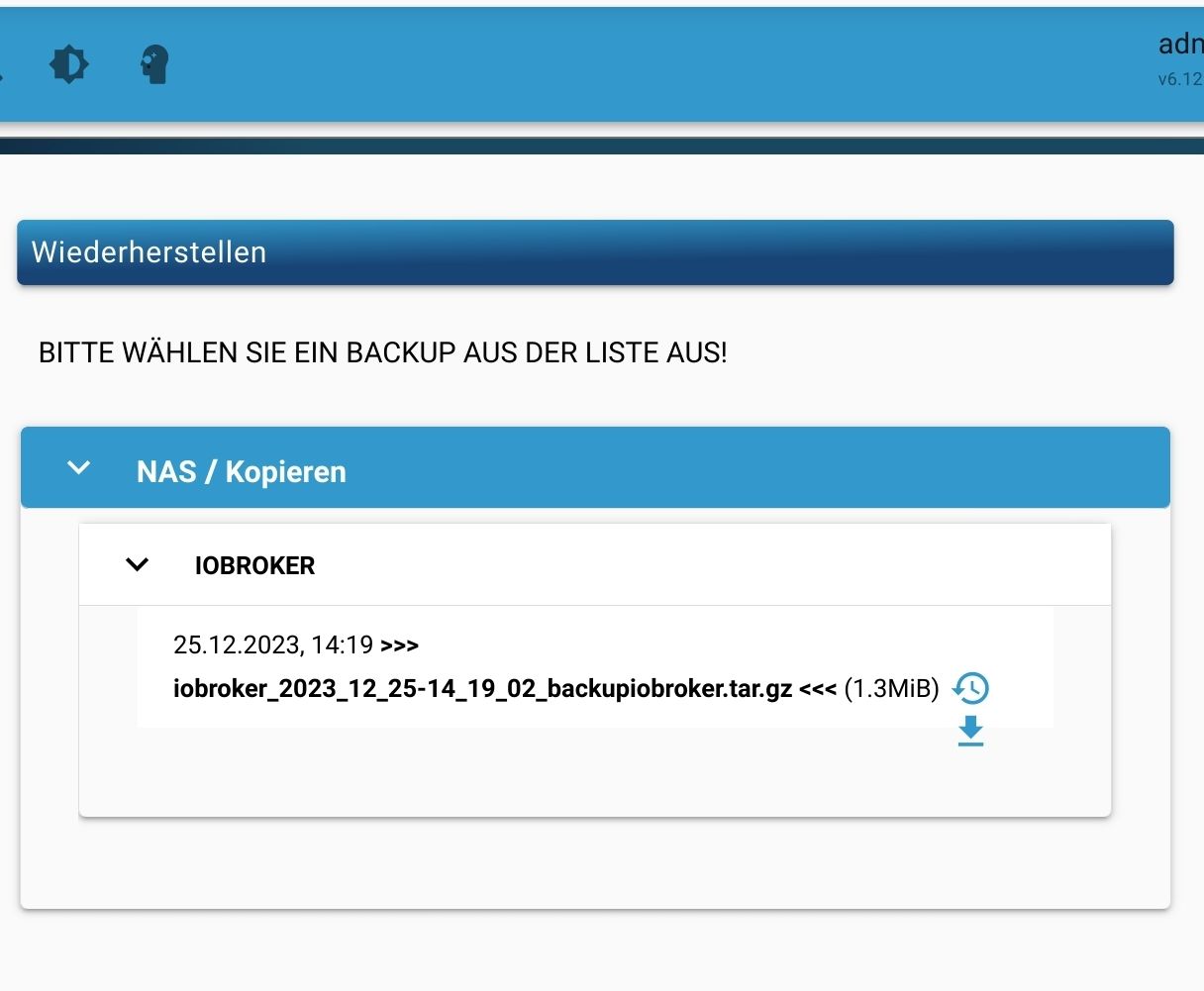
        Screenshot_20231225-141953_Firefox.jpg

        jetzt klappts auch mit dem Backup

        jetzt müsste ich "nur noch" an die fstab :scream:

        kein Support per PN! - Fragen im Forum stellen - es gibt fast nichts, was nicht auch für andere interessant ist.

        Benutzt das Voting rechts unten im Beitrag wenn er euch geholfen hat.

        der Installationsfixer: curl -fsL https://iobroker.net/fix.sh | bash -

        1 Antwort Letzte Antwort
        0
        • crunchipC crunchip

          @homoran sagte in Formatierung einer USB Platte am Pi5:

          da wäre es dann hier wohl sinnvoll den Eigentümer auf iobroker:iobroker zu setzen.

          wäre es nicht besser user pi?

          @homoran sagte in Formatierung einer USB Platte am Pi5:

          Berechtigung mehrerer Benutzer. Dies kann man bei Bedarf mit FACL

          dann mit setfacl iobroker berechtigen?

          aber ich kenn mich da auch nicht sonderlich aus

          HomoranH Nicht stören
          HomoranH Nicht stören
          Homoran
          Global Moderator Administrators
          schrieb am zuletzt editiert von Homoran
          #30

          @crunchip sagte in Formatierung einer USB Platte am Pi5:

          aber ich kenn mich da auch nicht sonderlich aus

          da sind wir schon zwei.

          Mein Denken war, dass der user pi in der Gruppe iobroker ist, umgekehrt aber nicht.
          Dadurch können jetzt beide dran

          kein Support per PN! - Fragen im Forum stellen - es gibt fast nichts, was nicht auch für andere interessant ist.

          Benutzt das Voting rechts unten im Beitrag wenn er euch geholfen hat.

          der Installationsfixer: curl -fsL https://iobroker.net/fix.sh | bash -

          crunchipC 1 Antwort Letzte Antwort
          0
          • HomoranH Homoran

            @crunchip sagte in Formatierung einer USB Platte am Pi5:

            aber ich kenn mich da auch nicht sonderlich aus

            da sind wir schon zwei.

            Mein Denken war, dass der user pi in der Gruppe iobroker ist, umgekehrt aber nicht.
            Dadurch können jetzt beide dran

            crunchipC Abwesend
            crunchipC Abwesend
            crunchip
            Forum Testing Most Active
            schrieb am zuletzt editiert von
            #31

            @homoran ok wenn das nun so funktioniert, sollte es ja passen

            hattest du oben nicht schon den Eintrag für fstab?

            umgestiegen von Proxmox auf Unraid

            HomoranH 1 Antwort Letzte Antwort
            0
            • crunchipC crunchip

              @homoran ok wenn das nun so funktioniert, sollte es ja passen

              hattest du oben nicht schon den Eintrag für fstab?

              HomoranH Nicht stören
              HomoranH Nicht stören
              Homoran
              Global Moderator Administrators
              schrieb am zuletzt editiert von
              #32

              @crunchip sagte in Formatierung einer USB Platte am Pi5:

              wenn das nun so funktioniert, sollte es ja passen

              so seh ich das auch

              @crunchip sagte in Formatierung einer USB Platte am Pi5:

              hattest du oben nicht schon den Eintrag für fstab?

              keine Ahnung :joy:
              Da kam eine Meldung, dass die fstab angepasst worden wäte.
              Dann hab ich sie mir angesehen. Mehr nicht.

              im Moment arbeite ich manuell gemountet.
              Selbst wenn nach einem reboot / Shutdown Strom weg und Umzug in den Serverschrank der Mount nicht wieder kommt ist das erst einmal nicht tragisch. Dann muss ich ihn manuell mounten.

              Bei meinem letzten Versuch fuhr die VM gar nicht mehr hoch, wenn der richtige USB Stick nicht mehr steckte.
              Das war schlimmer

              kein Support per PN! - Fragen im Forum stellen - es gibt fast nichts, was nicht auch für andere interessant ist.

              Benutzt das Voting rechts unten im Beitrag wenn er euch geholfen hat.

              der Installationsfixer: curl -fsL https://iobroker.net/fix.sh | bash -

              HomoranH 1 Antwort Letzte Antwort
              0
              • JLegJ JLeg

                @homoran sagte in Formatierung einer USB Platte am Pi5:

                @jleg sagte in Formatierung einer USB Platte am Pi5:

                was denn für ein Scheunentor?

                mit chmod 777

                ah ok, stimmt, world-writeable ist unschön; andererseits spielt‘s aber keine Rolle, wenn du das Ding im Bus liegen lässt… :)

                @jleg sagte in Formatierung einer USB Platte am Pi5:

                aber wieso will der mit ‚cifs‘ auf deinen Mount zugreifen? Schau mal in den backitup-Optionen, das sollte jedenfalls nicht cifs sein…(‚copy‘?)

                das ist copy

                wie sehen denn die Rechte der Dateien unterhalb …/backups/ aus?
                Und - bedeutet ‚mount as root‘ bei backitup, dass er auch als root schreibt/liest?

                Thomas BraunT Online
                Thomas BraunT Online
                Thomas Braun
                Most Active
                schrieb am zuletzt editiert von Thomas Braun
                #33

                @jleg sagte in Formatierung einer USB Platte am Pi5:

                Und - bedeutet ‚mount as root‘ bei backitup, dass er auch als root schreibt/liest?

                Nein, denn in den Mountoptionen wird uid und gid jeweils auf 'iobroker' geändert.

                Ich habe eine ganz ähnliche Konstellation so in der fstab eingetragen:

                #iobroker backup
                //fritz.nas/FRITZ.NAS/Hitachi-HTS545012B9SA00-01/iobbackups/chet /opt/iobroker/backups cifs credentials=/home/iobroker/.smbcredentials,users,noserverino,cache=loose,noauto,rw,uid=iobroker,gid=iobroker,file_mode=0777,dir_mode=0777,vers=3.1.1 0 0
                

                So kann auch der User 'iobroker' das Dateisystem mounten. Die das PW liegt dann in der .smbcredentials drin.

                Linux-Werkzeugkasten:
                https://forum.iobroker.net/topic/42952/der-kleine-iobroker-linux-werkzeugkasten
                NodeJS Fixer Skript:
                https://forum.iobroker.net/topic/68035/iob-node-fix-skript
                iob_diag: curl -sLf -o diag.sh https://iobroker.net/diag.sh && bash diag.sh

                HomoranH 1 Antwort Letzte Antwort
                1
                • Thomas BraunT Thomas Braun

                  @jleg sagte in Formatierung einer USB Platte am Pi5:

                  Und - bedeutet ‚mount as root‘ bei backitup, dass er auch als root schreibt/liest?

                  Nein, denn in den Mountoptionen wird uid und gid jeweils auf 'iobroker' geändert.

                  Ich habe eine ganz ähnliche Konstellation so in der fstab eingetragen:

                  #iobroker backup
                  //fritz.nas/FRITZ.NAS/Hitachi-HTS545012B9SA00-01/iobbackups/chet /opt/iobroker/backups cifs credentials=/home/iobroker/.smbcredentials,users,noserverino,cache=loose,noauto,rw,uid=iobroker,gid=iobroker,file_mode=0777,dir_mode=0777,vers=3.1.1 0 0
                  

                  So kann auch der User 'iobroker' das Dateisystem mounten. Die das PW liegt dann in der .smbcredentials drin.

                  HomoranH Nicht stören
                  HomoranH Nicht stören
                  Homoran
                  Global Moderator Administrators
                  schrieb am zuletzt editiert von
                  #34

                  @thomas-braun du mal wieder! :grin:
                  gaaanz einfache Konstellation :joy:

                  kein Support per PN! - Fragen im Forum stellen - es gibt fast nichts, was nicht auch für andere interessant ist.

                  Benutzt das Voting rechts unten im Beitrag wenn er euch geholfen hat.

                  der Installationsfixer: curl -fsL https://iobroker.net/fix.sh | bash -

                  Thomas BraunT 1 Antwort Letzte Antwort
                  0
                  • HomoranH Homoran

                    @thomas-braun du mal wieder! :grin:
                    gaaanz einfache Konstellation :joy:

                    Thomas BraunT Online
                    Thomas BraunT Online
                    Thomas Braun
                    Most Active
                    schrieb am zuletzt editiert von
                    #35

                    @homoran

                    Mehr oder weniger Standardkonfiguration... :-)

                    Linux-Werkzeugkasten:
                    https://forum.iobroker.net/topic/42952/der-kleine-iobroker-linux-werkzeugkasten
                    NodeJS Fixer Skript:
                    https://forum.iobroker.net/topic/68035/iob-node-fix-skript
                    iob_diag: curl -sLf -o diag.sh https://iobroker.net/diag.sh && bash diag.sh

                    1 Antwort Letzte Antwort
                    0
                    • HomoranH Homoran

                      @crunchip sagte in Formatierung einer USB Platte am Pi5:

                      wenn das nun so funktioniert, sollte es ja passen

                      so seh ich das auch

                      @crunchip sagte in Formatierung einer USB Platte am Pi5:

                      hattest du oben nicht schon den Eintrag für fstab?

                      keine Ahnung :joy:
                      Da kam eine Meldung, dass die fstab angepasst worden wäte.
                      Dann hab ich sie mir angesehen. Mehr nicht.

                      im Moment arbeite ich manuell gemountet.
                      Selbst wenn nach einem reboot / Shutdown Strom weg und Umzug in den Serverschrank der Mount nicht wieder kommt ist das erst einmal nicht tragisch. Dann muss ich ihn manuell mounten.

                      Bei meinem letzten Versuch fuhr die VM gar nicht mehr hoch, wenn der richtige USB Stick nicht mehr steckte.
                      Das war schlimmer

                      HomoranH Nicht stören
                      HomoranH Nicht stören
                      Homoran
                      Global Moderator Administrators
                      schrieb am zuletzt editiert von
                      #36

                      @homoran sagte in Formatierung einer USB Platte am Pi5:

                      Umzug in den Serverschrank

                      hat soeben stattgefunden, danach den mount erneuert.
                      jetzt ist der Pi5 auch USV gesichert.


                      ======== Start marking the full check here =========

                      Skript v.2023-10-10
                      
                      *** BASE SYSTEM ***
                       Static hostname: ioBrokerpi5
                             Icon name: computer
                      Operating System: Debian GNU/Linux 12 (bookworm)
                                Kernel: Linux 6.1.0-rpi7-rpi-2712
                          Architecture: arm64
                      
                      Model           : Raspberry Pi 5 Model B Rev 1.0
                      Docker          : false
                      Virtualization  : none
                      Kernel          : aarch64
                      Userland        : arm64
                      
                      Systemuptime and Load:
                       16:29:10 up 4 min,  2 users,  load average: 0.15, 0.05, 0.01
                      CPU threads: 4
                      
                      
                      *** RASPBERRY THROTTLING ***
                      Current issues:
                      No throttling issues detected.
                      
                      Previously detected issues:
                      No throttling issues detected.
                      
                      *** Time and Time Zones ***
                                     Local time: Mon 2023-12-25 16:29:10 CET
                                 Universal time: Mon 2023-12-25 15:29:10 UTC
                                       RTC time: Mon 2023-12-25 15:29:10
                                      Time zone: Europe/Berlin (CET, +0100)
                      System clock synchronized: yes
                                    NTP service: active
                                RTC in local TZ: no
                      
                      *** User and Groups ***
                      pi
                      /home/pi
                      pi adm dialout cdrom sudo audio video plugdev games users input render netdev gpio i2c spi iobroker
                      
                      *** X-Server-Setup ***
                      X-Server:       false
                      Desktop:
                      Terminal:       tty
                      Boot Target:    multi-user.target
                      
                      *** MEMORY ***
                                     total        used        free      shared  buff/cache   available
                      Mem:            8.4G        514M        7.7G        5.3M        277M        7.9G
                      Swap:           104M          0B        104M
                      Total:          8.5G        514M        7.9G
                      
                               8053 M total memory
                                491 M used memory
                                419 M active memory
                                104 M inactive memory
                               7387 M free memory
                                 29 M buffer memory
                                235 M swap cache
                                 99 M total swap
                                  0 M used swap
                                 99 M free swap
                      
                      Raspberry only:
                      vc_gencmd_read_response returned -1
                      error=1 error_msg="Command not registered"
                      
                      *** FAILED SERVICES ***
                      
                        UNIT LOAD ACTIVE SUB DESCRIPTION
                      0 loaded units listed.
                      
                      *** FILESYSTEM ***
                      Filesystem     Type      Size  Used Avail Use% Mounted on
                      udev           devtmpfs  3.8G     0  3.8G   0% /dev
                      tmpfs          tmpfs     806M  5.1M  801M   1% /run
                      /dev/mmcblk0p2 ext4      235G  2.8G  220G   2% /
                      tmpfs          tmpfs     4.0G     0  4.0G   0% /dev/shm
                      tmpfs          tmpfs     5.0M   48K  5.0M   1% /run/lock
                      /dev/mmcblk0p1 vfat      510M   61M  450M  12% /boot/firmware
                      /dev/sda1      ext4      137G  1.4M  130G   1% /media/usbplatte
                      tmpfs          tmpfs     806M     0  806M   0% /run/user/1000
                      
                      Messages concerning ext4 filesystem in dmesg:
                      [Mon Dec 25 16:24:23 2023] Kernel command line: coherent_pool=1M 8250.nr_uarts=1 pci=pcie_bus_safe snd_bcm2835.enable_compat_alsa=0 snd_bcm2835.enable_hdmi=1  smsc95xx.macaddr=D8:3A:DD:B1:CD:FC vc_mem.mem_base=0x3fc00000 vc_mem.mem_size=0x40000000  console=ttyAMA10,115200 console=tty1 root=PARTUUID=d9d24a14-02 rootfstype=ext4 fsck.repair=yes rootwait
                      [Mon Dec 25 16:24:28 2023] EXT4-fs (mmcblk0p2): mounted filesystem with ordered data mode. Quota mode: none.
                      [Mon Dec 25 16:24:29 2023] EXT4-fs (mmcblk0p2): re-mounted. Quota mode: none.
                      [Mon Dec 25 16:26:43 2023] EXT4-fs (sda1): mounted filesystem with ordered data mode. Quota mode: none.
                      
                      Show mounted filesystems \(real ones only\):
                      TARGET             SOURCE         FSTYPE OPTIONS
                      /                  /dev/mmcblk0p2 ext4   rw,noatime
                      |-/boot/firmware   /dev/mmcblk0p1 vfat   rw,relatime,fmask=0022,dmask=0022,codepage=437,iocharset=ascii,shortname=mixed,errors=remount-ro
                      `-/media/usbplatte /dev/sda1      ext4   rw,relatime
                      
                      Files in neuralgic directories:
                      
                      /var:
                      545M    /var/
                      204M    /var/cache
                      198M    /var/cache/apt
                      160M    /var/lib
                      132M    /var/lib/apt/lists
                      
                      Archived and active journals take up 79.8M in the file system.
                      
                      /opt/iobroker/backups:
                      4.0K    /opt/iobroker/backups/
                      
                      /opt/iobroker/iobroker-data:
                      39M     /opt/iobroker/iobroker-data/
                      15M     /opt/iobroker/iobroker-data/files
                      15M     /opt/iobroker/iobroker-data/backup-objects
                      13M     /opt/iobroker/iobroker-data/files/admin.admin/custom/static/js
                      13M     /opt/iobroker/iobroker-data/files/admin.admin/custom/static
                      
                      The five largest files in iobroker-data are:
                      8.0M    /opt/iobroker/iobroker-data/objects.jsonl
                      6.3M    /opt/iobroker/iobroker-data/files/admin.admin/custom/static/js/vendors-node_modules_iobroker_adapter-react-v5_assets_devices_parseNames_js-node_modules_iobr-99c23e.847b8ad9.chunk.js.map
                      2.8M    /opt/iobroker/iobroker-data/files/admin.admin/custom/static/js/vendors-node_modules_iobroker_adapter-react-v5_assets_devices_parseNames_js-node_modules_iobr-99c23e.847b8ad9.chunk.js
                      2.0M    /opt/iobroker/iobroker-data/states.jsonl
                      1.6M    /opt/iobroker/iobroker-data/files/admin.admin/custom/static/js/vendors-node_modules_mui_material_Accordion_index_js-node_modules_mui_material_AccordionDetai-57e02d.0886b730.chunk.js.map
                      
                      USB-Devices by-id:
                      USB-Sticks -  Avoid direct links to /dev/* in your adapter setups, please always prefer the links 'by-id':
                      
                      find: '/dev/serial/by-id/': No such file or directory
                      
                      *** NodeJS-Installation ***
                      
                      /usr/bin/nodejs         v18.19.0
                      /usr/bin/node           v18.19.0
                      /usr/bin/npm            10.2.3
                      /usr/bin/npx            10.2.3
                      /usr/bin/corepack       0.22.0
                      
                      
                      nodejs:
                        Installed: 18.19.0-1nodesource1
                        Candidate: 18.19.0-1nodesource1
                        Version table:
                       *** 18.19.0-1nodesource1 500
                              500 https://deb.nodesource.com/node_18.x nodistro/main arm64 Packages
                              100 /var/lib/dpkg/status
                           18.18.2-1nodesource1 500
                              500 https://deb.nodesource.com/node_18.x nodistro/main arm64 Packages
                           18.18.1-1nodesource1 500
                              500 https://deb.nodesource.com/node_18.x nodistro/main arm64 Packages
                           18.18.0-1nodesource1 500
                              500 https://deb.nodesource.com/node_18.x nodistro/main arm64 Packages
                           18.17.1-1nodesource1 500
                              500 https://deb.nodesource.com/node_18.x nodistro/main arm64 Packages
                           18.17.0-1nodesource1 500
                              500 https://deb.nodesource.com/node_18.x nodistro/main arm64 Packages
                           18.16.1-1nodesource1 500
                              500 https://deb.nodesource.com/node_18.x nodistro/main arm64 Packages
                           18.16.0-1nodesource1 500
                              500 https://deb.nodesource.com/node_18.x nodistro/main arm64 Packages
                           18.15.0-1nodesource1 500
                              500 https://deb.nodesource.com/node_18.x nodistro/main arm64 Packages
                           18.14.2-1nodesource1 500
                              500 https://deb.nodesource.com/node_18.x nodistro/main arm64 Packages
                           18.14.1-1nodesource1 500
                              500 https://deb.nodesource.com/node_18.x nodistro/main arm64 Packages
                           18.14.0-1nodesource1 500
                              500 https://deb.nodesource.com/node_18.x nodistro/main arm64 Packages
                           18.13.0+dfsg1-1 500
                              500 http://deb.debian.org/debian bookworm/main arm64 Packages
                           18.13.0-1nodesource1 500
                              500 https://deb.nodesource.com/node_18.x nodistro/main arm64 Packages
                           18.12.0-1nodesource1 500
                              500 https://deb.nodesource.com/node_18.x nodistro/main arm64 Packages
                           18.11.0-1nodesource1 500
                              500 https://deb.nodesource.com/node_18.x nodistro/main arm64 Packages
                           18.10.0-1nodesource1 500
                              500 https://deb.nodesource.com/node_18.x nodistro/main arm64 Packages
                           18.9.1-1nodesource1 500
                              500 https://deb.nodesource.com/node_18.x nodistro/main arm64 Packages
                           18.9.0-1nodesource1 500
                              500 https://deb.nodesource.com/node_18.x nodistro/main arm64 Packages
                           18.8.0-1nodesource1 500
                              500 https://deb.nodesource.com/node_18.x nodistro/main arm64 Packages
                           18.7.0-1nodesource1 500
                              500 https://deb.nodesource.com/node_18.x nodistro/main arm64 Packages
                           18.6.0-1nodesource1 500
                              500 https://deb.nodesource.com/node_18.x nodistro/main arm64 Packages
                           18.5.0-1nodesource1 500
                              500 https://deb.nodesource.com/node_18.x nodistro/main arm64 Packages
                           18.4.0-1nodesource1 500
                              500 https://deb.nodesource.com/node_18.x nodistro/main arm64 Packages
                           18.3.0-1nodesource1 500
                              500 https://deb.nodesource.com/node_18.x nodistro/main arm64 Packages
                           18.2.0-1nodesource1 500
                              500 https://deb.nodesource.com/node_18.x nodistro/main arm64 Packages
                           18.1.0-1nodesource1 500
                              500 https://deb.nodesource.com/node_18.x nodistro/main arm64 Packages
                           18.0.0-1nodesource1 500
                              500 https://deb.nodesource.com/node_18.x nodistro/main arm64 Packages
                      
                      Temp directories causing npm8 problem: 0
                      No problems detected
                      
                      Errors in npm tree:
                      
                      *** ioBroker-Installation ***
                      
                      ioBroker Status
                      iobroker is running on this host.
                      
                      
                      Objects type: jsonl
                      States  type: jsonl
                      
                      Core adapters versions
                      js-controller:  5.0.17
                      admin:          6.12.0
                      javascript:     "javascript" not found
                      
                      Adapters from github:   0
                      
                      Adapter State
                      + system.adapter.admin.0                  : admin                 : ioBrokerpi5                              -  enabled, port: 8081, bind: 0.0.0.0, run as: admin
                      + system.adapter.backitup.0               : backitup              : ioBrokerpi5                              -  enabled
                        system.adapter.discovery.0              : discovery             : ioBrokerpi5                              - disabled
                      + system.adapter.rpi2.0                   : rpi2                  : ioBrokerpi5                              -  enabled
                      
                      + instance is alive
                      
                      Enabled adapters with bindings
                      + system.adapter.admin.0                  : admin                 : ioBrokerpi5                              -  enabled, port: 8081, bind: 0.0.0.0, run as: admin
                      
                      ioBroker-Repositories
                      stable        : http://download.iobroker.net/sources-dist.json
                      beta          : http://download.iobroker.net/sources-dist-latest.json
                      
                      Active repo(s): stable
                      
                      Installed ioBroker-Instances
                      Used repository: stable
                      Adapter    "admin"        : 6.12.0   , installed 6.12.0
                      Adapter    "backitup"     : 2.9.8    , installed 2.9.8
                      Adapter    "discovery"    : 4.2.0    , installed 4.2.0
                      Controller "js-controller": 5.0.17   , installed 5.0.17
                      Adapter    "rpi2"         : 1.3.2    , installed 1.3.2
                      
                      Objects and States
                      Please stand by - This may take a while
                      Objects:        182
                      States:         129
                      
                      *** OS-Repositories and Updates ***
                      Hit:1 http://deb.debian.org/debian bookworm InRelease
                      Hit:2 http://archive.raspberrypi.com/debian bookworm InRelease
                      Hit:3 http://deb.debian.org/debian-security bookworm-security InRelease
                      Hit:4 http://deb.debian.org/debian bookworm-updates InRelease
                      Hit:5 https://deb.nodesource.com/node_18.x nodistro InRelease
                      Reading package lists...
                      Pending Updates: 0
                      
                      *** Listening Ports ***
                      Active Internet connections (only servers)
                      Proto Recv-Q Send-Q Local Address           Foreign Address         State       User       Inode      PID/Program name
                      tcp        0      0 127.0.0.1:9001          0.0.0.0:*               LISTEN      1001       13097      788/iobroker.js-con
                      tcp        0      0 127.0.0.1:9000          0.0.0.0:*               LISTEN      1001       15624      788/iobroker.js-con
                      tcp        0      0 0.0.0.0:22              0.0.0.0:*               LISTEN      0          16502      797/sshd: /usr/sbin
                      tcp6       0      0 :::8081                 :::*                    LISTEN      1001       16553      841/io.admin.0
                      tcp6       0      0 :::22                   :::*                    LISTEN      0          16504      797/sshd: /usr/sbin
                      udp        0      0 0.0.0.0:56427           0.0.0.0:*                           104        15178      675/avahi-daemon: r
                      udp        0      0 0.0.0.0:5353            0.0.0.0:*                           104        15176      675/avahi-daemon: r
                      udp6       0      0 :::36540                :::*                                104        15179      675/avahi-daemon: r
                      udp6       0      0 fe80::cb9d:71e1:3c0:546 :::*                                0          16602      759/NetworkManager
                      udp6       0      0 :::5353                 :::*                                104        15177      675/avahi-daemon: r
                      
                      *** Log File - Last 25 Lines ***
                      
                      2023-12-25 16:24:06.773  - info: host.ioBrokerpi5 Copyright (c) 2014-2023 bluefox, 2014 hobbyquaker
                      2023-12-25 16:24:06.774  - info: host.ioBrokerpi5 hostname: ioBrokerpi5, node: v18.19.0
                      2023-12-25 16:24:06.774  - info: host.ioBrokerpi5 ip addresses:
                      2023-12-25 16:24:07.268  - info: host.ioBrokerpi5 connected to Objects and States
                      2023-12-25 16:24:07.283  - info: host.ioBrokerpi5 added notifications configuration of host
                      2023-12-25 16:24:07.573  - info: host.ioBrokerpi5 4 instances found
                      2023-12-25 16:24:07.577  - info: host.ioBrokerpi5 starting 3 instances
                      2023-12-25 16:24:07.637  - info: host.ioBrokerpi5 instance system.adapter.admin.0 started with pid 841
                      2023-12-25 16:24:08.794  - info: admin.0 (841) starting. Version 6.12.0 in /opt/iobroker/node_modules/iobroker.admin, node: v18.19.0, js-controller: 5.0.17
                      2023-12-25 16:24:08.815  - info: admin.0 (841) requesting all objects
                      2023-12-25 16:24:08.874  - warn: admin.0 (841) Cannot check node.js versions: Error: getaddrinfo EAI_AGAIN nodejs.org
                      2023-12-25 16:24:09.079  - info: admin.0 (841) received all objects
                      2023-12-25 16:24:09.169  - warn: admin.0 (841) Cannot update news: getaddrinfo EAI_AGAIN iobroker.live
                      2023-12-25 16:24:09.171  - info: admin.0 (841) Request actual repository...
                      2023-12-25 16:24:09.183  - info: admin.0 (841) socket.io server listening on port 8081
                      2023-12-25 16:24:09.184  - info: admin.0 (841) http server listening on port 8081
                      2023-12-25 16:24:09.184  - info: admin.0 (841) Use link "http://127.0.0.1:8081" to configure.
                      2023-12-25 16:24:09.376  - info: host.ioBrokerpi5 Updating repository "stable" under "http://download.iobroker.net/sources-dist.json"
                      2023-12-25 16:24:10.380  - info: admin.0 (841) Repository received successfully.
                      2023-12-25 16:24:11.592  - info: host.ioBrokerpi5 instance system.adapter.rpi2.0 started with pid 906
                      2023-12-25 16:24:12.134  - info: rpi2.0 (906) starting. Version 1.3.2 in /opt/iobroker/node_modules/iobroker.rpi2, node: v18.19.0, js-controller: 5.0.17
                      2023-12-25 16:24:15.592  - info: host.ioBrokerpi5 instance system.adapter.backitup.0 started with pid 945
                      2023-12-25 16:24:16.300  - info: backitup.0 (945) starting. Version 2.9.8 in /opt/iobroker/node_modules/iobroker.backitup, node: v18.19.0, js-controller: 5.0.17
                      2023-12-25 16:24:16.327  - info: backitup.0 (945) [iobroker] backup will be activated at 04:22 every 1 day(s)
                      2023-12-25 16:28:09.233  - info: admin.0 (841) ==> Connected system.user.admin from ::ffff:192.168.138.145


                      ============ Mark until here for C&P =============

                      iob diag has finished.

                      Press any key for a summary

                      kein Support per PN! - Fragen im Forum stellen - es gibt fast nichts, was nicht auch für andere interessant ist.

                      Benutzt das Voting rechts unten im Beitrag wenn er euch geholfen hat.

                      der Installationsfixer: curl -fsL https://iobroker.net/fix.sh | bash -

                      1 Antwort Letzte Antwort
                      0
                      Antworten
                      • In einem neuen Thema antworten
                      Anmelden zum Antworten
                      • Älteste zuerst
                      • Neuste zuerst
                      • Meiste Stimmen


                      Support us

                      ioBroker
                      Community Adapters
                      Donate

                      327

                      Online

                      32.6k

                      Benutzer

                      82.0k

                      Themen

                      1.3m

                      Beiträge
                      Community
                      Impressum | Datenschutz-Bestimmungen | Nutzungsbedingungen | Einwilligungseinstellungen
                      ioBroker Community 2014-2025
                      logo
                      • Anmelden

                      • Du hast noch kein Konto? Registrieren

                      • Anmelden oder registrieren, um zu suchen
                      • Erster Beitrag
                        Letzter Beitrag
                      0
                      • Home
                      • Aktuell
                      • Tags
                      • Ungelesen 0
                      • Kategorien
                      • Unreplied
                      • Beliebt
                      • GitHub
                      • Docu
                      • Hilfe