




VIS Lizenz nach neu Installation (linux update)
-
@thomas-braun
was ist damit gemeint "Stimmt die Antiquitäten-Sammlung aus der Signatur"?Die 1.5.4. wurde mir als update bei den Adaptern angeboten.
Repository stand auf: Stable (default) - http://download.iobroker.net/sources-dist.jsonRepository Beta (latest) http://download.iobroker.net/sources-dist-latest.json führt zu einem timeout
In der Instanz ist jetzt der Schraubenschlüssel weg.
Hier noch ein paar log-Einträge.
vis.0 2023-12-23 09:06:05.940 info starting. Version 1.5.4 in /opt/iobroker/node_modules/iobroker.vis, node: v16.20.2, js-controller: 4.0.24 vis.0 2023-12-23 09:05:49.012 info Terminated (NO_ERROR): Without reason vis.0 2023-12-23 09:05:47.538 info starting. Version 1.5.4 in /opt/iobroker/node_modules/iobroker.vis, node: v16.20.2, js-controller: 4.0.24 vis.0 2023-12-23 09:05:41.395 info Terminated (NO_ERROR): Without reason vis.0 2023-12-23 09:05:40.880 info Uploaded. 0 vis.0 2023-12-23 09:05:28.558 info Terminated (NO_ERROR): Without reason vis.0 2023-12-23 09:05:27.039 info starting. Version 1.5.4 in /opt/iobroker/node_modules/iobroker.vis, node: v16.20.2, js-controller: 4.0.24 vis.0 2023-12-23 09:05:21.336 info Upload vis anew, while changes detected... vis.0 2023-12-23 09:05:21.286 info Changes in index.html detected => update cache.manifest vis.0 2023-12-23 09:05:21.000 info config.js changed. Upload. vis.0 2023-12-23 09:05:20.693 info starting. Version 1.5.4 in /opt/iobroker/node_modules/iobroker.vis, node: v16.20.2, js-controller: 4.0.24@klausiob sagte in VIS Lizenz nach neu Installation (linux update):
was ist damit gemeint "Stimmt die Antiquitäten-Sammlung aus der Signatur"?
Damit sind die dort von dir hinterlegten Versionsstände gemeint. Aber offenbar stimmen die Angaben nicht mehr. Die Ausgabe von
iob diagsagt?
-
@thomas-braun
was ist damit gemeint "Stimmt die Antiquitäten-Sammlung aus der Signatur"?Die 1.5.4. wurde mir als update bei den Adaptern angeboten.
Repository stand auf: Stable (default) - http://download.iobroker.net/sources-dist.jsonRepository Beta (latest) http://download.iobroker.net/sources-dist-latest.json führt zu einem timeout
In der Instanz ist jetzt der Schraubenschlüssel weg.
Hier noch ein paar log-Einträge.
vis.0 2023-12-23 09:06:05.940 info starting. Version 1.5.4 in /opt/iobroker/node_modules/iobroker.vis, node: v16.20.2, js-controller: 4.0.24 vis.0 2023-12-23 09:05:49.012 info Terminated (NO_ERROR): Without reason vis.0 2023-12-23 09:05:47.538 info starting. Version 1.5.4 in /opt/iobroker/node_modules/iobroker.vis, node: v16.20.2, js-controller: 4.0.24 vis.0 2023-12-23 09:05:41.395 info Terminated (NO_ERROR): Without reason vis.0 2023-12-23 09:05:40.880 info Uploaded. 0 vis.0 2023-12-23 09:05:28.558 info Terminated (NO_ERROR): Without reason vis.0 2023-12-23 09:05:27.039 info starting. Version 1.5.4 in /opt/iobroker/node_modules/iobroker.vis, node: v16.20.2, js-controller: 4.0.24 vis.0 2023-12-23 09:05:21.336 info Upload vis anew, while changes detected... vis.0 2023-12-23 09:05:21.286 info Changes in index.html detected => update cache.manifest vis.0 2023-12-23 09:05:21.000 info config.js changed. Upload. vis.0 2023-12-23 09:05:20.693 info starting. Version 1.5.4 in /opt/iobroker/node_modules/iobroker.vis, node: v16.20.2, js-controller: 4.0.24@klausiob said in VIS Lizenz nach neu Installation (linux update):
@thomas-braun
was ist damit gemeint "Stimmt die Antiquitäten-Sammlung aus der Signatur"?Hast du wirklich noch ein System mit raspian buster 10.10?
Läuft bei dir wirklich noch node 14?
Ist js-controller 3.3.x richtig?Alles total veraltet...
ABER vis 1.5.4 sollte dir nur mit node 16 oder neuer angeboten werden - zumindest in der Admin UI.
-
@klausiob sagte in VIS Lizenz nach neu Installation (linux update):
was ist damit gemeint "Stimmt die Antiquitäten-Sammlung aus der Signatur"?
Damit sind die dort von dir hinterlegten Versionsstände gemeint. Aber offenbar stimmen die Angaben nicht mehr. Die Ausgabe von
iob diagsagt?
@thomas-braun
mußte erst mal mein PW suchen. Ziemlich lange Ausgabe. Soll ich alles hier reinposten?Pi4B, Pi3B+, Master-Slave, EchoPlus, 3xEchoDot, FireTVstick, Xiaomi Sensoren, Fritzbox, DECT200, HS100, ZBT-ExtendedColor (ALDI), Shelly 2.5, 2xZigBee-Router-Plugs, Sileno 500 smart, Somfy switch, IONIQ5, tibber
node.js: 22.21.0 - npm: 10.9.4 - linux: raspbian-trixie - admin 7.7.19 - vis 1.5.6 - js-controller: 7.0.7 -
@thomas-braun
mußte erst mal mein PW suchen. Ziemlich lange Ausgabe. Soll ich alles hier reinposten?Ja, wenn du erst dein Passwort auch musstest bitte die Langfassung, da wird dann einiges daneben liegen.
-
Ja, wenn du erst dein Passwort auch musstest bitte die Langfassung, da wird dann einiges daneben liegen.
@thomas-braun ```
======== Start marking the full check here =========Skript v.2023-10-10 *** BASE SYSTEM *** Static hostname: hsmart4 Icon name: computer Operating System: Raspbian GNU/Linux 10 (buster) Kernel: Linux 5.10.103-v7l+ Architecture: arm Model : Raspberry Pi 4 Model B Rev 1.2 Docker : false Virtualization : none Kernel : armv7l Userland : armhf Systemuptime and Load: 15:37:25 up 19:04, 1 user, load average: 0.37, 0.35, 0.27 CPU threads: 4 *** RASPBERRY THROTTLING *** Current issues: No throttling issues detected. Previously detected issues: No throttling issues detected. *** Time and Time Zones *** Local time: Sat 2023-12-23 15:37:25 CET Universal time: Sat 2023-12-23 14:37:25 UTC RTC time: n/a Time zone: Europe/Berlin (CET, +0100) System clock synchronized: yes NTP service: active RTC in local TZ: no *** User and Groups *** pi /home/pi pi adm dialout cdrom sudo audio video plugdev games users input netdev gpio i2c spi iobroker *** X-Server-Setup *** X-Server: false Desktop: Terminal: tty Boot Target: graphical.target *** MEMORY *** total used free shared buff/cache available Mem: 3.8G 1.3G 1.9G 8.0M 630M 2.7G Swap: 99M 0B 99M Total: 3.9G 1.3G 2.0G 3838 M total memory 1302 M used memory 288 M active memory 1542 M inactive memory 1905 M free memory 111 M buffer memory 519 M swap cache 99 M total swap 0 M used swap 99 M free swap Raspberry only: oom events: 0 lifetime oom required: 0 Mbytes total time in oom handler: 0 ms max time spent in oom handler: 0 ms *** FAILED SERVICES *** 0 loaded units listed. Pass --all to see loaded but inactive units, too. To show all installed unit files use 'systemctl list-unit-files'. *** FILESYSTEM *** Filesystem Type Size Used Avail Use% Mounted on /dev/root ext4 59G 6.2G 50G 12% / devtmpfs devtmpfs 1.8G 0 1.8G 0% /dev tmpfs tmpfs 1.9G 0 1.9G 0% /dev/shm tmpfs tmpfs 1.9G 8.5M 1.9G 1% /run tmpfs tmpfs 5.0M 4.0K 5.0M 1% /run/lock tmpfs tmpfs 1.9G 0 1.9G 0% /sys/fs/cgroup /dev/mmcblk0p1 vfat 253M 49M 204M 20% /boot tmpfs tmpfs 384M 0 384M 0% /run/user/1000 Messages concerning ext4 filesystem in dmesg: [Fri Dec 22 20:33:23 2023] Kernel command line: coherent_pool=1M 8250.nr_uarts=0 snd_bcm2835.enable_compat_alsa=0 snd_bcm2835.enab le_hdmi=1 smsc95xx.macaddr=DC:A6:32:81:E0:C5 vc_mem.mem_base=0x3ec00000 vc_mem.mem_size=0x40000000 console=ttyS0,115200 console= tty1 root=PARTUUID=738a4d67-02 rootfstype=ext4 elevator=deadline fsck.repair=yes rootwait [Fri Dec 22 20:33:24 2023] EXT4-fs (mmcblk0p2): INFO: recovery required on readonly filesystem [Fri Dec 22 20:33:24 2023] EXT4-fs (mmcblk0p2): write access will be enabled during recovery [Fri Dec 22 20:33:24 2023] EXT4-fs (mmcblk0p2): orphan cleanup on readonly fs [Fri Dec 22 20:33:24 2023] EXT4-fs (mmcblk0p2): 6 orphan inodes deleted [Fri Dec 22 20:33:24 2023] EXT4-fs (mmcblk0p2): recovery complete [Fri Dec 22 20:33:25 2023] EXT4-fs (mmcblk0p2): mounted filesystem with ordered data mode. Opts: (null) [Fri Dec 22 20:33:25 2023] VFS: Mounted root (ext4 filesystem) readonly on device 179:2. [Fri Dec 22 20:33:27 2023] EXT4-fs (mmcblk0p2): re-mounted. Opts: (null) Show mounted filesystems \(real ones only\): TARGET SOURCE FSTYPE OPTIONS / /dev/mmcblk0p2 ext4 rw,noatime |-/sys/fs/bpf none bpf rw,nosuid,nodev,noexec,relatime,mode=700 `-/boot /dev/mmcblk0p1 vfat rw,relatime,fmask=0022,dmask=0022,codepage=437,iocharset=ascii,shortname=mixed,errors=remount- ro Files in neuralgic directories: /var: 426M /var/ 232M /var/cache 226M /var/cache/apt 167M /var/cache/apt/archives 92M /var/lib Archived and active journals take up 8.0M in the file system. /opt/iobroker/backups: 194M /opt/iobroker/backups/ /opt/iobroker/iobroker-data: 806M /opt/iobroker/iobroker-data/ 370M /opt/iobroker/iobroker-data/files 214M /opt/iobroker/iobroker-data/history 138M /opt/iobroker/iobroker-data/backup-objects 78M /opt/iobroker/iobroker-data/files/icons-open-icon-library-png The five largest files in iobroker-data are: 49M /opt/iobroker/iobroker-data/objects.jsonl 33M /opt/iobroker/iobroker-data/files/iot.admin/static/js/main.1797d034.js.map 21M /opt/iobroker/iobroker-data/files/web.admin/static/js/main.aaea95f8.js.map 12M /opt/iobroker/iobroker-data/objects.json.migrated 12M /opt/iobroker/iobroker-data/objects.json.bak.migrated USB-Devices by-id: USB-Sticks - Avoid direct links to /dev/* in your adapter setups, please always prefer the links 'by-id': find: '/dev/serial/by-id/': No such file or directory *** NodeJS-Installation *** /usr/bin/nodejs v16.20.2 /usr/bin/node v16.20.2 /usr/bin/npm 8.19.4 /usr/bin/npx 8.19.4 /usr/bin/corepack 0.17.0 nodejs: Installed: 16.20.2-deb-1nodesource1 Candidate: 16.20.2-deb-1nodesource1 Version table: *** 16.20.2-deb-1nodesource1 500 500 https://deb.nodesource.com/node_16.x buster/main armhf Packages 100 /var/lib/dpkg/status 10.24.0~dfsg-1~deb10u3 500 500 http://raspbian.raspberrypi.org/raspbian buster/main armhf Packages Temp directories causing npm8 problem: 0 No problems detected Errors in npm tree: npm ERR! code ELSPROBLEMS npm ERR! missing: chroma-js@^2.4.2, required by iobroker.javascript@6.1.4 npm ERR! missing: moment-duration-format@^2.3.2, required by iobroker.javascript@6.1.4 npm ERR! A complete log of this run can be found in: npm ERR! /home/pi/.npm/_logs/2023-12-23T14_37_38_549Z-debug-0.log *** ioBroker-Installation *** ioBroker Status iobroker is running on this host. Objects type: jsonl States type: jsonl Core adapters versions js-controller: 4.0.24 admin: 6.12.0 javascript: 6.1.4 Adapters from github: 0 Adapter State + system.adapter.admin.0 : admin : hsmart4 - enabled, port: 8081, bind: 0.0.0.0, run as: admin system.adapter.alexa2.1 : alexa2 : hsmart4 - enabled system.adapter.awattar.0 : awattar : hsmart4 - disabled + system.adapter.backitup.0 : backitup : hsmart4 - enabled + system.adapter.bluelink.0 : bluelink : hsmart4 - enabled system.adapter.daswetter.0 : daswetter : hsmart4 - enabled system.adapter.dwd.0 : dwd : hsmart4 - disabled system.adapter.fitbit-api.0 : fitbit-api : hsmart4 - disabled system.adapter.flot.0 : flot : hsmart4 - disabled + system.adapter.fritzdect.0 : fritzdect : hsmart4 - enabled system.adapter.gardena.0 : gardena : hsmart4 - disabled + system.adapter.history.0 : history : hsmart4 - enabled + system.adapter.hs100.0 : hs100 : hsmart4 - enabled system.adapter.ical.0 : ical : hsmart4 - enabled system.adapter.icons-icons8.0 : icons-icons8 : hsmart4 - disabled system.adapter.icons-material-png.0 : icons-material-png : hsmart4 - disabled system.adapter.icons-mfd-png.0 : icons-mfd-png : hsmart4 - disabled system.adapter.icons-mfd-svg.0 : icons-mfd-svg : hsmart4 - disabled system.adapter.icons-open-icon-library-png.0: icons-open-icon-library-png: hsmart4 - enabled + system.adapter.info.0 : info : hsmart4 - enabled + system.adapter.iot.0 : iot : hsmart4 - enabled + system.adapter.javascript.0 : javascript : hsmart4 - enabled + system.adapter.ping.0 : ping : hsmart4 - enabled system.adapter.proxy.0 : proxy : hsmart4 - enabled system.adapter.rpi2.0 : rpi2 : hsmart4 - disabled system.adapter.sayit.0 : sayit : hsmart4 - disabled, port: 0 + system.adapter.shelly.0 : shelly : hsmart4 - enabled, port: 1882, bind: 0.0.0.0 system.adapter.shelly.1 : shelly : hsmart4 - disabled, port: 1882, bind: 0.0.0.0 + system.adapter.simple-api.0 : simple-api : hsmart4 - enabled, port: 8087, bind: 0.0.0.0, run as: admin + system.adapter.socketio.0 : socketio : hsmart4 - enabled, port: 8084, bind: 0.0.0.0, run as: admin system.adapter.solarmanpv.0 : solarmanpv : hsmart4 - disabled system.adapter.tahoma.0 : tahoma : hsmart4 - disabled system.adapter.tibberlink.0 : tibberlink : hsmart4 - disabled + system.adapter.tr-064.0 : tr-064 : hsmart4 - enabled + system.adapter.tuya.0 : tuya : hsmart4 - enabled system.adapter.vis-colorpicker.0 : vis-colorpicker : hsmart4 - disabled system.adapter.vis-jqui-mfd.0 : vis-jqui-mfd : hsmart4 - disabled system.adapter.vis-justgage.0 : vis-justgage : hsmart4 - enabled system.adapter.vis-map.0 : vis-map : hsmart4 - enabled system.adapter.vis-materialdesign.0 : vis-materialdesign : hsmart4 - disabled system.adapter.vis.0 : vis : hsmart4 - enabled system.adapter.weatherunderground.0 : weatherunderground : hsmart4 - enabled + system.adapter.web.0 : web : hsmart4 - enabled, port: 8082, bind: 192.168.178.55, run as: admin + system.adapter.ws.0 : ws : hsmart4 - enabled, port: 8083, bind: 0.0.0.0, run as: admin + system.adapter.zigbee.0 : zigbee : hsmart - enabled, port: /dev/serial/by-id/usb-ITead_Sonoff_Zigbee_3.0_USB_Dongle_Plus_ae95f1fcc5c9eb1181c78d4f1d69213e-if00-port0 + instance is alive Enabled adapters with bindings + system.adapter.admin.0 : admin : hsmart4 - enabled, port: 8081, bind: 0.0.0.0, run as: admin + system.adapter.shelly.0 : shelly : hsmart4 - enabled, port: 1882, bind: 0.0.0.0 + system.adapter.simple-api.0 : simple-api : hsmart4 - enabled, port: 8087, bind: 0.0.0.0, run as: admin + system.adapter.socketio.0 : socketio : hsmart4 - enabled, port: 8084, bind: 0.0.0.0, run as: admin + system.adapter.web.0 : web : hsmart4 - enabled, port: 8082, bind: 192.168.178.55, run as: admin + system.adapter.ws.0 : ws : hsmart4 - enabled, port: 8083, bind: 0.0.0.0, run as: admin + system.adapter.zigbee.0 : zigbee : hsmart - enabled, port: /dev/serial/by-id/usb-ITead_Sonoff_Zigbee_3.0_USB_Dongle_Plus_ae95f1fcc5c9eb1181c78d4f1d69213e-if00-port0 ioBroker-Repositories Stable (default): http://download.iobroker.net/sources-dist.json Beta (latest) : http://download.iobroker.net/sources-dist-latest.json Active repo(s): Stable (default) Installed ioBroker-Instances Used repository: Stable (default) Adapter "admin" : 6.12.0 , installed 6.12.0 Adapter "alexa2" : 3.26.3 , installed 3.25.2 [Updatable] Adapter "awattar" : 1.0.6 , installed 1.0.6 Adapter "backitup" : 2.8.7 , installed 2.8.7 Adapter "bluelink" : 2.3.6 , installed 2.2.3 [Updatable] Adapter "daswetter" : 3.1.11 , installed 3.1.11 Adapter "dwd" : 2.8.5 , installed 2.8.5 Adapter "flot" : 1.12.0 , installed 1.12.0 Adapter "fritzdect" : 2.5.9 , installed 2.3.1 [Updatable] Adapter "history" : 3.0.1 , installed 3.0.1 Adapter "hs100" : 2.2.0 , installed 2.2.0 Adapter "ical" : 1.13.3 , installed 1.13.3 Adapter "icons-icons8" : 0.0.1 , installed 0.0.1 Adapter "icons-material-png": 0.1.0, installed 0.1.0 Adapter "icons-mfd-png": 1.1.0 , installed 1.1.0 Adapter "icons-mfd-svg": 1.1.0 , installed 1.1.0 Adapter "icons-open-icon-library-png": 0.1.2, installed 0.1.2 Adapter "info" : 2.0.0 , installed 2.0.0 Adapter "iot" : 2.0.11 , installed 2.0.11 Adapter "javascript" : 7.1.6 , installed 6.1.4 [Updatable] Controller "js-controller": 5.0.17 , installed 4.0.24 [Updatable] Adapter "ping" : 1.6.2 , installed 1.6.2 Adapter "proxy" : 1.3.2 , installed 1.3.2 Adapter "rpi2" : 1.3.2 , installed 1.3.2 Adapter "sayit" : 3.0.5 , installed 3.0.5 Adapter "shelly" : 6.6.1 , installed 6.4.1 [Updatable] Adapter "simple-api" : 2.7.2 , installed 2.7.2 Adapter "socketio" : 6.6.0 , installed 6.6.0 Adapter "solarmanpv" : 0.5.1 , installed 0.5.1 Adapter "tahoma" : 0.10.2 , installed 0.10.2 Adapter "tibberlink" : 1.6.1 , installed 1.4.2 [Updatable] Adapter "tr-064" : 4.2.18 , installed 4.2.18 Adapter "tuya" : 3.14.2 , installed 3.14.2 Adapter "vis" : 1.5.4 , installed 1.5.4 Adapter "vis-colorpicker": 2.0.3 , installed 2.0.3 Adapter "vis-jqui-mfd" : 1.0.12 , installed 1.0.12 Adapter "vis-justgage" : 2.1.0 , installed 1.0.2 [Updatable] Adapter "vis-map" : 1.0.4 , installed 1.0.4 Adapter "vis-materialdesign": 0.5.9, installed 0.4.2 [Updatable] Adapter "weatherunderground": 3.6.0, installed 3.6.0 Adapter "web" : 6.1.10 , installed 6.1.10 Adapter "ws" : 2.5.8 , installed 2.5.8 Adapter "zigbee" : 1.8.24 , installed 1.8.24 Objects and States Please stand by - This may take a while Objects: 11715 States: 10773 *** OS-Repositories and Updates *** Hit:1 http://raspbian.raspberrypi.org/raspbian buster InRelease Hit:2 http://archive.raspberrypi.org/debian buster InRelease Get:3 https://deb.nodesource.com/node_16.x buster InRelease [4584 B] Fetched 4584 B in 11s (433 B/s) Reading package lists... Pending Updates: 46 *** Listening Ports *** Active Internet connections (only servers) Proto Recv-Q Send-Q Local Address Foreign Address State User Inode PID/Program name tcp 0 0 192.168.178.55:8082 0.0.0.0:* LISTEN 1001 21029 1589/io.web.0 tcp 0 0 0.0.0.0:22 0.0.0.0:* LISTEN 0 17709 624/sshd tcp 0 0 0.0.0.0:9000 0.0.0.0:* LISTEN 1001 16767 617/iobroker.js-con tcp 0 0 0.0.0.0:9001 0.0.0.0:* LISTEN 1001 16760 617/iobroker.js-con tcp6 0 0 :::8081 :::* LISTEN 1001 18750 794/io.admin.0 tcp6 0 0 :::8083 :::* LISTEN 1001 22689 1761/io.ws.0 tcp6 0 0 :::8084 :::* LISTEN 1001 21073 1741/io.socketio.0 tcp6 0 0 :::22 :::* LISTEN 0 17711 624/sshd tcp6 0 0 :::8087 :::* LISTEN 1001 22279 1777/io.simple-api. udp 0 0 0.0.0.0:6666 0.0.0.0:* 1001 18086 1043/io.tuya.0 udp 0 0 0.0.0.0:6667 0.0.0.0:* 1001 18087 1043/io.tuya.0 udp 0 0 0.0.0.0:5683 0.0.0.0:* 1001 16144 952/io.shelly.0 udp 0 0 0.0.0.0:68 0.0.0.0:* 0 15609 616/dhcpcd udp 0 0 0.0.0.0:49324 0.0.0.0:* 108 15004 357/avahi-daemon: r udp 0 0 192.168.178.55:5353 0.0.0.0:* 1001 22913 1400/io.tr-064.0 udp 0 0 0.0.0.0:5353 0.0.0.0:* 108 15002 357/avahi-daemon: r udp6 0 0 :::546 :::* 0 15757 616/dhcpcd udp6 0 0 :::34991 :::* 108 15005 357/avahi-daemon: r udp6 0 0 :::5353 :::* 108 15003 357/avahi-daemon: r *** Log File - Last 25 Lines *** 2023-12-23 13:00:09.277 - info: host.hsmart4 instance system.adapter.daswetter.0 terminated with code 11 (ADAPTER_REQUESTED_TERMINATION) 2023-12-23 13:15:00.116 - info: host.hsmart4 instance system.adapter.daswetter.0 started with pid 23788 2023-12-23 13:15:09.061 - info: host.hsmart4 instance system.adapter.daswetter.0 terminated with code 11 (ADAPTER_REQUESTED_TERMINATION) 2023-12-23 13:30:00.113 - info: host.hsmart4 instance system.adapter.daswetter.0 started with pid 24074 2023-12-23 13:30:09.271 - info: host.hsmart4 instance system.adapter.daswetter.0 terminated with code 11 (ADAPTER_REQUESTED_TERMINATION) 2023-12-23 13:45:00.101 - info: host.hsmart4 instance system.adapter.daswetter.0 started with pid 24358 2023-12-23 13:45:09.175 - info: host.hsmart4 instance system.adapter.daswetter.0 terminated with code 11 (ADAPTER_REQUESTED_TERMINATION) 2023-12-23 13:47:00.149 - info: host.hsmart4 instance system.adapter.weatherunderground.0 started with pid 24406 2023-12-23 13:47:10.014 - info: host.hsmart4 instance system.adapter.weatherunderground.0 terminated with code 0 (NO_ERROR) 2023-12-23 14:00:00.100 - info: host.hsmart4 instance system.adapter.daswetter.0 started with pid 24638 2023-12-23 14:00:09.975 - info: host.hsmart4 instance system.adapter.daswetter.0 terminated with code 11 (ADAPTER_REQUESTED_TERMINATION) 2023-12-23 14:15:00.090 - info: host.hsmart4 instance system.adapter.daswetter.0 started with pid 24925 2023-12-23 14:15:09.004 - info: host.hsmart4 instance system.adapter.daswetter.0 terminated with code 11 (ADAPTER_REQUESTED_TERMINATION) 2023-12-23 14:30:00.060 - info: host.hsmart4 instance system.adapter.daswetter.0 started with pid 25223 2023-12-23 14:30:09.054 - info: host.hsmart4 instance system.adapter.daswetter.0 terminated with code 11 (ADAPTER_REQUESTED_TERMINATION) 2023-12-23 14:45:00.059 - info: host.hsmart4 instance system.adapter.daswetter.0 started with pid 25521 2023-12-23 14:45:09.330 - info: host.hsmart4 instance system.adapter.daswetter.0 terminated with code 11 (ADAPTER_REQUESTED_TERMINATION) 2023-12-23 14:47:00.121 - info: host.hsmart4 instance system.adapter.weatherunderground.0 started with pid 25571 2023-12-23 14:47:10.020 - info: host.hsmart4 instance system.adapter.weatherunderground.0 terminated with code 0 (NO_ERROR) 2023-12-23 15:00:00.098 - info: host.hsmart4 instance system.adapter.daswetter.0 started with pid 25900 2023-12-23 15:00:09.671 - info: host.hsmart4 instance system.adapter.daswetter.0 terminated with code 11 (ADAPTER_REQUESTED_TERMINATION) 2023-12-23 15:15:00.053 - info: host.hsmart4 instance system.adapter.daswetter.0 started with pid 26202 2023-12-23 15:15:09.916 - info: host.hsmart4 instance system.adapter.daswetter.0 terminated with code 11 (ADAPTER_REQUESTED_TERMINATION) 2023-12-23 15:30:00.058 - info: host.hsmart4 instance system.adapter.daswetter.0 started with pid 26517 2023-12-23 15:30:09.991 - info: host.hsmart4 instance system.adapter.daswetter.0 terminated with code 11 (ADAPTER_REQUESTED_TERMINATION)============ Mark until here for C&P =============
iob diag has finished.
Pi4B, Pi3B+, Master-Slave, EchoPlus, 3xEchoDot, FireTVstick, Xiaomi Sensoren, Fritzbox, DECT200, HS100, ZBT-ExtendedColor (ALDI), Shelly 2.5, 2xZigBee-Router-Plugs, Sileno 500 smart, Somfy switch, IONIQ5, tibber
node.js: 22.21.0 - npm: 10.9.4 - linux: raspbian-trixie - admin 7.7.19 - vis 1.5.6 - js-controller: 7.0.7 -
@thomas-braun ```
======== Start marking the full check here =========Skript v.2023-10-10 *** BASE SYSTEM *** Static hostname: hsmart4 Icon name: computer Operating System: Raspbian GNU/Linux 10 (buster) Kernel: Linux 5.10.103-v7l+ Architecture: arm Model : Raspberry Pi 4 Model B Rev 1.2 Docker : false Virtualization : none Kernel : armv7l Userland : armhf Systemuptime and Load: 15:37:25 up 19:04, 1 user, load average: 0.37, 0.35, 0.27 CPU threads: 4 *** RASPBERRY THROTTLING *** Current issues: No throttling issues detected. Previously detected issues: No throttling issues detected. *** Time and Time Zones *** Local time: Sat 2023-12-23 15:37:25 CET Universal time: Sat 2023-12-23 14:37:25 UTC RTC time: n/a Time zone: Europe/Berlin (CET, +0100) System clock synchronized: yes NTP service: active RTC in local TZ: no *** User and Groups *** pi /home/pi pi adm dialout cdrom sudo audio video plugdev games users input netdev gpio i2c spi iobroker *** X-Server-Setup *** X-Server: false Desktop: Terminal: tty Boot Target: graphical.target *** MEMORY *** total used free shared buff/cache available Mem: 3.8G 1.3G 1.9G 8.0M 630M 2.7G Swap: 99M 0B 99M Total: 3.9G 1.3G 2.0G 3838 M total memory 1302 M used memory 288 M active memory 1542 M inactive memory 1905 M free memory 111 M buffer memory 519 M swap cache 99 M total swap 0 M used swap 99 M free swap Raspberry only: oom events: 0 lifetime oom required: 0 Mbytes total time in oom handler: 0 ms max time spent in oom handler: 0 ms *** FAILED SERVICES *** 0 loaded units listed. Pass --all to see loaded but inactive units, too. To show all installed unit files use 'systemctl list-unit-files'. *** FILESYSTEM *** Filesystem Type Size Used Avail Use% Mounted on /dev/root ext4 59G 6.2G 50G 12% / devtmpfs devtmpfs 1.8G 0 1.8G 0% /dev tmpfs tmpfs 1.9G 0 1.9G 0% /dev/shm tmpfs tmpfs 1.9G 8.5M 1.9G 1% /run tmpfs tmpfs 5.0M 4.0K 5.0M 1% /run/lock tmpfs tmpfs 1.9G 0 1.9G 0% /sys/fs/cgroup /dev/mmcblk0p1 vfat 253M 49M 204M 20% /boot tmpfs tmpfs 384M 0 384M 0% /run/user/1000 Messages concerning ext4 filesystem in dmesg: [Fri Dec 22 20:33:23 2023] Kernel command line: coherent_pool=1M 8250.nr_uarts=0 snd_bcm2835.enable_compat_alsa=0 snd_bcm2835.enab le_hdmi=1 smsc95xx.macaddr=DC:A6:32:81:E0:C5 vc_mem.mem_base=0x3ec00000 vc_mem.mem_size=0x40000000 console=ttyS0,115200 console= tty1 root=PARTUUID=738a4d67-02 rootfstype=ext4 elevator=deadline fsck.repair=yes rootwait [Fri Dec 22 20:33:24 2023] EXT4-fs (mmcblk0p2): INFO: recovery required on readonly filesystem [Fri Dec 22 20:33:24 2023] EXT4-fs (mmcblk0p2): write access will be enabled during recovery [Fri Dec 22 20:33:24 2023] EXT4-fs (mmcblk0p2): orphan cleanup on readonly fs [Fri Dec 22 20:33:24 2023] EXT4-fs (mmcblk0p2): 6 orphan inodes deleted [Fri Dec 22 20:33:24 2023] EXT4-fs (mmcblk0p2): recovery complete [Fri Dec 22 20:33:25 2023] EXT4-fs (mmcblk0p2): mounted filesystem with ordered data mode. Opts: (null) [Fri Dec 22 20:33:25 2023] VFS: Mounted root (ext4 filesystem) readonly on device 179:2. [Fri Dec 22 20:33:27 2023] EXT4-fs (mmcblk0p2): re-mounted. Opts: (null) Show mounted filesystems \(real ones only\): TARGET SOURCE FSTYPE OPTIONS / /dev/mmcblk0p2 ext4 rw,noatime |-/sys/fs/bpf none bpf rw,nosuid,nodev,noexec,relatime,mode=700 `-/boot /dev/mmcblk0p1 vfat rw,relatime,fmask=0022,dmask=0022,codepage=437,iocharset=ascii,shortname=mixed,errors=remount- ro Files in neuralgic directories: /var: 426M /var/ 232M /var/cache 226M /var/cache/apt 167M /var/cache/apt/archives 92M /var/lib Archived and active journals take up 8.0M in the file system. /opt/iobroker/backups: 194M /opt/iobroker/backups/ /opt/iobroker/iobroker-data: 806M /opt/iobroker/iobroker-data/ 370M /opt/iobroker/iobroker-data/files 214M /opt/iobroker/iobroker-data/history 138M /opt/iobroker/iobroker-data/backup-objects 78M /opt/iobroker/iobroker-data/files/icons-open-icon-library-png The five largest files in iobroker-data are: 49M /opt/iobroker/iobroker-data/objects.jsonl 33M /opt/iobroker/iobroker-data/files/iot.admin/static/js/main.1797d034.js.map 21M /opt/iobroker/iobroker-data/files/web.admin/static/js/main.aaea95f8.js.map 12M /opt/iobroker/iobroker-data/objects.json.migrated 12M /opt/iobroker/iobroker-data/objects.json.bak.migrated USB-Devices by-id: USB-Sticks - Avoid direct links to /dev/* in your adapter setups, please always prefer the links 'by-id': find: '/dev/serial/by-id/': No such file or directory *** NodeJS-Installation *** /usr/bin/nodejs v16.20.2 /usr/bin/node v16.20.2 /usr/bin/npm 8.19.4 /usr/bin/npx 8.19.4 /usr/bin/corepack 0.17.0 nodejs: Installed: 16.20.2-deb-1nodesource1 Candidate: 16.20.2-deb-1nodesource1 Version table: *** 16.20.2-deb-1nodesource1 500 500 https://deb.nodesource.com/node_16.x buster/main armhf Packages 100 /var/lib/dpkg/status 10.24.0~dfsg-1~deb10u3 500 500 http://raspbian.raspberrypi.org/raspbian buster/main armhf Packages Temp directories causing npm8 problem: 0 No problems detected Errors in npm tree: npm ERR! code ELSPROBLEMS npm ERR! missing: chroma-js@^2.4.2, required by iobroker.javascript@6.1.4 npm ERR! missing: moment-duration-format@^2.3.2, required by iobroker.javascript@6.1.4 npm ERR! A complete log of this run can be found in: npm ERR! /home/pi/.npm/_logs/2023-12-23T14_37_38_549Z-debug-0.log *** ioBroker-Installation *** ioBroker Status iobroker is running on this host. Objects type: jsonl States type: jsonl Core adapters versions js-controller: 4.0.24 admin: 6.12.0 javascript: 6.1.4 Adapters from github: 0 Adapter State + system.adapter.admin.0 : admin : hsmart4 - enabled, port: 8081, bind: 0.0.0.0, run as: admin system.adapter.alexa2.1 : alexa2 : hsmart4 - enabled system.adapter.awattar.0 : awattar : hsmart4 - disabled + system.adapter.backitup.0 : backitup : hsmart4 - enabled + system.adapter.bluelink.0 : bluelink : hsmart4 - enabled system.adapter.daswetter.0 : daswetter : hsmart4 - enabled system.adapter.dwd.0 : dwd : hsmart4 - disabled system.adapter.fitbit-api.0 : fitbit-api : hsmart4 - disabled system.adapter.flot.0 : flot : hsmart4 - disabled + system.adapter.fritzdect.0 : fritzdect : hsmart4 - enabled system.adapter.gardena.0 : gardena : hsmart4 - disabled + system.adapter.history.0 : history : hsmart4 - enabled + system.adapter.hs100.0 : hs100 : hsmart4 - enabled system.adapter.ical.0 : ical : hsmart4 - enabled system.adapter.icons-icons8.0 : icons-icons8 : hsmart4 - disabled system.adapter.icons-material-png.0 : icons-material-png : hsmart4 - disabled system.adapter.icons-mfd-png.0 : icons-mfd-png : hsmart4 - disabled system.adapter.icons-mfd-svg.0 : icons-mfd-svg : hsmart4 - disabled system.adapter.icons-open-icon-library-png.0: icons-open-icon-library-png: hsmart4 - enabled + system.adapter.info.0 : info : hsmart4 - enabled + system.adapter.iot.0 : iot : hsmart4 - enabled + system.adapter.javascript.0 : javascript : hsmart4 - enabled + system.adapter.ping.0 : ping : hsmart4 - enabled system.adapter.proxy.0 : proxy : hsmart4 - enabled system.adapter.rpi2.0 : rpi2 : hsmart4 - disabled system.adapter.sayit.0 : sayit : hsmart4 - disabled, port: 0 + system.adapter.shelly.0 : shelly : hsmart4 - enabled, port: 1882, bind: 0.0.0.0 system.adapter.shelly.1 : shelly : hsmart4 - disabled, port: 1882, bind: 0.0.0.0 + system.adapter.simple-api.0 : simple-api : hsmart4 - enabled, port: 8087, bind: 0.0.0.0, run as: admin + system.adapter.socketio.0 : socketio : hsmart4 - enabled, port: 8084, bind: 0.0.0.0, run as: admin system.adapter.solarmanpv.0 : solarmanpv : hsmart4 - disabled system.adapter.tahoma.0 : tahoma : hsmart4 - disabled system.adapter.tibberlink.0 : tibberlink : hsmart4 - disabled + system.adapter.tr-064.0 : tr-064 : hsmart4 - enabled + system.adapter.tuya.0 : tuya : hsmart4 - enabled system.adapter.vis-colorpicker.0 : vis-colorpicker : hsmart4 - disabled system.adapter.vis-jqui-mfd.0 : vis-jqui-mfd : hsmart4 - disabled system.adapter.vis-justgage.0 : vis-justgage : hsmart4 - enabled system.adapter.vis-map.0 : vis-map : hsmart4 - enabled system.adapter.vis-materialdesign.0 : vis-materialdesign : hsmart4 - disabled system.adapter.vis.0 : vis : hsmart4 - enabled system.adapter.weatherunderground.0 : weatherunderground : hsmart4 - enabled + system.adapter.web.0 : web : hsmart4 - enabled, port: 8082, bind: 192.168.178.55, run as: admin + system.adapter.ws.0 : ws : hsmart4 - enabled, port: 8083, bind: 0.0.0.0, run as: admin + system.adapter.zigbee.0 : zigbee : hsmart - enabled, port: /dev/serial/by-id/usb-ITead_Sonoff_Zigbee_3.0_USB_Dongle_Plus_ae95f1fcc5c9eb1181c78d4f1d69213e-if00-port0 + instance is alive Enabled adapters with bindings + system.adapter.admin.0 : admin : hsmart4 - enabled, port: 8081, bind: 0.0.0.0, run as: admin + system.adapter.shelly.0 : shelly : hsmart4 - enabled, port: 1882, bind: 0.0.0.0 + system.adapter.simple-api.0 : simple-api : hsmart4 - enabled, port: 8087, bind: 0.0.0.0, run as: admin + system.adapter.socketio.0 : socketio : hsmart4 - enabled, port: 8084, bind: 0.0.0.0, run as: admin + system.adapter.web.0 : web : hsmart4 - enabled, port: 8082, bind: 192.168.178.55, run as: admin + system.adapter.ws.0 : ws : hsmart4 - enabled, port: 8083, bind: 0.0.0.0, run as: admin + system.adapter.zigbee.0 : zigbee : hsmart - enabled, port: /dev/serial/by-id/usb-ITead_Sonoff_Zigbee_3.0_USB_Dongle_Plus_ae95f1fcc5c9eb1181c78d4f1d69213e-if00-port0 ioBroker-Repositories Stable (default): http://download.iobroker.net/sources-dist.json Beta (latest) : http://download.iobroker.net/sources-dist-latest.json Active repo(s): Stable (default) Installed ioBroker-Instances Used repository: Stable (default) Adapter "admin" : 6.12.0 , installed 6.12.0 Adapter "alexa2" : 3.26.3 , installed 3.25.2 [Updatable] Adapter "awattar" : 1.0.6 , installed 1.0.6 Adapter "backitup" : 2.8.7 , installed 2.8.7 Adapter "bluelink" : 2.3.6 , installed 2.2.3 [Updatable] Adapter "daswetter" : 3.1.11 , installed 3.1.11 Adapter "dwd" : 2.8.5 , installed 2.8.5 Adapter "flot" : 1.12.0 , installed 1.12.0 Adapter "fritzdect" : 2.5.9 , installed 2.3.1 [Updatable] Adapter "history" : 3.0.1 , installed 3.0.1 Adapter "hs100" : 2.2.0 , installed 2.2.0 Adapter "ical" : 1.13.3 , installed 1.13.3 Adapter "icons-icons8" : 0.0.1 , installed 0.0.1 Adapter "icons-material-png": 0.1.0, installed 0.1.0 Adapter "icons-mfd-png": 1.1.0 , installed 1.1.0 Adapter "icons-mfd-svg": 1.1.0 , installed 1.1.0 Adapter "icons-open-icon-library-png": 0.1.2, installed 0.1.2 Adapter "info" : 2.0.0 , installed 2.0.0 Adapter "iot" : 2.0.11 , installed 2.0.11 Adapter "javascript" : 7.1.6 , installed 6.1.4 [Updatable] Controller "js-controller": 5.0.17 , installed 4.0.24 [Updatable] Adapter "ping" : 1.6.2 , installed 1.6.2 Adapter "proxy" : 1.3.2 , installed 1.3.2 Adapter "rpi2" : 1.3.2 , installed 1.3.2 Adapter "sayit" : 3.0.5 , installed 3.0.5 Adapter "shelly" : 6.6.1 , installed 6.4.1 [Updatable] Adapter "simple-api" : 2.7.2 , installed 2.7.2 Adapter "socketio" : 6.6.0 , installed 6.6.0 Adapter "solarmanpv" : 0.5.1 , installed 0.5.1 Adapter "tahoma" : 0.10.2 , installed 0.10.2 Adapter "tibberlink" : 1.6.1 , installed 1.4.2 [Updatable] Adapter "tr-064" : 4.2.18 , installed 4.2.18 Adapter "tuya" : 3.14.2 , installed 3.14.2 Adapter "vis" : 1.5.4 , installed 1.5.4 Adapter "vis-colorpicker": 2.0.3 , installed 2.0.3 Adapter "vis-jqui-mfd" : 1.0.12 , installed 1.0.12 Adapter "vis-justgage" : 2.1.0 , installed 1.0.2 [Updatable] Adapter "vis-map" : 1.0.4 , installed 1.0.4 Adapter "vis-materialdesign": 0.5.9, installed 0.4.2 [Updatable] Adapter "weatherunderground": 3.6.0, installed 3.6.0 Adapter "web" : 6.1.10 , installed 6.1.10 Adapter "ws" : 2.5.8 , installed 2.5.8 Adapter "zigbee" : 1.8.24 , installed 1.8.24 Objects and States Please stand by - This may take a while Objects: 11715 States: 10773 *** OS-Repositories and Updates *** Hit:1 http://raspbian.raspberrypi.org/raspbian buster InRelease Hit:2 http://archive.raspberrypi.org/debian buster InRelease Get:3 https://deb.nodesource.com/node_16.x buster InRelease [4584 B] Fetched 4584 B in 11s (433 B/s) Reading package lists... Pending Updates: 46 *** Listening Ports *** Active Internet connections (only servers) Proto Recv-Q Send-Q Local Address Foreign Address State User Inode PID/Program name tcp 0 0 192.168.178.55:8082 0.0.0.0:* LISTEN 1001 21029 1589/io.web.0 tcp 0 0 0.0.0.0:22 0.0.0.0:* LISTEN 0 17709 624/sshd tcp 0 0 0.0.0.0:9000 0.0.0.0:* LISTEN 1001 16767 617/iobroker.js-con tcp 0 0 0.0.0.0:9001 0.0.0.0:* LISTEN 1001 16760 617/iobroker.js-con tcp6 0 0 :::8081 :::* LISTEN 1001 18750 794/io.admin.0 tcp6 0 0 :::8083 :::* LISTEN 1001 22689 1761/io.ws.0 tcp6 0 0 :::8084 :::* LISTEN 1001 21073 1741/io.socketio.0 tcp6 0 0 :::22 :::* LISTEN 0 17711 624/sshd tcp6 0 0 :::8087 :::* LISTEN 1001 22279 1777/io.simple-api. udp 0 0 0.0.0.0:6666 0.0.0.0:* 1001 18086 1043/io.tuya.0 udp 0 0 0.0.0.0:6667 0.0.0.0:* 1001 18087 1043/io.tuya.0 udp 0 0 0.0.0.0:5683 0.0.0.0:* 1001 16144 952/io.shelly.0 udp 0 0 0.0.0.0:68 0.0.0.0:* 0 15609 616/dhcpcd udp 0 0 0.0.0.0:49324 0.0.0.0:* 108 15004 357/avahi-daemon: r udp 0 0 192.168.178.55:5353 0.0.0.0:* 1001 22913 1400/io.tr-064.0 udp 0 0 0.0.0.0:5353 0.0.0.0:* 108 15002 357/avahi-daemon: r udp6 0 0 :::546 :::* 0 15757 616/dhcpcd udp6 0 0 :::34991 :::* 108 15005 357/avahi-daemon: r udp6 0 0 :::5353 :::* 108 15003 357/avahi-daemon: r *** Log File - Last 25 Lines *** 2023-12-23 13:00:09.277 - info: host.hsmart4 instance system.adapter.daswetter.0 terminated with code 11 (ADAPTER_REQUESTED_TERMINATION) 2023-12-23 13:15:00.116 - info: host.hsmart4 instance system.adapter.daswetter.0 started with pid 23788 2023-12-23 13:15:09.061 - info: host.hsmart4 instance system.adapter.daswetter.0 terminated with code 11 (ADAPTER_REQUESTED_TERMINATION) 2023-12-23 13:30:00.113 - info: host.hsmart4 instance system.adapter.daswetter.0 started with pid 24074 2023-12-23 13:30:09.271 - info: host.hsmart4 instance system.adapter.daswetter.0 terminated with code 11 (ADAPTER_REQUESTED_TERMINATION) 2023-12-23 13:45:00.101 - info: host.hsmart4 instance system.adapter.daswetter.0 started with pid 24358 2023-12-23 13:45:09.175 - info: host.hsmart4 instance system.adapter.daswetter.0 terminated with code 11 (ADAPTER_REQUESTED_TERMINATION) 2023-12-23 13:47:00.149 - info: host.hsmart4 instance system.adapter.weatherunderground.0 started with pid 24406 2023-12-23 13:47:10.014 - info: host.hsmart4 instance system.adapter.weatherunderground.0 terminated with code 0 (NO_ERROR) 2023-12-23 14:00:00.100 - info: host.hsmart4 instance system.adapter.daswetter.0 started with pid 24638 2023-12-23 14:00:09.975 - info: host.hsmart4 instance system.adapter.daswetter.0 terminated with code 11 (ADAPTER_REQUESTED_TERMINATION) 2023-12-23 14:15:00.090 - info: host.hsmart4 instance system.adapter.daswetter.0 started with pid 24925 2023-12-23 14:15:09.004 - info: host.hsmart4 instance system.adapter.daswetter.0 terminated with code 11 (ADAPTER_REQUESTED_TERMINATION) 2023-12-23 14:30:00.060 - info: host.hsmart4 instance system.adapter.daswetter.0 started with pid 25223 2023-12-23 14:30:09.054 - info: host.hsmart4 instance system.adapter.daswetter.0 terminated with code 11 (ADAPTER_REQUESTED_TERMINATION) 2023-12-23 14:45:00.059 - info: host.hsmart4 instance system.adapter.daswetter.0 started with pid 25521 2023-12-23 14:45:09.330 - info: host.hsmart4 instance system.adapter.daswetter.0 terminated with code 11 (ADAPTER_REQUESTED_TERMINATION) 2023-12-23 14:47:00.121 - info: host.hsmart4 instance system.adapter.weatherunderground.0 started with pid 25571 2023-12-23 14:47:10.020 - info: host.hsmart4 instance system.adapter.weatherunderground.0 terminated with code 0 (NO_ERROR) 2023-12-23 15:00:00.098 - info: host.hsmart4 instance system.adapter.daswetter.0 started with pid 25900 2023-12-23 15:00:09.671 - info: host.hsmart4 instance system.adapter.daswetter.0 terminated with code 11 (ADAPTER_REQUESTED_TERMINATION) 2023-12-23 15:15:00.053 - info: host.hsmart4 instance system.adapter.daswetter.0 started with pid 26202 2023-12-23 15:15:09.916 - info: host.hsmart4 instance system.adapter.daswetter.0 terminated with code 11 (ADAPTER_REQUESTED_TERMINATION) 2023-12-23 15:30:00.058 - info: host.hsmart4 instance system.adapter.daswetter.0 started with pid 26517 2023-12-23 15:30:09.991 - info: host.hsmart4 instance system.adapter.daswetter.0 terminated with code 11 (ADAPTER_REQUESTED_TERMINATION)============ Mark until here for C&P =============
iob diag has finished.
iob stop
iob fix
iob nodejs-update
sudo reboot
Dann den ioBroker komplett auf den letzten Stand bringen, Backup davon und mit dem Backup auf ein neuzuinstallierendes Betriebssystem (Raspberry OS 12 'Bookworm' - 64Bit Lite) umziehen.
-
iob stop
iob fix
iob nodejs-update
sudo reboot
Dann den ioBroker komplett auf den letzten Stand bringen, Backup davon und mit dem Backup auf ein neuzuinstallierendes Betriebssystem (Raspberry OS 12 'Bookworm' - 64Bit Lite) umziehen.
@thomas-braun
irgenwas gefunden im log?
Ich habe auch noch einen Client-Raspi dranhängen.Pi4B, Pi3B+, Master-Slave, EchoPlus, 3xEchoDot, FireTVstick, Xiaomi Sensoren, Fritzbox, DECT200, HS100, ZBT-ExtendedColor (ALDI), Shelly 2.5, 2xZigBee-Router-Plugs, Sileno 500 smart, Somfy switch, IONIQ5, tibber
node.js: 22.21.0 - npm: 10.9.4 - linux: raspbian-trixie - admin 7.7.19 - vis 1.5.6 - js-controller: 7.0.7 -
@thomas-braun
irgenwas gefunden im log?
Ich habe auch noch einen Client-Raspi dranhängen.@klausiob sagte in VIS Lizenz nach neu Installation (linux update):
irgenwas gefunden im log?
Ja natürlich. Das was ich oben beschrieben habe.
Und ein angeschossenes Daetsystem, dem mindestens 6 inodes abhanden gekommen sind. Am besten ein neues Speichermedium bei der Neuinstallation verwenden.
-
@klausiob sagte in VIS Lizenz nach neu Installation (linux update):
irgenwas gefunden im log?
Ja natürlich. Das was ich oben beschrieben habe.
Und ein angeschossenes Daetsystem, dem mindestens 6 inodes abhanden gekommen sind. Am besten ein neues Speichermedium bei der Neuinstallation verwenden.
@Thomas-Braun Sorry, jetzt verstehe ich was Du gemeint hattest. Meine Signatur war etwas veraltet.
Neuinstallation, neues Speichermedium usw. Irgenwie ist mir hier der Wartungsaufwand und immer auf dem aktuellen Kenntnisstand zu bleiben, wenn man nur ein paar mal was am System im Jahr macht, zu aufwändig. Bin zwar Informatik-Ingenieur und habe vor vielen Jahren auch mit Linux gearbeitet.Auch jetzt beim Neustart gab es Errors im Log:
host.hsmart4
	2023-12-23 16:10:32.862	error	Caught by controller[0]: ^
host.hsmart4
	2023-12-23 16:10:32.861	error	Caught by controller[0]: throw err;
host.hsmart4
	2023-12-23 16:10:32.861	error	Caught by controller[0]: node:internal/modules/cjs/loader:445
host.hsmart4
	2023-12-23 16:08:04.893	error	instance system.adapter.alexa2.1 terminated by request of the instance itself and will not be restarted, before user restarts it.
alexa2.1
	2023-12-23 16:08:03.124	error	Adapter seems to have issues and crashed three times in a row. Disabling!! Please start again and check logs.
host.hsmart4
	2023-12-23 16:07:55.442	error	instance system.adapter.javascript.0 terminated with code 1 (JS_CONTROLLER_STOPPED)
host.hsmart4
	2023-12-23 16:07:55.441	error	Caught by controller[1]: Node.js v18.19.0
host.hsmart4
	2023-12-23 16:07:55.441	error	Caught by controller[0]: }
host.hsmart4
	2023-12-23 16:07:55.440	error	Caught by controller[0]: requestPath: 'coffeescript'
host.hsmart4
	2023-12-23 16:07:55.440	error	Caught by controller[0]: path: '/opt/iobroker/node_modules/iobroker.javascript/node_modules/coffeescript/package.json',
host.hsmart4
	2023-12-23 16:07:55.439	error	Caught by controller[0]: code: 'MODULE_NOT_FOUND',
host.hsmart4
	2023-12-23 16:07:55.439	error	Caught by controller[0]: at Module.load (node:internal/modules/cjs/loader:1197:32) {
host.hsmart4
	2023-12-23 16:07:55.439	error	Caught by controller[0]: at Module._extensions..js (node:internal/modules/cjs/loader:1414:10)
host.hsmart4
	2023-12-23 16:07:55.438	error	Caught by controller[0]: at Module._compile (node:internal/modules/cjs/loader:1356:14)
host.hsmart4
	2023-12-23 16:07:55.438	error	Caught by controller[0]: at Object.<anonymous> (/opt/iobroker/node_modules/iobroker.javascript/main.js:21:24)
host.hsmart4
	2023-12-23 16:07:55.437	error	Caught by controller[0]: at require (node:internal/modules/helpers:177:18)
host.hsmart4
	2023-12-23 16:07:55.437	error	Caught by controller[0]: at Module.require (node:internal/modules/cjs/loader:1225:19)
host.hsmart4
	2023-12-23 16:07:55.436	error	Caught by controller[0]: at Module._load (node:internal/modules/cjs/loader:975:27)
host.hsmart4
	2023-12-23 16:07:55.436	error	Caught by controller[0]: at Module._resolveFilename (node:internal/modules/cjs/loader:1120:27)
host.hsmart4
	2023-12-23 16:07:55.436	error	Caught by controller[0]: at Module._findPath (node:internal/modules/cjs/loader:705:18)
host.hsmart4
	2023-12-23 16:07:55.435	error	Caught by controller[0]: at tryPackage (node:internal/modules/cjs/loader:437:19)
host.hsmart4
	2023-12-23 16:07:55.435	error	Caught by controller[0]: Error: Cannot find module '/opt/iobroker/node_modules/iobroker.javascript/node_modules/coffeescript/lib/coffee-script/coffee-script'. Please verify that the package.json has a valid "main" entry
host.hsmart4
	2023-12-23 16:07:55.434	error	Caught by controller[0]: ^
host.hsmart4
	2023-12-23 16:07:55.423	error	Caught by controller[0]: throw err;
host.hsmart4
	2023-12-23 16:07:55.422	error	Caught by controller[0]: node:internal/modules/cjs/loader:445
ping.0
	2023-12-23 16:06:56.303	error	Objects database error: connect ECONNREFUSED 0.0.0.0:9001
host.hsmart4
	2023-12-23 16:06:37.959	error	instance system.adapter.ical.0 terminated with code 156 (START_IMMEDIATELY_AFTER_STOP)
Ach übrigens die Sache mit der Lizenz ist jetzt weg und VIS zeigt auch die aktuelle Version an.
Pi4B, Pi3B+, Master-Slave, EchoPlus, 3xEchoDot, FireTVstick, Xiaomi Sensoren, Fritzbox, DECT200, HS100, ZBT-ExtendedColor (ALDI), Shelly 2.5, 2xZigBee-Router-Plugs, Sileno 500 smart, Somfy switch, IONIQ5, tibber
node.js: 22.21.0 - npm: 10.9.4 - linux: raspbian-trixie - admin 7.7.19 - vis 1.5.6 - js-controller: 7.0.7 -
@Thomas-Braun Sorry, jetzt verstehe ich was Du gemeint hattest. Meine Signatur war etwas veraltet.
Neuinstallation, neues Speichermedium usw. Irgenwie ist mir hier der Wartungsaufwand und immer auf dem aktuellen Kenntnisstand zu bleiben, wenn man nur ein paar mal was am System im Jahr macht, zu aufwändig. Bin zwar Informatik-Ingenieur und habe vor vielen Jahren auch mit Linux gearbeitet.Auch jetzt beim Neustart gab es Errors im Log:
host.hsmart4
	2023-12-23 16:10:32.862	error	Caught by controller[0]: ^
host.hsmart4
	2023-12-23 16:10:32.861	error	Caught by controller[0]: throw err;
host.hsmart4
	2023-12-23 16:10:32.861	error	Caught by controller[0]: node:internal/modules/cjs/loader:445
host.hsmart4
	2023-12-23 16:08:04.893	error	instance system.adapter.alexa2.1 terminated by request of the instance itself and will not be restarted, before user restarts it.
alexa2.1
	2023-12-23 16:08:03.124	error	Adapter seems to have issues and crashed three times in a row. Disabling!! Please start again and check logs.
host.hsmart4
	2023-12-23 16:07:55.442	error	instance system.adapter.javascript.0 terminated with code 1 (JS_CONTROLLER_STOPPED)
host.hsmart4
	2023-12-23 16:07:55.441	error	Caught by controller[1]: Node.js v18.19.0
host.hsmart4
	2023-12-23 16:07:55.441	error	Caught by controller[0]: }
host.hsmart4
	2023-12-23 16:07:55.440	error	Caught by controller[0]: requestPath: 'coffeescript'
host.hsmart4
	2023-12-23 16:07:55.440	error	Caught by controller[0]: path: '/opt/iobroker/node_modules/iobroker.javascript/node_modules/coffeescript/package.json',
host.hsmart4
	2023-12-23 16:07:55.439	error	Caught by controller[0]: code: 'MODULE_NOT_FOUND',
host.hsmart4
	2023-12-23 16:07:55.439	error	Caught by controller[0]: at Module.load (node:internal/modules/cjs/loader:1197:32) {
host.hsmart4
	2023-12-23 16:07:55.439	error	Caught by controller[0]: at Module._extensions..js (node:internal/modules/cjs/loader:1414:10)
host.hsmart4
	2023-12-23 16:07:55.438	error	Caught by controller[0]: at Module._compile (node:internal/modules/cjs/loader:1356:14)
host.hsmart4
	2023-12-23 16:07:55.438	error	Caught by controller[0]: at Object.<anonymous> (/opt/iobroker/node_modules/iobroker.javascript/main.js:21:24)
host.hsmart4
	2023-12-23 16:07:55.437	error	Caught by controller[0]: at require (node:internal/modules/helpers:177:18)
host.hsmart4
	2023-12-23 16:07:55.437	error	Caught by controller[0]: at Module.require (node:internal/modules/cjs/loader:1225:19)
host.hsmart4
	2023-12-23 16:07:55.436	error	Caught by controller[0]: at Module._load (node:internal/modules/cjs/loader:975:27)
host.hsmart4
	2023-12-23 16:07:55.436	error	Caught by controller[0]: at Module._resolveFilename (node:internal/modules/cjs/loader:1120:27)
host.hsmart4
	2023-12-23 16:07:55.436	error	Caught by controller[0]: at Module._findPath (node:internal/modules/cjs/loader:705:18)
host.hsmart4
	2023-12-23 16:07:55.435	error	Caught by controller[0]: at tryPackage (node:internal/modules/cjs/loader:437:19)
host.hsmart4
	2023-12-23 16:07:55.435	error	Caught by controller[0]: Error: Cannot find module '/opt/iobroker/node_modules/iobroker.javascript/node_modules/coffeescript/lib/coffee-script/coffee-script'. Please verify that the package.json has a valid "main" entry
host.hsmart4
	2023-12-23 16:07:55.434	error	Caught by controller[0]: ^
host.hsmart4
	2023-12-23 16:07:55.423	error	Caught by controller[0]: throw err;
host.hsmart4
	2023-12-23 16:07:55.422	error	Caught by controller[0]: node:internal/modules/cjs/loader:445
ping.0
	2023-12-23 16:06:56.303	error	Objects database error: connect ECONNREFUSED 0.0.0.0:9001
host.hsmart4
	2023-12-23 16:06:37.959	error	instance system.adapter.ical.0 terminated with code 156 (START_IMMEDIATELY_AFTER_STOP)
Ach übrigens die Sache mit der Lizenz ist jetzt weg und VIS zeigt auch die aktuelle Version an.
@klausiob sagte in VIS Lizenz nach neu Installation (linux update):
Irgenwie ist mir hier der Wartungsaufwand und immer auf dem aktuellen Kenntnisstand zu bleiben, wenn man nur ein paar mal was am System im Jahr macht, zu aufwändig
Gerade bei Debian gibt es ganz klar kommunizierte Supportzeiträume. Der Buster hat halt sein End-of-Life erreicht. Je länger du da pennst umso aufwändiger wird das ganze. Deswegen immer am Ball bleiben und das System auf Stand halten. Ist dann auch weniger Aufwand, weil weniger Pakete angepackt werden müssen. Gleiches gilt für den ioBroker.
-
@Thomas-Braun Sorry, jetzt verstehe ich was Du gemeint hattest. Meine Signatur war etwas veraltet.
Neuinstallation, neues Speichermedium usw. Irgenwie ist mir hier der Wartungsaufwand und immer auf dem aktuellen Kenntnisstand zu bleiben, wenn man nur ein paar mal was am System im Jahr macht, zu aufwändig. Bin zwar Informatik-Ingenieur und habe vor vielen Jahren auch mit Linux gearbeitet.Auch jetzt beim Neustart gab es Errors im Log:
host.hsmart4
	2023-12-23 16:10:32.862	error	Caught by controller[0]: ^
host.hsmart4
	2023-12-23 16:10:32.861	error	Caught by controller[0]: throw err;
host.hsmart4
	2023-12-23 16:10:32.861	error	Caught by controller[0]: node:internal/modules/cjs/loader:445
host.hsmart4
	2023-12-23 16:08:04.893	error	instance system.adapter.alexa2.1 terminated by request of the instance itself and will not be restarted, before user restarts it.
alexa2.1
	2023-12-23 16:08:03.124	error	Adapter seems to have issues and crashed three times in a row. Disabling!! Please start again and check logs.
host.hsmart4
	2023-12-23 16:07:55.442	error	instance system.adapter.javascript.0 terminated with code 1 (JS_CONTROLLER_STOPPED)
host.hsmart4
	2023-12-23 16:07:55.441	error	Caught by controller[1]: Node.js v18.19.0
host.hsmart4
	2023-12-23 16:07:55.441	error	Caught by controller[0]: }
host.hsmart4
	2023-12-23 16:07:55.440	error	Caught by controller[0]: requestPath: 'coffeescript'
host.hsmart4
	2023-12-23 16:07:55.440	error	Caught by controller[0]: path: '/opt/iobroker/node_modules/iobroker.javascript/node_modules/coffeescript/package.json',
host.hsmart4
	2023-12-23 16:07:55.439	error	Caught by controller[0]: code: 'MODULE_NOT_FOUND',
host.hsmart4
	2023-12-23 16:07:55.439	error	Caught by controller[0]: at Module.load (node:internal/modules/cjs/loader:1197:32) {
host.hsmart4
	2023-12-23 16:07:55.439	error	Caught by controller[0]: at Module._extensions..js (node:internal/modules/cjs/loader:1414:10)
host.hsmart4
	2023-12-23 16:07:55.438	error	Caught by controller[0]: at Module._compile (node:internal/modules/cjs/loader:1356:14)
host.hsmart4
	2023-12-23 16:07:55.438	error	Caught by controller[0]: at Object.<anonymous> (/opt/iobroker/node_modules/iobroker.javascript/main.js:21:24)
host.hsmart4
	2023-12-23 16:07:55.437	error	Caught by controller[0]: at require (node:internal/modules/helpers:177:18)
host.hsmart4
	2023-12-23 16:07:55.437	error	Caught by controller[0]: at Module.require (node:internal/modules/cjs/loader:1225:19)
host.hsmart4
	2023-12-23 16:07:55.436	error	Caught by controller[0]: at Module._load (node:internal/modules/cjs/loader:975:27)
host.hsmart4
	2023-12-23 16:07:55.436	error	Caught by controller[0]: at Module._resolveFilename (node:internal/modules/cjs/loader:1120:27)
host.hsmart4
	2023-12-23 16:07:55.436	error	Caught by controller[0]: at Module._findPath (node:internal/modules/cjs/loader:705:18)
host.hsmart4
	2023-12-23 16:07:55.435	error	Caught by controller[0]: at tryPackage (node:internal/modules/cjs/loader:437:19)
host.hsmart4
	2023-12-23 16:07:55.435	error	Caught by controller[0]: Error: Cannot find module '/opt/iobroker/node_modules/iobroker.javascript/node_modules/coffeescript/lib/coffee-script/coffee-script'. Please verify that the package.json has a valid "main" entry
host.hsmart4
	2023-12-23 16:07:55.434	error	Caught by controller[0]: ^
host.hsmart4
	2023-12-23 16:07:55.423	error	Caught by controller[0]: throw err;
host.hsmart4
	2023-12-23 16:07:55.422	error	Caught by controller[0]: node:internal/modules/cjs/loader:445
ping.0
	2023-12-23 16:06:56.303	error	Objects database error: connect ECONNREFUSED 0.0.0.0:9001
host.hsmart4
	2023-12-23 16:06:37.959	error	instance system.adapter.ical.0 terminated with code 156 (START_IMMEDIATELY_AFTER_STOP)
Ach übrigens die Sache mit der Lizenz ist jetzt weg und VIS zeigt auch die aktuelle Version an.
coffeescript wurde lt. Releasenotes mit javascript 6.0.0 entfernt.
https://github.com/ioBroker/ioBroker.javascript/blob/master/CHANGELOG_OLD.md#600-2022-07-18Wundert mich, dass er das versucht zu laden.
-
@klausiob sagte in VIS Lizenz nach neu Installation (linux update):
Irgenwie ist mir hier der Wartungsaufwand und immer auf dem aktuellen Kenntnisstand zu bleiben, wenn man nur ein paar mal was am System im Jahr macht, zu aufwändig
Gerade bei Debian gibt es ganz klar kommunizierte Supportzeiträume. Der Buster hat halt sein End-of-Life erreicht. Je länger du da pennst umso aufwändiger wird das ganze. Deswegen immer am Ball bleiben und das System auf Stand halten. Ist dann auch weniger Aufwand, weil weniger Pakete angepackt werden müssen. Gleiches gilt für den ioBroker.
@thomas-braun
Erstmal aber möchte ich mich für den superschellen Support herzlich bedanken. Das prasselte ja hier regelrecht rein.Ja wenn man jetzt im Ruhestand ist, möchte man sich eigentlich damit nicht mehr beschäftigen. Dafür ist die wenige Freizeit zu schade

Das System müte sich melden "Es gibt ein Update" und man stimmt nur zu, so wie mit den Adaptern. Das klappt ja oft auch nicht ohne nachträgliche Anpassungen.Anbei noch was mir aufgefallen ist unter Info, die Farbdarstellung. Ich habe Firefox und Admin
Schlecht zu lesen, auch in den anderen Farbschemen vom Admin.
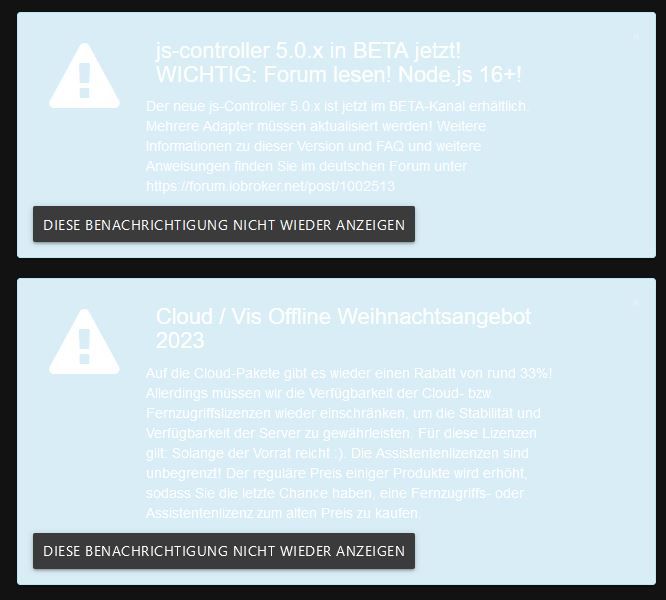 um dunkelmodus.
Pi4B, Pi3B+, Master-Slave, EchoPlus, 3xEchoDot, FireTVstick, Xiaomi Sensoren, Fritzbox, DECT200, HS100, ZBT-ExtendedColor (ALDI), Shelly 2.5, 2xZigBee-Router-Plugs, Sileno 500 smart, Somfy switch, IONIQ5, tibber
node.js: 22.21.0 - npm: 10.9.4 - linux: raspbian-trixie - admin 7.7.19 - vis 1.5.6 - js-controller: 7.0.7 -
@thomas-braun
Erstmal aber möchte ich mich für den superschellen Support herzlich bedanken. Das prasselte ja hier regelrecht rein.Ja wenn man jetzt im Ruhestand ist, möchte man sich eigentlich damit nicht mehr beschäftigen. Dafür ist die wenige Freizeit zu schade
Das System müte sich melden "Es gibt ein Update" und man stimmt nur zu, so wie mit den Adaptern. Das klappt ja oft auch nicht ohne nachträgliche Anpassungen.Anbei noch was mir aufgefallen ist unter Info, die Farbdarstellung. Ich habe Firefox und Admin
Schlecht zu lesen, auch in den anderen Farbschemen vom Admin.
um dunkelmodus.@klausiob sagte in VIS Lizenz nach neu Installation (linux update):
Das System müte sich melden "Es gibt ein Update"
Das kannst du dir skripten.
-
@klausiob sagte in VIS Lizenz nach neu Installation (linux update):
Das System müte sich melden "Es gibt ein Update"
Das kannst du dir skripten.
@thomas-braun
So neues Problem?$ iobroker upgrade shelly@6.6.1 Update shelly from @6.4.1 to @6.6.1 NPM version: 10.2.3 Installing iobroker.shelly@6.6.1... (System call) host.hsmart4 Cannot install iobroker.shelly@6.6.1: 217 ERROR: Process exited with code 25gleiche Problem bei tibber
$ iobroker upgrade tibberlink@1.6.1
Update tibberlink from @1.4.2 to @1.6.1
Installing iobroker.tibberlink@1.6.1... (System call)
host.hsmart4 Cannot install iobroker.tibberlink@1.6.1: 217
ERROR: Process exited with code 25
Muß man wissen was code 25 ist
Pi4B, Pi3B+, Master-Slave, EchoPlus, 3xEchoDot, FireTVstick, Xiaomi Sensoren, Fritzbox, DECT200, HS100, ZBT-ExtendedColor (ALDI), Shelly 2.5, 2xZigBee-Router-Plugs, Sileno 500 smart, Somfy switch, IONIQ5, tibber
node.js: 22.21.0 - npm: 10.9.4 - linux: raspbian-trixie - admin 7.7.19 - vis 1.5.6 - js-controller: 7.0.7 -
@thomas-braun
So neues Problem?$ iobroker upgrade shelly@6.6.1 Update shelly from @6.4.1 to @6.6.1 NPM version: 10.2.3 Installing iobroker.shelly@6.6.1... (System call) host.hsmart4 Cannot install iobroker.shelly@6.6.1: 217 ERROR: Process exited with code 25gleiche Problem bei tibber
$ iobroker upgrade tibberlink@1.6.1
Update tibberlink from @1.4.2 to @1.6.1
Installing iobroker.tibberlink@1.6.1... (System call)
host.hsmart4 Cannot install iobroker.tibberlink@1.6.1: 217
ERROR: Process exited with code 25
Muß man wissen was code 25 ist
@klausiob sagte in VIS Lizenz nach neu Installation (linux update):
Muß man wissen was code 25 ist
Bedeutet: Es gab einen Fehler. Näheres im angegebenen Log.
-
@thomas-braun
So neues Problem?$ iobroker upgrade shelly@6.6.1 Update shelly from @6.4.1 to @6.6.1 NPM version: 10.2.3 Installing iobroker.shelly@6.6.1... (System call) host.hsmart4 Cannot install iobroker.shelly@6.6.1: 217 ERROR: Process exited with code 25gleiche Problem bei tibber
$ iobroker upgrade tibberlink@1.6.1
Update tibberlink from @1.4.2 to @1.6.1
Installing iobroker.tibberlink@1.6.1... (System call)
host.hsmart4 Cannot install iobroker.tibberlink@1.6.1: 217
ERROR: Process exited with code 25
Muß man wissen was code 25 ist
@klausiob sagte in VIS Lizenz nach neu Installation (linux update):
Muß man wissen was code 25 ist
= "Es gibt ein Problem"

-
@thomas-braun
So neues Problem?$ iobroker upgrade shelly@6.6.1 Update shelly from @6.4.1 to @6.6.1 NPM version: 10.2.3 Installing iobroker.shelly@6.6.1... (System call) host.hsmart4 Cannot install iobroker.shelly@6.6.1: 217 ERROR: Process exited with code 25gleiche Problem bei tibber
$ iobroker upgrade tibberlink@1.6.1
Update tibberlink from @1.4.2 to @1.6.1
Installing iobroker.tibberlink@1.6.1... (System call)
host.hsmart4 Cannot install iobroker.tibberlink@1.6.1: 217
ERROR: Process exited with code 25
Muß man wissen was code 25 ist
Bist du da jetzt noch auf dem toten Pferd unterwegs?
Zeit abzusteigen. -
Bist du da jetzt noch auf dem toten Pferd unterwegs?
Zeit abzusteigen.@thomas-braun
ja habt ihr kein Weihnachten? Ich kann noch den js-controller auf 5.0.17 updaten aber dann muß ich noch den Weihnachtsbaum besorgen
Das Pferd ist doch nicht tot.
Im normalen log steht das gleiche drin.
Ist jetzt irgendeine Version zu hoch?Pi4B, Pi3B+, Master-Slave, EchoPlus, 3xEchoDot, FireTVstick, Xiaomi Sensoren, Fritzbox, DECT200, HS100, ZBT-ExtendedColor (ALDI), Shelly 2.5, 2xZigBee-Router-Plugs, Sileno 500 smart, Somfy switch, IONIQ5, tibber
node.js: 22.21.0 - npm: 10.9.4 - linux: raspbian-trixie - admin 7.7.19 - vis 1.5.6 - js-controller: 7.0.7 -
@thomas-braun
ja habt ihr kein Weihnachten? Ich kann noch den js-controller auf 5.0.17 updaten aber dann muß ich noch den Weihnachtsbaum besorgen
Das Pferd ist doch nicht tot.
Im normalen log steht das gleiche drin.
Ist jetzt irgendeine Version zu hoch?@klausiob sagte in VIS Lizenz nach neu Installation (linux update):
Das Pferd ist doch nicht tot.
natürlich!
buster lebt schon lange nicht mehr


Hey! Du scheinst an dieser Unterhaltung interessiert zu sein, hast aber noch kein Konto.
Hast du es satt, bei jedem Besuch durch die gleichen Beiträge zu scrollen? Wenn du dich für ein Konto anmeldest, kommst du immer genau dorthin zurück, wo du zuvor warst, und kannst dich über neue Antworten benachrichtigen lassen (entweder per E-Mail oder Push-Benachrichtigung). Du kannst auch Lesezeichen speichern und Beiträge positiv bewerten, um anderen Community-Mitgliedern deine Wertschätzung zu zeigen.
Mit deinem Input könnte dieser Beitrag noch besser werden 💗
Registrieren AnmeldenSupport us
335
Online33.0k
Benutzer83.6k
Themen1.3m
Beiträge