




Daikin Adapter
-
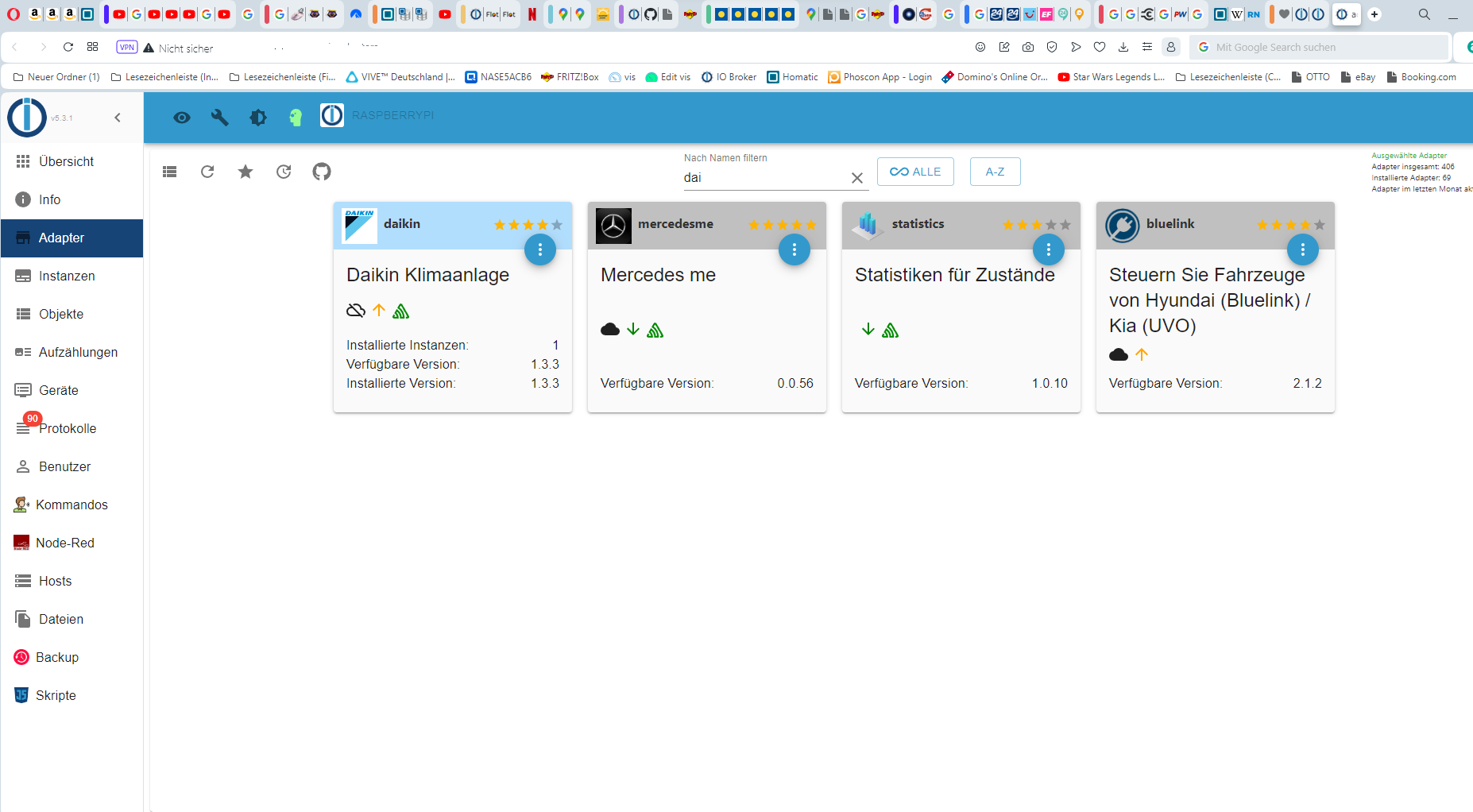
Ich benötige den cloud Adapter für Iobroker er ist nicht in der Adapterliste Bild 1
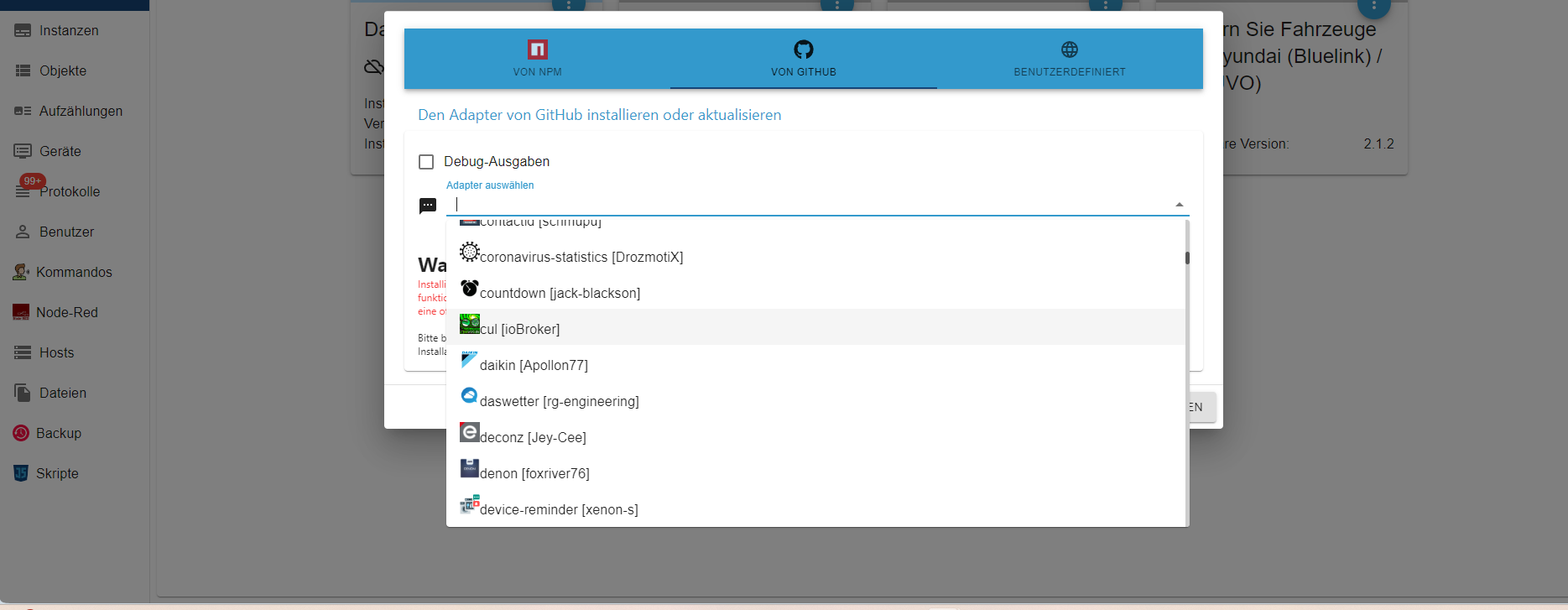
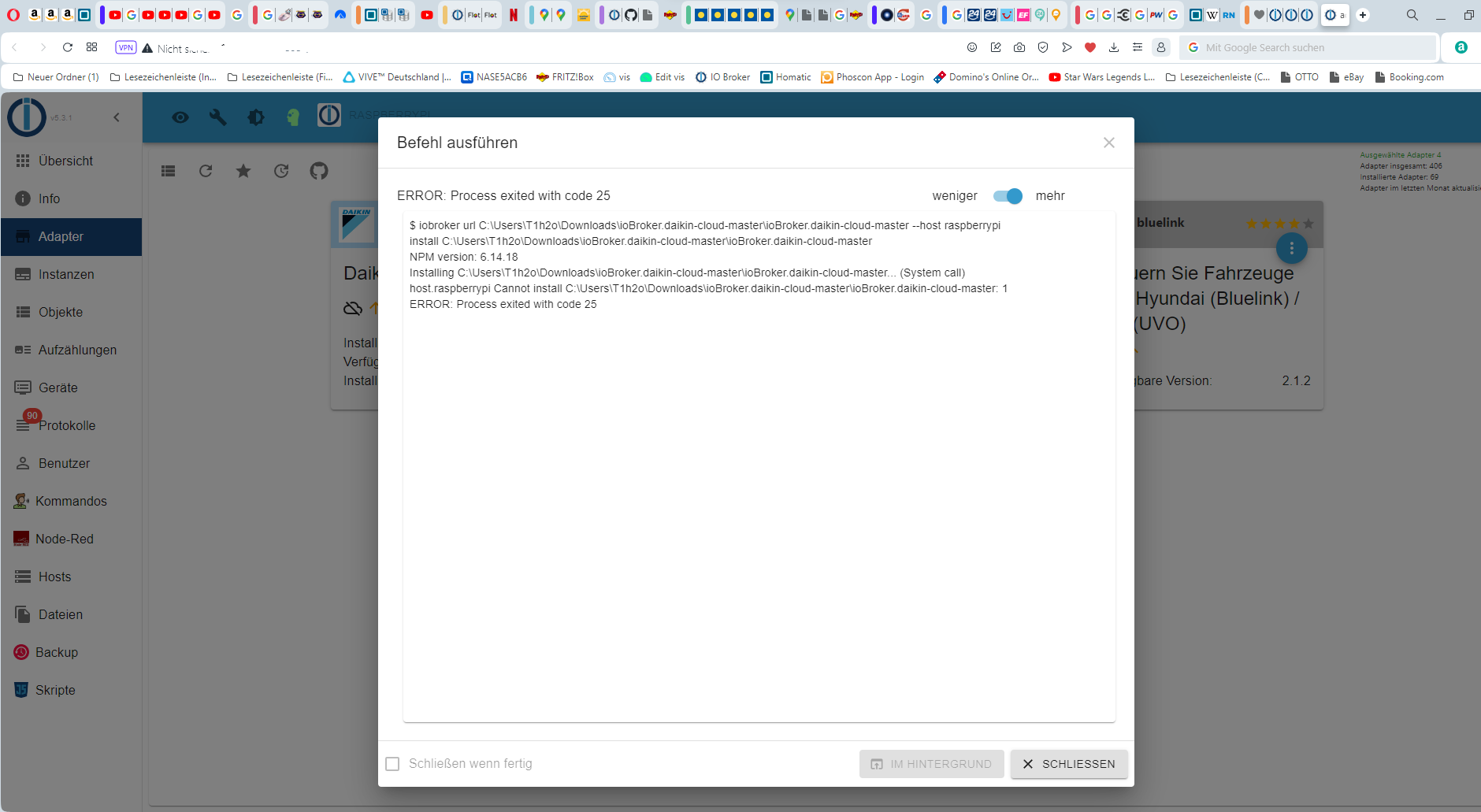
Bei suche in anderen Quellen Github ist ebenfalls nur ein Adapter gelistet Bild 2Bei der Installation bekomme ich folgende Fehlermeldung
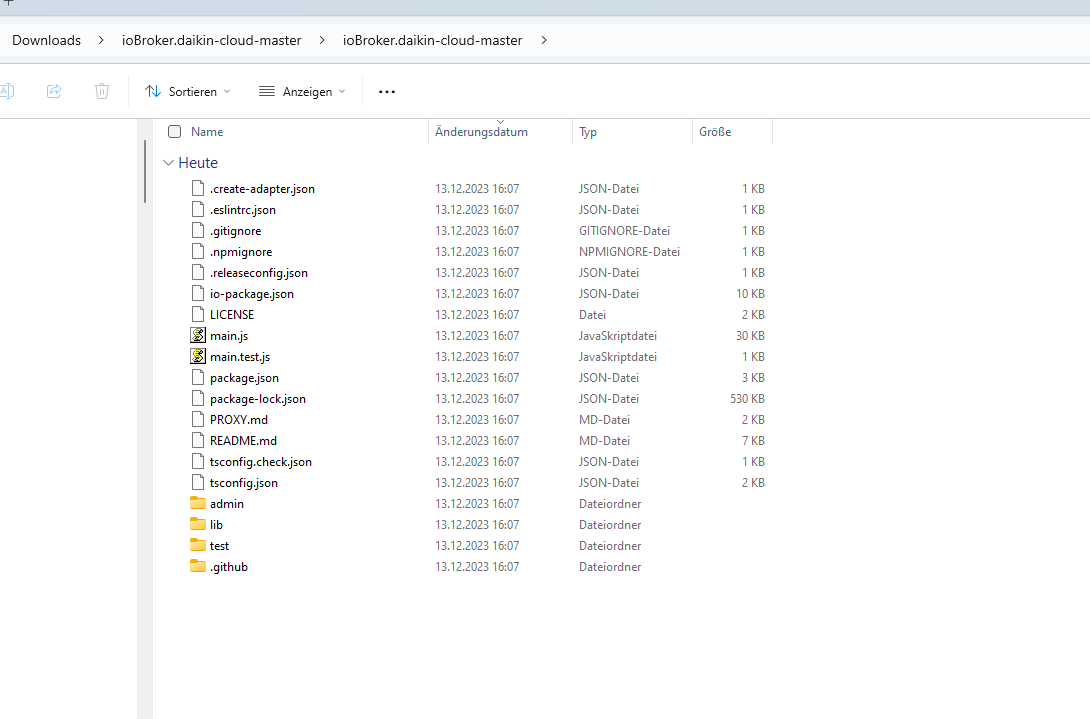
Down lode der Cloud Adapters geht aber ich weis aber nicht was ich für die installation als Datei wählen muss
@radix75 sagte in Daikin Adapter:
für Iobroker er ist nicht in der Adapterliste
doch, ist er.
@radix75 sagte in Daikin Adapter:
Down lode der Cloud Adapters geht
was machst du da?
Hast du da eine WIN Installation?
sieht im Screenshot so ausauch dass du 90 ERROR im log hast!
was steht da drin?bitte alle relevanten Infos geben!
https://forum.iobroker.net/topic/51555/hinweise-für-gute-forenbeiträge/1
-
Ich benötige den cloud Adapter für Iobroker er ist nicht in der Adapterliste Bild 1
Bei suche in anderen Quellen Github ist ebenfalls nur ein Adapter gelistet Bild 2Bei der Installation bekomme ich folgende Fehlermeldung
Down lode der Cloud Adapters geht aber ich weis aber nicht was ich für die installation als Datei wählen muss
@radix75 said in Daikin Adapter:
Ich benötige den cloud Adapter für Iobroker er ist nicht in der Adapterliste Bild 1
Bei suche in anderen Quellen Github ist ebenfalls nur ein Adapter gelistet Bild 2Bei der Installation bekomme ich folgende Fehlermeldung
Down lode der Cloud Adapters geht aber ich weis aber nicht was ich für die installation als Datei wählen muss
ich bin über den Broser auf meiner Raspi hier ist der Broker installiert
-
@radix75 said in Daikin Adapter:
Ich benötige den cloud Adapter für Iobroker er ist nicht in der Adapterliste Bild 1
Bei suche in anderen Quellen Github ist ebenfalls nur ein Adapter gelistet Bild 2Bei der Installation bekomme ich folgende Fehlermeldung
Down lode der Cloud Adapters geht aber ich weis aber nicht was ich für die installation als Datei wählen muss
ich bin über den Broser auf meiner Raspi hier ist der Broker installiert
@radix75 sagte in Daikin Adapter:
ich bin über den Broser auf meiner Raspi
dann geh mal per Konsole da drauf und ruf
iob diagauf.Den vollständigen Output dann hier in code-tags posten.
-
@radix75 sagte in Daikin Adapter:
ich bin über den Broser auf meiner Raspi
dann geh mal per Konsole da drauf und ruf
iob diagauf.Den vollständigen Output dann hier in code-tags posten.
@homoran pi@raspberrypi:~ $ iob diag
iobroker [command]Commands:
iobroker setup Setup ioBroker
iobroker start [all|<adapter>.<instance>] Starts the js-controller or a specified adapter instance
iobroker stop [<adapter>.<instance>] stops the js-controller or a specified adapter instance
iobroker restart [<adapter>.<instance>] Restarts js-controller or a specified adapter instance [aliases: r]
iobroker debug <adapter>[.<instance>] Starts a Node.js debugging session for the adapter instance
iobroker info Shows the host info
iobroker logs [<adapter>] Monitor log
iobroker add <adapter> [desiredNumber] Add instance of adapter [aliases: a]
iobroker install <adapter> Installs a specified adapter [aliases: i]
iobroker rebuild [<module>] Rebuild all native modules or path
iobroker url <url> [<name>] Install adapter from specified url, e.g. GitHub
iobroker del <adapter> Remove adapter and all instances from this host [aliases: delete]
iobroker del <adapter>.<instance> Remove adapter instance [aliases: delete]
iobroker update [<repositoryUrl>] Update repository and list adapters
iobroker upgrade Upgrade management
iobroker upload [all|<adapter>] Upload management [aliases: u]
iobroker object Object management [aliases: o]
iobroker state State management [aliases: s]
iobroker message <adapter>[.instance] <command> [<message>] Send message to adapter instance/s
iobroker list <type> [<filter>] List all entries, like objects
iobroker chmod <mode> <file> Change file rights
iobroker chown <user> <group> <file> Change file ownership
iobroker touch <file> Touch file
iobroker rm <file> Remove file
iobroker file File management
iobroker user User commands
iobroker group group management
iobroker host <hostname> Set host to given hostname
iobroker set <adapter>.<instance> Change settings of adapter config
iobroker license <license.file or license.text> Update license by given file
iobroker cert Certificate management
iobroker clean <yes> Clears all objects and states
iobroker backup Create backup
iobroker restore <backup name or path> Restore a specified backup
iobroker validate <backup name or path> Validate a specified backup
iobroker status [all|<adapter>.<instance>] Status of ioBroker or adapter instance [aliases: isrun]
iobroker repo [<name>] Show repo information
iobroker uuid Show uuid of the installation [aliases: id]
iobroker unsetup Reset license, installation secret and language
iobroker fix Execute the installation fixer script, this updates your ioBroker installation
iobroker multihost Multihost management
iobroker compact compact group management
iobroker plugin Plugin management
iobroker version [<adapter>] Show version of js-controller or specified adapter [aliases: v]Options:
--help Show help [boolean]
pi@raspberrypi:~ $ -
@homoran pi@raspberrypi:~ $ iob diag
iobroker [command]Commands:
iobroker setup Setup ioBroker
iobroker start [all|<adapter>.<instance>] Starts the js-controller or a specified adapter instance
iobroker stop [<adapter>.<instance>] stops the js-controller or a specified adapter instance
iobroker restart [<adapter>.<instance>] Restarts js-controller or a specified adapter instance [aliases: r]
iobroker debug <adapter>[.<instance>] Starts a Node.js debugging session for the adapter instance
iobroker info Shows the host info
iobroker logs [<adapter>] Monitor log
iobroker add <adapter> [desiredNumber] Add instance of adapter [aliases: a]
iobroker install <adapter> Installs a specified adapter [aliases: i]
iobroker rebuild [<module>] Rebuild all native modules or path
iobroker url <url> [<name>] Install adapter from specified url, e.g. GitHub
iobroker del <adapter> Remove adapter and all instances from this host [aliases: delete]
iobroker del <adapter>.<instance> Remove adapter instance [aliases: delete]
iobroker update [<repositoryUrl>] Update repository and list adapters
iobroker upgrade Upgrade management
iobroker upload [all|<adapter>] Upload management [aliases: u]
iobroker object Object management [aliases: o]
iobroker state State management [aliases: s]
iobroker message <adapter>[.instance] <command> [<message>] Send message to adapter instance/s
iobroker list <type> [<filter>] List all entries, like objects
iobroker chmod <mode> <file> Change file rights
iobroker chown <user> <group> <file> Change file ownership
iobroker touch <file> Touch file
iobroker rm <file> Remove file
iobroker file File management
iobroker user User commands
iobroker group group management
iobroker host <hostname> Set host to given hostname
iobroker set <adapter>.<instance> Change settings of adapter config
iobroker license <license.file or license.text> Update license by given file
iobroker cert Certificate management
iobroker clean <yes> Clears all objects and states
iobroker backup Create backup
iobroker restore <backup name or path> Restore a specified backup
iobroker validate <backup name or path> Validate a specified backup
iobroker status [all|<adapter>.<instance>] Status of ioBroker or adapter instance [aliases: isrun]
iobroker repo [<name>] Show repo information
iobroker uuid Show uuid of the installation [aliases: id]
iobroker unsetup Reset license, installation secret and language
iobroker fix Execute the installation fixer script, this updates your ioBroker installation
iobroker multihost Multihost management
iobroker compact compact group management
iobroker plugin Plugin management
iobroker version [<adapter>] Show version of js-controller or specified adapter [aliases: v]Options:
--help Show help [boolean]
pi@raspberrypi:~ $ -
@homoran pi@raspberrypi:~ $ iob diag
iobroker [command]Commands:
iobroker setup Setup ioBroker
iobroker start [all|<adapter>.<instance>] Starts the js-controller or a specified adapter instance
iobroker stop [<adapter>.<instance>] stops the js-controller or a specified adapter instance
iobroker restart [<adapter>.<instance>] Restarts js-controller or a specified adapter instance [aliases: r]
iobroker debug <adapter>[.<instance>] Starts a Node.js debugging session for the adapter instance
iobroker info Shows the host info
iobroker logs [<adapter>] Monitor log
iobroker add <adapter> [desiredNumber] Add instance of adapter [aliases: a]
iobroker install <adapter> Installs a specified adapter [aliases: i]
iobroker rebuild [<module>] Rebuild all native modules or path
iobroker url <url> [<name>] Install adapter from specified url, e.g. GitHub
iobroker del <adapter> Remove adapter and all instances from this host [aliases: delete]
iobroker del <adapter>.<instance> Remove adapter instance [aliases: delete]
iobroker update [<repositoryUrl>] Update repository and list adapters
iobroker upgrade Upgrade management
iobroker upload [all|<adapter>] Upload management [aliases: u]
iobroker object Object management [aliases: o]
iobroker state State management [aliases: s]
iobroker message <adapter>[.instance] <command> [<message>] Send message to adapter instance/s
iobroker list <type> [<filter>] List all entries, like objects
iobroker chmod <mode> <file> Change file rights
iobroker chown <user> <group> <file> Change file ownership
iobroker touch <file> Touch file
iobroker rm <file> Remove file
iobroker file File management
iobroker user User commands
iobroker group group management
iobroker host <hostname> Set host to given hostname
iobroker set <adapter>.<instance> Change settings of adapter config
iobroker license <license.file or license.text> Update license by given file
iobroker cert Certificate management
iobroker clean <yes> Clears all objects and states
iobroker backup Create backup
iobroker restore <backup name or path> Restore a specified backup
iobroker validate <backup name or path> Validate a specified backup
iobroker status [all|<adapter>.<instance>] Status of ioBroker or adapter instance [aliases: isrun]
iobroker repo [<name>] Show repo information
iobroker uuid Show uuid of the installation [aliases: id]
iobroker unsetup Reset license, installation secret and language
iobroker fix Execute the installation fixer script, this updates your ioBroker installation
iobroker multihost Multihost management
iobroker compact compact group management
iobroker plugin Plugin management
iobroker version [<adapter>] Show version of js-controller or specified adapter [aliases: v]Options:
--help Show help [boolean]
pi@raspberrypi:~ $@radix75
Klick mal auf Adapter aktualisisern (2tes von links)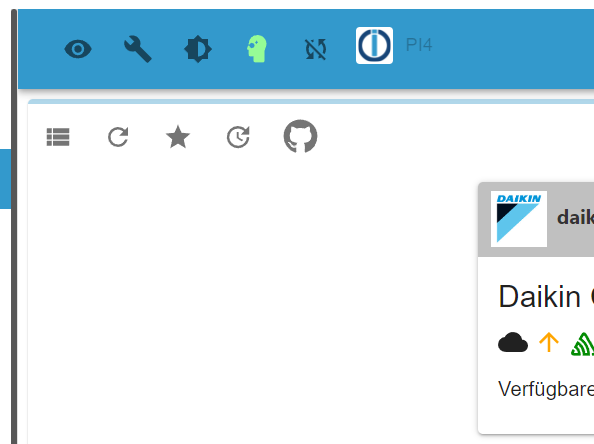
Und wenn dein system (noch) kein iobDiag kennt, könnte es ein wenig älter sein.
mach mal ein iob fix und versuch dann iob diag nochmal
Und verrat uns vorab mal welche node Version du einsetzt. Adapter erfordern node 16 minimum
Entwicklung u Betreuung: envertech-pv, hoymiles-ms, ns-client, pid, snmp Adapter;
Support Repositoryverwaltung.Wer 'nen Kaffee spendieren will: https://paypal.me
-
@radix75
Klick mal auf Adapter aktualisisern (2tes von links)Und wenn dein system (noch) kein iobDiag kennt, könnte es ein wenig älter sein.
mach mal ein iob fix und versuch dann iob diag nochmal
Und verrat uns vorab mal welche node Version du einsetzt. Adapter erfordern node 16 minimum
Jup - in deinem Feherbild steht npm 6.
Das bedeutet dass du noch node 14 fährst. Damit bist du am Abstellgleis - oder eher schon am Prellboch oder dahinter in der Wiese.ioBroker unterstütz zwische zeotlich nur merh node 16 und neuer, empfohlen ist node 18. Viele Adapter verlangen ebenfalls schon ndoe 18 oder neuer.
Ergo
Erst mal das System aktualisisern - dann kannst du über den Daikin Adapter nachdenken -
@radix75
Klick mal auf Adapter aktualisisern (2tes von links)Und wenn dein system (noch) kein iobDiag kennt, könnte es ein wenig älter sein.
mach mal ein iob fix und versuch dann iob diag nochmal
Und verrat uns vorab mal welche node Version du einsetzt. Adapter erfordern node 16 minimum
@mcm57 sagte in Daikin Adapter:
könnte es ein wenig älter sein.
so was schwebte mir vor
@mcm57 sagte in Daikin Adapter:
Erst mal das System aktualisisern - dann kannst du über den Daikin Adapter nachdenken
Ich würde deswegen gerne den aktuellen Status sehen.
kein Support per PN! - Fragen im Forum stellen - Benutzt das Voting rechts unten im Beitrag wenn er euch geholfen hat.
Das Forum freut sich über eine Spende. Benutzt dazu den Spendenbutton oben rechts. Danke!
der Installationsfixer: curl -fsL https://iobroker.net/fix.sh | bash - -
@mcm57 sagte in Daikin Adapter:
könnte es ein wenig älter sein.
so was schwebte mir vor
@mcm57 sagte in Daikin Adapter:
Erst mal das System aktualisisern - dann kannst du über den Daikin Adapter nachdenken
Ich würde deswegen gerne den aktuellen Status sehen.
Vermutlich ist eine Kernsanierung fällig.
Um OS-Keller angefangen bis zum iob-Dachgeschoß. -
Vermutlich ist eine Kernsanierung fällig.
Um OS-Keller angefangen bis zum iob-Dachgeschoß.@homoran said in Daikin Adapter:
@mcm57 sagte in Daikin Adapter:
könnte es ein wenig älter sein.
so was schwebte mir vor
@mcm57 sagte in Daikin Adapter:
Erst mal das System aktualisisern - dann kannst du über den Daikin Adapter nachdenken
Ich würde deswegen gerne den aktuellen Status sehen.
======== Start marking the full check here =========Skript v.2023-10-10 *** BASE SYSTEM *** Static hostname: raspberrypi Icon name: computer Operating System: Raspbian GNU/Linux 10 (buster) Kernel: Linux 5.10.103-v7l+ Architecture: arm Model : Raspberry Pi 4 Model B Rev 1.1 Docker : false Virtualization : none Kernel : armv7l Userland : armhf Systemuptime and Load: 18:04:49 up 50 days, 23:10, 2 users, load average: 2.42, 5.83, 7.14 CPU threads: 4 *** RASPBERRY THROTTLING *** Current issues: No throttling issues detected. Previously detected issues: ~ Under-voltage has occurred *** Time and Time Zones *** Local time: Wed 2023-12-13 18:04:49 CET Universal time: Wed 2023-12-13 17:04:49 UTC RTC time: Wed 2023-12-13 17:04:50 Time zone: Europe/Berlin (CET, +0100) System clock synchronized: yes NTP service: active RTC in local TZ: no *** User and Groups *** pi /home/pi pi adm dialout cdrom sudo audio video plugdev games users input netdev lpadmin gpio i2c spi iobroker *** X-Server-Setup *** X-Server: true Desktop: LXDE-pi Terminal: x11 Boot Target: graphical.target *** MEMORY *** total used free shared buff/cache available Mem: 3.8G 1.3G 1.7G 211M 743M 2.2G Swap: 99M 58M 41M Total: 3.9G 1.4G 1.8G 3787 M total memory 1298 M used memory 367 M active memory 1445 M inactive memory 1745 M free memory 140 M buffer memory 603 M swap cache 99 M total swap 58 M used swap 41 M free swap Raspberry only: oom events: 0 lifetime oom required: 0 Mbytes total time in oom handler: 0 ms max time spent in oom handler: 0 ms *** FAILED SERVICES *** UNIT LOAD ACTIVE SUB DESCRIPTION * dhcpcd.service loaded failed failed dhcpcd on all interfaces LOAD = Reflects whether the unit definition was properly loaded. ACTIVE = The high-level unit activation state, i.e. generalization of SUB. SUB = The low-level unit activation state, values depend on unit type. 1 loaded units listed. Pass --all to see loaded but inactive units, too. To show all installed unit files use 'systemctl list-unit-files'. *** FILESYSTEM *** Filesystem Type Size Used Avail Use% Mounted on /dev/root ext4 59G 27G 30G 48% / devtmpfs devtmpfs 1.7G 0 1.7G 0% /dev tmpfs tmpfs 1.9G 0 1.9G 0% /dev/shm tmpfs tmpfs 1.9G 175M 1.7G 10% /run tmpfs tmpfs 5.0M 4.0K 5.0M 1% /run/lock tmpfs tmpfs 1.9G 0 1.9G 0% /sys/fs/cgroup /dev/mmcblk0p1 vfat 253M 49M 204M 20% /boot tmpfs tmpfs 379M 4.0K 379M 1% /run/user/1000 Messages concerning ext4 filesystem in dmesg: [Mon Oct 23 19:54:16 2023] Kernel command line: coherent_pool=1M 8250.nr_uarts=1 snd_bcm2835.enable_compat_alsa=0 snd_bcm2835.enable_hdmi=1 video=HDMI-A-1:1280x1024M@60 smsc95xx.macaddr=DC:A6:32:49:AE:73 vc_mem.mem_base=0x3ec00000 vc_mem.mem_size=0x40000000 console=tty1 root=PARTUUID=2fef1976-02 rootfstype=ext4 elevator=deadline fsck.repair=yes rootwait quiet splash plymouth.ignore-serial-consoles [Mon Oct 23 19:54:16 2023] EXT4-fs (mmcblk0p2): INFO: recovery required on readonly filesystem [Mon Oct 23 19:54:16 2023] EXT4-fs (mmcblk0p2): write access will be enabled during recovery [Mon Oct 23 19:54:18 2023] EXT4-fs (mmcblk0p2): orphan cleanup on readonly fs [Mon Oct 23 19:54:18 2023] EXT4-fs (mmcblk0p2): 7 orphan inodes deleted [Mon Oct 23 19:54:18 2023] EXT4-fs (mmcblk0p2): recovery complete [Mon Oct 23 19:54:18 2023] EXT4-fs (mmcblk0p2): mounted filesystem with ordered data mode. Opts: (null) [Mon Oct 23 19:54:18 2023] VFS: Mounted root (ext4 filesystem) readonly on device 179:2. [Mon Oct 23 19:54:27 2023] EXT4-fs (mmcblk0p2): re-mounted. Opts: (null) Show mounted filesystems \(real ones only\): TARGET SOURCE FSTYPE OPTIONS / /dev/mmcblk0p2 ext4 rw,noatime |-/sys/fs/bpf none bpf rw,nosuid,nodev,noexec,relatime,mode=700 |-/run/user/1000/gvfs gvfsd-fuse fuse.gvfsd-fuse rw,nosuid,nodev,relatime,user_id=1000,group_id=1000 |-/boot /dev/mmcblk0p1 vfat rw,relatime,fmask=0022,dmask=0022,codepage=437,iocharset=ascii,shortname=mixed,errors=remount-ro `-/var/lib/lxcfs lxcfs fuse.lxcfs rw,nosuid,nodev,relatime,user_id=0,group_id=0,allow_other Files in neuralgic directories: /var: 4.9G /var/ 3.7G /var/cache/apt/archives 3.7G /var/cache/apt 3.7G /var/cache 739M /var/lib Archived and active journals take up 173.7M in the file system. /opt/iobroker/backups: 9.6G /opt/iobroker/backups/ 4.0K /opt/iobroker/backups/redistmp /opt/iobroker/iobroker-data: 625M /opt/iobroker/iobroker-data/ 462M /opt/iobroker/iobroker-data/files 120M /opt/iobroker/iobroker-data/files/javascript.admin 102M /opt/iobroker/iobroker-data/files/javascript.admin/static 101M /opt/iobroker/iobroker-data/files/javascript.admin/static/js The five largest files in iobroker-data are: 18M /opt/iobroker/iobroker-data/files/devices.admin/static/js/2.3257a139.chunk.js.map 12M /opt/iobroker/iobroker-data/files/javascript.admin/static/js/2.b7bbd921.chunk.js.map 9.8M /opt/iobroker/iobroker-data/files/javascript.admin/static/js/2.f6fd0e72.chunk.js.map 9.5M /opt/iobroker/iobroker-data/files/javascript.admin/static/js/2.0ffea560.chunk.js.map 8.9M /opt/iobroker/iobroker-data/files/javascript.admin/static/js/2.c2161e55.chunk.js.map USB-Devices by-id: USB-Sticks - Avoid direct links to /dev/* in your adapter setups, please always prefer the links 'by-id': /dev/serial/by-id/usb-dresden_elektronik_ingenieurtechnik_GmbH_ConBee_II_DE1962617-if00 *** NodeJS-Installation *** /usr/bin/nodejs v14.21.3 /usr/bin/node v14.21.3 /usr/bin/npm 6.14.18 /usr/bin/npx 6.14.18 /usr/bin/corepack 0.15.1 nodejs: Installed: 14.21.3-deb-1nodesource1 Candidate: 14.21.3-deb-1nodesource1 Version table: *** 14.21.3-deb-1nodesource1 500 500 https://deb.nodesource.com/node_14.x buster/main armhf Packages 100 /var/lib/dpkg/status 10.24.0~dfsg-1~deb10u3 500 500 http://raspbian.raspberrypi.org/raspbian buster/main armhf Packages Temp directories causing npm8 problem: 0 No problems detected Errors in npm tree:


Hey! Du scheinst an dieser Unterhaltung interessiert zu sein, hast aber noch kein Konto.
Hast du es satt, bei jedem Besuch durch die gleichen Beiträge zu scrollen? Wenn du dich für ein Konto anmeldest, kommst du immer genau dorthin zurück, wo du zuvor warst, und kannst dich über neue Antworten benachrichtigen lassen (entweder per E-Mail oder Push-Benachrichtigung). Du kannst auch Lesezeichen speichern und Beiträge positiv bewerten, um anderen Community-Mitgliedern deine Wertschätzung zu zeigen.
Mit deinem Input könnte dieser Beitrag noch besser werden 💗
Registrieren AnmeldenSupport us
299
Online33.0k
Benutzer83.6k
Themen1.3m
Beiträge