




Shelly Plus 1PM über MQTTund Node Red schalten
-
Hallo
Ich versuche schon ein paar Tage meinen Shelly Plus 1PM zu schalten.
Der Shelly soll über Mosquito und Node Red über den Node mqtt-out geschaltet werden.
Habe schon vieles versucht aber es geht nicht.
Habe im Netz folgendes gefunden.shellyplus1pm-3c610579ce9c/rpc/{"id":0, "src":"user_1", "method":"Switch.Set", "params":{"id":0,"on":true}}Ich kann den Shelly über Mosquito - Node Red mqtt-in Spannung,Leistung,Strom und ob er Ein oder Aus ist abfragen.
[
    {
        "id": "964735a35b7aa98a",
        "type": "debug",
        "z": "f82aa93122621ea5",
        "name": "Spannung",
        "active": true,
        "tosidebar": true,
        "console": false,
        "tostatus": false,
        "complete": "payload",
        "targetType": "msg",
        "statusVal": "",
        "statusType": "auto",
        "x": 950,
        "y": 100,
        "wires": []
    },
    {
        "id": "c2565c95cb85bf8f",
        "type": "change",
        "z": "f82aa93122621ea5",
        "name": "",
        "rules": [
            {
                "t": "set",
                "p": "payload",
                "pt": "msg",
                "to": "payload.voltage",
                "tot": "msg"
            }
        ],
        "action": "",
        "property": "",
        "from": "",
        "to": "",
        "reg": false,
        "x": 710,
        "y": 100,
        "wires": [
            [
                "964735a35b7aa98a"
            ]
        ]
    },
    {
        "id": "29acf3fe02d623fd",
        "type": "json",
        "z": "f82aa93122621ea5",
        "name": "",
        "property": "payload",
        "action": "",
        "pretty": false,
        "x": 490,
        "y": 100,
        "wires": [
            [
                "6dab402eca743cf0",
                "c2565c95cb85bf8f",
                "de25efb695d82cbc",
                "863b0621f826911d"
            ]
        ]
    },
    {
        "id": "d95a1c0e2ab9a70d",
        "type": "mqtt in",
        "z": "f82aa93122621ea5",
        "name": "",
        "topic": "shellyplus1pm-3c610579ce9c/status/switch:0",
        "qos": "0",
        "datatype": "auto",
        "broker": "1239431927fd4b8e",
        "nl": false,
        "rap": true,
        "rh": 0,
        "inputs": 0,
        "x": 190,
        "y": 100,
        "wires": [
            [
                "29acf3fe02d623fd",
                "43e928ccc34ec5dd"
            ]
        ]
    },
    {
        "id": "6dab402eca743cf0",
        "type": "debug",
        "z": "f82aa93122621ea5",
        "name": "json",
        "active": false,
        "tosidebar": true,
        "console": false,
        "tostatus": false,
        "complete": "payload",
        "targetType": "msg",
        "statusVal": "",
        "statusType": "auto",
        "x": 670,
        "y": 40,
        "wires": []
    },
    {
        "id": "43e928ccc34ec5dd",
        "type": "debug",
        "z": "f82aa93122621ea5",
        "name": "debug 8",
        "active": false,
        "tosidebar": true,
        "console": false,
        "tostatus": false,
        "complete": "false",
        "statusVal": "",
        "statusType": "auto",
        "x": 480,
        "y": 40,
        "wires": []
    },
    {
        "id": "7a62379f4c8012f7",
        "type": "debug",
        "z": "f82aa93122621ea5",
        "name": "Leistung",
        "active": true,
        "tosidebar": true,
        "console": false,
        "tostatus": false,
        "complete": "payload",
        "targetType": "msg",
        "statusVal": "",
        "statusType": "auto",
        "x": 940,
        "y": 180,
        "wires": []
    },
    {
        "id": "de25efb695d82cbc",
        "type": "change",
        "z": "f82aa93122621ea5",
        "name": "",
        "rules": [
            {
                "t": "set",
                "p": "payload",
                "pt": "msg",
                "to": "payload.apower",
                "tot": "msg"
            }
        ],
        "action": "",
        "property": "",
        "from": "",
        "to": "",
        "reg": false,
        "x": 710,
        "y": 180,
        "wires": [
            [
                "7a62379f4c8012f7"
            ]
        ]
    },
    {
        "id": "863b0621f826911d",
        "type": "change",
        "z": "f82aa93122621ea5",
        "name": "",
        "rules": [
            {
                "t": "set",
                "p": "payload",
                "pt": "msg",
                "to": "payload.output",
                "tot": "msg"
            }
        ],
        "action": "",
        "property": "",
        "from": "",
        "to": "",
        "reg": false,
        "x": 730,
        "y": 260,
        "wires": [
            [
                "f922a276b14e3074"
            ]
        ]
    },
    {
        "id": "f922a276b14e3074",
        "type": "debug",
        "z": "f82aa93122621ea5",
        "name": "Schaltstatus",
        "active": true,
        "tosidebar": true,
        "console": false,
        "tostatus": false,
        "complete": "payload",
        "targetType": "msg",
        "statusVal": "",
        "statusType": "auto",
        "x": 950,
        "y": 260,
        "wires": []
    },
    {
        "id": "1239431927fd4b8e",
        "type": "mqtt-broker",
        "name": "",
        "broker": "192.168.2.6",
        "port": "1883",
        "clientid": "",
        "autoConnect": true,
        "usetls": false,
        "protocolVersion": "4",
        "keepalive": "60",
        "cleansession": true,
        "birthTopic": "",
        "birthQos": "0",
        "birthPayload": "",
        "birthMsg": {},
        "closeTopic": "",
        "closeQos": "0",
        "closePayload": "",
        "closeMsg": {},
        "willTopic": "",
        "willQos": "0",
        "willPayload": "",
        "willMsg": {},
        "userProps": "",
        "sessionExpiry": ""
    }
]
Braue mal ein paar Denkanstöße oder ein Flow währen auch nicht schlecht.
Gruß NetFritz -
Hallo
Ich versuche schon ein paar Tage meinen Shelly Plus 1PM zu schalten.
Der Shelly soll über Mosquito und Node Red über den Node mqtt-out geschaltet werden.
Habe schon vieles versucht aber es geht nicht.
Habe im Netz folgendes gefunden.shellyplus1pm-3c610579ce9c/rpc/{"id":0, "src":"user_1", "method":"Switch.Set", "params":{"id":0,"on":true}}Ich kann den Shelly über Mosquito - Node Red mqtt-in Spannung,Leistung,Strom und ob er Ein oder Aus ist abfragen.
[
    {
        "id": "964735a35b7aa98a",
        "type": "debug",
        "z": "f82aa93122621ea5",
        "name": "Spannung",
        "active": true,
        "tosidebar": true,
        "console": false,
        "tostatus": false,
        "complete": "payload",
        "targetType": "msg",
        "statusVal": "",
        "statusType": "auto",
        "x": 950,
        "y": 100,
        "wires": []
    },
    {
        "id": "c2565c95cb85bf8f",
        "type": "change",
        "z": "f82aa93122621ea5",
        "name": "",
        "rules": [
            {
                "t": "set",
                "p": "payload",
                "pt": "msg",
                "to": "payload.voltage",
                "tot": "msg"
            }
        ],
        "action": "",
        "property": "",
        "from": "",
        "to": "",
        "reg": false,
        "x": 710,
        "y": 100,
        "wires": [
            [
                "964735a35b7aa98a"
            ]
        ]
    },
    {
        "id": "29acf3fe02d623fd",
        "type": "json",
        "z": "f82aa93122621ea5",
        "name": "",
        "property": "payload",
        "action": "",
        "pretty": false,
        "x": 490,
        "y": 100,
        "wires": [
            [
                "6dab402eca743cf0",
                "c2565c95cb85bf8f",
                "de25efb695d82cbc",
                "863b0621f826911d"
            ]
        ]
    },
    {
        "id": "d95a1c0e2ab9a70d",
        "type": "mqtt in",
        "z": "f82aa93122621ea5",
        "name": "",
        "topic": "shellyplus1pm-3c610579ce9c/status/switch:0",
        "qos": "0",
        "datatype": "auto",
        "broker": "1239431927fd4b8e",
        "nl": false,
        "rap": true,
        "rh": 0,
        "inputs": 0,
        "x": 190,
        "y": 100,
        "wires": [
            [
                "29acf3fe02d623fd",
                "43e928ccc34ec5dd"
            ]
        ]
    },
    {
        "id": "6dab402eca743cf0",
        "type": "debug",
        "z": "f82aa93122621ea5",
        "name": "json",
        "active": false,
        "tosidebar": true,
        "console": false,
        "tostatus": false,
        "complete": "payload",
        "targetType": "msg",
        "statusVal": "",
        "statusType": "auto",
        "x": 670,
        "y": 40,
        "wires": []
    },
    {
        "id": "43e928ccc34ec5dd",
        "type": "debug",
        "z": "f82aa93122621ea5",
        "name": "debug 8",
        "active": false,
        "tosidebar": true,
        "console": false,
        "tostatus": false,
        "complete": "false",
        "statusVal": "",
        "statusType": "auto",
        "x": 480,
        "y": 40,
        "wires": []
    },
    {
        "id": "7a62379f4c8012f7",
        "type": "debug",
        "z": "f82aa93122621ea5",
        "name": "Leistung",
        "active": true,
        "tosidebar": true,
        "console": false,
        "tostatus": false,
        "complete": "payload",
        "targetType": "msg",
        "statusVal": "",
        "statusType": "auto",
        "x": 940,
        "y": 180,
        "wires": []
    },
    {
        "id": "de25efb695d82cbc",
        "type": "change",
        "z": "f82aa93122621ea5",
        "name": "",
        "rules": [
            {
                "t": "set",
                "p": "payload",
                "pt": "msg",
                "to": "payload.apower",
                "tot": "msg"
            }
        ],
        "action": "",
        "property": "",
        "from": "",
        "to": "",
        "reg": false,
        "x": 710,
        "y": 180,
        "wires": [
            [
                "7a62379f4c8012f7"
            ]
        ]
    },
    {
        "id": "863b0621f826911d",
        "type": "change",
        "z": "f82aa93122621ea5",
        "name": "",
        "rules": [
            {
                "t": "set",
                "p": "payload",
                "pt": "msg",
                "to": "payload.output",
                "tot": "msg"
            }
        ],
        "action": "",
        "property": "",
        "from": "",
        "to": "",
        "reg": false,
        "x": 730,
        "y": 260,
        "wires": [
            [
                "f922a276b14e3074"
            ]
        ]
    },
    {
        "id": "f922a276b14e3074",
        "type": "debug",
        "z": "f82aa93122621ea5",
        "name": "Schaltstatus",
        "active": true,
        "tosidebar": true,
        "console": false,
        "tostatus": false,
        "complete": "payload",
        "targetType": "msg",
        "statusVal": "",
        "statusType": "auto",
        "x": 950,
        "y": 260,
        "wires": []
    },
    {
        "id": "1239431927fd4b8e",
        "type": "mqtt-broker",
        "name": "",
        "broker": "192.168.2.6",
        "port": "1883",
        "clientid": "",
        "autoConnect": true,
        "usetls": false,
        "protocolVersion": "4",
        "keepalive": "60",
        "cleansession": true,
        "birthTopic": "",
        "birthQos": "0",
        "birthPayload": "",
        "birthMsg": {},
        "closeTopic": "",
        "closeQos": "0",
        "closePayload": "",
        "closeMsg": {},
        "willTopic": "",
        "willQos": "0",
        "willPayload": "",
        "willMsg": {},
        "userProps": "",
        "sessionExpiry": ""
    }
]
Braue mal ein paar Denkanstöße oder ein Flow währen auch nicht schlecht.
Gruß NetFritz -
@netfritz Inzwischen solltest Du die Shellies direkt über einen command Ast schalten können:


über den rpc Datenpunkt kannst Du auch schalten, musst Du aber nicht mehr.
-
@mickym Hi, ich sitz jetzt seit 3h dran
 . Kannst du mir den Inhalt von z.B off schicken und der MqttOut posten?
@philipp-5 Na so wie Du es in der Abbildung siehst. Am Anfang steht halt dein Shelly und dann
..../command/switch:0halt mit den Doppelpunkt und Deinem Pfad zum Gerät
-
@philipp-5 Na so wie Du es in der Abbildung siehst. Am Anfang steht halt dein Shelly und dann
..../command/switch:0halt mit den Doppelpunkt und Deinem Pfad zum Gerät
-
@philipp-5 ja off/on/toogle also EINS von den dreien. Aber nur wenn es ein Gerät der 2. Generation ist. Bei Geräten der 1. Generation ist der Pfad anders. Was hast Du denn?
-
@philipp-5 ja off/on/toogle also EINS von den dreien. Aber nur wenn es ein Gerät der 2. Generation ist. Bei Geräten der 1. Generation ist der Pfad anders. Was hast Du denn?
-
@mickym Hab einen Plug S. Danke dir.. Ich glaube dann liegt mein Problem woanders.
Kann ihn auslesen aber über command geht nichts.
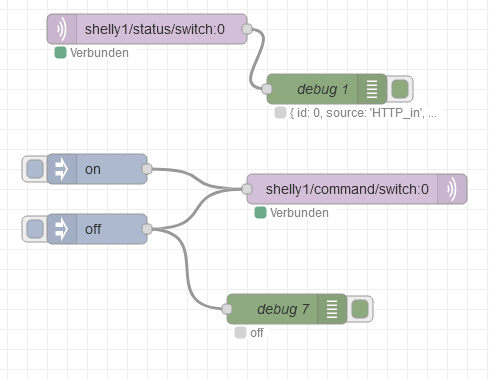
@philipp-5 Na die PlugS sind vielleicht Generation 1 - warte da schaut das anders aus. Da musst Du das command unter relay/0 machen.

Also
.../relay/0/command -
@philipp-5 Na die PlugS sind vielleicht Generation 1 - warte da schaut das anders aus. Da musst Du das command unter relay/0 machen.
Also
.../relay/0/command -
@mickym
:man-facepalming:
oh man...
ich mach erstmal feierabend für Heute. Hast mir trotzdem schon geholfen, vielen Dank!@philipp-5 Hat es geklappt?
-
@philipp-5 Hat es geklappt?
-
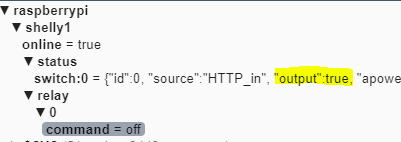
Na ich seh schon - das ist eine 2.Generation - aber es fehlt das command topic!!!
shelly1/command/switch:0Ich seh kein command Ast

Wichtig ist, dass die neueste Firmware drauf ist - die ersten konnten das noch nicht, da musstest Du über den rpc Punkt gehen.
-
@mickym
Hi,
hab es eben nochmal versucht und einfach mal einen Factory-Reset durchgeführt.
Jetzt gehen die ".../command/swich:0" Befehle auf wundersame weise. Es gibt gerade eine optionale Beta-Firmware. Vielleicht hängt es damit zusammen.
Danke dir trotzdem für die Hilfe!

Hey! Du scheinst an dieser Unterhaltung interessiert zu sein, hast aber noch kein Konto.
Hast du es satt, bei jedem Besuch durch die gleichen Beiträge zu scrollen? Wenn du dich für ein Konto anmeldest, kommst du immer genau dorthin zurück, wo du zuvor warst, und kannst dich über neue Antworten benachrichtigen lassen (entweder per E-Mail oder Push-Benachrichtigung). Du kannst auch Lesezeichen speichern und Beiträge positiv bewerten, um anderen Community-Mitgliedern deine Wertschätzung zu zeigen.
Mit deinem Input könnte dieser Beitrag noch besser werden 💗
Registrieren AnmeldenSupport us
403
Online33.0k
Benutzer83.6k
Themen1.3m
Beiträge