




Sonoff zbbridge pro mit Tastmota und ZigBee-Adapter

-
die 3 Status Meldungen scheinen nur nach dem Neustart einmalig in der Console zu erscheinen.
Boote mal neu und schau was im Log steht. -
die 3 Status Meldungen scheinen nur nach dem Neustart einmalig in der Console zu erscheinen.
Boote mal neu und schau was im Log steht.@ralla66 Wenn ich den Auto-configuration auf Sonoff ZBPro stelle, erhalte ich nach einem Neustart auch die Meldungen.
00:00:00.003 HDW: ESP32-D0WD-V3 v3.0
00:00:00.207 UFS: FlashFS mounted with 408 kB free
00:00:00.239 CFG: Loaded from File, Count 39
00:00:00.241 FRC: Some settings have been reset (2)
00:00:00.246 I2C: Bus1 using GPIO26(SCL) and GPIO25(SDA)
00:00:00.392 BRY: Berry initialized, RAM used=3932 bytes
00:00:00.457 TFS: File '.drvset003' not found
00:00:00.465 Project tasmota - Tasmota Version 13.2.0.1(zbbrdgpro)-2_0_14(2023-10-27T15:39:53)
00:00:01.183 WIF: Connecting to AP1 FRITZ!Box 7590 2.4 Channel 1 BSSId 2C:3A:FD:FB:F0:6E in mode 11n as tasmota-6063A4-0932...
00:00:03.005 WIF: Connected
00:00:03.262 HTP: Web server active on tasmota-6063A4-0932 with IP address 192.168.178.86
08:37:35.244 RSL: INFO1 = {"Info1":{"Module":"Sonoff Zigbee Pro","Version":"13.2.0.1(zbbrdgpro)","FallbackTopic":"cmnd/DVES_6063A4_fb/","GroupTopic":"cmnd/tasmotas/"}}
08:37:35.259 RSL: INFO2 = {"Info2":{"WebServerMode":"Admin","Hostname":"tasmota-6063A4-0932","IPAddress":"192.168.178.86","IP6Global":"","IP6Local":"fe80::4222:d8ff:fe60:63a4"}}
08:37:35.273 RSL: INFO3 = {"Info3":{"RestartReason":"Software reset CPU","BootCount":19}}
08:37:35.296 RUL: SYSTEM#BOOT performs "TCPStart 8888"
08:37:35.299 RSL: RESULT = {"Command":"Error"}
08:37:37.753 QPC: Reset
08:37:39.749 RSL: STATE = {"Time":"2023-10-28T08:37:39","Uptime":"0T00:00:09","UptimeSec":9,"Heap":165,"SleepMode":"Dynamic","Sleep":50,"LoadAvg":20,"MqttCount":0,"Berry":{"HeapUsed":3,"Objects":43},"Wifi":{"AP":1,"SSId":"FRITZ!Box 7590 2.4","BSSId":"2C:3A:FD:FB:F0:6E","Channel":1,"Mode":"11n","RSSI":100,"Signal":-28,"LinkCount":1,"Downtime":"0T00:00:04"}}
08:37:46.745 ZIG: rebooting ZNP device
08:37:49.397 RSL: RESULT = {"ZbState":{"Status":1,"Message":"CCxxxx ZNP booted","RestartReason":"Power-up","MajorRel":2,"MinorRel":7}}
08:37:49.597 RSL: RESULT = {"ZbState":{"Status":50,"MajorRel":2,"MinorRel":7,"MaintRel":1,"Revision":20230507}}
08:37:49.747 RSL: RESULT = {"ZbState":{"Status":2,"Message":"Resetting configuration"}}
08:37:51.997 RSL: RESULT = {"ZbState":{"Status":3,"Message":"Configured, starting coordinator"}}
08:37:56.197 RSL: RESULT = {"ZbState":{"Status":40,"NewState":9,"Message":"Started as coordinator"}}
08:37:56.297 RSL: RESULT = {"ZbState":{"Status":51,"IEEEAddr":"0x00124B00257B0374","ShortAddr":"0x0000","DeviceType":7,"DeviceState":9,"NumAssocDevices":0}}
08:37:56.797 RSL: RESULT = {"ZbState":{"Status":0,"Message":"Started"}}
08:37:56.800 ZIG: Zigbee started
08:37:56.808 ZIG: No Zigbee device information
08:37:56.811 ZIG: No Zigbee device data
08:37:56.813 ZIG: ZbLoad '<internal_plugin>' loaded successfully
Mit dier Einstellung bekomme ich aber keine Verbindung vom ioBroker zur Bridge aufgebaut.
Mit der Auto-configuration Sonoff ZBPro TCP bekomme ich keinerlei Meldungen bezüglich dem Chip, dafür kann die Verbindung wieder hergestellt werden. Zumindest steht das Connect drin.00:00:00.003 HDW: ESP32-D0WD-V3 v3.0 00:00:00.200 UFS: FlashFS mounted with 408 kB free 00:00:00.232 CFG: Loaded from File, Count 41 00:00:00.233 FRC: Some settings have been reset (2) 00:00:00.239 I2C: Bus1 using GPIO26(SCL) and GPIO25(SDA) 00:00:00.381 BRY: Berry initialized, RAM used=3936 bytes 00:00:00.450 TFS: File '.drvset003' not found 00:00:00.459 Project tasmota - Tasmota Version 13.2.0.1(zbbrdgpro)-2_0_14(2023-10-27T15:39:53) 00:00:01.195 WIF: Connecting to AP1 FRITZ!Box 7590 2.4 Channel 1 BSSId 2C:3A:FD:FB:F0:6E in mode 11n as tasmota-6063A4-0932... 00:00:03.020 WIF: Connected 00:00:03.276 HTP: Web server active on tasmota-6063A4-0932 with IP address 192.168.178.86 08:43:49.260 RSL: INFO1 = {"Info1":{"Module":"TCP ZBBridge Pro","Version":"13.2.0.1(zbbrdgpro)","FallbackTopic":"cmnd/DVES_6063A4_fb/","GroupTopic":"cmnd/tasmotas/"}} 08:43:49.275 RSL: INFO2 = {"Info2":{"WebServerMode":"Admin","Hostname":"tasmota-6063A4-0932","IPAddress":"192.168.178.86","IP6Global":"","IP6Local":"fe80::4222:d8ff:fe60:63a4"}} 08:43:49.289 RSL: INFO3 = {"Info3":{"RestartReason":"Software reset CPU","BootCount":20}} 08:43:49.312 RUL: SYSTEM#BOOT performs "TCPStart 8888" 08:43:49.314 TCP: Starting TCP server on port 8888 08:43:49.318 RSL: RESULT = {"TCPStart":"Done"} 08:43:51.779 QPC: Reset 08:43:53.794 RSL: STATE = {"Time":"2023-10-28T08:43:53","Uptime":"0T00:00:09","UptimeSec":9,"Heap":165,"SleepMode":"Dynamic","Sleep":50,"LoadAvg":19,"MqttCount":0,"Berry":{"HeapUsed":3,"Objects":43},"Wifi":{"AP":1,"SSId":"FRITZ!Box 7590 2.4","BSSId":"2C:3A:FD:FB:F0:6E","Channel":1,"Mode":"11n","RSSI":100,"Signal":-31,"LinkCount":1,"Downtime":"0T00:00:04"}} 08:44:18.576 TCP: Got connection from 192.168.178.36Jetzt die Frage: Sollte ich in der Tasmota console Zigbee infos angezeigt bekommen, wenn die Bridge auf TCP eingestellt ist?
Mir scheint ja fast, dass etwas mit den GPIO Einstellungen nicht passt. So als ob entweder eine c2652 Verbindung XOR eine TCP Verbindung aufgebaut werden kann.Hier auch nochmal der Log vom ioBroker, mit der TCP Einstellung auf der Bridge:
2023-10-28 09:51:42.548 - info: zigbee.0 (14273) starting. Version 1.8.24 (non-npm: ioBroker/ioBroker.zigbee) in /opt/iobroker/node_modules/iobroker.zigbee, node: v16.20.2, js-controller: 5.0.12 2023-10-28 09:51:42.597 - info: zigbee.0 (14273) delete old Backup files. keep only last 10 2023-10-28 09:51:42.598 - info: zigbee.0 (14273) Starting Zigbee npm ... 2023-10-28 09:51:42.733 - info: zigbee.0 (14273) Installed Version: ioBroker/ioBroker.zigbee 2023-10-28 09:53:01.043 - info: admin.0 (6349) ==> Connected system.user.admin from ::ffff:192.168.178.89 2023-10-28 09:53:01.165 - error: zigbee.0 (14273) getGroups: caught error: TypeError: Cannot read properties of undefined (reading 'getGroups') 2023-10-28 09:53:01.403 - info: zigbee.0 (14273) List of port: [{"path":"/dev/ttyS10"},{"path":"/dev/ttyS11"},{"path":"/dev/ttyS12"},{"path":"/dev/ttyS13"},{"path":"/dev/ttyS14"},{"path":"/dev/ttyS15"},{"path":"/dev/ttyS16"},{"path":"/dev/ttyS17"},{"path":"/dev/ttyS18"},{"path":"/dev/ttyS19"},{"path":"/dev/ttyS2"},{"path":"/dev/ttyS20"},{"path":"/dev/ttyS21"},{"path":"/dev/ttyS22"},{"path":"/dev/ttyS23"},{"path":"/dev/ttyS24"},{"path":"/dev/ttyS25"},{"path":"/dev/ttyS26"},{"path":"/dev/ttyS27"},{"path":"/dev/ttyS28"},{"path":"/dev/ttyS29"},{"path":"/dev/ttyS3"},{"path":"/dev/ttyS30"},{"path":"/dev/ttyS31"},{"path":"/dev/ttyS4"},{"path":"/dev/ttyS5"},{"path":"/dev/ttyS6"},{"path":"/dev/ttyS7"},{"path":"/dev/ttyS8"},{"path":"/dev/ttyS9"},{"path":"/dev/ttyS0"},{"path":"/dev/ttyS1"}] 2023-10-28 09:53:07.422 - info: admin.0 (6349) <== Disconnect system.user.admin from ::ffff:192.168.178.89 2023-10-28 09:53:09.031 - info: host.smarthome-VM stopInstance system.adapter.zigbee.0 (force=false, process=true) 2023-10-28 09:53:09.142 - info: zigbee.0 (14273) Got terminate signal TERMINATE_YOURSELF 2023-10-28 09:53:09.147 - info: host.smarthome-VM stopInstance system.adapter.zigbee.0 send kill signal 2023-10-28 09:53:09.143 - info: zigbee.0 (14273) cleaned everything up... 2023-10-28 09:53:09.145 - info: zigbee.0 (14273) Zigbee: disabling joining new devices. 2023-10-28 09:53:09.645 - info: zigbee.0 (14273) terminating 2023-10-28 09:53:09.647 - info: zigbee.0 (14273) Terminated (ADAPTER_REQUESTED_TERMINATION): Without reason 2023-10-28 09:53:10.154 - info: host.smarthome-VM stopInstance system.adapter.zigbee.0 killing pid 14273 2023-10-28 09:53:10.272 - info: host.smarthome-VM instance system.adapter.zigbee.0 terminated with code 11 (ADAPTER_REQUESTED_TERMINATION) 2023-10-28 09:53:12.223 - info: host.smarthome-VM instance system.adapter.zigbee.0 started with pid 14291 2023-10-28 09:53:14.780 - info: zigbee.0 (14291) starting. Version 1.8.24 (non-npm: ioBroker/ioBroker.zigbee) in /opt/iobroker/node_modules/iobroker.zigbee, node: v16.20.2, js-controller: 5.0.12 2023-10-28 09:53:14.830 - info: zigbee.0 (14291) delete old Backup files. keep only last 10 2023-10-28 09:53:14.831 - info: zigbee.0 (14291) Starting Zigbee npm ... 2023-10-28 09:53:14.928 - info: zigbee.0 (14291) Installed Version: ioBroker/ioBroker.zigbee 2023-10-28 09:54:09.764 - info: host.smarthome-VM instance system.adapter.solarmanpv.0 terminated with code 11 (ADAPTER_REQUESTED_TERMINATION) 2023-10-28 09:54:18.878 - info: admin.0 (6349) ==> Connected system.user.admin from ::ffff:192.168.178.89 2023-10-28 09:54:19.145 - error: zigbee.0 (14291) getGroups: caught error: TypeError: Cannot read properties of undefined (reading 'getGroups') 2023-10-28 09:54:19.329 - info: zigbee.0 (14291) List of port: [{"path":"/dev/ttyS10"},{"path":"/dev/ttyS11"},{"path":"/dev/ttyS12"},{"path":"/dev/ttyS13"},{"path":"/dev/ttyS14"},{"path":"/dev/ttyS15"},{"path":"/dev/ttyS16"},{"path":"/dev/ttyS17"},{"path":"/dev/ttyS18"},{"path":"/dev/ttyS19"},{"path":"/dev/ttyS2"},{"path":"/dev/ttyS20"},{"path":"/dev/ttyS21"},{"path":"/dev/ttyS22"},{"path":"/dev/ttyS23"},{"path":"/dev/ttyS24"},{"path":"/dev/ttyS25"},{"path":"/dev/ttyS26"},{"path":"/dev/ttyS27"},{"path":"/dev/ttyS28"},{"path":"/dev/ttyS29"},{"path":"/dev/ttyS3"},{"path":"/dev/ttyS30"},{"path":"/dev/ttyS31"},{"path":"/dev/ttyS4"},{"path":"/dev/ttyS5"},{"path":"/dev/ttyS6"},{"path":"/dev/ttyS7"},{"path":"/dev/ttyS8"},{"path":"/dev/ttyS9"},{"path":"/dev/ttyS0"},{"path":"/dev/ttyS1"}] 2023-10-28 09:54:54.365 - info: zigbee.0 (14291) Coordinator firmware version: {"type":"zStack3x0","meta":{"transportrev":2,"product":1,"majorrel":2,"minorrel":7,"maintrel":1,"revision":20230507}} 2023-10-28 09:54:54.432 - info: zigbee.0 (14291) Unable to disable LED, unsupported function. 2023-10-28 09:54:54.498 - info: zigbee.0 (14291) --> transmitPower : normal 2023-10-28 09:54:54.849 - info: zigbee.0 (14291) Currently no devices. 2023-10-28 09:54:54.849 - info: zigbee.0 (14291) Zigbee started 2023-10-28 09:54:54.853 - error: zigbee.0 (14291) Unable to apply ExtPanID changes: Error: SRSP - SYS - osalNvRead after 0,2ms 2023-10-28 09:54:54.890 - info: host.smarthome-VM stopInstance system.adapter.zigbee.0 (force=false, process=true) 2023-10-28 09:54:54.972 - info: zigbee.0 (14291) Got terminate signal TERMINATE_YOURSELF 2023-10-28 09:54:54.980 - info: host.smarthome-VM stopInstance system.adapter.zigbee.0 send kill signal 2023-10-28 09:54:54.972 - info: zigbee.0 (14291) cleaned everything up... 2023-10-28 09:54:54.973 - info: zigbee.0 (14291) Zigbee: disabling joining new devices. 2023-10-28 09:54:54.999 - info: zigbee.0 (14291) debug devices set to [] 2023-10-28 09:54:55.474 - info: zigbee.0 (14291) terminating 2023-10-28 09:54:55.475 - info: zigbee.0 (14291) Terminated (ADAPTER_REQUESTED_TERMINATION): Without reason 2023-10-28 09:54:55.981 - info: host.smarthome-VM stopInstance system.adapter.zigbee.0 killing pid 14291 2023-10-28 09:54:56.008 - info: host.smarthome-VM instance system.adapter.zigbee.0 terminated with code 11 (ADAPTER_REQUESTED_TERMINATION) 2023-10-28 09:54:58.063 - info: host.smarthome-VM instance system.adapter.zigbee.0 started with pid 14322 2023-10-28 09:55:00.927 - info: zigbee.0 (14322) starting. Version 1.8.24 (non-npm: ioBroker/ioBroker.zigbee) in /opt/iobroker/node_modules/iobroker.zigbee, node: v16.20.2, js-controller: 5.0.12 2023-10-28 09:55:01.017 - info: zigbee.0 (14322) delete old Backup files. keep only last 10 2023-10-28 09:55:01.019 - info: zigbee.0 (14322) Starting Zigbee npm ... 2023-10-28 09:55:01.209 - info: zigbee.0 (14322) Installed Version: ioBroker/ioBroker.zigbee 2023-10-28 09:55:20.906 - error: zigbee.0 (14322) Starting zigbee-herdsman problem : "Failed to connect to the adapter (Error: SRSP - SYS - ping after 6000ms)" 2023-10-28 09:55:20.907 - error: zigbee.0 (14322) Failed to start Zigbee 2023-10-28 09:55:20.907 - error: zigbee.0 (14322) Error herdsman start 2023-10-28 09:55:30.911 - info: zigbee.0 (14322) Try to reconnect. 2023-10-28 09:55:30.912 - info: zigbee.0 (14322) Starting Zigbee npm ... 2023-10-28 09:55:30.924 - info: zigbee.0 (14322) Installed Version: ioBroker/ioBroker.zigbee 2023-10-28 09:55:48.615 - info: admin.0 (6349) <== Disconnect system.user.admin from ::ffff:192.168.178.89 2023-10-28 09:55:49.971 - error: zigbee.0 (14322) Starting zigbee-herdsman problem : "Failed to connect to the adapter (Error: SRSP - SYS - ping after 6000ms)" 2023-10-28 09:55:49.973 - error: zigbee.0 (14322) Failed to start Zigbee 2023-10-28 09:55:49.974 - error: zigbee.0 (14322) Error herdsman start 2023-10-28 09:55:59.976 - info: zigbee.0 (14322) Try to reconnect. 2023-10-28 09:55:59.977 - info: zigbee.0 (14322) Starting Zigbee npm ... 2023-10-28 09:55:59.992 - info: zigbee.0 (14322) Installed Version: ioBroker/ioBroker.zigbee 2023-10-28 09:56:19.054 - error: zigbee.0 (14322) Starting zigbee-herdsman problem : "Failed to connect to the adapter (Error: SRSP - SYS - ping after 6000ms)" 2023-10-28 09:56:19.056 - error: zigbee.0 (14322) Failed to start Zigbee 2023-10-28 09:56:19.056 - error: zigbee.0 (14322) Error herdsman start 2023-10-28 09:56:29.061 - info: zigbee.0 (14322) Try to reconnect. 2023-10-28 09:56:29.063 - info: zigbee.0 (14322) Starting Zigbee npm ... 2023-10-28 09:56:29.073 - info: zigbee.0 (14322) Installed Version: ioBroker/ioBroker.zigbee 2023-10-28 09:56:48.128 - error: zigbee.0 (14322) Starting zigbee-herdsman problem : "Failed to connect to the adapter (Error: SRSP - SYS - ping after 6000ms)" 2023-10-28 09:56:48.131 - error: zigbee.0 (14322) Failed to start Zigbee 2023-10-28 09:56:48.131 - error: zigbee.0 (14322) Error herdsman start 2023-10-28 09:56:58.134 - info: zigbee.0 (14322) Try to reconnect. 2023-10-28 09:56:58.134 - info: zigbee.0 (14322) Starting Zigbee npm ... 2023-10-28 09:56:58.142 - info: zigbee.0 (14322) Installed Version: ioBroker/ioBroker.zigbee -
@ralla66 Wenn ich den Auto-configuration auf Sonoff ZBPro stelle, erhalte ich nach einem Neustart auch die Meldungen.
00:00:00.003 HDW: ESP32-D0WD-V3 v3.0
00:00:00.207 UFS: FlashFS mounted with 408 kB free
00:00:00.239 CFG: Loaded from File, Count 39
00:00:00.241 FRC: Some settings have been reset (2)
00:00:00.246 I2C: Bus1 using GPIO26(SCL) and GPIO25(SDA)
00:00:00.392 BRY: Berry initialized, RAM used=3932 bytes
00:00:00.457 TFS: File '.drvset003' not found
00:00:00.465 Project tasmota - Tasmota Version 13.2.0.1(zbbrdgpro)-2_0_14(2023-10-27T15:39:53)
00:00:01.183 WIF: Connecting to AP1 FRITZ!Box 7590 2.4 Channel 1 BSSId 2C:3A:FD:FB:F0:6E in mode 11n as tasmota-6063A4-0932...
00:00:03.005 WIF: Connected
00:00:03.262 HTP: Web server active on tasmota-6063A4-0932 with IP address 192.168.178.86
08:37:35.244 RSL: INFO1 = {"Info1":{"Module":"Sonoff Zigbee Pro","Version":"13.2.0.1(zbbrdgpro)","FallbackTopic":"cmnd/DVES_6063A4_fb/","GroupTopic":"cmnd/tasmotas/"}}
08:37:35.259 RSL: INFO2 = {"Info2":{"WebServerMode":"Admin","Hostname":"tasmota-6063A4-0932","IPAddress":"192.168.178.86","IP6Global":"","IP6Local":"fe80::4222:d8ff:fe60:63a4"}}
08:37:35.273 RSL: INFO3 = {"Info3":{"RestartReason":"Software reset CPU","BootCount":19}}
08:37:35.296 RUL: SYSTEM#BOOT performs "TCPStart 8888"
08:37:35.299 RSL: RESULT = {"Command":"Error"}
08:37:37.753 QPC: Reset
08:37:39.749 RSL: STATE = {"Time":"2023-10-28T08:37:39","Uptime":"0T00:00:09","UptimeSec":9,"Heap":165,"SleepMode":"Dynamic","Sleep":50,"LoadAvg":20,"MqttCount":0,"Berry":{"HeapUsed":3,"Objects":43},"Wifi":{"AP":1,"SSId":"FRITZ!Box 7590 2.4","BSSId":"2C:3A:FD:FB:F0:6E","Channel":1,"Mode":"11n","RSSI":100,"Signal":-28,"LinkCount":1,"Downtime":"0T00:00:04"}}
08:37:46.745 ZIG: rebooting ZNP device
08:37:49.397 RSL: RESULT = {"ZbState":{"Status":1,"Message":"CCxxxx ZNP booted","RestartReason":"Power-up","MajorRel":2,"MinorRel":7}}
08:37:49.597 RSL: RESULT = {"ZbState":{"Status":50,"MajorRel":2,"MinorRel":7,"MaintRel":1,"Revision":20230507}}
08:37:49.747 RSL: RESULT = {"ZbState":{"Status":2,"Message":"Resetting configuration"}}
08:37:51.997 RSL: RESULT = {"ZbState":{"Status":3,"Message":"Configured, starting coordinator"}}
08:37:56.197 RSL: RESULT = {"ZbState":{"Status":40,"NewState":9,"Message":"Started as coordinator"}}
08:37:56.297 RSL: RESULT = {"ZbState":{"Status":51,"IEEEAddr":"0x00124B00257B0374","ShortAddr":"0x0000","DeviceType":7,"DeviceState":9,"NumAssocDevices":0}}
08:37:56.797 RSL: RESULT = {"ZbState":{"Status":0,"Message":"Started"}}
08:37:56.800 ZIG: Zigbee started
08:37:56.808 ZIG: No Zigbee device information
08:37:56.811 ZIG: No Zigbee device data
08:37:56.813 ZIG: ZbLoad '<internal_plugin>' loaded successfully
Mit dier Einstellung bekomme ich aber keine Verbindung vom ioBroker zur Bridge aufgebaut.
Mit der Auto-configuration Sonoff ZBPro TCP bekomme ich keinerlei Meldungen bezüglich dem Chip, dafür kann die Verbindung wieder hergestellt werden. Zumindest steht das Connect drin.00:00:00.003 HDW: ESP32-D0WD-V3 v3.0 00:00:00.200 UFS: FlashFS mounted with 408 kB free 00:00:00.232 CFG: Loaded from File, Count 41 00:00:00.233 FRC: Some settings have been reset (2) 00:00:00.239 I2C: Bus1 using GPIO26(SCL) and GPIO25(SDA) 00:00:00.381 BRY: Berry initialized, RAM used=3936 bytes 00:00:00.450 TFS: File '.drvset003' not found 00:00:00.459 Project tasmota - Tasmota Version 13.2.0.1(zbbrdgpro)-2_0_14(2023-10-27T15:39:53) 00:00:01.195 WIF: Connecting to AP1 FRITZ!Box 7590 2.4 Channel 1 BSSId 2C:3A:FD:FB:F0:6E in mode 11n as tasmota-6063A4-0932... 00:00:03.020 WIF: Connected 00:00:03.276 HTP: Web server active on tasmota-6063A4-0932 with IP address 192.168.178.86 08:43:49.260 RSL: INFO1 = {"Info1":{"Module":"TCP ZBBridge Pro","Version":"13.2.0.1(zbbrdgpro)","FallbackTopic":"cmnd/DVES_6063A4_fb/","GroupTopic":"cmnd/tasmotas/"}} 08:43:49.275 RSL: INFO2 = {"Info2":{"WebServerMode":"Admin","Hostname":"tasmota-6063A4-0932","IPAddress":"192.168.178.86","IP6Global":"","IP6Local":"fe80::4222:d8ff:fe60:63a4"}} 08:43:49.289 RSL: INFO3 = {"Info3":{"RestartReason":"Software reset CPU","BootCount":20}} 08:43:49.312 RUL: SYSTEM#BOOT performs "TCPStart 8888" 08:43:49.314 TCP: Starting TCP server on port 8888 08:43:49.318 RSL: RESULT = {"TCPStart":"Done"} 08:43:51.779 QPC: Reset 08:43:53.794 RSL: STATE = {"Time":"2023-10-28T08:43:53","Uptime":"0T00:00:09","UptimeSec":9,"Heap":165,"SleepMode":"Dynamic","Sleep":50,"LoadAvg":19,"MqttCount":0,"Berry":{"HeapUsed":3,"Objects":43},"Wifi":{"AP":1,"SSId":"FRITZ!Box 7590 2.4","BSSId":"2C:3A:FD:FB:F0:6E","Channel":1,"Mode":"11n","RSSI":100,"Signal":-31,"LinkCount":1,"Downtime":"0T00:00:04"}} 08:44:18.576 TCP: Got connection from 192.168.178.36Jetzt die Frage: Sollte ich in der Tasmota console Zigbee infos angezeigt bekommen, wenn die Bridge auf TCP eingestellt ist?
Mir scheint ja fast, dass etwas mit den GPIO Einstellungen nicht passt. So als ob entweder eine c2652 Verbindung XOR eine TCP Verbindung aufgebaut werden kann.Hier auch nochmal der Log vom ioBroker, mit der TCP Einstellung auf der Bridge:
2023-10-28 09:51:42.548 - info: zigbee.0 (14273) starting. Version 1.8.24 (non-npm: ioBroker/ioBroker.zigbee) in /opt/iobroker/node_modules/iobroker.zigbee, node: v16.20.2, js-controller: 5.0.12 2023-10-28 09:51:42.597 - info: zigbee.0 (14273) delete old Backup files. keep only last 10 2023-10-28 09:51:42.598 - info: zigbee.0 (14273) Starting Zigbee npm ... 2023-10-28 09:51:42.733 - info: zigbee.0 (14273) Installed Version: ioBroker/ioBroker.zigbee 2023-10-28 09:53:01.043 - info: admin.0 (6349) ==> Connected system.user.admin from ::ffff:192.168.178.89 2023-10-28 09:53:01.165 - error: zigbee.0 (14273) getGroups: caught error: TypeError: Cannot read properties of undefined (reading 'getGroups') 2023-10-28 09:53:01.403 - info: zigbee.0 (14273) List of port: [{"path":"/dev/ttyS10"},{"path":"/dev/ttyS11"},{"path":"/dev/ttyS12"},{"path":"/dev/ttyS13"},{"path":"/dev/ttyS14"},{"path":"/dev/ttyS15"},{"path":"/dev/ttyS16"},{"path":"/dev/ttyS17"},{"path":"/dev/ttyS18"},{"path":"/dev/ttyS19"},{"path":"/dev/ttyS2"},{"path":"/dev/ttyS20"},{"path":"/dev/ttyS21"},{"path":"/dev/ttyS22"},{"path":"/dev/ttyS23"},{"path":"/dev/ttyS24"},{"path":"/dev/ttyS25"},{"path":"/dev/ttyS26"},{"path":"/dev/ttyS27"},{"path":"/dev/ttyS28"},{"path":"/dev/ttyS29"},{"path":"/dev/ttyS3"},{"path":"/dev/ttyS30"},{"path":"/dev/ttyS31"},{"path":"/dev/ttyS4"},{"path":"/dev/ttyS5"},{"path":"/dev/ttyS6"},{"path":"/dev/ttyS7"},{"path":"/dev/ttyS8"},{"path":"/dev/ttyS9"},{"path":"/dev/ttyS0"},{"path":"/dev/ttyS1"}] 2023-10-28 09:53:07.422 - info: admin.0 (6349) <== Disconnect system.user.admin from ::ffff:192.168.178.89 2023-10-28 09:53:09.031 - info: host.smarthome-VM stopInstance system.adapter.zigbee.0 (force=false, process=true) 2023-10-28 09:53:09.142 - info: zigbee.0 (14273) Got terminate signal TERMINATE_YOURSELF 2023-10-28 09:53:09.147 - info: host.smarthome-VM stopInstance system.adapter.zigbee.0 send kill signal 2023-10-28 09:53:09.143 - info: zigbee.0 (14273) cleaned everything up... 2023-10-28 09:53:09.145 - info: zigbee.0 (14273) Zigbee: disabling joining new devices. 2023-10-28 09:53:09.645 - info: zigbee.0 (14273) terminating 2023-10-28 09:53:09.647 - info: zigbee.0 (14273) Terminated (ADAPTER_REQUESTED_TERMINATION): Without reason 2023-10-28 09:53:10.154 - info: host.smarthome-VM stopInstance system.adapter.zigbee.0 killing pid 14273 2023-10-28 09:53:10.272 - info: host.smarthome-VM instance system.adapter.zigbee.0 terminated with code 11 (ADAPTER_REQUESTED_TERMINATION) 2023-10-28 09:53:12.223 - info: host.smarthome-VM instance system.adapter.zigbee.0 started with pid 14291 2023-10-28 09:53:14.780 - info: zigbee.0 (14291) starting. Version 1.8.24 (non-npm: ioBroker/ioBroker.zigbee) in /opt/iobroker/node_modules/iobroker.zigbee, node: v16.20.2, js-controller: 5.0.12 2023-10-28 09:53:14.830 - info: zigbee.0 (14291) delete old Backup files. keep only last 10 2023-10-28 09:53:14.831 - info: zigbee.0 (14291) Starting Zigbee npm ... 2023-10-28 09:53:14.928 - info: zigbee.0 (14291) Installed Version: ioBroker/ioBroker.zigbee 2023-10-28 09:54:09.764 - info: host.smarthome-VM instance system.adapter.solarmanpv.0 terminated with code 11 (ADAPTER_REQUESTED_TERMINATION) 2023-10-28 09:54:18.878 - info: admin.0 (6349) ==> Connected system.user.admin from ::ffff:192.168.178.89 2023-10-28 09:54:19.145 - error: zigbee.0 (14291) getGroups: caught error: TypeError: Cannot read properties of undefined (reading 'getGroups') 2023-10-28 09:54:19.329 - info: zigbee.0 (14291) List of port: [{"path":"/dev/ttyS10"},{"path":"/dev/ttyS11"},{"path":"/dev/ttyS12"},{"path":"/dev/ttyS13"},{"path":"/dev/ttyS14"},{"path":"/dev/ttyS15"},{"path":"/dev/ttyS16"},{"path":"/dev/ttyS17"},{"path":"/dev/ttyS18"},{"path":"/dev/ttyS19"},{"path":"/dev/ttyS2"},{"path":"/dev/ttyS20"},{"path":"/dev/ttyS21"},{"path":"/dev/ttyS22"},{"path":"/dev/ttyS23"},{"path":"/dev/ttyS24"},{"path":"/dev/ttyS25"},{"path":"/dev/ttyS26"},{"path":"/dev/ttyS27"},{"path":"/dev/ttyS28"},{"path":"/dev/ttyS29"},{"path":"/dev/ttyS3"},{"path":"/dev/ttyS30"},{"path":"/dev/ttyS31"},{"path":"/dev/ttyS4"},{"path":"/dev/ttyS5"},{"path":"/dev/ttyS6"},{"path":"/dev/ttyS7"},{"path":"/dev/ttyS8"},{"path":"/dev/ttyS9"},{"path":"/dev/ttyS0"},{"path":"/dev/ttyS1"}] 2023-10-28 09:54:54.365 - info: zigbee.0 (14291) Coordinator firmware version: {"type":"zStack3x0","meta":{"transportrev":2,"product":1,"majorrel":2,"minorrel":7,"maintrel":1,"revision":20230507}} 2023-10-28 09:54:54.432 - info: zigbee.0 (14291) Unable to disable LED, unsupported function. 2023-10-28 09:54:54.498 - info: zigbee.0 (14291) --> transmitPower : normal 2023-10-28 09:54:54.849 - info: zigbee.0 (14291) Currently no devices. 2023-10-28 09:54:54.849 - info: zigbee.0 (14291) Zigbee started 2023-10-28 09:54:54.853 - error: zigbee.0 (14291) Unable to apply ExtPanID changes: Error: SRSP - SYS - osalNvRead after 0,2ms 2023-10-28 09:54:54.890 - info: host.smarthome-VM stopInstance system.adapter.zigbee.0 (force=false, process=true) 2023-10-28 09:54:54.972 - info: zigbee.0 (14291) Got terminate signal TERMINATE_YOURSELF 2023-10-28 09:54:54.980 - info: host.smarthome-VM stopInstance system.adapter.zigbee.0 send kill signal 2023-10-28 09:54:54.972 - info: zigbee.0 (14291) cleaned everything up... 2023-10-28 09:54:54.973 - info: zigbee.0 (14291) Zigbee: disabling joining new devices. 2023-10-28 09:54:54.999 - info: zigbee.0 (14291) debug devices set to [] 2023-10-28 09:54:55.474 - info: zigbee.0 (14291) terminating 2023-10-28 09:54:55.475 - info: zigbee.0 (14291) Terminated (ADAPTER_REQUESTED_TERMINATION): Without reason 2023-10-28 09:54:55.981 - info: host.smarthome-VM stopInstance system.adapter.zigbee.0 killing pid 14291 2023-10-28 09:54:56.008 - info: host.smarthome-VM instance system.adapter.zigbee.0 terminated with code 11 (ADAPTER_REQUESTED_TERMINATION) 2023-10-28 09:54:58.063 - info: host.smarthome-VM instance system.adapter.zigbee.0 started with pid 14322 2023-10-28 09:55:00.927 - info: zigbee.0 (14322) starting. Version 1.8.24 (non-npm: ioBroker/ioBroker.zigbee) in /opt/iobroker/node_modules/iobroker.zigbee, node: v16.20.2, js-controller: 5.0.12 2023-10-28 09:55:01.017 - info: zigbee.0 (14322) delete old Backup files. keep only last 10 2023-10-28 09:55:01.019 - info: zigbee.0 (14322) Starting Zigbee npm ... 2023-10-28 09:55:01.209 - info: zigbee.0 (14322) Installed Version: ioBroker/ioBroker.zigbee 2023-10-28 09:55:20.906 - error: zigbee.0 (14322) Starting zigbee-herdsman problem : "Failed to connect to the adapter (Error: SRSP - SYS - ping after 6000ms)" 2023-10-28 09:55:20.907 - error: zigbee.0 (14322) Failed to start Zigbee 2023-10-28 09:55:20.907 - error: zigbee.0 (14322) Error herdsman start 2023-10-28 09:55:30.911 - info: zigbee.0 (14322) Try to reconnect. 2023-10-28 09:55:30.912 - info: zigbee.0 (14322) Starting Zigbee npm ... 2023-10-28 09:55:30.924 - info: zigbee.0 (14322) Installed Version: ioBroker/ioBroker.zigbee 2023-10-28 09:55:48.615 - info: admin.0 (6349) <== Disconnect system.user.admin from ::ffff:192.168.178.89 2023-10-28 09:55:49.971 - error: zigbee.0 (14322) Starting zigbee-herdsman problem : "Failed to connect to the adapter (Error: SRSP - SYS - ping after 6000ms)" 2023-10-28 09:55:49.973 - error: zigbee.0 (14322) Failed to start Zigbee 2023-10-28 09:55:49.974 - error: zigbee.0 (14322) Error herdsman start 2023-10-28 09:55:59.976 - info: zigbee.0 (14322) Try to reconnect. 2023-10-28 09:55:59.977 - info: zigbee.0 (14322) Starting Zigbee npm ... 2023-10-28 09:55:59.992 - info: zigbee.0 (14322) Installed Version: ioBroker/ioBroker.zigbee 2023-10-28 09:56:19.054 - error: zigbee.0 (14322) Starting zigbee-herdsman problem : "Failed to connect to the adapter (Error: SRSP - SYS - ping after 6000ms)" 2023-10-28 09:56:19.056 - error: zigbee.0 (14322) Failed to start Zigbee 2023-10-28 09:56:19.056 - error: zigbee.0 (14322) Error herdsman start 2023-10-28 09:56:29.061 - info: zigbee.0 (14322) Try to reconnect. 2023-10-28 09:56:29.063 - info: zigbee.0 (14322) Starting Zigbee npm ... 2023-10-28 09:56:29.073 - info: zigbee.0 (14322) Installed Version: ioBroker/ioBroker.zigbee 2023-10-28 09:56:48.128 - error: zigbee.0 (14322) Starting zigbee-herdsman problem : "Failed to connect to the adapter (Error: SRSP - SYS - ping after 6000ms)" 2023-10-28 09:56:48.131 - error: zigbee.0 (14322) Failed to start Zigbee 2023-10-28 09:56:48.131 - error: zigbee.0 (14322) Error herdsman start 2023-10-28 09:56:58.134 - info: zigbee.0 (14322) Try to reconnect. 2023-10-28 09:56:58.134 - info: zigbee.0 (14322) Starting Zigbee npm ... 2023-10-28 09:56:58.142 - info: zigbee.0 (14322) Installed Version: ioBroker/ioBroker.zigbeelangsam, was passiert nach cc.flash()
habe da Time Out
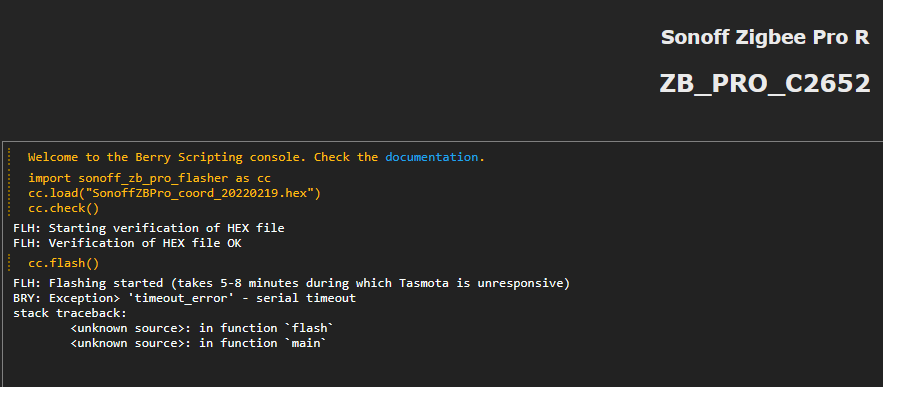
bei dir sollte stehen:
21:47:07.140 FLH: Verification of HEX file OK 21:49:06.780 FLH: cc2652_flasher rx=23 tx=19 rst=15 bsl=22 21:49:06.828 FLH: Flashing started (takes 5 minutes during which Tasmota is unresponsive) 21:54:43.835 FLH: Flashing completed: OK 21:54:43.948 FLH: Flash crc32 0x000000 - 0x2FFFF = bytes('1598929A') -
langsam, was passiert nach cc.flash()
habe da Time Out
bei dir sollte stehen:
21:47:07.140 FLH: Verification of HEX file OK 21:49:06.780 FLH: cc2652_flasher rx=23 tx=19 rst=15 bsl=22 21:49:06.828 FLH: Flashing started (takes 5 minutes during which Tasmota is unresponsive) 21:54:43.835 FLH: Flashing completed: OK 21:54:43.948 FLH: Flash crc32 0x000000 - 0x2FFFF = bytes('1598929A')lass mal Autoconfig , IO, TCP sein, gehe strikt nach Anleitung vor.
Console meldet ja:
No Zigbee device information
Also wird das Device ja nicht von der Bridge gefunden.Ota flashen ist immer kritisch da Reste im Speicher verbleiben können.
Besser ist flashen mit FTDI per Kabel und Erase des Speicher.Das Gerät wird wohl gefunden als
08:37:56.297 RSL: RESULT = {"ZbState":{"Status":51,"IEEEAddr":"0x00124B00257B0374"
schau mal ob die Addr vom ZB Device passt. -
lass mal Autoconfig , IO, TCP sein, gehe strikt nach Anleitung vor.
Console meldet ja:
No Zigbee device information
Also wird das Device ja nicht von der Bridge gefunden.Ota flashen ist immer kritisch da Reste im Speicher verbleiben können.
Besser ist flashen mit FTDI per Kabel und Erase des Speicher.Das Gerät wird wohl gefunden als
08:37:56.297 RSL: RESULT = {"ZbState":{"Status":51,"IEEEAddr":"0x00124B00257B0374"
schau mal ob die Addr vom ZB Device passt.@ralla66 Jetzt langsam verstehe ich es nicht mehr.
Ich hatte zuletzt folgendes gemacht:- Auto-configuration auf "Sonoff ZBPro TCP" gestellt (Restart danach)
Info am Rande, das Template steht auf:
{"NAME":"TCP ZBBridge Pro","GPIO":[0,0,576,0,480,0,0,0,0,1,1,5792,0,0,0,5472,0,320,5793,5504,0,640,608,32,0,0,0,0,0,1,0,0,0,0,0,0],"FLAG":0,"BASE":1}-
Tasmota wer per web installer (mit FTDI) auf development -> Tasmota32 Sonoff-ZigbeeBridgePro -> All, in der Version 13.2.0.1 geflashed worden.
-
Danach bin ich der Anleitung zum flashen der coordinater Firmware von hier https://notenoughtech.com/home-automation/tasmota-on-sonoff-zb-bridge-pro/#flash gefolgt. Dies wird auch von https://zigbee.blakadder.com/Sonoff_ZBBridge-P.html empfohlen. Allerdings habe ich nicht die SonoffZBPro_coord_20220219.hex Firmware, sondern die SonoffZBPro_coord_20230507.hex hochgeladen und verwendet.
-
Der Flashvorgang wurde auch in der Console mit ok bestätigt, jedoch habe ich zu diesem Zeitpunkt nie folgende Meldungen bekommen:
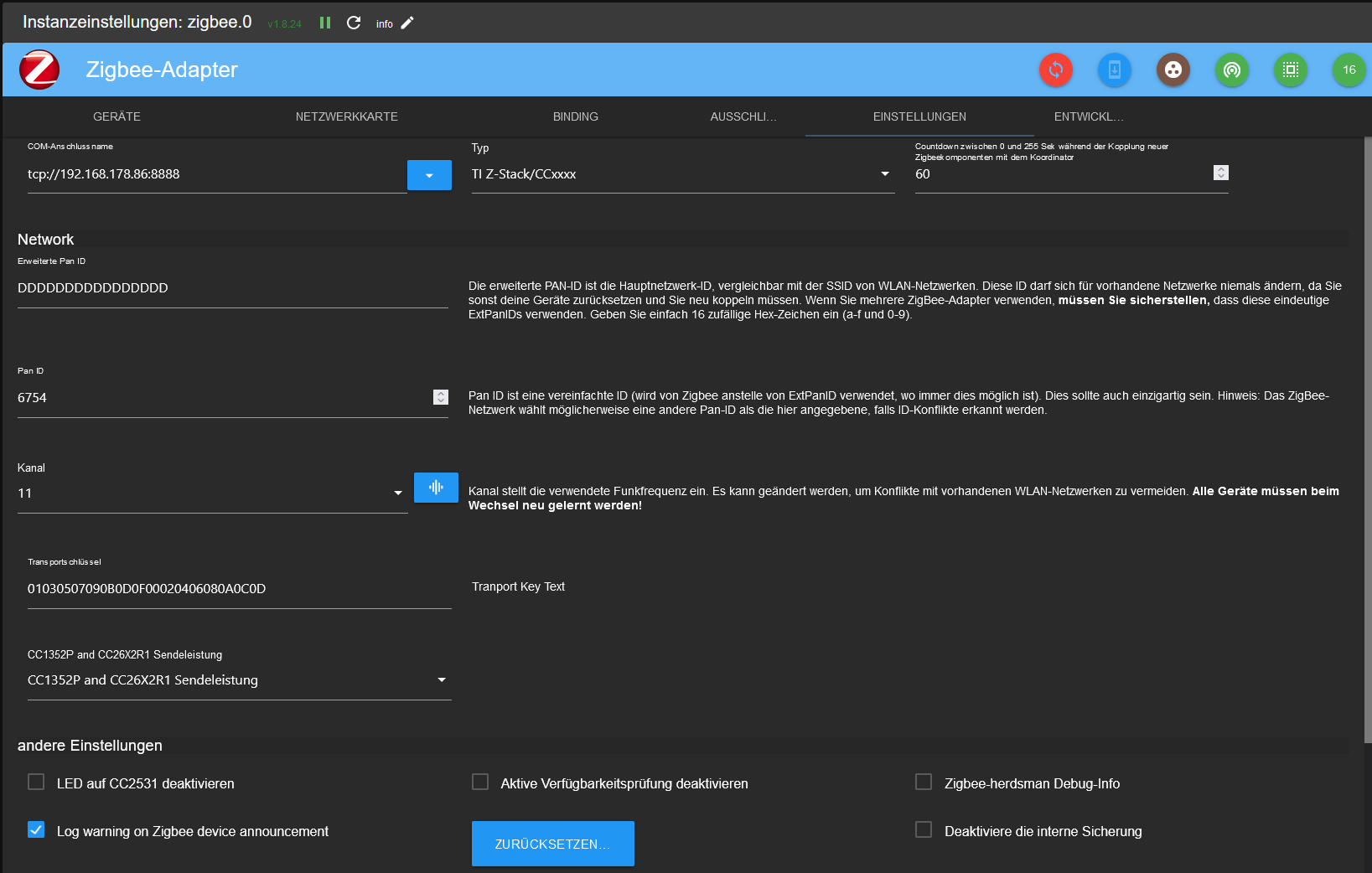
22:01:25.294 RSL: RESULT = {"ZbState":{"Status":3,"Message":"Configured, starting coordinator"}} 22:01:31.293 RSL: RESULT = {"ZbState":{"Status":40,"NewState":9,"Message":"Started as coordinator"}} 22:01:31.944 RSL: RESULT = {"ZbState":{"Status":0,"Message":"Started"}}- Der ZigBee-Adapter ist wie folgt konfiguriert:
Dann musste ich mich eben um mein Kind kümmern und war weg vom PC. Ebenfalls musste ich den Bosch Smart Home Controller II kurzzeitig vom Strom nehmen. (Nur als Info, kp ob das was zu bedeuten hat?!)
Als ich eben an den PC zurück bin, lief der Adapter und ich kann die ZigBee Geräte anlernen.
WTF, ich verstehe die Welt nicht mehr.Falls noch weitere Infos benötigt werden, um evtl. meine Dummheit oder einen Fehler zu belegen, gerne Bescheid geben.
EDIT:
Ich habe eben mal kurz die Erweiterte Pan ID umstellen wollen, danach lief der Adapter nicht mehr. Mit 16x D ging er direkt wieder auf Grün. - Auto-configuration auf "Sonoff ZBPro TCP" gestellt (Restart danach)
-
@ralla66 Jetzt langsam verstehe ich es nicht mehr.
Ich hatte zuletzt folgendes gemacht:- Auto-configuration auf "Sonoff ZBPro TCP" gestellt (Restart danach)
Info am Rande, das Template steht auf:
{"NAME":"TCP ZBBridge Pro","GPIO":[0,0,576,0,480,0,0,0,0,1,1,5792,0,0,0,5472,0,320,5793,5504,0,640,608,32,0,0,0,0,0,1,0,0,0,0,0,0],"FLAG":0,"BASE":1}-
Tasmota wer per web installer (mit FTDI) auf development -> Tasmota32 Sonoff-ZigbeeBridgePro -> All, in der Version 13.2.0.1 geflashed worden.
-
Danach bin ich der Anleitung zum flashen der coordinater Firmware von hier https://notenoughtech.com/home-automation/tasmota-on-sonoff-zb-bridge-pro/#flash gefolgt. Dies wird auch von https://zigbee.blakadder.com/Sonoff_ZBBridge-P.html empfohlen. Allerdings habe ich nicht die SonoffZBPro_coord_20220219.hex Firmware, sondern die SonoffZBPro_coord_20230507.hex hochgeladen und verwendet.
-
Der Flashvorgang wurde auch in der Console mit ok bestätigt, jedoch habe ich zu diesem Zeitpunkt nie folgende Meldungen bekommen:
22:01:25.294 RSL: RESULT = {"ZbState":{"Status":3,"Message":"Configured, starting coordinator"}} 22:01:31.293 RSL: RESULT = {"ZbState":{"Status":40,"NewState":9,"Message":"Started as coordinator"}} 22:01:31.944 RSL: RESULT = {"ZbState":{"Status":0,"Message":"Started"}}- Der ZigBee-Adapter ist wie folgt konfiguriert:
Dann musste ich mich eben um mein Kind kümmern und war weg vom PC. Ebenfalls musste ich den Bosch Smart Home Controller II kurzzeitig vom Strom nehmen. (Nur als Info, kp ob das was zu bedeuten hat?!)
Als ich eben an den PC zurück bin, lief der Adapter und ich kann die ZigBee Geräte anlernen.
WTF, ich verstehe die Welt nicht mehr.Falls noch weitere Infos benötigt werden, um evtl. meine Dummheit oder einen Fehler zu belegen, gerne Bescheid geben.
EDIT:
Ich habe eben mal kurz die Erweiterte Pan ID umstellen wollen, danach lief der Adapter nicht mehr. Mit 16x D ging er direkt wieder auf Grün.läuft, ist doch prima :-)
möglich das bei Erst Installation ein Suchlauf der Geräte durchgeführt wird.
Das kann ja 3 bis 5 Minten dauern.
Bei Adaptern ist es meist so das erst ein Triggern diesen grün werden läßt.
Sowas wie ZB Fenster auf / zu oder Reboot des Devices.
Die 3 Statusmeldungen sagen ja nur aus das der Coordinator nach reboot aktiv ist und somit
ist die Bridge richtig eingerichtet. Halt nicht ob der Cxxxx der richtige ist.
Das steht ja in der coord.Na ja der Typ vor dem Bildschirm, meist Besserwissend und hält sich nicht an Vorlagen
gepaart mit Unwissenheit beim Adapterstart.
Geht mir aber auch so, um so länger versucht um so mehr verrannt.Was ist denn ->Mit 16x D ?
Edit, stelle mal bitte ein Log File hier ein damit andere User sehen können welche
Schritte beim booten in der Console angezeigt werden. - Auto-configuration auf "Sonoff ZBPro TCP" gestellt (Restart danach)
-
Hallo,
ich habe eine Sonoff zbbridge pro, welche in den ioBroker eingebunden werden soll.
Folgendes habe ich bisher gamacht:-
die Bridge nach dieser Anleitung mit Tasmota und der coordinator firmware geflashed. https://notenoughtech.com/home-automation/tasmota-on-sonoff-zb-bridge-pro/#flash
-
Danach konnte ich über Tasmota die verschiedenen Geräte per Zigbee einbinden. Allerdings hat der ioBroker Adapter (ZigBee) keine Verbindung aufbauen können und ist immer wieder abgestüzt. (Vermutlich konnte die Verbindung wegen des falschen Templates nicht aufgebaut werden? GPIO 19 und 23 auf Zigbee Tx / Rx und nicht auf TCP Tx / Rx)
-
Daraufhin habe ich nochmals Tasmota per web Installer installiert. Hinweis kam von hier: https://github.com/arendst/Tasmota/discussions/14419#discussioncomment-2929774
Unter "Configure Other" habe ich folgende Einstellungen vorgenommen:
{"NAME":"Sonoff Zigbee Pro","GPIO":[0,0,576,0,480,0,0,0,0,1,1,5792,0,0,0,5472,0,320,5793,5504,0,640,608,32,0,0,0,0,0,1,0,0,0,0,0,0],"FLAG":0,"BASE":1}Des Weiteren habe ich als Rule1 folgendes eingetragen:
rule1 on system#boot do TCPStart 8888 endonNach einem Neustart kann ich folgendes in der Console lesen:
00:00:00.003 HDW: ESP32-D0WD-V3 v3.0
00:00:00.100 UFS: FlashFS mounted with 908 kB free
00:00:00.121 CFG: Loaded from File, Count 50
00:00:00.131 QPC: Count 1
00:00:00.137 I2C: Bus1 using GPIO26(SCL) and GPIO25(SDA)
00:00:00.226 BRY: Berry initialized, RAM used=3902 bytes
00:00:00.240 TFS: File '.drvset003' not found
00:00:00.249 Project tasmota - Tasmota Version 13.2.0(zbbrdgpro)-2_0_14(2023-10-19T09:04:58)
00:00:00.937 WIF: Connecting to AP1 FRITZ!Box 7590 2.4 Channel 1 BSSId 2C:3A:FD:FB:F0:6E in mode 11n as tasmota-6063A4-0932...
00:00:02.633 WIF: Connected
00:00:02.889 HTP: Web server active on tasmota-6063A4-0932 with IP address 192.168.178.86
18:10:23.874 RSL: INFO1 = {"Info1":{"Module":"Sonoff Zigbee Pro","Version":"13.2.0(zbbrdgpro)","FallbackTopic":"cmnd/DVES_6063A4_fb/","GroupTopic":"cmnd/tasmotas/"}}
18:10:23.890 RSL: INFO2 = {"Info2":{"WebServerMode":"Admin","Hostname":"tasmota-6063A4-0932","IPAddress":"192.168.178.86","IP6Global":"","IP6Local":"fe80::4222:d8ff:fe60:63a4"}}
18:10:23.904 RSL: INFO3 = {"Info3":{"RestartReason":"Software reset CPU","BootCount":25}}
18:10:23.926 RUL: SYSTEM#BOOT performs "TCPStart 8888"
18:10:23.929 TCP: Starting TCP server on port 8888
18:10:23.932 RSL: RESULT = {"TCPStart":"Done"}
18:10:26.868 QPC: Reset
18:10:27.865 RSL: STATE = {"Time":"2023-10-26T18:10:27","Uptime":"0T00:00:08","UptimeSec":8,"Heap":165,"SleepMode":"Dynamic","Sleep":50,"LoadAvg":19,"MqttCount":0,"Berry":{"HeapUsed":3,"Objects":43},"Wifi":{"AP":1,"SSId":"FRITZ!Box 7590 2.4","BSSId":"2C:3A:FD:FB:F0:6E","Channel":1,"Mode":"11n","RSSI":100,"Signal":-30,"LinkCount":1,"Downtime":"0T00:00:03"}}
Nun zum ZigBee Adapter, welchen ich wie folgt konfiguriert habe:

Nach ein paar Minuten stürzt der Adapter komplett ab und muss unter Host quitiert werden.
Parallel erhalte ich in der Concole in Tasmota diese eine Zeile (die IP.36 ist der ioBroker):18:13:17.360 TCP: Got connection from 192.168.178.36In den Logs vom ioBroker kommen folgende Einträge zum ZigBee Adapter:
	2023-10-26 19:14:56.266	error	Reset error: Error: {"sequence":-1} after 10000ms
	2023-10-26 19:14:56.266	error	Error: Reset error: Error: {"sequence":-1} after 10000ms at /opt/iobroker/node_modules/zigbee-herdsman/src/adapter/ezsp/driver/uart.ts:299:23 at Queue.executeNext (/opt/iobroker/node_modules/zigbee-herdsman/src/utils/queue.ts:32:32)
	2023-10-26 19:14:56.214	error	unhandled promise rejection: Reset error: Error: {"sequence":-1} after 10000ms
	2023-10-26 19:14:56.214	error	Unhandled promise rejection. This error originated either by throwing inside of an async function without a catch block, or by rejecting a promise which was not handled with .catch().
	2023-10-26 19:14:12.075	error	Reset error: Error: {"sequence":-1} after 10000ms
	2023-10-26 19:14:12.075	error	Error: Reset error: Error: {"sequence":-1} after 10000ms at /opt/iobroker/node_modules/zigbee-herdsman/src/adapter/ezsp/driver/uart.ts:299:23 at Queue.executeNext (/opt/iobroker/node_modules/zigbee-herdsman/src/utils/queue.ts:32:32)
	2023-10-26 19:14:12.010	error	unhandled promise rejection: Reset error: Error: {"sequence":-1} after 10000ms
	2023-10-26 19:14:12.009	error	Unhandled promise rejection. This error originated either by throwing inside of an async function without a catch block, or by rejecting a promise which was not handled with .catch().
	2023-10-26 19:13:28.444	error	Reset error: Error: {"sequence":-1} after 10000ms
	2023-10-26 19:13:28.443	error	Error: Reset error: Error: {"sequence":-1} after 10000ms at /opt/iobroker/node_modules/zigbee-herdsman/src/adapter/ezsp/driver/uart.ts:299:23 at Queue.executeNext (/opt/iobroker/node_modules/zigbee-herdsman/src/utils/queue.ts:32:32)
	2023-10-26 19:13:28.377	error	unhandled promise rejection: Reset error: Error: {"sequence":-1} after 10000ms
	2023-10-26 19:13:28.376	error	Unhandled promise rejection. This error originated either by throwing inside of an async function without a catch block, or by rejecting a promise which was not handled with .catch().
	2023-10-26 19:09:47.246	error	Reset error: Error: {"sequence":-1} after 10000ms
	2023-10-26 19:09:47.246	error	Error: Reset error: Error: {"sequence":-1} after 10000ms at /opt/iobroker/node_modules/zigbee-herdsman/src/adapter/ezsp/driver/uart.ts:299:23 at Queue.executeNext (/opt/iobroker/node_modules/zigbee-herdsman/src/utils/queue.ts:32:32)
	2023-10-26 19:09:47.195	error	unhandled promise rejection: Reset error: Error: {"sequence":-1} after 10000ms
	2023-10-26 19:09:47.194	error	Unhandled promise rejection. This error originated either by throwing inside of an async function without a catch block, or by rejecting a promise which was not handled with .catch().
	2023-10-26 19:09:02.719	error	Reset error: Error: {"sequence":-1} after 10000ms
	2023-10-26 19:09:02.718	error	Error: Reset error: Error: {"sequence":-1} after 10000ms at /opt/iobroker/node_modules/zigbee-herdsman/src/adapter/ezsp/driver/uart.ts:299:23 at Queue.executeNext (/opt/iobroker/node_modules/zigbee-herdsman/src/utils/queue.ts:32:32)
	2023-10-26 19:09:02.644	error	unhandled promise rejection: Reset error: Error: {"sequence":-1} after 10000ms
	2023-10-26 19:09:02.643	error	Unhandled promise rejection. This error originated either by throwing inside of an async function without a catch block, or by rejecting a promise which was not handled with .catch().
	2023-10-26 19:09:00.682	error	getGroups: caught error: TypeError: Cannot read properties of undefined (reading 'getGroups')
Und genau da stehe ich jetzt etwas wie der Ochs vorm Berg und komme nicht mehr weiter.
Wäre super wenn jemand eine Idee oder noch besser die Lösung hätte
Vielen Dank
@snert Moin Snert
Wieso Zigbee Adapter? Den kannste doch löschen!
Du hast doch Tasmota drauf... da solltest Du Dich doch mit dem mqtt-Adapter beschäftigen
Gruss von der Ostsee
Chrisbpi-m5 (ioBroker), rock3a (postgreSQL), lamobo R1 (OpenWRT), Tasmota-ZB, Tasmota-IR
-
-
@snert Moin Snert
Wieso Zigbee Adapter? Den kannste doch löschen!
Du hast doch Tasmota drauf... da solltest Du Dich doch mit dem mqtt-Adapter beschäftigen
Gruss von der Ostsee
Chris -
@ralla66 Jetzt langsam verstehe ich es nicht mehr.
Ich hatte zuletzt folgendes gemacht:- Auto-configuration auf "Sonoff ZBPro TCP" gestellt (Restart danach)
Info am Rande, das Template steht auf:
{"NAME":"TCP ZBBridge Pro","GPIO":[0,0,576,0,480,0,0,0,0,1,1,5792,0,0,0,5472,0,320,5793,5504,0,640,608,32,0,0,0,0,0,1,0,0,0,0,0,0],"FLAG":0,"BASE":1}-
Tasmota wer per web installer (mit FTDI) auf development -> Tasmota32 Sonoff-ZigbeeBridgePro -> All, in der Version 13.2.0.1 geflashed worden.
-
Danach bin ich der Anleitung zum flashen der coordinater Firmware von hier https://notenoughtech.com/home-automation/tasmota-on-sonoff-zb-bridge-pro/#flash gefolgt. Dies wird auch von https://zigbee.blakadder.com/Sonoff_ZBBridge-P.html empfohlen. Allerdings habe ich nicht die SonoffZBPro_coord_20220219.hex Firmware, sondern die SonoffZBPro_coord_20230507.hex hochgeladen und verwendet.
-
Der Flashvorgang wurde auch in der Console mit ok bestätigt, jedoch habe ich zu diesem Zeitpunkt nie folgende Meldungen bekommen:
22:01:25.294 RSL: RESULT = {"ZbState":{"Status":3,"Message":"Configured, starting coordinator"}} 22:01:31.293 RSL: RESULT = {"ZbState":{"Status":40,"NewState":9,"Message":"Started as coordinator"}} 22:01:31.944 RSL: RESULT = {"ZbState":{"Status":0,"Message":"Started"}}- Der ZigBee-Adapter ist wie folgt konfiguriert:
Dann musste ich mich eben um mein Kind kümmern und war weg vom PC. Ebenfalls musste ich den Bosch Smart Home Controller II kurzzeitig vom Strom nehmen. (Nur als Info, kp ob das was zu bedeuten hat?!)
Als ich eben an den PC zurück bin, lief der Adapter und ich kann die ZigBee Geräte anlernen.
WTF, ich verstehe die Welt nicht mehr.Falls noch weitere Infos benötigt werden, um evtl. meine Dummheit oder einen Fehler zu belegen, gerne Bescheid geben.
EDIT:
Ich habe eben mal kurz die Erweiterte Pan ID umstellen wollen, danach lief der Adapter nicht mehr. Mit 16x D ging er direkt wieder auf Grün.@snert Nachdem ich all die Leiden, die Du durchlitten hast auch durchgemacht habe, ist das die Lösung: Nach dem flashen muss man das Ding einmal mit autoconf auf "Sonoff ZbPro" stellen, dann kommen all die schönen ZbState-Meldungen. Danach auf "Sonoff ZbPro TCP" zurück, und alles klappt (So war es zumindest bei mir, ich habe so ziemlich alles was du ausprobiert hast auch gemacht, alles ohne Erfolg).
- Auto-configuration auf "Sonoff ZBPro TCP" gestellt (Restart danach)
-
@snert Nachdem ich all die Leiden, die Du durchlitten hast auch durchgemacht habe, ist das die Lösung: Nach dem flashen muss man das Ding einmal mit autoconf auf "Sonoff ZbPro" stellen, dann kommen all die schönen ZbState-Meldungen. Danach auf "Sonoff ZbPro TCP" zurück, und alles klappt (So war es zumindest bei mir, ich habe so ziemlich alles was du ausprobiert hast auch gemacht, alles ohne Erfolg).
@pbhd0815 Mit welchen Einstellungen auf dem Sonoff und im Zigbee Adapter hast du es zum laufen gebracht?
Verbindung mit Gerät oder Dienst bleibt bei mir rot im Adapter.
Edit: das manuelle Löschen der Backup Fille und Seepferdchen.db wie in dem Beitrag beschrieben war die Lösung
https://forum.iobroker.net/topic/56174/gelöst-zigbee-frage-zur-pan-id/15


Hey! Du scheinst an dieser Unterhaltung interessiert zu sein, hast aber noch kein Konto.
Hast du es satt, bei jedem Besuch durch die gleichen Beiträge zu scrollen? Wenn du dich für ein Konto anmeldest, kommst du immer genau dorthin zurück, wo du zuvor warst, und kannst dich über neue Antworten benachrichtigen lassen (entweder per E-Mail oder Push-Benachrichtigung). Du kannst auch Lesezeichen speichern und Beiträge positiv bewerten, um anderen Community-Mitgliedern deine Wertschätzung zu zeigen.
Mit deinem Input könnte dieser Beitrag noch besser werden 💗
Registrieren Anmelden224
Online33.0k
Benutzende83.7k
Themen1.3m
Beiträge