




ioBroker stoppt und startet unbeabsichtigt
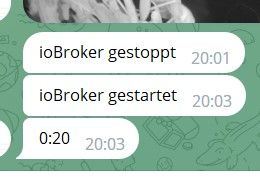
-
wenn nach
@raspiuser sagte in ioBroker stoppt und startet unbeabsichtigt:up 15 min
bereits nur noch
@raspiuser sagte in ioBroker stoppt und startet unbeabsichtigt:
available
523Mexistieren, hast du mit deinen 2GB RAM und 21 laufenden Instanzen wahrscheinlich das Ende der Fahnenstange erreicht.
dein
@raspiuser sagte in ioBroker stoppt und startet unbeabsichtigt:
vcan0-setup.service loaded failed failed Setup vcan0
läuft z.b. nicht.
Was hast du denn sonst noch an Speicherfressern am Start?
@raspiuser sagte in ioBroker stoppt und startet unbeabsichtigt:
Dieser Zustand läßt sich nur brutal mit 5V-raus-rein beenden.
und zerstört dein Dateisystem dermaßen, dass wir beim nächsten Fehler diesen nicht mehr zuordnen können.
Danke für die erste Reaktion ...
- mqtt-debug ist jetzt ausgeschaltet ... ich hatte da ein "Problemchen" ...
- Das der Pi4 seitens Hardware an die Grenze kommt war schon klar, deshalb "alles neu" mit weniger Adaptern.
Der "Tankerkönig" benötigt, aus welchen Gründen auch immer, nach kurzer Zeit manchmal 350MB.
Ansonsten die Adapter, die im Log aufgeführt sind ... Die möchte ich auch behalten ...
Wenn der Raspi "normal" läuft wäre der nächste Schritt, den ioBroker in eine QNAP VM zu überführen. - In einem anderen Beitrag wurde empfohlen, den SWAP zu erhöhen ... was in anderen Beiträgen wieder als nicht-Ziel-führend beschrieben wurde ...
- Das vcan0-Problem ist gerade hier angefragt ...
OK ... also jetzt abwarten und beim nächsten Absturz was tun ?
Oder: Wie stoppe ich den Raspi "legal"? Ich bekam nur das Lade-Symbol zu sehen. Über Putty ging auch nix ...EDIT:
... schon wieder ...
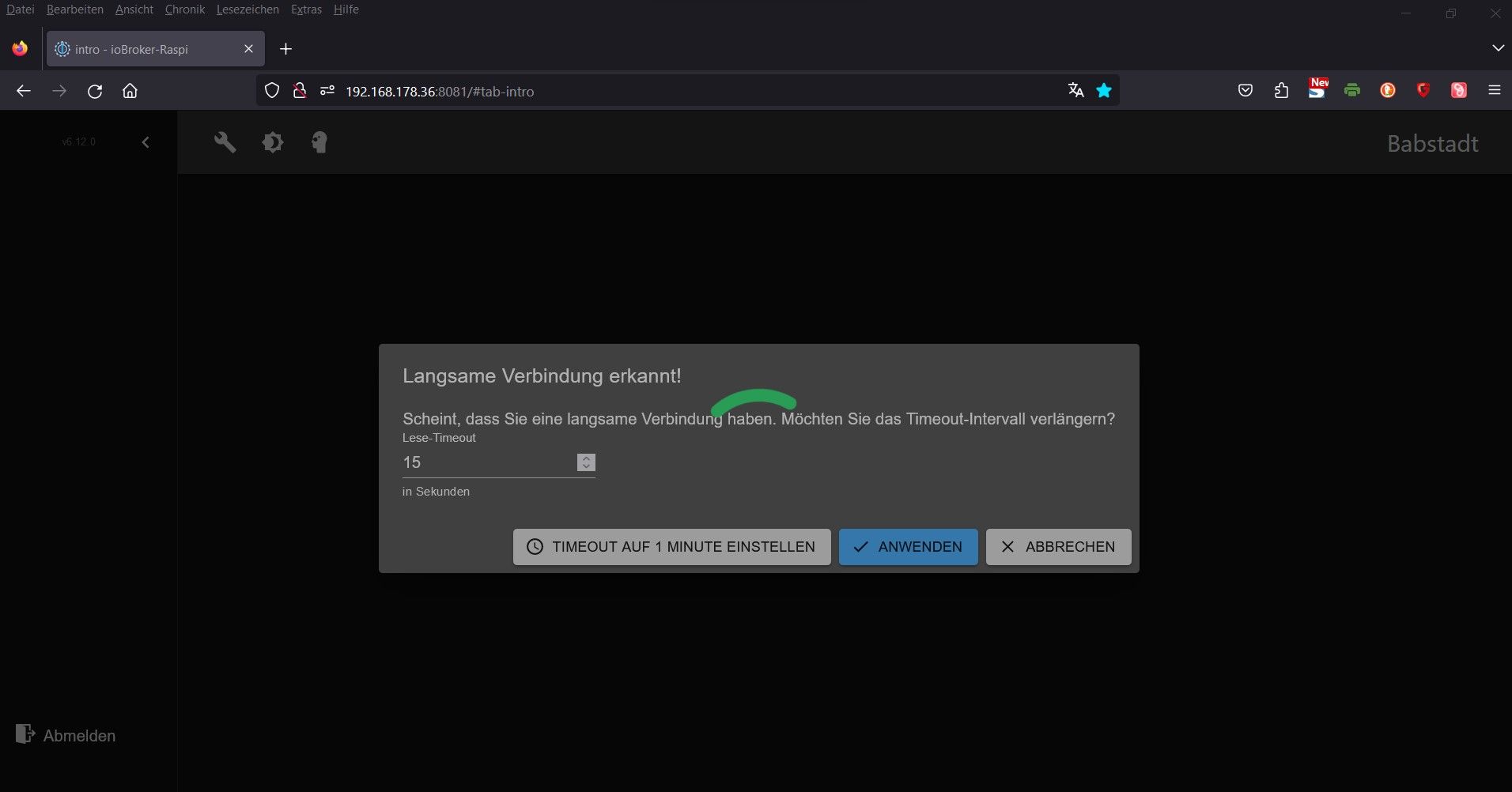
... gibt es etwas anderes außer "Stecker ziehen" ? -
Danke für die erste Reaktion ...
- mqtt-debug ist jetzt ausgeschaltet ... ich hatte da ein "Problemchen" ...
- Das der Pi4 seitens Hardware an die Grenze kommt war schon klar, deshalb "alles neu" mit weniger Adaptern.
Der "Tankerkönig" benötigt, aus welchen Gründen auch immer, nach kurzer Zeit manchmal 350MB.
Ansonsten die Adapter, die im Log aufgeführt sind ... Die möchte ich auch behalten ...
Wenn der Raspi "normal" läuft wäre der nächste Schritt, den ioBroker in eine QNAP VM zu überführen. - In einem anderen Beitrag wurde empfohlen, den SWAP zu erhöhen ... was in anderen Beiträgen wieder als nicht-Ziel-führend beschrieben wurde ...
- Das vcan0-Problem ist gerade hier angefragt ...
OK ... also jetzt abwarten und beim nächsten Absturz was tun ?
Oder: Wie stoppe ich den Raspi "legal"? Ich bekam nur das Lade-Symbol zu sehen. Über Putty ging auch nix ...EDIT:
... schon wieder ...
... gibt es etwas anderes außer "Stecker ziehen" ?@raspiuser sagte in ioBroker stoppt und startet unbeabsichtigt:
... gibt es etwas anderes außer "Stecker ziehen" ?
Abwarten. Der fängt sich.
-
@raspiuser sagte in ioBroker stoppt und startet unbeabsichtigt:
... gibt es etwas anderes außer "Stecker ziehen" ?
Abwarten. Der fängt sich.
@thomas-braun sagte in ioBroker stoppt und startet unbeabsichtigt:
Abwarten. Der fängt sich.
... tatsächlich ... hat zwar ca. 15min gedauert aber er läuft wieder.
Kannst Du (ich sehe nix ...) den Grund des Absturz erkennen ?
(Wieder zu wenig RAM ? ... aber das habe ich zwischenzeitlich verstanden ... )
)======== Start marking the full check here ========= Skript v.2023-10-10 *** BASE SYSTEM *** Static hostname: ioBroker-Raspi Icon name: computer Operating System: Debian GNU/Linux 12 (bookworm) Kernel: Linux 6.1.21-v8+ Architecture: arm64 Model : Raspberry Pi 4 Model B Rev 1.1 Docker : false Virtualization : none Kernel : aarch64 Userland : arm64 Systemuptime and Load: 09:49:01 up 1 day, 33 min, 2 users, load average: 1.00, 16.80, 24.11 CPU threads: 4 *** RASPBERRY THROTTLING *** Current issues: No throttling issues detected. Previously detected issues: No throttling issues detected. *** Time and Time Zones *** Local time: Thu 2023-11-02 09:49:01 CET Universal time: Thu 2023-11-02 08:49:01 UTC RTC time: n/a Time zone: Europe/Berlin (CET, +0100) System clock synchronized: yes NTP service: active RTC in local TZ: no *** User and Groups *** pi /home/pi pi adm dialout cdrom sudo audio video plugdev games users input render netdev gpio i2c spi iobroker *** X-Server-Setup *** X-Server: false Desktop: Terminal: tty Boot Target: multi-user.target *** MEMORY *** total used free shared buff/cache available Mem: 1.9G 1.4G 403M 1.1M 247M 583M Swap: 104M 6.2M 98M Total: 2.0G 1.4G 502M 1849 M total memory 1292 M used memory 1345 M active memory 4 M inactive memory 384 M free memory 25 M buffer memory 211 M swap cache 99 M total swap 5 M used swap 94 M free swap Raspberry only: oom events: 0 lifetime oom required: 0 Mbytes total time in oom handler: 0 ms max time spent in oom handler: 0 ms *** FAILED SERVICES *** UNIT LOAD ACTIVE SUB DESCRIPTION 0 loaded units listed. *** FILESYSTEM *** Filesystem Type Size Used Avail Use% Mounted on /dev/root ext4 15G 4.4G 9.4G 32% / devtmpfs devtmpfs 667M 0 667M 0% /dev tmpfs tmpfs 925M 0 925M 0% /dev/shm tmpfs tmpfs 370M 1.2M 369M 1% /run tmpfs tmpfs 5.0M 16K 5.0M 1% /run/lock /dev/mmcblk0p1 vfat 255M 31M 225M 13% /boot tmpfs tmpfs 185M 0 185M 0% /run/user/1000 Messages concerning ext4 filesystem in dmesg: [Wed Nov 1 09:15:52 2023] Kernel command line: coherent_pool=1M 8250.nr_uarts=0 snd_bcm2835.enable_headphones=0 snd_bcm2835.enable_headphones=1 snd_bcm2835.enable_hdmi=1 snd_bcm2835.enable_hdmi=0 smsc95xx.macaddr=DC:A6:32:12:B4:C8 vc_mem.mem_base=0x3ec00000 vc_mem.mem_size=0x40000000 console=ttyS0,115200 console=tty1 root=PARTUUID=bc66e88d-02 rootfstype=ext4 fsck.repair=yes rootwait [Wed Nov 1 09:15:53 2023] EXT4-fs (mmcblk0p2): mounted filesystem with ordered data mode. Quota mode: none. [Wed Nov 1 09:15:53 2023] VFS: Mounted root (ext4 filesystem) readonly on device 179:2. [Wed Nov 1 09:15:56 2023] EXT4-fs (mmcblk0p2): re-mounted. Quota mode: none. Show mounted filesystems \(real ones only\): TARGET SOURCE FSTYPE OPTIONS / /dev/mmcblk0p2 ext4 rw,noatime `-/boot /dev/mmcblk0p1 vfat rw,relatime,fmask=0022,dmask=0022,codepage=437,iocharset=ascii,shortname=mixed,errors=remount-ro Files in neuralgic directories: /var: 1.3G /var/ 647M /var/log 582M /var/log/journal/ececfd62e7f741458cc0d2ea60d43f93 582M /var/log/journal 328M /var/cache Archived and active journals take up 581.2M in the file system. /opt/iobroker/backups: 4.0K /opt/iobroker/backups/ /opt/iobroker/iobroker-data: 215M /opt/iobroker/iobroker-data/ 153M /opt/iobroker/iobroker-data/files 52M /opt/iobroker/iobroker-data/files/javascript.admin 43M /opt/iobroker/iobroker-data/backup-objects 34M /opt/iobroker/iobroker-data/files/javascript.admin/static The five largest files in iobroker-data are: 21M /opt/iobroker/iobroker-data/files/web.admin/static/js/main.edf7552a.js.map 13M /opt/iobroker/iobroker-data/objects.jsonl 8.3M /opt/iobroker/iobroker-data/files/web.admin/static/js/main.edf7552a.js 7.8M /opt/iobroker/iobroker-data/states.jsonl 7.1M /opt/iobroker/iobroker-data/files/javascript.admin/static/js/610.f22de4ab.chunk.js.map USB-Devices by-id: USB-Sticks - Avoid direct links to /dev/* in your adapter setups, please always prefer the links 'by-id': /dev/serial/by-id/usb-ITead_Sonoff_Zigbee_3.0_USB_Dongle_Plus_6edb8350b219ec11a0e039cc47486eb0-if00-port0 *** NodeJS-Installation *** /usr/bin/nodejs v18.18.2 /usr/bin/node v18.18.2 /usr/bin/npm 9.8.1 /usr/bin/npx 9.8.1 /usr/bin/corepack 0.19.0 nodejs: Installed: 18.18.2-1nodesource1 Candidate: 18.18.2-1nodesource1 Version table: *** 18.18.2-1nodesource1 1001 500 https://deb.nodesource.com/node_18.x nodistro/main arm64 Packages 100 /var/lib/dpkg/status 18.18.1-1nodesource1 1001 500 https://deb.nodesource.com/node_18.x nodistro/main arm64 Packages 18.18.0-1nodesource1 1001 500 https://deb.nodesource.com/node_18.x nodistro/main arm64 Packages 18.17.1-1nodesource1 1001 500 https://deb.nodesource.com/node_18.x nodistro/main arm64 Packages 18.17.0-1nodesource1 1001 500 https://deb.nodesource.com/node_18.x nodistro/main arm64 Packages 18.16.1-1nodesource1 1001 500 https://deb.nodesource.com/node_18.x nodistro/main arm64 Packages 18.16.0-1nodesource1 1001 500 https://deb.nodesource.com/node_18.x nodistro/main arm64 Packages 18.15.0-1nodesource1 1001 500 https://deb.nodesource.com/node_18.x nodistro/main arm64 Packages 18.14.2-1nodesource1 1001 500 https://deb.nodesource.com/node_18.x nodistro/main arm64 Packages 18.14.1-1nodesource1 1001 500 https://deb.nodesource.com/node_18.x nodistro/main arm64 Packages 18.14.0-1nodesource1 1001 500 https://deb.nodesource.com/node_18.x nodistro/main arm64 Packages 18.13.0+dfsg1-1 500 500 http://deb.debian.org/debian bookworm/main arm64 Packages 18.13.0-1nodesource1 1001 500 https://deb.nodesource.com/node_18.x nodistro/main arm64 Packages 18.12.0-1nodesource1 1001 500 https://deb.nodesource.com/node_18.x nodistro/main arm64 Packages 18.11.0-1nodesource1 1001 500 https://deb.nodesource.com/node_18.x nodistro/main arm64 Packages 18.10.0-1nodesource1 1001 500 https://deb.nodesource.com/node_18.x nodistro/main arm64 Packages 18.9.1-1nodesource1 1001 500 https://deb.nodesource.com/node_18.x nodistro/main arm64 Packages 18.9.0-1nodesource1 1001 500 https://deb.nodesource.com/node_18.x nodistro/main arm64 Packages 18.8.0-1nodesource1 1001 500 https://deb.nodesource.com/node_18.x nodistro/main arm64 Packages 18.7.0-1nodesource1 1001 500 https://deb.nodesource.com/node_18.x nodistro/main arm64 Packages 18.6.0-1nodesource1 1001 500 https://deb.nodesource.com/node_18.x nodistro/main arm64 Packages 18.5.0-1nodesource1 1001 500 https://deb.nodesource.com/node_18.x nodistro/main arm64 Packages 18.4.0-1nodesource1 1001 500 https://deb.nodesource.com/node_18.x nodistro/main arm64 Packages 18.3.0-1nodesource1 1001 500 https://deb.nodesource.com/node_18.x nodistro/main arm64 Packages 18.2.0-1nodesource1 1001 500 https://deb.nodesource.com/node_18.x nodistro/main arm64 Packages 18.1.0-1nodesource1 1001 500 https://deb.nodesource.com/node_18.x nodistro/main arm64 Packages 18.0.0-1nodesource1 1001 500 https://deb.nodesource.com/node_18.x nodistro/main arm64 Packages Temp directories causing npm8 problem: 0 No problems detected Errors in npm tree: *** ioBroker-Installation *** ioBroker Status iobroker is running on this host. Objects type: jsonl States type: jsonl Core adapters versions js-controller: 5.0.12 admin: 6.12.0 javascript: 7.1.4 Adapters from github: 1 Adapter State + system.adapter.admin.0 : admin : ioBroker-Raspi - enabled, port: 8081, bind: 0.0.0.0, run as: admin + system.adapter.alpha-ess.0 : alpha-ess : ioBroker-Raspi - enabled + system.adapter.backitup.0 : backitup : ioBroker-Raspi - enabled + system.adapter.canbus.0 : canbus : ioBroker-Raspi - enabled system.adapter.discovery.0 : discovery : ioBroker-Raspi - disabled system.adapter.feiertage.0 : feiertage : ioBroker-Raspi - enabled + system.adapter.frontier_silicon.0 : frontier_silicon : ioBroker-Raspi - enabled + system.adapter.hm-rega.0 : hm-rega : ioBroker-Raspi - enabled + system.adapter.hm-rpc.0 : hm-rpc : ioBroker-Raspi - enabled, port: 0 + system.adapter.hm-rpc.1 : hm-rpc : ioBroker-Raspi - enabled, port: 0 + system.adapter.iqontrol.0 : iqontrol : ioBroker-Raspi - enabled + system.adapter.javascript.0 : javascript : ioBroker-Raspi - enabled + system.adapter.lgtv.0 : lgtv : ioBroker-Raspi - enabled + system.adapter.mqtt.0 : mqtt : ioBroker-Raspi - enabled, port: 1883, bind: 192.168.178.36 system.adapter.onkyo.0 : onkyo : ioBroker-Raspi - disabled + system.adapter.psa.0 : psa : ioBroker-Raspi - enabled + system.adapter.sainlogic.0 : sainlogic : ioBroker-Raspi - enabled, port: 1030, bind: 192.168.178.36 + system.adapter.shuttercontrol.0 : shuttercontrol : ioBroker-Raspi - enabled system.adapter.simple-api.0 : simple-api : ioBroker-Raspi - disabled, port: 8087, bind: 0.0.0.0, run as: admin + system.adapter.sonoff.0 : sonoff : ioBroker-Raspi - enabled, port: 1885, bind: 0.0.0.0 + system.adapter.tankerkoenig.0 : tankerkoenig : ioBroker-Raspi - enabled + system.adapter.telegram.0 : telegram : ioBroker-Raspi - enabled, port: 8443, bind: 0.0.0.0 + system.adapter.tr-064.0 : tr-064 : ioBroker-Raspi - enabled + system.adapter.vw-connect.0 : vw-connect : ioBroker-Raspi - enabled + system.adapter.web.0 : web : ioBroker-Raspi - enabled, port: 8082, bind: 0.0.0.0, run as: admin + system.adapter.zigbee.0 : zigbee : ioBroker-Raspi - enabled, port: /dev/ttyUSB0 + instance is alive Enabled adapters with bindings + system.adapter.admin.0 : admin : ioBroker-Raspi - enabled, port: 8081, bind: 0.0.0.0, run as: admin + system.adapter.hm-rpc.0 : hm-rpc : ioBroker-Raspi - enabled, port: 0 + system.adapter.hm-rpc.1 : hm-rpc : ioBroker-Raspi - enabled, port: 0 + system.adapter.mqtt.0 : mqtt : ioBroker-Raspi - enabled, port: 1883, bind: 192.168.178.36 + system.adapter.sainlogic.0 : sainlogic : ioBroker-Raspi - enabled, port: 1030, bind: 192.168.178.36 + system.adapter.sonoff.0 : sonoff : ioBroker-Raspi - enabled, port: 1885, bind: 0.0.0.0 + system.adapter.telegram.0 : telegram : ioBroker-Raspi - enabled, port: 8443, bind: 0.0.0.0 + system.adapter.web.0 : web : ioBroker-Raspi - enabled, port: 8082, bind: 0.0.0.0, run as: admin + system.adapter.zigbee.0 : zigbee : ioBroker-Raspi - enabled, port: /dev/ttyUSB0 ioBroker-Repositories stable : http://download.iobroker.net/sources-dist.json beta : http://download.iobroker.net/sources-dist-latest.json Active repo(s): stable Installed ioBroker-Instances Used repository: stable Adapter "admin" : 6.12.0 , installed 6.12.0 Adapter "alpha-ess" : 1.0.2 , installed 1.0.2 Adapter "backitup" : 2.8.7 , installed 2.8.1 [Updatable] Adapter "canbus" : 1.3.1 , installed 1.3.1 Adapter "discovery" : 3.1.0 , installed 3.1.0 Adapter "feiertage" : 1.1.4 , installed 1.1.4 Adapter "frontier_silicon": 0.1.1 , installed 0.1.1 Adapter "hm-rega" : 3.0.47 , installed 3.0.47 Adapter "hm-rpc" : 1.15.19 , installed 1.15.19 Adapter "iqontrol" : 2.3.0 , installed 2.3.0 Adapter "javascript" : 7.1.4 , installed 7.1.4 Controller "js-controller": 5.0.12 , installed 5.0.12 Adapter "lgtv" : 2.1.1 , installed 2.1.1 Adapter "mqtt" : 4.1.1 , installed 4.1.1 Adapter "onkyo" : 2.1.2 , installed 2.1.2 Adapter "psa" : 0.0.11 , installed 0.0.11 Adapter "sainlogic" : 0.10.5 , installed 0.10.5 Adapter "shuttercontrol": 1.6.2 , installed 1.6.2 Adapter "simple-api" : 2.7.2 , installed 2.7.2 Adapter "socketio" : 6.5.5 , installed 6.5.5 Adapter "sonoff" : 2.5.3 , installed 2.5.3 Adapter "tankerkoenig" : 3.3.7 , installed 3.3.7 Adapter "telegram" : 1.16.0 , installed 1.16.0 Adapter "tr-064" : 4.2.18 , installed 4.2.18 Adapter "vw-connect" : 0.0.67 , installed 0.2.0 Adapter "web" : 6.1.2 , installed 6.1.2 Adapter "ws" : 2.5.5 , installed 2.5.5 Adapter "zigbee" : 1.8.23 , installed 1.8.23 Objects and States Please stand by - This may take a while Objects: 5773 States: 4364 *** OS-Repositories and Updates *** Hit:1 http://security.debian.org/debian-security bookworm-security InRelease Hit:2 http://deb.debian.org/debian bookworm InRelease Hit:3 http://deb.debian.org/debian bookworm-updates InRelease Hit:4 http://archive.raspberrypi.org/debian bookworm InRelease Hit:5 https://deb.nodesource.com/node_18.x nodistro InRelease Reading package lists... Pending Updates: 55 *** Listening Ports *** Active Internet connections (only servers) Proto Recv-Q Send-Q Local Address Foreign Address State User Inode PID/Program name tcp 0 0 0.0.0.0:22 0.0.0.0:* LISTEN 0 13851 543/sshd: /usr/sbin tcp 0 0 127.0.0.1:9000 0.0.0.0:* LISTEN 1001 428961 7507/iobroker.js-co tcp 0 0 127.0.0.1:9001 0.0.0.0:* LISTEN 1001 430255 7507/iobroker.js-co tcp 0 0 192.168.178.36:1883 0.0.0.0:* LISTEN 1001 430408 7700/io.mqtt.0 tcp 0 0 192.168.178.36:1030 0.0.0.0:* LISTEN 1001 432555 8067/io.sainlogic.0 tcp 0 0 192.168.178.36:42010 0.0.0.0:* LISTEN 1001 431490 7789/io.hm-rpc.1 tcp 0 0 192.168.178.36:42001 0.0.0.0:* LISTEN 1001 430426 7733/io.hm-rpc.0 tcp 0 0 0.0.0.0:1885 0.0.0.0:* LISTEN 1001 430764 7871/io.sonoff.0 tcp6 0 0 :::22 :::* LISTEN 0 13862 543/sshd: /usr/sbin tcp6 0 0 :::8081 :::* LISTEN 1001 429711 7640/io.admin.0 tcp6 0 0 :::8082 :::* LISTEN 1001 433227 8097/io.web.0 udp 0 0 0.0.0.0:20000 0.0.0.0:* 65534 1587 708/cannelloni udp 0 0 0.0.0.0:49934 0.0.0.0:* 108 11838 380/avahi-daemon: r udp 0 0 0.0.0.0:68 0.0.0.0:* 0 14020 844/dhcpcd udp 0 0 0.0.0.0:5353 0.0.0.0:* 108 11836 380/avahi-daemon: r udp6 0 0 :::546 :::* 0 14033 844/dhcpcd udp6 0 0 :::5353 :::* 108 11837 380/avahi-daemon: r udp6 0 0 :::39321 :::* 108 11839 380/avahi-daemon: r *** Log File - Last 25 Lines *** 2023-11-02 09:46:58.713 - info: iqontrol.0 (8112) Creating Widget States... 2023-11-02 09:46:58.714 - info: iqontrol.0 (8112) Lists deactivated. 2023-11-02 09:46:58.715 - info: iqontrol.0 (8112) Deleting unused Objects... 2023-11-02 09:46:58.716 - info: iqontrol.0 (8112) Subscribing to states... 2023-11-02 09:46:58.719 - info: iqontrol.0 (8112) iQontrol ready. 2023-11-02 09:46:59.522 - info: host.ioBroker-Raspi instance system.adapter.vw-connect.0 started with pid 8127 2023-11-02 09:47:02.502 - info: vw-connect.0 (8127) starting. Version 0.2.0 (non-npm: ta2k/ioBroker.vw-connect) in /opt/iobroker/node_modules/iobroker.vw-connect, node: v18.18.2, js-controller: 5.0.12 2023-11-02 09:47:02.556 - info: vw-connect.0 (8127) Login in with vwv2 2023-11-02 09:47:04.995 - info: vw-connect.0 (8127) Login successful 2023-11-02 09:47:05.489 - info: vw-connect.0 (8127) {"mandatoryConsentInfo":[{"id":"termsOfUse","status":"VALID"}],"mandatoryFieldsStatus":true,"mbbIdStatus":true,"mbbUserId":"5qIgGpN2LkvdHc2H0TWDvtlwap51","missingMandatoryFields":[],"scopeId":"commonMandatoryFields","spinStatus":true,"ssoId":"de858a4a-f971-40f1-b375-baf01b331d2a"} 2023-11-02 09:47:05.748 - info: vw-connect.0 (8127) Found 1 vehicles 2023-11-02 09:47:41.431 - info: sonoff.0 (7871) Client [Steckdose-6-Kuehlkombi] connected with secret 1698914861421_288 2023-11-02 09:47:46.989 - info: sonoff.0 (7871) Client [Steckdose-1-Trockner] connected with secret 1698914866986_6241 2023-11-02 09:47:48.809 - info: sonoff.0 (7871) Client [Bodenlampen] connected with secret 1698914868808_4658 2023-11-02 09:47:49.620 - warn: zigbee.0 (7823) Device '0x0017880102a2b974' announced itself 2023-11-02 09:47:54.695 - info: sonoff.0 (7871) Client [Steckdose-2-Waschmaschine] connected with secret 1698914874694_3145 2023-11-02 09:47:59.110 - info: sonoff.0 (7871) Client [Smartmeter] connected with secret 1698914879107_367 2023-11-02 09:48:02.306 - info: sonoff.0 (7871) Client [Steckdose-4-OG-Medien] connected with secret 1698914882305_5112 2023-11-02 09:48:03.405 - warn: zigbee.0 (7823) Device '0x7cb03eaa0a03fb8a' announced itself 2023-11-02 09:48:03.407 - warn: zigbee.0 (7823) Device '0x7cb03eaa0a059b32' announced itself 2023-11-02 09:48:06.841 - info: sonoff.0 (7871) Client [Steckdose-3-Geschirrspueler] connected with secret 1698914886840_7258 2023-11-02 09:48:09.379 - info: sonoff.0 (7871) Client [Steckdose-5-EG-Medien] connected with secret 1698914889378_439 2023-11-02 09:48:09.594 - info: sonoff.0 (7871) Client [Steckdose-9] connected with secret 1698914889592_1177 2023-11-02 09:48:10.457 - info: sonoff.0 (7871) Client [Steckdose-7-Gefrierschrank] connected with secret 1698914890455_4919 2023-11-02 09:48:10.481 - info: sonoff.0 (7871) Client [Steckdose-8] connected with secret 1698914890479_891 ============ Mark until here for C&P ============= iob diag has finished. -
@thomas-braun sagte in ioBroker stoppt und startet unbeabsichtigt:
Abwarten. Der fängt sich.
... tatsächlich ... hat zwar ca. 15min gedauert aber er läuft wieder.
Kannst Du (ich sehe nix ...) den Grund des Absturz erkennen ?
(Wieder zu wenig RAM ? ... aber das habe ich zwischenzeitlich verstanden ... )======== Start marking the full check here ========= Skript v.2023-10-10 *** BASE SYSTEM *** Static hostname: ioBroker-Raspi Icon name: computer Operating System: Debian GNU/Linux 12 (bookworm) Kernel: Linux 6.1.21-v8+ Architecture: arm64 Model : Raspberry Pi 4 Model B Rev 1.1 Docker : false Virtualization : none Kernel : aarch64 Userland : arm64 Systemuptime and Load: 09:49:01 up 1 day, 33 min, 2 users, load average: 1.00, 16.80, 24.11 CPU threads: 4 *** RASPBERRY THROTTLING *** Current issues: No throttling issues detected. Previously detected issues: No throttling issues detected. *** Time and Time Zones *** Local time: Thu 2023-11-02 09:49:01 CET Universal time: Thu 2023-11-02 08:49:01 UTC RTC time: n/a Time zone: Europe/Berlin (CET, +0100) System clock synchronized: yes NTP service: active RTC in local TZ: no *** User and Groups *** pi /home/pi pi adm dialout cdrom sudo audio video plugdev games users input render netdev gpio i2c spi iobroker *** X-Server-Setup *** X-Server: false Desktop: Terminal: tty Boot Target: multi-user.target *** MEMORY *** total used free shared buff/cache available Mem: 1.9G 1.4G 403M 1.1M 247M 583M Swap: 104M 6.2M 98M Total: 2.0G 1.4G 502M 1849 M total memory 1292 M used memory 1345 M active memory 4 M inactive memory 384 M free memory 25 M buffer memory 211 M swap cache 99 M total swap 5 M used swap 94 M free swap Raspberry only: oom events: 0 lifetime oom required: 0 Mbytes total time in oom handler: 0 ms max time spent in oom handler: 0 ms *** FAILED SERVICES *** UNIT LOAD ACTIVE SUB DESCRIPTION 0 loaded units listed. *** FILESYSTEM *** Filesystem Type Size Used Avail Use% Mounted on /dev/root ext4 15G 4.4G 9.4G 32% / devtmpfs devtmpfs 667M 0 667M 0% /dev tmpfs tmpfs 925M 0 925M 0% /dev/shm tmpfs tmpfs 370M 1.2M 369M 1% /run tmpfs tmpfs 5.0M 16K 5.0M 1% /run/lock /dev/mmcblk0p1 vfat 255M 31M 225M 13% /boot tmpfs tmpfs 185M 0 185M 0% /run/user/1000 Messages concerning ext4 filesystem in dmesg: [Wed Nov 1 09:15:52 2023] Kernel command line: coherent_pool=1M 8250.nr_uarts=0 snd_bcm2835.enable_headphones=0 snd_bcm2835.enable_headphones=1 snd_bcm2835.enable_hdmi=1 snd_bcm2835.enable_hdmi=0 smsc95xx.macaddr=DC:A6:32:12:B4:C8 vc_mem.mem_base=0x3ec00000 vc_mem.mem_size=0x40000000 console=ttyS0,115200 console=tty1 root=PARTUUID=bc66e88d-02 rootfstype=ext4 fsck.repair=yes rootwait [Wed Nov 1 09:15:53 2023] EXT4-fs (mmcblk0p2): mounted filesystem with ordered data mode. Quota mode: none. [Wed Nov 1 09:15:53 2023] VFS: Mounted root (ext4 filesystem) readonly on device 179:2. [Wed Nov 1 09:15:56 2023] EXT4-fs (mmcblk0p2): re-mounted. Quota mode: none. Show mounted filesystems \(real ones only\): TARGET SOURCE FSTYPE OPTIONS / /dev/mmcblk0p2 ext4 rw,noatime `-/boot /dev/mmcblk0p1 vfat rw,relatime,fmask=0022,dmask=0022,codepage=437,iocharset=ascii,shortname=mixed,errors=remount-ro Files in neuralgic directories: /var: 1.3G /var/ 647M /var/log 582M /var/log/journal/ececfd62e7f741458cc0d2ea60d43f93 582M /var/log/journal 328M /var/cache Archived and active journals take up 581.2M in the file system. /opt/iobroker/backups: 4.0K /opt/iobroker/backups/ /opt/iobroker/iobroker-data: 215M /opt/iobroker/iobroker-data/ 153M /opt/iobroker/iobroker-data/files 52M /opt/iobroker/iobroker-data/files/javascript.admin 43M /opt/iobroker/iobroker-data/backup-objects 34M /opt/iobroker/iobroker-data/files/javascript.admin/static The five largest files in iobroker-data are: 21M /opt/iobroker/iobroker-data/files/web.admin/static/js/main.edf7552a.js.map 13M /opt/iobroker/iobroker-data/objects.jsonl 8.3M /opt/iobroker/iobroker-data/files/web.admin/static/js/main.edf7552a.js 7.8M /opt/iobroker/iobroker-data/states.jsonl 7.1M /opt/iobroker/iobroker-data/files/javascript.admin/static/js/610.f22de4ab.chunk.js.map USB-Devices by-id: USB-Sticks - Avoid direct links to /dev/* in your adapter setups, please always prefer the links 'by-id': /dev/serial/by-id/usb-ITead_Sonoff_Zigbee_3.0_USB_Dongle_Plus_6edb8350b219ec11a0e039cc47486eb0-if00-port0 *** NodeJS-Installation *** /usr/bin/nodejs v18.18.2 /usr/bin/node v18.18.2 /usr/bin/npm 9.8.1 /usr/bin/npx 9.8.1 /usr/bin/corepack 0.19.0 nodejs: Installed: 18.18.2-1nodesource1 Candidate: 18.18.2-1nodesource1 Version table: *** 18.18.2-1nodesource1 1001 500 https://deb.nodesource.com/node_18.x nodistro/main arm64 Packages 100 /var/lib/dpkg/status 18.18.1-1nodesource1 1001 500 https://deb.nodesource.com/node_18.x nodistro/main arm64 Packages 18.18.0-1nodesource1 1001 500 https://deb.nodesource.com/node_18.x nodistro/main arm64 Packages 18.17.1-1nodesource1 1001 500 https://deb.nodesource.com/node_18.x nodistro/main arm64 Packages 18.17.0-1nodesource1 1001 500 https://deb.nodesource.com/node_18.x nodistro/main arm64 Packages 18.16.1-1nodesource1 1001 500 https://deb.nodesource.com/node_18.x nodistro/main arm64 Packages 18.16.0-1nodesource1 1001 500 https://deb.nodesource.com/node_18.x nodistro/main arm64 Packages 18.15.0-1nodesource1 1001 500 https://deb.nodesource.com/node_18.x nodistro/main arm64 Packages 18.14.2-1nodesource1 1001 500 https://deb.nodesource.com/node_18.x nodistro/main arm64 Packages 18.14.1-1nodesource1 1001 500 https://deb.nodesource.com/node_18.x nodistro/main arm64 Packages 18.14.0-1nodesource1 1001 500 https://deb.nodesource.com/node_18.x nodistro/main arm64 Packages 18.13.0+dfsg1-1 500 500 http://deb.debian.org/debian bookworm/main arm64 Packages 18.13.0-1nodesource1 1001 500 https://deb.nodesource.com/node_18.x nodistro/main arm64 Packages 18.12.0-1nodesource1 1001 500 https://deb.nodesource.com/node_18.x nodistro/main arm64 Packages 18.11.0-1nodesource1 1001 500 https://deb.nodesource.com/node_18.x nodistro/main arm64 Packages 18.10.0-1nodesource1 1001 500 https://deb.nodesource.com/node_18.x nodistro/main arm64 Packages 18.9.1-1nodesource1 1001 500 https://deb.nodesource.com/node_18.x nodistro/main arm64 Packages 18.9.0-1nodesource1 1001 500 https://deb.nodesource.com/node_18.x nodistro/main arm64 Packages 18.8.0-1nodesource1 1001 500 https://deb.nodesource.com/node_18.x nodistro/main arm64 Packages 18.7.0-1nodesource1 1001 500 https://deb.nodesource.com/node_18.x nodistro/main arm64 Packages 18.6.0-1nodesource1 1001 500 https://deb.nodesource.com/node_18.x nodistro/main arm64 Packages 18.5.0-1nodesource1 1001 500 https://deb.nodesource.com/node_18.x nodistro/main arm64 Packages 18.4.0-1nodesource1 1001 500 https://deb.nodesource.com/node_18.x nodistro/main arm64 Packages 18.3.0-1nodesource1 1001 500 https://deb.nodesource.com/node_18.x nodistro/main arm64 Packages 18.2.0-1nodesource1 1001 500 https://deb.nodesource.com/node_18.x nodistro/main arm64 Packages 18.1.0-1nodesource1 1001 500 https://deb.nodesource.com/node_18.x nodistro/main arm64 Packages 18.0.0-1nodesource1 1001 500 https://deb.nodesource.com/node_18.x nodistro/main arm64 Packages Temp directories causing npm8 problem: 0 No problems detected Errors in npm tree: *** ioBroker-Installation *** ioBroker Status iobroker is running on this host. Objects type: jsonl States type: jsonl Core adapters versions js-controller: 5.0.12 admin: 6.12.0 javascript: 7.1.4 Adapters from github: 1 Adapter State + system.adapter.admin.0 : admin : ioBroker-Raspi - enabled, port: 8081, bind: 0.0.0.0, run as: admin + system.adapter.alpha-ess.0 : alpha-ess : ioBroker-Raspi - enabled + system.adapter.backitup.0 : backitup : ioBroker-Raspi - enabled + system.adapter.canbus.0 : canbus : ioBroker-Raspi - enabled system.adapter.discovery.0 : discovery : ioBroker-Raspi - disabled system.adapter.feiertage.0 : feiertage : ioBroker-Raspi - enabled + system.adapter.frontier_silicon.0 : frontier_silicon : ioBroker-Raspi - enabled + system.adapter.hm-rega.0 : hm-rega : ioBroker-Raspi - enabled + system.adapter.hm-rpc.0 : hm-rpc : ioBroker-Raspi - enabled, port: 0 + system.adapter.hm-rpc.1 : hm-rpc : ioBroker-Raspi - enabled, port: 0 + system.adapter.iqontrol.0 : iqontrol : ioBroker-Raspi - enabled + system.adapter.javascript.0 : javascript : ioBroker-Raspi - enabled + system.adapter.lgtv.0 : lgtv : ioBroker-Raspi - enabled + system.adapter.mqtt.0 : mqtt : ioBroker-Raspi - enabled, port: 1883, bind: 192.168.178.36 system.adapter.onkyo.0 : onkyo : ioBroker-Raspi - disabled + system.adapter.psa.0 : psa : ioBroker-Raspi - enabled + system.adapter.sainlogic.0 : sainlogic : ioBroker-Raspi - enabled, port: 1030, bind: 192.168.178.36 + system.adapter.shuttercontrol.0 : shuttercontrol : ioBroker-Raspi - enabled system.adapter.simple-api.0 : simple-api : ioBroker-Raspi - disabled, port: 8087, bind: 0.0.0.0, run as: admin + system.adapter.sonoff.0 : sonoff : ioBroker-Raspi - enabled, port: 1885, bind: 0.0.0.0 + system.adapter.tankerkoenig.0 : tankerkoenig : ioBroker-Raspi - enabled + system.adapter.telegram.0 : telegram : ioBroker-Raspi - enabled, port: 8443, bind: 0.0.0.0 + system.adapter.tr-064.0 : tr-064 : ioBroker-Raspi - enabled + system.adapter.vw-connect.0 : vw-connect : ioBroker-Raspi - enabled + system.adapter.web.0 : web : ioBroker-Raspi - enabled, port: 8082, bind: 0.0.0.0, run as: admin + system.adapter.zigbee.0 : zigbee : ioBroker-Raspi - enabled, port: /dev/ttyUSB0 + instance is alive Enabled adapters with bindings + system.adapter.admin.0 : admin : ioBroker-Raspi - enabled, port: 8081, bind: 0.0.0.0, run as: admin + system.adapter.hm-rpc.0 : hm-rpc : ioBroker-Raspi - enabled, port: 0 + system.adapter.hm-rpc.1 : hm-rpc : ioBroker-Raspi - enabled, port: 0 + system.adapter.mqtt.0 : mqtt : ioBroker-Raspi - enabled, port: 1883, bind: 192.168.178.36 + system.adapter.sainlogic.0 : sainlogic : ioBroker-Raspi - enabled, port: 1030, bind: 192.168.178.36 + system.adapter.sonoff.0 : sonoff : ioBroker-Raspi - enabled, port: 1885, bind: 0.0.0.0 + system.adapter.telegram.0 : telegram : ioBroker-Raspi - enabled, port: 8443, bind: 0.0.0.0 + system.adapter.web.0 : web : ioBroker-Raspi - enabled, port: 8082, bind: 0.0.0.0, run as: admin + system.adapter.zigbee.0 : zigbee : ioBroker-Raspi - enabled, port: /dev/ttyUSB0 ioBroker-Repositories stable : http://download.iobroker.net/sources-dist.json beta : http://download.iobroker.net/sources-dist-latest.json Active repo(s): stable Installed ioBroker-Instances Used repository: stable Adapter "admin" : 6.12.0 , installed 6.12.0 Adapter "alpha-ess" : 1.0.2 , installed 1.0.2 Adapter "backitup" : 2.8.7 , installed 2.8.1 [Updatable] Adapter "canbus" : 1.3.1 , installed 1.3.1 Adapter "discovery" : 3.1.0 , installed 3.1.0 Adapter "feiertage" : 1.1.4 , installed 1.1.4 Adapter "frontier_silicon": 0.1.1 , installed 0.1.1 Adapter "hm-rega" : 3.0.47 , installed 3.0.47 Adapter "hm-rpc" : 1.15.19 , installed 1.15.19 Adapter "iqontrol" : 2.3.0 , installed 2.3.0 Adapter "javascript" : 7.1.4 , installed 7.1.4 Controller "js-controller": 5.0.12 , installed 5.0.12 Adapter "lgtv" : 2.1.1 , installed 2.1.1 Adapter "mqtt" : 4.1.1 , installed 4.1.1 Adapter "onkyo" : 2.1.2 , installed 2.1.2 Adapter "psa" : 0.0.11 , installed 0.0.11 Adapter "sainlogic" : 0.10.5 , installed 0.10.5 Adapter "shuttercontrol": 1.6.2 , installed 1.6.2 Adapter "simple-api" : 2.7.2 , installed 2.7.2 Adapter "socketio" : 6.5.5 , installed 6.5.5 Adapter "sonoff" : 2.5.3 , installed 2.5.3 Adapter "tankerkoenig" : 3.3.7 , installed 3.3.7 Adapter "telegram" : 1.16.0 , installed 1.16.0 Adapter "tr-064" : 4.2.18 , installed 4.2.18 Adapter "vw-connect" : 0.0.67 , installed 0.2.0 Adapter "web" : 6.1.2 , installed 6.1.2 Adapter "ws" : 2.5.5 , installed 2.5.5 Adapter "zigbee" : 1.8.23 , installed 1.8.23 Objects and States Please stand by - This may take a while Objects: 5773 States: 4364 *** OS-Repositories and Updates *** Hit:1 http://security.debian.org/debian-security bookworm-security InRelease Hit:2 http://deb.debian.org/debian bookworm InRelease Hit:3 http://deb.debian.org/debian bookworm-updates InRelease Hit:4 http://archive.raspberrypi.org/debian bookworm InRelease Hit:5 https://deb.nodesource.com/node_18.x nodistro InRelease Reading package lists... Pending Updates: 55 *** Listening Ports *** Active Internet connections (only servers) Proto Recv-Q Send-Q Local Address Foreign Address State User Inode PID/Program name tcp 0 0 0.0.0.0:22 0.0.0.0:* LISTEN 0 13851 543/sshd: /usr/sbin tcp 0 0 127.0.0.1:9000 0.0.0.0:* LISTEN 1001 428961 7507/iobroker.js-co tcp 0 0 127.0.0.1:9001 0.0.0.0:* LISTEN 1001 430255 7507/iobroker.js-co tcp 0 0 192.168.178.36:1883 0.0.0.0:* LISTEN 1001 430408 7700/io.mqtt.0 tcp 0 0 192.168.178.36:1030 0.0.0.0:* LISTEN 1001 432555 8067/io.sainlogic.0 tcp 0 0 192.168.178.36:42010 0.0.0.0:* LISTEN 1001 431490 7789/io.hm-rpc.1 tcp 0 0 192.168.178.36:42001 0.0.0.0:* LISTEN 1001 430426 7733/io.hm-rpc.0 tcp 0 0 0.0.0.0:1885 0.0.0.0:* LISTEN 1001 430764 7871/io.sonoff.0 tcp6 0 0 :::22 :::* LISTEN 0 13862 543/sshd: /usr/sbin tcp6 0 0 :::8081 :::* LISTEN 1001 429711 7640/io.admin.0 tcp6 0 0 :::8082 :::* LISTEN 1001 433227 8097/io.web.0 udp 0 0 0.0.0.0:20000 0.0.0.0:* 65534 1587 708/cannelloni udp 0 0 0.0.0.0:49934 0.0.0.0:* 108 11838 380/avahi-daemon: r udp 0 0 0.0.0.0:68 0.0.0.0:* 0 14020 844/dhcpcd udp 0 0 0.0.0.0:5353 0.0.0.0:* 108 11836 380/avahi-daemon: r udp6 0 0 :::546 :::* 0 14033 844/dhcpcd udp6 0 0 :::5353 :::* 108 11837 380/avahi-daemon: r udp6 0 0 :::39321 :::* 108 11839 380/avahi-daemon: r *** Log File - Last 25 Lines *** 2023-11-02 09:46:58.713 - info: iqontrol.0 (8112) Creating Widget States... 2023-11-02 09:46:58.714 - info: iqontrol.0 (8112) Lists deactivated. 2023-11-02 09:46:58.715 - info: iqontrol.0 (8112) Deleting unused Objects... 2023-11-02 09:46:58.716 - info: iqontrol.0 (8112) Subscribing to states... 2023-11-02 09:46:58.719 - info: iqontrol.0 (8112) iQontrol ready. 2023-11-02 09:46:59.522 - info: host.ioBroker-Raspi instance system.adapter.vw-connect.0 started with pid 8127 2023-11-02 09:47:02.502 - info: vw-connect.0 (8127) starting. Version 0.2.0 (non-npm: ta2k/ioBroker.vw-connect) in /opt/iobroker/node_modules/iobroker.vw-connect, node: v18.18.2, js-controller: 5.0.12 2023-11-02 09:47:02.556 - info: vw-connect.0 (8127) Login in with vwv2 2023-11-02 09:47:04.995 - info: vw-connect.0 (8127) Login successful 2023-11-02 09:47:05.489 - info: vw-connect.0 (8127) {"mandatoryConsentInfo":[{"id":"termsOfUse","status":"VALID"}],"mandatoryFieldsStatus":true,"mbbIdStatus":true,"mbbUserId":"5qIgGpN2LkvdHc2H0TWDvtlwap51","missingMandatoryFields":[],"scopeId":"commonMandatoryFields","spinStatus":true,"ssoId":"de858a4a-f971-40f1-b375-baf01b331d2a"} 2023-11-02 09:47:05.748 - info: vw-connect.0 (8127) Found 1 vehicles 2023-11-02 09:47:41.431 - info: sonoff.0 (7871) Client [Steckdose-6-Kuehlkombi] connected with secret 1698914861421_288 2023-11-02 09:47:46.989 - info: sonoff.0 (7871) Client [Steckdose-1-Trockner] connected with secret 1698914866986_6241 2023-11-02 09:47:48.809 - info: sonoff.0 (7871) Client [Bodenlampen] connected with secret 1698914868808_4658 2023-11-02 09:47:49.620 - warn: zigbee.0 (7823) Device '0x0017880102a2b974' announced itself 2023-11-02 09:47:54.695 - info: sonoff.0 (7871) Client [Steckdose-2-Waschmaschine] connected with secret 1698914874694_3145 2023-11-02 09:47:59.110 - info: sonoff.0 (7871) Client [Smartmeter] connected with secret 1698914879107_367 2023-11-02 09:48:02.306 - info: sonoff.0 (7871) Client [Steckdose-4-OG-Medien] connected with secret 1698914882305_5112 2023-11-02 09:48:03.405 - warn: zigbee.0 (7823) Device '0x7cb03eaa0a03fb8a' announced itself 2023-11-02 09:48:03.407 - warn: zigbee.0 (7823) Device '0x7cb03eaa0a059b32' announced itself 2023-11-02 09:48:06.841 - info: sonoff.0 (7871) Client [Steckdose-3-Geschirrspueler] connected with secret 1698914886840_7258 2023-11-02 09:48:09.379 - info: sonoff.0 (7871) Client [Steckdose-5-EG-Medien] connected with secret 1698914889378_439 2023-11-02 09:48:09.594 - info: sonoff.0 (7871) Client [Steckdose-9] connected with secret 1698914889592_1177 2023-11-02 09:48:10.457 - info: sonoff.0 (7871) Client [Steckdose-7-Gefrierschrank] connected with secret 1698914890455_4919 2023-11-02 09:48:10.481 - info: sonoff.0 (7871) Client [Steckdose-8] connected with secret 1698914890479_891 ============ Mark until here for C&P ============= iob diag has finished.load average: 1.00, 16.80, 24.11Kein Wunder. Ab 4 ist die Kiste voll ausgelastet.
Da knallt irgendwas heftig rein.Spiel die Updates ein!
sudo apt update
sudo apt full-upgrade
sudo reboot
Und auch den ioBroker auf Stand halten.
-
load average: 1.00, 16.80, 24.11Kein Wunder. Ab 4 ist die Kiste voll ausgelastet.
Da knallt irgendwas heftig rein.Spiel die Updates ein!
sudo apt update
sudo apt full-upgrade
sudo reboot
Und auch den ioBroker auf Stand halten.
@thomas-braun sagte in ioBroker stoppt und startet unbeabsichtigt:
Ab 4 ist die Kiste voll ausgelastet.
? ... meinst Du die Uhrzeit ?!
 Was sagt diese "load average" ?
@thomas-braun sagte in ioBroker stoppt und startet unbeabsichtigt:
irgendwas
... aber WAS sieht man scheinbar nicht ?
... ich mache alle 4 Wochen ...
sudo apt-get update sudo apt-get upgrade -
@thomas-braun sagte in ioBroker stoppt und startet unbeabsichtigt:
Ab 4 ist die Kiste voll ausgelastet.
? ... meinst Du die Uhrzeit ?!
Was sagt diese "load average" ?@thomas-braun sagte in ioBroker stoppt und startet unbeabsichtigt:
irgendwas
... aber WAS sieht man scheinbar nicht ?
... ich mache alle 4 Wochen ...
sudo apt-get update sudo apt-get upgrade@raspiuser sagte in ioBroker stoppt und startet unbeabsichtigt:
Was sagt diese "load average" ?
Ein Wert von 1 wäre eine Auslastung von 100% (pro Kern). Da du auf der CPU vier Kerne hast ist ab 4 der Prozessor vollständig dicht.
Die Werte sind der Durchschnitt über 1, 5 und 15 Minuten. Kann man aber auch alles nachlesen.Updates: Mach sie häufiger.
-
@thomas-braun sagte in ioBroker stoppt und startet unbeabsichtigt:
Ab 4 ist die Kiste voll ausgelastet.
? ... meinst Du die Uhrzeit ?!
Was sagt diese "load average" ?@thomas-braun sagte in ioBroker stoppt und startet unbeabsichtigt:
irgendwas
... aber WAS sieht man scheinbar nicht ?
... ich mache alle 4 Wochen ...
sudo apt-get update sudo apt-get upgrade@raspiuser sagte in ioBroker stoppt und startet unbeabsichtigt:
... aber WAS sieht man scheinbar nicht ?
Sieht man in Tools wie 'top' oder 'htop'.
-
@raspiuser sagte in ioBroker stoppt und startet unbeabsichtigt:
Was sagt diese "load average" ?
Ein Wert von 1 wäre eine Auslastung von 100% (pro Kern). Da du auf der CPU vier Kerne hast ist ab 4 der Prozessor vollständig dicht.
Die Werte sind der Durchschnitt über 1, 5 und 15 Minuten. Kann man aber auch alles nachlesen.Updates: Mach sie häufiger.
@thomas-braun sagte in ioBroker stoppt und startet unbeabsichtigt:
Updates
... habe jetzt ein Update mit "deinen" Befehlen durchgeführt ... hat etwas gedauert, war wohl nötig ....
Ich habe jetzt auch (zufällig "gefunden") in deinen "LINUX-Werkzeugkaste" reingeschaut ... sehr interessant !!!
-
@thomas-braun sagte in ioBroker stoppt und startet unbeabsichtigt:
Updates
... habe jetzt ein Update mit "deinen" Befehlen durchgeführt ... hat etwas gedauert, war wohl nötig ....
Ich habe jetzt auch (zufällig "gefunden") in deinen "LINUX-Werkzeugkaste" reingeschaut ... sehr interessant !!!
@raspiuser sagte in ioBroker stoppt und startet unbeabsichtigt:
habe jetzt ein Update mit "deinen" Befehlen durchgeführt
Das sind nicht 'meine Befehle ', das sind absolute Grundlagen.
-
@raspiuser sagte in ioBroker stoppt und startet unbeabsichtigt:
habe jetzt ein Update mit "deinen" Befehlen durchgeführt
Das sind nicht 'meine Befehle ', das sind absolute Grundlagen.
@thomas-braun sagte in ioBroker stoppt und startet unbeabsichtigt:
Das sind nicht 'meine Befehle '
... schon klar ... damit wollte ich nur zum Ausdruck bringen, dass ich "meine" Befehle nicht genutzt habe ...
-
@raspiuser sagte in ioBroker stoppt und startet unbeabsichtigt:
... aber WAS sieht man scheinbar nicht ?
Sieht man in Tools wie 'top' oder 'htop'.
@thomas-braun sagte in ioBroker stoppt und startet unbeabsichtigt:
Sieht man in Tools wie 'top' oder 'htop'.
Sorry ... ich nerve weiter ...:
Ich habe jetzt im Terminal "top" bzw. "htop" ausgeführt ...
Auf was muss ich achten bzw. WAS knallt da rein ? -
@thomas-braun sagte in ioBroker stoppt und startet unbeabsichtigt:
Sieht man in Tools wie 'top' oder 'htop'.
Sorry ... ich nerve weiter ...:
Ich habe jetzt im Terminal "top" bzw. "htop" ausgeführt ...
Auf was muss ich achten bzw. WAS knallt da rein ?Die Prozesse werden da angezeigt.
-
Die Prozesse werden da angezeigt.
@thomas-braun sagte in ioBroker stoppt und startet unbeabsichtigt:
Die Prozesse werden da angezeigt.
... aber wo muss ich bzgl. meinem Problem genauer hinschauen ... ? Welcher Wert ?
Tasks: 170 total, 1 running, 169 sleeping, 0 stopped, 0 zombie %Cpu(s): 4.5 us, 0.7 sy, 0.0 ni, 94.4 id, 0.2 wa, 0.0 hi, 0.1 si, 0.0 st MiB Mem : 1849.2 total, 169.9 free, 1346.7 used, 401.5 buff/cache MiB Swap: 100.0 total, 100.0 free, 0.0 used. 502.5 avail Mem PID USER PR NI VIRT RES SHR S %CPU %MEM TIME+ COMMAND 2735 iobroker 20 0 5198148 162752 44132 S 7.0 8.6 1:12.02 iobroker.js-con 3053 iobroker 20 0 662620 72140 38296 S 3.3 3.8 0:05.25 io.sainlogic.0 2809 iobroker 20 0 671776 80036 37112 S 2.6 4.2 0:05.13 io.mqtt.0 2772 iobroker 20 0 998016 148360 37172 S 1.7 7.8 0:27.47 io.javascript.0 2790 iobroker 20 0 807240 93184 43108 S 1.3 4.9 0:08.92 io.telegram.0 3072 iobroker 20 0 924548 71424 37808 S 1.0 3.8 0:05.45 io.alpha-ess.0 2828 iobroker 20 0 666680 76528 38384 S 0.7 4.0 0:05.90 io.hm-rpc.0 2843 iobroker 20 0 670960 81628 37824 S 0.7 4.3 0:09.38 io.hm-rega.0 3042 iobroker 20 0 665712 81488 42348 S 0.7 4.3 0:06.26 io.shuttercontr 3117 iobroker 20 0 5128684 89056 39592 S 0.7 4.7 0:07.81 io.vw-connect.0 -
@thomas-braun sagte in ioBroker stoppt und startet unbeabsichtigt:
Die Prozesse werden da angezeigt.
... aber wo muss ich bzgl. meinem Problem genauer hinschauen ... ? Welcher Wert ?
Tasks: 170 total, 1 running, 169 sleeping, 0 stopped, 0 zombie %Cpu(s): 4.5 us, 0.7 sy, 0.0 ni, 94.4 id, 0.2 wa, 0.0 hi, 0.1 si, 0.0 st MiB Mem : 1849.2 total, 169.9 free, 1346.7 used, 401.5 buff/cache MiB Swap: 100.0 total, 100.0 free, 0.0 used. 502.5 avail Mem PID USER PR NI VIRT RES SHR S %CPU %MEM TIME+ COMMAND 2735 iobroker 20 0 5198148 162752 44132 S 7.0 8.6 1:12.02 iobroker.js-con 3053 iobroker 20 0 662620 72140 38296 S 3.3 3.8 0:05.25 io.sainlogic.0 2809 iobroker 20 0 671776 80036 37112 S 2.6 4.2 0:05.13 io.mqtt.0 2772 iobroker 20 0 998016 148360 37172 S 1.7 7.8 0:27.47 io.javascript.0 2790 iobroker 20 0 807240 93184 43108 S 1.3 4.9 0:08.92 io.telegram.0 3072 iobroker 20 0 924548 71424 37808 S 1.0 3.8 0:05.45 io.alpha-ess.0 2828 iobroker 20 0 666680 76528 38384 S 0.7 4.0 0:05.90 io.hm-rpc.0 2843 iobroker 20 0 670960 81628 37824 S 0.7 4.3 0:09.38 io.hm-rega.0 3042 iobroker 20 0 665712 81488 42348 S 0.7 4.3 0:06.26 io.shuttercontr 3117 iobroker 20 0 5128684 89056 39592 S 0.7 4.7 0:07.81 io.vw-connect.0%CPU oder %MEM sind erste Indikatoren. Man kann das auch danach sortieren. Jedenfalls bei htop.
-
%CPU oder %MEM sind erste Indikatoren. Man kann das auch danach sortieren. Jedenfalls bei htop.
@thomas-braun sagte in ioBroker stoppt und startet unbeabsichtigt:
%CPU oder %MEM
OK ... ich verdaue jetzt erstmal deine Anmerkungen.
Danke soweit.


Hey! Du scheinst an dieser Unterhaltung interessiert zu sein, hast aber noch kein Konto.
Hast du es satt, bei jedem Besuch durch die gleichen Beiträge zu scrollen? Wenn du dich für ein Konto anmeldest, kommst du immer genau dorthin zurück, wo du zuvor warst, und kannst dich über neue Antworten benachrichtigen lassen (entweder per E-Mail oder Push-Benachrichtigung). Du kannst auch Lesezeichen speichern und Beiträge positiv bewerten, um anderen Community-Mitgliedern deine Wertschätzung zu zeigen.
Mit deinem Input könnte dieser Beitrag noch besser werden 💗
Registrieren Anmelden266
Online33.0k
Benutzer83.4k
Themen1.3m
Beiträge