Skip to content
  • Home
  • Aktuell
  • Tags
  • 0 Ungelesen 0
  • Kategorien
  • Unreplied
  • Beliebt
  • GitHub
  • Docu
  • Hilfe
Skins
  • Light
  • Brite
  • Cerulean
  • Cosmo
  • Flatly
  • Journal
  • Litera
  • Lumen
  • Lux
  • Materia
  • Minty
  • Morph
  • Pulse
  • Sandstone
  • Simplex
  • Sketchy
  • Spacelab
  • United
  • Yeti
  • Zephyr
  • Dark
  • Cyborg
  • Darkly
  • Quartz
  • Slate
  • Solar
  • Superhero
  • Vapor

  • Standard: (Kein Skin)
  • Kein Skin
Einklappen
ioBroker Logo

Community Forum

donate donate
  1. ioBroker Community Home
  2. Deutsch
  3. ioBroker Allgemein
  4. Anleitung Zigbee2MQTT Einrichtung im ioBroker

NEWS

  • Jahresrückblick 2025 – unser neuer Blogbeitrag ist online! ✨
    BluefoxB
    Bluefox
    17
    1
    3.6k

  • Neuer Blogbeitrag: Monatsrückblick - Dezember 2025 🎄
    BluefoxB
    Bluefox
    13
    1
    1.1k

  • Weihnachtsangebot 2025! 🎄
    BluefoxB
    Bluefox
    25
    1
    2.5k

Anleitung Zigbee2MQTT Einrichtung im ioBroker

Geplant Angeheftet Gesperrt Verschoben ioBroker Allgemein
28 Beiträge 5 Kommentatoren 14.5k Aufrufe 3 Watching
  • Älteste zuerst
  • Neuste zuerst
  • Meiste Stimmen
Antworten
  • In einem neuen Thema antworten
Anmelden zum Antworten
Dieses Thema wurde gelöscht. Nur Nutzer mit entsprechenden Rechten können es sehen.
  • ? Ein ehemaliger Benutzer

    @paul53 Danke erstmal für´s verschieben.
    Knn mir jetzt noch jemand die Parameter erklären?

    ? Offline
    ? Offline
    Ein ehemaliger Benutzer
    schrieb am zuletzt editiert von
    #7

    @papa_aus_rastatt sagte in Anleitung Zigbee2MQTT Einrichtung im ioBroker:

    Knn mir jetzt noch jemand die Parameter erklären?

    Moin,

    kannst Du erst einmal genauer erklären, was Du schon alles fertig eingerichtet hast, also ob Zigbee2MQTT, !!! Achtung, es ist nicht der ioBroker - Adapter gemeint !!!, sondern -> https://www.zigbee2mqtt.io/guide/getting-started/#installation, dann, wie ist das eingerichtet?

    VG
    Bernd

    ? 1 Antwort Letzte Antwort
    0
    • ? Ein ehemaliger Benutzer

      @paul53
      .. ich kämpfe gerade mit dem forum - er hat das in english hardware reingeworfen, und ich kann den beitrag nicht löschen oder verschieben.

      danke für den Link. mein adapter will unter zigbee nicht mehr, jetzt versuche ich das hiermit zum laufen zu bringen.

      Mir ist noch nicht klar, was mit Websocket gemeint ist. Und wenn auf meinem ioBroker bereits ein MQTT-Server (Sonoff) läuft, brauche ich dann diesen Dummy?

      ? Offline
      ? Offline
      Ein ehemaliger Benutzer
      schrieb am zuletzt editiert von
      #8

      @papa_aus_rastatt sagte in Anleitung Zigbee2MQTT Einrichtung im ioBroker:

      mein adapter will unter zigbee nicht mehr,

      Moin,

      das ist leider keine gute Fehlerbeschreibung, wenn Du mit dem Auto in die Werkstatt fährst, sagst Du auch nur, das geht nicht mehr? :)

      VG
      Bernd

      1 Antwort Letzte Antwort
      0
      • ? Ein ehemaliger Benutzer

        @papa_aus_rastatt sagte in Anleitung Zigbee2MQTT Einrichtung im ioBroker:

        Knn mir jetzt noch jemand die Parameter erklären?

        Moin,

        kannst Du erst einmal genauer erklären, was Du schon alles fertig eingerichtet hast, also ob Zigbee2MQTT, !!! Achtung, es ist nicht der ioBroker - Adapter gemeint !!!, sondern -> https://www.zigbee2mqtt.io/guide/getting-started/#installation, dann, wie ist das eingerichtet?

        VG
        Bernd

        ? Offline
        ? Offline
        Ein ehemaliger Benutzer
        schrieb am zuletzt editiert von
        #9

        @dp20eic sagte in Anleitung Zigbee2MQTT Einrichtung im ioBroker:

        https://www.zigbee2mqtt.io/guide/getting-started/#installation
        wenn ich das so verstehe, ist zigbee2mqtt nicht im iobroker als instanz enthalten sondern muss als service zusätzlich installiert werden?

        ? 1 Antwort Letzte Antwort
        0
        • ? Ein ehemaliger Benutzer

          @dp20eic sagte in Anleitung Zigbee2MQTT Einrichtung im ioBroker:

          https://www.zigbee2mqtt.io/guide/getting-started/#installation
          wenn ich das so verstehe, ist zigbee2mqtt nicht im iobroker als instanz enthalten sondern muss als service zusätzlich installiert werden?

          ? Offline
          ? Offline
          Ein ehemaliger Benutzer
          schrieb am zuletzt editiert von
          #10

          @papa_aus_rastatt sagte in Anleitung Zigbee2MQTT Einrichtung im ioBroker:

          @dp20eic sagte in Anleitung Zigbee2MQTT Einrichtung im ioBroker:

          https://www.zigbee2mqtt.io/guide/getting-started/#installation

          wenn ich das so verstehe, ist zigbee2mqtt nicht im iobroker als instanz enthalten sondern muss als service zusätzlich installiert werden?

          Moin,

          war das Deine Frage an mich?

          Ja, es gibt folgende Möglichkeiten im ioBroker an Zigbee Daten zu kommen.

          1. der zigbee Adapter von @arteck
            03e8206a-410a-41cb-89b3-ce96af25f959-grafik.png
          2. deconz, kann ich nicht zu beitragen
          3. Zigbee2MQTT, dieser setzt sich aber aus mehreren Bausteinen zusammen
            • Zigbee2MQTT das Teil muss man auf einem Rechner installieren, wo der Zigbee-Stick angeschlossen ist
            • mqtt Broker, z. B. mosquitto <- das muss nicht sein, ist aber mein Favorit, es so zu machen
            • zigbee2mqtt der Adapter inerhaln des ioBrokers, dieser greift dann über mqtt auf die durch Zigbee2MQTT erfassten Geräte zu und bildet sie gebrauchsfertig im ioBroker ab.
          4. reines mqtt dann nur Zigbee2MQTT und ein mqtt Broker, plus mqtt Adapter als Client im ioBroker

          VG
          Bernd

          1 Antwort Letzte Antwort
          0
          • ? Offline
            ? Offline
            Ein ehemaliger Benutzer
            schrieb am zuletzt editiert von
            #11

            @dp20eic danke für die Unterstützung.
            zu 1) hatte ich seit einem Jahr im Einsatz und funktioniert seit heute nicht mehr. Daher auf der Suche nach einer Alternative.
            https://forum.iobroker.net/topic/68791/sonoff-zigbee-pro-probleme-beim-wieder-verbinden
            zu 2) deconz sagt mir leider nichts
            zu 3) ich verwende einen ZigbeePro von Sonoff, der ist über WLAN angeschlossen. und läuft mit Tasmota, ich habe nur dass dazu gefunden:
            https://www.zigbee2mqtt.io/advanced/remote-adapter/connect_to_a_remote_sonoff_zbbridge.html

            ich würde also 4) favorisieren bekomme aber die Kommunikation nicht hin. Und die bisher gefundenen Anleitungen sind so für mich missverständlich.

            Ich würde mich also unheimlich über eine Anleitung erfreuen, damit ich meinen Zigbee-Adapter wieder benutzen kann.

            ? 1 Antwort Letzte Antwort
            0
            • ? Ein ehemaliger Benutzer

              @dp20eic danke für die Unterstützung.
              zu 1) hatte ich seit einem Jahr im Einsatz und funktioniert seit heute nicht mehr. Daher auf der Suche nach einer Alternative.
              https://forum.iobroker.net/topic/68791/sonoff-zigbee-pro-probleme-beim-wieder-verbinden
              zu 2) deconz sagt mir leider nichts
              zu 3) ich verwende einen ZigbeePro von Sonoff, der ist über WLAN angeschlossen. und läuft mit Tasmota, ich habe nur dass dazu gefunden:
              https://www.zigbee2mqtt.io/advanced/remote-adapter/connect_to_a_remote_sonoff_zbbridge.html

              ich würde also 4) favorisieren bekomme aber die Kommunikation nicht hin. Und die bisher gefundenen Anleitungen sind so für mich missverständlich.

              Ich würde mich also unheimlich über eine Anleitung erfreuen, damit ich meinen Zigbee-Adapter wieder benutzen kann.

              ? Offline
              ? Offline
              Ein ehemaliger Benutzer
              schrieb am zuletzt editiert von
              #12

              Moin,

              @papa_aus_rastatt sagte in Anleitung Zigbee2MQTT Einrichtung im ioBroker:

              zu 1) hatte ich seit einem Jahr im Einsatz und funktioniert seit heute nicht mehr. Daher auf der Suche nach einer Alternative.

              Dass etwas von heute auf Morgen nicht mehr funktioniert, glaube ich nicht, Du hast irgendetwas gemacht, Updates vom Betriebssystem, von Adaptern, oder Tasmota!

              @papa_aus_rastatt sagte in Anleitung Zigbee2MQTT Einrichtung im ioBroker:

              ich verwende einen ZigbeePro von Sonoff, der ist über WLAN angeschlossen. und läuft mit Tasmota, ich habe nur dass dazu gefunden:

              Hast Du das selbst gemacht, oder fertig gekauft? Wenn selbst gemacht, dann müsstest Du ja wissen, wie man den wieder korrekt flashed, wenn gekauft, mal mit dem Verkäufer in Verbindung treten.

              @papa_aus_rastatt sagte in Anleitung Zigbee2MQTT Einrichtung im ioBroker:

              ich würde also 4) favorisieren bekomme aber die Kommunikation nicht hin. Und die bisher gefundenen Anleitungen sind so für mich missverständlich.

              Du musst schon sagen, was Du wie eingerichtet hast, worauf läuft bei Dir alles, RasPI, PC, NUC, unter Proxmox, im Docker.
              Wie soll man da helfen, wenn da einiges unbekannt ist. Hier mal ein Forumsbeitrag, wenn man das beherzigt, dann kommen weniger Rückfragen ⇒ https://forum.iobroker.net/topic/51555/hinweise-für-gute-forenbeiträge

              @papa_aus_rastatt sagte in Anleitung Zigbee2MQTT Einrichtung im ioBroker:

              Ich würde mich also unheimlich über eine Anleitung erfreuen, damit ich meinen Zigbee-Adapter wieder benutzen kann.

              Also einfacher wird es auch nicht, wenn ich hier das schon geschrieben wiederhole, Du musst auch ganz ehrlich sein und sagen, was Du vorher gemacht hast.
              Frei nach dem Zitat aus einem Film

              "Es hat immer Geister in der Maschine gegeben. Zufällige Codesegmente gruppierten sich und formten unerwartete Protokolle. Diese unvorhergesehenen freien Radikale rufen grundlegende Fragen hervor nach freiem Willen, Kreativität und sogar nach der Natur dessen, was wir Seele nennen. Wie kommt es, dass in der Dunkelheit gelassene Robots das Licht suchen? Wie kommt es, dass Robots, die in einem leeren Raum gelagert werden, lieber gegenseitige Nähe suchen, anstatt allein zu stehen? Wie erklären wir dieses Verhalten? Zufällige Codesegmente? Oder ist es mehr? Wann wird aus einem Wahrnehmungsschema ein Bewusstsein? Wann wird eine Rechenmaschine zur Suche nach der Wahrheit? Wann wird aus einer Persönlichkeitssimulation die bittere Frucht einer Seele?"
              

              Glaube ich nicht daran, dass das bei Deinem Problem zutrifft ;)

              VG
              Bernd

              ? 2 Antworten Letzte Antwort
              0
              • ? Ein ehemaliger Benutzer

                Moin,

                @papa_aus_rastatt sagte in Anleitung Zigbee2MQTT Einrichtung im ioBroker:

                zu 1) hatte ich seit einem Jahr im Einsatz und funktioniert seit heute nicht mehr. Daher auf der Suche nach einer Alternative.

                Dass etwas von heute auf Morgen nicht mehr funktioniert, glaube ich nicht, Du hast irgendetwas gemacht, Updates vom Betriebssystem, von Adaptern, oder Tasmota!

                @papa_aus_rastatt sagte in Anleitung Zigbee2MQTT Einrichtung im ioBroker:

                ich verwende einen ZigbeePro von Sonoff, der ist über WLAN angeschlossen. und läuft mit Tasmota, ich habe nur dass dazu gefunden:

                Hast Du das selbst gemacht, oder fertig gekauft? Wenn selbst gemacht, dann müsstest Du ja wissen, wie man den wieder korrekt flashed, wenn gekauft, mal mit dem Verkäufer in Verbindung treten.

                @papa_aus_rastatt sagte in Anleitung Zigbee2MQTT Einrichtung im ioBroker:

                ich würde also 4) favorisieren bekomme aber die Kommunikation nicht hin. Und die bisher gefundenen Anleitungen sind so für mich missverständlich.

                Du musst schon sagen, was Du wie eingerichtet hast, worauf läuft bei Dir alles, RasPI, PC, NUC, unter Proxmox, im Docker.
                Wie soll man da helfen, wenn da einiges unbekannt ist. Hier mal ein Forumsbeitrag, wenn man das beherzigt, dann kommen weniger Rückfragen ⇒ https://forum.iobroker.net/topic/51555/hinweise-für-gute-forenbeiträge

                @papa_aus_rastatt sagte in Anleitung Zigbee2MQTT Einrichtung im ioBroker:

                Ich würde mich also unheimlich über eine Anleitung erfreuen, damit ich meinen Zigbee-Adapter wieder benutzen kann.

                Also einfacher wird es auch nicht, wenn ich hier das schon geschrieben wiederhole, Du musst auch ganz ehrlich sein und sagen, was Du vorher gemacht hast.
                Frei nach dem Zitat aus einem Film

                "Es hat immer Geister in der Maschine gegeben. Zufällige Codesegmente gruppierten sich und formten unerwartete Protokolle. Diese unvorhergesehenen freien Radikale rufen grundlegende Fragen hervor nach freiem Willen, Kreativität und sogar nach der Natur dessen, was wir Seele nennen. Wie kommt es, dass in der Dunkelheit gelassene Robots das Licht suchen? Wie kommt es, dass Robots, die in einem leeren Raum gelagert werden, lieber gegenseitige Nähe suchen, anstatt allein zu stehen? Wie erklären wir dieses Verhalten? Zufällige Codesegmente? Oder ist es mehr? Wann wird aus einem Wahrnehmungsschema ein Bewusstsein? Wann wird eine Rechenmaschine zur Suche nach der Wahrheit? Wann wird aus einer Persönlichkeitssimulation die bittere Frucht einer Seele?"
                

                Glaube ich nicht daran, dass das bei Deinem Problem zutrifft ;)

                VG
                Bernd

                ? Offline
                ? Offline
                Ein ehemaliger Benutzer
                schrieb am zuletzt editiert von
                #13

                @dp20eic
                zu 1) richtig . ich war Deutschlandsaufen. als ich nach hause gekommen bin, habe ich bemerkt, dass das Badezimmerlicht nicht mehr auf Steuerung reagierte. Ich habe es dann erneut angemeldet. Dann erst ist mir aufgefallen, dass der Zigbee nicht mehr angemeldet war.

                zu 2) Tasmota zu aktualisieren ist mit zwei Klicks erledigt:
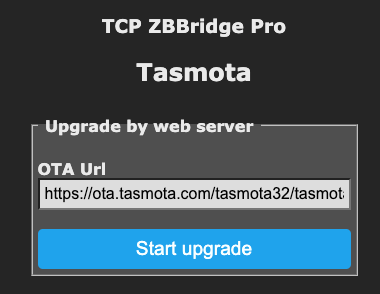
                afd14435-6d12-4cd5-9f0f-07b58c97d337-image.png

                zu 3) ich habe einen Raspberry 4b mit 4GB, der ausschließlich für ioBroker benutzt wird. kein PC, kein NUC, kein Proxmox oder Docker, aktuelles RaspiOS mit aktuellem NODE.JS 18.18.0, ich kann halt schlecht einschätzen, welche Informationen relevant sind.

                Aber aus dem Debug-Log ist vielleicht was hilfreich?

                
                zigbee.0
                2023-10-03 19:20:06.947	info	Installed Version: iobroker.zigbee@1.8.24
                
                zigbee.0
                2023-10-03 19:20:06.938	debug	Starting zigbee-herdsman...
                
                zigbee.0
                2023-10-03 19:20:06.928	info	Starting Zigbee npm ...
                
                zigbee.0
                2023-10-03 19:20:06.926	info	Try to reconnect.
                
                zigbee.0
                2023-10-03 19:19:56.923	error	Error herdsman start
                
                zigbee.0
                2023-10-03 19:19:56.922	error	Failed to start Zigbee
                
                zigbee.0
                2023-10-03 19:19:56.920	error	Starting zigbee-herdsman problem : "Failed to initialize NV memory item (id=3, name=STARTUP_OPTION, len=1, status=0)"
                
                zigbee.0
                2023-10-03 19:19:10.200	debug	Backup /opt/iobroker/iobroker-data/zigbee_0/backup_2023_10_03-19_19_09.tar.gz success
                
                zigbee.0
                2023-10-03 19:19:09.885	info	Installed Version: iobroker.zigbee@1.8.24
                
                zigbee.0
                2023-10-03 19:19:09.601	debug	Starting zigbee-herdsman...
                
                zigbee.0
                2023-10-03 19:19:09.556	info	Starting Zigbee npm ...
                
                zigbee.0
                2023-10-03 19:19:09.553	info	delete old Backup files. keep only last 10
                
                zigbee.0
                2023-10-03 19:19:09.477	debug	Using zigbee-herdsman with settings: {"network":{"panID":6754,"channelList":[11],"networkKey":[1,3,5,7,9,11,13,15,0,2,4,6,8,10,12,13],"extenedPanID":[221,221,221,221,221,221,221,221]},"databasePath":"/opt/iobroker/iobroker-data/zigbee_0/shepherd.db","backupPath":"/opt/iobroker/iobroker-data/zigbee_0/nvbackup.json","serialPort":{"baudRate":115200,"rtscts":false,"path":"tcp://zigbee-gateway.weinbrecht.lan:8888","adapter":"zstack"},"adapter":{"forceStartWithInconsistentAdapterConfiguration":true}}
                
                zigbee.0
                2023-10-03 19:19:09.421	info	starting. Version 1.8.24 in /opt/iobroker/node_modules/iobroker.zigbee, node: v18.18.0, js-controller: 5.0.12
                
                zigbee.0
                2023-10-03 19:19:08.871	debug	Plugin sentry Initialize Plugin (enabled=true)
                
                arteckA 1 Antwort Letzte Antwort
                0
                • ? Offline
                  ? Offline
                  Ein ehemaliger Benutzer
                  schrieb am zuletzt editiert von
                  #14

                  Moin,

                  jetzt ist Family time, sorry muss gehen, sonst werden mir die Hammelbeine lang gezogen :)

                  VG
                  Bernd

                  ? 1 Antwort Letzte Antwort
                  0
                  • ? Ein ehemaliger Benutzer

                    Moin,

                    jetzt ist Family time, sorry muss gehen, sonst werden mir die Hammelbeine lang gezogen :)

                    VG
                    Bernd

                    ? Offline
                    ? Offline
                    Ein ehemaliger Benutzer
                    schrieb am zuletzt editiert von
                    #15

                    @dp20eic

                    ja, kenn ich meine bessere Hälfte hat auch schon protestiert.

                    1 Antwort Letzte Antwort
                    0
                    • ? Ein ehemaliger Benutzer

                      Moin,

                      @papa_aus_rastatt sagte in Anleitung Zigbee2MQTT Einrichtung im ioBroker:

                      zu 1) hatte ich seit einem Jahr im Einsatz und funktioniert seit heute nicht mehr. Daher auf der Suche nach einer Alternative.

                      Dass etwas von heute auf Morgen nicht mehr funktioniert, glaube ich nicht, Du hast irgendetwas gemacht, Updates vom Betriebssystem, von Adaptern, oder Tasmota!

                      @papa_aus_rastatt sagte in Anleitung Zigbee2MQTT Einrichtung im ioBroker:

                      ich verwende einen ZigbeePro von Sonoff, der ist über WLAN angeschlossen. und läuft mit Tasmota, ich habe nur dass dazu gefunden:

                      Hast Du das selbst gemacht, oder fertig gekauft? Wenn selbst gemacht, dann müsstest Du ja wissen, wie man den wieder korrekt flashed, wenn gekauft, mal mit dem Verkäufer in Verbindung treten.

                      @papa_aus_rastatt sagte in Anleitung Zigbee2MQTT Einrichtung im ioBroker:

                      ich würde also 4) favorisieren bekomme aber die Kommunikation nicht hin. Und die bisher gefundenen Anleitungen sind so für mich missverständlich.

                      Du musst schon sagen, was Du wie eingerichtet hast, worauf läuft bei Dir alles, RasPI, PC, NUC, unter Proxmox, im Docker.
                      Wie soll man da helfen, wenn da einiges unbekannt ist. Hier mal ein Forumsbeitrag, wenn man das beherzigt, dann kommen weniger Rückfragen ⇒ https://forum.iobroker.net/topic/51555/hinweise-für-gute-forenbeiträge

                      @papa_aus_rastatt sagte in Anleitung Zigbee2MQTT Einrichtung im ioBroker:

                      Ich würde mich also unheimlich über eine Anleitung erfreuen, damit ich meinen Zigbee-Adapter wieder benutzen kann.

                      Also einfacher wird es auch nicht, wenn ich hier das schon geschrieben wiederhole, Du musst auch ganz ehrlich sein und sagen, was Du vorher gemacht hast.
                      Frei nach dem Zitat aus einem Film

                      "Es hat immer Geister in der Maschine gegeben. Zufällige Codesegmente gruppierten sich und formten unerwartete Protokolle. Diese unvorhergesehenen freien Radikale rufen grundlegende Fragen hervor nach freiem Willen, Kreativität und sogar nach der Natur dessen, was wir Seele nennen. Wie kommt es, dass in der Dunkelheit gelassene Robots das Licht suchen? Wie kommt es, dass Robots, die in einem leeren Raum gelagert werden, lieber gegenseitige Nähe suchen, anstatt allein zu stehen? Wie erklären wir dieses Verhalten? Zufällige Codesegmente? Oder ist es mehr? Wann wird aus einem Wahrnehmungsschema ein Bewusstsein? Wann wird eine Rechenmaschine zur Suche nach der Wahrheit? Wann wird aus einer Persönlichkeitssimulation die bittere Frucht einer Seele?"
                      

                      Glaube ich nicht daran, dass das bei Deinem Problem zutrifft ;)

                      VG
                      Bernd

                      ? Offline
                      ? Offline
                      Ein ehemaliger Benutzer
                      schrieb am zuletzt editiert von
                      #16

                      @dp20eic brav wie es sich gehört, läuft auch ein Backup in die Cloud, ich habe das von vor 2 Tagen eingespielt, als es noch lief:
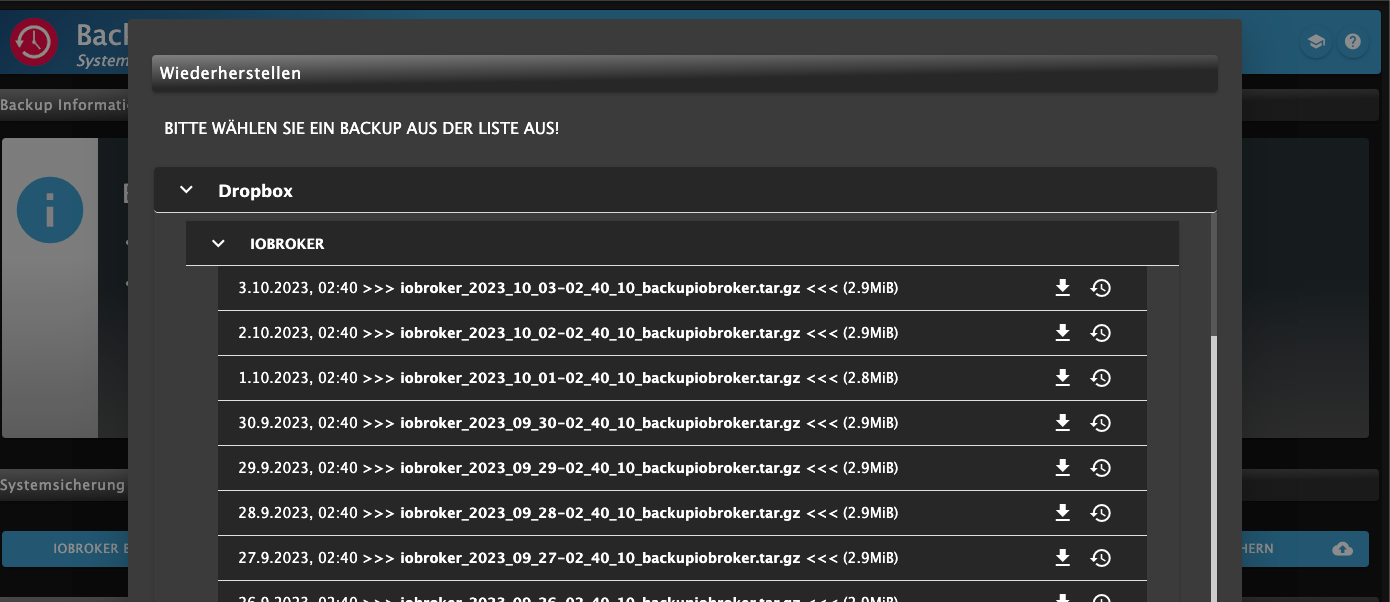
                      9ad8e6be-e846-46c1-b4da-599f92fc9743-image.png

                      gleiche Fehlermeldung:
                      b739d298-271a-4637-8be6-524961507ba2-image.png

                      1 Antwort Letzte Antwort
                      0
                      • ? Ein ehemaliger Benutzer

                        @dp20eic
                        zu 1) richtig . ich war Deutschlandsaufen. als ich nach hause gekommen bin, habe ich bemerkt, dass das Badezimmerlicht nicht mehr auf Steuerung reagierte. Ich habe es dann erneut angemeldet. Dann erst ist mir aufgefallen, dass der Zigbee nicht mehr angemeldet war.

                        zu 2) Tasmota zu aktualisieren ist mit zwei Klicks erledigt:
                        afd14435-6d12-4cd5-9f0f-07b58c97d337-image.png

                        zu 3) ich habe einen Raspberry 4b mit 4GB, der ausschließlich für ioBroker benutzt wird. kein PC, kein NUC, kein Proxmox oder Docker, aktuelles RaspiOS mit aktuellem NODE.JS 18.18.0, ich kann halt schlecht einschätzen, welche Informationen relevant sind.

                        Aber aus dem Debug-Log ist vielleicht was hilfreich?

                        
                        zigbee.0
                        2023-10-03 19:20:06.947	info	Installed Version: iobroker.zigbee@1.8.24
                        
                        zigbee.0
                        2023-10-03 19:20:06.938	debug	Starting zigbee-herdsman...
                        
                        zigbee.0
                        2023-10-03 19:20:06.928	info	Starting Zigbee npm ...
                        
                        zigbee.0
                        2023-10-03 19:20:06.926	info	Try to reconnect.
                        
                        zigbee.0
                        2023-10-03 19:19:56.923	error	Error herdsman start
                        
                        zigbee.0
                        2023-10-03 19:19:56.922	error	Failed to start Zigbee
                        
                        zigbee.0
                        2023-10-03 19:19:56.920	error	Starting zigbee-herdsman problem : "Failed to initialize NV memory item (id=3, name=STARTUP_OPTION, len=1, status=0)"
                        
                        zigbee.0
                        2023-10-03 19:19:10.200	debug	Backup /opt/iobroker/iobroker-data/zigbee_0/backup_2023_10_03-19_19_09.tar.gz success
                        
                        zigbee.0
                        2023-10-03 19:19:09.885	info	Installed Version: iobroker.zigbee@1.8.24
                        
                        zigbee.0
                        2023-10-03 19:19:09.601	debug	Starting zigbee-herdsman...
                        
                        zigbee.0
                        2023-10-03 19:19:09.556	info	Starting Zigbee npm ...
                        
                        zigbee.0
                        2023-10-03 19:19:09.553	info	delete old Backup files. keep only last 10
                        
                        zigbee.0
                        2023-10-03 19:19:09.477	debug	Using zigbee-herdsman with settings: {"network":{"panID":6754,"channelList":[11],"networkKey":[1,3,5,7,9,11,13,15,0,2,4,6,8,10,12,13],"extenedPanID":[221,221,221,221,221,221,221,221]},"databasePath":"/opt/iobroker/iobroker-data/zigbee_0/shepherd.db","backupPath":"/opt/iobroker/iobroker-data/zigbee_0/nvbackup.json","serialPort":{"baudRate":115200,"rtscts":false,"path":"tcp://zigbee-gateway.weinbrecht.lan:8888","adapter":"zstack"},"adapter":{"forceStartWithInconsistentAdapterConfiguration":true}}
                        
                        zigbee.0
                        2023-10-03 19:19:09.421	info	starting. Version 1.8.24 in /opt/iobroker/node_modules/iobroker.zigbee, node: v18.18.0, js-controller: 5.0.12
                        
                        zigbee.0
                        2023-10-03 19:19:08.871	debug	Plugin sentry Initialize Plugin (enabled=true)
                        
                        arteckA Offline
                        arteckA Offline
                        arteck
                        Developer Most Active
                        schrieb am zuletzt editiert von arteck
                        #17

                        @papa_aus_rastatt sagte in Anleitung Zigbee2MQTT Einrichtung im ioBroker:

                        Starting zigbee-herdsman problem : "Failed to initialize NV memory item (id=3, name=STARTUP_OPTION, len=1, status=0)"

                        der kann den Spcicher nicht initialisieren .. warum auch immer

                        zigbee hab ich, zwave auch, nuc's genauso und HA auch

                        ? 1 Antwort Letzte Antwort
                        0
                        • arteckA arteck

                          @papa_aus_rastatt sagte in Anleitung Zigbee2MQTT Einrichtung im ioBroker:

                          Starting zigbee-herdsman problem : "Failed to initialize NV memory item (id=3, name=STARTUP_OPTION, len=1, status=0)"

                          der kann den Spcicher nicht initialisieren .. warum auch immer

                          ? Offline
                          ? Offline
                          Ein ehemaliger Benutzer
                          schrieb am zuletzt editiert von Ein ehemaliger Benutzer
                          #18

                          @arteck Guten morgen,

                          ich hab den Debug gerade mal ausgeschnitten:

                          2023-10-04 07:08:26.755	info	Try to reconnect.
                          2023-10-04 07:08:16.750	error	Error herdsman start
                          2023-10-04 07:08:16.749	error	Failed to start Zigbee
                          2023-10-04 07:08:16.748	error	Starting zigbee-herdsman problem : "Failed to connect to the adapter (Error: SRSP - SYS - ping after 6000ms)"
                          2023-10-04 07:08:10.595	debug	zigbee-herdsman:adapter:zStack:unpi:writer --> frame [254,0,33,1,32]
                          2023-10-04 07:08:10.594	debug	zigbee-herdsman:adapter:zStack:znp:SREQ --> SYS - ping - {"capabilities":1}
                          2023-10-04 07:08:04.592	debug	zigbee-herdsman:adapter:zStack:unpi:writer --> frame [254,0,33,1,32]
                          2023-10-04 07:08:04.591	debug	zigbee-herdsman:adapter:zStack:znp:SREQ --> SYS - ping - {"capabilities":1}
                          2023-10-04 07:07:58.588	debug	zigbee-herdsman:adapter:zStack:unpi:writer --> frame [254,0,33,1,32]
                          2023-10-04 07:07:58.586	debug	zigbee-herdsman:adapter:zStack:znp:SREQ --> SYS - ping - {"capabilities":1}
                          2023-10-04 07:07:58.584	debug	zigbee-herdsman:adapter:zStack:znp:log Skip bootloader for CC2652/CC1352
                          2023-10-04 07:07:57.579	debug	zigbee-herdsman:adapter:zStack:unpi:writer --> buffer [239]
                          2023-10-04 07:07:57.578	debug	zigbee-herdsman:adapter:zStack:znp:log Writing CC2530/CC2531 skip bootloader payload
                          2023-10-04 07:07:57.576	debug	zigbee-herdsman:adapter:zStack:znp:log Socket ready
                          2023-10-04 07:07:57.575	debug	zigbee-herdsman:adapter:zStack:znp:log Socket connected
                          2023-10-04 07:07:57.572	debug	Backup /opt/iobroker/iobroker-data/zigbee_0/backup_2023_10_04-07_07_56.tar.gz success
                          2023-10-04 07:07:57.092	info	Installed Version: iobroker.zigbee@1.8.24
                          2023-10-04 07:07:57.086	debug	zigbee-herdsman:adapter:zStack:znp:log Opening TCP socket with 192.168.174.73:8888
                          2023-10-04 07:07:57.084	debug	zigbee-herdsman:controller:log Starting with options '{"network":{"networkKeyDistribute":false,"networkKey":[1,3,5,7,9,11,13,15,0,2,4,6,8,10,12,13],"panID":6754,"extendedPanID":[221,221,221,221,221,221,221,221],"channelList":[11]},"serialPort":{"baudRate":115200,"rtscts":false,"path":"tcp://192.168.174.73:8888","adapter":"zstack"},"databasePath":"/opt/iobroker/iobroker-data/zigbee_0/shepherd.db","databaseBackupPath":null,"backupPath":"/opt/iobroker/iobroker-data/zigbee_0/nvbackup.json","adapter":{"disableLED":false,"forceStartWithInconsistentAdapterConfiguration":true},"acceptJoiningDeviceHandler":null}'
                          2023-10-04 07:07:56.769	debug	Starting zigbee-herdsman...
                          2023-10-04 07:07:56.727	info	Starting Zigbee npm ...
                          2023-10-04 07:07:56.724	info	delete old Backup files. keep only last 10
                          2023-10-04 07:07:56.637	debug	Using zigbee-herdsman with settings: {"network":{"panID":6754,"extendedPanID":[221,221,221,221,221,221,221,221],"channelList":[11],"networkKey":[1,3,5,7,9,11,13,15,0,2,4,6,8,10,12,13]},"databasePath":"/opt/iobroker/iobroker-data/zigbee_0/shepherd.db","backupPath":"/opt/iobroker/iobroker-data/zigbee_0/nvbackup.json","serialPort":{"baudRate":115200,"rtscts":false,"path":"tcp://192.168.174.73:8888","adapter":"zstack"},"adapter":{"forceStartWithInconsistentAdapterConfiguration":true}}
                          2023-10-04 07:07:56.580	info	starting. Version 1.8.24 in /opt/iobroker/node_modules/iobroker.zigbee, node: v18.18.0, js-controller: 5.0.12
                          2023-10-04 07:07:56.041	debug	Plugin sentry Initialize Plugin (enabled=true)
                          

                          bin für Vorschläge dankbar.

                          1 Antwort Letzte Antwort
                          0
                          • ? Offline
                            ? Offline
                            Ein ehemaliger Benutzer
                            schrieb am zuletzt editiert von
                            #19

                            @papa_aus_rastatt sagte in Anleitung Zigbee2MQTT Einrichtung im ioBroker:

                            bin für Vorschläge dankbar.

                            Moin,

                            kannst Du auch noch den langen Output posten, von

                            iob diag
                            

                            VG
                            Bernd

                            ? 1 Antwort Letzte Antwort
                            0
                            • ? Ein ehemaliger Benutzer

                              @papa_aus_rastatt sagte in Anleitung Zigbee2MQTT Einrichtung im ioBroker:

                              bin für Vorschläge dankbar.

                              Moin,

                              kannst Du auch noch den langen Output posten, von

                              iob diag
                              

                              VG
                              Bernd

                              ? Offline
                              ? Offline
                              Ein ehemaliger Benutzer
                              schrieb am zuletzt editiert von
                              #20

                              @dp20eic ja natürlich, kannst etwas spezifieren, was dich genau interressiert?

                              1 Antwort Letzte Antwort
                              0
                              • arteckA Offline
                                arteckA Offline
                                arteck
                                Developer Most Active
                                schrieb am zuletzt editiert von arteck
                                #21

                                tue uns beiden den gefallen und mach nur das was wir dir sagen egal obs plausiebel für dich ist oder nicht (von debug war nie die Rede)

                                wenn @dp20eic langen Output will dann zeigmal ALLES was das iob diag liefert

                                ich will die Adapter Einstellungen als screensot sehen..ja alles

                                hast den umgestellt ??
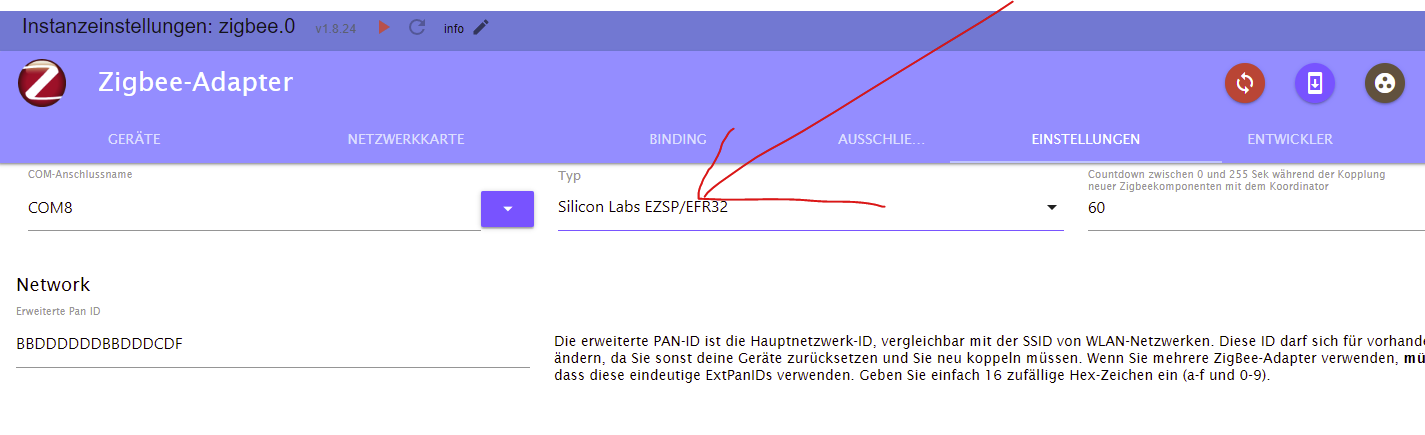
                                d44535f3-859c-4aac-9beb-7745ef389bf2-grafik.png

                                zigbee hab ich, zwave auch, nuc's genauso und HA auch

                                ? 1 Antwort Letzte Antwort
                                0
                                • arteckA arteck

                                  tue uns beiden den gefallen und mach nur das was wir dir sagen egal obs plausiebel für dich ist oder nicht (von debug war nie die Rede)

                                  wenn @dp20eic langen Output will dann zeigmal ALLES was das iob diag liefert

                                  ich will die Adapter Einstellungen als screensot sehen..ja alles

                                  hast den umgestellt ??
                                  d44535f3-859c-4aac-9beb-7745ef389bf2-grafik.png

                                  ? Offline
                                  ? Offline
                                  Ein ehemaliger Benutzer
                                  schrieb am zuletzt editiert von Ein ehemaliger Benutzer
                                  #22

                                  @arteck du meinst so?
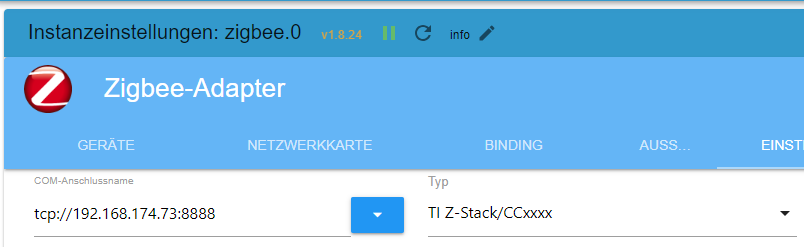
                                  30970379-5992-4013-89c4-38b6cf57b31f-image.png

                                  iob diag

                                  
                                  *** ioBroker Diagnosis ***
                                  
                                  Please stretch the window of your terminal programm (puTTY) as wide as possible or switch to full screen
                                  
                                  The following checks may give hints to potential malconfigurations or errors, please post them in our forum:
                                  
                                  https://forum.iobroker.net
                                  
                                  Just copy and paste the Summary Page, including the  characters at start and end.
                                  It helps us to help you!
                                  
                                  Press any key to continue
                                  
                                  ======== Start marking the full check here =========
                                  
                                  
                                  Skript v.2023-06-20
                                  
                                  *** BASE SYSTEM ***
                                     Static hostname: app-server1.weinbrecht.lan
                                           Icon name: computer
                                          Machine ID: f699c63377c1419dbac4c0c664f4b780
                                             Boot ID: 2dad0456cb654f80b695eb65355ad96e
                                    Operating System: Debian GNU/Linux 11 (bullseye)
                                              Kernel: Linux 6.1.54-v8+
                                        Architecture: arm64
                                  
                                  Model		: Raspberry Pi 4 Model B Rev 1.5
                                  Docker          : false
                                  Virtualization  : none
                                  Kernel          : aarch64
                                  Userland        : arm64
                                  
                                  Systemuptime and Load:
                                   08:53:22 up 14:16,  1 user,  load average: 0.36, 0.46, 0.50
                                  CPU threads: 4
                                  
                                  Raspberry only:
                                  throttled=0x0
                                  Other values than 0x0 hint to temperature/voltage problems
                                  temp=32.6'C
                                  volt=0.9360V
                                  
                                  *** Time and Time Zones ***
                                                 Local time: Wed 2023-10-04 08:53:22 CEST
                                             Universal time: Wed 2023-10-04 06:53:22 UTC
                                                   RTC time: n/a
                                                  Time zone: Europe/Berlin (CEST, +0200)
                                  System clock synchronized: yes
                                                NTP service: active
                                            RTC in local TZ: no
                                  
                                  *** User and Groups ***
                                  root
                                  /root
                                  root
                                  
                                  *** X-Server-Setup ***
                                  X-Server: 	false
                                  Desktop: 	
                                  Terminal: 	tty
                                  Boot Target: 	multi-user.target
                                  
                                  *** MEMORY ***
                                                 total        used        free      shared  buff/cache   available
                                  Mem:            3.8G        2.0G        534M        114M        1.3G        1.7G
                                  Swap:             0B          0B          0B
                                  Total:          3.8G        2.0G        534M
                                  
                                           3843 M total memory
                                           2010 M used memory
                                           2643 M active memory
                                            476 M inactive memory
                                            534 M free memory
                                             74 M buffer memory
                                           1223 M swap cache
                                              0 M total swap
                                              0 M used swap
                                              0 M free swap
                                  
                                  Raspberry only:
                                  oom events: 0
                                  lifetime oom required: 0 Mbytes
                                  total time in oom handler: 0 ms
                                  max time spent in oom handler: 0 ms
                                  
                                  *** FILESYSTEM ***
                                  Filesystem     Type      Size  Used Avail Use% Mounted on
                                  /dev/root      ext4      220G  6.6G  204G   4% /
                                  devtmpfs       devtmpfs  1.9G     0  1.9G   0% /dev
                                  tmpfs          tmpfs     1.9G     0  1.9G   0% /dev/shm
                                  tmpfs          tmpfs     769M  9.0M  760M   2% /run
                                  tmpfs          tmpfs     5.0M  4.0K  5.0M   1% /run/lock
                                  none           tmpfs     1.9G  2.2M  1.9G   1% /tmp
                                  tmpfs          tmpfs     1.9G  104M  1.8G   6% /var/cache
                                  tmpfs          tmpfs     1.9G  200K  1.9G   1% /var/log
                                  tmpfs          tmpfs     1.9G     0  1.9G   0% /var/tmp
                                  /dev/sda1      vfat      255M   53M  203M  21% /boot
                                  tmpfs          tmpfs     385M     0  385M   0% /run/user/0
                                  
                                  Messages concerning ext4 filesystem in dmesg:
                                  [Tue Oct  3 18:37:12 2023] Kernel command line: coherent_pool=1M 8250.nr_uarts=1 snd_bcm2835.enable_headphones=0 snd_bcm2835.enable_headphones=1 snd_bcm2835.enable_hdmi=1 bcm2708_fb.fbwidth=1920 bcm2708_fb.fbheight=1080 bcm2708_fb.fbdepth=16 bcm2708_fb.fbswap=1 smsc95xx.macaddr=D8:3A:DD:37:E1:5F vc_mem.mem_base=0x3f000000 vc_mem.mem_size=0x3f600000  console=ttyAMA0,115200 console=tty1 root=PARTUUID=66aa2880-02 rootfstype=ext4 fsck.repair=yes rootwait
                                  [Tue Oct  3 18:37:15 2023] EXT4-fs (sda2): mounted filesystem with writeback data mode. Quota mode: none.
                                  [Tue Oct  3 18:37:15 2023] VFS: Mounted root (ext4 filesystem) readonly on device 8:2.
                                  [Tue Oct  3 18:37:17 2023] EXT4-fs (sda2): re-mounted. Quota mode: none.
                                  
                                  Show mounted filesystems (real ones only):
                                  TARGET  SOURCE    FSTYPE OPTIONS
                                  /       /dev/sda2 ext4   rw,noatime,nodiratime,discard,nobarrier,stripe=8191
                                  `-/boot /dev/sda1 vfat   rw,relatime,fmask=0022,dmask=0022,codepage=437,iocharset=ascii,shortname=mixed,flush,errors=remount-ro
                                  
                                  Files in neuralgic directories:
                                  
                                  /var:
                                  421M	/var/
                                  316M	/var/lib
                                  158M	/var/lib/influxdb/engine
                                  158M	/var/lib/influxdb
                                  154M	/var/lib/influxdb/engine/data/a9866606e533e3f8/autogen
                                  
                                  Archived and active journals take up 8.0M in the file system.
                                  
                                  /opt/iobroker/backups:
                                  29M	/opt/iobroker/backups/
                                  
                                  /opt/iobroker/iobroker-data:
                                  439M	/opt/iobroker/iobroker-data/
                                  316M	/opt/iobroker/iobroker-data/files
                                  147M	/opt/iobroker/iobroker-data/files/vis-2
                                  75M	/opt/iobroker/iobroker-data/files/vis-2/static
                                  74M	/opt/iobroker/iobroker-data/files/vis-2/static/js
                                  
                                  The five largest files in iobroker-data are:
                                  46M	/opt/iobroker/iobroker-data/objects.jsonl
                                  33M	/opt/iobroker/iobroker-data/files/iot.admin/static/js/main.1797d034.js.map
                                  21M	/opt/iobroker/iobroker-data/files/web.admin/static/js/main.9aab3e1f.js.map
                                  19M	/opt/iobroker/iobroker-data/files/vis-2/static/js/main.d3c12542.js.map
                                  17M	/opt/iobroker/iobroker-data/files/vis-2/static/js/main.b6e16d06.js.map
                                  
                                  *** NodeJS-Installation ***
                                  
                                  /usr/bin/nodejs 	v18.18.0
                                  /usr/bin/node 		v18.18.0
                                  /usr/bin/npm 		10.1.0
                                  /usr/bin/npx 		10.1.0
                                  
                                  
                                  nodejs:
                                    Installed: 18.18.0-1nodesource1
                                    Candidate: 18.18.0-1nodesource1
                                    Version table:
                                   *** 18.18.0-1nodesource1 500
                                          500 https://deb.nodesource.com/node_18.x nodistro/main arm64 Packages
                                          100 /var/lib/dpkg/status
                                       18.17.1-1nodesource1 500
                                          500 https://deb.nodesource.com/node_18.x nodistro/main arm64 Packages
                                       18.17.0-1nodesource1 500
                                          500 https://deb.nodesource.com/node_18.x nodistro/main arm64 Packages
                                       18.16.1-1nodesource1 500
                                          500 https://deb.nodesource.com/node_18.x nodistro/main arm64 Packages
                                       18.16.0-1nodesource1 500
                                          500 https://deb.nodesource.com/node_18.x nodistro/main arm64 Packages
                                       18.15.0-1nodesource1 500
                                          500 https://deb.nodesource.com/node_18.x nodistro/main arm64 Packages
                                       18.14.2-1nodesource1 500
                                          500 https://deb.nodesource.com/node_18.x nodistro/main arm64 Packages
                                       18.14.1-1nodesource1 500
                                          500 https://deb.nodesource.com/node_18.x nodistro/main arm64 Packages
                                       18.14.0-1nodesource1 500
                                          500 https://deb.nodesource.com/node_18.x nodistro/main arm64 Packages
                                       18.13.0-1nodesource1 500
                                          500 https://deb.nodesource.com/node_18.x nodistro/main arm64 Packages
                                       18.12.0-1nodesource1 500
                                          500 https://deb.nodesource.com/node_18.x nodistro/main arm64 Packages
                                       18.11.0-1nodesource1 500
                                          500 https://deb.nodesource.com/node_18.x nodistro/main arm64 Packages
                                       18.10.0-1nodesource1 500
                                          500 https://deb.nodesource.com/node_18.x nodistro/main arm64 Packages
                                       18.9.1-1nodesource1 500
                                          500 https://deb.nodesource.com/node_18.x nodistro/main arm64 Packages
                                       18.9.0-1nodesource1 500
                                          500 https://deb.nodesource.com/node_18.x nodistro/main arm64 Packages
                                       18.8.0-1nodesource1 500
                                          500 https://deb.nodesource.com/node_18.x nodistro/main arm64 Packages
                                       18.7.0-1nodesource1 500
                                          500 https://deb.nodesource.com/node_18.x nodistro/main arm64 Packages
                                       18.6.0-1nodesource1 500
                                          500 https://deb.nodesource.com/node_18.x nodistro/main arm64 Packages
                                       18.5.0-1nodesource1 500
                                          500 https://deb.nodesource.com/node_18.x nodistro/main arm64 Packages
                                       18.4.0-1nodesource1 500
                                          500 https://deb.nodesource.com/node_18.x nodistro/main arm64 Packages
                                       18.3.0-1nodesource1 500
                                          500 https://deb.nodesource.com/node_18.x nodistro/main arm64 Packages
                                       18.2.0-1nodesource1 500
                                          500 https://deb.nodesource.com/node_18.x nodistro/main arm64 Packages
                                       18.1.0-1nodesource1 500
                                          500 https://deb.nodesource.com/node_18.x nodistro/main arm64 Packages
                                       18.0.0-1nodesource1 500
                                          500 https://deb.nodesource.com/node_18.x nodistro/main arm64 Packages
                                       12.22.12~dfsg-1~deb11u4 500
                                          500 http://security.debian.org/debian-security bullseye-security/main arm64 Packages
                                       12.22.12~dfsg-1~deb11u3 500
                                          500 http://deb.debian.org/debian bullseye/main arm64 Packages
                                  
                                  Temp directories causing npm8 problem: 0
                                  No problems detected
                                  
                                  Errors in npm tree: 0
                                  
                                  *** ioBroker-Installation ***
                                  
                                  ioBroker Status
                                  iobroker is running on this host.
                                  
                                  
                                  Objects type: jsonl
                                  States  type: jsonl
                                  
                                  No configuration change needed.
                                  
                                  
                                  Multihost discovery server: disabled
                                  Discovery authentication:   enabled
                                  Persistent activation:      disabled
                                  Objects:                    jsonl on 127.0.0.1
                                  States:                     jsonl on 127.0.0.1
                                  
                                  Core adapters versions
                                  js-controller: 	5.0.12
                                  admin: 		6.10.4
                                  javascript: 	7.1.4
                                  
                                  Adapters from github: 	1
                                  
                                  Adapter State
                                  + system.adapter.accuweather.0            : accuweather           : app-server1.weinbrecht.lan               -  enabled
                                  + system.adapter.admin.0                  : admin                 : app-server1.weinbrecht.lan               -  enabled, port: 8081, bind: 0.0.0.0, run as: admin
                                  + system.adapter.alexa2.0                 : alexa2                : app-server1.weinbrecht.lan               -  enabled
                                  + system.adapter.apsystems-ecu.0          : apsystems-ecu         : app-server1.weinbrecht.lan               -  enabled
                                  + system.adapter.backitup.0               : backitup              : app-server1.weinbrecht.lan               -  enabled
                                    system.adapter.cloud.0                  : cloud                 : app-server1.weinbrecht.lan               - disabled
                                    system.adapter.feiertage.0              : feiertage             : app-server1.weinbrecht.lan               -  enabled
                                  + system.adapter.fritzdect.0              : fritzdect             : app-server1.weinbrecht.lan               -  enabled
                                  + system.adapter.influxdb.0               : influxdb              : app-server1.weinbrecht.lan               -  enabled, port: 8086
                                  + system.adapter.info.0                   : info                  : app-server1.weinbrecht.lan               -  enabled
                                    system.adapter.iot.0                    : iot                   : app-server1.weinbrecht.lan               - disabled
                                  + system.adapter.javascript.0             : javascript            : app-server1.weinbrecht.lan               -  enabled
                                  + system.adapter.mihome-vacuum.0          : mihome-vacuum         : app-server1.weinbrecht.lan               -  enabled, port: 54321
                                  + system.adapter.modbus.0                 : modbus                : app-server1.weinbrecht.lan               -  enabled
                                  + system.adapter.sonoff.0                 : sonoff                : app-server1.weinbrecht.lan               -  enabled, port: 1883, bind: 192.168.174.12
                                  + system.adapter.telegram.0               : telegram              : app-server1.weinbrecht.lan               -  enabled, port: 8443, bind: 0.0.0.0
                                  + system.adapter.tr-064.0                 : tr-064                : app-server1.weinbrecht.lan               -  enabled
                                  + system.adapter.tuya.0                   : tuya                  : app-server1.weinbrecht.lan               -  enabled
                                  + system.adapter.vaillant.0               : vaillant              : app-server1.weinbrecht.lan               -  enabled
                                    system.adapter.vis-2-widgets-energy.0   : vis-2-widgets-energy  : app-server1.weinbrecht.lan               - disabled
                                    system.adapter.vis-2-widgets-gauges.0   : vis-2-widgets-gauges  : app-server1.weinbrecht.lan               - disabled
                                    system.adapter.vis-2-widgets-material.0 : vis-2-widgets-material: app-server1.weinbrecht.lan               - disabled
                                  + system.adapter.vis-2.0                  : vis-2                 : app-server1.weinbrecht.lan               -  enabled
                                  + system.adapter.web.0                    : web                   : app-server1.weinbrecht.lan               -  enabled, port: 8082, bind: 0.0.0.0, run as: admin
                                  + system.adapter.wifilight.0              : wifilight             : app-server1.weinbrecht.lan               -  enabled
                                  + system.adapter.zigbee.0                 : zigbee                : app-server1.weinbrecht.lan               -  enabled, port: tcp://192.168.174.73:8888
                                  
                                  + instance is alive
                                  
                                  Enabled adapters with bindings
                                  + system.adapter.admin.0                  : admin                 : app-server1.weinbrecht.lan               -  enabled, port: 8081, bind: 0.0.0.0, run as: admin
                                  + system.adapter.influxdb.0               : influxdb              : app-server1.weinbrecht.lan               -  enabled, port: 8086
                                  + system.adapter.mihome-vacuum.0          : mihome-vacuum         : app-server1.weinbrecht.lan               -  enabled, port: 54321
                                  + system.adapter.sonoff.0                 : sonoff                : app-server1.weinbrecht.lan               -  enabled, port: 1883, bind: 192.168.174.12
                                  + system.adapter.telegram.0               : telegram              : app-server1.weinbrecht.lan               -  enabled, port: 8443, bind: 0.0.0.0
                                  + system.adapter.web.0                    : web                   : app-server1.weinbrecht.lan               -  enabled, port: 8082, bind: 0.0.0.0, run as: admin
                                  + system.adapter.zigbee.0                 : zigbee                : app-server1.weinbrecht.lan               -  enabled, port: tcp://192.168.174.73:8888
                                  
                                  ioBroker-Repositories
                                  stable        : http://download.iobroker.net/sources-dist.json
                                  beta          : http://download.iobroker.net/sources-dist-latest.json
                                  
                                  Active repo(s): beta
                                  
                                  Installed ioBroker-Instances
                                  Used repository: beta
                                  Adapter    "accuweather"  : 1.3.1    , installed 1.3.1
                                  Adapter    "admin"        : 6.10.4   , installed 6.10.4
                                  Adapter    "alexa2"       : 3.25.2   , installed 3.25.2
                                  Adapter    "backitup"     : 2.8.2    , installed 2.8.2
                                  Adapter    "cloud"        : 4.4.1    , installed 4.4.1
                                  Adapter    "feiertage"    : 1.1.4    , installed 1.1.4
                                  Adapter    "fritzdect"    : 2.4.1    , installed 2.4.1
                                  Adapter    "influxdb"     : 3.2.0    , installed 3.2.0
                                  Adapter    "info"         : 2.0.0    , installed 2.0.0
                                  Adapter    "iot"          : 2.0.11   , installed 2.0.11
                                  Adapter    "javascript"   : 7.1.4    , installed 7.1.4
                                  Controller "js-controller": 5.0.12   , installed 5.0.12
                                  Adapter    "mihome-vacuum": 4.0.0    , installed 4.0.0
                                  Adapter    "modbus"       : 5.0.11   , installed 5.0.11
                                  Adapter    "simple-api"   : 2.7.2    , installed 2.7.2
                                  Adapter    "socketio"     : 6.5.6    , installed 6.5.6
                                  Adapter    "sonoff"       : 3.0.3    , installed 3.0.3
                                  Adapter    "telegram"     : 1.16.0   , installed 1.16.0
                                  Adapter    "tr-064"       : 4.2.18   , installed 4.2.18
                                  Adapter    "tuya"         : 3.14.2   , installed 3.14.2
                                  Adapter    "vaillant"     : 0.2.0    , installed 0.2.0
                                  Adapter    "vis-2"        : 2.3.0    , installed 2.3.0
                                  Adapter    "vis-2-widgets-energy": 0.3.8, installed 0.3.8
                                  Adapter    "vis-2-widgets-gauges": 0.2.0, installed 0.2.0
                                  Adapter    "vis-2-widgets-material": 1.2.1, installed 1.2.1
                                  Adapter    "web"          : 6.1.3    , installed 6.1.3
                                  Adapter    "wifilight"    : 1.1.4    , installed 1.1.4
                                  Adapter    "ws"           : 2.5.6    , installed 2.5.6
                                  Adapter    "zigbee"       : 1.8.24   , installed 1.8.24
                                  
                                  Objects and States
                                  Please stand by - This may take a while
                                  Objects: 	6543
                                  States: 	6142
                                  
                                  *** OS-Repositories and Updates ***
                                  Reading package lists...
                                  Pending Updates: 0
                                  
                                  *** Listening Ports ***
                                  Active Internet connections (only servers)
                                  Proto Recv-Q Send-Q Local Address           Foreign Address         State       User       Inode      PID/Program name    
                                  tcp        0      0 192.168.174.12:1883     0.0.0.0:*               LISTEN      1001       87078      8050/io.sonoff.0    
                                  tcp        0      0 0.0.0.0:5355            0.0.0.0:*               LISTEN      102        944        320/systemd-resolve 
                                  tcp        0      0 127.0.0.53:53           0.0.0.0:*               LISTEN      102        950        320/systemd-resolve 
                                  tcp        0      0 127.0.0.1:9000          0.0.0.0:*               LISTEN      1001       62525      4511/iobroker.js-co 
                                  tcp        0      0 127.0.0.1:9001          0.0.0.0:*               LISTEN      1001       61674      4511/iobroker.js-co 
                                  tcp        0      0 192.168.178.12:22       0.0.0.0:*               LISTEN      0          998        394/sshd: /usr/sbin 
                                  tcp        0      0 192.168.178.12:80       0.0.0.0:*               LISTEN      0          13414      493/nginx: master p 
                                  tcp        0      0 192.168.174.12:22       0.0.0.0:*               LISTEN      0          996        394/sshd: /usr/sbin 
                                  tcp        0      0 192.168.178.12:443      0.0.0.0:*               LISTEN      0          13412      493/nginx: master p 
                                  tcp6       0      0 :::3000                 :::*                    LISTEN      111        13546      525/grafana         
                                  tcp6       0      0 :::5355                 :::*                    LISTEN      102        947        320/systemd-resolve 
                                  tcp6       0      0 fd00::da3a:ddff:fe3:443 :::*                    LISTEN      0          13413      493/nginx: master p 
                                  tcp6       0      0 fd00::da3a:ddff:fe37:80 :::*                    LISTEN      0          13415      493/nginx: master p 
                                  tcp6       0      0 :::8081                 :::*                    LISTEN      1001       62602      4550/io.admin.0     
                                  tcp6       0      0 :::8082                 :::*                    LISTEN      1001       88461      8156/io.web.0       
                                  tcp6       0      0 :::8086                 :::*                    LISTEN      110        13436      466/influxd         
                                  udp        0      0 127.0.0.53:53           0.0.0.0:*                           102        949        320/systemd-resolve 
                                  udp        0      0 0.0.0.0:53421           0.0.0.0:*                           1001       78573      8014/io.mihome-vacu 
                                  udp        0      0 0.0.0.0:6666            0.0.0.0:*                           1001       88475      8084/io.tuya.0      
                                  udp        0      0 0.0.0.0:6667            0.0.0.0:*                           1001       88476      8084/io.tuya.0      
                                  udp        0      0 0.0.0.0:5355            0.0.0.0:*                           102        943        320/systemd-resolve 
                                  udp6       0      0 fe80::da3a:ddff:fe3:546 :::*                                101        481293     179/systemd-network 
                                  udp6       0      0 :::5355                 :::*                                102        946        320/systemd-resolve 
                                  
                                  *** Log File - Last 25 Lines ***
                                  
                                  2023-10-04 08:47:37.093  - info: zigbee.0 (49242) Installed Version: iobroker.zigbee@1.8.24
                                  2023-10-04 08:49:07.681  - error: zigbee.0 (49242) Starting zigbee-herdsman problem : "Cannot read properties of undefined (reading 'payload')"
                                  2023-10-04 08:49:07.682  - error: zigbee.0 (49242) Failed to start Zigbee
                                  2023-10-04 08:49:07.683  - error: zigbee.0 (49242) Error herdsman start
                                  2023-10-04 08:49:17.685  - info: zigbee.0 (49242) Try to reconnect.
                                  2023-10-04 08:49:17.686  - info: zigbee.0 (49242) Starting Zigbee  npm ...
                                  2023-10-04 08:49:17.693  - info: zigbee.0 (49242) Installed Version: iobroker.zigbee@1.8.24
                                  2023-10-04 08:51:42.121  - error: zigbee.0 (49242) Starting zigbee-herdsman problem : "network commissioning timed out - most likely network with the same panId or extendedPanId already exists nearby"
                                  2023-10-04 08:51:42.123  - error: zigbee.0 (49242) Failed to start Zigbee
                                  2023-10-04 08:51:42.124  - error: zigbee.0 (49242) Error herdsman start
                                  2023-10-04 08:51:52.129  - info: zigbee.0 (49242) Try to reconnect.
                                  2023-10-04 08:51:52.131  - info: zigbee.0 (49242) Starting Zigbee  npm ...
                                  2023-10-04 08:51:52.138  - info: zigbee.0 (49242) Installed Version: iobroker.zigbee@1.8.24
                                  2023-10-04 08:53:13.428  - error: zigbee.0 (49242) Starting zigbee-herdsman problem : "Cannot read properties of undefined (reading 'payload')"
                                  2023-10-04 08:53:13.429  - error: zigbee.0 (49242) Failed to start Zigbee
                                  2023-10-04 08:53:13.430  - error: zigbee.0 (49242) Error herdsman start
                                  2023-10-04 08:53:23.432  - info: zigbee.0 (49242) Try to reconnect.
                                  2023-10-04 08:53:23.433  - info: zigbee.0 (49242) Starting Zigbee  npm ...
                                  2023-10-04 08:53:23.442  - info: zigbee.0 (49242) Installed Version: iobroker.zigbee@1.8.24
                                  2023-10-04 08:53:48.737  - error: zigbee.0 (49242) Starting zigbee-herdsman problem : "Cannot read properties of undefined (reading 'payload')"
                                  2023-10-04 08:53:48.755  - error: zigbee.0 (49242) Failed to start Zigbee
                                  2023-10-04 08:53:48.756  - error: zigbee.0 (49242) Error herdsman start
                                  2023-10-04 08:53:58.759  - info: zigbee.0 (49242) Try to reconnect.
                                  2023-10-04 08:53:58.760  - info: zigbee.0 (49242) Starting Zigbee  npm ...
                                  2023-10-04 08:53:58.777  - info: zigbee.0 (49242) Installed Version: iobroker.zigbee@1.8.24


                                  ============ Mark until here for C&P =============
                                  
                                  iob diag has finished.
                                  
                                  
                                  Press any key for a summary
                                  
                                  Copy text starting here:
                                  
                                  
                                  ======================= SUMMARY =======================
                                  		     v.2023-06-20
                                  
                                  
                                     Static hostname: app-server1.weinbrecht.lan
                                           Icon name: computer
                                          Machine ID: f699c63377c1419dbac4c0c664f4b780
                                             Boot ID: 2dad0456cb654f80b695eb65355ad96e
                                    Operating System: Debian GNU/Linux 11 (bullseye)
                                              Kernel: Linux 6.1.54-v8+
                                        Architecture: arm64
                                  
                                  Installation: 		native
                                  Kernel: 		aarch64
                                  Userland: 		arm64
                                  Timezone: 		Europe/Berlin (CEST, +0200)
                                  User-ID: 		0
                                  X-Server: 		false
                                  Boot Target: 		multi-user.target
                                  
                                  Pending OS-Updates: 	0
                                  Pending iob updates: 	0
                                  
                                  Nodejs-Installation: 	/usr/bin/nodejs 	v18.18.0
                                  			/usr/bin/node 		v18.18.0
                                  			/usr/bin/npm 		10.1.0
                                  			/usr/bin/npx 		10.1.0
                                  
                                  Recommended versions are nodejs 18.x.y and npm 9.x.y
                                  Your nodejs installation is correct
                                  
                                  MEMORY: 
                                                 total        used        free      shared  buff/cache   available
                                  Mem:            3.8G        2.1G        456M        114M        1.3G        1.6G
                                  Swap:             0B          0B          0B
                                  Total:          3.8G        2.1G        456M
                                  
                                  Active iob-Instances: 	21
                                  Active repo(s): beta
                                  
                                  ioBroker Core: 		js-controller 		5.0.12
                                  			admin 			6.10.4
                                  
                                  ioBroker Status: 	iobroker is running on this host.
                                  
                                  
                                  Objects type: jsonl
                                  States  type: jsonl
                                  
                                  Status admin and web instance:
                                  + system.adapter.admin.0                  : admin                 : app-server1.weinbrecht.lan               -  enabled, port: 8081, bind: 0.0.0.0, run as: admin
                                  + system.adapter.web.0                    : web                   : app-server1.weinbrecht.lan               -  enabled, port: 8082, bind: 0.0.0.0, run as: admin
                                  
                                  Objects: 		6543
                                  States: 		6142
                                  
                                  Size of iob-Database:
                                  
                                  46M	/opt/iobroker/iobroker-data/objects.jsonl
                                  9.6M	/opt/iobroker/iobroker-data/states.jsonl


                                  =================== END OF SUMMARY ====================
                                  
                                  
                                  === Mark text until here for copying ===
                                  
                                  
                                  arteckA ? 2 Antworten Letzte Antwort
                                  0
                                  • ? Ein ehemaliger Benutzer

                                    @arteck du meinst so?
                                    30970379-5992-4013-89c4-38b6cf57b31f-image.png

                                    iob diag

                                    
                                    *** ioBroker Diagnosis ***
                                    
                                    Please stretch the window of your terminal programm (puTTY) as wide as possible or switch to full screen
                                    
                                    The following checks may give hints to potential malconfigurations or errors, please post them in our forum:
                                    
                                    https://forum.iobroker.net
                                    
                                    Just copy and paste the Summary Page, including the  characters at start and end.
                                    It helps us to help you!
                                    
                                    Press any key to continue
                                    
                                    ======== Start marking the full check here =========
                                    
                                    
                                    Skript v.2023-06-20
                                    
                                    *** BASE SYSTEM ***
                                       Static hostname: app-server1.weinbrecht.lan
                                             Icon name: computer
                                            Machine ID: f699c63377c1419dbac4c0c664f4b780
                                               Boot ID: 2dad0456cb654f80b695eb65355ad96e
                                      Operating System: Debian GNU/Linux 11 (bullseye)
                                                Kernel: Linux 6.1.54-v8+
                                          Architecture: arm64
                                    
                                    Model		: Raspberry Pi 4 Model B Rev 1.5
                                    Docker          : false
                                    Virtualization  : none
                                    Kernel          : aarch64
                                    Userland        : arm64
                                    
                                    Systemuptime and Load:
                                     08:53:22 up 14:16,  1 user,  load average: 0.36, 0.46, 0.50
                                    CPU threads: 4
                                    
                                    Raspberry only:
                                    throttled=0x0
                                    Other values than 0x0 hint to temperature/voltage problems
                                    temp=32.6'C
                                    volt=0.9360V
                                    
                                    *** Time and Time Zones ***
                                                   Local time: Wed 2023-10-04 08:53:22 CEST
                                               Universal time: Wed 2023-10-04 06:53:22 UTC
                                                     RTC time: n/a
                                                    Time zone: Europe/Berlin (CEST, +0200)
                                    System clock synchronized: yes
                                                  NTP service: active
                                              RTC in local TZ: no
                                    
                                    *** User and Groups ***
                                    root
                                    /root
                                    root
                                    
                                    *** X-Server-Setup ***
                                    X-Server: 	false
                                    Desktop: 	
                                    Terminal: 	tty
                                    Boot Target: 	multi-user.target
                                    
                                    *** MEMORY ***
                                                   total        used        free      shared  buff/cache   available
                                    Mem:            3.8G        2.0G        534M        114M        1.3G        1.7G
                                    Swap:             0B          0B          0B
                                    Total:          3.8G        2.0G        534M
                                    
                                             3843 M total memory
                                             2010 M used memory
                                             2643 M active memory
                                              476 M inactive memory
                                              534 M free memory
                                               74 M buffer memory
                                             1223 M swap cache
                                                0 M total swap
                                                0 M used swap
                                                0 M free swap
                                    
                                    Raspberry only:
                                    oom events: 0
                                    lifetime oom required: 0 Mbytes
                                    total time in oom handler: 0 ms
                                    max time spent in oom handler: 0 ms
                                    
                                    *** FILESYSTEM ***
                                    Filesystem     Type      Size  Used Avail Use% Mounted on
                                    /dev/root      ext4      220G  6.6G  204G   4% /
                                    devtmpfs       devtmpfs  1.9G     0  1.9G   0% /dev
                                    tmpfs          tmpfs     1.9G     0  1.9G   0% /dev/shm
                                    tmpfs          tmpfs     769M  9.0M  760M   2% /run
                                    tmpfs          tmpfs     5.0M  4.0K  5.0M   1% /run/lock
                                    none           tmpfs     1.9G  2.2M  1.9G   1% /tmp
                                    tmpfs          tmpfs     1.9G  104M  1.8G   6% /var/cache
                                    tmpfs          tmpfs     1.9G  200K  1.9G   1% /var/log
                                    tmpfs          tmpfs     1.9G     0  1.9G   0% /var/tmp
                                    /dev/sda1      vfat      255M   53M  203M  21% /boot
                                    tmpfs          tmpfs     385M     0  385M   0% /run/user/0
                                    
                                    Messages concerning ext4 filesystem in dmesg:
                                    [Tue Oct  3 18:37:12 2023] Kernel command line: coherent_pool=1M 8250.nr_uarts=1 snd_bcm2835.enable_headphones=0 snd_bcm2835.enable_headphones=1 snd_bcm2835.enable_hdmi=1 bcm2708_fb.fbwidth=1920 bcm2708_fb.fbheight=1080 bcm2708_fb.fbdepth=16 bcm2708_fb.fbswap=1 smsc95xx.macaddr=D8:3A:DD:37:E1:5F vc_mem.mem_base=0x3f000000 vc_mem.mem_size=0x3f600000  console=ttyAMA0,115200 console=tty1 root=PARTUUID=66aa2880-02 rootfstype=ext4 fsck.repair=yes rootwait
                                    [Tue Oct  3 18:37:15 2023] EXT4-fs (sda2): mounted filesystem with writeback data mode. Quota mode: none.
                                    [Tue Oct  3 18:37:15 2023] VFS: Mounted root (ext4 filesystem) readonly on device 8:2.
                                    [Tue Oct  3 18:37:17 2023] EXT4-fs (sda2): re-mounted. Quota mode: none.
                                    
                                    Show mounted filesystems (real ones only):
                                    TARGET  SOURCE    FSTYPE OPTIONS
                                    /       /dev/sda2 ext4   rw,noatime,nodiratime,discard,nobarrier,stripe=8191
                                    `-/boot /dev/sda1 vfat   rw,relatime,fmask=0022,dmask=0022,codepage=437,iocharset=ascii,shortname=mixed,flush,errors=remount-ro
                                    
                                    Files in neuralgic directories:
                                    
                                    /var:
                                    421M	/var/
                                    316M	/var/lib
                                    158M	/var/lib/influxdb/engine
                                    158M	/var/lib/influxdb
                                    154M	/var/lib/influxdb/engine/data/a9866606e533e3f8/autogen
                                    
                                    Archived and active journals take up 8.0M in the file system.
                                    
                                    /opt/iobroker/backups:
                                    29M	/opt/iobroker/backups/
                                    
                                    /opt/iobroker/iobroker-data:
                                    439M	/opt/iobroker/iobroker-data/
                                    316M	/opt/iobroker/iobroker-data/files
                                    147M	/opt/iobroker/iobroker-data/files/vis-2
                                    75M	/opt/iobroker/iobroker-data/files/vis-2/static
                                    74M	/opt/iobroker/iobroker-data/files/vis-2/static/js
                                    
                                    The five largest files in iobroker-data are:
                                    46M	/opt/iobroker/iobroker-data/objects.jsonl
                                    33M	/opt/iobroker/iobroker-data/files/iot.admin/static/js/main.1797d034.js.map
                                    21M	/opt/iobroker/iobroker-data/files/web.admin/static/js/main.9aab3e1f.js.map
                                    19M	/opt/iobroker/iobroker-data/files/vis-2/static/js/main.d3c12542.js.map
                                    17M	/opt/iobroker/iobroker-data/files/vis-2/static/js/main.b6e16d06.js.map
                                    
                                    *** NodeJS-Installation ***
                                    
                                    /usr/bin/nodejs 	v18.18.0
                                    /usr/bin/node 		v18.18.0
                                    /usr/bin/npm 		10.1.0
                                    /usr/bin/npx 		10.1.0
                                    
                                    
                                    nodejs:
                                      Installed: 18.18.0-1nodesource1
                                      Candidate: 18.18.0-1nodesource1
                                      Version table:
                                     *** 18.18.0-1nodesource1 500
                                            500 https://deb.nodesource.com/node_18.x nodistro/main arm64 Packages
                                            100 /var/lib/dpkg/status
                                         18.17.1-1nodesource1 500
                                            500 https://deb.nodesource.com/node_18.x nodistro/main arm64 Packages
                                         18.17.0-1nodesource1 500
                                            500 https://deb.nodesource.com/node_18.x nodistro/main arm64 Packages
                                         18.16.1-1nodesource1 500
                                            500 https://deb.nodesource.com/node_18.x nodistro/main arm64 Packages
                                         18.16.0-1nodesource1 500
                                            500 https://deb.nodesource.com/node_18.x nodistro/main arm64 Packages
                                         18.15.0-1nodesource1 500
                                            500 https://deb.nodesource.com/node_18.x nodistro/main arm64 Packages
                                         18.14.2-1nodesource1 500
                                            500 https://deb.nodesource.com/node_18.x nodistro/main arm64 Packages
                                         18.14.1-1nodesource1 500
                                            500 https://deb.nodesource.com/node_18.x nodistro/main arm64 Packages
                                         18.14.0-1nodesource1 500
                                            500 https://deb.nodesource.com/node_18.x nodistro/main arm64 Packages
                                         18.13.0-1nodesource1 500
                                            500 https://deb.nodesource.com/node_18.x nodistro/main arm64 Packages
                                         18.12.0-1nodesource1 500
                                            500 https://deb.nodesource.com/node_18.x nodistro/main arm64 Packages
                                         18.11.0-1nodesource1 500
                                            500 https://deb.nodesource.com/node_18.x nodistro/main arm64 Packages
                                         18.10.0-1nodesource1 500
                                            500 https://deb.nodesource.com/node_18.x nodistro/main arm64 Packages
                                         18.9.1-1nodesource1 500
                                            500 https://deb.nodesource.com/node_18.x nodistro/main arm64 Packages
                                         18.9.0-1nodesource1 500
                                            500 https://deb.nodesource.com/node_18.x nodistro/main arm64 Packages
                                         18.8.0-1nodesource1 500
                                            500 https://deb.nodesource.com/node_18.x nodistro/main arm64 Packages
                                         18.7.0-1nodesource1 500
                                            500 https://deb.nodesource.com/node_18.x nodistro/main arm64 Packages
                                         18.6.0-1nodesource1 500
                                            500 https://deb.nodesource.com/node_18.x nodistro/main arm64 Packages
                                         18.5.0-1nodesource1 500
                                            500 https://deb.nodesource.com/node_18.x nodistro/main arm64 Packages
                                         18.4.0-1nodesource1 500
                                            500 https://deb.nodesource.com/node_18.x nodistro/main arm64 Packages
                                         18.3.0-1nodesource1 500
                                            500 https://deb.nodesource.com/node_18.x nodistro/main arm64 Packages
                                         18.2.0-1nodesource1 500
                                            500 https://deb.nodesource.com/node_18.x nodistro/main arm64 Packages
                                         18.1.0-1nodesource1 500
                                            500 https://deb.nodesource.com/node_18.x nodistro/main arm64 Packages
                                         18.0.0-1nodesource1 500
                                            500 https://deb.nodesource.com/node_18.x nodistro/main arm64 Packages
                                         12.22.12~dfsg-1~deb11u4 500
                                            500 http://security.debian.org/debian-security bullseye-security/main arm64 Packages
                                         12.22.12~dfsg-1~deb11u3 500
                                            500 http://deb.debian.org/debian bullseye/main arm64 Packages
                                    
                                    Temp directories causing npm8 problem: 0
                                    No problems detected
                                    
                                    Errors in npm tree: 0
                                    
                                    *** ioBroker-Installation ***
                                    
                                    ioBroker Status
                                    iobroker is running on this host.
                                    
                                    
                                    Objects type: jsonl
                                    States  type: jsonl
                                    
                                    No configuration change needed.
                                    
                                    
                                    Multihost discovery server: disabled
                                    Discovery authentication:   enabled
                                    Persistent activation:      disabled
                                    Objects:                    jsonl on 127.0.0.1
                                    States:                     jsonl on 127.0.0.1
                                    
                                    Core adapters versions
                                    js-controller: 	5.0.12
                                    admin: 		6.10.4
                                    javascript: 	7.1.4
                                    
                                    Adapters from github: 	1
                                    
                                    Adapter State
                                    + system.adapter.accuweather.0            : accuweather           : app-server1.weinbrecht.lan               -  enabled
                                    + system.adapter.admin.0                  : admin                 : app-server1.weinbrecht.lan               -  enabled, port: 8081, bind: 0.0.0.0, run as: admin
                                    + system.adapter.alexa2.0                 : alexa2                : app-server1.weinbrecht.lan               -  enabled
                                    + system.adapter.apsystems-ecu.0          : apsystems-ecu         : app-server1.weinbrecht.lan               -  enabled
                                    + system.adapter.backitup.0               : backitup              : app-server1.weinbrecht.lan               -  enabled
                                      system.adapter.cloud.0                  : cloud                 : app-server1.weinbrecht.lan               - disabled
                                      system.adapter.feiertage.0              : feiertage             : app-server1.weinbrecht.lan               -  enabled
                                    + system.adapter.fritzdect.0              : fritzdect             : app-server1.weinbrecht.lan               -  enabled
                                    + system.adapter.influxdb.0               : influxdb              : app-server1.weinbrecht.lan               -  enabled, port: 8086
                                    + system.adapter.info.0                   : info                  : app-server1.weinbrecht.lan               -  enabled
                                      system.adapter.iot.0                    : iot                   : app-server1.weinbrecht.lan               - disabled
                                    + system.adapter.javascript.0             : javascript            : app-server1.weinbrecht.lan               -  enabled
                                    + system.adapter.mihome-vacuum.0          : mihome-vacuum         : app-server1.weinbrecht.lan               -  enabled, port: 54321
                                    + system.adapter.modbus.0                 : modbus                : app-server1.weinbrecht.lan               -  enabled
                                    + system.adapter.sonoff.0                 : sonoff                : app-server1.weinbrecht.lan               -  enabled, port: 1883, bind: 192.168.174.12
                                    + system.adapter.telegram.0               : telegram              : app-server1.weinbrecht.lan               -  enabled, port: 8443, bind: 0.0.0.0
                                    + system.adapter.tr-064.0                 : tr-064                : app-server1.weinbrecht.lan               -  enabled
                                    + system.adapter.tuya.0                   : tuya                  : app-server1.weinbrecht.lan               -  enabled
                                    + system.adapter.vaillant.0               : vaillant              : app-server1.weinbrecht.lan               -  enabled
                                      system.adapter.vis-2-widgets-energy.0   : vis-2-widgets-energy  : app-server1.weinbrecht.lan               - disabled
                                      system.adapter.vis-2-widgets-gauges.0   : vis-2-widgets-gauges  : app-server1.weinbrecht.lan               - disabled
                                      system.adapter.vis-2-widgets-material.0 : vis-2-widgets-material: app-server1.weinbrecht.lan               - disabled
                                    + system.adapter.vis-2.0                  : vis-2                 : app-server1.weinbrecht.lan               -  enabled
                                    + system.adapter.web.0                    : web                   : app-server1.weinbrecht.lan               -  enabled, port: 8082, bind: 0.0.0.0, run as: admin
                                    + system.adapter.wifilight.0              : wifilight             : app-server1.weinbrecht.lan               -  enabled
                                    + system.adapter.zigbee.0                 : zigbee                : app-server1.weinbrecht.lan               -  enabled, port: tcp://192.168.174.73:8888
                                    
                                    + instance is alive
                                    
                                    Enabled adapters with bindings
                                    + system.adapter.admin.0                  : admin                 : app-server1.weinbrecht.lan               -  enabled, port: 8081, bind: 0.0.0.0, run as: admin
                                    + system.adapter.influxdb.0               : influxdb              : app-server1.weinbrecht.lan               -  enabled, port: 8086
                                    + system.adapter.mihome-vacuum.0          : mihome-vacuum         : app-server1.weinbrecht.lan               -  enabled, port: 54321
                                    + system.adapter.sonoff.0                 : sonoff                : app-server1.weinbrecht.lan               -  enabled, port: 1883, bind: 192.168.174.12
                                    + system.adapter.telegram.0               : telegram              : app-server1.weinbrecht.lan               -  enabled, port: 8443, bind: 0.0.0.0
                                    + system.adapter.web.0                    : web                   : app-server1.weinbrecht.lan               -  enabled, port: 8082, bind: 0.0.0.0, run as: admin
                                    + system.adapter.zigbee.0                 : zigbee                : app-server1.weinbrecht.lan               -  enabled, port: tcp://192.168.174.73:8888
                                    
                                    ioBroker-Repositories
                                    stable        : http://download.iobroker.net/sources-dist.json
                                    beta          : http://download.iobroker.net/sources-dist-latest.json
                                    
                                    Active repo(s): beta
                                    
                                    Installed ioBroker-Instances
                                    Used repository: beta
                                    Adapter    "accuweather"  : 1.3.1    , installed 1.3.1
                                    Adapter    "admin"        : 6.10.4   , installed 6.10.4
                                    Adapter    "alexa2"       : 3.25.2   , installed 3.25.2
                                    Adapter    "backitup"     : 2.8.2    , installed 2.8.2
                                    Adapter    "cloud"        : 4.4.1    , installed 4.4.1
                                    Adapter    "feiertage"    : 1.1.4    , installed 1.1.4
                                    Adapter    "fritzdect"    : 2.4.1    , installed 2.4.1
                                    Adapter    "influxdb"     : 3.2.0    , installed 3.2.0
                                    Adapter    "info"         : 2.0.0    , installed 2.0.0
                                    Adapter    "iot"          : 2.0.11   , installed 2.0.11
                                    Adapter    "javascript"   : 7.1.4    , installed 7.1.4
                                    Controller "js-controller": 5.0.12   , installed 5.0.12
                                    Adapter    "mihome-vacuum": 4.0.0    , installed 4.0.0
                                    Adapter    "modbus"       : 5.0.11   , installed 5.0.11
                                    Adapter    "simple-api"   : 2.7.2    , installed 2.7.2
                                    Adapter    "socketio"     : 6.5.6    , installed 6.5.6
                                    Adapter    "sonoff"       : 3.0.3    , installed 3.0.3
                                    Adapter    "telegram"     : 1.16.0   , installed 1.16.0
                                    Adapter    "tr-064"       : 4.2.18   , installed 4.2.18
                                    Adapter    "tuya"         : 3.14.2   , installed 3.14.2
                                    Adapter    "vaillant"     : 0.2.0    , installed 0.2.0
                                    Adapter    "vis-2"        : 2.3.0    , installed 2.3.0
                                    Adapter    "vis-2-widgets-energy": 0.3.8, installed 0.3.8
                                    Adapter    "vis-2-widgets-gauges": 0.2.0, installed 0.2.0
                                    Adapter    "vis-2-widgets-material": 1.2.1, installed 1.2.1
                                    Adapter    "web"          : 6.1.3    , installed 6.1.3
                                    Adapter    "wifilight"    : 1.1.4    , installed 1.1.4
                                    Adapter    "ws"           : 2.5.6    , installed 2.5.6
                                    Adapter    "zigbee"       : 1.8.24   , installed 1.8.24
                                    
                                    Objects and States
                                    Please stand by - This may take a while
                                    Objects: 	6543
                                    States: 	6142
                                    
                                    *** OS-Repositories and Updates ***
                                    Reading package lists...
                                    Pending Updates: 0
                                    
                                    *** Listening Ports ***
                                    Active Internet connections (only servers)
                                    Proto Recv-Q Send-Q Local Address           Foreign Address         State       User       Inode      PID/Program name    
                                    tcp        0      0 192.168.174.12:1883     0.0.0.0:*               LISTEN      1001       87078      8050/io.sonoff.0    
                                    tcp        0      0 0.0.0.0:5355            0.0.0.0:*               LISTEN      102        944        320/systemd-resolve 
                                    tcp        0      0 127.0.0.53:53           0.0.0.0:*               LISTEN      102        950        320/systemd-resolve 
                                    tcp        0      0 127.0.0.1:9000          0.0.0.0:*               LISTEN      1001       62525      4511/iobroker.js-co 
                                    tcp        0      0 127.0.0.1:9001          0.0.0.0:*               LISTEN      1001       61674      4511/iobroker.js-co 
                                    tcp        0      0 192.168.178.12:22       0.0.0.0:*               LISTEN      0          998        394/sshd: /usr/sbin 
                                    tcp        0      0 192.168.178.12:80       0.0.0.0:*               LISTEN      0          13414      493/nginx: master p 
                                    tcp        0      0 192.168.174.12:22       0.0.0.0:*               LISTEN      0          996        394/sshd: /usr/sbin 
                                    tcp        0      0 192.168.178.12:443      0.0.0.0:*               LISTEN      0          13412      493/nginx: master p 
                                    tcp6       0      0 :::3000                 :::*                    LISTEN      111        13546      525/grafana         
                                    tcp6       0      0 :::5355                 :::*                    LISTEN      102        947        320/systemd-resolve 
                                    tcp6       0      0 fd00::da3a:ddff:fe3:443 :::*                    LISTEN      0          13413      493/nginx: master p 
                                    tcp6       0      0 fd00::da3a:ddff:fe37:80 :::*                    LISTEN      0          13415      493/nginx: master p 
                                    tcp6       0      0 :::8081                 :::*                    LISTEN      1001       62602      4550/io.admin.0     
                                    tcp6       0      0 :::8082                 :::*                    LISTEN      1001       88461      8156/io.web.0       
                                    tcp6       0      0 :::8086                 :::*                    LISTEN      110        13436      466/influxd         
                                    udp        0      0 127.0.0.53:53           0.0.0.0:*                           102        949        320/systemd-resolve 
                                    udp        0      0 0.0.0.0:53421           0.0.0.0:*                           1001       78573      8014/io.mihome-vacu 
                                    udp        0      0 0.0.0.0:6666            0.0.0.0:*                           1001       88475      8084/io.tuya.0      
                                    udp        0      0 0.0.0.0:6667            0.0.0.0:*                           1001       88476      8084/io.tuya.0      
                                    udp        0      0 0.0.0.0:5355            0.0.0.0:*                           102        943        320/systemd-resolve 
                                    udp6       0      0 fe80::da3a:ddff:fe3:546 :::*                                101        481293     179/systemd-network 
                                    udp6       0      0 :::5355                 :::*                                102        946        320/systemd-resolve 
                                    
                                    *** Log File - Last 25 Lines ***
                                    
                                    2023-10-04 08:47:37.093  - info: zigbee.0 (49242) Installed Version: iobroker.zigbee@1.8.24
                                    2023-10-04 08:49:07.681  - error: zigbee.0 (49242) Starting zigbee-herdsman problem : "Cannot read properties of undefined (reading 'payload')"
                                    2023-10-04 08:49:07.682  - error: zigbee.0 (49242) Failed to start Zigbee
                                    2023-10-04 08:49:07.683  - error: zigbee.0 (49242) Error herdsman start
                                    2023-10-04 08:49:17.685  - info: zigbee.0 (49242) Try to reconnect.
                                    2023-10-04 08:49:17.686  - info: zigbee.0 (49242) Starting Zigbee  npm ...
                                    2023-10-04 08:49:17.693  - info: zigbee.0 (49242) Installed Version: iobroker.zigbee@1.8.24
                                    2023-10-04 08:51:42.121  - error: zigbee.0 (49242) Starting zigbee-herdsman problem : "network commissioning timed out - most likely network with the same panId or extendedPanId already exists nearby"
                                    2023-10-04 08:51:42.123  - error: zigbee.0 (49242) Failed to start Zigbee
                                    2023-10-04 08:51:42.124  - error: zigbee.0 (49242) Error herdsman start
                                    2023-10-04 08:51:52.129  - info: zigbee.0 (49242) Try to reconnect.
                                    2023-10-04 08:51:52.131  - info: zigbee.0 (49242) Starting Zigbee  npm ...
                                    2023-10-04 08:51:52.138  - info: zigbee.0 (49242) Installed Version: iobroker.zigbee@1.8.24
                                    2023-10-04 08:53:13.428  - error: zigbee.0 (49242) Starting zigbee-herdsman problem : "Cannot read properties of undefined (reading 'payload')"
                                    2023-10-04 08:53:13.429  - error: zigbee.0 (49242) Failed to start Zigbee
                                    2023-10-04 08:53:13.430  - error: zigbee.0 (49242) Error herdsman start
                                    2023-10-04 08:53:23.432  - info: zigbee.0 (49242) Try to reconnect.
                                    2023-10-04 08:53:23.433  - info: zigbee.0 (49242) Starting Zigbee  npm ...
                                    2023-10-04 08:53:23.442  - info: zigbee.0 (49242) Installed Version: iobroker.zigbee@1.8.24
                                    2023-10-04 08:53:48.737  - error: zigbee.0 (49242) Starting zigbee-herdsman problem : "Cannot read properties of undefined (reading 'payload')"
                                    2023-10-04 08:53:48.755  - error: zigbee.0 (49242) Failed to start Zigbee
                                    2023-10-04 08:53:48.756  - error: zigbee.0 (49242) Error herdsman start
                                    2023-10-04 08:53:58.759  - info: zigbee.0 (49242) Try to reconnect.
                                    2023-10-04 08:53:58.760  - info: zigbee.0 (49242) Starting Zigbee  npm ...
                                    2023-10-04 08:53:58.777  - info: zigbee.0 (49242) Installed Version: iobroker.zigbee@1.8.24


                                    ============ Mark until here for C&P =============
                                    
                                    iob diag has finished.
                                    
                                    
                                    Press any key for a summary
                                    
                                    Copy text starting here:
                                    
                                    
                                    ======================= SUMMARY =======================
                                    		     v.2023-06-20
                                    
                                    
                                       Static hostname: app-server1.weinbrecht.lan
                                             Icon name: computer
                                            Machine ID: f699c63377c1419dbac4c0c664f4b780
                                               Boot ID: 2dad0456cb654f80b695eb65355ad96e
                                      Operating System: Debian GNU/Linux 11 (bullseye)
                                                Kernel: Linux 6.1.54-v8+
                                          Architecture: arm64
                                    
                                    Installation: 		native
                                    Kernel: 		aarch64
                                    Userland: 		arm64
                                    Timezone: 		Europe/Berlin (CEST, +0200)
                                    User-ID: 		0
                                    X-Server: 		false
                                    Boot Target: 		multi-user.target
                                    
                                    Pending OS-Updates: 	0
                                    Pending iob updates: 	0
                                    
                                    Nodejs-Installation: 	/usr/bin/nodejs 	v18.18.0
                                    			/usr/bin/node 		v18.18.0
                                    			/usr/bin/npm 		10.1.0
                                    			/usr/bin/npx 		10.1.0
                                    
                                    Recommended versions are nodejs 18.x.y and npm 9.x.y
                                    Your nodejs installation is correct
                                    
                                    MEMORY: 
                                                   total        used        free      shared  buff/cache   available
                                    Mem:            3.8G        2.1G        456M        114M        1.3G        1.6G
                                    Swap:             0B          0B          0B
                                    Total:          3.8G        2.1G        456M
                                    
                                    Active iob-Instances: 	21
                                    Active repo(s): beta
                                    
                                    ioBroker Core: 		js-controller 		5.0.12
                                    			admin 			6.10.4
                                    
                                    ioBroker Status: 	iobroker is running on this host.
                                    
                                    
                                    Objects type: jsonl
                                    States  type: jsonl
                                    
                                    Status admin and web instance:
                                    + system.adapter.admin.0                  : admin                 : app-server1.weinbrecht.lan               -  enabled, port: 8081, bind: 0.0.0.0, run as: admin
                                    + system.adapter.web.0                    : web                   : app-server1.weinbrecht.lan               -  enabled, port: 8082, bind: 0.0.0.0, run as: admin
                                    
                                    Objects: 		6543
                                    States: 		6142
                                    
                                    Size of iob-Database:
                                    
                                    46M	/opt/iobroker/iobroker-data/objects.jsonl
                                    9.6M	/opt/iobroker/iobroker-data/states.jsonl


                                    =================== END OF SUMMARY ====================
                                    
                                    
                                    === Mark text until here for copying ===
                                    
                                    
                                    arteckA Offline
                                    arteckA Offline
                                    arteck
                                    Developer Most Active
                                    schrieb am zuletzt editiert von
                                    #23

                                    @papa_aus_rastatt

                                    das musst du ändern 75cf9dd0-8b3b-4adb-93cd-93725cc7a64e-grafik.png

                                    zigbee hab ich, zwave auch, nuc's genauso und HA auch

                                    ? 1 Antwort Letzte Antwort
                                    0
                                    • arteckA arteck

                                      @papa_aus_rastatt

                                      das musst du ändern 75cf9dd0-8b3b-4adb-93cd-93725cc7a64e-grafik.png

                                      ? Offline
                                      ? Offline
                                      Ein ehemaliger Benutzer
                                      schrieb am zuletzt editiert von
                                      #24

                                      @arteck Ich habe scheinbar die Anleitung nicht richtig verstanden. In was müsste das geändert werden?

                                      https://zigbee.blakadder.com/Sonoff_ZBBridge-P.html
                                      f0e2f17a-5f98-42b7-817d-bc5a4b945193-image.png

                                      ? 1 Antwort Letzte Antwort
                                      0
                                      • ? Ein ehemaliger Benutzer

                                        @arteck du meinst so?
                                        30970379-5992-4013-89c4-38b6cf57b31f-image.png

                                        iob diag

                                        
                                        *** ioBroker Diagnosis ***
                                        
                                        Please stretch the window of your terminal programm (puTTY) as wide as possible or switch to full screen
                                        
                                        The following checks may give hints to potential malconfigurations or errors, please post them in our forum:
                                        
                                        https://forum.iobroker.net
                                        
                                        Just copy and paste the Summary Page, including the  characters at start and end.
                                        It helps us to help you!
                                        
                                        Press any key to continue
                                        
                                        ======== Start marking the full check here =========
                                        
                                        
                                        Skript v.2023-06-20
                                        
                                        *** BASE SYSTEM ***
                                           Static hostname: app-server1.weinbrecht.lan
                                                 Icon name: computer
                                                Machine ID: f699c63377c1419dbac4c0c664f4b780
                                                   Boot ID: 2dad0456cb654f80b695eb65355ad96e
                                          Operating System: Debian GNU/Linux 11 (bullseye)
                                                    Kernel: Linux 6.1.54-v8+
                                              Architecture: arm64
                                        
                                        Model		: Raspberry Pi 4 Model B Rev 1.5
                                        Docker          : false
                                        Virtualization  : none
                                        Kernel          : aarch64
                                        Userland        : arm64
                                        
                                        Systemuptime and Load:
                                         08:53:22 up 14:16,  1 user,  load average: 0.36, 0.46, 0.50
                                        CPU threads: 4
                                        
                                        Raspberry only:
                                        throttled=0x0
                                        Other values than 0x0 hint to temperature/voltage problems
                                        temp=32.6'C
                                        volt=0.9360V
                                        
                                        *** Time and Time Zones ***
                                                       Local time: Wed 2023-10-04 08:53:22 CEST
                                                   Universal time: Wed 2023-10-04 06:53:22 UTC
                                                         RTC time: n/a
                                                        Time zone: Europe/Berlin (CEST, +0200)
                                        System clock synchronized: yes
                                                      NTP service: active
                                                  RTC in local TZ: no
                                        
                                        *** User and Groups ***
                                        root
                                        /root
                                        root
                                        
                                        *** X-Server-Setup ***
                                        X-Server: 	false
                                        Desktop: 	
                                        Terminal: 	tty
                                        Boot Target: 	multi-user.target
                                        
                                        *** MEMORY ***
                                                       total        used        free      shared  buff/cache   available
                                        Mem:            3.8G        2.0G        534M        114M        1.3G        1.7G
                                        Swap:             0B          0B          0B
                                        Total:          3.8G        2.0G        534M
                                        
                                                 3843 M total memory
                                                 2010 M used memory
                                                 2643 M active memory
                                                  476 M inactive memory
                                                  534 M free memory
                                                   74 M buffer memory
                                                 1223 M swap cache
                                                    0 M total swap
                                                    0 M used swap
                                                    0 M free swap
                                        
                                        Raspberry only:
                                        oom events: 0
                                        lifetime oom required: 0 Mbytes
                                        total time in oom handler: 0 ms
                                        max time spent in oom handler: 0 ms
                                        
                                        *** FILESYSTEM ***
                                        Filesystem     Type      Size  Used Avail Use% Mounted on
                                        /dev/root      ext4      220G  6.6G  204G   4% /
                                        devtmpfs       devtmpfs  1.9G     0  1.9G   0% /dev
                                        tmpfs          tmpfs     1.9G     0  1.9G   0% /dev/shm
                                        tmpfs          tmpfs     769M  9.0M  760M   2% /run
                                        tmpfs          tmpfs     5.0M  4.0K  5.0M   1% /run/lock
                                        none           tmpfs     1.9G  2.2M  1.9G   1% /tmp
                                        tmpfs          tmpfs     1.9G  104M  1.8G   6% /var/cache
                                        tmpfs          tmpfs     1.9G  200K  1.9G   1% /var/log
                                        tmpfs          tmpfs     1.9G     0  1.9G   0% /var/tmp
                                        /dev/sda1      vfat      255M   53M  203M  21% /boot
                                        tmpfs          tmpfs     385M     0  385M   0% /run/user/0
                                        
                                        Messages concerning ext4 filesystem in dmesg:
                                        [Tue Oct  3 18:37:12 2023] Kernel command line: coherent_pool=1M 8250.nr_uarts=1 snd_bcm2835.enable_headphones=0 snd_bcm2835.enable_headphones=1 snd_bcm2835.enable_hdmi=1 bcm2708_fb.fbwidth=1920 bcm2708_fb.fbheight=1080 bcm2708_fb.fbdepth=16 bcm2708_fb.fbswap=1 smsc95xx.macaddr=D8:3A:DD:37:E1:5F vc_mem.mem_base=0x3f000000 vc_mem.mem_size=0x3f600000  console=ttyAMA0,115200 console=tty1 root=PARTUUID=66aa2880-02 rootfstype=ext4 fsck.repair=yes rootwait
                                        [Tue Oct  3 18:37:15 2023] EXT4-fs (sda2): mounted filesystem with writeback data mode. Quota mode: none.
                                        [Tue Oct  3 18:37:15 2023] VFS: Mounted root (ext4 filesystem) readonly on device 8:2.
                                        [Tue Oct  3 18:37:17 2023] EXT4-fs (sda2): re-mounted. Quota mode: none.
                                        
                                        Show mounted filesystems (real ones only):
                                        TARGET  SOURCE    FSTYPE OPTIONS
                                        /       /dev/sda2 ext4   rw,noatime,nodiratime,discard,nobarrier,stripe=8191
                                        `-/boot /dev/sda1 vfat   rw,relatime,fmask=0022,dmask=0022,codepage=437,iocharset=ascii,shortname=mixed,flush,errors=remount-ro
                                        
                                        Files in neuralgic directories:
                                        
                                        /var:
                                        421M	/var/
                                        316M	/var/lib
                                        158M	/var/lib/influxdb/engine
                                        158M	/var/lib/influxdb
                                        154M	/var/lib/influxdb/engine/data/a9866606e533e3f8/autogen
                                        
                                        Archived and active journals take up 8.0M in the file system.
                                        
                                        /opt/iobroker/backups:
                                        29M	/opt/iobroker/backups/
                                        
                                        /opt/iobroker/iobroker-data:
                                        439M	/opt/iobroker/iobroker-data/
                                        316M	/opt/iobroker/iobroker-data/files
                                        147M	/opt/iobroker/iobroker-data/files/vis-2
                                        75M	/opt/iobroker/iobroker-data/files/vis-2/static
                                        74M	/opt/iobroker/iobroker-data/files/vis-2/static/js
                                        
                                        The five largest files in iobroker-data are:
                                        46M	/opt/iobroker/iobroker-data/objects.jsonl
                                        33M	/opt/iobroker/iobroker-data/files/iot.admin/static/js/main.1797d034.js.map
                                        21M	/opt/iobroker/iobroker-data/files/web.admin/static/js/main.9aab3e1f.js.map
                                        19M	/opt/iobroker/iobroker-data/files/vis-2/static/js/main.d3c12542.js.map
                                        17M	/opt/iobroker/iobroker-data/files/vis-2/static/js/main.b6e16d06.js.map
                                        
                                        *** NodeJS-Installation ***
                                        
                                        /usr/bin/nodejs 	v18.18.0
                                        /usr/bin/node 		v18.18.0
                                        /usr/bin/npm 		10.1.0
                                        /usr/bin/npx 		10.1.0
                                        
                                        
                                        nodejs:
                                          Installed: 18.18.0-1nodesource1
                                          Candidate: 18.18.0-1nodesource1
                                          Version table:
                                         *** 18.18.0-1nodesource1 500
                                                500 https://deb.nodesource.com/node_18.x nodistro/main arm64 Packages
                                                100 /var/lib/dpkg/status
                                             18.17.1-1nodesource1 500
                                                500 https://deb.nodesource.com/node_18.x nodistro/main arm64 Packages
                                             18.17.0-1nodesource1 500
                                                500 https://deb.nodesource.com/node_18.x nodistro/main arm64 Packages
                                             18.16.1-1nodesource1 500
                                                500 https://deb.nodesource.com/node_18.x nodistro/main arm64 Packages
                                             18.16.0-1nodesource1 500
                                                500 https://deb.nodesource.com/node_18.x nodistro/main arm64 Packages
                                             18.15.0-1nodesource1 500
                                                500 https://deb.nodesource.com/node_18.x nodistro/main arm64 Packages
                                             18.14.2-1nodesource1 500
                                                500 https://deb.nodesource.com/node_18.x nodistro/main arm64 Packages
                                             18.14.1-1nodesource1 500
                                                500 https://deb.nodesource.com/node_18.x nodistro/main arm64 Packages
                                             18.14.0-1nodesource1 500
                                                500 https://deb.nodesource.com/node_18.x nodistro/main arm64 Packages
                                             18.13.0-1nodesource1 500
                                                500 https://deb.nodesource.com/node_18.x nodistro/main arm64 Packages
                                             18.12.0-1nodesource1 500
                                                500 https://deb.nodesource.com/node_18.x nodistro/main arm64 Packages
                                             18.11.0-1nodesource1 500
                                                500 https://deb.nodesource.com/node_18.x nodistro/main arm64 Packages
                                             18.10.0-1nodesource1 500
                                                500 https://deb.nodesource.com/node_18.x nodistro/main arm64 Packages
                                             18.9.1-1nodesource1 500
                                                500 https://deb.nodesource.com/node_18.x nodistro/main arm64 Packages
                                             18.9.0-1nodesource1 500
                                                500 https://deb.nodesource.com/node_18.x nodistro/main arm64 Packages
                                             18.8.0-1nodesource1 500
                                                500 https://deb.nodesource.com/node_18.x nodistro/main arm64 Packages
                                             18.7.0-1nodesource1 500
                                                500 https://deb.nodesource.com/node_18.x nodistro/main arm64 Packages
                                             18.6.0-1nodesource1 500
                                                500 https://deb.nodesource.com/node_18.x nodistro/main arm64 Packages
                                             18.5.0-1nodesource1 500
                                                500 https://deb.nodesource.com/node_18.x nodistro/main arm64 Packages
                                             18.4.0-1nodesource1 500
                                                500 https://deb.nodesource.com/node_18.x nodistro/main arm64 Packages
                                             18.3.0-1nodesource1 500
                                                500 https://deb.nodesource.com/node_18.x nodistro/main arm64 Packages
                                             18.2.0-1nodesource1 500
                                                500 https://deb.nodesource.com/node_18.x nodistro/main arm64 Packages
                                             18.1.0-1nodesource1 500
                                                500 https://deb.nodesource.com/node_18.x nodistro/main arm64 Packages
                                             18.0.0-1nodesource1 500
                                                500 https://deb.nodesource.com/node_18.x nodistro/main arm64 Packages
                                             12.22.12~dfsg-1~deb11u4 500
                                                500 http://security.debian.org/debian-security bullseye-security/main arm64 Packages
                                             12.22.12~dfsg-1~deb11u3 500
                                                500 http://deb.debian.org/debian bullseye/main arm64 Packages
                                        
                                        Temp directories causing npm8 problem: 0
                                        No problems detected
                                        
                                        Errors in npm tree: 0
                                        
                                        *** ioBroker-Installation ***
                                        
                                        ioBroker Status
                                        iobroker is running on this host.
                                        
                                        
                                        Objects type: jsonl
                                        States  type: jsonl
                                        
                                        No configuration change needed.
                                        
                                        
                                        Multihost discovery server: disabled
                                        Discovery authentication:   enabled
                                        Persistent activation:      disabled
                                        Objects:                    jsonl on 127.0.0.1
                                        States:                     jsonl on 127.0.0.1
                                        
                                        Core adapters versions
                                        js-controller: 	5.0.12
                                        admin: 		6.10.4
                                        javascript: 	7.1.4
                                        
                                        Adapters from github: 	1
                                        
                                        Adapter State
                                        + system.adapter.accuweather.0            : accuweather           : app-server1.weinbrecht.lan               -  enabled
                                        + system.adapter.admin.0                  : admin                 : app-server1.weinbrecht.lan               -  enabled, port: 8081, bind: 0.0.0.0, run as: admin
                                        + system.adapter.alexa2.0                 : alexa2                : app-server1.weinbrecht.lan               -  enabled
                                        + system.adapter.apsystems-ecu.0          : apsystems-ecu         : app-server1.weinbrecht.lan               -  enabled
                                        + system.adapter.backitup.0               : backitup              : app-server1.weinbrecht.lan               -  enabled
                                          system.adapter.cloud.0                  : cloud                 : app-server1.weinbrecht.lan               - disabled
                                          system.adapter.feiertage.0              : feiertage             : app-server1.weinbrecht.lan               -  enabled
                                        + system.adapter.fritzdect.0              : fritzdect             : app-server1.weinbrecht.lan               -  enabled
                                        + system.adapter.influxdb.0               : influxdb              : app-server1.weinbrecht.lan               -  enabled, port: 8086
                                        + system.adapter.info.0                   : info                  : app-server1.weinbrecht.lan               -  enabled
                                          system.adapter.iot.0                    : iot                   : app-server1.weinbrecht.lan               - disabled
                                        + system.adapter.javascript.0             : javascript            : app-server1.weinbrecht.lan               -  enabled
                                        + system.adapter.mihome-vacuum.0          : mihome-vacuum         : app-server1.weinbrecht.lan               -  enabled, port: 54321
                                        + system.adapter.modbus.0                 : modbus                : app-server1.weinbrecht.lan               -  enabled
                                        + system.adapter.sonoff.0                 : sonoff                : app-server1.weinbrecht.lan               -  enabled, port: 1883, bind: 192.168.174.12
                                        + system.adapter.telegram.0               : telegram              : app-server1.weinbrecht.lan               -  enabled, port: 8443, bind: 0.0.0.0
                                        + system.adapter.tr-064.0                 : tr-064                : app-server1.weinbrecht.lan               -  enabled
                                        + system.adapter.tuya.0                   : tuya                  : app-server1.weinbrecht.lan               -  enabled
                                        + system.adapter.vaillant.0               : vaillant              : app-server1.weinbrecht.lan               -  enabled
                                          system.adapter.vis-2-widgets-energy.0   : vis-2-widgets-energy  : app-server1.weinbrecht.lan               - disabled
                                          system.adapter.vis-2-widgets-gauges.0   : vis-2-widgets-gauges  : app-server1.weinbrecht.lan               - disabled
                                          system.adapter.vis-2-widgets-material.0 : vis-2-widgets-material: app-server1.weinbrecht.lan               - disabled
                                        + system.adapter.vis-2.0                  : vis-2                 : app-server1.weinbrecht.lan               -  enabled
                                        + system.adapter.web.0                    : web                   : app-server1.weinbrecht.lan               -  enabled, port: 8082, bind: 0.0.0.0, run as: admin
                                        + system.adapter.wifilight.0              : wifilight             : app-server1.weinbrecht.lan               -  enabled
                                        + system.adapter.zigbee.0                 : zigbee                : app-server1.weinbrecht.lan               -  enabled, port: tcp://192.168.174.73:8888
                                        
                                        + instance is alive
                                        
                                        Enabled adapters with bindings
                                        + system.adapter.admin.0                  : admin                 : app-server1.weinbrecht.lan               -  enabled, port: 8081, bind: 0.0.0.0, run as: admin
                                        + system.adapter.influxdb.0               : influxdb              : app-server1.weinbrecht.lan               -  enabled, port: 8086
                                        + system.adapter.mihome-vacuum.0          : mihome-vacuum         : app-server1.weinbrecht.lan               -  enabled, port: 54321
                                        + system.adapter.sonoff.0                 : sonoff                : app-server1.weinbrecht.lan               -  enabled, port: 1883, bind: 192.168.174.12
                                        + system.adapter.telegram.0               : telegram              : app-server1.weinbrecht.lan               -  enabled, port: 8443, bind: 0.0.0.0
                                        + system.adapter.web.0                    : web                   : app-server1.weinbrecht.lan               -  enabled, port: 8082, bind: 0.0.0.0, run as: admin
                                        + system.adapter.zigbee.0                 : zigbee                : app-server1.weinbrecht.lan               -  enabled, port: tcp://192.168.174.73:8888
                                        
                                        ioBroker-Repositories
                                        stable        : http://download.iobroker.net/sources-dist.json
                                        beta          : http://download.iobroker.net/sources-dist-latest.json
                                        
                                        Active repo(s): beta
                                        
                                        Installed ioBroker-Instances
                                        Used repository: beta
                                        Adapter    "accuweather"  : 1.3.1    , installed 1.3.1
                                        Adapter    "admin"        : 6.10.4   , installed 6.10.4
                                        Adapter    "alexa2"       : 3.25.2   , installed 3.25.2
                                        Adapter    "backitup"     : 2.8.2    , installed 2.8.2
                                        Adapter    "cloud"        : 4.4.1    , installed 4.4.1
                                        Adapter    "feiertage"    : 1.1.4    , installed 1.1.4
                                        Adapter    "fritzdect"    : 2.4.1    , installed 2.4.1
                                        Adapter    "influxdb"     : 3.2.0    , installed 3.2.0
                                        Adapter    "info"         : 2.0.0    , installed 2.0.0
                                        Adapter    "iot"          : 2.0.11   , installed 2.0.11
                                        Adapter    "javascript"   : 7.1.4    , installed 7.1.4
                                        Controller "js-controller": 5.0.12   , installed 5.0.12
                                        Adapter    "mihome-vacuum": 4.0.0    , installed 4.0.0
                                        Adapter    "modbus"       : 5.0.11   , installed 5.0.11
                                        Adapter    "simple-api"   : 2.7.2    , installed 2.7.2
                                        Adapter    "socketio"     : 6.5.6    , installed 6.5.6
                                        Adapter    "sonoff"       : 3.0.3    , installed 3.0.3
                                        Adapter    "telegram"     : 1.16.0   , installed 1.16.0
                                        Adapter    "tr-064"       : 4.2.18   , installed 4.2.18
                                        Adapter    "tuya"         : 3.14.2   , installed 3.14.2
                                        Adapter    "vaillant"     : 0.2.0    , installed 0.2.0
                                        Adapter    "vis-2"        : 2.3.0    , installed 2.3.0
                                        Adapter    "vis-2-widgets-energy": 0.3.8, installed 0.3.8
                                        Adapter    "vis-2-widgets-gauges": 0.2.0, installed 0.2.0
                                        Adapter    "vis-2-widgets-material": 1.2.1, installed 1.2.1
                                        Adapter    "web"          : 6.1.3    , installed 6.1.3
                                        Adapter    "wifilight"    : 1.1.4    , installed 1.1.4
                                        Adapter    "ws"           : 2.5.6    , installed 2.5.6
                                        Adapter    "zigbee"       : 1.8.24   , installed 1.8.24
                                        
                                        Objects and States
                                        Please stand by - This may take a while
                                        Objects: 	6543
                                        States: 	6142
                                        
                                        *** OS-Repositories and Updates ***
                                        Reading package lists...
                                        Pending Updates: 0
                                        
                                        *** Listening Ports ***
                                        Active Internet connections (only servers)
                                        Proto Recv-Q Send-Q Local Address           Foreign Address         State       User       Inode      PID/Program name    
                                        tcp        0      0 192.168.174.12:1883     0.0.0.0:*               LISTEN      1001       87078      8050/io.sonoff.0    
                                        tcp        0      0 0.0.0.0:5355            0.0.0.0:*               LISTEN      102        944        320/systemd-resolve 
                                        tcp        0      0 127.0.0.53:53           0.0.0.0:*               LISTEN      102        950        320/systemd-resolve 
                                        tcp        0      0 127.0.0.1:9000          0.0.0.0:*               LISTEN      1001       62525      4511/iobroker.js-co 
                                        tcp        0      0 127.0.0.1:9001          0.0.0.0:*               LISTEN      1001       61674      4511/iobroker.js-co 
                                        tcp        0      0 192.168.178.12:22       0.0.0.0:*               LISTEN      0          998        394/sshd: /usr/sbin 
                                        tcp        0      0 192.168.178.12:80       0.0.0.0:*               LISTEN      0          13414      493/nginx: master p 
                                        tcp        0      0 192.168.174.12:22       0.0.0.0:*               LISTEN      0          996        394/sshd: /usr/sbin 
                                        tcp        0      0 192.168.178.12:443      0.0.0.0:*               LISTEN      0          13412      493/nginx: master p 
                                        tcp6       0      0 :::3000                 :::*                    LISTEN      111        13546      525/grafana         
                                        tcp6       0      0 :::5355                 :::*                    LISTEN      102        947        320/systemd-resolve 
                                        tcp6       0      0 fd00::da3a:ddff:fe3:443 :::*                    LISTEN      0          13413      493/nginx: master p 
                                        tcp6       0      0 fd00::da3a:ddff:fe37:80 :::*                    LISTEN      0          13415      493/nginx: master p 
                                        tcp6       0      0 :::8081                 :::*                    LISTEN      1001       62602      4550/io.admin.0     
                                        tcp6       0      0 :::8082                 :::*                    LISTEN      1001       88461      8156/io.web.0       
                                        tcp6       0      0 :::8086                 :::*                    LISTEN      110        13436      466/influxd         
                                        udp        0      0 127.0.0.53:53           0.0.0.0:*                           102        949        320/systemd-resolve 
                                        udp        0      0 0.0.0.0:53421           0.0.0.0:*                           1001       78573      8014/io.mihome-vacu 
                                        udp        0      0 0.0.0.0:6666            0.0.0.0:*                           1001       88475      8084/io.tuya.0      
                                        udp        0      0 0.0.0.0:6667            0.0.0.0:*                           1001       88476      8084/io.tuya.0      
                                        udp        0      0 0.0.0.0:5355            0.0.0.0:*                           102        943        320/systemd-resolve 
                                        udp6       0      0 fe80::da3a:ddff:fe3:546 :::*                                101        481293     179/systemd-network 
                                        udp6       0      0 :::5355                 :::*                                102        946        320/systemd-resolve 
                                        
                                        *** Log File - Last 25 Lines ***
                                        
                                        2023-10-04 08:47:37.093  - info: zigbee.0 (49242) Installed Version: iobroker.zigbee@1.8.24
                                        2023-10-04 08:49:07.681  - error: zigbee.0 (49242) Starting zigbee-herdsman problem : "Cannot read properties of undefined (reading 'payload')"
                                        2023-10-04 08:49:07.682  - error: zigbee.0 (49242) Failed to start Zigbee
                                        2023-10-04 08:49:07.683  - error: zigbee.0 (49242) Error herdsman start
                                        2023-10-04 08:49:17.685  - info: zigbee.0 (49242) Try to reconnect.
                                        2023-10-04 08:49:17.686  - info: zigbee.0 (49242) Starting Zigbee  npm ...
                                        2023-10-04 08:49:17.693  - info: zigbee.0 (49242) Installed Version: iobroker.zigbee@1.8.24
                                        2023-10-04 08:51:42.121  - error: zigbee.0 (49242) Starting zigbee-herdsman problem : "network commissioning timed out - most likely network with the same panId or extendedPanId already exists nearby"
                                        2023-10-04 08:51:42.123  - error: zigbee.0 (49242) Failed to start Zigbee
                                        2023-10-04 08:51:42.124  - error: zigbee.0 (49242) Error herdsman start
                                        2023-10-04 08:51:52.129  - info: zigbee.0 (49242) Try to reconnect.
                                        2023-10-04 08:51:52.131  - info: zigbee.0 (49242) Starting Zigbee  npm ...
                                        2023-10-04 08:51:52.138  - info: zigbee.0 (49242) Installed Version: iobroker.zigbee@1.8.24
                                        2023-10-04 08:53:13.428  - error: zigbee.0 (49242) Starting zigbee-herdsman problem : "Cannot read properties of undefined (reading 'payload')"
                                        2023-10-04 08:53:13.429  - error: zigbee.0 (49242) Failed to start Zigbee
                                        2023-10-04 08:53:13.430  - error: zigbee.0 (49242) Error herdsman start
                                        2023-10-04 08:53:23.432  - info: zigbee.0 (49242) Try to reconnect.
                                        2023-10-04 08:53:23.433  - info: zigbee.0 (49242) Starting Zigbee  npm ...
                                        2023-10-04 08:53:23.442  - info: zigbee.0 (49242) Installed Version: iobroker.zigbee@1.8.24
                                        2023-10-04 08:53:48.737  - error: zigbee.0 (49242) Starting zigbee-herdsman problem : "Cannot read properties of undefined (reading 'payload')"
                                        2023-10-04 08:53:48.755  - error: zigbee.0 (49242) Failed to start Zigbee
                                        2023-10-04 08:53:48.756  - error: zigbee.0 (49242) Error herdsman start
                                        2023-10-04 08:53:58.759  - info: zigbee.0 (49242) Try to reconnect.
                                        2023-10-04 08:53:58.760  - info: zigbee.0 (49242) Starting Zigbee  npm ...
                                        2023-10-04 08:53:58.777  - info: zigbee.0 (49242) Installed Version: iobroker.zigbee@1.8.24


                                        ============ Mark until here for C&P =============
                                        
                                        iob diag has finished.
                                        
                                        
                                        Press any key for a summary
                                        
                                        Copy text starting here:
                                        
                                        
                                        ======================= SUMMARY =======================
                                        		     v.2023-06-20
                                        
                                        
                                           Static hostname: app-server1.weinbrecht.lan
                                                 Icon name: computer
                                                Machine ID: f699c63377c1419dbac4c0c664f4b780
                                                   Boot ID: 2dad0456cb654f80b695eb65355ad96e
                                          Operating System: Debian GNU/Linux 11 (bullseye)
                                                    Kernel: Linux 6.1.54-v8+
                                              Architecture: arm64
                                        
                                        Installation: 		native
                                        Kernel: 		aarch64
                                        Userland: 		arm64
                                        Timezone: 		Europe/Berlin (CEST, +0200)
                                        User-ID: 		0
                                        X-Server: 		false
                                        Boot Target: 		multi-user.target
                                        
                                        Pending OS-Updates: 	0
                                        Pending iob updates: 	0
                                        
                                        Nodejs-Installation: 	/usr/bin/nodejs 	v18.18.0
                                        			/usr/bin/node 		v18.18.0
                                        			/usr/bin/npm 		10.1.0
                                        			/usr/bin/npx 		10.1.0
                                        
                                        Recommended versions are nodejs 18.x.y and npm 9.x.y
                                        Your nodejs installation is correct
                                        
                                        MEMORY: 
                                                       total        used        free      shared  buff/cache   available
                                        Mem:            3.8G        2.1G        456M        114M        1.3G        1.6G
                                        Swap:             0B          0B          0B
                                        Total:          3.8G        2.1G        456M
                                        
                                        Active iob-Instances: 	21
                                        Active repo(s): beta
                                        
                                        ioBroker Core: 		js-controller 		5.0.12
                                        			admin 			6.10.4
                                        
                                        ioBroker Status: 	iobroker is running on this host.
                                        
                                        
                                        Objects type: jsonl
                                        States  type: jsonl
                                        
                                        Status admin and web instance:
                                        + system.adapter.admin.0                  : admin                 : app-server1.weinbrecht.lan               -  enabled, port: 8081, bind: 0.0.0.0, run as: admin
                                        + system.adapter.web.0                    : web                   : app-server1.weinbrecht.lan               -  enabled, port: 8082, bind: 0.0.0.0, run as: admin
                                        
                                        Objects: 		6543
                                        States: 		6142
                                        
                                        Size of iob-Database:
                                        
                                        46M	/opt/iobroker/iobroker-data/objects.jsonl
                                        9.6M	/opt/iobroker/iobroker-data/states.jsonl


                                        =================== END OF SUMMARY ====================
                                        
                                        
                                        === Mark text until here for copying ===
                                        
                                        
                                        ? Offline
                                        ? Offline
                                        Ein ehemaliger Benutzer
                                        schrieb am zuletzt editiert von
                                        #25

                                        @papa_aus_rastatt sagte in Anleitung Zigbee2MQTT Einrichtung im ioBroker:

                                        *** ioBroker Diagnosis ***

                                        Moin,

                                        da ist einiges, was man verbessern könnte/muss.

                                        Es fehlt ein User, der nicht root ist, denn wenn Du mit root arbeitest, dann kann man ganz schnell mal ungewollt etwas zerschießen, also leg Dir einen persönlichen User an, installier sudo und gib Deinem persönlichen User, zusätzlich die Gruppen sudo und iobroker.

                                        *** User and Groups ***
                                        
                                        root
                                        /root
                                        root
                                        

                                        Memory ist aktuell noch kein Problem, könnte aber zu einem werden, wenn Du Dein System ausbaust.

                                        *** MEMORY ***
                                                       total        used        free      shared  buff/cache   available
                                        
                                        Mem:            3.8G        2.0G        534M        114M        1.3G        1.7G
                                        

                                        Ansonsten sehe ich da erst einmal nichts, was auf Probleme hinsichtlich zigbee hindeuten würde.

                                        VG
                                        Bernd

                                        1 Antwort Letzte Antwort
                                        0
                                        • ? Ein ehemaliger Benutzer

                                          @arteck Ich habe scheinbar die Anleitung nicht richtig verstanden. In was müsste das geändert werden?

                                          https://zigbee.blakadder.com/Sonoff_ZBBridge-P.html
                                          f0e2f17a-5f98-42b7-817d-bc5a4b945193-image.png

                                          ? Offline
                                          ? Offline
                                          Ein ehemaliger Benutzer
                                          schrieb am zuletzt editiert von Ein ehemaliger Benutzer
                                          #26

                                          @papa_aus_rastatt sagte in Anleitung Zigbee2MQTT Einrichtung im ioBroker:

                                          @arteck Ich habe scheinbar die Anleitung nicht richtig verstanden. In was müsste das geändert werden?

                                          https://zigbee.blakadder.com/Sonoff_ZBBridge-P.html
                                          f0e2f17a-5f98-42b7-817d-bc5a4b945193-image.png

                                          Moin,

                                          wollte ich gestern schon, anmerken, hab es im Trubel aber verpennt.
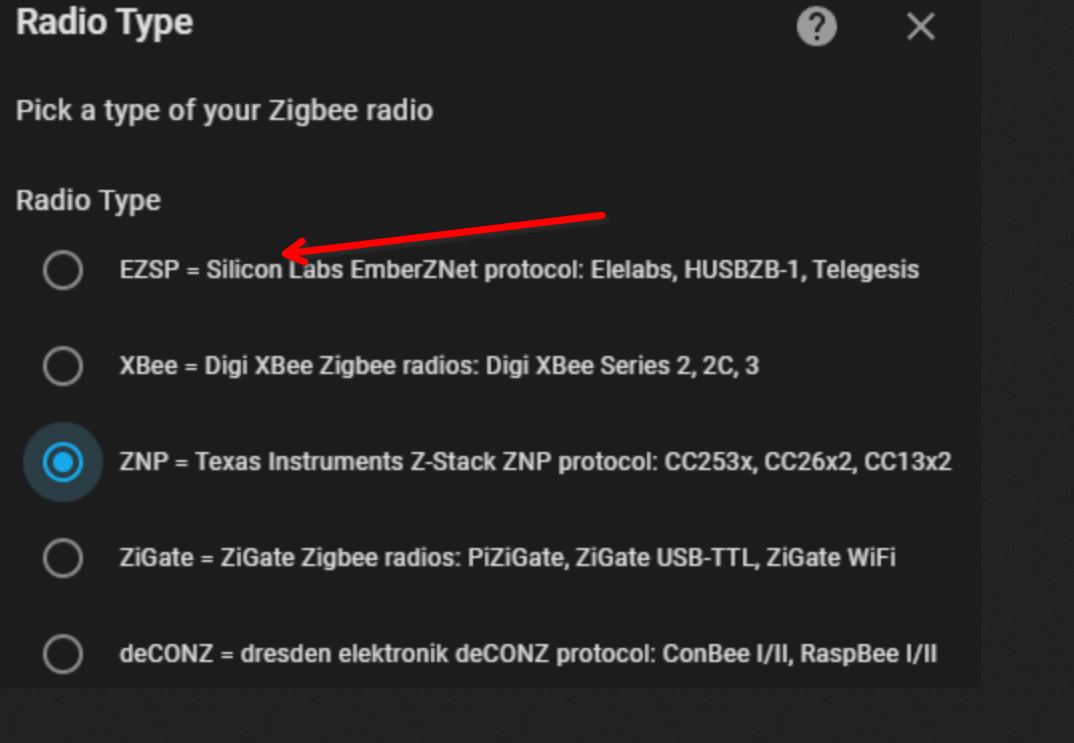
                                          e6d71865-0a58-422f-97e8-b35116c90cf2-grafik.png

                                          VG
                                          Bernd

                                          Edit
                                          hatte heute Morgen wohl zittrige Hände, oder den Schlaf noch nicht aus den Augen gerieben, falsches Bild, ersetzt, siehe auch Beitrag https://forum.iobroker.net/topic/68795/anleitung-zigbee2mqtt-einrichtung-im-iobroker/21?_=1696399590830 von @arteck

                                          1 Antwort Letzte Antwort
                                          0
                                          Antworten
                                          • In einem neuen Thema antworten
                                          Anmelden zum Antworten
                                          • Älteste zuerst
                                          • Neuste zuerst
                                          • Meiste Stimmen


                                          Support us

                                          ioBroker
                                          Community Adapters
                                          Donate
                                          FAQ Cloud / IOT
                                          HowTo: Node.js-Update
                                          HowTo: Backup/Restore
                                          Downloads
                                          BLOG

                                          723

                                          Online

                                          32.7k

                                          Benutzer

                                          82.4k

                                          Themen

                                          1.3m

                                          Beiträge
                                          Community
                                          Impressum | Datenschutz-Bestimmungen | Nutzungsbedingungen | Einwilligungseinstellungen
                                          ioBroker Community 2014-2025
                                          logo
                                          • Anmelden

                                          • Du hast noch kein Konto? Registrieren

                                          • Anmelden oder registrieren, um zu suchen
                                          • Erster Beitrag
                                            Letzter Beitrag
                                          0
                                          • Home
                                          • Aktuell
                                          • Tags
                                          • Ungelesen 0
                                          • Kategorien
                                          • Unreplied
                                          • Beliebt
                                          • GitHub
                                          • Docu
                                          • Hilfe