




Kann mir jemand zu dieser Fehlermeldung einen Hinweis geben?
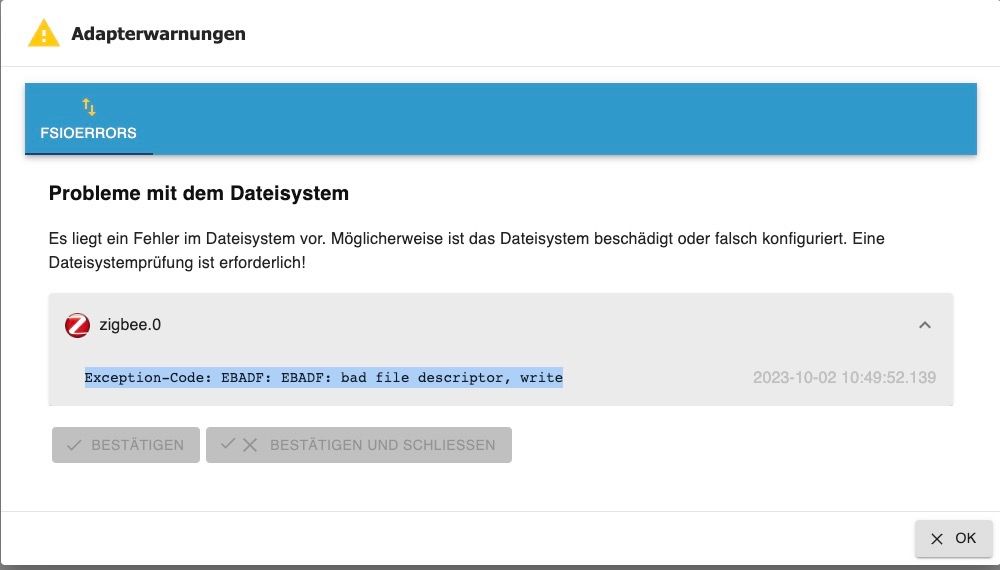

-
Sieht nicht so aus.
Static hostname: ioBroker Icon name: computer-vm Chassis: vm Machine ID: 00d6058392fa44d3b60e2dcfbf39a290 Boot ID: 53197dbac13b443ca2e6c0057088b14d Virtualization: kvm Operating System: Debian GNU/Linux 11 (bullseye) Kernel: Linux 5.10.0-25-amd64 Architecture: x86-64 Installation: kvm Kernel: x86_64 Userland: amd64 Timezone: Europe/Berlin (CEST, +0200) User-ID: 1000 X-Server: false Boot Target: graphical.target Pending OS-Updates: 0 Pending iob updates: 0 Nodejs-Installation: /usr/bin/nodejs v18.18.0 /usr/bin/node v18.18.0 /usr/bin/npm 9.8.1 /usr/bin/npx 9.8.1 Recommended versions are nodejs 18.x.y and npm 9.x.y Your nodejs installation is correct MEMORY: total used free shared buff/cache available Mem: 12G 2.5G 8.2G 0.0K 1.6G 9.7G Swap: 974M 0B 974M Total: 13G 2.5G 9.2G Active iob-Instances: 37 Active repo(s): Stable (default) ioBroker Core: js-controller 5.0.12 admin 6.10.1 ioBroker Status: iobroker is running on this host. Objects type: jsonl States type: jsonl Status admin and web instance: + system.adapter.admin.0 : admin : ioBroker - enabled, port: 8081, bind: 0.0.0.0, run as: admin + system.adapter.web.0 : web : ioBroker - enabled, port: 8082, bind: 0.0.0.0, run as: admin Objects: 18630 States: 15886 Size of iob-Database: 17M /opt/iobroker/iobroker-data/objects.jsonl 9.4M /opt/iobroker/iobroker-data/objects.json.migrated 9.4M /opt/iobroker/iobroker-data/objects.json.bak.migrated 34M /opt/iobroker/iobroker-data/states.jsonl 4.6M /opt/iobroker/iobroker-data/states.json.migrated 4.6M /opt/iobroker/iobroker-data/states.json.bak.migrated =================== END OF SUMMARY ====================@bastler sagte in Kann mir jemand zu dieser Fehlermeldung einen Hinweis geben?:
Sieht nicht so aus.
Die Langfassung.
-
@bastler sagte in Kann mir jemand zu dieser Fehlermeldung einen Hinweis geben?:
Sieht nicht so aus.
Die Langfassung.
======== Start marking the full check here ========= Skript v.2023-06-20 *** BASE SYSTEM *** Static hostname: ioBroker Icon name: computer-vm Chassis: vm Machine ID: 00d6058392fa44d3b60e2dcfbf39a290 Boot ID: 53197dbac13b443ca2e6c0057088b14d Virtualization: kvm Operating System: Debian GNU/Linux 11 (bullseye) Kernel: Linux 5.10.0-25-amd64 Architecture: x86-64 model name : Common KVM processor Docker : false Virtualization : kvm Kernel : x86_64 Userland : amd64 Systemuptime and Load: 12:07:49 up 14:49, 1 user, load average: 0.22, 0.41, 0.46 CPU threads: 4 *** Time and Time Zones *** Local time: Mon 2023-10-02 12:07:49 CEST Universal time: Mon 2023-10-02 10:07:49 UTC RTC time: Mon 2023-10-02 10:07:50 Time zone: Europe/Berlin (CEST, +0200) System clock synchronized: yes NTP service: active RTC in local TZ: no *** User and Groups *** ingo /home/ingo ingo cdrom floppy sudo audio dip video plugdev netdev lpadmin scanner iobroker *** X-Server-Setup *** X-Server: false Desktop: Terminal: tty Boot Target: graphical.target *** MEMORY *** total used free shared buff/cache available Mem: 12G 2.7G 7.9G 0.0K 1.8G 9.5G Swap: 974M 0B 974M Total: 13G 2.7G 8.9G 12373 M total memory 2674 M used memory 504 M active memory 3625 M inactive memory 7922 M free memory 179 M buffer memory 1596 M swap cache 974 M total swap 0 M used swap 974 M free swap *** FILESYSTEM *** Filesystem Type Size Used Avail Use% Mounted on udev devtmpfs 6.1G 0 6.1G 0% /dev tmpfs tmpfs 1.3G 528K 1.3G 1% /run /dev/sda1 ext4 31G 14G 16G 46% / tmpfs tmpfs 6.1G 0 6.1G 0% /dev/shm tmpfs tmpfs 5.0M 0 5.0M 0% /run/lock tmpfs tmpfs 1.3G 0 1.3G 0% /run/user/1000 Messages concerning ext4 filesystem in dmesg: [Sun Oct 1 21:18:31 2023] EXT4-fs (sda1): mounted filesystem with ordered data mode. Opts: (null) [Sun Oct 1 21:18:31 2023] EXT4-fs (sda1): re-mounted. Opts: errors=remount-ro Show mounted filesystems (real ones only): TARGET SOURCE FSTYPE OPTIONS / /dev/sda1 ext4 rw,relatime,errors=remount-ro Files in neuralgic directories: /var: 511M /var/ 210M /var/cache 189M /var/cache/apt 177M /var/lib 127M /var/lib/apt/lists Hint: You are currently not seeing messages from other users and the system. Users in groups 'adm', 'systemd-journal' can see all messages. Pass -q to turn off this notice. Archived and active journals take up 32.0M in the file system. /opt/iobroker/backups: 3.4G /opt/iobroker/backups/ /opt/iobroker/iobroker-data: 1.1G /opt/iobroker/iobroker-data/ 524M /opt/iobroker/iobroker-data/files 238M /opt/iobroker/iobroker-data/History_daten 150M /opt/iobroker/iobroker-data/backup-objects 88M /opt/iobroker/iobroker-data/files/echarts.admin The five largest files in iobroker-data are: 43M /opt/iobroker/iobroker-data/states.jsonl 35M /opt/iobroker/iobroker-data/files/devices.admin/static/js/main.24f2bb56.js.map 23M /opt/iobroker/iobroker-data/files/echarts/static/js/main.eb0afecd.js.map 23M /opt/iobroker/iobroker-data/files/echarts.admin/static/js/main.7952f0f7.js.map 23M /opt/iobroker/iobroker-data/files/echarts.admin/chart/static/js/main.eb0afecd.js.map *** NodeJS-Installation *** /usr/bin/nodejs v18.18.0 /usr/bin/node v18.18.0 /usr/bin/npm 9.8.1 /usr/bin/npx 9.8.1 nodejs: Installed: 18.18.0-1nodesource1 Candidate: 18.18.0-1nodesource1 Version table: *** 18.18.0-1nodesource1 1001 500 https://deb.nodesource.com/node_18.x nodistro/main amd64 Packages 100 /var/lib/dpkg/status 18.17.1-1nodesource1 1001 500 https://deb.nodesource.com/node_18.x nodistro/main amd64 Packages 18.17.0-1nodesource1 1001 500 https://deb.nodesource.com/node_18.x nodistro/main amd64 Packages 18.16.1-1nodesource1 1001 500 https://deb.nodesource.com/node_18.x nodistro/main amd64 Packages 18.16.0-1nodesource1 1001 500 https://deb.nodesource.com/node_18.x nodistro/main amd64 Packages 18.15.0-1nodesource1 1001 500 https://deb.nodesource.com/node_18.x nodistro/main amd64 Packages 18.14.2-1nodesource1 1001 500 https://deb.nodesource.com/node_18.x nodistro/main amd64 Packages 18.14.1-1nodesource1 1001 500 https://deb.nodesource.com/node_18.x nodistro/main amd64 Packages 18.14.0-1nodesource1 1001 500 https://deb.nodesource.com/node_18.x nodistro/main amd64 Packages 18.13.0-1nodesource1 1001 500 https://deb.nodesource.com/node_18.x nodistro/main amd64 Packages 18.12.0-1nodesource1 1001 500 https://deb.nodesource.com/node_18.x nodistro/main amd64 Packages 18.11.0-1nodesource1 1001 500 https://deb.nodesource.com/node_18.x nodistro/main amd64 Packages 18.10.0-1nodesource1 1001 500 https://deb.nodesource.com/node_18.x nodistro/main amd64 Packages 18.9.1-1nodesource1 1001 500 https://deb.nodesource.com/node_18.x nodistro/main amd64 Packages 18.9.0-1nodesource1 1001 500 https://deb.nodesource.com/node_18.x nodistro/main amd64 Packages 18.8.0-1nodesource1 1001 500 https://deb.nodesource.com/node_18.x nodistro/main amd64 Packages 18.7.0-1nodesource1 1001 500 https://deb.nodesource.com/node_18.x nodistro/main amd64 Packages 18.6.0-1nodesource1 1001 500 https://deb.nodesource.com/node_18.x nodistro/main amd64 Packages 18.5.0-1nodesource1 1001 500 https://deb.nodesource.com/node_18.x nodistro/main amd64 Packages 18.4.0-1nodesource1 1001 500 https://deb.nodesource.com/node_18.x nodistro/main amd64 Packages 18.3.0-1nodesource1 1001 500 https://deb.nodesource.com/node_18.x nodistro/main amd64 Packages 18.2.0-1nodesource1 1001 500 https://deb.nodesource.com/node_18.x nodistro/main amd64 Packages 18.1.0-1nodesource1 1001 500 https://deb.nodesource.com/node_18.x nodistro/main amd64 Packages 18.0.0-1nodesource1 1001 500 https://deb.nodesource.com/node_18.x nodistro/main amd64 Packages 12.22.12~dfsg-1~deb11u4 500 500 http://security.debian.org/debian-security bullseye-security/main amd64 Packages 12.22.12~dfsg-1~deb11u3 500 500 http://deb.debian.org/debian bullseye/main amd64 Packages Temp directories causing npm8 problem: 0 No problems detected Errors in npm tree: 0 *** ioBroker-Installation *** ioBroker Status iobroker is running on this host. Objects type: jsonl States type: jsonl No configuration change needed. Multihost discovery server: disabled Discovery authentication: enabled Persistent activation: disabled Objects: jsonl on 127.0.0.1 States: jsonl on 127.0.0.1 Core adapters versions js-controller: 5.0.12 admin: 6.10.1 javascript: 7.1.4 Adapters from github: 4 Adapter State + system.adapter.admin.0 : admin : ioBroker - enabled, port: 8081, bind: 0.0.0.0, run as: admin + system.adapter.alexa2.0 : alexa2 : ioBroker - enabled system.adapter.alias-manager.0 : alias-manager : ioBroker - enabled + system.adapter.backitup.0 : backitup : ioBroker - enabled + system.adapter.cloud.0 : cloud : ioBroker - enabled system.adapter.daswetter.0 : daswetter : ioBroker - enabled system.adapter.devices.0 : devices : ioBroker - enabled + system.adapter.discovery.0 : discovery : ioBroker - enabled + system.adapter.echarts.0 : echarts : ioBroker - enabled + system.adapter.email.0 : email : ioBroker - enabled + system.adapter.fb-checkpresence.0 : fb-checkpresence : ioBroker - enabled system.adapter.flot.0 : flot : ioBroker - disabled + system.adapter.fritzdect.0 : fritzdect : ioBroker - enabled + system.adapter.influxdb.0 : influxdb : ioBroker - enabled, port: 8086 + system.adapter.info.0 : info : ioBroker - enabled + system.adapter.iot.0 : iot : ioBroker - enabled + system.adapter.jarvis.0 : jarvis : ioBroker - enabled + system.adapter.javascript.0 : javascript : ioBroker - enabled + system.adapter.mihome-vacuum.0 : mihome-vacuum : ioBroker - enabled, port: 54321 + system.adapter.modbus.0 : modbus : ioBroker - enabled + system.adapter.mqtt.0 : mqtt : ioBroker - enabled, port: 1883, bind: 0.0.0.0 system.adapter.mqtt.1 : mqtt : ioBroker - disabled, port: 1883, bind: 0.0.0.0 system.adapter.parser.0 : parser : ioBroker - disabled system.adapter.powerfox2.0 : powerfox2 : ioBroker - enabled + system.adapter.pushover.0 : pushover : ioBroker - enabled + system.adapter.sayit.0 : sayit : ioBroker - enabled + system.adapter.scenes.0 : scenes : ioBroker - enabled + system.adapter.shelly.0 : shelly : ioBroker - enabled, port: 1883, bind: 0.0.0.0 + system.adapter.shelly.1 : shelly : ioBroker - enabled, port: 1882, bind: 0.0.0.0 + system.adapter.smartgarden.0 : smartgarden : ioBroker - enabled + system.adapter.sonoff.0 : sonoff : ioBroker - enabled, port: 1884, bind: 0.0.0.0 + system.adapter.sonos.0 : sonos : ioBroker - enabled + system.adapter.sourceanalytix.0 : sourceanalytix : ioBroker - enabled + system.adapter.tahoma.0 : tahoma : ioBroker - enabled + system.adapter.telegram.0 : telegram : ioBroker - enabled, port: 8443, bind: 0.0.0.0 + system.adapter.terminal.0 : terminal : ioBroker - enabled, port: 8087, bind: 0.0.0.0, run as: admin + system.adapter.text2command.0 : text2command : ioBroker - enabled + system.adapter.tr-064.0 : tr-064 : ioBroker - enabled + system.adapter.viessmannapi.0 : viessmannapi : ioBroker - enabled system.adapter.vis-weather.0 : vis-weather : ioBroker - enabled system.adapter.vis.0 : vis : ioBroker - enabled system.adapter.weatherunderground.1 : weatherunderground : ioBroker - enabled + system.adapter.web.0 : web : ioBroker - enabled, port: 8082, bind: 0.0.0.0, run as: admin + system.adapter.yahka.0 : yahka : ioBroker - enabled + system.adapter.zigbee.0 : zigbee : ioBroker - enabled, port: /dev/serial/by-id/usb-dresden_elektronik_ingenieurtechnik_GmbH_ConBee_II_DE2191141-if00 + instance is alive Enabled adapters with bindings + system.adapter.admin.0 : admin : ioBroker - enabled, port: 8081, bind: 0.0.0.0, run as: admin + system.adapter.influxdb.0 : influxdb : ioBroker - enabled, port: 8086 + system.adapter.mihome-vacuum.0 : mihome-vacuum : ioBroker - enabled, port: 54321 + system.adapter.mqtt.0 : mqtt : ioBroker - enabled, port: 1883, bind: 0.0.0.0 + system.adapter.shelly.0 : shelly : ioBroker - enabled, port: 1883, bind: 0.0.0.0 + system.adapter.shelly.1 : shelly : ioBroker - enabled, port: 1882, bind: 0.0.0.0 + system.adapter.sonoff.0 : sonoff : ioBroker - enabled, port: 1884, bind: 0.0.0.0 + system.adapter.telegram.0 : telegram : ioBroker - enabled, port: 8443, bind: 0.0.0.0 + system.adapter.terminal.0 : terminal : ioBroker - enabled, port: 8087, bind: 0.0.0.0, run as: admin + system.adapter.web.0 : web : ioBroker - enabled, port: 8082, bind: 0.0.0.0, run as: admin + system.adapter.zigbee.0 : zigbee : ioBroker - enabled, port: /dev/serial/by-id/usb-dresden_elektronik_ingenieurtechnik_GmbH_ConBee_II_DE2191141-if00 ioBroker-Repositories Stable (default): http://download.iobroker.net/sources-dist.json Beta (latest) : http://download.iobroker.net/sources-dist-latest.json Active repo(s): Stable (default) Installed ioBroker-Instances Used repository: Stable (default) Adapter "admin" : 6.10.1 , installed 6.10.1 Adapter "alexa2" : 3.25.2 , installed 3.25.2 Adapter "alias-manager": 1.2.6 , installed 1.2.6 Adapter "backitup" : 2.8.1 , installed 2.8.1 Adapter "cloud" : 4.4.1 , installed 4.4.1 Adapter "daswetter" : 3.1.10 , installed 3.1.10 Adapter "devices" : 1.1.5 , installed 1.1.5 Adapter "discovery" : 3.1.0 , installed 3.1.0 Adapter "echarts" : 1.5.1 , installed 1.5.1 Adapter "email" : 1.2.0 , installed 1.2.0 Adapter "fb-checkpresence": 1.2.2 , installed 1.2.2 Adapter "flot" : 1.12.0 , installed 1.12.0 Adapter "fritzdect" : 2.3.1 , installed 2.3.1 Adapter "influxdb" : 3.2.0 , installed 3.2.0 Adapter "info" : 2.0.0 , installed 2.0.0 Adapter "iot" : 1.14.5 , installed 1.14.5 Adapter "jarvis" : 3.1.2 , installed 3.1.2 Adapter "javascript" : 7.1.4 , installed 7.1.4 Controller "js-controller": 5.0.12 , installed 5.0.12 Adapter "mihome-vacuum": 4.0.0 , installed 4.0.0 Adapter "modbus" : 5.0.11 , installed 5.0.11 Adapter "mqtt" : 4.1.1 , installed 4.1.1 Adapter "parser" : 1.3.2 , installed 1.3.2 Adapter "powerfox2" : 0.0.12 , installed 0.0.12 Adapter "pushover" : 3.0.3 , installed 3.0.3 Adapter "sayit" : 3.0.5 , installed 3.0.5 Adapter "scenes" : 2.3.9 , installed 2.3.9 Adapter "shelly" : 6.4.1 , installed 6.4.1 Adapter "simple-api" : 2.7.2 , installed 2.7.2 Adapter "smartgarden" : 2.0.0 , installed 2.0.0 Adapter "socketio" : 6.5.5 , installed 6.5.5 Adapter "sonoff" : 2.5.3 , installed 2.5.3 Adapter "sonos" : 2.3.1 , installed 2.3.1 Adapter "tahoma" : 0.10.2 , installed 0.10.2 Adapter "telegram" : 1.16.0 , installed 1.16.0 Adapter "terminal" : 1.0.0 , installed 1.0.0 Adapter "text2command" : 3.0.2 , installed 3.0.2 Adapter "tr-064" : 4.2.18 , installed 4.2.18 Adapter "tradfri" : 3.1.3 , installed 3.1.3 Adapter "viessmannapi" : 2.0.9 , installed 2.0.9 Adapter "vis" : 1.4.16 , installed 1.4.16 Adapter "vis-weather" : 2.5.6 , installed 2.5.6 Adapter "weatherunderground": 3.6.0, installed 3.6.0 Adapter "web" : 6.1.2 , installed 6.1.2 Adapter "ws" : 2.5.5 , installed 2.5.5 Adapter "yahka" : 1.0.3 , installed 1.0.3 Adapter "zigbee" : 1.8.23 , installed 1.8.24 Objects and States Please stand by - This may take a while Objects: 18630 States: 15868 *** OS-Repositories and Updates *** Hit:1 https://repos.influxdata.com/debian stable InRelease Hit:2 http://deb.debian.org/debian bullseye InRelease Hit:3 http://security.debian.org/debian-security bullseye-security InRelease Hit:4 https://repos.influxdata.com/debian bullseye InRelease Hit:5 http://deb.debian.org/debian bullseye-updates InRelease Hit:6 https://deb.nodesource.com/node_18.x nodistro InRelease Reading package lists... Pending Updates: 0 *** Listening Ports *** Active Internet connections (only servers) Proto Recv-Q Send-Q Local Address Foreign Address State User Inode PID/Program name tcp 0 0 127.0.0.1:9000 0.0.0.0:* LISTEN 1001 869695 21761/iobroker.js-c tcp 0 0 127.0.0.1:9001 0.0.0.0:* LISTEN 1001 869690 21761/iobroker.js-c tcp 0 0 0.0.0.0:111 0.0.0.0:* LISTEN 0 10385 1/init tcp 0 0 0.0.0.0:8400 0.0.0.0:* LISTEN 1001 875213 22811/io.jarvis.0 tcp 0 0 0.0.0.0:22 0.0.0.0:* LISTEN 0 13665 476/sshd: /usr/sbin tcp 0 0 127.0.0.1:631 0.0.0.0:* LISTEN 0 177816 5419/cupsd tcp 0 0 127.0.0.1:8088 0.0.0.0:* LISTEN 998 12786 388/influxd tcp 0 0 0.0.0.0:1882 0.0.0.0:* LISTEN 1001 872633 22136/io.shelly.1 tcp 0 0 0.0.0.0:1883 0.0.0.0:* LISTEN 1001 870219 21979/io.mqtt.0 tcp 0 0 0.0.0.0:1884 0.0.0.0:* LISTEN 1001 871619 22077/io.sonoff.0 tcp 0 0 127.0.0.1:37535 0.0.0.0:* LISTEN 1001 876855 22968/io.yahka.0 tcp6 0 0 :::46663 :::* LISTEN 1001 876844 22968/io.yahka.0 tcp6 0 0 :::3500 :::* LISTEN 1001 870959 22017/io.sonos.0 tcp6 0 0 :::111 :::* LISTEN 0 10389 1/init tcp6 0 0 :::8081 :::* LISTEN 1001 869769 21784/io.admin.0 tcp6 0 0 :::8082 :::* LISTEN 1001 873831 22754/io.web.0 tcp6 0 0 :::8086 :::* LISTEN 998 12800 388/influxd tcp6 0 0 :::22 :::* LISTEN 0 13667 476/sshd: /usr/sbin tcp6 0 0 :::8087 :::* LISTEN 1001 876570 22910/io.terminal.0 tcp6 0 0 ::1:631 :::* LISTEN 0 177815 5419/cupsd tcp6 0 0 :::32771 :::* LISTEN 1001 876847 22968/io.yahka.0 udp 0 0 0.0.0.0:53130 0.0.0.0:* 105 13489 353/avahi-daemon: r udp 0 0 0.0.0.0:53421 0.0.0.0:* 1001 870813 21960/io.mihome-vac udp 0 0 192.168.178.186:5353 0.0.0.0:* 1001 871446 22036/io.tr-064.0 udp 0 0 0.0.0.0:5353 0.0.0.0:* 105 13487 353/avahi-daemon: r udp 0 0 0.0.0.0:5683 0.0.0.0:* 1001 870248 21998/io.shelly.0 udp 0 0 0.0.0.0:68 0.0.0.0:* 0 12624 341/dhclient udp 0 0 0.0.0.0:111 0.0.0.0:* 0 10386 1/init udp 0 0 0.0.0.0:631 0.0.0.0:* 0 177838 5421/cups-browsed udp6 0 0 :::53744 :::* 105 13490 353/avahi-daemon: r udp6 0 0 :::5353 :::* 105 13488 353/avahi-daemon: r udp6 0 0 :::111 :::* 0 10392 1/init *** Log File - Last 25 Lines *** 2023-10-02 12:08:05.741 - info: javascript.0 (21838) script.js.PV_Funktionen.Stromüberschuss_Lüfter: CurrentFeedin 2399 2023-10-02 12:08:05.741 - info: javascript.0 (21838) script.js.PV_Funktionen.Stromüberschuss_Lüfter: CurrentPower -2399 2023-10-02 12:08:05.741 - info: javascript.0 (21838) script.js.PV_Funktionen.Stromüberschuss_Lüfter: Lüfterstatus true 2023-10-02 12:08:05.768 - info: javascript.0 (21838) script.js.Verbräuche.Einspeisung: Messung Einspeisung 7474.419 2023-10-02 12:08:05.780 - info: powerfox2.0 (25939) Terminated (NO_ERROR): Without reason 2023-10-02 12:08:06.299 - info: host.ioBroker instance system.adapter.powerfox2.0 terminated with code 0 (NO_ERROR) 2023-10-02 12:08:07.171 - info: javascript.0 (21838) script.js.PV_Funktionen.PV_Leistung: 1335 2023-10-02 12:08:07.193 - info: javascript.0 (21838) script.js.PV_Funktionen.PV_Leistung: 2721 2023-10-02 12:08:07.297 - info: javascript.0 (21838) script.js.PV_Funktionen.PV_Leistung: 1524 2023-10-02 12:08:12.709 - info: javascript.0 (21838) script.js.PV_Funktionen.PV_Leistung: 1347 2023-10-02 12:08:12.752 - info: javascript.0 (21838) script.js.PV_Funktionen.PV_Leistung: 2745 2023-10-02 12:08:12.858 - info: javascript.0 (21838) script.js.PV_Funktionen.PV_Leistung: 1539 2023-10-02 12:08:13.998 - info: tr-064.0 (22036) forEachConfiguredDevice: in GetSpecificHostEntry 1(giggi1s-iPhone/8A:4A:6E:37:B8:1F) device seems offline but we never saw it since adapter was started:Error: sendSOAPActionRequest Error action=GetSpecificHostEntry serviceType=urn:dslforum-org:service:Hosts:1: 500 - {"code":500} 2023-10-02 12:08:18.264 - info: javascript.0 (21838) script.js.PV_Funktionen.PV_Leistung: 1348 2023-10-02 12:08:18.308 - info: javascript.0 (21838) script.js.PV_Funktionen.PV_Leistung: 2746 2023-10-02 12:08:18.413 - info: javascript.0 (21838) script.js.PV_Funktionen.PV_Leistung: 1541 2023-10-02 12:08:19.719 - info: javascript.0 (21838) script.js.Verbräuche.Gesamtverbräuche: Alle Messwerte = 167 2023-10-02 12:08:19.719 - info: javascript.0 (21838) script.js.Verbräuche.Gesamtverbräuche: Gesambedarf = 0 2023-10-02 12:08:19.719 - info: javascript.0 (21838) script.js.Verbräuche.Gesamtverbräuche: Restbetrag = -167 2023-10-02 12:08:23.832 - info: javascript.0 (21838) script.js.PV_Funktionen.PV_Leistung: 1338 2023-10-02 12:08:23.872 - info: javascript.0 (21838) script.js.PV_Funktionen.PV_Leistung: 2731 2023-10-02 12:08:23.973 - info: javascript.0 (21838) script.js.PV_Funktionen.PV_Leistung: 1531 2023-10-02 12:08:24.940 - info: tr-064.0 (22036) forEachConfiguredDevice: in GetSpecificHostEntry 1(giggi1s-iPhone/8A:4A:6E:37:B8:1F) device seems offline but we never saw it since adapter was started:Error: sendSOAPActionRequest Error action=GetSpecificHostEntry serviceType=urn:dslforum-org:service:Hosts:1: 500 - {"code":500} 2023-10-02 12:08:29.376 - info: javascript.0 (21838) script.js.PV_Funktionen.PV_Leistung: 1330 2023-10-02 12:08:29.424 - info: javascript.0 (21838) script.js.PV_Funktionen.PV_Leistung: 2713 ============ Mark until here for C&P ============= iob diag has finished. -
======== Start marking the full check here ========= Skript v.2023-06-20 *** BASE SYSTEM *** Static hostname: ioBroker Icon name: computer-vm Chassis: vm Machine ID: 00d6058392fa44d3b60e2dcfbf39a290 Boot ID: 53197dbac13b443ca2e6c0057088b14d Virtualization: kvm Operating System: Debian GNU/Linux 11 (bullseye) Kernel: Linux 5.10.0-25-amd64 Architecture: x86-64 model name : Common KVM processor Docker : false Virtualization : kvm Kernel : x86_64 Userland : amd64 Systemuptime and Load: 12:07:49 up 14:49, 1 user, load average: 0.22, 0.41, 0.46 CPU threads: 4 *** Time and Time Zones *** Local time: Mon 2023-10-02 12:07:49 CEST Universal time: Mon 2023-10-02 10:07:49 UTC RTC time: Mon 2023-10-02 10:07:50 Time zone: Europe/Berlin (CEST, +0200) System clock synchronized: yes NTP service: active RTC in local TZ: no *** User and Groups *** ingo /home/ingo ingo cdrom floppy sudo audio dip video plugdev netdev lpadmin scanner iobroker *** X-Server-Setup *** X-Server: false Desktop: Terminal: tty Boot Target: graphical.target *** MEMORY *** total used free shared buff/cache available Mem: 12G 2.7G 7.9G 0.0K 1.8G 9.5G Swap: 974M 0B 974M Total: 13G 2.7G 8.9G 12373 M total memory 2674 M used memory 504 M active memory 3625 M inactive memory 7922 M free memory 179 M buffer memory 1596 M swap cache 974 M total swap 0 M used swap 974 M free swap *** FILESYSTEM *** Filesystem Type Size Used Avail Use% Mounted on udev devtmpfs 6.1G 0 6.1G 0% /dev tmpfs tmpfs 1.3G 528K 1.3G 1% /run /dev/sda1 ext4 31G 14G 16G 46% / tmpfs tmpfs 6.1G 0 6.1G 0% /dev/shm tmpfs tmpfs 5.0M 0 5.0M 0% /run/lock tmpfs tmpfs 1.3G 0 1.3G 0% /run/user/1000 Messages concerning ext4 filesystem in dmesg: [Sun Oct 1 21:18:31 2023] EXT4-fs (sda1): mounted filesystem with ordered data mode. Opts: (null) [Sun Oct 1 21:18:31 2023] EXT4-fs (sda1): re-mounted. Opts: errors=remount-ro Show mounted filesystems (real ones only): TARGET SOURCE FSTYPE OPTIONS / /dev/sda1 ext4 rw,relatime,errors=remount-ro Files in neuralgic directories: /var: 511M /var/ 210M /var/cache 189M /var/cache/apt 177M /var/lib 127M /var/lib/apt/lists Hint: You are currently not seeing messages from other users and the system. Users in groups 'adm', 'systemd-journal' can see all messages. Pass -q to turn off this notice. Archived and active journals take up 32.0M in the file system. /opt/iobroker/backups: 3.4G /opt/iobroker/backups/ /opt/iobroker/iobroker-data: 1.1G /opt/iobroker/iobroker-data/ 524M /opt/iobroker/iobroker-data/files 238M /opt/iobroker/iobroker-data/History_daten 150M /opt/iobroker/iobroker-data/backup-objects 88M /opt/iobroker/iobroker-data/files/echarts.admin The five largest files in iobroker-data are: 43M /opt/iobroker/iobroker-data/states.jsonl 35M /opt/iobroker/iobroker-data/files/devices.admin/static/js/main.24f2bb56.js.map 23M /opt/iobroker/iobroker-data/files/echarts/static/js/main.eb0afecd.js.map 23M /opt/iobroker/iobroker-data/files/echarts.admin/static/js/main.7952f0f7.js.map 23M /opt/iobroker/iobroker-data/files/echarts.admin/chart/static/js/main.eb0afecd.js.map *** NodeJS-Installation *** /usr/bin/nodejs v18.18.0 /usr/bin/node v18.18.0 /usr/bin/npm 9.8.1 /usr/bin/npx 9.8.1 nodejs: Installed: 18.18.0-1nodesource1 Candidate: 18.18.0-1nodesource1 Version table: *** 18.18.0-1nodesource1 1001 500 https://deb.nodesource.com/node_18.x nodistro/main amd64 Packages 100 /var/lib/dpkg/status 18.17.1-1nodesource1 1001 500 https://deb.nodesource.com/node_18.x nodistro/main amd64 Packages 18.17.0-1nodesource1 1001 500 https://deb.nodesource.com/node_18.x nodistro/main amd64 Packages 18.16.1-1nodesource1 1001 500 https://deb.nodesource.com/node_18.x nodistro/main amd64 Packages 18.16.0-1nodesource1 1001 500 https://deb.nodesource.com/node_18.x nodistro/main amd64 Packages 18.15.0-1nodesource1 1001 500 https://deb.nodesource.com/node_18.x nodistro/main amd64 Packages 18.14.2-1nodesource1 1001 500 https://deb.nodesource.com/node_18.x nodistro/main amd64 Packages 18.14.1-1nodesource1 1001 500 https://deb.nodesource.com/node_18.x nodistro/main amd64 Packages 18.14.0-1nodesource1 1001 500 https://deb.nodesource.com/node_18.x nodistro/main amd64 Packages 18.13.0-1nodesource1 1001 500 https://deb.nodesource.com/node_18.x nodistro/main amd64 Packages 18.12.0-1nodesource1 1001 500 https://deb.nodesource.com/node_18.x nodistro/main amd64 Packages 18.11.0-1nodesource1 1001 500 https://deb.nodesource.com/node_18.x nodistro/main amd64 Packages 18.10.0-1nodesource1 1001 500 https://deb.nodesource.com/node_18.x nodistro/main amd64 Packages 18.9.1-1nodesource1 1001 500 https://deb.nodesource.com/node_18.x nodistro/main amd64 Packages 18.9.0-1nodesource1 1001 500 https://deb.nodesource.com/node_18.x nodistro/main amd64 Packages 18.8.0-1nodesource1 1001 500 https://deb.nodesource.com/node_18.x nodistro/main amd64 Packages 18.7.0-1nodesource1 1001 500 https://deb.nodesource.com/node_18.x nodistro/main amd64 Packages 18.6.0-1nodesource1 1001 500 https://deb.nodesource.com/node_18.x nodistro/main amd64 Packages 18.5.0-1nodesource1 1001 500 https://deb.nodesource.com/node_18.x nodistro/main amd64 Packages 18.4.0-1nodesource1 1001 500 https://deb.nodesource.com/node_18.x nodistro/main amd64 Packages 18.3.0-1nodesource1 1001 500 https://deb.nodesource.com/node_18.x nodistro/main amd64 Packages 18.2.0-1nodesource1 1001 500 https://deb.nodesource.com/node_18.x nodistro/main amd64 Packages 18.1.0-1nodesource1 1001 500 https://deb.nodesource.com/node_18.x nodistro/main amd64 Packages 18.0.0-1nodesource1 1001 500 https://deb.nodesource.com/node_18.x nodistro/main amd64 Packages 12.22.12~dfsg-1~deb11u4 500 500 http://security.debian.org/debian-security bullseye-security/main amd64 Packages 12.22.12~dfsg-1~deb11u3 500 500 http://deb.debian.org/debian bullseye/main amd64 Packages Temp directories causing npm8 problem: 0 No problems detected Errors in npm tree: 0 *** ioBroker-Installation *** ioBroker Status iobroker is running on this host. Objects type: jsonl States type: jsonl No configuration change needed. Multihost discovery server: disabled Discovery authentication: enabled Persistent activation: disabled Objects: jsonl on 127.0.0.1 States: jsonl on 127.0.0.1 Core adapters versions js-controller: 5.0.12 admin: 6.10.1 javascript: 7.1.4 Adapters from github: 4 Adapter State + system.adapter.admin.0 : admin : ioBroker - enabled, port: 8081, bind: 0.0.0.0, run as: admin + system.adapter.alexa2.0 : alexa2 : ioBroker - enabled system.adapter.alias-manager.0 : alias-manager : ioBroker - enabled + system.adapter.backitup.0 : backitup : ioBroker - enabled + system.adapter.cloud.0 : cloud : ioBroker - enabled system.adapter.daswetter.0 : daswetter : ioBroker - enabled system.adapter.devices.0 : devices : ioBroker - enabled + system.adapter.discovery.0 : discovery : ioBroker - enabled + system.adapter.echarts.0 : echarts : ioBroker - enabled + system.adapter.email.0 : email : ioBroker - enabled + system.adapter.fb-checkpresence.0 : fb-checkpresence : ioBroker - enabled system.adapter.flot.0 : flot : ioBroker - disabled + system.adapter.fritzdect.0 : fritzdect : ioBroker - enabled + system.adapter.influxdb.0 : influxdb : ioBroker - enabled, port: 8086 + system.adapter.info.0 : info : ioBroker - enabled + system.adapter.iot.0 : iot : ioBroker - enabled + system.adapter.jarvis.0 : jarvis : ioBroker - enabled + system.adapter.javascript.0 : javascript : ioBroker - enabled + system.adapter.mihome-vacuum.0 : mihome-vacuum : ioBroker - enabled, port: 54321 + system.adapter.modbus.0 : modbus : ioBroker - enabled + system.adapter.mqtt.0 : mqtt : ioBroker - enabled, port: 1883, bind: 0.0.0.0 system.adapter.mqtt.1 : mqtt : ioBroker - disabled, port: 1883, bind: 0.0.0.0 system.adapter.parser.0 : parser : ioBroker - disabled system.adapter.powerfox2.0 : powerfox2 : ioBroker - enabled + system.adapter.pushover.0 : pushover : ioBroker - enabled + system.adapter.sayit.0 : sayit : ioBroker - enabled + system.adapter.scenes.0 : scenes : ioBroker - enabled + system.adapter.shelly.0 : shelly : ioBroker - enabled, port: 1883, bind: 0.0.0.0 + system.adapter.shelly.1 : shelly : ioBroker - enabled, port: 1882, bind: 0.0.0.0 + system.adapter.smartgarden.0 : smartgarden : ioBroker - enabled + system.adapter.sonoff.0 : sonoff : ioBroker - enabled, port: 1884, bind: 0.0.0.0 + system.adapter.sonos.0 : sonos : ioBroker - enabled + system.adapter.sourceanalytix.0 : sourceanalytix : ioBroker - enabled + system.adapter.tahoma.0 : tahoma : ioBroker - enabled + system.adapter.telegram.0 : telegram : ioBroker - enabled, port: 8443, bind: 0.0.0.0 + system.adapter.terminal.0 : terminal : ioBroker - enabled, port: 8087, bind: 0.0.0.0, run as: admin + system.adapter.text2command.0 : text2command : ioBroker - enabled + system.adapter.tr-064.0 : tr-064 : ioBroker - enabled + system.adapter.viessmannapi.0 : viessmannapi : ioBroker - enabled system.adapter.vis-weather.0 : vis-weather : ioBroker - enabled system.adapter.vis.0 : vis : ioBroker - enabled system.adapter.weatherunderground.1 : weatherunderground : ioBroker - enabled + system.adapter.web.0 : web : ioBroker - enabled, port: 8082, bind: 0.0.0.0, run as: admin + system.adapter.yahka.0 : yahka : ioBroker - enabled + system.adapter.zigbee.0 : zigbee : ioBroker - enabled, port: /dev/serial/by-id/usb-dresden_elektronik_ingenieurtechnik_GmbH_ConBee_II_DE2191141-if00 + instance is alive Enabled adapters with bindings + system.adapter.admin.0 : admin : ioBroker - enabled, port: 8081, bind: 0.0.0.0, run as: admin + system.adapter.influxdb.0 : influxdb : ioBroker - enabled, port: 8086 + system.adapter.mihome-vacuum.0 : mihome-vacuum : ioBroker - enabled, port: 54321 + system.adapter.mqtt.0 : mqtt : ioBroker - enabled, port: 1883, bind: 0.0.0.0 + system.adapter.shelly.0 : shelly : ioBroker - enabled, port: 1883, bind: 0.0.0.0 + system.adapter.shelly.1 : shelly : ioBroker - enabled, port: 1882, bind: 0.0.0.0 + system.adapter.sonoff.0 : sonoff : ioBroker - enabled, port: 1884, bind: 0.0.0.0 + system.adapter.telegram.0 : telegram : ioBroker - enabled, port: 8443, bind: 0.0.0.0 + system.adapter.terminal.0 : terminal : ioBroker - enabled, port: 8087, bind: 0.0.0.0, run as: admin + system.adapter.web.0 : web : ioBroker - enabled, port: 8082, bind: 0.0.0.0, run as: admin + system.adapter.zigbee.0 : zigbee : ioBroker - enabled, port: /dev/serial/by-id/usb-dresden_elektronik_ingenieurtechnik_GmbH_ConBee_II_DE2191141-if00 ioBroker-Repositories Stable (default): http://download.iobroker.net/sources-dist.json Beta (latest) : http://download.iobroker.net/sources-dist-latest.json Active repo(s): Stable (default) Installed ioBroker-Instances Used repository: Stable (default) Adapter "admin" : 6.10.1 , installed 6.10.1 Adapter "alexa2" : 3.25.2 , installed 3.25.2 Adapter "alias-manager": 1.2.6 , installed 1.2.6 Adapter "backitup" : 2.8.1 , installed 2.8.1 Adapter "cloud" : 4.4.1 , installed 4.4.1 Adapter "daswetter" : 3.1.10 , installed 3.1.10 Adapter "devices" : 1.1.5 , installed 1.1.5 Adapter "discovery" : 3.1.0 , installed 3.1.0 Adapter "echarts" : 1.5.1 , installed 1.5.1 Adapter "email" : 1.2.0 , installed 1.2.0 Adapter "fb-checkpresence": 1.2.2 , installed 1.2.2 Adapter "flot" : 1.12.0 , installed 1.12.0 Adapter "fritzdect" : 2.3.1 , installed 2.3.1 Adapter "influxdb" : 3.2.0 , installed 3.2.0 Adapter "info" : 2.0.0 , installed 2.0.0 Adapter "iot" : 1.14.5 , installed 1.14.5 Adapter "jarvis" : 3.1.2 , installed 3.1.2 Adapter "javascript" : 7.1.4 , installed 7.1.4 Controller "js-controller": 5.0.12 , installed 5.0.12 Adapter "mihome-vacuum": 4.0.0 , installed 4.0.0 Adapter "modbus" : 5.0.11 , installed 5.0.11 Adapter "mqtt" : 4.1.1 , installed 4.1.1 Adapter "parser" : 1.3.2 , installed 1.3.2 Adapter "powerfox2" : 0.0.12 , installed 0.0.12 Adapter "pushover" : 3.0.3 , installed 3.0.3 Adapter "sayit" : 3.0.5 , installed 3.0.5 Adapter "scenes" : 2.3.9 , installed 2.3.9 Adapter "shelly" : 6.4.1 , installed 6.4.1 Adapter "simple-api" : 2.7.2 , installed 2.7.2 Adapter "smartgarden" : 2.0.0 , installed 2.0.0 Adapter "socketio" : 6.5.5 , installed 6.5.5 Adapter "sonoff" : 2.5.3 , installed 2.5.3 Adapter "sonos" : 2.3.1 , installed 2.3.1 Adapter "tahoma" : 0.10.2 , installed 0.10.2 Adapter "telegram" : 1.16.0 , installed 1.16.0 Adapter "terminal" : 1.0.0 , installed 1.0.0 Adapter "text2command" : 3.0.2 , installed 3.0.2 Adapter "tr-064" : 4.2.18 , installed 4.2.18 Adapter "tradfri" : 3.1.3 , installed 3.1.3 Adapter "viessmannapi" : 2.0.9 , installed 2.0.9 Adapter "vis" : 1.4.16 , installed 1.4.16 Adapter "vis-weather" : 2.5.6 , installed 2.5.6 Adapter "weatherunderground": 3.6.0, installed 3.6.0 Adapter "web" : 6.1.2 , installed 6.1.2 Adapter "ws" : 2.5.5 , installed 2.5.5 Adapter "yahka" : 1.0.3 , installed 1.0.3 Adapter "zigbee" : 1.8.23 , installed 1.8.24 Objects and States Please stand by - This may take a while Objects: 18630 States: 15868 *** OS-Repositories and Updates *** Hit:1 https://repos.influxdata.com/debian stable InRelease Hit:2 http://deb.debian.org/debian bullseye InRelease Hit:3 http://security.debian.org/debian-security bullseye-security InRelease Hit:4 https://repos.influxdata.com/debian bullseye InRelease Hit:5 http://deb.debian.org/debian bullseye-updates InRelease Hit:6 https://deb.nodesource.com/node_18.x nodistro InRelease Reading package lists... Pending Updates: 0 *** Listening Ports *** Active Internet connections (only servers) Proto Recv-Q Send-Q Local Address Foreign Address State User Inode PID/Program name tcp 0 0 127.0.0.1:9000 0.0.0.0:* LISTEN 1001 869695 21761/iobroker.js-c tcp 0 0 127.0.0.1:9001 0.0.0.0:* LISTEN 1001 869690 21761/iobroker.js-c tcp 0 0 0.0.0.0:111 0.0.0.0:* LISTEN 0 10385 1/init tcp 0 0 0.0.0.0:8400 0.0.0.0:* LISTEN 1001 875213 22811/io.jarvis.0 tcp 0 0 0.0.0.0:22 0.0.0.0:* LISTEN 0 13665 476/sshd: /usr/sbin tcp 0 0 127.0.0.1:631 0.0.0.0:* LISTEN 0 177816 5419/cupsd tcp 0 0 127.0.0.1:8088 0.0.0.0:* LISTEN 998 12786 388/influxd tcp 0 0 0.0.0.0:1882 0.0.0.0:* LISTEN 1001 872633 22136/io.shelly.1 tcp 0 0 0.0.0.0:1883 0.0.0.0:* LISTEN 1001 870219 21979/io.mqtt.0 tcp 0 0 0.0.0.0:1884 0.0.0.0:* LISTEN 1001 871619 22077/io.sonoff.0 tcp 0 0 127.0.0.1:37535 0.0.0.0:* LISTEN 1001 876855 22968/io.yahka.0 tcp6 0 0 :::46663 :::* LISTEN 1001 876844 22968/io.yahka.0 tcp6 0 0 :::3500 :::* LISTEN 1001 870959 22017/io.sonos.0 tcp6 0 0 :::111 :::* LISTEN 0 10389 1/init tcp6 0 0 :::8081 :::* LISTEN 1001 869769 21784/io.admin.0 tcp6 0 0 :::8082 :::* LISTEN 1001 873831 22754/io.web.0 tcp6 0 0 :::8086 :::* LISTEN 998 12800 388/influxd tcp6 0 0 :::22 :::* LISTEN 0 13667 476/sshd: /usr/sbin tcp6 0 0 :::8087 :::* LISTEN 1001 876570 22910/io.terminal.0 tcp6 0 0 ::1:631 :::* LISTEN 0 177815 5419/cupsd tcp6 0 0 :::32771 :::* LISTEN 1001 876847 22968/io.yahka.0 udp 0 0 0.0.0.0:53130 0.0.0.0:* 105 13489 353/avahi-daemon: r udp 0 0 0.0.0.0:53421 0.0.0.0:* 1001 870813 21960/io.mihome-vac udp 0 0 192.168.178.186:5353 0.0.0.0:* 1001 871446 22036/io.tr-064.0 udp 0 0 0.0.0.0:5353 0.0.0.0:* 105 13487 353/avahi-daemon: r udp 0 0 0.0.0.0:5683 0.0.0.0:* 1001 870248 21998/io.shelly.0 udp 0 0 0.0.0.0:68 0.0.0.0:* 0 12624 341/dhclient udp 0 0 0.0.0.0:111 0.0.0.0:* 0 10386 1/init udp 0 0 0.0.0.0:631 0.0.0.0:* 0 177838 5421/cups-browsed udp6 0 0 :::53744 :::* 105 13490 353/avahi-daemon: r udp6 0 0 :::5353 :::* 105 13488 353/avahi-daemon: r udp6 0 0 :::111 :::* 0 10392 1/init *** Log File - Last 25 Lines *** 2023-10-02 12:08:05.741 - info: javascript.0 (21838) script.js.PV_Funktionen.Stromüberschuss_Lüfter: CurrentFeedin 2399 2023-10-02 12:08:05.741 - info: javascript.0 (21838) script.js.PV_Funktionen.Stromüberschuss_Lüfter: CurrentPower -2399 2023-10-02 12:08:05.741 - info: javascript.0 (21838) script.js.PV_Funktionen.Stromüberschuss_Lüfter: Lüfterstatus true 2023-10-02 12:08:05.768 - info: javascript.0 (21838) script.js.Verbräuche.Einspeisung: Messung Einspeisung 7474.419 2023-10-02 12:08:05.780 - info: powerfox2.0 (25939) Terminated (NO_ERROR): Without reason 2023-10-02 12:08:06.299 - info: host.ioBroker instance system.adapter.powerfox2.0 terminated with code 0 (NO_ERROR) 2023-10-02 12:08:07.171 - info: javascript.0 (21838) script.js.PV_Funktionen.PV_Leistung: 1335 2023-10-02 12:08:07.193 - info: javascript.0 (21838) script.js.PV_Funktionen.PV_Leistung: 2721 2023-10-02 12:08:07.297 - info: javascript.0 (21838) script.js.PV_Funktionen.PV_Leistung: 1524 2023-10-02 12:08:12.709 - info: javascript.0 (21838) script.js.PV_Funktionen.PV_Leistung: 1347 2023-10-02 12:08:12.752 - info: javascript.0 (21838) script.js.PV_Funktionen.PV_Leistung: 2745 2023-10-02 12:08:12.858 - info: javascript.0 (21838) script.js.PV_Funktionen.PV_Leistung: 1539 2023-10-02 12:08:13.998 - info: tr-064.0 (22036) forEachConfiguredDevice: in GetSpecificHostEntry 1(giggi1s-iPhone/8A:4A:6E:37:B8:1F) device seems offline but we never saw it since adapter was started:Error: sendSOAPActionRequest Error action=GetSpecificHostEntry serviceType=urn:dslforum-org:service:Hosts:1: 500 - {"code":500} 2023-10-02 12:08:18.264 - info: javascript.0 (21838) script.js.PV_Funktionen.PV_Leistung: 1348 2023-10-02 12:08:18.308 - info: javascript.0 (21838) script.js.PV_Funktionen.PV_Leistung: 2746 2023-10-02 12:08:18.413 - info: javascript.0 (21838) script.js.PV_Funktionen.PV_Leistung: 1541 2023-10-02 12:08:19.719 - info: javascript.0 (21838) script.js.Verbräuche.Gesamtverbräuche: Alle Messwerte = 167 2023-10-02 12:08:19.719 - info: javascript.0 (21838) script.js.Verbräuche.Gesamtverbräuche: Gesambedarf = 0 2023-10-02 12:08:19.719 - info: javascript.0 (21838) script.js.Verbräuche.Gesamtverbräuche: Restbetrag = -167 2023-10-02 12:08:23.832 - info: javascript.0 (21838) script.js.PV_Funktionen.PV_Leistung: 1338 2023-10-02 12:08:23.872 - info: javascript.0 (21838) script.js.PV_Funktionen.PV_Leistung: 2731 2023-10-02 12:08:23.973 - info: javascript.0 (21838) script.js.PV_Funktionen.PV_Leistung: 1531 2023-10-02 12:08:24.940 - info: tr-064.0 (22036) forEachConfiguredDevice: in GetSpecificHostEntry 1(giggi1s-iPhone/8A:4A:6E:37:B8:1F) device seems offline but we never saw it since adapter was started:Error: sendSOAPActionRequest Error action=GetSpecificHostEntry serviceType=urn:dslforum-org:service:Hosts:1: 500 - {"code":500} 2023-10-02 12:08:29.376 - info: javascript.0 (21838) script.js.PV_Funktionen.PV_Leistung: 1330 2023-10-02 12:08:29.424 - info: javascript.0 (21838) script.js.PV_Funktionen.PV_Leistung: 2713 ============ Mark until here for C&P ============= iob diag has finished.@bastler sagte in Kann mir jemand zu dieser Fehlermeldung einen Hinweis geben?:
Setz den User in die Gruppe 'adm'.
-
@bastler sagte in Kann mir jemand zu dieser Fehlermeldung einen Hinweis geben?:
Setz den User in die Gruppe 'adm'.
-
Danke, wie mache ich das?
-
@thomas-braun sagte in Kann mir jemand zu dieser Fehlermeldung einen Hinweis geben?:
sudo usermod -a -G adm ingo
Erledigt, nach dem Einloggen war die rote 1 immer noch da. Habe sie bestätigt, jetzt ist sie weg - und bleibt hoffentlich auch weg :-)
-
Nochmal danke für deine unermüdliche Hilfe!
-
-
Hab mich mit einem anderen Gerät angemeldet. Allerdings liegen die beiden Fehlermeldungen schon gut 3h zurück. Habe sie bestätigt und jetzt sind sie wieder weg.
-
@bastler probier mal
iob upload all -
@crunchip sagte in Kann mir jemand zu dieser Fehlermeldung einen Hinweis geben?:
iob upload all
Habe ich ausgeführt und die Meldung bestätigt. Jetzt ist sie erst mal wieder weg.
Die Meldung kommt immer vom ZigBee - Adapter?
Welcher Coordinator hängt da dran? Firmware aktuell?
-
@bastler sagte in Kann mir jemand zu dieser Fehlermeldung einen Hinweis geben?:
Leider ist die Meldung wieder da?
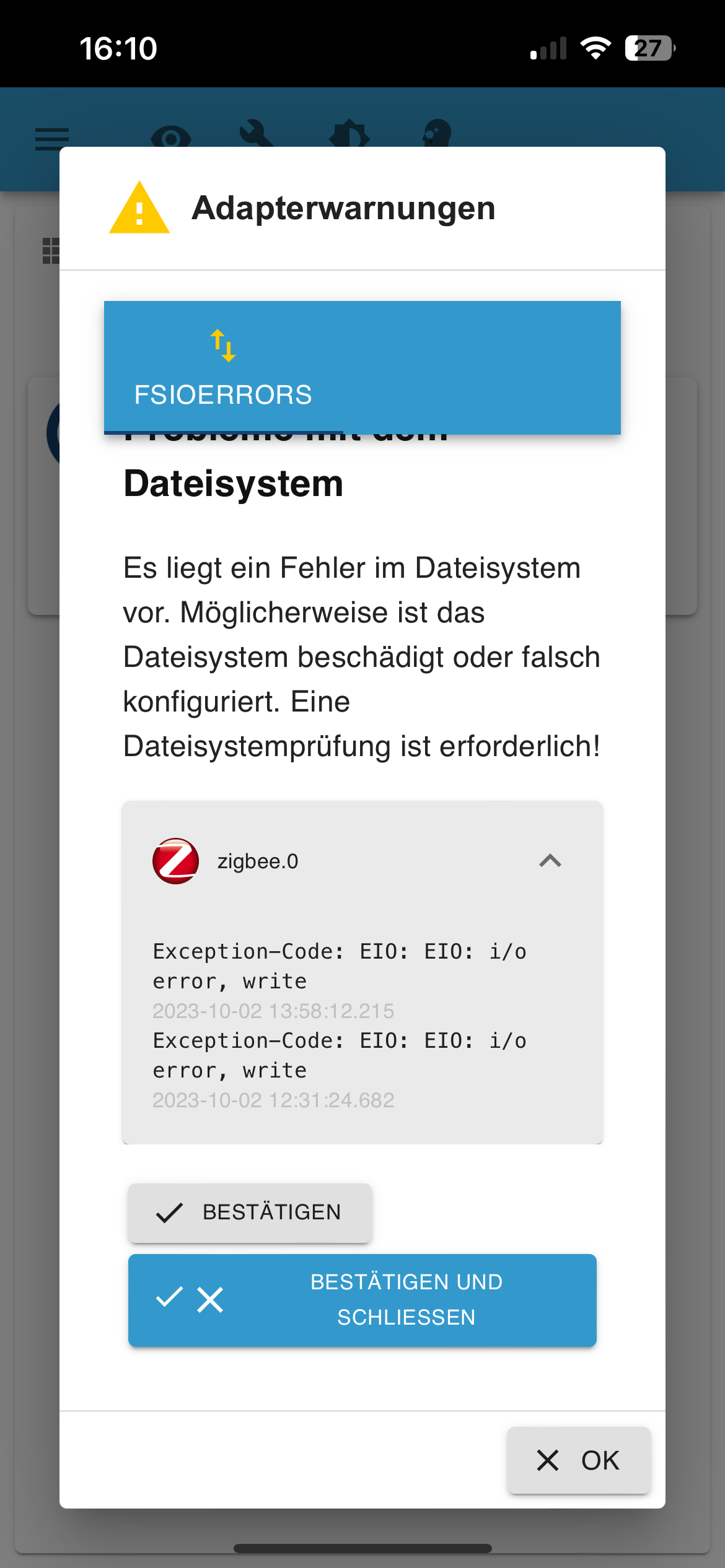
Moin,
Du hast einen Fehler im Dateisystem, der VM Festplatte, Du solltest einmal versuchen die VM von einem USB-Stick zu booten und dann ein check der Platte machen, das kann man leider nicht im laufenden Betrieb.
Du kannst das so oft bestätigen wie Du willst, dadurch wird das Dateisystem nicht besser.VG
Bernd -
Die Meldung kommt immer vom ZigBee - Adapter?
Welcher Coordinator hängt da dran? Firmware aktuell?
Ja, immer nur vom Zigbee Adapter. Ist aber wie schon gesagt erst gestern zum 1. Mal aufgetreten. Haben den ConBee II von Dresden Elektronik. Bezüglich der Firmware kann ich nichts zu sagen, habe bisher noch kein Update gemacht. Er ist seit seit gut 2 Jahren in Betrieb. Wüsste jetzt auch nicht wie ich die FW checken kann.
Bisher ist die Fehlermeldung noch nicht wieder gekommen.
-
@bastler sagte in Kann mir jemand zu dieser Fehlermeldung einen Hinweis geben?:
Leider ist die Meldung wieder da?
Moin,
Du hast einen Fehler im Dateisystem, der VM Festplatte, Du solltest einmal versuchen die VM von einem USB-Stick zu booten und dann ein check der Platte machen, das kann man leider nicht im laufenden Betrieb.
Du kannst das so oft bestätigen wie Du willst, dadurch wird das Dateisystem nicht besser.VG
Bernd -
Ja, immer nur vom Zigbee Adapter. Ist aber wie schon gesagt erst gestern zum 1. Mal aufgetreten. Haben den ConBee II von Dresden Elektronik. Bezüglich der Firmware kann ich nichts zu sagen, habe bisher noch kein Update gemacht. Er ist seit seit gut 2 Jahren in Betrieb. Wüsste jetzt auch nicht wie ich die FW checken kann.
Bisher ist die Fehlermeldung noch nicht wieder gekommen.
@bastler sagte in Kann mir jemand zu dieser Fehlermeldung einen Hinweis geben?:
Wüsste jetzt auch nicht wie ich die FW checken kann.
Beim Start des Adapters wird die Version genannt.
Update dann über den gcflasher oder so ähnlich. Steht aber auf der Phoscon/Deconz -Seite irgendwo. -
@dp20eic Moin Bernd, danke für den Hinweis. Mir ist nicht so ganz klar, wie ich das umsetzen soll. Vor allem wie checke ich die verbaute SSD? Proxmox läuft auf einem Mac mini und darunter die VM´s.
VG Ingo
@bastler sagte in Kann mir jemand zu dieser Fehlermeldung einen Hinweis geben?:
Moin Bernd, danke für den Hinweis. Mir ist nicht so ganz klar, wie ich das umsetzen soll. Vor allem wie checke ich die verbaute SSD? Proxmox läuft auf einem Mac mini und darunter die VM´s.
Moin,
ich nutze keine VMs, aber in etwa so sollte das gehen.
- Debian oder Ubuntu ISO-Image nutzen, das auch einen Live Modus hat, also wo Du in die Oberfläche kommst.
- VM herunterfahren
- In den Hardware Einstellungen zur VM, ein CD Laufwerk hinzufügen
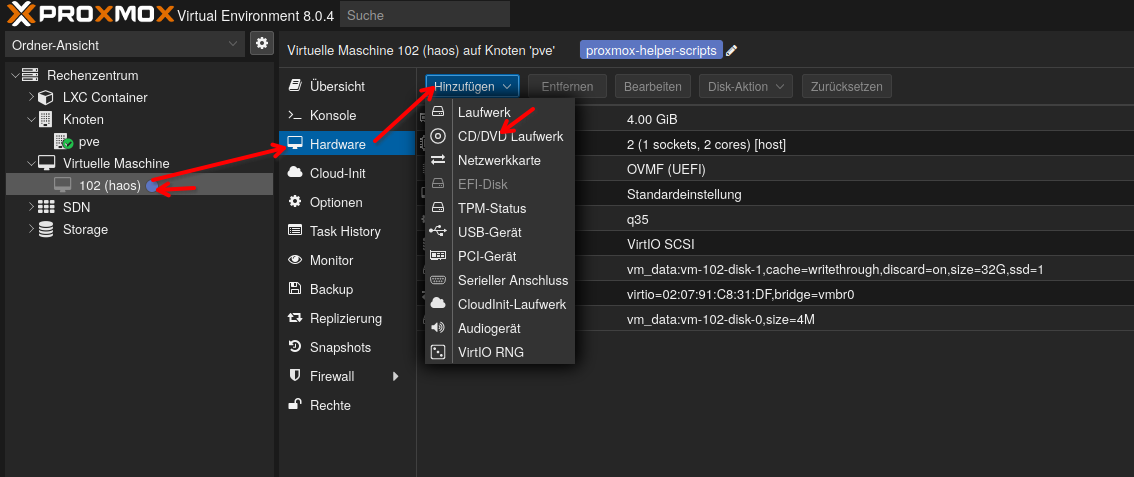
EIn Beispiel, musst Du natürlich an Dein Storage und Dein ISO-Image anpassen, ich hatte nichts anderes
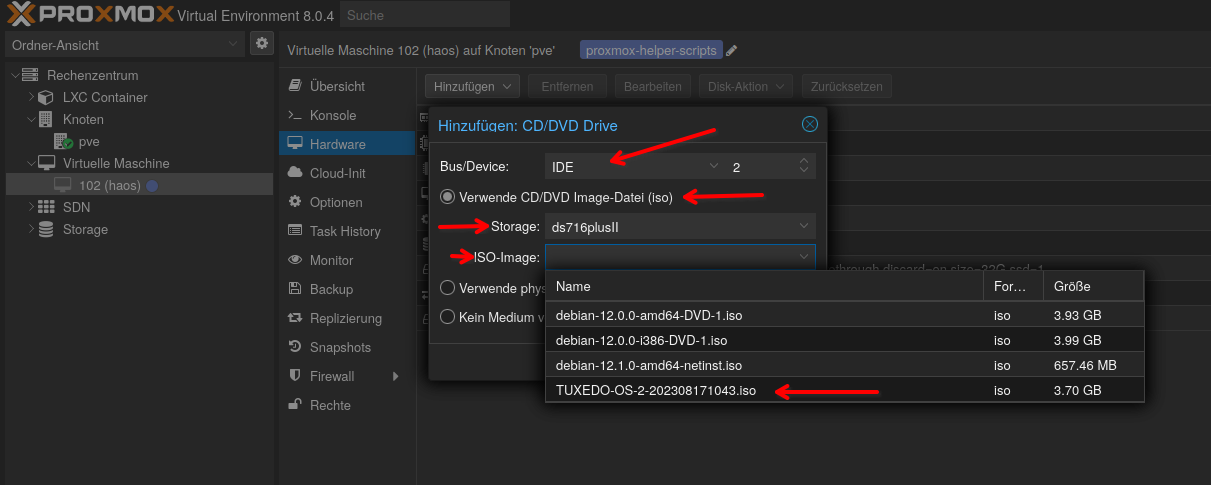
Dann die Bootreihenfolge unter Optionen ändern.
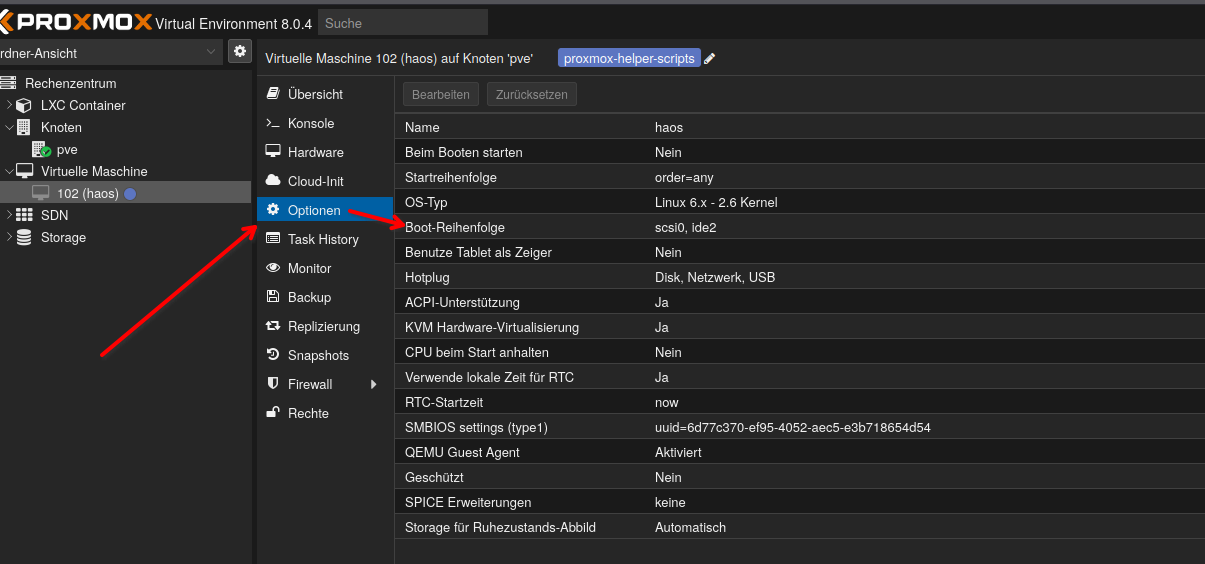
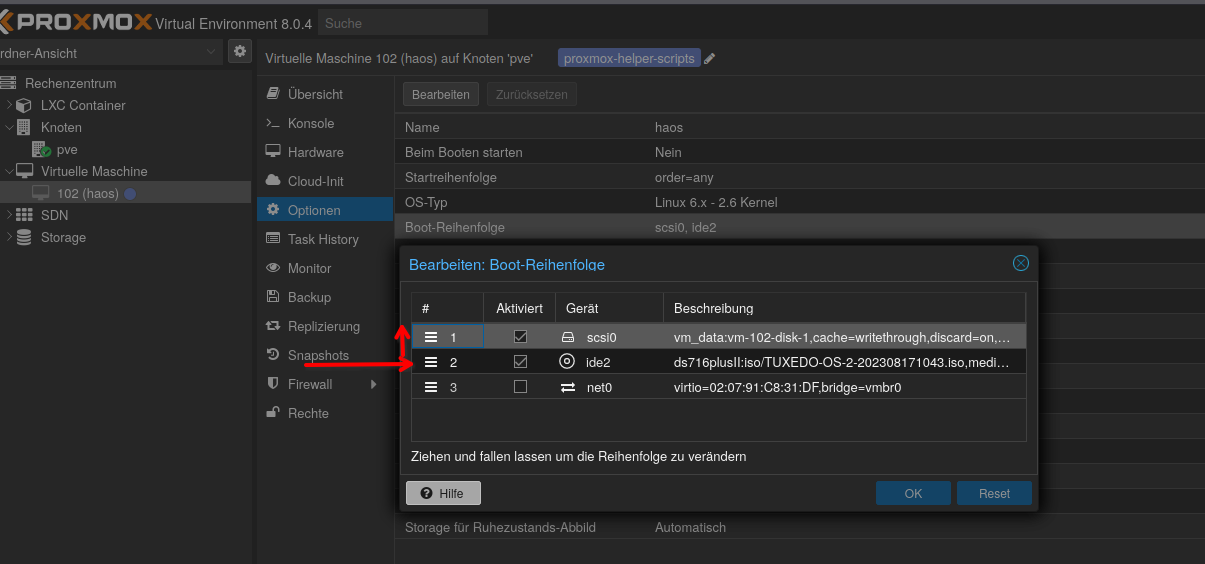
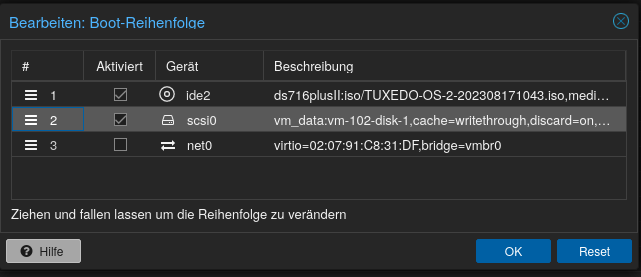
- VM booten, schauen das auch wirklich von USB-Stick gebootet wird
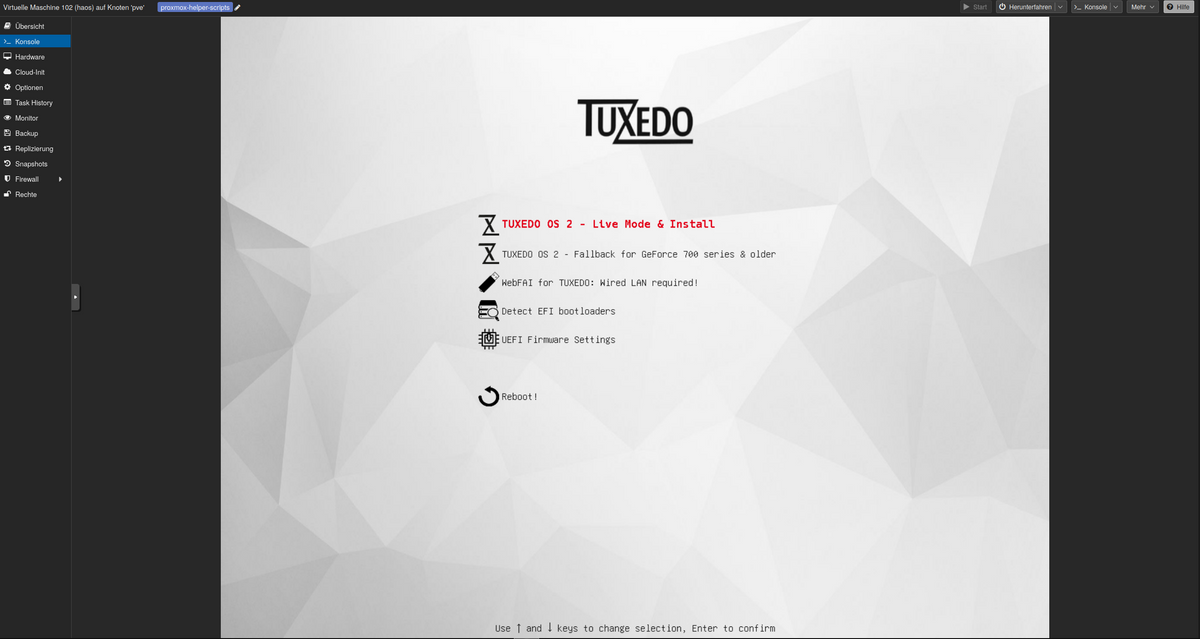
- wenn das ISO Image mit Debian oder Ubuntu gestartet ist, kannst Du schauen, ob Du die Festplatte von der VM siehst
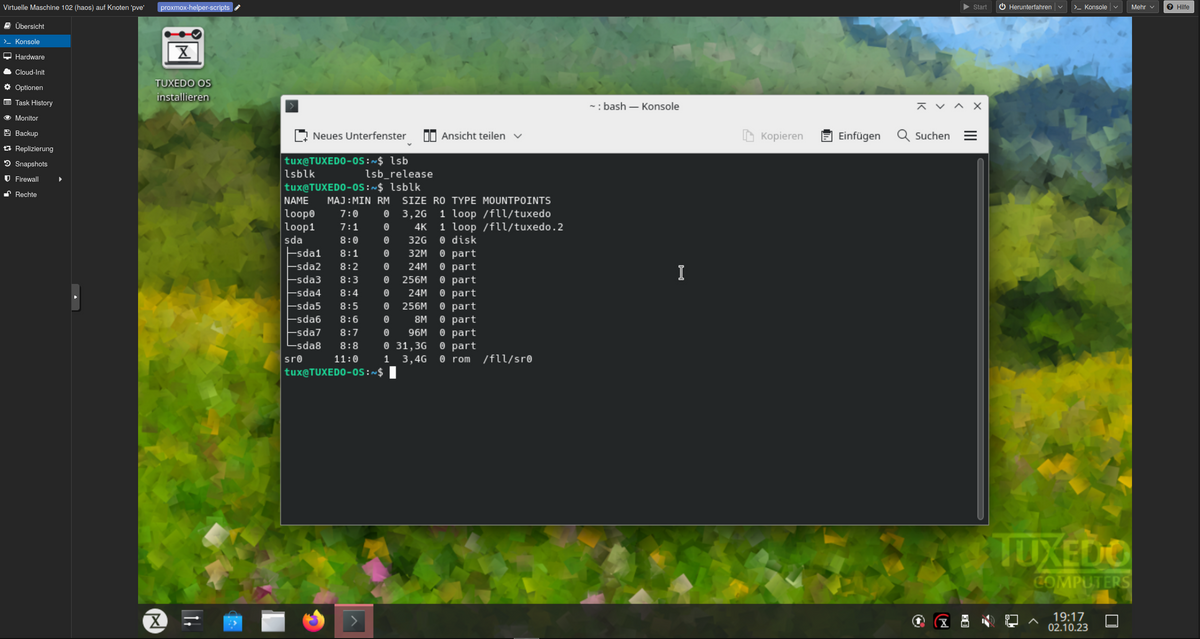
lsblkDas ist mein Laufwerk der VM
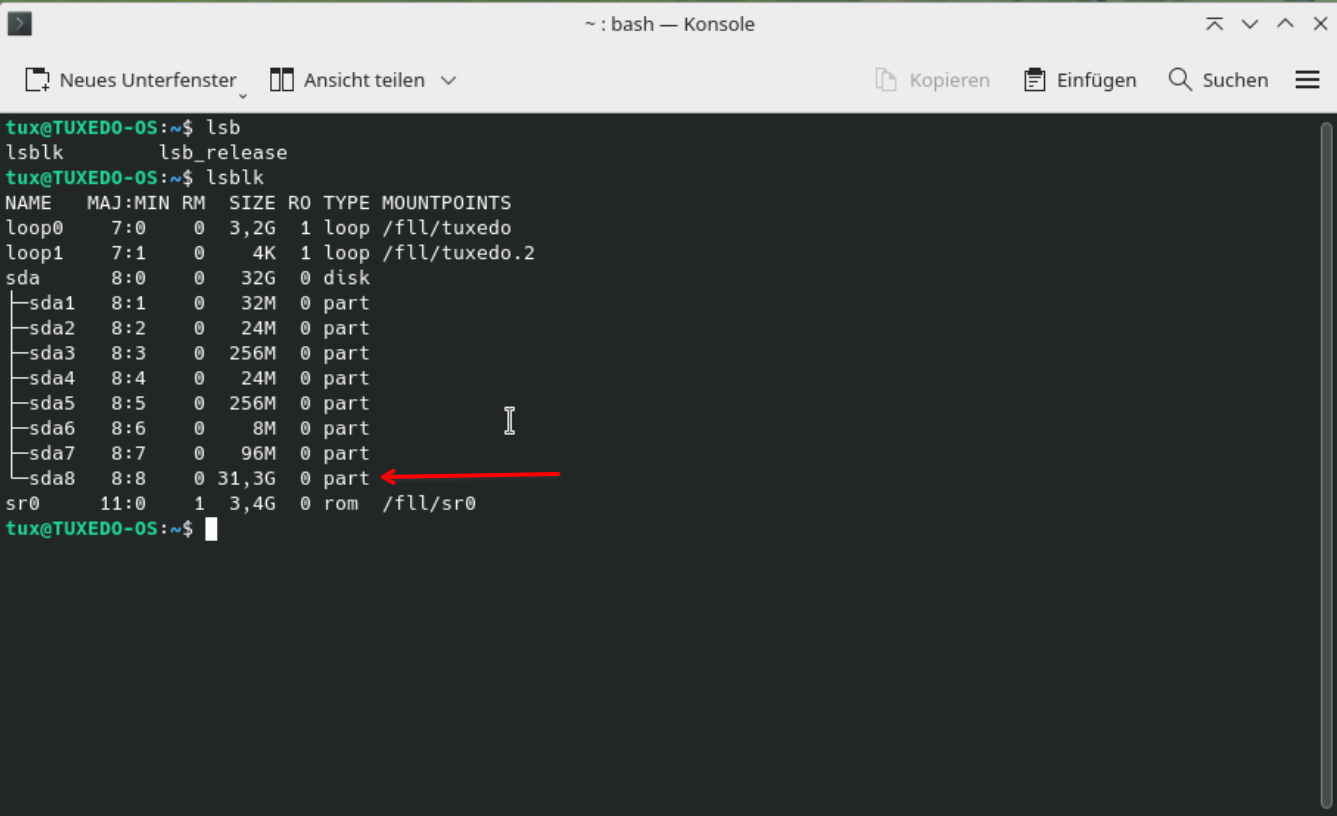
6. Ich gehe, jetzt davon aus, dass Duext4als Dateisystem hast, ansonsten mit einem Partitionmanager nachschauen.
7. einmal lesen wasfscktut# man fsck.ext4- einen ersten Test, um zu sehen ob etwas im Argen liegt.
# sudo fsck.ext4 -n /dev/sda8 ## das ist meine, Du musst `sda` an Deine Umgebung anpassen.Ergebnis, wenn sauber

VG
Bernd -



Hey! Du scheinst an dieser Unterhaltung interessiert zu sein, hast aber noch kein Konto.
Hast du es satt, bei jedem Besuch durch die gleichen Beiträge zu scrollen? Wenn du dich für ein Konto anmeldest, kommst du immer genau dorthin zurück, wo du zuvor warst, und kannst dich über neue Antworten benachrichtigen lassen (entweder per E-Mail oder Push-Benachrichtigung). Du kannst auch Lesezeichen speichern und Beiträge positiv bewerten, um anderen Community-Mitgliedern deine Wertschätzung zu zeigen.
Mit deinem Input könnte dieser Beitrag noch besser werden 💗
Registrieren Anmelden234
Online33.0k
Benutzer83.4k
Themen1.3m
Beiträge