




Raspberry Pi stürtzt ab mit Echarts
-
Vielleicht ist der Pi einfach etwas zu schwachbrüstig. Denke mal das du keinen Pi verwendest :-)
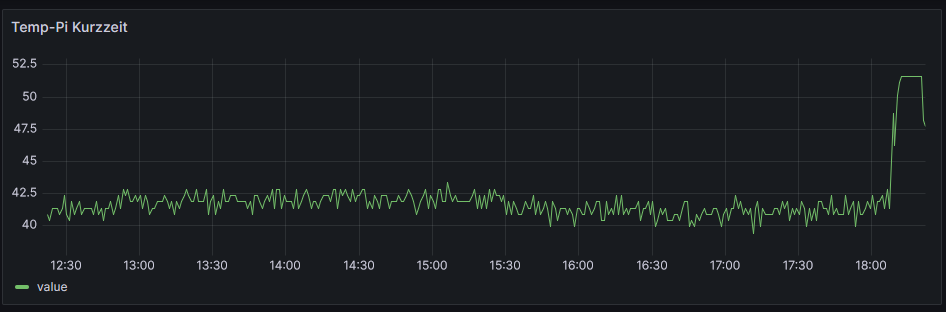
Hast du zufällig mal auf die Temperatur des Prozessors geachtet bei der Verwendung von eCharts?
Wie gesagt, so wild ist das jetzt nicht aber interssant wäre es trotzdem ;-)
-
@thomas-braun sagte in Raspberry Pi stürtzt ab mit Echarts:
iob diag
Bringt das jetzt noch was das auszuführen? Der Pi war ja nach dem Absturz stromlos.
Kann das sonst schon gerne mal posten.Edit:
Habs einfach mal gemacht:
======== Start marking the full check here ================= Start marking the full check here =========
Skript v.2023-06-20 *** BASE SYSTEM *** Static hostname: raspberrypi Icon name: computer Machine ID: d1492c3c26a048218fd90052e5ea5949 Boot ID: e4a1c325e8a24a93986364cd839afbcd Operating System: Debian GNU/Linux 11 (bullseye) Kernel: Linux 6.1.21-v8+ Architecture: arm64 Model : Raspberry Pi 4 Model B Rev 1.4 Docker : false Virtualization : none Kernel : aarch64 Userland : arm64 Systemuptime and Load: 19:04:36 up 45 min, 1 user, load average: 0.90, 0.91, 0.87 CPU threads: 4 Raspberry only: throttled=0x0 Other values than 0x0 hint to temperature/voltage problems temp=39.9'C volt=0.9260V *** Time and Time Zones *** Local time: Mon 2023-09-25 19:04:36 CEST Universal time: Mon 2023-09-25 17:04:36 UTC RTC time: n/a Time zone: Europe/Berlin (CEST, +0200) System clock synchronized: yes NTP service: active RTC in local TZ: no *** User and Groups *** pi /home/pi pi adm dialout cdrom sudo audio video plugdev games users input render netdev gpio i2c spi iobroker *** X-Server-Setup *** X-Server: false Desktop: Terminal: tty Boot Target: multi-user.target *** MEMORY *** total used free shared buff/cache available Mem: 7.8G 2.1G 4.6G 1.0M 1.1G 5.6G Swap: 99M 0B 99M Total: 7.9G 2.1G 4.7G 7811 M total memory 2077 M used memory 2831 M active memory 230 M inactive memory 4613 M free memory 68 M buffer memory 1052 M swap cache 99 M total swap 0 M used swap 99 M free swap Raspberry only: oom events: 0 lifetime oom required: 0 Mbytes total time in oom handler: 0 ms max time spent in oom handler: 0 ms *** FILESYSTEM *** Filesystem Type Size Used Avail Use% Mounted on /dev/root ext4 29G 7.9G 20G 29% / devtmpfs devtmpfs 3.6G 0 3.6G 0% /dev tmpfs tmpfs 3.9G 0 3.9G 0% /dev/shm tmpfs tmpfs 1.6G 1.1M 1.6G 1% /run tmpfs tmpfs 5.0M 4.0K 5.0M 1% /run/lock /dev/sda1 vfat 255M 31M 225M 13% /boot tmpfs tmpfs 782M 0 782M 0% /run/user/1000 Messages concerning ext4 filesystem in dmesg: [Mon Sep 25 18:18:51 2023] Kernel command line: coherent_pool=1M 8250.nr_uarts=0 snd_bcm2835.enable_headphones=0 snd_bcm2835.enable_headphones=1 snd_bcm2835.enable_hdmi=1 snd_bcm2835.enable_hdmi=0 smsc95xx.macaddr=E4:5F:01:36:CB:32 vc_mem.mem_base=0x3eb00000 vc_mem.mem_size=0x3ff00000 console=ttyS0,115200 console=tty1 root=PARTUUID=d7a4744b-02 rootfstype=ext4 fsck.repair=yes rootwait [Mon Sep 25 18:18:53 2023] EXT4-fs (sda2): INFO: recovery required on readonly filesystem [Mon Sep 25 18:18:53 2023] EXT4-fs (sda2): write access will be enabled during recovery [Mon Sep 25 18:18:53 2023] EXT4-fs (sda2): orphan cleanup on readonly fs [Mon Sep 25 18:18:53 2023] EXT4-fs (sda2): 6 orphan inodes deleted [Mon Sep 25 18:18:53 2023] EXT4-fs (sda2): recovery complete [Mon Sep 25 18:18:53 2023] EXT4-fs (sda2): mounted filesystem with ordered data mode. Quota mode: none. [Mon Sep 25 18:18:53 2023] VFS: Mounted root (ext4 filesystem) readonly on device 8:2. [Mon Sep 25 18:18:55 2023] EXT4-fs (sda2): re-mounted. Quota mode: none. Show mounted filesystems (real ones only): TARGET SOURCE FSTYPE OPTIONS / /dev/sda2 ext4 rw,noatime `-/boot /dev/sda1 vfat rw,relatime,fmask=0022,dmask=0022,codepage=437,iocharset=ascii,shortname=mixed,errors=remount-ro Files in neuralgic directories: /var: 3.0G /var/ 2.4G /var/log 2.3G /var/log/journal/d1492c3c26a048218fd90052e5ea5949 2.3G /var/log/journal 293M /var/lib Archived and active journals take up 2.2G in the file system. /opt/iobroker/backups: 12M /opt/iobroker/backups/ /opt/iobroker/iobroker-data: 539M /opt/iobroker/iobroker-data/ 428M /opt/iobroker/iobroker-data/files 88M /opt/iobroker/iobroker-data/files/echarts.admin 76M /opt/iobroker/iobroker-data/backup-objects 57M /opt/iobroker/iobroker-data/files/echarts The five largest files in iobroker-data are: 31M /opt/iobroker/iobroker-data/objects.jsonl 23M /opt/iobroker/iobroker-data/files/echarts/static/js/main.eb0afecd.js.map 23M /opt/iobroker/iobroker-data/files/echarts.admin/static/js/main.7952f0f7.js.map 23M /opt/iobroker/iobroker-data/files/echarts.admin/chart/static/js/main.eb0afecd.js.map 21M /opt/iobroker/iobroker-data/files/web.admin/static/js/main.edf7552a.js.map *** NodeJS-Installation *** /usr/bin/nodejs v18.17.1 /usr/bin/node v18.17.1 /usr/bin/npm 9.6.7 /usr/bin/npx 9.6.7 nodejs: Installed: 18.17.1-deb-1nodesource1 Candidate: 18.17.1-deb-1nodesource1 Version table: *** 18.17.1-deb-1nodesource1 500 500 https://deb.nodesource.com/node_18.x bullseye/main arm64 Packages 100 /var/lib/dpkg/status 12.22.12~dfsg-1~deb11u4 500 500 http://security.debian.org/debian-security bullseye-security/main arm64 Packages 12.22.12~dfsg-1~deb11u3 500 500 http://deb.debian.org/debian bullseye/main arm64 Packages Temp directories causing npm8 problem: 0 No problems detected Errors in npm tree: 0 *** ioBroker-Installation *** ioBroker Status iobroker is running on this host. Objects type: jsonl States type: jsonl No configuration change needed. Multihost discovery server: disabled Discovery authentication: enabled Persistent activation: disabled Objects: jsonl on 127.0.0.1 States: jsonl on 127.0.0.1 Core adapters versions js-controller: 5.0.12 admin: 6.10.1 javascript: 7.1.4 Adapters from github: 3 Adapter State + system.adapter.admin.0 : admin : raspberrypi - enabled, port: 8081, bind: 0.0.0.0, run as: admin + system.adapter.alexa2.0 : alexa2 : raspberrypi - enabled + system.adapter.backitup.0 : backitup : raspberrypi - enabled + system.adapter.deconz.0 : deconz : raspberrypi - enabled, port: 80 + system.adapter.device-reminder.0 : device-reminder : raspberrypi - enabled system.adapter.discovery.0 : discovery : raspberrypi - disabled + system.adapter.echarts.0 : echarts : raspberrypi - enabled + system.adapter.energiefluss.0 : energiefluss : raspberrypi - enabled system.adapter.feiertage.0 : feiertage : raspberrypi - enabled system.adapter.flot.0 : flot : raspberrypi - enabled + system.adapter.fritzdect.0 : fritzdect : raspberrypi - enabled + system.adapter.history.0 : history : raspberrypi - enabled system.adapter.icons-addictive-flavour-png.0: icons-addictive-flavour-png: raspberrypi - enabled system.adapter.icons-mfd-png.0 : icons-mfd-png : raspberrypi - enabled + system.adapter.influxdb.0 : influxdb : raspberrypi - enabled, port: 8086 + system.adapter.influxdb.1 : influxdb : raspberrypi - enabled, port: 8086 + system.adapter.influxdb.2 : influxdb : raspberrypi - enabled, port: 8086 + system.adapter.info.0 : info : raspberrypi - enabled + system.adapter.iot.0 : iot : raspberrypi - enabled + system.adapter.javascript.0 : javascript : raspberrypi - enabled system.adapter.mqtt.0 : mqtt : raspberrypi - disabled, port: 1884, bind: 0.0.0.0 + system.adapter.mystrom.0 : mystrom : raspberrypi - enabled system.adapter.net-tools.0 : net-tools : raspberrypi - disabled + system.adapter.opendtu.0 : opendtu : raspberrypi - enabled + system.adapter.rpi2.0 : rpi2 : raspberrypi - enabled system.adapter.smartcontrol.0 : smartcontrol : raspberrypi - disabled + system.adapter.sonoff.0 : sonoff : raspberrypi - enabled, port: 1883, bind: 0.0.0.0 + system.adapter.sourceanalytix.0 : sourceanalytix : raspberrypi - enabled + system.adapter.statistics.0 : statistics : raspberrypi - enabled + system.adapter.switchbot-hub.0 : switchbot-hub : raspberrypi - enabled + system.adapter.tankerkoenig.0 : tankerkoenig : raspberrypi - enabled + system.adapter.telegram.0 : telegram : raspberrypi - enabled, port: 8443, bind: 0.0.0.0 + system.adapter.text2command.0 : text2command : raspberrypi - enabled system.adapter.vis-colorpicker.0 : vis-colorpicker : raspberrypi - enabled system.adapter.vis-hqwidgets.0 : vis-hqwidgets : raspberrypi - enabled system.adapter.vis-icontwo.0 : vis-icontwo : raspberrypi - enabled + system.adapter.vis-inventwo.0 : vis-inventwo : raspberrypi - enabled system.adapter.vis-metro.0 : vis-metro : raspberrypi - enabled system.adapter.vis-rgraph.0 : vis-rgraph : raspberrypi - enabled system.adapter.vis-timeandweather.0 : vis-timeandweather : raspberrypi - enabled system.adapter.vis-weather.0 : vis-weather : raspberrypi - enabled system.adapter.vis.0 : vis : raspberrypi - enabled + system.adapter.web.0 : web : raspberrypi - enabled, port: 8082, bind: 0.0.0.0, run as: admin system.adapter.whatsapp-cmb.0 : whatsapp-cmb : raspberrypi - disabled + system.adapter.zigbee.0 : zigbee : raspberrypi - enabled, port: /dev/serial/by-id/usb-Silicon_Labs_Sonoff_Zigbee_3.0_USB_Dongle_Plus_0001-if00-port0 + instance is alive Enabled adapters with bindings + system.adapter.admin.0 : admin : raspberrypi - enabled, port: 8081, bind: 0.0.0.0, run as: admin + system.adapter.deconz.0 : deconz : raspberrypi - enabled, port: 80 + system.adapter.influxdb.0 : influxdb : raspberrypi - enabled, port: 8086 + system.adapter.influxdb.1 : influxdb : raspberrypi - enabled, port: 8086 + system.adapter.influxdb.2 : influxdb : raspberrypi - enabled, port: 8086 + system.adapter.sonoff.0 : sonoff : raspberrypi - enabled, port: 1883, bind: 0.0.0.0 + system.adapter.telegram.0 : telegram : raspberrypi - enabled, port: 8443, bind: 0.0.0.0 + system.adapter.web.0 : web : raspberrypi - enabled, port: 8082, bind: 0.0.0.0, run as: admin + system.adapter.zigbee.0 : zigbee : raspberrypi - enabled, port: /dev/serial/by-id/usb-Silicon_Labs_Sonoff_Zigbee_3.0_USB_Dongle_Plus_0001-if00-port0 ioBroker-Repositories stable : http://download.iobroker.net/sources-dist.json beta : http://download.iobroker.net/sources-dist-latest.json Active repo(s): stable Installed ioBroker-Instances Used repository: stable Adapter "admin" : 6.10.1 , installed 6.10.1 Adapter "alexa2" : 3.25.2 , installed 3.25.2 Adapter "backitup" : 2.8.1 , installed 2.8.1 Adapter "deconz" : 1.3.21 , installed 1.3.21 Adapter "device-reminder": 1.2.9 , installed 1.2.9 Adapter "discovery" : 3.1.0 , installed 3.2.0 Adapter "echarts" : 1.5.1 , installed 1.5.1 Adapter "feiertage" : 1.1.4 , installed 1.1.4 Adapter "flot" : 1.12.0 , installed 1.12.0 Adapter "fritzdect" : 2.3.1 , installed 2.3.1 Adapter "history" : 2.2.6 , installed 2.2.6 Adapter "icons-addictive-flavour-png": 0.1.0, installed 0.1.0 Adapter "icons-mfd-png": 1.1.0 , installed 1.1.0 Adapter "influxdb" : 3.2.0 , installed 3.2.0 Adapter "info" : 1.9.26 , installed 1.9.26 Adapter "iot" : 1.14.5 , installed 1.14.5 Adapter "javascript" : 7.1.4 , installed 7.1.4 Controller "js-controller": 5.0.12 , installed 5.0.12 Adapter "mqtt" : 4.1.1 , installed 4.1.1 Adapter "mystrom" : 0.0.14 , installed 0.0.14 Adapter "net-tools" : 0.2.0 , installed 0.2.0 Adapter "opendtu" : 0.1.7 , installed 0.1.7 Adapter "rpi2" : 1.3.2 , installed 1.3.2 Adapter "simple-api" : 2.7.2 , installed 2.7.2 Adapter "smartcontrol" : 1.3.2 , installed 1.3.2 Adapter "socketio" : 6.5.5 , installed 6.5.5 Adapter "sonoff" : 2.5.3 , installed 2.5.3 Adapter "statistics" : 2.3.0 , installed 2.3.0 Adapter "tankerkoenig" : 3.3.7 , installed 3.3.7 Adapter "telegram" : 1.16.0 , installed 1.16.0 Adapter "text2command" : 3.0.2 , installed 3.0.2 Adapter "vis" : 1.4.16 , installed 1.4.16 Adapter "vis-colorpicker": 2.0.3 , installed 2.0.3 Adapter "vis-hqwidgets": 1.4.0 , installed 1.4.0 Adapter "vis-icontwo" : 0.96.0 , installed 0.96.0 Adapter "vis-inventwo" : 3.3.3 , installed 3.3.3 Adapter "vis-metro" : 1.2.0 , installed 1.2.0 Adapter "vis-rgraph" : 0.0.2 , installed 0.0.2 Adapter "vis-timeandweather": 1.2.2, installed 1.2.2 Adapter "vis-weather" : 2.5.6 , installed 2.5.6 Adapter "web" : 6.1.2 , installed 6.1.2 Adapter "whatsapp-cmb" : 0.2.3 , installed 0.2.3 Adapter "ws" : 2.5.5 , installed 2.5.5 Adapter "zigbee" : 1.8.23 , installed 1.8.23 Objects and States Please stand by - This may take a while Objects: 7938 States: 7483 *** OS-Repositories and Updates *** Hit:1 http://security.debian.org/debian-security bullseye-security InRelease Hit:2 http://deb.debian.org/debian bullseye InRelease Hit:3 http://archive.raspberrypi.org/debian bullseye InRelease Hit:4 http://phoscon.de/apt/deconz bullseye InRelease Hit:5 http://deb.debian.org/debian bullseye-updates InRelease Hit:6 http://deb.debian.org/debian bullseye-backports InRelease Hit:7 https://repos.influxdata.com/debian bullseye InRelease Hit:8 https://packages.grafana.com/oss/deb stable InRelease Get:9 https://deb.nodesource.com/node_18.x bullseye InRelease [4586 B] Fetched 4586 B in 2s (2051 B/s) Reading package lists... Pending Updates: 0 *** Listening Ports *** Active Internet connections (only servers) Proto Recv-Q Send-Q Local Address Foreign Address State User Inode PID/Program name tcp 0 0 0.0.0.0:1883 0.0.0.0:* LISTEN 1001 15212 1380/io.sonoff.0 tcp 0 0 0.0.0.0:443 0.0.0.0:* LISTEN 1000 14557 403/deCONZ tcp 0 0 0.0.0.0:22 0.0.0.0:* LISTEN 0 14547 589/sshd: /usr/sbin tcp 0 0 0.0.0.0:80 0.0.0.0:* LISTEN 1000 15640 403/deCONZ tcp 0 0 127.0.0.1:9000 0.0.0.0:* LISTEN 1001 1735 750/iobroker.js-con tcp 0 0 127.0.0.1:9001 0.0.0.0:* LISTEN 1001 1721 750/iobroker.js-con tcp6 0 0 :::22 :::* LISTEN 0 14549 589/sshd: /usr/sbin tcp6 0 0 :::8081 :::* LISTEN 1001 2020 1047/io.admin.0 tcp6 0 0 :::8082 :::* LISTEN 1001 22170 2829/io.web.0 tcp6 0 0 :::8086 :::* LISTEN 999 14651 654/influxd tcp6 0 0 :::3000 :::* LISTEN 110 1769 749/grafana udp 0 0 0.0.0.0:68 0.0.0.0:* 0 1600 650/dhcpcd udp 0 0 0.0.0.0:5353 0.0.0.0:* 108 15446 398/avahi-daemon: r udp 0 0 0.0.0.0:54658 0.0.0.0:* 108 15448 398/avahi-daemon: r udp 0 0 0.0.0.0:1900 0.0.0.0:* 1001 20808 1669/io.deconz.0 udp 0 0 0.0.0.0:1900 0.0.0.0:* 1000 14560 403/deCONZ udp6 0 0 :::5353 :::* 108 15447 398/avahi-daemon: r udp6 0 0 :::1900 :::* 1001 20809 1669/io.deconz.0 udp6 0 0 :::39454 :::* 108 15449 398/avahi-daemon: r *** Log File - Last 25 Lines *** 2023-09-25 19:04:40.006 - info: javascript.0 (1167) script.js.PV_Nulleinspeisung.PV_Nulleinseisung: untere Grenze 48 2023-09-25 19:04:40.006 - info: javascript.0 (1167) script.js.PV_Nulleinspeisung.PV_Nulleinseisung: benötigte Power in Prozent 52 2023-09-25 19:04:40.006 - info: javascript.0 (1167) script.js.PV_Nulleinspeisung.PV_Nulleinseisung: benötigte Power in Watt 311.5 2023-09-25 19:04:40.006 - info: javascript.0 (1167) script.js.PV_Nulleinspeisung.PV_Nulleinseisung: keine Änderung 2023-09-25 19:05:00.007 - info: javascript.0 (1167) script.js.PV_Nulleinspeisung.PV_Nulleinseisung: Stromzähler Power in (W)308 2023-09-25 19:05:00.007 - info: javascript.0 (1167) script.js.PV_Nulleinspeisung.PV_Nulleinseisung: Istwert Gespeicherte Power 53 2023-09-25 19:05:00.008 - info: javascript.0 (1167) script.js.PV_Nulleinspeisung.PV_Nulleinseisung: obere Grenze 58 2023-09-25 19:05:00.008 - info: javascript.0 (1167) script.js.PV_Nulleinspeisung.PV_Nulleinseisung: untere Grenze 48 2023-09-25 19:05:00.008 - info: javascript.0 (1167) script.js.PV_Nulleinspeisung.PV_Nulleinseisung: benötigte Power in Prozent 52 2023-09-25 19:05:00.008 - info: javascript.0 (1167) script.js.PV_Nulleinspeisung.PV_Nulleinseisung: benötigte Power in Watt 313.4 2023-09-25 19:05:00.008 - info: javascript.0 (1167) script.js.PV_Nulleinspeisung.PV_Nulleinseisung: keine Änderung 2023-09-25 19:05:20.008 - info: javascript.0 (1167) script.js.PV_Nulleinspeisung.PV_Nulleinseisung: Stromzähler Power in (W)305 2023-09-25 19:05:20.008 - info: javascript.0 (1167) script.js.PV_Nulleinspeisung.PV_Nulleinseisung: Istwert Gespeicherte Power 53 2023-09-25 19:05:20.008 - info: javascript.0 (1167) script.js.PV_Nulleinspeisung.PV_Nulleinseisung: obere Grenze 58 2023-09-25 19:05:20.009 - info: javascript.0 (1167) script.js.PV_Nulleinspeisung.PV_Nulleinseisung: untere Grenze 48 2023-09-25 19:05:20.009 - info: javascript.0 (1167) script.js.PV_Nulleinspeisung.PV_Nulleinseisung: benötigte Power in Prozent 52 2023-09-25 19:05:20.009 - info: javascript.0 (1167) script.js.PV_Nulleinspeisung.PV_Nulleinseisung: benötigte Power in Watt 310.3 2023-09-25 19:05:20.009 - info: javascript.0 (1167) script.js.PV_Nulleinspeisung.PV_Nulleinseisung: keine Änderung 2023-09-25 19:05:40.005 - info: javascript.0 (1167) script.js.PV_Nulleinspeisung.PV_Nulleinseisung: Stromzähler Power in (W)306 2023-09-25 19:05:40.006 - info: javascript.0 (1167) script.js.PV_Nulleinspeisung.PV_Nulleinseisung: Istwert Gespeicherte Power 53 2023-09-25 19:05:40.007 - info: javascript.0 (1167) script.js.PV_Nulleinspeisung.PV_Nulleinseisung: obere Grenze 58 2023-09-25 19:05:40.007 - info: javascript.0 (1167) script.js.PV_Nulleinspeisung.PV_Nulleinseisung: untere Grenze 48 2023-09-25 19:05:40.007 - info: javascript.0 (1167) script.js.PV_Nulleinspeisung.PV_Nulleinseisung: benötigte Power in Prozent 52 2023-09-25 19:05:40.008 - info: javascript.0 (1167) script.js.PV_Nulleinspeisung.PV_Nulleinseisung: benötigte Power in Watt 311.2 2023-09-25 19:05:40.008 - info: javascript.0 (1167) script.js.PV_Nulleinspeisung.PV_Nulleinseisung: keine Änderung============ Mark until here for C&P =============
iob diag has finished.
Press any key for a summary
@thomas-braun vielleicht erkennst du ja etwas darin.
Nix besonderes; iob auf Respberry pi 4 (8GB) mit 32 GB SSD
Node.js: v22.23.2
NPM: 10.9.4
js-controller 7.1.2
Linux: Trixie -
@thomas-braun sagte in Raspberry Pi stürtzt ab mit Echarts:
iob diag
Bringt das jetzt noch was das auszuführen? Der Pi war ja nach dem Absturz stromlos.
Kann das sonst schon gerne mal posten.Edit:
Habs einfach mal gemacht:
======== Start marking the full check here ================= Start marking the full check here =========
Skript v.2023-06-20 *** BASE SYSTEM *** Static hostname: raspberrypi Icon name: computer Machine ID: d1492c3c26a048218fd90052e5ea5949 Boot ID: e4a1c325e8a24a93986364cd839afbcd Operating System: Debian GNU/Linux 11 (bullseye) Kernel: Linux 6.1.21-v8+ Architecture: arm64 Model : Raspberry Pi 4 Model B Rev 1.4 Docker : false Virtualization : none Kernel : aarch64 Userland : arm64 Systemuptime and Load: 19:04:36 up 45 min, 1 user, load average: 0.90, 0.91, 0.87 CPU threads: 4 Raspberry only: throttled=0x0 Other values than 0x0 hint to temperature/voltage problems temp=39.9'C volt=0.9260V *** Time and Time Zones *** Local time: Mon 2023-09-25 19:04:36 CEST Universal time: Mon 2023-09-25 17:04:36 UTC RTC time: n/a Time zone: Europe/Berlin (CEST, +0200) System clock synchronized: yes NTP service: active RTC in local TZ: no *** User and Groups *** pi /home/pi pi adm dialout cdrom sudo audio video plugdev games users input render netdev gpio i2c spi iobroker *** X-Server-Setup *** X-Server: false Desktop: Terminal: tty Boot Target: multi-user.target *** MEMORY *** total used free shared buff/cache available Mem: 7.8G 2.1G 4.6G 1.0M 1.1G 5.6G Swap: 99M 0B 99M Total: 7.9G 2.1G 4.7G 7811 M total memory 2077 M used memory 2831 M active memory 230 M inactive memory 4613 M free memory 68 M buffer memory 1052 M swap cache 99 M total swap 0 M used swap 99 M free swap Raspberry only: oom events: 0 lifetime oom required: 0 Mbytes total time in oom handler: 0 ms max time spent in oom handler: 0 ms *** FILESYSTEM *** Filesystem Type Size Used Avail Use% Mounted on /dev/root ext4 29G 7.9G 20G 29% / devtmpfs devtmpfs 3.6G 0 3.6G 0% /dev tmpfs tmpfs 3.9G 0 3.9G 0% /dev/shm tmpfs tmpfs 1.6G 1.1M 1.6G 1% /run tmpfs tmpfs 5.0M 4.0K 5.0M 1% /run/lock /dev/sda1 vfat 255M 31M 225M 13% /boot tmpfs tmpfs 782M 0 782M 0% /run/user/1000 Messages concerning ext4 filesystem in dmesg: [Mon Sep 25 18:18:51 2023] Kernel command line: coherent_pool=1M 8250.nr_uarts=0 snd_bcm2835.enable_headphones=0 snd_bcm2835.enable_headphones=1 snd_bcm2835.enable_hdmi=1 snd_bcm2835.enable_hdmi=0 smsc95xx.macaddr=E4:5F:01:36:CB:32 vc_mem.mem_base=0x3eb00000 vc_mem.mem_size=0x3ff00000 console=ttyS0,115200 console=tty1 root=PARTUUID=d7a4744b-02 rootfstype=ext4 fsck.repair=yes rootwait [Mon Sep 25 18:18:53 2023] EXT4-fs (sda2): INFO: recovery required on readonly filesystem [Mon Sep 25 18:18:53 2023] EXT4-fs (sda2): write access will be enabled during recovery [Mon Sep 25 18:18:53 2023] EXT4-fs (sda2): orphan cleanup on readonly fs [Mon Sep 25 18:18:53 2023] EXT4-fs (sda2): 6 orphan inodes deleted [Mon Sep 25 18:18:53 2023] EXT4-fs (sda2): recovery complete [Mon Sep 25 18:18:53 2023] EXT4-fs (sda2): mounted filesystem with ordered data mode. Quota mode: none. [Mon Sep 25 18:18:53 2023] VFS: Mounted root (ext4 filesystem) readonly on device 8:2. [Mon Sep 25 18:18:55 2023] EXT4-fs (sda2): re-mounted. Quota mode: none. Show mounted filesystems (real ones only): TARGET SOURCE FSTYPE OPTIONS / /dev/sda2 ext4 rw,noatime `-/boot /dev/sda1 vfat rw,relatime,fmask=0022,dmask=0022,codepage=437,iocharset=ascii,shortname=mixed,errors=remount-ro Files in neuralgic directories: /var: 3.0G /var/ 2.4G /var/log 2.3G /var/log/journal/d1492c3c26a048218fd90052e5ea5949 2.3G /var/log/journal 293M /var/lib Archived and active journals take up 2.2G in the file system. /opt/iobroker/backups: 12M /opt/iobroker/backups/ /opt/iobroker/iobroker-data: 539M /opt/iobroker/iobroker-data/ 428M /opt/iobroker/iobroker-data/files 88M /opt/iobroker/iobroker-data/files/echarts.admin 76M /opt/iobroker/iobroker-data/backup-objects 57M /opt/iobroker/iobroker-data/files/echarts The five largest files in iobroker-data are: 31M /opt/iobroker/iobroker-data/objects.jsonl 23M /opt/iobroker/iobroker-data/files/echarts/static/js/main.eb0afecd.js.map 23M /opt/iobroker/iobroker-data/files/echarts.admin/static/js/main.7952f0f7.js.map 23M /opt/iobroker/iobroker-data/files/echarts.admin/chart/static/js/main.eb0afecd.js.map 21M /opt/iobroker/iobroker-data/files/web.admin/static/js/main.edf7552a.js.map *** NodeJS-Installation *** /usr/bin/nodejs v18.17.1 /usr/bin/node v18.17.1 /usr/bin/npm 9.6.7 /usr/bin/npx 9.6.7 nodejs: Installed: 18.17.1-deb-1nodesource1 Candidate: 18.17.1-deb-1nodesource1 Version table: *** 18.17.1-deb-1nodesource1 500 500 https://deb.nodesource.com/node_18.x bullseye/main arm64 Packages 100 /var/lib/dpkg/status 12.22.12~dfsg-1~deb11u4 500 500 http://security.debian.org/debian-security bullseye-security/main arm64 Packages 12.22.12~dfsg-1~deb11u3 500 500 http://deb.debian.org/debian bullseye/main arm64 Packages Temp directories causing npm8 problem: 0 No problems detected Errors in npm tree: 0 *** ioBroker-Installation *** ioBroker Status iobroker is running on this host. Objects type: jsonl States type: jsonl No configuration change needed. Multihost discovery server: disabled Discovery authentication: enabled Persistent activation: disabled Objects: jsonl on 127.0.0.1 States: jsonl on 127.0.0.1 Core adapters versions js-controller: 5.0.12 admin: 6.10.1 javascript: 7.1.4 Adapters from github: 3 Adapter State + system.adapter.admin.0 : admin : raspberrypi - enabled, port: 8081, bind: 0.0.0.0, run as: admin + system.adapter.alexa2.0 : alexa2 : raspberrypi - enabled + system.adapter.backitup.0 : backitup : raspberrypi - enabled + system.adapter.deconz.0 : deconz : raspberrypi - enabled, port: 80 + system.adapter.device-reminder.0 : device-reminder : raspberrypi - enabled system.adapter.discovery.0 : discovery : raspberrypi - disabled + system.adapter.echarts.0 : echarts : raspberrypi - enabled + system.adapter.energiefluss.0 : energiefluss : raspberrypi - enabled system.adapter.feiertage.0 : feiertage : raspberrypi - enabled system.adapter.flot.0 : flot : raspberrypi - enabled + system.adapter.fritzdect.0 : fritzdect : raspberrypi - enabled + system.adapter.history.0 : history : raspberrypi - enabled system.adapter.icons-addictive-flavour-png.0: icons-addictive-flavour-png: raspberrypi - enabled system.adapter.icons-mfd-png.0 : icons-mfd-png : raspberrypi - enabled + system.adapter.influxdb.0 : influxdb : raspberrypi - enabled, port: 8086 + system.adapter.influxdb.1 : influxdb : raspberrypi - enabled, port: 8086 + system.adapter.influxdb.2 : influxdb : raspberrypi - enabled, port: 8086 + system.adapter.info.0 : info : raspberrypi - enabled + system.adapter.iot.0 : iot : raspberrypi - enabled + system.adapter.javascript.0 : javascript : raspberrypi - enabled system.adapter.mqtt.0 : mqtt : raspberrypi - disabled, port: 1884, bind: 0.0.0.0 + system.adapter.mystrom.0 : mystrom : raspberrypi - enabled system.adapter.net-tools.0 : net-tools : raspberrypi - disabled + system.adapter.opendtu.0 : opendtu : raspberrypi - enabled + system.adapter.rpi2.0 : rpi2 : raspberrypi - enabled system.adapter.smartcontrol.0 : smartcontrol : raspberrypi - disabled + system.adapter.sonoff.0 : sonoff : raspberrypi - enabled, port: 1883, bind: 0.0.0.0 + system.adapter.sourceanalytix.0 : sourceanalytix : raspberrypi - enabled + system.adapter.statistics.0 : statistics : raspberrypi - enabled + system.adapter.switchbot-hub.0 : switchbot-hub : raspberrypi - enabled + system.adapter.tankerkoenig.0 : tankerkoenig : raspberrypi - enabled + system.adapter.telegram.0 : telegram : raspberrypi - enabled, port: 8443, bind: 0.0.0.0 + system.adapter.text2command.0 : text2command : raspberrypi - enabled system.adapter.vis-colorpicker.0 : vis-colorpicker : raspberrypi - enabled system.adapter.vis-hqwidgets.0 : vis-hqwidgets : raspberrypi - enabled system.adapter.vis-icontwo.0 : vis-icontwo : raspberrypi - enabled + system.adapter.vis-inventwo.0 : vis-inventwo : raspberrypi - enabled system.adapter.vis-metro.0 : vis-metro : raspberrypi - enabled system.adapter.vis-rgraph.0 : vis-rgraph : raspberrypi - enabled system.adapter.vis-timeandweather.0 : vis-timeandweather : raspberrypi - enabled system.adapter.vis-weather.0 : vis-weather : raspberrypi - enabled system.adapter.vis.0 : vis : raspberrypi - enabled + system.adapter.web.0 : web : raspberrypi - enabled, port: 8082, bind: 0.0.0.0, run as: admin system.adapter.whatsapp-cmb.0 : whatsapp-cmb : raspberrypi - disabled + system.adapter.zigbee.0 : zigbee : raspberrypi - enabled, port: /dev/serial/by-id/usb-Silicon_Labs_Sonoff_Zigbee_3.0_USB_Dongle_Plus_0001-if00-port0 + instance is alive Enabled adapters with bindings + system.adapter.admin.0 : admin : raspberrypi - enabled, port: 8081, bind: 0.0.0.0, run as: admin + system.adapter.deconz.0 : deconz : raspberrypi - enabled, port: 80 + system.adapter.influxdb.0 : influxdb : raspberrypi - enabled, port: 8086 + system.adapter.influxdb.1 : influxdb : raspberrypi - enabled, port: 8086 + system.adapter.influxdb.2 : influxdb : raspberrypi - enabled, port: 8086 + system.adapter.sonoff.0 : sonoff : raspberrypi - enabled, port: 1883, bind: 0.0.0.0 + system.adapter.telegram.0 : telegram : raspberrypi - enabled, port: 8443, bind: 0.0.0.0 + system.adapter.web.0 : web : raspberrypi - enabled, port: 8082, bind: 0.0.0.0, run as: admin + system.adapter.zigbee.0 : zigbee : raspberrypi - enabled, port: /dev/serial/by-id/usb-Silicon_Labs_Sonoff_Zigbee_3.0_USB_Dongle_Plus_0001-if00-port0 ioBroker-Repositories stable : http://download.iobroker.net/sources-dist.json beta : http://download.iobroker.net/sources-dist-latest.json Active repo(s): stable Installed ioBroker-Instances Used repository: stable Adapter "admin" : 6.10.1 , installed 6.10.1 Adapter "alexa2" : 3.25.2 , installed 3.25.2 Adapter "backitup" : 2.8.1 , installed 2.8.1 Adapter "deconz" : 1.3.21 , installed 1.3.21 Adapter "device-reminder": 1.2.9 , installed 1.2.9 Adapter "discovery" : 3.1.0 , installed 3.2.0 Adapter "echarts" : 1.5.1 , installed 1.5.1 Adapter "feiertage" : 1.1.4 , installed 1.1.4 Adapter "flot" : 1.12.0 , installed 1.12.0 Adapter "fritzdect" : 2.3.1 , installed 2.3.1 Adapter "history" : 2.2.6 , installed 2.2.6 Adapter "icons-addictive-flavour-png": 0.1.0, installed 0.1.0 Adapter "icons-mfd-png": 1.1.0 , installed 1.1.0 Adapter "influxdb" : 3.2.0 , installed 3.2.0 Adapter "info" : 1.9.26 , installed 1.9.26 Adapter "iot" : 1.14.5 , installed 1.14.5 Adapter "javascript" : 7.1.4 , installed 7.1.4 Controller "js-controller": 5.0.12 , installed 5.0.12 Adapter "mqtt" : 4.1.1 , installed 4.1.1 Adapter "mystrom" : 0.0.14 , installed 0.0.14 Adapter "net-tools" : 0.2.0 , installed 0.2.0 Adapter "opendtu" : 0.1.7 , installed 0.1.7 Adapter "rpi2" : 1.3.2 , installed 1.3.2 Adapter "simple-api" : 2.7.2 , installed 2.7.2 Adapter "smartcontrol" : 1.3.2 , installed 1.3.2 Adapter "socketio" : 6.5.5 , installed 6.5.5 Adapter "sonoff" : 2.5.3 , installed 2.5.3 Adapter "statistics" : 2.3.0 , installed 2.3.0 Adapter "tankerkoenig" : 3.3.7 , installed 3.3.7 Adapter "telegram" : 1.16.0 , installed 1.16.0 Adapter "text2command" : 3.0.2 , installed 3.0.2 Adapter "vis" : 1.4.16 , installed 1.4.16 Adapter "vis-colorpicker": 2.0.3 , installed 2.0.3 Adapter "vis-hqwidgets": 1.4.0 , installed 1.4.0 Adapter "vis-icontwo" : 0.96.0 , installed 0.96.0 Adapter "vis-inventwo" : 3.3.3 , installed 3.3.3 Adapter "vis-metro" : 1.2.0 , installed 1.2.0 Adapter "vis-rgraph" : 0.0.2 , installed 0.0.2 Adapter "vis-timeandweather": 1.2.2, installed 1.2.2 Adapter "vis-weather" : 2.5.6 , installed 2.5.6 Adapter "web" : 6.1.2 , installed 6.1.2 Adapter "whatsapp-cmb" : 0.2.3 , installed 0.2.3 Adapter "ws" : 2.5.5 , installed 2.5.5 Adapter "zigbee" : 1.8.23 , installed 1.8.23 Objects and States Please stand by - This may take a while Objects: 7938 States: 7483 *** OS-Repositories and Updates *** Hit:1 http://security.debian.org/debian-security bullseye-security InRelease Hit:2 http://deb.debian.org/debian bullseye InRelease Hit:3 http://archive.raspberrypi.org/debian bullseye InRelease Hit:4 http://phoscon.de/apt/deconz bullseye InRelease Hit:5 http://deb.debian.org/debian bullseye-updates InRelease Hit:6 http://deb.debian.org/debian bullseye-backports InRelease Hit:7 https://repos.influxdata.com/debian bullseye InRelease Hit:8 https://packages.grafana.com/oss/deb stable InRelease Get:9 https://deb.nodesource.com/node_18.x bullseye InRelease [4586 B] Fetched 4586 B in 2s (2051 B/s) Reading package lists... Pending Updates: 0 *** Listening Ports *** Active Internet connections (only servers) Proto Recv-Q Send-Q Local Address Foreign Address State User Inode PID/Program name tcp 0 0 0.0.0.0:1883 0.0.0.0:* LISTEN 1001 15212 1380/io.sonoff.0 tcp 0 0 0.0.0.0:443 0.0.0.0:* LISTEN 1000 14557 403/deCONZ tcp 0 0 0.0.0.0:22 0.0.0.0:* LISTEN 0 14547 589/sshd: /usr/sbin tcp 0 0 0.0.0.0:80 0.0.0.0:* LISTEN 1000 15640 403/deCONZ tcp 0 0 127.0.0.1:9000 0.0.0.0:* LISTEN 1001 1735 750/iobroker.js-con tcp 0 0 127.0.0.1:9001 0.0.0.0:* LISTEN 1001 1721 750/iobroker.js-con tcp6 0 0 :::22 :::* LISTEN 0 14549 589/sshd: /usr/sbin tcp6 0 0 :::8081 :::* LISTEN 1001 2020 1047/io.admin.0 tcp6 0 0 :::8082 :::* LISTEN 1001 22170 2829/io.web.0 tcp6 0 0 :::8086 :::* LISTEN 999 14651 654/influxd tcp6 0 0 :::3000 :::* LISTEN 110 1769 749/grafana udp 0 0 0.0.0.0:68 0.0.0.0:* 0 1600 650/dhcpcd udp 0 0 0.0.0.0:5353 0.0.0.0:* 108 15446 398/avahi-daemon: r udp 0 0 0.0.0.0:54658 0.0.0.0:* 108 15448 398/avahi-daemon: r udp 0 0 0.0.0.0:1900 0.0.0.0:* 1001 20808 1669/io.deconz.0 udp 0 0 0.0.0.0:1900 0.0.0.0:* 1000 14560 403/deCONZ udp6 0 0 :::5353 :::* 108 15447 398/avahi-daemon: r udp6 0 0 :::1900 :::* 1001 20809 1669/io.deconz.0 udp6 0 0 :::39454 :::* 108 15449 398/avahi-daemon: r *** Log File - Last 25 Lines *** 2023-09-25 19:04:40.006 - info: javascript.0 (1167) script.js.PV_Nulleinspeisung.PV_Nulleinseisung: untere Grenze 48 2023-09-25 19:04:40.006 - info: javascript.0 (1167) script.js.PV_Nulleinspeisung.PV_Nulleinseisung: benötigte Power in Prozent 52 2023-09-25 19:04:40.006 - info: javascript.0 (1167) script.js.PV_Nulleinspeisung.PV_Nulleinseisung: benötigte Power in Watt 311.5 2023-09-25 19:04:40.006 - info: javascript.0 (1167) script.js.PV_Nulleinspeisung.PV_Nulleinseisung: keine Änderung 2023-09-25 19:05:00.007 - info: javascript.0 (1167) script.js.PV_Nulleinspeisung.PV_Nulleinseisung: Stromzähler Power in (W)308 2023-09-25 19:05:00.007 - info: javascript.0 (1167) script.js.PV_Nulleinspeisung.PV_Nulleinseisung: Istwert Gespeicherte Power 53 2023-09-25 19:05:00.008 - info: javascript.0 (1167) script.js.PV_Nulleinspeisung.PV_Nulleinseisung: obere Grenze 58 2023-09-25 19:05:00.008 - info: javascript.0 (1167) script.js.PV_Nulleinspeisung.PV_Nulleinseisung: untere Grenze 48 2023-09-25 19:05:00.008 - info: javascript.0 (1167) script.js.PV_Nulleinspeisung.PV_Nulleinseisung: benötigte Power in Prozent 52 2023-09-25 19:05:00.008 - info: javascript.0 (1167) script.js.PV_Nulleinspeisung.PV_Nulleinseisung: benötigte Power in Watt 313.4 2023-09-25 19:05:00.008 - info: javascript.0 (1167) script.js.PV_Nulleinspeisung.PV_Nulleinseisung: keine Änderung 2023-09-25 19:05:20.008 - info: javascript.0 (1167) script.js.PV_Nulleinspeisung.PV_Nulleinseisung: Stromzähler Power in (W)305 2023-09-25 19:05:20.008 - info: javascript.0 (1167) script.js.PV_Nulleinspeisung.PV_Nulleinseisung: Istwert Gespeicherte Power 53 2023-09-25 19:05:20.008 - info: javascript.0 (1167) script.js.PV_Nulleinspeisung.PV_Nulleinseisung: obere Grenze 58 2023-09-25 19:05:20.009 - info: javascript.0 (1167) script.js.PV_Nulleinspeisung.PV_Nulleinseisung: untere Grenze 48 2023-09-25 19:05:20.009 - info: javascript.0 (1167) script.js.PV_Nulleinspeisung.PV_Nulleinseisung: benötigte Power in Prozent 52 2023-09-25 19:05:20.009 - info: javascript.0 (1167) script.js.PV_Nulleinspeisung.PV_Nulleinseisung: benötigte Power in Watt 310.3 2023-09-25 19:05:20.009 - info: javascript.0 (1167) script.js.PV_Nulleinspeisung.PV_Nulleinseisung: keine Änderung 2023-09-25 19:05:40.005 - info: javascript.0 (1167) script.js.PV_Nulleinspeisung.PV_Nulleinseisung: Stromzähler Power in (W)306 2023-09-25 19:05:40.006 - info: javascript.0 (1167) script.js.PV_Nulleinspeisung.PV_Nulleinseisung: Istwert Gespeicherte Power 53 2023-09-25 19:05:40.007 - info: javascript.0 (1167) script.js.PV_Nulleinspeisung.PV_Nulleinseisung: obere Grenze 58 2023-09-25 19:05:40.007 - info: javascript.0 (1167) script.js.PV_Nulleinspeisung.PV_Nulleinseisung: untere Grenze 48 2023-09-25 19:05:40.007 - info: javascript.0 (1167) script.js.PV_Nulleinspeisung.PV_Nulleinseisung: benötigte Power in Prozent 52 2023-09-25 19:05:40.008 - info: javascript.0 (1167) script.js.PV_Nulleinspeisung.PV_Nulleinseisung: benötigte Power in Watt 311.2 2023-09-25 19:05:40.008 - info: javascript.0 (1167) script.js.PV_Nulleinspeisung.PV_Nulleinseisung: keine Änderung============ Mark until here for C&P =============
iob diag has finished.
Press any key for a summary
@thomas-braun vielleicht erkennst du ja etwas darin.
-
Hmm, das hilft mir jetzt nicht wirklich weiter :-)
Weder die Meldung noch weis ich was zu tun ist.
Du hast da doch bestimmt einen Tip für mich ;-)Nix besonderes; iob auf Respberry pi 4 (8GB) mit 32 GB SSD
Node.js: v22.23.2
NPM: 10.9.4
js-controller 7.1.2
Linux: Trixie -
Hmm, das hilft mir jetzt nicht wirklich weiter :-)
Weder die Meldung noch weis ich was zu tun ist.
Du hast da doch bestimmt einen Tip für mich ;-)@duffy sagte in Raspberry Pi stürtzt ab mit Echarts:
Du hast da doch bestimmt einen Tip für mich
Installier es neu. Backup druff, fertig.
-
@duffy sagte in Raspberry Pi stürtzt ab mit Echarts:
Du hast da doch bestimmt einen Tip für mich
Installier es neu. Backup druff, fertig.
ALLES Neu

Betrifft der Fehler nur Echarts? Dann lasse ich es einfach.
Ich müsste da Influxdb und grafana neu installieren das brauche ich wieder Tage für.
Was sagt den der Fehler überhaupt aus und wie findet man so einen Fehler in so viel Text?Nix besonderes; iob auf Respberry pi 4 (8GB) mit 32 GB SSD
Node.js: v22.23.2
NPM: 10.9.4
js-controller 7.1.2
Linux: Trixie -
ALLES Neu
Betrifft der Fehler nur Echarts? Dann lasse ich es einfach.
Ich müsste da Influxdb und grafana neu installieren das brauche ich wieder Tage für.
Was sagt den der Fehler überhaupt aus und wie findet man so einen Fehler in so viel Text?@duffy Der Fehler mit orphaned nodes sagt, dass mindestens Dein Dateisystem beschädigt ist, wenn nciht gar die SD-Karte. das passiert gerne, wenn man den Strom weg nimmt, bevor man sauber runterfährt.
Raspi killen bei sowas gerne die SD-Karte, so dass eine neue her muss.Gruss, Jürgen
-
@duffy Der Fehler mit orphaned nodes sagt, dass mindestens Dein Dateisystem beschädigt ist, wenn nciht gar die SD-Karte. das passiert gerne, wenn man den Strom weg nimmt, bevor man sauber runterfährt.
Raspi killen bei sowas gerne die SD-Karte, so dass eine neue her muss.Gruss, Jürgen
-
ALLES Neu
Betrifft der Fehler nur Echarts? Dann lasse ich es einfach.
Ich müsste da Influxdb und grafana neu installieren das brauche ich wieder Tage für.
Was sagt den der Fehler überhaupt aus und wie findet man so einen Fehler in so viel Text?Indem man den Text liest.
Steht hier drin:Messages concerning ext4 filesystem in dmesg: [Mon Sep 25 18:18:51 2023] Kernel command line: coherent_pool=1M 8250.nr_uarts=0 snd_bcm2835.enable_headphones=0 snd_bcm2835.enable_headphones=1 snd_bcm2835.enable_hdmi=1 snd_bcm2835.enable_hdmi=0 smsc95xx.macaddr=E4:5F:01:36:CB:32 vc_mem.mem_base=0x3eb00000 vc_mem.mem_size=0x3ff00000 console=ttyS0,115200 console=tty1 root=PARTUUID=d7a4744b-02 rootfstype=ext4 fsck.repair=yes rootwait [Mon Sep 25 18:18:53 2023] EXT4-fs (sda2): INFO: recovery required on readonly filesystem [Mon Sep 25 18:18:53 2023] EXT4-fs (sda2): write access will be enabled during recovery [Mon Sep 25 18:18:53 2023] EXT4-fs (sda2): orphan cleanup on readonly fs [Mon Sep 25 18:18:53 2023] EXT4-fs (sda2): 6 orphan inodes deletedBedeutet, das hier 'inodes' (das ist die tiefste Ebene im Dateisystem nicht mehr zugeordnet werden konnten und gelöscht wurden). Und damit auch alles, was in diesen 'inodes' gespeichert war. Passiert halt beim harten Stromentzug gerne.
-
Indem man den Text liest.
Steht hier drin:Messages concerning ext4 filesystem in dmesg: [Mon Sep 25 18:18:51 2023] Kernel command line: coherent_pool=1M 8250.nr_uarts=0 snd_bcm2835.enable_headphones=0 snd_bcm2835.enable_headphones=1 snd_bcm2835.enable_hdmi=1 snd_bcm2835.enable_hdmi=0 smsc95xx.macaddr=E4:5F:01:36:CB:32 vc_mem.mem_base=0x3eb00000 vc_mem.mem_size=0x3ff00000 console=ttyS0,115200 console=tty1 root=PARTUUID=d7a4744b-02 rootfstype=ext4 fsck.repair=yes rootwait [Mon Sep 25 18:18:53 2023] EXT4-fs (sda2): INFO: recovery required on readonly filesystem [Mon Sep 25 18:18:53 2023] EXT4-fs (sda2): write access will be enabled during recovery [Mon Sep 25 18:18:53 2023] EXT4-fs (sda2): orphan cleanup on readonly fs [Mon Sep 25 18:18:53 2023] EXT4-fs (sda2): 6 orphan inodes deletedBedeutet, das hier 'inodes' (das ist die tiefste Ebene im Dateisystem nicht mehr zugeordnet werden konnten und gelöscht wurden). Und damit auch alles, was in diesen 'inodes' gespeichert war. Passiert halt beim harten Stromentzug gerne.
OK, danke für die Erklärung.
Aber hätte ich eine andere Möglichkeit gehabt ausser Stromlos machen?Mit SSH ging ja auch nichts mehr.
Also wenn im Bodenseegebiet eine art Atompilz aufsteigt versuche ich den Pi neu aufzubauen.
Macht es Sinn in diesem Zusammenhang noch auf den PI Bücherwurm zu warten?
Nix besonderes; iob auf Respberry pi 4 (8GB) mit 32 GB SSD
Node.js: v22.23.2
NPM: 10.9.4
js-controller 7.1.2
Linux: Trixie -
OK, danke für die Erklärung.
Aber hätte ich eine andere Möglichkeit gehabt ausser Stromlos machen?Mit SSH ging ja auch nichts mehr.
Also wenn im Bodenseegebiet eine art Atompilz aufsteigt versuche ich den Pi neu aufzubauen.
Macht es Sinn in diesem Zusammenhang noch auf den PI Bücherwurm zu warten?
@duffy sagte in Raspberry Pi stürtzt ab mit Echarts:
Aber hätte ich eine andere Möglichkeit gehabt ausser Stromlos machen?
Den 'Linux-Affengriff'. Gibt u. a. eine Wikipedia-Eintrag dazu.
-
@thomas-braun sagte in Raspberry Pi stürtzt ab mit Echarts:
iob diag
Bringt das jetzt noch was das auszuführen? Der Pi war ja nach dem Absturz stromlos.
Kann das sonst schon gerne mal posten.Edit:
Habs einfach mal gemacht:
======== Start marking the full check here ================= Start marking the full check here =========
Skript v.2023-06-20 *** BASE SYSTEM *** Static hostname: raspberrypi Icon name: computer Machine ID: d1492c3c26a048218fd90052e5ea5949 Boot ID: e4a1c325e8a24a93986364cd839afbcd Operating System: Debian GNU/Linux 11 (bullseye) Kernel: Linux 6.1.21-v8+ Architecture: arm64 Model : Raspberry Pi 4 Model B Rev 1.4 Docker : false Virtualization : none Kernel : aarch64 Userland : arm64 Systemuptime and Load: 19:04:36 up 45 min, 1 user, load average: 0.90, 0.91, 0.87 CPU threads: 4 Raspberry only: throttled=0x0 Other values than 0x0 hint to temperature/voltage problems temp=39.9'C volt=0.9260V *** Time and Time Zones *** Local time: Mon 2023-09-25 19:04:36 CEST Universal time: Mon 2023-09-25 17:04:36 UTC RTC time: n/a Time zone: Europe/Berlin (CEST, +0200) System clock synchronized: yes NTP service: active RTC in local TZ: no *** User and Groups *** pi /home/pi pi adm dialout cdrom sudo audio video plugdev games users input render netdev gpio i2c spi iobroker *** X-Server-Setup *** X-Server: false Desktop: Terminal: tty Boot Target: multi-user.target *** MEMORY *** total used free shared buff/cache available Mem: 7.8G 2.1G 4.6G 1.0M 1.1G 5.6G Swap: 99M 0B 99M Total: 7.9G 2.1G 4.7G 7811 M total memory 2077 M used memory 2831 M active memory 230 M inactive memory 4613 M free memory 68 M buffer memory 1052 M swap cache 99 M total swap 0 M used swap 99 M free swap Raspberry only: oom events: 0 lifetime oom required: 0 Mbytes total time in oom handler: 0 ms max time spent in oom handler: 0 ms *** FILESYSTEM *** Filesystem Type Size Used Avail Use% Mounted on /dev/root ext4 29G 7.9G 20G 29% / devtmpfs devtmpfs 3.6G 0 3.6G 0% /dev tmpfs tmpfs 3.9G 0 3.9G 0% /dev/shm tmpfs tmpfs 1.6G 1.1M 1.6G 1% /run tmpfs tmpfs 5.0M 4.0K 5.0M 1% /run/lock /dev/sda1 vfat 255M 31M 225M 13% /boot tmpfs tmpfs 782M 0 782M 0% /run/user/1000 Messages concerning ext4 filesystem in dmesg: [Mon Sep 25 18:18:51 2023] Kernel command line: coherent_pool=1M 8250.nr_uarts=0 snd_bcm2835.enable_headphones=0 snd_bcm2835.enable_headphones=1 snd_bcm2835.enable_hdmi=1 snd_bcm2835.enable_hdmi=0 smsc95xx.macaddr=E4:5F:01:36:CB:32 vc_mem.mem_base=0x3eb00000 vc_mem.mem_size=0x3ff00000 console=ttyS0,115200 console=tty1 root=PARTUUID=d7a4744b-02 rootfstype=ext4 fsck.repair=yes rootwait [Mon Sep 25 18:18:53 2023] EXT4-fs (sda2): INFO: recovery required on readonly filesystem [Mon Sep 25 18:18:53 2023] EXT4-fs (sda2): write access will be enabled during recovery [Mon Sep 25 18:18:53 2023] EXT4-fs (sda2): orphan cleanup on readonly fs [Mon Sep 25 18:18:53 2023] EXT4-fs (sda2): 6 orphan inodes deleted [Mon Sep 25 18:18:53 2023] EXT4-fs (sda2): recovery complete [Mon Sep 25 18:18:53 2023] EXT4-fs (sda2): mounted filesystem with ordered data mode. Quota mode: none. [Mon Sep 25 18:18:53 2023] VFS: Mounted root (ext4 filesystem) readonly on device 8:2. [Mon Sep 25 18:18:55 2023] EXT4-fs (sda2): re-mounted. Quota mode: none. Show mounted filesystems (real ones only): TARGET SOURCE FSTYPE OPTIONS / /dev/sda2 ext4 rw,noatime `-/boot /dev/sda1 vfat rw,relatime,fmask=0022,dmask=0022,codepage=437,iocharset=ascii,shortname=mixed,errors=remount-ro Files in neuralgic directories: /var: 3.0G /var/ 2.4G /var/log 2.3G /var/log/journal/d1492c3c26a048218fd90052e5ea5949 2.3G /var/log/journal 293M /var/lib Archived and active journals take up 2.2G in the file system. /opt/iobroker/backups: 12M /opt/iobroker/backups/ /opt/iobroker/iobroker-data: 539M /opt/iobroker/iobroker-data/ 428M /opt/iobroker/iobroker-data/files 88M /opt/iobroker/iobroker-data/files/echarts.admin 76M /opt/iobroker/iobroker-data/backup-objects 57M /opt/iobroker/iobroker-data/files/echarts The five largest files in iobroker-data are: 31M /opt/iobroker/iobroker-data/objects.jsonl 23M /opt/iobroker/iobroker-data/files/echarts/static/js/main.eb0afecd.js.map 23M /opt/iobroker/iobroker-data/files/echarts.admin/static/js/main.7952f0f7.js.map 23M /opt/iobroker/iobroker-data/files/echarts.admin/chart/static/js/main.eb0afecd.js.map 21M /opt/iobroker/iobroker-data/files/web.admin/static/js/main.edf7552a.js.map *** NodeJS-Installation *** /usr/bin/nodejs v18.17.1 /usr/bin/node v18.17.1 /usr/bin/npm 9.6.7 /usr/bin/npx 9.6.7 nodejs: Installed: 18.17.1-deb-1nodesource1 Candidate: 18.17.1-deb-1nodesource1 Version table: *** 18.17.1-deb-1nodesource1 500 500 https://deb.nodesource.com/node_18.x bullseye/main arm64 Packages 100 /var/lib/dpkg/status 12.22.12~dfsg-1~deb11u4 500 500 http://security.debian.org/debian-security bullseye-security/main arm64 Packages 12.22.12~dfsg-1~deb11u3 500 500 http://deb.debian.org/debian bullseye/main arm64 Packages Temp directories causing npm8 problem: 0 No problems detected Errors in npm tree: 0 *** ioBroker-Installation *** ioBroker Status iobroker is running on this host. Objects type: jsonl States type: jsonl No configuration change needed. Multihost discovery server: disabled Discovery authentication: enabled Persistent activation: disabled Objects: jsonl on 127.0.0.1 States: jsonl on 127.0.0.1 Core adapters versions js-controller: 5.0.12 admin: 6.10.1 javascript: 7.1.4 Adapters from github: 3 Adapter State + system.adapter.admin.0 : admin : raspberrypi - enabled, port: 8081, bind: 0.0.0.0, run as: admin + system.adapter.alexa2.0 : alexa2 : raspberrypi - enabled + system.adapter.backitup.0 : backitup : raspberrypi - enabled + system.adapter.deconz.0 : deconz : raspberrypi - enabled, port: 80 + system.adapter.device-reminder.0 : device-reminder : raspberrypi - enabled system.adapter.discovery.0 : discovery : raspberrypi - disabled + system.adapter.echarts.0 : echarts : raspberrypi - enabled + system.adapter.energiefluss.0 : energiefluss : raspberrypi - enabled system.adapter.feiertage.0 : feiertage : raspberrypi - enabled system.adapter.flot.0 : flot : raspberrypi - enabled + system.adapter.fritzdect.0 : fritzdect : raspberrypi - enabled + system.adapter.history.0 : history : raspberrypi - enabled system.adapter.icons-addictive-flavour-png.0: icons-addictive-flavour-png: raspberrypi - enabled system.adapter.icons-mfd-png.0 : icons-mfd-png : raspberrypi - enabled + system.adapter.influxdb.0 : influxdb : raspberrypi - enabled, port: 8086 + system.adapter.influxdb.1 : influxdb : raspberrypi - enabled, port: 8086 + system.adapter.influxdb.2 : influxdb : raspberrypi - enabled, port: 8086 + system.adapter.info.0 : info : raspberrypi - enabled + system.adapter.iot.0 : iot : raspberrypi - enabled + system.adapter.javascript.0 : javascript : raspberrypi - enabled system.adapter.mqtt.0 : mqtt : raspberrypi - disabled, port: 1884, bind: 0.0.0.0 + system.adapter.mystrom.0 : mystrom : raspberrypi - enabled system.adapter.net-tools.0 : net-tools : raspberrypi - disabled + system.adapter.opendtu.0 : opendtu : raspberrypi - enabled + system.adapter.rpi2.0 : rpi2 : raspberrypi - enabled system.adapter.smartcontrol.0 : smartcontrol : raspberrypi - disabled + system.adapter.sonoff.0 : sonoff : raspberrypi - enabled, port: 1883, bind: 0.0.0.0 + system.adapter.sourceanalytix.0 : sourceanalytix : raspberrypi - enabled + system.adapter.statistics.0 : statistics : raspberrypi - enabled + system.adapter.switchbot-hub.0 : switchbot-hub : raspberrypi - enabled + system.adapter.tankerkoenig.0 : tankerkoenig : raspberrypi - enabled + system.adapter.telegram.0 : telegram : raspberrypi - enabled, port: 8443, bind: 0.0.0.0 + system.adapter.text2command.0 : text2command : raspberrypi - enabled system.adapter.vis-colorpicker.0 : vis-colorpicker : raspberrypi - enabled system.adapter.vis-hqwidgets.0 : vis-hqwidgets : raspberrypi - enabled system.adapter.vis-icontwo.0 : vis-icontwo : raspberrypi - enabled + system.adapter.vis-inventwo.0 : vis-inventwo : raspberrypi - enabled system.adapter.vis-metro.0 : vis-metro : raspberrypi - enabled system.adapter.vis-rgraph.0 : vis-rgraph : raspberrypi - enabled system.adapter.vis-timeandweather.0 : vis-timeandweather : raspberrypi - enabled system.adapter.vis-weather.0 : vis-weather : raspberrypi - enabled system.adapter.vis.0 : vis : raspberrypi - enabled + system.adapter.web.0 : web : raspberrypi - enabled, port: 8082, bind: 0.0.0.0, run as: admin system.adapter.whatsapp-cmb.0 : whatsapp-cmb : raspberrypi - disabled + system.adapter.zigbee.0 : zigbee : raspberrypi - enabled, port: /dev/serial/by-id/usb-Silicon_Labs_Sonoff_Zigbee_3.0_USB_Dongle_Plus_0001-if00-port0 + instance is alive Enabled adapters with bindings + system.adapter.admin.0 : admin : raspberrypi - enabled, port: 8081, bind: 0.0.0.0, run as: admin + system.adapter.deconz.0 : deconz : raspberrypi - enabled, port: 80 + system.adapter.influxdb.0 : influxdb : raspberrypi - enabled, port: 8086 + system.adapter.influxdb.1 : influxdb : raspberrypi - enabled, port: 8086 + system.adapter.influxdb.2 : influxdb : raspberrypi - enabled, port: 8086 + system.adapter.sonoff.0 : sonoff : raspberrypi - enabled, port: 1883, bind: 0.0.0.0 + system.adapter.telegram.0 : telegram : raspberrypi - enabled, port: 8443, bind: 0.0.0.0 + system.adapter.web.0 : web : raspberrypi - enabled, port: 8082, bind: 0.0.0.0, run as: admin + system.adapter.zigbee.0 : zigbee : raspberrypi - enabled, port: /dev/serial/by-id/usb-Silicon_Labs_Sonoff_Zigbee_3.0_USB_Dongle_Plus_0001-if00-port0 ioBroker-Repositories stable : http://download.iobroker.net/sources-dist.json beta : http://download.iobroker.net/sources-dist-latest.json Active repo(s): stable Installed ioBroker-Instances Used repository: stable Adapter "admin" : 6.10.1 , installed 6.10.1 Adapter "alexa2" : 3.25.2 , installed 3.25.2 Adapter "backitup" : 2.8.1 , installed 2.8.1 Adapter "deconz" : 1.3.21 , installed 1.3.21 Adapter "device-reminder": 1.2.9 , installed 1.2.9 Adapter "discovery" : 3.1.0 , installed 3.2.0 Adapter "echarts" : 1.5.1 , installed 1.5.1 Adapter "feiertage" : 1.1.4 , installed 1.1.4 Adapter "flot" : 1.12.0 , installed 1.12.0 Adapter "fritzdect" : 2.3.1 , installed 2.3.1 Adapter "history" : 2.2.6 , installed 2.2.6 Adapter "icons-addictive-flavour-png": 0.1.0, installed 0.1.0 Adapter "icons-mfd-png": 1.1.0 , installed 1.1.0 Adapter "influxdb" : 3.2.0 , installed 3.2.0 Adapter "info" : 1.9.26 , installed 1.9.26 Adapter "iot" : 1.14.5 , installed 1.14.5 Adapter "javascript" : 7.1.4 , installed 7.1.4 Controller "js-controller": 5.0.12 , installed 5.0.12 Adapter "mqtt" : 4.1.1 , installed 4.1.1 Adapter "mystrom" : 0.0.14 , installed 0.0.14 Adapter "net-tools" : 0.2.0 , installed 0.2.0 Adapter "opendtu" : 0.1.7 , installed 0.1.7 Adapter "rpi2" : 1.3.2 , installed 1.3.2 Adapter "simple-api" : 2.7.2 , installed 2.7.2 Adapter "smartcontrol" : 1.3.2 , installed 1.3.2 Adapter "socketio" : 6.5.5 , installed 6.5.5 Adapter "sonoff" : 2.5.3 , installed 2.5.3 Adapter "statistics" : 2.3.0 , installed 2.3.0 Adapter "tankerkoenig" : 3.3.7 , installed 3.3.7 Adapter "telegram" : 1.16.0 , installed 1.16.0 Adapter "text2command" : 3.0.2 , installed 3.0.2 Adapter "vis" : 1.4.16 , installed 1.4.16 Adapter "vis-colorpicker": 2.0.3 , installed 2.0.3 Adapter "vis-hqwidgets": 1.4.0 , installed 1.4.0 Adapter "vis-icontwo" : 0.96.0 , installed 0.96.0 Adapter "vis-inventwo" : 3.3.3 , installed 3.3.3 Adapter "vis-metro" : 1.2.0 , installed 1.2.0 Adapter "vis-rgraph" : 0.0.2 , installed 0.0.2 Adapter "vis-timeandweather": 1.2.2, installed 1.2.2 Adapter "vis-weather" : 2.5.6 , installed 2.5.6 Adapter "web" : 6.1.2 , installed 6.1.2 Adapter "whatsapp-cmb" : 0.2.3 , installed 0.2.3 Adapter "ws" : 2.5.5 , installed 2.5.5 Adapter "zigbee" : 1.8.23 , installed 1.8.23 Objects and States Please stand by - This may take a while Objects: 7938 States: 7483 *** OS-Repositories and Updates *** Hit:1 http://security.debian.org/debian-security bullseye-security InRelease Hit:2 http://deb.debian.org/debian bullseye InRelease Hit:3 http://archive.raspberrypi.org/debian bullseye InRelease Hit:4 http://phoscon.de/apt/deconz bullseye InRelease Hit:5 http://deb.debian.org/debian bullseye-updates InRelease Hit:6 http://deb.debian.org/debian bullseye-backports InRelease Hit:7 https://repos.influxdata.com/debian bullseye InRelease Hit:8 https://packages.grafana.com/oss/deb stable InRelease Get:9 https://deb.nodesource.com/node_18.x bullseye InRelease [4586 B] Fetched 4586 B in 2s (2051 B/s) Reading package lists... Pending Updates: 0 *** Listening Ports *** Active Internet connections (only servers) Proto Recv-Q Send-Q Local Address Foreign Address State User Inode PID/Program name tcp 0 0 0.0.0.0:1883 0.0.0.0:* LISTEN 1001 15212 1380/io.sonoff.0 tcp 0 0 0.0.0.0:443 0.0.0.0:* LISTEN 1000 14557 403/deCONZ tcp 0 0 0.0.0.0:22 0.0.0.0:* LISTEN 0 14547 589/sshd: /usr/sbin tcp 0 0 0.0.0.0:80 0.0.0.0:* LISTEN 1000 15640 403/deCONZ tcp 0 0 127.0.0.1:9000 0.0.0.0:* LISTEN 1001 1735 750/iobroker.js-con tcp 0 0 127.0.0.1:9001 0.0.0.0:* LISTEN 1001 1721 750/iobroker.js-con tcp6 0 0 :::22 :::* LISTEN 0 14549 589/sshd: /usr/sbin tcp6 0 0 :::8081 :::* LISTEN 1001 2020 1047/io.admin.0 tcp6 0 0 :::8082 :::* LISTEN 1001 22170 2829/io.web.0 tcp6 0 0 :::8086 :::* LISTEN 999 14651 654/influxd tcp6 0 0 :::3000 :::* LISTEN 110 1769 749/grafana udp 0 0 0.0.0.0:68 0.0.0.0:* 0 1600 650/dhcpcd udp 0 0 0.0.0.0:5353 0.0.0.0:* 108 15446 398/avahi-daemon: r udp 0 0 0.0.0.0:54658 0.0.0.0:* 108 15448 398/avahi-daemon: r udp 0 0 0.0.0.0:1900 0.0.0.0:* 1001 20808 1669/io.deconz.0 udp 0 0 0.0.0.0:1900 0.0.0.0:* 1000 14560 403/deCONZ udp6 0 0 :::5353 :::* 108 15447 398/avahi-daemon: r udp6 0 0 :::1900 :::* 1001 20809 1669/io.deconz.0 udp6 0 0 :::39454 :::* 108 15449 398/avahi-daemon: r *** Log File - Last 25 Lines *** 2023-09-25 19:04:40.006 - info: javascript.0 (1167) script.js.PV_Nulleinspeisung.PV_Nulleinseisung: untere Grenze 48 2023-09-25 19:04:40.006 - info: javascript.0 (1167) script.js.PV_Nulleinspeisung.PV_Nulleinseisung: benötigte Power in Prozent 52 2023-09-25 19:04:40.006 - info: javascript.0 (1167) script.js.PV_Nulleinspeisung.PV_Nulleinseisung: benötigte Power in Watt 311.5 2023-09-25 19:04:40.006 - info: javascript.0 (1167) script.js.PV_Nulleinspeisung.PV_Nulleinseisung: keine Änderung 2023-09-25 19:05:00.007 - info: javascript.0 (1167) script.js.PV_Nulleinspeisung.PV_Nulleinseisung: Stromzähler Power in (W)308 2023-09-25 19:05:00.007 - info: javascript.0 (1167) script.js.PV_Nulleinspeisung.PV_Nulleinseisung: Istwert Gespeicherte Power 53 2023-09-25 19:05:00.008 - info: javascript.0 (1167) script.js.PV_Nulleinspeisung.PV_Nulleinseisung: obere Grenze 58 2023-09-25 19:05:00.008 - info: javascript.0 (1167) script.js.PV_Nulleinspeisung.PV_Nulleinseisung: untere Grenze 48 2023-09-25 19:05:00.008 - info: javascript.0 (1167) script.js.PV_Nulleinspeisung.PV_Nulleinseisung: benötigte Power in Prozent 52 2023-09-25 19:05:00.008 - info: javascript.0 (1167) script.js.PV_Nulleinspeisung.PV_Nulleinseisung: benötigte Power in Watt 313.4 2023-09-25 19:05:00.008 - info: javascript.0 (1167) script.js.PV_Nulleinspeisung.PV_Nulleinseisung: keine Änderung 2023-09-25 19:05:20.008 - info: javascript.0 (1167) script.js.PV_Nulleinspeisung.PV_Nulleinseisung: Stromzähler Power in (W)305 2023-09-25 19:05:20.008 - info: javascript.0 (1167) script.js.PV_Nulleinspeisung.PV_Nulleinseisung: Istwert Gespeicherte Power 53 2023-09-25 19:05:20.008 - info: javascript.0 (1167) script.js.PV_Nulleinspeisung.PV_Nulleinseisung: obere Grenze 58 2023-09-25 19:05:20.009 - info: javascript.0 (1167) script.js.PV_Nulleinspeisung.PV_Nulleinseisung: untere Grenze 48 2023-09-25 19:05:20.009 - info: javascript.0 (1167) script.js.PV_Nulleinspeisung.PV_Nulleinseisung: benötigte Power in Prozent 52 2023-09-25 19:05:20.009 - info: javascript.0 (1167) script.js.PV_Nulleinspeisung.PV_Nulleinseisung: benötigte Power in Watt 310.3 2023-09-25 19:05:20.009 - info: javascript.0 (1167) script.js.PV_Nulleinspeisung.PV_Nulleinseisung: keine Änderung 2023-09-25 19:05:40.005 - info: javascript.0 (1167) script.js.PV_Nulleinspeisung.PV_Nulleinseisung: Stromzähler Power in (W)306 2023-09-25 19:05:40.006 - info: javascript.0 (1167) script.js.PV_Nulleinspeisung.PV_Nulleinseisung: Istwert Gespeicherte Power 53 2023-09-25 19:05:40.007 - info: javascript.0 (1167) script.js.PV_Nulleinspeisung.PV_Nulleinseisung: obere Grenze 58 2023-09-25 19:05:40.007 - info: javascript.0 (1167) script.js.PV_Nulleinspeisung.PV_Nulleinseisung: untere Grenze 48 2023-09-25 19:05:40.007 - info: javascript.0 (1167) script.js.PV_Nulleinspeisung.PV_Nulleinseisung: benötigte Power in Prozent 52 2023-09-25 19:05:40.008 - info: javascript.0 (1167) script.js.PV_Nulleinspeisung.PV_Nulleinseisung: benötigte Power in Watt 311.2 2023-09-25 19:05:40.008 - info: javascript.0 (1167) script.js.PV_Nulleinspeisung.PV_Nulleinseisung: keine Änderung============ Mark until here for C&P =============
iob diag has finished.
Press any key for a summary
@thomas-braun vielleicht erkennst du ja etwas darin.
@duffy sagte in Raspberry Pi stürtzt ab mit Echarts:
Kann das sonst schon gerne mal posten.
Moin,
im Nachgang ist, das glaube ich, nicht mehr hilfreich.
Wenn Du Dich noch erinnerst, wann das war, Tag/Uhrzeit, dann könntest Du mal in die Logs schauen.# ls -la /opt/iobroker/log dann, entweder # zmore /opt/iobroker/log/iobroker.2023-09-xx.gz <- für xx den Tag einsetzen oder # zgrep -i 'error:' /opt/iobroker/log/iobroker.2023-09-xx.gzAuch nicht verkehrt ist mal zu schauen, was vom Betriebssystem ins Log geschrieben wurde
# sudo journalctl -g error
oder, in dem man den Zeitbereich eingrenzt
# sudo journalctl -S "2023-09-23 15:00:00" -U "2023-09-24 10:00"
VG
BerndP.S.: sehe, Ihr seid schon bei einem neuen Thema :)
-
OK, danke für die Erklärung.
Aber hätte ich eine andere Möglichkeit gehabt ausser Stromlos machen?Mit SSH ging ja auch nichts mehr.
Also wenn im Bodenseegebiet eine art Atompilz aufsteigt versuche ich den Pi neu aufzubauen.
Macht es Sinn in diesem Zusammenhang noch auf den PI Bücherwurm zu warten?
@duffy Wenn SSH nicht mehr geht (ungewöhnlich, aber soll vorkommen wenn die Kiste zu stark ausgelastet ist) so könnte man immer noch einen Monitor und eine USB-Tastatur anschliessen und schauen, ob da noch was geht oder ob Meldungen erscheinen.
Strom weg ist halt ein guter Garant für mindestens ein (teil-)zerstörtes Dateisystem, nämlich die noch geöffneten Dateien. Und von denen hat iobroker im Betrieb eben einige offen. Vom Betriebssystem ganz abgesehen. Beim PC/Laptop wird ja auch nicht (hoffentlich!) einfach so hart abgeschaltet, sondern sauber runtergefahren. Hartes Abschalten hatte ich zuletzt beim C64 und Amiga, bevor auch der eine Festplatte bekam.Gruss, Jürgen
-
@duffy sagte in Raspberry Pi stürtzt ab mit Echarts:
Kann das sonst schon gerne mal posten.
Moin,
im Nachgang ist, das glaube ich, nicht mehr hilfreich.
Wenn Du Dich noch erinnerst, wann das war, Tag/Uhrzeit, dann könntest Du mal in die Logs schauen.# ls -la /opt/iobroker/log dann, entweder # zmore /opt/iobroker/log/iobroker.2023-09-xx.gz <- für xx den Tag einsetzen oder # zgrep -i 'error:' /opt/iobroker/log/iobroker.2023-09-xx.gzAuch nicht verkehrt ist mal zu schauen, was vom Betriebssystem ins Log geschrieben wurde
# sudo journalctl -g error
oder, in dem man den Zeitbereich eingrenzt
# sudo journalctl -S "2023-09-23 15:00:00" -U "2023-09-24 10:00"
VG
BerndP.S.: sehe, Ihr seid schon bei einem neuen Thema :)
-
@duffy Wenn SSH nicht mehr geht (ungewöhnlich, aber soll vorkommen wenn die Kiste zu stark ausgelastet ist) so könnte man immer noch einen Monitor und eine USB-Tastatur anschliessen und schauen, ob da noch was geht oder ob Meldungen erscheinen.
Strom weg ist halt ein guter Garant für mindestens ein (teil-)zerstörtes Dateisystem, nämlich die noch geöffneten Dateien. Und von denen hat iobroker im Betrieb eben einige offen. Vom Betriebssystem ganz abgesehen. Beim PC/Laptop wird ja auch nicht (hoffentlich!) einfach so hart abgeschaltet, sondern sauber runtergefahren. Hartes Abschalten hatte ich zuletzt beim C64 und Amiga, bevor auch der eine Festplatte bekam.Gruss, Jürgen
Aber dafür müsste ich doch eine grafische Oberfläche haben von der @Thomas-Braun immer abrät, oder?
Nix besonderes; iob auf Respberry pi 4 (8GB) mit 32 GB SSD
Node.js: v22.23.2
NPM: 10.9.4
js-controller 7.1.2
Linux: Trixie -
Aber dafür müsste ich doch eine grafische Oberfläche haben von der @Thomas-Braun immer abrät, oder?
@duffy Nö. Eine Tastatur funktioniert natürlich auch in tty/Terminals. Da braucht es keinen Desktop.
-
Aber dafür müsste ich doch eine grafische Oberfläche haben von der @Thomas-Braun immer abrät, oder?
@duffy Nö, auf einem Server läuft keine grafische Oberfläche. Wenn Du einen Monitor anschließt, dann hast Du ein Terminal, ganz so, wie beim Zugriff per SSH. Nur eben direkt. Da kannst Du alles tun, was Du per SSH machst. Und da stehen dann auch öfter mal meldungen, wenn es Probleme gibt, die Du per SSh nicht siehst, wil sie eben nur auf das erste Terminal gehen, das ist eben das direkt auf dem gerät. Da kannst Du dann sudo shutdown eingeben um runter zu fahren. Oder eben iobroker mal stoppen, was weiss ich was sonst noch. Wenn gar nix mehr geht, dann kannst Du immer noch den "Linux-Affengriff" versuchen, den Thomas nannte. Dann werden offene Dateien geschlossen und anschließend ein Reset ausgelöst.
Gruss, Jürgen
-
@duffy Nö, auf einem Server läuft keine grafische Oberfläche. Wenn Du einen Monitor anschließt, dann hast Du ein Terminal, ganz so, wie beim Zugriff per SSH. Nur eben direkt. Da kannst Du alles tun, was Du per SSH machst. Und da stehen dann auch öfter mal meldungen, wenn es Probleme gibt, die Du per SSh nicht siehst, wil sie eben nur auf das erste Terminal gehen, das ist eben das direkt auf dem gerät. Da kannst Du dann sudo shutdown eingeben um runter zu fahren. Oder eben iobroker mal stoppen, was weiss ich was sonst noch. Wenn gar nix mehr geht, dann kannst Du immer noch den "Linux-Affengriff" versuchen, den Thomas nannte. Dann werden offene Dateien geschlossen und anschließend ein Reset ausgelöst.
Gruss, Jürgen
Ok danke, das muss ich jetzt mal wirken lassen.
Soll aber heißen wenn ich einen Monitor anschließe und die Tastatur über USB 2 sollte ich etwas auf dem Monitor sehen?
Erkennt Linux den Monitor und die Taststur und bedarf es da wieder irgendwelche komplizierten Eingriffe.Danke aber schon mal an euch alle für eure Erklärungen.
Nix besonderes; iob auf Respberry pi 4 (8GB) mit 32 GB SSD
Node.js: v22.23.2
NPM: 10.9.4
js-controller 7.1.2
Linux: Trixie -
Ok danke, das muss ich jetzt mal wirken lassen.
Soll aber heißen wenn ich einen Monitor anschließe und die Tastatur über USB 2 sollte ich etwas auf dem Monitor sehen?
Erkennt Linux den Monitor und die Taststur und bedarf es da wieder irgendwelche komplizierten Eingriffe.Danke aber schon mal an euch alle für eure Erklärungen.
@duffy sagte in Raspberry Pi stürtzt ab mit Echarts:
Erkennt Linux den Monitor und die Taststur
Hängt von den Gerätschaften ab. Eine Standardauflösung bekommst du aber immer hin.
-
@dp20eic
Er ist schon öfter mal abgestürzt (immer nur in Verbindung mit eCharts), Da weis ich nicht wann das immer war :-(
@duffy sagte in Raspberry Pi stürtzt ab mit Echarts:
Er ist schon öfter mal abgestürzt (immer nur in Verbindung mit eCharts), Da weis ich nicht wann das immer war
Moin,
na, wenn das
immerpassiert, wenn DueChartsbenutzt, dann produziere es doch einfach und merk Dir die Zeit. Dasjournalwird durch einen Neustart nicht gelöscht und auch das Log vomioBrokerist noch da.VG
Bernd


Hey! Du scheinst an dieser Unterhaltung interessiert zu sein, hast aber noch kein Konto.
Hast du es satt, bei jedem Besuch durch die gleichen Beiträge zu scrollen? Wenn du dich für ein Konto anmeldest, kommst du immer genau dorthin zurück, wo du zuvor warst, und kannst dich über neue Antworten benachrichtigen lassen (entweder per E-Mail oder Push-Benachrichtigung). Du kannst auch Lesezeichen speichern und Beiträge positiv bewerten, um anderen Community-Mitgliedern deine Wertschätzung zu zeigen.
Mit deinem Input könnte dieser Beitrag noch besser werden 💗
Registrieren AnmeldenSupport us
248
Online33.0k
Benutzer83.6k
Themen1.3m
Beiträge