



Skip to content
  • Home
  • Aktuell
  • Tags
  • 0 Ungelesen 0
  • Kategorien
  • Unreplied
  • Beliebt
  • GitHub
  • Docu
  • Hilfe
Skins
  • Light
  • Brite
  • Cerulean
  • Cosmo
  • Flatly
  • Journal
  • Litera
  • Lumen
  • Lux
  • Materia
  • Minty
  • Morph
  • Pulse
  • Sandstone
  • Simplex
  • Sketchy
  • Spacelab
  • United
  • Yeti
  • Zephyr
  • Dark
  • Cyborg
  • Darkly
  • Quartz
  • Slate
  • Solar
  • Superhero
  • Vapor

  • Standard: (Kein Skin)
  • Kein Skin
Einklappen
ioBroker Logo

Community Forum

donate donate
  1. ioBroker Community Home
  2. Deutsch
  3. ioBroker Allgemein
  4. iobroker geht nicht nach stromausfall
NEWS

  • Jahresrückblick 2025 – unser neuer Blogbeitrag ist online! ✨
    BluefoxB
    Bluefox
    16
    1
    1.4k

  • Neuer Blogbeitrag: Monatsrückblick - Dezember 2025 🎄
    BluefoxB
    Bluefox
    13
    1
    823

  • Weihnachtsangebot 2025! 🎄
    BluefoxB
    Bluefox
    25
    1
    2.1k

iobroker geht nicht nach stromausfall

Geplant Angeheftet Gesperrt Verschoben ioBroker Allgemein
154 Beiträge 7 Kommentatoren 15.2k Aufrufe 5 Watching
  • Älteste zuerst
  • Neuste zuerst
  • Meiste Stimmen
Antworten
  • In einem neuen Thema antworten
Anmelden zum Antworten
Dieses Thema wurde gelöscht. Nur Nutzer mit entsprechenden Rechten können es sehen.
  • Thomas BraunT Thomas Braun

    @esmax666 sagte in iobroker geht nicht nach stromausfall:

    die Datei die man braucht wäre eher
    2023-09-06_10-19_states.json.gz
    das wäre perfekt

    Die hast du aber nicht mehr. Kein anderweitiges, richtiges Backup?

    E Offline
    E Offline
    Esmax666
    schrieb am zuletzt editiert von
    #65

    @thomas-braun ich hab gerade ein backupiobroker.tar backup gefunden
    ich wollte die Datei probieren aber ich bekomme
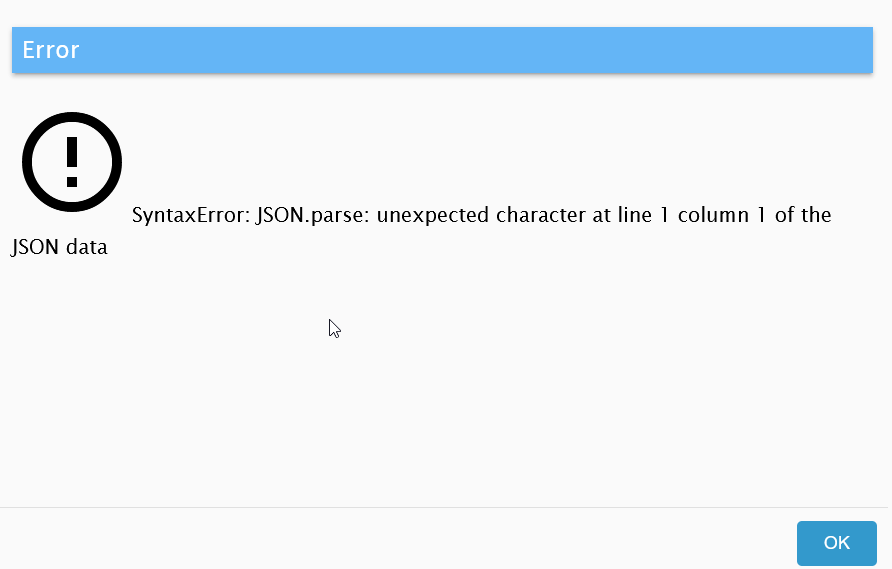
    1f33477b-6c46-40b0-b77c-19c7e7f4bba3-image.png

    Thomas BraunT 1 Antwort Letzte Antwort
    0
    • E Esmax666

      @thomas-braun ich hab gerade ein backupiobroker.tar backup gefunden
      ich wollte die Datei probieren aber ich bekomme
      1f33477b-6c46-40b0-b77c-19c7e7f4bba3-image.png

      Thomas BraunT Online
      Thomas BraunT Online
      Thomas Braun
      Most Active
      schrieb am zuletzt editiert von
      #66

      @esmax666

      Wie alt?

      Linux-Werkzeugkasten:
      https://forum.iobroker.net/topic/42952/der-kleine-iobroker-linux-werkzeugkasten
      NodeJS Fixer Skript:
      https://forum.iobroker.net/topic/68035/iob-node-fix-skript
      iob_diag: curl -sLf -o diag.sh https://iobroker.net/diag.sh && bash diag.sh

      E 1 Antwort Letzte Antwort
      1
      • Thomas BraunT Thomas Braun

        @esmax666

        Wie alt?

        E Offline
        E Offline
        Esmax666
        schrieb am zuletzt editiert von
        #67

        @thomas-braun 1 Jahr, ich hatte mein Config später gar nicht megr geändert, kein update ...
        (2022_09_23-02_40_10)

        OliverIOO 1 Antwort Letzte Antwort
        0
        • E Esmax666

          @thomas-braun 1 Jahr, ich hatte mein Config später gar nicht megr geändert, kein update ...
          (2022_09_23-02_40_10)

          OliverIOO Offline
          OliverIOO Offline
          OliverIO
          schrieb am zuletzt editiert von OliverIO
          #68

          @esmax666

          vorausgesetzt das backup ist nicht kaputt, müsste man nochmal
          die alte iobroker version installieren, dann dort importieren
          und dann die ganze upgrade orgie nochmal machen.
          das sorgt dafür, das die alten Strukturen dann auch mit angepasst werden.

          dürfte aber auch nicht ganz so easy sein, da man zumindest für den backup adapter die damalig gültige versionsnummer raussuchen muss.

          Meine Adapter und Widgets
          TVProgram, SqueezeboxRPC, OpenLiga, RSSFeed, MyTime,, pi-hole2, vis-json-template, skiinfo, vis-mapwidgets, vis-2-widgets-rssfeed
          Links im Profil

          Thomas BraunT E 2 Antworten Letzte Antwort
          1
          • OliverIOO OliverIO

            @esmax666

            vorausgesetzt das backup ist nicht kaputt, müsste man nochmal
            die alte iobroker version installieren, dann dort importieren
            und dann die ganze upgrade orgie nochmal machen.
            das sorgt dafür, das die alten Strukturen dann auch mit angepasst werden.

            dürfte aber auch nicht ganz so easy sein, da man zumindest für den backup adapter die damalig gültige versionsnummer raussuchen muss.

            Thomas BraunT Online
            Thomas BraunT Online
            Thomas Braun
            Most Active
            schrieb am zuletzt editiert von
            #69

            @oliverio

            Das wäre jetzt auch mein Ansatz.
            Ansonsten würde ich aber auch "Kein Backup? Kein Mitleid!" sagen.

            Linux-Werkzeugkasten:
            https://forum.iobroker.net/topic/42952/der-kleine-iobroker-linux-werkzeugkasten
            NodeJS Fixer Skript:
            https://forum.iobroker.net/topic/68035/iob-node-fix-skript
            iob_diag: curl -sLf -o diag.sh https://iobroker.net/diag.sh && bash diag.sh

            1 Antwort Letzte Antwort
            1
            • OliverIOO OliverIO

              @esmax666

              vorausgesetzt das backup ist nicht kaputt, müsste man nochmal
              die alte iobroker version installieren, dann dort importieren
              und dann die ganze upgrade orgie nochmal machen.
              das sorgt dafür, das die alten Strukturen dann auch mit angepasst werden.

              dürfte aber auch nicht ganz so easy sein, da man zumindest für den backup adapter die damalig gültige versionsnummer raussuchen muss.

              E Offline
              E Offline
              Esmax666
              schrieb am zuletzt editiert von
              #70

              @oliverio also das heisst ich muss alle adapter wieder ein downgrade machen ?
              muss man alle separat machen ? wie mach ich das auf ein stand von davor ?

              Thomas BraunT 1 Antwort Letzte Antwort
              0
              • E Esmax666

                @oliverio also das heisst ich muss alle adapter wieder ein downgrade machen ?
                muss man alle separat machen ? wie mach ich das auf ein stand von davor ?

                Thomas BraunT Online
                Thomas BraunT Online
                Thomas Braun
                Most Active
                schrieb am zuletzt editiert von
                #71

                @esmax666 sagte in iobroker geht nicht nach stromausfall:

                also das heisst ich muss alle adapter wieder ein downgrade machen ?

                Ich würde nur den js-controller runter drücken und dann versuchen das Backup mit Bordmitteln einzuspielen.

                Ich bin aber für heute raus. N8!

                Linux-Werkzeugkasten:
                https://forum.iobroker.net/topic/42952/der-kleine-iobroker-linux-werkzeugkasten
                NodeJS Fixer Skript:
                https://forum.iobroker.net/topic/68035/iob-node-fix-skript
                iob_diag: curl -sLf -o diag.sh https://iobroker.net/diag.sh && bash diag.sh

                E 1 Antwort Letzte Antwort
                1
                • E Esmax666

                  @thomas-braun said in iobroker geht nicht nach stromausfall:

                  iob stop

                  ich bekomme schonn hier fehler

                  ubuntu@ubuntu:/opt/iobroker$ iob update
                  Used repository: stable
                  hash unchanged, use cached sources
                  update done
                   Cannot find view "system" for search "instance"
                  Error: Cannot find view "system"
                      at ObjectsInMemoryServerClass._getObjectView (/opt/iobroker/node_modules/@iobroker/db-objects-redis/lib/objects/objectsInRedisClient.js:3313:59)
                      at process.processTicksAndRejections (node:internal/process/task_queues:95:5)
                  Adapter    "admin"         : 6.10.1   , installed 5.2.1 [Updateable]
                  Adapter    "alexa2"        : 3.25.2   , installed 3.9.3 [Updateable]
                  Adapter    "backitup"      : 2.6.23   , installed 2.2.2 [Updateable]
                  Adapter    "cloud"         : 4.4.1    , installed 4.1.0 [Updateable]
                  Adapter    "discovery"     : 3.1.0    , installed 2.7.0 [Updateable]
                  Adapter    "flot"          : 1.12.0   , installed 1.10.6 [Updateable]
                  Adapter    "heatingcontrol": 2.11.1   , installed 2.7.2 [Updateable]
                  Adapter    "history"       : 2.2.6    , installed 1.9.14 [Updateable]
                  Adapter    "ical"          : 1.13.3   , installed 1.11.4 [Updateable]
                  Adapter    "info"          : 1.9.26   , installed 1.9.8 [Updateable]
                  Adapter    "iot"           : 1.14.5   , installed 1.8.22 [Updateable]
                  Adapter    "javascript"    : 7.1.4    , installed 5.2.13 [Updateable]
                  Controller "js-controller" : 5.0.12   , installed 3.3.22 [Updateable]
                  Adapter    "linkeddevices" : 1.5.5    , installed 1.4.3 [Updateable]
                  Adapter    "mobile"        : 1.0.1    , installed 1.0.1
                  Adapter    "radar2"        : 2.0.7    , installed 2.0.3 [Updateable]
                  Adapter    "rpi2"          : 1.3.2    , installed 1.3.1 [Updateable]
                  Adapter    "shuttercontrol": 1.6.1    , installed 1.2.1 [Updateable]
                  Adapter    "simple-api"    : 2.7.2    , installed 2.6.2 [Updateable]
                  Adapter    "socketio"      : 6.5.5    , installed 3.1.4 [Updateable]
                  Adapter    "telegram"      : 1.16.0   , installed 1.10.0 [Updateable]
                  Adapter    "text2command"  : 3.0.2    , installed 2.1.1 [Updateable]
                  Adapter    "tr-064"        : 4.2.18   , installed 4.2.14 [Updateable]
                  Adapter    "vis"           : 1.4.16   , installed 1.4.5 [Updateable]
                  Adapter    "vis-colorpicker": 2.0.3   , installed 1.2.0 [Updateable]
                  Adapter    "vis-hqwidgets" : 1.4.0    , installed 1.1.7 [Updateable]
                  Adapter    "vis-jqui-mfd"  : 1.0.12   , installed 1.0.12
                  Adapter    "vis-metro"     : 1.2.0    , installed 1.1.2 [Updateable]
                  Adapter    "vis-timeandweather": 1.2.2   , installed 1.1.7 [Updateable]
                  Adapter    "web"           : 6.1.2    , installed 3.4.9 [Updateable]
                  Adapter    "zwave2"        : 3.0.5    , installed 2.4.1 [Updateable]
                  ubuntu@ubuntu:/opt/iobroker$ iob upgrade all -y
                   Cannot find view "system" for search "instance"
                  Cannot find view "system"
                   Cannot find view "system" for search "instance"
                  Cannot find view "system"
                   Cannot find view "system" for search "instance"
                  Cannot find view "system"
                   Cannot find view "system" for search "instance"
                  Cannot find view "system"
                   Cannot find view "system" for search "instance"
                  Cannot find view "system"
                   Cannot find view "system" for search "instance"
                  Cannot find view "system"
                   Cannot find view "system" for search "instance"
                  Cannot find view "system"
                   Cannot find view "system" for search "instance"
                  Cannot find view "system"
                   Cannot find view "system" for search "instance"
                  Cannot find view "system"
                   Cannot find view "system" for search "instance"
                  Cannot find view "system"
                   Cannot find view "system" for search "instance"
                  Cannot find view "system"
                   Cannot find view "system" for search "instance"
                  Cannot find view "system"
                   Cannot find view "system" for search "instance"
                  Cannot find view "system"
                   Cannot find view "system" for search "instance"
                  Cannot find view "system"
                   Cannot find view "system" for search "instance"
                  Cannot find view "system"
                   Cannot find view "system" for search "instance"
                  Cannot find view "system"
                   Cannot find view "system" for search "instance"
                  Cannot find view "system"
                   Cannot find view "system" for search "instance"
                  Cannot find view "system"
                   Cannot find view "system" for search "instance"
                  Cannot find view "system"
                   Cannot find view "system" for search "instance"
                  Cannot find view "system"
                   Cannot find view "system" for search "instance"
                  Cannot find view "system"
                   Cannot find view "system" for search "instance"
                  Cannot find view "system"
                   Cannot find view "system" for search "instance"
                  Cannot find view "system"
                   Cannot find view "system" for search "instance"
                  Cannot find view "system"
                   Cannot find view "system" for search "instance"
                  Cannot find view "system"
                   Cannot find view "system" for search "instance"
                  Cannot find view "system"
                   Cannot find view "system" for search "instance"
                  Cannot find view "system"
                   Cannot find view "system" for search "instance"
                  Cannot find view "system"
                  ubuntu@ubuntu:/opt/iobroker
                  
                  E Offline
                  E Offline
                  Esmax666
                  schrieb am zuletzt editiert von
                  #72

                  @esmax666 said in iobroker geht nicht nach stromausfall:

                  Adapter "admin" : 6.10.1 , installed 5.2.1 [Updateable] Adapter "alexa2" : 3.25.2 , installed 3.9.3 [Updateable] Adapter "backitup" : 2.6.23 , installed 2.2.2 [Updateable] Adapter "cloud" : 4.4.1 , installed 4.1.0 [Updateable] Adapter "discovery" : 3.1.0 , installed 2.7.0 [Updateable] Adapter "flot" : 1.12.0 , installed 1.10.6 [Updateable] Adapter "heatingcontrol": 2.11.1 , installed 2.7.2 [Updateable] Adapter "history" : 2.2.6 , installed 1.9.14 [Updateable] Adapter "ical" : 1.13.3 , installed 1.11.4 [Updateable] Adapter "info" : 1.9.26 , installed 1.9.8 [Updateable] Adapter "iot" : 1.14.5 , installed 1.8.22 [Updateable] Adapter "javascript" : 7.1.4 , installed 5.2.13 [Updateable] Controller "js-controller" : 5.0.12 , installed 3.3.22 [Updateable] Adapter "linkeddevices" : 1.5.5 , installed 1.4.3 [Updateable] Adapter "mobile" : 1.0.1 , installed 1.0.1 Adapter "radar2" : 2.0.7 , installed 2.0.3 [Updateable] Adapter "rpi2" : 1.3.2 , installed 1.3.1 [Updateable] Adapter "shuttercontrol": 1.6.1 , installed 1.2.1 [Updateable] Adapter "simple-api" : 2.7.2 , installed 2.6.2 [Updateable] Adapter "socketio" : 6.5.5 , installed 3.1.4 [Updateable] Adapter "telegram" : 1.16.0 , installed 1.10.0 [Updateable] Adapter "text2command" : 3.0.2 , installed 2.1.1 [Updateable] Adapter "tr-064" : 4.2.18 , installed 4.2.14 [Updateable] Adapter "vis" : 1.4.16 , installed 1.4.5 [Updateable] Adapter "vis-colorpicker": 2.0.3 , installed 1.2.0 [Updateable] Adapter "vis-hqwidgets" : 1.4.0 , installed 1.1.7 [Updateable] Adapter "vis-jqui-mfd" : 1.0.12 , installed 1.0.12 Adapter "vis-metro" : 1.2.0 , installed 1.1.2 [Updateable] Adapter "vis-timeandweather": 1.2.2 , installed 1.1.7 [Updateable] Adapter "web" : 6.1.2 , installed 3.4.9 [Updateable] Adapter "zwave2" : 3.0.5 , installed 2.4.1 [Updateable]

                  das war wahrscheinlich mein stand von davor

                  1 Antwort Letzte Antwort
                  0
                  • Thomas BraunT Thomas Braun

                    @esmax666 sagte in iobroker geht nicht nach stromausfall:

                    also das heisst ich muss alle adapter wieder ein downgrade machen ?

                    Ich würde nur den js-controller runter drücken und dann versuchen das Backup mit Bordmitteln einzuspielen.

                    Ich bin aber für heute raus. N8!

                    E Offline
                    E Offline
                    Esmax666
                    schrieb am zuletzt editiert von
                    #73

                    @thomas-braun

                    Gute nacht :)
                    Vielleicht kannst du mir morgen die befehle geben

                    1 Antwort Letzte Antwort
                    0
                    • Thomas BraunT Thomas Braun

                      @esmax666 sagte in iobroker geht nicht nach stromausfall:

                      Demnach kann das nicht direkt über redis gelaufen sein. Sonst müsste da irgendwas aus der Ecke installiert sein.

                      cd /opt/iobroker 
                      npm install iobroker.js-controller@4.0.24
                      

                      liefert?

                      E Offline
                      E Offline
                      Esmax666
                      schrieb am zuletzt editiert von
                      #74

                      @thomas-braun

                      würde sowas gehen:

                      npm install iobroker.js-controller@3.3.22
                      

                      woder wie soll ich am besten machen ?

                      Thomas BraunT 1 Antwort Letzte Antwort
                      0
                      • E Esmax666

                        @thomas-braun

                        würde sowas gehen:

                        npm install iobroker.js-controller@3.3.22
                        

                        woder wie soll ich am besten machen ?

                        Thomas BraunT Online
                        Thomas BraunT Online
                        Thomas Braun
                        Most Active
                        schrieb am zuletzt editiert von
                        #75

                        @esmax666

                        Ja, aber im richtigen Verzeichnis.

                        iob stop
                        cd /opt/iobroker
                        npm install iobroker.js-controller@3.3.22
                        

                        Und dann das vorliegende Backup versuchen einzuspielen.
                        Da hab ich den Befehl nicht parat.

                        Linux-Werkzeugkasten:
                        https://forum.iobroker.net/topic/42952/der-kleine-iobroker-linux-werkzeugkasten
                        NodeJS Fixer Skript:
                        https://forum.iobroker.net/topic/68035/iob-node-fix-skript
                        iob_diag: curl -sLf -o diag.sh https://iobroker.net/diag.sh && bash diag.sh

                        E 3 Antworten Letzte Antwort
                        1
                        • Thomas BraunT Thomas Braun

                          @esmax666

                          Ja, aber im richtigen Verzeichnis.

                          iob stop
                          cd /opt/iobroker
                          npm install iobroker.js-controller@3.3.22
                          

                          Und dann das vorliegende Backup versuchen einzuspielen.
                          Da hab ich den Befehl nicht parat.

                          E Offline
                          E Offline
                          Esmax666
                          schrieb am zuletzt editiert von
                          #76

                          @thomas-braun said in iobroker geht nicht nach stromausfall:

                          Backup

                          ok ich versuche heute abend

                          1 Antwort Letzte Antwort
                          0
                          • Thomas BraunT Thomas Braun

                            @esmax666

                            Ja, aber im richtigen Verzeichnis.

                            iob stop
                            cd /opt/iobroker
                            npm install iobroker.js-controller@3.3.22
                            

                            Und dann das vorliegende Backup versuchen einzuspielen.
                            Da hab ich den Befehl nicht parat.

                            E Offline
                            E Offline
                            Esmax666
                            schrieb am zuletzt editiert von
                            #77

                            @thomas-braun

                            ok ist gemacht leider das PRoblem ist immer noch da:

                            ======== Start marking the full check here =========
                            
                            Skript v.2023-06-20
                            
                            *** BASE SYSTEM ***
                               Static hostname: ubuntu
                                     Icon name: computer
                                    Machine ID: 551875df55414c0f832b43a896fe8ce5
                                       Boot ID: a58fe4cd23274d7e86463c9c059dca8f
                              Operating System: Ubuntu 21.04
                                        Kernel: Linux 5.11.0-1027-raspi
                                  Architecture: arm
                            
                            Model           : Raspberry Pi 4 Model B Rev 1.4
                            Docker          : false
                            Virtualization  : none
                            Kernel          : armv7l
                            Userland        : armhf
                            
                            Systemuptime and Load:
                             17:04:34 up 1 day,  5:13,  1 user,  load average: 0.23, 0.27, 0.19
                            CPU threads: 4
                            
                            
                            *** Time and Time Zones ***
                                           Local time: Wed 2023-09-20 17:04:34 CEST
                                       Universal time: Wed 2023-09-20 15:04:34 UTC
                                             RTC time: n/a
                                            Time zone: Europe/Berlin (CEST, +0200)
                            System clock synchronized: yes
                                          NTP service: active
                                      RTC in local TZ: no
                            
                            *** User and Groups ***
                            ubuntu
                            /home/ubuntu
                            ubuntu adm dialout cdrom floppy sudo audio dip video plugdev netdev lxd iobroker
                            
                            *** X-Server-Setup ***
                            X-Server:       false
                            Desktop:
                            Terminal:       tty
                            Boot Target:    graphical.target
                            
                            *** MEMORY ***
                                          total        used        free      shared  buff/cache   available
                            Mem:           7.9G        328M        5.3G        3.0M        2.3G        7.5G
                            Swap:            0B          0B          0B
                            Total:         7.9G        328M        5.3G
                            
                                     7886 M total memory
                                      328 M used memory
                                      638 M active memory
                                     1645 M inactive memory
                                     5289 M free memory
                                      311 M buffer memory
                                     1956 M swap cache
                                        0 M total swap
                                        0 M used swap
                                        0 M free swap
                            
                            *** FILESYSTEM ***
                            Filesystem     Type   Size  Used Avail Use% Mounted on
                            tmpfs          tmpfs  789M  4.0M  785M   1% /run
                            /dev/sda2      ext4    57G  7.6G   47G  14% /
                            tmpfs          tmpfs  3.9G     0  3.9G   0% /dev/shm
                            tmpfs          tmpfs  5.0M     0  5.0M   0% /run/lock
                            tmpfs          tmpfs  4.0M     0  4.0M   0% /sys/fs/cgroup
                            /dev/sda1      vfat   253M  120M  133M  48% /boot/firmware
                            tmpfs          tmpfs  789M  4.0K  789M   1% /run/user/1000
                            
                            Messages concerning ext4 filesystem in dmesg:
                            [Tue Sep 19 11:50:44 2023] Kernel command line: coherent_pool=1M 8250.nr_uarts=1 snd_bcm2835.enable_compat_alsa=0 snd_bcm2835.enable_hdmi=1 bcm2708_fb.fbwidth=0 bcm2708_fb.fbheight=0 bcm2708_fb.fbswap=1 smsc95xx.macaddr=E4:5F:01:1B:22:9D vc_mem.mem_base=0x3eb00000 vc_mem.mem_size=0x3ff00000  dwc_otg.lpm_enable=0 console=ttyS0,115200 console=tty1 root=LABEL=writable rootfstype=ext4 elevator=deadline rootwait fixrtc quiet splash
                            [Tue Sep 19 11:50:54 2023] EXT4-fs (sda2): mounted filesystem with ordered data mode. Opts: (null). Quota mode: none.
                            [Tue Sep 19 11:50:57 2023] EXT4-fs (sda2): re-mounted. Opts: discard,errors=remount-ro. Quota mode: none.
                            
                            Show mounted filesystems (real ones only):
                            TARGET              SOURCE     FSTYPE   OPTIONS
                            /                   /dev/sda2  ext4     rw,relatime,discard,errors=remount-ro
                            |-/snap/core18/2789 /dev/loop0 squashfs ro,nodev,relatime
                            |-/snap/core20/1894 /dev/loop2 squashfs ro,nodev,relatime
                            |-/snap/core18/2795 /dev/loop1 squashfs ro,nodev,relatime
                            |-/snap/lxd/24921   /dev/loop3 squashfs ro,nodev,relatime
                            |-/snap/snapd/19366 /dev/loop4 squashfs ro,nodev,relatime
                            |-/snap/snapd/20101 /dev/loop7 squashfs ro,nodev,relatime
                            |-/snap/core22/754  /dev/loop8 squashfs ro,nodev,relatime
                            |-/snap/core22/868  /dev/loop5 squashfs ro,nodev,relatime
                            |-/snap/lxd/25507   /dev/loop9 squashfs ro,nodev,relatime
                            |-/snap/core20/2018 /dev/loop6 squashfs ro,nodev,relatime
                            `-/boot/firmware    /dev/sda1  vfat     rw,relatime,fmask=0022,dmask=0022,codepage=437,iocharset=ascii,shortname=mixed,errors=remount-ro
                            
                            Files in neuralgic directories:
                            
                            /var:
                            3.2G    /var/
                            1.9G    /var/log
                            1.7G    /var/log/journal/551875df55414c0f832b43a896fe8ce5
                            1.7G    /var/log/journal
                            1.2G    /var/lib
                            
                            Archived and active journals take up 1.6G in the file system.
                            
                            /opt/iobroker/backups:
                            50M     /opt/iobroker/backups/
                            
                            /opt/iobroker/iobroker-data:
                            369M    /opt/iobroker/iobroker-data/
                            193M    /opt/iobroker/iobroker-data/files
                            162M    /opt/iobroker/iobroker-data/backup-objects
                            52M     /opt/iobroker/iobroker-data/files/javascript.admin
                            34M     /opt/iobroker/iobroker-data/files/javascript.admin/static
                            
                            The five largest files in iobroker-data are:
                            21M     /opt/iobroker/iobroker-data/files/web.admin/static/js/main.edf7552a.js.map
                            19M     /opt/iobroker/iobroker-data/files/iot.admin/static/js/main.2975a411.js.map
                            18M     /opt/iobroker/iobroker-data/files/text2command.admin/static/js/main.274a4d8d.js.map
                            8.3M    /opt/iobroker/iobroker-data/files/web.admin/static/js/main.edf7552a.js
                            8.2M    /opt/iobroker/iobroker-data/files/iot.admin/static/js/main.2975a411.js
                            
                            *** NodeJS-Installation ***
                            
                            /usr/bin/nodejs         v18.18.0
                            /usr/bin/node           v18.18.0
                            /usr/bin/npm            9.8.1
                            /usr/bin/npx            9.8.1
                            
                            
                            nodejs:
                              Installed: 18.18.0-1nodesource1
                              Candidate: 18.18.0-1nodesource1
                              Version table:
                             *** 18.18.0-1nodesource1 1001
                                    500 https://deb.nodesource.com/node_18.x nodistro/main armhf Packages
                                    100 /var/lib/dpkg/status
                                 18.17.1-1nodesource1 1001
                                    500 https://deb.nodesource.com/node_18.x nodistro/main armhf Packages
                                 18.17.0-1nodesource1 1001
                                    500 https://deb.nodesource.com/node_18.x nodistro/main armhf Packages
                                 18.16.1-1nodesource1 1001
                                    500 https://deb.nodesource.com/node_18.x nodistro/main armhf Packages
                                 18.16.0-1nodesource1 1001
                                    500 https://deb.nodesource.com/node_18.x nodistro/main armhf Packages
                                 18.15.0-1nodesource1 1001
                                    500 https://deb.nodesource.com/node_18.x nodistro/main armhf Packages
                                 18.14.2-1nodesource1 1001
                                    500 https://deb.nodesource.com/node_18.x nodistro/main armhf Packages
                                 18.14.1-1nodesource1 1001
                                    500 https://deb.nodesource.com/node_18.x nodistro/main armhf Packages
                                 18.14.0-1nodesource1 1001
                                    500 https://deb.nodesource.com/node_18.x nodistro/main armhf Packages
                                 18.13.0-1nodesource1 1001
                                    500 https://deb.nodesource.com/node_18.x nodistro/main armhf Packages
                                 18.12.0-1nodesource1 1001
                                    500 https://deb.nodesource.com/node_18.x nodistro/main armhf Packages
                                 18.11.0-1nodesource1 1001
                                    500 https://deb.nodesource.com/node_18.x nodistro/main armhf Packages
                                 18.10.0-1nodesource1 1001
                                    500 https://deb.nodesource.com/node_18.x nodistro/main armhf Packages
                                 18.9.1-1nodesource1 1001
                                    500 https://deb.nodesource.com/node_18.x nodistro/main armhf Packages
                                 18.9.0-1nodesource1 1001
                                    500 https://deb.nodesource.com/node_18.x nodistro/main armhf Packages
                                 18.8.0-1nodesource1 1001
                                    500 https://deb.nodesource.com/node_18.x nodistro/main armhf Packages
                                 18.7.0-1nodesource1 1001
                                    500 https://deb.nodesource.com/node_18.x nodistro/main armhf Packages
                                 18.6.0-1nodesource1 1001
                                    500 https://deb.nodesource.com/node_18.x nodistro/main armhf Packages
                                 18.5.0-1nodesource1 1001
                                    500 https://deb.nodesource.com/node_18.x nodistro/main armhf Packages
                                 18.4.0-1nodesource1 1001
                                    500 https://deb.nodesource.com/node_18.x nodistro/main armhf Packages
                                 18.3.0-1nodesource1 1001
                                    500 https://deb.nodesource.com/node_18.x nodistro/main armhf Packages
                                 18.2.0-1nodesource1 1001
                                    500 https://deb.nodesource.com/node_18.x nodistro/main armhf Packages
                                 18.1.0-1nodesource1 1001
                                    500 https://deb.nodesource.com/node_18.x nodistro/main armhf Packages
                                 18.0.0-1nodesource1 1001
                                    500 https://deb.nodesource.com/node_18.x nodistro/main armhf Packages
                                 12.21.0~dfsg-3ubuntu1 500
                                    500 http://ports.ubuntu.com/ubuntu-ports hirsute/universe armhf Packages
                            
                            Temp directories causing npm8 problem: 0
                            No problems detected
                            
                            Errors in npm tree: 0
                            
                            *** ioBroker-Installation ***
                            
                            ioBroker Status
                            iobroker is running on this host.
                            
                            
                            Objects type: jsonl
                            States  type: jsonl
                            
                            No configuration change needed.
                            
                            
                            Multihost discovery server: disabled
                            Discovery authentication:   enabled
                            Persistent activation:      disabled
                            Objects:                    jsonl on 127.0.0.1
                            States:                     jsonl on 127.0.0.1
                            
                            Core adapters versions
                            js-controller:  3.3.22


                            hab dann probiert auch backiup auf 2.2.2 zu machen aber laut " list adapters" hat das nicht funktionniert

                            ubuntu@ubuntu:/opt/iobroker$ iob stop
                            ubuntu@ubuntu:/opt/iobroker$ npm install iobroker.backitup@2.2.2
                            
                            up to date in 7s
                            
                            124 packages are looking for funding
                              run `npm fund` for details
                            ubuntu@ubuntu:/opt/iobroker$ iob start
                            ubuntu@ubuntu:/opt/iobroker$ iob list adapters
                            system.adapter.admin                   : admin          - v6.10.1
                            system.adapter.alexa2                  : alexa2         - v3.25.2
                            system.adapter.backitup                : backitup       - v2.6.23
                            system.adapter.cloud                   : cloud          - v4.4.1
                            system.adapter.discovery               : discovery      - v3.1.0
                            system.adapter.flot                    : flot           - v1.12.0
                            system.adapter.heatingcontrol          : heatingcontrol - v2.11.1
                            system.adapter.history                 : history        - v2.2.6
                            system.adapter.ical                    : ical           - v1.13.3
                            system.adapter.info                    : info           - v1.9.26
                            system.adapter.iot                     : iot            - v1.14.5
                            system.adapter.javascript              : javascript     - v7.1.4
                            system.adapter.linkeddevices           : linkeddevices  - v1.5.5
                            system.adapter.radar2                  : radar2         - v2.0.7
                            system.adapter.rpi2                    : rpi2           - v1.3.2
                            system.adapter.shuttercontrol          : shuttercontrol - v1.6.1
                            system.adapter.simple-api              : simple-api     - v2.7.2
                            system.adapter.socketio                : socketio       - v6.5.5
                            system.adapter.telegram                : telegram       - v1.16.0
                            system.adapter.text2command            : text2command   - v3.0.2
                            system.adapter.tr-064                  : tr-064         - v4.2.18
                            system.adapter.vis                     : vis            - v1.4.16
                            system.adapter.vis-colorpicker         : vis-colorpicker - v2.0.3
                            system.adapter.vis-hqwidgets           : vis-hqwidgets  - v1.4.0
                            system.adapter.vis-metro               : vis-metro      - v1.2.0
                            system.adapter.vis-timeandweather      : vis-timeandweather - v1.2.2
                            system.adapter.web                     : web            - v6.1.2
                            system.adapter.zwave2                  : zwave2         - v3.0.5
                            ubuntu@ubuntu:/opt/iobroker$
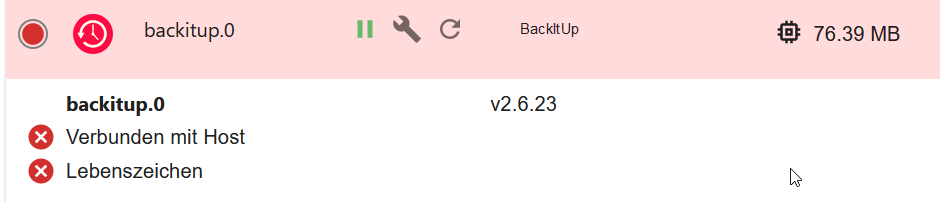


                            df077309-4951-45bc-802e-966f095a0477-image.png

                            Thomas BraunT 1 Antwort Letzte Antwort
                            0
                            • E Esmax666

                              @thomas-braun

                              ok ist gemacht leider das PRoblem ist immer noch da:

                              ======== Start marking the full check here =========
                              
                              Skript v.2023-06-20
                              
                              *** BASE SYSTEM ***
                                 Static hostname: ubuntu
                                       Icon name: computer
                                      Machine ID: 551875df55414c0f832b43a896fe8ce5
                                         Boot ID: a58fe4cd23274d7e86463c9c059dca8f
                                Operating System: Ubuntu 21.04
                                          Kernel: Linux 5.11.0-1027-raspi
                                    Architecture: arm
                              
                              Model           : Raspberry Pi 4 Model B Rev 1.4
                              Docker          : false
                              Virtualization  : none
                              Kernel          : armv7l
                              Userland        : armhf
                              
                              Systemuptime and Load:
                               17:04:34 up 1 day,  5:13,  1 user,  load average: 0.23, 0.27, 0.19
                              CPU threads: 4
                              
                              
                              *** Time and Time Zones ***
                                             Local time: Wed 2023-09-20 17:04:34 CEST
                                         Universal time: Wed 2023-09-20 15:04:34 UTC
                                               RTC time: n/a
                                              Time zone: Europe/Berlin (CEST, +0200)
                              System clock synchronized: yes
                                            NTP service: active
                                        RTC in local TZ: no
                              
                              *** User and Groups ***
                              ubuntu
                              /home/ubuntu
                              ubuntu adm dialout cdrom floppy sudo audio dip video plugdev netdev lxd iobroker
                              
                              *** X-Server-Setup ***
                              X-Server:       false
                              Desktop:
                              Terminal:       tty
                              Boot Target:    graphical.target
                              
                              *** MEMORY ***
                                            total        used        free      shared  buff/cache   available
                              Mem:           7.9G        328M        5.3G        3.0M        2.3G        7.5G
                              Swap:            0B          0B          0B
                              Total:         7.9G        328M        5.3G
                              
                                       7886 M total memory
                                        328 M used memory
                                        638 M active memory
                                       1645 M inactive memory
                                       5289 M free memory
                                        311 M buffer memory
                                       1956 M swap cache
                                          0 M total swap
                                          0 M used swap
                                          0 M free swap
                              
                              *** FILESYSTEM ***
                              Filesystem     Type   Size  Used Avail Use% Mounted on
                              tmpfs          tmpfs  789M  4.0M  785M   1% /run
                              /dev/sda2      ext4    57G  7.6G   47G  14% /
                              tmpfs          tmpfs  3.9G     0  3.9G   0% /dev/shm
                              tmpfs          tmpfs  5.0M     0  5.0M   0% /run/lock
                              tmpfs          tmpfs  4.0M     0  4.0M   0% /sys/fs/cgroup
                              /dev/sda1      vfat   253M  120M  133M  48% /boot/firmware
                              tmpfs          tmpfs  789M  4.0K  789M   1% /run/user/1000
                              
                              Messages concerning ext4 filesystem in dmesg:
                              [Tue Sep 19 11:50:44 2023] Kernel command line: coherent_pool=1M 8250.nr_uarts=1 snd_bcm2835.enable_compat_alsa=0 snd_bcm2835.enable_hdmi=1 bcm2708_fb.fbwidth=0 bcm2708_fb.fbheight=0 bcm2708_fb.fbswap=1 smsc95xx.macaddr=E4:5F:01:1B:22:9D vc_mem.mem_base=0x3eb00000 vc_mem.mem_size=0x3ff00000  dwc_otg.lpm_enable=0 console=ttyS0,115200 console=tty1 root=LABEL=writable rootfstype=ext4 elevator=deadline rootwait fixrtc quiet splash
                              [Tue Sep 19 11:50:54 2023] EXT4-fs (sda2): mounted filesystem with ordered data mode. Opts: (null). Quota mode: none.
                              [Tue Sep 19 11:50:57 2023] EXT4-fs (sda2): re-mounted. Opts: discard,errors=remount-ro. Quota mode: none.
                              
                              Show mounted filesystems (real ones only):
                              TARGET              SOURCE     FSTYPE   OPTIONS
                              /                   /dev/sda2  ext4     rw,relatime,discard,errors=remount-ro
                              |-/snap/core18/2789 /dev/loop0 squashfs ro,nodev,relatime
                              |-/snap/core20/1894 /dev/loop2 squashfs ro,nodev,relatime
                              |-/snap/core18/2795 /dev/loop1 squashfs ro,nodev,relatime
                              |-/snap/lxd/24921   /dev/loop3 squashfs ro,nodev,relatime
                              |-/snap/snapd/19366 /dev/loop4 squashfs ro,nodev,relatime
                              |-/snap/snapd/20101 /dev/loop7 squashfs ro,nodev,relatime
                              |-/snap/core22/754  /dev/loop8 squashfs ro,nodev,relatime
                              |-/snap/core22/868  /dev/loop5 squashfs ro,nodev,relatime
                              |-/snap/lxd/25507   /dev/loop9 squashfs ro,nodev,relatime
                              |-/snap/core20/2018 /dev/loop6 squashfs ro,nodev,relatime
                              `-/boot/firmware    /dev/sda1  vfat     rw,relatime,fmask=0022,dmask=0022,codepage=437,iocharset=ascii,shortname=mixed,errors=remount-ro
                              
                              Files in neuralgic directories:
                              
                              /var:
                              3.2G    /var/
                              1.9G    /var/log
                              1.7G    /var/log/journal/551875df55414c0f832b43a896fe8ce5
                              1.7G    /var/log/journal
                              1.2G    /var/lib
                              
                              Archived and active journals take up 1.6G in the file system.
                              
                              /opt/iobroker/backups:
                              50M     /opt/iobroker/backups/
                              
                              /opt/iobroker/iobroker-data:
                              369M    /opt/iobroker/iobroker-data/
                              193M    /opt/iobroker/iobroker-data/files
                              162M    /opt/iobroker/iobroker-data/backup-objects
                              52M     /opt/iobroker/iobroker-data/files/javascript.admin
                              34M     /opt/iobroker/iobroker-data/files/javascript.admin/static
                              
                              The five largest files in iobroker-data are:
                              21M     /opt/iobroker/iobroker-data/files/web.admin/static/js/main.edf7552a.js.map
                              19M     /opt/iobroker/iobroker-data/files/iot.admin/static/js/main.2975a411.js.map
                              18M     /opt/iobroker/iobroker-data/files/text2command.admin/static/js/main.274a4d8d.js.map
                              8.3M    /opt/iobroker/iobroker-data/files/web.admin/static/js/main.edf7552a.js
                              8.2M    /opt/iobroker/iobroker-data/files/iot.admin/static/js/main.2975a411.js
                              
                              *** NodeJS-Installation ***
                              
                              /usr/bin/nodejs         v18.18.0
                              /usr/bin/node           v18.18.0
                              /usr/bin/npm            9.8.1
                              /usr/bin/npx            9.8.1
                              
                              
                              nodejs:
                                Installed: 18.18.0-1nodesource1
                                Candidate: 18.18.0-1nodesource1
                                Version table:
                               *** 18.18.0-1nodesource1 1001
                                      500 https://deb.nodesource.com/node_18.x nodistro/main armhf Packages
                                      100 /var/lib/dpkg/status
                                   18.17.1-1nodesource1 1001
                                      500 https://deb.nodesource.com/node_18.x nodistro/main armhf Packages
                                   18.17.0-1nodesource1 1001
                                      500 https://deb.nodesource.com/node_18.x nodistro/main armhf Packages
                                   18.16.1-1nodesource1 1001
                                      500 https://deb.nodesource.com/node_18.x nodistro/main armhf Packages
                                   18.16.0-1nodesource1 1001
                                      500 https://deb.nodesource.com/node_18.x nodistro/main armhf Packages
                                   18.15.0-1nodesource1 1001
                                      500 https://deb.nodesource.com/node_18.x nodistro/main armhf Packages
                                   18.14.2-1nodesource1 1001
                                      500 https://deb.nodesource.com/node_18.x nodistro/main armhf Packages
                                   18.14.1-1nodesource1 1001
                                      500 https://deb.nodesource.com/node_18.x nodistro/main armhf Packages
                                   18.14.0-1nodesource1 1001
                                      500 https://deb.nodesource.com/node_18.x nodistro/main armhf Packages
                                   18.13.0-1nodesource1 1001
                                      500 https://deb.nodesource.com/node_18.x nodistro/main armhf Packages
                                   18.12.0-1nodesource1 1001
                                      500 https://deb.nodesource.com/node_18.x nodistro/main armhf Packages
                                   18.11.0-1nodesource1 1001
                                      500 https://deb.nodesource.com/node_18.x nodistro/main armhf Packages
                                   18.10.0-1nodesource1 1001
                                      500 https://deb.nodesource.com/node_18.x nodistro/main armhf Packages
                                   18.9.1-1nodesource1 1001
                                      500 https://deb.nodesource.com/node_18.x nodistro/main armhf Packages
                                   18.9.0-1nodesource1 1001
                                      500 https://deb.nodesource.com/node_18.x nodistro/main armhf Packages
                                   18.8.0-1nodesource1 1001
                                      500 https://deb.nodesource.com/node_18.x nodistro/main armhf Packages
                                   18.7.0-1nodesource1 1001
                                      500 https://deb.nodesource.com/node_18.x nodistro/main armhf Packages
                                   18.6.0-1nodesource1 1001
                                      500 https://deb.nodesource.com/node_18.x nodistro/main armhf Packages
                                   18.5.0-1nodesource1 1001
                                      500 https://deb.nodesource.com/node_18.x nodistro/main armhf Packages
                                   18.4.0-1nodesource1 1001
                                      500 https://deb.nodesource.com/node_18.x nodistro/main armhf Packages
                                   18.3.0-1nodesource1 1001
                                      500 https://deb.nodesource.com/node_18.x nodistro/main armhf Packages
                                   18.2.0-1nodesource1 1001
                                      500 https://deb.nodesource.com/node_18.x nodistro/main armhf Packages
                                   18.1.0-1nodesource1 1001
                                      500 https://deb.nodesource.com/node_18.x nodistro/main armhf Packages
                                   18.0.0-1nodesource1 1001
                                      500 https://deb.nodesource.com/node_18.x nodistro/main armhf Packages
                                   12.21.0~dfsg-3ubuntu1 500
                                      500 http://ports.ubuntu.com/ubuntu-ports hirsute/universe armhf Packages
                              
                              Temp directories causing npm8 problem: 0
                              No problems detected
                              
                              Errors in npm tree: 0
                              
                              *** ioBroker-Installation ***
                              
                              ioBroker Status
                              iobroker is running on this host.
                              
                              
                              Objects type: jsonl
                              States  type: jsonl
                              
                              No configuration change needed.
                              
                              
                              Multihost discovery server: disabled
                              Discovery authentication:   enabled
                              Persistent activation:      disabled
                              Objects:                    jsonl on 127.0.0.1
                              States:                     jsonl on 127.0.0.1
                              
                              Core adapters versions
                              js-controller:  3.3.22


                              hab dann probiert auch backiup auf 2.2.2 zu machen aber laut " list adapters" hat das nicht funktionniert

                              ubuntu@ubuntu:/opt/iobroker$ iob stop
                              ubuntu@ubuntu:/opt/iobroker$ npm install iobroker.backitup@2.2.2
                              
                              up to date in 7s
                              
                              124 packages are looking for funding
                                run `npm fund` for details
                              ubuntu@ubuntu:/opt/iobroker$ iob start
                              ubuntu@ubuntu:/opt/iobroker$ iob list adapters
                              system.adapter.admin                   : admin          - v6.10.1
                              system.adapter.alexa2                  : alexa2         - v3.25.2
                              system.adapter.backitup                : backitup       - v2.6.23
                              system.adapter.cloud                   : cloud          - v4.4.1
                              system.adapter.discovery               : discovery      - v3.1.0
                              system.adapter.flot                    : flot           - v1.12.0
                              system.adapter.heatingcontrol          : heatingcontrol - v2.11.1
                              system.adapter.history                 : history        - v2.2.6
                              system.adapter.ical                    : ical           - v1.13.3
                              system.adapter.info                    : info           - v1.9.26
                              system.adapter.iot                     : iot            - v1.14.5
                              system.adapter.javascript              : javascript     - v7.1.4
                              system.adapter.linkeddevices           : linkeddevices  - v1.5.5
                              system.adapter.radar2                  : radar2         - v2.0.7
                              system.adapter.rpi2                    : rpi2           - v1.3.2
                              system.adapter.shuttercontrol          : shuttercontrol - v1.6.1
                              system.adapter.simple-api              : simple-api     - v2.7.2
                              system.adapter.socketio                : socketio       - v6.5.5
                              system.adapter.telegram                : telegram       - v1.16.0
                              system.adapter.text2command            : text2command   - v3.0.2
                              system.adapter.tr-064                  : tr-064         - v4.2.18
                              system.adapter.vis                     : vis            - v1.4.16
                              system.adapter.vis-colorpicker         : vis-colorpicker - v2.0.3
                              system.adapter.vis-hqwidgets           : vis-hqwidgets  - v1.4.0
                              system.adapter.vis-metro               : vis-metro      - v1.2.0
                              system.adapter.vis-timeandweather      : vis-timeandweather - v1.2.2
                              system.adapter.web                     : web            - v6.1.2
                              system.adapter.zwave2                  : zwave2         - v3.0.5
                              ubuntu@ubuntu:/opt/iobroker$


                              df077309-4951-45bc-802e-966f095a0477-image.png

                              Thomas BraunT Online
                              Thomas BraunT Online
                              Thomas Braun
                              Most Active
                              schrieb am zuletzt editiert von
                              #78

                              @esmax666

                              Versuch mal

                              iobroker restore <BACKUPDATEI>
                              

                              Linux-Werkzeugkasten:
                              https://forum.iobroker.net/topic/42952/der-kleine-iobroker-linux-werkzeugkasten
                              NodeJS Fixer Skript:
                              https://forum.iobroker.net/topic/68035/iob-node-fix-skript
                              iob_diag: curl -sLf -o diag.sh https://iobroker.net/diag.sh && bash diag.sh

                              E 1 Antwort Letzte Antwort
                              0
                              • Thomas BraunT Thomas Braun

                                @esmax666

                                Versuch mal

                                iobroker restore <BACKUPDATEI>
                                
                                E Offline
                                E Offline
                                Esmax666
                                schrieb am zuletzt editiert von
                                #79

                                @thomas-braun said in iobroker geht nicht nach stromausfall:

                                iobroker restore

                                und wie gebe ich die datei rein ?

                                HomoranH Thomas BraunT 2 Antworten Letzte Antwort
                                0
                                • E Esmax666

                                  @thomas-braun said in iobroker geht nicht nach stromausfall:

                                  iobroker restore

                                  und wie gebe ich die datei rein ?

                                  HomoranH Nicht stören
                                  HomoranH Nicht stören
                                  Homoran
                                  Global Moderator Administrators
                                  schrieb am zuletzt editiert von
                                  #80

                                  @esmax666 sagte in iobroker geht nicht nach stromausfall:

                                  @thomas-braun said in iobroker geht nicht nach stromausfall:

                                  iobroker restore

                                  und wie gebe ich die datei rein ?

                                  wo ist die denn?

                                  kein Support per PN! - Fragen im Forum stellen - es gibt fast nichts, was nicht auch für andere interessant ist.

                                  Benutzt das Voting rechts unten im Beitrag wenn er euch geholfen hat.

                                  der Installationsfixer: curl -fsL https://iobroker.net/fix.sh | bash -

                                  E 1 Antwort Letzte Antwort
                                  0
                                  • E Esmax666

                                    @thomas-braun said in iobroker geht nicht nach stromausfall:

                                    iobroker restore

                                    und wie gebe ich die datei rein ?

                                    Thomas BraunT Online
                                    Thomas BraunT Online
                                    Thomas Braun
                                    Most Active
                                    schrieb am zuletzt editiert von
                                    #81

                                    @esmax666

                                    Am besten kopierst du die Datei erstmal nach /opt/iobroker/backup und dann in dem Verzeichnis ausführen.

                                    Linux-Werkzeugkasten:
                                    https://forum.iobroker.net/topic/42952/der-kleine-iobroker-linux-werkzeugkasten
                                    NodeJS Fixer Skript:
                                    https://forum.iobroker.net/topic/68035/iob-node-fix-skript
                                    iob_diag: curl -sLf -o diag.sh https://iobroker.net/diag.sh && bash diag.sh

                                    E 1 Antwort Letzte Antwort
                                    0
                                    • HomoranH Nicht stören
                                      HomoranH Nicht stören
                                      Homoran
                                      Global Moderator Administrators
                                      schrieb am zuletzt editiert von Homoran
                                      #82

                                      Sagt mal!
                                      warum befinden wir uns in der Englischen Sektion des Forums?

                                      kein Support per PN! - Fragen im Forum stellen - es gibt fast nichts, was nicht auch für andere interessant ist.

                                      Benutzt das Voting rechts unten im Beitrag wenn er euch geholfen hat.

                                      der Installationsfixer: curl -fsL https://iobroker.net/fix.sh | bash -

                                      DJMarc75D E 2 Antworten Letzte Antwort
                                      0
                                      • HomoranH Homoran

                                        Sagt mal!
                                        warum befinden wir uns in der Englischen Sektion des Forums?

                                        DJMarc75D Offline
                                        DJMarc75D Offline
                                        DJMarc75
                                        schrieb am zuletzt editiert von
                                        #83

                                        @homoran sagte in iobroker geht nicht nach stromausfall:

                                        warum befinden wir uns in der Englischen Sektion des Forums?

                                        while wers cannen :clown_face:

                                        Lehrling seit 1975 !!!
                                        Beitrag geholfen ? dann gerne ein upvote rechts unten im Beitrag klicken ;)
                                        https://forum.iobroker.net/topic/51555/hinweise-f%C3%BCr-gute-forenbeitr%C3%A4ge

                                        1 Antwort Letzte Antwort
                                        1
                                        • HomoranH Homoran

                                          @esmax666 sagte in iobroker geht nicht nach stromausfall:

                                          @thomas-braun said in iobroker geht nicht nach stromausfall:

                                          iobroker restore

                                          und wie gebe ich die datei rein ?

                                          wo ist die denn?

                                          E Offline
                                          E Offline
                                          Esmax666
                                          schrieb am zuletzt editiert von
                                          #84

                                          @homoran
                                          C:\Users\xxxx\Downloads\iobroker_2022_09_06-02_40_10_backupiobroker.tar.gz

                                          HomoranH 1 Antwort Letzte Antwort
                                          0
                                          Antworten
                                          • In einem neuen Thema antworten
                                          Anmelden zum Antworten
                                          • Älteste zuerst
                                          • Neuste zuerst
                                          • Meiste Stimmen


                                          Support us

                                          ioBroker
                                          Community Adapters
                                          Donate
                                          FAQ Cloud / IOT
                                          HowTo: Node.js-Update
                                          HowTo: Backup/Restore
                                          Downloads
                                          BLOG

                                          697

                                          Online

                                          32.6k

                                          Benutzer

                                          82.1k

                                          Themen

                                          1.3m

                                          Beiträge
                                          Community
                                          Impressum | Datenschutz-Bestimmungen | Nutzungsbedingungen | Einwilligungseinstellungen
                                          ioBroker Community 2014-2025
                                          logo
                                          • Anmelden

                                          • Du hast noch kein Konto? Registrieren

                                          • Anmelden oder registrieren, um zu suchen
                                          • Erster Beitrag
                                            Letzter Beitrag
                                          0
                                          • Home
                                          • Aktuell
                                          • Tags
                                          • Ungelesen 0
                                          • Kategorien
                                          • Unreplied
                                          • Beliebt
                                          • GitHub
                                          • Docu
                                          • Hilfe
