




Performance Probleme durch Shelly Adapter?
-
@schtallone sagte in Performance Probleme durch Shelly Adapter?:
Wie viel Pro muss man hier sein, damit man nicht ins Messer läuft
überhaupt nicht!
ich bin beileibe kein Pro.
Ich versuche nur systematisch das Problem einzukreisen.
und dazu benötige ich -zumal ich weder Docker, noch Container und erst Recht keine QNAP kenne- Informationen von dir!
ich habe das mal hier
https://forum.iobroker.net/topic/51555/hinweise-für-gute-forenbeiträge/1
zusammengeschrieben wie so etwas ablaufen sollte.Dazu gehört es ganz vorne vor direkt zu Beginn alle Fakten auf den Tisch zu legen.
Als nächstes sollte sehr zeitnah alles beantwortet werden wonach Helfende Fragen, um strukturiert die einzelnen Möglichkeiten abzuarbeiten und nicht dauernd zwischen diversen Themen hin und herzuspringen, was zu einem Chaos führen wird.Aber am besten liest du dir den Link mal konzentriert durch.
EDIT:
@Glasfaser
tippe ich hier am Handy tatsächlich schon 7+ Minuten ?@homoran said in Performance Probleme durch Shelly Adapter?:
Dazu gehört es ganz vorne vor direkt zu Beginn alle Fakten auf den Tisch zu legen.
Als nächstes sollte sehr zeitnah alles beantwortet werden wonach Helfende Fragen, um strukturiert die einzelnen Möglichkeiten abzuarbeiten und nicht dauernd zwischen diversen Themen hin und herzuspringen, was zu einem Chaos führen wird.Aber am besten liest du dir den Link mal konzentriert durch.
Oh ja, das hätte sicherlich einiges an Durcheinander gespart.....Jetzt ist es zu spät und ichj hoffe ich kann weiterhin auf die Hilfe hoffen.
-
@schtallone sagte in Performance Probleme durch Shelly Adapter?:
Moin,
ja und, ich schreibe langsam, und versuche auch immer etwas Wissen in meine Texte zu bringen, dann kann es schon mal passieren, dass sich Posts überholen, wenn Du erst überlegt hättest und dann gepostet hättest, dann hätte man schon 4 Posts weniger :)
VG
Bernd -
@homoran said in Performance Probleme durch Shelly Adapter?:
Dazu gehört es ganz vorne vor direkt zu Beginn alle Fakten auf den Tisch zu legen.
Als nächstes sollte sehr zeitnah alles beantwortet werden wonach Helfende Fragen, um strukturiert die einzelnen Möglichkeiten abzuarbeiten und nicht dauernd zwischen diversen Themen hin und herzuspringen, was zu einem Chaos führen wird.Aber am besten liest du dir den Link mal konzentriert durch.
Oh ja, das hätte sicherlich einiges an Durcheinander gespart.....Jetzt ist es zu spät und ichj hoffe ich kann weiterhin auf die Hilfe hoffen.
@schtallone Wenn Du die defekte Platte gegen eine neue getauscht hast, dann gib dem Ganzen bitte auch Zeit! Es werden dann alle Daten von der intakten Platte erst einmal auf die neue leere Platte gespiegelt. Das dauert und lastet Dein QNAP bestimmt auch wieder gut aus. Da dann gleich zu erwarten, das System und iobroker rennt wieder ist eine falsche Erwartung. Sowas kann, je nach Größe ein Weilchen dauern, auch Stunden oder gar Tage, wobei ich Letzteres bei RAID1 nicht erwarten würde. Es schadet auch nix, für diesen Zeitraum alles auf dem Gerät zu beenden. Alles, was mit Docker, VM, LXC zu tun hat, alle Dienste, alle Verbindungen von Rechnern zu trennen und das Ding erst einmal machen zu lassen.
HIER steht, wie es gemacht werden sollte.
Gruss, Jürgen
-
@schtallone Wenn Du die defekte Platte gegen eine neue getauscht hast, dann gib dem Ganzen bitte auch Zeit! Es werden dann alle Daten von der intakten Platte erst einmal auf die neue leere Platte gespiegelt. Das dauert und lastet Dein QNAP bestimmt auch wieder gut aus. Da dann gleich zu erwarten, das System und iobroker rennt wieder ist eine falsche Erwartung. Sowas kann, je nach Größe ein Weilchen dauern, auch Stunden oder gar Tage, wobei ich Letzteres bei RAID1 nicht erwarten würde. Es schadet auch nix, für diesen Zeitraum alles auf dem Gerät zu beenden. Alles, was mit Docker, VM, LXC zu tun hat, alle Dienste, alle Verbindungen von Rechnern zu trennen und das Ding erst einmal machen zu lassen.
HIER steht, wie es gemacht werden sollte.
Gruss, Jürgen
@wildbill Hallo,
ja danke für den Hinweis. Habe das schon mal vor Jahren gemacht, hat glaube ich 2 Tage gedauert? War aber auch ein langsameres NAS. DANKE -
@schtallone sagte in Performance Probleme durch Shelly Adapter?:
CPU: 25.8% usr 14.8% sys 0.1% nic 58.9% idle 0.1% io 0.0% irq 0.1% sirq
Moin,
was ich wirklich nicht verstehe, sind die Werte für
nicund nur 0,1 % für Idle.
Erklärung für die Werte:
CPU-ZeileAbkürzung Bedeutung us user - Zeit, die von ungeniceten Benutzerprozessen verwendet wird sy system - Zeit, die von Kernelprozessen verwendet wird ni nice - Zeit, die von ge"nice"ten Userprozessen verwendet wird id idle - Zeit, die das System im Leerlauf verbringt wa IO-wait - Zeit, die auf Datenverarbeitung gewartet wird (gibt Hinweise auf Engpässe bei der Datenträgergeschwindigkeit) hi Zeit, die auf das Bearbeiten von Hardware Interrupts verwendet wird si Zeit, die auf das Bearbeiten von Software Interrupts verwendet wird st stolen - Zeit, die von der laufenden Virtuellen Maschine vom Hypervisor für andere Aufgaben gestohlen wird (z.B. für andere VM) Bei Dir ist ni=~60 % <- also sind dort einige Prozesse ge-niced, sprich eine andere Priorität als
0am Laufen,nicegeht von-20höchste Priorität über0 = Standardbis+19niedrigste Priorität.
Auf der anderen Seite, Dein System hat keinidle, nur 0.1 %, ist also nie im Leerlauf???Schau mal wie Du bei Dir
topso aufrufen kannst, das auchniangezeigt wird, wie bei mirtop - 19:09:57 up 41 days, 10:37, 1 user, load average: 1.73, 1.75, 3.68 [IO: 0.68, 0.88, 2.80 CPU: 1.05, 0.88, 0.88] Tasks: 813 total, 1 running, 812 sleeping, 0 stopped, 0 zombie %Cpu(s): 3.6 us, 3.9 sy, 0.0 ni, 92.5 id, 0.0 wa, 0.0 hi, 0.0 si, 0.0 st GiB Mem : 7.718 total, 0.997 free, 3.171 used, 3.550 buff/cache GiB Swap: 6.633 total, 3.947 free, 2.686 used. 4.180 avail Mem || \/ PID USER PR NI VIRT RES %CPU %MEM TIME+ S COMMAND 12828 root 20 0 57.3m 2.5m 3.846 0.032 776:16.38 S synostgd-space 18292 dp20eic 20 0 34.1m 2.7m 3.846 0.035 0:15.33 R top 17518 root 20 0 835.6m 8.4m 2.564 0.106 658:38.72 S /usr/syno/bin/scemd 20309 104 20 0 62.4m 8.5m 2.564 0.107 761:48.40 S /usr/sbin/mosquitto -c /mqtt/config/mosquitto.conf 2903 1000 20 0 3366.4m 72.7m 1.282 0.920 60:59.37 S emqx -Bd -spp true -A 4 -IOt 4 -SDio 8 -e 262144 -zdbbl 8192 -Q 1048576 -P 2097152 -- -root /op+ 2955 1000 20 0 3360.9m 68.4m 1.282 0.866 58:10.59 S emqx -Bd -spp true -A 4 -IOt 4 -SDio 8 -e 262144 -zdbbl 8192 -Q 1048576 -P 2097152 -- -root /op+ 18 root 20 0 0.0m 0.0m 0.641 0.000 27:02.42 S [ksoftirqd/2]VG
Bernd@dp20eic
so ich habe es geschafft, auch den NI Wert anzeigen zu lassen. Dazu musste ich eine mod. Version von top (nennt sich htop) auf dem NAS installieren.[~] # htop 1 [||||||#########################*********************** 70.3%] Tasks: 147, 559 thr; 2 running 2 [|##############################************************ 73.0%] Load average: 1.97 2.24 2.26 Mem[||||||||||||||#######################*********** 1.34G/7.61G] Uptime: 1 day, 06:46:06 Swp[| 2.27M/22.9G] PID USER PRI NI VIRT RES SHR S CPU% MEM% TIME+ Command 3441 admin 20 0 1326M 19396 9824 S 35.0 0.2 2h12:29 /sbin/hal_daemon -f 10860 admin 20 0 138M 17320 15580 R 28.5 0.2 0:00.47 manaRequest.cgi 3521 admin 20 0 1326M 19396 9824 S 26.5 0.2 25:10.38 /sbin/hal_daemon -f 3010 admin 20 0 2520 2288 964 S 7.1 0.0 0:09.03 /share/CACHEDEV1_DATA/.qpkg/IOTop/iotop 3011 admin 20 0 2524 2288 964 S 5.8 0.0 0:09.86 /share/CACHEDEV1_DATA/.qpkg/IOTop/iotop 24282 admin 20 0 1876 1684 964 S 4.5 0.0 0:55.24 iotop 8086 admin 20 0 2204 1840 356 R 2.6 0.0 0:01.35 htop 3485 admin 20 0 1326M 19396 9824 S 2.6 0.2 33:27.30 /sbin/hal_daemon -f 3501 admin 20 0 1326M 19396 9824 S 1.9 0.2 9:59.30 /sbin/hal_daemon -f 3500 admin 20 0 1326M 19396 9824 S 1.9 0.2 9:55.69 /sbin/hal_daemon -f 2117 admin 18 -2 2191M 20980 7800 S 1.3 0.3 0:12.31 /usr/local/apache/bin/apache_proxy -k start -f /etc/apache-sys-proxy.conf 3490 admin 20 0 1326M 19396 9824 S 0.6 0.2 11:26.21 /sbin/hal_daemon -f 3494 admin 20 0 1326M 19396 9824 S 0.6 0.2 1:00.04 /sbin/hal_daemon -f 3496 admin 20 0 1326M 19396 9824 S 0.6 0.2 3:42.68 /sbin/hal_daemon -f 2350 admin 18 -2 2191M 20980 7800 S 0.6 0.3 0:00.25 /usr/local/apache/bin/apache_proxy -k start -f /etc/apache-sys-proxy.conf 29203 admin 20 0 20692 4440 3000 S 0.6 0.1 1:16.65 /bin/sh /sbin/qdesk_soldier 3499 admin 20 0 1326M 19396 9824 S 0.0 0.2 9:55.88 /sbin/hal_daemon -f 3484 admin 20 0 1326M 19396 9824 S 0.0 0.2 6:47.56 /sbin/hal_daemon -f 10394 admin 20 0 222M 15704 6584 S 0.0 0.2 2:24.91 /mnt/ext/opt/Python/bin/python2 /sbin/wsd.py 8493 admin 20 0 219M 18392 3256 S 0.0 0.2 1:40.32 python /usr/local/network/nmd/nmd.pyc 4487 admin 20 0 311M 1156 384 S 0.0 0.0 0:39.50 /sbin/lvmetad 22971 admin 20 0 18360 2276 2108 S 0.0 0.0 1:12.35 /sbin/gen_bandwidth -r 23792 admin 20 0 152M 4868 3756 S 0.0 0.1 0:01.76 qNoticeEngined: Write notice is enabled... 3480 admin 20 0 1326M 19396 9824 S 0.0 0.2 5:46.24 /sbin/hal_daemon -f 22665 admin 20 0 84952 2348 2072 S 0.0 0.0 2:38.81 /sbin/rfsd -i -f /etc/rfsd.conf 22664 admin 20 0 84952 2348 2072 S 0.0 0.0 2:38.81 /sbin/rfsd -i -f /etc/rfsd.conf 3476 admin 20 0 1326M 19396 9824 S 0.0 0.2 1:59.95 /sbin/hal_daemon -f 3486 admin 20 0 1326M 19396 9824 S 0.0 0.2 1:54.84 /sbin/hal_daemon -f 19651 admin 20 0 16180 2456 2220 S 0.0 0.0 0:02.12 top 8545 admin 20 0 222M 20404 5784 S 0.0 0.3 2:30.69 python /usr/local/network/nmd/nmd.pyc 21946 guest 20 0 30660 3224 2564 S 0.0 0.0 2:53.21 avahi-daemon: running [QNAP-TS251D.local] 11426 admin 20 0 74752 7956 6944 S 0.0 0.1 0:40.08 /sbin/vdd_control -d 8495 admin 20 0 219M 18392 3256 S 0.0 0.2 1:27.91 python /usr/local/network/nmd/nmd.pyc 3487 admin 20 0 1326M 19396 9824 S 0.0 0.2 2:57.89 /sbin/hal_daemon -f 28830 admin 20 0 14812 4596 3148 S 0.0 0.1 0:00.80 /share/CACHEDEV1_DATA/.qpkg/IOTop/gottyIO -p 18986 -w /share/CACHEDEV1_DATA/.qpkg/IOTop/iotop 2372 admin 18 -2 2191M 20980 7800 S 0.0 0.3 0:00.66 /usr/local/apache/bin/apache_proxy -k start -f /etc/apache-sys-proxy.conf 30634 admin 20 0 88172 9760 8592 S 0.0 0.1 0:00.20 sshd: admin@pts/2 2365 admin 18 -2 2191M 20980 7800 S 0.0 0.3 0:00.20 /usr/local/apache/bin/apache_proxy -k start -f /etc/apache-sys-proxy.conf 10454 admin 20 0 222M 15704 6584 S 0.0 0.2 1:19.57 /mnt/ext/opt/Python/bin/python2 /sbin/wsd.py 7597 admin 20 0 41708 3752 2456 S 0.0 0.0 1:32.50 /mnt/ext/opt/netmgr/util/redis/redis-server *:0 9830 admin 20 0 441M 40184 9108 S 0.0 0.5 2:37.13 /mnt/ext/opt/Python/bin/python /mnt/ext/opt/netmgr/api service ip_monitor start 16150 admin 20 0 176M 8036 5684 S 0.0 0.1 0:03.79 /usr/local/apache/bin/apache -k start -c PidFile /var/lock/apache.pid -f /etc/config/apache/apache.conf 26141 admin 20 0 857M 51668 4504 S 0.0 0.6 0:13.25 /usr/local/mariadb/bin/mysqld --defaults-file=/etc/qcoolie-mariadb.cnf --basedir=/usr/local/mariadb --data 3497 admin 20 0 1326M 19396 9824 S 0.0 0.2 2:38.69 /sbin/hal_daemon -f 10470 admin 20 0 222M 15704 6584 S 0.0 0.2 1:03.52 /mnt/ext/opt/Python/bin/python2 /sbin/wsd.py 18490 admin 20 0 90188 5640 3848 S 0.0 0.1 0:44.02 /usr/local/sbin/_thttpd_ -p 58080 -nor -nos -u admin -d /home/httpd -c **.* -h 127.0.0.1 -i /var/lock/._th 22811 admin 20 0 196M 17292 14908 S 0.0 0.2 0:21.93 /sbin/bcclient 2367 admin 18 -2 2191M 20980 7800 S 0.0 0.3 0:00.22 /usr/local/apache/bin/apache_proxy -k start -f /etc/apache-sys-proxy.conf 2356 admin 18 -2 2191M 20980 7800 S 0.0 0.3 0:00.11 /usr/local/apache/bin/apache_proxy -k start -f /etc/apache-sys-proxy.conf 2317 admin 18 -2 2191M 20980 7800 S 0.0 0.3 0:00.22 /usr/local/apache/bin/apache_proxy -k start -f /etc/apache-sys-proxy.conf 8554 admin 20 0 163M 2760 2544 S 0.0 0.0 0:16.68 /usr/local/bin/rates_monitor_start 11416 admin 20 0 4408 1488 1392 S 0.0 0.0 0:02.04 /sbin/iscsid --config=/etc/config/iscsi/sbin/iscsid.conf --initiatorname=/etc/iscsi/initiatorname.iscsi 3493 admin 20 0 1326M 19396 9824 S 0.0 0.2 1:23.23 /sbin/hal_daemon -f 20813 admin 20 0 162M 4872 3644 S 0.0 0.1 0:56.51 /usr/local/bin/hda_qmonitor -pid:24141 -reg:/mnt/HDA_ROOT -client:hda_qmonitor -filter:0x6763 -b -m 23781 admin 20 0 227M 5648 4576 S 0.0 0.1 0:02.25 /sbin/qShield 22812 admin 20 0 196M 17292 14908 S 0.0 0.2 0:21.80 /sbin/bcclient 3488 admin 20 0 1326M 19396 9824 S 0.0 0.2 0:30.67 /sbin/hal_daemon -f 22075 admin 20 0 104M 12144 6384 S 0.0 0.2 1:04.63 /usr/local/bin/snmpd -c /etc/config/snmpd.conf -p 161 3483 admin 20 0 1326M 19396 9824 S 0.0 0.2 2:09.00 /sbin/hal_daemon -f F1Help F2Setup F3SearchF4FilterF5Tree F6SortByF7Nice -F8Nice +F9Kill F10Quit -
@dp20eic
so ich habe es geschafft, auch den NI Wert anzeigen zu lassen. Dazu musste ich eine mod. Version von top (nennt sich htop) auf dem NAS installieren.[~] # htop 1 [||||||#########################*********************** 70.3%] Tasks: 147, 559 thr; 2 running 2 [|##############################************************ 73.0%] Load average: 1.97 2.24 2.26 Mem[||||||||||||||#######################*********** 1.34G/7.61G] Uptime: 1 day, 06:46:06 Swp[| 2.27M/22.9G] PID USER PRI NI VIRT RES SHR S CPU% MEM% TIME+ Command 3441 admin 20 0 1326M 19396 9824 S 35.0 0.2 2h12:29 /sbin/hal_daemon -f 10860 admin 20 0 138M 17320 15580 R 28.5 0.2 0:00.47 manaRequest.cgi 3521 admin 20 0 1326M 19396 9824 S 26.5 0.2 25:10.38 /sbin/hal_daemon -f 3010 admin 20 0 2520 2288 964 S 7.1 0.0 0:09.03 /share/CACHEDEV1_DATA/.qpkg/IOTop/iotop 3011 admin 20 0 2524 2288 964 S 5.8 0.0 0:09.86 /share/CACHEDEV1_DATA/.qpkg/IOTop/iotop 24282 admin 20 0 1876 1684 964 S 4.5 0.0 0:55.24 iotop 8086 admin 20 0 2204 1840 356 R 2.6 0.0 0:01.35 htop 3485 admin 20 0 1326M 19396 9824 S 2.6 0.2 33:27.30 /sbin/hal_daemon -f 3501 admin 20 0 1326M 19396 9824 S 1.9 0.2 9:59.30 /sbin/hal_daemon -f 3500 admin 20 0 1326M 19396 9824 S 1.9 0.2 9:55.69 /sbin/hal_daemon -f 2117 admin 18 -2 2191M 20980 7800 S 1.3 0.3 0:12.31 /usr/local/apache/bin/apache_proxy -k start -f /etc/apache-sys-proxy.conf 3490 admin 20 0 1326M 19396 9824 S 0.6 0.2 11:26.21 /sbin/hal_daemon -f 3494 admin 20 0 1326M 19396 9824 S 0.6 0.2 1:00.04 /sbin/hal_daemon -f 3496 admin 20 0 1326M 19396 9824 S 0.6 0.2 3:42.68 /sbin/hal_daemon -f 2350 admin 18 -2 2191M 20980 7800 S 0.6 0.3 0:00.25 /usr/local/apache/bin/apache_proxy -k start -f /etc/apache-sys-proxy.conf 29203 admin 20 0 20692 4440 3000 S 0.6 0.1 1:16.65 /bin/sh /sbin/qdesk_soldier 3499 admin 20 0 1326M 19396 9824 S 0.0 0.2 9:55.88 /sbin/hal_daemon -f 3484 admin 20 0 1326M 19396 9824 S 0.0 0.2 6:47.56 /sbin/hal_daemon -f 10394 admin 20 0 222M 15704 6584 S 0.0 0.2 2:24.91 /mnt/ext/opt/Python/bin/python2 /sbin/wsd.py 8493 admin 20 0 219M 18392 3256 S 0.0 0.2 1:40.32 python /usr/local/network/nmd/nmd.pyc 4487 admin 20 0 311M 1156 384 S 0.0 0.0 0:39.50 /sbin/lvmetad 22971 admin 20 0 18360 2276 2108 S 0.0 0.0 1:12.35 /sbin/gen_bandwidth -r 23792 admin 20 0 152M 4868 3756 S 0.0 0.1 0:01.76 qNoticeEngined: Write notice is enabled... 3480 admin 20 0 1326M 19396 9824 S 0.0 0.2 5:46.24 /sbin/hal_daemon -f 22665 admin 20 0 84952 2348 2072 S 0.0 0.0 2:38.81 /sbin/rfsd -i -f /etc/rfsd.conf 22664 admin 20 0 84952 2348 2072 S 0.0 0.0 2:38.81 /sbin/rfsd -i -f /etc/rfsd.conf 3476 admin 20 0 1326M 19396 9824 S 0.0 0.2 1:59.95 /sbin/hal_daemon -f 3486 admin 20 0 1326M 19396 9824 S 0.0 0.2 1:54.84 /sbin/hal_daemon -f 19651 admin 20 0 16180 2456 2220 S 0.0 0.0 0:02.12 top 8545 admin 20 0 222M 20404 5784 S 0.0 0.3 2:30.69 python /usr/local/network/nmd/nmd.pyc 21946 guest 20 0 30660 3224 2564 S 0.0 0.0 2:53.21 avahi-daemon: running [QNAP-TS251D.local] 11426 admin 20 0 74752 7956 6944 S 0.0 0.1 0:40.08 /sbin/vdd_control -d 8495 admin 20 0 219M 18392 3256 S 0.0 0.2 1:27.91 python /usr/local/network/nmd/nmd.pyc 3487 admin 20 0 1326M 19396 9824 S 0.0 0.2 2:57.89 /sbin/hal_daemon -f 28830 admin 20 0 14812 4596 3148 S 0.0 0.1 0:00.80 /share/CACHEDEV1_DATA/.qpkg/IOTop/gottyIO -p 18986 -w /share/CACHEDEV1_DATA/.qpkg/IOTop/iotop 2372 admin 18 -2 2191M 20980 7800 S 0.0 0.3 0:00.66 /usr/local/apache/bin/apache_proxy -k start -f /etc/apache-sys-proxy.conf 30634 admin 20 0 88172 9760 8592 S 0.0 0.1 0:00.20 sshd: admin@pts/2 2365 admin 18 -2 2191M 20980 7800 S 0.0 0.3 0:00.20 /usr/local/apache/bin/apache_proxy -k start -f /etc/apache-sys-proxy.conf 10454 admin 20 0 222M 15704 6584 S 0.0 0.2 1:19.57 /mnt/ext/opt/Python/bin/python2 /sbin/wsd.py 7597 admin 20 0 41708 3752 2456 S 0.0 0.0 1:32.50 /mnt/ext/opt/netmgr/util/redis/redis-server *:0 9830 admin 20 0 441M 40184 9108 S 0.0 0.5 2:37.13 /mnt/ext/opt/Python/bin/python /mnt/ext/opt/netmgr/api service ip_monitor start 16150 admin 20 0 176M 8036 5684 S 0.0 0.1 0:03.79 /usr/local/apache/bin/apache -k start -c PidFile /var/lock/apache.pid -f /etc/config/apache/apache.conf 26141 admin 20 0 857M 51668 4504 S 0.0 0.6 0:13.25 /usr/local/mariadb/bin/mysqld --defaults-file=/etc/qcoolie-mariadb.cnf --basedir=/usr/local/mariadb --data 3497 admin 20 0 1326M 19396 9824 S 0.0 0.2 2:38.69 /sbin/hal_daemon -f 10470 admin 20 0 222M 15704 6584 S 0.0 0.2 1:03.52 /mnt/ext/opt/Python/bin/python2 /sbin/wsd.py 18490 admin 20 0 90188 5640 3848 S 0.0 0.1 0:44.02 /usr/local/sbin/_thttpd_ -p 58080 -nor -nos -u admin -d /home/httpd -c **.* -h 127.0.0.1 -i /var/lock/._th 22811 admin 20 0 196M 17292 14908 S 0.0 0.2 0:21.93 /sbin/bcclient 2367 admin 18 -2 2191M 20980 7800 S 0.0 0.3 0:00.22 /usr/local/apache/bin/apache_proxy -k start -f /etc/apache-sys-proxy.conf 2356 admin 18 -2 2191M 20980 7800 S 0.0 0.3 0:00.11 /usr/local/apache/bin/apache_proxy -k start -f /etc/apache-sys-proxy.conf 2317 admin 18 -2 2191M 20980 7800 S 0.0 0.3 0:00.22 /usr/local/apache/bin/apache_proxy -k start -f /etc/apache-sys-proxy.conf 8554 admin 20 0 163M 2760 2544 S 0.0 0.0 0:16.68 /usr/local/bin/rates_monitor_start 11416 admin 20 0 4408 1488 1392 S 0.0 0.0 0:02.04 /sbin/iscsid --config=/etc/config/iscsi/sbin/iscsid.conf --initiatorname=/etc/iscsi/initiatorname.iscsi 3493 admin 20 0 1326M 19396 9824 S 0.0 0.2 1:23.23 /sbin/hal_daemon -f 20813 admin 20 0 162M 4872 3644 S 0.0 0.1 0:56.51 /usr/local/bin/hda_qmonitor -pid:24141 -reg:/mnt/HDA_ROOT -client:hda_qmonitor -filter:0x6763 -b -m 23781 admin 20 0 227M 5648 4576 S 0.0 0.1 0:02.25 /sbin/qShield 22812 admin 20 0 196M 17292 14908 S 0.0 0.2 0:21.80 /sbin/bcclient 3488 admin 20 0 1326M 19396 9824 S 0.0 0.2 0:30.67 /sbin/hal_daemon -f 22075 admin 20 0 104M 12144 6384 S 0.0 0.2 1:04.63 /usr/local/bin/snmpd -c /etc/config/snmpd.conf -p 161 3483 admin 20 0 1326M 19396 9824 S 0.0 0.2 2:09.00 /sbin/hal_daemon -f F1Help F2Setup F3SearchF4FilterF5Tree F6SortByF7Nice -F8Nice +F9Kill F10Quit@schtallone sagte in Performance Probleme durch Shelly Adapter?:
@dp20eic
so ich habe es geschafft, auch den NI Wert anzeigen zMoin,
was ist
hal_deamonder nutzt 35 % und läuft x mal, auchmanaRequest.cgiverbrät da viel CPU Zeit, das ist aber QNAP spezifisch, das müsste das Health Center, oder wie das bei QNAP heißt sein, für ein Paar bunte Bilder, ganz schön viel.Also Du solltest noch mal schauen was im
syslogsteht, das durchrsysloggeschrieben wird.
Dann würde ich erst einmal die Baustelle mit der defekten Platte, was genau sagt denS.M.A.R.Tgenau zur Platte, beheben und dann schauen ob der ´load` auf einem akzeptablen Niveau ist.VG
Bernd -
@dp20eic said in Performance Probleme durch Shelly Adapter?:
@schtallone sagte in Performance Probleme durch Shelly Adapter?:
@dp20eicso ich habe es geschafft, auch den NI Wert anzeigen z
Moin,
was ist
hal_deamonder nutzt 35 % und läuft x mal, auchmanaRequest.cgiverbrät da viel CPU Zeit, das ist aber QNAP spezifisch, das müsste das Health Center, oder wie das bei QNAP heißt sein, für ein Paar bunte Bilder, ganz schön viel.ich habe das zu hal_deamon gefunden, kann aber nicht wirklich etwas damit anfangen, weil...--> keine Ahnung. ;-)
https://linux.die.net/man/8/hald
https://github.com/guedou/TS-453Be/blob/master/doc/reversing.mdAlso Du solltest noch mal schauen was im
syslogsteht, das durchrsysloggeschrieben wird.SInd das auch Befehle unter LINUX? Beide gehen auf der QNAP nicht bzw. müssten dann erst noch installiert werden. MElde ich mich morgen dann zu.
Dann würde ich erst einmal die Baustelle mit der defekten Platte, was genau sagt den
S.M.A.R.Tgenau zur Platte, beheben und dann schauen ob der ´load` auf einem akzeptablen Niveau ist.Das sagt S.M.A.R.T
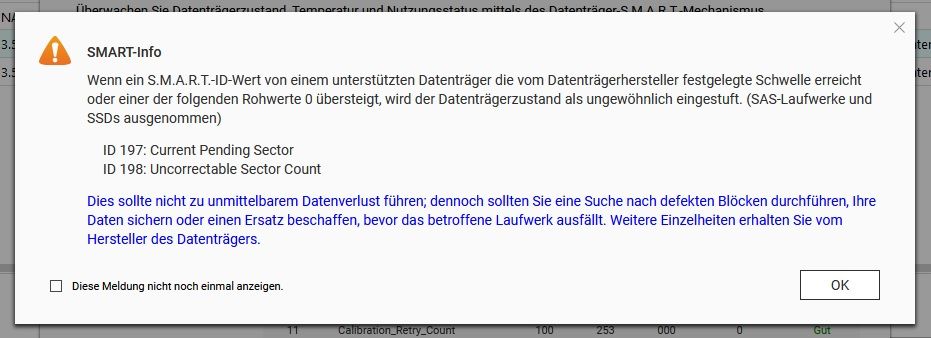
Ich werde, nachdem die neue Festplatte drin ist und alles synchronisiert ist, wieder die loads genauer beoabachten und hier berichten.
VG
Bernd -
@dp20eic said in Performance Probleme durch Shelly Adapter?:
@schtallone sagte in Performance Probleme durch Shelly Adapter?:
@dp20eicso ich habe es geschafft, auch den NI Wert anzeigen z
Moin,
was ist
hal_deamonder nutzt 35 % und läuft x mal, auchmanaRequest.cgiverbrät da viel CPU Zeit, das ist aber QNAP spezifisch, das müsste das Health Center, oder wie das bei QNAP heißt sein, für ein Paar bunte Bilder, ganz schön viel.ich habe das zu hal_deamon gefunden, kann aber nicht wirklich etwas damit anfangen, weil...--> keine Ahnung. ;-)
https://linux.die.net/man/8/hald
https://github.com/guedou/TS-453Be/blob/master/doc/reversing.mdAlso Du solltest noch mal schauen was im
syslogsteht, das durchrsysloggeschrieben wird.SInd das auch Befehle unter LINUX? Beide gehen auf der QNAP nicht bzw. müssten dann erst noch installiert werden. MElde ich mich morgen dann zu.
Dann würde ich erst einmal die Baustelle mit der defekten Platte, was genau sagt den
S.M.A.R.Tgenau zur Platte, beheben und dann schauen ob der ´load` auf einem akzeptablen Niveau ist.Das sagt S.M.A.R.T
Ich werde, nachdem die neue Festplatte drin ist und alles synchronisiert ist, wieder die loads genauer beoabachten und hier berichten.
VG
Bernd@schtallone Hast Du die Installation von dem GitHub Link befolgt, die Du angegeben hast? Ehrlich gesagt sieht mir das nach "Bastellösung" aus, die ich mich nicht trauen würde für einen SmartHome Server produktiv einzusetzen. Wenn man wirklich tief in Linux zu Hause ist (bin ich nicht), dann vielleicht...
Der HAL Deamon jedenfalls ist anscheinend auf der Orginaldistribution allgemein für die Verbindung der Peripherie zuständig. Im Github wird dann ein Teil davon für die Lüftersteuerung separat in einen anderen Prozess ausgelagert. Und da hörts auch bei mir auf. Der HAL Daemon läuft ja offensichtlich noch - soll das so sein? Kollidieren hier HAL-Deamon und das neu erstellte HAL-Event? Im Orginalsystem ist das wohl dasselbe, aber auch im veränderten? Unabhängig wie das mit der neuen Platte ausgeht, würde ich wirklich drüber nachdenken, das Produktivsystem grundsätzlich anders aufzusetzen, sprich separate Hardware (Ich glaube das wurde auch schon einige Male hier angemerkt...?). Dann würden auch die "komischen" Prozesse wie der JDownloader (Gibts den wirklich noch? Wofür nutzt mal den heutzutage?) keinen Schaden mehr anrichten. -
@schtallone Hast Du die Installation von dem GitHub Link befolgt, die Du angegeben hast? Ehrlich gesagt sieht mir das nach "Bastellösung" aus, die ich mich nicht trauen würde für einen SmartHome Server produktiv einzusetzen. Wenn man wirklich tief in Linux zu Hause ist (bin ich nicht), dann vielleicht...
Der HAL Deamon jedenfalls ist anscheinend auf der Orginaldistribution allgemein für die Verbindung der Peripherie zuständig. Im Github wird dann ein Teil davon für die Lüftersteuerung separat in einen anderen Prozess ausgelagert. Und da hörts auch bei mir auf. Der HAL Daemon läuft ja offensichtlich noch - soll das so sein? Kollidieren hier HAL-Deamon und das neu erstellte HAL-Event? Im Orginalsystem ist das wohl dasselbe, aber auch im veränderten? Unabhängig wie das mit der neuen Platte ausgeht, würde ich wirklich drüber nachdenken, das Produktivsystem grundsätzlich anders aufzusetzen, sprich separate Hardware (Ich glaube das wurde auch schon einige Male hier angemerkt...?). Dann würden auch die "komischen" Prozesse wie der JDownloader (Gibts den wirklich noch? Wofür nutzt mal den heutzutage?) keinen Schaden mehr anrichten.@frederik-buss ich gehe davon aus, dass bei @Schtallone noch das Original läuft und er die beiden links nur herausgesucht hat um zu wissen was hal ist
-
@frederik-buss ich gehe davon aus, dass bei @Schtallone noch das Original läuft und er die beiden links nur herausgesucht hat um zu wissen was hal ist
@frederik-buss
@homoran said in Performance Probleme durch Shelly Adapter?:@frederik-buss ich gehe davon aus, dass bei @Schtallone noch das Original läuft und er die beiden links nur herausgesucht hat um zu wissen was hal ist
Guten morgen,genau so sieht es aus, ich habe nur recherciert zum dem HAL Deamon und nichts an meinem System verändert.
-
@frederik-buss
@homoran said in Performance Probleme durch Shelly Adapter?:@frederik-buss ich gehe davon aus, dass bei @Schtallone noch das Original läuft und er die beiden links nur herausgesucht hat um zu wissen was hal ist
Guten morgen,genau so sieht es aus, ich habe nur recherciert zum dem HAL Deamon und nichts an meinem System verändert.
top - 07:26:41 up 1 day, 18:17,  0 users,  load average: 1,84, 1,77, 1,78
Tasks:  14 total,   1 running,  13 sleeping,   0 stopped,   0 zombie
%Cpu(s): 16,9 us,  5,7 sy,  0,0 ni, 73,2 id,  3,9 wa,  0,0 hi,  0,3 si,  0,0 st
MiB Mem :   7792,2 total,   1364,3 free,   3246,5 used,   3181,3 buff/cache
MiB Swap:  23447,2 total,  23379,7 free,     67,5 used.   3621,2 avail Mem

  PID USER      PR  NI    VIRT    RES    SHR S  %CPU  %MEM     TIME+ COMMAND
  317 iobroker  20   0  724076 106928  20492 S   3,3   1,3  14:36.83 io.shelly.0
  213 iobroker  20   0   11,1g 278124  21244 S   3,0   3,5  26:03.69 iobroker.js-con
31027 iobroker  20   0   21,0g 178900  49192 S   2,0   2,2   1:02.84 node-red
  347 iobroker  20   0  715884  92196  20424 S   1,0   1,2   3:04.56 io.mqtt.0
  261 iobroker  20   0  820708  69204  20628 S   0,3   0,9   0:17.12 io.node-red.0
  381 iobroker  20   0  771220  90100  20424 S   0,3   1,1   2:48.92 io.sourceanalyt
    1 root      20   0    7372   3604   3272 S   0,0   0,0   0:00.07 bash
  246 iobroker  20   0 1033820 156276  21988 S   0,0   2,0   0:40.63 io.admin.0
  343 root      20   0    7504   3752   3312 S   0,0   0,0   0:00.03 bash
  370 iobroker  20   0   10,9g  84224  21232 S   0,0   1,1   0:18.38 io.backitup.0
  398 root      20   0   10308   3696   3220 R   0,0   0,0   0:00.00 top
  472 iobroker  20   0  693820  66724  20360 S   0,0   0,8   0:19.73 io.shuttercontr
 1212 iobroker  20   0  695460  66964  20436 S   0,0   0,8   0:53.98 io.modbus.0
 3525 iobroker  20   0  960232  71468  22448 S   0,0   0,9   0:22.99 io.netatmo.0
heute morgen mit doch schon einigen Adaptern wieder am start.
Gruß Euch.
-
@schtallone Hast Du die Installation von dem GitHub Link befolgt, die Du angegeben hast? Ehrlich gesagt sieht mir das nach "Bastellösung" aus, die ich mich nicht trauen würde für einen SmartHome Server produktiv einzusetzen. Wenn man wirklich tief in Linux zu Hause ist (bin ich nicht), dann vielleicht...
Der HAL Deamon jedenfalls ist anscheinend auf der Orginaldistribution allgemein für die Verbindung der Peripherie zuständig. Im Github wird dann ein Teil davon für die Lüftersteuerung separat in einen anderen Prozess ausgelagert. Und da hörts auch bei mir auf. Der HAL Daemon läuft ja offensichtlich noch - soll das so sein? Kollidieren hier HAL-Deamon und das neu erstellte HAL-Event? Im Orginalsystem ist das wohl dasselbe, aber auch im veränderten? Unabhängig wie das mit der neuen Platte ausgeht, würde ich wirklich drüber nachdenken, das Produktivsystem grundsätzlich anders aufzusetzen, sprich separate Hardware (Ich glaube das wurde auch schon einige Male hier angemerkt...?). Dann würden auch die "komischen" Prozesse wie der JDownloader (Gibts den wirklich noch? Wofür nutzt mal den heutzutage?) keinen Schaden mehr anrichten.@frederik-buss said in Performance Probleme durch Shelly Adapter?:
Unabhängig wie das mit der neuen Platte ausgeht, würde ich wirklich drüber nachdenken, das Produktivsystem grundsätzlich anders aufzusetzen, sprich separate Hardware (Ich glaube das wurde auch schon einige Male hier angemerkt...?). Dann würden auch die "komischen" Prozesse wie der JDownloader (Gibts den wirklich noch? Wofür nutzt mal den heutzutage?) keinen Schaden mehr anrichten.
Ja da läuft es gedanklich bei mir drauf hinaus, dass ich mir einen separaten PI (Gen4 mit 8gb) für den iob und ggf. noch Nodered anschaffe. Hier würde ich aber auch auf DOCKER gehen wollen, denn so (dachte ich) kann ich die Container auf im Falle eines Ausfalls als Ersatz auf dem NAS (vorübergehend) betreiben.
Gruß
-
@dp20eic said in Performance Probleme durch Shelly Adapter?:
@schtallone sagte in Performance Probleme durch Shelly Adapter?:
@dp20eicso ich habe es geschafft, auch den NI Wert anzeigen z
Moin,
was ist
hal_deamonder nutzt 35 % und läuft x mal, auchmanaRequest.cgiverbrät da viel CPU Zeit, das ist aber QNAP spezifisch, das müsste das Health Center, oder wie das bei QNAP heißt sein, für ein Paar bunte Bilder, ganz schön viel.ich habe das zu hal_deamon gefunden, kann aber nicht wirklich etwas damit anfangen, weil...--> keine Ahnung. ;-)
https://linux.die.net/man/8/hald
https://github.com/guedou/TS-453Be/blob/master/doc/reversing.mdAlso Du solltest noch mal schauen was im
syslogsteht, das durchrsysloggeschrieben wird.SInd das auch Befehle unter LINUX? Beide gehen auf der QNAP nicht bzw. müssten dann erst noch installiert werden. MElde ich mich morgen dann zu.
Dann würde ich erst einmal die Baustelle mit der defekten Platte, was genau sagt den
S.M.A.R.Tgenau zur Platte, beheben und dann schauen ob der ´load` auf einem akzeptablen Niveau ist.Das sagt S.M.A.R.T
Ich werde, nachdem die neue Festplatte drin ist und alles synchronisiert ist, wieder die loads genauer beoabachten und hier berichten.
VG
Bernd@schtallone sagte in Performance Probleme durch Shelly Adapter?:
ich habe das zu hal_deamon gefunden, kann aber nicht wirklich etwas damit anfangen, weil...--> keine Ahnung.
Moin,
das sind, glaube ich, zwei unterschiedliche Dinge, habe aber heute Morgen keine Zeit, muss Frauchen bespaßen, und im Bad einiges renovieren.
@schtallone sagte in Performance Probleme durch Shelly Adapter?:
SInd das auch Befehle unter LINUX? Beide gehen auf der QNAP nicht bzw. müssten dann erst noch installiert werden. MElde ich mich morgen dann zu.
Nein, die laufen schon, normalerweise, findet man die Log Files unter
/var/log/syslogoder die QNAP hat eine APP um Log auf der WEB GUI anzuzeigen.VG
Bernd -
@dp20eic said in Performance Probleme durch Shelly Adapter?:
@schtallone sagte in Performance Probleme durch Shelly Adapter?:
ich habe das zu hal_deamon gefunden, kann aber nicht wirklich etwas damit anfangen, weil...--> keine Ahnung.
@schtallone sagte in Performance Probleme durch Shelly Adapter?:
SInd das auch Befehle unter LINUX? Beide gehen auf der QNAP nicht bzw. müssten dann erst noch installiert werden. MElde ich mich morgen dann zu.
Nein, die laufen schon, normalerweise, findet man die Log Files unter
/var/log/syslogoder die QNAP hat eine APP um Log auf der WEB GUI anzuzeigen.VG
BerndIch bin per WINSCP mal auf die Suchge nach dem syslog gegangen und nicht fündig geworden. Es gibt aber ein QNAP-log:
2023-09-16 13:12:18,851 [Information] [Database] initialize 2023-09-16 13:12:19,116 [Information] [Database] initialize database 2023-09-16 13:12:19,120 [Information] [Database] initialize function 2023-09-16 13:12:19,122 [Information] [Database] initialize procedure 2023-09-16 13:12:19,181 [Information] [Database] initialize device table 2023-09-16 13:12:19,266 [Information] [Database] initialize filter tables 2023-09-16 13:12:19,285 [Information] [Database] initialize highlight tables 2023-09-16 13:12:19,285 [Information] [Database] initialize receiver table 2023-09-16 13:12:19,413 [Information] [Database] initialize local_event log table 2023-09-16 13:12:19,446 [Information] [Database] initialize remote_event log table 2023-09-16 13:12:19,448 [Information] [Database] initialize local_access access table 2023-09-16 13:12:19,449 [Information] [Database] initialize remote_access access table 2023-09-16 13:12:19,504 [Information] [Compatible] notify_send = 0x7f5bc925eff0 2023-09-16 13:12:19,504 [Information] [Compatible] naslog_notice_send = 0x7f5bc925ea20 2023-09-16 13:12:19,504 [Information] [Compatible] shm_get_all_user = 0x7f5bc8ff9f00 2023-09-16 13:12:19,504 [Information] [Compatible] shm_get_all_user_v1 = 0x7f5bc8ff9fc0 2023-09-16 13:12:19,504 [Information] [qulog] service pid(13801) start. 2023-09-16 13:12:19,507 [Information] [SyslogClientManager] load system default adapter mac address [24:5e:be:3b:f1:9f] 2023-09-16 13:12:19,508 [Information] [SyslogClientManager] start threading 2023-09-16 13:12:37,788 [Warning] [A049, C009, 38] [Hardware Status] "Host: 3.5" SATA HDD 1": Read I/O error, "UNRECOVERED READ ERROR ", sense_key=0x3, asc=0x11, ascq=0x4, CDB=88 00 00 00 00 01 d0 b1 45 c0 00 00 04 00 00 00 .. 2023-09-16 13:12:38,660 [Warning] [A049, C009, 39] [Hardware Status] "Host: 3.5" SATA HDD 1": Medium error. Run a bad block scan on the drive. Replace the drive if the error persists. 2023-09-16 13:12:39,840 [Information] [A007, C001, 18] [Power] The system has started. 2023-09-16 13:12:39,864 [Information] [A201, reserved, 0153] [Network & Virtual Switch] Initialized Network & Virtual Switch. 2023-09-16 13:12:39,868 [Information] [A201, C012, 0115] [Network & Virtual Switch] Set "Virtual Switch 4" as the system default gateway. 2023-09-16 13:12:39,871 [Information] [A201, C012, 0185] [Network & Virtual Switch] Configured "Virtual Switch 4" as system default gateway. 2023-09-16 13:13:14,994 [Information] [A041, C002, 15] [myQNAPcloud] DDNS updated WAN IP address to "178.19.86.155". 2023-09-16 13:13:20,626 [Information] [A051, C001, 4] [Multimedia Console] Started Multimedia Services. 2023-09-16 13:13:48,885 [Information] [A039, C002, 22] [App Center] Started Media Streaming Add-on. 2023-09-16 13:14:49,547 [Information] [, , ] Starting Plex Media Server... 2023-09-16 13:17:11,154 [Information] [A041, C003, 31] [myQNAPcloud] myQNAPcloud Link service for myQNAPcloud website is ready. 2023-09-16 13:17:12,959 [Information] [A041, C003, 28] [myQNAPcloud] myQNAPcloud Link service for mobile and PC applications is ready. 2023-09-16 13:29:52,626 [Information] [A039, C005, 98] [App Center] Started app update check. The current setting is to "Install required updates automatically". 2023-09-16 13:29:58,322 [Information] [A039, C005, 99] [App Center] Finished app update check. 2023-09-16 14:04:51,180 [Information] [A214, C005, 5003] [Container Station] Removing volume "2cb9fb6286b77ba6be07d0983700bbcd7f6fda3877feb4b31f9cdb8ec28d0f7f". 2023-09-16 14:04:55,026 [Information] [A214, C005, 5004] [Container Station] Removed volume "2cb9fb6286b77ba6be07d0983700bbcd7f6fda3877feb4b31f9cdb8ec28d0f7f". 2023-09-16 14:04:56,515 [Information] [A214, C005, 5003] [Container Station] Removing volume "08d9cd6a7cda0139615506d87ec4c154c06c0d41f0d431b5b1a3df5c1a877098". 2023-09-16 14:04:57,653 [Information] [A214, C005, 5004] [Container Station] Removed volume "08d9cd6a7cda0139615506d87ec4c154c06c0d41f0d431b5b1a3df5c1a877098". 2023-09-16 14:04:59,037 [Information] [A214, C005, 5003] [Container Station] Removing volume "grafana-ini". 2023-09-16 14:05:01,222 [Information] [A214, C005, 5004] [Container Station] Removed volume "grafana-ini". 2023-09-16 14:05:03,183 [Information] [A214, C005, 5003] [Container Station] Removing volume "grafana-storage". 2023-09-16 14:05:05,544 [Information] [A214, C005, 5004] [Container Station] Removed volume "grafana-storage". 2023-09-16 14:05:07,878 [Information] [A214, C005, 5003] [Container Station] Removing volume "iobroker_data". 2023-09-16 14:05:10,541 [Information] [A214, C005, 5004] [Container Station] Removed volume "iobroker_data". 2023-09-16 14:05:43,050 [Information] [A214, C004, 4014] [Container Station] Removing image "sha256:0ea5f9b58fb2ca54cc85a1d2767aee56a47a7d742043eb188cfe45e339482b08". 2023-09-16 14:06:12,825 [Information] [A214, C004, 4015] [Container Station] Removed image "sha256:0ea5f9b58fb2ca54cc85a1d2767aee56a47a7d742043eb188cfe45e339482b08". 2023-09-16 14:06:13,782 [Information] [A214, C004, 4014] [Container Station] Removing image "sha256:7f20d3b8b9d75287cbdb36393ef49cfd08faafa2ad56416c741e4b4311079c45". 2023-09-16 14:06:20,015 [Information] [A214, C004, 4015] [Container Station] Removed image "sha256:7f20d3b8b9d75287cbdb36393ef49cfd08faafa2ad56416c741e4b4311079c45". 2023-09-16 14:09:05,577 [Information] [A293, C003, 13] [QuFirewall] Reached alert message threshold. Threshold value: 50, Time interval: 2023-09-16 13:46:01 ~ 2023-09-16 14:09:03. 2023-09-16 14:53:15,534 [Information] [A041, C002, 15] [myQNAPcloud] DDNS updated WAN IP address to "178.19.81.138". 2023-09-16 15:06:04,155 [Information] [A293, C003, 13] [QuFirewall] Reached alert message threshold. Threshold value: 50, Time interval: 2023-09-16 14:46:01 ~ 2023-09-16 15:06:03. 2023-09-16 16:12:04,036 [Information] [A293, C003, 13] [QuFirewall] Reached alert message threshold. Threshold value: 50, Time interval: 2023-09-16 15:46:02 ~ 2023-09-16 16:12:02. 2023-09-16 17:06:02,642 [Information] [A293, C003, 13] [QuFirewall] Reached alert message threshold. Threshold value: 50, Time interval: 2023-09-16 16:46:01 ~ 2023-09-16 17:06:01. 2023-09-16 18:10:04,809 [Information] [A293, C003, 13] [QuFirewall] Reached alert message threshold. Threshold value: 50, Time interval: 2023-09-16 17:46:01 ~ 2023-09-16 18:10:02. 2023-09-16 19:07:03,187 [Information] [A293, C003, 13] [QuFirewall] Reached alert message threshold. Threshold value: 50, Time interval: 2023-09-16 18:46:01 ~ 2023-09-16 19:07:02. 2023-09-16 20:12:02,938 [Information] [A293, C003, 13] [QuFirewall] Reached alert message threshold. Threshold value: 50, Time interval: 2023-09-16 19:46:02 ~ 2023-09-16 20:12:01. 2023-09-16 20:59:45,699 [Information] [A039, C002, 23] [App Center] Stopped Video Station. 2023-09-16 21:00:10,610 [Information] [A039, C002, 23] [App Center] Stopped SSD Profiling Tool. 2023-09-16 21:04:02,685 [Information] [A293, C003, 13] [QuFirewall] Reached alert message threshold. Threshold value: 50, Time interval: 2023-09-16 20:46:03 ~ 2023-09-16 21:04:01. 2023-09-16 22:12:03,189 [Information] [A293, C003, 13] [QuFirewall] Reached alert message threshold. Threshold value: 50, Time interval: 2023-09-16 21:46:01 ~ 2023-09-16 22:12:02. 2023-09-16 23:08:02,900 [Information] [A039, C005, 98] [App Center] Started app update check. The current setting is to "Install required updates automatically". 2023-09-16 23:08:05,655 [Information] [A039, C005, 99] [App Center] Finished app update check. 2023-09-16 23:09:02,852 [Information] [A293, C003, 13] [QuFirewall] Reached alert message threshold. Threshold value: 50, Time interval: 2023-09-16 22:46:02 ~ 2023-09-16 23:09:01. 2023-09-17 00:00:26,326 [Information] [A200, C002, 8] [Hybrid Backup Sync] Started Backup job: "Backup QNAP TS-251D". 2023-09-17 00:01:04,831 [Information] [A200, C002, 131] [Hybrid Backup Sync] Backup job "Backup QNAP TS-251D": Using network interface "Virtual Switch 4". Interface selection: Automatic. 2023-09-17 00:12:02,330 [Information] [A293, C003, 13] [QuFirewall] Reached alert message threshold. Threshold value: 50, Time interval: 2023-09-16 23:46:01 ~ 2023-09-17 00:12:01. 2023-09-17 00:56:17,218 [Information] [A002, C012, 216] [Storage & Snapshots] Finished creating snapshot "Replication-Job0". Volume: Datenvolumen1. 2023-09-17 01:00:11,609 [Information] [A002, C012, 222] [Storage & Snapshots] Started creating scheduled snapshot. Volume: Datenvolumen1. 2023-09-17 01:00:34,538 [Information] [A002, C012, 223] [Storage & Snapshots] Finished creating scheduled snapshot. Volume: Datenvolumen1. 2023-09-17 01:00:35,236 [Information] [A002, C012, 222] [Storage & Snapshots] Started creating scheduled snapshot. LUN: iSCSI_0. 2023-09-17 01:00:38,894 [Information] [A002, C012, 229] [Storage & Snapshots] Deleted snapshot "GMT+01_2023-09-12_0101". LUN: iSCSI_0. 2023-09-17 01:00:39,550 [Information] [A002, C012, 791] [Storage & Snapshots] Reached volume/LUN snapshot limit. LUN: iSCSI_0. The oldest snapshot will be deleted whenever a new snapshot is created. 2023-09-17 01:00:45,080 [Information] [A002, C012, 223] [Storage & Snapshots] Finished creating scheduled snapshot. LUN: iSCSI_0. 2023-09-17 01:12:05,441 [Information] [A293, C003, 13] [QuFirewall] Reached alert message threshold. Threshold value: 50, Time interval: 2023-09-17 00:46:01 ~ 2023-09-17 01:12:01. 2023-09-17 01:15:24,896 [Information] [A200, C002, 15] [Hybrid Backup Sync] Finished Backup job: "Backup QNAP TS-251D". 2023-09-17 02:12:02,485 [Information] [A293, C003, 13] [QuFirewall] Reached alert message threshold. Threshold value: 50, Time interval: 2023-09-17 01:46:01 ~ 2023-09-17 02:12:01. 2023-09-17 03:00:07,075 [Information] [A227, C001, 1] [Malware Remover] Started scanning. 2023-09-17 03:02:30,834 [Information] [A227, C001, 19] [Malware Remover] Scan completed. 2023-09-17 03:11:10,538 [Information] [A293, C003, 13] [QuFirewall] Reached alert message threshold. Threshold value: 50, Time interval: 2023-09-17 02:46:00 ~ 2023-09-17 03:11:08. 2023-09-17 04:12:02,826 [Information] [A293, C003, 13] [QuFirewall] Reached alert message threshold. Threshold value: 50, Time interval: 2023-09-17 03:46:01 ~ 2023-09-17 04:12:01. 2023-09-17 05:01:59,297 [Information] [A293, C004, 28] [QuFirewall] Updated the PSIRT tor deny list from version 20230914 to version 20230916. 2023-09-17 05:01:59,370 [Information] [A293, C004, 27] [QuFirewall] Updated the PSIRT database from version 20230914 to version 20230916. 2023-09-17 05:27:02,551 [Information] [A293, C003, 13] [QuFirewall] Reached alert message threshold. Threshold value: 50, Time interval: 2023-09-17 04:46:01 ~ 2023-09-17 05:27:02. 2023-09-17 06:12:01,451 [Information] [A293, C003, 13] [QuFirewall] Reached alert message threshold. Threshold value: 50, Time interval: 2023-09-17 05:46:01 ~ 2023-09-17 06:12:01. 2023-09-17 07:11:01,729 [Information] [A293, C003, 13] [QuFirewall] Reached alert message threshold. Threshold value: 50, Time interval: 2023-09-17 06:46:01 ~ 2023-09-17 07:11:01. 2023-09-17 08:00:03,171 [Information] [A227, C001, 43] [Malware Remover] Started automatically updating the application. 2023-09-17 08:00:04,873 [Information] [A227, C001, 44] [Malware Remover] Finished automatic update check. No new software version found. 2023-09-17 08:12:02,380 [Information] [A293, C003, 13] [QuFirewall] Reached alert message threshold. Threshold value: 50, Time interval: 2023-09-17 07:46:01 ~ 2023-09-17 08:12:01. 2023-09-17 09:11:05,122 [Information] [A293, C003, 13] [QuFirewall] Reached alert message threshold. Threshold value: 50, Time interval: 2023-09-17 08:46:01 ~ 2023-09-17 09:11:02. 2023-09-17 10:07:02,458 [Information] [A293, C003, 13] [QuFirewall] Reached alert message threshold. Threshold value: 50, Time interval: 2023-09-17 09:46:01 ~ 2023-09-17 10:07:01. 2023-09-17 11:04:01,952 [Information] [A293, C003, 13] [QuFirewall] Reached alert message threshold. Threshold value: 50, Time interval: 2023-09-17 10:46:02 ~ 2023-09-17 11:04:01. 2023-09-17 11:04:34,180 [Information] [A234, C001, 3] [Qboost] Successfully cleared the memory cache. 2023-09-17 11:04:58,446 [Information] [A234, C003, 2] [Qboost] Successfully deleted the system junk. 2023-09-17 11:08:26,477 [Information] [A234, C001, 3] [Qboost] Successfully cleared the memory cache. 2023-09-17 11:09:27,611 [Information] [A234, C003, 1] [Qboost] Successfully emptied the Recycle Bin. 2023-09-17 11:48:36,743 [Information] [A234, C001, 3] [Qboost] Successfully cleared the memory cache. 2023-09-17 11:57:19,373 [Information] [A039, C002, 23] [App Center] Stopped QNAP AI Core. 2023-09-17 11:57:44,188 [Information] [A039, C002, 23] [App Center] Stopped Container Station. 2023-09-17 12:09:02,617 [Information] [A293, C003, 13] [QuFirewall] Reached alert message threshold. Threshold value: 50, Time interval: 2023-09-17 11:46:01 ~ 2023-09-17 12:09:01. 2023-09-17 12:12:06,683 [Information] [A039, C002, 22] [App Center] Started Container Station. 2023-09-17 12:13:00,068 [Information] [A039, C002, 22] [App Center] Started QNAP AI Core. 2023-09-17 12:57:04,373 [Information] [A293, C003, 13] [QuFirewall] Reached alert message threshold. Threshold value: 50, Time interval: 2023-09-17 12:46:01 ~ 2023-09-17 12:57:02. 2023-09-17 13:53:08,885 [Information] [A039, C001, 46] [App Center] Installed IOtop 0.1.1.1 in "/share/CACHEDEV1_DATA/.qpkg/IOTop". 2023-09-17 13:53:15,958 [Information] [A039, C001, 47] [App Center] IOtop enabled. 2023-09-17 13:55:17,880 [Information] [A039, C001, 46] [App Center] Installed IOtop 0.1.1.1 in "/share/CACHEDEV1_DATA/.qpkg/IOTop". 2023-09-17 13:55:24,806 [Information] [A039, C001, 47] [App Center] IOtop enabled. 2023-09-17 13:55:27,913 [Information] [A039, C001, 88] [App Center] Updated IOtop from 0.1.1.1 to 0.1.1.1 . 2023-09-17 13:59:02,896 [Information] [A293, C003, 13] [QuFirewall] Reached alert message threshold. Threshold value: 50, Time interval: 2023-09-17 13:46:01 ~ 2023-09-17 13:59:01. 2023-09-17 14:49:02,240 [Information] [A293, C003, 13] [QuFirewall] Reached alert message threshold. Threshold value: 50, Time interval: 2023-09-17 14:46:02 ~ 2023-09-17 14:49:01. 2023-09-17 14:53:19,104 [Information] [A041, C002, 15] [myQNAPcloud] DDNS updated WAN IP address to "178.19.90.229". 2023-09-17 16:00:02,195 [Information] [A293, C003, 13] [QuFirewall] Reached alert message threshold. Threshold value: 50, Time interval: 2023-09-17 15:46:01 ~ 2023-09-17 16:00:01. 2023-09-17 16:59:01,826 [Information] [A293, C003, 13] [QuFirewall] Reached alert message threshold. Threshold value: 50, Time interval: 2023-09-17 16:46:01 ~ 2023-09-17 16:59:01. 2023-09-17 17:36:59,061 [Information] [A039, C002, 23] [App Center] Stopped License Center. 2023-09-17 17:37:05,815 [Information] [A039, C002, 23] [App Center] Stopped Malware Remover. 2023-09-17 17:37:06,716 [Information] [A039, C002, 23] [App Center] Stopped Media Streaming Add-on. 2023-09-17 17:37:12,474 [Information] [A039, C002, 23] [App Center] Stopped Qboost. 2023-09-17 17:37:13,326 [Information] [, , ] Stopping Plex Media Server... 2023-09-17 17:37:21,092 [Information] [A039, C002, 23] [App Center] Stopped QNAP AI Core. 2023-09-17 17:37:22,802 [Information] [A039, C002, 23] [App Center] Stopped Plex Media Server. 2023-09-17 17:37:44,476 [Information] [A039, C002, 23] [App Center] Stopped Qsync Central. 2023-09-17 17:37:50,078 [Information] [A039, C002, 23] [App Center] Stopped myQNAPcloud Link. 2023-09-17 17:38:02,055 [Information] [A039, C002, 23] [App Center] Stopped QuMagie. 2023-09-17 17:38:15,968 [Information] [A039, C002, 23] [App Center] Stopped QuFirewall. 2023-09-17 17:38:18,494 [Information] [A039, C002, 23] [App Center] Stopped Container Station. 2023-09-17 17:38:30,707 [Information] [A039, C002, 23] [App Center] Stopped Security Center. 2023-09-17 17:38:41,127 [Information] [A039, C002, 23] [App Center] Stopped Hybrid Backup Sync. 2023-09-17 17:38:58,104 [Information] [A039, C002, 23] [App Center] Stopped Multimedia Console. 2023-09-17 17:40:14,480 [Information] [A039, C002, 22] [App Center] Started Qboost. 2023-09-17 17:41:51,978 [Information] [A234, C003, 1] [Qboost] Successfully emptied the Recycle Bin. 2023-09-17 17:41:52,169 [Information] [A234, C003, 2] [Qboost] Successfully deleted the system junk. 2023-09-17 17:41:57,535 [Information] [A234, C001, 3] [Qboost] Successfully cleared the memory cache. 2023-09-17 17:42:29,297 [Information] [A039, C002, 23] [App Center] Stopped Qboost. 2023-09-17 19:03:38,657 [Information] [A039, C002, 22] [App Center] Started Container Station. 2023-09-17 19:16:25,066 [Information] [A039, C002, 23] [App Center] Stopped Container Station. 2023-09-17 19:40:16,050 [Information] [A039, C005, 89] [App Center] Enabled "Allow installation of applications without a valid digital signature". 2023-09-17 19:46:07,160 [Information] [A039, C005, 91] [App Center] Added an app repository. 2023-09-17 19:46:54,798 [Information] [A039, C005, 93] [App Center] Deleted an app repository. 2023-09-17 19:47:23,352 [Information] [A039, C005, 95] [App Center] Disabled app update checks. 2023-09-17 19:50:16,494 [Information] [A039, C001, 46] [App Center] Installed htop (CLI) 3.0.0.1 in "/share/CACHEDEV1_DATA/.qpkg/HTOP". 2023-09-17 19:50:22,390 [Information] [A039, C001, 47] [App Center] htop (CLI) enabled. 2023-09-17 19:50:47,113 [Error] [, , ] Iftop 1.0.0 installation failed. Error Firmware version, please downgrade to QTS 5.0.0 or older version. 2023-09-17 19:51:07,636 [Error] [A039, C001, 41] [App Center] Failed to install GoTop. Downgrade QTS to 5.0.0 or an older compatible version. 2023-09-17 20:00:38,255 [Error] [, , ] Iftop 1.0.0 installation failed. Error Firmware version, please downgrade to QTS 5.0.0 or older version. 2023-09-17 20:01:30,018 [Information] [A039, C002, 22] [App Center] Started Qboost. 2023-09-17 20:01:51,227 [Information] [A039, C002, 22] [App Center] Started Container Station. 2023-09-17 20:02:07,553 [Information] [A039, C002, 22] [App Center] Started Hybrid Backup Sync. 2023-09-17 20:58:33,452 [Information] [A039, C002, 23] [App Center] Stopped htop (CLI). 2023-09-17 20:58:39,400 [Information] [A039, C002, 23] [App Center] Stopped IOtop. 2023-09-17 21:00:21,936 [Information] [A041, C003, 14] [myQNAPcloud] Disabled myQNAPcloud Link. 2023-09-17 21:00:29,324 [Information] [A041, C002, 12] [myQNAPcloud] Disabled DDNS. 2023-09-18 00:00:16,206 [Information] [A200, C002, 8] [Hybrid Backup Sync] Started Backup job: "Backup QNAP TS-251D". 2023-09-18 00:00:57,650 [Information] [A200, C002, 131] [Hybrid Backup Sync] Backup job "Backup QNAP TS-251D": Using network interface "Virtual Switch 4". Interface selection: Automatic. 2023-09-18 01:00:08,447 [Information] [A002, C012, 222] [Storage & Snapshots] Started creating scheduled snapshot. Volume: Datenvolumen1. 2023-09-18 01:00:30,336 [Information] [A002, C012, 223] [Storage & Snapshots] Finished creating scheduled snapshot. Volume: Datenvolumen1. 2023-09-18 01:00:30,953 [Information] [A002, C012, 222] [Storage & Snapshots] Started creating scheduled snapshot. LUN: iSCSI_0. 2023-09-18 01:00:33,643 [Information] [A002, C012, 229] [Storage & Snapshots] Deleted snapshot "GMT+01_2023-09-13_0100". LUN: iSCSI_0. 2023-09-18 01:00:34,527 [Information] [A002, C012, 791] [Storage & Snapshots] Reached volume/LUN snapshot limit. LUN: iSCSI_0. The oldest snapshot will be deleted whenever a new snapshot is created. 2023-09-18 01:00:38,254 [Information] [A002, C012, 223] [Storage & Snapshots] Finished creating scheduled snapshot. LUN: iSCSI_0. 2023-09-18 01:13:49,899 [Information] [A002, C012, 216] [Storage & Snapshots] Finished creating snapshot "Replication-Job0". Volume: Datenvolumen1. 2023-09-18 01:24:45,585 [Information] [A200, C002, 15] [Hybrid Backup Sync] Finished Backup job: "Backup QNAP TS-251D". 2023-09-18 07:43:31,262 [Information] [A039, C002, 22] [App Center] Started htop (CLI). -
@dp20eic said in Performance Probleme durch Shelly Adapter?:
@schtallone sagte in Performance Probleme durch Shelly Adapter?:
ich habe das zu hal_deamon gefunden, kann aber nicht wirklich etwas damit anfangen, weil...--> keine Ahnung.
@schtallone sagte in Performance Probleme durch Shelly Adapter?:
SInd das auch Befehle unter LINUX? Beide gehen auf der QNAP nicht bzw. müssten dann erst noch installiert werden. MElde ich mich morgen dann zu.
Nein, die laufen schon, normalerweise, findet man die Log Files unter
/var/log/syslogoder die QNAP hat eine APP um Log auf der WEB GUI anzuzeigen.VG
BerndIch bin per WINSCP mal auf die Suchge nach dem syslog gegangen und nicht fündig geworden. Es gibt aber ein QNAP-log:
2023-09-16 13:12:18,851 [Information] [Database] initialize 2023-09-16 13:12:19,116 [Information] [Database] initialize database 2023-09-16 13:12:19,120 [Information] [Database] initialize function 2023-09-16 13:12:19,122 [Information] [Database] initialize procedure 2023-09-16 13:12:19,181 [Information] [Database] initialize device table 2023-09-16 13:12:19,266 [Information] [Database] initialize filter tables 2023-09-16 13:12:19,285 [Information] [Database] initialize highlight tables 2023-09-16 13:12:19,285 [Information] [Database] initialize receiver table 2023-09-16 13:12:19,413 [Information] [Database] initialize local_event log table 2023-09-16 13:12:19,446 [Information] [Database] initialize remote_event log table 2023-09-16 13:12:19,448 [Information] [Database] initialize local_access access table 2023-09-16 13:12:19,449 [Information] [Database] initialize remote_access access table 2023-09-16 13:12:19,504 [Information] [Compatible] notify_send = 0x7f5bc925eff0 2023-09-16 13:12:19,504 [Information] [Compatible] naslog_notice_send = 0x7f5bc925ea20 2023-09-16 13:12:19,504 [Information] [Compatible] shm_get_all_user = 0x7f5bc8ff9f00 2023-09-16 13:12:19,504 [Information] [Compatible] shm_get_all_user_v1 = 0x7f5bc8ff9fc0 2023-09-16 13:12:19,504 [Information] [qulog] service pid(13801) start. 2023-09-16 13:12:19,507 [Information] [SyslogClientManager] load system default adapter mac address [24:5e:be:3b:f1:9f] 2023-09-16 13:12:19,508 [Information] [SyslogClientManager] start threading 2023-09-16 13:12:37,788 [Warning] [A049, C009, 38] [Hardware Status] "Host: 3.5" SATA HDD 1": Read I/O error, "UNRECOVERED READ ERROR ", sense_key=0x3, asc=0x11, ascq=0x4, CDB=88 00 00 00 00 01 d0 b1 45 c0 00 00 04 00 00 00 .. 2023-09-16 13:12:38,660 [Warning] [A049, C009, 39] [Hardware Status] "Host: 3.5" SATA HDD 1": Medium error. Run a bad block scan on the drive. Replace the drive if the error persists. 2023-09-16 13:12:39,840 [Information] [A007, C001, 18] [Power] The system has started. 2023-09-16 13:12:39,864 [Information] [A201, reserved, 0153] [Network & Virtual Switch] Initialized Network & Virtual Switch. 2023-09-16 13:12:39,868 [Information] [A201, C012, 0115] [Network & Virtual Switch] Set "Virtual Switch 4" as the system default gateway. 2023-09-16 13:12:39,871 [Information] [A201, C012, 0185] [Network & Virtual Switch] Configured "Virtual Switch 4" as system default gateway. 2023-09-16 13:13:14,994 [Information] [A041, C002, 15] [myQNAPcloud] DDNS updated WAN IP address to "178.19.86.155". 2023-09-16 13:13:20,626 [Information] [A051, C001, 4] [Multimedia Console] Started Multimedia Services. 2023-09-16 13:13:48,885 [Information] [A039, C002, 22] [App Center] Started Media Streaming Add-on. 2023-09-16 13:14:49,547 [Information] [, , ] Starting Plex Media Server... 2023-09-16 13:17:11,154 [Information] [A041, C003, 31] [myQNAPcloud] myQNAPcloud Link service for myQNAPcloud website is ready. 2023-09-16 13:17:12,959 [Information] [A041, C003, 28] [myQNAPcloud] myQNAPcloud Link service for mobile and PC applications is ready. 2023-09-16 13:29:52,626 [Information] [A039, C005, 98] [App Center] Started app update check. The current setting is to "Install required updates automatically". 2023-09-16 13:29:58,322 [Information] [A039, C005, 99] [App Center] Finished app update check. 2023-09-16 14:04:51,180 [Information] [A214, C005, 5003] [Container Station] Removing volume "2cb9fb6286b77ba6be07d0983700bbcd7f6fda3877feb4b31f9cdb8ec28d0f7f". 2023-09-16 14:04:55,026 [Information] [A214, C005, 5004] [Container Station] Removed volume "2cb9fb6286b77ba6be07d0983700bbcd7f6fda3877feb4b31f9cdb8ec28d0f7f". 2023-09-16 14:04:56,515 [Information] [A214, C005, 5003] [Container Station] Removing volume "08d9cd6a7cda0139615506d87ec4c154c06c0d41f0d431b5b1a3df5c1a877098". 2023-09-16 14:04:57,653 [Information] [A214, C005, 5004] [Container Station] Removed volume "08d9cd6a7cda0139615506d87ec4c154c06c0d41f0d431b5b1a3df5c1a877098". 2023-09-16 14:04:59,037 [Information] [A214, C005, 5003] [Container Station] Removing volume "grafana-ini". 2023-09-16 14:05:01,222 [Information] [A214, C005, 5004] [Container Station] Removed volume "grafana-ini". 2023-09-16 14:05:03,183 [Information] [A214, C005, 5003] [Container Station] Removing volume "grafana-storage". 2023-09-16 14:05:05,544 [Information] [A214, C005, 5004] [Container Station] Removed volume "grafana-storage". 2023-09-16 14:05:07,878 [Information] [A214, C005, 5003] [Container Station] Removing volume "iobroker_data". 2023-09-16 14:05:10,541 [Information] [A214, C005, 5004] [Container Station] Removed volume "iobroker_data". 2023-09-16 14:05:43,050 [Information] [A214, C004, 4014] [Container Station] Removing image "sha256:0ea5f9b58fb2ca54cc85a1d2767aee56a47a7d742043eb188cfe45e339482b08". 2023-09-16 14:06:12,825 [Information] [A214, C004, 4015] [Container Station] Removed image "sha256:0ea5f9b58fb2ca54cc85a1d2767aee56a47a7d742043eb188cfe45e339482b08". 2023-09-16 14:06:13,782 [Information] [A214, C004, 4014] [Container Station] Removing image "sha256:7f20d3b8b9d75287cbdb36393ef49cfd08faafa2ad56416c741e4b4311079c45". 2023-09-16 14:06:20,015 [Information] [A214, C004, 4015] [Container Station] Removed image "sha256:7f20d3b8b9d75287cbdb36393ef49cfd08faafa2ad56416c741e4b4311079c45". 2023-09-16 14:09:05,577 [Information] [A293, C003, 13] [QuFirewall] Reached alert message threshold. Threshold value: 50, Time interval: 2023-09-16 13:46:01 ~ 2023-09-16 14:09:03. 2023-09-16 14:53:15,534 [Information] [A041, C002, 15] [myQNAPcloud] DDNS updated WAN IP address to "178.19.81.138". 2023-09-16 15:06:04,155 [Information] [A293, C003, 13] [QuFirewall] Reached alert message threshold. Threshold value: 50, Time interval: 2023-09-16 14:46:01 ~ 2023-09-16 15:06:03. 2023-09-16 16:12:04,036 [Information] [A293, C003, 13] [QuFirewall] Reached alert message threshold. Threshold value: 50, Time interval: 2023-09-16 15:46:02 ~ 2023-09-16 16:12:02. 2023-09-16 17:06:02,642 [Information] [A293, C003, 13] [QuFirewall] Reached alert message threshold. Threshold value: 50, Time interval: 2023-09-16 16:46:01 ~ 2023-09-16 17:06:01. 2023-09-16 18:10:04,809 [Information] [A293, C003, 13] [QuFirewall] Reached alert message threshold. Threshold value: 50, Time interval: 2023-09-16 17:46:01 ~ 2023-09-16 18:10:02. 2023-09-16 19:07:03,187 [Information] [A293, C003, 13] [QuFirewall] Reached alert message threshold. Threshold value: 50, Time interval: 2023-09-16 18:46:01 ~ 2023-09-16 19:07:02. 2023-09-16 20:12:02,938 [Information] [A293, C003, 13] [QuFirewall] Reached alert message threshold. Threshold value: 50, Time interval: 2023-09-16 19:46:02 ~ 2023-09-16 20:12:01. 2023-09-16 20:59:45,699 [Information] [A039, C002, 23] [App Center] Stopped Video Station. 2023-09-16 21:00:10,610 [Information] [A039, C002, 23] [App Center] Stopped SSD Profiling Tool. 2023-09-16 21:04:02,685 [Information] [A293, C003, 13] [QuFirewall] Reached alert message threshold. Threshold value: 50, Time interval: 2023-09-16 20:46:03 ~ 2023-09-16 21:04:01. 2023-09-16 22:12:03,189 [Information] [A293, C003, 13] [QuFirewall] Reached alert message threshold. Threshold value: 50, Time interval: 2023-09-16 21:46:01 ~ 2023-09-16 22:12:02. 2023-09-16 23:08:02,900 [Information] [A039, C005, 98] [App Center] Started app update check. The current setting is to "Install required updates automatically". 2023-09-16 23:08:05,655 [Information] [A039, C005, 99] [App Center] Finished app update check. 2023-09-16 23:09:02,852 [Information] [A293, C003, 13] [QuFirewall] Reached alert message threshold. Threshold value: 50, Time interval: 2023-09-16 22:46:02 ~ 2023-09-16 23:09:01. 2023-09-17 00:00:26,326 [Information] [A200, C002, 8] [Hybrid Backup Sync] Started Backup job: "Backup QNAP TS-251D". 2023-09-17 00:01:04,831 [Information] [A200, C002, 131] [Hybrid Backup Sync] Backup job "Backup QNAP TS-251D": Using network interface "Virtual Switch 4". Interface selection: Automatic. 2023-09-17 00:12:02,330 [Information] [A293, C003, 13] [QuFirewall] Reached alert message threshold. Threshold value: 50, Time interval: 2023-09-16 23:46:01 ~ 2023-09-17 00:12:01. 2023-09-17 00:56:17,218 [Information] [A002, C012, 216] [Storage & Snapshots] Finished creating snapshot "Replication-Job0". Volume: Datenvolumen1. 2023-09-17 01:00:11,609 [Information] [A002, C012, 222] [Storage & Snapshots] Started creating scheduled snapshot. Volume: Datenvolumen1. 2023-09-17 01:00:34,538 [Information] [A002, C012, 223] [Storage & Snapshots] Finished creating scheduled snapshot. Volume: Datenvolumen1. 2023-09-17 01:00:35,236 [Information] [A002, C012, 222] [Storage & Snapshots] Started creating scheduled snapshot. LUN: iSCSI_0. 2023-09-17 01:00:38,894 [Information] [A002, C012, 229] [Storage & Snapshots] Deleted snapshot "GMT+01_2023-09-12_0101". LUN: iSCSI_0. 2023-09-17 01:00:39,550 [Information] [A002, C012, 791] [Storage & Snapshots] Reached volume/LUN snapshot limit. LUN: iSCSI_0. The oldest snapshot will be deleted whenever a new snapshot is created. 2023-09-17 01:00:45,080 [Information] [A002, C012, 223] [Storage & Snapshots] Finished creating scheduled snapshot. LUN: iSCSI_0. 2023-09-17 01:12:05,441 [Information] [A293, C003, 13] [QuFirewall] Reached alert message threshold. Threshold value: 50, Time interval: 2023-09-17 00:46:01 ~ 2023-09-17 01:12:01. 2023-09-17 01:15:24,896 [Information] [A200, C002, 15] [Hybrid Backup Sync] Finished Backup job: "Backup QNAP TS-251D". 2023-09-17 02:12:02,485 [Information] [A293, C003, 13] [QuFirewall] Reached alert message threshold. Threshold value: 50, Time interval: 2023-09-17 01:46:01 ~ 2023-09-17 02:12:01. 2023-09-17 03:00:07,075 [Information] [A227, C001, 1] [Malware Remover] Started scanning. 2023-09-17 03:02:30,834 [Information] [A227, C001, 19] [Malware Remover] Scan completed. 2023-09-17 03:11:10,538 [Information] [A293, C003, 13] [QuFirewall] Reached alert message threshold. Threshold value: 50, Time interval: 2023-09-17 02:46:00 ~ 2023-09-17 03:11:08. 2023-09-17 04:12:02,826 [Information] [A293, C003, 13] [QuFirewall] Reached alert message threshold. Threshold value: 50, Time interval: 2023-09-17 03:46:01 ~ 2023-09-17 04:12:01. 2023-09-17 05:01:59,297 [Information] [A293, C004, 28] [QuFirewall] Updated the PSIRT tor deny list from version 20230914 to version 20230916. 2023-09-17 05:01:59,370 [Information] [A293, C004, 27] [QuFirewall] Updated the PSIRT database from version 20230914 to version 20230916. 2023-09-17 05:27:02,551 [Information] [A293, C003, 13] [QuFirewall] Reached alert message threshold. Threshold value: 50, Time interval: 2023-09-17 04:46:01 ~ 2023-09-17 05:27:02. 2023-09-17 06:12:01,451 [Information] [A293, C003, 13] [QuFirewall] Reached alert message threshold. Threshold value: 50, Time interval: 2023-09-17 05:46:01 ~ 2023-09-17 06:12:01. 2023-09-17 07:11:01,729 [Information] [A293, C003, 13] [QuFirewall] Reached alert message threshold. Threshold value: 50, Time interval: 2023-09-17 06:46:01 ~ 2023-09-17 07:11:01. 2023-09-17 08:00:03,171 [Information] [A227, C001, 43] [Malware Remover] Started automatically updating the application. 2023-09-17 08:00:04,873 [Information] [A227, C001, 44] [Malware Remover] Finished automatic update check. No new software version found. 2023-09-17 08:12:02,380 [Information] [A293, C003, 13] [QuFirewall] Reached alert message threshold. Threshold value: 50, Time interval: 2023-09-17 07:46:01 ~ 2023-09-17 08:12:01. 2023-09-17 09:11:05,122 [Information] [A293, C003, 13] [QuFirewall] Reached alert message threshold. Threshold value: 50, Time interval: 2023-09-17 08:46:01 ~ 2023-09-17 09:11:02. 2023-09-17 10:07:02,458 [Information] [A293, C003, 13] [QuFirewall] Reached alert message threshold. Threshold value: 50, Time interval: 2023-09-17 09:46:01 ~ 2023-09-17 10:07:01. 2023-09-17 11:04:01,952 [Information] [A293, C003, 13] [QuFirewall] Reached alert message threshold. Threshold value: 50, Time interval: 2023-09-17 10:46:02 ~ 2023-09-17 11:04:01. 2023-09-17 11:04:34,180 [Information] [A234, C001, 3] [Qboost] Successfully cleared the memory cache. 2023-09-17 11:04:58,446 [Information] [A234, C003, 2] [Qboost] Successfully deleted the system junk. 2023-09-17 11:08:26,477 [Information] [A234, C001, 3] [Qboost] Successfully cleared the memory cache. 2023-09-17 11:09:27,611 [Information] [A234, C003, 1] [Qboost] Successfully emptied the Recycle Bin. 2023-09-17 11:48:36,743 [Information] [A234, C001, 3] [Qboost] Successfully cleared the memory cache. 2023-09-17 11:57:19,373 [Information] [A039, C002, 23] [App Center] Stopped QNAP AI Core. 2023-09-17 11:57:44,188 [Information] [A039, C002, 23] [App Center] Stopped Container Station. 2023-09-17 12:09:02,617 [Information] [A293, C003, 13] [QuFirewall] Reached alert message threshold. Threshold value: 50, Time interval: 2023-09-17 11:46:01 ~ 2023-09-17 12:09:01. 2023-09-17 12:12:06,683 [Information] [A039, C002, 22] [App Center] Started Container Station. 2023-09-17 12:13:00,068 [Information] [A039, C002, 22] [App Center] Started QNAP AI Core. 2023-09-17 12:57:04,373 [Information] [A293, C003, 13] [QuFirewall] Reached alert message threshold. Threshold value: 50, Time interval: 2023-09-17 12:46:01 ~ 2023-09-17 12:57:02. 2023-09-17 13:53:08,885 [Information] [A039, C001, 46] [App Center] Installed IOtop 0.1.1.1 in "/share/CACHEDEV1_DATA/.qpkg/IOTop". 2023-09-17 13:53:15,958 [Information] [A039, C001, 47] [App Center] IOtop enabled. 2023-09-17 13:55:17,880 [Information] [A039, C001, 46] [App Center] Installed IOtop 0.1.1.1 in "/share/CACHEDEV1_DATA/.qpkg/IOTop". 2023-09-17 13:55:24,806 [Information] [A039, C001, 47] [App Center] IOtop enabled. 2023-09-17 13:55:27,913 [Information] [A039, C001, 88] [App Center] Updated IOtop from 0.1.1.1 to 0.1.1.1 . 2023-09-17 13:59:02,896 [Information] [A293, C003, 13] [QuFirewall] Reached alert message threshold. Threshold value: 50, Time interval: 2023-09-17 13:46:01 ~ 2023-09-17 13:59:01. 2023-09-17 14:49:02,240 [Information] [A293, C003, 13] [QuFirewall] Reached alert message threshold. Threshold value: 50, Time interval: 2023-09-17 14:46:02 ~ 2023-09-17 14:49:01. 2023-09-17 14:53:19,104 [Information] [A041, C002, 15] [myQNAPcloud] DDNS updated WAN IP address to "178.19.90.229". 2023-09-17 16:00:02,195 [Information] [A293, C003, 13] [QuFirewall] Reached alert message threshold. Threshold value: 50, Time interval: 2023-09-17 15:46:01 ~ 2023-09-17 16:00:01. 2023-09-17 16:59:01,826 [Information] [A293, C003, 13] [QuFirewall] Reached alert message threshold. Threshold value: 50, Time interval: 2023-09-17 16:46:01 ~ 2023-09-17 16:59:01. 2023-09-17 17:36:59,061 [Information] [A039, C002, 23] [App Center] Stopped License Center. 2023-09-17 17:37:05,815 [Information] [A039, C002, 23] [App Center] Stopped Malware Remover. 2023-09-17 17:37:06,716 [Information] [A039, C002, 23] [App Center] Stopped Media Streaming Add-on. 2023-09-17 17:37:12,474 [Information] [A039, C002, 23] [App Center] Stopped Qboost. 2023-09-17 17:37:13,326 [Information] [, , ] Stopping Plex Media Server... 2023-09-17 17:37:21,092 [Information] [A039, C002, 23] [App Center] Stopped QNAP AI Core. 2023-09-17 17:37:22,802 [Information] [A039, C002, 23] [App Center] Stopped Plex Media Server. 2023-09-17 17:37:44,476 [Information] [A039, C002, 23] [App Center] Stopped Qsync Central. 2023-09-17 17:37:50,078 [Information] [A039, C002, 23] [App Center] Stopped myQNAPcloud Link. 2023-09-17 17:38:02,055 [Information] [A039, C002, 23] [App Center] Stopped QuMagie. 2023-09-17 17:38:15,968 [Information] [A039, C002, 23] [App Center] Stopped QuFirewall. 2023-09-17 17:38:18,494 [Information] [A039, C002, 23] [App Center] Stopped Container Station. 2023-09-17 17:38:30,707 [Information] [A039, C002, 23] [App Center] Stopped Security Center. 2023-09-17 17:38:41,127 [Information] [A039, C002, 23] [App Center] Stopped Hybrid Backup Sync. 2023-09-17 17:38:58,104 [Information] [A039, C002, 23] [App Center] Stopped Multimedia Console. 2023-09-17 17:40:14,480 [Information] [A039, C002, 22] [App Center] Started Qboost. 2023-09-17 17:41:51,978 [Information] [A234, C003, 1] [Qboost] Successfully emptied the Recycle Bin. 2023-09-17 17:41:52,169 [Information] [A234, C003, 2] [Qboost] Successfully deleted the system junk. 2023-09-17 17:41:57,535 [Information] [A234, C001, 3] [Qboost] Successfully cleared the memory cache. 2023-09-17 17:42:29,297 [Information] [A039, C002, 23] [App Center] Stopped Qboost. 2023-09-17 19:03:38,657 [Information] [A039, C002, 22] [App Center] Started Container Station. 2023-09-17 19:16:25,066 [Information] [A039, C002, 23] [App Center] Stopped Container Station. 2023-09-17 19:40:16,050 [Information] [A039, C005, 89] [App Center] Enabled "Allow installation of applications without a valid digital signature". 2023-09-17 19:46:07,160 [Information] [A039, C005, 91] [App Center] Added an app repository. 2023-09-17 19:46:54,798 [Information] [A039, C005, 93] [App Center] Deleted an app repository. 2023-09-17 19:47:23,352 [Information] [A039, C005, 95] [App Center] Disabled app update checks. 2023-09-17 19:50:16,494 [Information] [A039, C001, 46] [App Center] Installed htop (CLI) 3.0.0.1 in "/share/CACHEDEV1_DATA/.qpkg/HTOP". 2023-09-17 19:50:22,390 [Information] [A039, C001, 47] [App Center] htop (CLI) enabled. 2023-09-17 19:50:47,113 [Error] [, , ] Iftop 1.0.0 installation failed. Error Firmware version, please downgrade to QTS 5.0.0 or older version. 2023-09-17 19:51:07,636 [Error] [A039, C001, 41] [App Center] Failed to install GoTop. Downgrade QTS to 5.0.0 or an older compatible version. 2023-09-17 20:00:38,255 [Error] [, , ] Iftop 1.0.0 installation failed. Error Firmware version, please downgrade to QTS 5.0.0 or older version. 2023-09-17 20:01:30,018 [Information] [A039, C002, 22] [App Center] Started Qboost. 2023-09-17 20:01:51,227 [Information] [A039, C002, 22] [App Center] Started Container Station. 2023-09-17 20:02:07,553 [Information] [A039, C002, 22] [App Center] Started Hybrid Backup Sync. 2023-09-17 20:58:33,452 [Information] [A039, C002, 23] [App Center] Stopped htop (CLI). 2023-09-17 20:58:39,400 [Information] [A039, C002, 23] [App Center] Stopped IOtop. 2023-09-17 21:00:21,936 [Information] [A041, C003, 14] [myQNAPcloud] Disabled myQNAPcloud Link. 2023-09-17 21:00:29,324 [Information] [A041, C002, 12] [myQNAPcloud] Disabled DDNS. 2023-09-18 00:00:16,206 [Information] [A200, C002, 8] [Hybrid Backup Sync] Started Backup job: "Backup QNAP TS-251D". 2023-09-18 00:00:57,650 [Information] [A200, C002, 131] [Hybrid Backup Sync] Backup job "Backup QNAP TS-251D": Using network interface "Virtual Switch 4". Interface selection: Automatic. 2023-09-18 01:00:08,447 [Information] [A002, C012, 222] [Storage & Snapshots] Started creating scheduled snapshot. Volume: Datenvolumen1. 2023-09-18 01:00:30,336 [Information] [A002, C012, 223] [Storage & Snapshots] Finished creating scheduled snapshot. Volume: Datenvolumen1. 2023-09-18 01:00:30,953 [Information] [A002, C012, 222] [Storage & Snapshots] Started creating scheduled snapshot. LUN: iSCSI_0. 2023-09-18 01:00:33,643 [Information] [A002, C012, 229] [Storage & Snapshots] Deleted snapshot "GMT+01_2023-09-13_0100". LUN: iSCSI_0. 2023-09-18 01:00:34,527 [Information] [A002, C012, 791] [Storage & Snapshots] Reached volume/LUN snapshot limit. LUN: iSCSI_0. The oldest snapshot will be deleted whenever a new snapshot is created. 2023-09-18 01:00:38,254 [Information] [A002, C012, 223] [Storage & Snapshots] Finished creating scheduled snapshot. LUN: iSCSI_0. 2023-09-18 01:13:49,899 [Information] [A002, C012, 216] [Storage & Snapshots] Finished creating snapshot "Replication-Job0". Volume: Datenvolumen1. 2023-09-18 01:24:45,585 [Information] [A200, C002, 15] [Hybrid Backup Sync] Finished Backup job: "Backup QNAP TS-251D". 2023-09-18 07:43:31,262 [Information] [A039, C002, 22] [App Center] Started htop (CLI).@schtallone sagte in Performance Probleme durch Shelly Adapter?:
2023-09-16 13:12:37,788 [Warning] [A049, C009, 38] [Hardware Status] "Host: 3.5" SATA HDD 1": Read I/O error, "UNRECOVERED READ ERROR ", sense_key=0x3, asc=0x11, ascq=0x4, CDB=88 00 00 00 00 01 d0 b1 45 c0 00 00 04 00 00 00 ..Da ist das Problem mit den I/O, was sehr wahrscheinlich die Ursache für die hohe Load ist.
@schtallone sagte in Performance Probleme durch Shelly Adapter?:
2023-09-17 19:51:07,636 [Error] [A039, C001, 41] [App Center] Failed to install GoTop. Downgrade QTS to 5.0.0 or an older compatible version.was auch immer das war. da passt die App nicht zu deinem QTS, was auch immer das ist.
-
@schtallone sagte in Performance Probleme durch Shelly Adapter?:
2023-09-16 13:12:37,788 [Warning] [A049, C009, 38] [Hardware Status] "Host: 3.5" SATA HDD 1": Read I/O error, "UNRECOVERED READ ERROR ", sense_key=0x3, asc=0x11, ascq=0x4, CDB=88 00 00 00 00 01 d0 b1 45 c0 00 00 04 00 00 00 ..Da ist das Problem mit den I/O, was sehr wahrscheinlich die Ursache für die hohe Load ist.
@schtallone sagte in Performance Probleme durch Shelly Adapter?:
2023-09-17 19:51:07,636 [Error] [A039, C001, 41] [App Center] Failed to install GoTop. Downgrade QTS to 5.0.0 or an older compatible version.was auch immer das war. da passt die App nicht zu deinem QTS, was auch immer das ist.
@homoran said in Performance Probleme durch Shelly Adapter?:
@schtallone sagte in Performance Probleme durch Shelly Adapter?:
2023-09-17 19:51:07,636 [Error] [A039, C001, 41] [App Center] Failed to install GoTop. Downgrade QTS to 5.0.0 or an older compatible version.was auch immer das war. da passt die App nicht zu deinem QTS, was auch immer das ist.
Ja, ich war gestern auf der Suche nach einer möglichkeit, TOP auf dem NAS laufen zu lassen. Dabei gab es ein paar Versionen zu Auswahl, ohne das da eine Kompatiblität stand. Ich habe das richtige aber gefunden.
-
@homoran said in Performance Probleme durch Shelly Adapter?:
@schtallone sagte in Performance Probleme durch Shelly Adapter?:
2023-09-17 19:51:07,636 [Error] [A039, C001, 41] [App Center] Failed to install GoTop. Downgrade QTS to 5.0.0 or an older compatible version.was auch immer das war. da passt die App nicht zu deinem QTS, was auch immer das ist.
Ja, ich war gestern auf der Suche nach einer möglichkeit, TOP auf dem NAS laufen zu lassen. Dabei gab es ein paar Versionen zu Auswahl, ohne das da eine Kompatiblität stand. Ich habe das richtige aber gefunden.
@schtallone sagte in Performance Probleme durch Shelly Adapter?:
TOP auf dem NAS laufen zu lassen.
und dafür braucht es eine APP???
man tippt einfach
topin der Konsole ein. -
@schtallone sagte in Performance Probleme durch Shelly Adapter?:
TOP auf dem NAS laufen zu lassen.
und dafür braucht es eine APP???
man tippt einfach
topin der Konsole ein.@homoran
nicht auf einem NAS, wie ich es habe. Das ist dann jetzt auch keine APP in dem Sinne, sondern ein Befehl über die Konsole -
@homoran
nicht auf einem NAS, wie ich es habe. Das ist dann jetzt auch keine APP in dem Sinne, sondern ein Befehl über die Konsole@schtallone Und den Befehl bringt eigentlich jedes Linux, und sei es noch so abgespeckt, gleich mit. Einzig htop muss man meist separat installieren, aber top sollte Dein QNAP auch gekannt haben.
Gruss, Jürgen
-
@schtallone Und den Befehl bringt eigentlich jedes Linux, und sei es noch so abgespeckt, gleich mit. Einzig htop muss man meist separat installieren, aber top sollte Dein QNAP auch gekannt haben.
Gruss, Jürgen
Nabend zusammen,
die neue Festplatte ist nun seit ca. 48h verbaut und der RAID-Sync ist seit ca. 20h beendet.
Dieses Bild zeigt sich nun, wohlgemerkt mit Docker Containern am laufen...
[~] # htop

  1  [##########################**************** 86.3%]   Tasks: 189, 943 thr; 2 running
  2  [################################***********97.0%]   Load average: 1.19 1.03 1.01
  Mem[||||||||||||||||||||||||||#########**4.04G/7.61G]   Uptime: 5 days, 04:08:18
  Swp[|||                                  1.07G/22.9G]

  PID USER      PRI  NI  VIRT   RES   SHR S CPU% MEM%   TIME+  Command
32245 1883       20   0  4160  1668   872 S  0.0  0.0  5:08.57 /usr/sbin/mosquitto -c /mosquitto/config/mosquitto.co
32121 472        20   0  860M 70084 27064 S  0.0  0.9  5:15.08 grafana server --homepath=/usr/share/grafana --config
 6144 472        20   0  860M 70084 27064 S  0.0  0.9  0:44.77 grafana server --homepath=/usr/share/grafana --config
32454 472        20   0  860M 70084 27064 S  0.0  0.9  0:23.07 grafana server --homepath=/usr/share/grafana --config
32458 472        20   0  860M 70084 27064 S  0.0  0.9  0:00.41 grafana server --homepath=/usr/share/grafana --config
32459 472        20   0  860M 70084 27064 S  0.0  0.9  0:01.79 grafana server --homepath=/usr/share/grafana --config
32460 472        20   0  860M 70084 27064 S  0.0  0.9  0:21.44 grafana server --homepath=/usr/share/grafana --config
32461 472        20   0  860M 70084 27064 S  0.0  0.9  0:00.00 grafana server --homepath=/usr/share/grafana --config
 6166 472        20   0  860M 70084 27064 S  0.0  0.9  0:00.00 grafana server --homepath=/usr/share/grafana --config
 6167 472        20   0  860M 70084 27064 S  0.0  0.9  0:25.08 grafana server --homepath=/usr/share/grafana --config
 6168 472        20   0  860M 70084 27064 S  0.0  0.9  0:33.86 grafana server --homepath=/usr/share/grafana --config
 6170 472        20   0  860M 70084 27064 S  0.0  0.9  0:33.05 grafana server --homepath=/usr/share/grafana --config
 6172 472        20   0  860M 70084 27064 S  0.0  0.9  0:43.92 grafana server --homepath=/usr/share/grafana --config
 6173 472        20   0  860M 70084 27064 S  0.0  0.9  0:39.44 grafana server --homepath=/usr/share/grafana --config
 6174 472        20   0  860M 70084 27064 S  0.0  0.9  0:46.78 grafana server --homepath=/usr/share/grafana --config
17640 Peter Pau  20   0 21.0G  189M 49412 S  2.5  2.4 14:19.52 node-red
 5948 Peter Pau  20   0 3517M  390M  7540 S  5.6  5.0  1h50:26 /usr/bin/java -XX:-UsePerfData -Dawt.useSystemAAFontS
  930 Peter Pau  20   0 3538M  588M 22120 S 27.2  7.6  5h29:50 influxd
16260 Peter Pau  20   0 11.5G  514M 15964 S  1.9  6.6  3h58:08 iobroker.js-controller
27530 Peter Pau  20   0  906M  109M 13572 S  3.1  1.4  1h41:06 io.shelly.0
17650 Peter Pau  20   0 21.0G  189M 49412 S  0.0  2.4  0:39.55 node-red
 6362 Peter Pau  20   0 3538M  588M 22120 S  6.8  7.6 22:12.72 influxd
17652 Peter Pau  20   0 21.0G  189M 49412 S  0.0  2.4  0:38.58 node-red
17651 Peter Pau  20   0 21.0G  189M 49412 S  0.0  2.4  0:38.54 node-red
 7166 Peter Pau  20   0 3517M  390M  7540 S  3.1  5.0 51:31.16 /usr/bin/java -XX:-UsePerfData -Dawt.useSystemAAFontS
17653 Peter Pau  20   0 21.0G  189M 49412 S  0.0  2.4  0:38.68 node-red
 6796 Peter Pau  20   0 3538M  588M 22120 S  0.0  7.6 25:54.77 influxd
 7605 Peter Pau  20   0 3517M  390M  7540 S  1.9  5.0 30:26.17 /usr/bin/java -XX:-UsePerfData -Dawt.useSystemAAFontS
18062 Peter Pau  20   0  924M  118M 12944 S  0.0  1.5 25:31.62 io.sourceanalytix.0
17641 Peter Pau  20   0  703M 62988 12868 S  0.0  0.8 24:11.34 io.mqtt.0
 5380 Peter Pau  20   0 31148 21796   160 S  0.0  0.3 17:18.06 Xvnc -nolisten tcp -nolisten local -listen unix -geom
 6204 Peter Pau  20   0 3538M  588M 22120 S  9.3  7.6 23:05.17 influxd
 6148 Peter Pau  20   0 3538M  588M 22120 S  0.6  7.6 28:15.44 influxd
 6774 Peter Pau  20   0 3538M  588M 22120 S  0.0  7.6 17:29.21 influxd
27534 Peter Pau  20   0  906M  109M 13572 S  0.0  1.4  2:15.49 io.shelly.0
Sieht deutlich besser aus. Hätte nicht gedacht, dass diese SMART MEldung solche Probleme erzeugen kann....
Gruß

Hey! Du scheinst an dieser Unterhaltung interessiert zu sein, hast aber noch kein Konto.
Hast du es satt, bei jedem Besuch durch die gleichen Beiträge zu scrollen? Wenn du dich für ein Konto anmeldest, kommst du immer genau dorthin zurück, wo du zuvor warst, und kannst dich über neue Antworten benachrichtigen lassen (entweder per E-Mail oder Push-Benachrichtigung). Du kannst auch Lesezeichen speichern und Beiträge positiv bewerten, um anderen Community-Mitgliedern deine Wertschätzung zu zeigen.
Mit deinem Input könnte dieser Beitrag noch besser werden 💗
Registrieren Anmelden289
Online33.0k
Benutzer83.5k
Themen1.3m
Beiträge