Skip to content
  • Home
  • Aktuell
  • Tags
  • 0 Ungelesen 0
  • Kategorien
  • Unreplied
  • Beliebt
  • GitHub
  • Docu
  • Hilfe
Skins
  • Light
  • Brite
  • Cerulean
  • Cosmo
  • Flatly
  • Journal
  • Litera
  • Lumen
  • Lux
  • Materia
  • Minty
  • Morph
  • Pulse
  • Sandstone
  • Simplex
  • Sketchy
  • Spacelab
  • United
  • Yeti
  • Zephyr
  • Dark
  • Cyborg
  • Darkly
  • Quartz
  • Slate
  • Solar
  • Superhero
  • Vapor

  • Standard: (Kein Skin)
  • Kein Skin
Einklappen
ioBroker Logo

Community Forum

donate donate
  1. ioBroker Community Home
  2. Deutsch
  3. ioBroker Allgemein
  4. iobroker kaum benutzbar - redis 100%

NEWS

  • Neuer Blogbeitrag: Monatsrückblick - Dezember 2025 🎄
    BluefoxB
    Bluefox
    11
    1
    545

  • Weihnachtsangebot 2025! 🎄
    BluefoxB
    Bluefox
    24
    1
    1.7k

  • UPDATE 31.10.: Amazon Alexa - ioBroker Skill läuft aus ?
    apollon77A
    apollon77
    48
    3
    9.6k

iobroker kaum benutzbar - redis 100%

Geplant Angeheftet Gesperrt Verschoben ioBroker Allgemein
89 Beiträge 9 Kommentatoren 7.7k Aufrufe 4 Watching
  • Älteste zuerst
  • Neuste zuerst
  • Meiste Stimmen
Antworten
  • In einem neuen Thema antworten
Anmelden zum Antworten
Dieses Thema wurde gelöscht. Nur Nutzer mit entsprechenden Rechten können es sehen.
  • Ro75R Offline
    Ro75R Offline
    Ro75
    schrieb am zuletzt editiert von
    #38

    @caravandriver also ich nutze Redis auch und hatte noch nie Probleme, ganz im Gegenteil. Dank Redis läuft alles "flotter" und benötigt unterm Strich deutlich weniger Ressourcen.

    Wenn es bei dir anders ist (konnte man ja sehen), dann würde ich zuerst die Frage an dich stellen:

    • Was hast du an der redis config denn geändert?

    Ro75.

    SERVER = Beelink U59 16GB DDR4 RAM 512GB SSD, FB 7490, FritzDect 200+301+440, ConBee II, Zigbee Aqara Sensoren + NOUS A1Z, NOUS A1T, Philips Hue ** ioBroker, REDIS, influxdb2, Grafana, PiHole, Plex-Mediaserver, paperless-ngx (Docker), MariaDB + phpmyadmin *** VIS-Runtime = Intel NUC 8GB RAM 128GB SSD + 24" Touchscreen

    caravandriverC 1 Antwort Letzte Antwort
    0
    • Ro75R Ro75

      @caravandriver also ich nutze Redis auch und hatte noch nie Probleme, ganz im Gegenteil. Dank Redis läuft alles "flotter" und benötigt unterm Strich deutlich weniger Ressourcen.

      Wenn es bei dir anders ist (konnte man ja sehen), dann würde ich zuerst die Frage an dich stellen:

      • Was hast du an der redis config denn geändert?

      Ro75.

      caravandriverC Offline
      caravandriverC Offline
      caravandriver
      schrieb am zuletzt editiert von
      #39

      @ro75 Ich habe da gar nichts geändert. Ich habe eine große iobroker installation. Klar, ohne redis wird es schlimmer sein, nur ist es eben mit nicht gut.

      ? 1 Antwort Letzte Antwort
      0
      • caravandriverC Offline
        caravandriverC Offline
        caravandriver
        schrieb am zuletzt editiert von
        #40

        @dp20eic

        Installiert
        iobroker stop
        sudo apt install redis-server
        iobroker setup custom

        wie finde ich raus, was in redis geschrieben wird?

        Thomas BraunT 1 Antwort Letzte Antwort
        0
        • caravandriverC caravandriver

          @ro75 Ich habe da gar nichts geändert. Ich habe eine große iobroker installation. Klar, ohne redis wird es schlimmer sein, nur ist es eben mit nicht gut.

          ? Offline
          ? Offline
          Ein ehemaliger Benutzer
          schrieb am zuletzt editiert von
          #41

          @caravandriver sagte in iobroker kaum benutzbar - redis 100%:

          Ich habe da gar nichts geändert. Ich habe eine große iobroker installation.

          Moin,

          das kann ja dann schon mal ein Hinweis sein, denn Redis funktioniert nur so gut wie es auch eingerichtet ist, vielleicht ist ja die Standardkonfiguration nicht für Deine Installation geeignet, also zeig mal das Konfigurationsfile.

          Logs sollten unter /var/log zu finden sein.

          VG
          Bernd

          caravandriverC 2 Antworten Letzte Antwort
          0
          • ? Ein ehemaliger Benutzer

            @caravandriver sagte in iobroker kaum benutzbar - redis 100%:

            Ich habe da gar nichts geändert. Ich habe eine große iobroker installation.

            Moin,

            das kann ja dann schon mal ein Hinweis sein, denn Redis funktioniert nur so gut wie es auch eingerichtet ist, vielleicht ist ja die Standardkonfiguration nicht für Deine Installation geeignet, also zeig mal das Konfigurationsfile.

            Logs sollten unter /var/log zu finden sein.

            VG
            Bernd

            caravandriverC Offline
            caravandriverC Offline
            caravandriver
            schrieb am zuletzt editiert von
            #42

            @dp20eic

            tail -f /var/log/redis/ --> ist leer

            ? 1 Antwort Letzte Antwort
            0
            • ? Ein ehemaliger Benutzer

              @caravandriver sagte in iobroker kaum benutzbar - redis 100%:

              Ich habe da gar nichts geändert. Ich habe eine große iobroker installation.

              Moin,

              das kann ja dann schon mal ein Hinweis sein, denn Redis funktioniert nur so gut wie es auch eingerichtet ist, vielleicht ist ja die Standardkonfiguration nicht für Deine Installation geeignet, also zeig mal das Konfigurationsfile.

              Logs sollten unter /var/log zu finden sein.

              VG
              Bernd

              caravandriverC Offline
              caravandriverC Offline
              caravandriver
              schrieb am zuletzt editiert von caravandriver
              #43

              @dp20eic

              Hier die Konfig

              redis.conf

              1 Antwort Letzte Antwort
              0
              • caravandriverC caravandriver

                @dp20eic

                Installiert
                iobroker stop
                sudo apt install redis-server
                iobroker setup custom

                wie finde ich raus, was in redis geschrieben wird?

                Thomas BraunT Online
                Thomas BraunT Online
                Thomas Braun
                Most Active
                schrieb am zuletzt editiert von
                #44

                @caravandriver
                Ist auch das Paket redis installiert?

                apt policy redis*
                

                liefert?

                Linux-Werkzeugkasten:
                https://forum.iobroker.net/topic/42952/der-kleine-iobroker-linux-werkzeugkasten
                NodeJS Fixer Skript:
                https://forum.iobroker.net/topic/68035/iob-node-fix-skript
                iob_diag: curl -sLf -o diag.sh https://iobroker.net/diag.sh && bash diag.sh

                caravandriverC 1 Antwort Letzte Antwort
                0
                • caravandriverC caravandriver

                  @dp20eic

                  tail -f /var/log/redis/ --> ist leer

                  ? Offline
                  ? Offline
                  Ein ehemaliger Benutzer
                  schrieb am zuletzt editiert von
                  #45

                  @caravandriver sagte in iobroker kaum benutzbar - redis 100%:

                  @dp20eic

                  tail -f /var/log/redis/ --> ist leer

                  Moin,

                  Dir ist bewusst, dass das nur der Ordner ist, auf den Du ein tail machst?

                  # ls -la /var/log/redis/*
                  Dann tail auf das Logfile, das zur Problemzeit passt
                  # tail -f /var/log/redis/logfile.xyz
                  

                  VG
                  Bernd

                  caravandriverC 2 Antworten Letzte Antwort
                  0
                  • Thomas BraunT Thomas Braun

                    @caravandriver
                    Ist auch das Paket redis installiert?

                    apt policy redis*
                    

                    liefert?

                    caravandriverC Offline
                    caravandriverC Offline
                    caravandriver
                    schrieb am zuletzt editiert von
                    #46

                    @thomas-braun

                     apt policy redis*
                    redis-server:
                      Installed: 5:6.0.16-1+deb11u2
                      Candidate: 5:6.0.16-1+deb11u2
                      Version table:
                     *** 5:6.0.16-1+deb11u2 500
                            500 http://ftp.debian.org/debian bullseye/main amd64 Packages
                            500 http://security.debian.org bullseye-security/main amd64 Packages
                            100 /var/lib/dpkg/status
                    redis-redisearch-doc:
                      Installed: (none)
                      Candidate: 1:1.2.2-4
                      Version table:
                         1:1.2.2-4 500
                            500 http://ftp.debian.org/debian bullseye/main amd64 Packages
                    redis-sentinel:
                      Installed: (none)
                      Candidate: 5:6.0.16-1+deb11u2
                      Version table:
                         5:6.0.16-1+deb11u2 500
                            500 http://ftp.debian.org/debian bullseye/main amd64 Packages
                            500 http://security.debian.org bullseye-security/main amd64 Packages
                    redis-tools:
                      Installed: 5:6.0.16-1+deb11u2
                      Candidate: 5:6.0.16-1+deb11u2
                      Version table:
                     *** 5:6.0.16-1+deb11u2 500
                            500 http://ftp.debian.org/debian bullseye/main amd64 Packages
                            500 http://security.debian.org bullseye-security/main amd64 Packages
                            100 /var/lib/dpkg/status
                    redis-redisearch:
                      Installed: (none)
                      Candidate: 1:1.2.2-4
                      Version table:
                         1:1.2.2-4 500
                            500 http://ftp.debian.org/debian bullseye/main amd64 Packages
                    redis:
                      Installed: 5:6.0.16-1+deb11u2
                      Candidate: 5:6.0.16-1+deb11u2
                      Version table:
                     *** 5:6.0.16-1+deb11u2 500
                            500 http://ftp.debian.org/debian bullseye/main amd64 Packages
                            500 http://security.debian.org bullseye-security/main amd64 Packages
                            100 /var/lib/dpkg/status
                    
                    
                    1 Antwort Letzte Antwort
                    0
                    • ? Ein ehemaliger Benutzer

                      @caravandriver sagte in iobroker kaum benutzbar - redis 100%:

                      @dp20eic

                      tail -f /var/log/redis/ --> ist leer

                      Moin,

                      Dir ist bewusst, dass das nur der Ordner ist, auf den Du ein tail machst?

                      # ls -la /var/log/redis/*
                      Dann tail auf das Logfile, das zur Problemzeit passt
                      # tail -f /var/log/redis/logfile.xyz
                      

                      VG
                      Bernd

                      caravandriverC Offline
                      caravandriverC Offline
                      caravandriver
                      schrieb am zuletzt editiert von
                      #47

                      @dp20eic sagte in iobroker kaum benutzbar - redis 100%:

                      ls -la /var/log/redis/*

                      ja ist mir bewusst. Ich tabbe an der stelle und es ist nichts drin...

                      1 Antwort Letzte Antwort
                      0
                      • ? Ein ehemaliger Benutzer

                        @caravandriver sagte in iobroker kaum benutzbar - redis 100%:

                        @dp20eic

                        tail -f /var/log/redis/ --> ist leer

                        Moin,

                        Dir ist bewusst, dass das nur der Ordner ist, auf den Du ein tail machst?

                        # ls -la /var/log/redis/*
                        Dann tail auf das Logfile, das zur Problemzeit passt
                        # tail -f /var/log/redis/logfile.xyz
                        

                        VG
                        Bernd

                        caravandriverC Offline
                        caravandriverC Offline
                        caravandriver
                        schrieb am zuletzt editiert von caravandriver
                        #48

                        @dp20eic

                        ls -la /var/log/redis/*
                        ls: cannot access '/var/log/redis/*': Permission denied
                        
                        sudo  ls -la /var/log/redis/*
                        ls: cannot access '/var/log/redis/*': No such file or directory
                        

                        mit einem sudo chmod -R 777 /var/log/redis/
                        komme ich nun dran...

                        iobroker@SmarthomeVM:~$ tail -f /var/log/redis/redis-server.log
                        197:M 05 Sep 2023 09:36:07.012 * 10000 changes in 60 seconds. Saving...
                        197:M 05 Sep 2023 09:36:07.022 * Background saving started by pid 1919271
                        1919271:C 05 Sep 2023 09:36:16.429 * DB saved on disk
                        1919271:C 05 Sep 2023 09:36:16.440 * RDB: 24 MB of memory used by copy-on-write
                        197:M 05 Sep 2023 09:36:16.462 * Background saving terminated with success
                        197:M 05 Sep 2023 09:37:17.080 * 10000 changes in 60 seconds. Saving...
                        197:M 05 Sep 2023 09:37:17.089 * Background saving started by pid 1920931
                        1920931:C 05 Sep 2023 09:37:26.622 * DB saved on disk
                        1920931:C 05 Sep 2023 09:37:26.633 * RDB: 18 MB of memory used by copy-on-write
                        197:M 05 Sep 2023 09:37:26.737 * Background saving terminated with success
                        197:M 05 Sep 2023 09:38:27.057 * 10000 changes in 60 seconds. Saving...
                        197:M 05 Sep 2023 09:38:27.066 * Background saving started by pid 1922567
                        1922567:C 05 Sep 2023 09:38:36.614 * DB saved on disk
                        1922567:C 05 Sep 2023 09:38:36.625 * RDB: 18 MB of memory used by copy-on-write
                        197:M 05 Sep 2023 09:38:36.650 * Background saving terminated with success
                        197:M 05 Sep 2023 09:39:37.073 * 10000 changes in 60 seconds. Saving...
                        197:M 05 Sep 2023 09:39:37.082 * Background saving started by pid 1924186
                        1924186:C 05 Sep 2023 09:39:47.195 * DB saved on disk
                        1924186:C 05 Sep 2023 09:39:47.207 * RDB: 22 MB of memory used by copy-on-write
                        197:M 05 Sep 2023 09:39:47.241 * Background saving terminated with success
                        197:M 05 Sep 2023 09:40:48.076 * 10000 changes in 60 seconds. Saving...
                        197:M 05 Sep 2023 09:40:48.085 * Background saving started by pid 1925897
                        

                        10000 Änderungen in 60 sek??? Das ist viel, oder? Wo sehe ich was das macht?

                        HomoranH OliverIOO Thomas BraunT 3 Antworten Letzte Antwort
                        0
                        • caravandriverC caravandriver

                          @dp20eic

                          ls -la /var/log/redis/*
                          ls: cannot access '/var/log/redis/*': Permission denied
                          
                          sudo  ls -la /var/log/redis/*
                          ls: cannot access '/var/log/redis/*': No such file or directory
                          

                          mit einem sudo chmod -R 777 /var/log/redis/
                          komme ich nun dran...

                          iobroker@SmarthomeVM:~$ tail -f /var/log/redis/redis-server.log
                          197:M 05 Sep 2023 09:36:07.012 * 10000 changes in 60 seconds. Saving...
                          197:M 05 Sep 2023 09:36:07.022 * Background saving started by pid 1919271
                          1919271:C 05 Sep 2023 09:36:16.429 * DB saved on disk
                          1919271:C 05 Sep 2023 09:36:16.440 * RDB: 24 MB of memory used by copy-on-write
                          197:M 05 Sep 2023 09:36:16.462 * Background saving terminated with success
                          197:M 05 Sep 2023 09:37:17.080 * 10000 changes in 60 seconds. Saving...
                          197:M 05 Sep 2023 09:37:17.089 * Background saving started by pid 1920931
                          1920931:C 05 Sep 2023 09:37:26.622 * DB saved on disk
                          1920931:C 05 Sep 2023 09:37:26.633 * RDB: 18 MB of memory used by copy-on-write
                          197:M 05 Sep 2023 09:37:26.737 * Background saving terminated with success
                          197:M 05 Sep 2023 09:38:27.057 * 10000 changes in 60 seconds. Saving...
                          197:M 05 Sep 2023 09:38:27.066 * Background saving started by pid 1922567
                          1922567:C 05 Sep 2023 09:38:36.614 * DB saved on disk
                          1922567:C 05 Sep 2023 09:38:36.625 * RDB: 18 MB of memory used by copy-on-write
                          197:M 05 Sep 2023 09:38:36.650 * Background saving terminated with success
                          197:M 05 Sep 2023 09:39:37.073 * 10000 changes in 60 seconds. Saving...
                          197:M 05 Sep 2023 09:39:37.082 * Background saving started by pid 1924186
                          1924186:C 05 Sep 2023 09:39:47.195 * DB saved on disk
                          1924186:C 05 Sep 2023 09:39:47.207 * RDB: 22 MB of memory used by copy-on-write
                          197:M 05 Sep 2023 09:39:47.241 * Background saving terminated with success
                          197:M 05 Sep 2023 09:40:48.076 * 10000 changes in 60 seconds. Saving...
                          197:M 05 Sep 2023 09:40:48.085 * Background saving started by pid 1925897
                          

                          10000 Änderungen in 60 sek??? Das ist viel, oder? Wo sehe ich was das macht?

                          HomoranH Nicht stören
                          HomoranH Nicht stören
                          Homoran
                          Global Moderator Administrators
                          schrieb am zuletzt editiert von
                          #49

                          @caravandriver sagte in iobroker kaum benutzbar - redis 100%:

                          17.080 * 10000 changes in 60 seconds. Saving...

                          ist nicht dein Ernst?
                          und du wunderst dich dass es klemmt?

                          kein Support per PN! - Fragen im Forum stellen - es gibt fast nichts, was nicht auch für andere interessant ist.

                          Benutzt das Voting rechts unten im Beitrag wenn er euch geholfen hat.

                          der Installationsfixer: curl -fsL https://iobroker.net/fix.sh | bash -

                          caravandriverC 1 Antwort Letzte Antwort
                          0
                          • caravandriverC caravandriver

                            @dp20eic

                            ls -la /var/log/redis/*
                            ls: cannot access '/var/log/redis/*': Permission denied
                            
                            sudo  ls -la /var/log/redis/*
                            ls: cannot access '/var/log/redis/*': No such file or directory
                            

                            mit einem sudo chmod -R 777 /var/log/redis/
                            komme ich nun dran...

                            iobroker@SmarthomeVM:~$ tail -f /var/log/redis/redis-server.log
                            197:M 05 Sep 2023 09:36:07.012 * 10000 changes in 60 seconds. Saving...
                            197:M 05 Sep 2023 09:36:07.022 * Background saving started by pid 1919271
                            1919271:C 05 Sep 2023 09:36:16.429 * DB saved on disk
                            1919271:C 05 Sep 2023 09:36:16.440 * RDB: 24 MB of memory used by copy-on-write
                            197:M 05 Sep 2023 09:36:16.462 * Background saving terminated with success
                            197:M 05 Sep 2023 09:37:17.080 * 10000 changes in 60 seconds. Saving...
                            197:M 05 Sep 2023 09:37:17.089 * Background saving started by pid 1920931
                            1920931:C 05 Sep 2023 09:37:26.622 * DB saved on disk
                            1920931:C 05 Sep 2023 09:37:26.633 * RDB: 18 MB of memory used by copy-on-write
                            197:M 05 Sep 2023 09:37:26.737 * Background saving terminated with success
                            197:M 05 Sep 2023 09:38:27.057 * 10000 changes in 60 seconds. Saving...
                            197:M 05 Sep 2023 09:38:27.066 * Background saving started by pid 1922567
                            1922567:C 05 Sep 2023 09:38:36.614 * DB saved on disk
                            1922567:C 05 Sep 2023 09:38:36.625 * RDB: 18 MB of memory used by copy-on-write
                            197:M 05 Sep 2023 09:38:36.650 * Background saving terminated with success
                            197:M 05 Sep 2023 09:39:37.073 * 10000 changes in 60 seconds. Saving...
                            197:M 05 Sep 2023 09:39:37.082 * Background saving started by pid 1924186
                            1924186:C 05 Sep 2023 09:39:47.195 * DB saved on disk
                            1924186:C 05 Sep 2023 09:39:47.207 * RDB: 22 MB of memory used by copy-on-write
                            197:M 05 Sep 2023 09:39:47.241 * Background saving terminated with success
                            197:M 05 Sep 2023 09:40:48.076 * 10000 changes in 60 seconds. Saving...
                            197:M 05 Sep 2023 09:40:48.085 * Background saving started by pid 1925897
                            

                            10000 Änderungen in 60 sek??? Das ist viel, oder? Wo sehe ich was das macht?

                            OliverIOO Offline
                            OliverIOO Offline
                            OliverIO
                            schrieb am zuletzt editiert von
                            #50

                            @caravandriver
                            In der Instanz Sicht des iobrokers kann man sehen wieviele Events pro Eintrag vorkommen.
                            Das ist ein Hinweis auf dir Anzahl der gelesenen und geschriebenen datenpunkte.

                            Meine Adapter und Widgets
                            TVProgram, SqueezeboxRPC, OpenLiga, RSSFeed, MyTime,, pi-hole2, vis-json-template, skiinfo, vis-mapwidgets, vis-2-widgets-rssfeed
                            Links im Profil

                            caravandriverC 1 Antwort Letzte Antwort
                            1
                            • HomoranH Homoran

                              @caravandriver sagte in iobroker kaum benutzbar - redis 100%:

                              17.080 * 10000 changes in 60 seconds. Saving...

                              ist nicht dein Ernst?
                              und du wunderst dich dass es klemmt?

                              caravandriverC Offline
                              caravandriverC Offline
                              caravandriver
                              schrieb am zuletzt editiert von
                              #51

                              @homoran
                              Nein, ich wunder mich nicht, aber warum ist das so? Ich habe nichts irgendwo eingestellt das sagt "mach das so"...

                              ? 1 Antwort Letzte Antwort
                              0
                              • caravandriverC caravandriver

                                @dp20eic

                                ls -la /var/log/redis/*
                                ls: cannot access '/var/log/redis/*': Permission denied
                                
                                sudo  ls -la /var/log/redis/*
                                ls: cannot access '/var/log/redis/*': No such file or directory
                                

                                mit einem sudo chmod -R 777 /var/log/redis/
                                komme ich nun dran...

                                iobroker@SmarthomeVM:~$ tail -f /var/log/redis/redis-server.log
                                197:M 05 Sep 2023 09:36:07.012 * 10000 changes in 60 seconds. Saving...
                                197:M 05 Sep 2023 09:36:07.022 * Background saving started by pid 1919271
                                1919271:C 05 Sep 2023 09:36:16.429 * DB saved on disk
                                1919271:C 05 Sep 2023 09:36:16.440 * RDB: 24 MB of memory used by copy-on-write
                                197:M 05 Sep 2023 09:36:16.462 * Background saving terminated with success
                                197:M 05 Sep 2023 09:37:17.080 * 10000 changes in 60 seconds. Saving...
                                197:M 05 Sep 2023 09:37:17.089 * Background saving started by pid 1920931
                                1920931:C 05 Sep 2023 09:37:26.622 * DB saved on disk
                                1920931:C 05 Sep 2023 09:37:26.633 * RDB: 18 MB of memory used by copy-on-write
                                197:M 05 Sep 2023 09:37:26.737 * Background saving terminated with success
                                197:M 05 Sep 2023 09:38:27.057 * 10000 changes in 60 seconds. Saving...
                                197:M 05 Sep 2023 09:38:27.066 * Background saving started by pid 1922567
                                1922567:C 05 Sep 2023 09:38:36.614 * DB saved on disk
                                1922567:C 05 Sep 2023 09:38:36.625 * RDB: 18 MB of memory used by copy-on-write
                                197:M 05 Sep 2023 09:38:36.650 * Background saving terminated with success
                                197:M 05 Sep 2023 09:39:37.073 * 10000 changes in 60 seconds. Saving...
                                197:M 05 Sep 2023 09:39:37.082 * Background saving started by pid 1924186
                                1924186:C 05 Sep 2023 09:39:47.195 * DB saved on disk
                                1924186:C 05 Sep 2023 09:39:47.207 * RDB: 22 MB of memory used by copy-on-write
                                197:M 05 Sep 2023 09:39:47.241 * Background saving terminated with success
                                197:M 05 Sep 2023 09:40:48.076 * 10000 changes in 60 seconds. Saving...
                                197:M 05 Sep 2023 09:40:48.085 * Background saving started by pid 1925897
                                

                                10000 Änderungen in 60 sek??? Das ist viel, oder? Wo sehe ich was das macht?

                                Thomas BraunT Online
                                Thomas BraunT Online
                                Thomas Braun
                                Most Active
                                schrieb am zuletzt editiert von
                                #52

                                @caravandriver sagte in iobroker kaum benutzbar - redis 100%:

                                sudo chmod -R 777 /var/log/redis/

                                Am Rande: 777 rekursiv über ein Verzeichnis kippen ist immer die allerallerschlechteste Herangehensweise.
                                Ich vermute, da fehlt die Mitgliedschaft in einer Gruppe 'redis' oder ähnliches.

                                Linux-Werkzeugkasten:
                                https://forum.iobroker.net/topic/42952/der-kleine-iobroker-linux-werkzeugkasten
                                NodeJS Fixer Skript:
                                https://forum.iobroker.net/topic/68035/iob-node-fix-skript
                                iob_diag: curl -sLf -o diag.sh https://iobroker.net/diag.sh && bash diag.sh

                                1 Antwort Letzte Antwort
                                0
                                • OliverIOO OliverIO

                                  @caravandriver
                                  In der Instanz Sicht des iobrokers kann man sehen wieviele Events pro Eintrag vorkommen.
                                  Das ist ein Hinweis auf dir Anzahl der gelesenen und geschriebenen datenpunkte.

                                  caravandriverC Offline
                                  caravandriverC Offline
                                  caravandriver
                                  schrieb am zuletzt editiert von caravandriver
                                  #53

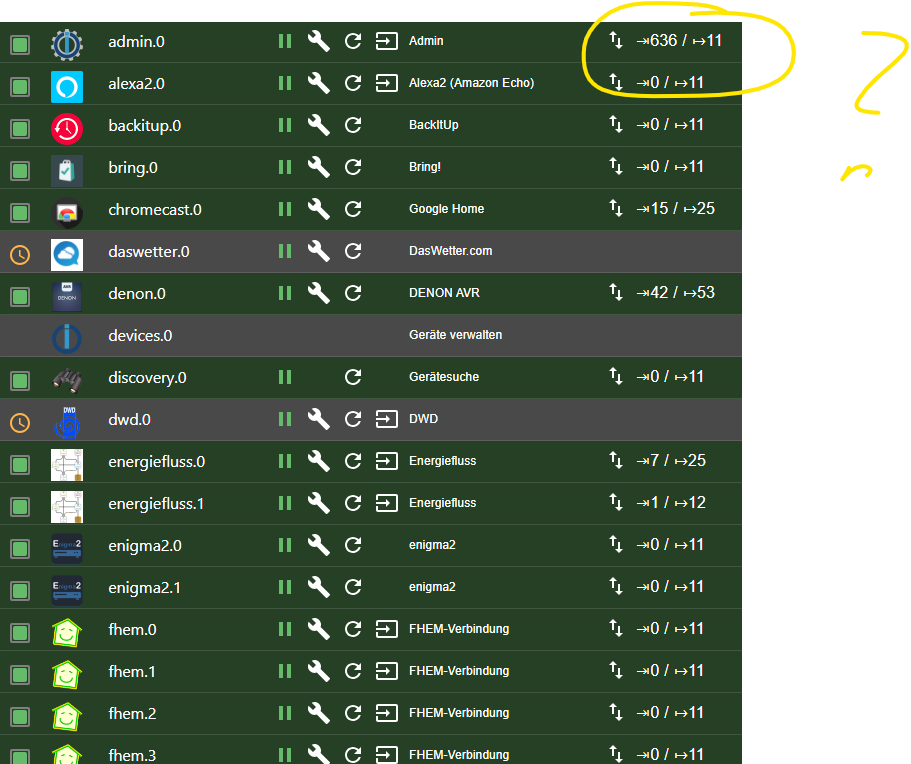
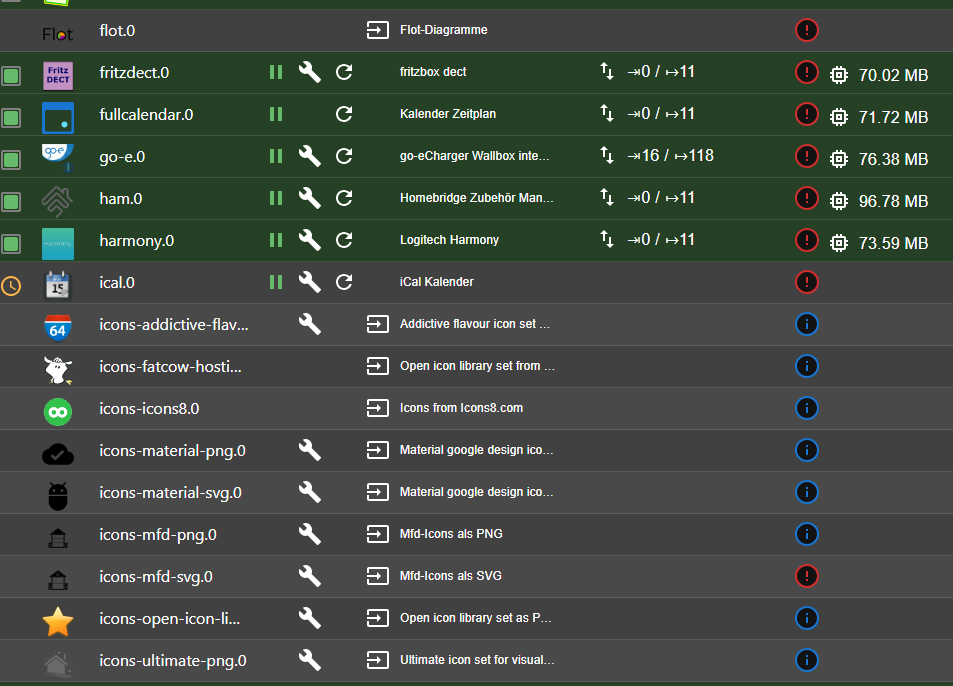
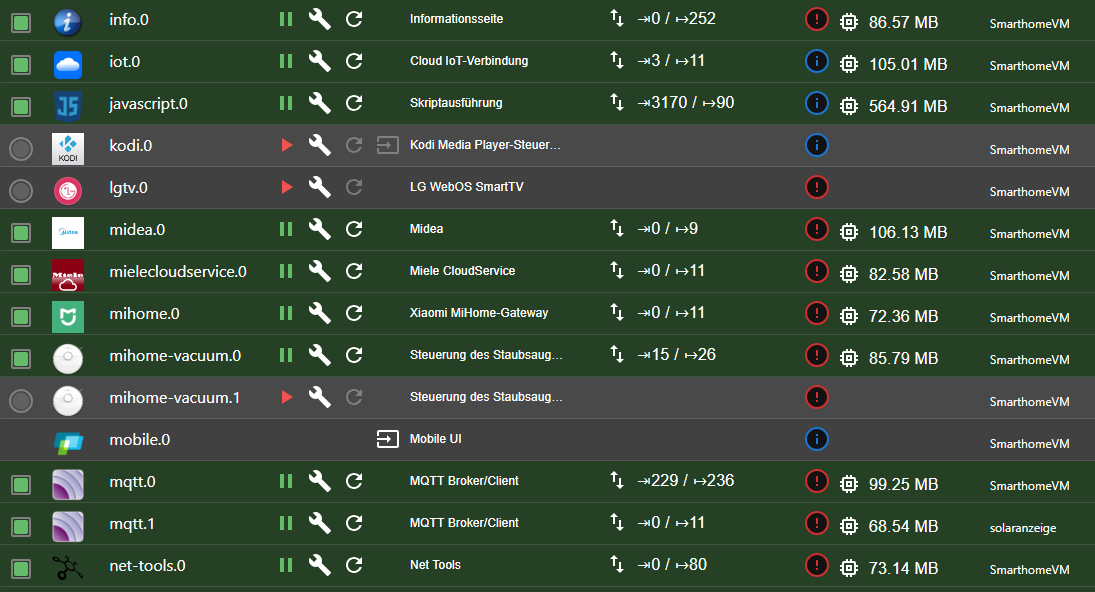
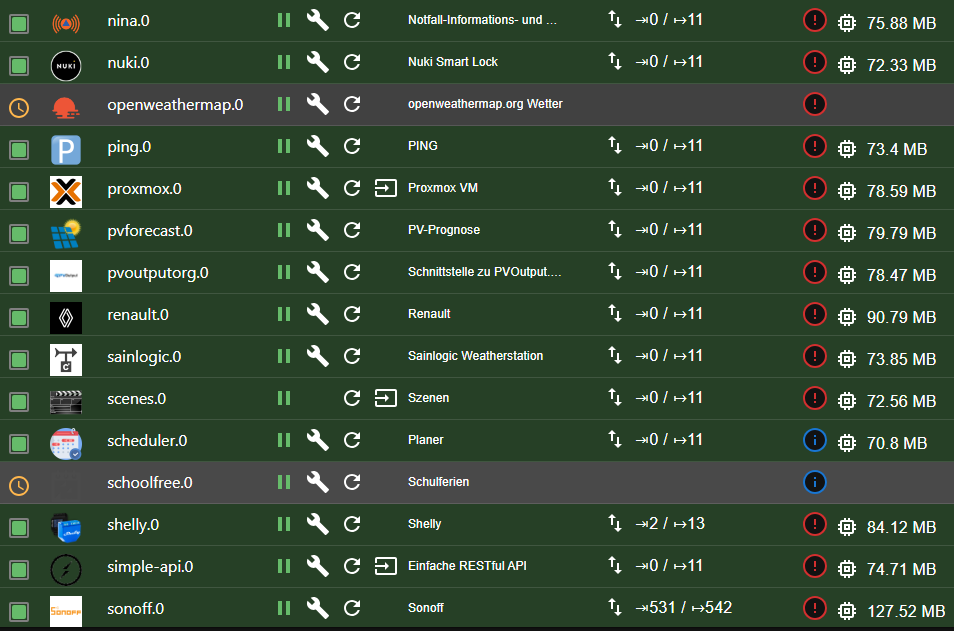
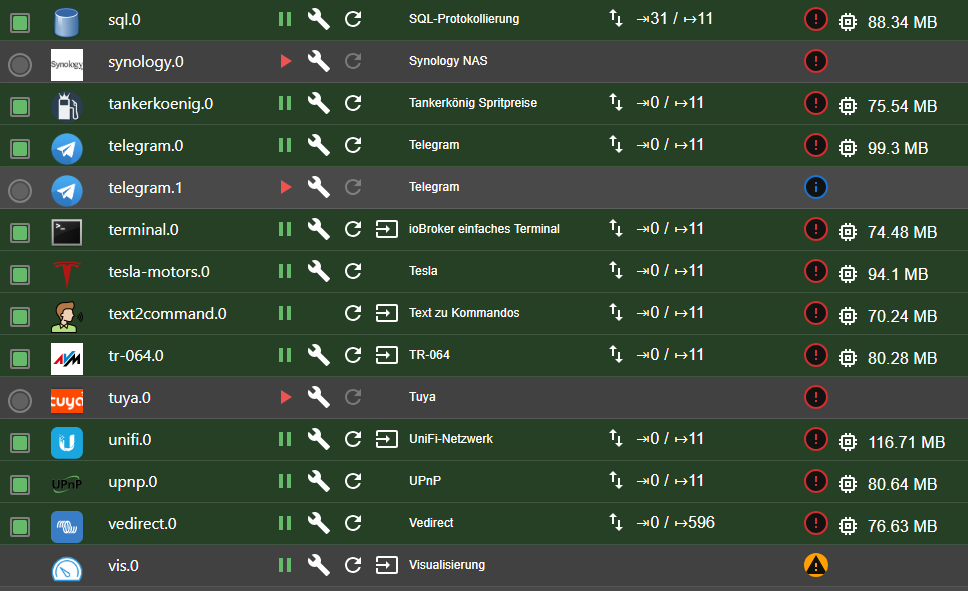
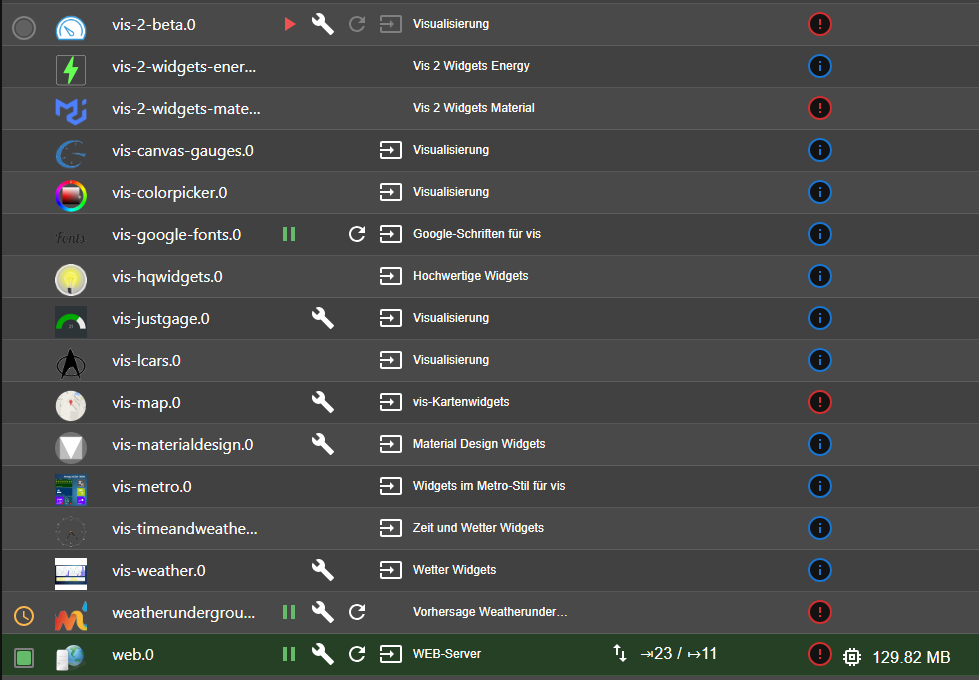
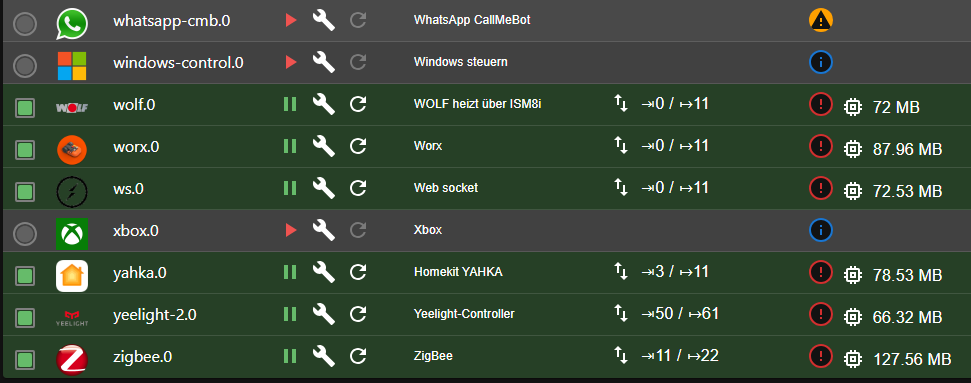
                                  @oliverio

                                  hier?

                                  66c801d6-de5a-4eef-857a-81385ed06a46-image.png

                                  41b1a48e-4025-48a5-a644-51c210c49472-image.png

                                  8d9e8803-303a-4632-ae20-848270be3fe9-image.png

                                  c554d49d-c8c1-4bc1-9fa7-87dbab4de4ea-image.png

                                  8081c059-d45e-48c0-a6b5-1e4e405a7622-image.png

                                  e62f2759-1d39-4294-92a5-792d049a37e2-image.png

                                  51b5a0ef-38f2-46a4-bb30-2f99da8cd53d-image.png

                                  Ja, ich habe einige Javascripte. Die machen am meisten. Aber: Wie finde ich raus, welches da am meisten input macht? ggf ist ja eines kaputt..

                                  Aber: Auch wenn ich javascript anhalte wird es nicht besser.

                                  HomoranH OliverIOO 2 Antworten Letzte Antwort
                                  0
                                  • caravandriverC caravandriver

                                    @oliverio

                                    hier?

                                    66c801d6-de5a-4eef-857a-81385ed06a46-image.png

                                    41b1a48e-4025-48a5-a644-51c210c49472-image.png

                                    8d9e8803-303a-4632-ae20-848270be3fe9-image.png

                                    c554d49d-c8c1-4bc1-9fa7-87dbab4de4ea-image.png

                                    8081c059-d45e-48c0-a6b5-1e4e405a7622-image.png

                                    e62f2759-1d39-4294-92a5-792d049a37e2-image.png

                                    51b5a0ef-38f2-46a4-bb30-2f99da8cd53d-image.png

                                    Ja, ich habe einige Javascripte. Die machen am meisten. Aber: Wie finde ich raus, welches da am meisten input macht? ggf ist ja eines kaputt..

                                    Aber: Auch wenn ich javascript anhalte wird es nicht besser.

                                    HomoranH Nicht stören
                                    HomoranH Nicht stören
                                    Homoran
                                    Global Moderator Administrators
                                    schrieb am zuletzt editiert von
                                    #54

                                    @caravandriver hast du alle hunderte Instanzen aud Logstufe debug?

                                    kein Support per PN! - Fragen im Forum stellen - es gibt fast nichts, was nicht auch für andere interessant ist.

                                    Benutzt das Voting rechts unten im Beitrag wenn er euch geholfen hat.

                                    der Installationsfixer: curl -fsL https://iobroker.net/fix.sh | bash -

                                    caravandriverC 1 Antwort Letzte Antwort
                                    0
                                    • HomoranH Homoran

                                      @caravandriver hast du alle hunderte Instanzen aud Logstufe debug?

                                      caravandriverC Offline
                                      caravandriverC Offline
                                      caravandriver
                                      schrieb am zuletzt editiert von
                                      #55

                                      @homoran Nein, alle sind auf "Error"

                                      1 Antwort Letzte Antwort
                                      0
                                      • caravandriverC caravandriver

                                        @homoran
                                        Nein, ich wunder mich nicht, aber warum ist das so? Ich habe nichts irgendwo eingestellt das sagt "mach das so"...

                                        ? Offline
                                        ? Offline
                                        Ein ehemaliger Benutzer
                                        schrieb am zuletzt editiert von Ein ehemaliger Benutzer
                                        #56

                                        @caravandriver sagte in iobroker kaum benutzbar - redis 100%:

                                        @homoran
                                        Nein, ich wunder mich nicht, aber warum ist das so? Ich habe nichts irgendwo eingestellt das sagt "mach das so"...

                                        Moin,

                                        doch hast Du, aus Deiner Konfiguration

                                        ################################ SNAPSHOTTING  ################################
                                        #
                                        # Save the DB on disk:
                                        #
                                        #   save <seconds> <changes>
                                        #
                                        #   Will save the DB if both the given number of seconds and the given
                                        #   number of write operations against the DB occurred.
                                        #
                                        #   In the example below the behavior will be to save:
                                        #   after 900 sec (15 min) if at least 1 key changed
                                        #   after 300 sec (5 min) if at least 10 keys changed
                                        #   after 60 sec if at least 10000 keys changed
                                        #
                                        #   Note: you can disable saving completely by commenting out all "save" lines.
                                        #
                                        #   It is also possible to remove all the previously configured save
                                        #   points by adding a save directive with a single empty string argument
                                        #   like in the following example:
                                        #
                                        #   save ""
                                        
                                        save 900 1
                                        save 300 10
                                        save 60 10000
                                        

                                        @caravandriver sagte in iobroker kaum benutzbar - redis 100%:

                                        redis-server:
                                        Installed: 5:6.0.16-1+deb11u2
                                        Candidate: 5:6.0.16-1+deb11u2

                                        Auf meinem Office PC sehe ich das aktuell Version 7.0 aktuell ist, keine Ahnung, ob es da auch eine aktuellere Version für Bullseye gibt.

                                        @caravandriver sagte in iobroker kaum benutzbar - redis 100%:

                                        mit einem sudo chmod -R 777 /var/log/redis/

                                        Keine Gute Idee, was sagt denn

                                        # ls -la /var/log
                                        

                                        VG
                                        Bernd

                                        caravandriverC 1 Antwort Letzte Antwort
                                        0
                                        • ? Ein ehemaliger Benutzer

                                          @caravandriver sagte in iobroker kaum benutzbar - redis 100%:

                                          @homoran
                                          Nein, ich wunder mich nicht, aber warum ist das so? Ich habe nichts irgendwo eingestellt das sagt "mach das so"...

                                          Moin,

                                          doch hast Du, aus Deiner Konfiguration

                                          ################################ SNAPSHOTTING  ################################
                                          #
                                          # Save the DB on disk:
                                          #
                                          #   save <seconds> <changes>
                                          #
                                          #   Will save the DB if both the given number of seconds and the given
                                          #   number of write operations against the DB occurred.
                                          #
                                          #   In the example below the behavior will be to save:
                                          #   after 900 sec (15 min) if at least 1 key changed
                                          #   after 300 sec (5 min) if at least 10 keys changed
                                          #   after 60 sec if at least 10000 keys changed
                                          #
                                          #   Note: you can disable saving completely by commenting out all "save" lines.
                                          #
                                          #   It is also possible to remove all the previously configured save
                                          #   points by adding a save directive with a single empty string argument
                                          #   like in the following example:
                                          #
                                          #   save ""
                                          
                                          save 900 1
                                          save 300 10
                                          save 60 10000
                                          

                                          @caravandriver sagte in iobroker kaum benutzbar - redis 100%:

                                          redis-server:
                                          Installed: 5:6.0.16-1+deb11u2
                                          Candidate: 5:6.0.16-1+deb11u2

                                          Auf meinem Office PC sehe ich das aktuell Version 7.0 aktuell ist, keine Ahnung, ob es da auch eine aktuellere Version für Bullseye gibt.

                                          @caravandriver sagte in iobroker kaum benutzbar - redis 100%:

                                          mit einem sudo chmod -R 777 /var/log/redis/

                                          Keine Gute Idee, was sagt denn

                                          # ls -la /var/log
                                          

                                          VG
                                          Bernd

                                          caravandriverC Offline
                                          caravandriverC Offline
                                          caravandriver
                                          schrieb am zuletzt editiert von
                                          #57

                                          @dp20eic

                                          Bewusst habe ich da nichts geändert.
                                          Kannst du mir einfach deine Konfig geben bzw. die relevanten Zeilen sagen, die ich ändern sollte?

                                          ? 1 Antwort Letzte Antwort
                                          0
                                          Antworten
                                          • In einem neuen Thema antworten
                                          Anmelden zum Antworten
                                          • Älteste zuerst
                                          • Neuste zuerst
                                          • Meiste Stimmen


                                          Support us

                                          ioBroker
                                          Community Adapters
                                          Donate
                                          FAQ Cloud / IOT
                                          HowTo: Node.js-Update
                                          HowTo: Backup/Restore
                                          Downloads
                                          BLOG

                                          798

                                          Online

                                          32.5k

                                          Benutzer

                                          81.8k

                                          Themen

                                          1.3m

                                          Beiträge
                                          Community
                                          Impressum | Datenschutz-Bestimmungen | Nutzungsbedingungen | Einwilligungseinstellungen
                                          ioBroker Community 2014-2025
                                          logo
                                          • Anmelden

                                          • Du hast noch kein Konto? Registrieren

                                          • Anmelden oder registrieren, um zu suchen
                                          • Erster Beitrag
                                            Letzter Beitrag
                                          0
                                          • Home
                                          • Aktuell
                                          • Tags
                                          • Ungelesen 0
                                          • Kategorien
                                          • Unreplied
                                          • Beliebt
                                          • GitHub
                                          • Docu
                                          • Hilfe